mirror AUDI A6 2018 User Guide
[x] Cancel search | Manufacturer: AUDI, Model Year: 2018, Model line: A6, Model: AUDI A6 2018Pages: 266, PDF Size: 41.38 MB
Page 102 of 266
Ass is tance sy stem s
-If vehicles are a pproach ing or being left
behind very quickly. The display may not
turn on in time.
- In poor weather conditions such as heavy
rain, snow or heavy mist.
- On very wide lanes, in tight curves, or if
there is a rise in the road surface. Vehicles
in the adjacent lane may not be detected because they are outside of the sensor
range.
- Audi side assist cannot detect all vehicles
under all conditions, which can increase the
risk of accidents .
- Please note that side assist only displays ap
proaching vehicles or vehicles in your bl ind
spot if your vehicle is traveling at least
1 9 mph (30 km/h).
- In certai n situations, the system may not
work or its function may be limited. For ex amp le:
- The display may not turn on at the rig ht
time if vehicles are approaching or passing
very quick ly.
- In poor weather conditions, such as heavy
rain, snow or fog.
- In very wide lanes, in tight curves or when
there are slopes in the roadway, vehicles
in the neighboring lanes may not be de
tected because they are outside of the
sensor range.
(D Note
The sensors can be displaced by impacts or damage to the bumper, whee l housing and
underbody. Th is can impa ir the system. Have
an authorized Audi dealer or authorized Audi
Serv ice Facility check their function .
(D Tips
-If the window g lass in the driver's door or
front passenger's door has been tinted, the display in the exterio r mirror may be incor
r ect.
- Fo r an explanation on conformity with the
FCC regulations in the Uni ted States and the
Industry Ca nada regu lations, see
¢page 2 50.
100
Switching on and off
App lies to : vehicles wi th Audi side ass ist
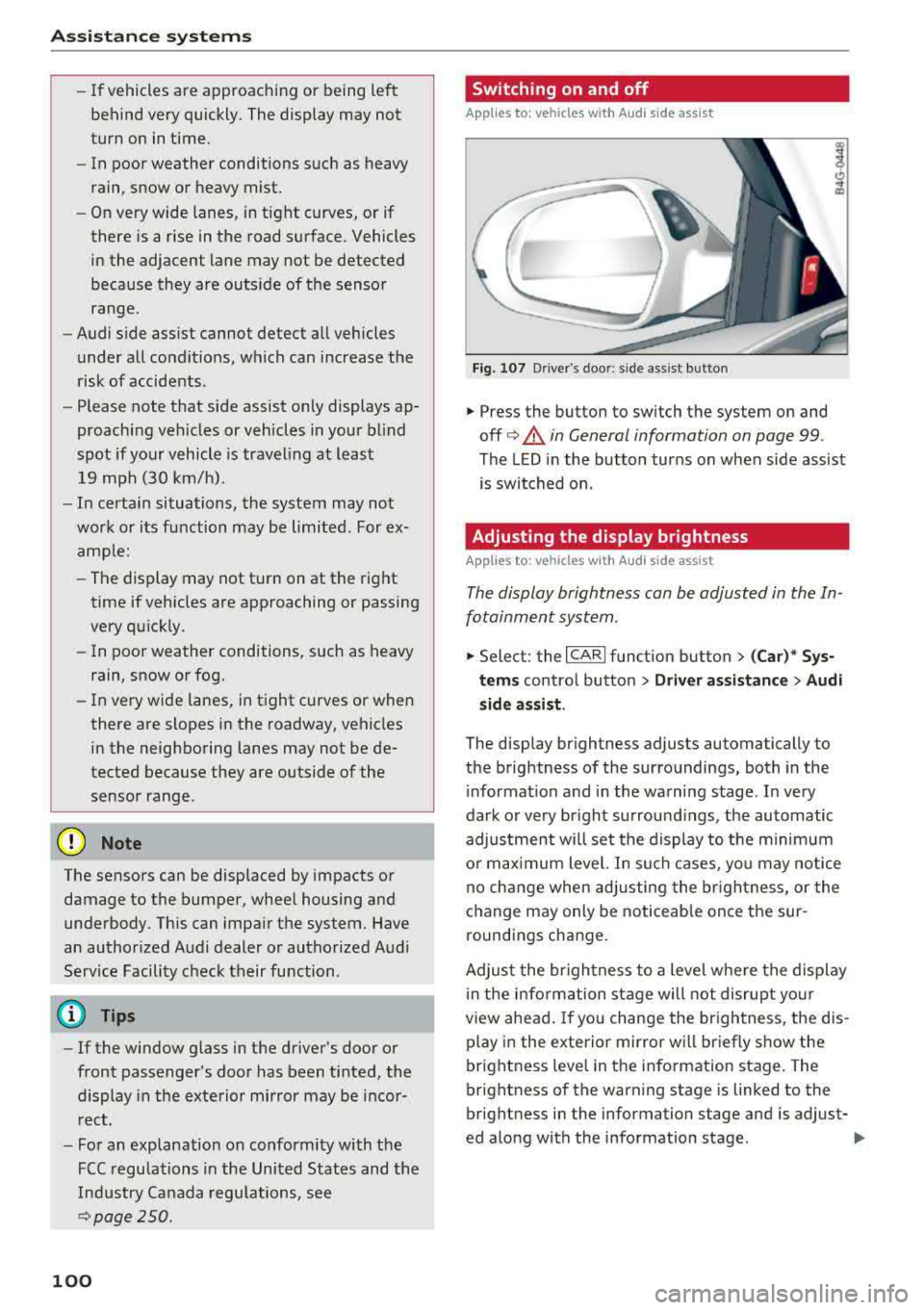
Fig. 107 Driver 's door : s ide ass ist button
.,. Press the button to sw itch the system on and
off ¢.&. in General information on page 99 .
The LED in the button turns on when side assist
is switched on.
Adjusting the display brightness
App lies to: vehicles wit h Audi side ass ist
The display brightness can be adjusted in the In
fotainment system .
.,. Select: the I CARI function button > (Car)* Sys
tems contro l button > Driv er a ssistan ce> Audi
s ide assi st .
The display brightness adjusts automatically to
the brightness of the surroundings, both in the
i nformation and in the warning stage . In very
dark o r very bright surround ings, the automatic
adjustment will set the display to the minimum
o r max imum level. In su ch cases, yo u may notice
no c hange when adjusting the br igh tness, or the
change may only be noticeab le once the sur
round ings change.
Adjus t the br igh tness to a level whe re the display
i n the information stage will not disrupt yo ur
view ahea d. If you change the br igh tness, the dis
play in the exterior mirror wi ll br iefly show the
brightness level in the information stage. The
brightness of the warning stage is linked to the
br ightness in the information stage and is adjust-
ed along with the information stage .
..,
Page 112 of 266

Parking syste m s
-For objects that do not touch the ground,
such as the bumper of a parked vehicle, a
trailer hitch or the rear of a truck. Do not
use the orientation lines in this case.
- If driven from a level surface onto an in
cline, or a downward slope.
- If driven toward protruding objects.
-If the vehicle is carrying too much load in
the rear.
- Applies to: vehicles with air sus pension: the
accuracy of the orientation lines and blue
surfaces decreases when the vehicle is raised/lowered
¢page 104.
(D Note
- Always read and follow the applicable warn
ings
¢ 0 in General information on
page 107.
-The orange-colored orientation lines in the
Infotainment display show the vehicle path
based on the steering wheel angle. The
front of the vehicle swings out more than
the rear of the veh icle . Maintain plenty of
distance so that an exterio r mirror or a cor
ner of the veh icle does not co llide w ith any
obstacles.
Switching on/off
Applies to : ve hicles with rearv iew camera
Sw itching on
~ S hi ft into reve rse, or
• P ress the P' #.!\. button in the cente r console
¢
page 108, fig. 115 . A short conf irmat ion
tone sounds and the LED in the button turns
on .
Sw itching between the rearview camera and
optical display
~ Press the Graph ic contro l button ®
¢ page 110, fig. 120 to see the opt ica l disp lay.
• Press the R ear view control button to see the
rearview camera image.
Switching off
• Drive faster than 6 mph (10 km/h), or
• Press the P" '.!\. button, or
~ Switc h the ignition off.
110
@ Tips
-The visua l display in the left part of the dis
play should he lp you detect the crit ica l vehi-
cle areas.
- You can change the vol ume and pitch of the
signals as well as the display¢
page 117.
Perpendicular parking
App lies to : vehicles wit h rearv iew camera
This view may be used when parking in a garage
or in a parking space.
Fig. 120 Infota inment system: aiming at a park ing space
Fig. 121 Infota inment system : alig ning the vehicle
~ Turn the Infotainment system on and shift into
reverse gear.
• The orange orie ntation lines (!) show the vehi
cle 's direction of travel. Turn the steering wheel
until the orange o rientation lines appear in the
parking space ¢
fig. 120. Use the markings @
to he lp you estima te the distance to an obsta
cle . Each marking represents approximate ly 3
ft (1 m). The b lue area represents an extension
of the vehicle's outline by approximately 16 ft
(5 meters) to the rear.
~ Wh ile driving in reverse gear, adjust the steer-
ing wheel angle to
fit the park ing space using ..,.
Page 114 of 266

Parking syste m s
@ Tips
The left or right orientation lines and surfaces
will be displayed, depending on the turn sig nal being used.
Peripheral came ras
Introduction
Applies to : vehicles with peripheral cameras
With this equipment, the parking system plus*
¢ page 108 is supplemented with various periph
eral cameras.
Depending on vehicle equipment, you are prov id
ed w ith the following views: area around the ve
hicle, front corner view and rear corner view , view
in front of th e vehicle and behind the veh icle .
General information
Applies to: vehicles w ith peripheral cameras
Fig. 12 4 Loca tion of peripheral ca meras
The periphera l cameras are located in the radia
tor gr ille, in the luggage compartment lid and on
both exter ior mirrors
¢ fig . 124.
Make sure that the lenses are not covered by de
posits or any other obstructions as it may impa ir
the system . For information on cleaning, see
¢ page 221 .
In the Surro und ing mode, black corners are
shown in the vehicle s ilhouette. Objects in these
areas a re outside of the camera's field of v iew
and are not detected .
The accuracy of the orientation lines and the blue
surfaces is reduced if the adaptive air suspen-
112
sion* is fau lty, if the ve hicle is lifted or if the Dy
nam ic
mode is activat ed ¢ page 104 .
A WARNING
-Always read and follow the applicable warn
ings¢&. in General information on
page 107.
-If the position or the installation angle of a
camera was changed, for example after a
collision, do not continue to use the system
for safety reasons. Have it checked by an au thorized Audi dealer or authorized Audi
Serv ice Facility .
-Keep in mind that the image in the display is
incorrect if the exterior mirror housing has
been moved out of p lace.
-Use the R ear mode and the C orner vie w
( rear )
mode only when the luggage com
pa rtment l id is completely closed . Other
wise the image in the disp lay w ill be incor
rect.
-The area around the vehicle is shown us ing
the camera images. The veh icle image is
shown by the system. Objects and obstacles
above the camera are not displayed .
-Camera lenses enlarge and distort the field
of vision. The objects appear both altered
and inaccurate on the screen .
(D Note
-Always read and fol low the applicable warn
ings
¢ 0 in General information on
page 107.
- T he Infotainmen t display shows the direc
t ion in which the rear of the vehicle is travel
ing based on the steering wheel ang le . The
front of the veh icle swings out more than
the rear of the vehicle. Maintain plenty of
distance so that an exterior m irror or a cor
ner of the vehicle does not collide with any
obstacles.
@ Tips
If the 8/cr;;fl/r::=s symbo l appears in the dis
play and the respective display area is grayed
out, then the powe r exter ior mirrors were
Page 127 of 266

a co .... N
" N .... 0 0 \.J '
Basics
Safe driving habits
Please remember -safety first!
The individual safety features of your vehicle can
work together as a system to help protect you
and your passengers in a wide range of accidents.
These features cannot work as a system if they
are not always correctly adjusted and correctly
used .
This chapter contains important informat ion,
tips, instructions and warnings that you need to
read and observe for your own safety, the safety
of your passengers and others . We have summar
iz ed here what you need to know about safety
belts, airbags, child restraints as well as child
safety. Your safety is for us priority number 1. Al
ways observe the information and warnings in
this section -for your own safety as well as that
of your passengers.
The informa tion in t his section applies to all
model versions of your vehicle. Some of the fea
tures described in this sections may be standard
eq uip ment on some models, or may be optional
equ ipment on others. If you are not sure, ask
your author ized Audi dealer.
A WARNING
-Always make sure that you follow the in
struct ions and heed the WARNINGS in this
Manual. It is in your i nterest and in the in
terest of your passengers .
-
-Always keep the complete Owner's Litera
ture in your Audi when you lend or sell yo ur
vehicle so that this important information
w ill always be available to the driver and
passengers.
-Always keep the Owner's literature handy so
that you can find it easily if you have ques
tions .
Driving safety
Important things to do before driving
Safety is everybody 's job ! Vehicle and occupant
safety always depends on the informed and care
ful driver .
For your safety and the safety of your passen
gers,
before driving always:
.. Make sure that a ll lights and signals are operat
ing correctly.
.. Make sure tha t the tire pressure is correct .
.. Make sure that all w indows are clean and afford
good vis ibility to the outs ide.
.. Secure all luggage and othe r items ca refully
¢ page 54, ¢page 53 .
.. Make sure that nothing can interfere with the
peda ls .
.. Adjust front seat, head restraint and mirrors
correct ly for your height.
.. Instruct passengers to adjust the head re
straints according to their height.
.. Make sure to use the right child restraint cor
rectly to protect children
¢ page 166, Child
safety .
.. Sit properly in your seat and make sure t hat
your passengers do the
same¢ page 47, Seats
and storage.
.. Fasten your safety belt and wear it properly. Al
so instruct your passengers to fasten their safe
ty belts
properly ¢ page 134 .
What impairs driving safety?
Safe driving is directly related to the condition of
the vehicle , the driver as well as the driver 's abili
ty to concentrate on the road without being dis
tracted.
The driver is responsible for the safety of the ve
hicle and a ll of its occupants. If your ability to
drive is impa ired, safety risks for everybody in the
vehicle increase and you a lso become a hazard to
everyone else on the road
¢ &_ . Therefore:
.. Do not let yourse lf be distracted by passengers
or by using a cellular telephone .
.. NEVER drive when your driving abi lity is im
pa ired (by med ications, alcohol, drugs, etc .) .
.. Observe all traffic laws, rules of the road and
speed lim its and plain common sense .
125
Page 224 of 266
Care and cl eaning
- To reduce the risk of cuts, protect yourself
from sharp metal components when wash ing the underbody or the inside of the wheel
housings .
- After washing the vehicle, the braking effect
may be delayed due to mo isture on the
brake rotors or ice in the winter . This in
c reases the risk of an acc ident. The brakes
must be d ried first w ith a few careful b rake
applica tions.
@ Note
- If you wash the veh icle in an automatic car
wash, you m ust fold the exte rior m irrors i n
to reduce the risk of damage to the mirrors.
Power folding exte rior m irro rs* must o nly
be fo lded in and out using the powe r folding
funct ion .
- To reduce t he risk of paint damage , do no t
wash the vehi cle i n direct sunlig ht. - T
o red uce the risk of damage to the s urface,
do not use insect removing sponges, kitchen
sponges o r similar items .
- Matte finish painted vehicle components:
- To reduce the r isk of damage to the sur-
face, do not use pol ish ing agents or hard
wax.
- Never use protective wax. It can destroy
the matte finish effect .
- Do not place any stickers or magnetic
signs on vehicle parts painted with matte
f inish paint. The paint could be damaged
when the stickers or magnets a re re
moved.
@ For the sake of the environment
Only wash the veh icle in facilities spec ially de
s igned for that pu rpose. This will reduce the
r isk of dirty wate r contam inated with o il from
en te ring the sewe r system.
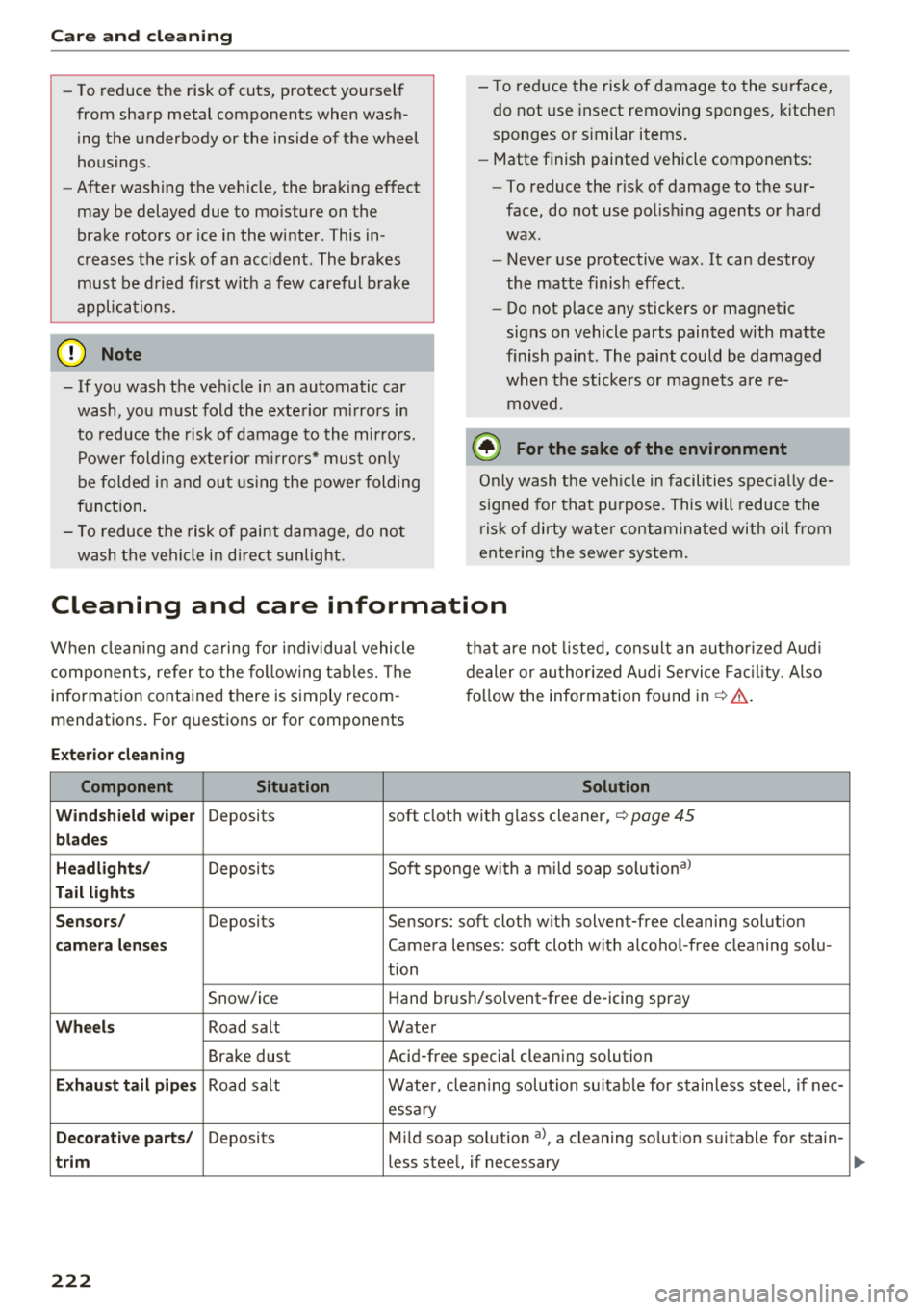
Cleaning and care information
W hen clea ning and ca ring for ind ividua l vehicle
components, refer to the fo llow ing tables. The
information contained there is simply recom
mendations. For questions or for components t
h at are not listed, cons ult an autho rized Audi
dealer or author ized A udi Servi ce Fac ility. Also
fo llow the information found
in ¢,&. .
Exterior cl eanin g
Component Situation Solution
Wind shield wiper
Deposits soft cloth with glass cleaner,
¢ page 45
blades
Headli ght s/
Deposits Soft sponge with a mild soap so lution3
)
Tail light s
S en sors /
Deposits Sensors: soft cloth with solvent-free cleaning solution
cam era l ens es Camera lenses: soft cloth w ith alcohol -free cleaning solu-
tion
Snow/ice Hand brush/solvent-free de -icing spray
Wheels Road salt Water
Brake dust Acid-free special cleaning solution
E
xhaust tail pip es Road salt Water, clean ing solution su itab le for stainless stee l, if nee-
essary
D ecor ativ e part s/ Deposits Mild soap solution a), a cleaning solution suitable for stain-
trim less steel, if necessary
222
Page 226 of 266
Care and cl eaning
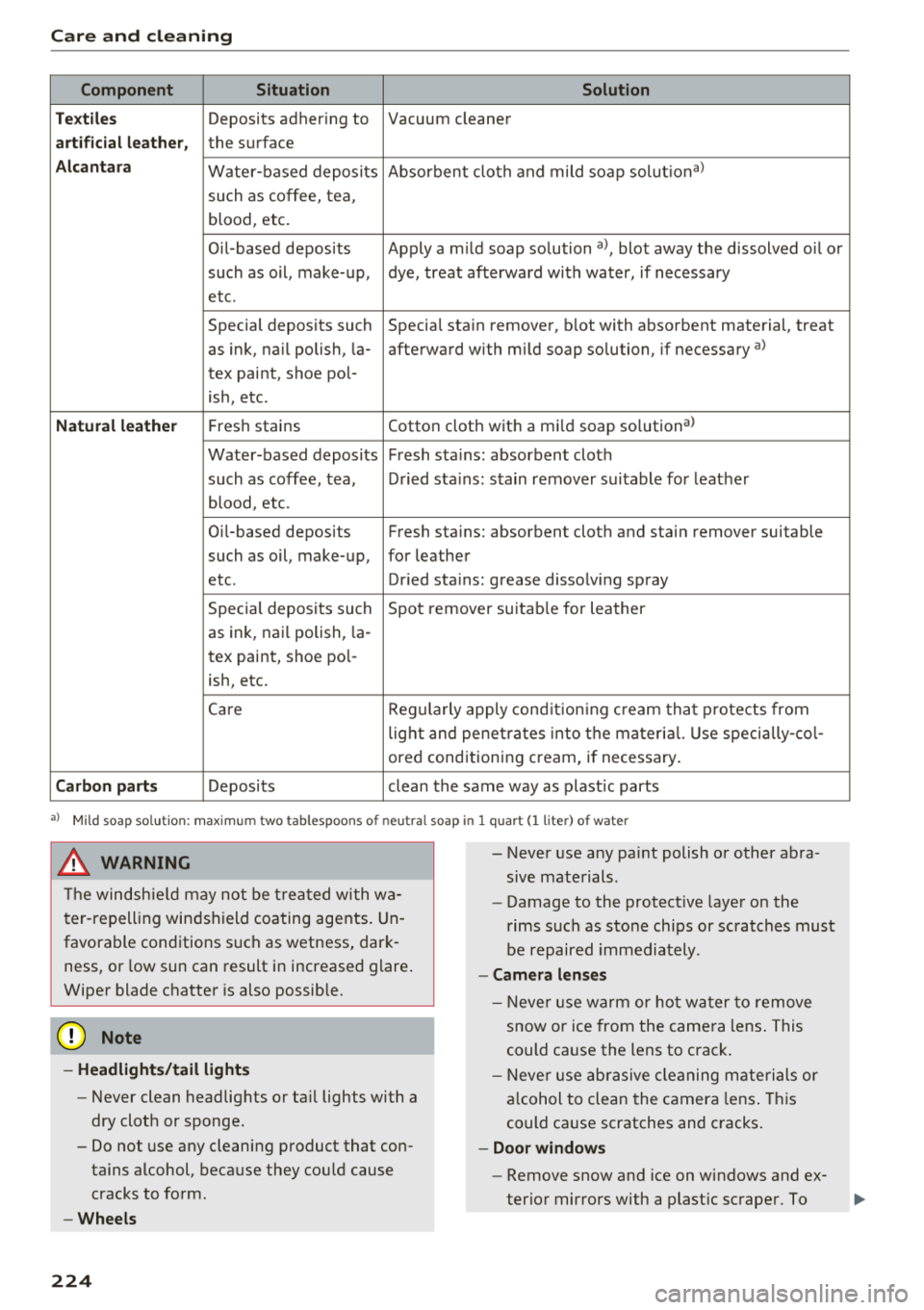
Component Situation Solution
Tex tile s
Deposits adhering to Vacuum cleaner
art ifici al l eat her, the surface
A lca ntara Water -based deposits Absorbent cloth and mild soap solut
iona>
such as coffee, tea,
blood, etc.
O il-based deposits Apply a m ild soap solution
a), blot away the dissolved oil or
such as oil , make-up, dye, treat afterward with water, if necessary
etc.
Special deposits such Special stain remover, blot with absorbent material, treat
as ink, na il polish, la- afterward with mild soap solution, if necessary a)
tex paint, shoe pol-
ish, etc.
Natural leathe r Fresh stains Cotton cloth
with a mild soap so lutiona >
Water-based deposits Fresh stairns : absorbent cloth
such as coffee, tea, Dried sta ins : stain remover suitable for leather
blood, etc.
Oil -based deposits Fresh stairns : absorbent cloth and stain remover suitable
such as oil, make-up, for leather
etc. Dried stains : grease dissolving spray
Special deposits such Spot remover suitab le for leather
as ink, nai l polish, la -
tex paint, shoe pol-
ish, etc.
Care Regula rly apply cond it ion ing cream that p rotects from
lig ht and penetrates into the material. Use specia lly-co l-
ored conditioning cream, if necessary .
Carbon part s Deposits clean the same way as plastic parts
al Mild soap solution: maximum two tablespoons of neutral soap in 1 quart (1 liter) of water
_& WARNING
The windsh ie ld may not be treated wi th wa
ter-repelling windshield coating agents. Un
favorable conditions such as wetness, dark
ness, or low sun can result in increased glare.
Wiper blade chatter is also possible.
@ Note
-Headlight s/tail light s
-Never clean headlights or tail lights with a
dry cloth or sponge.
- Do not use any cleaning product that con
tains alcohol, because they could cause
cracks to form .
-Wheel s
224
- - Never use any paint polish or other abra
sive materials.
- Damage to the protect ive layer on the
rims such as stone chips or scratches must
be repaired immediately.
- Cam era lens es
- Neve r use wa rm or hot water to remove
snow or ice from the came ra lens . This
could cause the lens to crack .
- Neve r use ab rasive cleaning m aterials or
a lcohol to clean the camera lens . This
could cause scratches and cracks .
-Door wind ow s
- Remove snow and ice on windows and ex-
terior mirrors with a plast ic scraper. To
Page 227 of 266
a co .... N
" N .... 0 0 \,;J '
one direction and not back and forth.
- N ever remove snow or ice from door win
dows and mirrors using warm or hot water
because this could cause cracks to form .
- To avoid damage to the rear w indow de
fogger, do not apply any stickers on the heating wires on the inside of the window .
-Deco rati ve parts /trim
- Never use chrome care or cleaning prod-
ucts.
- Paint
-To red uce the risk of scratches, the vehicle
must be free of dirt and dus t before pol
ishing or waxing .
- To preven t pa int damage, do not pol ish or
wax the ve hicle in direct sunlight.
- To red uce the risk of pa int damage, do not
polish away rust spots.
- Remove cosmetics and sunscreen immedi
a tely- these could damage the pa int.
- Displa ys
- To avoid scratches, do not use dry cleaning
methods on displays .
-Controls
- Make sure that no fluids enter the con-
trols, because this could cause damage.
- Safet y belts
- Do not remove the safety belts to clean
t hem.
- Never clean safety belts or their compo
nents chemically or with cor rosive fl uids
or so lvents and neve r allow sh arp obje cts
t o come into con ta ct w ith the sa fe ty belts.
Th is could cause damage to the belt web
bing .
- If the re is damage to the webbing, the
connections, the retractors or the b uckles,
have them replaced by an authorized Audi
dea ler or authorized Audi Service Facility.
- Te xtiles/artificial leather / Alcantara
- Never treat artific ial leather/ Alcantara
w ith leather care products, solvents, floor
polish, shoe polish, spot remove or similar
prod ucts .
- Have a specialist remove st ubborn stains
to prevent damage.
Care and cleaning
- Neve r use steam cleaners, brushes, hard
sponges, etc. when cleaning .
- Do not turn on the seat heating* to dry the
seat.
- Obje cts w ith sharp edges, such as zippe rs
or rivets on clothing or be lts, can cause
damage to the surface .
- Open hoo k and loop fasteners, for exam
p le on clothing, can damage seat covers.
M ake sure hook and loop fasteners are
closed.
- Natural leather
- Never treat leather with solvents, floor
polish, shoe po lish, spot remover or sim i
lar p roducts.
- Objects w ith sharp edges, such as zippers
or rivets on clothing or belts, can cause
damage to the surface.
- Never use steam cleaners, brushes, hard
sponges, etc. when cleaning.
- Do not turn on the seat heating* to dry the seat.
- To he lp prevent the leather from fad ing,
do not leave the vehicle in direct sun light
fo r long pe riods of time. If leav ing the ve
h icle parked fo r long pe riods of time, you
should cover the le athe r to prote ct it from
d irec t sun light.
(D Tips
- Insects are easie r to remove from paint that
has been freshly waxed.
- Regular wax ing can prevent rust spots from
forming.
Placing your vehicle out
of service
If you would like to take your vehicle out of serv
ice for a longer period of time, contact an author
ized Audi dea ler or authorized Audi Service Facili
ty. They will adv ise you of important measures,
such as corrosion protection, service and storage
procedures. Also follow the information about
the veh icle battery
r=;,page 197 .
225
Page 239 of 266
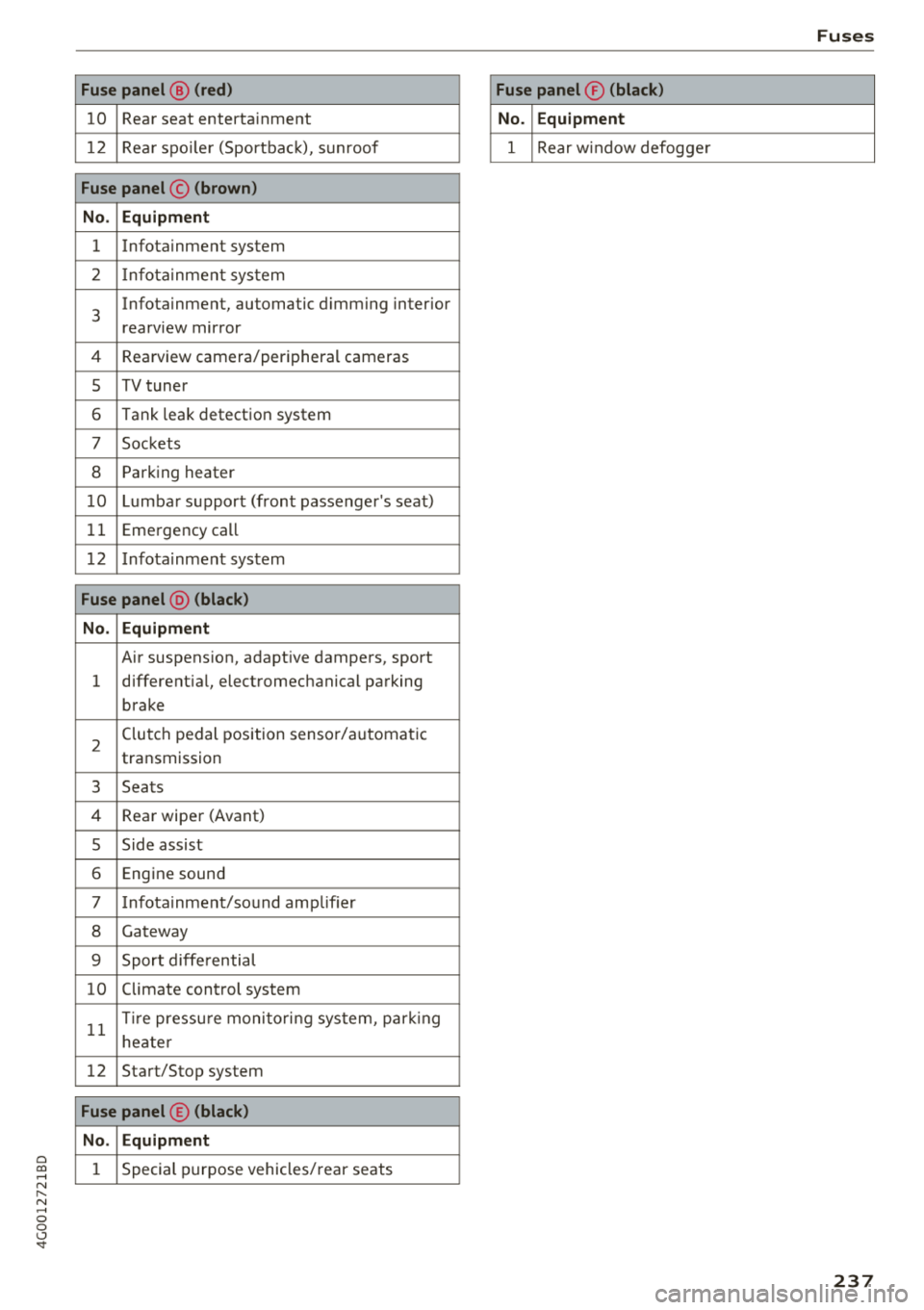
a co .... N
" N .... 0 0 \,;J '
10 Rear seat entertainment
1 2 Rea r spo ile r (Sportbac k), sunroof
Fuse panel © (brown )
N o. Equipm ent
1 Infotainment system
2 Infota inment system
3
Infotainment, automatic dimming interior
rearview mirror
4 Rearview camera/peripheral cameras
5 TV tuner
6 Tank leak detection system
7 Sockets
8 Parking heater
1 0 Lumbar support (front passenger's seat)
11 Emergency
call
1 2 Infotainment system
Fuse panel @ (black )
N o. Equipm ent
Air suspension, adaptive dampers, sport
1 different
ial, electromechanical parking
brake
2 Clutch pedal position sensor/automatic
transmission
3 Seats
4 Rear wiper (Avant)
5 Side assist
6 Engine sound
7 Infotainment/sound amplifier
8 Gateway
9 Sport diffe rential
10 Climate control
system
11 T
ir e pressu re monito ring system, park ing
heate r
12 Start/Stop
system
Fuse panel © (black )
N o. E quipm ent
1 Special purpose vehicles/ rear seats
Fuses
Fuse panel ® (blac k)
N o. Equipm en t
1 Rear w indow defogge r
237
Page 247 of 266
a co ,...,
N
" N ,...,
0 0 \,;J "
Vehicle specifications
XXXXX XX -X -XXXX XXX XX
®-+ : ::::::. XXXXXXXX XX X XX XXX XXX
IYP /lffl XXX XXX
XX XXXXXXX XX X X XX
XXX KW XXX
®i ~=-:~~ XXXX XXX XXX
©+ ~ rur:i~ xxxx I xxxx XXX I xx
II. · AIJSlit I OPTIONS
EOA 7D 5 4U B 6XM SSG SR W
2 EH JO Z 1LB 1AS 1BA
3FC SM U 7Xl
F O A 9G3 OG7 O YH OJF
TL 6 3 KA 8EH UlA X 9B OZ7
l XW
803
908 8Z4 020
7 T6 CV7
71<0 4X3 21< 2
3L4 4 KC 3YO 413 5 02
1S A 7GB
01A 4GQ
XX . X XX X XX X XXXX
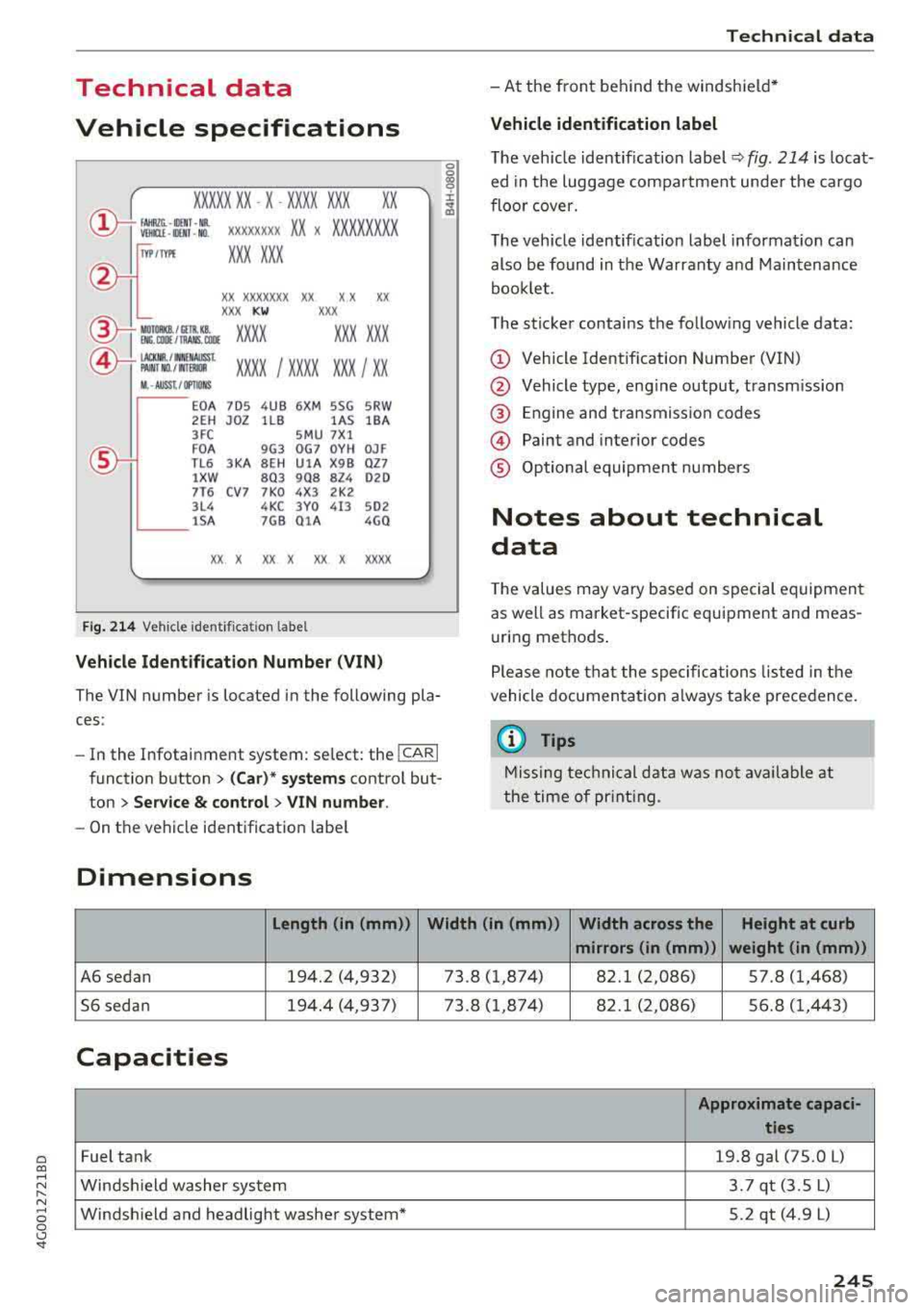
Fig. 21 4 Vehicle ident ifica tion labe l
Vehicle Ident ifi cation Number (VIN )
The VIN number is located in the following pla
ces :
-In the Infotainment system: select: the !CARI
function button > (C ar) * systems contro l but
ton
> Se rvice & control > VIN numbe r.
-On the vehicle identification label
Dimensions
0
0
~ :x:
-At the front behind the windshield *
Vehicle identification label
The vehicle identif ication label ~ fig. 214 is loca t·
ed in the luggage compartment unde r the cargo
floor cover.
The veh icle identification label informat ion can
also be found in the Warranty and Maintenance
booklet .
The sticker contains the follow ing vehicle data :
© Vehicle Identification Number (VIN)
@ Vehicle type, eng ine output, transm ission
@ Engine and transmission codes
@ Paint and interior codes
® Optional equipment numbers
Notes about technical
data
T he values may vary based on special equipment
as well as market-specif ic equipment and meas
uring methods .
Please note that the specific ations listed in the
vehicle documen tat ion a lways take precedence.
{I) Tips
Missing techni cal data was not ava ilable at
the time of pr int ing.
Length (in (mm )) Width (in (mm ))
Width across the Height at curb
mirrors (in (mm )) weight (in (mm))
A6 sedan 194.2 (4,932) 73.8 (1,874) 82.1 (2,086) 5 7 .8 (1,468)
56 sedan 194.4 (4,937) 73 .8
(1 ,874) 82.1 (2,086) 56.8 (1,443)
Capacities
Approximate capaci -
ties
Fuel tank 19.8 gal (75.0 L)
Windsh ield washer system 3.7 qt (3.5 L)
Windsh ield and headlight washer system* 5.2 qt (4.9 L)
245
Page 256 of 266
Index
Cylinder management
refer to Cylinder on demand system . . . . . . 20
Cyli nder on dema nd syste m . . . . . . . . . . . . . . 20
D
Data recorder . . . . . . . . . . . . . . . . . . . . . . . . 124
Date display . . . . . . . . . . . . . . . . . . . . . . . . . . 22
Daytime runni ng lights . . . . . . . . . . . . . . . . . 38
Declaration of compliance . . . . . . . . . . . . . . 250
D efective light bulb warning
Indicato r light . . . . . . . . . . . . . . . . . . . . . . . 1 7
Defrost ing (windows)
4- zone deluxe au toma tic climate con trol . . 6 1
D eluxe a utomat ic cli mate contro l . . . . . . . . 59
D EF (instrument cluste r) . . . . . . . . . . . . . . . . 22
De luxe a utomatic climate contro l
Air vents . . . . . . . . . . . . . . . . . . . . . . . . . . . . 60
Determin ing cor rec t load l imi t . . . . . . . . . . 215
Dimensions . . . . . . . . . . . . . . . . . . . . . . . . . . 245
Dimming the rea rview mirror . . . . . . . . . . . . 42
Distance dr iven . . . . . . . . . . . . . . . . . . . . . . . . 20
Door/rear lid warn ing . . . . . . . . . . . . . . . . . . . 19
Doors Chi ld safety lock . . . . . . . . . . . . . . . . . . . . . . 33
C losing aid . . . . . . . . . . . . . . . . . . . . . . . . . . 24
Mechanically lock ing . . . . . . . . . . . . . . . . . . 29
Dr iver inform ation system . . . . . . . . . . . . . . . 19
C D/rad io disp lay . . . . . . . . . . . . . . . . . . . . . . 1 9
D oor/l uggage compartment lid warning . . 19
Efficiency program . . . . . . . . . . . . . . . . . . . . 21
E xterior temperature disp lay . . . . . . . . . . . 19
On-board computer . . . . . . . . . . . . . . . . . . . 20
Serv ice i nterval d isplay . . . . . . . . . . . . . . . 199
D river seating position . . . . . . . . . . . . . . . . . 126
D rive se lect . . . . . . . . . . . . . . . . . . . . . . . . . . 104
Driving economically . . . . . . . . . . . . . . . . . . . 65
Dr iving safely . . . . . . . . . . . . . . . . . . . . . . . . 125
Driving throug h water . . . . . . . . . . . . . . . . . . 64
Driving time . . . . . . . . . . . . . . . . . . . . . . . . . . 20
Dus t fi lte r
refer to Po llutant filter . . . . . . . . . . . . . . . . 58
Dynamic steering . . . . . . . . . . . . . . . . . . . . . 104
Indicator l ight . . . . . . . . . . . . . . . . . . . . . . 122
254
E
Easy seat entry . . . . . . . . . . . . . . . . . . . . . . . . 67
Economy tips (efficiency program) . . . . . . . . 21
E DL
refer to E lectronic D ifferent ial Lock . . . . . 119
Effic iency program . . . . . . . . . . . . . . . . . . . . . 21
E lectromechanical parking brake . . . . . . . . . 72
E lectromechanical steering . . . . . . . . . . . . . 122
Ind icator light . . . . . . . . . . . . . . . . . . . . . . 122
El ectron ic Diffe renti al Lock . . . . . . . . . . . . . 119
Ind icator lig ht . . . . . . . . . . . . . . . . . . . . . . . 16
E lectron ic immobilizer . . . . . . . . . . . . . . . . . . 25
E lectron ic stab ilization control . . . . . . . . . . 119
Ind icator light . . . . . . . . . . . . . . . . . . . . . . . 16
Sport mode . . . . . . . . . . . . . . . . . . . . . . . . 120
E mergency assistance . . . . . . . . . . . . . . . . . 226
Emergency b raking fu nction . . . . . . . . . . . . . 73
E mergency flashers . . . . . . . . . . . . . . . . . . . . 40
E mergency ope ra tion
Doors . . . . . . . . . . . . . . . . . . . . . . . . . . . . . . 29
Luggage compartment lid . . . . . . . . . . . . . . 33
Se lector lever . . . . . . . . . . . . . . . . . . . . . . . . 80
Su nroof. . . . . . . . . . . . . . . . . . . . . . . . . . . . . 35
E mergency release
Fuel f iller door . . . . . . . . . . . . . . . . . . . . . . 188
Emergency starting . . . . . . . . . . . . . . . . . . . 239
Emissions control system . . . . . . . . . . . . . . 188
En ergy managemen t . . . . . . . . . . . . . . . . . . 1 23
Ind icator lig ht . . . . . . . . . . . . . . . . . . . . . . . 14
Engine Coo la nt . . . . . . . . . . . . . . . . . . . . . . . . . . . . 195
Start/Stop system . . . . . . . . . . . . . . . . . . . . 70
Start ing . . . . . . . . . . . . . . . . . . . . . . . . . . . . 68
Start ing wi th ju mpe r ca bles . . . . . . . . . . . 239
Stopping . . . . . . . . . . . . . . . . . . . . . . . . . . . . 68
Warming up/cooling down . . . . . . . . . . . . . 64
E ngine compartment
Open ing/clos ing the hood . . . . . . . . . . . . . 191
Overv iew . . . . . . . . . . . . . . . . . . . . . . . . . . . 192
Safety precau tions . . . . . . . . . . . . . . . . . . . 189
E n gine contro l (ind icator light) . . . . . . . . . . . 16
E ngine o il
Adding . . . . . . . . . . . . . . . . . . . . . . . . . . . . 192
Chang ing . . . . . . . . . . . . . . . . . . . . . . . . . . 194
Checking o il level . . . . . . . . . . . . . . . . . . . . 192