key AUDI A6 2018 Owner's Manual
[x] Cancel search | Manufacturer: AUDI, Model Year: 2018, Model line: A6, Model: AUDI A6 2018Pages: 266, PDF Size: 41.38 MB
Page 57 of 266
a co ,...,
N
" N ,...,
0 0 \,;J '
compartment
Applies to: vehicles with folding backrests
The rear seat backrests can be folded forward ei
ther separately or together.
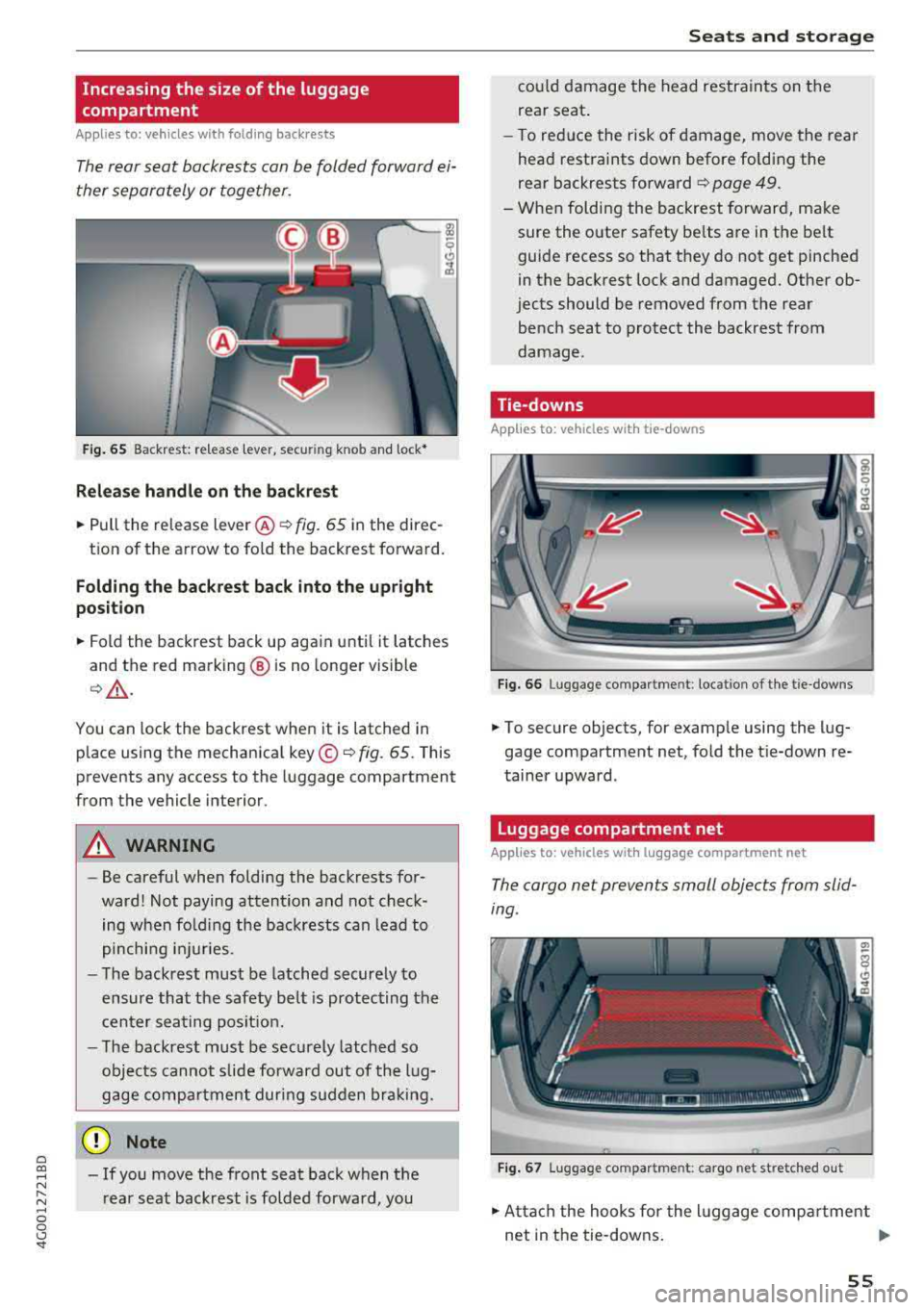
F ig . 65 Backrest: re lease lever, secur ing knob and lock•
Relea se handle on the back re st
~ Pull the release lever @¢ fig. 65 in the direc-
tion of the arrow to fo ld the backrest forward.
Folding the ba ckrest back into the upright
po sition
~ Fold the backrest back up again until it latches
and the red marking @ is no longer visible
¢& .
You can lock the backrest when it is latched in
place using the mechanical key ©¢
fig. 65 . This
prevents any access to the luggage compartment
from the vehicle interior.
A WARNING
- Be careful when folding the backrests for
ward! Not paying attention and not check ing when fo ld ing the backrests can lead to
pinching i njuries.
- The backrest must be latched securely to
ensure that the safety be lt is protecting the
cen ter seating posit ion.
- The backrest must be securely latched so
objects cannot slide forward out of the l ug
gage compartment during sudden bra king.
(D Note
- If you move the front seat back when t he
r ear seat backrest is folded forward, you
S eats and storag e
could damage the head restraints on the
rear seat .
- To red uce the risk of damage, move the rear
head restraints down before folding the
rear backrests forward¢
page 49.
- When fold ing the backrest forward, make
sure the outer safety be lts are in the belt
guide recess so that they do not get pinched
in the backrest lock and damaged. Other ob
jects should be removed from the rear
bench seat to protect the backrest from
damage.
Tie-downs
Applies to: vehicles with tie-downs
F ig. 66 Luggage compartment: location of the tie-downs
~ To secure objects, for examp le using the lug
gage compartment net, fold the t ie-down re
tainer upward.
Luggage compartment net
Applies to: vehicles with luggage compartment net
The cargo net prevents small objects from slid
ing.
F ig . 67 Luggage compartment: cargo net stretched o ut
~ Atta ch the hooks for the l uggage compa rtment
net in the tie-downs .
..,..
55
Page 60 of 266
Warm and cold
Warm and cold
Climate control system
Description
The climate control system warms, cools and re moves humidity from the air in the vehicle interi
or. It is the most effective when the windows and
sunroof* are closed. If there is a bui ld-up of heat
inside the vehicle, ventilation can he lp to speed
up the cooling process.
I n all heating mode functions, except for defrost,
the blower only switches to a higher speed once
the engine coolant has reached a sufficient tem
perature.
Pollutant filt er
The po llutant filter removes poll utants such as
dust and pollen from the a ir .
Ke y re cognition
A pp lies to: ve hicles w ith de luxe au toma tic clima te co ntrol
The blower sett ing and air distribution are stored
automatically and ass igned to the remote control
key that you are using.
A pp lies to: ve hicles w ith 4 -zo ne del uxe automatic c limate
co ntrol
The climate control set tings are automatically
stored and assigned to the remote control key
that is in use.
A WARNING
Poor visibility can lead to accidents.
- For safer driving, keep all windows free of
ice, snow and fog .
- Become familiar as quickly as possible with
the correct use and function of the climate contro l system, especially with the defrost
ing and defogg ing function.
58
- When the temperature is below freezing,
only use the windshield washer system after
the windshield has been warmed by the cli mate control system . The washer fluid could
freeze on the w indsh ield and impair v isib il i
ty .
@ Note
-If you suspect that the climate contro l sys
tem is damaged, switch the system
off to
prevent further damage and have it checked
by an authorized Aud i dea ler or authorized
Audi Serv ice Facility.
- Repa irs to t he Aud i climate control system
require special techn ical know ledge and
special tools. See an aut ho rized Aud i dea le r
or authorized Aud i Serv ice Fac ility .
@) For the sake of the environment
To save fue l, turn off cooling mode by press
i ng the
IA/Cl button. This will a lso reduce
emissions.
(D Tips
- T o prevent i nterference with t he heat ing
and cooli ng outpu t and to p revent the win
dows from fogging over, the a ir intake in
front of the windshie ld must be free of ice,
snow or leaves.
- C ondensation from the coo ling system can
drip and form a pudd le o f water under the
vehicle . This is norma l and does not mean
there is a leak.
- Th e energy management system may tem
porarily switc h
off certain functions, such as
the seat heating* or rear window defogger.
These systems are ava ilable again as soon
as the energy supply has been restored.
Page 65 of 266
a co ,...,
N
" N ,...,
0 0 \,;J '
Applies to: veh icles with steering wheel heating
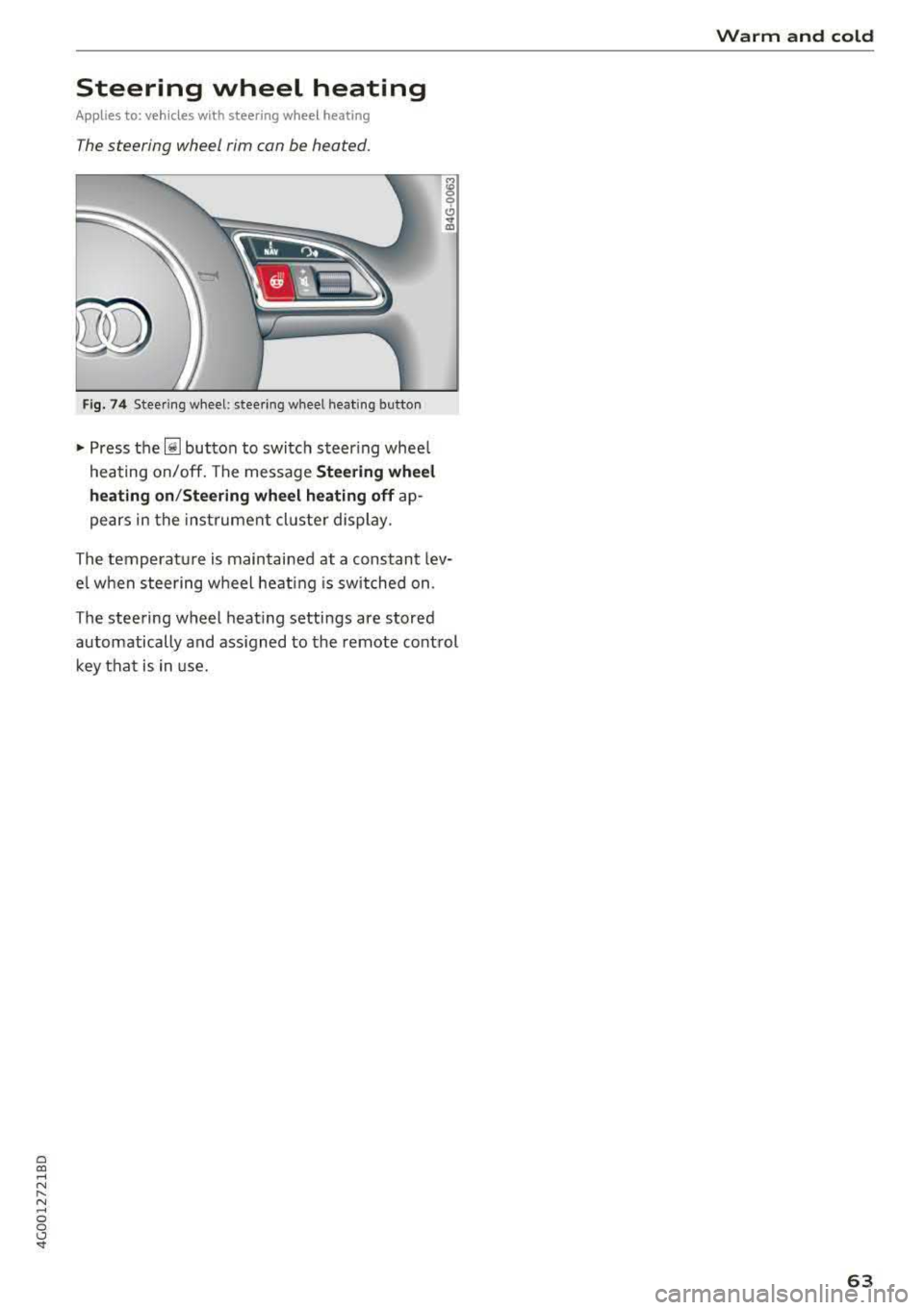
The steering wheel rim can be heated.
Fig . 74 Steering wheel: steering wheel heating button
~ Press the~ button to switch steer ing whee l
heating on/off. The message
Steering wheel
heating on /Steering wheel heating off
ap
pears in the instrument cluster display.
The temperature is maintained at a constant lev
e l when steering wheel heat ing is switched on.
The steering wheel heating settings are stored
automatically and ass igned to the remote control
key that is in use.
Warm and cold
63
Page 71 of 266
a co .... N
" N .... 0 0 \.J '
I START ENGINE STOPI button and also press the
brake pedal.
A WARNING
- Never turn off the engine before the vehicle
has come to a complete stop. The full func
tion of the brake booster and the power
steering is not guaranteed. You may need to
use more force when braking or steering.
Because you cannot brake and steer as you
usually would, this could lead to accidents
and serious injuries.
- If you leave the vehicle, switch the ignition
off and take the vehicle key with you . Other
wise, the engine could be started or electri
cal equipment such as the power windows
could be operated. This can lead to serious
injury.
- For safety reasons, always park the vehicle
with the selector lever in the P position .
Otherwise, there is the risk that the vehicle
could roll unintentionally.
0 Note
If the engine has been under heavy load for
an extended period of time, heat builds up in
the engine compartment after the engine is
switched off and there is a risk of damaging
the engine. For this reason, let the engine run
at idle for approximately two minutes before
shutting it off .
(D Tips
For up to 10 minutes after stopping the en
gine, the radiator fan may turn on again auto
matically or it may continue to run (even if
the ignition is switched off) for the following
reasons:
- The coolant temperature is increasing due
to trapped heat.
- If the engine is warm and the engine com
partment also heats up from strong sun
light.
Messages
Turn off ignition before leaving car Driving
This
message appears and a warning tone sounds
if you open the driver's door wh en the ignition is
switched on.
Press brake pedal to start engine
This message appears if you do not press the
brake pedal when starting the engine.
fll 1s key in the vehicle?
This indicator light turns on and this message ap
pears if the ignition key was removed from the
vehicle when the engine was running. If the igni
tion key is no longer in the vehicle , you cannot
switch on the ignition or start the engine once
you stop it. You also cannot lock the vehicle from
the outside .
Shift to P, otherwise vehicle can roll away.
Doors do not lock if lever is not in P.
This message appears for safety reasons if the
transmission is not in the P position when you
switch the ignition off . Move the selector lever to
the "P" position . Otherwise the vehicle is not pro
tected from rolling and it cannot be locked.
II Key is not recognized. Hold back of key
against marked area. See owner's manual
If the indicator light turns on and this message
appears, there is a malfun ction
c> page 70 .
Turn off ignition before leaving car. Battery is
discharging
This message appears if the driver's door is
opened while the ignition is switched on. Always
switch off the ignition if you are leaving the vehi
cle. Also see
c> page 71.
Shift to P and turn off ignition before leaving
car, otherwise vehicle can roll away
This message appears if the driver's door is
opened while the ignition is switched on and the
selector lever is not in the P position . Move the
selector lever into the P position and switch the
ignition off when you exit the vehicle. Otherwise
the vehicle could roll. Also see
c> page 71.
69
Page 72 of 266
Driving
Starting the engine when there is a
malfunction
It may not be possible to start the engine under
certain circumstan ces, for example if the battery
in the vehicle key is drained, if interference is af
fected the key or if there is a system malfunc
tion .
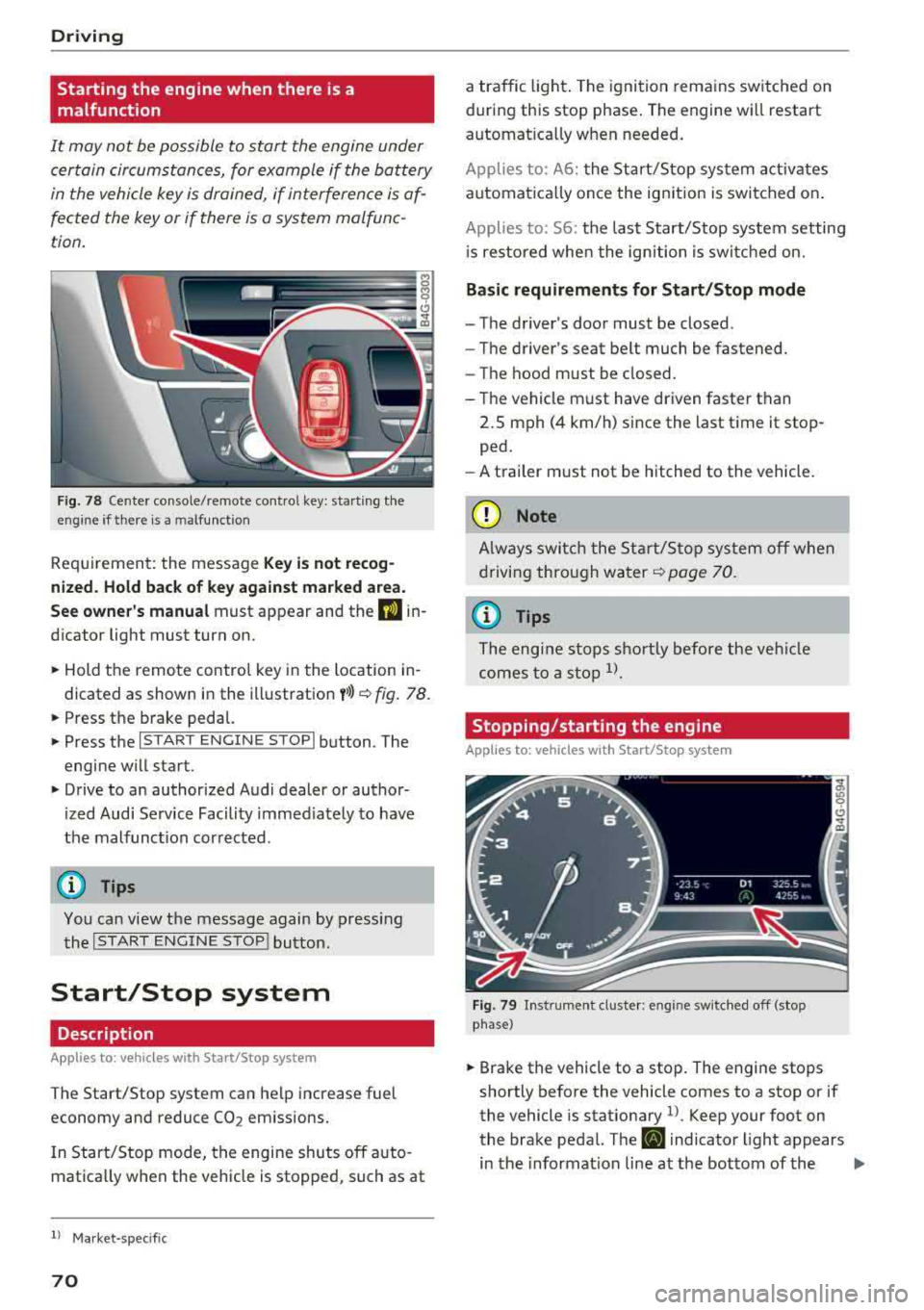
Fig . 78 Cen te r co nsole /rem ote co ntro l key : sta rt ing t he
en gine if th ere is a m alfu nction
Req uiremen t: the messa ge Key i s no t recog
nized . Hold back of key against marked a rea.
See owner's manual
must app ear and the DJ in
dicator light must tu rn on .
,.. Hold the remo te contro l key in the loc ation in
dicated as shown in the illustration
y >l) c::> fig . 78.
,.. Press the b rake pedal.
,.. Press the I S TAR T ENGINE STOPI button . The
engine will start.
,.. Drive to an authorized Audi dealer or author
ized Audi Service Facility immed iately to have
the malfunc tion cor rected .
(D Tips
You can view the message again by pressing
the
I START ENGINE STOP ! button.
Start/Stop system
Description
Applies to: veh icles with Sta rt/Stop system
The Start/Stop system can help increase fuel
economy and reduce
CO 2 em issions.
I n Start/Stop mode, the engine shuts off a uto
mat ica lly w hen the veh icle is stopped, such as at
ll Ma rket -spe cifi c
70
a traffic light . The ignition remains sw itched on
during this stop phase . The engine wi ll restart
automat ica lly w hen needed .
Applies to: A 6: the Sta rt/Stop system activates
automat ica lly once the ig nition is switched on .
Applies to: 56: the last S tart/Stop system setting
i s re stored whe n the ignition is switc hed on.
Basic requirements for Start/Stop mode
- The driver's doo r must be closed .
- The driver 's seat be lt much be fastened.
- The hood must be closed.
- T he vehicle m ust have driven faster than
2.5 mph (4 km/h) since the last t ime it stop
ped.
- A t railer m ust not be hitched to the vehicle.
(D Note
A lways swi tch the Start/Sto p system o ff whe n
drivi ng thro ugh wa ter
<::> page 70.
(D Tips
The engi ne s tops s hortly before the ve hicle
comes to a sto p
ll.
Stopping/starting the engine
Applies to: vehicles with Start/Stop sys tem
F ig. 79 In str umen t cl uste r: en gin e sw it ch ed off (stop
p hase )
,.. Brake the vehicl e to a stop. The engine stops
shortly before the vehicle comes to a stop or if
the vehicle is stationary
1> . Keep your foot on
the brake pedal. The
D] i ndicator light appears
in the informat ion line at the bottom of the
.,..
Page 75 of 266
a co .... N
" N .... 0 0 \,;J '
Requirement: the driver's door must be closed,
the driver's safety belt must be latched and the
parking brake must be set.
.,. To start driving and release the parking brake
automatically, press the accelerator pedal as
usual.
In addition to releasing the parking brake auto
matically, other convenience and safety functions
are available when you start driving
¢page 74,
Starting to drive.
Preventing the automatic parking brake
release
The vehicle could begin rolling unintentionally,
depending on the hill or if towing a trailer.
.,. To prevent the parking brake from releasing au
tomatically, pull and hold
the(®) switch and
press the accelerator pedal. The parking brake
remains set and prevents the vehicle from roll
ing backward.
.,. You can release the C®l switch again once you
are sure that you are giving enough driving
force to the wheels by pressing the accelerator pedal.
Emergency braking function
You can use the emergency braking function in an
emergency situation, or if the standard brake op
eration malfunctions or is disabled.
.,. Pull and hold the®) switch.
.,. As soon as you release the (®) switch or acceler-
ate, the braking stops.
Pulling and holding the
C®) switch while driving
the vehicle activates the emergency braking func
tion. The vehicle is braked at all four wheels by
activating the hydraulic brake system. The brak ing effect is similar to heavy
braking¢&_ .
To reduce the risk of activating the emergency
braking by mistake, a warning tone (buzzer)
sounds when
the®> switch is pulled. Emergency
braking stops as soon as
the®) switch is released
or the accelerator pedal is pressed.
Parking
.,. Press the brake pedal to stop the vehicle.
Driving
.,. Pull the®> switch to set the parking brake .
.,. Place the selector lever in the P position.
.,. Turn the engine off¢&_ .
.,. Turn the steering wheel when parking on in
clines so that the wheels will roll into the curb
if the vehicle starts moving.
A WARNING
-
- Do not press the accelerator pedal inadver
tently if a gear is selected when the vehicle
is stationary and the engine is running. Oth
erwise, the vehicle will start to move imme
diately and this could result in an accident.
- Emergency braking should only be used in
an emergency, when the normal brake pedal
has failed or the brake pedal is obstructed.
During emergency braking, your vehicle will
brake similar to heavy braking. ESC and the
associated components (ABS, ASR, EDL)
cannot overcome the laws of physics . In cor
ners and when road or weather conditions
are bad, a full brake application can cause
the vehicle to skid or the rear end to swerve,
which
increases the risk of an accident.
- If the power supply fails , you cannot set the
parking brake if it is released . In this case,
park the vehicle on level ground and secure
it by placing the selector lever in the P posi
tion. See an authorized Audi dealer or au
thorized Audi Service Facility for assistance.
- If you leave the vehicle, switch the ignition
off and take the vehicle key with you. This
applies particularly when children remain in
the vehicle. Otherwise children could start
the engine, release the parking brake or op
erate electrical equipment such as power
windows, which increases the risk of an acci
dent.
- No one should remain in the vehicle when it
is locked - especially children . Locked doors
make it more difficult for emergency work
ers to get into the vehicle, which puts lives
at risk.
(D Tips
When stopping at a traffic signal or stopping
in city traffic, you can set the parking brake
manually . The vehicle does not have to be
73
Page 93 of 266

a co ,...,
N
" N ,...,
0 0 <..:l '
to a distance of
92 ft (28 m) when traveling at 62
mph (100 km/h), for examp le (time between: 1
second).
~ --~--Distance 2: this setting corresponds
to a distance of 118
ft (36 m) when traveling at
62 mph (100 km/h), for examp le (time between:
1.3 seconds).
~ -- -~ -Distance 3: this setting corresponds
to a distance of 164
ft (SO m) when traveling at
62 mph (100 km/h), for examp le (time between:
1.8 seconds).
~ -- --~ Distance 4: This setting corresponds
to a distance of 210
ft (64 m) when traveling at
62 mph (100 km/h), (time distance of 2.3 sec
onds).
A WARNING
Following other vehicles too closely increases
the risk of collisions and ser ious perso nal in
jury.
- Setting short distances to the traffic ahead
reduces the t ime and distance available to
br ing your vehicle to a safe stop and makes
it even mo re necessary to pay close atten
t ion to traffic.
- Always obey applicable traff ic laws, use
good judgment, and select a safe following
dis tance fo r the traffic, road and weathe r
condit ions .
{]) Tips
-Distance 3 is set automatically each time
you switch the igni tion on.
- You r settings are automatically stored and
assigned to the remote control key being
u sed.
Selecting the driving mode
A pplies to: ve hicles with Audi adaptive cruise co ntro l
.. Select the des ired driving mode in dr ive se lect
¢ page 104.
Assi st a nce systems
(D Tips
Your settings are automatically stored and as
s igned to the remote control key being used.
Request for driver intervention
Applies to : vehicles wi th Audi ada ptive c ruise control
Fig. 97 Instrument cluster: request for driver intervention
In certain si tuations, the system will request you
to take action:
- I f the brak ing from the ad apt ive cru ise con trol
sys tem is not enough to ma intain eno ugh dis
tance to the object ahead .
T he da nger is indica ted by
the . indica tor light
¢ fig. 97. A n aud io signa l wi ll also so u nd .
- Press the brake pedal to slow your vehicle down.
Audi braking guard
App lies to : vehicles with A udi ada ptive cr uise control
Fig. 98 Inst rume nt cluste r: approach warnin g
The braking guard uses radar sensors and a video
camera . It also functions w ith in the limits of the
system when adaptive cru ise control is switched
~ ~
91
Page 95 of 266

a co .... N
" N .... 0 0 \.J '
the ris k of damage or i njury.
Settings in the Infotainment system
Applies to: vehicles with Audi adaptive cruise control
~ Select : the ICARI function button > ( Car )* Sys
tems
control button > Driver assistance > Audi
braking guard .
System -
switch the brak ing guard On /Off. When
you switch the ign it ion on, the message
B raking
guard: Off
appears if the sys tem is switched off .
Early warning -the distance and approach warn
ings in the display can be switched
On /Off .
(D Tips
-You r settings are automatically stored and
assigned to the remote contro l key being
u sed .
-If yo u rest rict or sw itch off the ESC, t he
bra king gua rd also sw itches itself off
c> page 120.
-Switc h braking guard off w hen yo u are load
i ng t he ve hicle onto a vehicle ca rr ier, t rain,
s hi p or other type o f transportation . This
ca n prevent undesired warnings from the
braking guard system .
Messages
Applies to: vehicles with Audi adaptive cruise control
Braking guard: Off
This message appears if the system is switched
off through the Infota inme nt system . Otherwise,
if the system is turned off, the information ap
pea rs every time shortly after the start of the
tr ip.
The message also appears if the system is not
ava ilable d ue to a malfunct io n or if the ESC is
sw itched off
c> page 120 . If this is the case, the
sys tem w ill not prov ide warnings about a possi
b le co llision.
Braking guard: engaged
This message appea rs if a sharp brake press ure
was applied due to an acute wa rning.
A ss istance systems
ACC: Unavailable!
ACC and Audi braking guard: Unavailable
The system cannot guarantee that it will detect objects correctly and is sw itched off . The sensors
have been moved or are faulty . Th e p re sense
funct ions may a lso be affec ted . D rive to an au
tho riz ed Au di dealer or author ized Audi Serv ice
F aci lity immed iate ly to have the ma lfunction co r
r ected .
ACC: Currently unavailable. No sensor vision
A CC and Audi braking guard: Currently unavail
able. No sensor vision
This message appears if the sensor v iew is ob
structed, for examp le by leaves, snow, heavy
spray or dirt . Clean the sensors
c> page 86 ,
fig . 89 .
AC C: Currently unavailable . Gradient too steep
T he road exceeds the maxim um poss ible angle
fo r safe adaptive c ruise contro l operation . Adap
tive cruise control is switched off.
ACC : Only available in D , Sor M
Select t he "D/S" or "M" se lecto r lever position .
ACC: Currently unavailable . Parking brake ap
plied
T he adaptive cr uise cont rol system switches off
automat ica lly if the parking brake is set.
ACC: Currently unavailable . Stability control
( ESC ) input.
This message appears if the e lectro nic s tabiliza
t io n c ontrol ( ES C) is tak ing a ct ion to s tabili ze the
vehicle. In t his case, adaptive cruise contro l
switches off automatically.
ACC off : Manual control!
Th is message appears when adaptive c ruise co n
t rol cannot set the parking brake . P ress the brake
peda l to prevent the veh icle from ro lling.
• ••
T hree white dots appear if a setting cannot be se
l ected w ith the operating lever. For example, this
happens if adapt ive cru ise control cannot sta rt
driv ing automat ica lly in stop-and-go traff ic
93
Page 99 of 266

a co .... N
" N .... 0 0 \.J '
disp lay *.
White line(s) Active lane assist is activated and ready to provide warnings .
Red line(s) Active lane assist warns yo u
(left or right) before leaving a lane
c> fig. 101. In addit ion, the
steering wheel vibra tes light ly.
Gray line(s) Active lane ass ist is activ ated,
b ut not ready to give warning
c> fig . 102 .
Messages in the instrument cluster display
If t he ac tive lane ass ist switches off automat ic al
l y, the indicator lig ht in the display turns off and
one of the following messages appears :
Audi active lane assis t: Currently unavailabl e.
No camera view
This message appea rs if the came ra is u nable to
detect t he lines. This co uld happen if:
- The camera field of v iew
c> page 96, fig . 100 is
dirty or covered in ice. C lea n this area on the
wi ndsh ield .
- The camera field of v iew is fogged over . Wait
u nt il the fog has cleared before sw itch ing the
active lane assist on again .
- T he system has been unab le to detect the lanes
fo r an extended pe riod of time due to road con
dit ions. Sw itch act ive lane assist bac k on when
t h e lines are mo re visible .
Audi active lane a ssist : Currently unavailable
T here is a temporary active lane assist malf unc
tion . Try sw itching the act ive lane assist on aga in
l a ter.
Audi active lane as sist : System fault!
D rive to an autho rized Aud i de aler o r a uth o rized
Aud i Service Facility immediately to have t he
malfunction corrected.
Audi active lane as sist: Please take over steering
T his message appea rs if you are not steering by
yourself . If t his is t he case, active lane assist does
n ot swi tch off, but it is "no t ready " to prov ide a
war ning. The system c an help you keep t he ve hi-
A ss istance systems
cle in the lane . Howeve r, you are responsible for
driving the ve hicle and m ust steer it yourse lf .
A WARNING
--
Note that messages may be de layed or not
d isplayed o n ve hicles w ith accessories mount
ed on the steering wheel, such as a steer ing
whee l spinne r knob . Always keep your hands
on the steering wheel.
Adjusting the vibration warning
App lies to: veh icles w it h Audi act ive lane ass ist
.,. Select: the I CAR ! funct io n button > (Car) * Sys
tem s
contro l butto n > Driver as sistance > Audi
activ e lane assi st.
Vibration warning
You can switch the add it io nal vibration warn ing
i n t he steer ing whee l on or off .
(D Tips
Your settings are automatically stored and as
s igned to the remote co ntro l key being used .
97
Page 103 of 266

a co ,...,
N
" N ,...,
0 0 \,;J '
-Side assist is not active w hile you are mak
i ng the ad justment.
- Your settings are automatically stored and
ass igned to the remote control key being
used.
Messages
App lies to: ve hicles with Audi side assist
If side assist switches off by i tself, the LED in the
button turns off and a message will appear in the
i nstr ument cluster d isplay:
Audi side a ssist: Currently una vailable . N o
senso r vision
The radar sensor v is ion is impaired . Do not cover
the area in front of the sensors with bike wheels, stickers, dirt or other objects . Clean the area in
front of the senso rs , if
necessa ry ~ page 99 ,
fig . 106.
Audi side as sist: Currently un avail able
Side assist cannot be switched on at th is time be
cause there is a malfunction (for example , the
battery charge level may be too low) .
Audi side as sist : System fault!
The sys tem cannot guarantee that it will detect
veh icles correctly and it has switched off. The
sensors have been moved or are faulty . H ave the
system checked by an authorized Audi dealer or
author ized Audi Se rvice Facility soon .
Audi side assist: Unav ailable when towing
Side assist sw itches off automatically when a fac
tory-ins talled trailer hi tch is connected to the
e lectrical connector on the trailer . There is no
gua rantee the system will sw itch off when using
a retrofi tte d trai ler hitch. Do not use s ide ass ist
when towing a t railer.
A ssi st a nce systems
Night vision assist with
pedestrian and wild
animal detection
Description
Applies to : vehicles wit h night vision assist
The night vision assist con detect, highlight and,
if n ecessary, warn about p ed estrians and large
wild animals.
Night vision assist wit h pedest rian and wi ld ani
mal detection assists you at night by using an in
frared camera to monitor the a rea in front of
your vehicle, within the limits of the system. It can d isplay objects up to a distance of approxi
mately 1000 feet (300 m). The thermal image
detected by the camera is shown in the inst ru
ment cluster d isp lay. Wa rm areas appear lighter
and co ld areas appear da rker.
Highlighting detected pedestrians and wild
animals
Appl ies to: vehicles with night vision assist
Fig. 1 08 In strum ent cluster: ye llow highlig h ted pedes
tria ns
Fi g. 10 9 Ins trumen t cl uster : sy mb ol when t he in frar ed im
age is not v is ib le
Wi thin the limi ts of the sys tem, the night v is io n
ass ist can detec t pedestr ians and wild animals
.,_
101