lights AUDI A6 2018 Owner's Manual
[x] Cancel search | Manufacturer: AUDI, Model Year: 2018, Model line: A6, Model: AUDI A6 2018Pages: 266, PDF Size: 41.38 MB
Page 45 of 266
a co ,...,
N
" N ,...,
0 0 <..:l '
.,. Press the button @¢ fig. 43. T he ind icator
light @ turns on. Interior and exterior mirrors *
will dim when there is incoming light (such as headlights from the rear) .
A WARNING
If the glass on an automatic dimming mirror
breaks, electrolyte can leak out. This liquid
can irritate the skin, eyes and respiratory sys
tem . If there is contact with the flu id, flush
immediately with plenty of wate r. Consult a
physician if necessary.
- Repeated or long-term exposure to electro
lyte fluid can lead to irritation of the air
ways, especially in people with asthma or
other respiratory conditions. Take deep
breaths immediate ly after leaving the veh i
cle or, if this is not possible, open all of the
doors and windows as wide as possible.
- If electrolyte fluid enters the eyes, flush
them thoroughly with a large amount of
clean water for at least 15 minutes and then
seek medical attention.
- If electrolyte f luid comes into contact with
the skin, flush the affected area with clean
water for at least 15 minutes and then clean
with soap and water and seek med ical at
tent ion . Clean affected cloth ing and shoes
thoroughly before wear ing again .
- If the fluid was swallowed and the person is
conscious, fl ush the mouth with water for at
least 15 minutes. Do not induce vomiting
unless this is recommended by medical pro
fessionals. Seek medical attention immedi
ately .
(D Note
If the glass on an automatic dimming mirror
breaks, e lectrolyte can leak out . This liquid
damages plastic surfaces and paint. Clean
this liquid as quickly as possible, for example
with a wet sponge.
Lights and Vision
(D Tips
-If the light reaching the rearview mirror is
obstructed, the automatic dimming mirror
will not function correctly,
- The automatic dimming mirrors do not dim
when the interior lighting is turned on or
the reverse gear is se lected.
Sun visors
[ }
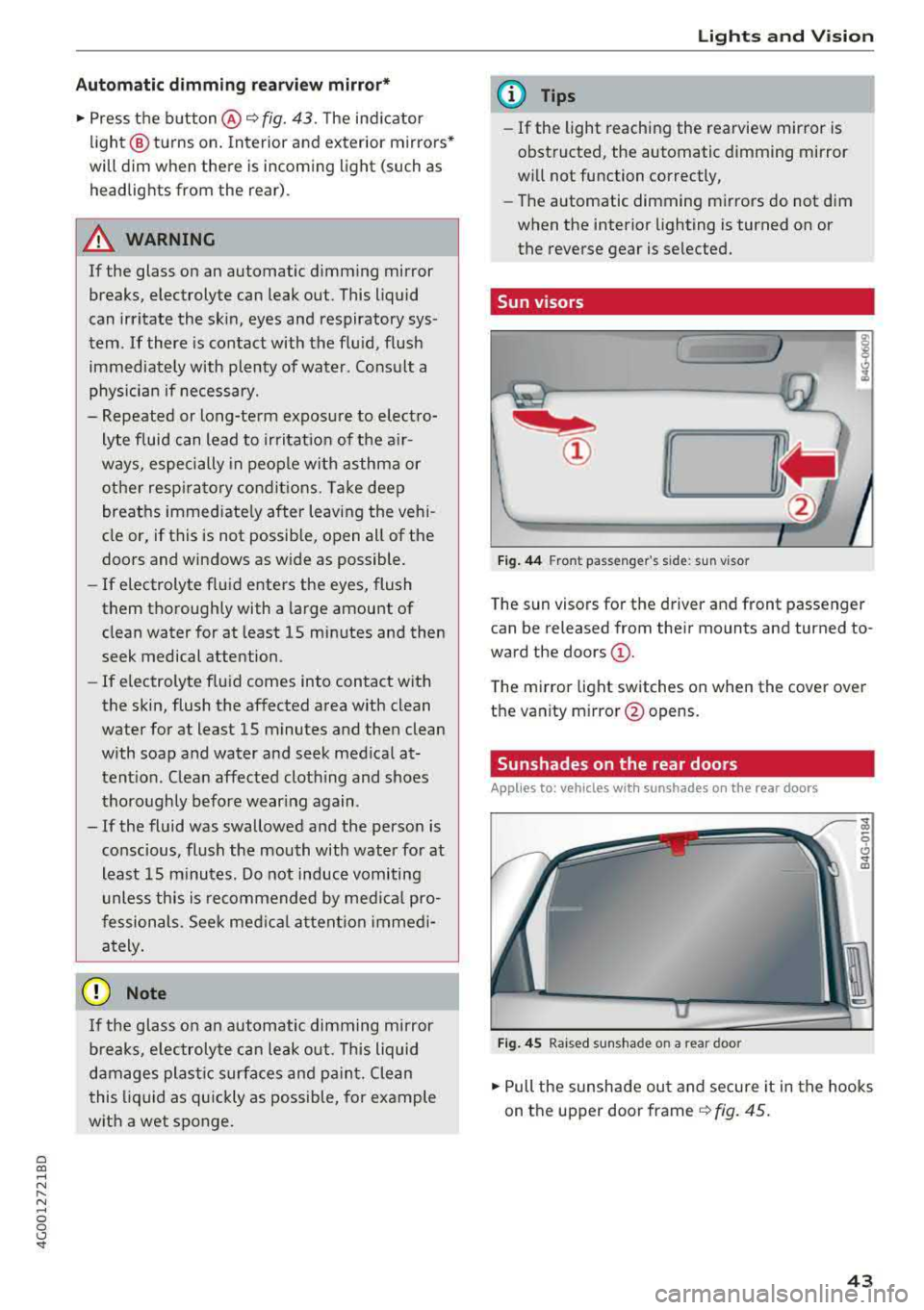
Fi g. 44 Fr ont pass eng er's s id e: sun vis or
T he sun visors for the driver and front passeng er
can be released from their mounts and tu rned to
ward the
doors @.
The mirror light switches on when the cover over
the vanity m irror @opens.
Sunshades on the rear doors
Applies to: vehicles with sunshades on the rear doors
Fig. 45 Raised sunshade on a rear door
... Pull the sunshade ou t and secure it in the hooks
on the upper door frame
¢ fig. 45.
43
Page 46 of 266

Lights and Vision
Sunshade on the rear window
Applies to: vehicles with a sunshade on the rear window
Applies to: sedan
F ig . 4 6 Ce nte r co nsole: butto n fo r r ea r w indow s unsh ad e
.,. To raise/lower the sunshade, press the ~ but-
ton
¢ fig. 46 in the cockpit.
The rear window sunshade ca n be set so that it
retracts automatically when driving in reverse. To
do this, select: ICARlfu nction button>
(Car )* sys
tem s
contro l button > Vehicle settings > Auto
matic rear blind > On .
The sunshade is extended
again as soon as the vehicle is trave ling forwa rd
at a speed greater than
9 mph (15 km/h) if the
ignit ion has not been switched off in the mean
time.
,& WARNING
-
N ever operate the rear wi ndow su nsh ade
w ithou t paying a ttent io n or in an uncon trol
led manner. Pinching could cause serious inju
r ies .
@ Tips
-Pressing the~ but ton seve ral times in a
r ow can trigge r the ove rload pro tection. The
su nsh ade c an on ly be exten ded/re trac ted
again after a brief waiting period .
-The rea r win dow suns hade o nly functions
whe n the vehicle interior is warmer tha n
14°F (-10°C) .
44
Windshield wipers
Switching the windshield wipers on
Fig. 47 Wind shi eld w iper l eve r
Move the windshie ld w iper lever to the co rre
sponding posit ion:
@ -Windshie ld w ipers o ff
(D -Rain senso r mode. The w indshield w ipers
swi tch on on ce the veh icle speed exceeds a pprox
imately 2 mp h (4 km/h) and it is ra ining . The
higher the sensitivity of the ra in se nsor that is set
(switch @to the rig ht), the ea rlier the wind
shield wipers react to mo isture on the wind
shield . You can deact ivate the ra in sensor mode
i n the Info ta inmen t sys tem, wh ic h sw itches the
i nte rm itte nt mode on . Se lect: ICARI f unct ion but
ton
> (Car) * systems con trol b utton > Driver as
sistan ce > Rain sensor > Off .
In in termi ttent
mode, yo u can adjust the interval time usi ng the
swi tc h @ .
@-Slow w ip ing
@ -Fast w iping
© -Sing le w ipe. If you ho ld the lever in th is posi
tion longer, the wipers switch from slow wiping
to fast wiping.
® -Clean the w indshield . T he wipers w ipe o ne
time a fter several seconds of driving to remove
water droplets. You can sw itch thi s function off
by moving the leve r to posit ion ® within
10 sec
o nds of t he afte rwipe . T he afterwipe fu nction is
r eac tiva ted t he nex t time you sw itch t he ignit io n
on.
Clean the headlight s*. The he adlight washer sys
tem* operates only whe n the low beam head -
li gh ts are on. If you move the leve r to pos it io n
Ill>
Page 47 of 266

a co .... N
" N .... 0 0 \.J '
camera* are cleaned at intervals .
A WARNING
-The rain sensor is only intended to assist the
dr iver. The driver may still be responsible
for manually sw itching the w ipers on based
on v is ibility conditions.
- The windshie ld may not be treated with wa
ter-repell ing windsh ield coating agents . U n
favorable cond itions, such as wetness, dark
ness or low sun, can result in increased
glare, wh ich inc reases the risk of an acc i
dent . W iper b la d e chatter is also poss ible.
- Prope rly funct ion ing windsh ield wiper
blades are required fo r a clear view and safe
dr iv ing¢
page 45, Replacing windshield
wiper blades.
0 Note
- If there is frost, make su re the windsh ie ld
wipe r blades a re not fro zen to the wind
s hi eld. Sw itch ing on the win dsh ield wipe rs
when the blades are frozen to the wind
sh ield can damage the wiper blades.
- The w inds hield wipe r system must be
swi tched off ( lever in pos ition 0) befo re us
ing a car wash. This prevents the wipers
from switching on unintentionally and ca us
i ng damage to the windshie ld w iper system.
(D Tips
- The windshield wipers switch off when the
ignition is switched off . Yo u can activate the
windsh ield wipers after the ign it ion is
switched back on by moving the winds hield
wiper lever to any pos it ion.
- Wo rn o r dirty windshield wipe r blades result
i n streak ing . This can affect the ra in sensor
funct io n. Check yo ur windsh ield wiper
b lades regu larly .
- The was her fluid nozzles fo r th e windshie ld
washer system are heated at low tempera
tures when the ignition is on .
- When stopp ing temporarily, such as at a
traffic l ight, the speed of the windsh ield
wipe rs a utomat ically red uces by one leve l.
Light s and Vision
Cleaning windshield wiper blades
Clean t he wiper b lades when yo u see w iper
st reaks. Use a soft cloth and a g lass cleaner.
"" Place th e w indsh ield w iper arms in the service
position ¢
page 45.
"" Fold the windsh ie ld w iper arms away from t he
w indshie ld.
A WARNING ~ -
D ir ty windshie ld w iper b lades can impa ir vi
sion, w hic h increases the risk of an accident .
Replacing windshield wiper blades
Fig. 48 Remov ing w inds hield w iper b lades
Windshield wiper service position /blade
replacem ent po sit ion
- -M 0 :i:
wiper lever to position @briefly ¢
page 44,
fig. 47.
The windshield wipers move into the
serv ice position .
""To br ing the windshie ld w ipers back to the nor
mal position, switch the ignition on and ho ld
the windshield wiper lever in pos ition
@ unt il
the wi ndsh ield wipers go back to the normal
position , or d rive faster than 8 mph (12 km/ h).
You can also turn the service posit io n on or off in
the Infotainment system:
"" Switch the windsh ield w ipers off (pos it io n @
¢ page 44, fig. 47) .
"" Select: the I CAR ! fu nct io n button > (Car )* Sys
tem s
contro l bu tton > Servi ce & control > Wip -
er change po sition.
> On /Off IJJ,-
45
Page 48 of 266
Lights and Vi sion
Removing th e wip er bl ad e
.,. Fo ld the w indshield wipe r arm away from the
windshield .
.,. Press the locking knob (D ¢ fig. 48 on the wiper
blade . Hold the wiper b lade firmly .
.,. Remove the wiper blade in the direction of the
arrow .
Install ing th e wiper blad e
.,. Insert the new wiper b lade into the mount on
the wiper arm @unti l it clicks into place .
.,. Place the wiper arm back on the windshie ld .
.,. Turn the serv ice position off.
A WARNING -
For safety reasons, the windsh ield w iper
blades should be replaced once or tw ice each
year.
@ Note
- Only fo ld the windshield wipers away when
they are in the serv ice position. Otherwise,
you r isk damaging the paint on the hood or
the w indshield w iper moto r.
- You should not move your vehicle or operate
the w indshield w iper lever when the wiper
a rms are fo lded away from the w indshield .
The w indshield wipe rs would move bac k in
to t heir orig inal position and cou ld damage
the hood and win dshield .
(0 Tips
- You can also use the serv ice position, fo r ex
ample, if yo u want to p ro tect the windsh ie ld
from icing by us ing a cover .
- You canno t activate t he se rvice pos ition
whe n the hood is open.
46
Page 49 of 266
a co ,...,
N
" N ,...,
0 0 \,;J '
General information
A WARNING
-
Refer to c:::> page 125, Driving safety for im
portant information, tips, suggestions and
warnings that you should read and follow for
your own safety and the safety of yo ur pas
senge rs.
Front seats
Power seat adjustment
Applies to vehicles with power adjustable seats
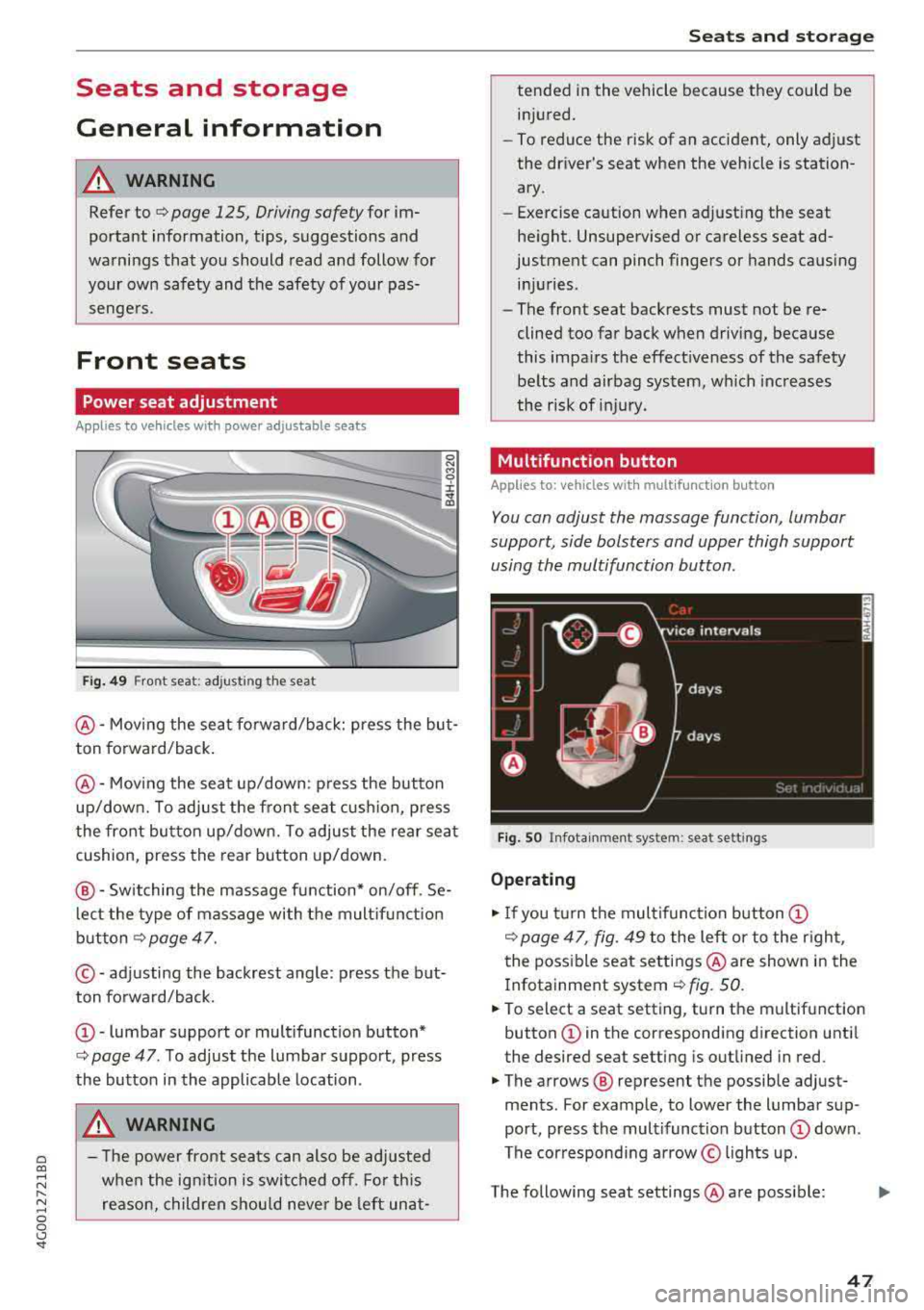
Fig . 49 Front seat: adj usting the seat
0 N M '? ::c .,. a,
@ -Moving the sea t fo rward/back: press the but
ton forward/back .
@-Moving the seat up/down: p ress the button
up/down. To adjust the fron t seat cush ion, p ress
the front button up/down. To adjust the rear sea t
cushion, press the rear button up/down.
@ -Switching the massage function * on/off . Se
l ec t the type of massage with the mult if u nct ion
button
c:::> page 47.
© - adjusting the backrest angle : press the but
ton forward/back.
@ -lumbar support or mult ifunction button*
c> page 47 . To adjust the lumbar support, press
the button in the applicable location .
A WARNING
-The power fron t seats can also be ad justed
when the ig nition is swi tched off. For this
reason, children should never be left unat-
S eats and storag e
tended i n the vehicle because they could be
in jured.
-To reduce the risk of an accident, only adjust
the dr iver's seat when the vehicle is station
ary.
-Exercise caution when adjusting the seat
he ight. Unsupe rvised or careless seat ad
justment can pinch fingers or hands causing inj uries .
-The front seat backrests must not be re
clined too far back when driving, because
this impa irs the effect iveness of the safety
be lts and airbag system, which inc reases
the r isk of inj ury .
Multifunction button
Applies to: vehicles with multifunctio n button
You can adjust the massage function , lumbar
support, side bolsters and upper thigh support
using the multifunction button.
Fig. SO Infota inme nt sys te m : seat sett ings
Operating
"I f you turn the mul tifunction button (D
c> page 47 , fig. 49 to the lef t or to the r ight,
the poss ible seat settings @are show n in the
I nfotainment system
c:::> fig. 50.
" To select a seat setting, turn the multifunction
button
(D in the corresponding direction unti l
the desired seat setting is outlined in red.
" The arrows @ represent the possib le adjust
ments . For example, to lower the lumbar sup
port, press the multifunction button
(D down .
The corresponding a rrow © lights up.
The following seat settings @are poss ible:
IJi,
47
Page 52 of 266
Seats and storage
Remote Memory button
control key
Driver Driver
Front
passen-
ger
Seat X X X
Steering wheel* X X
Both exterior X X
mirrors*
Remote control key
Applies to: vehicles with memory function
The driver 's seat profile can be assigned to the
remo te control key when the vehicle is locked.
.,.. Se lect : the ICARI function button > (Car)* Sys
tems
control button > Vehicle settings > Driv
er 's seat
> Remote control key > On.
(D Tips
If you do not wish to have the seat profile for
another driver assigned to the remote contro l
key, switch the memory function off in the In
fotainment system or using the
IOFFI button
r::::;, page 50 .
Memory buttons
App lies to: vehicles with memory function
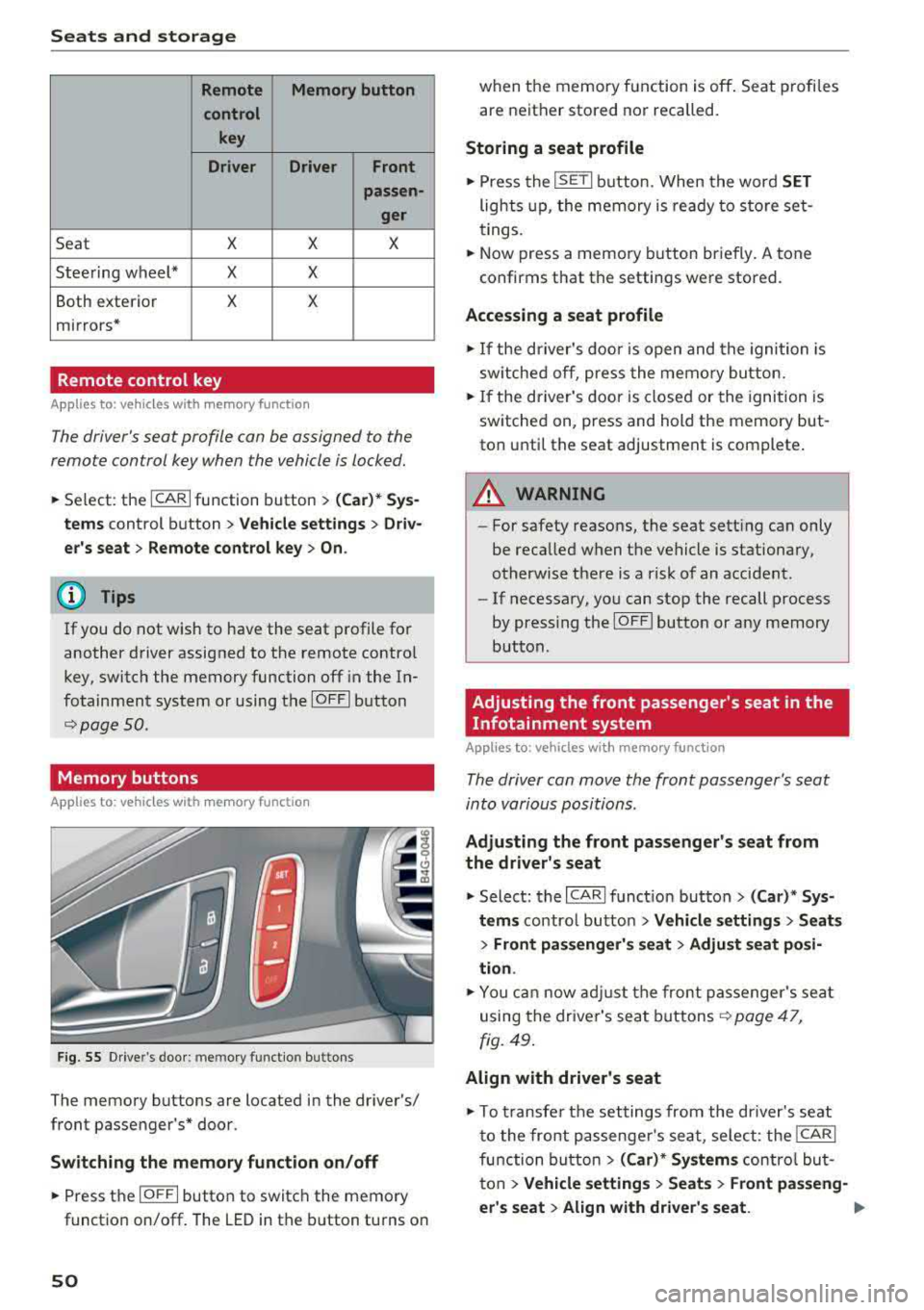
F ig. 55 Drive r's door : m em ory functio n bu ttons
The memory buttons are located in the driver's/
front passenger 's* door.
Switching the memory function on/off
.,.. Press the IO FF I button to switch the memory
functio n on/off. The LED in the button turns on
50
when the memory function is off . Seat profiles
are neither stored nor recalled.
Storing a seat profile
.,.. Press the ISET I button . When the word SET
lights up, the memory is ready to store set
tings.
.,.. Now press a memo ry button briefly. A tone
confirms that th e settings were stor ed.
Accessing a seat profile
.,.. If the driver's door is open and the ignition is
sw itched off, press the memory button.
.,.. If the driver's door is closed or the ignition is
switched on, press and hold the memory but
ton until the seat adjustment is complete .
A WARNING
-For safety reasons, the seat setting can only
be recalled when the vehicle is stationary,
otherwise there is a risk of an accident .
-If necessary, you can stop the recall process
by press ing the
IOF FI butto n or any memory
button .
Adjusting the front passenger's seat in the
Infotainment system
Applies to: vehicles with memory function
The driver can move the front passenger's seat
into various positions .
Adjusting the front passenger's seat from
the driver's seat
.,. Select: the I CARI function button > (Car)* Sys
tems
control butto n > Vehicle settings > Seats
> Front passenger's seat > Adjust seat posi
tion .
.,.. You can now adjust the front passenger's seat
using the driver's seat buttons
r:::;, page 47,
fig. 49.
Align with driver's seat
.,. To trans fer the settings from the dr iver's seat
to the front passenge r's seat, select: the
I CAR I
function button > (Car)* Systems control but
ton
> Vehicle settings > Seats > Front passeng-
er 's seat
> Align with driver 's seat. .,..
Page 67 of 266
a co .... N
" N
-Keep in mind that oncoming vehicles may
create waves that raise the water level and
make it too deep for your vehicle to drive
through safely.
-Avoid driving through salt water, because
this can cause corrosion.
Economical and environmentally-friendly
driving
The amount of fuel consumption, the environ
mental impact and the wear to the engine,
brakes and tires depends mostly on your driving
style. With an anticipatory and economic driving
style, fuel consumption can be reduced by ap
proximately 10-15%. The following tips will help
you conserve the environment and your money at the same time.
Anticipatory driving
A vehicle uses the most fuel when accelerating.
When you drive with anticipation, you do not
need to brake as often and so you accelerate less.
When possible, let your vehicle coast with a
gear
engaged, for example, when you notice that the
next traffic light is red. This produces an engine
braking effect, which helps to protect the brakes
and tires and reduces the emissions and fuel con
sumption to zero (fuel shut-off during decelera
tion) .
Shift efficiently
Upshifting earlier is an effective way to save fuel.
Staying in a gear too long uses fuel unnecessari
ly .
Press down on the accelerator pedal slowly and
avoid "kick-down".
Avoid full acceleration
You should rarely travel at the maximum vehicle
speed. High speeds cause a disproportionately
high increase in fuel consumption, emissions and
traffic noise. Slower driving saves fuel.
Reduce idling time
The Start/Stop system* helps to reduce the idling
time automatically. In vehicles without the Start/
8 Stop system*, it is efficient to switch the engine 0 \.J '
off when stopped at railroad crossings and long
red lights. Stopping the engine for 30-40 sec
onds already saves more fuel than the amount of
extra fuel needed to restart the engine.
It takes a very long time in idle to warm the en
gine up to operating temperature. Wear and
emissions are especially high in the warm-up
phase. Therefore, you should begin driving im
mediately after starting the engine. Avoid high
RPMs while doing this .
Have maintenance performed regularly
By having maintenance performed regularly on
your vehicle, you can help to reduce fuel con
sumption before you even start to drive. The maintenance condition of your vehicle not only
affects traffic safety and long-term value but al
so impacts
fuel consumption . A poorly main
tained engine can lead to fuel consumption that
is 10% higher than normal.
Avoid short trips
The engine and emissions control system must
reach their optimal operating temperature to ef
fectively reduce consumption and emissions .
A cold engine uses a disproportionately high amount of fuel. The engine reaches operating
temperature and consumption normalizes only
after approximately
2 .5 miles (4 km) .
Check the tire pressure
To save fuel, make sure the tires are always in
flated to the correct pressure
Q page 211. The
fuel consumption can increase by S% if the pres
sure is only 0.5 bar too low . Due to the increased
rolling resistance, low tire pressures will also
lead to greater tire
wear and will affect driving
behavior.
Do not drive on
winter tires year -round, as this
will consume up to 10% more fuel.
Eliminate unnecessary weight
Since every pound of extra weight increases fuel
consumption, a quick inspection of the luggage
compartment may be worth it to avoid unneces -
sary weight.
.,.
65
Page 68 of 266
Driving
When not being used, a roof rack should be removed to decrease the wind resistance of the ve
hicle. You will save approximately 12% of your
fuel when at speeds from 62- 7 5 mph
(100-120 km/h) .
Save energy
The engine drives the generator, which generates
electricity ; the fuel consumption also increases
with the demand for electricity. Therefore, switch electrical equipment off when you no longer
need it. Examples of equipment that uses a lot of
energy are air blowers at a high setting, the rear
window defogger and seat heating* .
@ Note
Do not leave engine idling unattended after
starting. If warning lights should come on to
ind icate improper operation, they would go
unheeded. Extended idling also produces
heat, which could result in overheating or
other damage to the vehicle or other proper-
ty.
@ Note
- Have your vehicle maintained properly and
in accordance with the service recommenda
tions in your Warranty
& Maintenance book
let. Lack of proper maintenance as well as
improper use of the vehicle will impair the
function of the emission control system and
could lead to damage.
- Do not alter or remove any component of
the Emission Control System unless ap proved by the manufacturer .
- Do not alter or remove any device , such as
heat shields, switches, ignition wires,
valves, which are designed to protect your
vehicle's Emission Control System and other important vehicle components .
@ Tips
The consumption estimates as published by
ENVIRONMENTAL PROTECTION AGENCY (EPA) and Transport Canada may not corre
spond to your actual consumption on the
road, which will vary depending upon vehicle
66
load and speed, road and weather conditions ,
trip length, etc.
Steering
Manual steering wheel position adjustment
Applies to: vehicles with manual steering wheel adjustment
The steering wheel posi tion is adjustable up and
down and forward and back .
Fig. 75 Lever on th e stee ring column
.,. Pull the lever in the direction of the arrow
~A -
... Bring the steering wheel into the desired posi
tion .
.,. Push the lever against the steering column un
til it is secure.
A WARNING
Improper use of steering wheel adjustment
and improper seating position can cause seri
ous personal injury.
-Adjust the steering wheel column only when
the vehicle is not moving to prevent loss of
vehicle control.
-Adjust the driver's seat or steering wheel so
that there is a minimum of 10 in (25 cm)
between your chest and the steering wheel
~page 126, fig. 138. If you cannot main
tain this minimum distance, the airbag sys
tem cannot protect you properly .
- If physical limitations prevent you from sit
ting 10 in (25 cm) or more from the steer
ing wheel, check with your authorized Audi
dealer to see if adaptive equipment is avail-
able.
.,.
Page 70 of 266
Driving
the ignition is switched off. After entering the ve
hicle, the steering co lumn returns to the stored
position once the ignition is sw itched on.
Starting and stopping
the engine
Starting the engine
The I S TAR T ENGINE ST OP I button switches the
ignition on and starts the engine.
Fig. 77 Center co nsole : START ENGINE STO P butto n
Starting the engine
.. Press the brake pedal and move the se lector
lever into the P or N po sit ion
¢ ,A .
.. Press the I START ENGIN E STOPI button . The
engine will start .
Switch ing the ignition on /off
If you wou ld like to switch the ignition on with
out starting the engine, follow these steps:
.. Press the I S TAR T ENG IN E STOPI button with
out
pressing the brake pedal.
.. To switch the ignition off, press the button
again. The needle in the tachometer
moves into
the
OFF position.
Equipment that uses a lot of electricity is switch
ed off temporari ly when you start the engine .
If the engine does not start immediate ly, the
starting procedure stops automatically after a
short time. Repeat the starting procedure .
ll This fun ctio n is not availab le in all c oun tries.
68
Start /Stop system*
See the information in ¢ page 70, Start/Stop
system.
A WARNING
To reduce the risk of poisoning, never allow
the engine to run in confined spaces.
(D Note
Avoid high engine speed, full th rottle, and
heavy engine load if the engine has not
reached operating temperature yet . You could
damage the engine.
@ For the sake of the environment
Do not let the engine run while parked to
warm up. Begin driving immediate ly. This re
duces unnecessary emissions.
(D Tips
- Some noise after starting the engine is nor
ma l and is no cause for concern.
- If you leave the veh icle w ith the ignition
switched on, the ignition w ill switch off af
ter a certain amount of time . Make sure that
electrical equipment such as the exterior
lights are switched off .
Stopping the engine
.. Bring the vehicle to a full stop .
.. Move the selector lever to the P or N posit io n.
.. Press the I START ENGINE STOP I button
¢ page 68, fig. 77.
Steering lock1>
The steering locks when you turn the engine off
using the
I STAR T ENGIN E STOPI button and
open the driver's door . The locked steering helps
prevent veh icle theft .
Emergency off function*
If it is absolutely necessary, the engine can also
be turned off while driving in the R or D/S selec-
tor lever position at speeds be low 6 mph (10 km/
...
Page 73 of 266
a co .... N
" N .... 0 0 \.J '
tachometer also moves into the
READ Y posi
t ion
ll .
~ The eng ine starts aga in when you take your
foot off the brake pedal. The ind icator light
turns off.
Additional inf ormation
The engine stops in the P, N and D se lector lever
positions.
I f you select the R pos ition dur ing a stop phase,
the engine will start again .
Shift to P q uickl y to p revent t he engine from
starti ng u ninten tiona lly w hen s hift ing t hrough R .
You can determ ine for yourself if the eng ine will
stop or not by reducing or increas ing the amount
of force you use to press the bra ke pedal. For ex
ample, if you only lig htly press on t he b rake ped
a l in stop-and -go traff ic or w hen tu rning, the en
gine will not switch
off when the vehicle is sta
tionary . As soon as yo u press the brake down
harder, the eng ine will switch off.
(D Tips
-Press the b rake pedal during a Stop p hase
to keep the ve hicle from rolling.
-The ignition wi ll tu rn off if you press the
I START E NGINE STOP ! button during a stop
phase . The need le in the tachomete r moves
i nto the
OFF position.
General information
App lies to: ve hicles with Start/Stop system
The standard Start/Stop mode can be canceled
for various system-related reasons.
Engine does not switch off
B efore and d urin g e ach stop phase , the system
checks if certa in con ditions have been me t. If the
@j indicator light appears in the instrument cl us
ter disp lay, the engine will not be stopped, for
examp le in the fo llow ing s ituations:
ll Ma rket -specific
Driving
-The engine has not reached the minim um re
quired temperature for Sta rt/Stop mode.
-The interior temperature selec ted by the cli -
mate control system has not been reached .
-The outside tempe ra ture is ex tremely high/low.
-The winds hield is bei ng defros ted® .
-The parking system * is sw itched on .
-The vehicle battery charge level is too low .
-The steering wheel is tu rned at a sharp angle o r
is moving.
-After engaging the reverse gear.
-On sharp inclines .
Engine automatically restarts
The standard Start/S top mode w ill be can celed
dur ing a stop phase in the followi ng si tuatio ns.
T he eng ine restarts wi thout any action by the
driver .
-The vehi cle ro lls, fo r example whi le on a slope .
-The inte rior tempe rature d iffers from t he tem-
pe ra ture selected in the A/C system.
-The winds hield is bei ng defrosted® .
-The brake peda l is pressed severa l times in a
row .
-The vehicle battery charge level is too low.
-Power consumption is high.
T he eng ine can turn off aga in when the cond i
tions for Start/Stop mode are met.
Ignition is switched off automatically
T o p reve nt the vehicle battery from dra ining, the
i gni tion will switc h off
automaticall y under the
f o llow ing co nditions:
-The vehicle has already been dr iven .
-The Start/Stop system has stopped the engine .
-The driver's door is opened .
-The driver's safety belt is unbuckled.
-The brake peda l is not pressed .
-The vehicle is stat ion ary.
In this case, the activated low beam is replaced
by the pa rk ing light. The par kin g lights wi ll
swi tch off afte r approx imately 30 m inutes o r
whe n you lock t he ve hicle.
71