service AUDI A6 2018 Owner's Manual
[x] Cancel search | Manufacturer: AUDI, Model Year: 2018, Model line: A6, Model: AUDI A6 2018Pages: 266, PDF Size: 41.38 MB
Page 97 of 266

a co .... N
" N .... 0 0 \.J '
The sensors can be displaced by impacts or
damage to the bumper, whee l housing and
underbody. Pre sense can be impaired by this.
Have an authorized Audi dealer or authorized
Audi Service Facility check their function .
(D Tips
- Certain pre sense front functions switch off
when sport mode is switched off or when
driving in reverse .
- The pre sense functions may not be availa
ble if there is a malfunction in the ESC sys
tem or the airbag control module.
- The pre sense front/plus functions are not
available if there is a malfunction in the
adaptive cruise control* system
~ page 93.
- The pre sense rear/plus functions are not
available if there is a malfunction in the side
assist* system
~ page 93 .
Audi active lane assist
Description
Applies to: veh icles with Audi active lane assist
Active lane assist detects lane marker lines with
in the limits of the system using a camera in the
windshield. If you are approaching a detected lane marker line and it appears likely that you
will leave the lane, the system will warn you with
corrective steering . You can override this steering
at any time . If you pass over a line, the steer ing
wheel will v ibrate lightly. In order for this warn
ing vibration to occur, it must first be sw itched
on in the Infotainment system. Active lane assist
is ready for operation when the lane marker line
is detected on at least one side of the vehicle.
The system is designed for driving on express
ways and highways and therefore only activates
at speeds above approximately 40 mph (65 km/
h).
Applies to: vehicles with s ide assist
If you activate a turn signal when active lane as
sist is ready and it classifies a lane change as crit
ical because of vehicles traveling alongside you or
approaching you, there will be noticeable correc-
Assistance systems
tive steering shortly before you leave the lane.
This will attempt to keep your vehicle in the lane.
Applies to: vehicles w it h out side ass ist
The system will not warn you before crossing a
lane marker line if you have activated the turn
s ignal. In this case, it assumes that you are
changing lanes intentionally.
Applies to: veh icles w it h adaptive cruise contro l
The corrective steering is targeted based on the
driving situation. In addition to the lane marker
lines , the system can also take into account other
objects such as guard rails . If they are detected in
close proximity to the vehicle, active lane assist
helps prevent the vehicle from driving too close
to them. There is also passing ass istance. The
system does not provide any corrective steering if
it detects that you are passing another vehicle.
A WARNING ~ -
-The system warns the driver that the vehicle
is leaving the lane using corrective steering.
The driver is always responsible for keeping
the vehicle within the lane.
- The system can help you keep the vehicle in
the lane, but it does not drive by itself. Al
ways keep your hands on the steering
wheel.
- Corrective steering may not occur in certain
situations, such as during heavy braking.
- There may be cases where the camera does
not recognize all lane marker lines. Correc
tive steering can only take place on the side
of the vehicle where lane marker lines are
detected.
- Other road structures or objects could possi
b ly be identified unintentionally as lane
marker lines. As a result, corrective steering
may be unexpected or may not occur.
- The camera view can be restricted, for ex
ample by vehicles driving ahead or by ra in,
snow, heavy spray or light shining into the
camera. This can result in active lane assist
not detecting the lane marker lines or de
tecting them incorrectly .
95
Page 99 of 266

a co .... N
" N .... 0 0 \.J '
disp lay *.
White line(s) Active lane assist is activated and ready to provide warnings .
Red line(s) Active lane assist warns yo u
(left or right) before leaving a lane
c> fig. 101. In addit ion, the
steering wheel vibra tes light ly.
Gray line(s) Active lane ass ist is activ ated,
b ut not ready to give warning
c> fig . 102 .
Messages in the instrument cluster display
If t he ac tive lane ass ist switches off automat ic al
l y, the indicator lig ht in the display turns off and
one of the following messages appears :
Audi active lane assis t: Currently unavailabl e.
No camera view
This message appea rs if the came ra is u nable to
detect t he lines. This co uld happen if:
- The camera field of v iew
c> page 96, fig . 100 is
dirty or covered in ice. C lea n this area on the
wi ndsh ield .
- The camera field of v iew is fogged over . Wait
u nt il the fog has cleared before sw itch ing the
active lane assist on again .
- T he system has been unab le to detect the lanes
fo r an extended pe riod of time due to road con
dit ions. Sw itch act ive lane assist bac k on when
t h e lines are mo re visible .
Audi active lane a ssist : Currently unavailable
T here is a temporary active lane assist malf unc
tion . Try sw itching the act ive lane assist on aga in
l a ter.
Audi active lane as sist : System fault!
D rive to an autho rized Aud i de aler o r a uth o rized
Aud i Service Facility immediately to have t he
malfunction corrected.
Audi active lane as sist: Please take over steering
T his message appea rs if you are not steering by
yourself . If t his is t he case, active lane assist does
n ot swi tch off, but it is "no t ready " to prov ide a
war ning. The system c an help you keep t he ve hi-
A ss istance systems
cle in the lane . Howeve r, you are responsible for
driving the ve hicle and m ust steer it yourse lf .
A WARNING
--
Note that messages may be de layed or not
d isplayed o n ve hicles w ith accessories mount
ed on the steering wheel, such as a steer ing
whee l spinne r knob . Always keep your hands
on the steering wheel.
Adjusting the vibration warning
App lies to: veh icles w it h Audi act ive lane ass ist
.,. Select: the I CAR ! funct io n button > (Car) * Sys
tem s
contro l butto n > Driver as sistance > Audi
activ e lane assi st.
Vibration warning
You can switch the add it io nal vibration warn ing
i n t he steer ing whee l on or off .
(D Tips
Your settings are automatically stored and as
s igned to the remote co ntro l key being used .
97
Page 106 of 266

Assistance systems
Messages
App lies to: ve hicles w ith night v isio n ass ist
Night vision assist: System fault
The system cannot guarantee correct function
and is switched off . See an author ized Audi deal
er or authorized Audi Service Facility for assis
tance .
Night vision assist: Currently unavailable
The system cannot guarantee correct function at
this t ime and is switched off.
Night vision assist: Only available at night with
lights turned on
Night vision assist onl y works when it is dar k out
side and the head lights are on.
Night vision assist: Pedestrian marking current
ly unavailable
The pedestrian and wild animal marking was
sw itched off by the system.
Audi drive select (drive
settings)
Introduction
Drive select makes it possible to experience dif
ferent types of vehicle settings in one vehicle .
The driver can se lect
Comfort , Auto and Dynamic
modes in the Inf ota inme nt system to switch be
tween, for example, a sporty and a comfo rtable
driving mode .
I n the
Individual mode, the sett ings can be ad
justed to your perso nal preferences. This makes
it poss ible to comb ine settings such as a spo rty
engine setting with light steering.
Description
The following systems, among other things, are
influenced by drive select:
Engine and automatic transmission
Depending on the mode , the engine and a uto
mat ic tran smission respond more quickly or in a
mo re balanced manner to accelerator peda l
104 movements
. In the sporty dynamic mode, the
transmission shifts at higher speed ranges.
Adaptive air suspension*
The adaptive a ir suspens ion* is an electron ically
controlled air suspension and damping system.
The adjustment depends on the driving mode se
l ected, steering movements, the driver's braking
and acce leration, and as the road surface, vehicle
speed and load.
The vehicle ground clearance depends on the
mode selected and the speed . When you are in
the
auto mode, the highway setting is activated
when you drive above 75 mph (120 km/h) for
more than 30 seconds. The ground clearance is
i ncreased automatically if the speed drops below
44 mph (70 km/h) for more than 120 seconds .
Steering
The power steering adapts. Indirect steering that
moves easily as in comfort mode is especia lly
su ited to long drives on a highway. The dynamic
mode provides sporty, direct steering.
App lies to: vehicles wit h dynamic steer ing
The steering ratio changes based on vehicle
speed in order to maintain optimum steering ef
fort for the driver at all times. Th is sets the steer
i ng to be less sensitive at h igher speeds in order
to provide improved veh icle control. At reduced
speeds, steering is more direct in o rder to keep
t h e steer ing effort as minimal as possible whe n
the driver is maneuvering the vehicle. At low and
average speeds, dynamic steering* additionally
provides more responsive steering performance.
Sport differential*
As a component of the all whee l dr ive system
(quattro)
~ page 123, the sport differe ntial dis
tributes the driving power to the rear axle de
pending on the situation. The distribution of
power varies from ba lanced (comfort) to sporty
(dynamic) depending on the se lected mode. The
goal is a high level of agility and ability to accel
erate on curves. The vehicle is very responsive to
steering.
IJIJ,
Page 111 of 266
a co ,...,
N
" N ,...,
0 0 \,;J '
Introduction
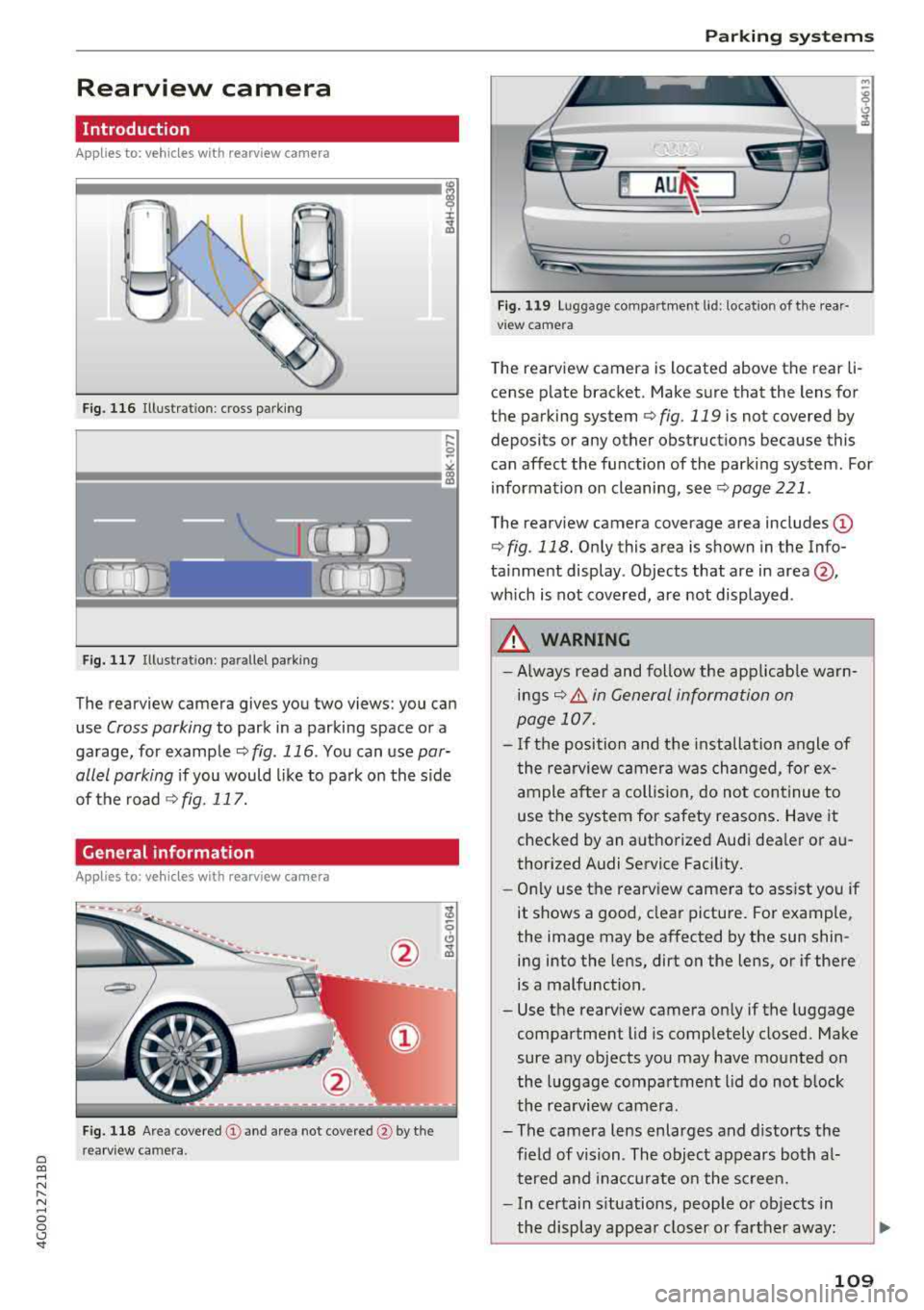
Applies to: vehicles with rearv iew camera
t --...
...
~
F ig. 116 Illustrat ion : cross parking
Fig. 117 Illustra tion : para llel parking
The rearview camera gives you two views: you can
use
Cross parking to park in a parking space or a
garage, for example
~ fig . 116 . You can use par
allel parking
if you would like to park on the side
of the road
¢ fig . 117.
General information
Appl ies to : vehicles wit h rearv iew camera
F ig. 118 A re a covered (D and area not covered @ by the
r ea rv iew ca mera.
Parking systems
Fig. 119 Lu ggage compar tmen t lid : locat io n of t he rear·
v iew camera
T he rearview camera is located above the rear li·
cense plate bracket. Make sure that the lens for
the parking system
¢ fig. 119 is not covered by
deposits or any other obstruct ions because this
can affect the function of the parking system. For
information on cleaning, see
~ page 221 .
The rearview camera coverage area includes@
¢fig . 118. On ly this area is shown in the Info
ta inment display . Objects that are in
area @,
which is not covered, are not displayed .
A WARNING
--Always read and follow the applicab le warn-
ings~ A in General information on
page 107.
- If the position and the i nstallation angle of
the rea rview camera was changed, fo r ex
ample after a collision, do not continue to
use the system for safety reasons . Have it
checked by an autho rized Audi dea ler or a u
thor ized Audi Service Facility.
- Only use the rearview camera to ass ist you if
it shows a good, clear pictu re. For example,
the image may be affected by the sun shin· ing into the lens, dirt on the lens, or if the re
is a malfunction.
- Use the rearv iew camera only if the luggage
compartment lid is comp letely closed. Make
sure any objects you may have mounted on
the l uggage compartment l id do not block
the rea rview camera.
- The camera lens enlarges and distorts the field of vision . The object appears both a l·
tered and inacc urate on the sc reen.
- In certain s ituations, people or ob jects in
the display appea r closer or farther away:
109
Page 123 of 266
a co .... N
" N .... 0 0 \,;J '
wear depends largely on the way the
vehicle is driven and on operating conditions.
This is especially true if you are driving frequently
in the city and on curves or with a sporty driving
style.
Operating noise
Noises may occur when braking depending on the
speed, braking force and outside conditions such
as temperature and humidity.
Effect of water and road salt
In certain situations, for example after driving
through water, in heavy ra in, after overnight con
densat ion or after washing your car, the braking
effect can be reduced by moisture or ice on the
brake rotors and brake pads. The brakes must be
"dried" first with a few careful brake applica
tions.
At higher speeds and with the windshie ld wipers
turned on, the brake pads press against the brake rotors for a short amount of time. This action,
which is not felt by the driver, happens at regular
intervals and ensures a better reaction time for
the brakes in wet weather .
The braking effect can also be reduced if you are
driving on salted roads and you do not apply the brakes for long periods of time. The layer of salt
on the brake rotors and pads must be worn off
f ir st when the brakes are applied.
Corrosion
Leaving the vehicle parked for long periods of
time, low mileage and avo iding heavy brak ing
can contribute to corrosion on the brake rotors
and to d irty brake pads .
If you usually avoid heavy braking or if there is
corros ion present, occasional heavy braking at
high speeds is recommended to clean the brake
rotors and
pads¢ &..
Brake system malfunction
If you notice that the brake pedal travel has sud
denly
increased, then a brake circuit in the dual
circu it brake system may have malfunct ioned.
Drive to an authorized Aud i dealer or authorized
Intelligent Technology
Audi Service Facility immediately to have the
problem corrected. On the way there, drive with
reduced speed and keep in mind that you will
need a longer distance to stop and you will need
to press the brake peda l harder.
Low brake fluid level
When the brake fluid level is low, malfunctions in
the brake system may occur . The brake fluid level
is e lectronically monitored.
Brake booster
T he brake booster amplifies the press ure you ap
ply to the brake pedal. It on ly works w hen the en
gine is running.
A WARNING
-
-Only apply the brakes for the purpose of
cleaning the brake system when road and
traffic cond itions permit. You must not en
danger other road users. This increases the
risk of an accident .
- Never let the vehicle roll while the engine is
stopped because this increases the risk of an
accident .
- New brake pads do not ach ieve the ir full
braking effect dur ing the first 250 m i
(400 km). They must be "broken in" first .
However, you can compensate fo r the
slightly reduced braking force by pressing
firmly on the brake pedal. Avoid heavy b rak
ing during the break -in period.
- Ce rtain weather and operating conditions
such as driving through water, dr iv ing in
heavy rain or driving after washing your ve
hicle can impair the effectiveness of the
brakes. In the winter, ice may build up on
the brake pads, rotors and drums. Check
these components by braking carefully. Ap
plying the brakes carefully several times
dries the brakes and removes ice build-up .
- The efficiency of the brakes can also be im
pa ired by dr iv ing for long stretches on roads
covered with salt without using the brakes.
You can remove salt deposits from the
brake rotors and pads by carefully applying
the brakes several times.
121
Page 124 of 266

Intellig ent T echn olo gy
- If the front spoiler is damaged or you insta ll
another spoiler, make sure the front wheel
brakes are venti lated properly. Otherwise,
the brake system could overheat, wh ich re
duces the ir effectiveness .
- Failure of a brake circuit impairs braking
performance, which increases brak ing dis
tance. Avoid driving the vehicle and have it
towed it to the nearest author ized Audi
dealer or author ized A udi Se rvice Fac il ity.
- If the brake booster is not working, you will
have to press muc h ha rde r on the bra ke
peda l to compe nsate for the lack of the
booste r.
0 Note
- Neve r let the brakes "rub" by press ing the
pedal light ly when bra kin g is not actually
ne cessa ry. Th is ca u ses the brakes to over
hea t an d increases bra king d istance and
causes wear.
- B efo re dr iv ing downh ill a long distance on a
steep hi ll, de crease your speed and se lec t a
l ower gear . This makes use of the engine
braking effect and relieves the brakes . If
you need to brake additionally, brake in in
tervals and not continuously.
(D Tips
- If the brake booster is not working, you
must press the brake pedal with much more
force than normal.
- If you retrofit your vehicle with a front spoil
er, whee l covers or s imilar items, make sure
that the a ir flow to the front whee ls is not
i nterrupted. Otherw ise the brake system
can become too hot .
Electromechanical
steering, dynamic
steering
The electromechanical steering supports the
driver's steering movements.
Power steering adapts electronically based on
the vehicle speed.
122
Indicator lights and me ssag es
• Do n ot driv e vehi cle: Ste ering d efe ctiv e
If this indicator light turns on and stays on and
t hi s message appears, the power steering may
have failed.
Stop the veh icle in a safe location as soon as pos
s ible. Do
n o t continue driving . See an authorized
Audi dealer or author ized Audi Service Fac ility for
ass ista nce.
kr-D S te ering: System fault You can cont inu e
dri ving
If the indicator light turns on and the message
appears, the steering wheel may be more d iffi
cult to move or more sensitive than usual. The
steering wheel may also be at an angle when
driv ing stra ight.
Drive slowly to an authorized Audi dealer or au
thorized Aud i Serv ice Facility to have the mal
funct ion corrected.
l;rfl D ynamic steer ing: Init ializing
If the indicator light is blinking and this message
appears, dynamic steering* is being initialized.
The steering wheel will be easy to move after
start ing the engine. Re-initialization might be
necessary if the steering wheel was moved hard
to the left and r ight while the veh icle was not
moving. T he d isplay turns off if the in it ial izat ion
was successful.
(D Tips
- If the . or ':r,y indicator l ight only stays on
for a sho rt time, you may cont inue d riv ing.
- The dynamic steering stability systems
~page 119 are not ava ilable in the event of
a system malfunct ion.
- For add itional information o n dynamic
steering,
see~ page 104 .
Page 126 of 266

Intelligent Technology
Notice about data
recorded by the Event
Data Recorder and
vehicle control modules
Event Data Recorder
This vehicle is equipped with an Event Data Re
corder (EDR). The main purpose of an EDR is to
record, in certain crash or near crash-like situa
tions, such as an airbag deployment or hitting a road obstacle, data that will assist in understand
ing how a vehicle's systems performed. The EDR
is designed to record data related to vehicle dy
namics and safety systems for a short period of
time, typically 30 seconds or less . The EDR in this
veh icle is designed to record such data as :
-How various systems in your vehicle were oper
at ing;
-Whether or not the driver and passenger safety
belts were buckled/fastened;
-How far (if at all) the driver was depressing the
accelerator and/or brake pedal; and,
-How fast the vehicle was traveling.
These data can help provide a better understand ing of the circumstances in which crashes and in
juries occur. NOTE : EDR data are recorded by your
vehicle only if a non-trivial crash situation occurs;
no data are recorded by the EDR under normal
driving conditions and no personal data (e .g .,
name, gender, age, and crash location) are re
corded. However, other pa rties , such as law en
forcement, could combine the EDR data wit h the
type of persona lly identifying data routine ly ac
quired during a crash investigation.
To read data recorded by an EDR, specia l equip
ment is required, and access to the veh icle or the
EDR is needed. In add it ion to the vehicle manu
facturer, other parties, such as law enforcement,
that have the specia l equipment, can read the in
formation if they have access to the vehicle or the
E DR .
Some state laws restrict the retrieval or down
loading of data stored by ED Rs installed in a vehi
cle for the express purpose of retrieving data af
ter an accident or crash event without the own
er's consent.
124
Audi will not access the EDR and/or simi lar data
or give it to others
-
-un less t he ve hicle owne r (or lessee if the vehi
cle has been leased) agrees; or
-upon the offic ial request by the police; or
-upon the order of a court of law or a govern-
ment agency; or
-for the defense of a lawsuit through the jud icial
discovery process .
-Audi may also use the data for research about
veh icle operat ion and safety performance or
prov ide t he data to a third party for research
purposes without identify ing t he specific vehi
cle or information about the identity of its own
er or lessee and only after the recorded vehicle
data has been accessed.
Vehicle control modules
Your vehicle is also equ ipped with a numbe r of
electronic cont rol modules for various vehicle
systems, such as engine management, em iss ion
contro l, airbags, and safety be lts.
These elect ronic control modules record data
during normal vehicle operation t hat may be
needed by trained technic ia ns for diagnostic and
repair purposes. The recording capability of these
modules is limited to data (no sound is record
ed). Only a sma ll amount of data is actually re
corded over a very limited period of time, or stor
ed when a system fault is detected by a control
module . Some of the data stored may relate to
vehicle speed, d irection, or braking, as well as re
straint system use and performance in the event
of a crash. Stored data can also only be read a nd
down loaded w ith specia l equipment that is di
rectly connected to the vehicle.
(D Tips
Your vehicle may be equipped w ith Aud i con
nect. Your use of certain Audi connect fea
tures requires wire less services that are pro
vided by a third party wireless telecommuni
cations provider. For details regarding how in
formation obtained through Audi connect is
collected, processed, transmitted, used, and
shared, please see your contract with the
wireless telecommun ications provider .
Page 143 of 266
a co .... N
" N .... 0 0 \.J '
-A fine dust is released when the pyrotechnic
safety be lt pretens ioners deploy . This is nor
mal and is not caused by a fire in the vehi
cle.
- The re levant safety requirements must be
observed when the veh icle or components
of the system are scrapped. A qualif ied
dealersh ip is familiar w ith these regulations
and will be pleased to pass on the informa
tion to you.
Service and disposal of safety belt preten
sioner
The safety be lt pretensioners are parts of the
safety belts on your Audi. Installing, removing,
servicing or repa iring of belt pretensioners can
damage the safety belt system and prevent it
from work ing correctly in a collision .
There are some important things you have to know to make sure that the effectiveness of the
system w ill not be impaired and that discarded
components do not cause injury or pollute the
env ironment.
A WARNING
-
Improper care, serv icing and repa ir proce
dures can increase the r is k of personal injury
and death by preventing a safety be lt preten
sioner from activating when needed or acti
vating it unexpectedly:
- T he be lt pretensione r system can be act ivat
ed only once . If belt pretensione rs have
been activated, the system must be re
placed.
- Never repair, adjust, or change any parts of the safety be lt system .
- Safety belt systems including safety belt
pretensioners cannot be repaired. Specia l
procedures are required for removal, insta l
lation and disposal of this system.
- For any work on the safety belt system, we
strongly recommend that you see your au
thorized Aud i dea ler or qualified technician
who has an Audi approved repair manual,
train ing and spec ial equ ipment necessary .
Safety be lts
{® For the sa ke of the environment
Undeployed airbag modules and pretension
ers might be classif ied as Perchlorate Materi
al -special handling may apply, see
www.dtsc.ca.gov/hazardouswaste/perchlo rate . When the vehicle or parts of the re
straint system including airbag modules safe
ty belts with pretensioners are scrapped, all
applicable laws and regu lations must be ob
se rved. Your authorized Audi dealer is familiar
with these requirements and we recommend
that you have your dealer perform this service
for you .
141
Page 160 of 266
Airbag system
must be performed by qualified workshops
only. Make sure that any airbag service ac
tion is entered in your Audi Warranty
&
Maintenance booklet under AIRBAG RE·
PLACEMENT RECORD .
-For safety reasons in severe accidents, the
alternator and starter are separated from
the vehicle battery with a pyrotechn ic circuit
interrupter.
- Work on the pyrotechnic circuit interrupt
er must only be performed by a qualified
technicians who have the experience, in
formation and special tools necessary to
perform the work safely.
- If the vehicle or the circuit interrupter is
scrapped, all applicable safety precautions
must be followed .
@ For the sake of the environment
Undeployed airbag modules and pretension
ers might be classified as Perchlorate Materi
al
-special handling may apply , see
www .dtsc.ca.gov/hazardouswaste/perchlo
rate . When the vehicle or parts of the re
straint system including airbag modules and
safety belts w ith pretensioners are scrapped,
all applicable laws and regulations must be
observed . Your authorized Audi dealer is fa
miliar with these requirements and we recom
mend that you have your dealer perform this
service for you.
Other things that can affect Advanced
Airbag performance
Changing the vehicle's suspension system can
change the way that the Advanced Airbag System
performs in a crash. For example, using tire-rim
comb inations not approved by Audi, lower ing the
vehicle, chang ing the stiffness of the suspension,
including the springs, suspension struts , shock
absorb ers etc . can change the forces that are
measured by the airbag sensors and sent to the
electronic control unit . Some suspension changes
can, for example, increase the force levels meas
ured by the sensors and make the airbag system
deploy in crashes in which it would not deploy if
the changes had not been made. Other kinds of
158
changes may reduce the force levels measured by
the sensors and prevent the airbag from deploy
i ng when it should .
& WARNING
Changing the vehicle's suspension including
use of unapproved tire-rim combinations can
change Advanced Airbag performance and in
crease the risk of serious personal injury in a
crash .
- Never install suspension components that do not have the same performance charac
teristics as the components origina lly instal
led on your vehicle.
- Never use tire-rim combinations that have
not been approved by Aud i.
Knee airbags
Description of knee airbags
Applies to: vehicles with knee airbags
The knee airbag system can provide supplemen
tal protection to properly restrained front seat
occupants.
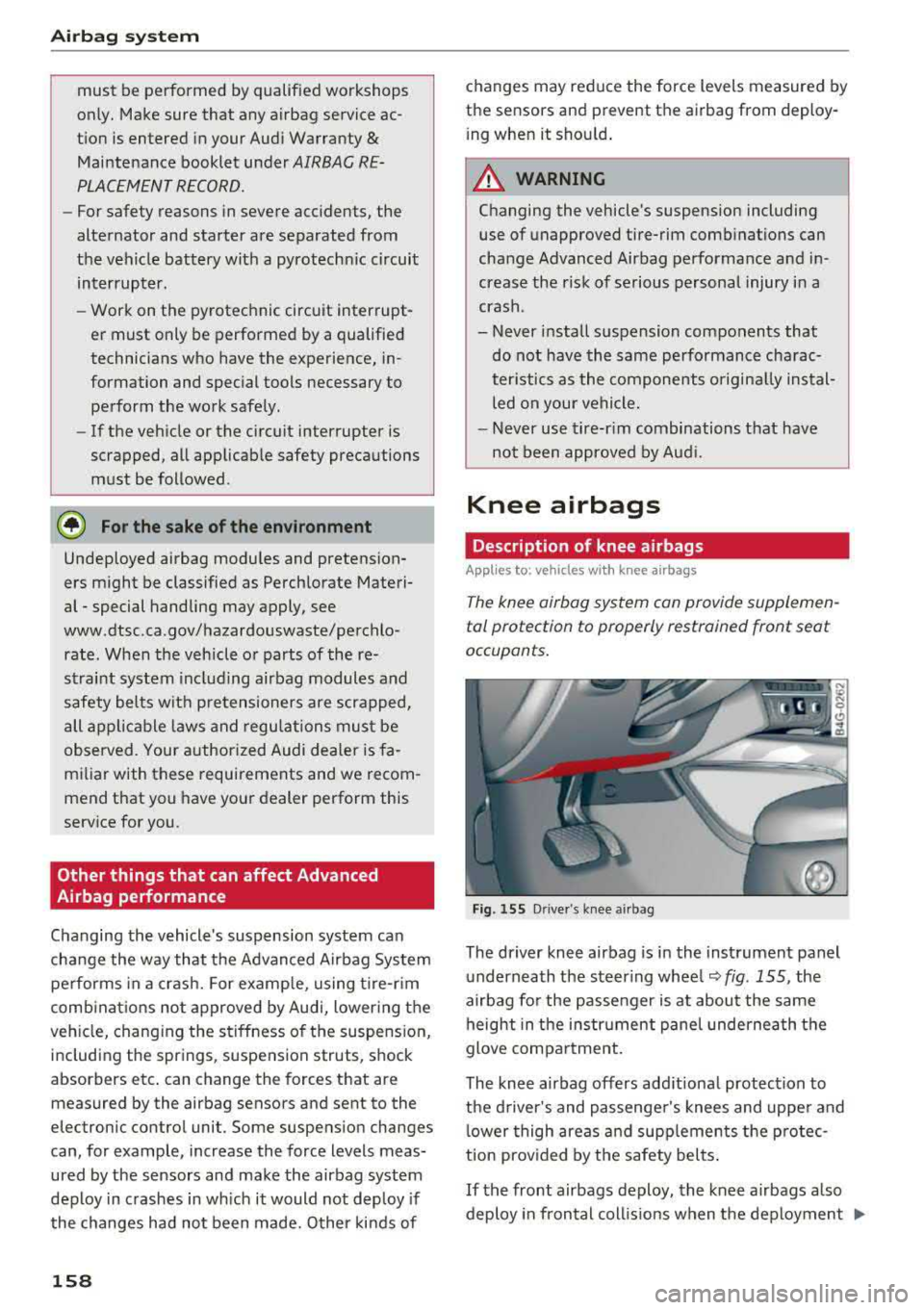
Fig . 155 Driver 's knee airbag
The driver knee airbag is in the instrument panel
underneath the steering wheel ¢
fig. 155, the
airbag for the passenger is at about the same height in the instrument panel underneath the
glove compartment.
The knee airbag offers add itional protect ion to
the driver's and passenger's knees and upper and lower thigh areas and supplements the protec
tion prov ided by the safety belts .
If the front airbags deploy, the knee airbags also
deploy in frontal coll is ions when the deployment
..,.
Page 188 of 266
Checking and Filling
-If you a re unable to determine whether or
not a particular fuel blend meets the speci
fications, ask your service station or its fuel
supplier.
- Do not use fuel for which the contents can
not be identified.
- Fuel system damage and performance prob
lems resulting from the use of fuels differ
ent from those specified a re not the respon
sibility of Audi and are not covered under
the New Vehicle or the Emission Control System Warranties.
- If you experience a loss of fuel economy or
driveability and performance problems due
to the use of one of these fuel blends , we
recommend that you switch to unblended
fuel.
Gasoline additives
A major concern among many auto manufactur
ers is carbon deposit build-up caused by the type
of gasoline you use.
Although gasoline grades differ from one manu
facturer to another, they have certain things in
common. All gasoline grades contain substances
that can cause deposits to collect on vital engin e
parts, such as fuel injectors and intake valves. Al
though most gasoline brands include additives to keep engine and fuel systems clean, they are not
equally effective .
Audi recommends using TOP TI ER Dete rgent Gas
oline. For more information on TOP TIER Deter
gent Gasoline , please go to the official website
(www .toptiergas .com) .
After an extended per iod of us ing inadequate
fuels, carbon deposit build-ups can rob your
en
gine of peak performance.
(D Note
Damage or malfunction due to poor fuel qual
ity is not covered by the Audi New Vehicle Limited Warranty.
186
Refueling
Fueling procedure
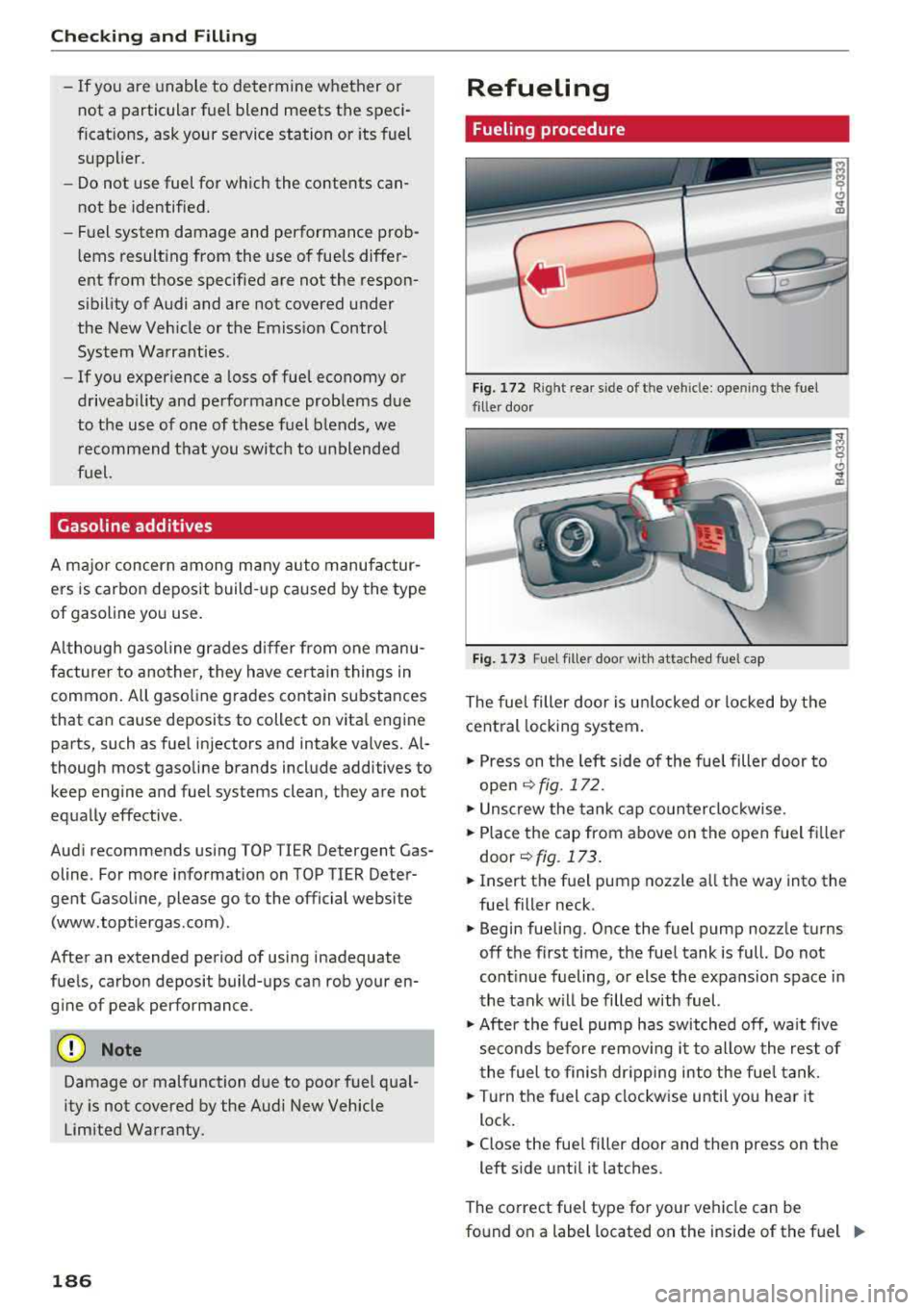
Fig. 172 R ig ht re ar sid e o f th e ve hicle: o penin g th e fu el
filler door
Fig. 173 F uel fille r doo r with at tached fuel cap
The fuel filler door is unlocked or locked by the
central locking system.
.,. Press on the left side of the fuel filler door to
open
~ fig. 172.
.,. Unscrew the tank cap counterclockwise .
.,. Place the cap from above on the open fuel filler
door
~ fig.173.
.,. Insert the fuel pump nozzle all the way into the
fuel filler neck .
.,. Begin fueling. Once the fuel pump nozzle turns
off the first time, the fuel tank is full. Do not
continue fueling, or else the expansion space in
the tank will be filled with fuel.
.,. After the fuel pump has switched off, wait five
seconds before removing it to allow the rest of
the fuel to finish dripping into the fue l tank.
.,. Turn the fuel cap clockwise until you hear it
lock.
.,. Close the fuel filler door and then press on the
left side until it latches.
The correct fuel type for your vehicle can be
found on a label located on the inside of the fuel
.,.