warning lights AUDI A6 2018 Owner's Manual
[x] Cancel search | Manufacturer: AUDI, Model Year: 2018, Model line: A6, Model: AUDI A6 2018Pages: 266, PDF Size: 41.38 MB
Page 52 of 266
Seats and storage
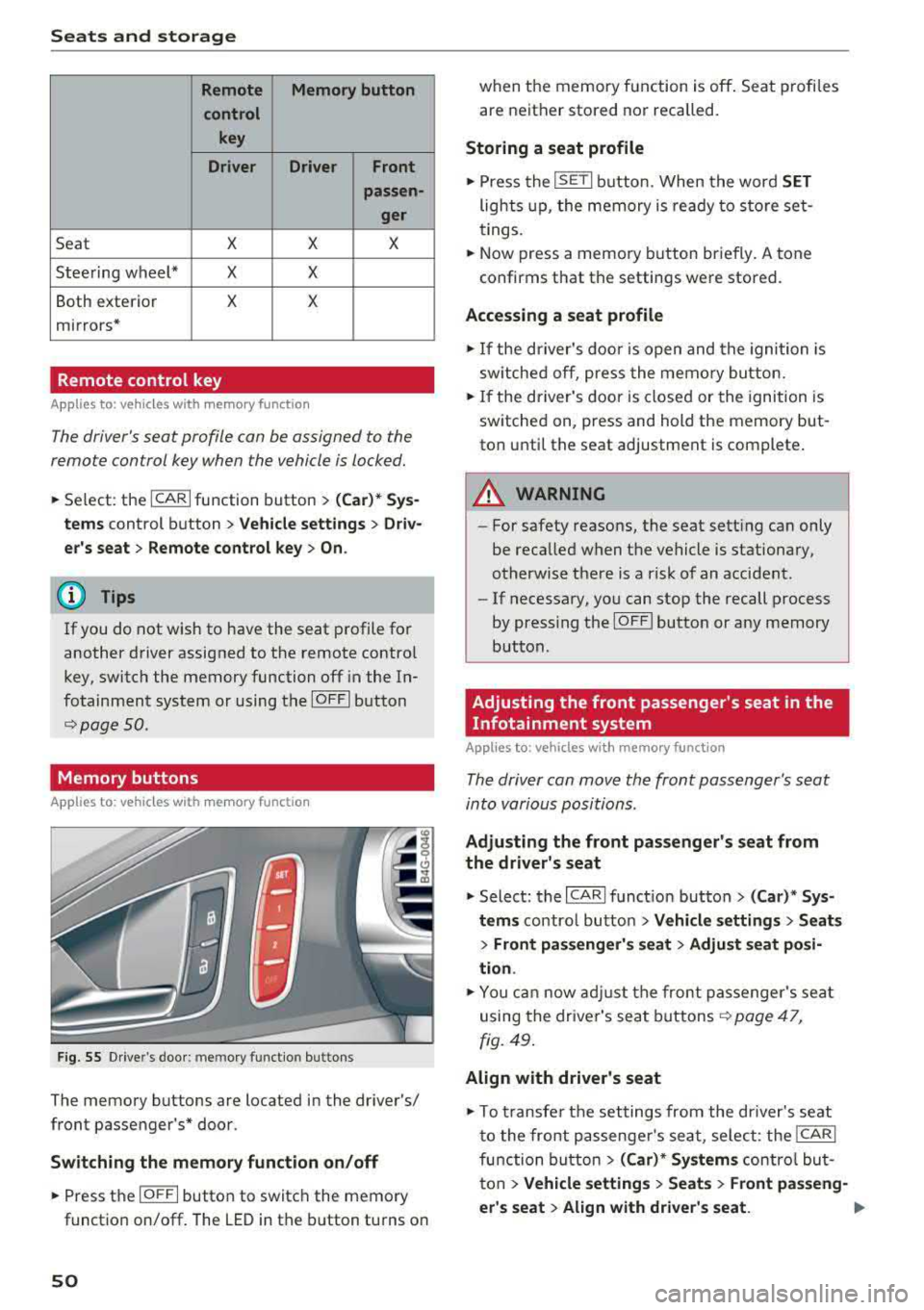
Remote Memory button
control key
Driver Driver
Front
passen-
ger
Seat X X X
Steering wheel* X X
Both exterior X X
mirrors*
Remote control key
Applies to: vehicles with memory function
The driver 's seat profile can be assigned to the
remo te control key when the vehicle is locked.
.,.. Se lect : the ICARI function button > (Car)* Sys
tems
control button > Vehicle settings > Driv
er 's seat
> Remote control key > On.
(D Tips
If you do not wish to have the seat profile for
another driver assigned to the remote contro l
key, switch the memory function off in the In
fotainment system or using the
IOFFI button
r::::;, page 50 .
Memory buttons
App lies to: vehicles with memory function
F ig. 55 Drive r's door : m em ory functio n bu ttons
The memory buttons are located in the driver's/
front passenger 's* door.
Switching the memory function on/off
.,.. Press the IO FF I button to switch the memory
functio n on/off. The LED in the button turns on
50
when the memory function is off . Seat profiles
are neither stored nor recalled.
Storing a seat profile
.,.. Press the ISET I button . When the word SET
lights up, the memory is ready to store set
tings.
.,.. Now press a memo ry button briefly. A tone
confirms that th e settings were stor ed.
Accessing a seat profile
.,.. If the driver's door is open and the ignition is
sw itched off, press the memory button.
.,.. If the driver's door is closed or the ignition is
switched on, press and hold the memory but
ton until the seat adjustment is complete .
A WARNING
-For safety reasons, the seat setting can only
be recalled when the vehicle is stationary,
otherwise there is a risk of an accident .
-If necessary, you can stop the recall process
by press ing the
IOF FI butto n or any memory
button .
Adjusting the front passenger's seat in the
Infotainment system
Applies to: vehicles with memory function
The driver can move the front passenger's seat
into various positions .
Adjusting the front passenger's seat from
the driver's seat
.,. Select: the I CARI function button > (Car)* Sys
tems
control butto n > Vehicle settings > Seats
> Front passenger's seat > Adjust seat posi
tion .
.,.. You can now adjust the front passenger's seat
using the driver's seat buttons
r:::;, page 47,
fig. 49.
Align with driver's seat
.,. To trans fer the settings from the dr iver's seat
to the front passenge r's seat, select: the
I CAR I
function button > (Car)* Systems control but
ton
> Vehicle settings > Seats > Front passeng-
er 's seat
> Align with driver 's seat. .,..
Page 68 of 266
Driving
When not being used, a roof rack should be removed to decrease the wind resistance of the ve
hicle. You will save approximately 12% of your
fuel when at speeds from 62- 7 5 mph
(100-120 km/h) .
Save energy
The engine drives the generator, which generates
electricity ; the fuel consumption also increases
with the demand for electricity. Therefore, switch electrical equipment off when you no longer
need it. Examples of equipment that uses a lot of
energy are air blowers at a high setting, the rear
window defogger and seat heating* .
@ Note
Do not leave engine idling unattended after
starting. If warning lights should come on to
ind icate improper operation, they would go
unheeded. Extended idling also produces
heat, which could result in overheating or
other damage to the vehicle or other proper-
ty.
@ Note
- Have your vehicle maintained properly and
in accordance with the service recommenda
tions in your Warranty
& Maintenance book
let. Lack of proper maintenance as well as
improper use of the vehicle will impair the
function of the emission control system and
could lead to damage.
- Do not alter or remove any component of
the Emission Control System unless ap proved by the manufacturer .
- Do not alter or remove any device , such as
heat shields, switches, ignition wires,
valves, which are designed to protect your
vehicle's Emission Control System and other important vehicle components .
@ Tips
The consumption estimates as published by
ENVIRONMENTAL PROTECTION AGENCY (EPA) and Transport Canada may not corre
spond to your actual consumption on the
road, which will vary depending upon vehicle
66
load and speed, road and weather conditions ,
trip length, etc.
Steering
Manual steering wheel position adjustment
Applies to: vehicles with manual steering wheel adjustment
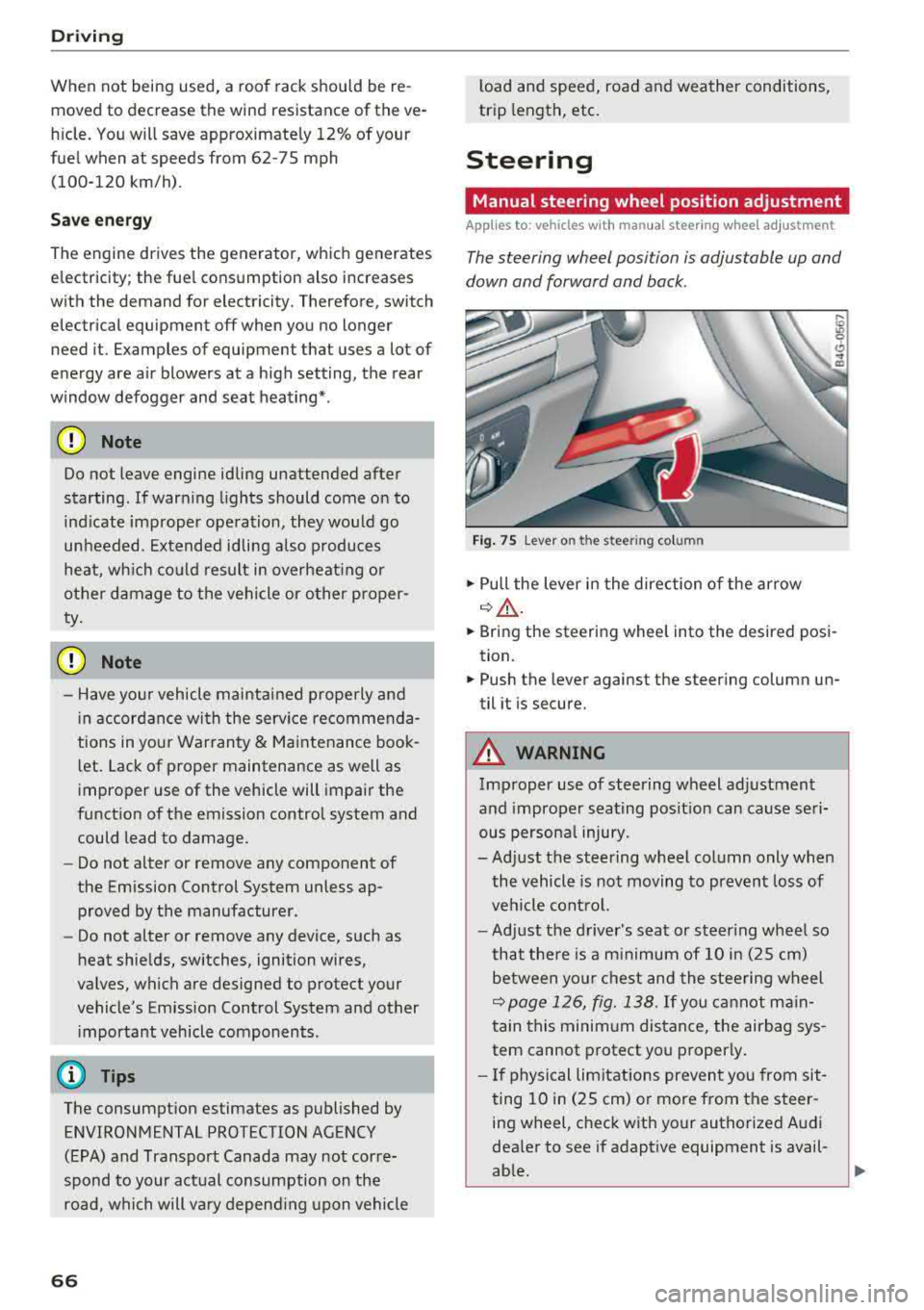
The steering wheel posi tion is adjustable up and
down and forward and back .
Fig. 75 Lever on th e stee ring column
.,. Pull the lever in the direction of the arrow
~A -
... Bring the steering wheel into the desired posi
tion .
.,. Push the lever against the steering column un
til it is secure.
A WARNING
Improper use of steering wheel adjustment
and improper seating position can cause seri
ous personal injury.
-Adjust the steering wheel column only when
the vehicle is not moving to prevent loss of
vehicle control.
-Adjust the driver's seat or steering wheel so
that there is a minimum of 10 in (25 cm)
between your chest and the steering wheel
~page 126, fig. 138. If you cannot main
tain this minimum distance, the airbag sys
tem cannot protect you properly .
- If physical limitations prevent you from sit
ting 10 in (25 cm) or more from the steer
ing wheel, check with your authorized Audi
dealer to see if adaptive equipment is avail-
able.
.,.
Page 70 of 266
Driving
the ignition is switched off. After entering the ve
hicle, the steering co lumn returns to the stored
position once the ignition is sw itched on.
Starting and stopping
the engine
Starting the engine
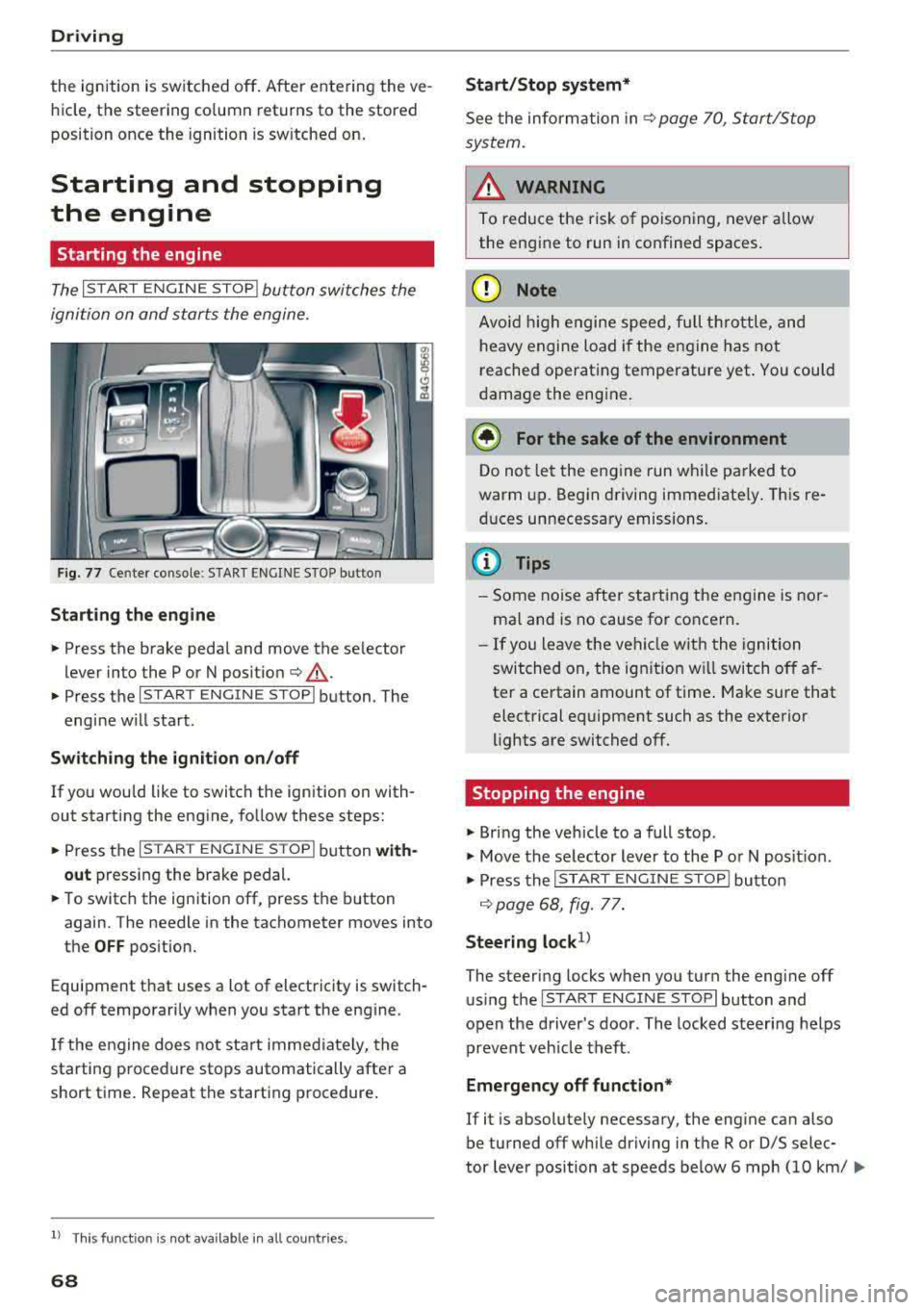
The I S TAR T ENGINE ST OP I button switches the
ignition on and starts the engine.
Fig. 77 Center co nsole : START ENGINE STO P butto n
Starting the engine
.. Press the brake pedal and move the se lector
lever into the P or N po sit ion
¢ ,A .
.. Press the I START ENGIN E STOPI button . The
engine will start .
Switch ing the ignition on /off
If you wou ld like to switch the ignition on with
out starting the engine, follow these steps:
.. Press the I S TAR T ENG IN E STOPI button with
out
pressing the brake pedal.
.. To switch the ignition off, press the button
again. The needle in the tachometer
moves into
the
OFF position.
Equipment that uses a lot of electricity is switch
ed off temporari ly when you start the engine .
If the engine does not start immediate ly, the
starting procedure stops automatically after a
short time. Repeat the starting procedure .
ll This fun ctio n is not availab le in all c oun tries.
68
Start /Stop system*
See the information in ¢ page 70, Start/Stop
system.
A WARNING
To reduce the risk of poisoning, never allow
the engine to run in confined spaces.
(D Note
Avoid high engine speed, full th rottle, and
heavy engine load if the engine has not
reached operating temperature yet . You could
damage the engine.
@ For the sake of the environment
Do not let the engine run while parked to
warm up. Begin driving immediate ly. This re
duces unnecessary emissions.
(D Tips
- Some noise after starting the engine is nor
ma l and is no cause for concern.
- If you leave the veh icle w ith the ignition
switched on, the ignition w ill switch off af
ter a certain amount of time . Make sure that
electrical equipment such as the exterior
lights are switched off .
Stopping the engine
.. Bring the vehicle to a full stop .
.. Move the selector lever to the P or N posit io n.
.. Press the I START ENGINE STOP I button
¢ page 68, fig. 77.
Steering lock1>
The steering locks when you turn the engine off
using the
I STAR T ENGIN E STOPI button and
open the driver's door . The locked steering helps
prevent veh icle theft .
Emergency off function*
If it is absolutely necessary, the engine can also
be turned off while driving in the R or D/S selec-
tor lever position at speeds be low 6 mph (10 km/
...
Page 77 of 266
a co ,...,
N
" N ,...,
0 0 \,;J '
transmissions and allow the vehicle to accelerate without a noticeab le interruption in tract ion .
Appl ies to: veh icles wit h a t iptro nic tra nsm iss io n
Power is transferred using a torque converter .
Selector lever positions
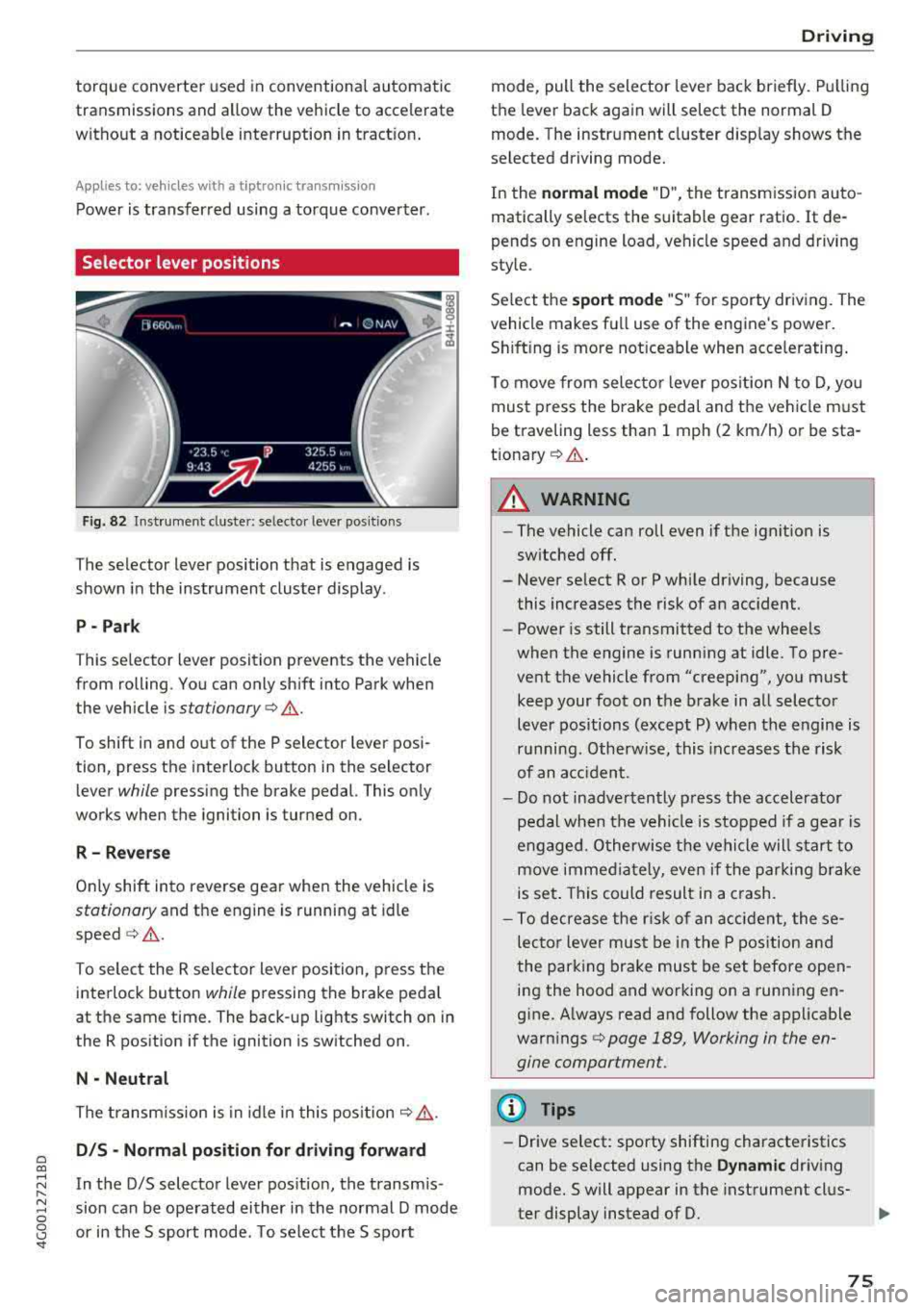
Fig. 82 Instrument cluste r: se lecto r leve r po sition s
The selector lever position that is engaged is
shown in the instrument cluster display .
P- Park
T his selector l ev er position prevents the vehicle
from rolling. You can only sh ift into Park when
the vehicle is
stationary ¢.&. .
To shift in and out of the P selector lever posi
tion, press the interlock button in the selector
lever
while pressing the brake pedal. This only
works when the ignition is turned on.
R - R everse
Only shift into reverse gea r when the vehicle is
stationary and the engine is running at idle
speed ¢.&. .
To select the R se lector lever position, press t he
interlock button
while pressing the brake peda l
at the same time. The back-up lights switch on in
the R position if the ignition is switched on .
N -Neutral
The transm iss ion is in idle in this pos it ion ¢,&. .
DIS -Normal pos iti on for d riv ing forward
In the D/S selector lever pos ition, the transm is
sion can be ope rated either in the normal D mode
or in the S sport mode . T o select the S sport
D rivi ng
mode, pull the selector lever back briefly. Pulling
the lever back again will select the normal D
mode. The instrument cluster d isp lay shows the
selected driving mode.
In the
n o rmal mode "D", the transmission auto
matically selects the suitable gear ratio .
It de
pends on engine load, vehicle speed and driving
style.
Se lect the
sport mode "S " for sporty driving. The
vehicle makes fu ll use of the engine's power.
Sh ift ing is more not iceable when accelerating .
To move from selecto r lever pos ition N to D, you
must press the brake pedal and the vehicle must
be traveling less than 1 mph (2 km/h) or be sta
t ionary ¢.&. .
A WARNING
----
-The vehicle can roll even if the ignition is
sw itched off.
- Never se lect R or P while driving, because
this increases the risk of an accident.
- Power is still transmitted to the wheels
when the engine is running at idle . To pre
vent the vehicle from "creeping", you must keep your foot on the b rake in all selector
lever positions (except P) when the engine is
r u nning. Otherwise, this inc reases the risk
of an acc ident.
- Do not inadvertently p ress the accelerator
pedal when the vehicle is stopped if a gea r is
engaged. O therwise the ve hicle will start to
move immed iate ly, even if the parking brake
is set . This could result in a crash.
- To decrease the r is k of an accident, these
lecto r lever mus t be in the P pos ition and
the parking brake must be set before open
ing the hood and working on a running en
g ine. A lways read and follow the applicable
warn ings
¢ page 189, Working in the en
gine compartment.
(D Tips
- Drive select : sporty shifting characteristics
can be se lected using the
Dynamic driv ing
mode.Swill appear in the instrument clus
ter display instead of D.
75
Page 91 of 266

a co ,...,
N
" N ,...,
0 0 <..:l '
•-Adaptive cru ise control is switched on . No
objects are detected ahead. The stored speed is
maintained .
•-An object a head was de tected. The adap tive
cr uise control system regula tes the speed and
d istance to the ob ject ahead and acce lerates/
brakes a utomatically.
r-j -Adaptive cru ise con trol is switched on . An
object ahead was detec ted . Your vehicle rema ins
stopped and w ill not s tart dr iv ing automat ica lly.
• -The automatic brak ing is no t enough to
main tain a sufficient distance to a n object ahead.
You must inte rvene
¢ page 91, Reques t for
driver intervention.
© Instrument cluster display
I f adaptive cruise control is not shown in the in
strument cluster disp lay, yo u can call it up using
the mu ltifu nction stee ring wheel b uttons
¢ page 19.
Based on the graphics in the d isp lay, you can de
termine if the system is ma inta ining a distance to
the object ahead and what that distance is.
No vehicle -no object was detected ahead .
White vehicle -an object was detected ahead.
Red vehicle -request for driver intervention
¢ page 91 .
Both arrow s on the scale © indicate the dis tance
to the object a head . No ar row appea rs when the
ve hicle is on an open road and there is no object
ahead. If an object is detected ahead, the arrow
moves on the scale.
T he green zone on the sca le ind icates the s tore
d ista nce . For information on changing the dis
tance, refer to
~ page 90. If the distance se
lect ed is exce eded or not reached, th e arrow
moves into the red zone on the scale.
A WARNING
If you press the ISE TI button when d riving at
speeds below 20 mph (30 km/h), the vehicle
accelerates automat ically up to 20 mph (30
A ssi st a nce systems
km/h), wh ic h is the minim um speed that can
be set .
(D Tips
-If you switch the ignit ion or the adaptive
cruise control system off, the set speed is
erased fo r safety reasons .
-The e lectronic stabilization control (ESC)
and the anti -slip -regulation (ASR) are auto
matically switched on when the adaptive
cruise cont rol is switched on.
Changing the speed
Applies to: vehicles with Audi adaptive cruise control
0
f
•
0
Fi g. 9 4 Operating lever : chang ing t he sp eed
.,. To increase or reduce the speed in increments,
tap the lever up o r down.
.,. To increase or decrease the speed quick ly, hold
the lever up or down until the red LED @reach
es the des ired
speed ¢ page 88, fig . 93.
After each change, the new sto red speed appears
briefly in the information
line ¢ page 88 , fig . 93
@ .
Driving in stop-and-go traffic
Applies to: vehicles with Audi adapt ive cru ise control
The adaptive cru ise control system also assists
you in stop-and-go traffic .
Stopping automatically
If an object ahead stops, your vehicle will brake
and stay at a stop, within the limits of t he sys
tem . The Sta rt/Stop system* can be used as usu -
al.
..,_
89
Page 98 of 266

Assistance systems
-Under certain conditions such as ruts in the
road, a banked roadway or crosswinds, the
corrective steering alone may not be enough
to keep the vehicle in the middle of the lane.
- For safety reasons, active lane assist must
not be used when there are poor road and/
or weather conditions such as slippery
roads, fog, gravel, heavy rain, snow and the
potential for hydroplaning. Using active lane
assist under these conditions may increase
the risk of a crash.
Switching on/off
A pplies to: ve hicles w ith Audi active lane assist
-;g
9 ::i 00 CD
Fig. 99 Turn signa l lever: button for active lane assist
Fig. 100 Windshield: camera window for active lane assist
• Press the button to switch the system on and
off ¢
fig. 99. The. or. indicator light in
the instrument cluster turns on or off.
Indicator lights
• Ready: the indicator light turns on when the
system is ready for use . The system can now be
operated .
• Not ready: the indicator light turns on if the
system is switched on but is inoperable. This may
be due to the following reasons:
96
-Th ere is no lane marker line.
-The relevant lan e marker lines are not detected
(for example, markings in a construction zone
or because they are obstructed by snow, dirt,
water or lighting).
-Th e vehicle speed is below the activation speed
of approximate ly 40 mph (65 km/h).
-The lane is too narrow or too wide.
-The curve is too narrow.
-The driver's hands are not on the steering
wheel.
@ Tips
Make sure the camera's field of view
¢ fig. 100 is not obstructed by stickers or any
thing else. For information on cleaning, see
¢page 221.
View in instrument cluster display
Appl ies to: vehicles wi th Aud i ac tive la ne ass ist
Fig. 101 Instrument cl uste r: active lane assist is sw itched
on and providing warnings
Fig. 102 Instrument cluster: active lane assist is switched
on but not ready to provide warnings
You can call up the active lane assist display us
ing the buttons in the multifunction steering
wheel
¢page 19. Ill>
Page 104 of 266
Assistance systems
that are between approximately 32 ft (10 m) and
295
ft (90 m) in front of the vehicle and within
the detection zone. Within the limits of the sys
tem
c:> page 102, a pedestrian or wild animal de
tected when the low beams are switched on is
highlighted in yellow
c:> fig. 108. Animal recogni
tion is not active within highly developed areas.
The system only detects large wild animals such
as deer.
(D Tips
If another display such as navigation replaces
the image from the night vision assist
the~--,
symbol appears in a tab c:>fig. 109. You can
access night vision assist using the multifunc
tion steering wheel buttons
c:> page 20.
Pedestrian and wild animal warning
Applies to: vehicles with night vision assist
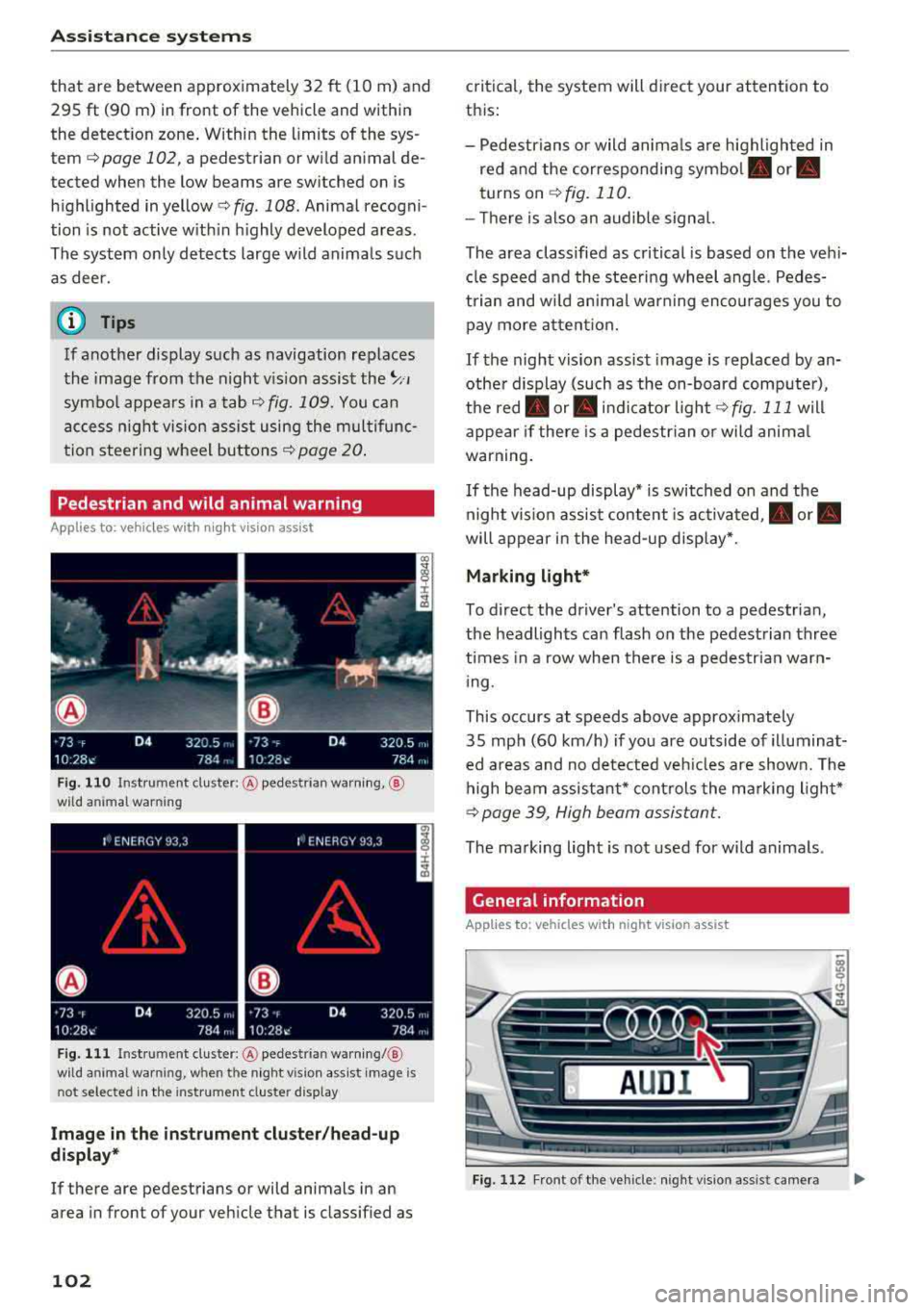
Fig . 110 Inst rument cluster :® pedestrian warning, ®
wild animal warning
Fig. 111 In strument cl uster: ® pedestrian warning/ @
w ild an imal warning, when the night vision assist image is
n ot selected in the instrument cl uster display
Image in the instrument cluster/head-up
display*
If there are pedestrians or wild animals in an
area in front of your vehicle that is classified as
102
critical, the system will direct your attention to
this :
- Pedestrians or wild animals are highlighted in
red and the corresponding
symbol . or.
turns on c:>fig. 110.
- There is also an audible signal.
The area classified as critical is based on the vehi
cle speed and the steering wheel angle. Pedes
trian and wild animal warning encourages you to pay more attention.
If the night vision assist image is replaced by an
other display (such as the on-board computer),
the
red . or. indicator light c:> fig. 111 will
appear if there is a pedestrian or wild animal
warning.
If the head-up display* is switched on and the
night vision assist content is activated, .
or.
will appear in the head-up display*.
Marking light*
To direct the driver's attention to a pedestrian,
the headlights can flash on the pedestrian three
times in a row when there is a pedestrian warn
ing.
This occurs at speeds above approximately
35 mph (60 km/h) if you are outside of illuminat
ed areas and no detected vehicles are shown. The
high beam assistant* controls the marking light*
c:> page 39, High beam assistant.
The marking light is not used for wild animals .
General information
Applies to: vehicles with night vision assist
Fig. 112 Fro nt of the vehicl e: night vision assist camera
Page 105 of 266

a co ,...,
N
" N ,...,
0 0 <..:l '
of the night vision assist system:
- Poor visibility such as snow, rain, fog or heavy
spray
- Dirty lens on the night vision assist camera
Make sure the night vision assist camera
c::> fig. 112 is not covered by stickers, deposits or
any other obstructions because that can affect
the camera function. For information on clean
ing, see
c::> page 221 .
The pedestrian and wild animal recognition de
pends on the temperature difference between
the person/wild animal and the background. Peo ple/wild animals may not be detected if the dif
ference is too small. The pedestrian/wild animal
marking and the marking light* deactivate at
temperatures above approximately 77 °F (25 °C)
and during daylight.
If the night vision assist im
age is selected in the instrument cluster display,
then the
D symbol appears at the top on the
right side .
_&, WARNING
Pay attention to traffic and the area around
your vehicle when night vision assist is switch
ed on. The driver is always responsible for as
sessing the traffic situation.
- Night vision assist can only warn about peo
ple and wild animals located within the visu
al range of the infrared camera. The visual
range corresponds to the image in the in
strument cluster display.
- Night vision assist may not detect people or
wild animals and mark them if
-they are not in an upright position, for ex
ample if they are sitting or lying down
and/or
-the silhouette in the display appears in
complete or interrupted, for example be
cause the person is partially covered by a
vehicle or the animal is partially covered
by tall grass. This could increase the risk
of an accident.
- Never try to swerve around animals if doing
so will endanger you or other road users, be
cause this increases the risk of an accident.
Assistance systems
(D Tips
-Even though the system evaluates the
shape and heat given off by all detected ob
jects, there are limits to the system . There
may be false warnings.
-For technical reasons, the image pauses in
split second intervals.
Switching on/off
Applies to: vehicles with night vision assist
Fig. 113 Area around the light switc h: night vis ion assist
button
Requirement: switch the ignition on and turn the
light switch to the
AUTO position.
.. Press the~ button c::> fig. 113. The heat image
from the night vision camera appears in the in
strument cluster display .
., Press the~ button again to switch the night
vision assist off.
If conditions are bright enough, night vision as
sist can be switched on without moving the light
switch to the
AUTO position. Pedestrian and wild
animal highlighting and warnings are only active
when it is dark outside and the headlights are
switched on.
Adjusting the contrast
Applies to: vehicles with night vision assist
.. Select: the I CAR! function button > (Car)* Sys
tems
contro l button > Driver assistance >
Night vision assist contrast .
When the night vision assist is switched on and
the image is visible in the instrument cluster dis
play, you can adjust the contrast in the image
from
Min to Max .
103
Page 122 of 266
Intelligent Technology
driving too close to objects ahead . The ESC
and its integrated systems cannot always prevent coll isions
-there is still a risk of ac
cidents!
- Press the accelerator pedal carefully when
accelerating on even, slippery surfaces such as ice and snow . The drive wheels can spin
even when these control systems are instal-
Switching on /off
led and this can affect driving stability and
increase the risk of a collision.
(D Tips
-ABS and ASR only function correctly when
all four wheels are equipped with identical
tires. Different tire sizes can lead to a reduc
tion in engine power.
- You may hear noises when the systems de
scribed are working.
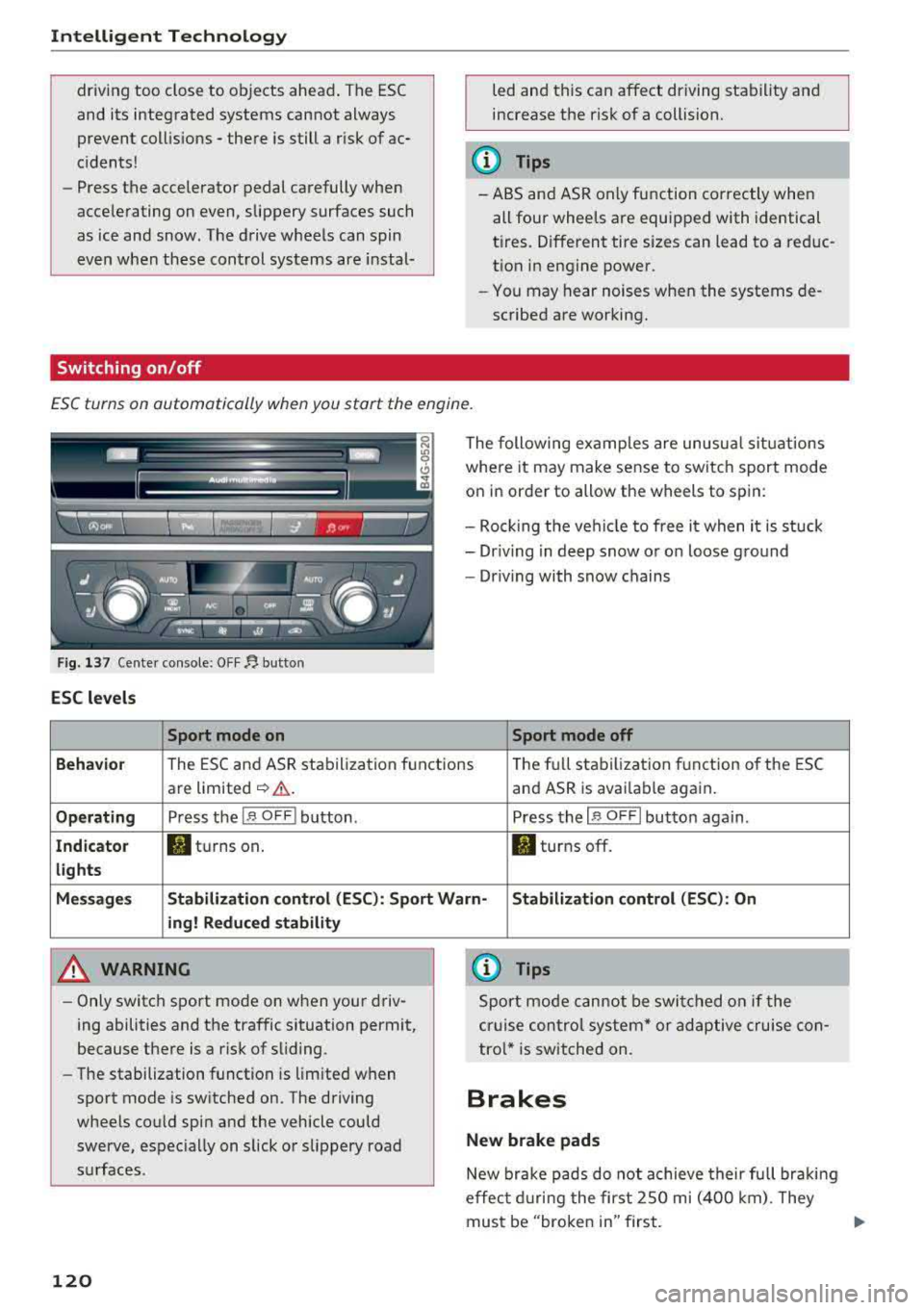
ESC turns on automatically when you start the engine .
Fig. 137 Ce nter con sole: OF F~ button
ESC levels
Sport mode on
The following examples are unusual situations
where it may make sense to switch sport mode
on in order to allow the wheels to spin:
- Rock ing the vehicle to free it when it is stuck
- Dr iving in deep snow or on loose ground
- Driving with snow chains
Sport mode off
Behavior
The ESC and ASR stabilization f unctions Th
e fu ll stabilization f unction of the ESC
are limited
~ &. . and ASR is avai lab le again.
Operating Press the I~ O FF I button . Press the I~ OF F! button again .
Indicator filturns on. . turns off.
lights
Messages Stabilization control (ESC): Sport Warn-Stabilization control (ESC): On
ing! Reduced stability
A WARNING
-Only switch sport mode on when your driv
ing abilities and the traffic situation permit,
because there is a risk of sliding .
- The stabilization function is limited when
sport mode is switched on. The driving
wheels could spin and the vehicle could
swerve, espec ially on slick or slippery road
surfaces .
120
-
{l) Tips
Sport mode cannot be switched on if the
cruise control system* or adaptive cruise con
tro l* is switched on .
Brakes
New brake pads
New brake pads do not achieve their full braki ng
effec t during the first 2SO mi (400 km). They
must be "broken in" first.
Page 127 of 266

a co .... N
" N .... 0 0 \.J '
Basics
Safe driving habits
Please remember -safety first!
The individual safety features of your vehicle can
work together as a system to help protect you
and your passengers in a wide range of accidents.
These features cannot work as a system if they
are not always correctly adjusted and correctly
used .
This chapter contains important informat ion,
tips, instructions and warnings that you need to
read and observe for your own safety, the safety
of your passengers and others . We have summar
iz ed here what you need to know about safety
belts, airbags, child restraints as well as child
safety. Your safety is for us priority number 1. Al
ways observe the information and warnings in
this section -for your own safety as well as that
of your passengers.
The informa tion in t his section applies to all
model versions of your vehicle. Some of the fea
tures described in this sections may be standard
eq uip ment on some models, or may be optional
equ ipment on others. If you are not sure, ask
your author ized Audi dealer.
A WARNING
-Always make sure that you follow the in
struct ions and heed the WARNINGS in this
Manual. It is in your i nterest and in the in
terest of your passengers .
-
-Always keep the complete Owner's Litera
ture in your Audi when you lend or sell yo ur
vehicle so that this important information
w ill always be available to the driver and
passengers.
-Always keep the Owner's literature handy so
that you can find it easily if you have ques
tions .
Driving safety
Important things to do before driving
Safety is everybody 's job ! Vehicle and occupant
safety always depends on the informed and care
ful driver .
For your safety and the safety of your passen
gers,
before driving always:
.. Make sure that a ll lights and signals are operat
ing correctly.
.. Make sure tha t the tire pressure is correct .
.. Make sure that all w indows are clean and afford
good vis ibility to the outs ide.
.. Secure all luggage and othe r items ca refully
¢ page 54, ¢page 53 .
.. Make sure that nothing can interfere with the
peda ls .
.. Adjust front seat, head restraint and mirrors
correct ly for your height.
.. Instruct passengers to adjust the head re
straints according to their height.
.. Make sure to use the right child restraint cor
rectly to protect children
¢ page 166, Child
safety .
.. Sit properly in your seat and make sure t hat
your passengers do the
same¢ page 47, Seats
and storage.
.. Fasten your safety belt and wear it properly. Al
so instruct your passengers to fasten their safe
ty belts
properly ¢ page 134 .
What impairs driving safety?
Safe driving is directly related to the condition of
the vehicle , the driver as well as the driver 's abili
ty to concentrate on the road without being dis
tracted.
The driver is responsible for the safety of the ve
hicle and a ll of its occupants. If your ability to
drive is impa ired, safety risks for everybody in the
vehicle increase and you a lso become a hazard to
everyone else on the road
¢ &_ . Therefore:
.. Do not let yourse lf be distracted by passengers
or by using a cellular telephone .
.. NEVER drive when your driving abi lity is im
pa ired (by med ications, alcohol, drugs, etc .) .
.. Observe all traffic laws, rules of the road and
speed lim its and plain common sense .
125