warning light AUDI A6 2018 Owner's Guide
[x] Cancel search | Manufacturer: AUDI, Model Year: 2018, Model line: A6, Model: AUDI A6 2018Pages: 266, PDF Size: 41.38 MB
Page 71 of 266
a co .... N
" N .... 0 0 \.J '
I START ENGINE STOPI button and also press the
brake pedal.
A WARNING
- Never turn off the engine before the vehicle
has come to a complete stop. The full func
tion of the brake booster and the power
steering is not guaranteed. You may need to
use more force when braking or steering.
Because you cannot brake and steer as you
usually would, this could lead to accidents
and serious injuries.
- If you leave the vehicle, switch the ignition
off and take the vehicle key with you . Other
wise, the engine could be started or electri
cal equipment such as the power windows
could be operated. This can lead to serious
injury.
- For safety reasons, always park the vehicle
with the selector lever in the P position .
Otherwise, there is the risk that the vehicle
could roll unintentionally.
0 Note
If the engine has been under heavy load for
an extended period of time, heat builds up in
the engine compartment after the engine is
switched off and there is a risk of damaging
the engine. For this reason, let the engine run
at idle for approximately two minutes before
shutting it off .
(D Tips
For up to 10 minutes after stopping the en
gine, the radiator fan may turn on again auto
matically or it may continue to run (even if
the ignition is switched off) for the following
reasons:
- The coolant temperature is increasing due
to trapped heat.
- If the engine is warm and the engine com
partment also heats up from strong sun
light.
Messages
Turn off ignition before leaving car Driving
This
message appears and a warning tone sounds
if you open the driver's door wh en the ignition is
switched on.
Press brake pedal to start engine
This message appears if you do not press the
brake pedal when starting the engine.
fll 1s key in the vehicle?
This indicator light turns on and this message ap
pears if the ignition key was removed from the
vehicle when the engine was running. If the igni
tion key is no longer in the vehicle , you cannot
switch on the ignition or start the engine once
you stop it. You also cannot lock the vehicle from
the outside .
Shift to P, otherwise vehicle can roll away.
Doors do not lock if lever is not in P.
This message appears for safety reasons if the
transmission is not in the P position when you
switch the ignition off . Move the selector lever to
the "P" position . Otherwise the vehicle is not pro
tected from rolling and it cannot be locked.
II Key is not recognized. Hold back of key
against marked area. See owner's manual
If the indicator light turns on and this message
appears, there is a malfun ction
c> page 70 .
Turn off ignition before leaving car. Battery is
discharging
This message appears if the driver's door is
opened while the ignition is switched on. Always
switch off the ignition if you are leaving the vehi
cle. Also see
c> page 71.
Shift to P and turn off ignition before leaving
car, otherwise vehicle can roll away
This message appears if the driver's door is
opened while the ignition is switched on and the
selector lever is not in the P position . Move the
selector lever into the P position and switch the
ignition off when you exit the vehicle. Otherwise
the vehicle could roll. Also see
c> page 71.
69
Page 74 of 266
Driving
If the Start/Stop system has not turned of f the
engine or if you have switched the Start/Stop sys
tem off manually, the ignition will not be auto
matically switched off and the engine w ill contin
ue to run
c:> .&. .
A WARNING
To reduce the risk of poisoning, never allow
the engine to run in confined spaces.
(D Tips
If you select the D or N se lector lever position
after shift ing into reverse, the vehicle must
be driven faster than 6 mph (10 km/h) in or
de r for the engine to switch off again .
Manually switching the Start/Stop system
off/on
Applies to: vehicles with Start/Stop system
If you do not wish to use the system, you can
switch it off manually.
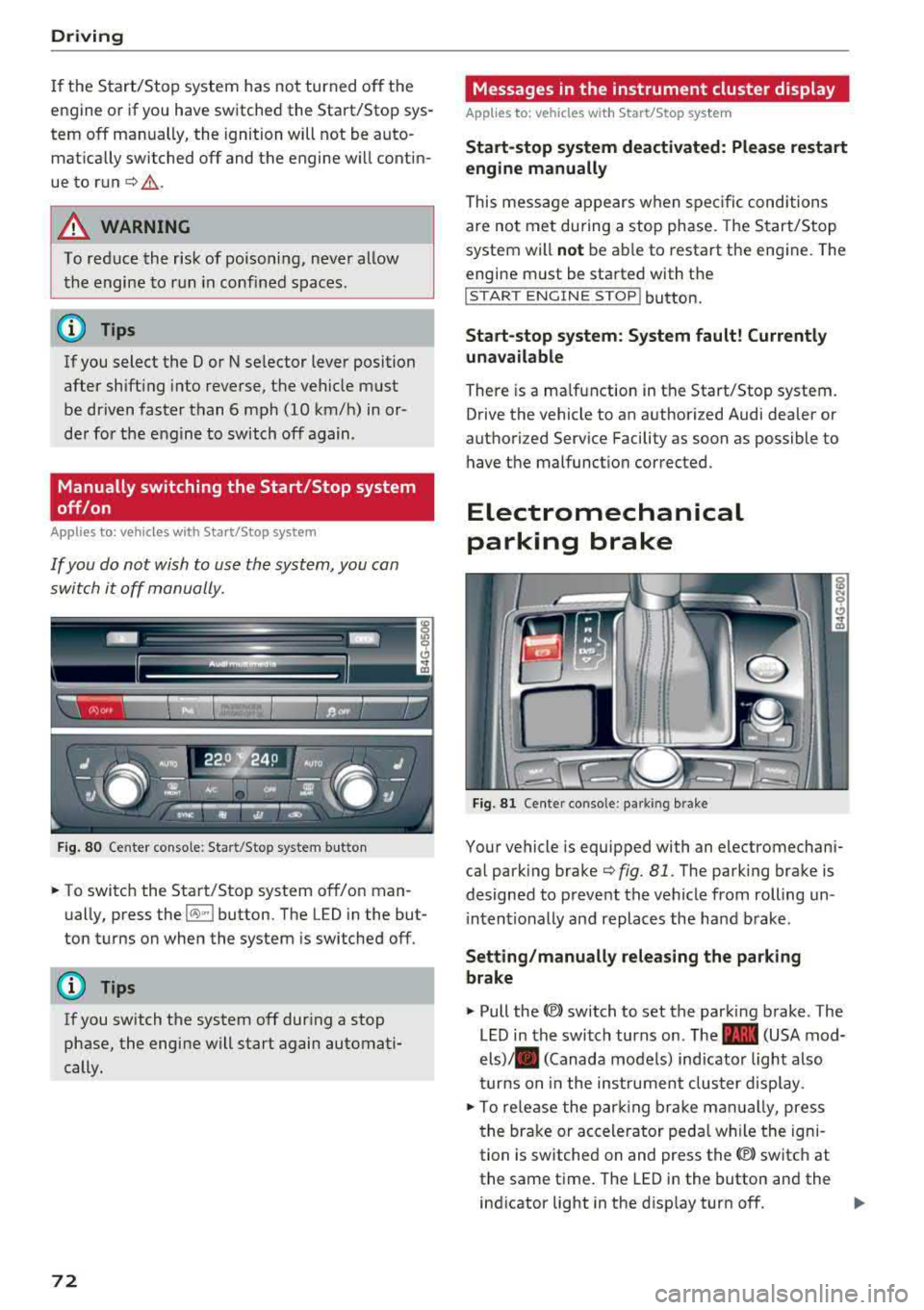
F ig . 80 Center conso le: Start/Stop system button
-
.. To switch the Start/Stop system off/on man
ually, press the
l(>:)ml button. The LED in the but
ton turns on when the system is switched off.
(D Tips
If you switch the system off during a stop
phase, the engine will start again automati
cally.
72
Messages in the instrument cluster display
Applies to: vehicles with Start/Stop system
Start -stop system deact ivated: Please restart
engine manually
This mess age appears when spec ific conditions
are not met during a stop phase. The Start/Stop
system will
not be ab le to restart the engine. The
engine m ust be started with the
!START ENGINE S T OP ! button.
Start -stop system: System fault! Currently
una vailable
There is a malfunction in the Start/Stop system.
Drive the vehicle to an authorized Audi dealer or
authorized Service Facility as soon as possible to have t he malfunction corrected.
Electromechanical
parking brake
Fi g. 81 Cente r conso le : pa rk in g brake
Your vehicle is equipped with an electromechani
cal park ing brake
c:>fig. 81 . The park ing brake is
designed to prevent the vehicle from rolling un i ntentionally and replaces the hand brake .
Setting/manually releasing the parking
brake
.. Pull the<®> switch to set the parking brake . The
LED in the switch turns on. The
-(USA mod
els)/ . (Canada models) ind icator light also
turns on in the instrumen t cluster display .
.. To re lease the par king br ake man ually, press
the brake or accelerator peda l w hil e the igni
tion is switched on and press the
(®) switch at
the same time. The LED in the button and the
ind icator light in the disp lay turn off.
Page 77 of 266
a co ,...,
N
" N ,...,
0 0 \,;J '
transmissions and allow the vehicle to accelerate without a noticeab le interruption in tract ion .
Appl ies to: veh icles wit h a t iptro nic tra nsm iss io n
Power is transferred using a torque converter .
Selector lever positions
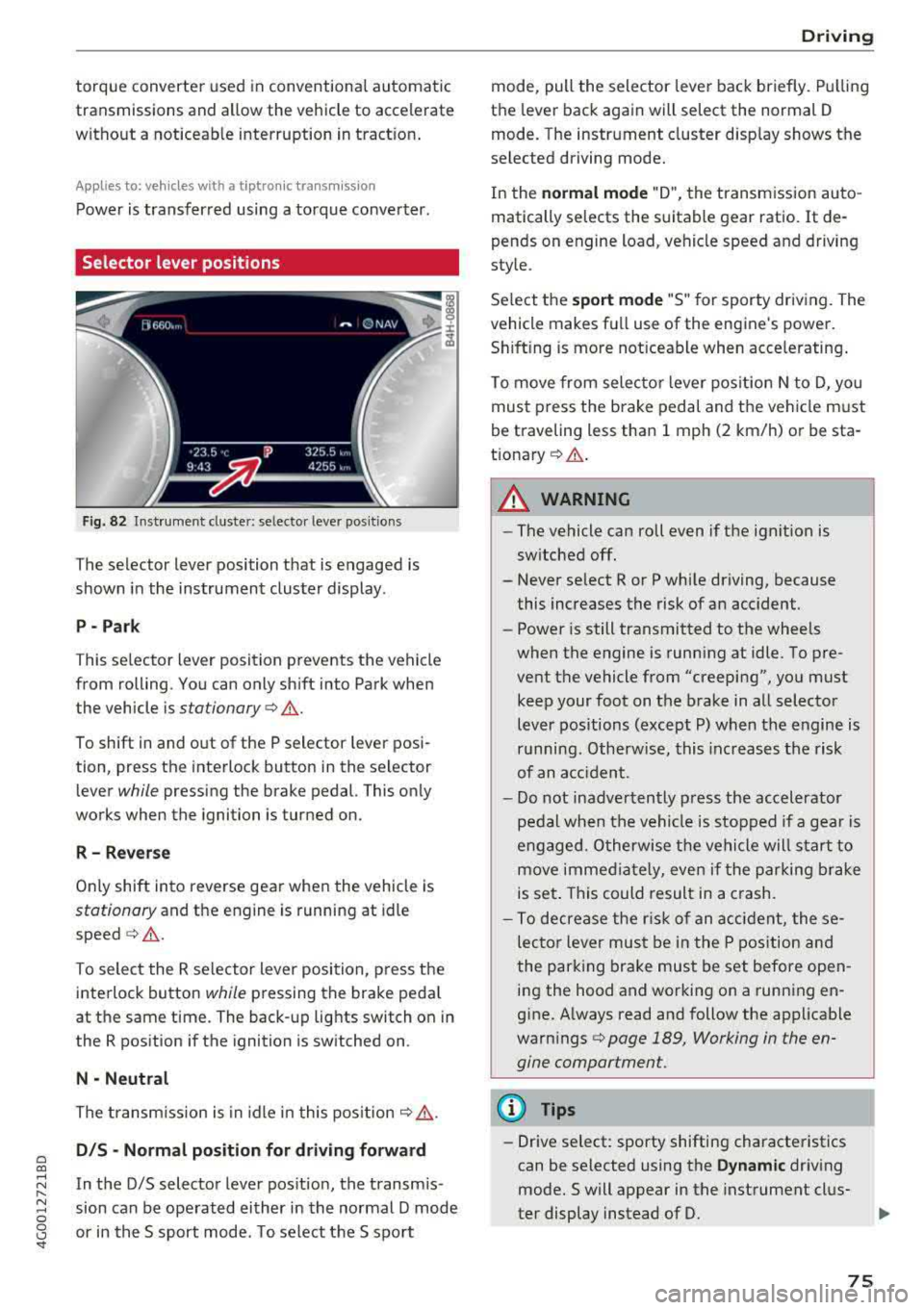
Fig. 82 Instrument cluste r: se lecto r leve r po sition s
The selector lever position that is engaged is
shown in the instrument cluster display .
P- Park
T his selector l ev er position prevents the vehicle
from rolling. You can only sh ift into Park when
the vehicle is
stationary ¢.&. .
To shift in and out of the P selector lever posi
tion, press the interlock button in the selector
lever
while pressing the brake pedal. This only
works when the ignition is turned on.
R - R everse
Only shift into reverse gea r when the vehicle is
stationary and the engine is running at idle
speed ¢.&. .
To select the R se lector lever position, press t he
interlock button
while pressing the brake peda l
at the same time. The back-up lights switch on in
the R position if the ignition is switched on .
N -Neutral
The transm iss ion is in idle in this pos it ion ¢,&. .
DIS -Normal pos iti on for d riv ing forward
In the D/S selector lever pos ition, the transm is
sion can be ope rated either in the normal D mode
or in the S sport mode . T o select the S sport
D rivi ng
mode, pull the selector lever back briefly. Pulling
the lever back again will select the normal D
mode. The instrument cluster d isp lay shows the
selected driving mode.
In the
n o rmal mode "D", the transmission auto
matically selects the suitable gear ratio .
It de
pends on engine load, vehicle speed and driving
style.
Se lect the
sport mode "S " for sporty driving. The
vehicle makes fu ll use of the engine's power.
Sh ift ing is more not iceable when accelerating .
To move from selecto r lever pos ition N to D, you
must press the brake pedal and the vehicle must
be traveling less than 1 mph (2 km/h) or be sta
t ionary ¢.&. .
A WARNING
----
-The vehicle can roll even if the ignition is
sw itched off.
- Never se lect R or P while driving, because
this increases the risk of an accident.
- Power is still transmitted to the wheels
when the engine is running at idle . To pre
vent the vehicle from "creeping", you must keep your foot on the b rake in all selector
lever positions (except P) when the engine is
r u nning. Otherwise, this inc reases the risk
of an acc ident.
- Do not inadvertently p ress the accelerator
pedal when the vehicle is stopped if a gea r is
engaged. O therwise the ve hicle will start to
move immed iate ly, even if the parking brake
is set . This could result in a crash.
- To decrease the r is k of an accident, these
lecto r lever mus t be in the P pos ition and
the parking brake must be set before open
ing the hood and working on a running en
g ine. A lways read and follow the applicable
warn ings
¢ page 189, Working in the en
gine compartment.
(D Tips
- Drive select : sporty shifting characteristics
can be se lected using the
Dynamic driv ing
mode.Swill appear in the instrument clus
ter display instead of D.
75
Page 79 of 266
a co .... N
" N .... 0 0 \.J '
If t he se lecto r lever is not in t he P posi tion when
you open the driver 's door, the vehicle could rol l.
The message
V ehicle ma y roll! Selector le ver not
in P
appears . A warning tone will a lso sound .
.,. Press and hold the brake pedal¢.&_ .
.,. Set the parking brake.
.,. Se lect the P selector lever position.
Unde r ce rtain c ircumstances, s uch as dr iv ing in
the mountains, i t may be useful to switch tempo
rari ly to the manua l shift program in order to
manually adjust the gears to the driving condi
tions
¢ page 78.
On inclines, activate the park ing brake fi rst and
then move the selector lever to the P position
¢ page 72 . Th is prevents the locking mechanism
from being loaded too heavi ly and wi ll make it
eas ier to move the se lector lever out of the P po
sition .
A WARNING
-The veh icle can roll even if the ignition is
switched off .
-Never leave your vehicle with the engine
runn ing wh ile in gear .
-Do not press the accelerator pedal when
changing the selector lever pos ition wh ile
the vehicle is stationary and the engine is
ru nning .
-
-Please note that a sma ll amount of power is
t ransmitted if the vehicle is stopped tempo
ra rily while in t he D/S or R selector lever po
s iti on. To redu ce the r isk of an accident, yo u
mus t continue press ing firmly on the brake
peda l w hil e the vehicle is stopped so that it
does not roll.
-Never engage the R o r P se lec to r level posi
tions while driving .
It could cause a crash.
-Be fore dr iv ing dow n a steep s lope, red uce
yo ur speed and shift in to a lower gear with
"ti ptro n i c" .
-Do not ride the brakes o r press the brake
peda l too often or too long w hen driving
down hill. Constant braking causes the
brakes to overheat and substantially re
duces braking performance, increases brak-
Driving
ing distance or causes comp lete fai lure of
the brake system.
-If you m ust stop on an incline, a lways ho ld
the vehicle in place wit h the foot brake or
parking brake to prevent it from rolling
back .
-Never hold the vehicle on an incline with a
slipp ing clutch. The clutch opens automati
cally when it becomes too hot from the
overload .
The@] indicator light turns on
a nd a message
appears~ page 79 when
the clutch is overloaded .
@ Note
-When stopping on an incl ine, do not try to
hold the ve hicle in place by pressing the ac
celerator peda l wh ile a d riving gear is se
lected. This ca n cause t he transmission to
over heat a nd can damage it. Se t the park ing
bra ke or p ress the brake pedal to p revent
t he vehicle from rolling.
-Allowing the vehicle to roll when t he engine
is stopped will damage the transmission be
cause it is not lubricated.
(D Tips
Fo r sa fety reasons, the park ing bra ke is re
l eased a utomatica lly on ly when t he driver 's
safety be lt is fastened.
Hill descent control
The hill descent control system assists the driver
when driving down hills .
Hill descent control is act ivated when the selec
tor leve r is in the D or S position and yo u press
the brake peda l. The transmission a utomatica lly
selects a gear that is suitable for the hi ll. Hill de
scent control tries to maintain the speed ach
ieved at the time of braking, w ith in physical and
technical lim itations . If may still be necessary to
adjust the speed w ith the brake pedal.
Hi ll descent control switches off once the hill lev-
els out or you press the accelerator pedal.
.,..
77
Page 80 of 266
Driving
On vehicles with a cruise control system*
¢ page 84, hill descent control is also activated
when the speed is set.
A WARNING
Hill descent control cannot overcome physical
limitations, so it may not be able to maintain
a constant speed under all condit ions. Always
be ready to apply the brakes.
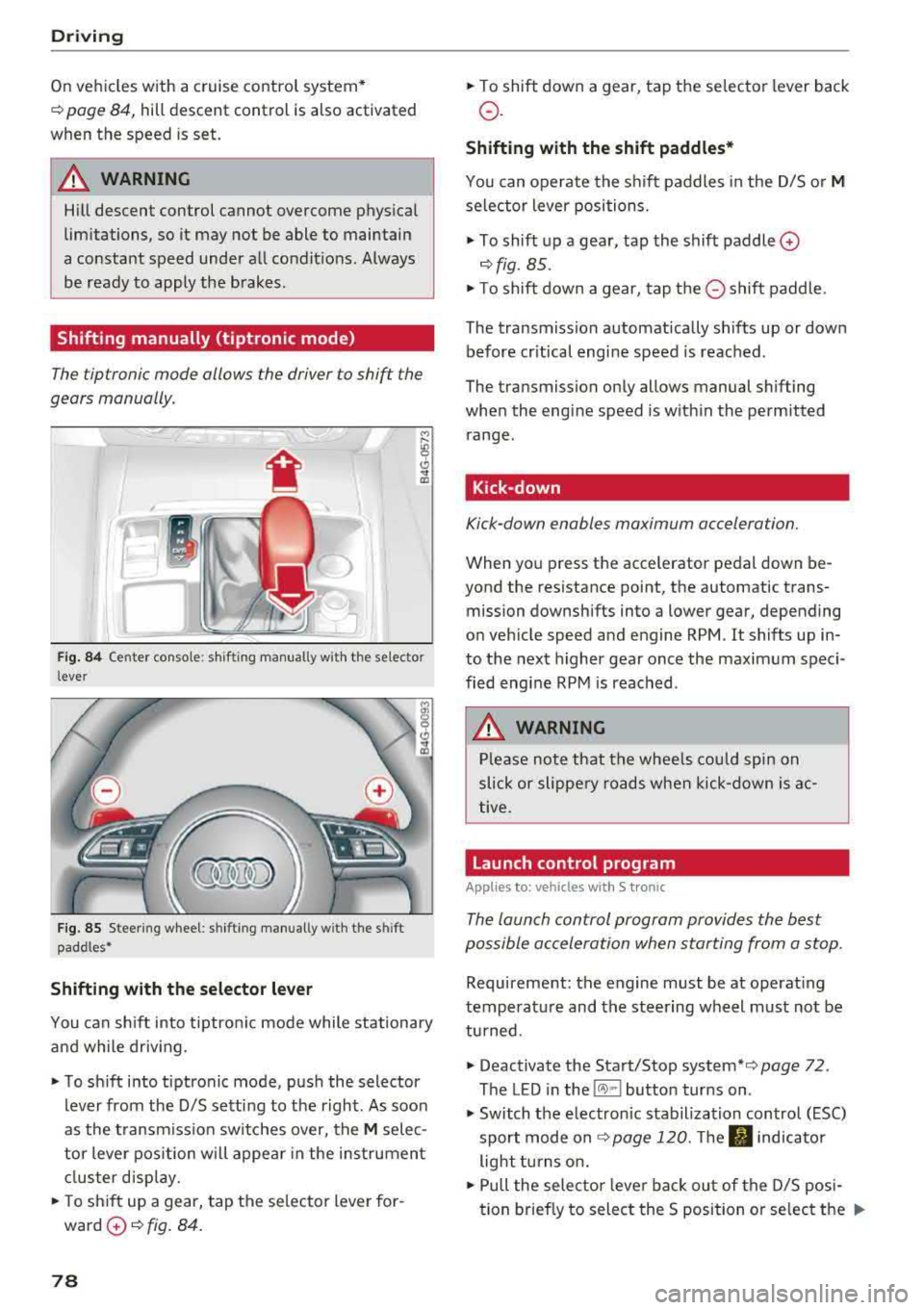
Shifting manually (tiptronic mode)
The tiptronic mode allows the driver to shift the
gears manually.
)
r
Fig. 84 Center console : sh ifting manual ly w ith the se lector
l ever
F ig. 85 Stee ring wheel: shifting manually w ith t he s hift
paddles*
Shifting with the selector lever
You can shift into tiptronic mode while stationary
and while driv ing .
"To shift into tiptronic mode, push the selector
lever from the 0/5 sett ing to the right. As soon
as the transmission switches over, the
M selec
tor lever position will appear in the instrument
cluster disp lay.
.. To sh ift up a gear, tap the se lector lever for
ward
0 ¢ fig. 84.
78
" To shift down a gear, tap the selector lever back
o.
Shifting with the shift paddles*
You can operate the shift paddles in the 0/5 or M
selector lever positions.
" To shift up a gear, tap the shift paddle 0
¢ fig . 85 .
"T o shift down a gear, tap the 0 shift paddle.
The transmission automatically shifts up or down before cr itical engine speed is reached .
The transmission only allows manual shifting
when the engine speed is w ithin the permitted
range.
Kick-down
Kick-down enables maximum acceleration.
When you press the accelerator pedal down be
yond the resistance point, the automatic trans
mission downshifts into a lower gear, depending
on vehicle speed and engine RPM . It shifts up in
to the next higher gear once the maximum speci
fied engine RPM is reached.
A WARNING
Please note that the whee ls could spin on
slick or slippery roads when kick-down is ac
tive .
Launch control program
Applies to: vehicles with S tronic
-
The launch control program provides the best
possible acceleration when starting from a stop .
Requirement: the engine must be at operating
temperature and the steering wheel must not be
turned.
.. Deactivate the Start/Stop system* ¢ page 72.
The LED in the
l(A) ~l button turns on .
" Switch the electronic stabilization control (ESC)
sport mode
on ¢ page 120. The fl indicator
light turns on.
" Pull the selecto r lever bac k out of the 0/5 posi
tion brief ly to select the S position or select the
..,.
Page 81 of 266
a co .... N
" N .... 0 0 \.J '
~ page 105 .
~ Press t he b rake peda l firmly with you r left foot
and hold it all the way down for at least one
second.
~ At the same t ime, press the gas pedal all the
way dow n wit h your right foot unt il the engi ne
r eaches and stays at a h igh RPM level.
~ Remove yo ur foot from t he b rake pedal within
five
seconds ~& ..
& WARNING
-Always adapt yo ur driv ing to t he tra ffic flow.
-O nly use the La u nch control prog ram when
road and traffic cond itions allow it and ot h
er drivers w ill not be endangered or both
ere d by your driving and the vehicle's accel
eration.
-Please note that the drive whee ls can sp in
and the vehicle can break away when sport
mode is switched o n, especia lly when the
road is s lippery.
-Once the vehicle has sta rted moving, press
the
I ~ OF FI button br iefly to tu rn the sport
mode off.
(D Tips
-The transmiss ion tem perature may increase
s ignificantly a fte r us ing the launc h cont rol
p rogram. If that happens, the program may
not be available for a few m in utes .
It will be
available again after a cool-down pe riod .
-When accelerating using the la unch control
p rogram, all ve hicle parts are subject to
heavy loads. This can lead to increased
wea r.
Transmission malfunction
ID Transmi ssion : Press brake pedal and select
gear again .
Press the brake pedal and se lect t he des ired se
l ec to r l ever pos it io n aga in . You can t hen continue
d riving.
ID Transmission overheating : Please drive con
s e rvatively.
Driving
T he transmission tem peratu re has inc reased sig
nificantly due to the sporty driving manner . Drive
i n a less spo rty manne r until the temperatu re re
turns to the norma l range and the indicator light
switches of.
[O] Transmission malfunction : You can continue
driving
T he re is a system malfu nction in t he tra nsmis
s ion . You may contin ue driving . Dr ive to an a u
t h orized Audi dea le r or a uthorized Audi Service
Fac ility soon to have t he malfunct io n corrected .
[O] Transmission malfunction: You can continue
driving with limited functionality
T he re is a system malfu nction in t he transmis
s io n. The transm ission is swi tc hi ng to eme rge ncy
mode. This mode only sh ifts into ce rtain gears or
will no longer shift a t all. T he eng ine may sta ll.
D rive to an authorized A udi dealer or autho rized
Audi Se rvice Facility immed iate ly to have the
malfunction corrected.
Applies to: vehicles with S tronic transmission
[O] lij Transmis sion malfunction: No rever se
gear. You can continue driving
T he re is a system m alfu nction in t he tra nsmis
s io n. The transm ission is swi tc hi ng to emergency
mode. This mode only shifts into certain gears or
will no longer shift at a ll. The eng ine may sta ll.
Yo u cannot engage the reve rse gear. Dr ive to an
authori zed Aud i dea le r or a uthori zed Audi Serv ice
Facility immed iate ly to have the ma lfunction cor
rected .
[O] Transmission malfunction: Stop vehicle and
shift to park.
Do not continue dr iv ing . Se lect t he P sele ctor lev
er posit io n an d see an au thor ized A udi dealer or
a ut ho riz ed Au di Serv ice Facili ty fo r ass ista nce .
@ Note
If t he t ransm iss ion has swi tched to em erge n
cy mo de, dr ive t o an a uth o riz e d Aud i de aler o r
auth oriz e d Aud i Serv ice F acili ty imme diat ely
to have t he mal func tion cor rected .
79
Page 82 of 266
Driving
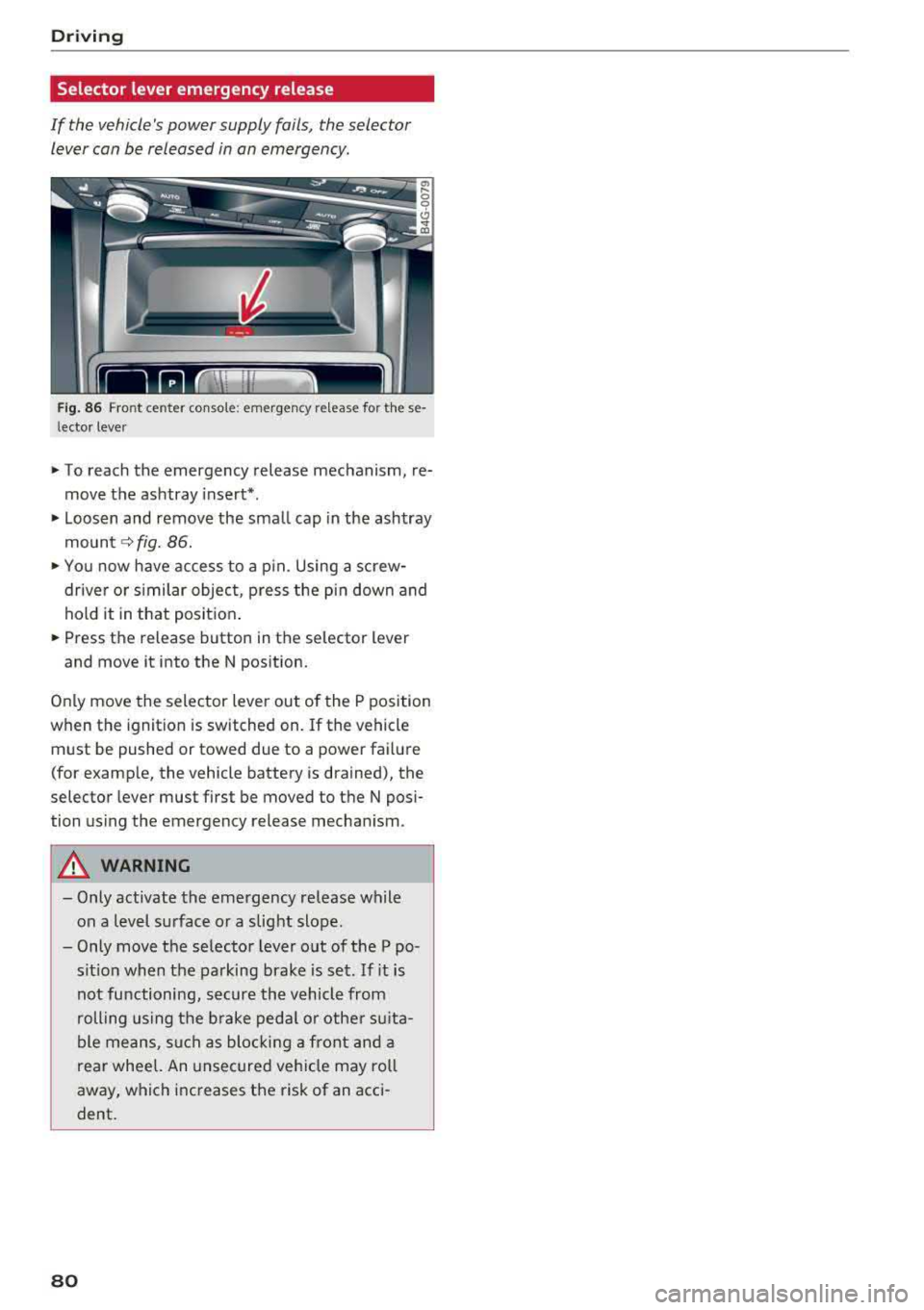
Selector lever emergency release
If the vehicle's power supply fails, the selector lever can be released in an emergency.
Fig. 86 Front center console: emergency release for these
l ector lever
"' To reach the emergency release mechanism, re
move the ashtray insert*.
"' Loosen and remove the small cap in the ashtray
mount
c:> fig. 86 .
.. You now have access to a pin. Using a screw
driver or similar object, press the pin down and
hold it in that position .
.. Press the release button in the selector lever
and move it into the N position.
Only move the selector lever out of the P position
when the ignition is switched on. If the vehicle
must be pushed or towed due to a power failure
(for example, the vehicle battery is drained), the
selector lever must first be moved to the
N posi
tion using the emergency release mechanism .
A WARNING
-Only activate the emergency release while
on a level surface or a slight slope.
-Only move the selector lever out of the P po
sition when the parking brake is set. If it is
not functioning, secure the vehicle from
rolling using the brake pedal or other suita
ble means, such as blocking a front and a
rear wheel. An unsecured vehicle may roll
away, which increases the risk of an acci
dent.
80
-
Page 83 of 266
a co .... N
" N .... 0 0 \.J -
General information
Your veh icle is primar ily intended for transport
ing people and luggage. However, if you dr ive
with a trailer, follow the technical requirements,
the operation and driving tips, and the legal reg
u lations.
Driving with a trailer affects the vehicle 's fuel
consumption, performance and wear. It also re
quires highe r concentration from the driver.
A WARNING
Do not transport any people in a trailer due to
the risk of fatal injury.
Technical requirements
Certain requirements must be met when towing
a trailer.
Trailer hitch
Only use a trailer hitch with a removab le ball
hitch mount and ball hitch. The trailer hitch must
be perm itted for the vehicle, the trailer and the
permitted total weight of the trailer being
pu lled. Above all, it must be secure ly and safe ly
attached to the vehicle trailer.
Never mount a trailer hitch on the bumper. The
trailer hitch must be mounted in a way that does
not impair the function of the bumper. Do not
make any changes to the exhaust system and the
brake system.
Check regularly if the trailer hitch is securely
mounted. A lways follow the instructions given by
the trai ler hitch manufacturer .
Trailer brakes
If the tra iler has its own brake system, then fol
l ow the manufacturer specifications. However,
the brake system on the trailer must never be
connected to the vehicle brake system.
Trailer towing
Engine cooling system
Driving with a trailer means a higher load on the
engine and the cooling system. The coo ling sys
tem must be designed for additiona l load and
contain enough coo lant
i::> @ .
@ Note
Longer inclines cannot be driven without a
suitab le cooling system, especia lly if t he out
side temperatures are high . otherwise, this
increases the risk of engine damage.
Operating instructions
Several things must be noted when towing a
trailer.
Towing capacity
Your vehicle can only be operated with class 1 or
class 2 trailers.
Load distribution
Poor cargo load and distribut ion can negatively
impact vehicle handling.
- Store objects preferably in the vehicle luggage
compartment . The vehicle should always carry
the heaviest poss ible load and the trailer
should have the lightest possible load.
- Distribute the load in the trailer so that the
heavy objects are as close to the axle as poss i
b le.
- Secure objects from sl iding out of place .
- Ut ilize the maximum permitted tongue weight
if possible .
Tires
Set the tire pressure on your vehicle for a "full
load"; see the tire pressure sticker
c::>page 211.
If necessary, also adjust the tire pressure on the
trailer according to the manufacturer's recom mendat ion .
Winter tires should be mounted on the vehicle and on the trailer during winter temperatures.
Outside mirrors
If you cannot see the tra ffic behind the trailer
with the standard exterior mirrors, then you
81
Page 86 of 266
Ass is tance sy stem s
Assistance systems
Speed warning system
Description
Applies to: veh icles with speed warning system
The speed warning system helps you to stay un
der a specified maximum speed.
The speed warning system warns you if you are
exceeding the maximum speed that you have set.
A warning tone will sound as soon as your speed
exceeds the sto red value slightly.
The . (USA models) I. (Canada models) indi
cator light and a message appear in the instru
ment cluster display at the same time.
The.
• indicator light and the message turn off if the
speed falls back below the stored maximum
speed.
Sett ing a threshold is recommended if you would
like to be reminded when you reach a certa in
maximum speed. S ituations where you may want
to do so i nclude driving in a country wit h a ge ne r
a l speed limit o r if the re is a specified maximum
speed for winter tires.
Setting the warning threshold
The warning threshold is set in the Infotainment
system.
• Se lect: the ICARI function button> (Car )* Sys
tems
control button > Driver assistan ce >
Spe ed warning .
(D Tips
Regardless of the speed warning system, you
should always monitor your speed using the
speedometer and make sure you are following
the legal speed limit.
84
Cruise control system
Switching on
Applies to: vehicles with cruise control system
The cruise control system makes it possible to
drive at a constant speed starting at 20 mph (30
km/h).
0
f
~
0
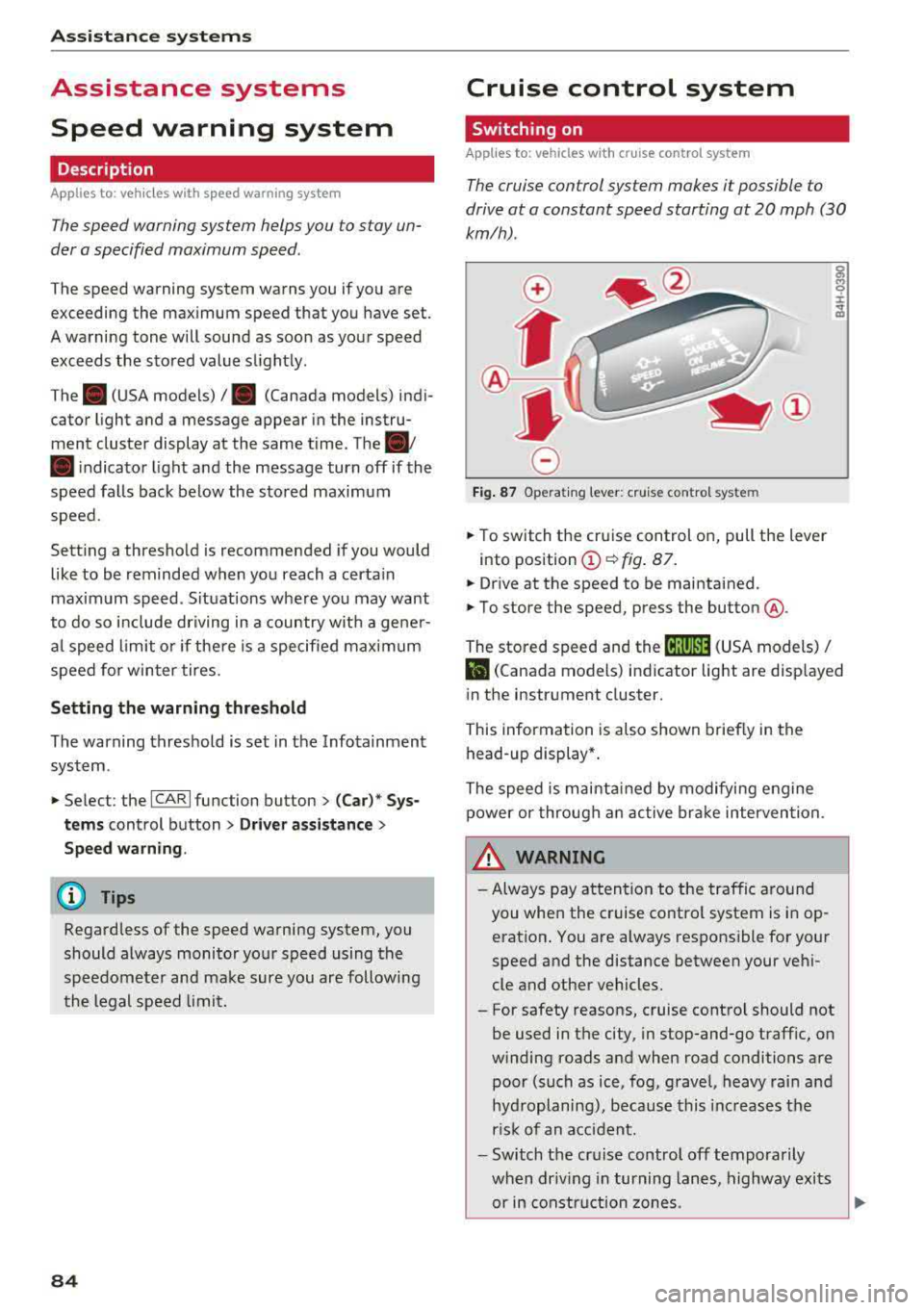
F ig . 8 7 Operat ing lever: c ruise control system
• To switch t he cru ise control o n, pull the lever
into position
(D ~ fig. 87 .
• Drive at the speed to be maintained.
• To store the speed, press the button @.
The stored speed and the
( ij;\1)~14 (USA models) /
l'I (Canada models) ind icator lig ht are disp layed
in the instrument cluster.
This information is also shown briefly in the
head -up display* .
The speed is mainta ined by modifying engine
power or through a n active br ake interven tion.
~ WARNING
-Always pay at tentio n to the traffic around
you when the cruise contro l system is in op
eration . You are always respons ible for your
speed and the distance between your ve hi
cle and other vehicles.
-For safety reasons, cruise control should not
be used in the city, in stop-and-go traff ic, on
winding roads and when road conditions are poor (such as ice, fog, gravel, heavy rai n and
hyd roplaning), because this inc reases the
r is k of an accident.
-Switch the cr uise control off temporarily
when dr iv ing in turning lanes, highway exits
or in constr uction zones.
-
Page 87 of 266
a co .... N
" N .... 0 0 \.J '
yo ur foot on the accelerator pedal prevents
the cruise control from braking. Th is is be
cause pressing the acce lerator pedal over
rides the cruise control system .
- If a brake system ma lf u nction such as over
heating occu rs when the c ruise contro l sys
tem is switched on, the braking function in
the system may be switched off . The rest of
t h e cruise control system f unction s remain
ac tive as long as
the @;(IM~ (USA model s) /
l'I (C anada models) indi cator light is on .
(D Tips
The brake ligh ts turn on when the brakes a re
ap plied a utomat ica lly .
Changing speed
Applies to: vehicles with cruise control system
.. To inc rease o r decrease the speed in incre
ments, tap the lever toward
0 10 <=> page 84 ,
fig . 87 .
.. To inc rease o r decrease the speed qu ickly, ho ld
the leve r in the
010 direction until the de
s ir ed speed is displayed.
You can a lso press the acce lerator pedal down to
increase yo ur speed, for example i f you want to
pass someone. The speed you set earlier w ill re
sume as soo n as you release t he accelerator ped
al.
However, if you exceed your saved speed by 5
mph (10 km/h) for longe r th an 6 mi nutes, the
cru ise control system tur ns off temporar ily .
The
green @;(i)~i~ (USA models) !l'I (Canada mod
e ls) indicator light in the speedometer tu rns off
and the stored speed is maintained.
Preselecting the speed
Applies to: vehicles with cruise control system
You can pre-select your desired speed when the
vehicle is stationary.
.. Switch the ign ition on.
.. Pull the lever into position @<=> page 84,
fig. 87 .
A ss istance systems
.. To increase or decrease the speed, tap the lever
toward
0 10 .
.. To store t he speed d isp layed, release the leve r.
T his func tion makes it possible , fo r example, to
save the spee d you want before driving on the
highway. Once on the highway, activate the
c ruise contro l by pull ing the leve r
towa rd @ .
Switching off
Applies to : vehicles with cruise control system
Deact ivating temporarily
.. Press the brake pedal, or
.. Press the lever into position @(not clicked into
p lace) <=>
page 84, fig . 87, or
.. Dr ive fo r longer t han 5 m inutes faster than 5
mph (10 km/h) above the stored speed .
Switching off completely
.. Press the lever into position @(clicked into
p lace), or
.. Switch the ignit ion off .
The speed you stored will be ma intained if the
cruise contro l has been switched off temporari ly .
To resume the stored speed, re lease the brake
peda l and pull the lever to
position @.
Switching the ignition off wi ll erase the stored
speed.
A WARNING "---
You should only resume the sto red speed if it
i s no t too high fo r existing t raff ic conditions .
Otherw ise you can inc rease the risk of an acci
d ent .
85