seats AUDI A6 2018 Owners Manual
[x] Cancel search | Manufacturer: AUDI, Model Year: 2018, Model line: A6, Model: AUDI A6 2018Pages: 266, PDF Size: 41.38 MB
Page 4 of 266
Table of contents
About this Owner's Manual . .. .. .
Cockpit ... .. ............... .... .. .
Cockpit overview .. ..... ... .. .. .. .
Controls at a glance . .. ..... ... .. .. .. .
Instruments and indicator lights
Instruments ....... .. ..... ... .. .. .. .
Indicato r lights .... .. ..... ... .. .. .. .
Driver information system ... .. .
Ove rview ....... ... .. ..... ... .. .. .. .
Operation . ........ .. ..... ... .. .. .. .
On-board computer ........... .... .. .
Eff iciency program ............ .... .. .
Odometer .. .. .. ................ ... .
T ime/date display ............... ... .
H ead-up display ................. ... .
Starting and driving ............ .
Opening and closing ............ .
Cent ral lock ing .. ............. .... .. .
L ugg age compa rtment lid ...... .. .. .. .
Ch ild safety lock . ............. .... .. .
P owe r windows .... .. ..... ... .. .. .. .
Sunroof . ....... ... .. ..... ... .. .. .. .
Va let par king function . ..... ... .. .. .. .
5
6
6
6
9
9
1 0
1 9
1 9
20
20
21
22
22
22
24
24
24
30
33
34
35
36
Garage door opener (Homelink) . . . . . . . . 36
Lights and Vision . . . . . . . . . . . . . . . . . 38
E xterior lighting . . . . . . . . . . . . . . . . . . . . . 38
Interior lighting . . . . . . . . . . . . . . . . . . . . .
41
V1s1on . . . . . . . . . . . . . . . . . . . . . . . . . . . . . 42
W indshield w ipers . . . . . . . . . . . . . . . . . . . 44
Seats and storage . . . . . . . . . . . . . . . . 47
General informa tion . . . . . . . . . . . . . . . . .
47
Front seats . . . . . . . . . . . . . . . . . . . . . . . . . 47
H ead restra ints . . . . . . . . . . . . . . . . . . . . . 48
M emory fu nction . . . . . . . . . . . . . . . . . . . . 49
Ashtray . . . . . . . . . . . . . . . . . . . . . . . . . . . .
51
Ciga rette lighte r . . . . . . . . . . . . . . . . . . . . 51
12
Volt sockets . . . . . . . . . . . . . . . . . . . . . 52
Storage . . . . . . . . . . . . . . . . . . . . . . . . . . . . 52
Luggage compartment . . . . . . . . . . . . . . . 54
2
Warm and cold .... ... .. ..... ... . .
Climate contro l system . .. .. ..... ... . .
Steering w heel heat ing . .. .. ..... ... . .
Driving . .. .. .. .... .. ... .. ..... ... . .
Genera l information . .... .. ..... ... . .
Steering .. .. .. .. .. .. ............. . .
Start ing and stopping the eng ine ..... . .
Start/Stop system .. .. ... .. ..... ... . .
E lectromechanical parking brake ...... .
Start ing to drive .. .. .. .............. .
A utomat ic transmission
Trailer towing ... .. .............. .
D riving with a tra ile r
Driver assi stance .. .............. .
Assistance systems ............. .
Speed warning system .............. . .
Cru ise cont ro l sys tem . ............. . .
Audi adaptive cruise contro l ...... ... . .
Audi pre sense ..... .. ... .. ..... ... . .
Audi active lane assist .... .. ..... ... . .
Audi s ide ass ist .. .. .. ............. . .
N ight vision assist w ith pedestrian and
wild animal detection . ............. . .
Audi drive select (drive settings) ....... .
58
58
63
6 4
64
66
68
70
72
74
7 4
81
81
84
8 4
84
8 4
86
94
95
98
101
104
Parking systems . . . . . . . . . . . . . . . . . 107
Genera l information . . . . . . . . . . . . . . . . . 107
Parking system plus . . . . . . . . . . . . . . . . . . 108
Rearv iew camera . . . . . . . . . . . . . . . . . . . . 109
Per iphera l came ras . . . . . . . . . . . . . . . . . . 112
Adjus ting the d isplay and the wa rn ing
tones.. ... .. .. .... .. ... .. ..... ... ..
11 7
Error messages . . . . . . . . . . . . . . . . . . . . . 117
Traile r hitch . . . . . . . . . . . . . . . . . . . . . . . . 117
Intelligent Technology . . . . . . . . . . 11 9
Electronic stabilization control (ESC) . . . . 119
B rakes . . . . . . . . . . . . . . . . . . . . . . . . . . . . . 120
E lectromechanical steering, dynamic
steering . . . . . . . . . . . . . . . . . . . . . . . . . . .
122
All wheel drive (quattro) . . . . . . . . . . . . . . 123
Energy management . . . . . . . . . . . . . . . . . 123
Notice abo ut data recorded by the Event
Data Recorder and veh icle co ntro l
modules . . . . . . . . . . . . . . . . . . . . . . . . . . .
12 4
Page 5 of 266
a co .... N
" N .... 0 0 \,;J '
Driving safety . . . . . . . . . . . . . . . . . . . . 125
Basics . . . . . . . . . . . . . . . . . . . . . . . . . . . . . 125
Correct passenger seating positions . . . . . 126
Driver 's and front passenger's footwell . . 129
Pedal area . . . . . . . . . . . . . . . . . . . . . . . . . . 130
Storing cargo correctly . . . . . . . . . . . . . . . 130
Repo rt ing Safety Defects . . . . . . . . . . . . . . 132
Safety belts . . . . . . . . . . . . . . . . . . . . . . 134
Gene ral informat ion . . . . . . . . . . . . . . . . . 134
Why use safety belts? . . . . . . . . . . . . . . . . 135
Safety bel ts . . . . . . . . . . . . . . . . . . . . . . . . 13 7
Belt tens ione rs . . . . . . . . . . . . . . . . . . . . . . 140
Airbag system . . . . . . . . . . . . . . . . . . . . 142
I mportant info rm ation . . . . . . . . . . . . . . . 142
Fr on t ai rbags . . . . . . . . . . . . . . . . . . . . . . . 146
M onitoring the Advanced Airbag System . 154
Knee airbags. . . . . . . . . . . . . . . . . . . . . . . . 158
Side airbags . . . . . . . . . . . . . . . . . . . . . . . . 160
Side curtain airbags . . . . . . . . . . . . . . . . . . 163
Child safety . . . . . . . . . . . . . . . . . . . . . . 166
Important information . . . . . . . . . . . . . . . 166
C hi ld safety seats............. .. .. .. . 172
Secur ing ch ild safety seats . . . . . . . . . . . . 177
L ATCH system (lowe r anchorages a nd
tethers for children) . . . . . . . . . . . . . . . . . 180
Addit io n al i nfo rmat ion . . . . . . . . . . . . . . . 184
Maint enance and Care . . . . . . . . . . . 185
Checking and Filling . . . . . . . . . . . . . 185
Fu el . . . . . . . . . . . . . . . . . . . . . . . . . . . . . . . 185
Refueling . . . . . . . . . . . . . . . . . . . . . . . . . . 186
Emissions control system . . . . . . . . . . . . . 188
On Board Diagnostic System (OBD) . . . . . 189
E ng ine compartment . . . . . . . . . . . . . . . . . 189
Eng ine oil . . . . . . . . . . . . . . . . . . . . . . . . . . 192
Cooling system . . . . . . . . . . . . . . . . . . . . . . 195
Brake fluid . . . . . . . . . . . . . . . . . . . . . . . . . 197
Battery . . . . . . . . . . . . . . . . . . . . . . . . . . . . 197
W indshield was her system . . . . . . . . . . . . 199
Serv ice inte rval d isplay . . . . . . . . . . . . . . . 199
Table of content s
Wheels .. .. .... .. ... .. ..... ... .. ..
20 1
Whee ls and Tires . . . . . . . . . . . . . . . . . . . . 201
Tire pressure monitoring system . . . . . . . 218
Care and cleaning . . . . . . . . . . . . . . . . 2 21
Genera l information . . . . . . . . . . . . . . . . . 221
Car washes . . . . . . . . . . . . . . . . . . . . . . . . . 221
Cleaning and care informat ion . . . . . . . . . 222
Plac ing your vehicle out of serv ice . . . . . . 225
Do It Yourself . . . . . . . . . . . . . . . . . . . . 226
Emergency assistance . . . . . . . . . . . 226
General information . . . . . . . . . . . . . . . . . 226
Eq uipment . . . . . . . . . . . . . . . . . . . . . . . . . 226
Replacing w heels . . . . . . . . . . . . . . . . . . . . 227
Spa re t ire 232
Fuses ........ .. .. ................ . 234
Replacing fuses . . . . . . . . . . . . . . . . . . . . . 234
Dr ive r side cockpit f use assignmen t
F ront passenge r side co ckpit fuse 2
35
assignment . . . . . . . . . . . . . . . . . . . . . . . . 2 36
Luggage compartment fuse assignment 236
Bulbs .. .. .. .... .. ... .. ..... ... .. .. 23 8
Replacing light bu lbs . . . . . . . . . . . . . . . . . 238
Emergency situations . . . . . . . . . . . . 239
Genera l . . . . . . . . . . . . . . . . . . . . . . . . . . . . 239
Starting by p ush ing or towing . . . . . . . . . . 239
Start ing with jumper cab les . . . . . . . . . . . 239
Use of jumper cables . . . . . . . . . . . . . . . . . 240
Tow ing with a tow truck . . . . . . . . . . . . . . 241
Raising the vehicle . . . . . . . . . . . . . . . . . . . 243
Accessories and Technical Data . 245
Technical data . . . . . . . . . . . . . . . . . . . . 245
Vehicle spec if icat io ns . . . . . . . . . . . . . . . . 245
Notes about technical data . . . . . . . . . . . . 245
D imens ions . . . . . . . . . . . . . . . . . . . . . . . . . 245
Capaci ties . . . . . . . . . . . . . . . . . . . . . . . . . . 245
Weig hts . . . . . . . . . . . . . . . . . . . . . . . . . . . 246
Consumer Information . . . . . . . . . . 247
Warranty cove rages . . . . . . . . . . . . . . . . . . 24 7
Operating your vehicle outside the U.S.A.
or Canada . . . . . . . . . . . . . . . . . . . . . . . . . . 247
3
Page 49 of 266
a co ,...,
N
" N ,...,
0 0 \,;J '
General information
A WARNING
-
Refer to c:::> page 125, Driving safety for im
portant information, tips, suggestions and
warnings that you should read and follow for
your own safety and the safety of yo ur pas
senge rs.
Front seats
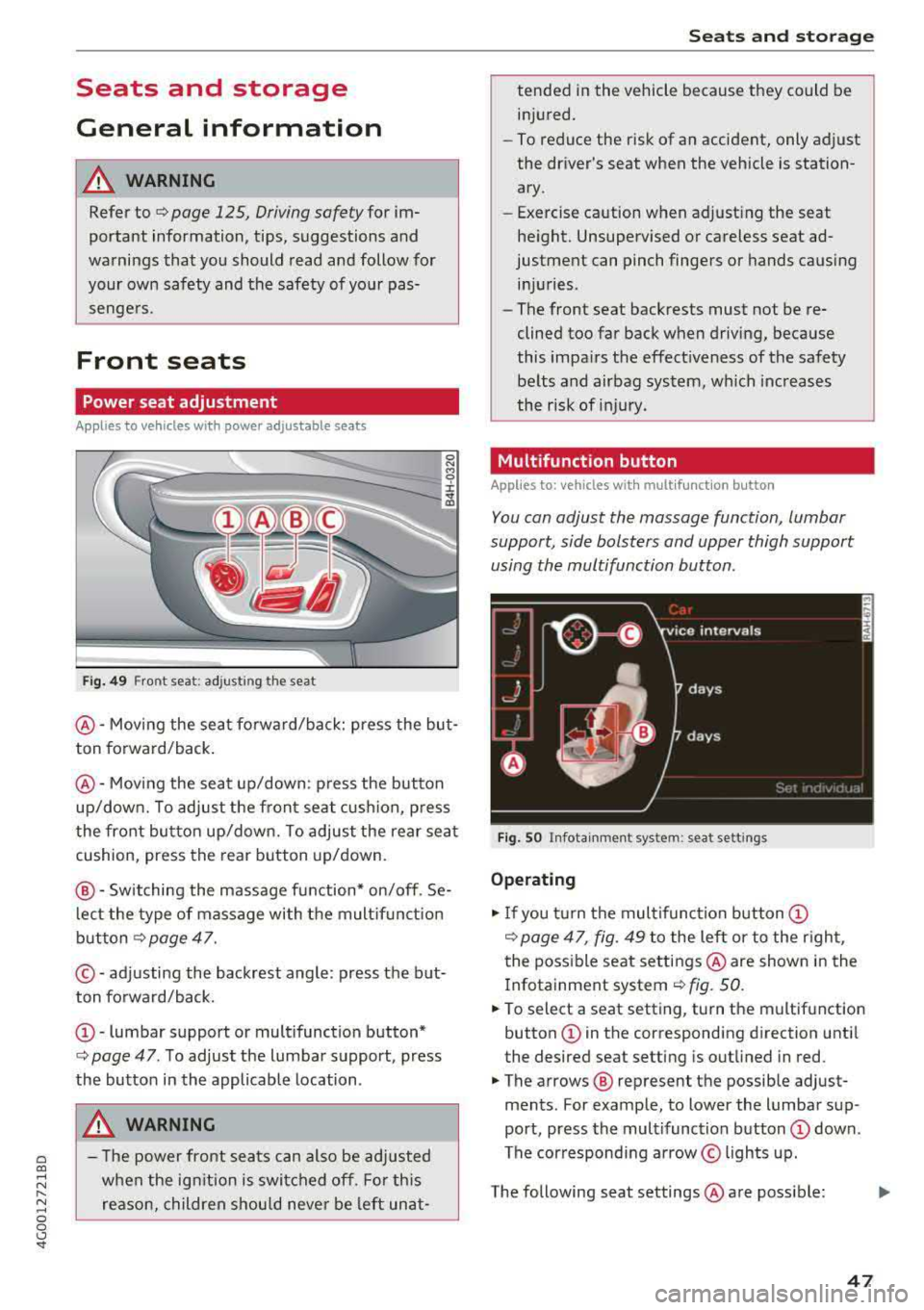
Power seat adjustment
Applies to vehicles with power adjustable seats
Fig . 49 Front seat: adj usting the seat
0 N M '? ::c .,. a,
@ -Moving the sea t fo rward/back: press the but
ton forward/back .
@-Moving the seat up/down: p ress the button
up/down. To adjust the fron t seat cush ion, p ress
the front button up/down. To adjust the rear sea t
cushion, press the rear button up/down.
@ -Switching the massage function * on/off . Se
l ec t the type of massage with the mult if u nct ion
button
c:::> page 47.
© - adjusting the backrest angle : press the but
ton forward/back.
@ -lumbar support or mult ifunction button*
c> page 47 . To adjust the lumbar support, press
the button in the applicable location .
A WARNING
-The power fron t seats can also be ad justed
when the ig nition is swi tched off. For this
reason, children should never be left unat-
S eats and storag e
tended i n the vehicle because they could be
in jured.
-To reduce the risk of an accident, only adjust
the dr iver's seat when the vehicle is station
ary.
-Exercise caution when adjusting the seat
he ight. Unsupe rvised or careless seat ad
justment can pinch fingers or hands causing inj uries .
-The front seat backrests must not be re
clined too far back when driving, because
this impa irs the effect iveness of the safety
be lts and airbag system, which inc reases
the r isk of inj ury .
Multifunction button
Applies to: vehicles with multifunctio n button
You can adjust the massage function , lumbar
support, side bolsters and upper thigh support
using the multifunction button.
Fig. SO Infota inme nt sys te m : seat sett ings
Operating
"I f you turn the mul tifunction button (D
c> page 47 , fig. 49 to the lef t or to the r ight,
the poss ible seat settings @are show n in the
I nfotainment system
c:::> fig. 50.
" To select a seat setting, turn the multifunction
button
(D in the corresponding direction unti l
the desired seat setting is outlined in red.
" The arrows @ represent the possib le adjust
ments . For example, to lower the lumbar sup
port, press the multifunction button
(D down .
The corresponding a rrow © lights up.
The following seat settings @are poss ible:
IJi,
47
Page 50 of 266
Seats and storage
Massage function*
-select the massage type
Wave , Pulse , Stretch , Lumbar , Shoulder or Off.
You can adjust the intensity of each massage
from 1 through 5 . You can switch the selected
massage on/off using the
button @¢ page 47,
fig .
49 .
Lumbar support -you can adjust the lumbar sup
port up/down and to be stronger/weaker.
Side section seat* -you can increase/decrease
the lateral support in the seat using the side bol
sters at the seat surface and the backrest.
Upper thigh support* -you can increase/de
crease the upper thigh support.
(D Tips
- The massage function switches off auto
matically after approximately 10 minutes.
- The air in the side bolsters* is released as
soon as the driver's door opens. This makes
is possible to enter and exit the vehicle
more comfortab ly . As soon as you start driv
ing the veh icle, the s ide bolsters fill.
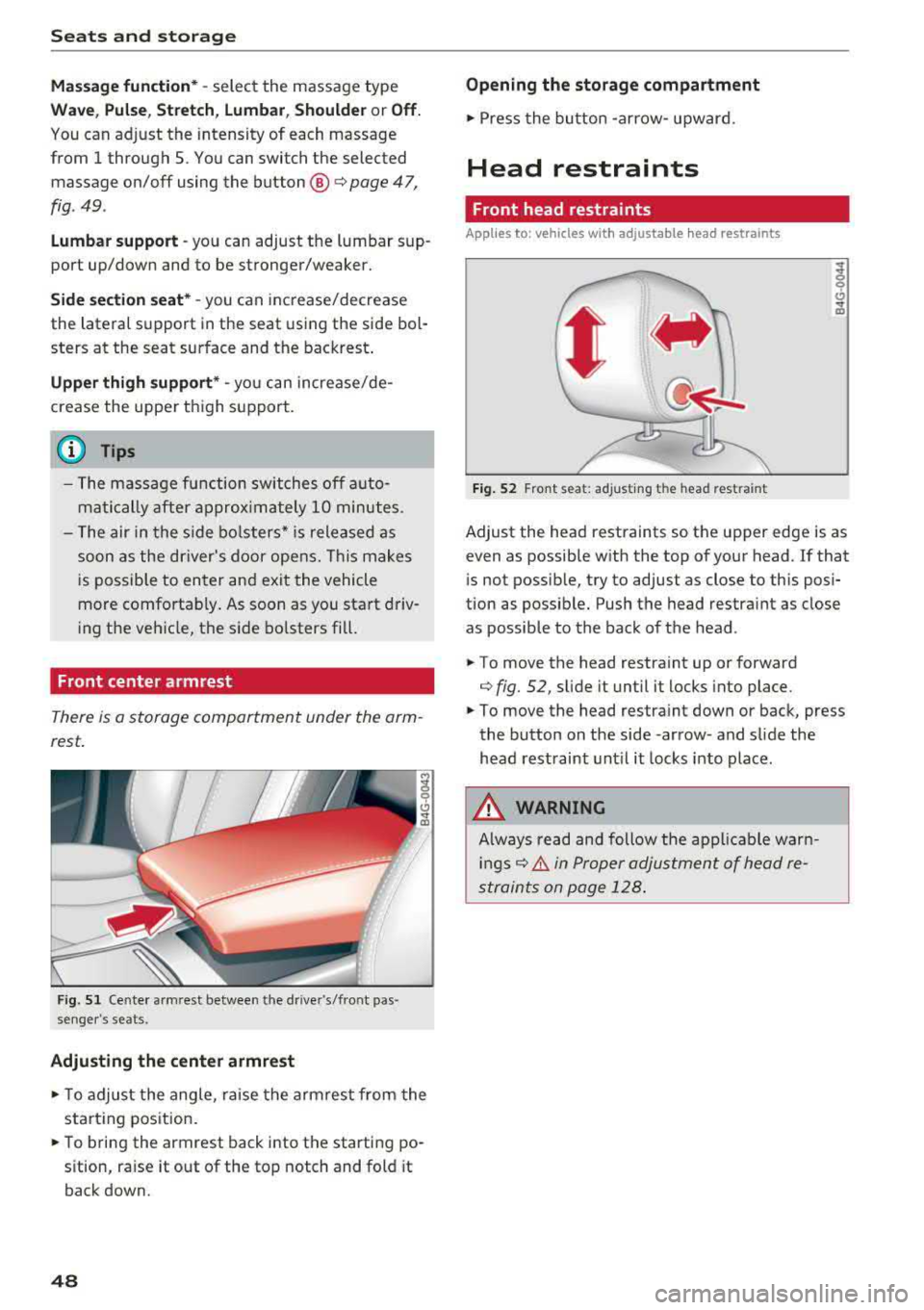
Front center armrest
There is a storage compartment under the arm
rest.
F ig. 51 Cente r armrest between the driver's/front pas ·
senger 's seats.
Adjusting the center armrest
.,. T o adjust the angle, raise the arm rest from the
starting position .
.,. To bring the armrest back into the starting po
sition, raise it out of the top notch and fold it
back down.
48
Opening the storage compartment
.,. Press the button -arrow- upward.
Head restraints
Front head restraints
Applies to: vehicles with adjustable head restra ints
Fig. 52 Front seat: ad justing t he head rest ra in t
Adjust the head restraints so the upper edge is as
even as possible with the top of your head. If that
is not possib le, try to adjust as close to this posi
tion as possib le. Push the head restraint as close
as possible to the back of the head.
.,. To move the head restra int up or forward
¢ fig. 52, sli de it until it locks into place .
.,. To move the head restra int down or back, press
the button on the side -arrow- and slide the
head restraint until it locks into place.
A WARNING
Always read and follow the applicable warn
ings¢ & in Proper adjustment of head re
straints on page 128.
.
Page 51 of 266
a
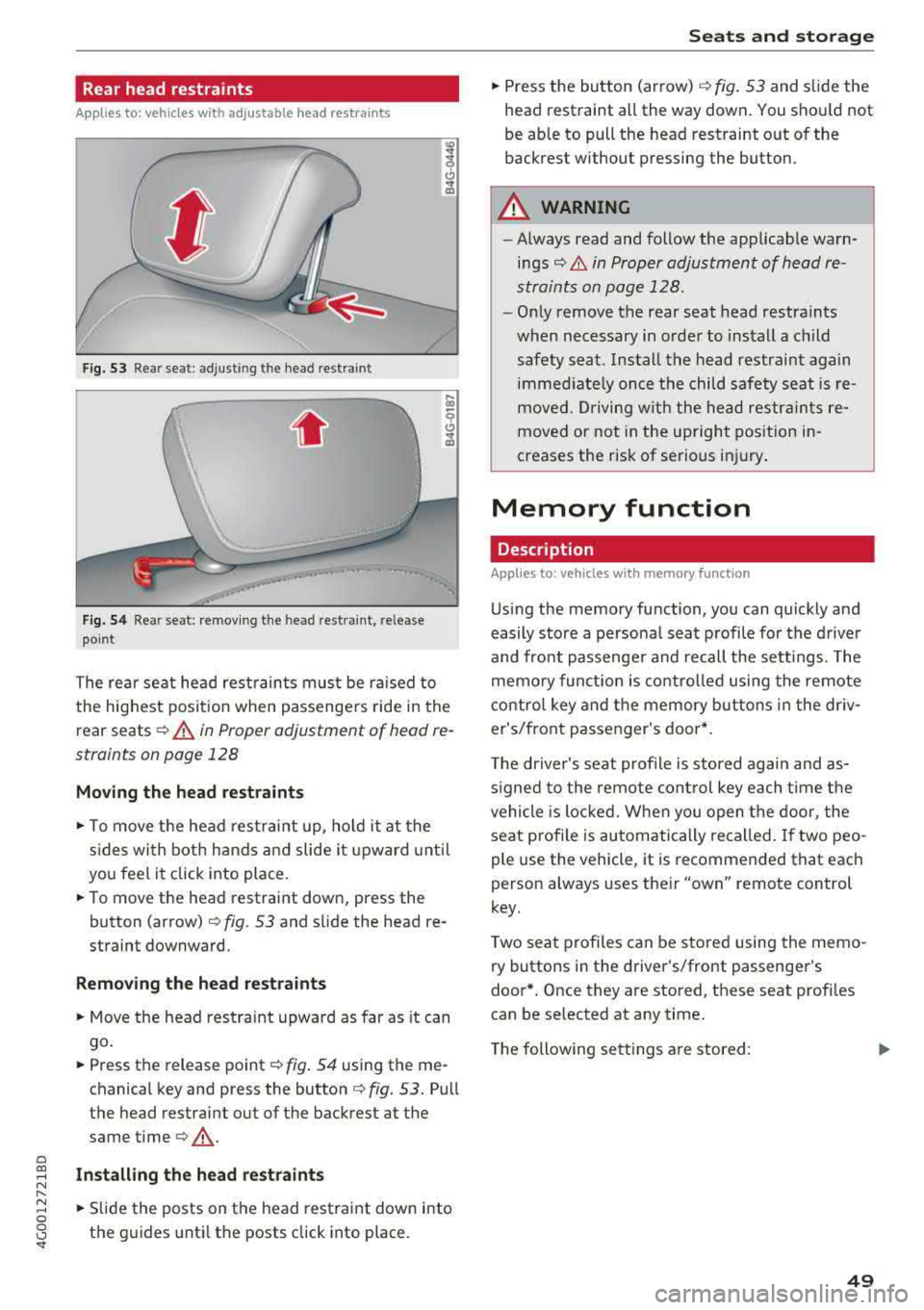
Rear head restraints
Applies to: ve hicles with a djustable head restra ints
F ig. 53 Rea r seat: adjusti ng the head restraint
Fig. 54 Rear seat: remov ing the head restra int, release
point
The rear seat head restrain ts must be ra ised to
the highest posit ion when passengers ride in the
rear seats
c::> A in Proper adjustment of head re
straints on page 128
Moving the head rest raints
.,. To move the head rest raint up, ho ld it at the
s ides with both hands a nd slide i t upward unt il
you feel it click into place.
.. To move the head restraint down, press the
button (arrow)
c::> fig. 53 and s lide the head re
straint downward.
Remov ing th e head re straints
.,. Move the head restra int upward as far as it can
go .
.. Press the release point c::> fig . 54 using the me
chanical key and press the button
c::> fig. 53. Pull
the head restraint out of the backrest at the
same
time¢ .,&..
~ Install ing the head re st raint s N
" ~ .. Slide the posts on the head restraint down into 0
8 the guides until the posts click into place. '
.,. Press the button (arrow) ¢ fig. 53 and slide the
head restraint all the way down . You shou ld not
be able to pull the head restraint out of the
backrest without pressing the button.
A WARNING
-==
- Always read and follow the applicable warn-
ings
c::> & in Proper adjustment of head re
straints on page 128.
- Only remove the rear seat head restraints
when necessary in order to install a child
safety seat. Install the head restraint again immed iate ly once the child safety seat is re
moved. Driving w ith the head restraints re
moved or not in the upright position in
creases the risk of serious inj ury.
Memory function
Description
Appl ies to: vehicles wit h memo ry funct ion
Us ing the memory function, you can quickly and
easily store a persona l seat profile fo r the driver
and front passenge r and recall the sett ings. The
memo ry func tion is co ntro lled using the remote
contro l key and the memory buttons i n the dr iv
er's/front passe nger's door*.
T he driver's seat profile is stored again and as
s igned to the remote cont rol key each t ime t he
vehicle is loc ked. When you open the door, the
seat profile is automatically recalled. If two peo
ple use the vehicle, it is recommended that each
person always uses their
"own" remote control
key.
T wo sea t profiles can be stored using the memo
ry buttons in the driver's/front passenger's
door* . Once they are stored, these seat profi les
can be selected at any time .
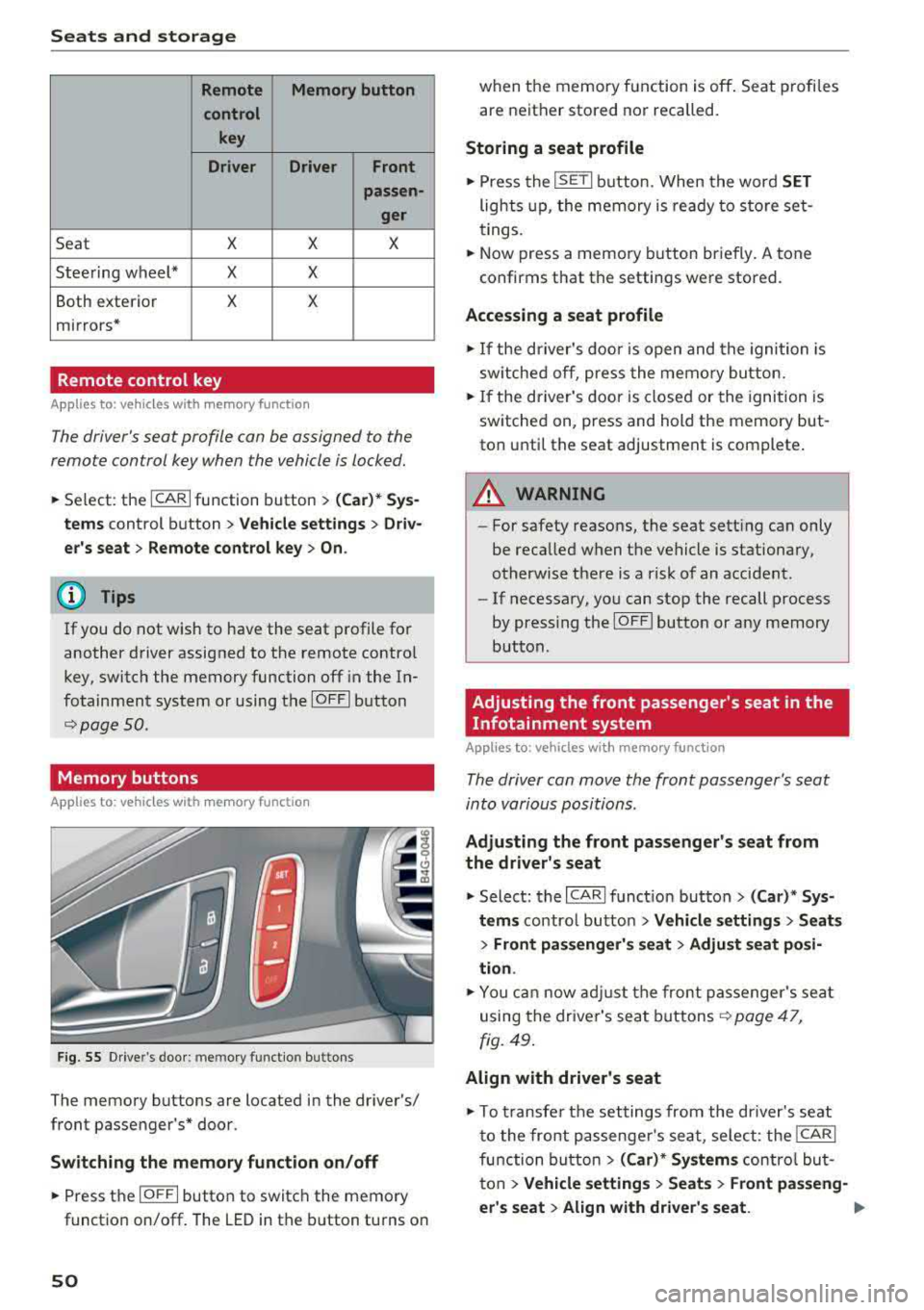
T he following se tt ings are stored:
..,.
49
Page 52 of 266
Seats and storage
Remote Memory button
control key
Driver Driver
Front
passen-
ger
Seat X X X
Steering wheel* X X
Both exterior X X
mirrors*
Remote control key
Applies to: vehicles with memory function
The driver 's seat profile can be assigned to the
remo te control key when the vehicle is locked.
.,.. Se lect : the ICARI function button > (Car)* Sys
tems
control button > Vehicle settings > Driv
er 's seat
> Remote control key > On.
(D Tips
If you do not wish to have the seat profile for
another driver assigned to the remote contro l
key, switch the memory function off in the In
fotainment system or using the
IOFFI button
r::::;, page 50 .
Memory buttons
App lies to: vehicles with memory function
F ig. 55 Drive r's door : m em ory functio n bu ttons
The memory buttons are located in the driver's/
front passenger 's* door.
Switching the memory function on/off
.,.. Press the IO FF I button to switch the memory
functio n on/off. The LED in the button turns on
50
when the memory function is off . Seat profiles
are neither stored nor recalled.
Storing a seat profile
.,.. Press the ISET I button . When the word SET
lights up, the memory is ready to store set
tings.
.,.. Now press a memo ry button briefly. A tone
confirms that th e settings were stor ed.
Accessing a seat profile
.,.. If the driver's door is open and the ignition is
sw itched off, press the memory button.
.,.. If the driver's door is closed or the ignition is
switched on, press and hold the memory but
ton until the seat adjustment is complete .
A WARNING
-For safety reasons, the seat setting can only
be recalled when the vehicle is stationary,
otherwise there is a risk of an accident .
-If necessary, you can stop the recall process
by press ing the
IOF FI butto n or any memory
button .
Adjusting the front passenger's seat in the
Infotainment system
Applies to: vehicles with memory function
The driver can move the front passenger's seat
into various positions .
Adjusting the front passenger's seat from
the driver's seat
.,. Select: the I CARI function button > (Car)* Sys
tems
control butto n > Vehicle settings > Seats
> Front passenger's seat > Adjust seat posi
tion .
.,.. You can now adjust the front passenger's seat
using the driver's seat buttons
r:::;, page 47,
fig. 49.
Align with driver's seat
.,. To trans fer the settings from the dr iver's seat
to the front passenge r's seat, select: the
I CAR I
function button > (Car)* Systems control but
ton
> Vehicle settings > Seats > Front passeng-
er 's seat
> Align with driver 's seat. .,..
Page 54 of 266
Seats and stor age
12 Volt sockets
Applies to: veh icles with 12 volt sockets
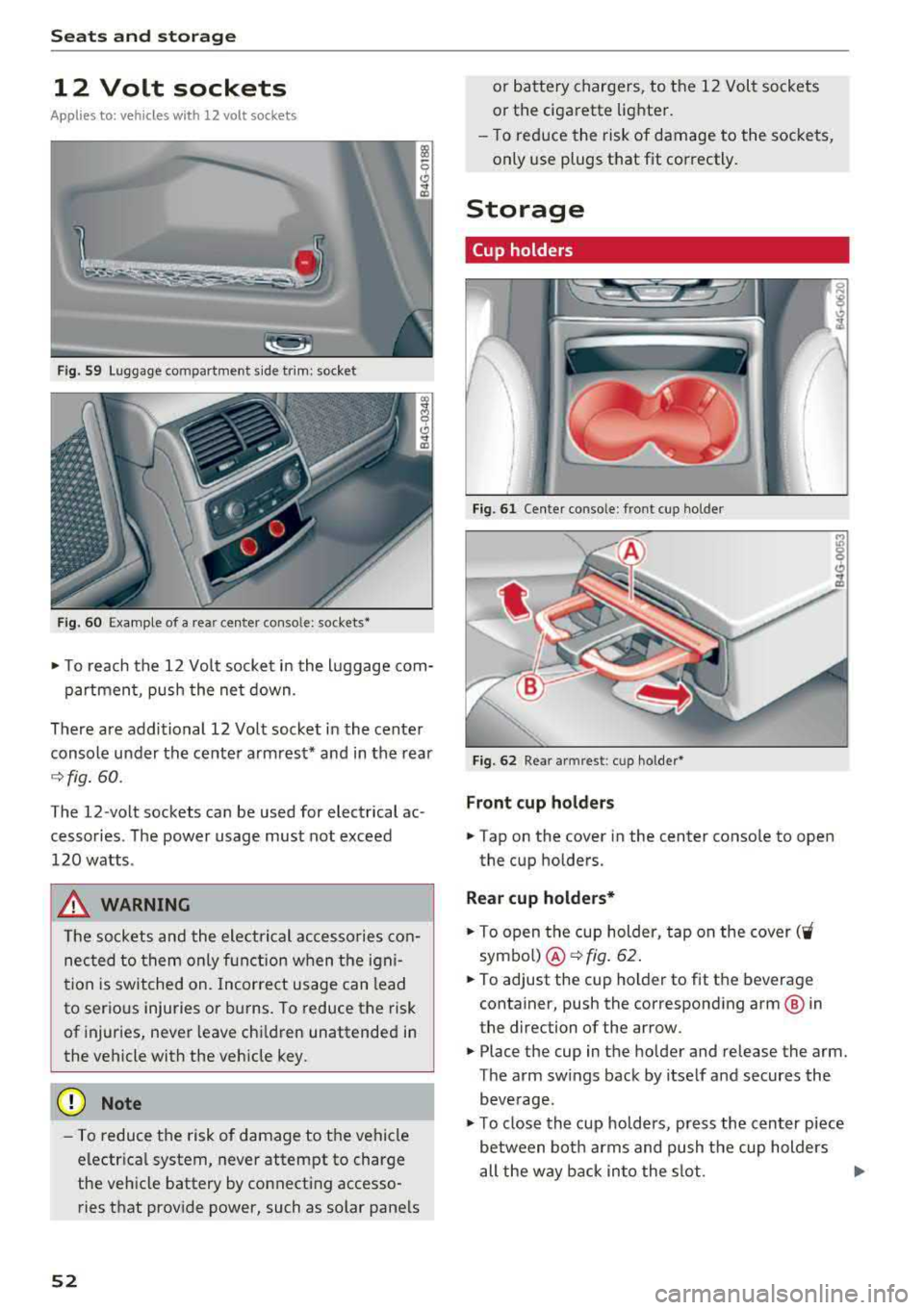
F ig . 59 Luggage compartment s ide trim : socket
F ig . 60 Example of a rear ce nter conso le : sockets*
• T o reach the 12 Vo lt socket in the l uggage com-
partmen t, push the net down .
There are additional 12 Volt socket in the center
console under the center armrest* and in the rear
9 fig. 60.
The 12-volt sockets can be used for electrical ac
cessories. The power usage must not exceed
120 watts .
_& WARNING
The sockets and the electrical accesso ries con
nec ted to them only f unction when the igni
t ion is sw itched on. Incorrect usage can lead
to serious injuries or b urns. To reduce the risk
of injuries, never leave children unattended in
the vehicle with the veh icle key.
(D Note
- To reduce the risk of damage to the vehicle
electrica l system, never attempt to charge
the ve hicle battery by connecting accesso
ries that provide power, such as solar pane ls
52
or battery chargers, to the 12 Volt sockets
or the cigarette lighter.
- T o reduce the risk of damage to the sockets,
only use plugs that fit correctly.
Storage
Cup holders
I
I
Fig. 61 Cente r co nso le : fr ont cup ho ld er
Fig. 62 Rear arm rest : cu p ho lder*
Front cup holder s
• Tap on the cover in the center conso le to open
the cup holders.
Rear cup h olde rs*
• To open the cup holder, tap on the cover ('i
symbo l) @ 9fig . 62.
• To adjust the cup holder to fit the beverage
container, push the corresponding arm @ in
the direction of the arrow.
• Place the cup in the holder and release the arm.
The arm sw ings back by itself and secures the
beverage.
• T o close the cup holders, press the center piece
between both arms and push the cup holders
all the way back in to the slot .
..,_
Page 55 of 266
_& WARNING
-Do not put any hot beverages in the cup
holder while the vehicle is moving. Hot bev
erages could spill, which can cause injury.
- Do not use any breakable beverage contain
ers (for example, made out of glass or por
celain). You could be injured by them in the
event of an accident.
(D Note
Beverage containers in the cup holders should
always have a lid. If not, beverages could spill
and cause damage to vehicle equipment, such
electronics or seat covers.
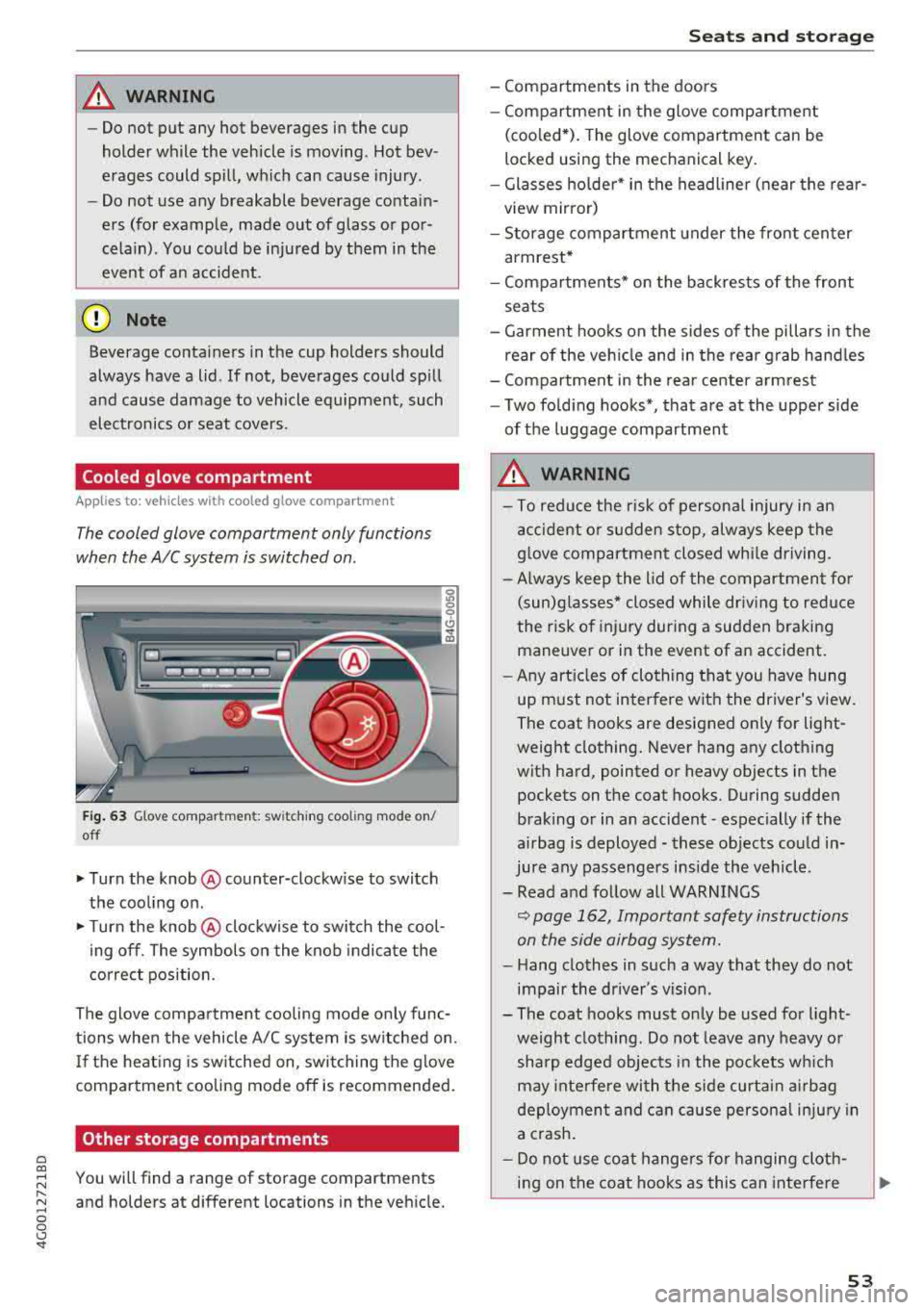
Cooled glove compartment
Appl ies to: vehicles with cooled glove compartment
The cooled glove compartment only functions
when the
AIC system is switched on.
Fig. 63 Glove compartment: sw itching cooling mode on/
off
... Turn the knob@ counter-clockwise to switch
the cooling on.
""Turn the knob @ clockwise to switch the cool
ing off. The symbols on the knob indicate the
correct position.
The glove compartment cooling mode only func
tions when the vehicle A/C system is switched on.
If the heat ing is switched on, switching the glove
compartment cooling mode off is recommended.
Other storage compartments
a co
;::j You will find a range of storage compartments
:::, and holders at different locations in the vehicle .
.... 0 0 <..:l '
- Compartments in the doors
- Compartment in the glove compartment
(coo led*). The glove compartment can be
locked using the mechanical key.
- Glasses holder* in the headliner (near the rear
view mirror)
- Storage compartment under the front center
armrest*
- Compartments* on the backrests of the front
seats
- Garment hooks on the sides of the pillars in the
rear of the vehicle and in the rear grab handles
- Compartment in the rear center armrest
- Two folding hooks*, that are at the upper side
of the luggage compartment
_& WARNING
- To reduce the risk of personal injury in an
accident or sudden stop, always keep the
glove compartment closed while driving.
- Always keep the lid of the compartment for
(sun)glasses* closed while driving to reduce
the risk of injury during a sudden braking
maneuver or in the event of an accident.
- Any articles of clothing that you have hung
up must not interfere with the driver's view.
The coat hooks are designed only for light
weight clothing. Never hang any clothing
with hard, pointed or heavy objects in the pockets on the coat hooks. During sudden
braking or in an accident -especially if the
airbag is deployed - these objects could in
jure any passengers inside the vehicle .
- Read and follow all WARNINGS
~ page 162, Important safety instructions
on the side airbag system.
- Hang clothes in such a way that they do not
impair the driver's vision .
-
- The coat hooks must only be used for light
weight clothing. Do not leave any heavy or sharp edged objects in the pockets which
may interfere with the side curtain airbag
deployment and can cause personal injury in
a crash.
- Do not use coat hangers for hanging cloth
ing on the coat hooks as this can interfere
53
Page 56 of 266
Seats and stor age
with proper deployment of the side curtain
airbags in an accident.
-Do not hang heavy objects on the coat
hooks, as they could cause personal injury in
a sudden stop .
CD Note
Objects on the rear shelf that rub against the
rear window can damage the rear window
heating wires.
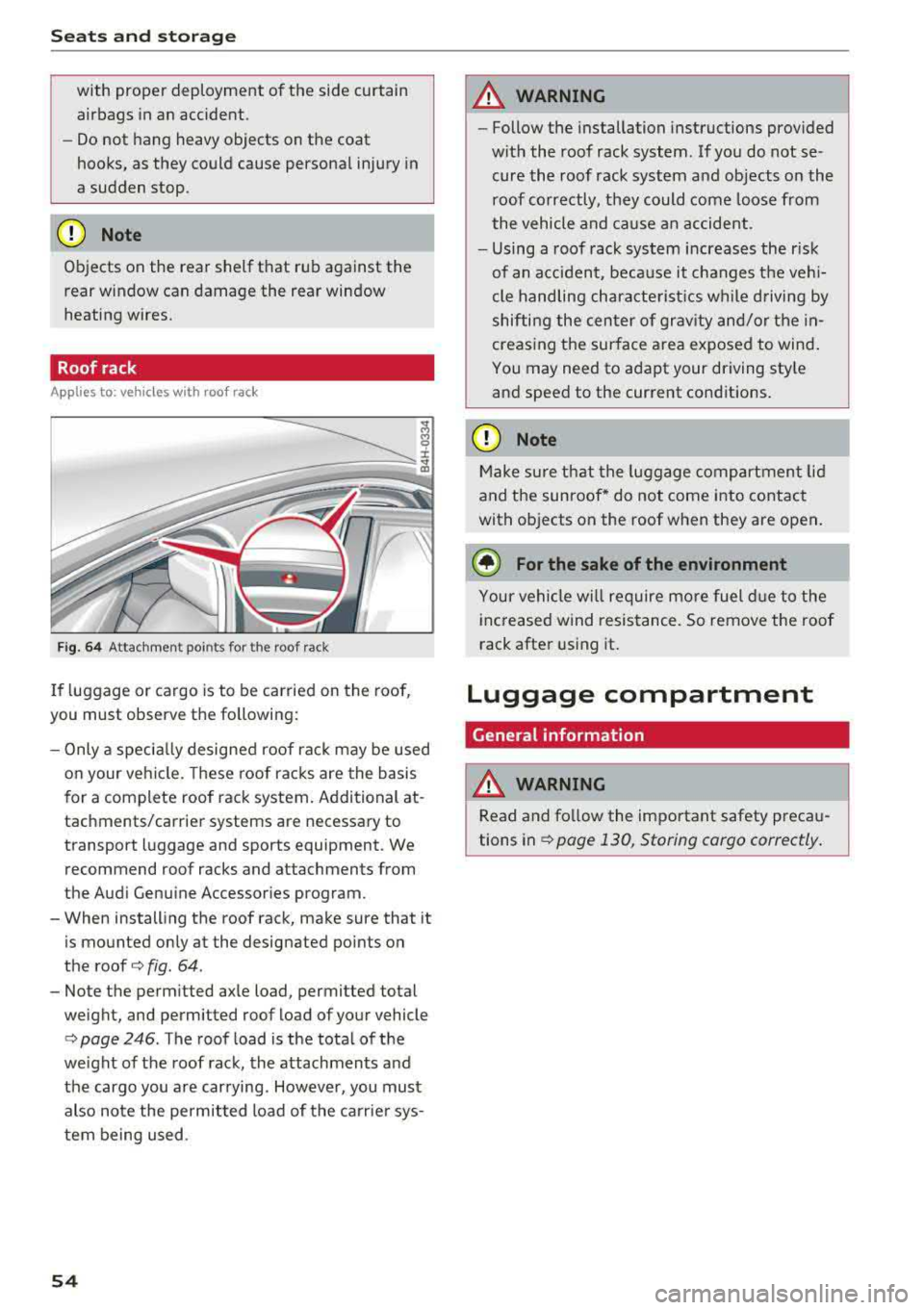
Roof rack
A pp lies to: ve hicles w ith roo f rac k
-
r~
Fig . 64 Attachment poi nts for the roof rack
If luggage or cargo is to be carried on the roof,
you must observe the following:
-Only a specia lly designed roof ra ck may be used
o n your veh icle. These roof racks are the basis
for a complete roof rack system. Additional at
tachments/carrier systems are necessary to
transport luggage and sports equipment. We
recommend roof racks and attachments from
the Audi Genu ine Accessor ies program.
-When installing the roof rack, make sure that it
is mounted only at the designated points on
the roof
i:> fig. 64 .
-Note the perm itted axle load, permitted total
weight, and permitted roof load of your vehicle
<=> page 246. The roof load is the tota l of the
weight of t he roof rack, the attachments and
the cargo you are carrying. However, you must
also note the permitted load of the carrier sys
tem being used .
54
A WARNING
,-
-Follow the installation instructions provided
w it h the roof rack system. If you do not se
cure the roof rack system and objects on the
roof correctly, they could come loose from
the vehicle and ca use an accident .
-Using a roof rack system increases the r isk
of an accident, because it changes the ve hi
cle handling characte rist ics wh ile driving by
shifting the center of grav ity and/or the in
creasing the sur face area exposed to wind .
You may need to adapt your driving sty le
and speed to the current conditions.
CD Note
Make sure that the luggage compartment lid
and the sunroof* do not come into contact
with objects on the roof when they are open .
@ For the sake of the environment
Your vehi cle will require mo re fuel d ue to the
increased wind resistance. So remove the roof
rack after using it.
Luggage compartment
General information
A WARNING
Read and fo llow the important safety precau
tions
in¢ page 130, Storing cargo correctly .
-
Page 58 of 266
Seats and stor age
A WARNING
For strength reasons, only objects with a max
imum weight of 10 lbs (5 kg) should be se
cured in the luggage compartment net. Heavi
er objects are not adequate ly secured . There
is risk of personal i njur y.
Storage hooks
App lies to: vehicles with bag hooks
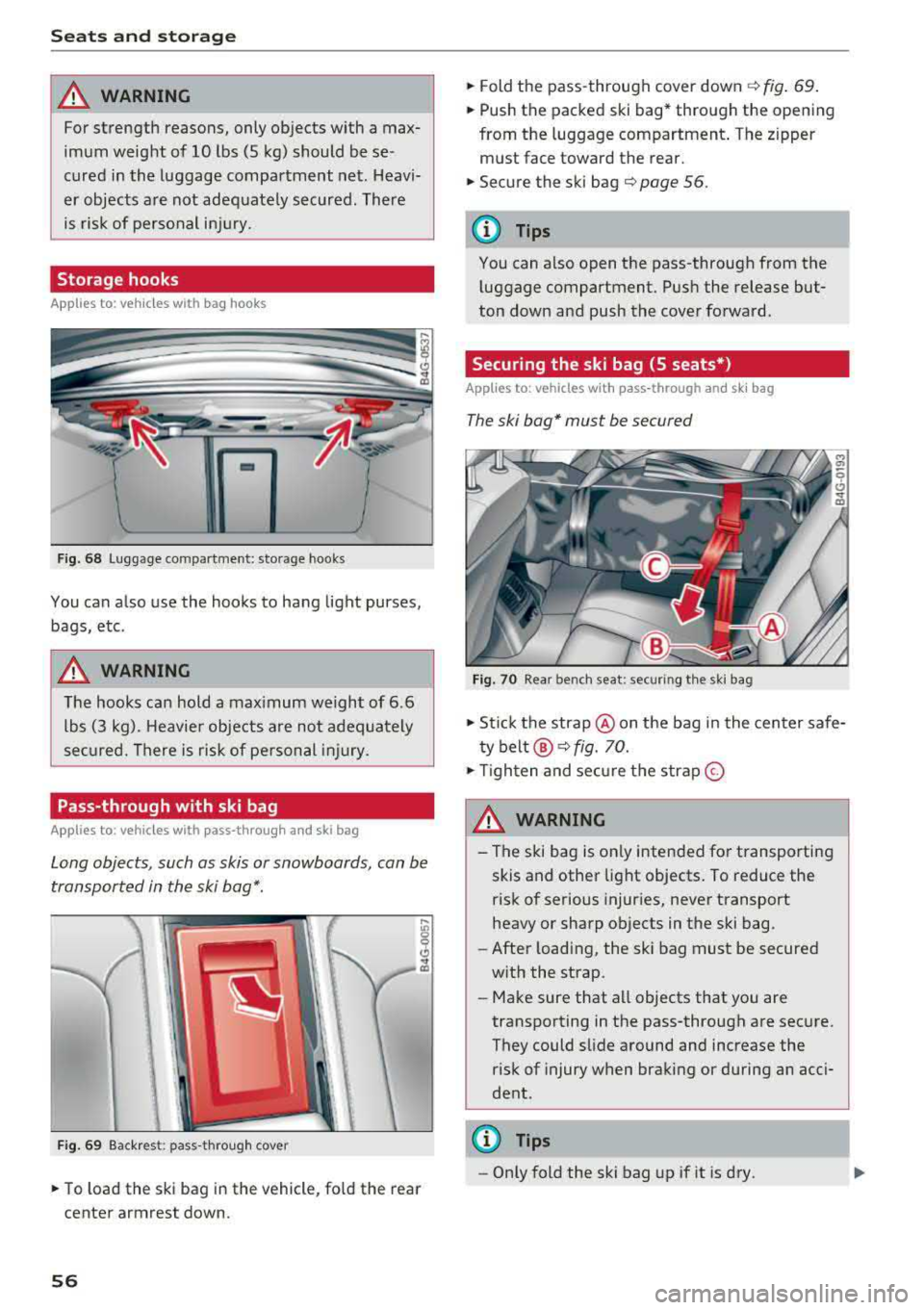
F ig. 68 Lugg age compartme nt: storage hooks
You can a lso use the hooks to hang light purses,
bags, etc .
A WARNING
The hooks can hold a max imum weight of 6 .6
lbs (3 kg). Heavier objects are not adequa tely
secured. There is risk of personal injury.
Pass-through with ski bag
Applies to: vehicles with pass -through and ski bag
Long objects, such as skis or snowboards, can be
transported in the ski
bag*.
F ig . 6 9 Backres t: pass-through cover
.,. To load the ski bag in the vehicle , fo ld the rear
center armrest down.
56
.,. Fold the pass-through cover down¢ fig. 69.
.,. Push the packed ski bag* through the opening
from the luggage compartment. The zipper
must face toward the rear.
.,. Secure the ski bag ¢ page 56.
(D Tips
You can also open the pass-through from the
l uggage compartment. Push the release but
ton down and push the cover forward.
Securing the ski bag (5 seats*)
Applies to: vehicles with pass-through and sk i bag
The ski bag* must be secured
Fig. 70 Rea r bench seat: securing t he ski bag
.,. St ic k the strap @on the bag in the center safe
t y
belt @¢ fig. 70.
.,. Tigh ten and se cure the s trap @
A WARNING
-The ski bag is on ly intended for transporting
skis and other light objects . To reduce the
risk of serious injur ies, never transport
heavy or sharp ob jects in the ski bag .
- After loading, the ski bag must be secured
w ith the strap.
-Make sure that all objects that you are
transporting in the pass-through are secure.
They could slide around and increase the
risk of injury when braking or during an acci
dent.
(D Tips
-Only fold the ski bag up if it is dry .