power steering AUDI A6 2020 User Guide
[x] Cancel search | Manufacturer: AUDI, Model Year: 2020, Model line: A6, Model: AUDI A6 2020Pages: 316, PDF Size: 86.41 MB
Page 113 of 316
4K0012721BD
Driving dynamic
the vehicle, and the turning radius may be much
larger. Slow down immediately, and stop your ve-
hicle as soon as possible in a safe location with
enough space at the sides of the vehicle. Do not
continue driving. See an authorized Audi dealer
or authorized Audi Service Facility for assistance.
2 —<| Steering: malfunction! Please stop vehicle
There is a malfunction in the electronic steering
lock. You cannot turn the ignition on. Do not tow
your vehicle because it cannot be steered. See an
authorized Audi dealer or authorized Audi Service
Facility for assistance.
El steering: malfunction! You can continue
driving
There is a malfunction in the steering system.
Steering may be more difficult or more sensitive.
Adapt your driving style. Have the steering sys-
tem checked immediately by an authorized Audi
dealer or authorized Audi Service Facility. Please
note that the red indicator light may turn on af-
ter restarting the engine. Do not continue driving
if it does.
& Steering: malfunction! Adapt driving style.
Larger turning radius
The rear axle steering may have failed. The vehi-
cle will have a larger turning radius, and the sta-
bility when driving around curves will be compa-
rable to a vehicle without rear axle steering. Drive
carefully to an authorized Audi dealer or author-
ized Audi Service Facility to have the malfunction
corrected.
|e —o| Steering lock: malfunction! Please contact
Service
There is a malfunction in the electronic steering
lock. Drive immediately to an authorized Audi
dealer or authorized Audi Service Facility to have
the malfunction repaired.
Dynamic steering: correcting steering wheel
position
The steering is reinitializing. The steering wheel
will move easily after starting the vehicle. Reiniti-
alization might be necessary if the steering wheel
was moved while the engine was switched off.
The display turns off if the initialization was suc-
cessful.
ZA\ WARNING
Do not tow your vehicle if there is a malfunc-
tion in the electronic steering lock because
this increases the risk of an accident.
@) Tips
—If there is a malfunction, the steering wheel
may be crooked when driving straight.
—Ifthe a or a indicator light only stays on
for a short time, you may continue driving.
All wheel drive (quattro)
Applies to: vehicles with all wheel drive
The all-wheel drive system distributes the driving
power variably to the front and rear axle to im-
prove the driving characteristics. It works togeth-
er with selective wheel torque control, which can
activate when driving through curves
=> page 113.
Applies to: vehicles with quattro ultra: If the driv-
ing situation does not require all wheel drive,
then the rear section of the drivetrain will decou-
ple to save fuel. The system constantly deter-
mines and anticipates if all wheel drive is needed.
This allows the rear drivetrain to recouple shortly
before it is needed.
The all-wheel drive system is designed for high
engine power. Your vehicle is exceptionally pow-
erful and has excellent driving characteristics
both under normal driving conditions and on
snow and ice. Always read and follow safety pre-
cautions > A\.
ZA\ WARNING
— Even in vehicles with all wheel drive, you
should adapt your driving style to the cur-
rent road and traffic conditions to reduce
the risk of an accident.
— The braking ability of your vehicle is limited
to the traction of the wheels. In this way, it
is not different from a two wheel drive >
111
Page 114 of 316
Driving dynamic
vehicle. Do not drive too fast because this
increases the risk of an accident.
— Note that on wet streets, the front wheels
can “hydroplane” if driving at speeds that
are too high. Unlike front wheel drive
vehicles, the engine RPM does not increase
suddenly when the vehicle begins hydro-
planing. Adapt your speed to the road condi-
tions to reduce the risk of an accident.
turns to the normal range and the indicator light
switches of.
ZA\ WARNING
Contact an authorized Audi dealer or author-
ized Audi Service Facility if the sport differen-
tial is faulty or malfunctioning. The repair
must be performed by trained personnel us-
ing the correct oil in order to ensure safety.
Sport differential
Applies to: vehicles with sport differential
The sport differential distributes the drive power
to the rear axle based on the situation. The goal
is a high level of agility and ability to accelerate
on curves. The vehicle is very responsive to steer-
ing. The settings depend on the selected Audi
drive select* mode.
Messages
t-3| All-wheel drive: malfunction! You may con-
tinue driving. Please contact Service
Drive immediately to an authorized Audi dealer
or authorized Audi Service Facility to have the
malfunction repaired.
F3| Sport differential: malfunction! Please con-
tact Service
Drive immediately to an authorized Audi dealer
or authorized Audi Service Facility to have the
malfunction repaired.
3] All-wheel drive: too hot. Please adapt driv-
ing style. See owner's manual
The transmission temperature has increased sig-
nificantly due to the sporty driving manner. Drive
in a less sporty manner until the temperature re-
turns to the normal range and the indicator light
switches of.
it-3| Sport differential: temperature too high.
Please adapt driving style
The transmission temperature has increased sig-
nificantly due to the sporty driving manner. Drive
in a less sporty manner until the temperature re-
112
Electronic Stabilization
Control
Electronic Stabilization Control (ESC) supports
driver safety. It reduces the risk of slipping and
improves driving stability. ESC detects critical sit-
uations, such as if the vehicle is oversteering or
understeering, or if the wheels are spinning. The
brakes are applied or the engine torque is re-
duced in order to stabilize the vehicle.
If the BA indicator light blinks while driving, the
ESC is actively regulating.
If the B indicator light turns on, the system has
switched the ESC off. In this case, you can switch
the ignition off and then on to switch the ESC on
again. The indicator light turns off when the sys-
tem is fully functional.
If the B indicator light turns on, ESC was limit-
ed or switched off manually > page 113.
The following systems are integrated in the ESC:
Anti-lock braking system (ABS)
ABS prevents the wheels from locking when brak-
ing. The vehicle can still be steered even during
hard braking. Apply steady pressure to the brake
pedal. Do not pump the pedal.
A pulsing in the brake pedal indicates that the
system is acting to stabilize the vehicle.
Brake assist
The brake assist system can decrease braking dis-
tance. It increases braking power when the driver
presses the brake pedal quickly in emergency sit-
uations. You must press and hold the brake pedal >
Page 115 of 316
4K0012721BD
Driving dynamic
until the dangerous situation is over. Depending
on the activated driver assistance systems, the
brake assist system may react with increased sen-
sitivity.
Anti-Slip Regulation (ASR)
ASR reduces drive power when the wheels begin
spinning and adapts the power to the road condi-
tions. This will increase the driving stability.
Electronic Differential Lock (EDL)
The EDL applies the brakes to wheels that are
slipping and transfers the drive power to the oth-
er wheels. This function is not available at higher
speeds.
In extreme cases, EDL automatically switches off
to keep the brake on the braked wheel from over-
heating. The vehicle is still functioning correctly.
EDL will switch on again automatically when con-
ditions have returned to normal.
Power steering
The ESC can also support vehicle stability
through steering.
Selective wheel torque control
Selective wheel torque control is used when driv-
ing on curves. Braking is targeted toward the
wheels on the inside of the curve as needed. This
allows more precise driving in curves.
Automatic post-collision braking system
The automatic post-collision braking system can
help to reduce the risk of sliding and of addition-
al collisions after an accident. If the airbag con-
trol module detects a collision, the vehicle is
braked by the ESC.
The vehicle does not brake automatically if one of
the following occurs:
— The driver presses the accelerator pedal, or
— The braking force generated by the pressed
brake pedal is greater than the braking force
that
would be initiated by the system
— The ESC, the brake system, or the vehicle elec-
trical system is not functioning
ZA WARNING
— The ESC and its integrated systems cannot
overcome the limits imposed by natural
physical laws. This is especially important on
slippery or wet roads. If the systems begin
acting to stabilize your vehicle, you should
immediately alter your speed to match the
road and traffic conditions. Do not let the in-
creased safety provided tempt you into tak-
ing risks. This could increase your risk of a
collision.
— Please note the risk of a collision increases
when driving fast, especially through curves
and on slippery or wet roads, and when driv-
ing too close to objects ahead. There is still
a risk of accidents because the ESC and its
integrated systems cannot always prevent
collisions.
— Accelerate carefully when driving on
smooth, slippery surfaces such as ice and
snow. The drive wheels can spin even when
these control systems are installed and this
can affect driving stability and increase the
risk of a collision.
(i) Tips
— The ABS and ASR only function correctly
when all four wheels have a similar wear
condition. Different tire sizes can lead toa
reduction in engine power.
— You may hear noises when the systems de-
scribed are working.
The So button for controlling the ESC is located
in the center console, in front of the selector lev-
er.
The ESC is automatically switched on when the
ignition is switched on. It may make sense in
some situations to limit the ESC so that the
wheels can spin:
— Rocking the vehicle to free it when it is stuck
— Driving in deep snow, on unpaved ground, or
with snow chains
113
Page 138 of 316

Driver assistance
— The adaptive cruise assist does not respond to
people, animals, or objects that are crossing or
approaching from the opposite direction.
Z\ WARNING
Follow the safety precautions and note the
limits of the assist systems, sensors, and
cameras > page 118.
Display overview
Applies to: vehicles with adaptive cruise assist
3] S|
me Ny Iz G3
Fig. 104 Instrument cluster: driver assistance display
Indicator lights and messages in the speedome-
ter @ -@) inform you about the driving situation
and the settings. In the Driver assistance display
@ - @, you can find more detailed information
about the system. The displays depend on the
country and equipment.
Display in the speedometer
The display in the speedometer is not available in
all layouts*.
@ Marking for the set speed
@ Current vehicle speed
@® Available speed range for adaptive cruise as-
sist (example)
136
Image in the Driver assistance display
The display only appears when the Driver assis-
tance display is open in the on-board computer
=> page 16.
Messages and settings
Detected vehicle driving ahead
Set target distance
The set distance is not met. The distance bars
will be colored red from the bottom upward.
Your vehicle
©®
CC®
Availability of lane departure warning and
lane guidance for adaptive cruise assist
© Availability of lane guidance for adaptive
cruise assist
Indicator lights
A - The speed/distance control is active. No
vehicles were detected ahead. The stored speed
is maintained.
Ba - The speed/distance control is active. A vehi-
cle was detected ahead. The adaptive cruise as-
sist controls the speed and distance from the ve-
hicle driving ahead, and accelerates and brakes
automatically.
A - The speed/distance control is active but the
vehicle is not ready to drive. A vehicle was de-
tected ahead. Your vehicle is stationary and will
not start driving automatically.
BS - The speed/distance control is active but the
vehicle is not ready to drive. No vehicles were de-
tected ahead. Your vehicle is stationary and will
not start driving automatically.
aA - The automatic braking is not enough to
maintain a sufficient distance to a vehicle driving
ahead. You must intervene > page 141, Driver in-
tervention request.
& - The indicator light turns on if the system
does not detect enough steering activity by the
driver. Always keep your hands on the steering
wheel so you can be ready to steer at any time.
The indicator light will also turn off, for example
if the steering power from the system is not suf-
ficient and adaptive cruise assist is canceled
=> page 139, Steering intervention request.
Page 141 of 316

4K0012721BD
Driver assistance
— The driver's hands are not on the steering
wheel
— Visibility is obstructed by a rise or dip.
Steering intervention request
If no steering activity is detected or the steering
power from the system is not sufficient, the driv-
er steering intervention request will alert the
driver using audio and visual signals. Take over
the steering and keep your hands on the steering
wheel so that you will be ready to steer at any
time. The system will become inactive after a
short time and will only be active again later.
If the driver does not take over steering, adaptive
cruise assist will be canceled. If the vehicle is
equipped with emergency assist and it is ready to
function, it will be activated if possible
=> page 154.
ZA\ WARNING
Follow the safety precautions and note the
limits of the assist systems, sensors, and
cameras > page 118.
G) Tips
— Always keep your hands on the steering
wheel so you can be ready to steer at any
time. The driver is always responsible for
adhering to the regulations applicable in
the country where the vehicle is being oper-
ated.
— It is recommended to only switch on lane
guidance on well-constructed roads.
— Certain settings are stored automatically in
the active personal profile.
—The & fig. 107 button switches lane guid-
ance availability and the lane departure
warning on or off simultaneously, if lane
guidance is preset in the adaptive cruise as-
sist settings.
Setting the distance
Applies to: vehicles with adaptive cruise assist
B4M-0234
Fig. 108 Operating lever: setting the distance
If you adjust the speed, you must also change the
time gap to the vehicle driving ahead. The higher
the speed, the greater the distance that is need-
ed.
> Tap the rocker switch to display the distance
that is currently set.
> To increase or decrease the distance in incre-
ments, tap the switch again toward G) or ().
The newly-set distance will be shown briefly, for
example with the indicator light. In the Driv-
er assistance display, a graphic display is shown
instead of the indicator lights > page 136,
fig. 104. The display matches the functions of
the indicator lights.
When approaching a vehicle driving ahead, the
adaptive cruise assist brakes to the set speed and
then maintains the set distance. If the vehicle
driving ahead accelerates, then the adaptive
cruise assist will also accelerate up to the speed
that you have set.
The following distances can be set:
139
Page 147 of 316

4K0012721BD
Driver assistance
If the indicator light turns on, the lane depar-
ture warning is not ready to provide warnings.
This may be due to the following reasons:
— The necessary lane marker lines have not been
detected (for example, in a construction zone
or because the lines are obstructed by snow,
dirt, water, or lighting)
— The speed is below the activation speed
— The lane is too narrow or too wide
— The curve is too narrow
— The driver's hands are not on the steering
wheel
— Visibility is obstructed by a rise or dip.
Steering intervention request
If no steering activity is detected or the steering
power from the system is not sufficient, the driv-
er steering intervention request will alert the
driver using audio and visual signals. Take over
the steering and keep your hands on the steering
wheel so that you will be ready to steer at any
time. The system will become inactive after a
short time and will only be active again later.
If the driver does not take over steering, the lane
departure warning will no longer be ready to pro-
vide warnings. If the vehicle is equipped with
emergency assist and it is ready to function, it
will be activated > page 154.
Behavior when a turn signal is active
Applies to: vehicles with side assist: Even if the
system is ready to provide warnings, it will not
warn you if you activate a turn signal before
crossing the lane marker line. In this case, it as-
sumes that you are changing lanes intentionally.
Applies to: vehicles with side assist: If the turn
signal is activated, the lane departure warning is
ready, and a lane change has been classified as
critical by the lane departure warning due to
vehicles traveling beside you or due to approach-
ing vehicles, then a noticeable corrective steering
movement will occur shortly before exiting the
lane. This will attempt to keep your vehicle in the
lane.
ZA WARNING
— Follow the safety precautions and note the
limits of the assist systems, sensors, and
cameras > page 118.
— The system warns the driver that the vehicle
is leaving the lane using corrective steering.
The
driver is always responsible for keeping
the vehicle within the lane.
— Corrective steering may not occur at all in
certain situations, such as during heavy
braking. Always be ready to intervene.
(i) Tips
— Always keep your hands on the steering
wheel so you can be ready to steer at any
time. The driver is always responsible for
adhering to the regulations applicable in
the country where the vehicle is being oper-
ated.
— The system does not provide any corrective
steering or steering wheel vibrations if it de-
tects that you are passing another vehicle.
ONC mam Ks) Clea}
Applies to: vehicles with lane departure warning
You can switch the optional steering wheel vibra-
tion warning for the lane departure warning on
and off. The settings depend on the vehicle
equipment.
— Applies to: MMI: Select on the home screen:
VEHICLE > Driver assistance > (<3) > Lane de-
parture warning > Vibration warning.
G) Tips
Certain settings are stored automatically in
the active personal profile.
tLe [4
Applies to: vehicles with lane departure warning
ray or {is displayed when there is a malfunc-
tion, the lane departure warning and lane guid-
ance functions of the adaptive cruise functions
may be unavailable or limited.
A message that indicates the cause and possible
solution may appear with some displays. The
145
>
Page 215 of 316
4K0012721BD
Media
@) Note
— Pull the cable out of the Audi music inter-
face carefully so that the USB ports are not
damaged.
— Use a USB extension cable to connect devi-
ces that have an integrated USB connector
(such as a USB stick) to reduce the risk of
damage to your USB device and the Audi
music interface.
— Extremely high or low temperatures that
can occur inside vehicles can damage mobile
devices and/or impair their performance.
Never leave mobile devices in the vehicle in
extremely high or low temperatures.
@ Tips
— Always follow the information found in
=>
page 80.
— When you switch the ignition off, the USB
ports are still supplied with power until the
energy management intervenes.
— Do not use an additional adapter cable or
USB extension cable to connect mobile devi-
ces to the Audi music interface that already
have a cable or that must be connected with
a USB adapter cable (> page 212, fig. 147).
Using an additional adapter or US extension
cable may impair functionality.
— Functionality is not guaranteed for mobile
devices that do not conform to the USB 2.0
specification.
— USB hubs are not supported.
— Video playback through the Audi music in-
terface is not supported on Apple and MTP
devices (such as smartphones).
— iPod or iPhone malfunctions also affect the
operation of the MMI. Reset your mobile de-
vice in these situations.
— Audi recommends updating the iPod or
iPhone software to the latest version. Refer
to your mobile device owner's manual for
more information.
— The USB adapter on the Audi music inter-
face will support iPod touch or iPhone devi-
ces from the 5th generation or newer with
the lightning connector.
— For more information about the Audi music
interface and supported devices, check the
Audi database for mobile devices at www.
audi.com/mp3 or contact an authorized
Audi dealer or authorized Audi Service Fa-
cility.
Playing media
The following sources can be selected depending
on the vehicle equipment:
— Amazon Alexa > page 212.
—SD card > page 209.
— USB © page 212.
— DVD drive > page 210.
— Connect external device: you can connect ex-
ternal devices via Bluetooth and use the Blue-
tooth audio player > page 210, or you can con-
nect an external device directly to the Audi mu-
sic interface > page 212.
— Connect online media > page 211.
Accessing media
Playing media files using the MMI
> Applies to: MMI: Select on the home screen:
MEDIA > Source > a source. Depending on the
connected device or online media service”, the
symbol for a source may change. The device
name may be displayed (for example: my-
Phone).
> Select a track from the categories in the media
center > page 214.
Playing media files using the multifunction
steering wheel
Requirement: a media drive must contain media
files > page 213.
> Select the Radio/Media tab using the multi-
function steering wheel.
> Turn the left thumbwheel to display the play-
list.
> To switch to a different source, press the [=|
button.
> To select a media file or a source, turn and
press the left thumbwheel.
213
Page 284 of 316

Emergency assistance
(50 km), then transport the vehicle on a
special carrier.
— If the vehicle is towed by a tow truck at the
axle that is not permitted, this can cause se-
vere damage to the transmission.
— The vehicle must not be tow started for
technical reasons.
@) Tips
— If the power supply is interrupted, then it
will not be possible to move the selector
lever out of the "P" position. The parking
lock must be released using the emergency
release before towing the vehicle
> page 98.
— Switch Audi pre sense* off > page 149 when
loading the vehicle onto a vehicle carrier,
train, ship, or other type of transportation,
or when towing the vehicle. This can prevent
an undesired intervention from the pre
sense* system.
— Follow the local legal regulations for tow-
ing.
Read and follow the important information under
=> page 281.
Preparations
> Only secure the towing cable or tow bar at the
designated towing loops > page 282,
> page 283.
> Make sure the towing cable is not twisted. Oth-
erwise it could disconnect from the towing loop
while towing.
> Switch the emergency flashers on in both
vehicles > page 51. However, do not do this if it
prohibited by law.
Towing vehicle (front)
> Only start to drive when the towing cable is
taut.
> Press the brake pedal very carefully.
> Avoid sudden braking or driving maneuvers.
282
Vehicle being towed (rear)
> Make sure the ignition is switched on so that
the steering wheel is not locked and so that you
can use the turn signals, the horn, and the
windshield wipers if needed > A\.
> Switching it off before the vehicle has stopped
may
impair the function of the brake booster
and power steering. You would then need to
use more force to steer and brake the vehicle.
> Release the parking brake > page 104.
> Select the “N” selector lever position.
> Make sure the towing cable is always taut.
ZA WARNING
Never tow a vehicle using a tow bar or towing
cable if the vehicle does not have electrical
power.
Front towing loop
Fig. 179 Front bumper: installing the towing loop
The threaded opening for the towing loop is lo-
cated on the right side of the front bumper.
> Remove the towing loop from the vehicle tool
kit > page 272.
> Press the cap inward with brief, strong pressure
=> fig. 179. The cap will loosen from the bump-
er.
> Tighten the towing loop in the threaded open-
ing until it stops and then tighten it with a
wheel wrench.
>» After using, place the towing loop back in the
vehicle tool kit.
ZA WARNING
If the towing loop is not tightened until it
stops when installing, the threads may be >
Page 308 of 316
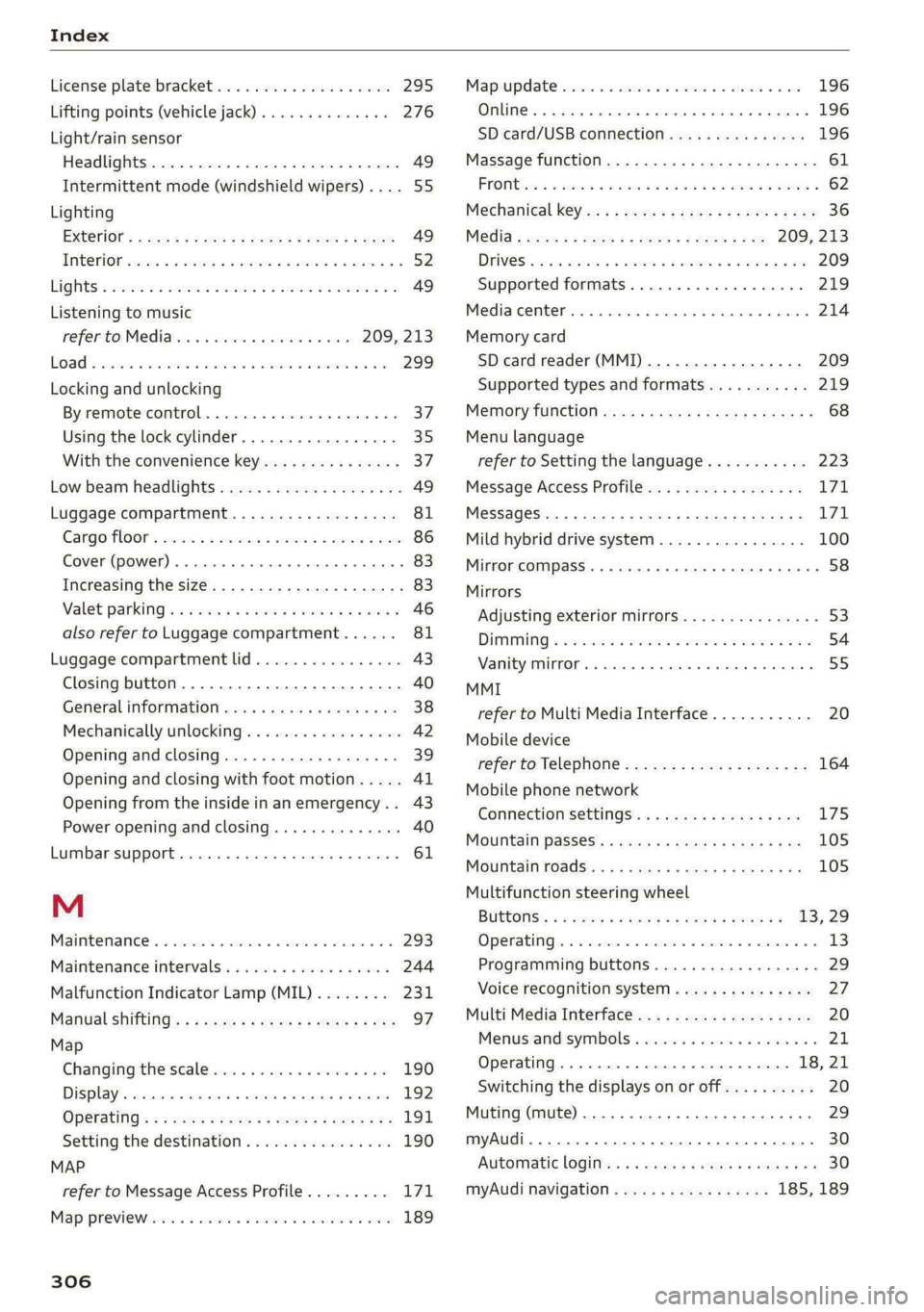
Index
License plate bracket................... 295
Lifting points (vehicle jack).............. 276
Light/rain sensor
Headlights...............00 02.2 e ee eee 49
Intermittent mode (windshield wipers).... 55
Lighting
Exterior’: 2 20s + ses ¢ 2 seuu ¢ » Nee e Fes 49
EMCOVION sszows 2 2 soso a 2 serves oon Maes aH HERE 52
LIQHES s sons vo somems wo eames oo come eo ame OB 49
Listening to music
refer to Media....... ccc eee e eee 209, 213
Loa & sss 3 wesw @ oman oe emo ae ee ew 299
Locking and unlocking
By remote control..............-00 eee 37
Using the lock cylinder..............00. 35
With the convenience key............... 37
Low beam headlights.................04. 49
Luggage compartment................5. 81
Cargo floor’. sis ¢ « asain + 3 mwen 3 0 veewin oo ae 86
Cover (power) .... 00... cece eee eee eee 83
Increasing the size..............-00 0 eee 83
Valet parkinGis « aces « 2 ewes 2 x ane © 2 gems ¥ 46
also refer to Luggage compartment...... 81
Luggage compartment lid................ 43
Closing button. ................000000. 40
General information ............e00e005 38
Mechanically unlocking...............-. 42
Opening and closing.................-. 39
Opening and closing with foot motion..... 41
Opening from the inside in an emergency... 43
Power opening and closing.............. 40
Lumbar support........... 0.0 0c eee eae 61
M
Maintenance’. « ssciais 2 6 avcaie + 6 sess © 4 aneve © 293
Maintenance intervals.................. 244
Malfunction Indicator Lamp (MIL)........ 231
Manual shifting’. « « sexs +e sees ye aes ee ee 97
Map
Changing the scale wis. so caw se ewes ov ove 190
Display. ...... eee eee eee 192
Operating’: « ses = s goam & & wows & i eee oye 191
Setting the destination................ 190
MAP
refer to Message Access Profile......... 171
MapiprevieWesscrs s+ csmuens 2 0 eases a a somes v 6 oseee 189
306
Online
FROM tii 2s ceo + moms oo mers a 2 oe oo eR
Mechanical key
Media : swe 2 s sees 2 2 eee se eee ce
DrVCSiiwic 2 mace: a 2 comes a 2 en a HO wa 209
Supported formats..............00005 219
Media
cemter inn «6 wissen 0 osname « oxeeas « sees a 214
Memory card
SD card reader (MMI)...........--.... 209
Supported types and formats........... 219
MEMONy fUACHION wea ss nee s yates a x geoee 6 8 68
Menu language
refer to Setting the language........... 223
Message Access Profile...............0- 171
MESSAGESizs 5 & sews & § ees Fe SG FE Se ee 171
Mild hybrid drive system.............00- 100
Mirror COMPASS... . 1... ee eee eee ee 58
Mirrors
Adjusting exterior mirrors............... 53
DIMMs 2 sco oo sess & o ees © oy me © oe 54
VENIEYAMKOR. « cancace & eoneon 9 91 testes & 0! eEtenens 55
MMI
refer to Multi Media Interface........... 20
Mobile device
referto Telephone.................005 164
Mobile phone network
Connection settings...............04. 175
Mountain passes’: = sews s = seus << ees se oe 105
MOUTEaINTOSdSins « ¢ wens ¢ e rere x tees Bee 105
Multifunction steering wheel
BUttONS's = « san + & saws + women a = ween a = 13, 29
OPenrabtings, « = sess «a wince. & meena « # emer WH 6 13
Programming buttons.................- 29
Voice recognition system............... 27
Multi Media Interface................055 20
MenustandisymDolls « wicca x ewes so wae « © 21
Operating...............02.00.000. 18, 21
Switching the displays on or off.......... 20
Muting (mute) ................0..00000. 29
myAudi... 2... eee eee 30
Automatic logitts: « « sews + ¢ sees ye eee ees 30
myAudi navigation................. 185, 189
Page 310 of 316

Index
Parking light sis: = 2 sccwe = x cscuee ov ewerae oo orescence 49
Parking lock emergency release........... 98
Parking system
Adjusting the volume...............-. 157
Automatic activation
Deactivating rear cross-traffic assist... .. 163
Parking systems
Parkingisystem plusts so seis © v sewn w @ sense 156
Partition Net ses 2s ismie seman os eee ee eee 84
Pass-through sess s = eeey se eee ss eee Eb Bee 84
Password
myAudi automatic login................ 30
PAthiSes & wae & 2 wea 3 2 news s wey ¢ HERE Ge 19
Pause (media files) .............00000005 213
PédalSiss « see « : seme © ¥ Geme ¢ ¢ Rewe 2 eee 97
Pedestrian detection.................4. 127
Perchlorate ......... 2.0.0 eee eee eee eee 293
Peripheral cameras.............--000-5 158
Personal route assistance............... 193
Phone
Answering/ending acall............... 170
Connecting a second mobile device...... 165
Disconnecting a mobile device.......... 166
SettingS
.. 0.6... cece eee eee 174
Phonebook
refer to CONtACtS) «3s «cca gv Hoek ss Hees 169
Playback (media) ............. 00000000 213
Podcast
refer to Online radio.................. 205
5) 188
Point of interest
refer to Online Points of Interest........ 188
PoliShitiGuscs ¢ = seme : evens : sees st newe soe 268
Pollen filter
refer to Pollutant filter..............0.. 91
Pollutant Titer’: = caws = = mews = eoven gs pee ss 91
Power closing (doors).......-.. eee eee e eee 32
Power SourceS... 2.2.0.0 0 2c eee eee 80, 212
Power windows...........--.0 00sec eee ee 43
MalfUnCtOfin: + asm se mein 3 x aoe a 2 43,44
Power windows malfunction.............. 43
Predictive control.......... eee eee eee eee 133
Predictive messages................ 97,132
pre sense
refer to Audi presense.............008 146
Presentation mode.............005-008 200
308
Pressure
Tire pressure monitoring system........ 264
Tit@Sies ¢ x sae Haves ¢ i deme Fe Rem aE eee 255
Progressive steering... 62.05. ceeds eieees 110
Protecting... 0... ccc e cece ee eee eee eee 268
Pyrotechnic elements................4. 293
Q
quattro... 2... eee eee eee iy
Selective wheel torque control.......... 113
R
Radio... cee eee eee eee 201
Radio texte « < says a 2 geen 2 2 cee & 2 ee 204
SEALIOMIISE cowie x + cxctene © 2 sunsnwe wom aaennie w os 201
Radio communications equipment........ 295
Radio equipment ................+-00 ee 295
Radio Standards Specification (RSS) ....... 296
Raileartier': + wows « 2 some x ¢ yea xo eee 8 a 109
Rain/light sensor
Headlights: aces © swine es wuss oo eens 2 2 eee 49
Intermittent mode (windshield wipers).... 55
RANGES. a ctimene ao ominaae so omeneite Heian oH ounRON 4 16
Reading lightstex: cs ssc: «x wnscame © w cxntene wo cman 52
Rear cross-traffic assist............0008. 162
Rear lid
refer to Luggage compartment lid........ 39
Rear shelf
refer to Storage area behind the rear head
FESthAINIES same 2 y was ¢ 2 eee x Eee go eee 81
Rearview camera..........--.0 eee seen 158
Rear window defogger............-..00-- 90
Rear wiper blades
CHANGING ss « 2 eaaws g x memes 5 ¥ cere s Ee EE 5/
Cleaning isa = 2 wccon =o ween seen aw ro eB HH 57
REAR (climate control system)............ 89
Reception range’: « « scovs ss ews 9 e rere bg oe 201
Recirculation Mode : sins si sees is awa ve 90
Recuperation.......... 000 cece eee eee 16
Refueling........... 0.0 c cece eee eee ee 228
Remote control
Garage door opener............--eeeeee 46
Remote control key... . 0.0... cece cece 36
Convenience opening and closing......... 44
Key replacement...............000000- 36