ECU AUDI A6 2020 Owner's Manual
[x] Cancel search | Manufacturer: AUDI, Model Year: 2020, Model line: A6, Model: AUDI A6 2020Pages: 316, PDF Size: 86.41 MB
Page 82 of 316
Stowing and using
Stowing and using
Power sources
When the ignition is switched on, you may be
able to use multiple power sources for external
devices, depending on the vehicle equipment.
12 volt sockets
You can connect electrical accessories to the 12
volt sockets. The power usage must not exceed
120 watts.
The 12 volt sockets are labeled with the 12V
symbol. They are located in the front center con-
sole, in the rear* and on the side trim panel in the
luggage compartment*.
USB ports
Applies to: vehicles with USB input
You can charge mobile devices using the USB
ports. The USB ports are labeled with the «> or
(4 symbol or CHARGE ONLY.
Cup holders
Applies to: vehicles with cup holders
[RAz-0745
ZA\ WARNING
—To reduce the risk of fatal injury, store all
connected devices securely when driving so
that they do not move around inside the ve-
hicle when braking or in the event of an acci-
dent.
— Incorrect usage can lead to serious injuries
or burns. To reduce the risk of injuries, never
leave children unattended in the vehicle
with the vehicle key.
@) Note
— Read the operating manuals for the con-
nected devices.
—To reduce the risk of damage to the vehicle
electrical system, never attempt to charge
the vehicle battery by connecting accesso-
ries that provide power to the power sour-
ces.
— Do not connect any device whose network
class (voltage) does not match the network
class designed for the socket.
— Disconnect the connectors from the power
sources carefully to reduce the risk of dam-
aging them.
80
Fig. 69 Rear center armrest*: cup holders
Front center console cup holders
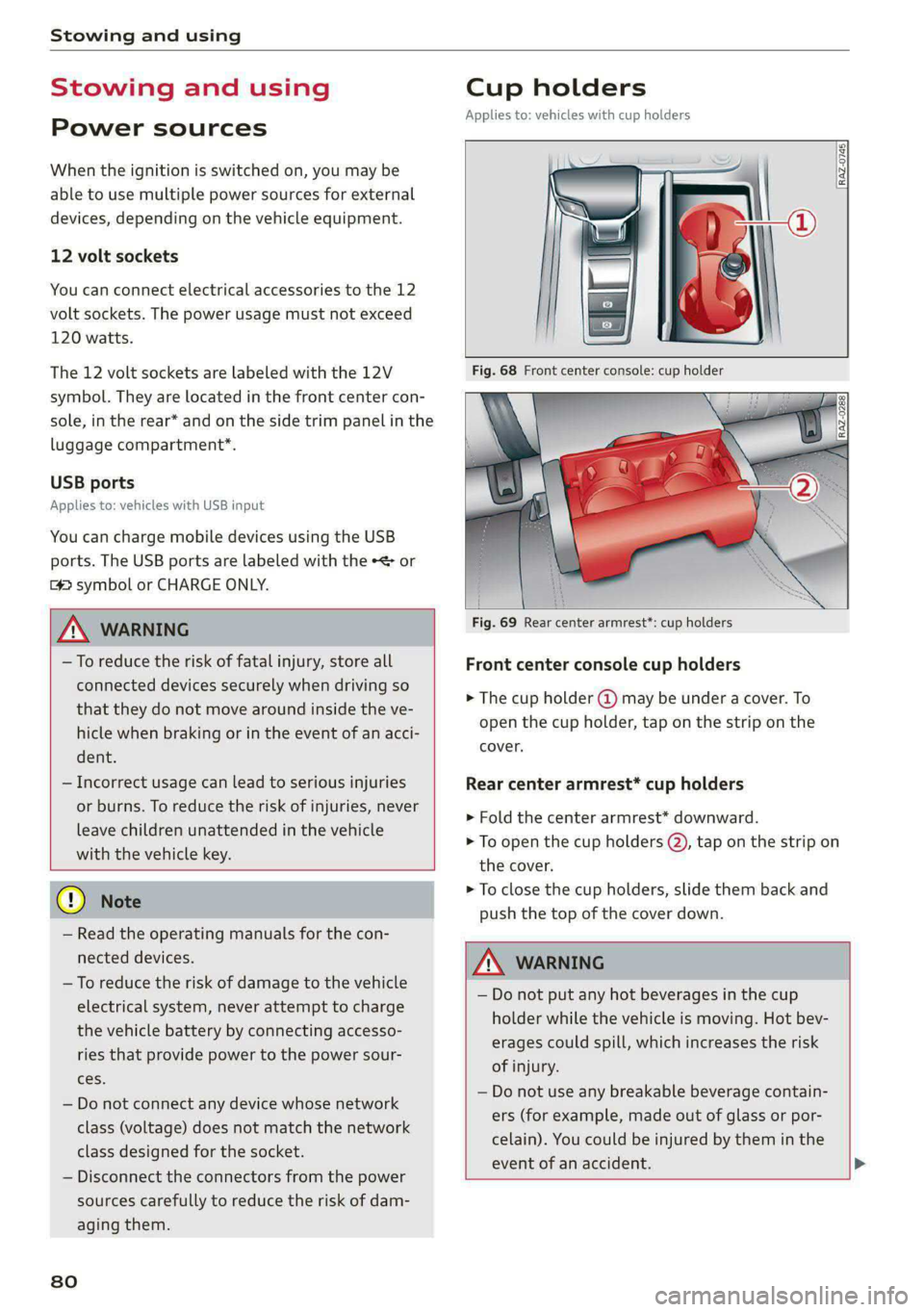
> The cup holder @ may be under a cover. To
open the cup holder, tap on the strip on the
cover.
Rear center armrest* cup holders
> Fold the center armrest* downward.
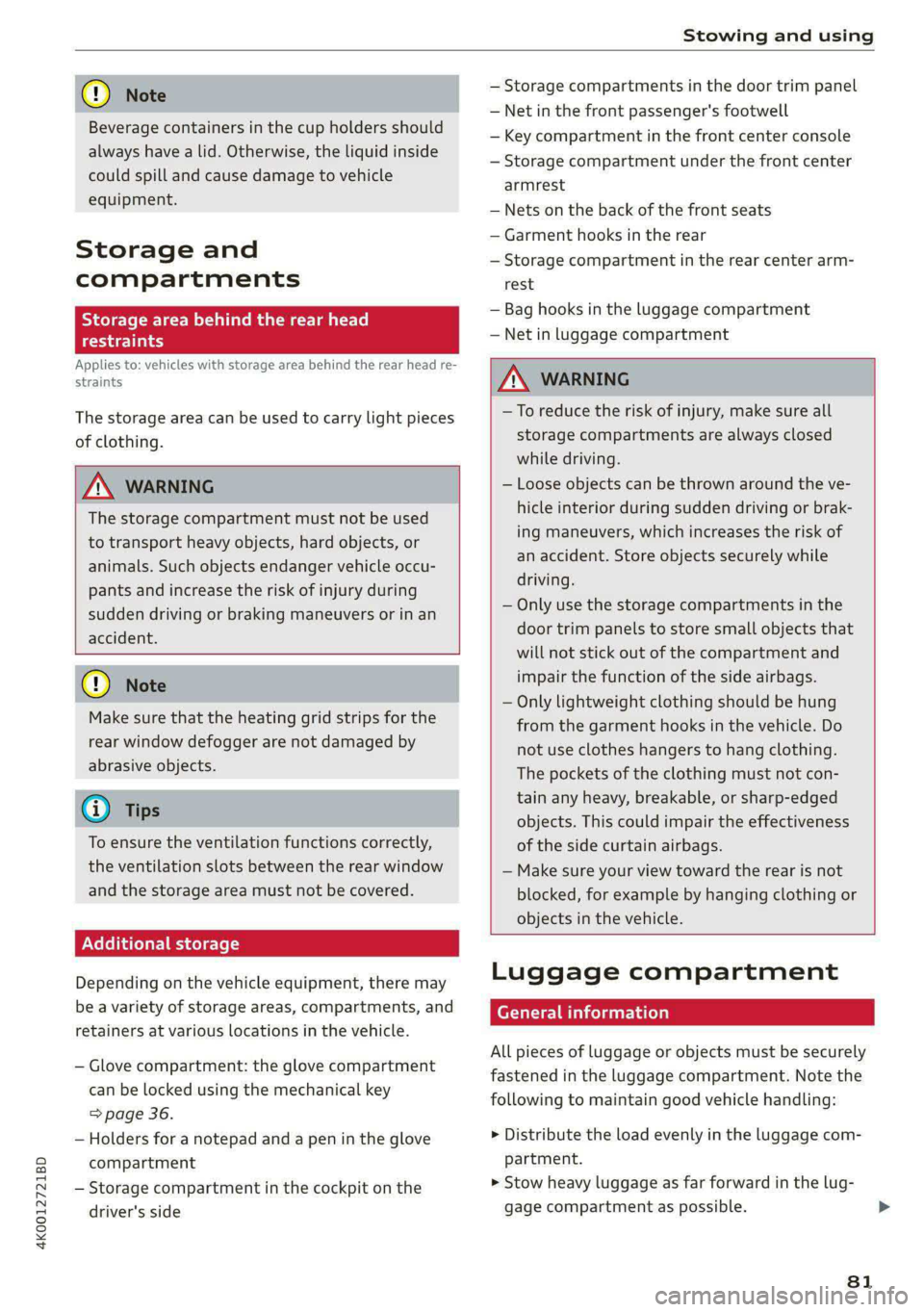
> To open the cup holders @), tap on the strip on
the cover.
> To close the cup holders, slide them back and
push the top of the cover down.
Z\ WARNING
— Do not put any hot beverages in the cup
holder while the vehicle is moving. Hot bev-
erages could spill, which increases the risk
of injury.
— Do not use any breakable beverage contain-
ers (for example, made out of glass or por-
celain). You could be injured by them in the
event of an accident.
Page 83 of 316
4K0012721BD
Stowing and using
@) Note
Beverage containers in the cup holders should
always
have a lid. Otherwise, the liquid inside
could spill and cause damage to vehicle
equipment.
Storage and
compartments
Storage area behind the rear head
eel ey
Applies to: vehicles with storage area behind the rear head re-
straints
The storage area can be used to carry light pieces
of clothing.
Z\ WARNING
The storage compartment must not be used
to transport heavy objects, hard objects, or
animals. Such objects endanger vehicle occu-
pants and increase the risk of injury during
sudden driving or braking maneuvers or in an
accident.
@) Note
Make sure that the heating grid strips for the
rear window defogger are not damaged by
abrasive objects.
@ Tips
To ensure the ventilation functions correctly,
the ventilation slots between the rear window
and the storage area must not be covered.
Additional storage
Depending on the vehicle equipment, there may
be a variety of storage areas, compartments, and
retainers at various locations in the vehicle.
— Glove compartment: the glove compartment
can be locked using the mechanical key
=> page 36.
— Holders for a notepad and a pen in the glove
compartment
— Storage compartment in the cockpit on the
driver's side
— Storage compartments in the door trim panel
— Net in the front passenger's footwell
— Key compartment in the front center console
— Storage compartment under the front center
armrest
— Nets on the back of the front seats
— Garment hooks in the rear
— Storage compartment in the rear center arm-
rest
— Bag hooks in the luggage compartment
— Net in luggage compartment
ZA\ WARNING
—To reduce the risk of injury, make sure all
storage compartments are always closed
while driving.
— Loose objects can be thrown around the ve-
hicle interior during sudden driving or brak-
ing maneuvers, which increases the risk of
an accident. Store objects securely while
driving.
— Only use the storage compartments in the
door trim panels to store small objects that
will not stick out of the compartment and
impair the function of the side airbags.
— Only lightweight clothing should be hung
from the garment hooks in the vehicle. Do
not use clothes hangers to hang clothing.
The pockets of the clothing must not con-
tain any heavy, breakable, or sharp-edged
objects. This could impair the effectiveness
of the side curtain airbags.
— Make sure your view toward the rear is not
blocked, for example by hanging clothing or
objects in the vehicle.
Luggage compartment
General information
All pieces of luggage or objects must be securely
fastened in the luggage compartment. Note the
following to maintain good vehicle handling:
> Distribute the load evenly in the luggage com-
partment.
> Stow heavy luggage as far forward in the lug-
gage compartment as possible.
81
>
Page 84 of 316
Stowing and using
> Use non-elastic cords attached to the tie-downs
to secure objects.
ZA WARNING
— Applies to: vehicles with luggage compart-
ment cover: The luggage compartment cov-
er is not a surface for storing objects. Ob-
jects placed on the cover increase the risk of
injury to all vehicle occupants during sudden
driving or braking maneuvers or in the event
of an accident.
— Loose objects can be thrown around the ve-
hicle interior during sudden driving or brak-
ing maneuvers, which increases the risk of
an accident. Always stow objects securely in
the luggage compartment and secure them
at the tie-downs. Use straps suitable for
heavy objects.
— If pieces of luggage or objects are secured
to the tie-downs with unsuitable or dam-
aged straps, this can increase the risk of in-
jury during braking maneuvers or accidents.
— When transporting heavy objects, the vehi-
cle characteristics will change due to the
shift in the center of gravity, which increases
the risk of an accident. You may need to
adapt your driving style and speed to the
current conditions.
— The cargo net is only strong enough to se-
cure light objects. Heavy objects are not ade-
quately secured. Attempting to secure heavy
objects increases the risk of injury.
— Never exceed the permitted axle and load
and vehicle weight > page 299.
— Never secure a child safety seat to the tie-
downs.
— Never leave your vehicle unattended, espe-
cially if the luggage compartment lid is
open. Children could enter the luggage com-
partment and close the luggage compart-
ment lid from the inside. This creates the
risk of fatal injury, since the children would
be locked in and may not be able to escape
by themselves.
— Do not allow children to play in or on the ve-
hicle. Close and lock the luggage compart-
ment lid as well as all other doors when you
leave the vehicle.
— Never transport passengers in the luggage
compartment. Every passenger must be cor-
rectly secured with the safety belts in the
vehicle > page 65.
— Be careful when releasing the backrest and
folding
it forward. To reduce the risk of be-
ing pinched, pay attention and check when
folding backrests forward.
— The backrest must be securely latched so
objects cannot slide forward out of the lug-
gage compartment during sudden braking.
— The backrest must be latched securely to en-
sure that the safety belt is protecting the
center seating position.
— Always pull forward on the backrest to make
sure it is check if it is correctly locked in
place.
82
@) Note
—To reduce the risk of damage, move the rear
head restraints down > page 64 before fold-
ing the rear backrests forward.
— When folding the backrest forward, make
sure the outer safety belts are in the belt
guide recess so that they do not get pinched
in the backrest lock and damaged. Other ob-
jects should be removed from the rear
bench seat to protect the backrest from
damage.
— If you move the front seat back when the
rear seat backrest is folded forward, you
could damage the head restraints on the
rear seat.
— Make sure that the heating grid strips for
the rear window defogger are not damaged
by abrasive objects.
— Let the luggage compartment cover roll up
slowly to reduce the risk of damage.
— Let the partition net roll up slowly to pre-
vent damage.
@ Tips
— The tire pressure must be adapted to the
load > page 255.
— You can purchase straps at specialty stores.
Page 85 of 316
4K0012721BD
Stowing and using
Power luggage compartment cover
Applies to: vehicles with power luggage compartment cover
Fig. 71 Luggage compartment: removing the luggage
compartment cover
Follow the safety precautions > page 81.
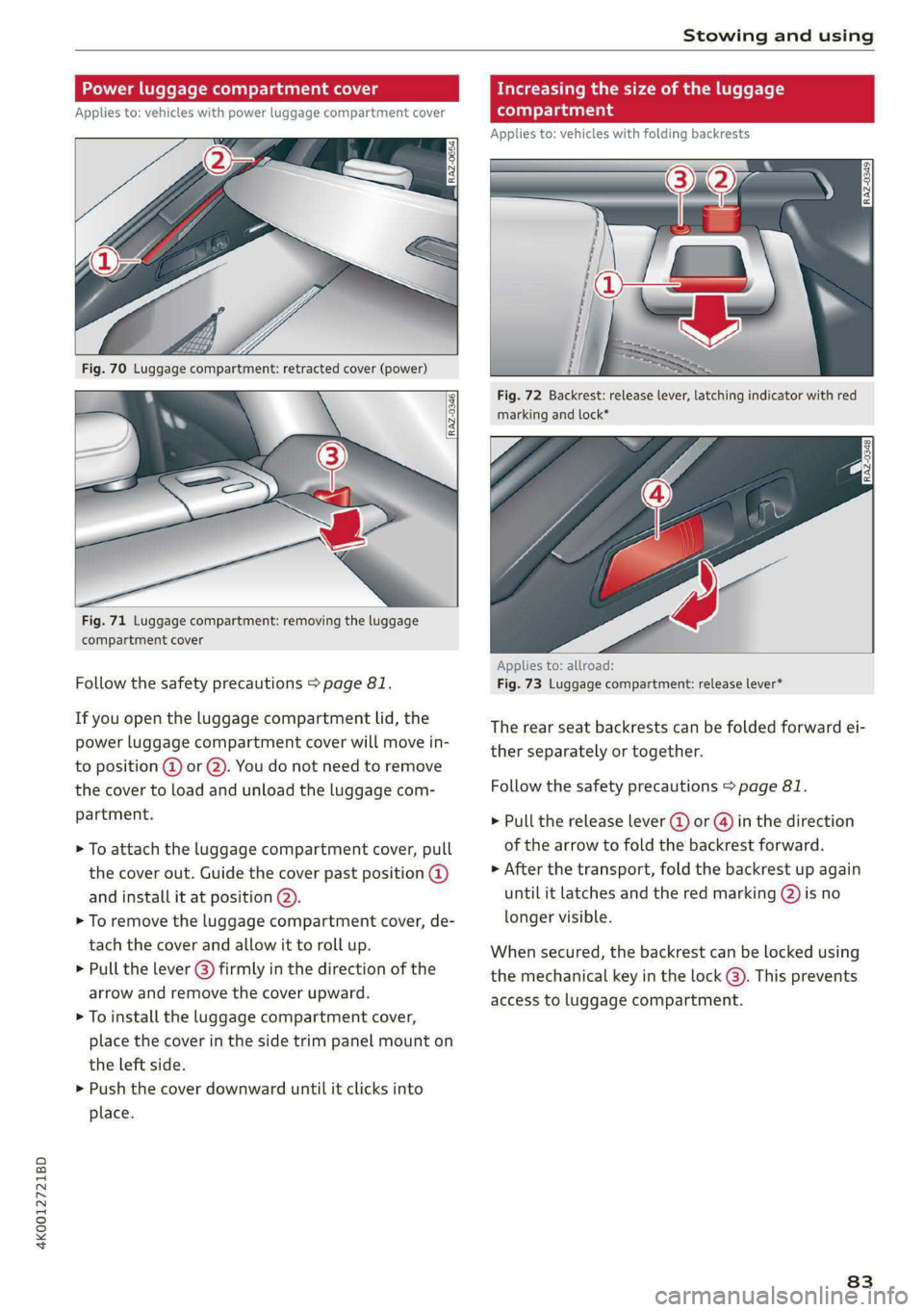
If you open the luggage compartment lid, the
power luggage compartment cover will move in-
to position @ or @). You do not need to remove
the cover to load and unload the luggage com-
partment.
> To attach the luggage compartment cover, pull
the cover out. Guide the cover past position @
and install it at position (2).
> To remove the luggage compartment cover, de-
tach the cover and allow it to roll up.
> Pull the lever () firmly in the direction of the
arrow and remove the cover upward.
> To install the luggage compartment cover,
place the cover in the side trim panel mount on
the left side.
> Push the cover downward until it clicks into
place.
Increasing the size of the luggage
compartment
Applies to: vehicles with folding backrests
Fig. 72 Backrest: release lever, latching indicator with red
marking and lock*
Applies to: allroad:
Fig. 73 Luggage compartment: release lever*
The rear seat backrests can be folded forward ei-
ther separately or together.
Follow the safety precautions > page 81.
> Pull the release lever (@) or @) in the direction
of the arrow to fold the backrest forward.
> After the transport, fold the backrest up again
until it latches and the red marking @) is no
longer visible.
When secured, the backrest can be locked using
the mechanical key in the lock @). This prevents
access to luggage compartment.
83
Page 87 of 316
4K0012721BD
Stowing and using
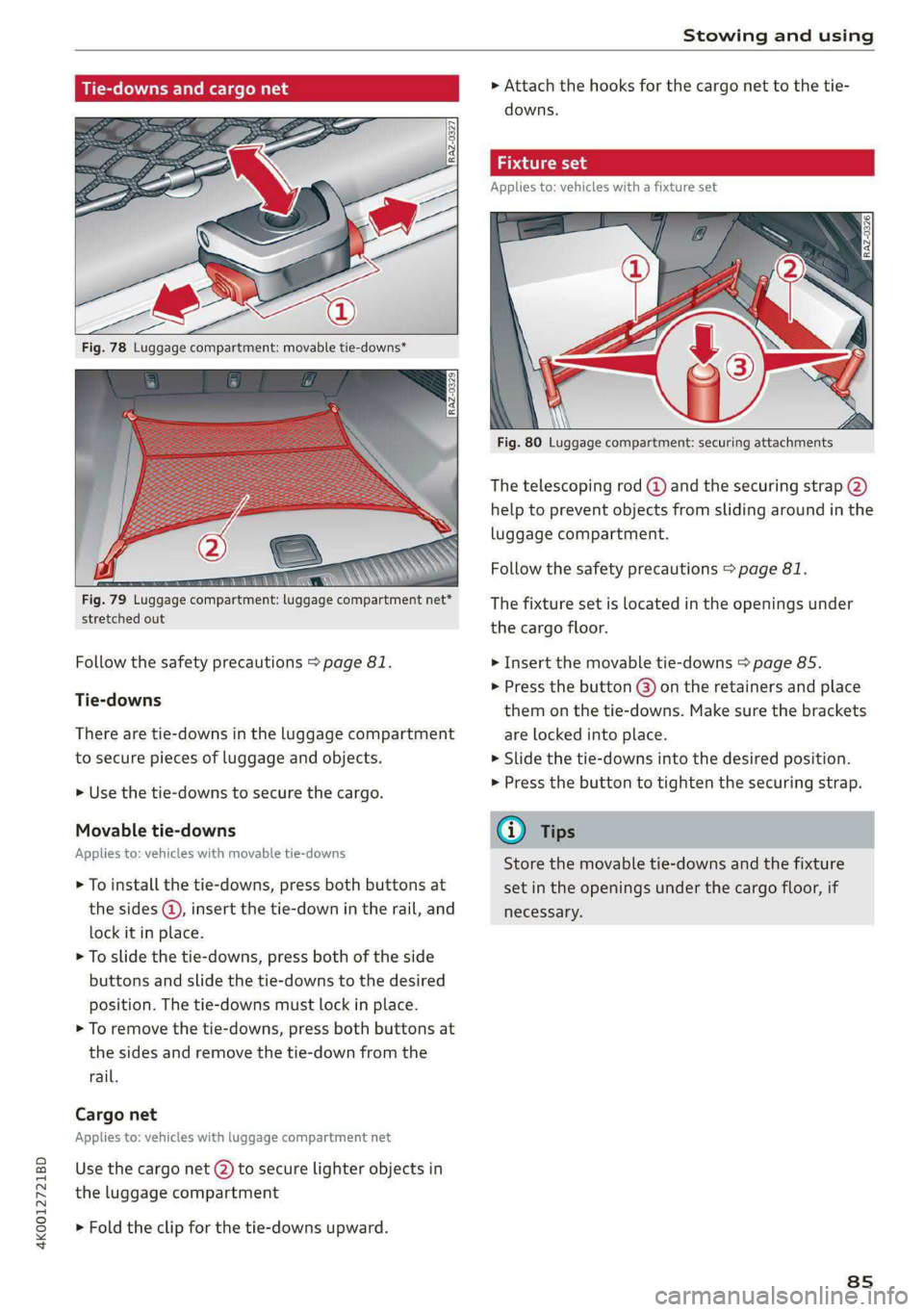
Tie-downs and cargo net
Fig. 78 Luggage compartment: movable tie-downs*
stretched out
Follow the safety precautions > page 81.
Tie-downs
There are tie-downs in the luggage compartment
to secure pieces of luggage and objects.
> Use the tie-downs to secure the cargo.
Movable tie-downs
Applies to: vehicles with movable tie-downs
> To install the tie-downs, press both buttons at
the sides @, insert the tie-down in the rail, and
lock it in place.
> To slide the tie-downs, press both of the side
buttons and slide the tie-downs to the desired
position. The tie-downs must lock in place.
> To remove the tie-downs, press both buttons at
the sides and remove the tie-down from the
rail.
Cargo net
Applies to: vehicles with luggage compartment net
Use the cargo net (2) to secure lighter objects in
the luggage compartment
> Fold the clip for the tie-downs upward.
> Attach the hooks for the cargo net to the tie-
downs.
Fixture set
Applies to: vehicles with a fixture set
Fig. 80 Luggage compartment: securing attachments
The telescoping rod @ and the securing strap (2)
help to prevent objects from sliding around in the
luggage compartment.
Follow the safety precautions > page 81.
The fixture set is located in the openings under
the cargo floor.
> Insert the movable tie-downs > page 85.
> Press the button @) on the retainers and place
them on the tie-downs. Make sure the brackets
are locked into place.
> Slide the tie-downs into the desired position.
> Press the button to tighten the securing strap.
Store the movable tie-downs and the fixture
set in the openings under the cargo floor, if
necessary.
8s
Page 88 of 316
Stowing and using
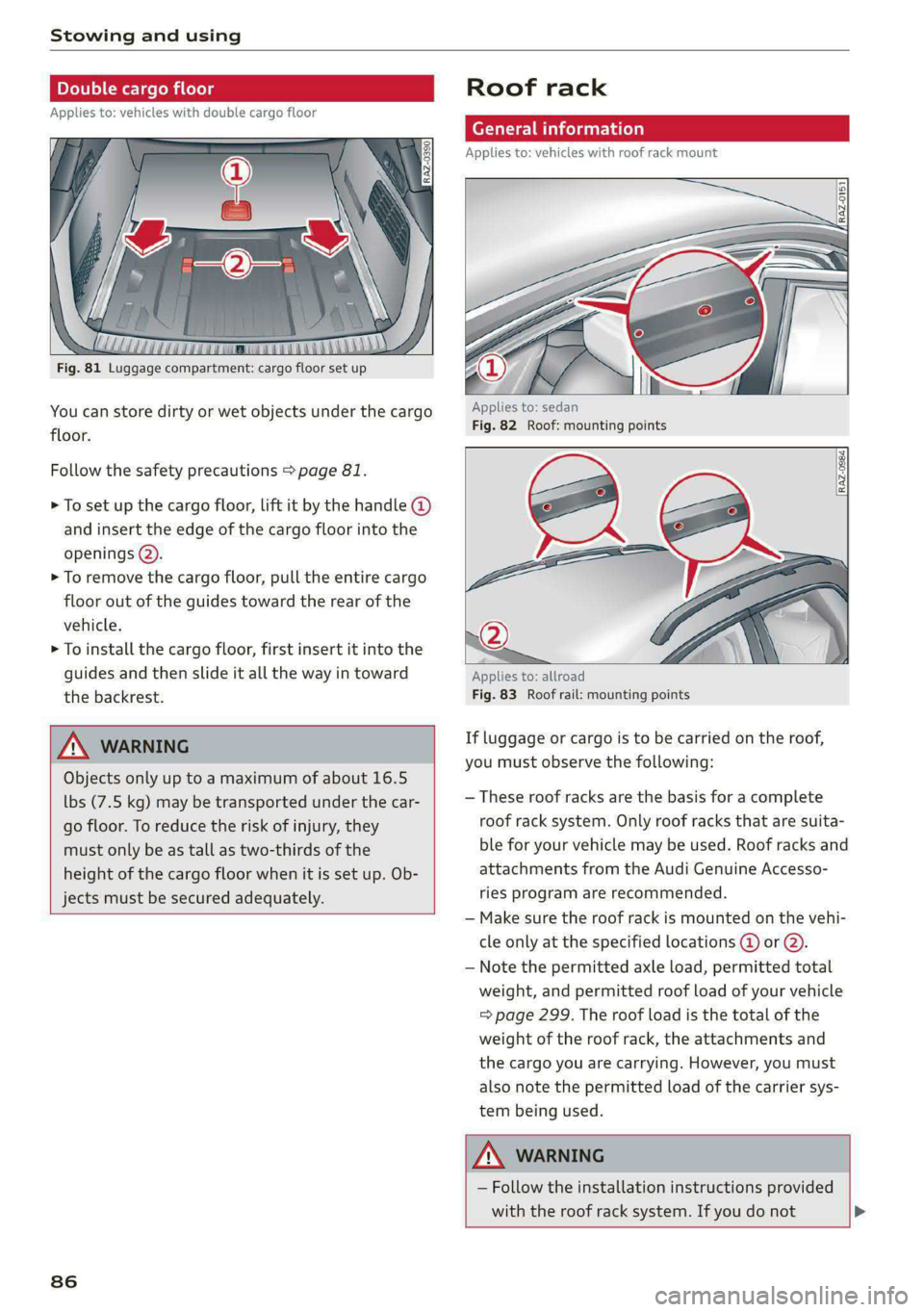
ble cargo floor
Applies to: vehicles with double cargo floor
Fig. 81 Luggage compartment: cargo floor set up
You can store dirty or wet objects under the cargo
floor.
Follow the safety precautions > page 81.
> To set up the cargo floor, lift it by the handle @
and insert the edge of the cargo floor into the
openings @).
> To remove the cargo floor, pull the entire cargo
floor out of the guides toward the rear of the
vehicle.
> To install the cargo floor, first insert it into the
guides and then slide it all the way in toward
the backrest.
Objects only up to a maximum of about 16.5
lbs (7.5 kg) may be transported under the car-
go floor. To reduce the risk of injury, they
must only be as tall as two-thirds of the
height of the cargo floor when it is set up. Ob-
jects must be secured adequately.
86
Roof rack
General information
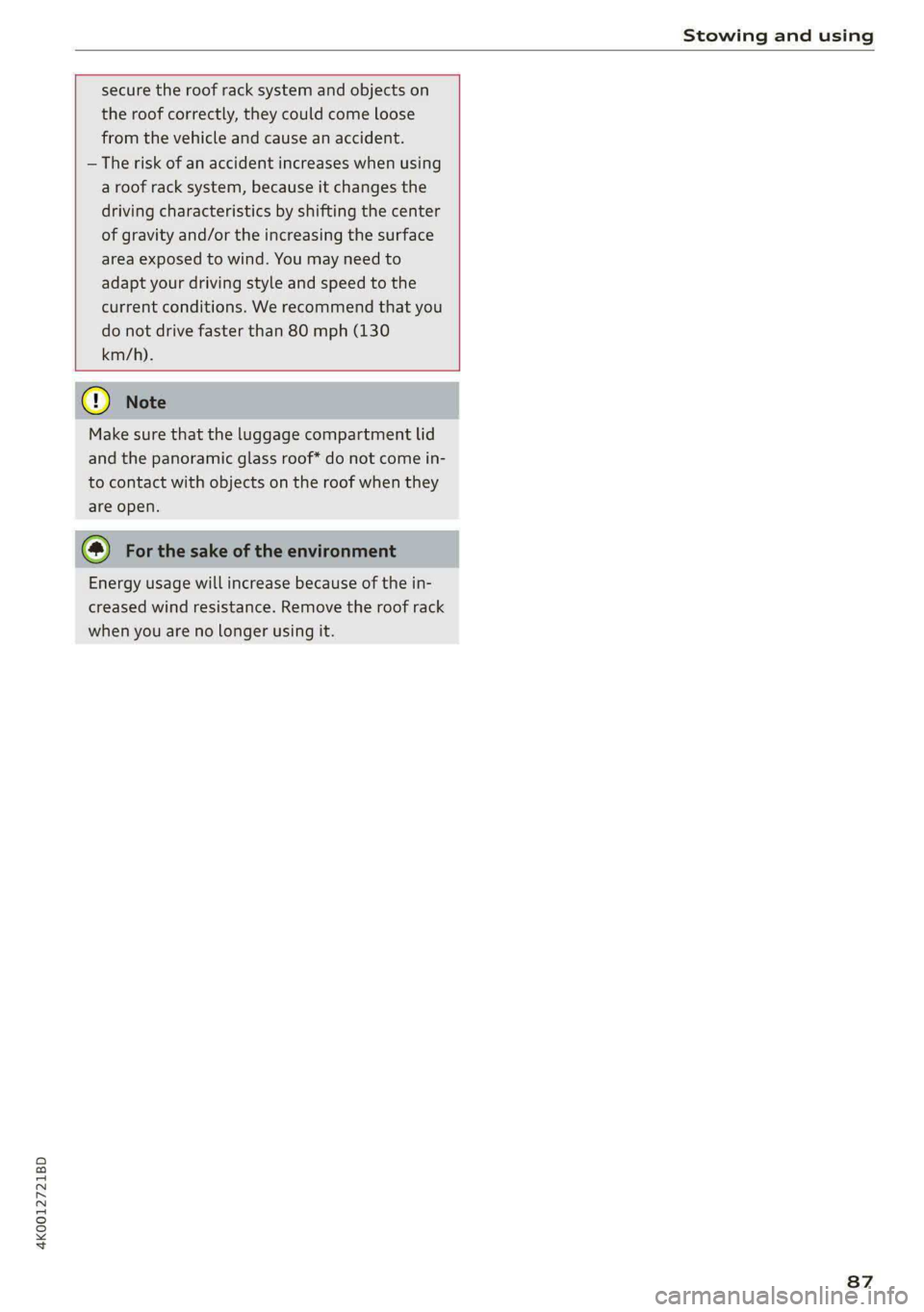
Applies to: vehicles with roof rack mount
Applies to: sedan
Fig. 82 Roof: mounting points
Applies to: allroad
Fig. 83 Roof rail: mounting points
If luggage or cargo is to be carried on the roof,
you must observe the following:
— These roof racks are the basis for a complete
roof rack system. Only roof racks that are suita-
ble for your vehicle may be used. Roof racks and
attachments from the Audi Genuine Accesso-
ries program are recommended.
— Make sure the roof rack is mounted on the vehi-
cle only at the specified locations @ or @).
— Note the permitted axle load, permitted total
weight, and permitted roof load of your vehicle
=> page 299. The roof load is the total of the
weight of the roof rack, the attachments and
the cargo you are carrying. However, you must
also note the permitted load of the carrier sys-
tem being used.
— Follow the installation instructions provided
with the roof rack system. If you do not
Page 89 of 316
4K0012721BD
Stowing and using
secure the roof rack system and objects on
the roof correctly, they could come loose
from the vehicle and cause an accident.
— The risk of an accident increases when using
a roof rack system, because it changes the
driving characteristics by shifting the center
of gravity and/or the increasing the surface
area exposed to wind. You may need to
adapt your driving style and speed to the
current conditions. We recommend that you
do not drive faster than 80 mph (130
km/h).
() Note
Make sure that the luggage compartment lid
and the panoramic glass roof* do not come in-
to contact with objects on the roof when they
are open.
@ For the sake of the environment
Energy usage will increase because of the in-
creased wind resistance. Remove the roof rack
when you are no longer using it.
87
Page 94 of 316

Warm and cold
Fluids in the A/C system
Refrigerant in the A/C system
The sticker in the engine compartment provides
information about the type and amount of refrig-
erant used in the vehicle’s A/C system. The stick-
er is located in the front section of the engine
compartment or at the front or back of the hood.
Symbol | Meaning
Warning: the A/C system must only
A be serviced by qualified technicians.
Refrigerant type
alt Lubricant type
Refer to the service information
(only available for authorized Audi
dealers or authorized Audi Service
Facilities)
i
The A/C system must only be serv-
iced by qualified technicians.
Flammable refrigerant
Se
|Be
Make sure all components are dis-
posed of correctly and never install
y components in the vehicle that have
been removed from old vehicles or
taken from recycling.
Lubricant in the A/C system
The exact specification and amount of lubricant
in the A/C system can be obtained from an au-
thorized Audi dealer or authorized Audi Service
Facility or at https://erwin.audiusa.com/erwin.
ZA\ WARNING
To ensure secure and safe operation, the A/C
system must only be serviced by qualified
technicians.
@) Tips
— Never repair the A/C system evaporator with
components from old vehicles or from recy-
cling.
— New replacement evaporators for portable
A/C systems must be certified and labeled
92
as such, so that they comply with the SAE
standard J2842 HFO-1234yf and R744.
Page 96 of 316

Driving
reached operating temperature yet. You
could damage the engine.
— If the engine has been under heavy load for
an extended period of time, heat builds up
in the engine compartment after the engine
is switched off and there is a risk of damag-
ing the engine. For this reason, let the en-
gine run at idle for approximately two mi-
nutes before shutting it off.
@ Tips
— Brief noises are normal when starting and
stopping the vehicle and are no cause for
concern.
— For up to 10 minutes after stopping the en-
gine, the radiator fan may turn on again au-
tomatically or it may continue to run, even if
the ignition is switched off.
— It may not be possible to start the vehicle in
extremely low temperatures.
— Power will be fully available once the engine
is at operating temperature.
Messages
|| Engine start system: malfunction! Please
contact Service
Do not switch the ignition off because you may
not be able to switch it on again. Drive to an au-
thorized Audi dealer or authorized Audi Service
Facility immediately to have the malfunction cor-
rected.
|—c} Engine start system: malfunction! Please
contact Service
There is a malfunction in the engine start system.
Drive immediately to an authorized Audi dealer
or authorized Audi Service Facility to have the
malfunction repaired.
E Remote control key: key not detected. Is the
key
still in the vehicle?
The vehicle key was removed from the vehicle
while the engine is running. If the vehicle key is
no longer in the vehicle, you cannot switch the ig-
nition on or start the engine once you stop it. You
also cannot lock the vehicle from the outside.
94
Remote control key: hold back of key
against the designated area. See owner's man-
ual
The battery in the vehicle key may be drained or
there may be a malfunction. To start the vehicle,
you must also hold the vehicle key against the lo-
cation shown ?) > page 93, fig. 85.
If the malfunction remains, drive immediately to
an authorized Audi dealer or authorized Audi
Service Facility to have the malfunction correct-
ed.
When driving
Starting to drive, stopping, and parking
Starting from a stop
> Press and hold the brake pedal.
> Start the engine.
> Select a gear.
>» Release the parking brake.
> Release the brake pedal. The vehicle may roll.
> Press the accelerator pedal to accelerate.
Stopping and parking
> Bring the vehicle to a full stop and press and
hold the brake pedal.
> Set the parking brake.
> Select the “P” selector lever position to secure
the vehicle from rolling away.
> Turn the steering wheel when parking on in-
clines so that the wheels will roll into the curb
if the vehicle starts moving.
>» Switch off the ignition before leaving the vehi-
cle.
On hills, activate the parking brake first and then
shift into the "P" selector lever position. This pre-
vents too much stress from being placed on the
locking mechanism.
ZA WARNING
— Always set the parking brake when leaving
your vehicle, even if for a short period of
time. If the parking brake is not set, the ve-
hicle could roll away, increasing the risk of
an accident. >
Page 98 of 316
Driving
—To skip a gear (for example, move from “D” to
“R”), move the selector lever past the pressure
point in the desired direction.
— The label next to the selector lever for the se-
lected gear will light up.
“N” (Neutral) gear
In the “N” gear, power is not transmitted to the
driving wheels. Use the “N” gear in a car wash
(with conveyor belts), for example.
If you unintentionally select “N” while driving
(faster than 1 mph (2 km/h)), you can also shift
back to “D” without pressing the brake pedal.
For safety reasons, the vehicle cannot be locked
when the transmission is in the "N” gear.
“Pp” (Park) gear
Requirement: the ignition must be switched on.
The vehicle is secured from rolling away by the
parking lock when in the “P” gear.
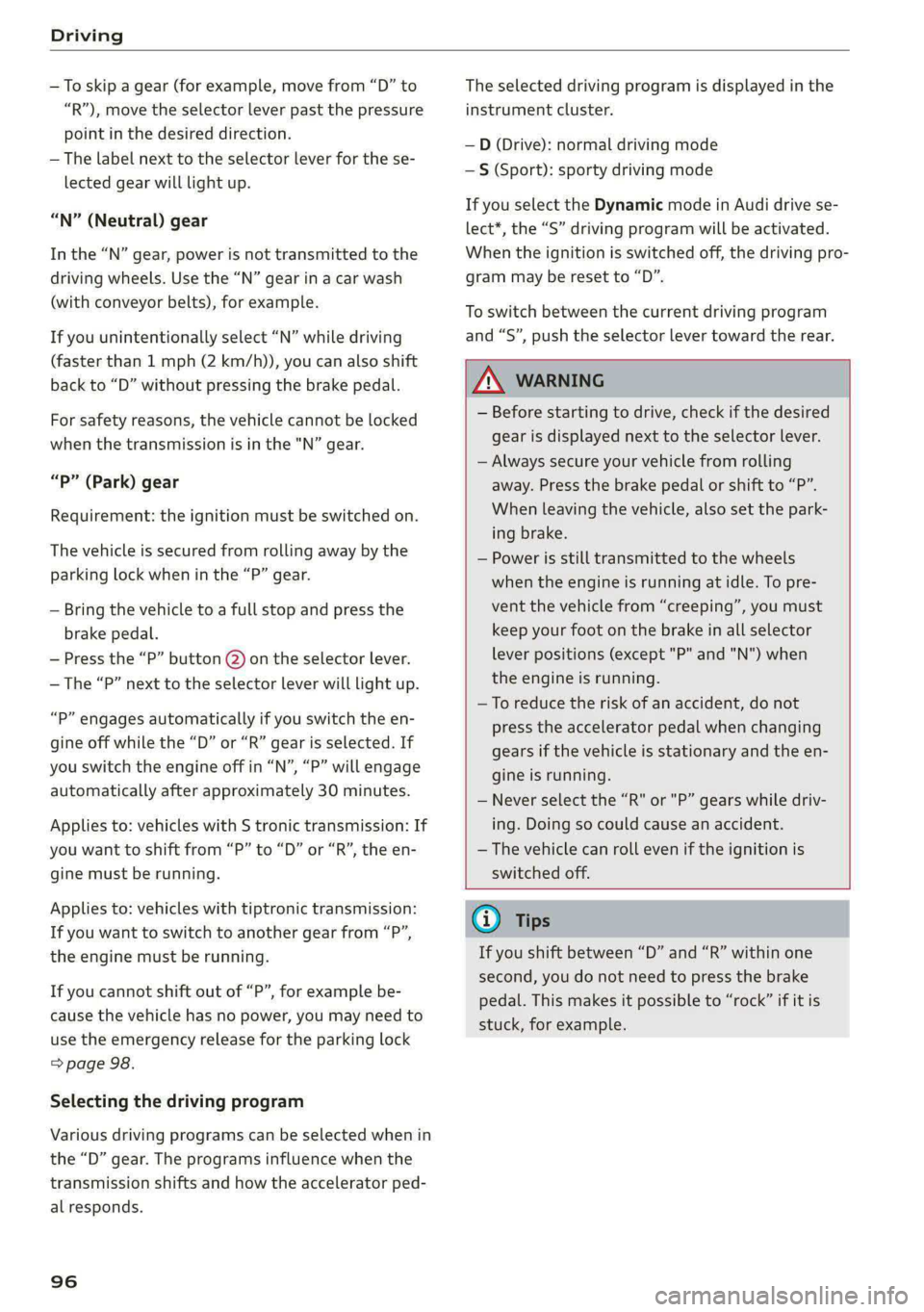
— Bring the vehicle to a full stop and press the
brake pedal.
— Press the “P” button (2) on the selector lever.
—The “P” next to the selector lever will light up.
“P” engages automatically if you switch the en-
gine off while the “D” or “R” gear is selected. If
you switch the engine off in “N”, “P” will engage
automatically after approximately 30 minutes.
Applies to: vehicles with S tronic transmission: If
you want to shift from “P” to “D” or “R”, the en-
gine must be running.
Applies
to: vehicles with tiptronic transmission:
If you want to switch to another gear from “P”,
the engine must be running.
If you cannot shift out of “P”, for example be-
cause the vehicle has no power, you may need to
use the emergency release for the parking lock
=> page 98.
Selecting the driving program
Various driving programs can be selected when in
the “D” gear. The programs influence when the
transmission shifts and how the accelerator ped-
al responds.
96
The selected driving program is displayed in the
instrument cluster.
—D (Drive): normal driving mode
—S (Sport): sporty driving mode
If you select the Dynamic mode in Audi drive se-
lect*, the “S” driving program will be activated.
When the ignition is switched off, the driving pro-
gram may be reset to “D”.
To switch between the current driving program
and “S”, push the selector lever toward the rear.
ZA\ WARNING
— Before starting to drive, check if the desired
gear is displayed next to the selector lever.
— Always secure your vehicle from rolling
away. Press the brake pedal or shift to “P”.
When leaving the vehicle, also set the park-
ing brake.
— Power is still transmitted to the wheels
when the engine is running at idle. To pre-
vent the vehicle from “creeping”, you must
keep your foot on the brake in all selector
lever positions (except "P" and "N") when
the engine is running.
—To reduce the risk of an accident, do not
press the accelerator pedal when changing
gears if the vehicle is stationary and the en-
gine is running.
— Never select the “R" or "P” gears while driv-
ing. Doing so could cause an accident.
— The vehicle can roll even if the ignition is
switched off.
G@) Tips
If you shift between “D” and “R” within one
second, you do not need to press the brake
pedal. This makes it possible to “rock” if it is
stuck, for example.