interior lights AUDI A6 2020 Owners Manual
[x] Cancel search | Manufacturer: AUDI, Model Year: 2020, Model line: A6, Model: AUDI A6 2020Pages: 316, PDF Size: 86.41 MB
Page 4 of 316
Table of contents
About this Owner's Manual......
SUMIMALY: ; « ss6% : osen ss sean cs poe s
QC CCeS Skis: si esis a 6 ores os ewe
Cockpit... 2... ee eee eee eee
Indicator lights overview...........0.
Display and operation............
Instrument cluster...............
Instrument cluster overview...........
Loading a personal profile.............
Operating. ........ 20.00. cece eee eee
Adjusting the display.................
Coolant temperature display...........
Tachometer............. eee eee eee
OdOMELEF as + 2 ams < gay & = pemE se ROR «
Outside temperature display...........
Engine oil temperature indicator.......
Boost indicator’: vos + 2 xeeg es meme a 2 oes
Vehicle functions « sisi ss em ee omen ees
Touch displays....................
General touch display operation........
Multi Media Interface................
Head-up display..................
DeSGriPtionis << seorve so mses w + axocune & ovorene
Voice recognition system........
General information.................
Operating... 0... cece eee eee eee
External voice operation..............
Global functions.................
Additional function buttons...........
Starting and driving.............
Personalization..................
Luggage compartment lid.............
Child safety lock sae < « see8 cs vena ee oes
Power windowSiin: ss sew. 4 sve eo scares a
Panoramic glass roof.................
NOD
OO
13)
14 14
15
15
15
16
16
16
18 18
20
26
26
27 27 27 28 29 29 30 30 30
32
32
36 38
43 43 45
Valetiparking «= s ss-ec «x ences ov cusee a 2 oe 46
Garage door opener..........---00 eee 46
Lights and Vision................. 49
Exterior lighting...................0. 49
Interior ligQhting ss =e aves sy cows so owas §2
ViSIOM a « 3 sees 2s oman 2 mena = HOR © oe 53
Windshield wipers................05- 55
Digital compass..............--.0000- 58
Sitting correctly and safely...... 60
Correct passenger seating position...... 60
FrontS@ats:: 2 ss«s < = scws ¢ » sees + = eee e 60
Steering wheel sie < «cries + eee ss oeree 63
Head restraints..................000. 64
Safety DEltS': < sews + x neue 3 e eas Fe Hae 65
Memory function . « scion ss cee ve ero ee 68
Airbag system... .. 2.6... eee eee eee 69
Child
safety seats...............-000- 73
Stowing and using............... 80
POWEPFSOUICES csisu ¢ ¢ avons 8 Baws 2s Re 80
Gup holders'. ¢ scr 2 + wen 2 = wee 2 oe een 80
Storage and compartments............ 81
Luggage compartment............... 81
ROOf FaGK:: « = seve x ¢ saws 2 & noes 2 8 ewe es 86
Warm and cold.................65 88
Climate control system.............0- 88
Steering wheel heating............... 91
Fluids in the A/C system. ............. 92
DEIN): «wesc 3 seen 3 @ ares 6 vo eee 6 2 es 93
Starting the vehicle.................. 93
WHER ATIVING ius s = eres s treme x 2 ees £2 94
DFiVe SYStEM sce 5s cesses 6 2 vase oo case sw 100
Start/Stop system. ...........000000- 101
Brakes: « 5 saa,a 2 aauaa & = aauee @ 3 mawee & & Bane 102
Electromechanical parking brake....... 104
Special driving situations.............. 105
Driving dynamic.................. 108
Audi drivesselects. « cscas + 6 conan + « cneen + we 108
Suspension ....... 00.00 ese eee eee eee 109
St@Gritig « cas s+ mews ve mews ve Hees ee os 110
Page 29 of 316

4K0012721BD
Voice recognition system
Voice recognition system
General information
Applies to: vehicles with voice recognition system
You can operate many functions in the vehicle
easily using voice commands.
Using the voice recognition system optimally
> Speak clearly and distinctly at a normal volume.
Speak louder when driving faster.
» Emphasize the words in the commands evenly
and do not leave long pauses.
> Close the doors, the windows, and the sunroof*
to reduce background noise. Make sure that
passengers are not speaking when you are giv-
ing a voice command.
> Do not direct the vents toward the hands-free
microphone, which is in the roof headliner near
the front interior lights.
> Only the driver should speak to the system, be-
cause the handsfree microphone is aimed to-
ward this seating position.
ZA WARNING
— Direct your full attention to driving. As the
driver, you have complete responsibility for
safety in traffic. Only use the functions in
such a way that you always maintain com-
plete control over your vehicle in all traffic
situations.
— Do not use the voice recognition system in
emergencies because your voice may change
in stressful situations. The system may take
longer to dial the number or may not be
able to dial it at all. Dial the emergency
number manually.
G) Tips
There are no voice guidance* prompts when a
dialog is active.
Operating
Applies to: vehicles with voice recognition system
(2 ELE
Pat) 5 ce
Where is a
Connect >
Diala
coy n
ey
Os 4
Cog
Fig. 19 Upper display: voice recognition system
Switching the voice recognition system on or
off
Requirement: the ignition and the MMI must be
switched on. A system language supported by
the voice recognition system must be set. There
must be no phone calls in progress and the park-
ing aid must not be active.
> To switch the voice recognition system on,
briefly press the «€ button on the multifunction
steering wheel, or depending on the context,
press w¢ in the upper display.
> To switch the voice recognition system off,
press and hold the « button on the multifunc-
tion steering wheel, or say or press Cancel (a).
Using the voice recognition system
In the voice recognition system menu, possible
commands or help settings are displayed for the
current dialog @).
> Say the desired command after the signal tone.
> To receive additional help for the current dia-
log, say or press Help (2).
> To pause voice recognition, say or press Pause
@. To reactivate voice recognition, press @)
again or briefly press the «€ button on the mul-
tifunction steering wheel.
> Applies to: MMI: Select on the home screen:
SETTINGS > General > Speech dialog system >
Allow commands during voice output. If the
function is switched on, you can simply say a
new command during a prompt.
Activating the online recognizer
Applies to: vehicles with online recognizer
You can activate the online recognizer for addi-
tional functions and to improve the results of
27
>
Page 48 of 316
Opening and closing
@) Tips
— After switching off the ignition, the roof and
sunshades can still be operated for several
minutes as long as neither of the front
doors are opened.
— It is not possible to open the roof when
temperatures are too low.
Valet parking
Applies to: vehicles with valet parking function
The valet parking function can protect the lug-
gage compartment from unauthorized access.
The [VALET] button for valet parking is in the
glove compartment.
You can switch the valet parking function on, for
example when someone else is parking your vehi-
cle }). The vehicle can be driven, locked, and un-
locked using the vehicle key, but access to the
luggage compartment is blocked.
> Remove the mechanical key > page 36.
> Press the [VALET] button in the glove compart-
ment. The LED in the button turns on if the
function is switched on.
> Lock the glove compartment with the mechani-
cal key.
> Applies to: vehicles with lockable pass-through
and lockable rear seat backrests: To secure the
luggage compartment from the vehicle interior,
lock the pass-through and the rear seat backr-
ests using the mechanical key > page 84,
> page 83.
>» Give your vehicle key to the service personnel
who are parking your vehicle and keep the me-
chanical key.
The following buttons are deactivated when the
valet parking function is switched on:
— < button in the driver's door
— <¥ or 4s button on the vehicle key
— Handle in the luggage compartment lid
D_ This function is not available in all countries.
2) The possible number of hand-held transmitters depends
on the equipment.
46
If the valet parking function is switched on, a
message will appear every time the ignition is
switched on.
G) Tips
Please note that the luggage compartment
can still be accessed from the vehicle interior
in vehicles with fixed rear seat backrests or
ones that cannot be locked, even when the
valet parking function is switched on.
Garage door opener
Applies to: vehicles with garage door opener
With the garage door opener, you can activate
systems such as the garage doors, security sys-
tems or house lights from inside your vehicle.
These functions are operated in the MMI. Multi-
ple receivers can be programmed, which can con-
trol the functions of up to eight?) hand-held
transmitters.
ZA\ WARNING
— When operating or programming the garage
door opener, make sure that no people or
objects are in the area immediately sur-
rounding the equipment. People can be in-
jured or property can be damaged if struck
when closing.
— Do not allow yourself to be distracted from
traffic by the viewing and operating the dis-
plays.
G) Tips
— If you sell your vehicle, remove the key user
= page 31 and reset all settings to the fac-
tory settings > page 224.
— For an explanation on conformity with the
FCC regulations in the United States and the
Industry Canada regulations, see
=> page 296.
Page 54 of 316

Lights and Vision
— you are the last car in a traffic jam so that
all other vehicles approaching from behind
can see your vehicle
— your vehicle has broken down or you are
having an emergency
— your vehicle is being towed or if you are tow-
ing another vehicle
Messages
If the 8; indicator light turns on, a bulb has
failed. The displayed message indicates the cause
and possible solutions. If one of the messages
does not turn off, drive immediately to an author-
ized Audi dealer or authorized Audi Service Facili-
ty to have the malfunction repaired.
BB) Audi adaptive light: malfunction! See own-
er's manual
Adaptive light* is not working. The headlights
still function. Drive immediately to an authorized
Audi dealer or authorized Audi Service Facility to
have the malfunction repaired.
High beam assistant: malfunction! See own-
er's manual
You can still switch the high beams on or off
manually. Drive immediately to an authorized
Audi dealer or authorized Audi Service Facility to
have the malfunction repaired.
High beam assistant: currently unavailable.
Camera view limited due to surroundings.
This message appears if the camera's visual field
is blocked. The system will switch itself off. Try
switching the systems on again later.
Automatic headlights: malfunction! See
owner's manual
The light/rain sensor is malfunctioning. The low
beams remain switched on at all times for safety
reasons with the AUTO light function. Drive im-
mediately to an authorized Audi dealer or author-
ized Audi Service Facility to have the malfunction
repaired.
52
Interior lighting
Front interior lighting
Fig. 40 Headliner: interior lighting
Interior lighting buttons
axs* — Interior lighting on/off
4 - Door contact switch on/off. The interior light-
ing is controlled automatically.
Touch-sensitive reading lights
> To turn a reading light on or off, touch the sur-
face @ briefly.
> To activate the manual dimming function,
touch the surface @ when the light is switched
off and keep touching it until the desired
brightness is reached.
Rear interior lighting
Fig. 41 Headliner: reading lights
Reading lights
> To switch the reading lamp on or off, press the
‘ button @.
> To activate the manual dimming function*,
touch the surface when the light is switched off
“¥ @ and keep touching it until the desired
brightness is reached.
Page 55 of 316

4K0012721BD
Lights and Vision
Interior lighting
Applies to: vehicles with interior lighting
The ambient lighting turns on when the ignition
is switched on. The ambient lighting is deactivat-
ed when the light function is OFF.
You can adjust the interior lighting individually.
The settings depend on the vehicle equipment.
> Applies to: MMI: Select on the home screen:
VEHICLE > Light & Visibility > Interior light-
ing.
You can choose among predefined color profiles,
such as Maritime.
Additional settings and profiles:
— Brightness: you can adjust the brightness for
all of the interior lighting.
— Individual: you can adjust the brightness and
color of the interior lighting separately, divided
into contour and surface lighting.
— Drive select: the contour and surface lighting
color changes depending on the selected Audi
drive select* mode.
@ Tips
— Depending on vehicle equipment, when the
Drive select function is activated, the color
of the contour and surface lighting may
briefly change to red or blue when the inte-
rior temperature is manually increased or
decreased.
— Certain settings are stored automatically in
the active personal profile.
Display brightness
You can adjust the instrument and display illumi-
nation separately. The settings depend on the ve-
hicle equipment.
> Applies to: MMI: Select on the home screen:
SETTINGS > Display & brightness.
Possible settings in the MMI:
— Cockpit dimming
— Head-up display
—MMI
— Virtual cockpit
Vision
Adjusting exterior mirrors
RAZ-0150
©
Fig. 42 Driver's door: knob for the exterior mirrors
©
> Turn the knob in the driver's door to the desired
position:
0 - All adjustment functions are deactivated.
Q/ © - Selects the left or right exterior mirror.
To adjust the mirror glass in a mirror, press the
knob in the desired direction.
GA - Heats* the mirror glass depending on the
outside temperature.
=) - Folds the exterior mirrors*. To fold the mir-
rors out, turn the knob to one of the other posi-
tions. In the MMI, you can select if the mirrors
fold in automatically when you lock the vehicle
=> page 33.
Front passenger's exterior mirror tilt
function*
Requirement: the knob must be in the position
for the front passenger’s exterior mirror.
To help you see the curb when backing into a
parking space, the surface of the mirror will tilt
slightly when reverse gear is selected.
You can adjust the mirror surface by turning the
knob in the desired direction.
The mirror moves from the reversing position
back to the original position:
— When you switch the ignition off
— Once you drive forward at speeds faster than 9
mph (15 km/h)
— When the knob is no longer in the position for
the front passenger exterior mirror
53
>
Page 56 of 316

Lights and Vision
ZA WARNING
Curved mirror surfaces (for example convex)
enlarge the field of vision. However, they
make objects in the mirror appear smaller and
farther away. When using these mirrors to es-
timate your distance to vehicles behind you
when changing lanes, you could estimate in-
correctly, which increases the risk of an acci-
dent.
@) Note
— Applies to: vehicles with power folding exte-
rior mirrors: If the mirror housing was
moved by outside forces (such as an impact
when maneuvering), you must use the pow-
er folding function to fold the mirror all the
way out. The mirrors will make a loud noise
when they latch into place. The mirror hous-
ing must not be moved back into place by
hand because this could impair the function
of the mirror mechanism.
— Applies to: vehicles without power folding
exterior mirrors: If the mirror housing was
moved by outside forces (such as an impact
when maneuvering), you must move it back
in place by hand.
— If you wash the vehicle in an automatic car
wash, you must fold the exterior mirrors in
to reduce the risk of damage to the mirrors.
Never fold power folding exterior mirrors*
by hand. Only fold them in and out using
the power controls.
G) Tips
— Certain settings are stored automatically in
the active personal profile.
— If the power adjusting function malfunc-
tions, the glass in both mirrors can be ad-
justed by pressing on the edge of it by hand.
Dimming the mirrors
Manual dimming rearview mirror
> Pull the lever on the bottom of the mirror back.
54
Automatic dimming rearview mirror*
> The interior and exterior mirrors dim automati-
cally when light shines on them, for example
from headlights on a vehicle behind you.
Z\ WARNING
— If the glass on an automatic dimming mir-
ror* breaks, electrolyte can leak out. This
liquid can irritate the skin, eyes and respira-
tory system. If there is contact with the flu-
id, flush immediately with plenty of water.
Consult a physician if necessary.
— Repeated or long-term exposure to electro-
lyte fluid can lead to irritation of the air-
ways, especially in people with asthma or
other respiratory conditions. Take deep
breaths immediately after leaving the vehi-
cle or, if this is not possible, open all of the
doors and windows as wide as possible.
— If electrolyte fluid comes into contact with
the eyes, flush them thoroughly with plenty
of clean water for at least 15 minutes and
then seek medical attention.
— If electrolyte fluid comes into contact with
the skin, flush the affected area with clean
water for at least 15 minutes, and then
clean with soap and water and seek medical
attention. Clean affected clothing and shoes
thoroughly before wearing again.
— If the fluid was swallowed and the person is
conscious, flush the mouth with water for at
least 15 minutes. Do not induce vomiting
unless this is recommended by medical pro-
fessionals. Seek medical attention immedi-
ately.
() Note
If the glass on an automatic dimming mirror*
breaks, electrolyte can leak out. This liquid
damages plastic surfaces and paint. Clean
this liquid as quickly as possible, for example
with a wet sponge.
@ Tips
—If the light reaching the rearview mirror is
obstructed, the automatic dimming mirror*
will not function correctly.
Page 57 of 316
4K0012721BD
Lights and Vision
— The automatic dimming mirrors* do not dim
when the interior lighting is turned on or re-
verse gear is selected.
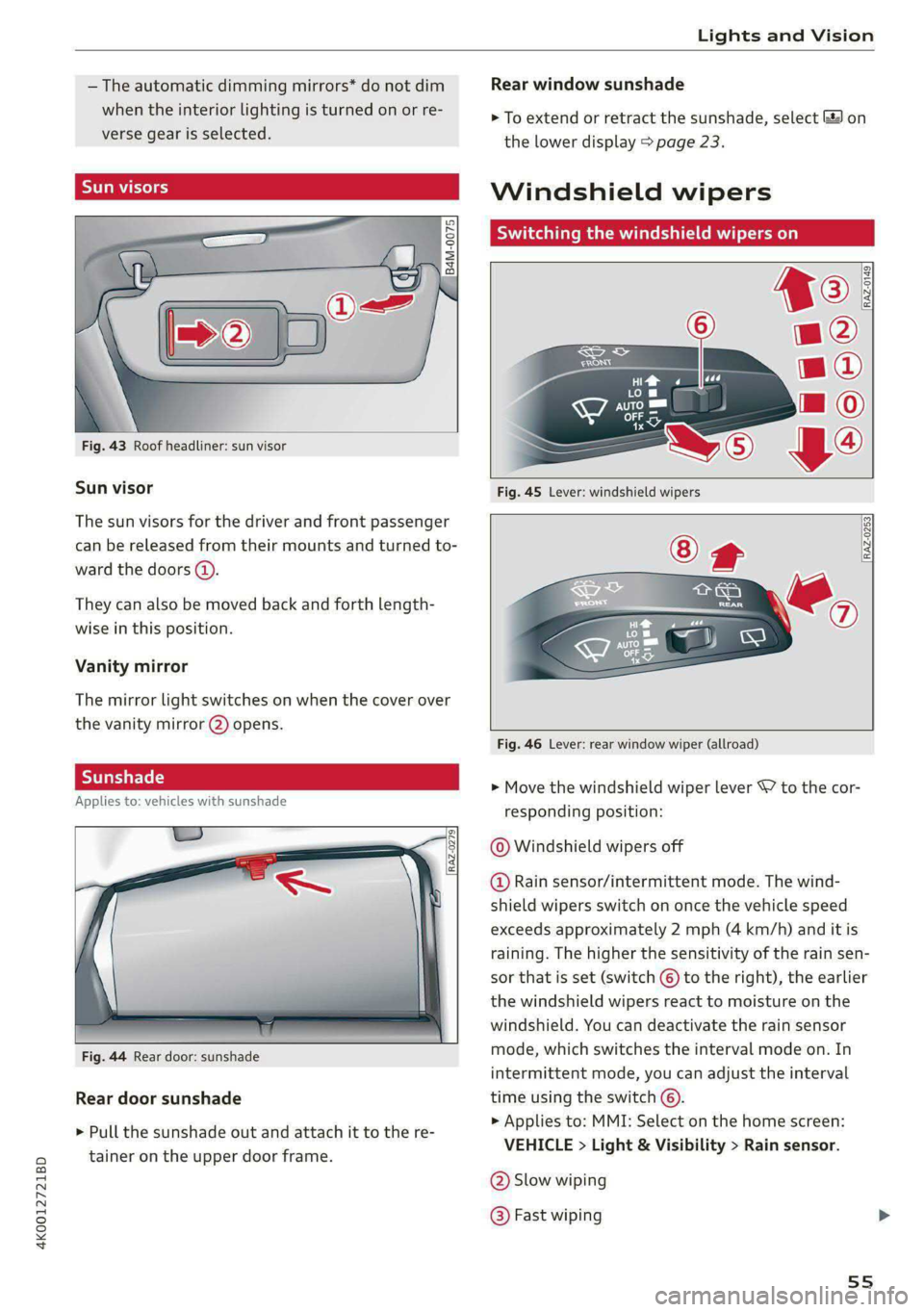
Sun visors
Fig. 43 Roof headliner: sun visor
Sun visor
The
sun visors for the driver and front passenger
can be released from their mounts and turned to-
ward the doors (4).
They can also be moved back and forth length-
wise in this position.
Vanity mirror
The mirror light switches on when the cover over
the
vanity mirror @) opens.
Applies to: vehicles with sunshade
RAZ-0279
Fig. 44 Rear door: sunshade
Rear door sunshade
> Pull the sunshade out and attach it to the re-
tainer on the upper door frame.
Rear window sunshade
> To extend or retract the sunshade, select 3 on
the lower display > page 23.
Windshield wipers
Switching the windshield wipers on
RAZ-0253
Fig. 46 Lever: rear window wiper (allroad)
> Move the windshield wiper lever S7 to the cor-
responding position:
© Windshield wipers off
@ Rain sensor/intermittent mode. The wind-
shield wipers switch on once the vehicle speed
exceeds approximately 2 mph (4 km/h) and it is
raining. The higher the sensitivity of the rain sen-
sor that is set (switch ©) to the right), the earlier
the windshield wipers react to moisture on the
windshield. You can deactivate the rain sensor
mode, which switches the interval mode on. In
intermittent mode, you can adjust the interval
time using the switch ©.
> Applies to: MMI: Select on the home screen:
VEHICLE > Light & Visibility > Rain sensor.
@® Slow wiping
@ Fast wiping
55
Page 61 of 316
4K0012721BD
Lights and Vision
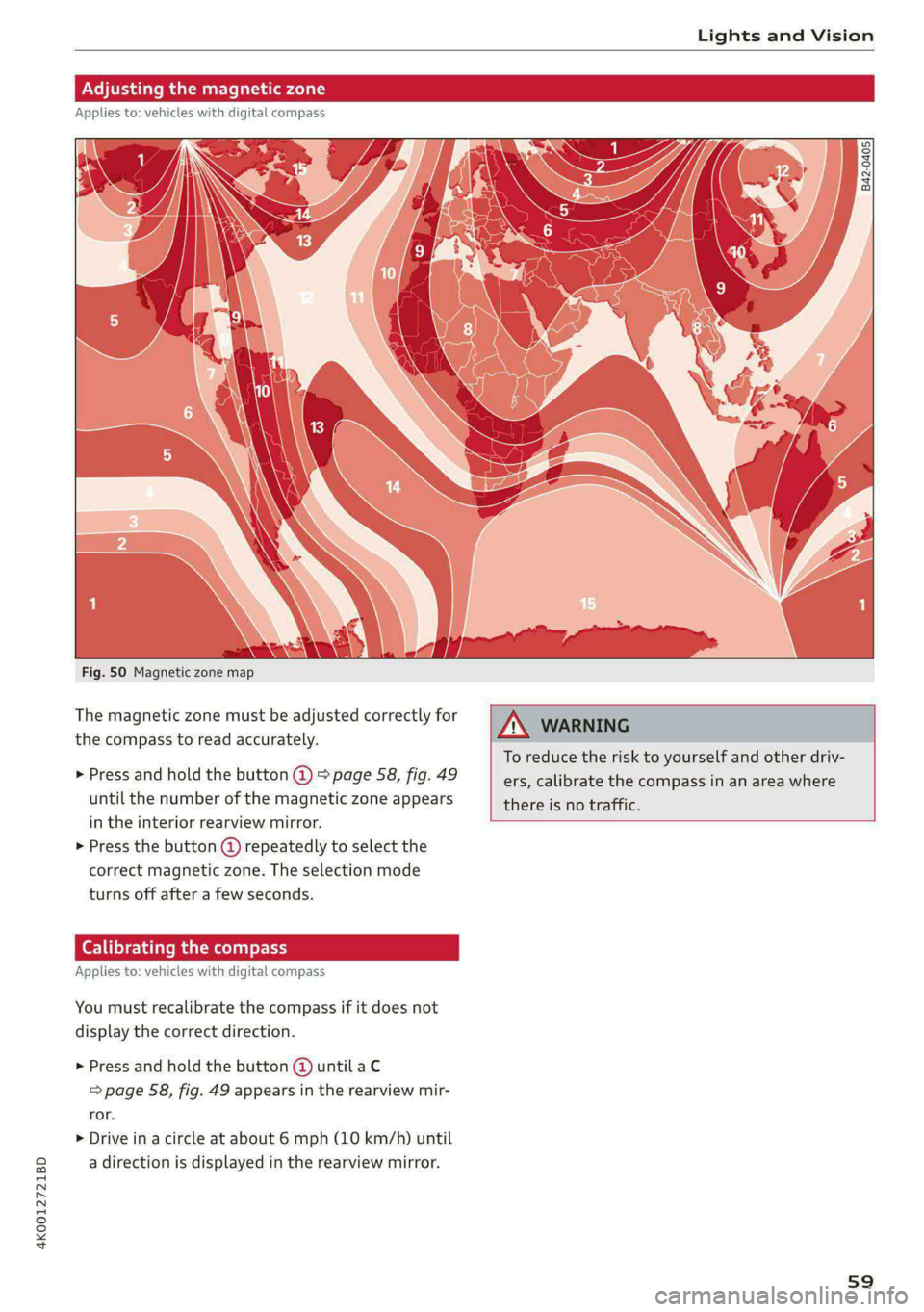
Fig. 50 Magnetic zone map
The magnetic zone must be adjusted correctly for
the compass to read accurately.
> Press and hold the button @ > page 58, fig. 49
until the number of the magnetic zone appears
in the interior rearview mirror.
> Press the button (4) repeatedly to select the
correct magnetic zone. The selection mode
turns off after a few seconds.
Calibrating the compass
Applies to: vehicles with digital compass
You must recalibrate the compass if it does not
display the correct direction.
> Press and hold the button @ untila C
=> page 58, fig. 49 appears in the rearview mir-
ror.
> Drive in a circle at about 6 mph (10 km/h) until
a direction is displayed in the rearview mirror.
B42-0405
To reduce the risk to yourself and other driv-
ers, calibrate the compass in an area where
there is no traffic.
s9
Page 120 of 316

Assist systems
Assist systems
General information
Safety precautions
ZA WARNING
— As the driver, you are always completely re-
sponsible for all driving tasks. The assist
systems cannot replace the driver's atten-
tion. Give your full attention to driving the
vehicle, and be ready to intervene in the
traffic situation at all times.
— Activate the assist systems only if the sur-
rounding conditions permit it. Always adapt
your driving style to the current visual,
weather, road, and traffic conditions.
— Loose objects can be thrown around the ve-
hicle interior during sudden driving or brak-
ing maneuvers, which increases the risk of
an accident. Store objects securely while
driving.
— For the assist systems to be able to react
correctly, the function of the sensors and
cameras must not be restricted. Note the in-
formation on sensors and cameras
=>page 119.
@ Tips
— Pay attention to applicable local regulations
relating to driving tasks, leaving space for
emergency vehicles, vehicle distance, speed,
parking location, wheel placement, etc. The
driver is always responsible for following
the laws that are applicable in the location
where the vehicle is being operated.
— You can cancel a steering or braking inter-
vention by the system, by braking or accel-
erating noticeably, steering, or deactivating
the respective assist system.
— Always check the assist systems settings be-
fore driving. The settings could have been
changed, for example, by other drivers or if
another personal profile was used.
118
System limitations
ZA\ WARNING
— The use of an assist system cannot over-
come the natural laws of physics. A collision
cannot be prevented in certain circumstan-
ces.
— Warnings, messages, or indicator lights may
not be displayed or initiated on time or cor-
rectly, for example, if vehicles are approach-
ing very fast.
— Corrective interventions by the assist sys-
tems, such as steering or braking interven-
tions, may not be sufficient or they may not
occur. Always be ready to intervene.
G) Tips
— Due to the system limitations when detect-
ing the surrounding area, the systems may
warn or intervene unexpectedly or too late
in certain situations. The assist systems may
also interpret a driving maneuver incorrectly
and then warn the driver unexpectedly.
— The systems may not function as expected
in unusual driving situations, such as driving
offroad, on unpaved roads, on loose ground,
on inclines, or on grooves in the road.
— The systems may not function correctly in
unclear traffic situations, such as turning
lanes, exit ramps, construction zones, rises
or dips that obstruct visibility, intersections,
toll stations, or city traffic.
— The detection of the surrounding area can
be limited, for example by vehicles driving
ahead or by rain, snow, heavy spray, or light
shining into the camera.
— If accessories have been mounted on the
steering wheel, the ability for the steering
systems to react may be limited.
Page 307 of 316

4K0012721BD
Index
Highway lights © esc x 2 semis < = wwwee ¥ aeenee © 49
Hill descent:assist 2.006... ec eewe ss oe 107
Hill descent control. ...........ee eee eee 105
Hill Hold ASSISt caxis s < exw x eras se wee ee 95
Home
refer to Home address................ 194
Homevaddress: « saws ss geen sy caw yee 194
HomeLink
refer to Garage door opener............. 46
HOME'SCrEEN & & sevevss vs seas o 6 omen + 8 wea Dos 19
HOM 2 wwe 5 ¢ suse + & sees & & ews Ey eee Es es 6
Hotspot
MOFER CONNIE Lc & cecaonorx v sxewce a a wrens i x swaese 181
I
Ignition
Switching on and off................00. 93
Imbalance (wheels)............. 0000005 254
Immobilizer
refer to Electronic immobilizer........... 36
Inclinometer......... 0.00. cece 106
Undicatorlights « wicsse « vanavese © enauese wv sneaen 6 5 8 7
Inspectionsinterval:. « sows s cccawecs xs wessne a 4 oo 244
Instrument cluster: . weve 2s cee 2 a wee see 12
Adjusting the layout................0-. 14
Cleaning........ 0. e eee eee eee eee 268
ENGINGCOdes: « new 2 wee » 5 weed & 5 saree 226
Failure... eee 12
On-board computer.................020. 16
Operating « = eee ss mews se ees s Bee sg He 13
Persomal.progile wwvone« « csarsns ic axnsine «0 oxstins 13
Service interval display...............- 244
Software information................. 226
Switchingtabsss « sic i + sarin es sac oo acesese 13
Switching the view...............-0000 05 14
Vehicle TURCLIONS vais sx woos s x oss a eee 16
Version information................-. 226
Instrument illumination................. 53
Integrated assistance...............0005 20
Intelligent search
Navigationis « 2 savers x « snes oo aasan © 3 seaweus © 186
Interior lighting < svi. «sos = & ema oo ve 52,53
INterior MONitoring « « wece ss wows te wees s Be 35
Intermittent mode (windshield wipers) ..... 55
International travel...............0000- 182
Internet
refertoconnect.......... eee eee eee 177
Internet radio
referto Online radio............--- eee 205
Intersection assistant...............05- 153
Tonizer. 2... eee eee 90
iPhone
refer to Audi music interface........... 212
J
Jump starting. ............ 0. eee 279
K
Key. eee eee eee eee 32, 36
Convenience opening and closing......... 44
Key replacement...............-0e eee 36
Mechanical key......... 0.00.0 cee eevee 36
Not recognized = sews « ¢ sews: ¢ pews s bees 94
PANIC: Ke ytins « ciccsass 2 x sven © w emouews <6 scours ¥ ¥ 8 36
Replacing the battery...............0-. 38
Unlocking and locking............-...0- 37
Vehicle code sri «5 escves « 3 wane 2 0 weve oes 36
Key USEP': «2 sau ¥ «saws oo sees 3 o Hew oo Ses 31
Kick-COWIN's = werey = » sews = ¢ eum * 9 tes te oe 97
L
Lane assist
refer to Lane departure warning......... 144
refer to Lane guidance................ 144
Lane departure warning................. 144
Cleaning the camera area.............. 267
Lane guidance............0.000000005- 138
Laptimer................0..0 0000008. 126
Evaluating ; « saas ss seee sv wees so ees ss 127
SPAREN sic: 5s cosas oo enaoes 6 > eeu 5 w aewOEEE eo 126
LaSer Scanner’: s + ww » ¢ sees & ¢ sews 2 8 ee 119
Cleanings. 5 + sussasi «a seins + 6 scenes «8 maui © i 268
LATCH (securing child safety seats)......... 76
Launch: GontrObens «ose oo eee vs exons oo cen 98
Leather care and cleaning............... 269
Legal information
License:subscriptionss « « <0 @ esse + wes 225
Software information................. 225
SOfEWANE LICENSES). 5 s wenn ay tem s eee es 225
Version information...............05- 225
305