phone AUDI A6 2020 Owners Manual
[x] Cancel search | Manufacturer: AUDI, Model Year: 2020, Model line: A6, Model: AUDI A6 2020Pages: 316, PDF Size: 86.41 MB
Page 5 of 316
4K0012721BD
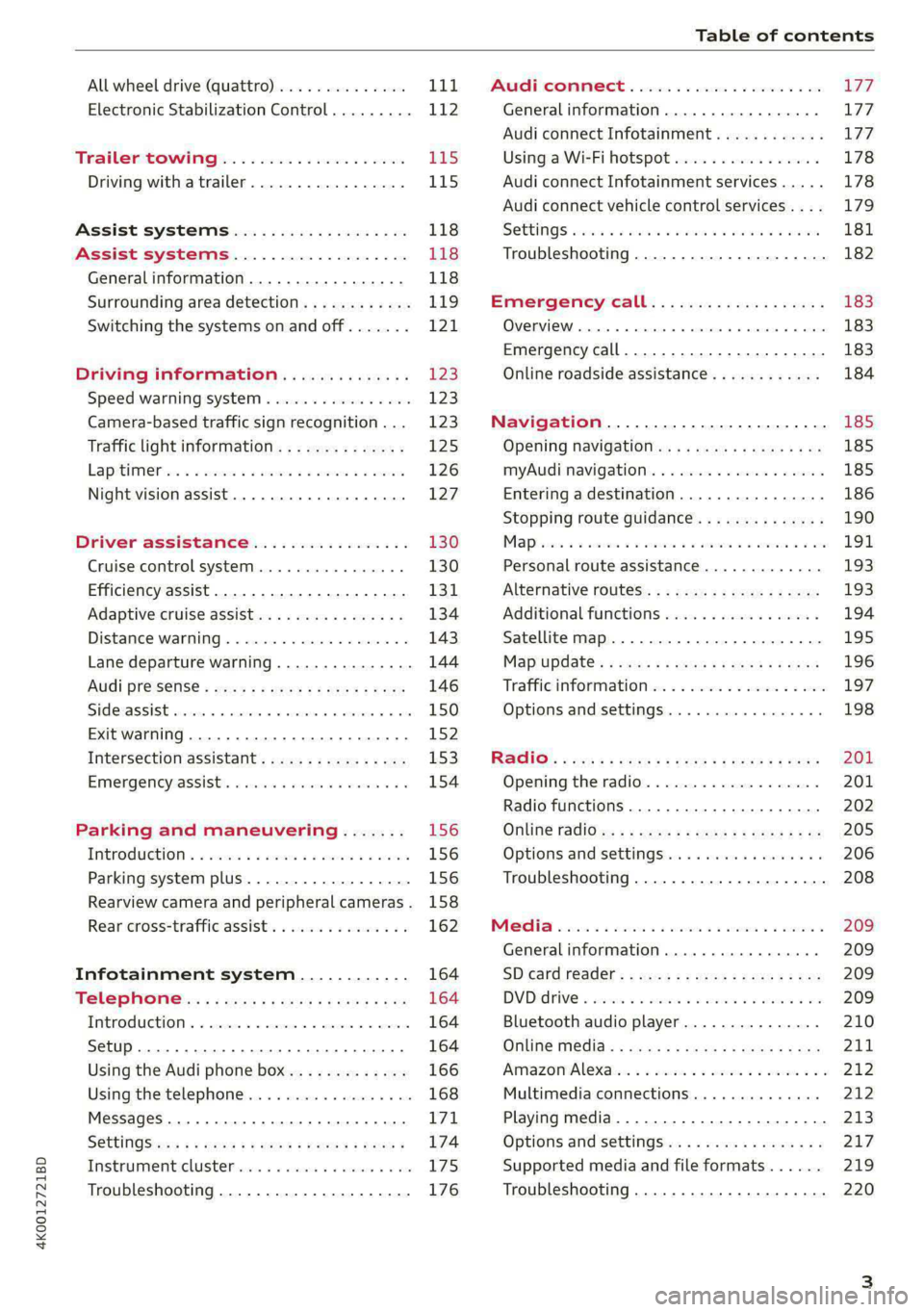
Table of contents
All wheel drive (quattro).............. Lid,
Electronic Stabilization Control......... 112
Tratlerstowlinigg.. «eck 6 wecns 6 o aes £45
Driving with atrailer................. 115
Assist systems................... 118
Assist systems................... 118
General information. . 118
Surrounding area detection............ 119
Switching the systems on and off....... 121,
Driving information.............. 123
Speed warning system................ 12:3
Camera-based traffic sign recognition... 123
Traffic light information.............. 125
Lapitimeron + 3 ssa oo aeenvs o 6 seaeene & 6 sense 126
Night vision assist... ............000. 127
Driver assistance................. 130
Cruise control system............00-5 130
Efficiency assist..............2--000. 131
Adaptive cruise assist................ 134
Distance warning ..............00000. 143
Lane departure warning............... 144
Audi presense............-.22--000 146
Side assist... 0... eee cece eee eee 150
Exit warning ...........-.02.0 ese eeee 152
Intersection assistant................ 153
EMergeneysassisti. «swe & wesaos a x wore e as 154
Parking and maneuvering....... 156
INtroduction « & wesc 2 2 senses oe mame 2% eee 156
Parking system plus...............04. 156
Rearview camera and peripheral cameras. 158
Rear cross-traffic assist............00. 162
Infotainment system............ 164
Tele pAONnG.: s «cian 2 mwag sy eager 164
IMEROMUCHION « & cseece « « cavnwen ws x oezane % « onerens 164
Setup... ee eee eee ee 164
Using the Audi phone box............. 166
Using the:telephomesss << sisi « « cvsses + © a0 168
MessageS ... 0... 0. cece eee eee 171
SOttiNngS swiss & cawis + # ees + peewee s Hewes 174
Instrumenticlustetivess so sssie 6 once a i ove 175
Troubleshooting............-..000005 176
PAC COMIMBCE 's. cesses 5 6 cise 6 v eseees wo one 177
General information................- 177
Audi connect Infotainment............ 177
Using a Wi-Fi hotspot................ 178
Audi connect Infotainment services..... 178
Audi connect vehicle control services.... 179
S@ttiNgS sess oo canoe + sen wv ween we Ra 181
Troubleshooting..............--.0005 182
Emergency call................... 183
OVERVIEW ovens « suse » 0 uncuem » 0 comes x 6 ene 183
Emergency call...................00. 183
Online roadside assistance............ 184
Navigation........................ 185
Opening navigation.................. 185
myAudi navigation................... 185
Entering adestination................ 186
Stopping route guidance.............. 190
Mapes + 5 cscs 2 6 wren oo amma © 8 awn 8 ow 191
Personal route assistance............. 193
Alternative routes.............2--00. 193
Additional functions................. 194
Satellite map 195
Map update.... 196
Traffic information w. «sess 2 2 even as sore 197
Options and settings................. 198
RAGIG:: «cas cs seus cs pemg 2 ¢ eww +o ee 201
Opening the radio...............00.. 201
Radio functions................00055 202
Online radio's: ss sees = + ewes sv Hewes ee 205
Options and settings..............00e 206
Troubleshooting.............---000ee 208
PROS wesc as soaen 6 3 sonweme 3 7 meen 6 eo 209
Generalinformation................. 209
SD card redder’. «2223 is seaxserenes ees 209
DVDidiiVe
« sisi 5 2 sere 2 6 were 2 8 worm © ee 209
Bluetooth audio player............... 210
Online Medias ¢ sis ¢ = eases 4s Haw a eee 211
Amazon’Alexains = «esis 2 a eee 2 wane 3 os 212
Multimedia connections............-. 212
Playing media...............0--00005 213
Options and Settingsis« ¢ ¢ woos sy wawu aa 217
Supported media and file formats...... 219
Troubleshooting............0-seee eee 220
Page 6 of 316

Table of contents
Audi smartphone interface...... Z21,
Setup... eee eee ee eee 221
TrOuUBLESHOOtING wees « & wees « 2 eos so eee 222
Additional settings.............. 223
System settingS.......0seeecceeveees 223
Connected devices ...... 0.0... 000 e eee 224
Legalinformation..................5 225
Maintenance and Care........... 227
Checking and Filling............. 227
Fuel... 2. cece eee eee eee eee 227
Refuelingjecs ss sees se ane + eeee § s peme 228
Emissions control system...........4. 230
Engine compartment................. 231
ERGINGOtls seus 2 x seme « ¥ neue =e oRBER Fae 234
Cooling:system . « sscses v < ssesens vo eevee so ave 238
Brake fluid... 2... eee eee eee 240
Electrical SySteMi wis ¢ scm ae mews eg ey 240
Battery: « & cess 6 6 ceva © 5 mews « wenn ¥ © oi 241
Windshield washer system...........- 243
Service interval display............... 244
Wheels ........ 0... eee 245
Wheels and Tires . . 245
Tire pressure monitoring system....... 263
Care and cleaning................ 266
General
information................. 266
Car washess « siscica ea suasen a i wana # w auavars a a 266
Cleaning and care information......... 267
Taking your vehicle out of service....... 271
Do It Yourself .................... 272
Emergency assistance........... 272
General information..............0.. 272
Equipment.........-...00 2. cece eee 272
Tire Mobility’ Kit « sc ss ces scans 8 ees 272
Replacing wheels................-00. 274
Space-saving spare tire............... 278
Collapsible spare tire..............02. 278
JUITIP'SESPCING « cores s « weve « ¥ eerws & 2 cores 279
TOWING senses <2 seexsie s > costeine © « serene « o samenes 281
Fuses and bulbs.................. 284
FUSCSiercs i & accaans ao cena ooo mero wom ROI & 284
Bulbs. .... 0... eee eee eee eee eee 288
Customer information........... 289
Data privacy..................000. 289
Image recording............seeeeeees 289
Datamemoniesy. « s sscams sv sume ov ene a 0s 289
Transmitted information.............. 290
Accessories and technical
CHANGES... 1... eee eee eee 293
Warranty......... 00-000. e eee eee 293
Audi Literature Shop..............00. 293
Driving in other countries............. 293,
Maintenance, repairs, and technical
MOGIFIcAatIONS vase x x mem = x saw x 2 sue 293
Accessories and parts................ 295
Reporting Safety Defects.............. 295
Declaration
of compliance for
telecommunications equipment and
electronic systems............---0000- 296
Wechinicaldata:... . secs. s wen es ews 298
Identification data................00. 298
Vehicle dataiscs: = s xews 2s eens sp oes ye 298
Index... 0.2... eee 300
Page 9 of 316
4K0012721BD
Quick access
PESOGKED oe esciee vo acres vo asteame ww awe 80
— Vehicle key holder
@_ Depending on equipment:
— Starting the engine when there is
a Malfunction: « ¢ cee vs nee x 2 oe 94
— Audi musicinterface .......... 212
— Audi phone box ............... 166
SSDicand reader’ so seein «owas we 209
@9 Electromechanical parking brake
BIUEEOM simine = x soinsis « 0 oneens © o) meson « 104
@ Automatic transmission selector
OS ee 95
@ [START ENGINE STOP] button .... 93
@3) Steering wheel adjustment ...... 63
@4 Lever for:
— Cruise control system ......... 130
— Adaptive cruise assist .......... 134
@3) Connection port for the On Board
Diagnostic System (OBD) ........ 289
@8 Buttons for:
-Lights ........ ccc eee 49
—All-weather lights ............ 49
@) Hood release ...........0...0.. 232
Button for:
— Luggage compartment lid ...... 38
@9) Exterior mirror adjustment ...... 53
69 Buttons for:
— Power windows .............. 43
—Child safety lock .............. 43
@) Tips
Some the equipment listed here is only instal-
led in certain models or is available as an op-
tion.
Indicator lights overview
The indicator lights in the instrument cluster
blink or turn on. They indicate functions or mal-
functions. Some warning and indicator lights
turn on when you switch the ignition on and must
turn off when the drive system is switched on or
while driving.
With some indicator lights, messages may ap-
pear and warning signals may sound. The indica-
tor lights and messages may be covered by other
displays. To show them again, select the second
tab for messages with the multifunction steering
wheel & page 13.
Some indicator lights in the display can display in
several colors.
A\ Central indicator light
If the A or N indicator light turns on, check
the message in the instrument cluster.
Cea
The following indicator lights may be available,
depending on the vehicle equipment:
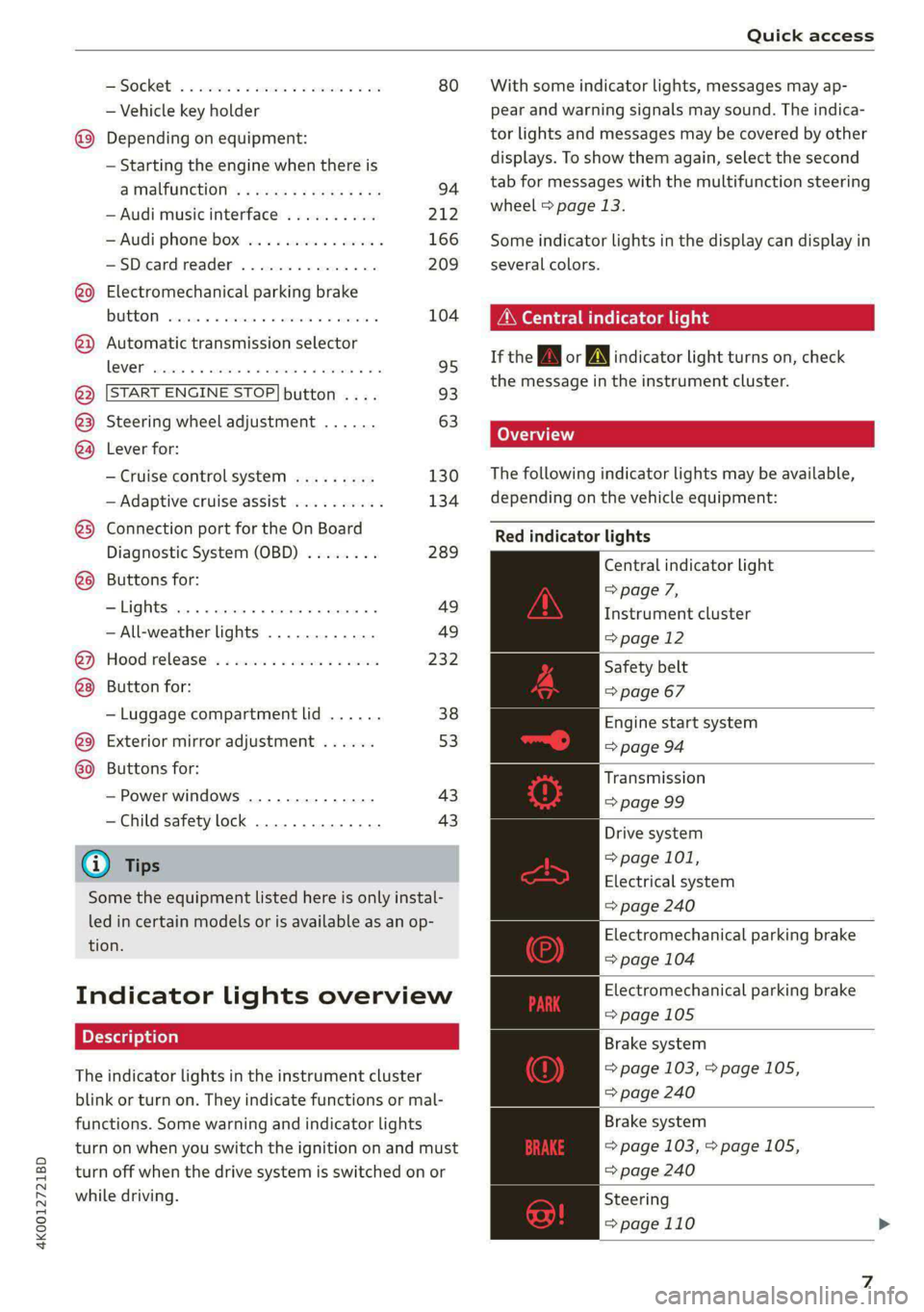
Red indicator lights
Central indicator light
=> page 7,
Instrument cluster
=> page 12
Safety belt
=> page 67
Engine start system
=> page 94
Transmission
=> page 99
Drive system
=> page 101,
Electrical system
=> page 240
Electromechanical parking brake
=> page 104
Electromechanical parking brake
=> page 105
Brake system
=> page 103, > page 105,
=> page 240
Brake system
=> page 103, > page 105,
=> page 240
Steering
=>page 110
Page 16 of 316
![AUDI A6 2020 Owners Manual Instrument cluster
Returning to functions at higher levels
> Press the 5 button @).
Opening and closing the menu
> Press the [=] button ©.
Selecting and confirming a function
Requirement: a](/img/6/57584/w960_57584-15.png "AUDI A6 2020 Owners Manual Instrument cluster
Returning to functions at higher levels
> Press the 5 button @).
Opening and closing the menu
> Press the [=] button ©.
Selecting and confirming a function
Requirement: a")
Instrument cluster
Returning to functions at higher levels
> Press the 5 button @).
Opening and closing the menu
> Press the [=] button ©.
Selecting and confirming a function
Requirement: a menu or list must be displayed.
> To select a function, turn the left thumbwheel
@ to the desired function.
> To confirm a selection, press the left thumb-
wheel (2).
Switching the view
> Press the VIEW button @).
The following tabs may be available, depending
on vehicle equipment:
First tab Vehicle functions > page 16
Second tab | Driver messages (this is only dis-
played if at least one indicator
light/message is being displayed)
Third tab Night vision assist (this is only dis-
played if the night vision assist
has been activated) > page 127
Fourth tab | Radio > page 201
Media > page 213
Fifth tab Telephone > page 175
Sixth tab Navigation > page 185
Adjusting the display
Applies to: Audi virtual cockpit
Fig. 7 Upper display: adjusting the display
Switching the view
Applies to: Audi virtual cockpit
> Press the VIEW button to switch between the
default view @) and the enhanced view (@).
14
Adjusting the layout
Applies to: Audi virtual cockpit
Depending on the vehicle equipment, various lay-
outs may be available.
> Applies to: MMI: Select on the home screen:
SETTINGS > Display & brightness > Virtual
cockpit.
> To adjust the desired layout, press ().
Adjusting the additional display
Applies to: Audi virtual cockpit
Depending on the vehicle equipment, the addi-
tional displays that can be selected may vary.
> Applies to: MMI: Select on the home screen:
SETTINGS > Display & brightness > Virtual
cockpit > (Configure).
> Select the desired additional display.
Reducing the display
Depending on the vehicle equipment, you can
hide the central area in the instrument cluster.
> Applies to: analog instrument cluster: Press the
VIEW button on the multifunction steering
wheel.
> Applies to: Audi virtual cockpit: Select on the
instrument cluster: vehicle functions tab >
button > Reduced display.
Coolant temperature
display
The coolant temperature display @ > page 12
only functions when the ignition is switched on.
To reduce the risk of engine damage, please ob-
serve the following notes about the temperature
ranges.
Cold range
If only the LEDs at the bottom of the gauge turn
on, the engine has not reached operating tem-
perature yet. Avoid high engine speeds, full accel-
eration, and heavy engine loads.
Normal range
The engine has reached its operating tempera-
ture once the LEDs up to the center of the gauge
turn on. If the |_| indicator light in the
Page 20 of 316
Touch displays
Touch displa
General touch display
operation
Applies to: touch displays
The touch display is controlled through the
touchscreen. Operation is very similar to operat-
ing a smartphone.
All touch displays in the vehicle can be operated
with the gestures described in the following in-
formation.
@) Tips
Certain gestures may not be available on all
touch displays or in every menu.
al)
Applies to: touch displays
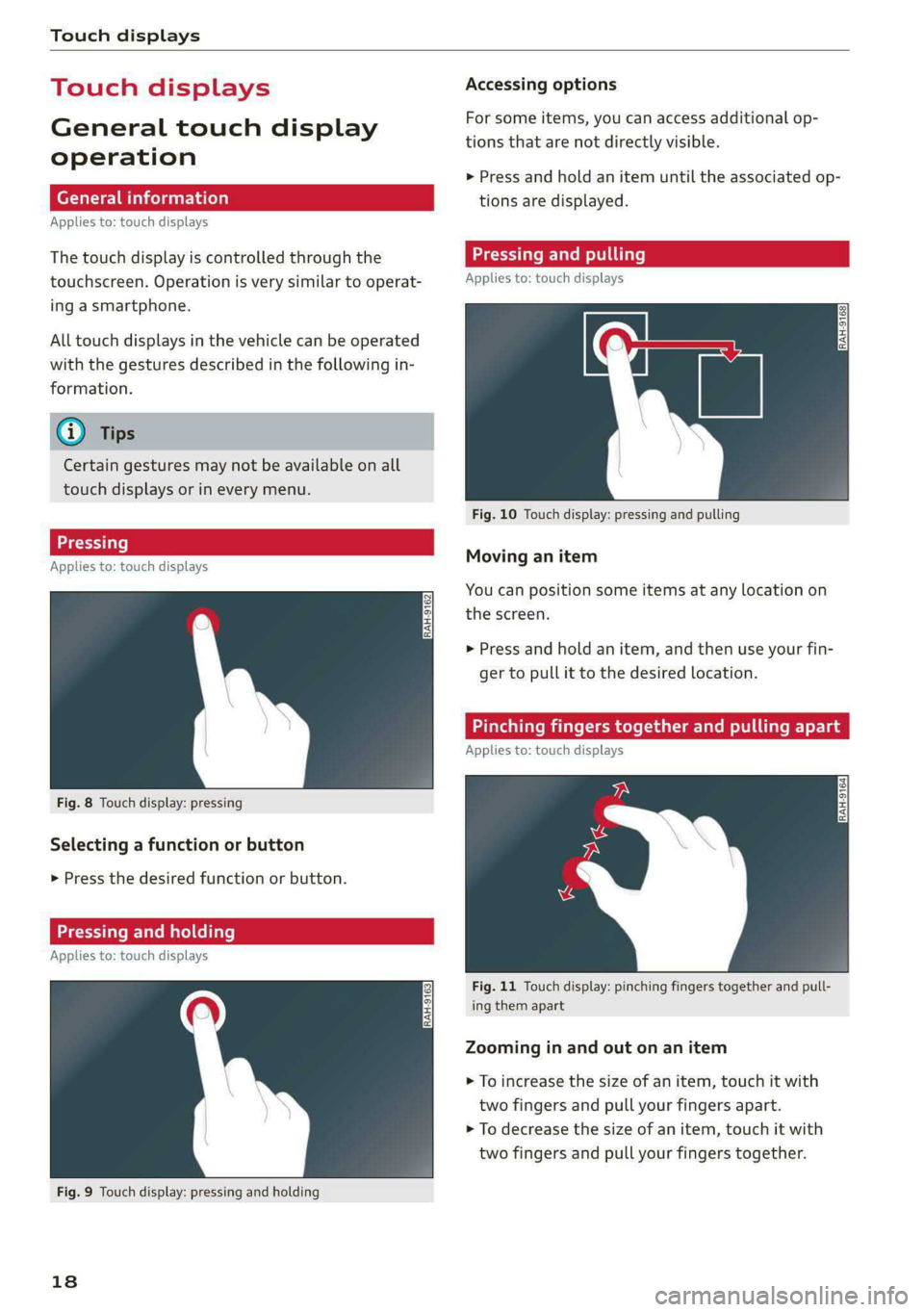
Fig. 8 Touch display: pressing
Selecting a function or button
> Press the desired function or button.
Pressing and holding
Applies to: touch displays
Fig. 9 Touch display: pressing and holding
18
Accessing options
For some items, you can access additional op-
tions that are not directly visible.
>» Press and hold an item until the associated op-
tions are displayed.
Applies to: touch displays
Fig. 10 Touch display: pressing and pulling
Moving an item
You can position some items at any location on
the screen.
> Press and hold an item, and then use your fin-
ger to pull it to the desired location.
Pinching fingers together and pulling apar
Applies to: touch displays
Fig. 11 Touch display: pinching fingers together and pull-
ing them apart
Zooming in and out on an item
> To increase the size of an item, touch it with
two fingers and pull your fingers apart.
> To decrease the size of an item, touch it with
two fingers and pull your fingers together.
Page 22 of 316

Touch displays
> If the General button is not displayed, swipe
toward the left or right with one finger until it
appears.
>» Press the General button.
> If the Date & time button is not displayed,
swipe upward or downward with one finger un-
tilit appears.
> Press the Date & time button.
@) Tips
If a menu or symbol is in parentheses in the
path, for example, (General) or (423), then it is
an optional menu item that does not need to
be used in every system.
You can adjust or turn off the MMI touch display
feedback.
> Applies to MMI: Select on the home screen:
SETTINGS > Display & brightness > MMI.
Possible settings:
— Brightness
— Touchscreen Feedback
Multi Media Interface
Airlie lia acoder)
Audi recommends performing certain Infotain-
ment system functions, such as entering a desti-
nation, only when the vehicle is stationary. Al-
ways be prepared to stop operating the Infotain-
ment system in the interest of your safety and
the safety of other road users.
ZA\ WARNING
Only use the Infotainment system when road,
traffic, weather, and visibility conditions per-
mit and always in a way that allows you to
maintain complete control over your vehicle.
@ Tips
Certain functions are not available while driv-
ing.
20
Wine mela mel mela
Switching the MMI on or off
> To switch the MMI off, press and hold the
On/Off knob > page 29, fig. 21 until the up-
per display and all Infotainment system func-
tions are switched off.
> To switch the MMI on, press the On/Off knob.
Restarting the MMI
>» Press and hold the On/Off knob for at least 10
seconds.
Switching displays on or off
> To switch the upper display off, press [Jon the
lower display.
> To switch the upper display on, touch the upper
display or press [Jon the lower display.
> To switch both displays on or off, press and hold
Co] on the lower display.
Introduction
You can display and operate Infotainment system
and vehicle functions using both of the Multi Me-
dia Interface (MMI) touch displays.
Configuration wizard
After starting for the first time, the configuration
wizard helps you to set up the vehicle, for exam-
ple to set the desired system language and con-
nect a telephone.
> Follow the instructions in the display.
> Applies to: MMI: To access the configuration
wizard at a later time, select on the home
screen: HELP > Configuration wizard.
Tool tips
Tool tips are displayed on the upper display after
starting for the first time. They introduce various
MMI functions to you.
> Follow the instructions in the display.
> Applies to: MMI: To access the tool tips at a lat-
er time, select on the home screen: SETTINGS
> Help > Show tool tips.
> Applies to: MMI: To receive additional tool tips,
select on the home screen: HELP > Tool tips >
Basic information or Expert information.
Page 24 of 316
Touch displays
Configuring quick access
> Press and hold a button on the home screen
display area or in the quick access bar.
> To move a button to the quick access bar, pull it
from the display area to the quick access bar.
> To adjust the placement of the buttons in the
quick access bar, pull them to the desired posi-
tion in the bar.
> Press Done to complete the configuration.
@) Tips
The position of © cannot be adjusted.
Display area
You can freely change the location of the buttons
on the home screen display area.
Configuring the display area
> Press and hold a button on the home screen
display area.
> To adjust the placement of the buttons, pull
them to the desired locations.
> Press Done to complete the configuration.
Switching between menu pages
If a menu contains multiple menu pages, febatea iS
displayed in the display area. The white bar
shows the location of the current menu page.
> To switch between menu pages, swipe your fin-
ger to the right or Left.
Of OB On
Of of af
CO o8 of
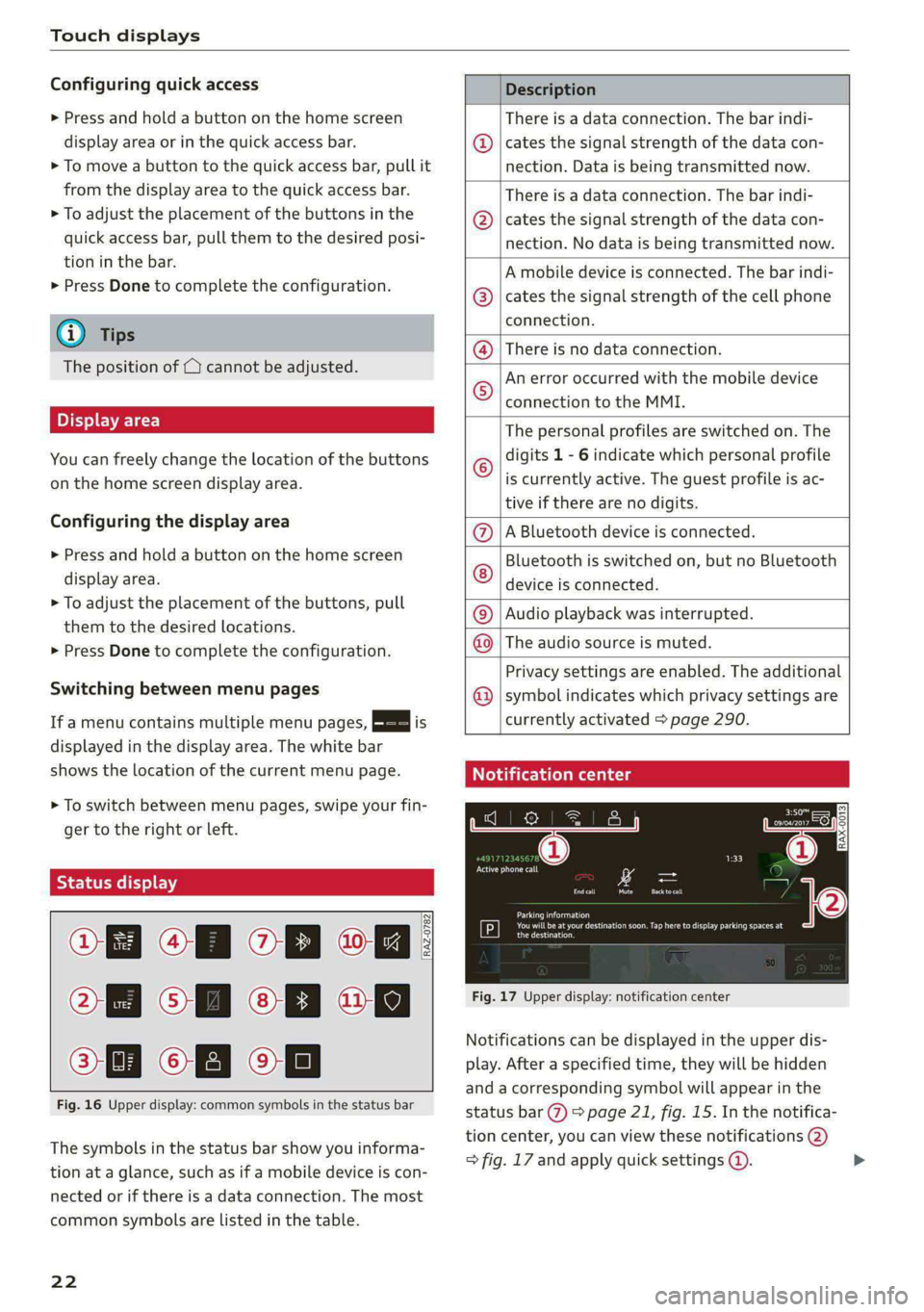
Fig. 16 Upper display: common symbols in the status bar
[RAZ-0782
The symbols in the status bar show you informa-
tion at a glance, such as if a mobile device is con-
nected or if there is a data connection. The most
common symbols are listed in the table.
22
Description
There is a data connection. The bar indi-
cates the signal strength of the data con-
nection. Data is being transmitted now.
There is a data connection. The bar indi-
cates the signal strength of the data con-
nection. No data is being transmitted now.
A mobile device is connected. The bar indi-
cates the signal strength of the cell phone
connection.
® There is no data connection.
An error occurred with the mobile device
connection to the MMI. @
The personal profiles are switched on. The
digits 1 - 6 indicate which personal profile
is currently active. The guest profile is ac-
tive if there are no digits.
A Bluetooth device is connected.
Bluetooth is switched on, but no Bluetooth
device is connected. ©®e
©
Audio playback was interrupted.
The audio source is muted. @|©
Privacy settings are enabled. The additional
symbol indicates which privacy settings are ©
currently activated > page 290.
Notification center
ll
RAX-0013
reuse
Sear)
You will be at your destination soon. Tap here to display parking spaces at
[P] eesti
Fig. 17 Upper display: notification center
Notifications can be displayed in the upper dis-
play. After a specified time, they will be hidden
and a corresponding symbol will appear in the
status bar (2) > page 21, fig. 15. In the notifica-
tion center, you can view these notifications @)
> fig. 17 and apply quick settings @. >
Page 29 of 316

4K0012721BD
Voice recognition system
Voice recognition system
General information
Applies to: vehicles with voice recognition system
You can operate many functions in the vehicle
easily using voice commands.
Using the voice recognition system optimally
> Speak clearly and distinctly at a normal volume.
Speak louder when driving faster.
» Emphasize the words in the commands evenly
and do not leave long pauses.
> Close the doors, the windows, and the sunroof*
to reduce background noise. Make sure that
passengers are not speaking when you are giv-
ing a voice command.
> Do not direct the vents toward the hands-free
microphone, which is in the roof headliner near
the front interior lights.
> Only the driver should speak to the system, be-
cause the handsfree microphone is aimed to-
ward this seating position.
ZA WARNING
— Direct your full attention to driving. As the
driver, you have complete responsibility for
safety in traffic. Only use the functions in
such a way that you always maintain com-
plete control over your vehicle in all traffic
situations.
— Do not use the voice recognition system in
emergencies because your voice may change
in stressful situations. The system may take
longer to dial the number or may not be
able to dial it at all. Dial the emergency
number manually.
G) Tips
There are no voice guidance* prompts when a
dialog is active.
Operating
Applies to: vehicles with voice recognition system
(2 ELE
Pat) 5 ce
Where is a
Connect >
Diala
coy n
ey
Os 4
Cog
Fig. 19 Upper display: voice recognition system
Switching the voice recognition system on or
off
Requirement: the ignition and the MMI must be
switched on. A system language supported by
the voice recognition system must be set. There
must be no phone calls in progress and the park-
ing aid must not be active.
> To switch the voice recognition system on,
briefly press the «€ button on the multifunction
steering wheel, or depending on the context,
press w¢ in the upper display.
> To switch the voice recognition system off,
press and hold the « button on the multifunc-
tion steering wheel, or say or press Cancel (a).
Using the voice recognition system
In the voice recognition system menu, possible
commands or help settings are displayed for the
current dialog @).
> Say the desired command after the signal tone.
> To receive additional help for the current dia-
log, say or press Help (2).
> To pause voice recognition, say or press Pause
@. To reactivate voice recognition, press @)
again or briefly press the «€ button on the mul-
tifunction steering wheel.
> Applies to: MMI: Select on the home screen:
SETTINGS > General > Speech dialog system >
Allow commands during voice output. If the
function is switched on, you can simply say a
new command during a prompt.
Activating the online recognizer
Applies to: vehicles with online recognizer
You can activate the online recognizer for addi-
tional functions and to improve the results of
27
>
Page 30 of 316

Voice recognition system
voice recognition. A supported menu language
must be selected. When there is an active Inter-
net connection, the spoken command is evaluat-
ed in the vehicle and online.
> When you switch on the voice recognition sys-
tem for the first time, a menu for the online
recognizer opens. Or:
> Applies to: MMI: Select on the home screen:
SETTINGS > General > Speech dialog system >
Consent to online speech recognizer.
> Read the licensing agreements and accept
them.
Activating Amazon Alexa!)
Applies to: vehicles with Amazon Alexa Integration
You can activate Amazon Alexa to access special
additional functions. A supported menu lan-
guage must be selected. A reduced number of
commands are available during this.
Requirement: you must be logged in to your
myAudi account in the vehicle. The online recog-
nizer must be activated.
> Applies to: MMI: Select on the home screen:
USER > Connect to Amazon Alexa.
> Follow the instructions in the display.
> After connecting successfully, turn on the voice
recognition system as normal > page 27,
Switching the voice recognition system on or
off, say the activation word “Alexa”, and then
say the desired command.
() Note
Read the information about Audi connect, and
be sure to note the connectivity costs section
=@) in General information on page 177.
External voice operation
Applies to: vehicles with external speech dialog system
You can access and control the voice operation on
a connected mobile device through your vehicle.
2) AUDI AG provides access to services from third party pro-
viders. Permanent availability cannot be guaranteed, be-
cause that depends on the third party provider.
238
Switching external voice operation on or off
Requirement: the ignition and the MMI must be
switched on. A mobile device must be connected
to the MMI with the Handsfree profile
=> page 164. The mobile device being connected
must have voice control that can be controlled
externally. There must be no phone calls in prog-
ress and the parking aid must not be active.
> To switch on the external voice operation, press
and hold the «€ button longer on the multifunc-
tion steering wheel.
> To switch off the external voice operation, press
and hold the «€ button longer on the multifunc-
tion steering wheel or press Cancel.
Using external voice operation
> Say the desired command after the signal tone.
> To reactivate voice recognition when it is
paused, press the «¢ button briefly on the mul-
tifunction steering wheel or press Resume.
(i) Tips
AUDI AG simply provides access to control
your mobile device with voice operation and
does not assume any responsibility for the
content and commands within the external
voice control.
Page 31 of 316
4K0012721BD
Global functions
Global functions
Additional function
buttons
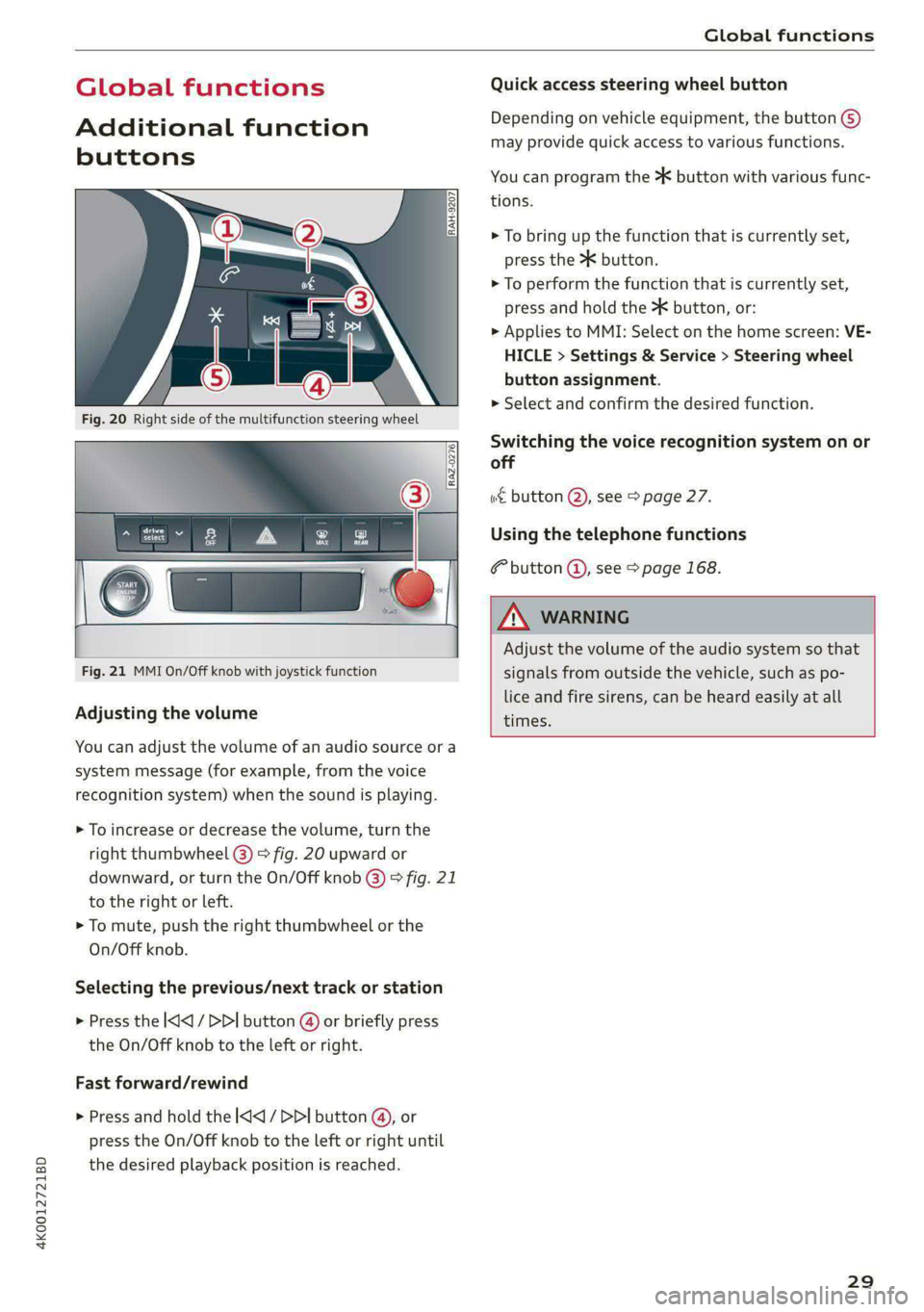
Fig. 20 Right side of the multifunction steering wheel
Fig. 21 MMI On/Off knob with joystick function
Adjusting the volume
You can adjust the volume of an audio source or a
system message (for example, from the voice
recognition system) when the sound is playing.
> To increase or decrease the volume, turn the
right
thumbwheel @) © fig. 20 upward or
downward, or turn the On/Off knob @) ° fig. 21
to the right or left.
> To mute, push the right thumbwheel or the
On/Off knob.
Selecting the previous/next track or station
> Press the l
Fast forward/rewind
> Press and hold the ] button @, or
press the On/Off knob to the left or right until
the desired playback position is reached.
Quick access steering wheel button
Depending on vehicle equipment, the button @)
may provide quick access to various functions.
You can program the >K button with various func-
tions.
> To bring up the function that is currently set,
press the >K button.
> To perform the function that is currently set,
press and hold the >K button, or:
> Applies to MMI: Select on the home screen: VE-
HICLE > Settings & Service > Steering wheel
button assignment.
» Select and confirm the desired function.
Switching the voice recognition system on or
off
w€ button @), see > page 27.
Using the telephone functions
button @, see > page 168.
ZA WARNING
Adjust the volume of the audio system so that
signals from outside the vehicle, such as po-
lice and fire sirens, can be heard easily at all
times.
29