seat adjustment AUDI A6 2020 Owners Manual
[x] Cancel search | Manufacturer: AUDI, Model Year: 2020, Model line: A6, Model: AUDI A6 2020Pages: 316, PDF Size: 86.41 MB
Page 15 of 316
4K0012721BD
Instrument cluster
@) Tips
— The following pages primarily show illustra-
tions of the Audi virtual cockpit*. The ap-
pearance or the location of the items shown
may differ in an analog instrument cluster.
— You can select the units used for tempera-
ture, speed, and other measurements in the
Infotainment system > page 223.
— Speeds are displayed in mph (miles per
hour) or km/h (kilometers per hour).
— If there is a malfunction in the instrument
cluster, DEF will appear in the trip odometer
display. Have the malfunction corrected as
soon as possible.
— Certain instrument cluster content can also
be displayed in the head-up display*
=> page 26.
— Certain settings are stored automatically in
the active personal profile.
— Applies to: vehicles with analog instrument
cluster: When the lights are switched off
and the ignition is switched on, the instru-
ment illumination (needles and gauges) will
switch on. The illumination for the gauges
reduces automatically and eventually turns
off as brightness outside increases. This
function reminds the driver to turn the low
beams on at the appropriate time.
Loading a personal
profile
Welcome
See eI
Elie)
OK
SOT ceam cel ti C=y
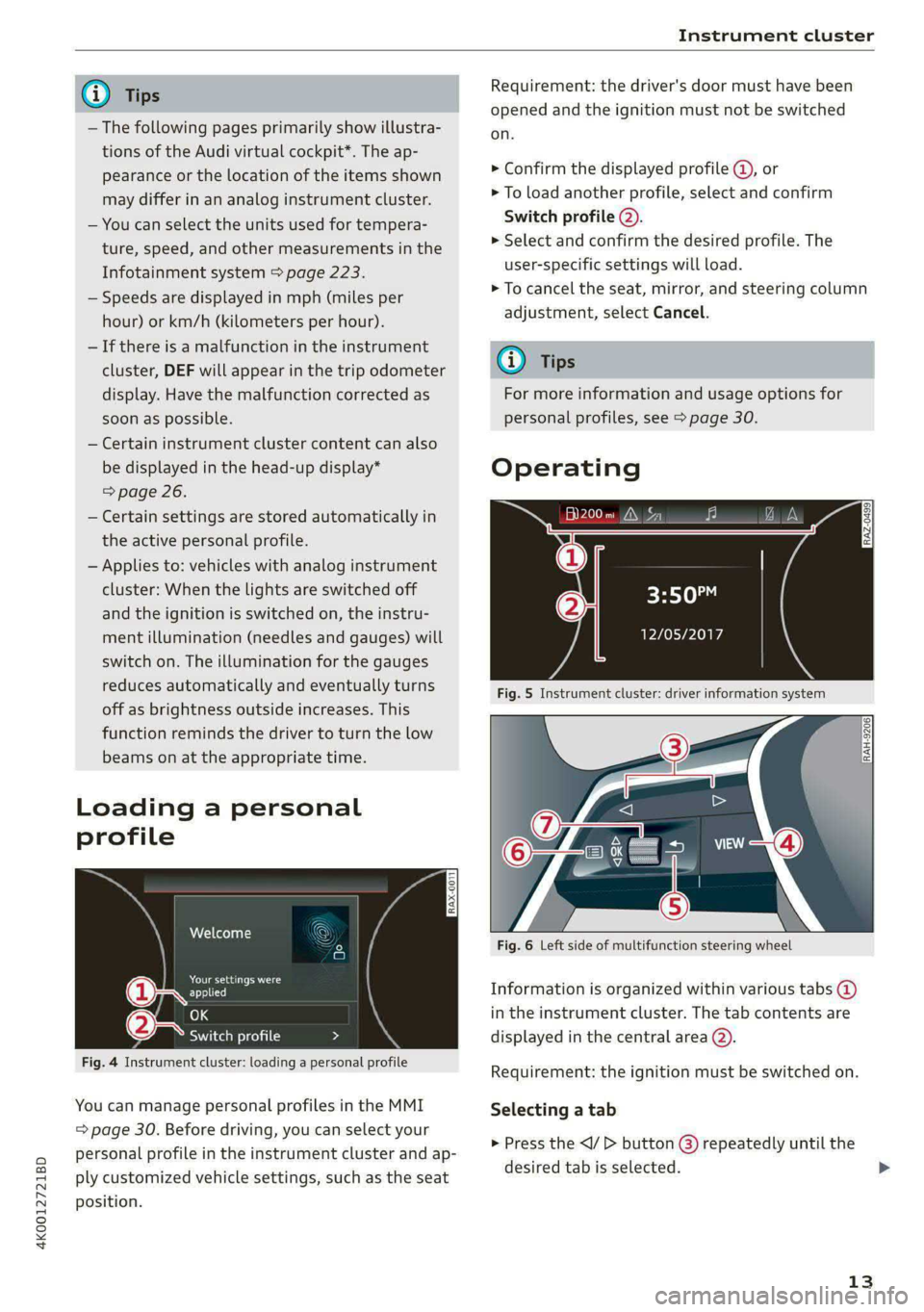
Fig. 4 Instrument cluster: loading a personal profile
You can manage personal profiles in the MMI
= page 30. Before driving, you can select your
personal profile in the instrument cluster and ap-
ply customized vehicle settings, such as the seat
position.
Requirement: the driver's door must have been
opened and the ignition must not be switched
on.
> Confirm the displayed profile @, or
> To load another profile, select and confirm
Switch profile (2).
> Select and confirm the desired profile. The
user-specific settings will load.
> To cancel the seat, mirror, and steering column
adjustment, select Cancel.
G) Tips
For more information and usage options for
personal profiles, see > page 30.
Operating
al 3]
ig hea IN iz fa
3:50™
PTL Plh
Fig. 5 Instrument cluster: driver information system
RAH-9206|
Fig. 6 Left side of multifunction steering wheel
Information is organized within various tabs @)
in the instrument cluster. The tab contents are
displayed in the central area (2).
Requirement: the ignition must be switched on.
Selecting a tab
> Press the button () repeatedly until the
desired tab is selected.
13
>
Page 28 of 316
Head-up display
Head-up display
Description
Applies to: vehicles with head-up display
The head-up display projects certain warnings or
selected information from the assist systems on
the windshield. The display appears within the
driver's field of vision.
Switching on and off
The Y button is located in the function bar on
the lower display > page 21.
> To switch the head-up display on or off, press
and hold the Y button.
Settings in the Infotainment system
> Applies to: MMI: Select on the home screen:
SETTINGS > Display & brightness > Head-up
display, or
> Press the Y button.
Possible settings:
— Picture rotation
— Brightness
— Display height: you can adjust the height of the
display. Sit in the correct seating position
=> page 60 and adjust the head-up display.
— Display contents: you can set which informa-
tion should be displayed. The display of certain
information and some of the red indicator
lights cannot be hidden.
® Note
To reduce the risk of scratches on the glass
covering the head-up display, do not place any
objects in the projection opening.
@ Tips
— Sunglasses with polarization filters and un-
favorable lighting conditions can impair visi-
bility of the display.
— An optimal display depends on the seat po-
sition and the height adjustment of the
head-up display.
—A special windshield is needed for the head-
up display function.
26
— For information on cleaning, see > table In-
terior cleaning on page 268.
— Certain settings are stored automatically in
the active personal profile.
Page 63 of 316

4K0012721BD
Sitting correctly and safely
— The distance between your upper body and the
steering wheel or instrument panel is at least
10 inches (25 cm)
— The distance between your knees and the in-
strument panel is at least 4 inches (10 cm)
— Your thighs are lightly supported by the front
surface of the seat
— The backrest is in an upright position and your
back
is resting against it
— You have a sufficient view of the area around
the vehicle
— You have a clear view of the instrument cluster,
indicator lights, and the head-up display*
Seat settings menu: quick access
Applies to: vehicles with seat settings in the MMI
If you press on the image of the driver's or front
passenger's seat in the climate control system
menu © page 88, fig. 84 @, you will go directly
to the seat settings for that seat.
to use the pedals if sudden driving or brak-
ing maneuvers were needed, which increas-
es the risk of an accident.
— Make sure that the floor mats are always se-
curely attached.
—To reduce the risk of an accident, never place
additional floor mats or other floor covers
over the installed floor mats, because this
reduces the pedal's range of motion and can
impair pedal operation.
—To reduce the risk of injury, never place your
feet on the instrument panel, out of the
window, or on the seat surfaces. This also
applies to passengers in the rear seats.
Z\ WARNING
— If you are too close to the steering wheel or
instrument panel, the airbag system cannot
provide the optimal protection, which in-
creases the risk of injury and death.
—To reduce the risk of injury in the event of
sudden braking maneuvers or accidents,
never drive with the backrest reclined very
far. The airbag system and seat belts can on-
ly provide optimal protection when the back-
rest is in an upright position and the driver
is wearing the seat belt correctly. If the
backrest is angled back too far, the safety
belt can shift to soft areas of the body, such
as the stomach, which increases the risk of
injury.
—To reduce the risk of an accident, only adjust
the seats when the vehicle is stationary.
— Be careful when adjusting the seat. Lack of
control or attention when adjusting can re-
sult in injuries due to pinching to vehicle oc-
cupants both in the front seats and rear
seats.
— Never place objects in the driver's footwell.
Objects could shift and enter the area
around the pedals, which could prevent you
from using them. You would then be unable
@) Note
To reduce the risk of damage, be very careful
when adjusting the seat to make sure the
head restraints do not come into contact with
the headliner or the sunroof*.
G@) Tips
At the same time, only move the respective
seat using the controls.
Adjusting the front power seats
You can adjust the basic settings using the but-
RAZ.0172
tons.
CO.
oS
Fig. 51 Front seat: seat adjustment buttons
The settings depend on the vehicle equipment.
Adjusting the seat position
> To move the seat forward or backward, push
the button @) forward or backward.
61
Page 64 of 316

Sitting correctly and safely
> To adjust the seat upward or downward, push
the rear section of the button @) upward or
downward.
> To adjust the seat surface, press the front part
of the button @ upward or downward.
Adjusting the backrests
> To move the backrest forward or backward,
press the button @) forward or backward.
Adjusting the lumbar support
> To adjust the lumbar support, press the button
@ at the applicable location.
Massage function
Switch the massage function on or off @). Setting
the massage type and intensity > page 62.
ZA\ WARNING
The power front seats can also be adjusted
when the ignition is switched off. To reduce
the risk of injury, children should never be left
unattended in the vehicle.
Neem a Rice D
Applies to: vehicles with seat settings in the MMI
You can adjust additional settings in the MMI.
Cre
@—
RAZ-0589)
—O
©=-c
Fig. 52 Upper display: seat setting
The settings and the number of menus and but-
tons depend on the vehicle equipment.
Operating
Applies to: MMI
> Select on the home screen: VEHICLE > Seats.
> To access the various menus (3), swipe to the
left or right.
> To display the various seats, press ) or ¢ @®.
The red color of the symbol () indicates which
seat is selected.
62
Seat adjustment
Applies to: MMI
> To select a seat setting, press (@ if necessary.
> Press the respective arrow (@) until the desired
position is reached.
Massage
See > page 62
Additional seat settings
See > page 62
Front seat massage function
Applies to: vehicles with massage function
Selecting the massage function
Applies to: MMI
> To access the Massage menu, press the J but-
ton @) > page 61, fig. 51.
Switching the massage function on or off
Applies to: MMI
> To switch the massage function on or off, press
the J button @ © page 61, fig. 51. Or:
> Press Start/Stop on the MMI.
Setting the massage type and intensity
Applies to: MMI
> To adjust the massage type, press the desired
button on the MMI, for example Wave.
> To adjust the intensity of the massage, press
Intensity on the MMI repeatedly until the de-
sired level is reached.
(i) Tips
The massage function switches off automati-
cally after approximately 10 minutes.
ONC eerste Meee
You can adjust additional settings and switch
functions on or off in the MMI.
> Applies to: MMI: Select on the home screen:
VEHICLE > Seats > Additional seat settings.
Depending on the vehicle equipment, the follow-
ing options may be available.
Page 65 of 316

4K0012721BD
Sitting correctly and safely
Reset seat position
You can adjust the position of the front passeng-
er’s seat to match the driver's seat.
Driver seat entry assistance/Front passenger
seat entry assistance
Entry assistance makes it easier to enter or exit
the vehicle.
Adjusting the front passenger's seat from
AK Least
Applies to: vehicles with front passenger seat adjustment
You can adjust the front passenger's side with the
driver's seat buttons.
Applies to: MMI:
> Select on the home screen: VEHICLE > Seats.
> To display the various seats, press ) or ¢.
> To switch on the function, press the 2) button.
The lower edge of the button will turn red.
After you have switched on the function, you can
adjust the front passenger's seat using the driv-
er's seat buttons > page 61, fig. 51.
@ Tips
The function switches off automatically when
you exit the menu.
aaa lerlenl et i
Applies to: vehicles with a front center armrest
The front center armrest is located between the
front seats.
Adjusting the center armrest
> To adjust the armrest forward or backward,
move the armrest in the desired direction.
> To adjust the angle, raise the armrest from the
starting position in stages.
> To bring the armrest back into the starting po-
sition,
raise it out of the top level and fold it
back down.
ZA WARNING
In certain positions, the front center armrest
can interfere with the driver’s arm movement,
which increases the risk of injury.
Steering wheel
General information
Make sure that:
— The distance between your upper body and the
steering wheel is at least 10 in (25 cm)
— Your arms are bent slightly at the elbows
— You have a sufficient view of the area around
the vehicle and you have a clear view of the in-
strument cluster and head-up display”.
— You are always holding the steering wheel with
both hands on the outer edge at the sides (9:00
and
3:00 position) when driving
ZA WARNING
—To reduce the risk of an accident, make sure
the steering wheel is adjusted correctly and
cannot be moved out of position before you
start to drive.
— If you are too close to the steering wheel,
the driver's airbag cannot provide optimal
protection, which increases the risk of injury
or fatality.
— Never hold the steering wheel in the 12:00
position or in any other way, such as holding
the center of the steering wheel. Otherwise,
your arms, hands, and head could be injured
in the event that the driver's airbag deploys.
Power steering wheel position adjustment
The steering wheel position can be adjusted elec-
trically
up/down and forward/back.
2 S
S z
a
Fig. 53 Steering column: switch for adjusting the steering
wheel position
> To move the steering wheel upward or down-
ward, press the switch upward or downward.
63
>
Page 69 of 316

4K0012721BD
Sitting correctly and safely
— Do not position the safety belt over hard or
breakable objects (such as glasses, pens,
GiKe)),
— The lap belt portion of the safety belt must
sit as low as possible on the lap of pregnant
women and lie flat under the belly.
@) Note
Make sure that there are no hook-and-loop
fasteners or sharp objects such as zippers or
rivets on clothing in the area where the safety
belt is worn. Otherwise, the safety belt could
be damaged.
Fastening and unfastening safety belts
,
|
B4H-0462
aS
\
B4H-0270
Fig. 60 Releasing the belt buckle from the belt latch
Follow the safety precautions > page 65.
Fastening the safety belt
> Pull the safety belt by the belt buckle evenly
across your chest and lap.
> Insert the belt buckle in the belt latch belong-
ing to the seat until it audibly engages
> fig. 59.
> Pull on the belt to make sure that the belt is se-
curely locked in the latch.
Unfastening the safety belt
> Press the red button on the belt latch > fig. 60.
The belt buckle will pop out.
> Guide the belt back by hand so that the safety
belt can roll up more easily.
SEA leet RS etna
B- If the indicator light turns on or flashes, a
safety belt is not fastened or it has been unfas-
tened while the vehicle is in motion. Above cer-
tain speeds, additional warning tones will sound.
Depending on the equipment, the safety belts in
the rear may also be monitored using the follow-
ing indicator lights:
aI - If this indicator light turns on, the safety
belt for the corresponding rear seat is not fas-
tened.
Ba - If this indicator light turns on, the safety
belt for the rear seat has been fastened.
g- If this indicator light turns on with a white
light, the safety belt for the rear seat has been
fastened. If the indicator light flashes or turns
gray, a safety belt in the rear is not fastened or
has been unfastened while the vehicle is in mo-
tion.
Adjusting the height of the safety belt
B4G-0004
Fig. 61 Belt height adjustment for the front seats - safety
belt relay
> To move the belt higher, slide the safety belt re-
lay @ upward.
> To move the belt lower, press the release but-
ton @ and slide the safety belt relay @) down-
ward.
67
>
Page 71 of 316

4K0012721BD
Sitting correctly and safely
the memory button until the seat profile is
completely set.
Z\ WARNING
— To reduce the risk of an accident, the seat
setting can only be recalled when the vehicle
is stationary.
— In an emergency, the recall process can be
canceled by pressing the seat adjustment
button on that seat.
@) Tips
Certain settings are stored automatically in
the active personal profile.
Airbag system
General information
ZA WARNING
— If you have not fastened your safety belt,
you are in an incorrect seating position, or
you are too close to the airbag system, the
airbag system will not be able to protect
you. This increases the risk of serious or fa-
tal injuries. Make sure that every vehicle
passenger has their safety belt correctly fas-
tened and is sitting in a correct seating posi-
tion = page 60. This is necessary regardless
of whether the seat is equipped with an air-
bag or not.
— Never place your feet on the instrument
panel, out of the window, or on the seat sur-
faces. To help ensure that the airbag system
can deploy correctly, never bend forward or
lean on the door or the side window. Other-
wise, serious and possibly fatal injuries can
occur if the airbags deploy.
— People, animals, or objects between the
passengers and the airbag system can inter-
fere with the correct deployment of the air-
bag or can be thrown through the vehicle in-
terior, increasing the risk of serious or fatal
injuries. Make sure that nothing is located
between the vehicle occupants and the air-
bag system. Do not secure or transport any
objects within the deployment zone of the
airbag systems, especially on the steering
wheel, on the instrument panel, on the
doors, on the windows, or in the footwell.
— Never put stickers on the airbag system cov-
ers or cover them with any objects.
— Only lightweight clothing should be hung
from the garment hooks in the vehicle. Do
not use clothes hangers to hang clothing.
The pockets of the clothing must not con-
tain any heavy, breakable, or sharp-edged
objects. This could impair the effectiveness
of the side curtain airbags.
— You must not use seat or protective covers
that are not specifically approved for use on
Audi seats with side airbags. Since the side
airbags deploy from the seat backrest, such
covers could impair the protective function
of the side airbags.
— Damage to the original seat covers in the
side airbag deployment area must always be
repaired by an authorized Audi dealer or au-
thorized Audi Service Facility.
— Airbag system components are installed at
various locations in your vehicle. Incorrect
work or repairs on the vehicle could damage
the airbag system components or impair
their functionality. This may prevent the air-
bags from deploying or cause them to de-
ploy incorrectly in the event of an accident,
which increases the risk of serious or fatal
injuries. Only have an authorized Audi dealer
or authorized Audi Service Facility make re-
pairs or modifications to a vehicle.
— The airbag system can only provide protec-
tion during one collision. If there is another
collision, the airbag system will not deploy
again. If the airbag system has deployed,
have it replaced immediately by an author-
ized Audi dealer or authorized Audi Service
Facility.
— Fine dust may appear if the airbags deploy.
This is completely normal and does not indi-
cate a fire in the vehicle. The fine dust can ir-
ritate the skin and mucous membranes in
the eyes and can cause difficulty breathing,
particularly for individuals who have or have
69
Page 243 of 316

4K0012721BD
Checking and Filling
Switch off all electrical equipment that is not
needed. Vehicle functions/driving stability may
be limited. Drive to an authorized Audi dealer or
authorized Audi Service Facility immediately.
= Electrical system: low battery charge. Bat-
tery will be charged while driving
The starting ability may be impaired.
If this message turns off after a little while, the
vehicle battery has charged enough while driving.
If this message does not turn off, drive immedi-
ately to an authorized Audi dealer or authorized
Audi Service Facility.
ZA WARNING
When there is an electrical system malfunc-
tion, vehicle functions may not work and driv-
ing stability may be limited, which increases
the risk of an accident. Do not continue driv-
ing and switch the ignition off. See an author-
ized Audi dealer or authorized Audi Service Fa-
cility for assistance.
Battery
Praia Ueeece(el)
Because of the complex power supply, all work on
batteries such as disconnecting, replacing, etc.,
should only be performed by an authorized Audi
dealer or authorized Audi Service Facility > A\.
Multiple batteries with different technologies
may be installed in your vehicle:
— Vehicle battery (for example, for starting the
engine, basic power supply) > page 242, 12
Volt vehicle battery or > page 242, Other bat-
tery types
— Auxiliary battery (for example, for recuperation
or optional equipment) > page 242, Other bat-
tery types
Not running the vehicle for long periods of
time
The battery will gradually drain if the vehicle
does not run for long periods of time. To ensure
that the vehicle can still be started, the electrical
equipment will be limited or switched off. Some
convenience functions, such as interior lighting
or power seat adjustment, may not be available
under certain circumstances. The convenience
functions will be available again when you start
the
engine.
Even when electrical equipment is switched off,
the equipment can still drain the battery if the
vehicle is not driven for long periods of time.
Deep draining results in a chemical reaction that
destroys the inside of the battery. The battery
must be charged every month to prevent this
= page 243. Contact an authorized Audi dealer or
authorized Audi Service Facility for more infor-
mation.
Winter operation
Cold weather places an especially high load on
the 12 Volt vehicle battery. Have the battery
checked by an authorized Audi dealer or author-
ized Audi Service Facility before cold weather be-
gins.
Z\ WARNING
— All work on the battery or electrical system
in your vehicle can result in injuries, chemi-
cal burns, accidents, or burns. Because of
this, all work must be performed only by an
authorized Audi dealer or authorized Audi
Service Facility.
— Never connect a charging cable or jump
start cable directly to the 12 Volt vehicle
battery. Only use the connections in the en-
gine compartment > page 243.
ZA WARNING
California Proposition 65 Warning:
— Battery posts, terminals and related acces-
sories contain lead and lead compounds,
chemicals known to the State of California
to cause cancer and reproductive harms.
Wash hands after handling.
CG) Note
— If the vehicle will be parked for long periods
of time, protect the battery against the cold
so that it will not be destroyed by “freezing”
241
>
Page 288 of 316

Fuses and bulbs
Fuse assignm ide of cockpit
Fig. 185 Left side of the cockpit: fuse panel with plastic
Fuse panel @) (red)
7 |Instrument panel
8 | Climate control system fresh air blower
9 | Windshield wiper control module
10 | Dynamic steering
11 | Engine start
12 | Automatic transmission
Fuse panel @) (black)
No. | Equipment
1 |Front seat heating
2 |Windshield wipers
3 | Left headlight electronics
4 | Panoramic glass roof
5 |Left front door control module
6 |Sockets
7 |Right rear door control module
8 |AWD control module
9 | Right headlight electronics
10 Windshield washer system/headlight
washer system
11 | Left rear door control module
12 | Parking heater
Fuse panel G) (brown)
No. | Equipment
Seat ventilation, seat electronics, rearview
1 | mirror, rear climate control panel, diag-
nostic connector
2 Vehicle electrical system control module,
gateway control module
3 | Sound actuator/exhaust sound tuning
4 |Transmission heating valve
5 |Engine start
8 | Night vision assist, active roll stabilization
9 |Adaptive cruise assist, front radar
11 Intersection assistant, driver assist sys-
tems
12 | Exterior sound
286
clip
Fuse panel (@) (black)
No. | Equipment
2 | Steering column adjustment
3 | CD/DVD player
4 | Steering column electronics
5S | Light switch, switch panels
6 |Volume control
7 |Instrument cluster
8 |Upper/lower display
9 |Steering wheel heating
Fuse panel (2) (brown)
No. | Equipment
2 |MMI Infotainment system control module
Audi music interface
4 |Head-up display
5 Climate control system, fragrance system,
lonizer
9 |Steering column lock
Page 306 of 316

Index
F
Factory default settings
Multi Media Interface................. 224
Fast forwarding and rewinding (media file). 213
Fast forwarding (media files)............ 213
Fast route. ....... eee eee eee 186
Favorites
BIGGtOOths = acces ¢ ¢ qn Gs Sees sb eee se 225
NavigattOtitin = 3 cescm ss mcwsn 6 was oo mS 188
Radio... eee cece eee eee eee 203
Telephone........... 2-000 eee eee eee 169
Federal Communications Commission (FCC) . 296
File formats (media drives).............. 219
Fixture set... 0... eee 85
Fog (WINK OWS) weccic 6s eosece «wrens & coavene oe anave 90
Folding the rearseats.............-.0005 83
Footwell temperature.................4. 91
For the sake of the environment
Disposing of engine oil................ 237
Fueling...... 2... 0c cece eee ee 228
LeakSivn s < sews 2 2 poem 2 2 poe xe HeORS Be 232
RraQranc@ sas ¢ < sees ¢ 5 Souk ¢ a ees Fee 90, 91
Free text search
Medias = = sees ys aoe se soee ss Seen ae ree 217
Radio... eee cece eee eee ee 203
also refer to Intelligent search.......... 186
Freeze protection
COOLANt wesc x 2 wows se seme to eee ev Bee 238
Front center armrest...................0- 63
Front collision warning
refer to Audi pre sense front............ 146
Front passenger’s seat adjustment
FRONES « «were 2 v memes = wane a x em oo aoe w 63
Rear... eee eee 62
Front wiper blades
Changing............ cece cece eee 56
Cleaning’: « = ees = « sews to tee as cae pee 56
FUGls s semw 2 s gee 2 y eee eee ye Bem eo re 227
AGiRIVES 5 5 mows 6 wane 4 o cieren 3 8 were 3 6 os 228
Current consumption..................- 16
Fuel display’: wesc ss oeas se eee cv een eae 12
Fuel tank capacity... 6.0... 0. cece renee 299
Gasoline... 2... eee eee eee eee 227
Reducing fuel consumption............ 100
304
Fueling
Fuel filler door. .... 2.0... cece eee eee 228
Fuel filler door emergency release....... 230
Fueltankccapacitys. « s seccn es esc ve ence « 299
G
Garage door opener..............00e eee 46
GarMeNntshOOks « saswea x © ieee 2 x camw ¥ Capen a oY 81
GASOLINE seems ¢ eee: 3 2 eee Ye eee 8 8 Re 227
BOGHIVOS. 5 esses 3 x mama ve omen ow oma Oxo 228
Gasoline mixture... 2... 0... e cece aee 227
GAWR
refer to Gross Axle Weight Rating (GAWR) . 299
Gears... eet eee 95
Glossary of tire and loading terminology... 248
Glove compartment........... 0. eee eee 81
Valet parking............. eee eee ee eee 46
Gross Axle Weight Rating (GAWR)........ 299
Gross Vehicle Weight Rating (GVWR)...... 299
GVWR
refer to Gross Vehicle Weight
Rating (GVWR) « « sae « 2 sawe ys ames 2 8 ae 299
H
Handsfree: « = gees = y sews sv Sees oe Hees yes 165
Hahids Free Profile’s:: « « smu zs eens is oaee : 165
Head-up display
AGJUSING seis « s mews ¢ owen a 9 word 8 3 ees 26
Adjusting the brightness................ 53
Operating.............. 06.0 c eee eee 26
Headlight range control.................. 49
Headlights
GlGSMING: << ¢ 5 wees + 5 Haas + Boe ce See Gos 267
Headlight range control................ 49
Washer system... 0.2.0.0. e eee eee eae 55
Head restraints
Adjusting... 0... .... 00. e eee e eee eee 64
Removing and installing..............-. 64
Heated rear window.............--00000- 90
Heated steering wheel...............---. 91
Heating........... 0.000. 88
HFP
refer to Hands Free Profile............. 164
High beams
High beam assistant................04. 50