Luggage AUDI A6 2021 Owner´s Manual
[x] Cancel search | Manufacturer: AUDI, Model Year: 2021, Model line: A6, Model: AUDI A6 2021Pages: 332, PDF Size: 119.45 MB
Page 88 of 332

Storage and convenience
cover is not a surface for storing objects. Ob-
jects placed on the cover increase the risk of
injury to all vehicle occupants during sudden
driving or braking maneuvers or in the event
of an accident.
— Applies to: vehicles with luggage compart-
ment cover: The luggage compartment cov-
er must always be securely fastened when in
use to reduce the risk of an accident.
— Loose objects can be thrown around the ve-
hicle interior during sudden driving or brak-
ing maneuvers, which increases the risk of
an accident. Always stow objects securely in
the luggage compartment and secure them
at the tie-downs. Use straps suitable for
heavy objects.
— If pieces of luggage or objects are secured
to the tie-downs with unsuitable or dam-
aged straps, this can increase the risk of in-
jury during braking maneuvers or accidents.
— When transporting heavy objects, the vehi-
cle characteristics will change due to the
shift in the center of gravity, which increases
the risk of an accident. You may need to
adapt your driving style and speed to the
current conditions.
— The cargo net* is only strong enough to se-
cure light objects. Heavy objects are not ade-
quately secured. Attempting to secure heavy
objects increases the risk of injury.
— Never exceed the permitted axle and load
and vehicle weight > page 314.
— Never secure a child safety seat to the tie-
downs.
— Never leave your vehicle unattended, espe-
cially if the luggage compartment lid is
open. Children could enter the luggage com-
partment and close the luggage compart-
ment lid from the inside. This creates the
risk of fatal injury, since the children would
be locked in and may not be able to escape
by themselves.
— Do not allow children to play in or on the ve-
hicle. Close and lock the luggage compart-
ment lid as well as all other doors when you
leave
the vehicle.
— Never transport passengers in the luggage
compartment. Every passenger must be cor-
rectly secured with the safety belts in the
vehicle > page 70.
— Be careful when releasing the backrest and
folding
it forward. To reduce the risk of be-
ing pinched, pay attention and check when
folding backrests forward.
— The backrest must be securely latched so
objects cannot slide forward out of the lug-
gage compartment during sudden braking.
— The backrest must be latched securely to en-
sure that the safety belt is protecting the
center seating position.
— Always pull forward on the backrest to make
sure it is check if it is correctly locked in
place.
86
@) Note
—To reduce the risk of damage, move the rear
head restraints down > page 69 before fold-
ing the rear backrests forward.
— When folding the backrest forward, make
sure the outer safety belts are in the belt
guide recess so that they do not get pinched
in the backrest lock and damaged. Other ob-
jects should be removed from the rear
bench seat to protect the backrest from
damage.
— If you move the front seat back when the
rear seat backrest is folded forward, you
could damage the head restraints on the
rear seat.
— Make sure that the heating grid strips for
the rear window defogger are not damaged
by abrasive objects.
— Applies to: vehicles with manual luggage
compartment cover: Let the luggage com-
partment cover roll up slowly to reduce the
risk of damage.
— Applies to: vehicles with partition net: Let
the partition net roll up slowly to reduce the
risk of damage.
@) Tips
— The tire pressure must be adapted to the
load > page 266.
— You can purchase straps at specialty stores.
Page 89 of 332
4K0012721BE
Storage and convenience
Power luggage compartment cover
Applies to: vehicles with power luggage compartment cover
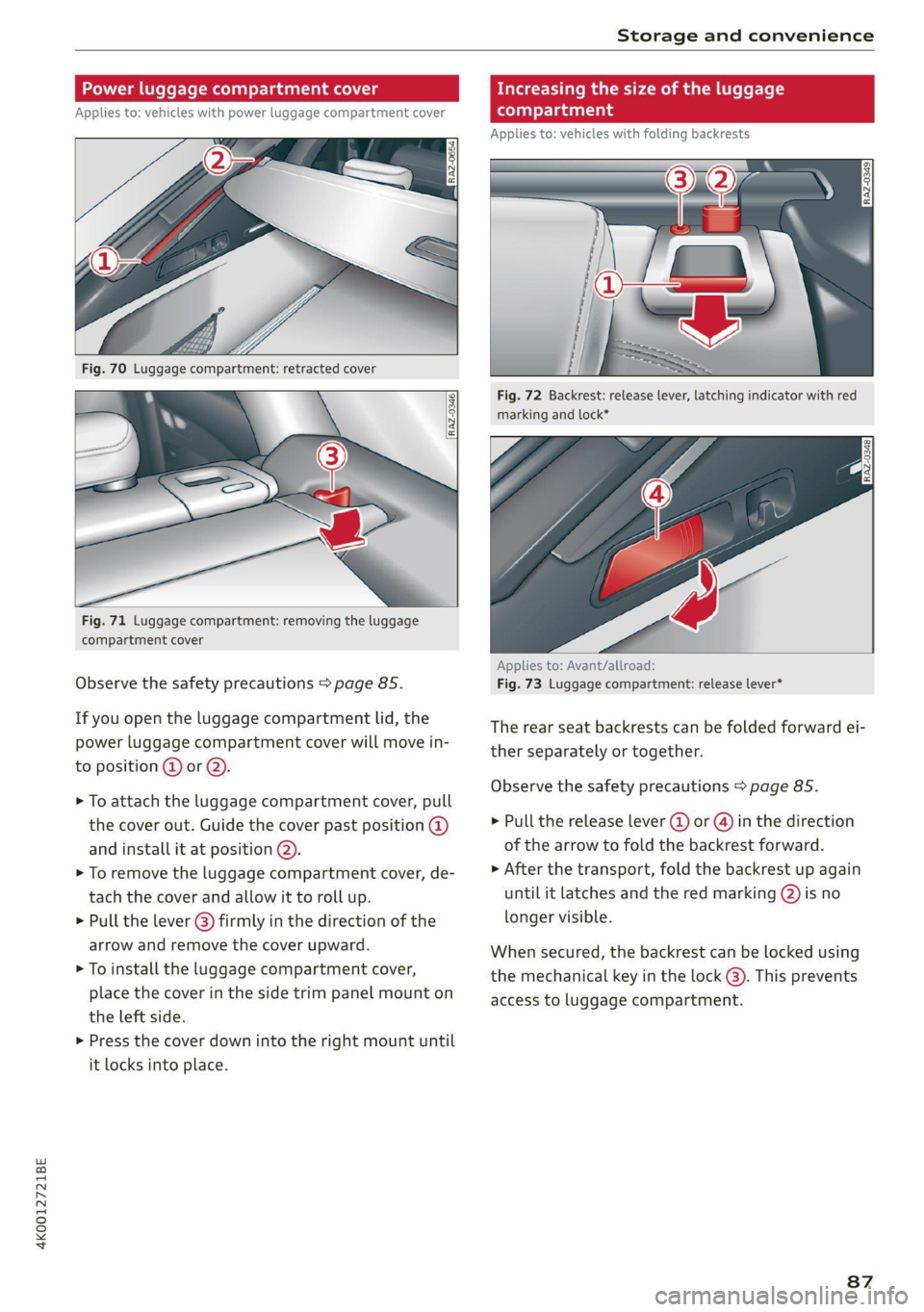
Fig. 71 Luggage compartment: removing the luggage
compartment cover
Observe the safety precautions > page 85.
If you open the luggage compartment lid, the
power luggage compartment cover will move in-
to position @ or Q).
> To attach the luggage compartment cover, pull
the cover out. Guide the cover past position @
and install it at position @).
> To remove the luggage compartment cover, de-
tach the cover and allow it to roll up.
> Pull the lever (@) firmly in the direction of the
arrow and remove the cover upward.
> To install the luggage compartment cover,
place the cover in the side trim panel mount on
the left side.
>» Press the cover down into the right mount until
it locks into place.
Increasing the size of the luggage
compartment
Applies to: vehicles with folding backrests
Fig. 72 Backrest: release lever, latching indicator with red
marking and lock*
Applies to: Avant/allroad:
Fig. 73 Luggage compartment: release lever*
The rear seat backrests can be folded forward ei-
ther separately or together.
Observe the safety precautions > page 85.
> Pull the release lever (@) or @) in the direction
of the arrow to fold the backrest forward.
> After the transport, fold the backrest up again
until it latches and the red marking (2) is no
longer visible.
When secured, the backrest can be locked using
the mechanical key in the lock @). This prevents
access to luggage compartment.
87
Page 90 of 332
Storage and convenience
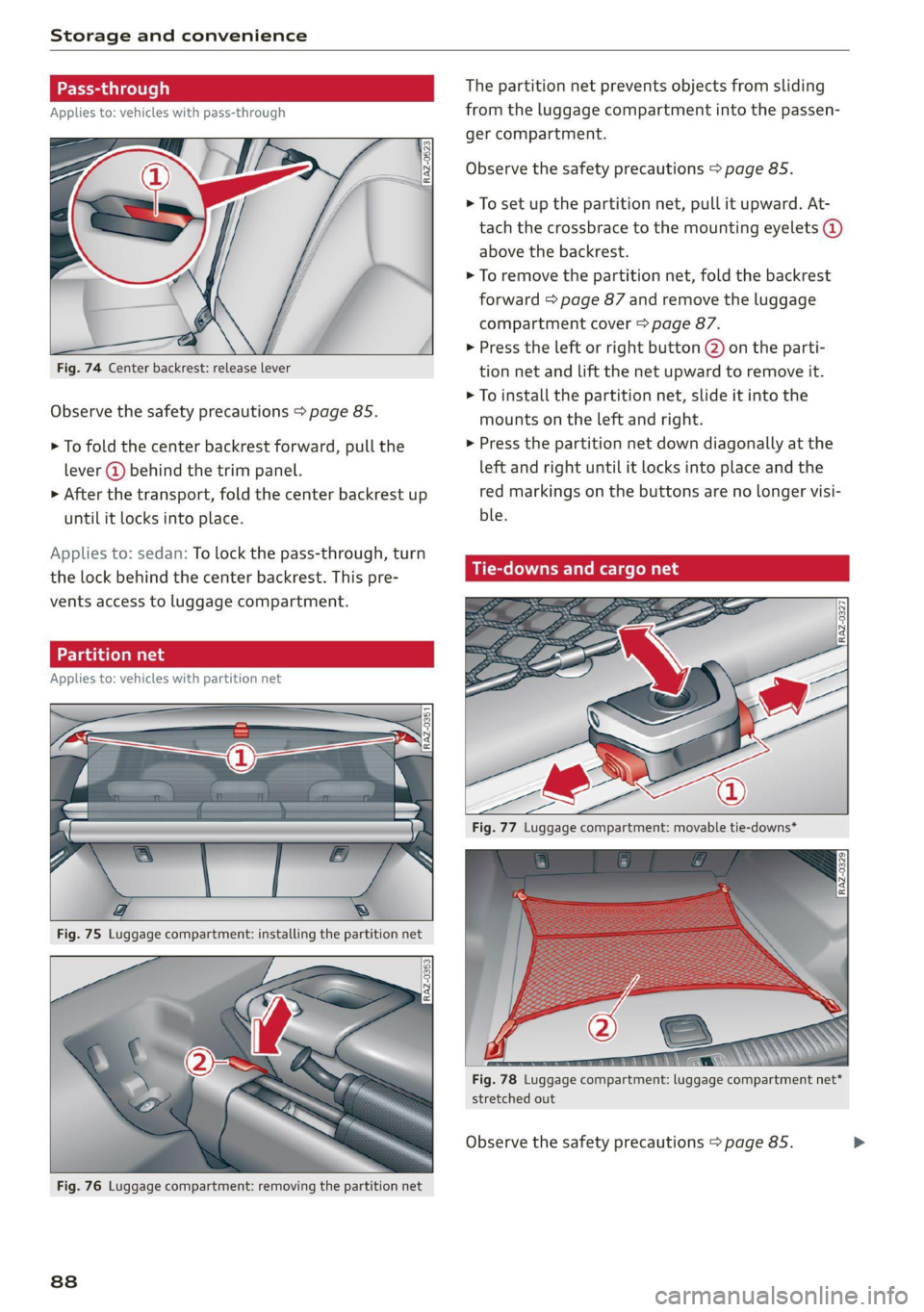
Fig. 74 Center backrest: release lever
Observe the safety precautions > page 85.
> To fold the center backrest forward, pull the
lever @ behind the trim panel.
> After the transport, fold the center backrest up
until
it locks into place.
Applies to: sedan: To lock the pass-through, turn
the lock behind the center backrest. This pre-
vents access to luggage compartment.
Applies to: vehicles with partition net
Fig. 76 Luggage compartment: removing the partition net
88
The partition net prevents objects from sliding
from the luggage compartment into the passen-
ger compartment.
Observe the safety precautions > page 85.
> To set up the partition net, pull it upward. At-
tach the crossbrace to the mounting eyelets @
above the backrest.
> To remove the partition net, fold the backrest
forward > page 87 and remove the luggage
compartment cover > page 87.
> Press the left or right button @) on the parti-
tion net and lift the net upward to remove it.
>
To install the partition net, slide it into the
mounts on the left and right.
> Press the partition net down diagonally at the
left and right until it locks into place and the
red markings on the buttons are no longer visi-
ble.
Tie-downs and cargo net
a
Fig. 77 Luggage compartment: movable tie-downs*
stretched out
Observe the safety precautions > page 85.
Page 91 of 332

4K0012721BE
Storage and convenience
Tie-downs
There are tie-downs in the luggage compartment
to secure pieces of luggage and objects.
> Use the tie-downs to secure the cargo.
Movable tie-downs
Applies to: vehicles with movable tie-downs
> To install the tie-down, press both buttons at
the sides @, insert the tie-down in the rail, and
lock it in place.
> To slide the tie-down, press both of the side
buttons @) and slide the tie-downs to the de-
sired position. The tie-downs must lock in
place.
> To remove the tie-down, press both buttons @)
at the sides and remove the tie-down from the
rail.
Cargo net
Applies to: vehicles with cargo net
Use the cargo net (2) to secure lighter objects in
the luggage compartment
> Fold the clip for the tie-downs upward.
> Attach the hooks for the cargo net to the tie-
downs.
Applies to: vehicles with a fixture set
Fig. 79 Luggage compartment: securing attachments
The telescoping rod @ and the securing strap 2)
help to prevent objects from sliding around in the
luggage compartment.
Observe the safety precautions > page 85.
The fixture set is located in the openings under
the cargo floor.
> Insert the movable tie-downs > page 89.
> Press the button @) on the retainers and place
them on the tie-downs. Make sure the brackets
are locked into place.
> Slide the tie-downs into the desired position.
> Press the button @) to tighten the securing
Store the movable tie-downs and the fixture
set in the openings under the cargo floor, if
necessary.
uble cargo floor
Applies to: vehicles with double cargo floor
Fig. 80 Luggage compartment: cargo floor set up
You can store dirty or wet objects under the cargo
floor on the middle floor panel.
Observe the safety precautions > page 85.
> To set up the cargo floor, lift it by the handle @
and insert the edge of the cargo floor into the
openings @).
> To remove the cargo floor, pull the entire cargo
floor out of the guides toward the rear of the
vehicle.
> To install the cargo floor, first insert it into the
guides and then slide it all the way in toward
the backrest.
ZX WARNING
Objects only up to a maximum of about 16.5
lbs (7.5 kg) may be transported on the middle
floor panel. The objects may only have a maxi-
mum height of 2/3 the height of the extend-
ed cargo floor. Objects must be secured ade-
quately.
89
Page 92 of 332
Storage and convenience
Roof rack
General information
Applies to: vehicles with roof rack mount
5
aI
a
=|
Applies to: sedan
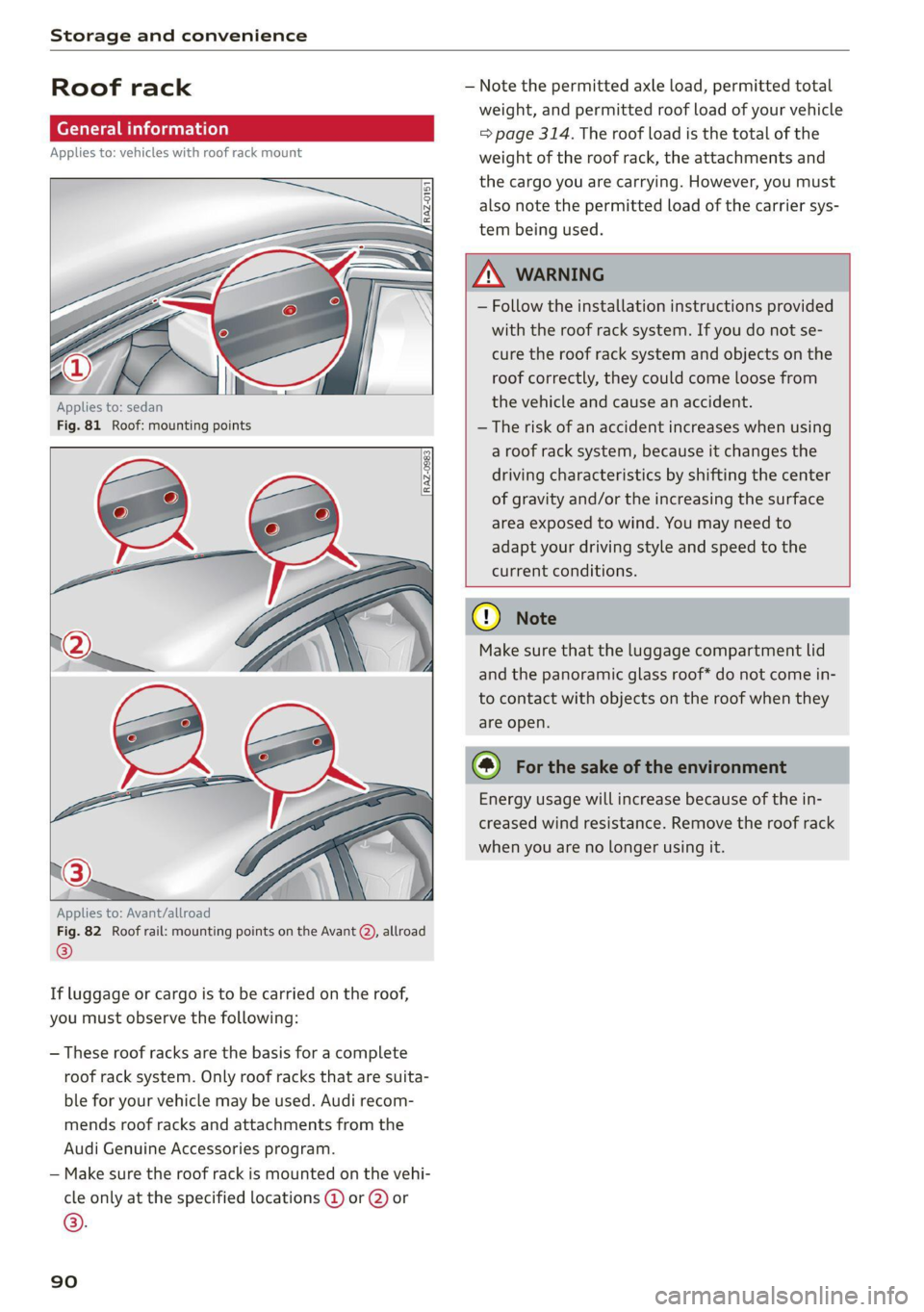
Fig. 81 Roof: mounting points
Applies to: Avant/allroad
Fig. 82 Roof rail: mounting points on the Avant Q), allroad
®
If luggage or cargo is to be carried on the roof,
you must observe the following:
— These roof racks are the basis for a complete
roof rack system. Only roof racks that are suita-
ble for your vehicle may be used. Audi recom-
mends roof racks and attachments from the
Audi Genuine Accessories program.
— Make sure the roof rack is mounted on the vehi-
cle only at the specified locations @ or @) or
©.
90
— Note the permitted axle load, permitted total
weight, and permitted roof load of your vehicle
= page 314. The roof load is the total of the
weight of the roof rack, the attachments and
the cargo you are carrying. However, you must
also note the permitted load of the carrier sys-
tem being used.
A\ WARNING
— Follow the installation instructions provided
with the roof rack system. If you do not se-
cure the roof rack system and objects on the
roof correctly, they could come loose from
the vehicle and cause an accident.
— The risk of an accident increases when using
a roof rack system, because it changes the
driving characteristics by shifting the center
of gravity and/or the increasing the surface
area exposed to wind. You may need to
adapt your driving style and speed to the
current conditions.
® Note
Make sure that the luggage compartment lid
and the panoramic glass roof* do not come in-
to contact with objects on the roof when they
are open.
@) For the sake of the environment
Energy usage will increase because of the in-
creased wind resistance. Remove the roof rack
when you are no longer using it.
Page 121 of 332

4K0012721BE
Trailer towing
Trailer towing
Driving with a trailer
eT e e eeu)
Your vehicle is primarily intended for transport-
ing people and luggage. However, if you drive
with a trailer, follow the technical requirements,
the operation and driving tips, and the legal reg-
ulations.
Driving with a trailer affects the vehicle's energy
usage, performance, and wear. It also requires
higher concentration from the driver.
Z\ WARNING
Do not transport any people in a trailer due to
the risk of fatal injury.
Technical requirements
Trailer hitch
Only use a trailer hitch with a removable ball
hitch mount and ball hitch. The trailer hitch must
be permitted for the vehicle, the trailer and the
permitted total weight of the trailer being
pulled. Above all, it must be securely and safely
attached to the vehicle trailer.
Never mount a trailer hitch on the bumper. The
trailer hitch must be mounted in a way that does
not impair the function of the bumper. Do not
make any changes to the exhaust system and the
brake system.
Check regularly if the trailer hitch is securely
mounted. Always follow the instructions given by
the trailer hitch manufacturer.
Trailer brakes
If the trailer has its own brake system, then fol-
low the manufacturer specifications. However,
the brake system on the trailer must never be
connected to the vehicle brake system.
Engine cooling system
Driving with a trailer means a higher load on the
engine and the cooling system. The cooling sys-
tem must be designed for additional load and
contain enough coolant > @®.
CG) Note
Longer inclines cannot be driven without a
suitable cooling system, especially if the out-
side temperatures are high. Otherwise, this
increases the risk of engine damage.
Operating instructions
Towing capacity
Your vehicle can only be operated with class 1 or
class 2 trailers.
Load distribution
Poor cargo load and distribution can negatively
impact vehicle handling. Load the trailer based
on the following criteria as much as possible:
— Store objects in the vehicle luggage compart-
ment, if possible. The vehicle should always
carry the heaviest possible load and the trailer
should have the lightest possible load.
— Distribute the load in the trailer so that the
heavy objects are as close to the axle as possi-
ble.
— Secure objects so that they do not slide.
— Utilize the maximum permitted tongue weight
if possible.
Tires
Set the tire pressure on your vehicle for a “full
load”; see the tire pressure sticker > page 266. If
necessary, also adjust the tire pressure on the
trailer according to the manufacturer's specifica-
tions.
The trailer and the vehicle should be equipped
with winter tires when driving in winter tempera-
tures.
Outside mirrors
If you cannot see the traffic behind the trailer
with the standard exterior mirrors, then you
must attach additional exterior mirrors. Adjust
them so you have a sufficient visibility behind
you.
Exterior lighting
Follow the legal regulations for lighting on your
trailer that are applicable in the country where
119
>
Page 127 of 332
4K0012721BE
Assist systems
Rear area
Depending on the vehicle equipment, the follow-
ing sensors and cameras may be installed:
— Rearview camera in the luggage compartment
lid
— Radar sensors at the rear corners of the vehicle
— Rear and side ultrasonic sensors
Switching the systems
on and off
ZA\ WARNING
Applies to: vehicles with laser scanner
— The surface of the laser scanner can become
hot during operation, which increases the
risk of burns.
— The laser scanner contains a class 1 laser in
accordance with IEC 60825-1:2014. When
used according to regulations, the laser is
not dangerous. Opening the laser module
and removing covers is not permitted. Doing
so could cause permanent injuries to the
eyes.
— Any repair work on the laser module must
be performed by an authorized Audi dealer
or authorized Audi Service Facility; other-
wise the vehicle's operating license may be
voided. Incorrect repairs may cause limited
functionality and eye damage.
@) Tips
Applies to: vehicles with laser scanner
— The possible emissions are below the
threshold for class 1 lasers.
— Complies with 21 CFR 1040.10 and
1040.11 except for deviations pursuant to
Laser Notice No. 50, dated June 24, 2007.
@ Tips
— The locations of the sensors may differ
slightly depending on vehicle equipment.
— Some sensors are installed under vehicle
components and cannot be seen from the
outside.
— The system complies with United States FCC
regulations and ISED regulations
=> page 311.
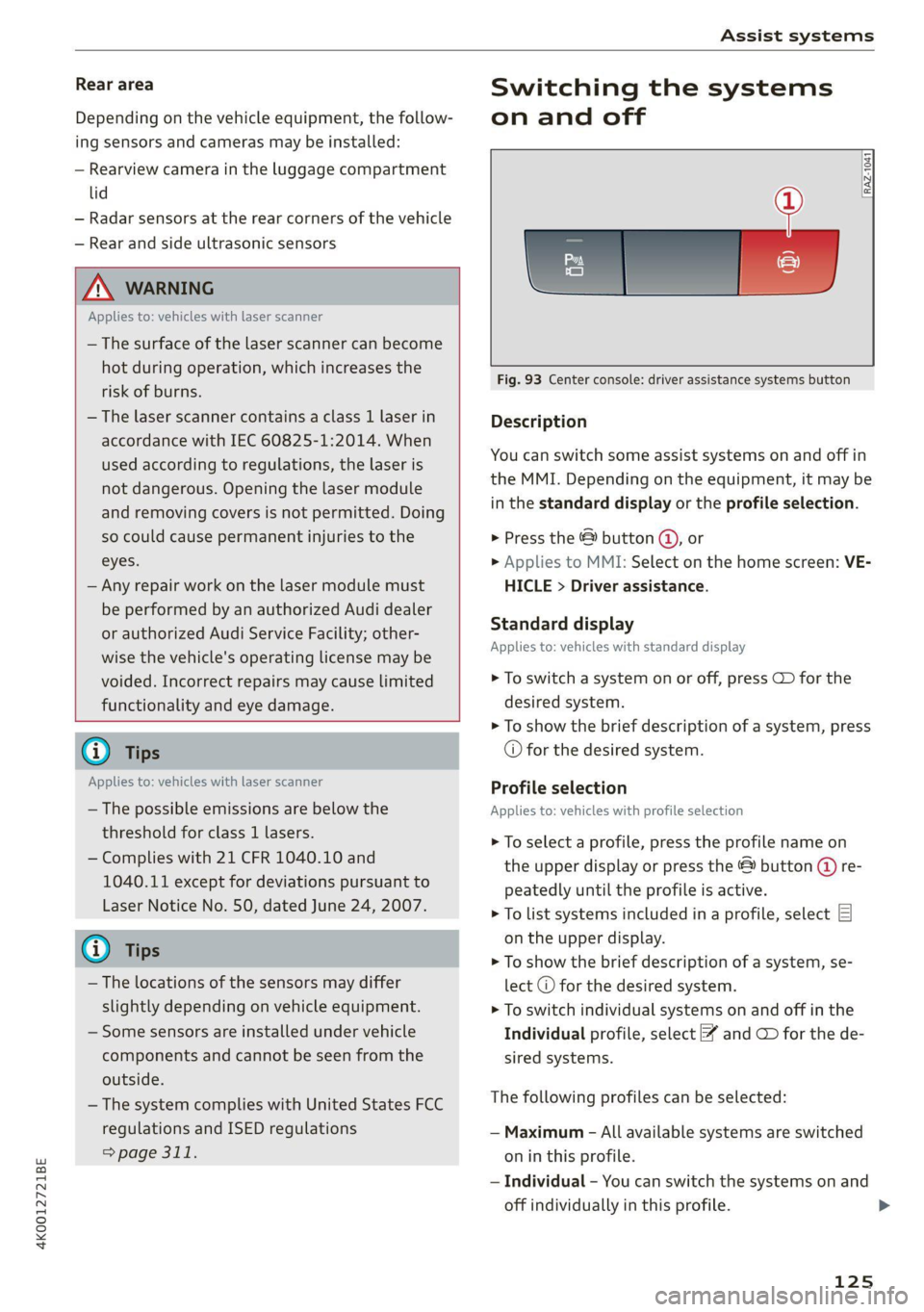
Fig. 93 Center console: driver assistance systems button
Description
You can switch some assist systems on and off in
the MMI. Depending on the equipment, it may be
in the standard display or the profile selection.
> Press the © button @, or
> Applies to MMI: Select on the home screen: VE-
HICLE > Driver assistance.
Standard display
Applies to: vehicles with standard display
> To switch a system on or off, press CD for the
desired system.
> To show the brief description of a system, press
© for the desired system.
Profile selection
Applies to: vehicles with profile selection
> To select a profile, press the profile name on
the upper display or press the & button (@ re-
peatedly until the profile is active.
> To list systems included in a profile, select E]
on the upper display.
> To show the brief description of a system, se-
lect @ for the desired system.
> To switch individual systems on and off in the
Individual profile, select ¥ and CD for the de-
sired systems.
The following profiles can be selected:
— Maximum - All available systems are switched
on in this profile.
— Individual - You can switch the systems on and
off individually in this profile.
125
Page 166 of 332

Parking and maneuvering
Applies to: vehicles with rearview camera/peripheral cameras
Fig. 122 Upper display: aiming at a parking space
When parking with the rearview camera or pe-
ripheral camera, the parking system plus audio
and visual warnings* will also assist you
=> page 161.
Visual orientation lines
@ The orange orientation lines show the vehi-
cle's direction of travel >@. Turn the steer-
ing wheel until the orange orientation lines
align with the parking space.
@) Use the blue markings to help you estimate
the distance to an obstacle. Each marking
represents approximately 3 feet (1 meter).
The blue area represents an extension of the
vehicle's outline by approximately 16 feet (5
meters) to the rear.
@® You can recognize the rear bumper in the
lower display.
@ You should stop driving in reverse when the
red orientation line touches the edge of an
object, at the latest.
Symbols
If 2/&9/< is displayed and the display area
represented by that symbol is not available, then
the camera on the that side is not available. The
power exterior mirrors may have been folded in
or a door or the luggage compartment lid may
have been opened.
If # is displayed, there is a system malfunction
and the display area represented by that symbol
is not available. The camera is not working in this
area.
164
If Avis displayed, the respective ultrasonic sensor
is icy or dirty. Clean the area in front of the sen-
sors > page 124.
If one of the symbols continues to be displayed,
drive immediately to an authorized Audi dealer or
authorized Audi Service Facility to have the mal-
function repaired.
ZA WARNING
— Observe the safety precautions and note the
limits of the assist systems, sensors, and
cameras > page 122.
— Sensors and cameras have spots in which
the surrounding area cannot be detected.
Objects, animals, and people may only be
detected with limitations may not be detect-
ed at all. Always monitor the traffic and the
vehicle's surroundings directly and do not
become distracted.
() Note
— The orange orientation lines @ show the di-
rection the rear of the vehicle will be travel-
ing, based on the steering wheel angle. The
front of the vehicle swings out more than
the rear of the vehicle. Maintain plenty of
distance so that an exterior mirror or a cor-
ner of the vehicle does not collide with any
obstacles.
— Keep enough distance from the curb to
avoid damage to the rims.
— Only use the images provided by the camera
on the rear of the vehicle when the luggage
compartment lid is completely closed. Make
sure any objects you may have mounted on
the luggage compartment lid do not block
the rearview camera.
G) Tips
Applies to vehicles with air suspension: The
accuracy of the orientation lines and blue sur-
faces on the camera display decreases when
the vehicle is raised or lowered with the air
suspension.
Page 168 of 332

Parking and maneuvering
Symbol/Descrip-
tion
Description
psp
Switch between 3D surroundings and Surroundings
Front corner
or Display selection
bar
This view makes it easier to drive out of tight parking spaces or areas and
intersections with poor visibility. It shows an almost 180° panorama view
in front of the vehicle.
Front
This view assists you in using the full area for maneuvering in front of the
vehicle.
Surroundings
This view helps you to maneuver and position the vehicle more precisely.
The area around the vehicle is shown using the camera images. The vehi-
cle image is shown by the system > A\.
Rear
This view assists you in using the full area for maneuvering behind the ve-
hicle. This is the rearview camera image.
Rear corner
This view can assist you when driving out of tight parking spaces or areas
with poor visibility. It shows an almost 180° panorama view behind the
vehicle.
Front tires
This view helps you to see the distance between the front tires and the
curb and the steering wheel angle when parking.
Rear tires
This view helps you to detect the distance between the rear wheels and
the curb when parking.
3D surroundings
In these views, you can see the areas surrounding the vehicle in 3D when
parking. The vehicle surrounding views are created from the camera im-
©f$;/@/e|
®
|o/e
|e]
e@
|e
ages and sensor data. The vehicle image is shown by the system > A\.
ZA\ WARNING
— Observe the safety precautions and note the
limits of the assist systems, sensors, and
cameras > page 122.
— The Surroundings and 3D surroundings are
created from the individual camera images.
The vehicle image is shown by the system.
Objects and obstacles above the camera are
not displayed.
@) Note
Only use the images provided by the camera
on the rear of the vehicle when the luggage
compartment lid is completely closed. Make
sure any objects you may have mounted on
the luggage compartment lid do not block the
rearview camera.
@) Tips
— Depending on the selected gear, it will auto-
matically switch between the Front and
166
Rear views. If you switch the view manually,
the automatic front/rear camera change will
be temporarily deactivated.
— When first activated while a forward gear is
engaged, the Front corner is displayed.
Page 179 of 332

4K0012721BE
Parking and maneuvering
Preparing the vehicle
> To enable the selected parking space (2) for re-
mote controlled parking, press E @ on the up-
per display.
> If you have already approached a parking space
in the vehicle, remote controlled parking can be
activated to continue with the rest of the park-
ing process. To enable remote controlled park-
ing, press [J in the upper display.
> Exit the vehicle while the engine is running and
take the vehicle key with you. Always keep both
the vehicle key and the mobile device with you
during the entire remote controlled parking
process.
> Make sure that all doors and the luggage com-
partment lid are closed.
Starting the parking process
> Start the myAudi app soon, or the function will
be canceled.
> Pay attention to the path of the vehicle. If the
traffic situation permits, park your vehicle in
the parking space using the mobile device
> JX. The vehicle key and the mobile device
cannot be more than approximately 20 feet
(6 m) away from the vehicle.
> Pay attention to the path of the vehicle. In un-
clear situations, pause the parking process us-
ing
the mobile device. For example, this may be
necessary if an obstacle appears or the vehicle
comes very close to an obstacle.
> To resume the parking process, start it again on
the mobile device. The rest of the parking proc-
ess will be recalculated based on the vehicle po-
sition.
End of the parking process
If an obstacle appears, stop the parking process
=> page 178.
The parking process will end automatically once
the vehicle has reached the end point in the park-
ing space. Once parking is successfully complet-
ed, the parking lock will be engaged, the parking
brake will be set, and the engine will switch off.
The vehicle will also be locked.
ZA WARNING
— Observe the safety precautions and note the
limits of the assist systems, sensors, and
cameras > page 122.
— Failing to pay careful attention to the vehi-
cle's surroundings increases the risk of an
accident. Park your vehicle with the mobile
device only if you are sure that no obstacle is
in the vehicle's path or under the vehicle,
and that no obstacles will move into the ve-
hicle's path.
@ Tips
— If the parking space is located in a garage, it
must be detected correctly by the vehicle.
When the parking space is detected com-
pletely, the edges of the space will be high-
lighted @).
— The parking process can only be started if
the vehicle key is located outside the vehicle
after the vehicle is prepared. Always keep
both the vehicle key and the mobile device
with you during the entire remote control-
led parking process.
— Remote controlled parking may be restrict-
ed or unavailable in situations such as the
following:
—If the ESC is restricted or switched off, or
if there is a malfunction.
—If there is another vehicle key inside the
vehicle or nearby.
— The system can incorrectly interpret parking
space barriers (such as parking curbs). Take
over the parking process = page 178 if the
vehicle is not completely inside the parking
space or if the vehicle tries to drive over the
parking space barrier.
177