instrument cluster AUDI A6 2021 Owner´s Manual
[x] Cancel search | Manufacturer: AUDI, Model Year: 2021, Model line: A6, Model: AUDI A6 2021Pages: 332, PDF Size: 119.45 MB
Page 255 of 332
4K0012721BE
Checking and Filling
battery. Only use the connections in the en-
gine compartment > page 254.
ZA WARNING
California Proposition 65 Warning:
— Battery posts, terminals and related acces-
sories contain lead and lead compounds,
chemicals known to the State of California
to cause cancer and reproductive harms.
Wash hands after handling.
@) Note
— If the vehicle will be parked for long periods
of time, protect the battery against the cold
so that it will not be destroyed by “freezing”
= page 254, Charging the 12 Volt vehicle
battery.
— There are electrical components under the
cargo floor behind a trim panel that warm
up during operation. To reduce the risk of
the components overheating, do not store
objects such as blankets under the cargo
floor. If the components overheat, they will
switch off temporarily. This will be indicated
by a message that will be displayed in the
instrument cluster until the temperature re-
turns to normal.
12 Volt vehicle battery
Explanation of warnings:
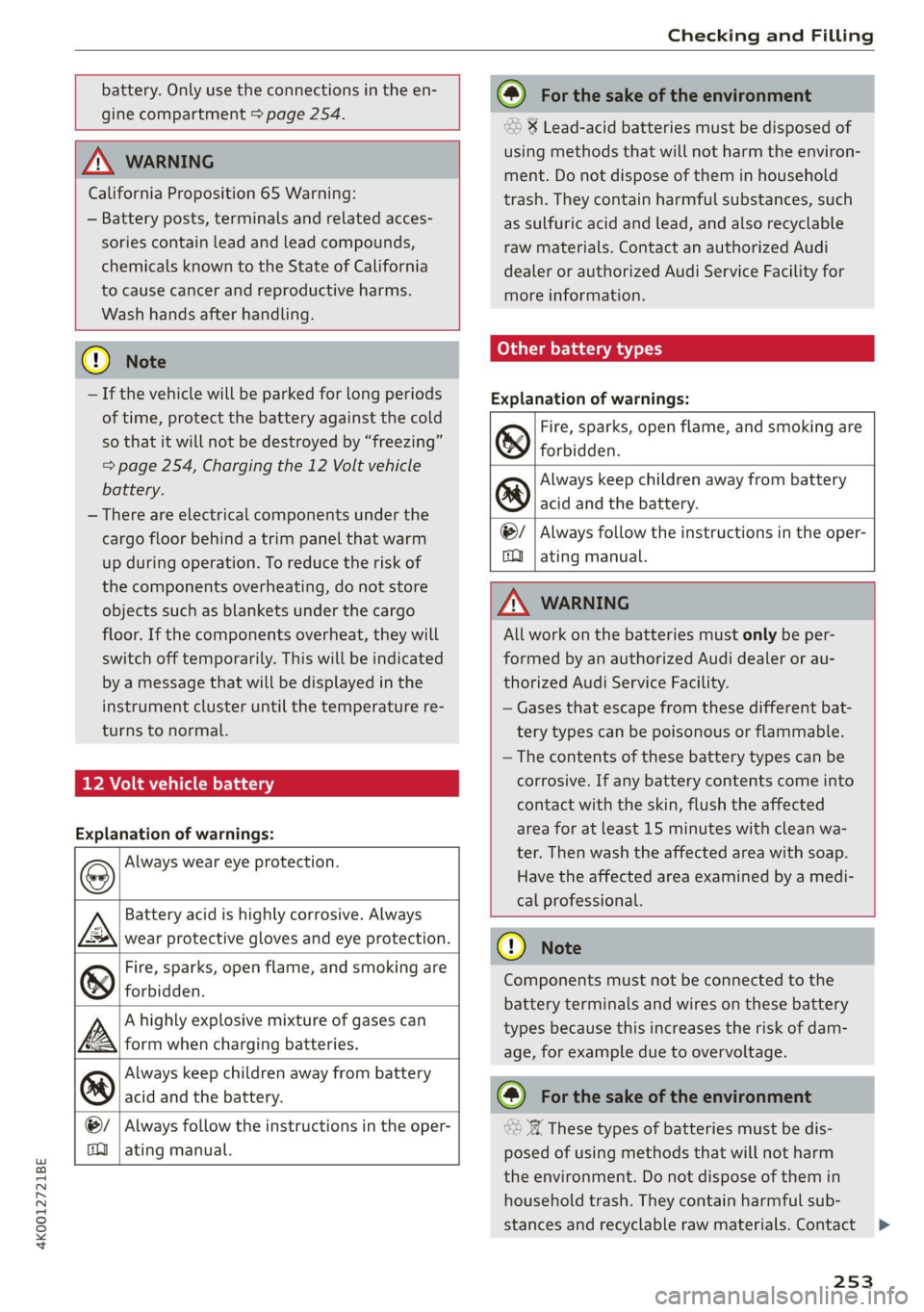
Always wear eye protection.
Battery acid is highly corrosive. Always
wear protective gloves and eye protection.
Fire, sparks, open flame, and smoking are
forbidden.
A highly explosive mixture of gases can
form when charging batteries.
Always keep children away from battery
acid and the battery.
Always follow the instructions in the oper-
2e@
PS
@L
O
ating manual.
(@) For the sake of the environment
* Lead-acid batteries must be disposed of
using methods that will not harm the environ-
ment. Do not dispose of them in household
trash. They contain harmful substances, such
as sulfuric acid and lead, and also recyclable
raw materials. Contact an authorized Audi
dealer or authorized Audi Service Facility for
more information.
Other battery types
Explanation of warnings:
Fire, sparks, open flame, and smoking are
& forbidden.
Always keep children away from battery
® acid and the battery.
@/ | Always follow the instructions in the oper-
QQ | ating manual.
ZA WARNING
All work on the batteries must only be per-
formed by an authorized Audi dealer or au-
thorized Audi Service Facility.
— Gases that escape from these different bat-
tery types can be poisonous or flammable.
— The contents of these battery types can be
corrosive. If any battery contents come into
contact with the skin, flush the affected
area for at least 15 minutes with clean wa-
ter. Then wash the affected area with soap.
Have the affected area examined by a medi-
cal professional.
CG) Note
Components must not be connected to the
battery terminals and wires on these battery
types because this increases the risk of dam-
age, for example due to overvoltage.
@) For the sake of the environment
©» 8 These types of batteries must be dis-
posed of using methods that will not harm
the environment. Do not dispose of them in
household trash. They contain harmful sub-
stances and recyclable raw materials. Contact
253
>
Page 257 of 332

4K0012721BE
Checking and Filling
anti-freezing agent should be added to the water
so that it does not freeze.
Messages
EE Please add washer fluid
Fill the washer fluid for the windshield washer
system and the headlight washer system* when
the ignition is switched off.
@) Note
— The concentration of anti-freezing agent
must be adjusted to the vehicle operating
conditions and the climate. A concentration
that is too high can lead to vehicle damage.
— Never add radiator anti-freeze or other addi-
tives to the washer fluid.
— Do not use a glass cleaner that contains
paint solvents, because this could damage
the paint.
Service interval display
The service interval display detects when your ve-
hicle is due for service.
The service interval display works in two stages:
— Inspection or oil change reminder: after driv-
ing a certain distance, a message appears in the
instrument cluster display each time the igni-
tion is switched on or off. The remaining dis-
tance or time is displayed briefly.
— Inspection or oil change due: if your vehicle
has reached an inspection or oil change interval
or both intervals at the same time, the mes-
sage Inspection due! or Oil change due! or Oil
change and inspection due! appears briefly af-
ter switching the ignition on or off.
Checking service intervals
You can check the remaining distance or time un-
til the next oil change or next inspection in the
Infotainment system.
Applies to MMI: Select on the home screen: VE-
HICLE > Settings & Service > Service intervals.
Resetting the indicator
An authorized Audi dealer or authorized Audi
Service Facility will reset the service interval dis-
play after performing service.
If you have changed the oil yourself, you must re-
set the oil change interval.
Applies to: MMI: To reset the display, select on
the home screen: VEHICLE > Settings & Service
> Service intervals.
@) Note
— Only reset the oil change indicator if the oil
was changed.
— Following the service intervals is critical to
maintaining the service life and value of
your vehicle, especially the engine. Even if
the mileage on the vehicle is low, do not ex-
ceed the time for the next service.
255
Page 274 of 332

Wheels
ZA\ WARNING
Wheel bolts that are tightened or repaired in-
correctly can become loose and result in loss
of vehicle control, which increases the risk of
an accident. For the correct tightening specifi-
cation, see > page 291, Finishing.
— Always keep the wheel bolts and the threads
in the wheel hub clean and free of grease.
— Only use wheel bolts that fit the rim.
— Always have damaged rims repaired by an
authorized Audi dealer or authorized Audi
Service Facility. Never repair or disassemble
rims yourself, because this increases the risk
of an accident.
Loose wheel warning
Applies to: vehicles with loose wheel warning
Within the limits of the system, the loose wheel
warning in the instrument cluster warns you if
one or more wheels are loose.
Using the ABS sensors, the loose wheel warning
system compares the vibration characteristics of
the individual tires. If one or more wheels are
loose, it will be indicated in the instrument clus-
ter display with the & indicator light and a mes-
sage. If only one wheel is affected, the location
of that wheel will be indicated.
Messages
fi Wheel bolts loose. Please safely stop the ve-
hicle and check all wheel bolts!
Loose wheel warning for at least one wheel > A\.
Check the wheel bolts on all wheels with the
wheel wrench (vehicle tool kit). Have the tighten-
ing specification checked as soon as possible with
a torque wrench. Drive carefully until then. For
the correct tightening specification, see
=> page 291, Finishing.
fl Wheel assessment active. Please continue
driving carefully
After this message appears and you have checked
the wheel bolts, the assessment phase begins
when the vehicle is in motion. This may take sev-
eral minutes.
272
fi Loose wheel warning: malfunction! See
owner's manual
There is a system malfunction. Drive immediately
to an authorized Audi dealer or authorized Audi
Service Facility to have the malfunction repaired.
Z\ WARNING
Wheel bolts that are tightened incorrectly can
become loose and result in loss of vehicle con-
trol, which increases the risk of an accident.
— If a message appears, reduce your speed im-
mediately and avoid any hard steering or
braking maneuvers. Stop as soon as possible
and check the wheel bolts.
— Check your wheels for damage. Have the
damaged wheels checked and/or replaced
immediately by an authorized Audi dealer or
authorized Audi Service Facility.
— Under certain conditions (such as a sporty
driving style, winter conditions, or unpaved
roads), the message may be delayed.
— The driver is responsible for ensuring that
the wheels are attached correctly.
(i) Tips
— The loose wheel warning system can also
stop working when there is an ESC malfunc-
tion.
— Using snow chains may result in a system
malfunction.
Winter tires significantly improve the vehicle's
handling when driving in winter conditions. Be-
cause of their construction (width, compound,
tread pattern), summer tires provide less traction
on ice and snow.
> Use winter tires on all four wheels.
> Only use winter tires that are approved for your
vehicle.
> Please note that the maximum permitted
speed may be lower with winter tires > A\ in
General information on page 256. An author-
ized Audi dealer or authorized Audi Service Fa-
cility can inform you about the maximum per-
mitted speed for your tires.
Page 277 of 332
4K0012721BE
Wheels
As an added safety feature, your vehicle has been
equipped with a tire pressure monitoring system
(TPMS) that illuminates a low tire pressure tell-
tale when one or more of your tires is significant-
ly under-inflated. Accordingly, when the low tire
pressure telltale illuminates, you should stop and
check your tires as soon as possible, and inflate
them to the proper pressure. Driving ona signifi-
cantly under-inflated tire causes the tire to over-
heat and can lead to tire failure. Under-inflation
also reduces fuel efficiency and tire tread life,
and may affect the vehicle's handling and stop-
ping ability.
Please note that the TPMS is not a substitute for
proper tire maintenance, and it is the driver's re-
sponsibility to maintain correct tire pressure,
even if under-inflation has not reached the level
to trigger illumination of the TPMS low tire pres-
sure telltale.
Your vehicle has also been equipped with a TPMS
malfunction indicator to indicate when the sys-
tem is not operating properly. The TPMS mal-
function indicator is combined with the low tire
pressure telltale. When the system detects a
malfunction, the telltale will flash for approxi-
mately one minute and then remain continuously
illuminated. This sequence will continue upon
subsequent vehicle start-ups as long as the mal-
function exists.
When the malfunction indicator is illuminated,
the system may not be able to detect or signal
low tire pressure as intended. TPMS malfunctions
may occur for a variety of reasons, including the
installation of replacement or alternate tires or
wheels on the vehicle that prevent the TPMS
from functioning properly. Always check the
TPMS malfunction telltale after replacing one or
more tires or wheels on your vehicle to ensure
that the replacement or alternate tires and
wheels allow the TPMS to continue to function
properly.
If the tire pressure monitoring indicator
appears
Applies to: vehicles with Tire Pressure Monitoring System in-
dicator
The tire pressure indicator in the instrument
cluster informs you if the tire pressure is too low
or if there is a system malfunction.
Using the ABS sensors, the tire pressure monitor-
ing system compares the tire tread circumference
and vibration characteristics of the individual
tires. If the pressure changes in one or more
tires, this is indicated in the instrument cluster
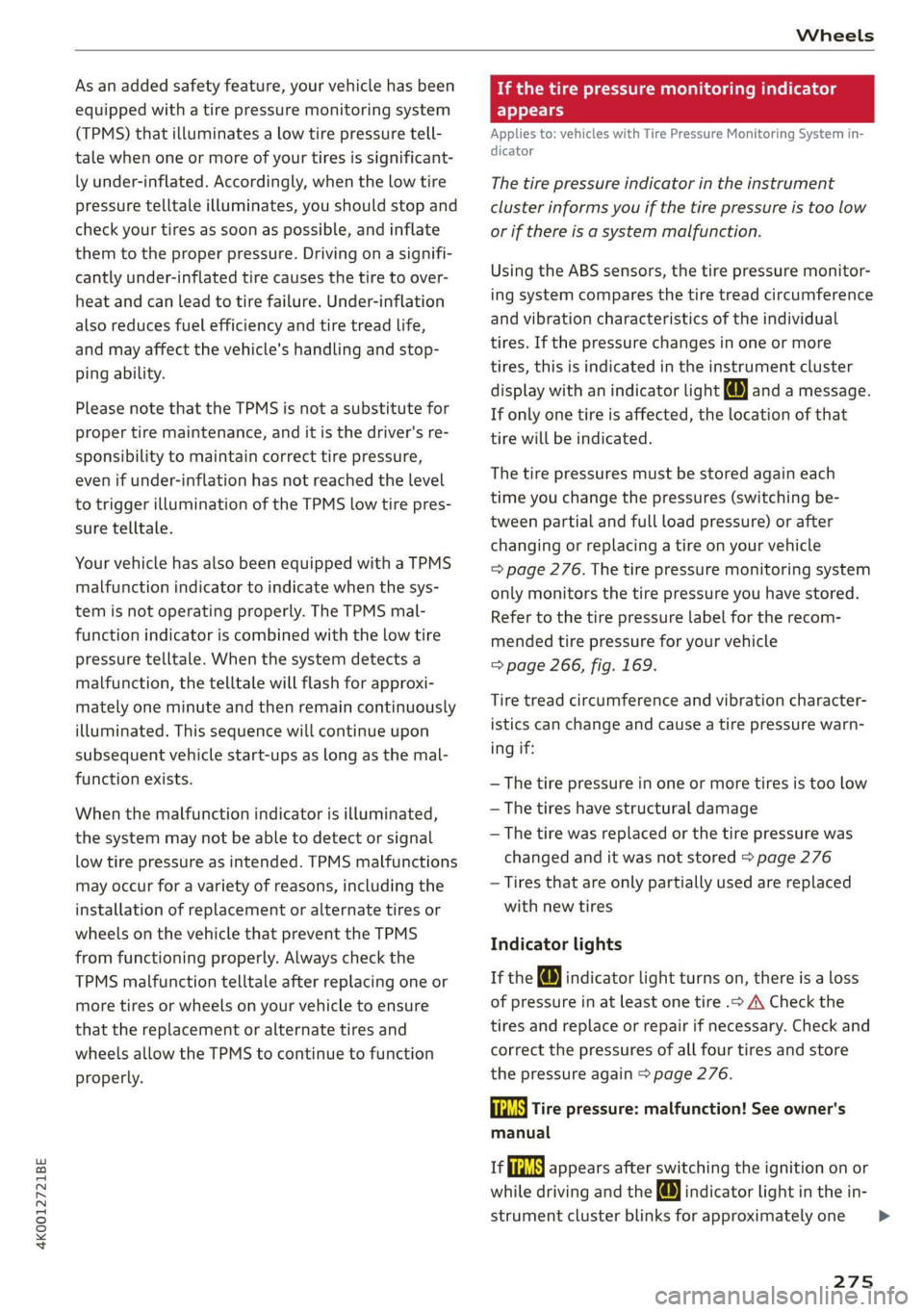
display with an indicator light @ and a message.
If only one tire is affected, the location of that
tire will be indicated.
The tire pressures must be stored again each
time you change the pressures (switching be-
tween partial and full load pressure) or after
changing or replacing a tire on your vehicle
= page 276. The tire pressure monitoring system
only monitors the tire pressure you have stored.
Refer to the tire pressure label for the recom-
mended tire pressure for your vehicle
=> page 266, fig. 169.
Tire tread circumference and vibration character-
istics can change and cause a tire pressure warn-
ing if:
— The tire pressure in one or more tires is too low
— The tires have structural damage
— The tire was replaced or the tire pressure was
changed and it was not stored > page 276
— Tires that are only partially used are replaced
with new tires
Indicator lights
If the @ indicator light turns on, there is a loss
of pressure in at least one tire .> A\ Check the
tires and replace or repair if necessary. Check and
correct the pressures of all four tires and store
the pressure again > page 276.
ia Tire pressure: malfunction! See owner's
manual
fe appears after switching the ignition on or
while driving and the @ indicator light in the in-
strument cluster blinks for approximately one
275
>
Page 285 of 332
4K0012721BE
Care and cleaning
Water-based deposits
such as coffee, tea,
blood, etc.
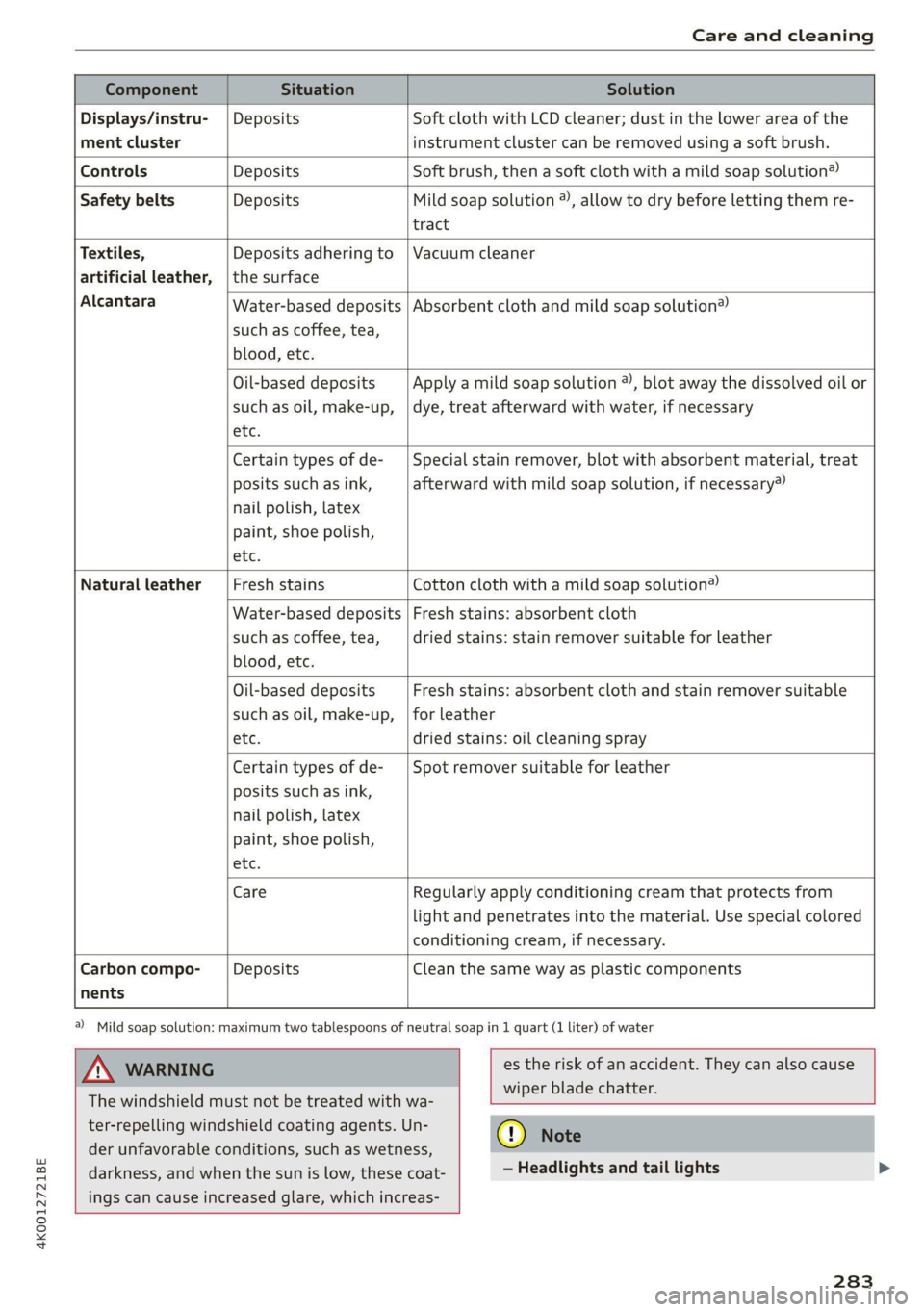
Component Situation Solution
Displays/instru- | Deposits Soft cloth with LCD cleaner; dust in the lower area of the
ment cluster instrument cluster can be removed using a soft brush.
Controls Deposits Soft brush, then a soft cloth with a mild soap solution®
Safety belts Deposits Mild soap solution ®), allow to dry before letting them re-
tract
Textiles, Deposits adhering to | Vacuum cleaner
artificial leather, |the surface
Alcantara Absorbent cloth and mild soap solution®
Oil-based deposits
such as oil, make-up,
etc.
Apply a mild soap solution ®), blot away the dissolved oil or
dye, treat afterward with water, if necessary
Certain types of de-
posits such as ink,
nail polish, latex
paint, shoe polish,
etc.
Special stain remover, blot with absorbent material, treat
afterward with mild soap solution, if necessary)
Natural leather Fresh stains Cotton cloth with a mild soap solution®
Water-based deposits
such as coffee, tea,
blood, etc.
Fresh stains: absorbent cloth
dried stains: stain remover suitable for leather
Oil-based deposits
such as oil, make-up,
etc.
Fresh stains: absorbent cloth and stain remover suitable
for leather
dried stains: oil cleaning spray
Certain types of de-
posits such as ink,
nail polish, latex
paint, shoe polish,
etc.
Spot remover suitable for leather
nents
Care Regularly apply conditioning cream that protects from
light and penetrates into the material. Use special colored
conditioning cream, if necessary.
Carbon compo- Deposits Clean the same way as plastic components
@) Mild soap solution: maximum two tablespoons of neutral soap in 1 quart (1 liter) of water
Z\ WARNING
The windshield must not be treated with wa-
ter-repelling windshield coating agents. Un-
der
unfavorable conditions, such as wetness,
darkness, and when the sun is low, these coat-
ings can cause increased glare, which increas-
es the risk of an accident. They can also cause
wiper blade chatter.
() Note
— Headlights and tail lights
283
Page 286 of 332

Care and cleaning
— Never clean the headlights or tail lights
with a dry cloth or sponge because the
lights could be damaged.
— Do not use any cleaning products that con-
tain alcohol, because they could cause
cracks to form.
— Wheels
— Never use any paint polish or other abra-
sive materials.
— Damage to the protective layer on the
rims, such as stone chips or scratches,
must be repaired immediately.
— Camera lenses
— Never use warm or hot water to remove
snow or ice from the camera lens. This
could cause the lens to crack.
— Never use abrasive cleaning materials or
alcohol to clean the camera lens. This
could cause scratches and cracks.
— Laser scanner
— Never use abrasive cleaning materials to
clean the laser scanner. This could cause
scratches and cracks.
— Door windows
— Remove snow and ice on windows and ex-
terior mirrors with a plastic scraper. To re-
duce the risk of scratches, move the scra-
per only in one direction and not back and
forth.
— Never remove snow or ice from door win-
dows and mirrors using warm or hot water
because this could cause cracks to form.
—To reduce the risk of damage to the rear
window defogger, do not apply any stick-
ers on the heating wires on the inside of
the window.
— Decorative parts and trim
— Never use chrome care or cleaning prod-
ucts.
— Paint
— To reduce the risk of scratches, the vehicle
must be free of dirt and dust before pol-
ishing or waxing.
—To prevent paint damage, do not polish or
wax the vehicle in direct sunlight.
—To reduce the risk of paint damage, do not
polish away rust spots.
284
— Remove cosmetics and sunscreen immedi-
ately because they could damage the
paint.
— Decorative decals
—To reduce the risk of damage, do not use
any rough powder or abrasive cleaning
products.
— To reduce the risk of damage, do not pol-
ish decorative decals that have a matte or
printed finish.
— Due to the risk of damage, do not use an
ice scraper to remove snow and ice on win-
dows with decorative decals on them.
— Displays and instrument cluster
— Make sure that the display and instrument
cluster are switched off and have cooled
down before cleaning. To switch off the
upper and lower display, select on the
MMI home screen: SETTINGS > Display &
brightness > MMI > Screen cleaning.
— Displays, the instrument cluster, and the
trim surrounding it must not be cleaned
with dry cleaning methods because they
could become scratched.
— Make sure no fluids enter the spaces be-
tween the instrument cluster and the
trim, because that could cause damage.
— Controls
— Make sure that no fluids enter the con-
trols, because this could cause damage.
— Safety belts
— Do not remove the safety belts to clean
them.
— Never clean safety belts or their compo-
nents with chemicals or with corrosive flu-
ids or solvents and never allow sharp ob-
jects to come into contact with the safety
belts. This could cause damage to the belt
webbing.
—If there is damage to the webbing, the
connections, the retractors, or the buck-
les, have them replaced by an authorized
Audi dealer or authorized Audi Service Fa-
cility.
— Textiles, artificial leather, and Alcantara
— Never treat artificial leather or Alcantara
with leather care products, solvents, floor >
Page 302 of 332

Fuses and bulbs
Fuse panel @) (red) (
No. | Equipment 9 |Adaptive cruise assist, front wheel sensors
1 | Engine ignition coils 11 Intersection assistant, driver assist sys-
3 |High-voltage heating, compressor tems
5 |Engine mount 12
| Exterior sound generator
6 |Automatic transmission 15 [USB input
7 |Instrument panel
8 |Climate control system blower Fuse assignment - left side of cockpit
9 |Windshield wiper control module
10 | Dynamic steering
11 | Engine start
12 | Electric oil pump
Fuse panel @) (black)
No. | Equipment
1 |Front seat heating
2 |Windshield wipers
3 | Left headlight electronics
4 | Panoramic glass roof
5 | Left front door control module
6 | Sockets
7 |Right rear door control module
8 |All wheel drive control module
9 | Right headlight electronics
Windshield washer system/headlight
10 Fig. 189 Left side of th kpit: f L with plasti
washer system control module fin Oe a
11 | Left rear door control module
12 | Parking heater Fuse panel (d) (black)
: No. | Equipment
Fuse panel (5) (brown) a P -
= 2 |Steering column adjustment
No. | Equipment
— - > 3 |DVD drive
Seat ventilation, seat electronics, rearview -
-
1 mirror, rear climate control system control 4 | Steering column electronics
panel, diagnostic connection, traffic infor- 5 |Light switch, switch panels
mation antenna (TMC) 6 |Volume control
2 Vehicle electrical system control module, 7 |Instrument cluster
diagnostic interface 8 |Upper/lower display
3_| Sound generator 9 | Steering wheel heating
4 |Transmission heating valve —
5 [engine start Fuse panel) (Gravn)
7 |Active accelerator pedal No. equipment
8 | Night vision assist 2 |Infotainment system
3 | Audi music interface
300
Page 317 of 332

4K0012721BE
Index
A
A/C cooling mode..........-. eee eee eee ee
A/C system refrigerant oil...............
Acceleration measurement..............
Accelerator pedal...............-00000-
also refer to Accelerator pedal..........
AccessorieS.... 0... 0.00. eee eee
Active lane assist
refer to Lane departure warning.........
refer to Lane guidance................
Adaptive cruise assist................04.
Cleaning the sensors......... 0.0.0.0 005
Adaptive cruise control
Predictive control..............000005
Adaptive dampers « sve « « savece ae scare 6 0 oe
Adaptive speed assist
refer to Adaptive cruise assist..........
Adjusting the air distribution.............
Adjusting the brightness.................
Adjusting the sound................0005
Adjusting the temperature...............
Adjusting the vents ccs <= csws + © sews +o oer
Adjusting the volume............. eee eee
Adjusting the volume (announcements) ... .
Adjusting the welcome sound............
Airbag system... 2.2... eee eee
AIPSUSPONSION ix o © aowees « 2 mines + omnes 5, v0
Alarm system
refer to Anti-theft alarm system..........
Alignment pin (changing the wheel).......
All-weather lights...............-..00005
Allseason tires’... cscu ve ones ee eee ee oe
All wheel drive
refer to quattro.............. 0...
Amazon Alexa integration
Media playback........... 00 cee e eee
QOPOratitig = = sews = « eee 5 4 wees s Ree se BES
AMI
refer to Audi music interface...........
Android Auto
refer to Audi smartphone interface......
Anti-lock braking system............000.
Anti-Slip Regulation.................05.
Anti-theft alarm system ...........-.00005
Anti-theft wheel bolts...............00.
Apple CarPlay
refer to Audi smartphone interface...... 231
Aspect ratio
NidGO verse < ¢ seven & 5 seaRE ze SeHER Fo Bee 225, 227
ASR
refer to Anti-Slip Regulation............ 117
Audi adaptive light...............-..000- 53
Audi connect
MEFEPTONCONNECE: « «esses oo wesc ow xem ¥ v0 192
AUGIGriVe’SelECt ios: « « suas > gemy 2 x seme gee 112
Audi music interface. .............0.00048 222
Audio files................-...000000 0s 223
Audi phone box....... 2... eee eee eee 183
Audi presense....... 2... 0c eee eee 150
M@SSAGES same x < eee 5 2 euS 5 2 eee Fo 154
Audi pre sense front.............-..00-- 151
Audi side assist
refer to Side assist.............00 eee ee 154
Audi smartphone interface.............. 231
Legalinformation..........0..ceeeeee 236
Audi virtual cockpit
refer to Instrument cluster.............. 12
AUTO
Automatic headlights .................. 53
Climate control system..............0-. 92
Auto Lock (central locking) ............... 35
Automatic climate control system
refer to Climate control system.......... 91.
Automatic luggage compartment lid.... 43,44
Automatic transmission............-...5- 98
Parking lock emergency release......... 101
Automatic wipe/wash system............. 60
Average consumption................... 17
Average speed... 0... . eee eee eee 17
B
Bag hooks ......... 00 eee eee eee eee 85
Band
refer to Frequency band............... 212
Battery
Charging (12 Volt vehicle battery)....... 254
Vehicle battery (12 Volt)............0.-. 252
Winter operation (12 Volt vehicle battery) . 252
Blinds
refer to Panoramic glass roof............ 48
BIGCK
OUE saws = x aeeon #2 seme x 8 eR ¢ 2 wee
Page 319 of 332

4K0012721BE
Luggage compartment lid with foot motion . 44
Panoramic glass roof............00 ee eee 48
SUTSHadE (FOOT): + wars a 2 womm a 2 cows © a rey 48
WWINOWS « wscsese 2 x aessee ov areene oo come mt oon 47
Closing aid (power closing doors).......... 35
Cockpit diMMiNg : « sea « = mews se pews se ey 58
Cockpit (OVErVieW) « » uss x vmx = vem e + sex 6
Collapsible spare tire................0.. 292
Collapsible tire
refer to Collapsible spare tire........... 292
GoloreGdebn: « » swe yz ame + sem oy neve ee 313
Combustion engine................---. 103
Coming home/Leaving home
refer to Entry/exit lighting.............. 56
Gommpact Spare tire = xcus: s x wens sy gems sx ae 292
Compartments.................0 2000005 85
Compass inthe mirror............-...0-- 63
Compliance ........ 0... ce eee ee eee 311
Confernencescallicser. « o ecszace sa soeseu 0 a memos «0 187
Configuration wizard...............-.00 20
COMMO CB ais 5 x susias ww amine a 8 wend & 8 inesains «wa 192
Data plans....... 0... ee eee eee ee 196
Datta Privacy'es ss sees se eeeis s beens spews 306
Emergency Call ssvises 2 3 woe se wee s voor 197
Infotainment
Infotainment services..............005 193
Online roadside assistance............. 198
Vehicle control services... uc... eee ee 194
Connected devices
Device overvieW........-... 00 e ee eee 235
Connections
Heer tO Medias < = ssc ss eae se eae 2204223
Consumer information............-.000+ 308
Consumption
ROGUGING « esay « x eee « u oes e aeee oe eR 103
Consumption (fuel) .......... 0.00 eee eee 17
Contacts
IMPOrtingcs « «cece ss ewes sees bee 189
Updating inthe MMI...............085 189
also refer to Directory................. 186
Convenience key......... 0.00 e eee eee eee 35
Convenience closing..............-+05. 48
also refer to Vehicle key.............0.. 39
Convenience opening and closing
Windows or panoramic glass roof........ 48
Coolant temperature display.............. 14
Cooling MOd etic. i = scciin ee ecenere ee serene wv omen 92
Cooling system
Adding
coolant................-000 ee 250
Checking the coolant level............. 250
GOOlANE svc 2 x oes ov ewe eo a 2 o oe 249
Cornering lighti:. » 2 ces: = ews: o ees ee eee 53
Cross traffic assist (intersection assistant) .. 157
Cruise control system............000005 135
Cup holders. ....... 0 cece eee eee eee 84
Current consumption.............-0 eens 17
D
Data module
Serial:number (IMED) ¢ esses ss saan ss cause 189
Data plans... .... eee eee eee 196
Data Privacy...... 0... s cee cece eee 306
Date... eee eee 17
SGttiliG's s savau 3 ¥ RAH s 4 BeueS 4 E RaER ¢ Esa 2:33:
Daytime running lights................-. 53
Declaration of compliance...........0005 311
DEF (instrument cluster)...............4- 12
Demo mode
refer to Presentation mode............. 210
Destination onthe map...............4. 203
Details, . a resco « sxanene os stineoue i 6 omens mo auncems 203
Determining correct load limit........... 271,
Digital:compass sass «seas oo save oo sare 2 63
DIM@NSIONS. « s ween « seems oy noes 6 2 ew & e 3:13
Dimming the exterior mirrors............. 59
Dimming the rearview mirror............. 59
Directory........ 0.0.02... cece eee eee ee 186
BUSINESS Cat dsiies + » news oe wows ¢ pawe ws BE 187
SOEGINGS
cscs « 2 mazes & nenseee « scene © © amt « 189
Display
Cleaning...........0 0. 283
Disposal..... 0.02... ce eee eee eee eee ee 308
DistamG@ sericea & ssseie ss owes so covnine oo creme @ os 17
Distance: warning csvevs © « sce vs sseoee wo senses 148
Doors
Child safety lock...................000. 46
DOOrCONntactSWitch » + ceau sv sees gc aeam a: 57
Mechanically unlocking and locking....... 38
Power closing/closing aid............... 35
Driver information system.............--. 13
317
Page 322 of 332

Index
Head restraints
Adjusting ...... 0... 69
Removing and installing................ 69
Heated rear window.............02.000 ee 93
Heated steering wheel...........-.000 eee 94
Heating .... 2.0... 66. cece cece eee ee eee 91
HFP
refer to Hands Free Profile............. 181
High beams
High beam assistant................... 54
Highway lights; «s+ secs 2+ seeues verses 53
Hill descent assist..................00. 110
Hill descent control.............0000 00 109
Hill hold assist... 02... ee eee eee eee 98
Home
refer to Home address................ 206
Home address............- 00 eee eee ee 206
HomeLink
refer to Garage door opener............. 50
Home screen......... 000.0000 cee eee eee 19
HOM... ee eee 6
Hotspot
FEPEPEO WI-ELs s x wave & 2 gees s i oeles & 2 ee 195
I
Ignition
Switching onvand Off’: «sass a & wows so warns 4 96
Imbalance (wheels). = 5 seas ss peas ss sees s 265
Immobilizer
refer to Electronic immobilizer........... 39
Inclinometer:s « « s<0s s ¢ exes ss mews ov eee 109
Indicator lights = saws ss wees = x wees ee wees eee 7
IASPeCtion interval ss cece « x wows sy Des Ze 255
Instrument cluster...............00000 ee 12
Adjusting the layout.................0. 14
CLEAN’. 5s sexes ao ornare os ummens © a enon ee 283
Engine code.......... eee eee eee eee 236
Failut@ws : sees s pee & s quem & ¥ HORE EERE 12
On=board: compute siicss se sees sv cress oo vw 17
Operating............... 0.00.00. e eee 13
Service interval display................ 255
Software information................. 236
Switching tabs............... 20.0. 0005 13
Switching the view...............-000 05 14
Vehicle Functions « sss + exes oe omens ee oer 16
Version information..............0005 236
320
Instrument illumination................. 58
Integrated assistance. ..............000. 20
Integrated Toll Module................. 133
Intelligent search
Navigation cis « cesses x ruses wo cause ao amuse 201
Interior lighting..................00- 57,58
Interior MONItoring:. « s geass ¢ cows oe cows oe 38
Intermittent mode (windshield wipers) ..... 60
International travel sc i. ssas ss eeas teens 196
Internet
refer to‘cOnnect, « : sevus s een sy ees ees 192
Internet radio
refer to Online radio.............. 216, 217
Intersection assistant.................. 157
TOMIZEP ie: ¢ 3 sees 2 ees ¢ ¢ eee § 2 ee ce ees 93
iPhone
refer to Audi music interface........... 222
J
JUMPIStArtING ccsssne 5 was es wees eo wou 6 3 oe 293
K
Key's « cows = v gees oy cas = Corea gz ne a 35,39
Convenience opening and closing......... 48
Key replacement......... 0c eee eee eee 39
Mechanical key.............--0-e eee eee 39
NOt reeogmized «i sess + o suinaus a o manasa 6 oneumis 97
PANIC button.............-.....000000 39
Replacing the battery.................. 4l
Unlocking and locking...............005 40
Vehicle code... . 0.2... eee eee eee 39
Key user... 2... eee eee eee 33
RiGKSGOWIE « o sss « cases 6 o caeenie w & etomege wo 0 4 100
L
Lane assist
refer to Lane departure warning......... 149
refer to Lane guidance................ 149
Lane departure warning................. 149
Cleaning the camera area.............. 281
Lane guidance............ eee eee eee eee 141
Lap EIMers « = seas = 2 aes 7 e mee ce eee ta: 130
LASEF LIQHtiNG css asc ¢ ¥ aces ¢ o Ges > F Oe 55
Laser scanner........ 20.00 eee eee eee 123
Gl@aning