ignition AUDI A7 2012 User Guide
[x] Cancel search | Manufacturer: AUDI, Model Year: 2012, Model line: A7, Model: AUDI A7 2012Pages: 294, PDF Size: 73.33 MB
Page 34 of 294
32 Openin g and clo sing
- When you leave the vehicle, always take
the ignition key with you. This will pre
vent passengers (children, for example)
from accidentally being locked in the ve
hicle should they accidentally press the
power locking switch in the doors.
- Do not leave children ins ide the veh icle
unsupervised. In an emergency it would
be impossible to open the doors from
the outside without the key.
- Applies to vehicles with power side door
closer*:
- When closing a door, make sure noth
ing can inter fere with the door. This
could cause ser ious persona l injury.
- You can stop the door from closing at
any time by pulling on the inside or
outside door handle.
- In the event of a c rash with airbag de
ployment a ll locked doors will be auto
matically unlocked to g ive access to the
vehicle occupants from the outside.
- If the power lock ing system should ma l
funct ion, you can lock the dr iver's door
using the mechanical key¢
page 35.
- If the power lock ing system should fail,
you can sti ll open the fue l tank flap in an
emergency ¢
page 214.
- You are we ll advised not to keep valua
bles inside an unattended vehicle, visib le
or not . Even a properly locked vehicle
cannot provide the sec urity of a safe.
- If the LED in the upper edge of the driv
er's door panel comes on fo r abo ut 30
seconds afte r the vehicle is locked, the re
i s a ma lfunction in the power loc king or
the anti- theft warn ing system. Have the
malfunction corre cte d by an author ized
A udi dealersh ip or qua lified repai r fac ili
ty .
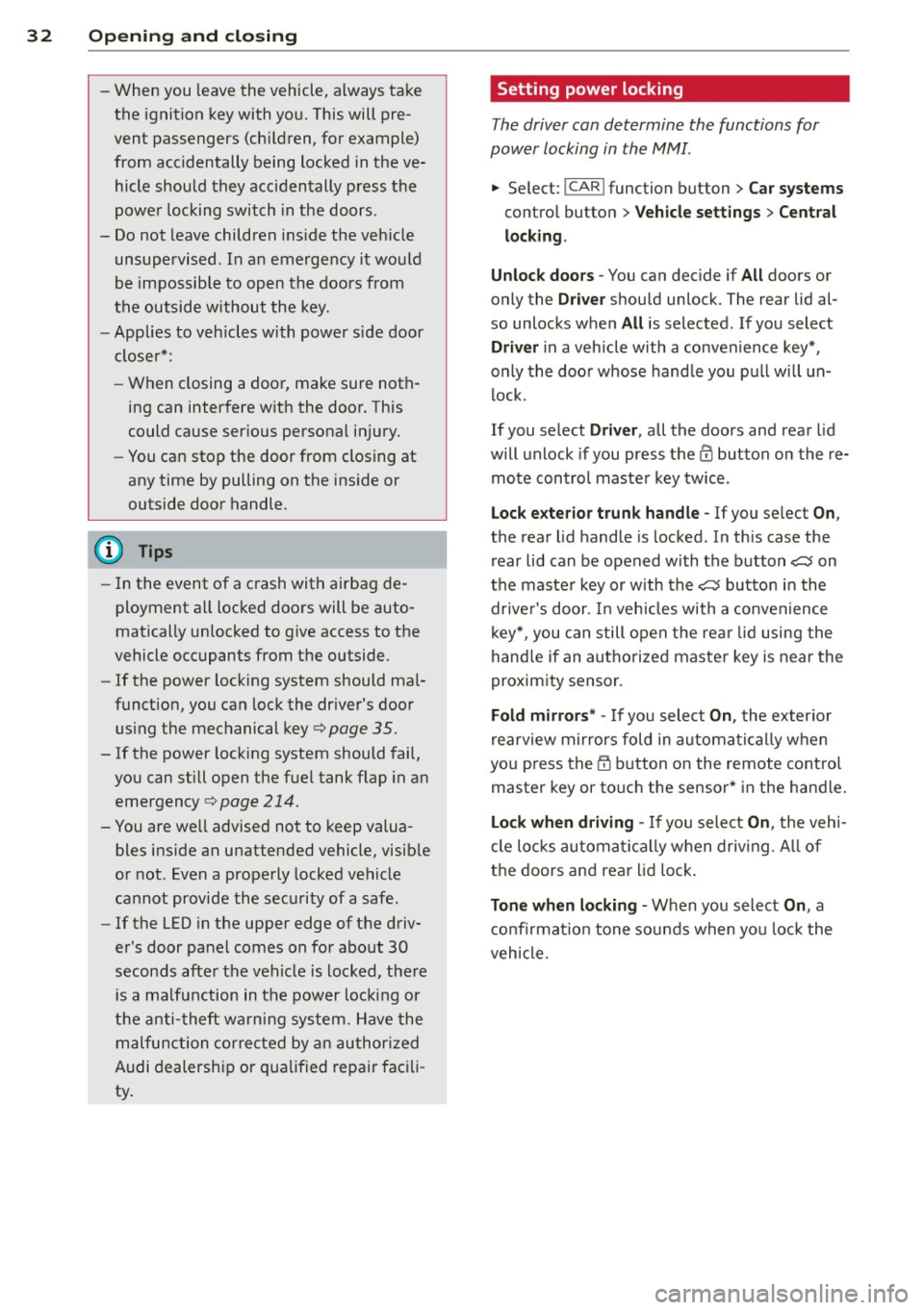
Setting power locking
The driver can determine the functions for
power locking in the MMI .
.,. Select: I CAR I function button > Car systems
contro l butto n > Vehicle settings > Cent ral
lo cking .
Unloc k doors -
You can dec ide if All doors or
only the
Dr iver shou ld unlock. The rear lid al
so unlocks when
All is selected . If you select
Driver in a vehicle with a convenience key*,
o nl y th e doo r whose hand le you p ull will un
lock.
If you se lect
Driver , all the doors and rear lid
will unlock if you press the
CD button on the re
mote control maste r key twice .
Lock exterior trunk handle -If you select On ,
the rear l id handle is locked . In this case the
rear lid can be opened with the b utton
,c::5 on
the maste r key or with the
,c::5 button in the
drive r's door . In veh icles with a convenience
key*, you ca n still open the re ar lid using the
hand le if an authorized maste r key is near the
proximity sensor .
Fold mirrors* -If you selec t On, the exterior
rearview m irrors fold in au toma tica lly w hen
yo u press the
CD bu tton o n the remote contro l
master key or touch the sensor* in the handle .
Lock wh en d riving -If you select On, t he vehi
cl e locks automa tica lly when driv ing. A ll of
t h e doors and rea r lid lock .
Tone when locking -When you select On, a
c o nfirmat io n tone sounds when yo u lock the
vehicle.
Page 37 of 294
- Rear doors: pull the door handle once to re
lease the lock. Pull the hand le
again to open
the door .
- If you have a crash and the airbag is activat
ed, the doors automatically un lock .
.&_ WARNING
- The power locking switch works with the
ignition off and automatically locks the
entire vehicle when it is actuated.
- On a vehicle locked from the outside the
power locking system switch is inopera
tive.
- locking doors from the inside can help
prevent inadvertent door opening during
an acc ident and can also prevent unwant
ed entry from the outside. locked doors
can, however, delay assistance to veh icle
occupants and hold up rescue efforts
from the outside in an acc ident or other
eme rgency .
@ Tips
Your vehicle is locked automatically at a
speed of9 mph (15 km/h)
qpoge 31. You
can unlock the vehicle again usin g the
opening funct ion in the power locking sys
tem switch.
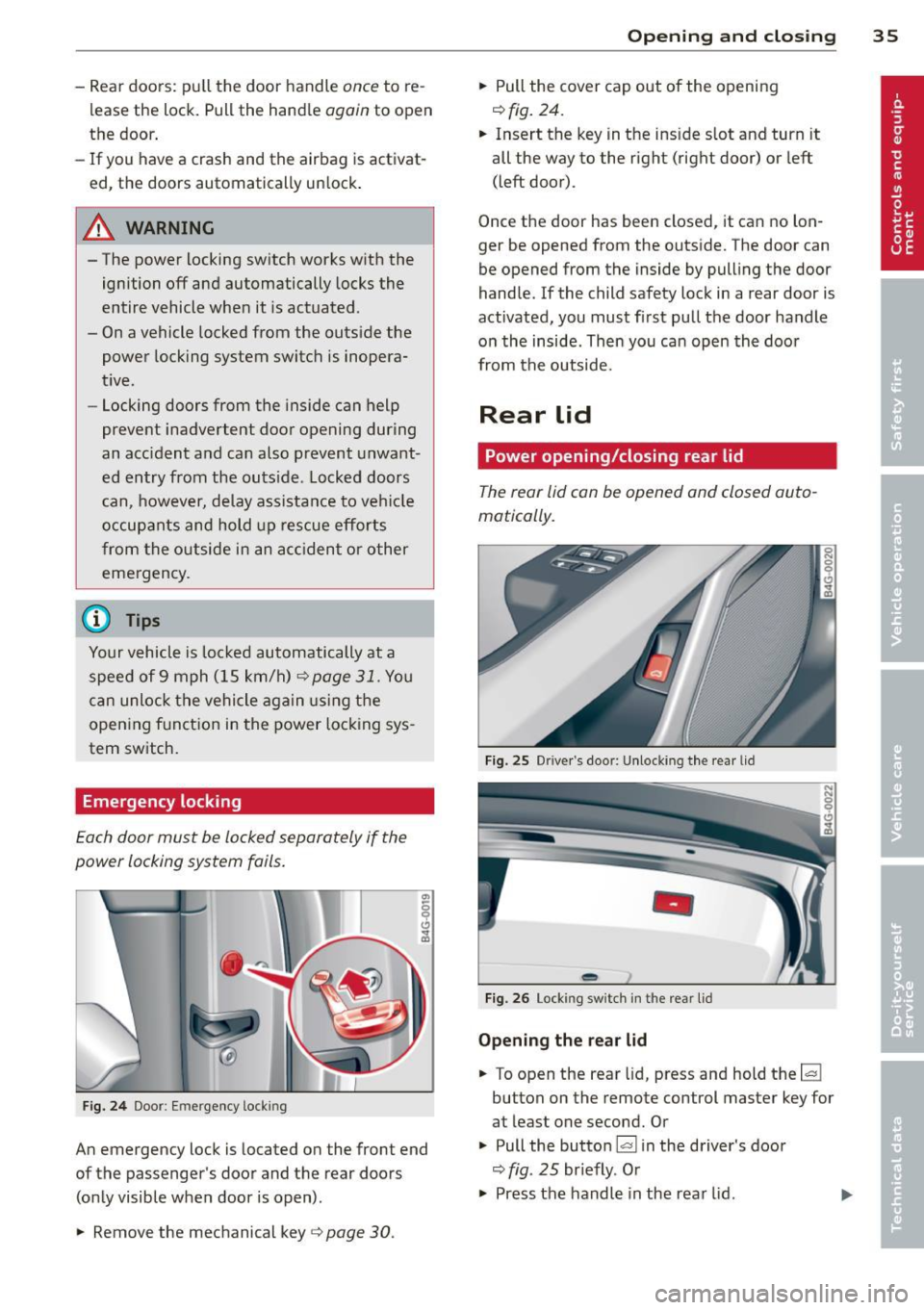
Emergency locking
Each door must be locked separately if the
power locking system foils .
Fig. 24 Doo r: Em ergency lock ing
An emergency lock is located on the front end
of the passenger's door and the rear doors (only visible when door is open) .
.,. Remove the mechanical key
q page 30 .
Opening and closing 35
.,. Pull the cover cap out of the opening
r=> fig. 24.
.. Insert the key in the ins ide s lot and turn it
all the way to the right (right door) or left
(left door) .
Once the door has been closed, it can no lon
ger be opened from the outside. The door can
be opened from the inside by pulling the door
handle .
If the child safety lock in a rear door is
activated, you must first pull the door handle
on the inside . Then you can open the door
from the outside.
Rear lid
Power opening/closing rear lid
The rear lid con be opened and closed auto
matically.
Fig. 25 Drive r's doo r: Unlocki ng the rear lid
-
Fig. 26 Lock ing switch in t he rear lid
Opening the rear lid
.. To open the rear lid, press and hold the~
button on the remote control master key for
at least one second. Or
.,. Pull the button~ in the driver 's door
r=> fig. 25 br iefly. Or
.,. Press the handle in the rear lid. ..,.
Page 38 of 294
36 Openin g and clo sing
Cl os ing th e rea r lid
.. Press the lc:::, 1 button in the rear lid ¢ fig. 26.
T he rear lid moves to the closed position by
itse lf and soft close locks it automatically
¢ _& .Or
.. Switch the ignition on and pull and hold the
button
!c:::, I in the driver 's door until the rear
lid is closed ¢
_A.
Setting th e rear lid op en po siti on
.. Bring the rear lid into the desired open posi
tion ¢(D. The position can be stored at only
one specif ic height.
.. Press and hold the button
!c:::, I for at least
four seconds to store the new open pos ition.
A v isual and aud io signal will follow .
The settings in the MMI determine if the rear lid can be opened using the handle ¢
page 32.
Opening will be stopped immediately when :
- You press the b utton
lc:::, I on the remote con -
tro l master key, or
- You press the button
la l in the rear lid, or
- You push the handle in the rear lid , or
- You pull the button
l a! in the driver's door,
or
- When something blocks the rear lid or
makes it difficult for the lid to move.
If you press one of the buttons ~now, the
rear lid will either open or close, depending on
its angle .
Closing will be stopped immediate ly when:
- You press the button
lc:::, I in the rear lid, or
- You push the handle in the rear lid , or
- You release the button
la l on the driver's
door , or
- When something blocks the rear lid or
makes it difficult for the lid to move .
If you press one of the buttons ~now, the
rear lid will either close or open, depending on
its angle .
You can manually stop the automatic open ing/closing of the rear lid. The automatic clos
ing process begins if you push down on the
rear lid .
A WARNING
-After closing the rear lid, always pull up
on it to make sure that it is properly
closed . Otherwise it could ope n suddenly
when the vehicle is moving .
- To help prevent poisonous exhaust gas from being drawn into the vehicle, al
ways keep the rear lid closed wh ile driv
ing. Never transpo rt objects la rger than
those which fit complete ly into the lug
gage area, beca use then the rear lid can
not be fu lly closed .
- Never leave your veh icle unattended es
pecia lly with the rear lid left open. A
child cou ld craw l into the car through the
luggage compartment and pu ll the lid
shut, becoming trapped and unable to
get out. To reduce the risk of personal in
jury, never let c hildren play in or around
your ve hicle. Always keep the rear lid as
well as the vehicle doors closed when not i n use .
- Never close the rear lid inattentively o r
without check ing first . Although the
clos ing force of the rear lid is limited,
you can still serious ly injure yourself or
others.
- Always ensure that no one is within
range of the rear lid when it is moving, in
particular close to the hinges and the up
per and lower edges -fingers or hands
can be pinched.
- Never try to interfere with the rear lid or
he lp it when it is be ing opened or closed
automatically.
(D Note
The rear lid can bump into ob jects such as
the garage ceiling when opening and be
come damaged .
(D Tips
-Audio signals a re given when you close
the rear lid using the
l a! button in the
driver's door .
- If there is a mechanica l problem with au
tomatic closing for the rear lid or there is .,..
Page 40 of 294
38 Opening and closing
Power windows
Controls
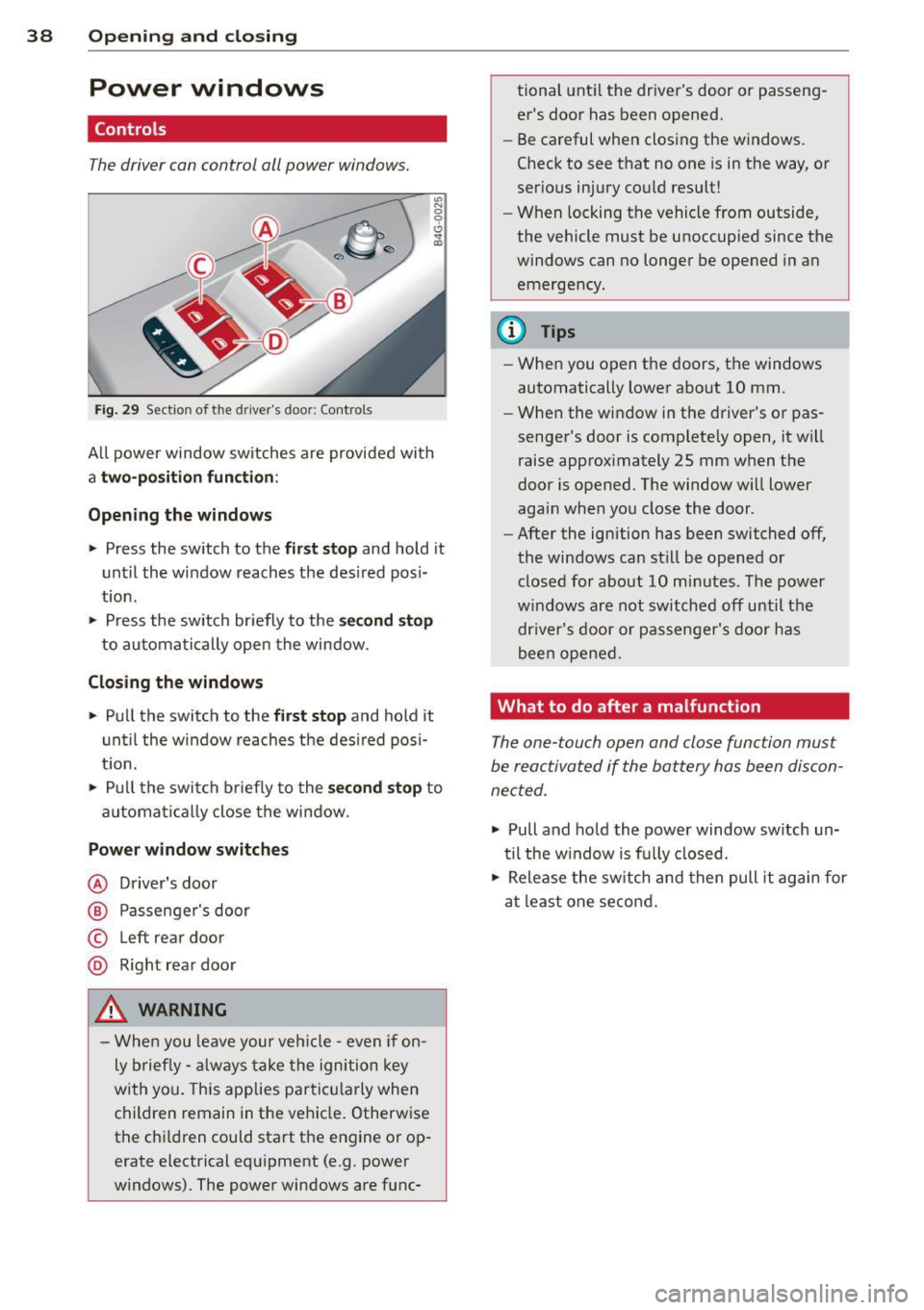
The driver can con trol all power windows.
"' N 0 0 6
Fig . 29 Sect io n of the drive r's d oor : Contro ls
"' m
All power window sw itches are provided with
a two -pos ition function:
Opening the windows
.. Press the switch to the first stop and ho ld it
until the window reaches the desired posi
tion .
.. Press the switch briefly to the
second stop
to automatically open the window .
Closing the windows
.. Pull the switch to the first stop and hold it
until the window reaches the desired pos i
t ion.
.. Pull the switch briefly to the
second stop to
automa tically close the window .
Power window switches
@ Driver's door
@ Passenger's door
© Left r ear door
@ Right rear door
_& WARNING
- When you leave your veh icle -even if on
ly brief ly -always take the ignition key
with you. This applies particu larly when
children remain in the veh icle. Otherwise
the chi ldren could start the engine or op
erate electrical equipment (e.g . power
windows). The power windows are func- tional
until the driver's door or passeng
er's door has been opened.
- Be careful when closing the windows.
Check to see that no one is in the way, or
serious injury could result!
- When locking the vehicle from outside,
the vehicle must be unoccupied since the
windows can no longer be opened in an
emergency.
@ Tips
- When you open the doors, the windows
automatically lower about 10 mm .
- When the window in the driver's or pas
senger's door is complete ly open, it wi ll
raise approximately 25 mm when the
door is opened . The window will lower
again when you close the door .
- After the ignition has been switched off,
the windows can still be opened or closed for about 10 minutes . The power
w indows are not switched off until the
dr iver's door or passenger's door has
been opened.
What to do after a malfunction
The one-touch open and close function must
be reactivated if the battery has been discon
nected .
.. Pull and hold the power window switch un
til the w indow is fully closed .
.. Release the switch and then pull it again for
at least one second.
Page 41 of 294
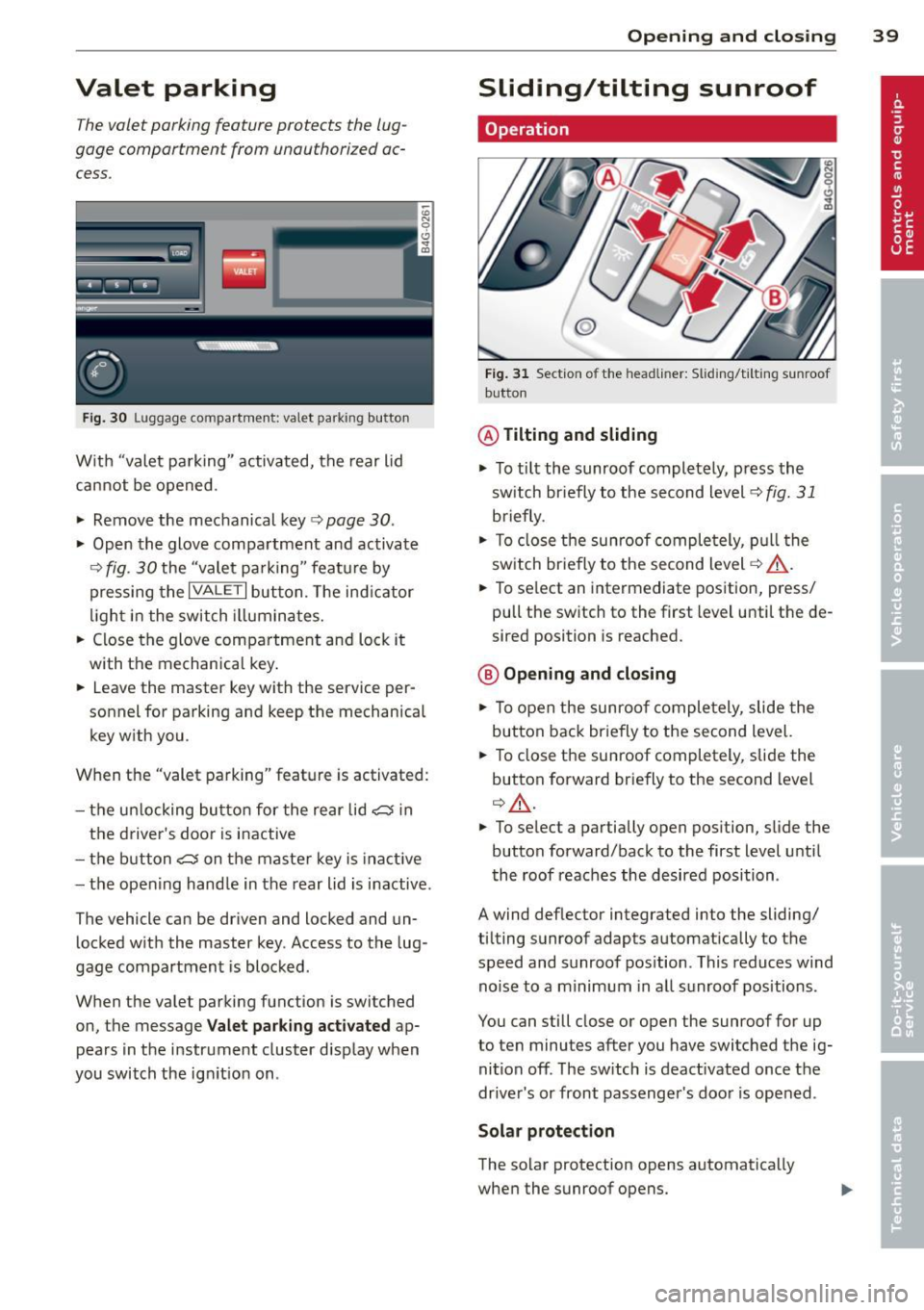
Valet parking
The valet parking feature protects the lug
gage comportment from unauthorized ac
cess.
Fig. 30 Luggage compartment: valet parking button
With "valet parking" activated, the rear lid
cannot be opened.
~ Remove the mechanical key¢ page 30 .
~ Open the glove compartment and activate
¢
fig. 30 the "valet parking" feature by
pressing the
I VALET I button. The indicator
light in the switch illuminates.
~ Close the glove compartment and lock it
with the mechanical key.
~ Leave the master key with the service per
sonnel for parking and keep the mechanical
key with you .
When the "valet parking" feature is activated:
- the un locking button for the rear lid
c:s in
the driver's door is inactive
- the button
c:s on the master key is inact ive
- the opening hand le in the rear lid is inactive .
The vehicle can be driven and locked and un locked with the master key. Access to the lug
gage compartment is blocked.
When the valet parking function is switched
on, the message Valet parking activated ap
pears in the instrument cluster display when
you switch the ignition on .
Opening and closing 39
Sliding/tilting sunroof
Operation
@
Fig. 31 Section of the headliner: Sliding/ti lting sunroof
button
@ Tilting and sliding
~ To tilt the sunroof completely, press the
sw itch br iefly to the second level¢
fig. 31
briefly .
~ To close the sunroof completely, pull the
switch br iefly to the second level¢.&_ .
~ To select an intermediate position, press/
pull the switch to the first level until the de
sired position is reached.
@ Opening and closing
~ To open the sunroof completely, slide the
button back briefly to the second level.
~ To close the sunroof completely, slide the
button forward briefly to the second level
¢ .&_ .
~ To select a partially open position, slide the
button forward/back to the first level until
the roof reaches the desired position .
A wind deflector integrated into the sliding/
tilting sunroof adapts automatically to the
speed and sunroof pos ition . This reduces wind
noise to a minimum in all sunroof positions.
You can still close or open the sunroof for up
to ten minutes after you have switched the ig
nition
off . The switch is deactivated once the
driver's or front passenger's door is opened .
Solar protection
The solar protection opens automatically
when the sunroof opens.
Page 43 of 294
Clear vision Lights
Switching the headlights on and off
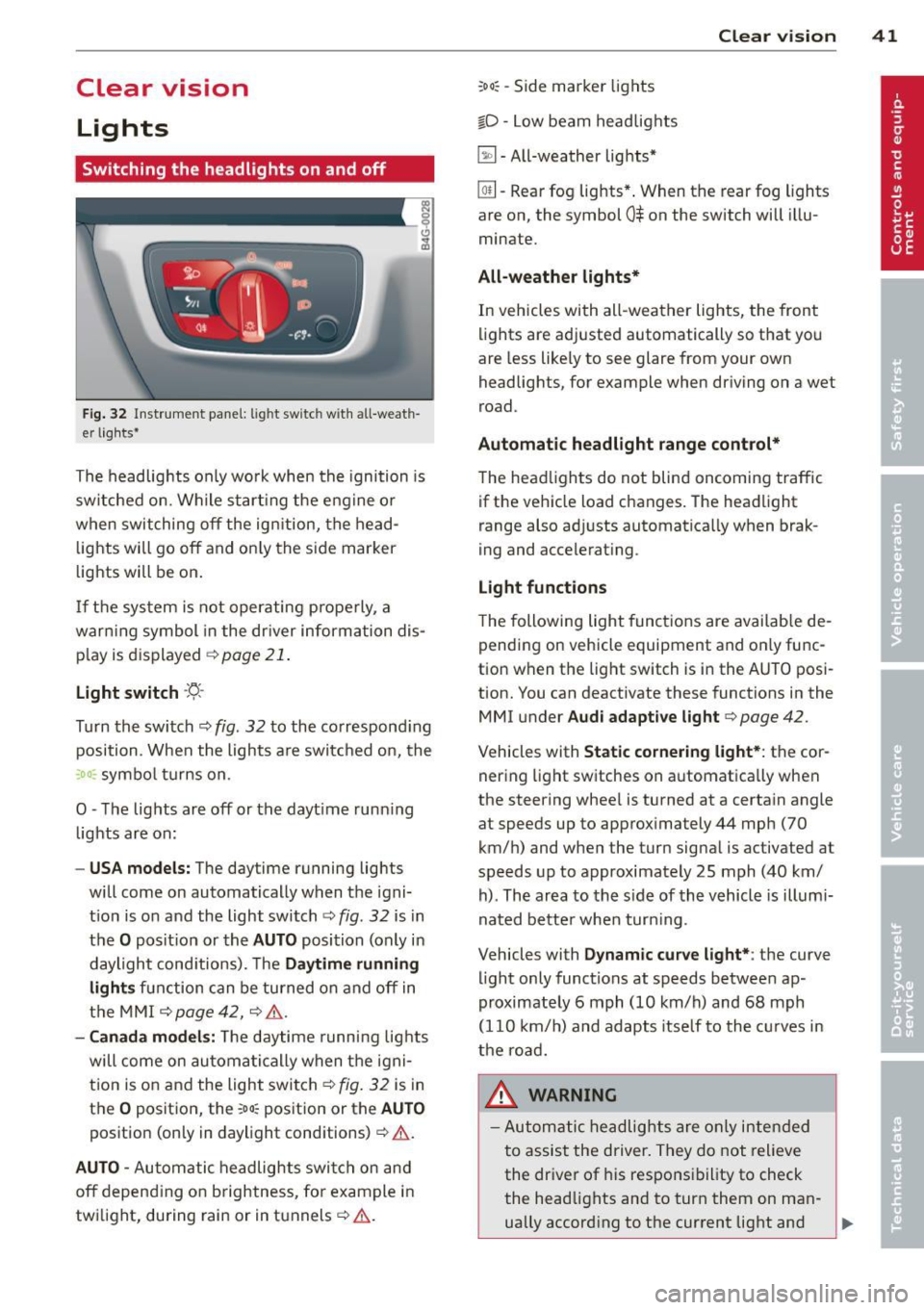
Fig . 32 Instrument pane l: lig ht sw itc h wit h all -weath
er lights•
The headlights only wo rk when the ignition is
switched on. Wh ile start ing the eng ine o r
when switching off the ign ition, the head
lights will go off and on ly the side marker
lights will be on .
If the system is not operating p rope rly, a
war ning symbol in the dr iver information dis
p lay is d isplayed
c::> page 21 .
Light switch ·'t!- -
Tu rn the switch c::> fig . 32 to the correspond ing
position . When the lights a re switched on, the
:oo: symbo l tu rns on .
0 -The lig hts are off or the dayt ime runn ing
lights are on:
- USA models: The daytime running ligh ts
will come on automatically when the igni
t ion is on and the light switch
c::> fig . 32 is in
the O posit ion or the AUTO position (only in
daylight cond itions). The Daytime running
light s function can be turned on and off in
the MMI
c::> page42, c::>A .
-Ca nada model s: The daytime running lig hts
will come on automa tically when the igni
t ion is on and the light switch
c::> fig . 32 is in
the O position, the
:oo: pos ition or the AUTO
position (only in daylight conditions)
c::> A .
AUTO -Automatic headlights swi tch on and
off depend ing o n brightness, for example i n
tw ilight, during rain or in tunnels
c::> &. .
:oo: -Side marke r lights
io -Low beam headlights
~ -All-weather lig hts*
Clear vi sion 41
[Q!l -Rear fog lights* . When th e rear fog lights
a re on, the symbol
0$ on the switch will illu
mina te.
All-weath er lights*
In vehicles with all-weather lights, the front
li ghts are adj usted automatically so that you
are less like ly to see glare from your own
headligh ts, for example when driving on a wet
road .
Automatic headlight range cont rol*
The head lights do not blind oncoming traffic
if the vehicle load changes . The headlight
range also ad justs automatica lly when brak
i ng and accelerat ing .
Light function s
T he following light funct ions are avai lab le de
pending on vehicle equipment and on ly func
tion when the light switch is i n the AUTO posi
tion. You c an deactiv ate these functions in the
MMI under Audi adaptive light
c::> page 42 .
Vehicles w ith Static cornering light* : the cor
ner ing light sw itches on automatica lly when
the stee ring whee l is tu rned at a ce rta in angle
at speeds up to approx imately 44 mph (70
km/ h) and when the turn signa l is ac tiva ted a t
speeds up to approximately 25 mph (40 km/
h) . The area to the s ide of the vehicle is illumi
nated bette r whe n turn ing .
Vehicles with Dynamic curve light* : the
curve
li ght only functions at speeds betwee n ap
proximately 6 mph (10 km/h) and 68 mph
(110 km/ h) and adapts itself to the cu rves in
the ro ad.
_& WARNING
- Autom atic headlig hts are only intended
to assist the driver. They do not relieve
the dr iver of his responsibility to check
the head lights and to turn them on man -
ually accord ing to the current light and
~
Page 44 of 294
42 Clear vision
visibility conditions. For example, fog cannot be detected by the light sensors.
So always switch on the headlights
io
under these weather conditions and
when driving in the dark.
- Crashes can happen when you cannot see
the road ahead and when you cannot be
seen by other motorists . Always turn on
the headlights so that you can see ahead and so that others can see your car from
the back.
(D Note
The rear fog lights should only be turned
on in accordance with traffic regulation, as
the lights are bright for following traffic.
@ Tips
-In the event of a light sensor malfunc
tion, the driver is notified in the instru
ment cluster display~
page 21.
-You will hear a warning tone if you open
the driver door when the exterior lights
are switched on.
- Please observe legal regulations when
using the lighting systems described .
Emergency flasher
The emergency flasher makes other motorists
aware that you or your vehicle are in an emer
gency situation.
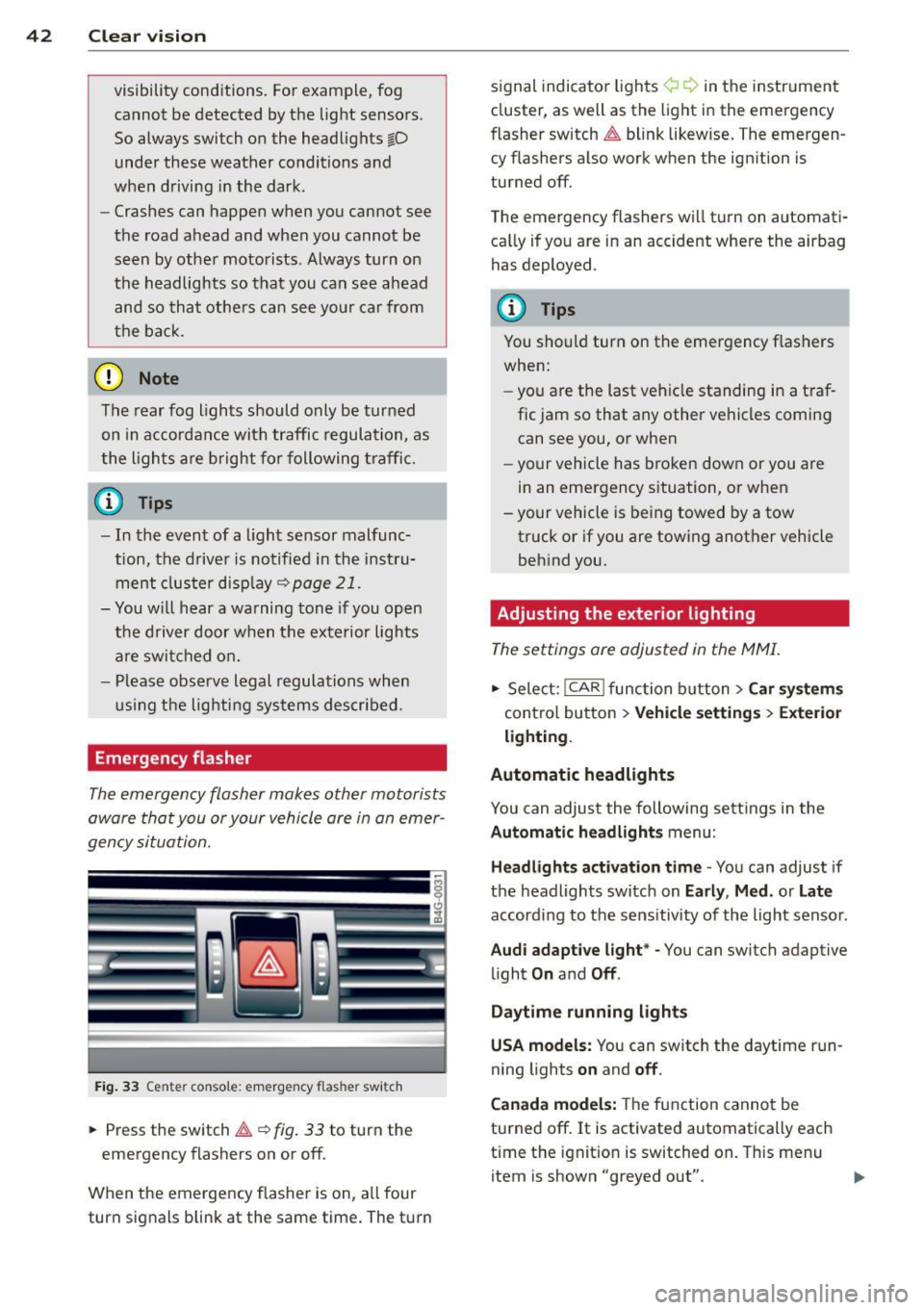
Fig. 33 Center console : emerge ncy flasher switch
• Press the switch~~ fig. 33 to turn the
emergency flashers on or off.
When the emergency flasher is on, all four
turn signals blink at the same time. The turn signal
indicato r lights ¢ Q in the instrument
cluster, as well as the light in the emergency
fl asher switch ~ blink likewise. The emergen
cy flashers also work when the ignition is
turned off.
The emergency flashers will turn on automati
cally if you are in an accident where the airbag
has deployed .
(D Tips
You should turn on the emergency flashers
when:
- you are the last vehicle standing in a traf
fic jam so that any other vehicles coming
can see you, or when
- your vehicle has broken down or you are
in an emergency situation, or when
- your vehicle is being towed by a tow
truck or if you are towing another vehicle
behind you.
· Adjusting the exterior lighting
The settings ore adjusted in the MMI.
• Select: I CAR I function button > Car systems
control button > Vehicle settings> Exterior
lighting.
Automatic headlights
You can adjust the following settings in the
Automatic headlights menu :
Headlights activation time -You can adjust if
the headlights switch on
Early , Med. or Late
according to the sensitivity of the light sensor .
Audi adaptive light* -You can switch adaptive
light
On and Off .
Daytime running lights
USA models:
You can switch the daytime run
ning lights
on and off.
Canada models:
The function cannot be
turned off.
It is activated automatically each
time the ignition is switched on. This menu
item is shown "greyed out".
Page 45 of 294
Coming home , Leav ing home
The coming home function il luminates the
area outside the vehicle when you switch the
ignition off and open the driver 's door . To turn
the function on, select
Light s when le aving
c a r > On .
The leav ing home function illuminates the
area outside the vehicle when yo u un lock the
veh icle . To turn the function on, select
Li gh ts
when unloc kin g ca r> On.
The coming home and leaving home functions
only operate when it is dark and the light
switch is in the
AUTO pos ition.
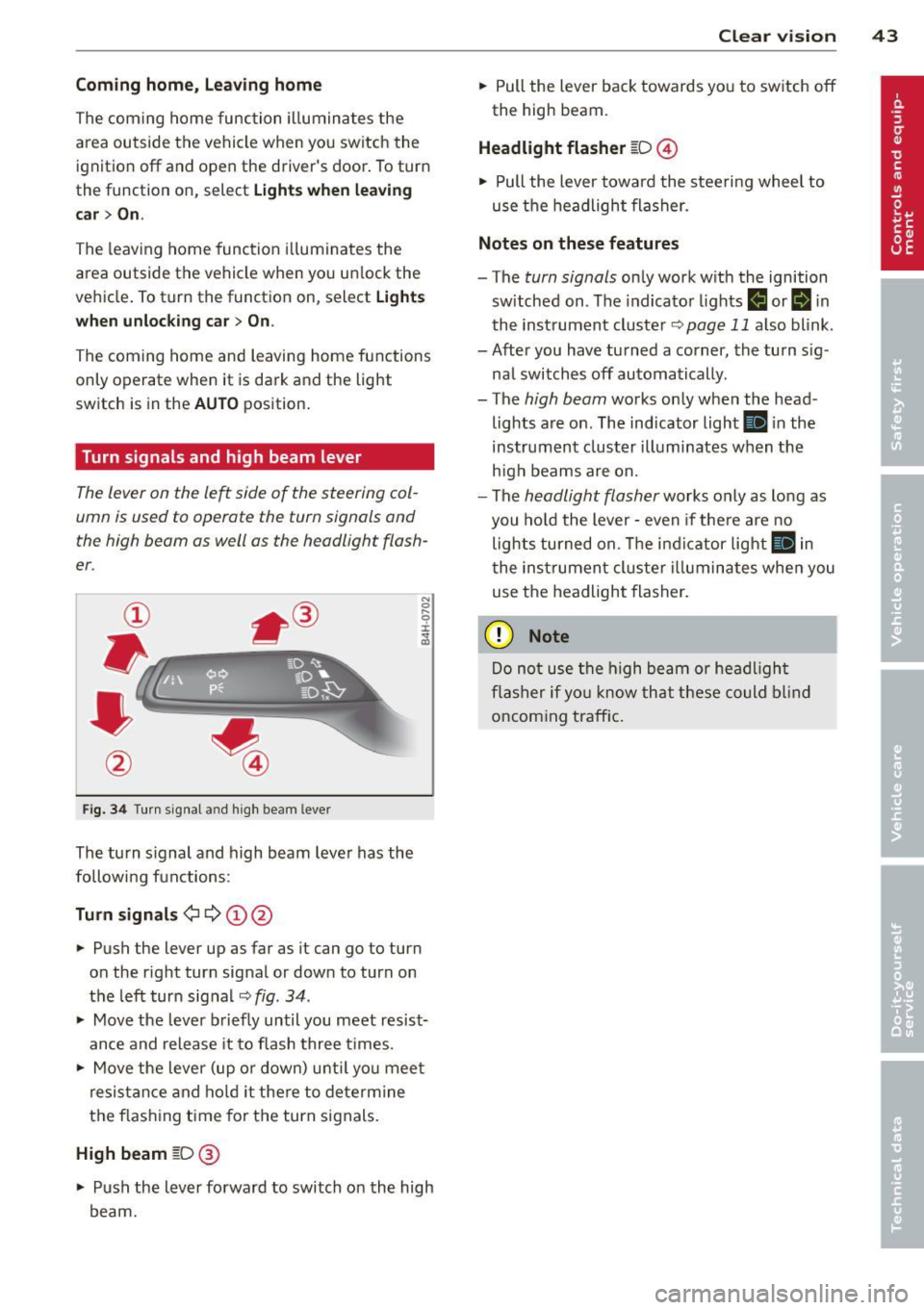
Turn signals and high beam lever
The lever on the le~ side of the steering col
umn is used to operate the turn signals and
the high beam as well as the headlight flash
er .
Fig. 3 4 Tu rn signal a nd h igh beam lever
The turn s ignal and high beam lever has the
followi ng functions:
Tu rn sign als ¢ ¢ @@
.. Push the lever up as far as it can go to turn
on the r ight turn signal or down to turn on
the left turn sig nal
c:::;, fig . 34 .
.. Move the lever b riefly until you meet resist
ance and release it to flash three times .
.. Move the lever (up or down) unti l you mee t
resistance and ho ld it there to dete rmine
the f las hing t ime for the turn signals.
High beam [D @
.. Push the lever forward to switch on the high
beam.
Clear vi sion 43
.. Pull the lever back towards you to switch off
the high beam.
Headlight fla sher [D ©
.. Pull the lever towa rd the stee ring wheel to
use the headlight flasher.
Note s on these features
- The turn signals on ly work with the ignition
sw itched on . The indicator lights
f,j or II in
the inst rument cluste r
~page 11 also blink.
- After you have turned a corner, the turn s ig -
nal switches off automatically .
- The
high beam works only when the head
lights are on . The indicator light
Ill in the
instrument cluster illuminates when the
h igh beams are on.
- The
headlight flasher works only as long as
you hold the lever -even if the re a re no
lights turned on. The indicator light
Ill in
the inst rument cluster i lluminates whe n you
use the headlight flasher.
(D Note
Do no t use the high beam or headligh t
flasher if yo u know that these could blind
oncoming traffic.
Page 46 of 294
44 Clear vis ion
Interior lights
Front and rear interior lighting
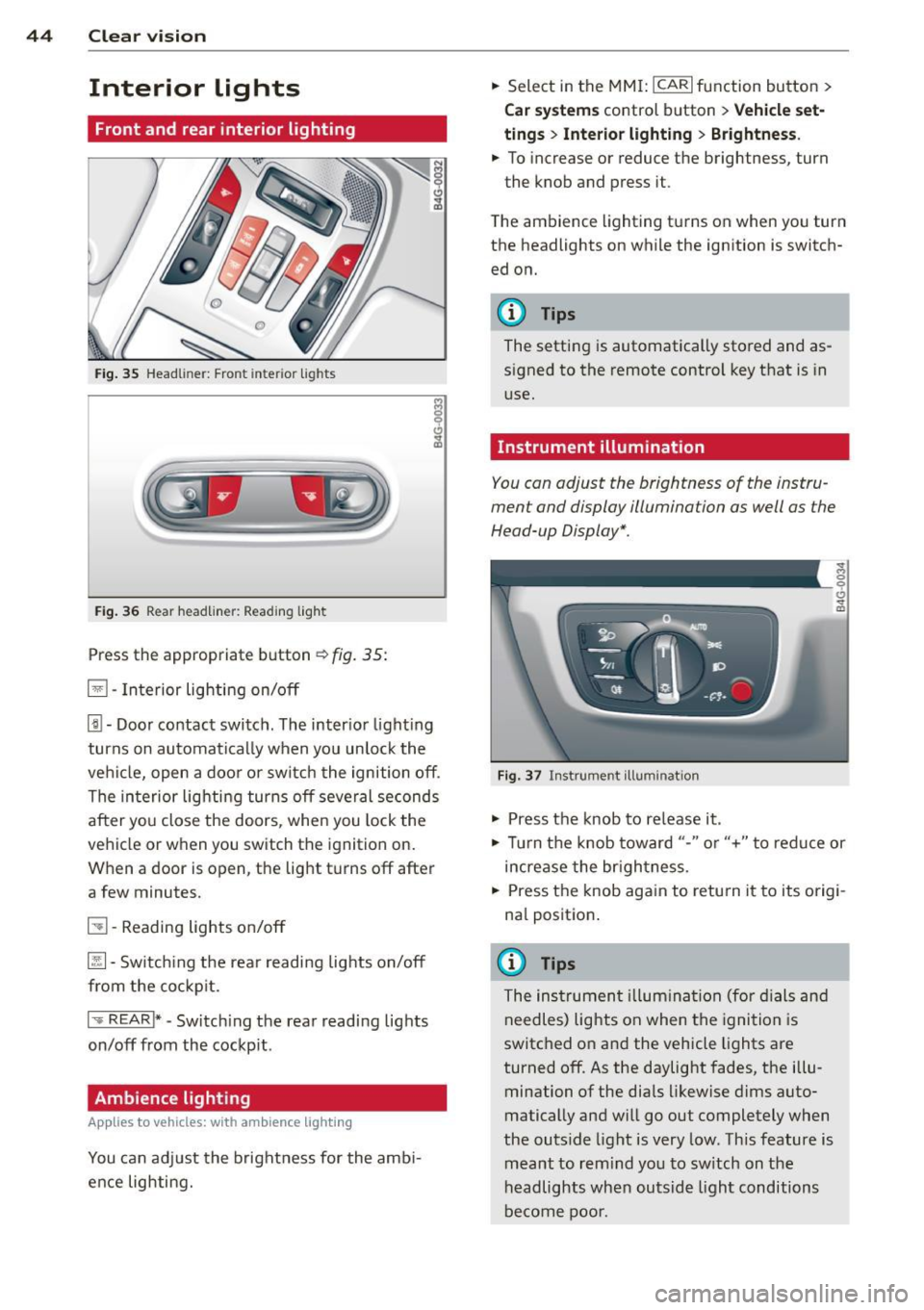
Fig. 35 Head liner: Fron t int eri or ligh ts
Fig. 36 Rear headlin er: R ead in g light
Press the appropriate b utton ~ fig. 35:
El -Interior lighting on/off
[j) -Door contact switch . The inter io r l ight ing
turns on automatically when you unlock the
vehi cle, open a doo r or switch the ignition off .
The interior lighting turns off several seconds
after you close the doors , when you lock the
vehicle or when you switch the ignition on.
When a door is open, the light t urns off after
a few minutes.
51 -Reading lights o n/off
~ -Sw itch ing the rear readi ng lights on/off
from the co ckpit.
I .,.. REAR !* -Switch ing the rear reading lights
on/off from the cockp it .
Ambience lighting
Appl ies to vehicles: wit h ambience lighting
You can adj ust the brightness for the amb i
ence lighting. .,.
Select in the MM I: ICARlfunction button>
C ar sys tem s control button > Vehicle set
ting s
> Interio r light ing > Brightne ss .
.,. To increase or reduce the brightness, turn
the knob and press it .
T he ambience lighting turns on when you turn
the headlights on while the ignition is switch ed on.
@ Tips
The setting is automatically stored and as
signed to the remote control key that is in
use.
Instrument illumination
You can adjust the brightness of the instru
ment and display illumination as well as the
Head-up Display *.
F ig. 37 In strume nt ill umin ation
.,. Press the knob to re lease it .
~ 0
"'
.,. Tur n the knob toward "-" or"+" to redu ce or
increase the br ightness.
.,. Press the knob aga in to retu rn it to its origi
na l position .
(I} Tips
The instrumen t illum ina tion (for dials and
needles) lights on when the ignition is
switc hed o n and the vehicle lights are
turned off . As the daylight fades, the illu
mination of the dia ls likewise d ims auto
matically and will g o out completely when
the outs ide light is very low. This feature is
meant to rem ind yo u to sw itch on the
headlights when outsid e light conditions
be come poo r.
Page 48 of 294
46 Clear vis ion
vision system camera* are cleaned a utomati
cally the first time the lever is press in posi
tion ® and every 8 times it is pressed after
that . They are also cleaned every time you
hold the lever in pos ition ® for longer than 8
seconds .
A WARNING
- The ra in sensor is only des igned to assist
and support the drive r. It remains entire
ly the dr iver's respons ibility to monito r
o ut side weather conditions and to man
ually activa te the wipers as soon as rain
or drizzle reduces visibility through the
windshield.
- The windshie ld m ust not be treated with
water -repe llent materials. They can in
c rease glare under poor visibi lity condi
tions such as wetness, darkness, or when
the sun is low on the horizon. In addi
t ion, they can cause the windshield wip
ers to chatter .
- Proper ly functioning w indshie ld w iper
blades are required for a clear view and
safe dr iv ing
Q page 46, Replacing
windshield wiper blades .
([) Note
- In the case of frost, check whether the
winds hield wiper b lades are frozen to
the windshie ld. Switching on the wind
shield wipers can damage the wiper
blades!
- Prior to using a car wash, the wi ndsh ield
wipe r system must be switched off (lever
i n position 0). This helps to preve nt unin
tention al swi tching on and damage to
the windshie ld w iper system.
- Do no t use the wipe rs to cle ar a fros ted
window. Using the w ipers as a conven
ient ice scraper will destroy the wiper
b lades .
(D Tips
- The w indshield wi pers are swi tched off
when the ignition is off . Activate the
windsh ield wipers after the ignition is
'
switched back on by moving the w ind
shield wiper lever to any position.
- Worn or d irty windshield wipe r blades
result in st reaking. This can affect the
rain sensor function . Check your wind
shield wiper blades regularly.
- The washer fluid nozz les of the wind
shield washer system a re heated at low
tempe rat ures when the ignition is on .
- When stopping temporarily, e.g . at
a
traffic light, the set speed of the wind
shield wipers is automatically reduced by
one speed.
Replacing windshield wiper blades
Wiper blades in good condition help keep the
windshield clear .
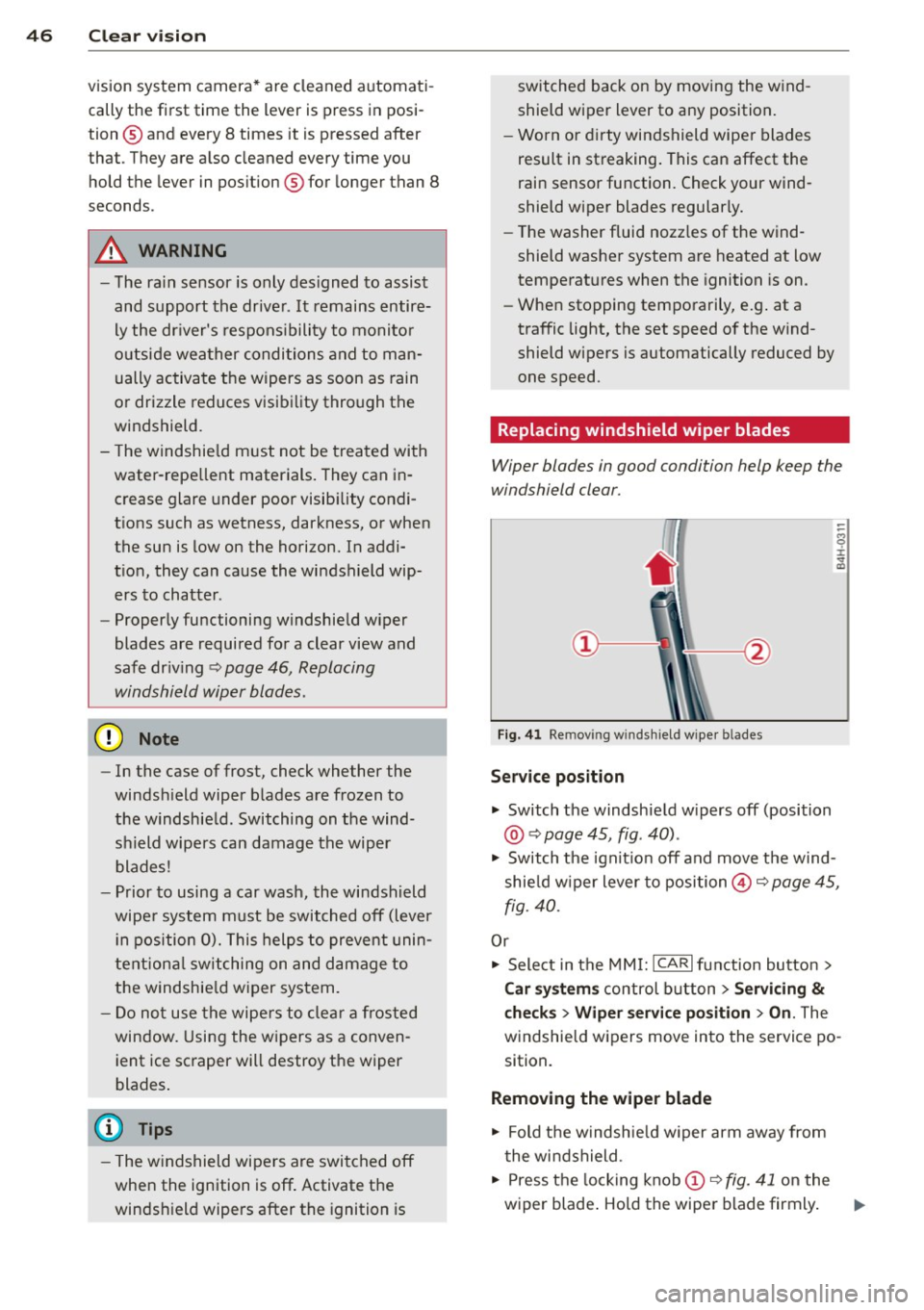
Fig. 41 Re mov ing w in d sh iel d wipe r bl ades
Service position
... Switch the windshie ld w ipers off (position
@ Q page 45, fig . 40) .
.,. Switch t he ignit ion off and move t he wind
shie ld w iper lever to position@Q
page 45,
fig. 40.
Or
.,. Sele ct in the MMI: ICAR lfunction button>
Car sy stem s control button > Servicing
&
checks > Wiper service po sition > On . The
windsh ie ld wipers move in to the service po
sition.
Removing the wiper blade
.,. Fold t he windsh ie ld w iper arm away from
t he wi ndshield .
.,. Press the locking knob
(D Q fig. 41 on the
wiper blade . Ho ld the wiper blade firmly . ..,.