instrument cluster AUDI A7 2012 User Guide
[x] Cancel search | Manufacturer: AUDI, Model Year: 2012, Model line: A7, Model: AUDI A7 2012Pages: 294, PDF Size: 73.33 MB
Page 45 of 294
Coming home , Leav ing home
The coming home function il luminates the
area outside the vehicle when you switch the
ignition off and open the driver 's door . To turn
the function on, select
Light s when le aving
c a r > On .
The leav ing home function illuminates the
area outside the vehicle when yo u un lock the
veh icle . To turn the function on, select
Li gh ts
when unloc kin g ca r> On.
The coming home and leaving home functions
only operate when it is dark and the light
switch is in the
AUTO pos ition.
Turn signals and high beam lever
The lever on the le~ side of the steering col
umn is used to operate the turn signals and
the high beam as well as the headlight flash
er .
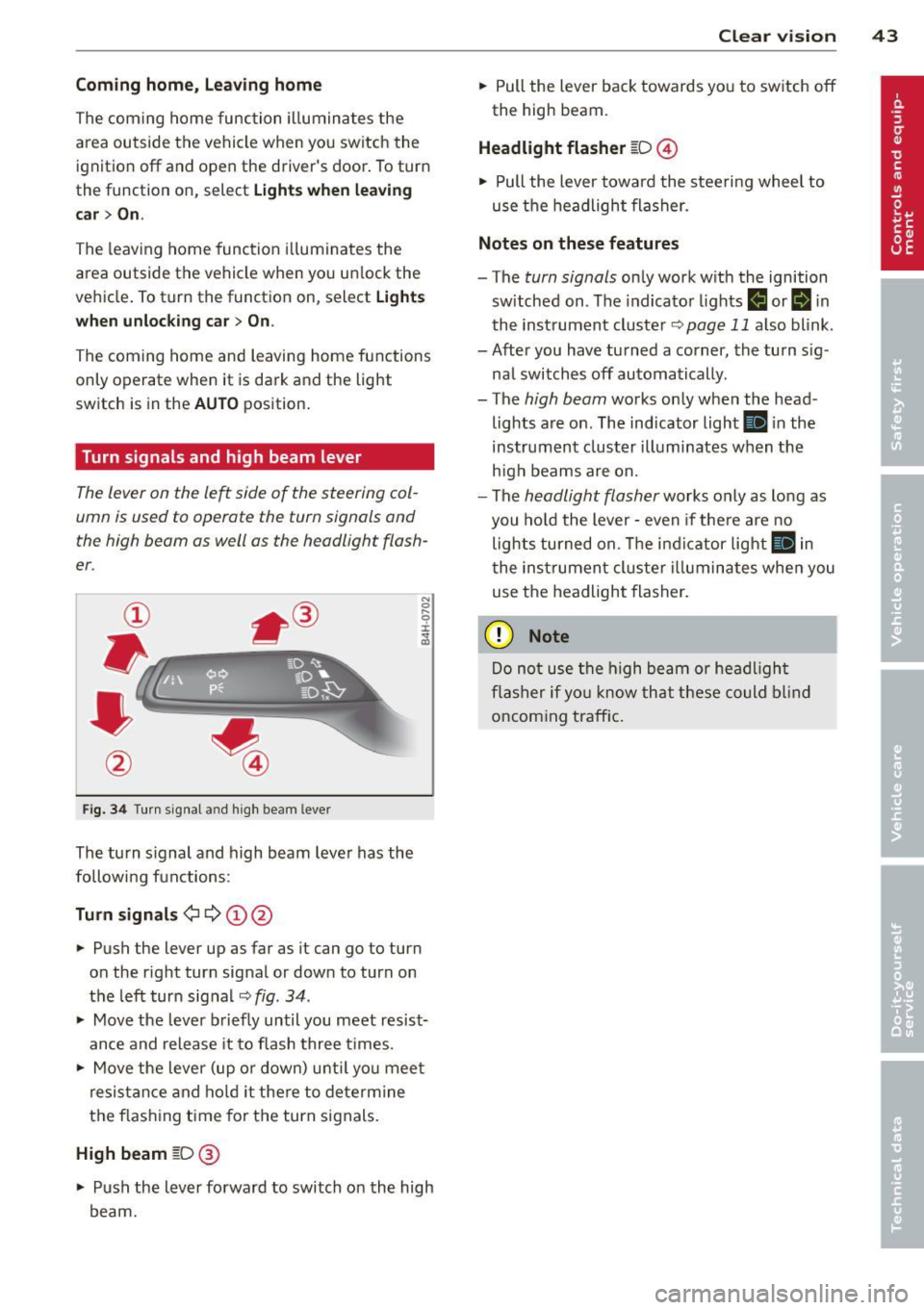
Fig. 3 4 Tu rn signal a nd h igh beam lever
The turn s ignal and high beam lever has the
followi ng functions:
Tu rn sign als ¢ ¢ @@
.. Push the lever up as far as it can go to turn
on the r ight turn signal or down to turn on
the left turn sig nal
c:::;, fig . 34 .
.. Move the lever b riefly until you meet resist
ance and release it to flash three times .
.. Move the lever (up or down) unti l you mee t
resistance and ho ld it there to dete rmine
the f las hing t ime for the turn signals.
High beam [D @
.. Push the lever forward to switch on the high
beam.
Clear vi sion 43
.. Pull the lever back towards you to switch off
the high beam.
Headlight fla sher [D ©
.. Pull the lever towa rd the stee ring wheel to
use the headlight flasher.
Note s on these features
- The turn signals on ly work with the ignition
sw itched on . The indicator lights
f,j or II in
the inst rument cluste r
~page 11 also blink.
- After you have turned a corner, the turn s ig -
nal switches off automatically .
- The
high beam works only when the head
lights are on . The indicator light
Ill in the
instrument cluster illuminates when the
h igh beams are on.
- The
headlight flasher works only as long as
you hold the lever -even if the re a re no
lights turned on. The indicator light
Ill in
the inst rument cluster i lluminates whe n you
use the headlight flasher.
(D Note
Do no t use the high beam or headligh t
flasher if yo u know that these could blind
oncoming traffic.
Page 71 of 294
(D Note
To avoid damage to the heating elements in the seats, do not kneel on the seats or
place heavy loads on a small area of the
seat.
Setup
App lies to vehicles: with four-zone a utomat ic climate con·
tro t
The climate con trol system setup is accessed
through the MMI.
" Select: ICARI function button > Car systems
control button > AC.
Rear cabin settings*
When this function is selected, all settings for
the rear can be adjusted through the climate
control system in the cockpit. The climate
control system settings cannot be adjusted in
the rear seat at the same time. This function
switches
off after a certain period of time or
when one of the dials in the cockpit is press
ed .
Auto recirculation*
The sensitivity level of the automatic rec ircu
la tion mode can be set at various leve ls from
off to sensitive. The recirculation mode is con
trolled automat ica lly. You must press the~
button if fog forms on the windows.
Footwell temperature
You can adjust the footwell temperature so
that it is cooler or warmer.
AC mode
The strength of the airflow can be adjusted to
light, med ium or strong.
Warm and cold 69
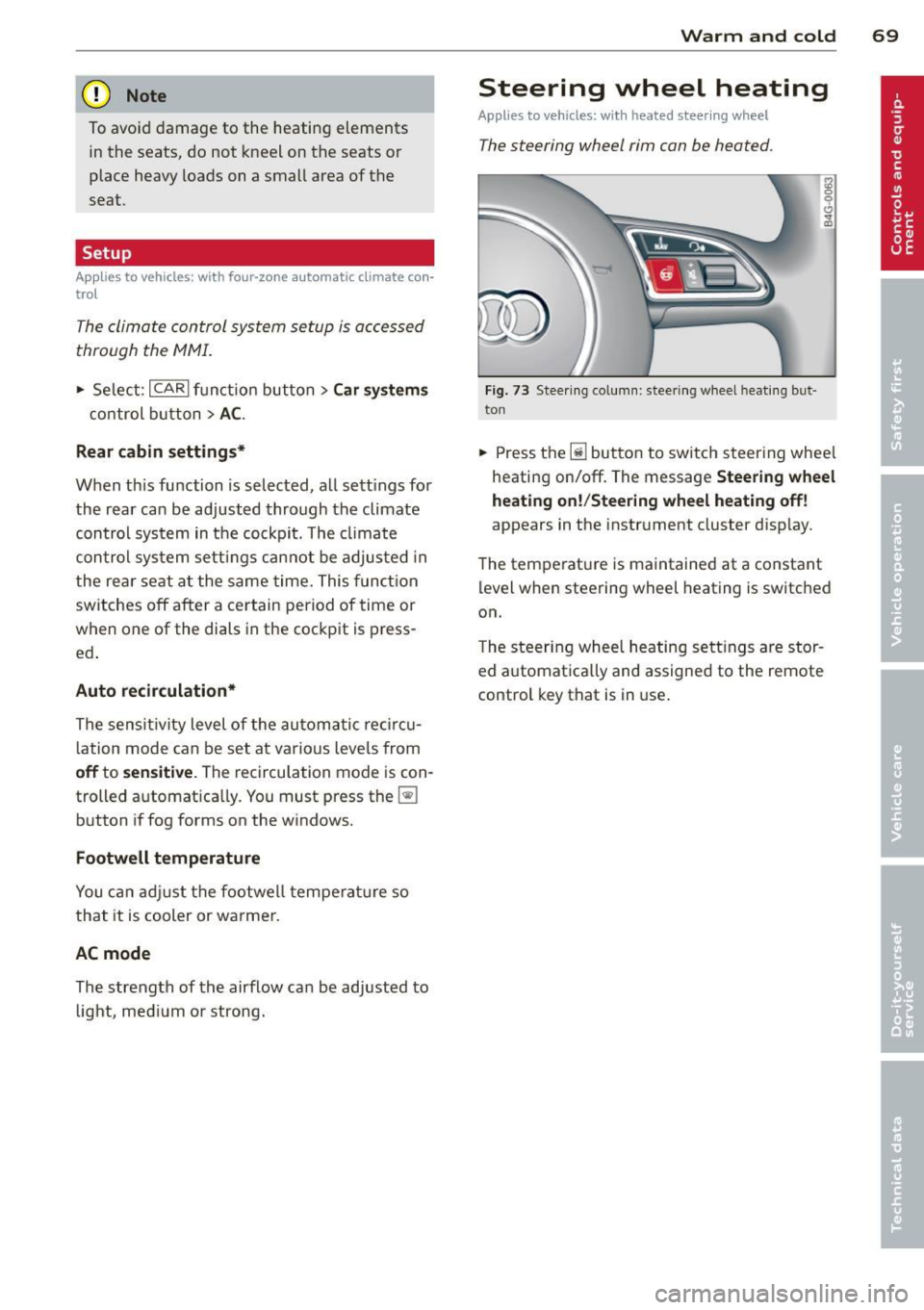
Steering wheel heating
Applies to vehicles: wit h hea ted stee ring wheel
The steering wheel rim con be heated.
Fig. 73 Stee ring column: steering w heel hea ting but ·
ton
.. Press the Ii] bu tton to switch steering whee l
heating on/off. The message
Steering wheel
heating on! /Steering wheel heating off!
appears in the instrument cluster d isp lay.
The temperat ure is maintained at a constant
level when steering wheel heating is switched
on.
T he steering wheel heating settings are stor
ed automat ica lly and assigned to the remote
control key that is in use .
Page 76 of 294
7 4 On the road
Electromechanical
parking brake
Operation
The electromechanical parking brake replaces
the hand brake.
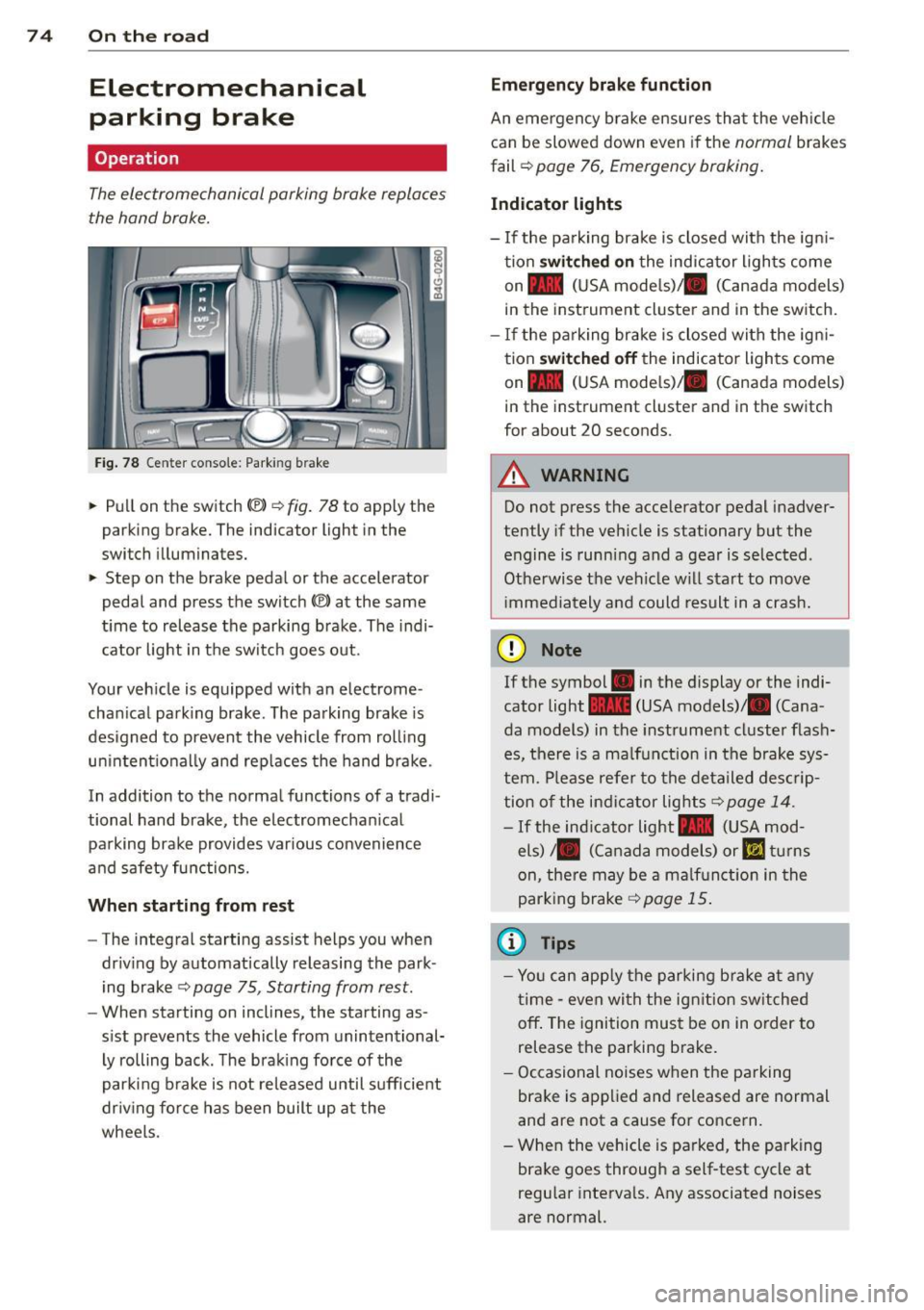
Fig. 78 Center conso le: Park ing brake
~ Pull on the switch ®> r::!;> fig. 78 to apply the
parking brake. The indicator light in the
switch illuminates.
~ Step on the brake pedal or the accelerator
pedal and press the switch
®) at the same
t ime to release the parking brake . The indi
cator light in the switch goes out.
Your veh icle is equipped with an electrome
chan ical parking brake . The parking brake is
designed to prevent the vehicle from rolling unintent ionally and replaces the hand brake.
In addition to the normal functions of a tradi
tional hand brake, the electromechan ical
parking brake provides various convenience
and safety functions.
When starting from rest
-The integral starting assist helps you when
dr iv ing by automatically releasing the park
ing brake
r::!;> page 75, Starting from rest.
- When sta rting on inclines, the starting as
s ist prevents the vehicle from unintentional
ly rolling back . The brak ing force of the
parking brake is not released until sufficient
dr iv ing force has been built up at the
wheels .
Emergency brake function
An emergency brake ensures that the veh icle
can be slowed down even if the
normal brakes
fail ¢
page 76, Emergency braking.
Indicator lights
-If the parking brake is closed with the ign i
tion
switched on the indicator lights come
on - (USA mode ls)/ . (Canada models)
in the instrument cluster and in the switch.
- If the pa rking brake is closed with the ign i
tion
switched off the indicator lights come
on - (USA mode ls)/ . (Canada models)
in the instrument cluster and in the switch
for about 20 seconds.
A WARNING
-Do not press the accelerator pedal inadver-
tently if the vehicle is stationary but the
engine is running and a gear is selected .
Otherwise the vehicle w ill start to move
i mmediately and could result in a crash.
(D Note
If the symbol . in the display or the indi
cator light
1111 (USA models)/ . (Cana
da models) in the instrument cluster flash
es, there is a ma lfunction in the brake sys
tem. Please refer to the detailed descrip
tion of the indicator lights
r::!;> page 14.
- If the indicator light- (USA mod-
els)/ . (Canada models) or
IIJ tur ns
on, there may be a malf unct ion in the
parking brake
¢page 15.
(0 Tips
-Yo u can apply the parking b rake at any
time - even with the ign ition sw itched
off . The ignition must be on in order to
release the parking brake.
- Occasional noises when the parking
brake is applied and released are normal
and are not a cause for concern .
- When the vehicle is parked, the parking
brake goes through a self-test cycle at
regu lar intervals. Any associated noises
are normal.
Page 79 of 294

Cruise control
Switching on
Applies to vehicles: with cr uise contro l
The cruise control system makes it possible to
drive at a constant speed starting at 20 mph
(30 km/h).
0
•
~
0
Fig . 79 Contro l lever with set button
Fig. 80 Display: Selected speed
• Pull the lever to position (D ¢ fig. 79 to
switch the system on.
• Drive at the speed you wish to set.
• Press button @to set that speed.
The stored speed and the indicator light
lff;(1)~1~ (US models) 111 (Canad ian models) ap
pear in the instrument cluster display
¢ fig. 80. The display may vary, depending on
the type of display in your vehicle . The indica
tor
light ll in the instrument cluster also illu
minates.
This information is also shown briefly in the
Head-up Display*.
The speed is kept constant via an engine out
put adjustment or active brake intervention .
On the road 77
A WARNING
-Always pay attention to traffic even when
the cruise control is switched on. You are
always responsible for your speed and
the distance between your veh icle and
other veh icles .
- For safety reasons, the cruise contro l
should not be used in the city, in stop
and-go traffic, on twisting roads and
when road conditions are poor (such as
ice, fog, gravel, heavy rain and hydro
planing) -risk of accident .
- Turn off the cruise control temporarily
when entering turn lanes, highway exit
lanes or in construction zones .
- Please note that inadvertently "resting"
your foot on the accelerator pedal causes the cruise control not to brake. This is
because the cruise control is overridden
by the driver's acceleration.
- If a brake system malfunction such as
overheating occurs when the cruise con
trol system is switched on, the braking
function in the system may be switched off. The other cruise control functions re
ma in active as long as the indicato r light
mmlm (US models) !Iii (Canadian mod
e ls) is on.
(D Tips
The brake lights illuminate as soon as the
brakes decelerate automatically.
Changing speed
Applies to vehicles: wi th cruise co ntrol
• Press lever in the 0 or 0 direction
¢ page 77, fig. 79 to increase or decrease
your speed .
• Release the lever to
save that speed.
Change speed in in crements of 1 mph (1 km/
h) by lightly pressing the lever. If you keep the
lever pressed down, you will a lter your speed
in 5 mph (10 km/h) increments.
You can also press the accelerator pedal down
to increase your speed, e.g . if you want to
II>
Page 86 of 294
84 Adaptive cruise control and braking guard
@ reaches the desired speed ¢ page 81,
fig. 86.
Setting the distance and driving
program
App lies to vehicles: with adaptive cruise control
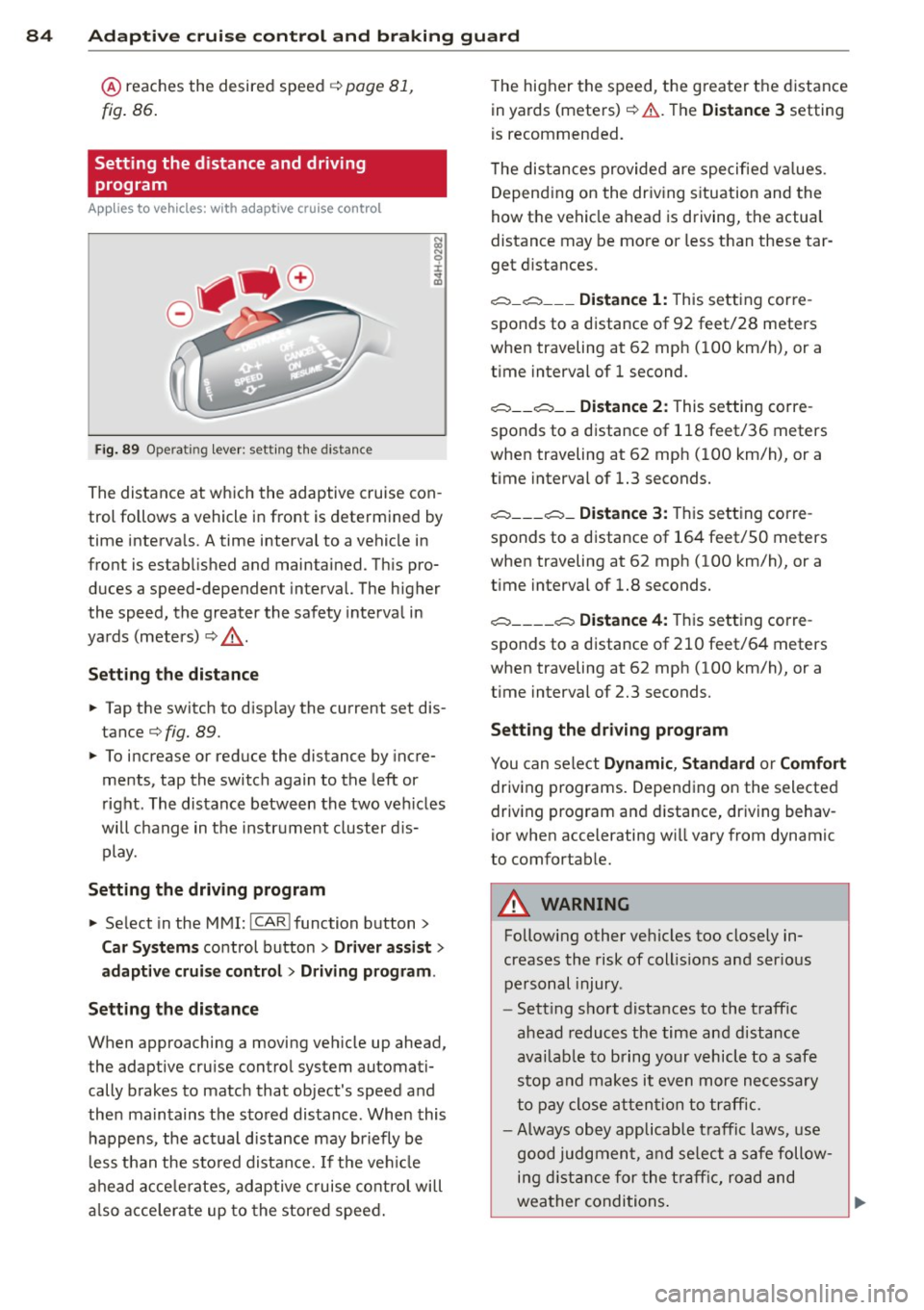
Fig. 89 Opera ting lever: set ting the distance
The distance at which the adaptive cruise con
trol fo llows a vehicle in front is determined by
time intervals. A time interval to a vehicle in
front is established and maintained. This pro
duces a speed-dependent interval. The higher
the speed, the greater the safety interval in
yards (meters)
i::> ,& .
Setting the distance
• Tap the switch to disp lay the current set dis
tance
i::> fig. 89.
• To increase or reduce the distance by incre
ments , tap the switch again to the left or
right . The distance between the two vehicles
wi ll change in the instrument cluster dis
play.
Setting the driving program
• Select in the MMI:
!CAR I function button>
Car Systems control button > Driver assist>
adaptive cruise control
> Driving program .
Setting the distance
When approaching a moving vehicle up ahead,
the adaptive cruise control system automati
cally brakes to match that object's speed and
then maintains the stored distance. When this
happens , the actual d istance may briefly be
less than the stored distance.
If the vehicle
ahead accele rates, adaptive cruise control will
also accelerate up to the stored speed. T
he higher the speed, the g reate r the distance
in yards (meters)
i::> .& . Th e Distance 3 setting
is recommended.
T he distances provided are specified va lues .
Depending on the driving situation and the
how the vehicle ahead is driving, the actua l
distance may be more or less than these tar
get distances .
c::::,_c::::, ___ Distance 1: This setting corre-
sponds to a distance of 92 feet/28 meters
when traveling at 62 mph (100 km/h), or a
t ime interval of 1 second.
c::::, __ c::::, __ Distance 2: This setting corre
sponds to a distance of 118 feet/36 meters
when traveling at 62 mph (100 km/h), or a
time interval of 1.3 seconds.
c::::, ___ c::::,_ Distance 3: This setting corre-
sponds to a distance of 164 feet/SO meters
when traveling at 62 mph (100 km/h), or a
t ime interval of 1.8 seconds.
c::::, ____ c::::, Distance 4: This setting corre-
sponds to a distance of 210 feet/64 meters
when traveling at 62 mph (100 km/h), or a
t ime interval of 2.3 seconds.
Setting the driving program
You can select Dynamic , Standard or Comfort
driving programs. Depending on the selected
driving program and distance, driving behav
ior when accelerating wi ll vary from dynamic
to comfortab le.
A WARNING
Following other vehicles too closely in
creases the risk of collis ions and ser ious
personal injury .
- Sett ing short distances to the traffic
ahead reduces the time and distance
availab le to bring your vehicle to a safe
stop and makes it even more necessary
to pay close attention to traffic .
-
-Always obey applicable traffic laws, use
good judgment, and select a safe follow
ing distance for the traffic, road and
weather conditions.
Page 87 of 294
Adaptive cruise control and braking guard 85
@ Tips
- Distance 3
is set automatically each time
you switch the ignition on.
- Your standard settings are automatically
stored and assigned to the remote con
trol key being used.
Audi braking guard
Descript ion
Applies to vehicles: with adaptive cruise contro l
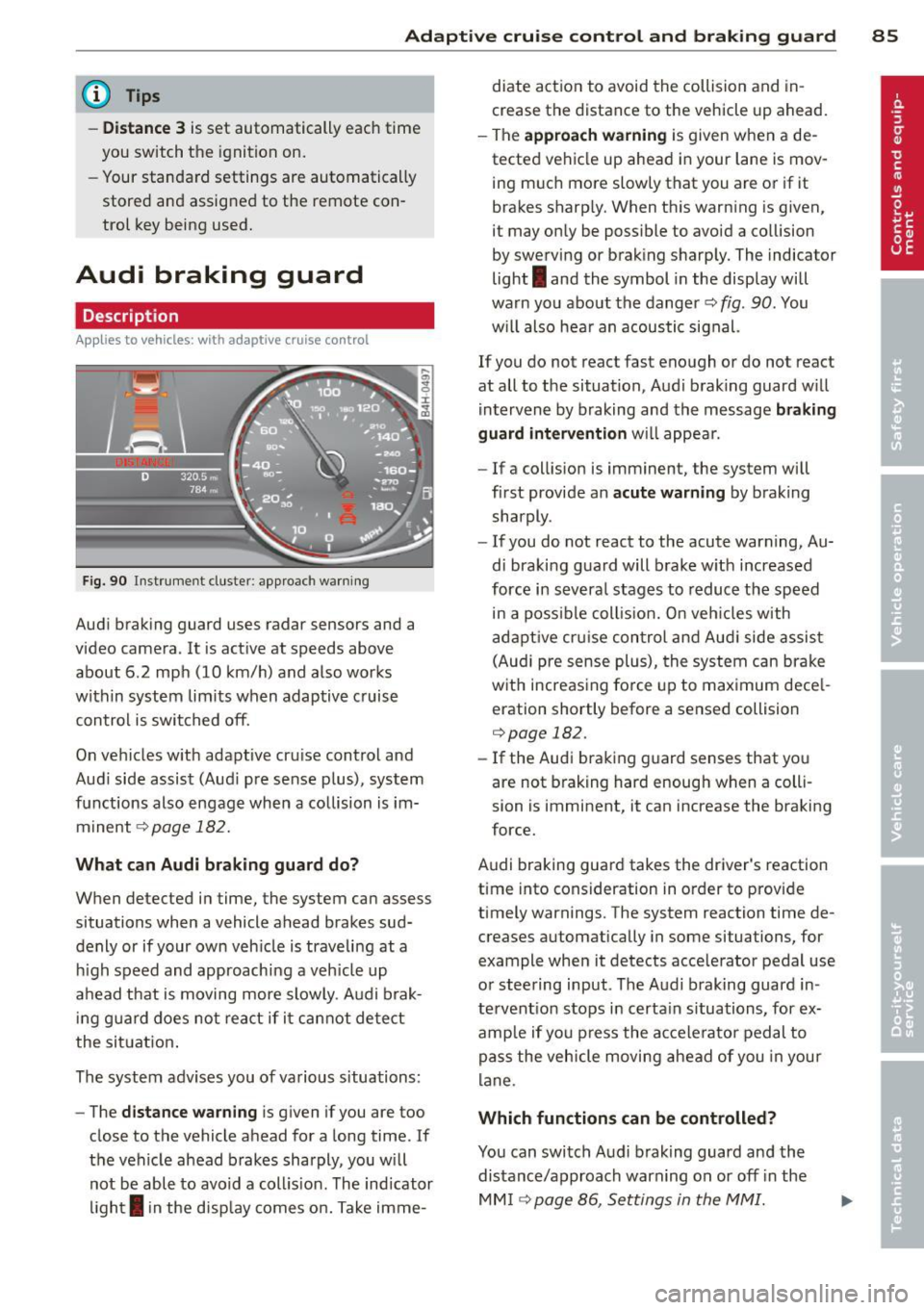
Fig. 90 Instrument cluster: approach warning
Audi braking guard uses radar sensors and a
video camera. It is active at speeds above
about 6.2 mph (10 km/h) and also works
within system limits when adaptive c ruise
control is switched off.
On vehicles w ith adaptive cru ise control and
Audi side assist (Aud i pre sense plus), system
functions also engage when a collision is im
minent
c::> page 182.
What can Audi braking guard do?
When detected in time, the system can assess
situations when a vehicle ahead brakes sud
denly or if your own veh icle is traveling at a
h igh speed and approaching a veh icle up
ahead that is moving more slowly . Audi brak
in g guard does not react if it cannot detect
the situation.
The system advises you of various s ituations:
- The
distance warning is given if you are too
close to the vehicle ahead for a long time. If
the vehicle ahead brakes sharply, you will not be able to avoid a coll is ion . The ind icator
light
I in the disp lay comes on. Take imme- diate action to avoid
the collision and in
crease the distance to the vehicle up ahead.
- The
approach warning is given when a de
tected vehicle up ahead in your lane is mov
ing much more slowly that you are or if it
brakes sharp ly. When this warning is given,
it may only be possible to avoid a collision
by swerving or braking sharply. The indicator
light
I and the symbol in the display will
warn you about the danger
c::> fig . 90 . You
w il l also hear an acoustic signal.
If you do not react fast enough or do not react
at all to the situation, Audi braking guard w ill
intervene by braking and the message
braking
guard intervention
will appear.
- If a collision is imminent, the system will
first provide an
acute warning by braking
sharply.
- If you do not react to the acute warning, Au
di braking guard will brake w ith increased
force in severa l stages to reduce the speed
in a poss ible collis ion. On veh icles with
adaptive cruise control and Audi side assist
(Audi pre sense plus), the system can brake
with increasing force up to maximum dece l
eration shortly before a sensed collision
c::>page 182.
-If the Audi braking guard senses that you
are not brak ing hard enough when a colli
sion is imminent, it can increase the braking
force.
Audi braking guard takes the driver's reaction
time into consideration in order to provide
timely warnings. The system reaction time de
creases automatically in some situations, for
example when it detects acce lerator pedal use
or steering input . The Audi braking guard in
tervent ion stops in certa in situations, for ex
amp le if you press the accelerato r pedal to
pass the vehicle moving ahead of you in your
lane .
Which functions can be controlled?
You can switch Audi braking guard and the
distance/approach warning on or
off i n the
MM I ¢ page 86, Settings in the MMI.
Page 96 of 294
94 Audi side assist
right of your travel lane, depending on wheth
er you drive in the center of your lane or closer
to the edge.
If you drive in narrow lanes, s ide ass ist's de
tection area may a lso include other lanes -es
pecia lly if you tend to drive on the edge of
your lane¢
fig. 99. Under these condit ions,
vehicles can also be detected that are two lanes away, and side assist then could switch
between the informat ional and warning stage
signals .
When driving in very w ide lanes, vehicles in
the adjacent lane may not be detected be
cause they are not inside the detection area .
Notes
Messages in instrument cluster display
Applies to vehicles: with side assis t
If side assist turns off automatically, the indi
cator light on the button wi ll go out and you
will see a message in the instrument cluster
d isplay:
Audi side assist: not available. sensors
blocked
The side assist sensors are built into the rear
bumper on the left and right (not visible on
the outside)
¢ page 88, fig. 91 . To ensure that
you do not adversely affect the way side assist
functions, foreign objects (such as stickers or
b icycle racks) should not be attached to the
a rea on the rear bumper where the sensors
are located. If side assist functions are ad
versely affected, you will see this message in
the instrument cluster display. Remove any
thing that may be blocking the sensors .
If no vehicle is detected for a longer period of
time while driving, side assist will also switc h
off a utomatica lly.
Audi side assist currently not available
If there is a temporary problem (such as the
ve hicle's battery charge being low), s ide ass ist
cannot be activated tempo rari ly.
Audi side assist: system fault
Have the system checked by an authorized Au
di dealer or qualified workshop.
Audi side assist: not available when
towing
T he radar senso r's view is limited when tow
ing a trai le r. For vehicles with a fa ctory instal
led towing hitch or a trailer hitch that was in
stalled later according to factory specifica
tions, side assist is automatically deactivated
as soon as the electrical connection to the
trailer's electrical socket is made, and this sta
tus message appears in the instrument clus
ter display . Deactivation cannot be guaran
teed when using a retrofitted towing hitch
that was
not installed according to factory
specifications.
Safety tips
Appl ies to vehicles : wi th side assist
The side assist detection may be limited when
driving aro und narrow street corners, on hilly
streets, and under poor weather cond itions.
It is possible that the radar sensors may also
detect other objects, such as high or stag
gered guardrails .
Side assist does not measure actual lane
width. The system assumes a fixed lane width.
Detection in the left and right lanes is based
o n this ass umed lane width . When driving on
narrow roads or when driving to the left or
right of the center of a trave l lane, it is poss i
ble that vehicles will be detected that are
not
in the lane next to the lane you are using.
A WARNING
- Improper reliance on the side assist sys
tem can cause collis ion s and serious per
sonal injury:
- Never rely only on side assist when
changing lanes .
- Always check rear view mirrors to make
sure that it is safe to change lanes.
- Side assist cannot detect all vehicles un-
der all conditions- danger of accident! ..,.
Page 100 of 294
98 Night vision assistant
Night vision assistant
Night vision assistant
with detected pedestrian marking
Description
App lies to vehicles: with night v isio n ass istant
Fig. 101 D isplay: n ight vis ion assistant
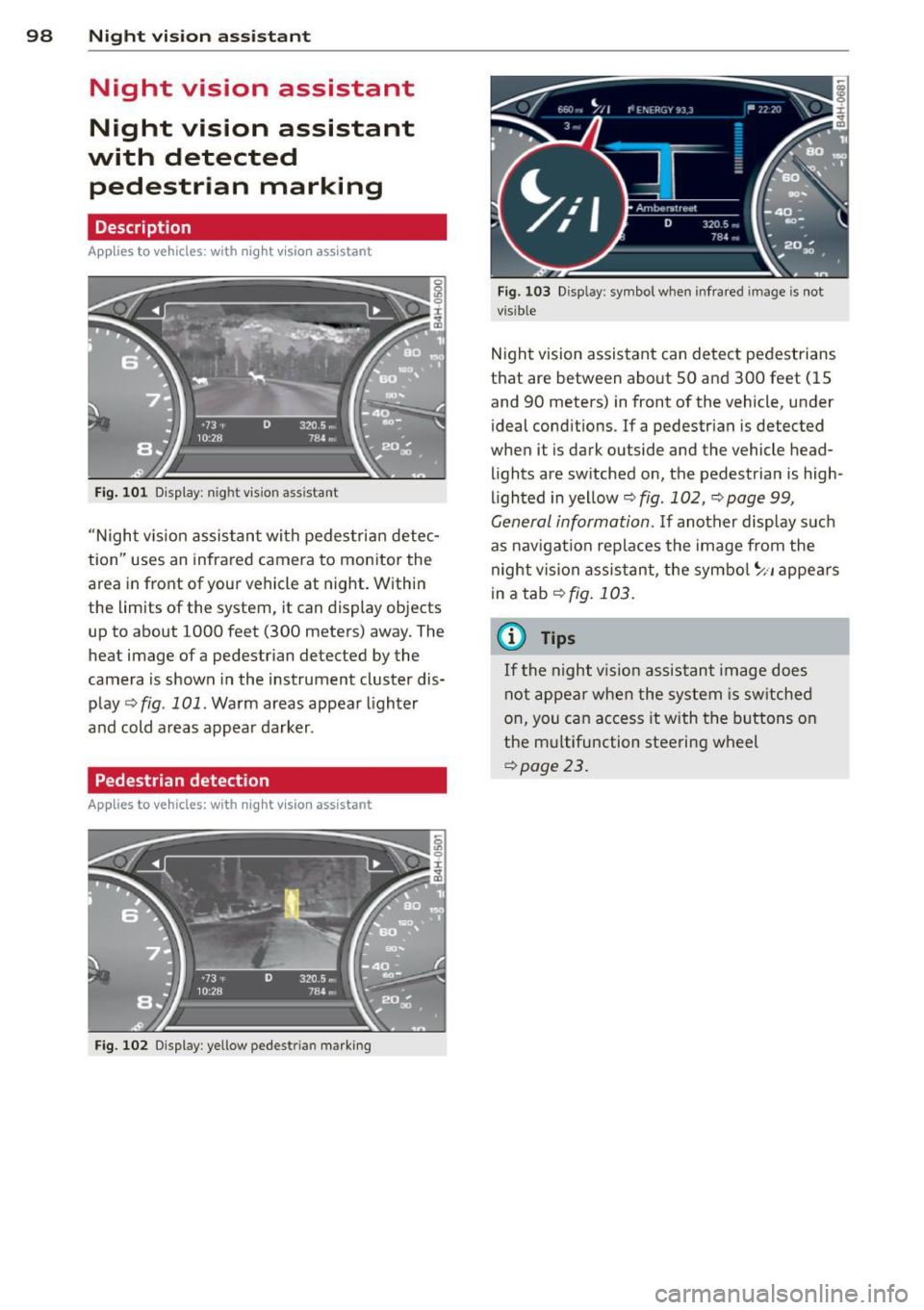
"N ight v is ion assistant with pedestrian detec
tion" uses an infrared camera to monitor the
area in front of your vehicle at night. Within
the limits of the system, it can display objects
up to about 1000 feet (300 meters) away. The
heat image of a pedestrian detected by the
camera is shown in the instrument cluster dis
play
q fig. 101. Warm areas appear lighter
and cold areas appear darker .
Pedestrian detection
Applies to vehicles: with n ig ht v ision ass istant
Fig. 102 Display : yellow pedestrian marking
Fig. 103 Disp lay: symbo l w hen infrare d im age is not
visible
Night vision assistant can detect pedestrians
that are between about SO and 300 feet (15
and 90 meters) in front of the vehicle, under
ideal conditions . If a pedestrian is detected
when it is dark outside and the vehicle head
lights are switched on, the pedestrian is high
lighted in yellow
q fig. 102, q page 99,
General information. If another display such
as nav igation replaces the image from the
night vision assistant, the symbol
~11 appears
in a tab
qfig. 103.
(0 Tips
If
th e night vi.sion assistant image does
not appear when the system is switched
on, you can access it with the buttons on
the multifunction steering wheel
qpage 23.
Page 106 of 294

104 Automatic Transmission
In the normal mode D , the transmission auto
matica lly selects the best gear ratio. It de
pends on eng ine load, veh icle speed and the
dynamic control program (DRP).
Select the
sport mode S for sporty driving .
The vehicle makes full use of the engine's
power. Shifting is more not iceable when accel
erating.
When the vehicle is stationary or at speeds
be low 3 mph (5 km/h), you must always apply
the foot brake before and while mov ing the
lever to
D/S out of N.
In certain circumstances it may be advanta
geous to temporarily switch to the manual
shift program to manually se lect gear ratios
to match specific driving conditions
¢page 105.
A WARNING
Read and follow all WARNINGS c> .&. in
Driving the automatic transmission on
page
102.
Q) Note
-
Coasting downh ill with the transmission in
N and the engine not running will result in
damage to the automatic transmission
and possibly the catalytic converter.
Automatic Shift Lock (ASL)
Applies to vehicles: with tiptronic
The Automatic Shift Lock safeguards you
against accidentally shifting into a forward or the reverse gear and causing the vehicle to
move unintentionally.
')
I
Fig. 111 Shift gate: se lector lever lock positions and
interlock button highl ighted
T he selector lever lock is released as follows:
., Tur n the ignition on.
., Step on the brake pedal.
At the same time
press and hold the interlock button on the
side o f the gear selector knob
¢ fig. 111
with your thumb until you have moved the
selector lever to the des ired posit ion .
Automatic selector lever lock
The selector lever is locked in the P and N po
s iti ons when the ig nition is turned on. To
move the lever from these positions the driver
must depress the brake peda l. As a reminder
to the driver, the following warning appears in
the instrument cluster disp lay when the selec
tor is in
P and N :
When stationary apply footbrake while se
lecting gear
A time delay element prevents the selector
lever from locking when it is moved through
the
N position (going from R to D/S ). The
locking element will lock the se lector lever if
the lever is left in N (Neutral) for more than
approximately 1 second, without the brake
pedal being pressed .
At speeds above about 3 mph (5 km/h) the
Automatic Shift Lock is automatically deacti
vated in the
N position.
Interlock button
The lock button on the selector lever prevents
the lever from being accidentally shifted into
certain positions. Pressing this button deacti
vates the selector lever lock. Depending on
the direction of the sh ift, the selector lever
locks at different posit ions . The pos itions are
highlighted i n the illustration
¢fig . 111 .
Kick-down
Applies to veh icles: w ith tiptron ic
The kick-down feature allows the vehicle to
generate maximum acceleration .
When you press the accelerator pedal beyond
the resistance point that is reached at full
throttle, the transm iss ion w ill select a lower
Ill>
Page 130 of 294
128 Safety belts
Safety belts
General notes
Always wear safety belts!
Wearing safe ty bel ts correctly saves lives!
This chapter exp lains why safety be lts are nec
essary, how they work and how to adjust and
wear them correctly .
.. Read a ll the information that fo llows and
heed all of the instruct ions and WARNINGS.
A WARNING
Not wearing safety belts or wearing them
improperly increases the risk of ser ious
personal in jury and death .
- Safety belts are the sing le most effective
means avai lab le to reduce the risk of se
r ious injury and dea th in a utomob ile acci
dents . For your protection and that of
yo ur passenge rs, always co rrectly wear
safety belts when the vehicle is moving .
- P regnant women, injured, or physically
im paired perso ns mu st also use safety
bel ts . Lik e all veh icle occup ants, they are
more like ly to be ser iously injured if they
do not wea r safety be lts . The best way to
protect a fetus is to protect the mother -
throughout the entire pregnancy.
Number of seats
Your Audi has a total of four seating position s:
two in the front and two in the rear . Each seat
ing position has a safety belt .
A WARNING
Not wearing safety belts or weari ng them
improp erly increases th e risk of ser ious
pe rsonal i njury and dea th.
- N ever st rap more than one pe rson, in
cl uding small ch ild ren, into any belt.
It is
e speci ally dange rous to pla ce a safety
belt over a child s itting on yo ur lap.
- N ever le t mo re people ride in the ve hicl e
than there are s afe ty be lts avail able. -
Be s ure everyone riding in the vehicle is
properly restrained w ith a separate safe
ty belt or child restra int.
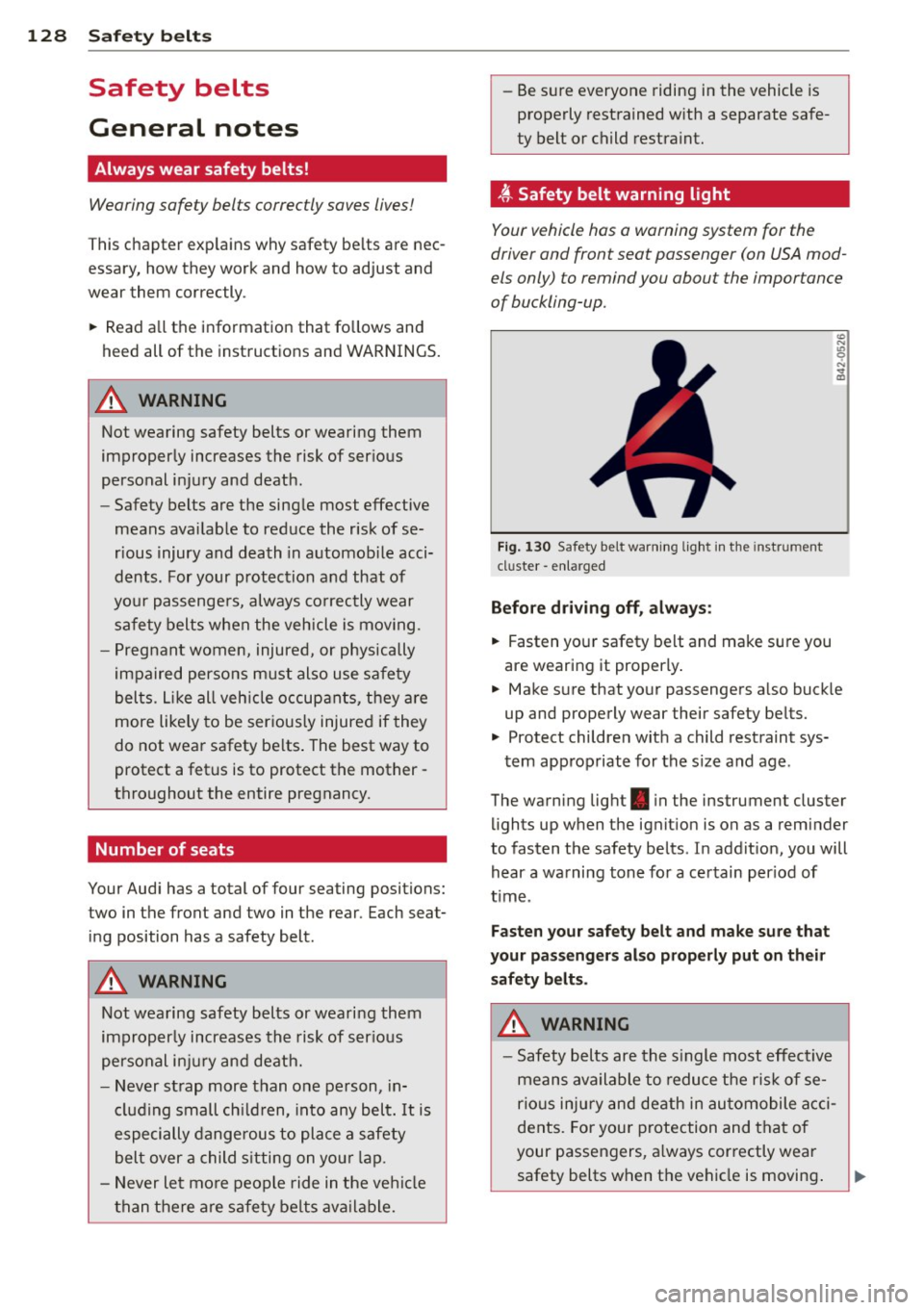
t Safety belt warning light
Your vehicle hos o warning system for the
driver and front seat passenger (on USA mod
els only) to remind you abou t the impor tance
of buckling-up .
Fi g. 130 Safety bel t warni ng lig ht in the inst rum ent
cl uster -e nl ar ged
Before driving off, alway s:
.. Fasten you r safety belt and make sure you
are wearing it properly .
.. Make s ure that your passengers a lso buck le
up and properly wear their safety be lts.
.. Protect children wit h a child restraint sys-
tem app ro priate for the s ize and age .
The warn ing light . in the instrument cluster
li ghts up when the ignit ion is on as a reminder
to fasten the safety belts . In addit ion, you will
hear a wa rning tone fo r a ce rtain per iod of
t ime .
Fasten your safety belt and make su re that
your pass eng ers also properly put on their
s afety belt s.
A WARNING .....=-
- Safety b elts are the s ingle most eff ect ive
means availa ble to redu ce t he ri sk of se
rio us inju ry and de ath in au tomobile a cci
dents. Fo r you r protection and that of
your passengers, a lways correctly wear
safety belts w hen t he vehicle is moving .