parking brake AUDI A7 2012 User Guide
[x] Cancel search | Manufacturer: AUDI, Model Year: 2012, Model line: A7, Model: AUDI A7 2012Pages: 294, PDF Size: 73.33 MB
Page 104 of 294

102 Automatic Transmission
Automatic
Transmission
tiptronic®
Introduction
Applies to vehicles: with tiptro nic
Your vehicle is equipped with an electronically
controlled automatic transmission. Upshifting
and downshifting takes place
automatically.
The transmission is also equipped with tip
tronic ®.
It allows the driver to shift gears
manually if desired ¢ page 105.
Driving the automatic transmission
Applies to vehicles: with tiptronic
Fig. 109 Shift gate o n the center console: selecto r lev ·
er w ith release button
Starting the engine
• The selector lever must be in P or N.
Starting off
• Press and hold the brake pedal.
• Press and hold the release button in these
lector lever handle and move the selector
lever from
P or N to 0/5 and re lease the but·
ton¢ .&_.
• Wait briefly until the transmission has shift·
ed (you will feel a slight movement).
• Remove your foot from the brake pedal and
accelerate.
Rocking back and forth to become
unstuck
• Shift only between D/5 and R when the ve·
hicle is at a full stop and the engine is run
ning at idle speed.
Stopping
• Press and hold the brake peda l until the ve
hicle has come to a comp lete stop.
• Keep the brake peda l depressed so that the
vehicle cannot roll forward or backward
while it is idling
c:> .&_ .
.,. Once stopped,
do not depress the accelera
tor pedal to rev up the engine
c:> .&_ .
Parking
• Press and hold the brake pedal until the ve
hicle has come to a complete stop.
• Set the parking brake firm ly
c:> page 75 ,
Parking .
.,. Press and hold the release button in these
lector lever handle, move the selector lever
into
P and then let go of the release button
Q .&_.
The selector lever must be in
P or N. If one of
the driving positions is engaged a safety
switch will prevent the engine from being
sta rted . See also
c:>p age 71.
Before you move the selector lever from the P
posit ion, you must always apply the brake
peda l before and while depressing the button
in the handle of the selector lever.
_&. WARNING
- Unintended vehicle movement can cause
serious injury .
- When the selector lever is in a driving
pos ition, the vehicle may creep, even at
idle speed. Therefore do not release
the parking brake or foot brake unti l
you are ready to move, because power
is transmitted to the wheels as soon as
a driving position is engaged.
- Do not accelerate while selecting a
driving position. At this time the en
gine must be at idle speed so that un
due stress is not placed on the clutches
in the transmission .
- Remember: Even when stopped briefly with the automatic transmission in D/S
or R, engine power is being transmit·
ted to the wheels. Your veh icle cou ld
Page 105 of 294
"creep" forward or backward. When
stopped, keep the brake pedal fully de
pressed and use the park ing brake if
necessary to keep the veh icle from roll
ing.
- If the selector lever is unintentionally
moved into N wh ile you are driving, take
your foot off the accele rator pedal and
wait for the engine to return to idle speed before selecting a d riving position.
- Never shift into R or P when the vehicle is in motion.
- Never get out of the driver's seat when
the engine is running.
- If you must get out of the vehicle, move
the se lector lever securely into the P po
sit ion and apply the par king brake firm ly.
- If the engine must remain running , never
have any driv ing position engaged when
chec king under the hood. Make sure the
selector lever has securely engaged and is locked in P with the parking bra ke
firmly set ¢
page 210, Engine compart
ment .
Otherw ise, any increase in engine
speed may set the vehicle in mot ion,
even with the parki ng brake applied.
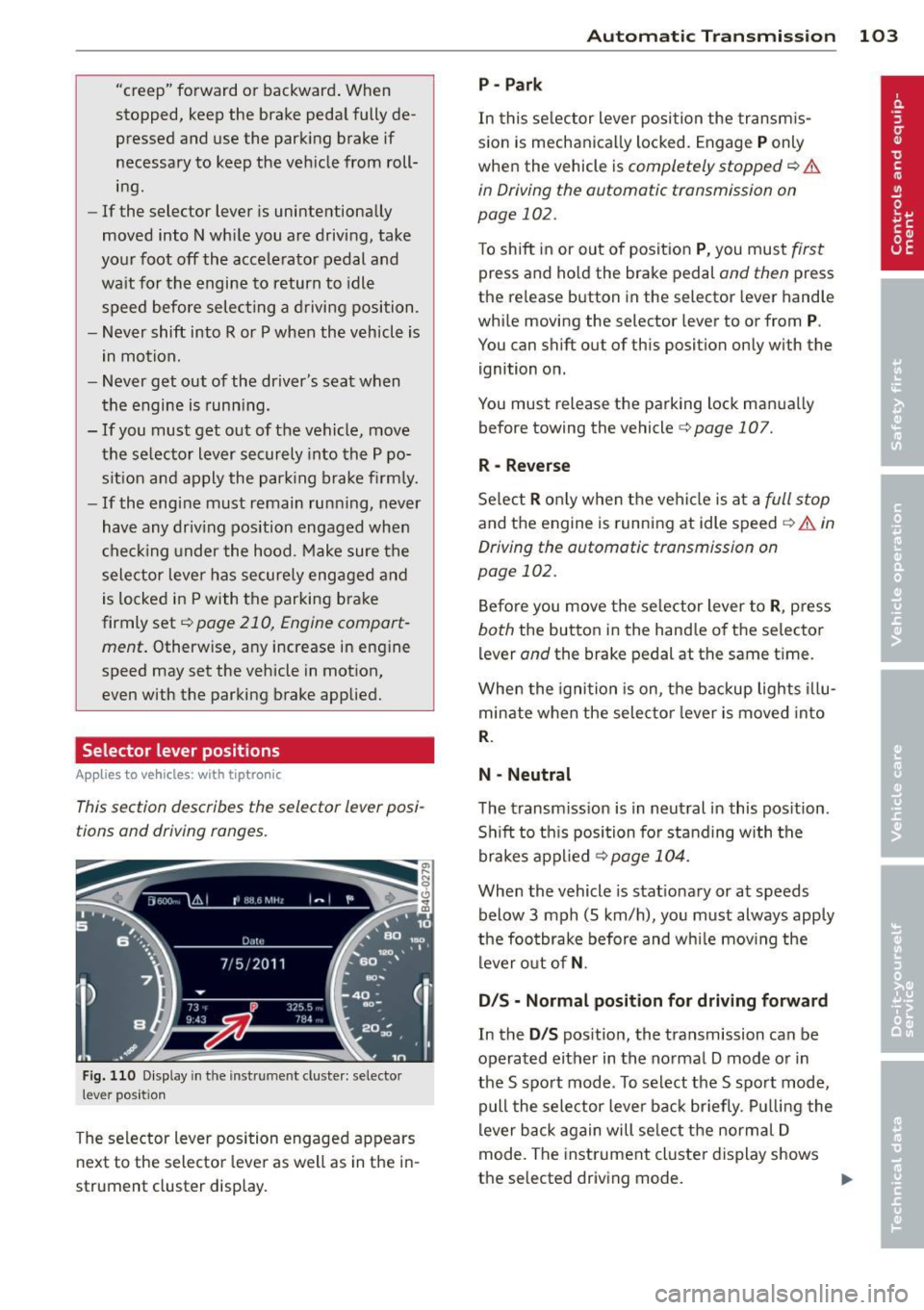
Selector lever positions
Applies to vehicles: with tiptronic
This section describes the selector lever posi
tions and driving ranges.
F ig . 1 10 D isplay in th e inst rument cluste r: selec to r
lever position
The selector lever position engaged appears
next to the selector lever as well as in the i n
strument cluster display.
Automatic Tra nsmi ssi on 10 3
P-Park
In this se lector lever posi tion the transm is
s ion is mechanica lly locked. Engage
P only
when the vehicle is
completely stopped ¢ &
in Driving the automatic transmission on
page 102.
To shift in or out of posit ion P , you mus t first
press and ho ld the brake pedal and then press
the re lease button in the selector lever hand le
whi le moving the selector lever to or from
P.
You can shift out of this position only with the
ignition on.
You must release the parking lock man ua lly
before towing the vehicle
c:> page 107.
R -Reverse
Se lect R o nl y when the vehi cle is at a full s top
and the engine is running at idle speed ¢ A in
Driving the automatic transmission on
page 102.
Be fore you move the se lector lever to R , press
both the button in the hand le of th e selector
lever
and the brake pedal at the same ti me .
When the igni tion is on, the backup lights illu
minate when the selec tor lever is moved into
R.
N -Neutral
The transm iss ion is in neut ral in this pos ition .
S hi ft to th is position for standing with the
brakes a pplied
¢ page 104.
When the vehicle is stat ionary or at speeds
below 3 mph (5 km/h), yo u must always apply
the foo tbrake before and w hile mov ing the
lever o ut of
N .
D/S - Normal posit ion for driving forward
In the D/S pos ition, the transmission can be
operated either in the no rmal D mode o r in
the S spo rt mode . To select the S spo rt mode,
pull the selector lever bac k br iefly . Pul ling the
lever b ack again will se lect the norma l D
mode. The inst rument cl uster display shows
the selected driving mode.
II>
Page 117 of 294
Homelink®
Universal remote
control
General information
Applies to vehicles: with Horne Link® universal remote
control
The Homelink universal remote control can
be programmed with hand -held transmitters
from existing equipment.
Using the Homelink universal remote control,
you can operate equ ipment such as garage
doors, property gates and house lights from ins ide your vehicle.
Using the Homelink universal remote control,
you can replace up to three separate hand
held transmitters for equipment on your
property with just one universal remote con
trol. Most of these transmitters a re used to
ope rate ga rage doo rs and p roperty gates. The
individua l transmitters are programmed at
the front bumper. That is where the control
module is located.
The transmitters must be programmed first in
order to operate systems using the Homelink universal remote control.
A WARNING
-
- Never use the Homelink ® transmitter
with any garage door opener that does have not the safety stop and reverse fea
ture as required by federal safety stand
ards . Th is includes any garage door open
er model manufactured before April 1, 1982.
- A garage door opener which cannot de
tect an object, signaling the door to stop
and reverse does not meet current feder
al safety standards. Us ing a ga rage door
opener without these features increases
risk of serious injury or death.
- For safety reasons never release the
parking brake or start the engine while
anyone is standing in front of the vehicle .
- A garage door or an estate gate may
sometimes be set in motion when the
Homelink ® 115
Homelink ® remote control is being pro
grammed.
If the device is repeatedly ac
tivated, t his can overstrain motor and
damage its electrical components - an
overheated motor is a fire hazard!
- To avo id possible injuries or property
damage, please always make absolutely
certain that no persons or objects are lo
cated in the range of motion of any
equ ipment being operated.
(D Tips
- If you would like additional information
on the Homelink ® Universal Transce iver,
Homel ink compatible products, or to
purchase other accessories such as the
Homel ink ® Lighting Package, please
contact Homelink at 1 -800 -355-3515 o r
on the Internet at www.homelink.com.
- For Declara tion of Comp liance to United
States FCC and Industry Canada reg ula
tions ~
page 2 76.
Page 118 of 294

116 Homelink®
Programming transmitters
Appli es to vehicles: with Horne link
You con program the buttons in the Home
Link universal remote control located in the
vehicle headliner.
Fig. 126 Co ntrol un it in the headliner
Fi g. 127 Left front area of the bumper
Programming a button
"' 0
9 C,
~
.. Make sure your veh icle is within operating
range of the remote controlled garage door
opener.
.. Set the parking brake
~ A in General infor
mation on page 115 .
.. Switch the ignition on. Do not start the en
gine!
.. There are two ways to program a button :
press the button that you would like to pro
gram . The MMI will display instructions to
guide you through the programm ing . Or
.,. Se lect :
ICARI funct ion button > Car systems
control button > Vehicle settings > Garage
door opener > Program garage door open
er .
.. Se lect the button that yo u wou ld like to
program.
.. Follow the instructions in the MMI.
.. If the garage door opening must also be
synchronized with the Homel ink module, refer to
the owner's manual for the garage
door opener .
Using the programmed button
.. Press the programmed button q ,& in Gen
eral information on page 115
to open the
ga rage door. The light @ will blink or turn
on.
.. Press t he button again to close the garage
door
q A in General information on
page 115.
Erasing the button programming
.. Select: I CAR I function button > Car systems
function key > Vehicle settings> Garage
door opener > Clear program settings
>
Yes .
Displaying the version/status/country
code
.. Select: I CAR I function button > Car systems
contro l button > Vehicle settings > Garage
door opener
> Version information .
You can program both fixed code and rolling
code systems using these instructions.
Programming a button
The requ ired distan ce between the handheld
transmitter and the Homelink module in the
bumper depends on the system that you are
programming. You may have to try several
times.
Each of the buttons can be reprogrammed in
dividua lly . The procedure is the same as fo r in
itial programming .
qpoge 116, Programming
a button.
Erasing the button programming
Individual buttons can be reprogrammed. Fol
low the same steps used when first prog ram
ming the button .
If you would like to erase all programmed but
tons at the same time, sele ct Erase button
programming .
Page 201 of 294
different weight distribution. Safety, perform
ance and economy wi ll greatly depend on how
carefu lly you load your trailer and operate
your rig.
Before you actua lly tow your trailer, practice
turning, stopping and backing up in an area
away from traffic. Keep practicing until you
have become comp letely fam iliar with the way
your vehicle- trailer combination behaves and
responds .
Backing up is d ifficult and requires practice.
Backing up with a trai ler generally requires
steering action opposite to that when backing up your vehicle without a trailer .
Maintain a greater distance between your ve
hicle and the one in front of you. You will need
more room to stop. To compensate for the
trailer, you will need a larger than normal
turn ing radius.
When passing, remember that you cannot ac
celerate as fast as you normally would be
cause of the added load. Make sure you have
enough room to pass . After passing, allow
p lenty of room for your tra iler before chang
ing lanes again.
Avoid jerky starts, sharp turns or rapid lane
changes.
(D Tips
- Do not tow a trailer during the break- in
period of your vehicle.
- If you tow a trailer, your Audi may re
quire more frequent maintenance due to
the extra load
¢ page 2 73 .
Parking on a slope
Do not park on a slope with a trailer. If i t can
not be avoided, do so only after doing the fol
lowing:
When parking:
.. Apply the foot brake .
.. Have someone place chocks under both the
vehicle and the trailer wheels.
Trailer towing 199
.. With chocks in place, slowly release the
brakes until the wheel chocks absorb the
load .
.. Turn the wheels towards the curb .
.. Apply the parking brake.
.. Select the
P selector lever position .
When restarting after parking:
.. App ly the foot brake.
.. Start the engine .
.. Select the
D/S selector lever position.
.. Release the parking brake and slowly pull
out and away from the wheel chocks .
.. Stop and have someone retr ieve the wheel
chocks.
(D Tips
If you move the selector lever of the auto
matic transmission to
P before applying
the pa rking brake and before blocking the
whee ls, you may have to use more force
lat er to move the lever out of the
P posi
tion.
•
•
Page 218 of 294
216 Checking and filling
Checking and filling Engine hood
Releasing the engine hood
The engine hood is released from inside the
vehicle .
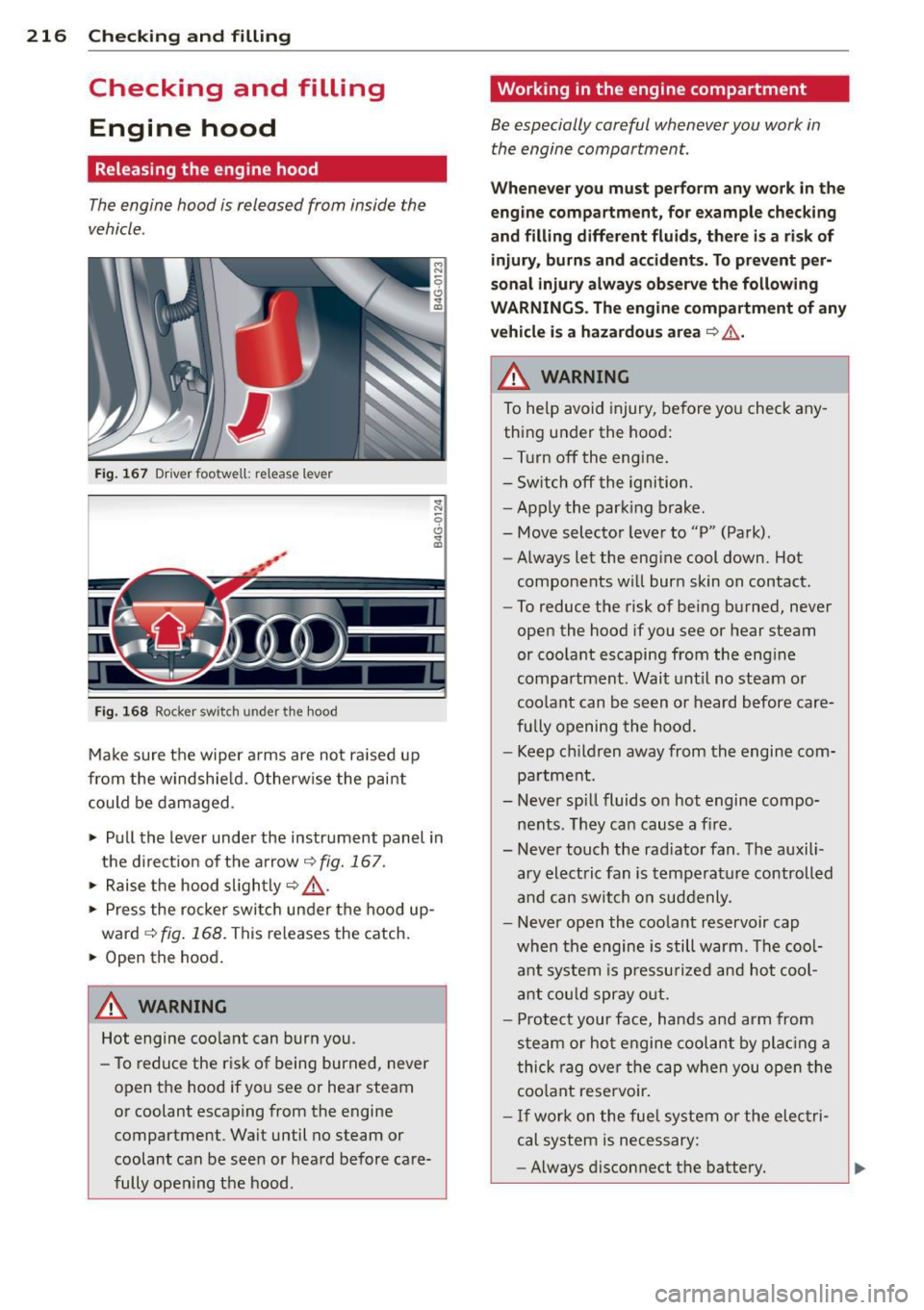
Fig. 167 Driver foo twell: release lever
Fig. 168 Rocker switch un der the hood
Make sure the wiper arms are not raised up
from the windshield. Otherwise the paint
could be damaged.
.,. Pull the lever under the instrument panel in
the direction of the arrow
~ fig. 167.
.,. Raise the hood slightly~.&_ .
... Press the rocker switch under the hood up
ward
~ fig. 168. This releases the catch.
... Open the hood.
&_ WARNING
Hot engine coolant can burn you.
- To reduce the risk of being burned, never
open the hood if you see or hear steam
or coolant escaping from the engine compartment . Wait until no steam or
coolant can be seen or heard before care
fully opening the hood .
' Working in the engine compartment
Be especially careful whenever you work in
the engine compartment.
Whenever you must perform any work in the
engine compartment, for example checking
and filling different fluids, there is a risk of injury, burns and accidents. To prevent per
sonal injury always observe the following
WARNINGS. The engine compartment of any
vehicle is a hazardous area
~ ,&. .
/n.. WARNING
To help avoid injury, before you check any
thing under the hood:
- Turn off the engine.
- Switch off the ignition .
- Apply the parking brake.
- Move selector lever to "P" (Park) .
- Always let the engine cool down. Hot
components will burn skin on contact.
- To reduce the risk of being burned, never
open the hood if you see or hear steam
or coolant escaping from the engine
compartment. Wait until no steam or
coolant can be seen or heard before care
fully opening the hood.
- Keep children away from the engine com
partment.
- Never spill fluids on hot engine compo
nents . They can cause a fire .
- Never touch the radiator fan. The auxili
ary electric fan is temperature controlled
and can switch on suddenly .
- Never open the coolant reservoir cap
when the engine is still warm . The cool
ant system is pressurized and hot cool
ant could spray out.
- Protect your face, hands and arm from
steam or hot engine coolant by placing a
thick rag over the cap when you open the
coolant reservoir.
- If work on the fuel system or the electri
cal system is necessary:
- Always disconnect the battery.
Page 219 of 294
-Never smoke or work near heate rs or
open flames. Fluids in the engine com
partment could start a fire.
- Keep an approved fire extinguisher im
mediately ava ilable.
- To avoid electrical shock and persona l in
jury while the engine is running or be ing
started, never touch:
- I gnition cables
- Other components of the high voltage
electronic ignition system.
- If you must pe rform a check or repa ir
with the engine running:
- F irst, fully apply the parking brake,
move selector lever to "P" (Park) .
- Always use extreme caution to prevent
clothing, jewelry, or long hai r from get
ting caught in the radiator fan, V-belts
or other moving parts, or from contact ing hot parts. T ie back hair before
starting, and do not wear cloth ing that
will hang or droop into the eng ine.
- Min imize exposure to emission and
chemical hazards
c:> &,.
A WARNING
California Propos ition 65 Warning:
- Engine exhaust, some of its constituents,
and certai n veh icle components co nta in
or em it chemicals known to the State of
Californ ia to cause cancer a nd b irth d e
fects a nd rep roduct ive ha rm. In addi tion,
c e rta in fluids cont ained in vehicle s and
certain p rod ucts of component wear con
tain or emit chemicals known to the
State of Ca lifo rnia to cause cancer and
birth defects or other reproductive harm.
- Battery posts, terminals and re lated ac
cessories contain lead and lead com-
Checkin g and fillin g 217
pounds, c hemicals known to the State of
California to cause cancer and reproduc
tive harms. Wash hands after handling.
([) Note
When adding fluids, always make su re that
they are poured into the p roper conta iner
or fi ller opening, otherwise serious dam
age to vehicle systems w ill occur .
@ For the sake of the environment
To detect lea ks in time, inspect the vehicle
floor pan from underneath regular ly. If
you see spots from oil or other veh icle flu
i ds, have you r vehicle inspected by an au
thorized Audi dea ler.
Closing the engine hood
.. Pull the hood down until the pressure from
t he st ruts is reduced.
.. Let the hoo d
drop down and latc h in p lace.
Do not try to push it shut; it may fail to en
gage 9 A_ .
A WARNING
-
A hood that is not completely latched
could fly up and b lock your view while dr iv
ing.
- When you close the engine hood, check it to make sure t he safety catch has prope r
ly engaged. The hood shou ld be flush
with the surround ing vehicle body parts .
- If you notice while driv ing that the hood
is not secured prope rly, stop at once and
close it. •
•
Page 256 of 294

254 What do I do now?
-Never st ore the inflatable spare tire or
jack and tools in the passenger com
partm ent.
- Always s tore a ll jacking equipment,
too ls, and the inflatable spare tire in
the luggage compartment.
- Tighten the knurled retaining screw for
the inflatable spare tire securely.
Changing a wheel
Before changing a wheel
Observe the following precautions for your
own and your passenger's safety when chang
ing a wheel .
" After you experience a tire fa ilure, pull t he
ca r well away from moving traffic and try to
r each
level gro und before you stop c::> ,&. .
" All passengers sho uld leave the car and
move to a safe loca tion (fo r inst ance, behind
the g uardrail)
c::> ,&. .
" Engage the parking brake to prevent your
vehicle from ro lling unintentionally
c::> ,&. .
" Move selecto r lever to pos ition Pc::> ,&. .
" If you are tow ing a trailer, unh itch the tra il
er from your veh icle .
" Take the
jack and the spare tire out of the
l uggage compartment
c::> page 252 ,
c::> page 253.
.&_ WARNING
You or your p assengers cou ld be injured
while changing a whee l if you do not fol
low t hese safety preca utions:
- If you have a fl at t ire, move a safe dis
tance off the road . Tur n off the engine,
t ur n the emergency flas hers o n and use
other warning dev ices to alert other mo
torists .
- Make su re that passengers wait in a safe
place away from the vehicle and well
away from the road and traff ic.
- To help p revent the veh icle from mov ing
sudden ly and possibly slipping off the
jack, always fully set the parking brake and block th e whee l diago na lly opposite
-
the wheel be ing changed . When one
front wheel is lifted off the ground, plac ing the Automatic Transmission in "P"
(Park) will
not prevent the vehicle from
mov ing .
- Before you change a wheel, be sure t he
ground is level and firm. If necessary, use a sturdy board under the jack .
- After insta lling the spare wheel, make
sure tha t you replace the fla t tire/wheel
i n its storage area prope rly and tighten
the knurled retain ing screw secu rely.
Changing a wheel
When you change a wheel , follow these
quence described below step-by-step and in
exactly that order.
1. Remove the decorative wheel cover* . For
more details see also
c::> page 255, Deco
rative wheel covers
or c::> page 255,
Wheels with wheel bolt caps.
2 . Loosen the wheel bolt s c::>page 255.
3. Loc ate the p roper moun ting poin t for th e
jac k an d align the jack be low that poin t
c::>page 256 .
4. Raise the car with the jack c::> page 256.
5. Remove the wheel with the flat tire and
then insta ll
the spare c::> page 257.
6. Tig hte n all whee l bolts lightly .
7.
Lower the vehicle wi th the jack .
8 . Use the wheel bolt w rench and
firmly
t ig ht en al l w heel bo lts c::> page 25 5.
9. Re place the decora tive wheel cover* .
A WARNING
Always read and fo llow all WA RNINGS and
i nformat io n
c::> & in Raising the vehicle on
page 257
and c::> page 258 .
After changing a wheel
A wheel change is not complete withou t the
doing the following .
" Replace the too ls and the jac k in their prop-
er lo cat io n. .,.
Page 264 of 294

262 Fuses and bulb s
Fuse panel @ (black )
No . Equ ipment Amps
=
8
Headlight range adjustment/
5/7,5
adaptive lighting system
10 Left headlight (headlight with
7,5
adaptive light)
Fuse panel
@ ( brown )
No .II Equ ipm ent
II Amp s
1 Climate control 10
2 Climate control system blower 40
3 Diagnostic connector 10
4 Electrical ignition lock 5
5 Power steering column adjust-
ment
5
Steering column switch module 10
7 Power steer
ing column adjust-
ment 25
8 Light switch
Luggage compartment fuse assignment
Fig. 196 Luggage compartment: fuse panel with plas·
tic bracket
Fuse panel @ (bl ack )
No. II Equipment
I[ Amp s
4 E lectromechanical parking brake 30
5 Electromechanical parking brake 30
6 Front door (front passenger's
35
side)
7 Rear exterior lighting Rear sun shade, closing aid, lug
s gage compartment lock, con
venience key, START ENGINE
STOP, fuel filler door 30
20
-Fuse pane
l@ (blac k) I
No. Equipm ent Amps
=· 9 Power seat adjustment 15
10 Parking system
s
30
Fus e pane l
B (red)
No . Equipment Amps
1 Left belt tensioner
25
Right belt tensioner 25
3 Socket 20
20
Electromechanical parking brake
5
adaptive air suspension 15
7 Rear door (front passenger's
35
side)
Rear exterior lighting 30
9
Luggage compartment lid con-
30
t rol module
10 Telephone 5
11 Sound amp lifier 30
12 Rear spoiler 20
Fuse pane l c (b rown )
No. Equipment Amps
1 Rad
io receiver, Sound amplif ier/
30/20
MMI unit/dr ives
2 Tank leak detection system 5
AEM control module/battery 15/
4
module 7,5
6 Battery fan 35
Rad io receiver
7,5
7,5
9
Automatic dimming interior
5/15
rearview mirror/battery module
Parking system 5
Fu se panel o (gre en)
No. Equipment Amps
1 Audi pre sense 5
2 Electromechanical parking brake 5
3 adaptive a
ir suspension
5
Automatic transmission 7,5
...
Page 281 of 294

Manual shift program . . . . . . . . . . . . . . 105
Selector lever .................. ... 103
Shift buttons . . . . . . . . . . . . . . . . . . . . . 106
Steering wheel with tiptronic . .. .. .. . 106
Automatic wipers .......... .. .. .. .... 45
Auto Safety Hotline ............ ... .. 126
Average consumption .......... ... .. .. 23
Average speed . . . . . . . . . . . . . . . . . . . . . . . 23
Avoid damaging the vehicle .. .. .. .. .. . 193
B
Battery ... .. .. ............. .. .. ... 226
Charging . .. ............. .... .. ... 229
Important warnings ...... .. .. .. .. . 227
Jump starting ............... ... ... 264
Location ... ... .. .. ...... .. .. .. .. . 227
l ow . .. .. .. .. ... .. ..... ... .. .. .. . 190
Replacing the battery ..... .. .. .. .. . 230
State of charge ........... .... .. ... 190
Winter operation ............ ... .. . 226
Working on the battery ....... ... .. . 227
Before driving . . . . . . . . . . . . . . . . . . . . . . 118
Blended gasoline .......... .... .. .. . 211
Blower (automatic climate control) . . . . . . 68
Blower (climate control) . . . . . . . . . . . . . . . 65
Body cavity sealing ............ ... .. . 205
Booster seats ............. .. .. .. .. . 172
Brake fluid Changing the brake fluid ....... ... .. 226
Checking the brake fluid level ... ... .. 225
What is the correct brake fluid level? .. 225
What should I do if the brake fluid warn-
ing light comes on? ....... .. .. .. .. . 225
Brake system Anti-lock braking system . ......... ... 18
Brake assist system .......... .... .. 184
Brake booster ............ .... .. .. . 188
Brake fluid .............. .... .. .. . 225
Brake fluid specifications for refill and re-
placement ................. ... ... 226
Brake light defective ......... ... .. .. 20
Brake pads . ............. .... .. ... 192
Electromechanical parking brake .. .. .. 74
Fluid reservoir ........... .... .. .. . 225
How does moisture or road salt affect the
brakes? .. ............ ...... .... .. 187
Index 279
Warning/indicator lights ............. 14
Worn brake pads symbol ............. 19
braking guard . . . . . . . . . . . . . . . . . . . . . . . 79
Messages . .. .. .. .... ........... .. . 86
Settings .. .. .. .. ................. . 86
Break-in period .. .... .. .. ...... ..... 192
Brake pads ...... .. ............... 192
T ires ... .. .. .. .. ... .. .......... .. 192
Bulbs .... .. .. .. .. .. ............... 263
C
California Proposition 65 Warning ..... 217
Battery specific .. .... ............. 228
Capacities .. .. .. .. .... ........... .. 272
Engine oil ........................ 218
Car care .. .. .. .. .. .. . .. .... ........ 200
Exterior ... .. .. .... ... .. ..... ..... 200
Interior . .. .... .. .. . .............. 206
Cargo area . . . . . . . . . . . . . . . . . . . . . . . . . 124
Cargo net . . . . . . . . . . . . . . . . . . . . . . . . . . . 61
Catalytic converter ................. . 193
Center armrest Cockpi t ..... .. ................... .
Sl
Central locking . . . . . . . . . . . . . . . . . . . . . . 31
Emergency locking . ............... .. 35
Certification ...... .. ............... 276
Changing a wheel .. ............. .. .. 254
Changi ng engine oil .... ............. 222
Chassis (undercoating) ............... 205
Checking Engine coolant level ............ .... 223
Tire pressure . .. .. ................. 237
Child restraints Danger of using child restraints in the
front seat ........................ 139
Where can I get additional information
about child restraints and their use? .. 181
Child restraint system anchors ....... . 177
Child safety ....... .. ..... .......... 163
Convertib le locking retractor ......... 17 4
Important safety instructions for using
child safety seats . .. ........... .... 167
Important things to know when driving
with children .. .... ............... 163
Tether anchors ..... .............. . 180
Tether straps .. .. ................. 180
•
•