lights AUDI A7 2012 Owner's Manual
[x] Cancel search | Manufacturer: AUDI, Model Year: 2012, Model line: A7, Model: AUDI A7 2012Pages: 294, PDF Size: 73.33 MB
Page 44 of 294
42 Clear vision
visibility conditions. For example, fog cannot be detected by the light sensors.
So always switch on the headlights
io
under these weather conditions and
when driving in the dark.
- Crashes can happen when you cannot see
the road ahead and when you cannot be
seen by other motorists . Always turn on
the headlights so that you can see ahead and so that others can see your car from
the back.
(D Note
The rear fog lights should only be turned
on in accordance with traffic regulation, as
the lights are bright for following traffic.
@ Tips
-In the event of a light sensor malfunc
tion, the driver is notified in the instru
ment cluster display~
page 21.
-You will hear a warning tone if you open
the driver door when the exterior lights
are switched on.
- Please observe legal regulations when
using the lighting systems described .
Emergency flasher
The emergency flasher makes other motorists
aware that you or your vehicle are in an emer
gency situation.
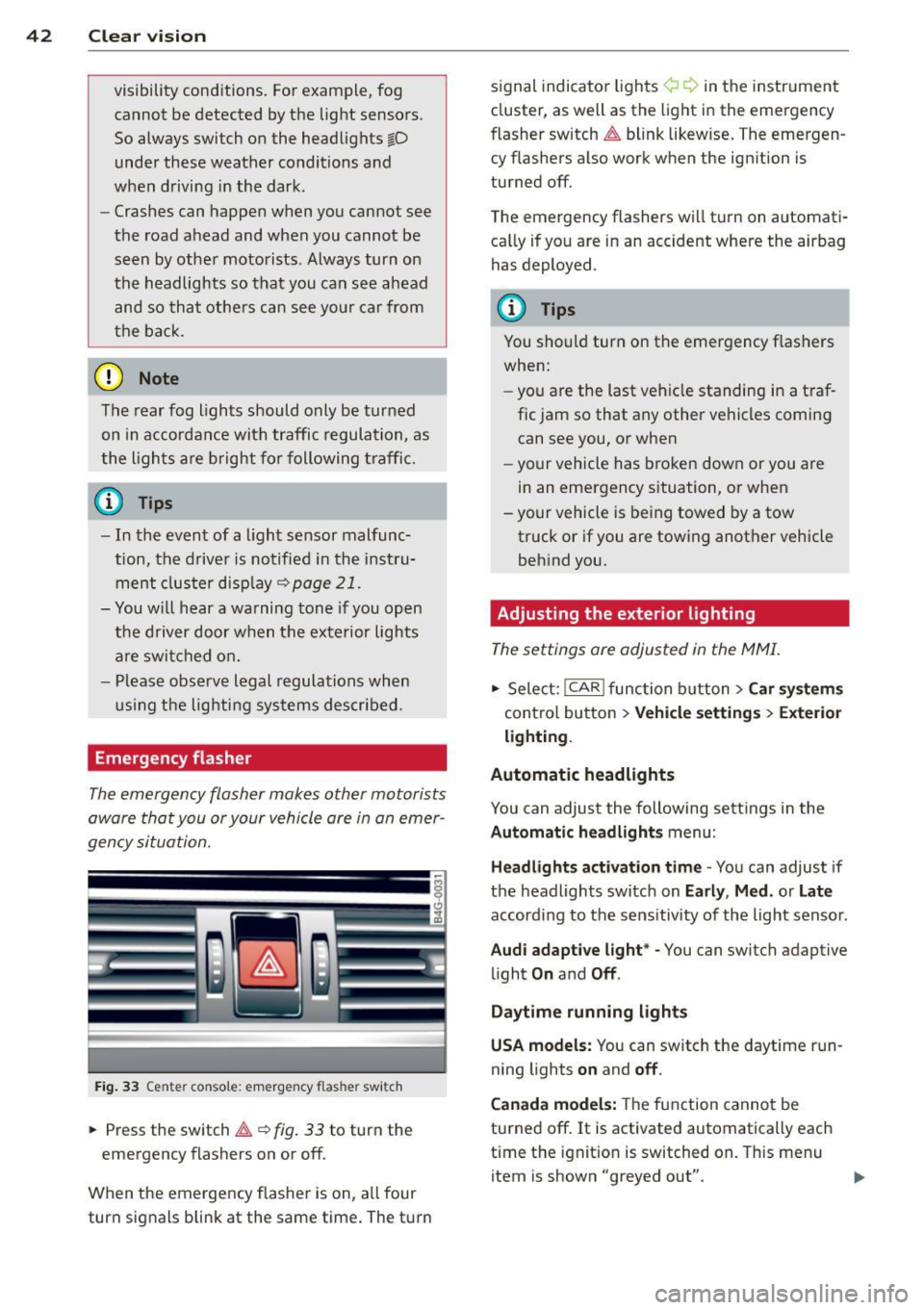
Fig. 33 Center console : emerge ncy flasher switch
• Press the switch~~ fig. 33 to turn the
emergency flashers on or off.
When the emergency flasher is on, all four
turn signals blink at the same time. The turn signal
indicato r lights ¢ Q in the instrument
cluster, as well as the light in the emergency
fl asher switch ~ blink likewise. The emergen
cy flashers also work when the ignition is
turned off.
The emergency flashers will turn on automati
cally if you are in an accident where the airbag
has deployed .
(D Tips
You should turn on the emergency flashers
when:
- you are the last vehicle standing in a traf
fic jam so that any other vehicles coming
can see you, or when
- your vehicle has broken down or you are
in an emergency situation, or when
- your vehicle is being towed by a tow
truck or if you are towing another vehicle
behind you.
· Adjusting the exterior lighting
The settings ore adjusted in the MMI.
• Select: I CAR I function button > Car systems
control button > Vehicle settings> Exterior
lighting.
Automatic headlights
You can adjust the following settings in the
Automatic headlights menu :
Headlights activation time -You can adjust if
the headlights switch on
Early , Med. or Late
according to the sensitivity of the light sensor .
Audi adaptive light* -You can switch adaptive
light
On and Off .
Daytime running lights
USA models:
You can switch the daytime run
ning lights
on and off.
Canada models:
The function cannot be
turned off.
It is activated automatically each
time the ignition is switched on. This menu
item is shown "greyed out".
Page 45 of 294
Coming home , Leav ing home
The coming home function il luminates the
area outside the vehicle when you switch the
ignition off and open the driver 's door . To turn
the function on, select
Light s when le aving
c a r > On .
The leav ing home function illuminates the
area outside the vehicle when yo u un lock the
veh icle . To turn the function on, select
Li gh ts
when unloc kin g ca r> On.
The coming home and leaving home functions
only operate when it is dark and the light
switch is in the
AUTO pos ition.
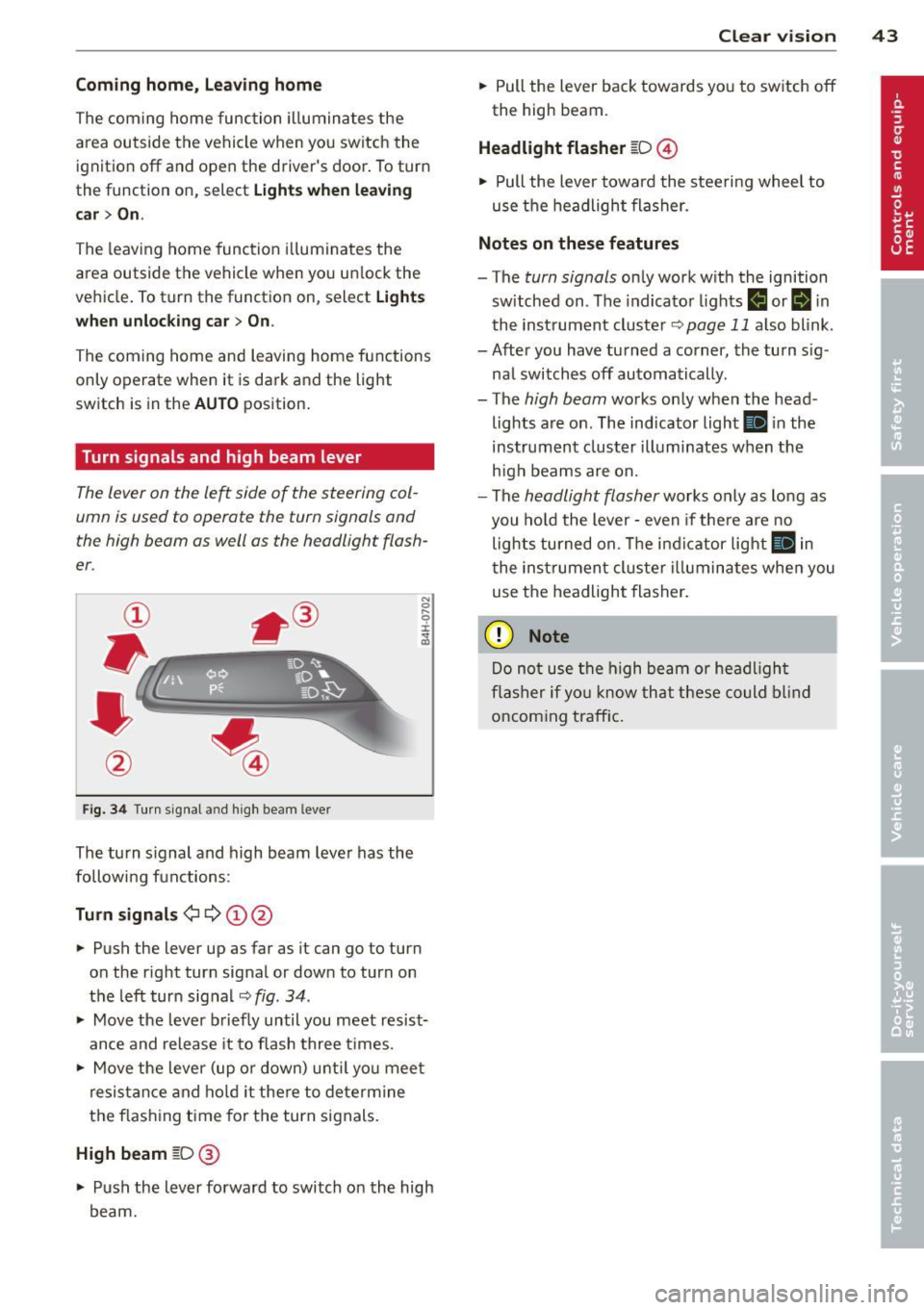
Turn signals and high beam lever
The lever on the le~ side of the steering col
umn is used to operate the turn signals and
the high beam as well as the headlight flash
er .
Fig. 3 4 Tu rn signal a nd h igh beam lever
The turn s ignal and high beam lever has the
followi ng functions:
Tu rn sign als ¢ ¢ @@
.. Push the lever up as far as it can go to turn
on the r ight turn signal or down to turn on
the left turn sig nal
c:::;, fig . 34 .
.. Move the lever b riefly until you meet resist
ance and release it to flash three times .
.. Move the lever (up or down) unti l you mee t
resistance and ho ld it there to dete rmine
the f las hing t ime for the turn signals.
High beam [D @
.. Push the lever forward to switch on the high
beam.
Clear vi sion 43
.. Pull the lever back towards you to switch off
the high beam.
Headlight fla sher [D ©
.. Pull the lever towa rd the stee ring wheel to
use the headlight flasher.
Note s on these features
- The turn signals on ly work with the ignition
sw itched on . The indicator lights
f,j or II in
the inst rument cluste r
~page 11 also blink.
- After you have turned a corner, the turn s ig -
nal switches off automatically .
- The
high beam works only when the head
lights are on . The indicator light
Ill in the
instrument cluster illuminates when the
h igh beams are on.
- The
headlight flasher works only as long as
you hold the lever -even if the re a re no
lights turned on. The indicator light
Ill in
the inst rument cluster i lluminates whe n you
use the headlight flasher.
(D Note
Do no t use the high beam or headligh t
flasher if yo u know that these could blind
oncoming traffic.
Page 46 of 294
44 Clear vis ion
Interior lights
Front and rear interior lighting
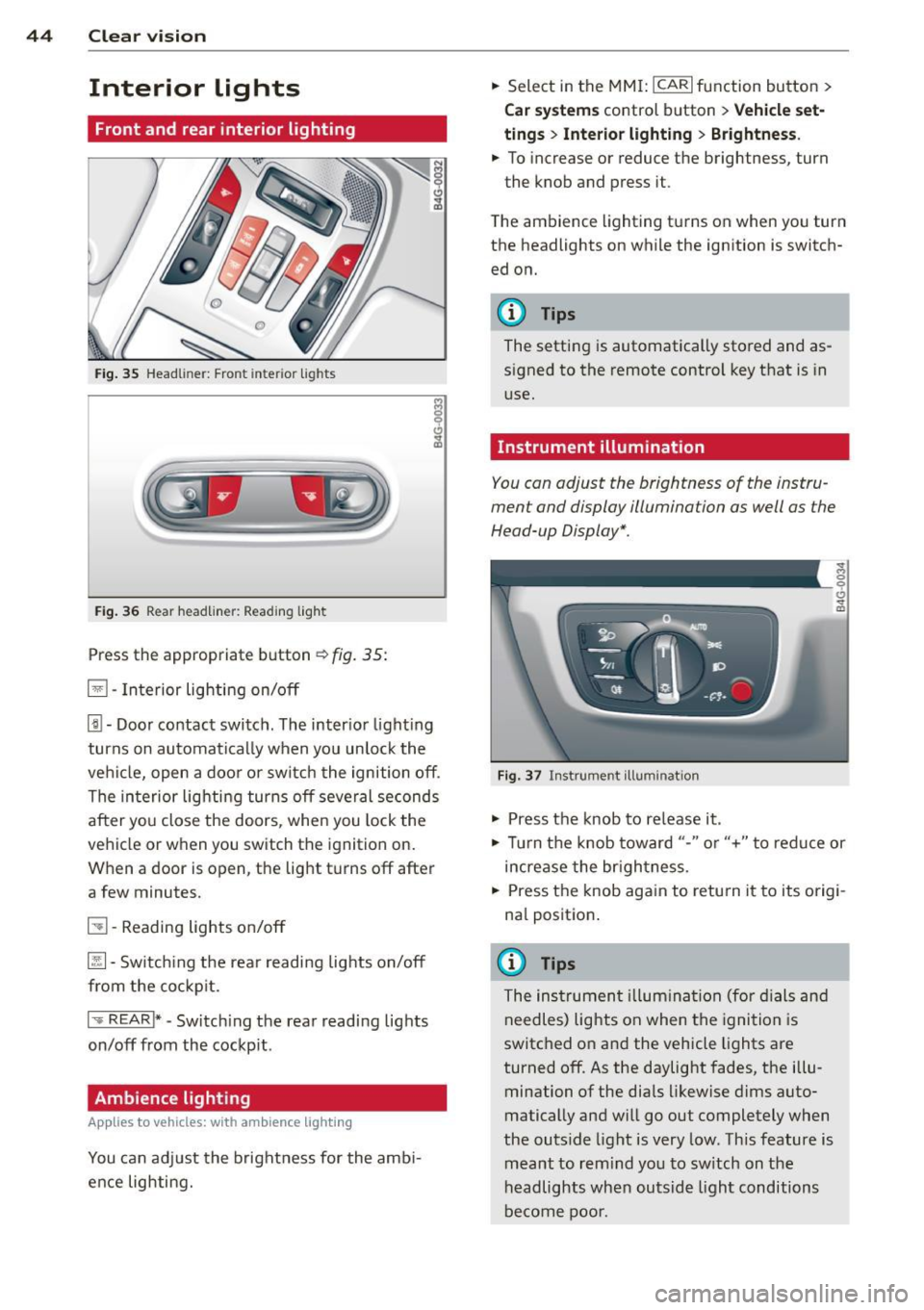
Fig. 35 Head liner: Fron t int eri or ligh ts
Fig. 36 Rear headlin er: R ead in g light
Press the appropriate b utton ~ fig. 35:
El -Interior lighting on/off
[j) -Door contact switch . The inter io r l ight ing
turns on automatically when you unlock the
vehi cle, open a doo r or switch the ignition off .
The interior lighting turns off several seconds
after you close the doors , when you lock the
vehicle or when you switch the ignition on.
When a door is open, the light t urns off after
a few minutes.
51 -Reading lights o n/off
~ -Sw itch ing the rear readi ng lights on/off
from the co ckpit.
I .,.. REAR !* -Switch ing the rear reading lights
on/off from the cockp it .
Ambience lighting
Appl ies to vehicles: wit h ambience lighting
You can adj ust the brightness for the amb i
ence lighting. .,.
Select in the MM I: ICARlfunction button>
C ar sys tem s control button > Vehicle set
ting s
> Interio r light ing > Brightne ss .
.,. To increase or reduce the brightness, turn
the knob and press it .
T he ambience lighting turns on when you turn
the headlights on while the ignition is switch ed on.
@ Tips
The setting is automatically stored and as
signed to the remote control key that is in
use.
Instrument illumination
You can adjust the brightness of the instru
ment and display illumination as well as the
Head-up Display *.
F ig. 37 In strume nt ill umin ation
.,. Press the knob to re lease it .
~ 0
"'
.,. Tur n the knob toward "-" or"+" to redu ce or
increase the br ightness.
.,. Press the knob aga in to retu rn it to its origi
na l position .
(I} Tips
The instrumen t illum ina tion (for dials and
needles) lights on when the ignition is
switc hed o n and the vehicle lights are
turned off . As the daylight fades, the illu
mination of the dia ls likewise d ims auto
matically and will g o out completely when
the outs ide light is very low. This feature is
meant to rem ind yo u to sw itch on the
headlights when outsid e light conditions
be come poo r.
Page 47 of 294
Vision
Sun visors
( J
Fig. 38 Sun v isor
The sun visors for the driver and passenger
can be released from their brackets and
turned toward the doors
c::> fig. 38 @.
The mirror light switches on when the cover
over the vanity mirror @opens.
Sun shad e
Applies to vehicles: with s un shade
The sun shade is located on the luggage com
partment shelf.
F ig. 3 9 Sun sh ade i n lowe red pos iti on
When the sun shade is in the lowered posi
tion, it is secured in the retainer @.
.. To raise @ the sun shade, remove it from
the retainer .
A WARNING
Do not use the sun shade to secure ca rgo .
The luggage compartment cover is not a
surface fo r stor ing objects. Objects placed
on the cover co uld end anger all vehicle oc
c upants d uri ng sudden braking ma neuvers
or in a cras h. Clear vi
sion 45
Wiper and washer
system
Switching the windshield wipers on
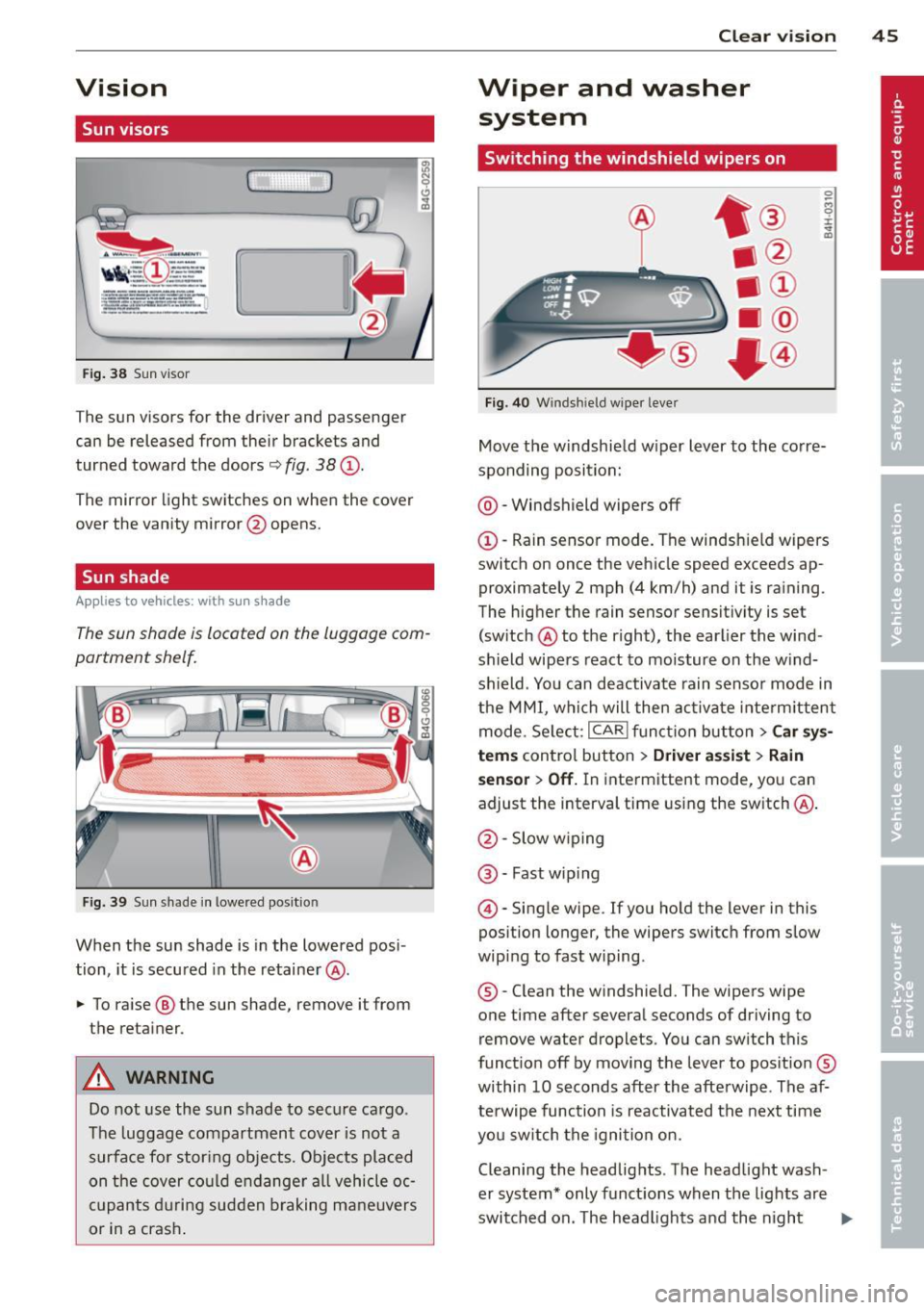
Fi g. 40 W ind shield wiper leve r
Move the w indshie ld w iper lever to the co rre
sponding position:
@ -Windshield wipers off
©-Rain sensor mode. The windsh ield wipers
switch on once the vehicle speed exceeds ap
proximately 2 mph (4 km/h) and it is ra ining .
The hig her the rain sensor sensitivity is set
(sw itch @to th e right), the earlier the wind
shield wipe rs react to moisture on the w ind
shield . Yo u can deactivate rain senso r mode in
the MMI, whi ch will then ac tivate inte rm ittent
mode. Se lect:
I CAR I fu nct io n but ton> Car sy s
tems
contro l button > Driver a ssist > Rain
sensor > Off.
In inte rmittent mode, yo u can
adjust the interval time using the switch @.
@ -Slow w iping
@ -Fast wip ing
© -Single wipe . If you hold the lever in this
position longer, the wipers switch from slow
wip ing to fast w iping.
® -Clean the w indshie ld. The wipers wipe
one time after severa l seconds of driving to
remove water droplets. You can switch this
funct io n off by moving t he lever to pos itio n®
within 10 seconds after the afte rwipe . The af
terwipe function is reactivated the next time
yo u s witch the igni tion on.
Cleaning the headlig hts . The head light wash
er system* only funct ions when the lights are
switched on. The headligh ts and the night
II>
Page 50 of 294
48 Clear vis ion
another gear, the new mirror position is stor
ed and assign ed to the key you a re using.
The mirror goes back in to its origina l posit io n
once yo u drive forward faster than 9 mph (15
km/h) or switch the ignition
off.
~ WARNING
- Curved ( i.e. convex) mirror s urfaces in
crease your field of view. Remember that
vehicles or other objects will appear
smaller a nd fa rther away than when seen
in a flat m irror . If you use this mirro r to
est imate distances of following vehicles
when changing lanes, you cou ld estimate
incorrectly and cause an ac cident .
-
@ Note
-If the mirro r hous ing is moved uninten
t ionally (for example, whi le park ing your
vehicle), then you must first fo ld the mi r
r or electri cally. Do not readjust the m ir
r or ho us in g manua lly . You could damage
the motor which con trols the mirror .
- If you wash t he vehi cle in an au tomatic
c ar wash, yo u m ust fold the e xterior m ir
rors in to reduce the risk of damage to
the mirrors. Never fold power fo lding ex
terior mi rrors* by hand. Only fold them
i n and out us ing t he power contro ls.
@ Tips
- The exterior mirror settings are stored
with the memory funct ion *
~ page 53.
- If there is a malfunct ion i n the elect rical
system, you can still adjust the exter ior
mirrors by pressing the edge of the mir
ror.
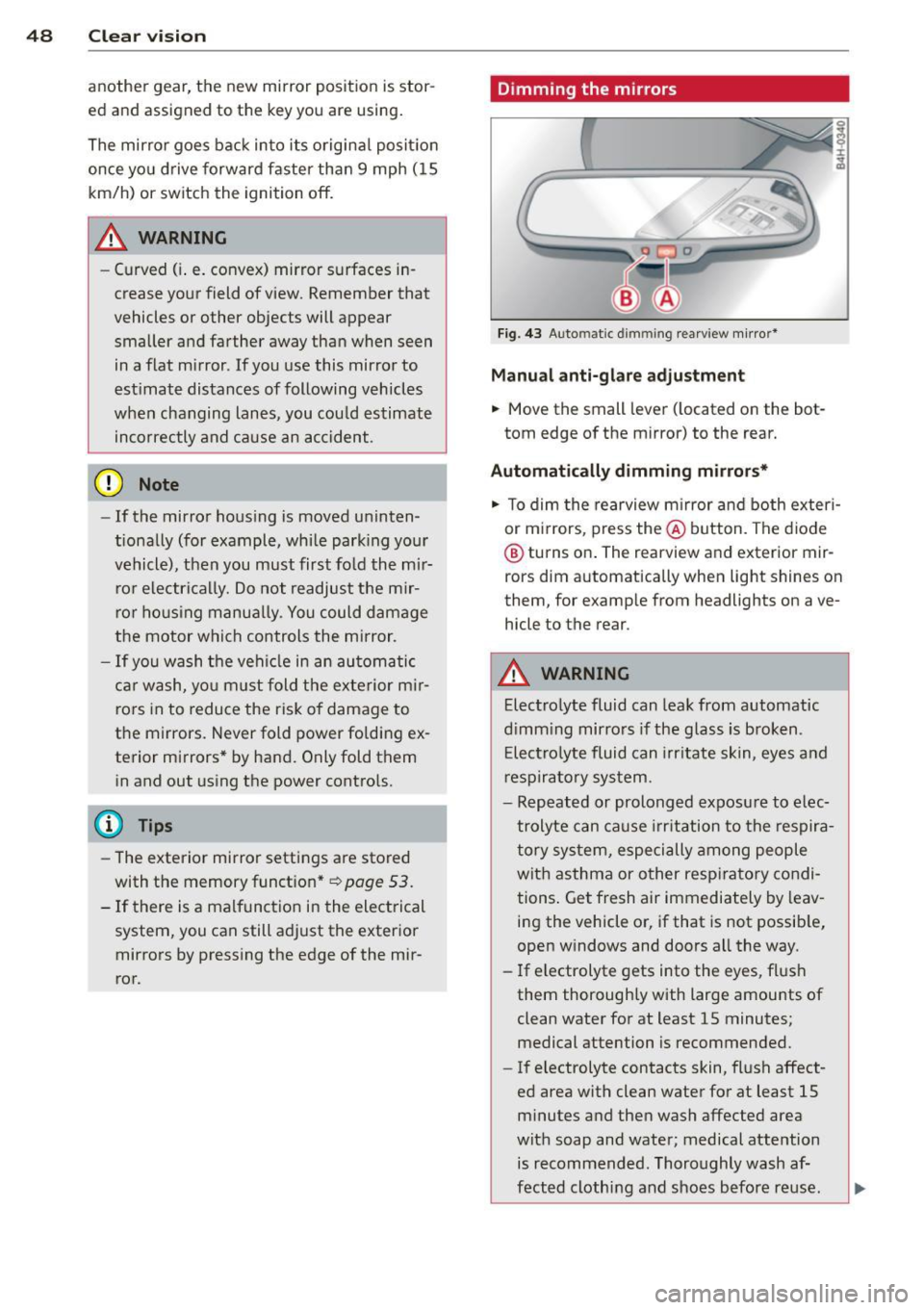
Dimming the mirrors
F ig . 4 3 Auto ma tic d immin g rearview mirro r*
Manu al anti-glare adjustment
.,. Move the small leve r (located on the bot
tom edge of the mirror) to the rear.
Automatically dimming mirrors*
.,. To dim the rearview m irror and both exteri
or m irrors, press the@ button . The diode
® turns on . The rearview and exterior mir
rors dim automatically when light shines on
them, for examp le from headlights on ave
hicle to the rear .
A WARNING
=
Electrolyte fluid can lea k from automatic
d imm ing mirro rs if the g lass is broken .
E lectro lyte fluid can irr itate sk in, eyes a nd
r espira to ry system .
- Repeated or prolonged exposu re to e lec
trolyte can ca u se irritation to the respira
t ory sys tem, especially among people
wit h asthma or other resp iratory condi
tions . Get fresh air immediately by leav
ing the vehicle or, if that is not possib le,
open w indows and doors all the way .
- If electrolyte gets into the eyes, fl ush
them thorough ly with large amou nts of
clean water for at least 15 minutes; medical attention is recommended.
- If electrolyte contacts skin, fl ush affect
ed area with clean water for at least 15 minutes a nd then wash affected area
with soap and water; medical atte ntion
is recommended. Thoroughly wash af
fect ed clothing and shoes before re use .
Page 56 of 294
54 Seats and storage
• To recall a seating profile, press and hold
the memory button until the seat is adjust
ed to the stored settings .
• To sw itch the memory function for the driv
er or front passenger off, press the
I OFF I
button . The word OFF lights up when the
memo ry fu nction is switched off. Seating
profiles will not be stored.
.&, WARNING
-For safety reasons, the seat se tting
should only be recalled when the vehicle
is stationary -otherwise yo u risk havi ng
an accident.
- If necessary, you stop the process by
pressing the
IOF FI button or any of the
memory buttons .
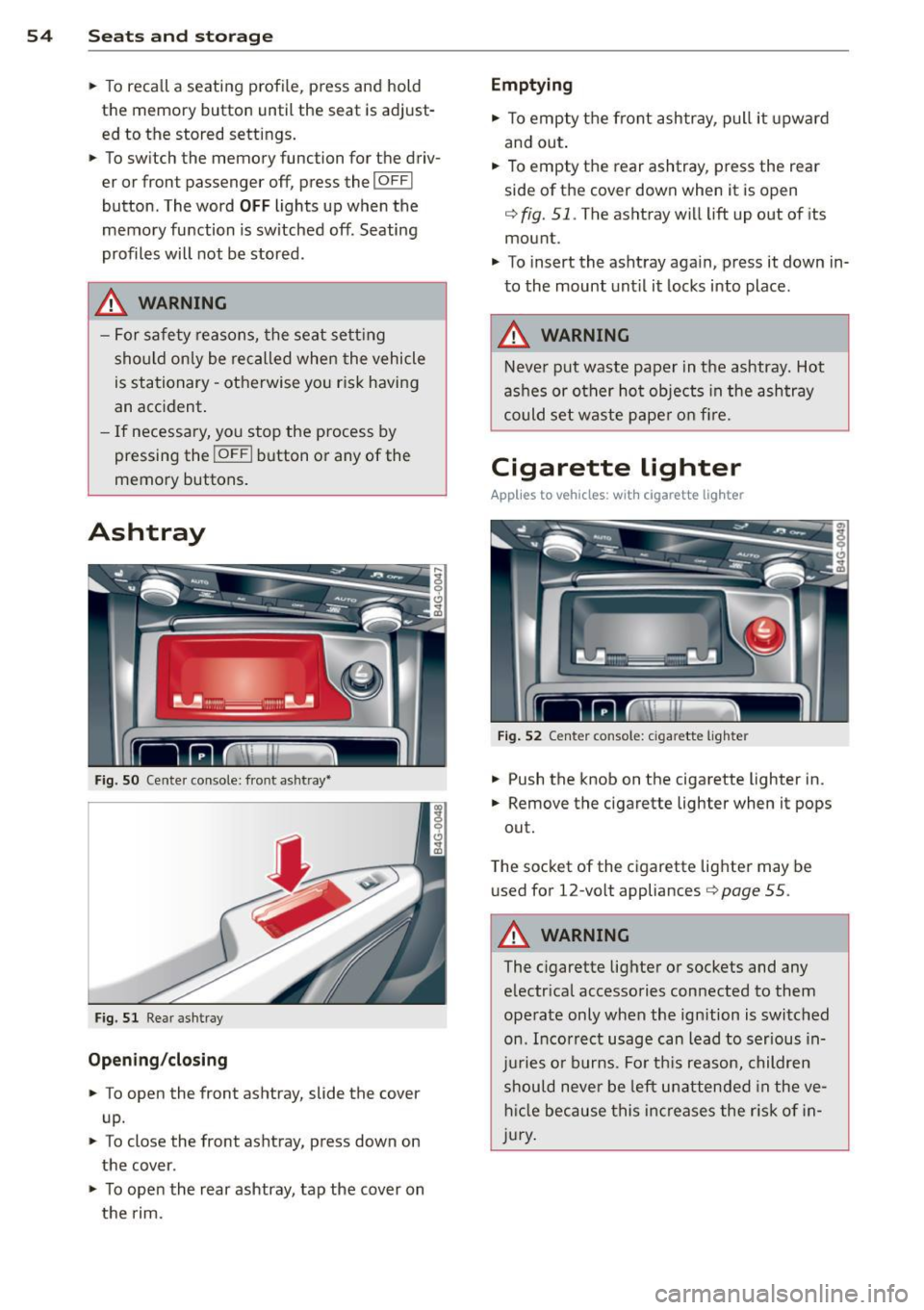
Ashtray
Fig. S O Cente r console: front ashtray•
Fig. 51 Rear ashtray
Opening /closing
• To open the front ashtray, slide the cover
up.
• To close the front ashtray, press down on
the cover .
• To open the rear ashtray, tap the cover on
the rim.
Emptying
• To empty the front ashtray, pull it upward
and out.
• To empty the rear ashtray , press the rear
side of the cover down when it is open
q fig. 51. The ashtray will lift up out of its
mount.
• To insert the ashtray aga in, p ress it down in
to the mount unt il it locks into place .
.&, WARNING
-Neve r put waste paper in the ashtray. Hot
ashes or oth er ho t objects in the ashtray
could set waste pape r o n fire.
Cigarette lighter
Applies to veh icles: w ith cigarette lighter
F ig. 52 Center console: cigarette lighte r
• Push the knob on the cigarette lighter in.
• Remove the cigarette lighter when it pops
out.
T he socket of the cigarette lighte r may be
used for 12-volt appliances
Q page 55 .
.&, WARNING
-
The cigarette lighter or sockets and any
e lectr ica l accessories con nected to them
operate only when the ign ition is switched
on . Incorrect usage can lead to serious in
j u ries or burns . Fo r th is reason, children
should never be left unatten ded in the ve
h icl e because this inc reases the r is k of i n
j u ry .
-
Page 75 of 294

-If you leave the vehicle with the ignition
switched on, the ignition will switch off
after a certain period of time . Please
note that e lectrica l equipment such as
exterior lights will switch off as well
when that happens.
Stopping the engine
.,. Bring your vehicle to a complete stop.
.,. Move the selector lever to the
P or N posi
t ion.
.,. Press the
!START ENGINE STOPI button
¢page 71, fig. 76.
Emergency off
If necessary, the engine can be sw itched off
with the selector leve r in the
R or D/ S posi
tion . The engine stops if you p ress the
I START ENGINE STOPI button at speeds below
6 mph (10 km/h) and press the brake pedal.
A WARNING
- Never turn off the engine until the vehi
cle has come to a complete stop.
- The brake booster and power steering
only work when the engine is running. If
the engine is off, you have to use more
force when steering or braking. Because
you cannot steer and brake as you usua l
ly would, this could lead to crashes and
serious injur ies.
- For safety reasons, you should always
park your vehicle with the selector lever
in P. Othe rwise, the veh icle could inad
vertent ly roll away.
- After the engine has been switched off,
the radiator fan can continue to r un for
up to 10 minutes - even with the ign it ion
swit ched off.
It can a lso swi tch on aga in
after some time if the coo lant tempera
ture rises as the result of a heat buildup
or if the engine is hot and the engine
compartment is additionally heated by
the sun's rays.
On th e road 73
(D Note
Do not stop the engine immediately after
hard or extended driving. Keep the engine
running for approximately two minutes to
prevent excess ive heat bu ild-up.
Starting the engine if there is a
malfunction
It may not be possible to start the engine un
der certain circumstances, for example if the
battery in the vehicle key is drained, if inter
ference is affected the key or if there is a sys
tem malfunction.
F ig . 77 Center console/master key: start ing the eng ine
i f there is a malfunction
Requirement : The message K ey not recog
nized . Ho ld back of k ey against mark ed area .
Se e own er's manual.
must appear and the in
di cator light
I] must swi tch on.
.,. Hold the master key vertically in the loca
tion indicated
y >>) 9 fig. 77.
.,. Press the b rake pedal¢
& in Starting the
engine on page
72.
... Press the '"" I s"'T ,..,A ""'R ,.,,T ,..., E"' N...,. G = I N~ E-=s"'T '""o '"" P,..,I button.
The engine will start.
... Drive to your authorized Audi dea ler imme
diately to have the malfunction corrected.
(D Tips
You can view the message again by press i ng the
I STAR T ENGINE STOP ! button.
Page 76 of 294
7 4 On the road
Electromechanical
parking brake
Operation
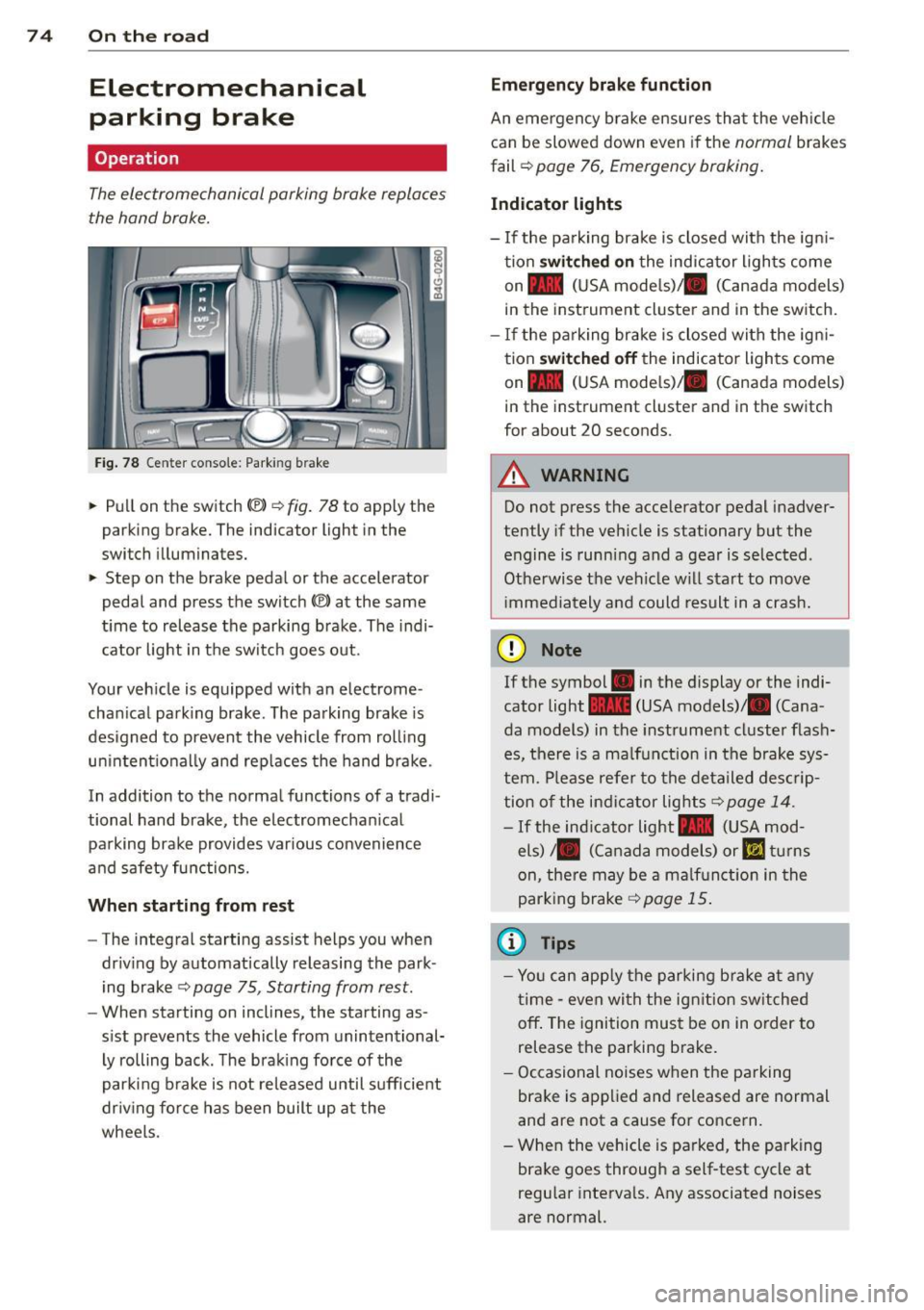
The electromechanical parking brake replaces
the hand brake.
Fig. 78 Center conso le: Park ing brake
~ Pull on the switch ®> r::!;> fig. 78 to apply the
parking brake. The indicator light in the
switch illuminates.
~ Step on the brake pedal or the accelerator
pedal and press the switch
®) at the same
t ime to release the parking brake . The indi
cator light in the switch goes out.
Your veh icle is equipped with an electrome
chan ical parking brake . The parking brake is
designed to prevent the vehicle from rolling unintent ionally and replaces the hand brake.
In addition to the normal functions of a tradi
tional hand brake, the electromechan ical
parking brake provides various convenience
and safety functions.
When starting from rest
-The integral starting assist helps you when
dr iv ing by automatically releasing the park
ing brake
r::!;> page 75, Starting from rest.
- When sta rting on inclines, the starting as
s ist prevents the vehicle from unintentional
ly rolling back . The brak ing force of the
parking brake is not released until sufficient
dr iv ing force has been built up at the
wheels .
Emergency brake function
An emergency brake ensures that the veh icle
can be slowed down even if the
normal brakes
fail ¢
page 76, Emergency braking.
Indicator lights
-If the parking brake is closed with the ign i
tion
switched on the indicator lights come
on - (USA mode ls)/ . (Canada models)
in the instrument cluster and in the switch.
- If the pa rking brake is closed with the ign i
tion
switched off the indicator lights come
on - (USA mode ls)/ . (Canada models)
in the instrument cluster and in the switch
for about 20 seconds.
A WARNING
-Do not press the accelerator pedal inadver-
tently if the vehicle is stationary but the
engine is running and a gear is selected .
Otherwise the vehicle w ill start to move
i mmediately and could result in a crash.
(D Note
If the symbol . in the display or the indi
cator light
1111 (USA models)/ . (Cana
da models) in the instrument cluster flash
es, there is a ma lfunction in the brake sys
tem. Please refer to the detailed descrip
tion of the indicator lights
r::!;> page 14.
- If the indicator light- (USA mod-
els)/ . (Canada models) or
IIJ tur ns
on, there may be a malf unct ion in the
parking brake
¢page 15.
(0 Tips
-Yo u can apply the parking b rake at any
time - even with the ign ition sw itched
off . The ignition must be on in order to
release the parking brake.
- Occasional noises when the parking
brake is applied and released are normal
and are not a cause for concern .
- When the vehicle is parked, the parking
brake goes through a self-test cycle at
regu lar intervals. Any associated noises
are normal.
Page 79 of 294

Cruise control
Switching on
Applies to vehicles: with cr uise contro l
The cruise control system makes it possible to
drive at a constant speed starting at 20 mph
(30 km/h).
0
•
~
0
Fig . 79 Contro l lever with set button
Fig. 80 Display: Selected speed
• Pull the lever to position (D ¢ fig. 79 to
switch the system on.
• Drive at the speed you wish to set.
• Press button @to set that speed.
The stored speed and the indicator light
lff;(1)~1~ (US models) 111 (Canad ian models) ap
pear in the instrument cluster display
¢ fig. 80. The display may vary, depending on
the type of display in your vehicle . The indica
tor
light ll in the instrument cluster also illu
minates.
This information is also shown briefly in the
Head-up Display*.
The speed is kept constant via an engine out
put adjustment or active brake intervention .
On the road 77
A WARNING
-Always pay attention to traffic even when
the cruise control is switched on. You are
always responsible for your speed and
the distance between your veh icle and
other veh icles .
- For safety reasons, the cruise contro l
should not be used in the city, in stop
and-go traffic, on twisting roads and
when road conditions are poor (such as
ice, fog, gravel, heavy rain and hydro
planing) -risk of accident .
- Turn off the cruise control temporarily
when entering turn lanes, highway exit
lanes or in construction zones .
- Please note that inadvertently "resting"
your foot on the accelerator pedal causes the cruise control not to brake. This is
because the cruise control is overridden
by the driver's acceleration.
- If a brake system malfunction such as
overheating occurs when the cruise con
trol system is switched on, the braking
function in the system may be switched off. The other cruise control functions re
ma in active as long as the indicato r light
mmlm (US models) !Iii (Canadian mod
e ls) is on.
(D Tips
The brake lights illuminate as soon as the
brakes decelerate automatically.
Changing speed
Applies to vehicles: wi th cruise co ntrol
• Press lever in the 0 or 0 direction
¢ page 77, fig. 79 to increase or decrease
your speed .
• Release the lever to
save that speed.
Change speed in in crements of 1 mph (1 km/
h) by lightly pressing the lever. If you keep the
lever pressed down, you will a lter your speed
in 5 mph (10 km/h) increments.
You can also press the accelerator pedal down
to increase your speed, e.g . if you want to
II>
Page 84 of 294

82 Adaptive cruise control and braking guard
Setting the speed and activating
regulation
.. To set the current speed, press the I SET !
button ¢ fig. 85. The set speed is shown in
the tachometer @and in the display
¢
fig . 86. You must also press the brake
pedal when the vehicle is stopped.
Switching adaptive cruise control off
.. Push the lever away from you into position
@ until it clicks into p lace. The message
ACC off appears.
Indicator lamps and messages in the instru
ment cluster display inform you about the cur
rent system status and settings.
@ Indicator lights
II -adaptive cruise control is switched on. No
vehicles are detected up ahead. The stored
speed is ma intained.
I -A moving vehicle is detected up ahead.
The adaptive cruise control system regulates
the speed and distance to the moving vehicle
ahead and acce lerates/brakes automat ically.
fij-adaptive cruise control is switched on. A
moving vehicle up ahead was detected. Your
vehicle remains stopped and will not start driving automatically.
I-When a utomat ic brak ing is not able to
keep enough distance to a previously detected
moving vehicle up ahead, you must take con
trol and brake¢
page 83, Prompt for driver
intervention.
© Display
If adaptive cruise control is not shown in the
display, you can call it up with the multifunc
tion steering wheel buttons¢
page 22.
Based on the symbo ls in the display, you can
determine if the system is main taining a dis
tance to the vehicle ahead and what that dis
tance is .
No vehicle -No vehi cle ahead was detected.
White vehicle -A vehicle ahead was detected.
Red vehicle -Prompt for the driver to take ac
tion ¢
page 83 .
Both arrows on the scale © indicate the dis
tance to the vehicle ahead. No arrow appears
when the vehicle is on an open road and the re
is no object ahead. If an object is detected
ahead, the arrow moves on the scale.
T he green zone on the scale shows the stored
distance . For information on changing the
stored distance ¢
page 84. If the distance
selected is too close or may soon become too
close, the arrows move into the red zone on
the scale.
A WARNING
Improper use of the adaptive cruise con
trol can cause collisions, other accidents
and serious personal injur ies.
- Pressing the
!SET ! button when driv ing at
speeds below
20 mph (30 km/h), w ill au
tomatically accelerate the vehicle to
20
mph (30 km/h), which is the minim um
speed that can be set.
(D Tips
-If you switch the ignit ion or the adaptive
cruise contro l off, the set speed is e rased
from the system memory.
- You cannot switch the Electron ic Stabili
zation Program (ESP) to the SPORT mode
when adaptive cruise control is sw itched
on.
Driving in stop-and-go traffic
Applies to vehicles: with adaptive cruise control
The adaptive cruise control system also as sists you in stop-and-go traffic. If a previous
detected vehicle ahead stops, your vehicle will
brake to a stop, within the limits of the sys
tem.
.. To resume driving with adaptive cruise con
trol, tap the acce lerator pedal or
.. Pull the lever toward you into position @
¢ page 81, fig. 85. .,.