lights AUDI A7 2012 Owner's Guide
[x] Cancel search | Manufacturer: AUDI, Model Year: 2012, Model line: A7, Model: AUDI A7 2012Pages: 294, PDF Size: 73.33 MB
Page 90 of 294
88 Audi side a ssist
Audi side assist
Lane Change Assistant
Description
App lies to vehicles: wit h side ass ist
The side assist helps you when changing
lanes.
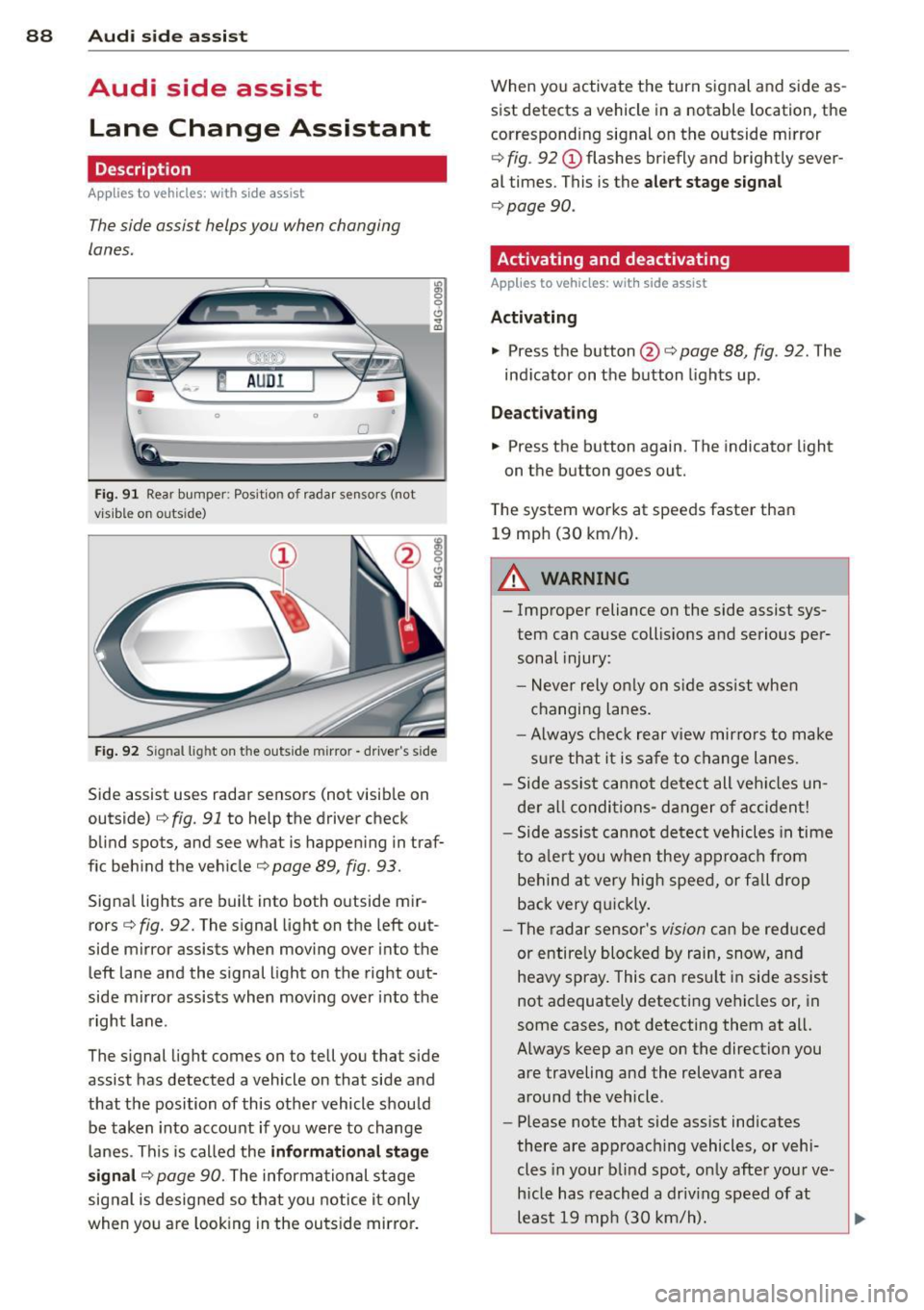
F ig . 91 Rear bumper : Pos it ion of rada r se nsors (not
v is ib le on outs ide)
:R 0 0 C)
" a,
F ig . 92 S ignal lig ht on the outside m irror -driver's side
Side assist uses radar sensors (not visib le on
outside)¢
fig. 91 to help the driver check
blind spots, and see what is happen ing in traf
f ic beh ind the vehicle¢
page 89, fig. 93.
Signa l lights are built into both o utside mir
rors ¢
fig. 92. The s ignal light on the left out
side mirror assists when moving over into the
left lane and the signal light on the right out
side mirror assists when moving over into the right lane.
The s ignal light comes on to tell you that side
assist has detected a vehicle on that side and
that the position of this othe r vehicle should
be taken into account if yo u were to change
l anes . This is called the
informati ona l stag e
s ignal ¢
page 90. The informational stage
signal is designed so that you notice it only
when you are look ing in the ou ts ide mirror. When you activate the turn signal and side as
sist detects a vehicle in a notable location, the
corresponding signal on the outside mirror
¢ fig. 92 (!) flashes br iefly and brightly sever
al times. This is the
alert stage signal
¢ page 90.
Activating and deactivating
Appl ies to veh ic les : w it h side assist
Activating
• Press th e button @¢ page 88 , fig . 92 . The
ind icator on the button lights up .
Deactivating
• Press the button again. The indicator light
on the button goes out.
T he system works at speeds faster than
19 mp h (30 km/h).
A WARNING
-
-Improper reliance on the side assist sys-
tem can cause collis ions and serious per
sonal injury:
- Never rely on ly on s ide ass ist whe n
changing lanes.
- Always chec k rear v iew mirro rs to make
su re that it is sa fe to change l anes.
- Side assist cannot de te ct all veh icles un
der a ll condi tions- d anger of a cc iden t!
- Side assist cannot detect vehicles in time
to a le rt you when they ap proa ch from
be hind at very hig h spee d, or fall drop
back very q uickly.
- The radar sensor's
vision ca n be reduced
or entire ly blocked by rain, snow, and
heavy spray . This can resu lt in side assist
not adequately detecting vehicles or, in
some cases, not detecting them at all.
Always keep an eye on the direction you are traveling and the relevant area
around the vehicle .
- Please note that side ass ist indicates
there are approaching vehicles, or vehi
cles in your blind spot, o nly after you r ve
h icle has reach ed a driv ing speed of at
least 19 mph (30 km/h). ..,
Page 92 of 294

90 Audi side assist
signal light will come on as soon as the other
vehicle is in your blind spot and is detected by
side assist. When the difference in speed is
greater, the signa l light will not come on.
Informational and alert stage signals
Applies to vehicles: with side assist
Side assist has two s ignal stages:
- the informational stage signal, and
- the a le rt stage signa l.
Side assist helps you by using the appropriate
signal stage, depending on whethe r or not
you have activated the turn signal, and thus
have indicated that you are or are not chang
ing lanes.
Informational stage signal
As long as you have not activated the turn sig
nal, side assist informs you of detec ted vehi
cles that are registered as being in a notable
l ocation if you were to change lanes. Whenev
er the detected vehicle's difference in speed
and distance is registered by side assist as no
table, the signal light on the respective m irror
produces muted illumination.
The brightness of the informational stage sig
na l is designed not to be as intense, so that it
does not interfere with your view of the road
when you are driving and have no intention of
changing lanes. When you look in the outside
mirror, you can clearly see the informat ional
stage signal.
Alert stage signal
When you activate the turn signal, and side
assist has detected a vehicle in a notable loca
tion on that part icular side, the signal l ight on
this side mirror flashes bright ly . The repeated
brief and bright flashing of the alert stage
signal reminds you to carefully check traffic to
the rear in the outside mirror and over your
shoulder, so that yo u can safely complete the
lane change
c::> & in Safety tips on page 94.
(D Tips
The brightness of the signal light on the
outside m irrors can be adjusted with the
MMI c::> page 93.
Driving situation: Fast approaching
vehicles
Applies to vehicles: with side assist
©
@
Fig. 94 Side ass ist: Fast approach ing ve hicles
@ Signal on outside mirror does not light
up
No vehicle was detected by the sensors . The
signal on the o utside mirror does not light up
c::> & in Safety tips on page 94.
@ Informational stage signal lights up
A fast approaching vehicle - in the left-hand
lane for example - was detected by the sen
sors . Although this vehicle is still far away, it
should be taken into account if yo u were to
change lanes, due to the considerab le differ
ence in speed. The informational stage s ignal
on the outside mirror lights up
c::> page 90 . ..,.
Page 93 of 294
@ Alert stage signal flashes
If you activate your turn signal in driving sit
uation @, the signa l briefly f lashes repeated
ly. Side assist is a lerting yo u to a vehicle that
you may not have noticed.
@ Tips
- The faster a vehicle approaches from the
rear, the sooner the signa l on the outside
mirror lights up. Side assist will signa l,
at the latest, when a detected vehicle en
ters your "blind spot".
- When vehicles approach very quickly,
changing lanes can be dangerous even if
the signal on the outside mirror does not
light up.
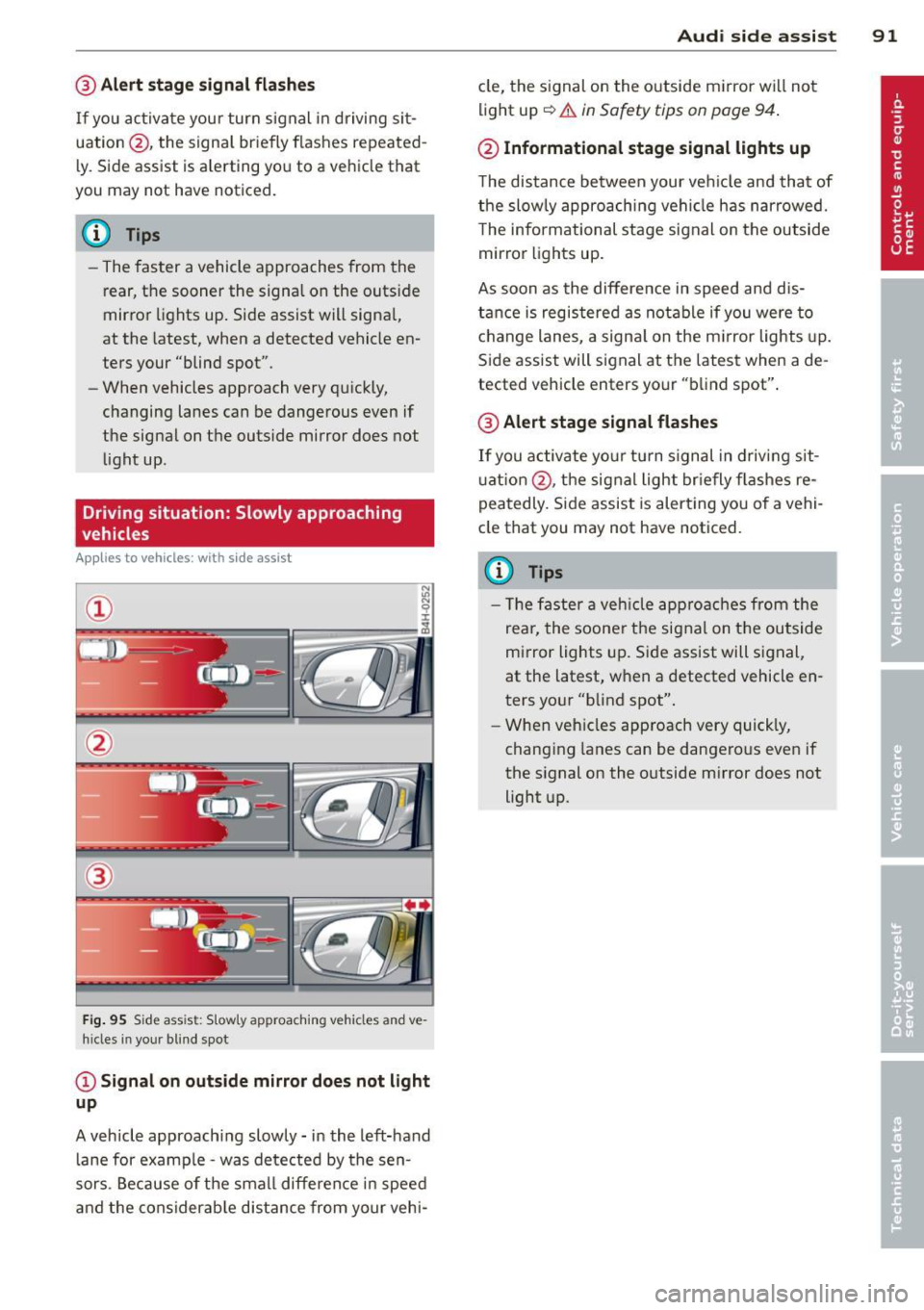
Driving situation: Slowly approaching
vehicles
Appl ies to vehicles : wit h side ass ist
®
F ig . 95 S ide ass ist: S lowly approaching vehicles and ve·
h ides in your blind spot
@ Signal on outside mirror does not light
up
A vehicle approaching slowly -in the left-hand
lane for examp le -was detected by the sen
sors. Because of the small difference in speed
and the considerab le distance from your vehi-
Audi side assist 91
cle, the signal on the outside mirror wi ll not
light up
~.& in Safety tips on page 94 .
@ Informational stage signal lights up
The distance between your ve hicle and that of
the slowly approaching vehicle has narrowed.
T he informational stage signal on the outside
mirror lights up.
As soon as the difference in speed and dis
tance is registered as notable if you were to
change lanes, a signal on the m irror lights up.
Side assist will signal at the latest when a de
tected vehicle enters your "blind spot".
@ Alert stage signal flashes
If you activate your turn signal in driving sit
u ation @, the signal light briefly fla shes re
peatedly. Side assist is alert ing you of a vehi
cle that you may not have noticed.
(D Tips
- Th e faster a vehicle approaches from the
rear, the soone r the signal on the outside
mirror lights up. Side assist will signal,
at the latest, when a detected vehicle en
ters your "blind spot".
- When vehicles approach very quickly,
changing lanes can be dangerous even if
the signal on the outside m irror does not
light up.
Page 94 of 294
92 Audi side assist
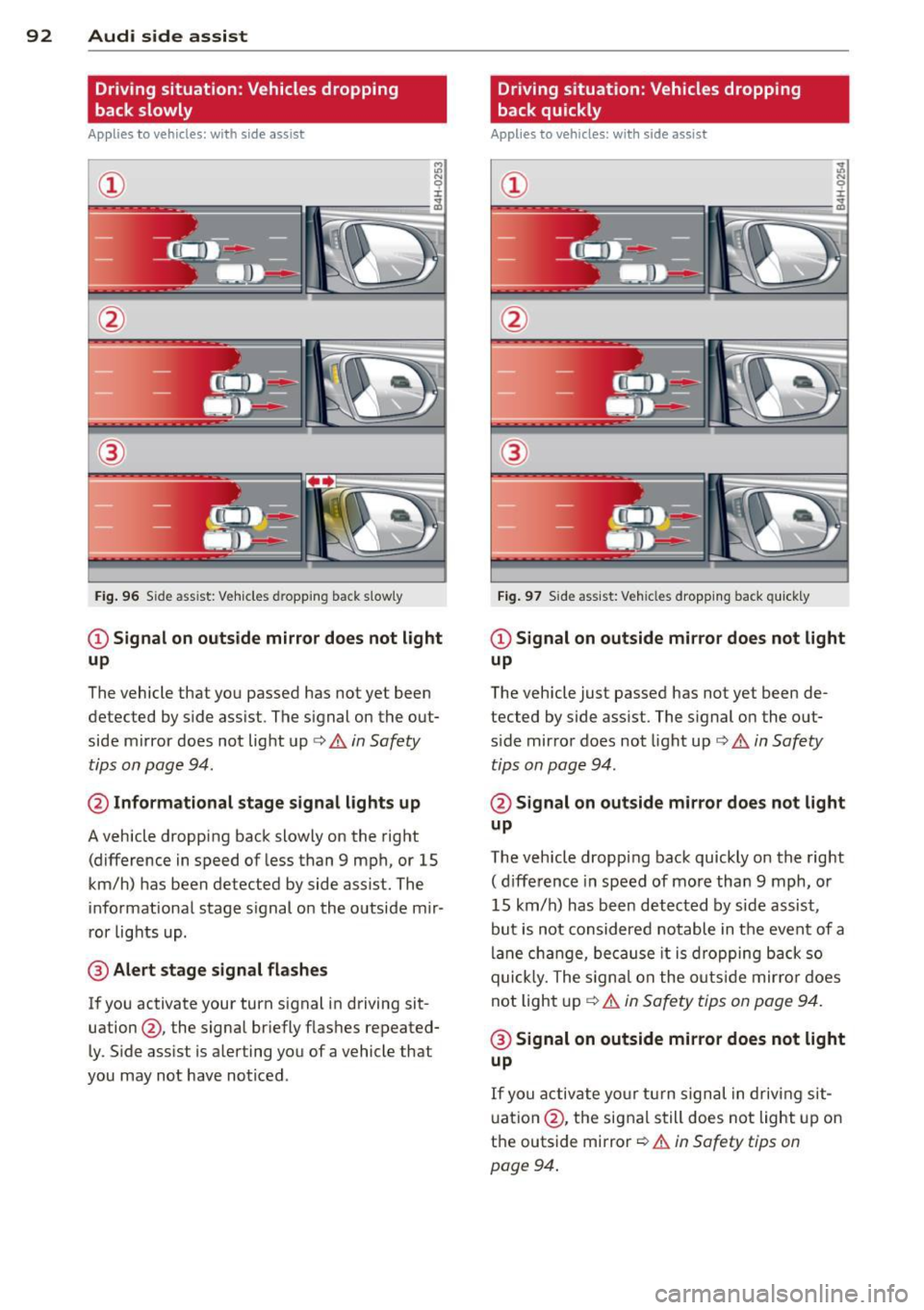
Driving situation: Vehicles dropping
back slowly
Applies to vehicles: with side assist
i:i N 9 J:
-------::~
®
Fig. 96 Side ass ist: Veh icles d ropping back slow ly
CD Signal on outside mirror does not light
up
The vehicle that you passed has not yet been
detected by side assist . The signal on the out
side mirror does not light up¢
A in Safety
tips on page 94.
@ Informational stage signal lights up
A vehicle dropping back slowly on the right
(difference in speed of less than 9 mph, or 15
km/h) has been detected by side assist. The
informational stage signal on the outside mir
ror lights up.
@ Alert stage signal flashes
If you activate your turn signal in driving sit
uation@, the signal briefly flashes repeated
ly. Side assist is alerting you of a vehicle that
you may not have noticed .
Driving situation: Vehicles dropping
back quickly
Applies to vehicles: with side assist
®
Fig. 97 Side ass ist: Vehicles dropping ba ck quickly
CD Signal on outside mirror does not light
up
The vehicle just passed has not yet been de
tected by side assist. The signal on the out
s ide mirror doe s not light up¢
A in Safety
tips on page 94 .
@Signal on outside mirror does not light
up
The vehicle dropping back quickly on the right
( d ifference in speed of more than 9 mph, or
15 km/h) has been detected by side assist ,
but is not considered notable in the event of a
lane change, because it is dropping back so
quick ly. The signal on the outs ide mirro r does
not light up¢
A in Safety tips on page 94.
@ Signal on outside mirror does not light
up
If you activate your turn signal in driving sit
uation @, the signal still does not light up on
the outside mirror ¢
A in Safety tips on
page 94 .
Page 100 of 294
98 Night vision assistant
Night vision assistant
Night vision assistant
with detected pedestrian marking
Description
App lies to vehicles: with night v isio n ass istant
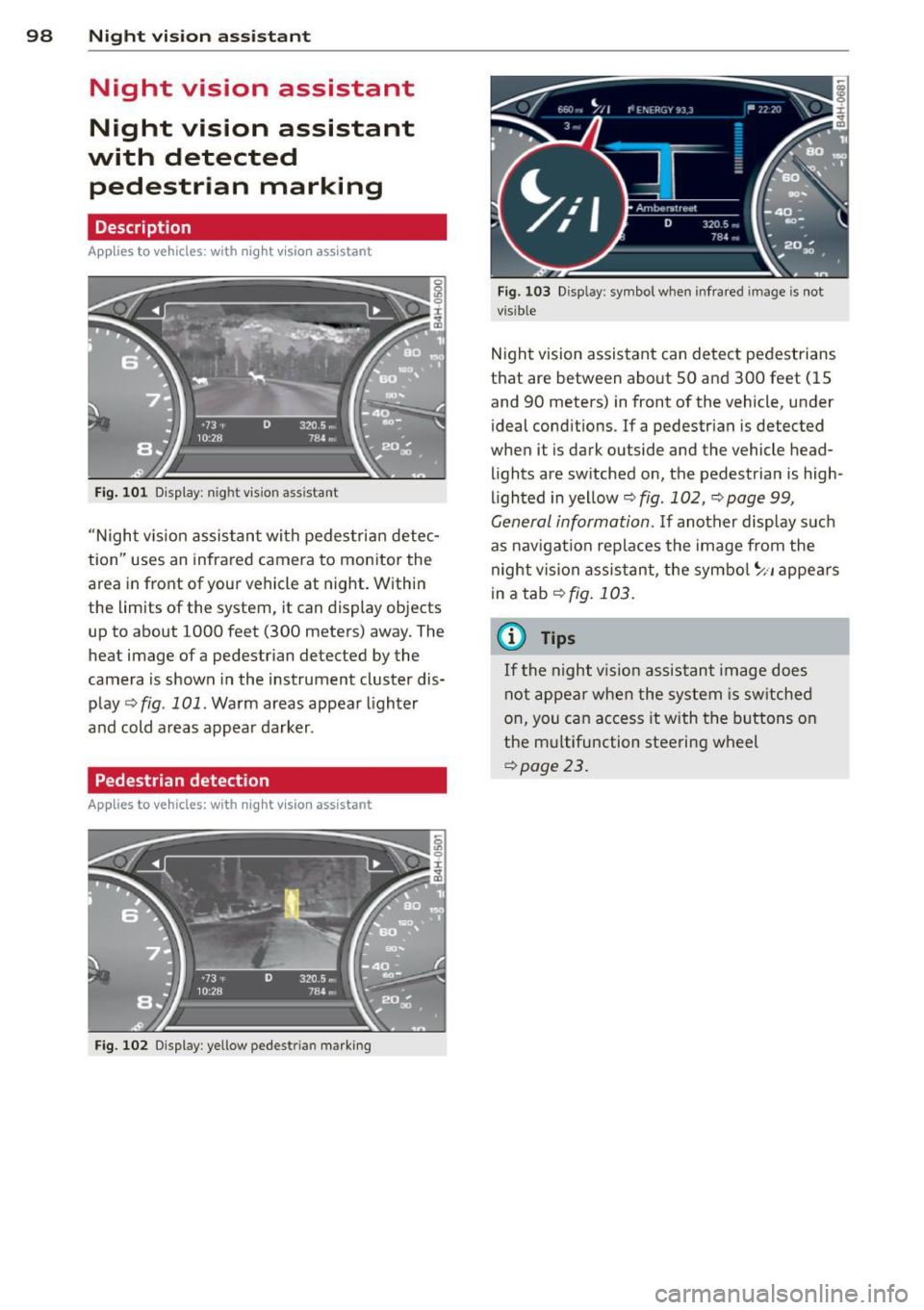
Fig. 101 D isplay: n ight vis ion assistant
"N ight v is ion assistant with pedestrian detec
tion" uses an infrared camera to monitor the
area in front of your vehicle at night. Within
the limits of the system, it can display objects
up to about 1000 feet (300 meters) away. The
heat image of a pedestrian detected by the
camera is shown in the instrument cluster dis
play
q fig. 101. Warm areas appear lighter
and cold areas appear darker .
Pedestrian detection
Applies to vehicles: with n ig ht v ision ass istant
Fig. 102 Display : yellow pedestrian marking
Fig. 103 Disp lay: symbo l w hen infrare d im age is not
visible
Night vision assistant can detect pedestrians
that are between about SO and 300 feet (15
and 90 meters) in front of the vehicle, under
ideal conditions . If a pedestrian is detected
when it is dark outside and the vehicle head
lights are switched on, the pedestrian is high
lighted in yellow
q fig. 102, q page 99,
General information. If another display such
as nav igation replaces the image from the
night vision assistant, the symbol
~11 appears
in a tab
qfig. 103.
(0 Tips
If
th e night vi.sion assistant image does
not appear when the system is switched
on, you can access it with the buttons on
the multifunction steering wheel
qpage 23.
Page 103 of 294
Night vision assistant: only available in dark
ness and with lights switched on
N ig ht visio n ass ist ant on ly wo rk s when i t is
d ar k outside and the headligh ts are on.
Night vision assistant : pedestrian detection
not available
T he system has deactivated the pedestr ian de
t e ction f unction .
Night vision assistant 101
Page 105 of 294
"creep" forward or backward. When
stopped, keep the brake pedal fully de
pressed and use the park ing brake if
necessary to keep the veh icle from roll
ing.
- If the selector lever is unintentionally
moved into N wh ile you are driving, take
your foot off the accele rator pedal and
wait for the engine to return to idle speed before selecting a d riving position.
- Never shift into R or P when the vehicle is in motion.
- Never get out of the driver's seat when
the engine is running.
- If you must get out of the vehicle, move
the se lector lever securely into the P po
sit ion and apply the par king brake firm ly.
- If the engine must remain running , never
have any driv ing position engaged when
chec king under the hood. Make sure the
selector lever has securely engaged and is locked in P with the parking bra ke
firmly set ¢
page 210, Engine compart
ment .
Otherw ise, any increase in engine
speed may set the vehicle in mot ion,
even with the parki ng brake applied.
Selector lever positions
Applies to vehicles: with tiptronic
This section describes the selector lever posi
tions and driving ranges.
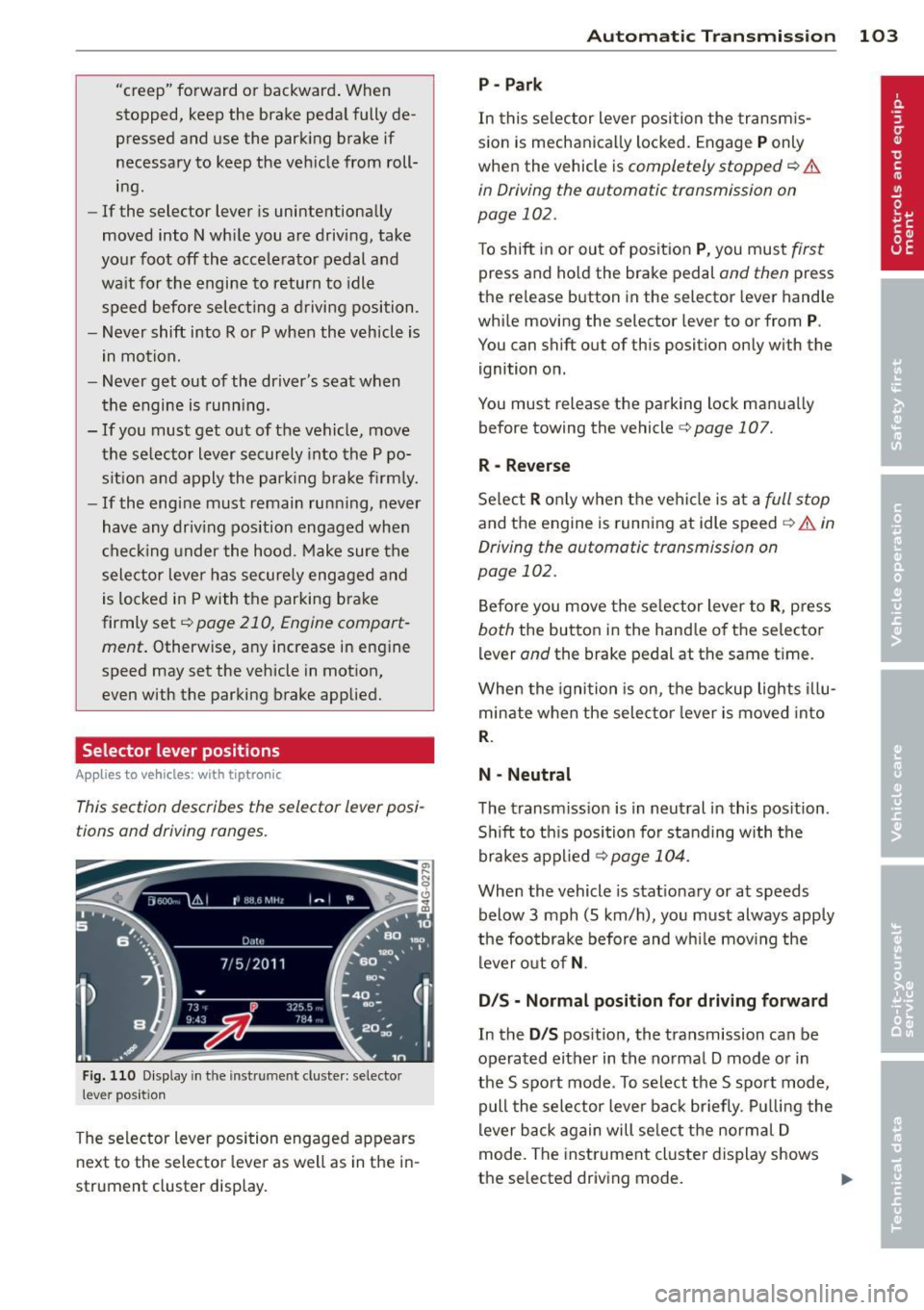
F ig . 1 10 D isplay in th e inst rument cluste r: selec to r
lever position
The selector lever position engaged appears
next to the selector lever as well as in the i n
strument cluster display.
Automatic Tra nsmi ssi on 10 3
P-Park
In this se lector lever posi tion the transm is
s ion is mechanica lly locked. Engage
P only
when the vehicle is
completely stopped ¢ &
in Driving the automatic transmission on
page 102.
To shift in or out of posit ion P , you mus t first
press and ho ld the brake pedal and then press
the re lease button in the selector lever hand le
whi le moving the selector lever to or from
P.
You can shift out of this position only with the
ignition on.
You must release the parking lock man ua lly
before towing the vehicle
c:> page 107.
R -Reverse
Se lect R o nl y when the vehi cle is at a full s top
and the engine is running at idle speed ¢ A in
Driving the automatic transmission on
page 102.
Be fore you move the se lector lever to R , press
both the button in the hand le of th e selector
lever
and the brake pedal at the same ti me .
When the igni tion is on, the backup lights illu
minate when the selec tor lever is moved into
R.
N -Neutral
The transm iss ion is in neut ral in this pos ition .
S hi ft to th is position for standing with the
brakes a pplied
¢ page 104.
When the vehicle is stat ionary or at speeds
below 3 mph (5 km/h), yo u must always apply
the foo tbrake before and w hile mov ing the
lever o ut of
N .
D/S - Normal posit ion for driving forward
In the D/S pos ition, the transmission can be
operated either in the no rmal D mode o r in
the S spo rt mode . To select the S spo rt mode,
pull the selector lever bac k br iefly . Pul ling the
lever b ack again will se lect the norma l D
mode. The inst rument cl uster display shows
the selected driving mode.
II>
Page 110 of 294

108 Parking system
Parking system
General information
Applies to vehicles: Aud i pa rki ng syste m plus/Audi park
ing system plus w ith rear v iew camera
Depending on your vehicle's equ ipment, vari
ous parking aids wil l help you when pa rk ing
and maneuvering.
The Audi p arking sy ste m p lu s assists you
when park ing by p rov iding audio and visual
warn ings abo ut objec ts
in front of and behind
the vehicle¢ page 108.
The Audi p arking sy ste m p lu s with rear view
c am era shows the area behind the vehicle in
the disp lay . Thi s image helps you when paral
lel parki ng or cross parking. The system a lso
p rovides the parking aid audio and vis ual sig
na ls
¢ page 109.
0) Tips
For information on clean ing, refer to
¢page 202.
Audi parking system
plus
Description
Ap plies to vehicles: with park ing system p lus
Audi parking system plus provides audio and
visual signals when parking .
Sensors are located in the front and rear
bumpers .
If these detect an obs tacle, aud ible
and v isua l signa ls warn you . The range at
which the sensors begin to measure is approx
i ma tely:
side 3 ft (0.90 m)
front
4 ft ( 1. 20 m)
side 2 ft (0.60 m)
rear S.2 ft (1.60 m)
The clos er you get to the obsta cle, the sho rter
the interval between the audible signa ls. A
continuous tone so unds when the obstacle is
less than approximate ly 1 foo t (0.30 meters)
away. Do not continue driving farther! If the distance to an obstacle remains con
stant, the volume of the distance warning
gradua
lly drops after about fo ur seconds (this
does not apply in the continuous tone range).
Switching on and off
Applies to vehicles: wit h parking system plus
Fig . 1 16 Center console: Parking system sw itch
F ig. 117 MMI d isplay: visual distance display
Switching on
.,. Switch the MMI on
.,. Activate comfort or auto mode in Audi drive
selec t ¢
page 96.
.,. Shift into reverse or
.,. Press the switch~ in the center conso le
¢
fig . 116. A short confirmation tone
sounds and the indicator light in the switch
lights up.
Switching off
.,. Drive faste r th an 6 mph ( 10 km/h), or
.,. press the switch
~ or
.,. switch off the ignition.
Segments in the visual display
The red segments in front of and behind the
vehicle ¢
fig. 117 help yo u to dete rm ine the
distan ce between yo u and an obstacle. As
you r vehicle comes close r to the obstacle, the .,.
Page 113 of 294

-Never use warm or hot water to remove
snow or ice from the rear view camera l ens - th is could cause the lens to crack!
- When cleaning the lens, never use prod
ucts that are abrasive .
Switching on and off
Applies to vehicles: with pa rk in g system p lus wit h rear
view ca mera
The rear view camera switches on automati
cally together with the acoustic and visual
park assist when you put the vehicle in re
verse .
Switching on
.,. Switch the MMI on
.,. Activate
co mfort or auto mode in Audi drive
select ¢
page 96.
.,. Sh ift into reve rse or
.,. Press the switch
lp.,,, I in the cente r console
¢
page 108, fig. 116 . A short confirmation
tone sounds and th e indicator light in the
switch lights up.
Sw itching betwe en th e rear view camer a
a nd vis u al di splay
.,. Press the Gr aphi c control button
¢page 112, fig . 122 @to see the visua l
display .
.,. Press the
Rear vie w control button to see
the rear view camera image
Q page 108,
fig . 117 .
Switchin g off
.,. Drive faster than 6 mph (10 km/h), or
.,. press the switch ~ or
.,. switch off the ignit ion.
A WARNING
- The MMI display cannot show, or cannot
adequate ly show, certa in objects (such as
small posts o r grating), recesses in the
ground and protrud ing parts on another
car.
- Only use the rear v iew camera to assist
you if it shows a good, clear pictu re . For
example, the image may be affected by
Par king system 11 1
the sun shining into the lens, dirt on the
lens or if there is a defect .
- Use the rear view camera on ly with the
rear lid comp lete ly closed. Make sure any
objects you may have mounted on the
rear lid do not b lock the rear v iew cam
era.
(D Tips
- The sensors must be kept clean and free
of snow and ice for the park assist to op
erate .
- If your veh icle is near an obstacle, an ad
ditional v isual ind icator appears in the
rearview camera image . Th is superim
posed image is there to help you to de
termined wh ich area of the vehicle is af
fected .
- Yo u can change the volume and pitch of
the s ignals as we ll as the disp lay
Q page 113.
-What appears in the display is time-de
layed .
Page 117 of 294
Homelink®
Universal remote
control
General information
Applies to vehicles: with Horne Link® universal remote
control
The Homelink universal remote control can
be programmed with hand -held transmitters
from existing equipment.
Using the Homelink universal remote control,
you can operate equ ipment such as garage
doors, property gates and house lights from ins ide your vehicle.
Using the Homelink universal remote control,
you can replace up to three separate hand
held transmitters for equipment on your
property with just one universal remote con
trol. Most of these transmitters a re used to
ope rate ga rage doo rs and p roperty gates. The
individua l transmitters are programmed at
the front bumper. That is where the control
module is located.
The transmitters must be programmed first in
order to operate systems using the Homelink universal remote control.
A WARNING
-
- Never use the Homelink ® transmitter
with any garage door opener that does have not the safety stop and reverse fea
ture as required by federal safety stand
ards . Th is includes any garage door open
er model manufactured before April 1, 1982.
- A garage door opener which cannot de
tect an object, signaling the door to stop
and reverse does not meet current feder
al safety standards. Us ing a ga rage door
opener without these features increases
risk of serious injury or death.
- For safety reasons never release the
parking brake or start the engine while
anyone is standing in front of the vehicle .
- A garage door or an estate gate may
sometimes be set in motion when the
Homelink ® 115
Homelink ® remote control is being pro
grammed.
If the device is repeatedly ac
tivated, t his can overstrain motor and
damage its electrical components - an
overheated motor is a fire hazard!
- To avo id possible injuries or property
damage, please always make absolutely
certain that no persons or objects are lo
cated in the range of motion of any
equ ipment being operated.
(D Tips
- If you would like additional information
on the Homelink ® Universal Transce iver,
Homel ink compatible products, or to
purchase other accessories such as the
Homel ink ® Lighting Package, please
contact Homelink at 1 -800 -355-3515 o r
on the Internet at www.homelink.com.
- For Declara tion of Comp liance to United
States FCC and Industry Canada reg ula
tions ~
page 2 76.