lock AUDI A7 2012 Owner's Manual
[x] Cancel search | Manufacturer: AUDI, Model Year: 2012, Model line: A7, Model: AUDI A7 2012Pages: 294, PDF Size: 73.33 MB
Page 45 of 294
Coming home , Leav ing home
The coming home function il luminates the
area outside the vehicle when you switch the
ignition off and open the driver 's door . To turn
the function on, select
Light s when le aving
c a r > On .
The leav ing home function illuminates the
area outside the vehicle when yo u un lock the
veh icle . To turn the function on, select
Li gh ts
when unloc kin g ca r> On.
The coming home and leaving home functions
only operate when it is dark and the light
switch is in the
AUTO pos ition.
Turn signals and high beam lever
The lever on the le~ side of the steering col
umn is used to operate the turn signals and
the high beam as well as the headlight flash
er .
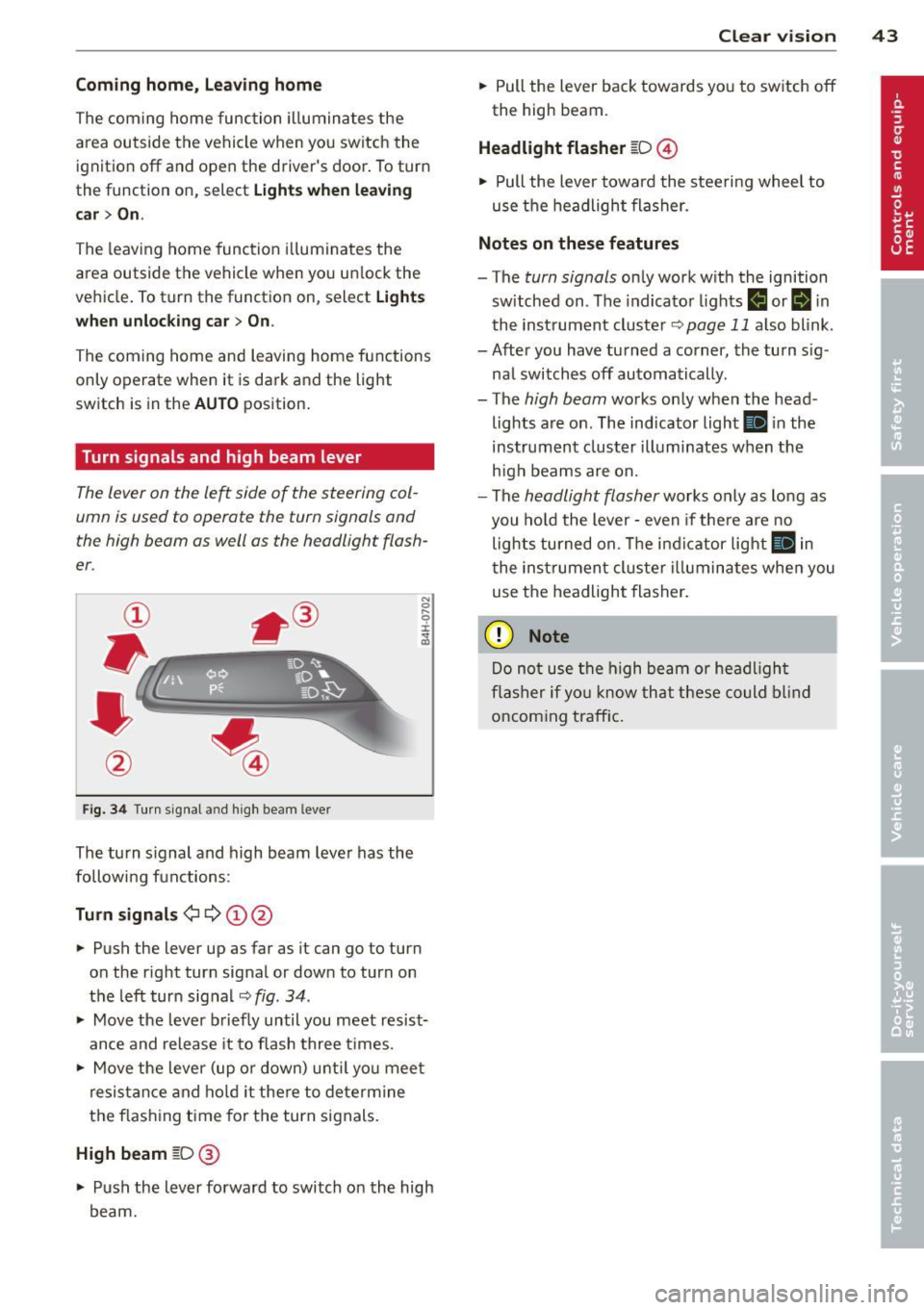
Fig. 3 4 Tu rn signal a nd h igh beam lever
The turn s ignal and high beam lever has the
followi ng functions:
Tu rn sign als ¢ ¢ @@
.. Push the lever up as far as it can go to turn
on the r ight turn signal or down to turn on
the left turn sig nal
c:::;, fig . 34 .
.. Move the lever b riefly until you meet resist
ance and release it to flash three times .
.. Move the lever (up or down) unti l you mee t
resistance and ho ld it there to dete rmine
the f las hing t ime for the turn signals.
High beam [D @
.. Push the lever forward to switch on the high
beam.
Clear vi sion 43
.. Pull the lever back towards you to switch off
the high beam.
Headlight fla sher [D ©
.. Pull the lever towa rd the stee ring wheel to
use the headlight flasher.
Note s on these features
- The turn signals on ly work with the ignition
sw itched on . The indicator lights
f,j or II in
the inst rument cluste r
~page 11 also blink.
- After you have turned a corner, the turn s ig -
nal switches off automatically .
- The
high beam works only when the head
lights are on . The indicator light
Ill in the
instrument cluster illuminates when the
h igh beams are on.
- The
headlight flasher works only as long as
you hold the lever -even if the re a re no
lights turned on. The indicator light
Ill in
the inst rument cluster i lluminates whe n you
use the headlight flasher.
(D Note
Do no t use the high beam or headligh t
flasher if yo u know that these could blind
oncoming traffic.
Page 46 of 294
44 Clear vis ion
Interior lights
Front and rear interior lighting
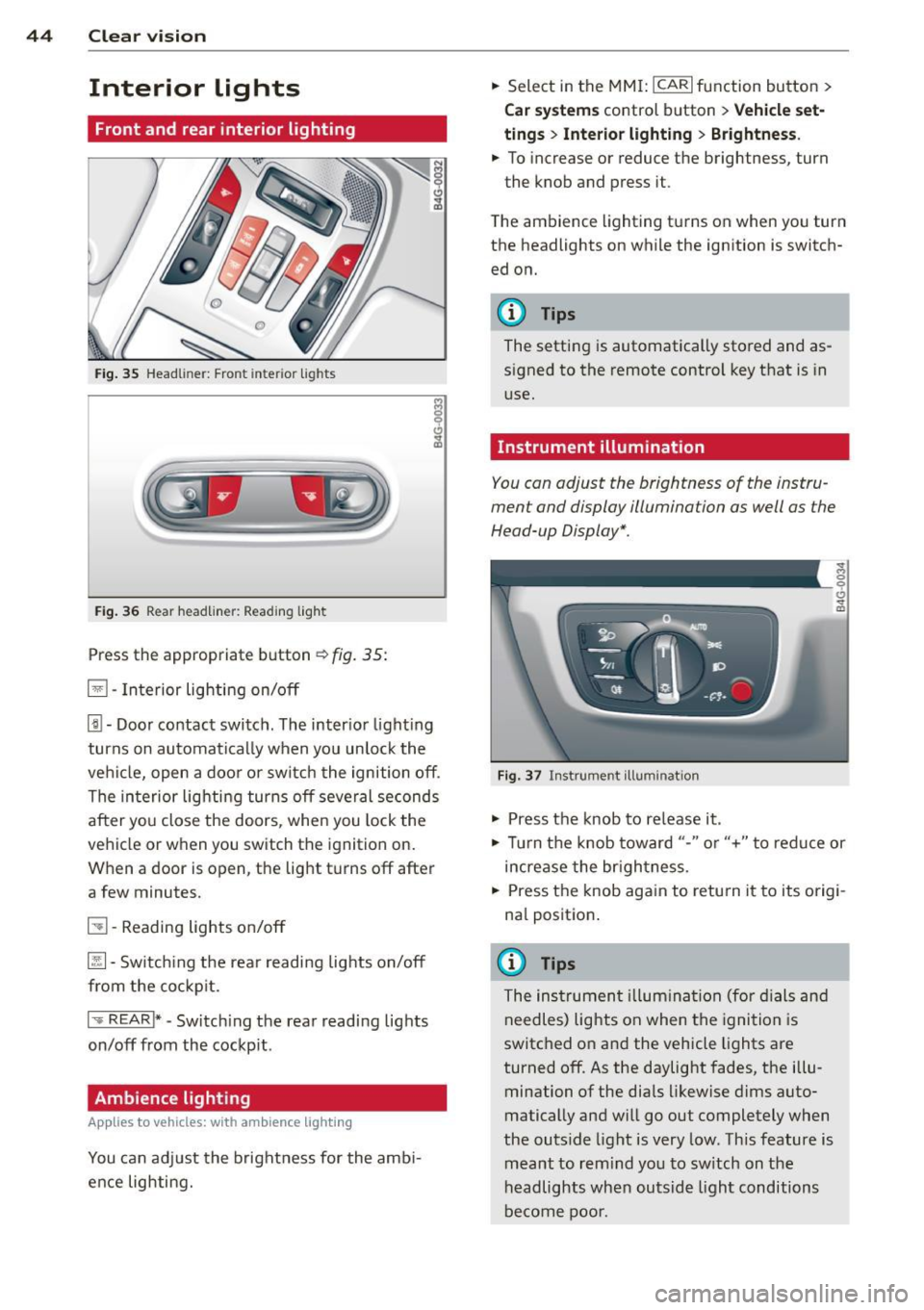
Fig. 35 Head liner: Fron t int eri or ligh ts
Fig. 36 Rear headlin er: R ead in g light
Press the appropriate b utton ~ fig. 35:
El -Interior lighting on/off
[j) -Door contact switch . The inter io r l ight ing
turns on automatically when you unlock the
vehi cle, open a doo r or switch the ignition off .
The interior lighting turns off several seconds
after you close the doors , when you lock the
vehicle or when you switch the ignition on.
When a door is open, the light t urns off after
a few minutes.
51 -Reading lights o n/off
~ -Sw itch ing the rear readi ng lights on/off
from the co ckpit.
I .,.. REAR !* -Switch ing the rear reading lights
on/off from the cockp it .
Ambience lighting
Appl ies to vehicles: wit h ambience lighting
You can adj ust the brightness for the amb i
ence lighting. .,.
Select in the MM I: ICARlfunction button>
C ar sys tem s control button > Vehicle set
ting s
> Interio r light ing > Brightne ss .
.,. To increase or reduce the brightness, turn
the knob and press it .
T he ambience lighting turns on when you turn
the headlights on while the ignition is switch ed on.
@ Tips
The setting is automatically stored and as
signed to the remote control key that is in
use.
Instrument illumination
You can adjust the brightness of the instru
ment and display illumination as well as the
Head-up Display *.
F ig. 37 In strume nt ill umin ation
.,. Press the knob to re lease it .
~ 0
"'
.,. Tur n the knob toward "-" or"+" to redu ce or
increase the br ightness.
.,. Press the knob aga in to retu rn it to its origi
na l position .
(I} Tips
The instrumen t illum ina tion (for dials and
needles) lights on when the ignition is
switc hed o n and the vehicle lights are
turned off . As the daylight fades, the illu
mination of the dia ls likewise d ims auto
matically and will g o out completely when
the outs ide light is very low. This feature is
meant to rem ind yo u to sw itch on the
headlights when outsid e light conditions
be come poo r.
Page 48 of 294
46 Clear vis ion
vision system camera* are cleaned a utomati
cally the first time the lever is press in posi
tion ® and every 8 times it is pressed after
that . They are also cleaned every time you
hold the lever in pos ition ® for longer than 8
seconds .
A WARNING
- The ra in sensor is only des igned to assist
and support the drive r. It remains entire
ly the dr iver's respons ibility to monito r
o ut side weather conditions and to man
ually activa te the wipers as soon as rain
or drizzle reduces visibility through the
windshield.
- The windshie ld m ust not be treated with
water -repe llent materials. They can in
c rease glare under poor visibi lity condi
tions such as wetness, darkness, or when
the sun is low on the horizon. In addi
t ion, they can cause the windshield wip
ers to chatter .
- Proper ly functioning w indshie ld w iper
blades are required for a clear view and
safe dr iv ing
Q page 46, Replacing
windshield wiper blades .
([) Note
- In the case of frost, check whether the
winds hield wiper b lades are frozen to
the windshie ld. Switching on the wind
shield wipers can damage the wiper
blades!
- Prior to using a car wash, the wi ndsh ield
wipe r system must be switched off (lever
i n position 0). This helps to preve nt unin
tention al swi tching on and damage to
the windshie ld w iper system.
- Do no t use the wipe rs to cle ar a fros ted
window. Using the w ipers as a conven
ient ice scraper will destroy the wiper
b lades .
(D Tips
- The w indshield wi pers are swi tched off
when the ignition is off . Activate the
windsh ield wipers after the ignition is
'
switched back on by moving the w ind
shield wiper lever to any position.
- Worn or d irty windshield wipe r blades
result in st reaking. This can affect the
rain sensor function . Check your wind
shield wiper blades regularly.
- The washer fluid nozz les of the wind
shield washer system a re heated at low
tempe rat ures when the ignition is on .
- When stopping temporarily, e.g . at
a
traffic light, the set speed of the wind
shield wipers is automatically reduced by
one speed.
Replacing windshield wiper blades
Wiper blades in good condition help keep the
windshield clear .
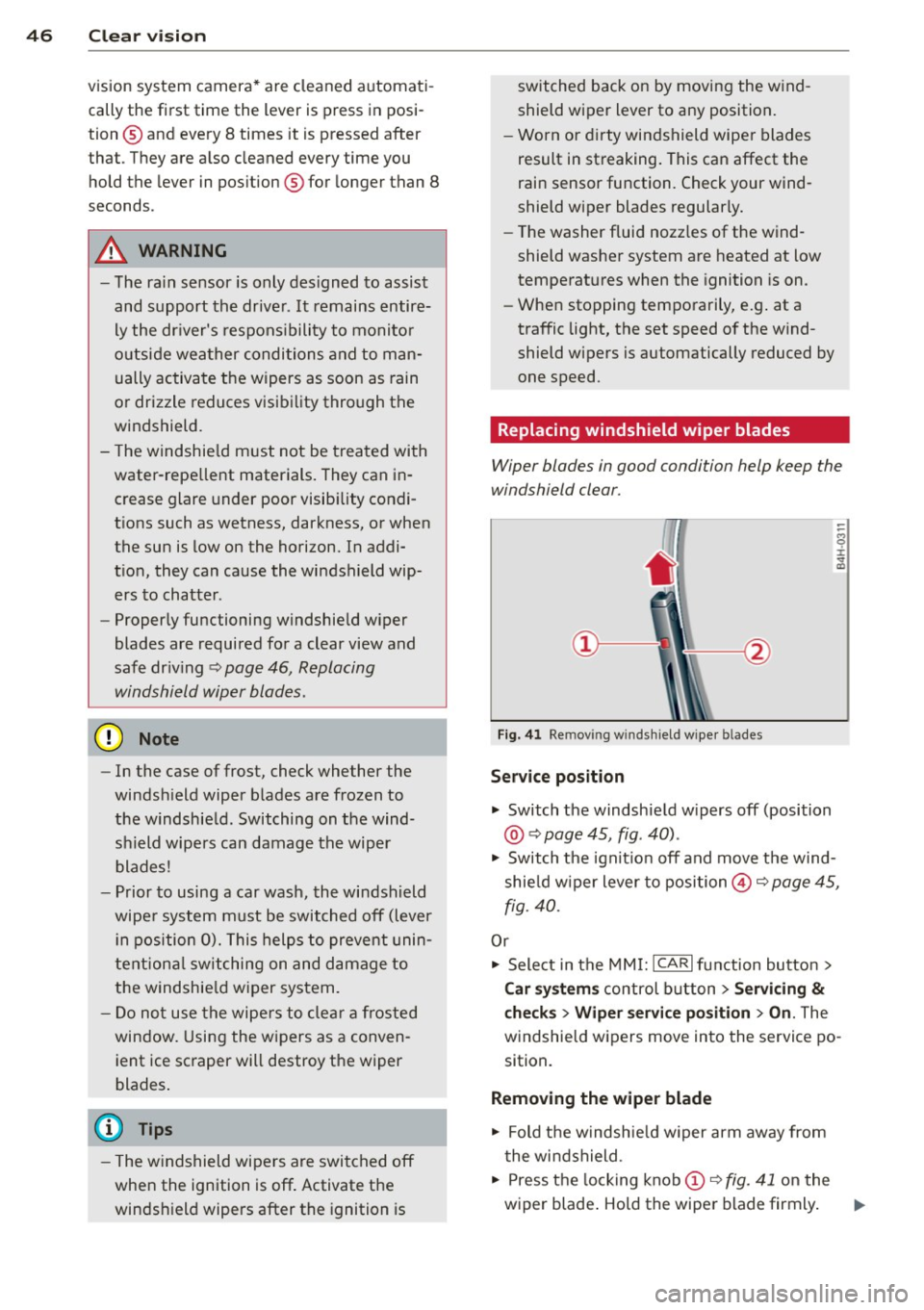
Fig. 41 Re mov ing w in d sh iel d wipe r bl ades
Service position
... Switch the windshie ld w ipers off (position
@ Q page 45, fig . 40) .
.,. Switch t he ignit ion off and move t he wind
shie ld w iper lever to position@Q
page 45,
fig. 40.
Or
.,. Sele ct in the MMI: ICAR lfunction button>
Car sy stem s control button > Servicing
&
checks > Wiper service po sition > On . The
windsh ie ld wipers move in to the service po
sition.
Removing the wiper blade
.,. Fold t he windsh ie ld w iper arm away from
t he wi ndshield .
.,. Press the locking knob
(D Q fig. 41 on the
wiper blade . Ho ld the wiper blade firmly . ..,.
Page 49 of 294
.. Remove the wiper blade in the direction of
the arrow .
Installing the wiper blade
.. Inse rt the new wiper blade into the moun t
on the w iper arm @until you hea r it latch
i nto place.
.. Place the wiper arm back on the windshie ld .
.. Switch the ignition on.
.. Press the w indshield wiper lever.
Or .. Se lect : ICAR lf u nction button>
Car sy stem s
control button > Servicing & check s > Wiper
se rvice position
> Off .
A WARNING
-If the wi ndshield wipe rs smear the wind
shield, clean the w iper blades with w ind
shield washe r fl uid . If the wiper blades
are extremely d irty, yo u can also clean
th em with a soft sponge or cloth.
- For yo ur safe ty, you should replace the
wiper blades once or twice a year . See
yo ur aut horiz e d Aud i dea ler for rep lace
me nt blades .
(D Note
-The wi ndshield wiper blades mus t only
b e fo lded away when in t he se rv ice posi
tion! Otherwise, you risk damaging the
paint on the hoo d or the wi ndshield wip
e r mo to r.
- Y ou sho uld not m ove y our vehicle or
press the w indshie ld w iper lever when
the wiper arms are folded away from the
windsh ield . The windshield w ipers would
move back into the ir o rig inal position
and could damage the hood and w ind
s h ield.
- To he lp prevent damage to the wiper sys
tem, a lways loosen blades which are fro
zen to the windsh ield before operat ing
wipers.
- To he lp prevent damage to w iper blades,
do not use gasoline, ke rosene, pa int
t hi nner, or othe r solve nts on or nea r th e
wipe r blades. Clear vi
sion 4 7
- T o help p revent damage to the wiper
arms or other components, do not at
tempt to move the wipers by hand.
(D Tips
- Commercial hot waxes appli ed by a uto
matic ca r washes affect the cleanability
o f the windshie ld .
- Yo u can also use the serv ice po sit ion, for
example, if yo u want to p rotect the
w indshield from icing by using a cover .
- Yo u cannot activate the se rv ice position
w hen the hood is ope n.
Mirrors
Adjusting the exterior mirrors
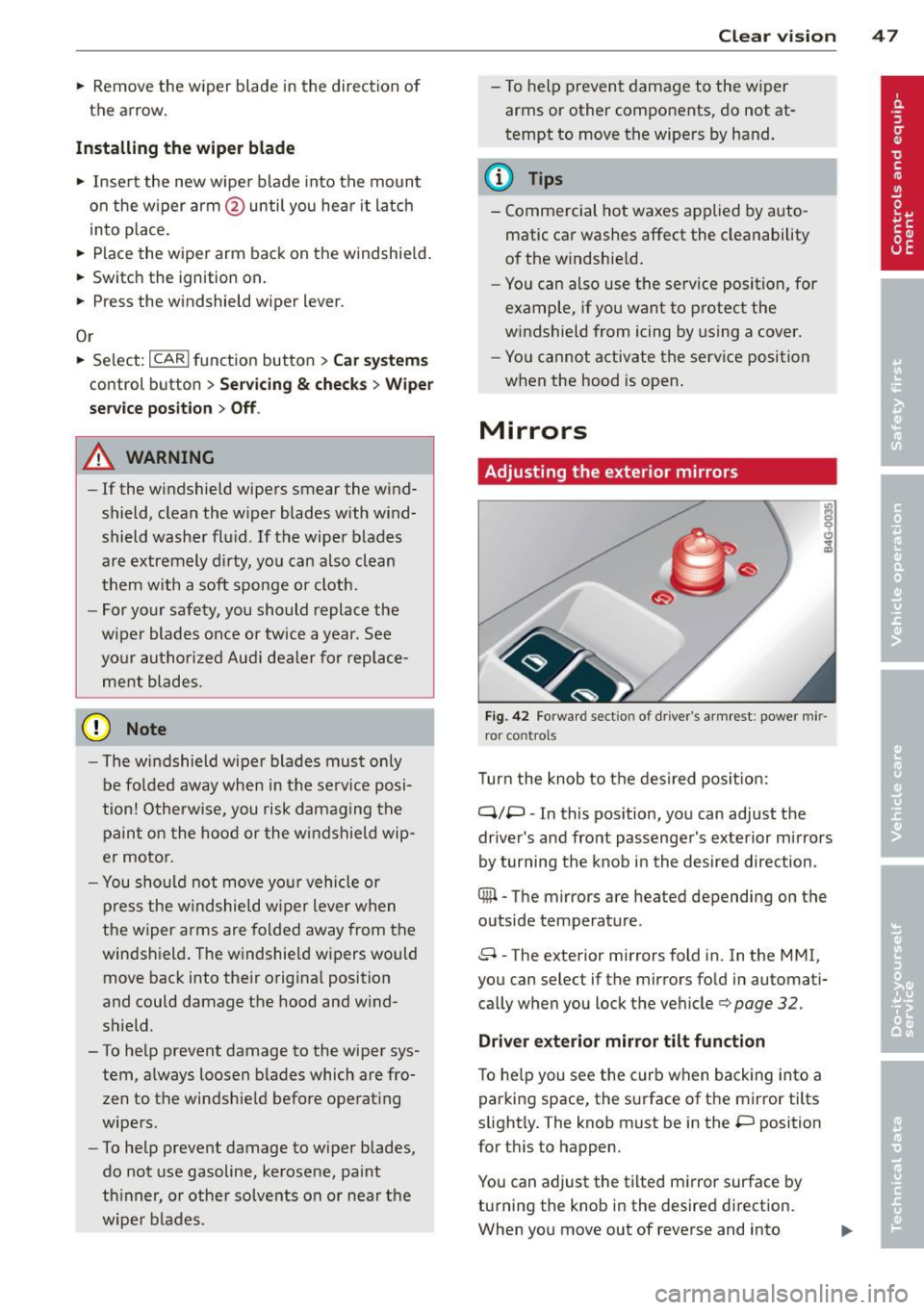
Fig. 42 Forwar d sect io n of dr ive r's ar mrest : power mir
r o r cont rol s
Turn the knob to t he des ired po sition:
q;p -In this pos ition, you can adjust the
drive r's and fro nt pass enge r's exte rior mi rrors
by turning the knob in the desired d irection.
® -The mirrors are heated depending on the
outside temperature .
8 -The exterior mirrors fold in. In the MMI,
you can select if the mirrors fo ld in automati
ca lly when you lock t he vehicle¢
page 32.
Driver exterior mirror tilt function
To he lp you see the curb when backing into a
par king space , the s urface of t he mirror tilts
slight ly. The knob must be in the
P position
for t his to happen .
You can adjust the tilted m irror surface by
turning the kno b in the desire d di rect ion.
When you move out of reverse and into
Page 54 of 294
52 Seats and storage
Adjusting the armrest
.,. To adjust the angle, raise the armrest from
the start ing pos ition detent by detent.
.,. To bring the armrest back into its origina l
position, lift it above the top position and
then fold it back down.
Opening the storage compartment
.,. Press the button -arrow- upward.
Please note that the driver's arm movements
may be restr icted w ith the armrest fo lded
down. For this reason, the arm rest should not
be folded down when driving in c ity traffic.
Head restraints
Front head restraints
App lies to vehicles: with adj ustable head restraints
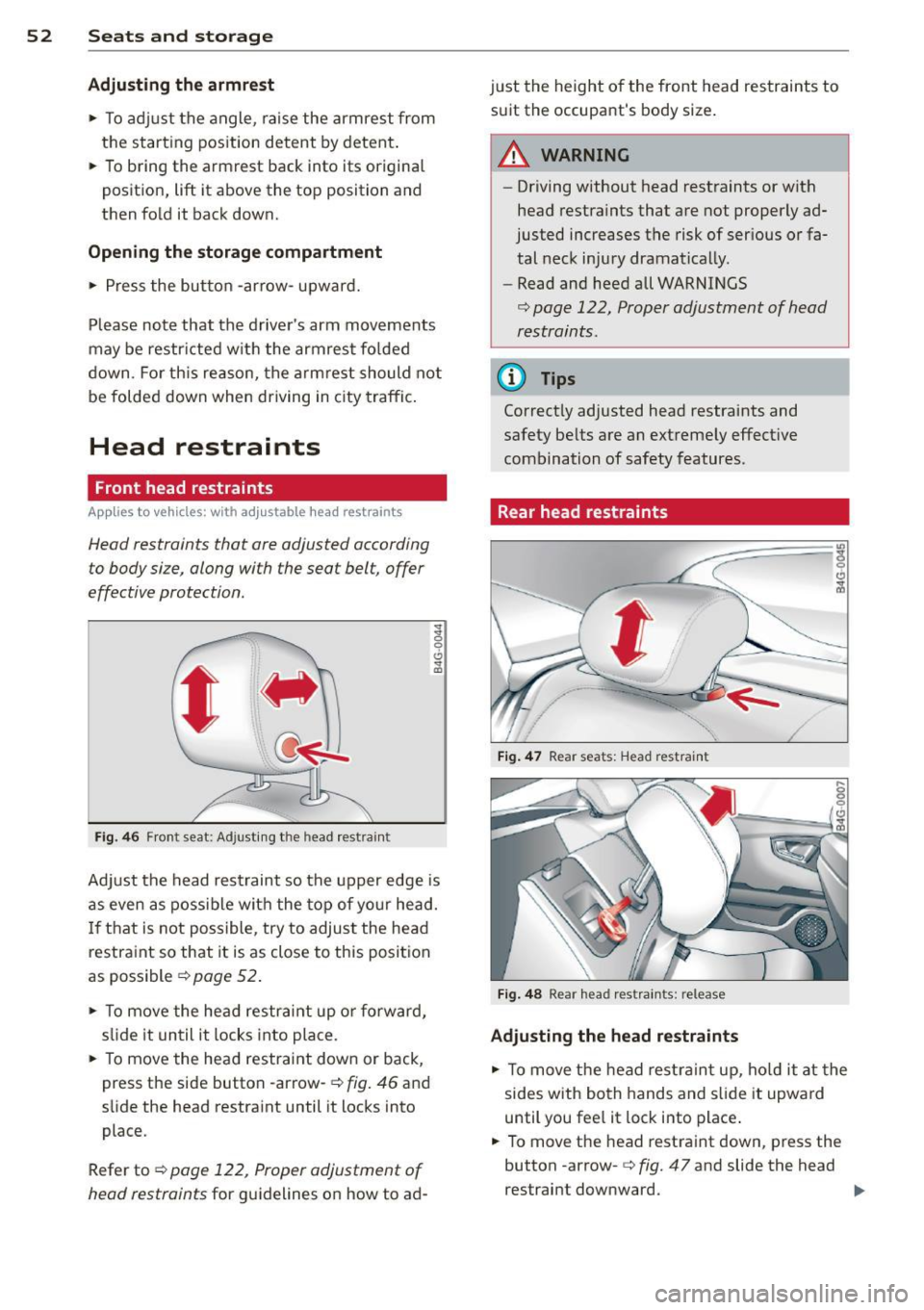
Head restraints that ore adjusted according
to body size, along with the seat belt , offer
effective protection .
' Fig. 46 Front seat : Ad justing t he head restrain t
"' ;g 0 6
"' m
Adjust the head restraint so the upper edge is
as even as possible with the top of your head.
If that is not possible, try to adjust the head
restraint so that it is as close to this position
as possible
¢ page 52.
.,. To move the head restrai nt up or forward,
s lide it until it locks into place.
.,. To move the head restraint down or back,
press the side button -arrow-¢
fig. 46 and
slide the head restraint until it locks into
place.
Refer to¢
page 122, Proper adjustment of
head restraints
for guidelines on how to ad- just the
height of the front head restraints to
suit the occupant's body size .
.&_ WARNING
--
-Driving without head restraints or with
head restraints that are not properly ad
justed increases the risk of ser ious or fa
tal neck injury dramatically.
- Read and heed all WARNINGS
¢ page 122, Proper adjustment of head
restraints .
(D Tips
Correctly adjusted head restraints and
safety belts are an extremely effect ive
combination of safety features.
Rear head restraints
Fig. 47 Rear seats: Head restraint
Fig. 48 Rear head res tra ints: release
Adjusting the head restraints
.,. To move the head rest raint up, hold it at the
sides with both hands and slide it upward
until you fee l it lock into place.
.,. To move the head restraint down, press the
button -arrow- ¢
fig. 47 and slide the head
restraint downward.
...
Page 55 of 294
Removing the head restraints
• Fo ld the backrest fo rward c:> page 60.
• Move the head restraint upward as far as it
can go.
• Press the release
c:> fig. 48 with the me
chanical key
c:> page 30 and the button
-arrow-
c:> fig . 47. Pull the head restraint out
of the backrest at the same time
c:> _&. .
Install ing the head restraints
• Slide the posts on the head restraint down
into the guides until you feel the posts lock
into place .
• Press the button -arrow-
c:> fig. 47 and slide
t h e head restraint all the way down . You
should not be able to pull the head restraint
out of the backrest .
So that the driver can have a better view to
the rear, the head restraints should be pushed
down completely when the rear seats are not
occupied .
_& WARNING
-Only remove the rear seat head restraints
when necessary in order to install a chi ld
seat . Install the head restraint again im
mediately once the child seat is removed.
Driving without head restraints or with
head restraints that are not properly ad
justed increases the risk of serious or fa
tal neck injury dramatically .
- Read and heed all WARNINGS
<=> page 122.
Seat memory
Description
Applies to vehicles: with memory functio n
The memory function allows you to quickly
and easi ly store and recall personal seating
profiles for the driver . The memory function is
operated through the master key and the
memory buttons in the driver's door.
The driver's seating profi le is stored and as
signed to the master key each time the vehicle is locked. The seating profile is recalled auto-
Seats and storage 53
matically when the vehicle is unlocked. If two
people use one vehicle, it is recommended
that each person always uses "their own" master key.
Two seating profiles can be stored in each of
the driver's door. Once stored, these seating
profiles can be recalled at any time.
The following sett ings are stored:
- Dr iver's seat
- Steering wheel*
- Both exterior rearview mirrors*
Remote control key
Applies to vehicles: with memory function
To assign the driver's seat settings to the re
mote control key when locking the veh icle, the
funct io n must be switched on .
• Select: ICAR ifunction button>
Car systems
control button > Vehicle settings> Seats>
Driver seat> Remote control key> On .
(D Tips
If you do not want another driver's set
tings to be assigned to the remote control
key, switch off the memory function using
the MMI or the IOFF i button
c:> page 53.
Memory buttons
Applies to vehicles: with memory function
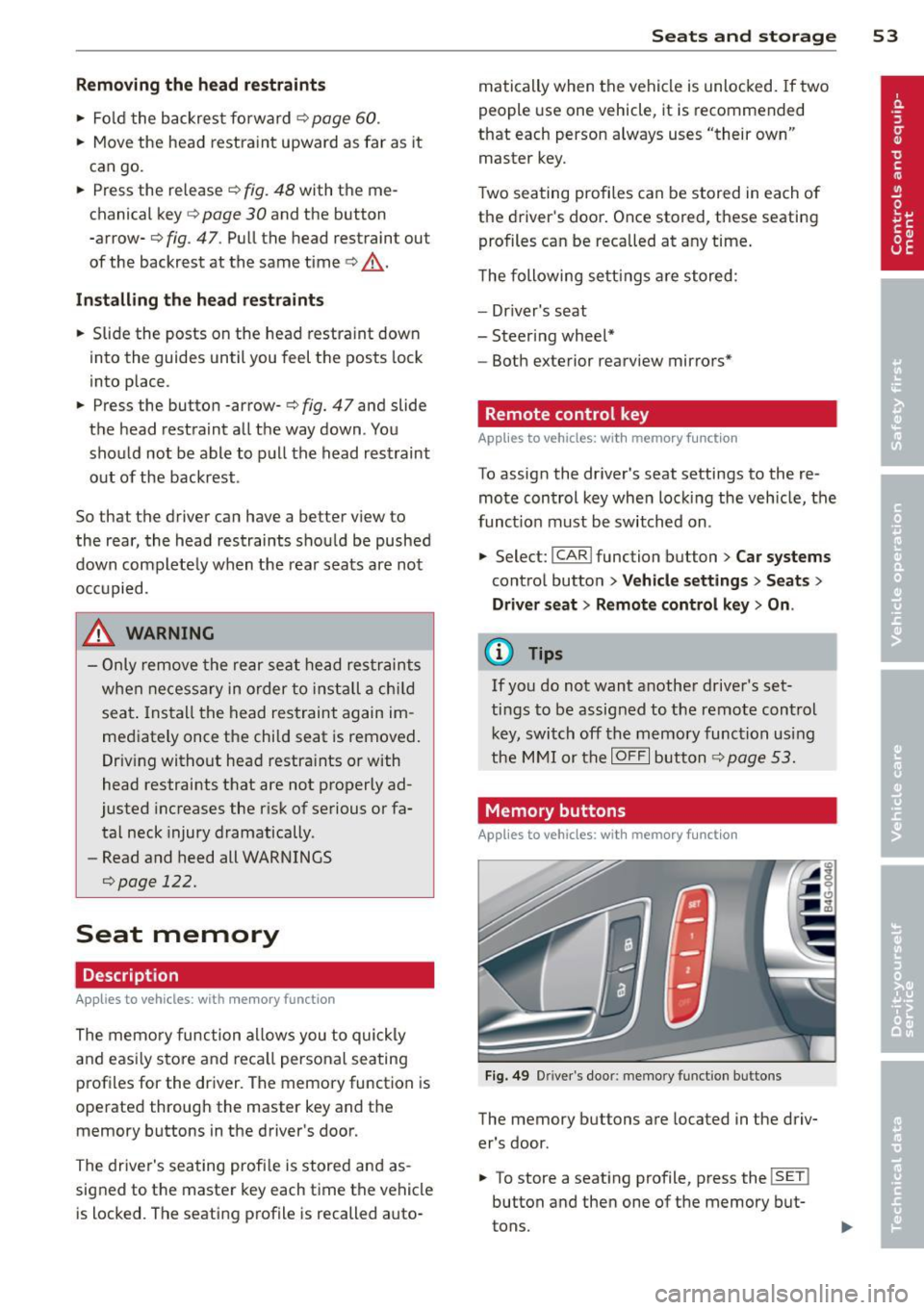
Fig. 49 Driver 's doo r: memo ry fun ction b uttons
The memory buttons are located in the driv
er's door.
• To store a seating profile , press the
!SE T!
button and then one of the memory but
tons.
Page 56 of 294
54 Seats and storage
• To recall a seating profile, press and hold
the memory button until the seat is adjust
ed to the stored settings .
• To sw itch the memory function for the driv
er or front passenger off, press the
I OFF I
button . The word OFF lights up when the
memo ry fu nction is switched off. Seating
profiles will not be stored.
.&, WARNING
-For safety reasons, the seat se tting
should only be recalled when the vehicle
is stationary -otherwise yo u risk havi ng
an accident.
- If necessary, you stop the process by
pressing the
IOF FI button or any of the
memory buttons .
Ashtray
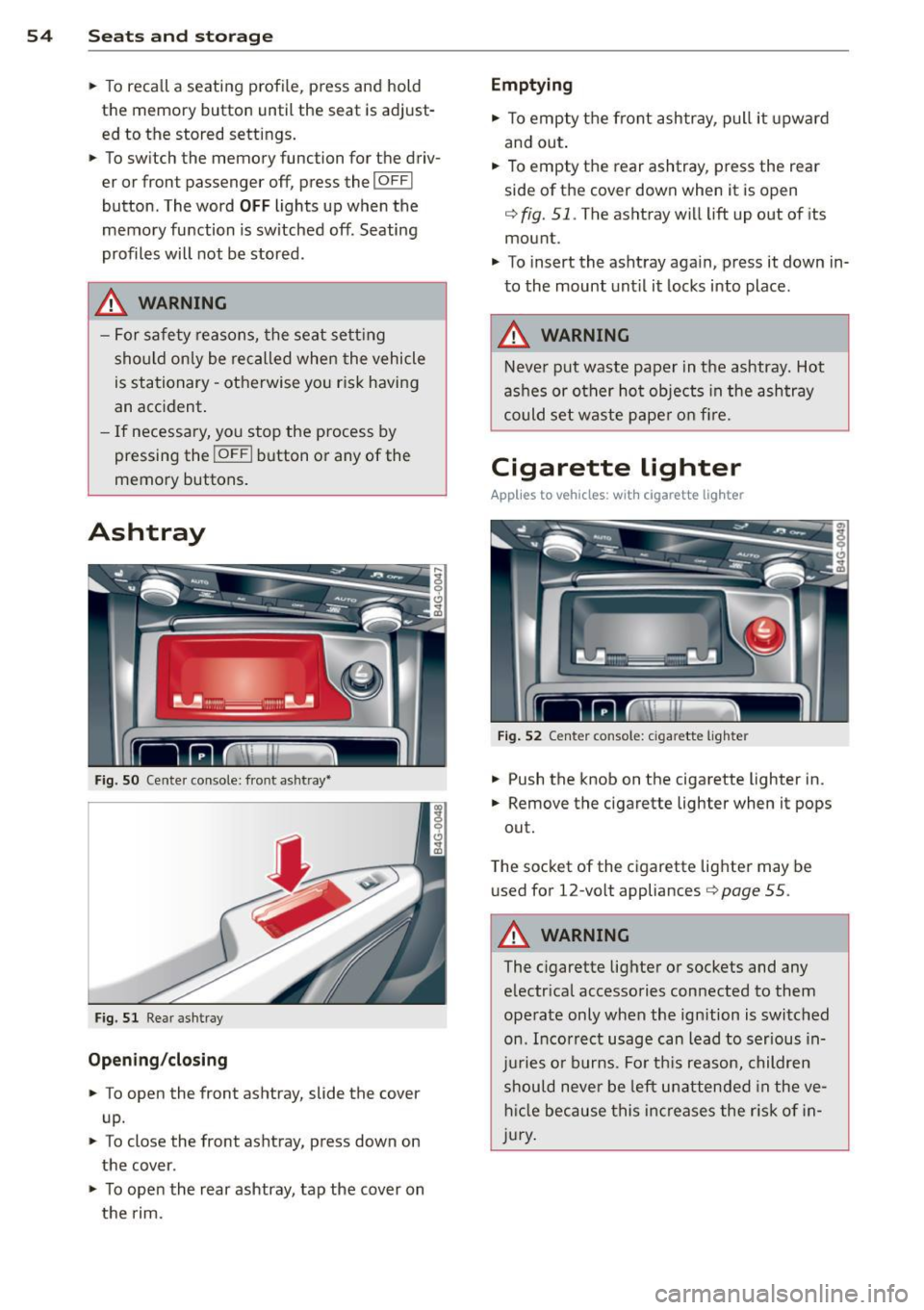
Fig. S O Cente r console: front ashtray•
Fig. 51 Rear ashtray
Opening /closing
• To open the front ashtray, slide the cover
up.
• To close the front ashtray, press down on
the cover .
• To open the rear ashtray, tap the cover on
the rim.
Emptying
• To empty the front ashtray, pull it upward
and out.
• To empty the rear ashtray , press the rear
side of the cover down when it is open
q fig. 51. The ashtray will lift up out of its
mount.
• To insert the ashtray aga in, p ress it down in
to the mount unt il it locks into place .
.&, WARNING
-Neve r put waste paper in the ashtray. Hot
ashes or oth er ho t objects in the ashtray
could set waste pape r o n fire.
Cigarette lighter
Applies to veh icles: w ith cigarette lighter
F ig. 52 Center console: cigarette lighte r
• Push the knob on the cigarette lighter in.
• Remove the cigarette lighter when it pops
out.
T he socket of the cigarette lighte r may be
used for 12-volt appliances
Q page 55 .
.&, WARNING
-
The cigarette lighter or sockets and any
e lectr ica l accessories con nected to them
operate only when the ign ition is switched
on . Incorrect usage can lead to serious in
j u ries or burns . Fo r th is reason, children
should never be left unatten ded in the ve
h icl e because this inc reases the r is k of i n
j u ry .
-
Page 58 of 294
56 Seats and storage
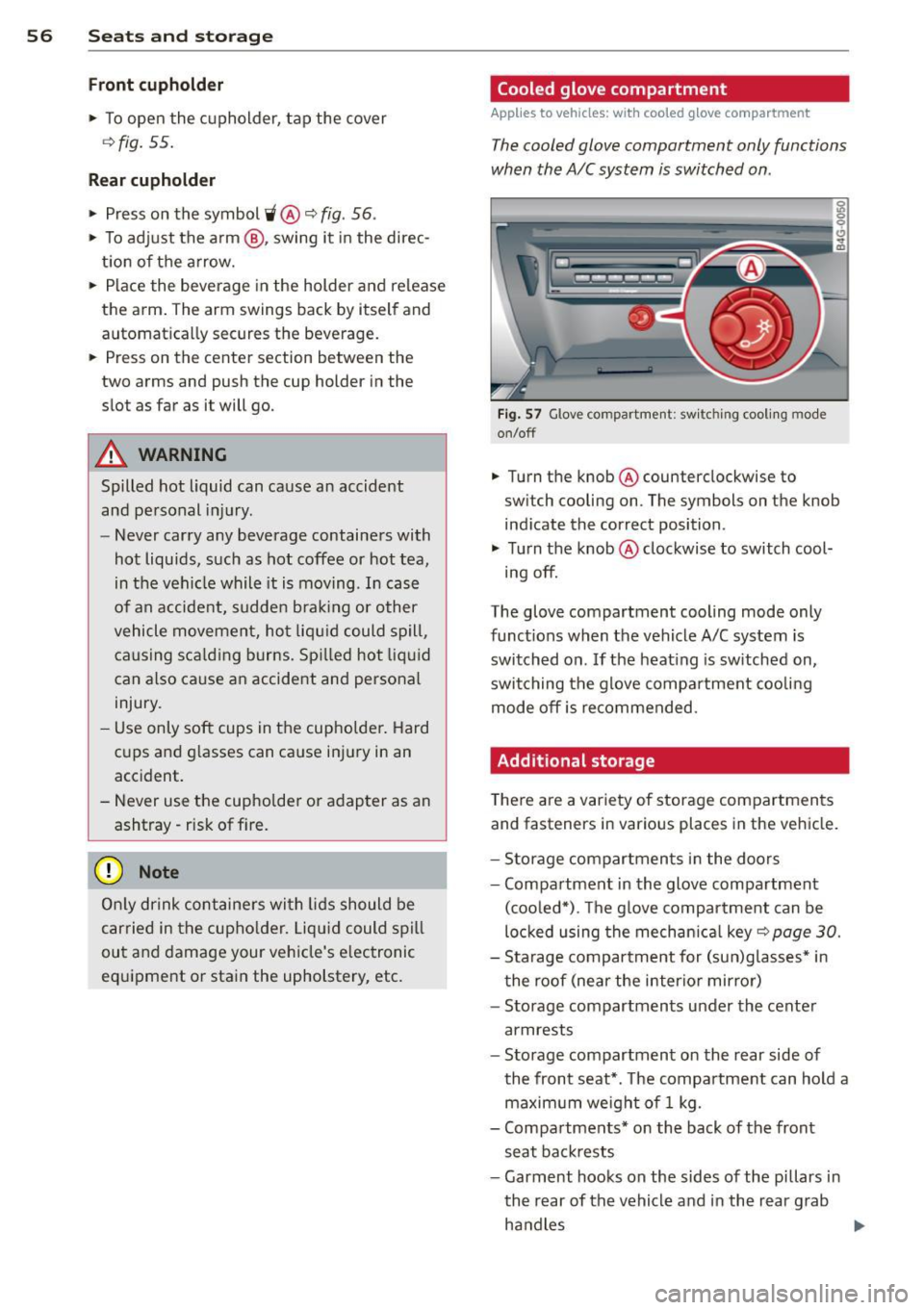
Front cuphold er
.,. To open the c upholder, tap the cover
~ fig. 55.
Rear cuphold er
.,. Press on the symbol 'i@ ~ fig . 56 .
.,. To adjust the a rm @ , swing it in the direc
t ion of the a rrow .
.,. Place the beverage in the holder and release
the arm . The arm swings back by itself and
automatically secures the beverage .
.,. Press on the center section between the
two arms and push the cup holder in the
slot as far as it will go.
_& WARNING
Spilled hot liquid can cause an accident
and personal inj ury .
-
- Never carry any beverage containers with
hot liquids, such as hot coffee or hot tea,
in the vehicle while it is mov ing . In case
of an accident, sudden b ra ki ng o r other
vehicle movement, hot liq uid could spill,
causing sca ld ing burns. Sp illed hot liq ui d
can also ca use an accident and personal
injury.
- Use only soft cups in the cupholder . Hard
cups and g lasses can ca use inj ury in an
accident.
- Never use the cupho lder or adapter as an
ashtray- r isk of f ire.
(D Note
On ly drink containers wi th lids should be
carried in the cupho lder. Liqu id could spi ll
ou t and damage your vehicle's e lectronic
equ ipment or stain the upholstery, etc.
Cooled glove compartment
Applies to vehicles: with coo led g love compartment
The cooled glove compartment only functions
when the A/C system is switched on .
Fig . 57 G love compartme nt: sw it c hin g cooli ng m ode
on/off
.,. Turn the knob @counterclockwise to
sw itch cooling on . The symbols on the knob
ind icate the correct position .
.,. Turn the knob @clockwise to switch cool-
ing off.
The glove compartment cooling mode only
funct ions when the vehicle A/C system is
switched on . If the heating is sw itched on,
switching the g love compa rtment coo lin g
mode off is recommended.
Additional storage
T here a re a var iety of storage compartments
and fasteners in various places in the vehicle.
- S torage compartments in the doors
- Compartment in the glove compartment
(coo led*) . T he g love compar tment can be
loc ked using the mechan ica l
key ~ page 30.
-Sta rage compartment for (su n)g lasses* in
t he roof (near the interio r mirror)
- Storage compartments under the center
armrests
- Storage compartment on the rear side of
the front seat *. T he compa rtment can hold a
maximum weigh t of 1 kg.
- Compa rtments* on the back of the front
seat ba ckrests
- Garment hooks on the sides of the pi llars in
th e rear of the vehicle and in the rear g rab
ha ndles
lllJ,,
Page 62 of 294
60 Seats and st o rage
Luggage compartment cover
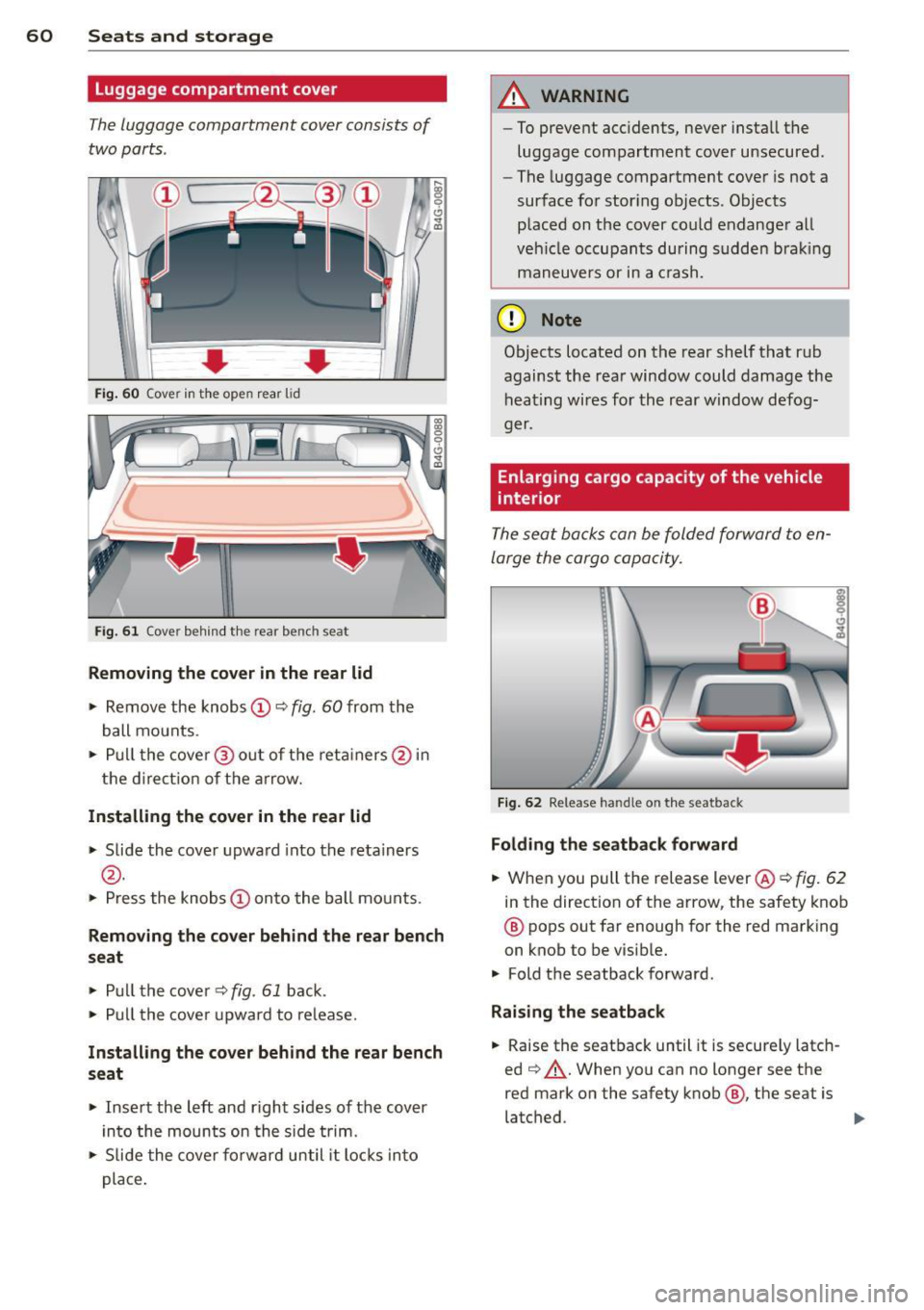
The luggage compartment cover consists of
two parts .
• • Fig. 60 Cover in t he open rear lid
Fig. 61 Cover behind t he rear bench seat
Removing the cov er in the r ear lid
.. Remove the knobs CD¢ fig. 60 from the
ball mounts .
.. Pu ll the cove r@ out of the reta iners @in
the d irect ion of the a rrow.
Install ing th e cover in the rear lid
.. Slide the cover upward into the retainers
@ .
.. Press the knobs CD onto the ball mounts.
9 C) .. (D
Rem oving the cov er behind the rear bench
seat
.. Pull the cove r¢ fig. 61 back .
.. Pull the cove r upward to re lease.
In sta ll ing th e co ver behind the rear bench
seat
.. Inse rt the left and r ight sides of the cover
in to the mounts on the s ide trim .
.. Slide the cover forward until it locks into
place .
A WARNING
--To prevent acc idents, never insta ll the
luggage compartment cover unsecured .
- The luggage compartment cover is not a
surface for storing objects. Objects
p laced on the cover co uld endanger all
veh icle occupan ts during sudden bra king
maneuvers or in a c rash.
(D Note
Objects located on the rear shelf that rub
against the rear window could damage the heating wires for the rear window defog-
ger.
Enlarging cargo capacity of the vehicle
interior
The seat backs can be folded forward to en
large the cargo capacity.
F ig . 62 Release handle on the seatback
Folding th e seatba ck forward
.. When you pull the release lever @¢ fig. 62
in the direction of the arrow, the safety knob
@ pops out far enough for the red marking
on knob to be visible.
.. Fold the seatback forward .
Raising th e se atb ack
.. Raise the seatback until it is secure ly latch
ed ~,&. .When you can no longer see the
red mark on the safety knob @, the seat is
latched . ..,
Page 67 of 294

Warm and cold 65
Three-zone climate control
Operation
Applies to vehicles: with three-zone climate control
We recommend pressing the !AUTOI button and setting the temperature to 72 °F (22 °C).
F ig. 70 Three -zone cl imate control : controls
Press the buttons to turn the funct ions on or
off. The dial adjusts the temperature and the
blower . The LED in the buttons illuminates
when the funct ion is active.
IAUTO I Switching automatic mode on
Automatic mode maintains a constant tem
perature inside the vehicle. Air temperature,
airflow and air d istribution are controlled au
tomatically.
e °F e Adjusting the temperature
The temperature can be adjusted individually
for the driver and front passenger using the
d ials (!) and @.
8fr Adjusting the airflow
Using the dial@, you can manually adjust the
amount of air generated by the blower to suit
your preferences . To have the airflow regulat
ed automatically, press the
! AUTO ! button.
~. rill, [2] Adjusting the air distribution
You can manually se lect the vents where the
air will flow. To have the air distribution regu lated automatically, press the
!AUTOI button .
l""" I Switching recirculation mode on/off
In recirculation mode, the air inside the vehi
cle is circulated and filtered. This prevents the
unfiltered air outside the veh icle from enter
ing the vehicle interior . We recommend
switching recirculation mode on when dr iving
through a tunnel or when sitting in traffic
~.& -
The !AUTO ! button or~ button switches recir
cu lation mode off.
I OFFI Switching the climate control
system on/off
The ! O FF! button switches the climate con trol
system on or off.
It also switches on when yo u
turn the dial or press any button. Airflow from
outside is blocked when the climate control
system is switched off.
IACI Switching cooling mode on/off
The air is not coo led and humidity is not re
moved when cooling mode is switched off .
This can cause fog on the w indows. Cooling
mode switches off automatically when the
outside temperature is be low zero.