steering AUDI A7 2012 Owners Manual
[x] Cancel search | Manufacturer: AUDI, Model Year: 2012, Model line: A7, Model: AUDI A7 2012Pages: 294, PDF Size: 73.33 MB
Page 4 of 294
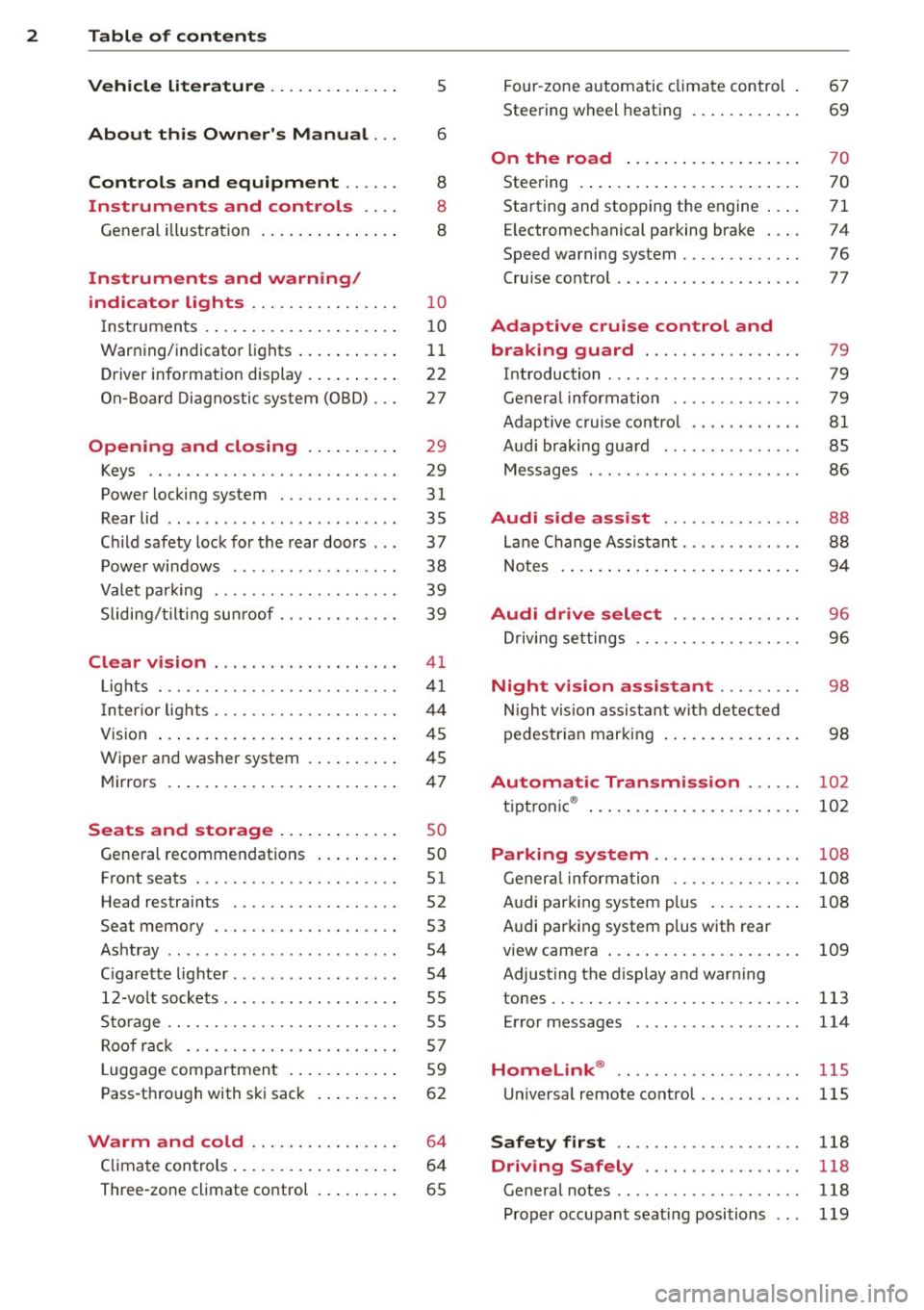
2 Table of content s
Vehicle lite ratu re .. .. .. .. .. ... .
5
About thi s Owner' s Manual . . . 6
C ontr ols and equi pm ent .. ... .
Ins truments and controls .. . .
General illustration ...... ... .. ... .
Instruments and warning /
indicator lights ........ .. .. .. . .
Instruments ............ ... .. ... .
Warning/indicator lights .. ... ... .. .
Driver information display .... .. ... .
On-Board Diagnostic system (OBD) . . .
Opening and closing .. .. .... . .
Keys .. ...... ........... .. .. ... .
Power locking system ..... .. .. .. . .
Rear lid .. .. ........ ........ .... .
Child safety lock for the rear doors .. .
Power windows ............... .. .
Valet park ing . ........... .. .. ... .
Sliding/tilting sun roof ... .. .. .. .. . .
Clear vi sion ................... .
Lights . .. .. .. . .......... .. .. .. . .
I nter ior lights ............ .. .. .. . .
V1s 1on .......... ......... ... ... .
Wiper and washer system ... .... .. .
Mirrors .... .............. ... ... .
Seats and storage ...... ... ... .
General recommendations ... .... . .
Front seats ... ........... .. .. ... .
Head restraints .............. ... .
Seat memory . ........... .... ... .
Ashtray .. .. ... .... ...... .. .. .. . .
C igarette lighter .............. .. . .
12-vo lt sockets ............ ... .. . .
Sto rage ................. .. .. ... .
Roof rack ............... .. .. .. . .
L uggage compartment ... ... ... .. .
Pass-through with ski sack ... .. ... .
Warm and cold ............ ... .
C limate controls ......... ... .. ... .
Three-zone climate control ... .. ... .
8
8
8
10
10
11
22
27
29
29
31
35
37
38
39
39
41
41
44
45
45
47
so
so
51
52
53
54
54
55
55
57
59
62
64
64
65 Four
-zone automatic climate control .
Steering wheel heating ...... ... .. .
On the road ... ... ....... ... .. .
Steering . ..... .. ... ....... ..... .
Starting and stopping the engine .. . .
E lectromechanical parking brake . .. . 67
69
70
70
71
74
Speed warning system . . . . . . . . . . . . . 76
Cru ise control . . . . . . . . . . . . . . . . . . . . 77
Adaptive crui se control and
braking guard . . . . . . . . . . . . . . . . .
79
Introduction . . . . . . . . . . . . . . . . . . . . . 79
General information . . . . . . . . . . . . . . 79
Adaptive cruise control . . . . . . . . . . . . 81
Audi braking gua rd . . . . . . . . . . . . . . . 85
Messages . . . . . . . . . . . . . . . . . . . . . . . 86
Audi side assist . . . . . . . . . . . . . . . 88
Lane Change Assistant. . . . . . . . . . . . . 88
Notes . . . . . . . . . . . . . . . . . . . . . . . . . . 94
Audi drive select . . . . . . . . . . . . . . 96
Driv ing set tings . . . . . . . . . . . . . . . . . . 96
Night vision a ssistant . . . . . . . . . 98
N ight vision assistant with detec ted
pedestrian marking . . . . . . . . . . . . . . . 98
Automatic Transmission . . . . . . 102
t. t
. ® 1p ronic ..... .. ... .. ..... ... .. . 102
Parking system . . . . . . . . . . . . . . . . 108
Genera l informa tion . . . . . . . . . . . . . . 108
Audi parking system p lus . . . . . . . . . . 108
Audi parking system plus with rear
view camera . . . . . . . . . . . . . . . . . . . . . 109
Adjusting the d isplay and warn ing
tones. .... .... .. ............. ... 113
Error messages 114
Homelink® . . . . . . . . . . . . . . . . . . . . 115
Universal remote control. .......... 115
Safet y first . . . . . . . . . . . . . . . . . . . . 118
Driving Safely . . . . . . . . . . . . . . . . . 118
General notes . . . . . . . . . . . . . . . . . . . . 118
Proper occupant seating positions . . . 119
Page 11 of 294
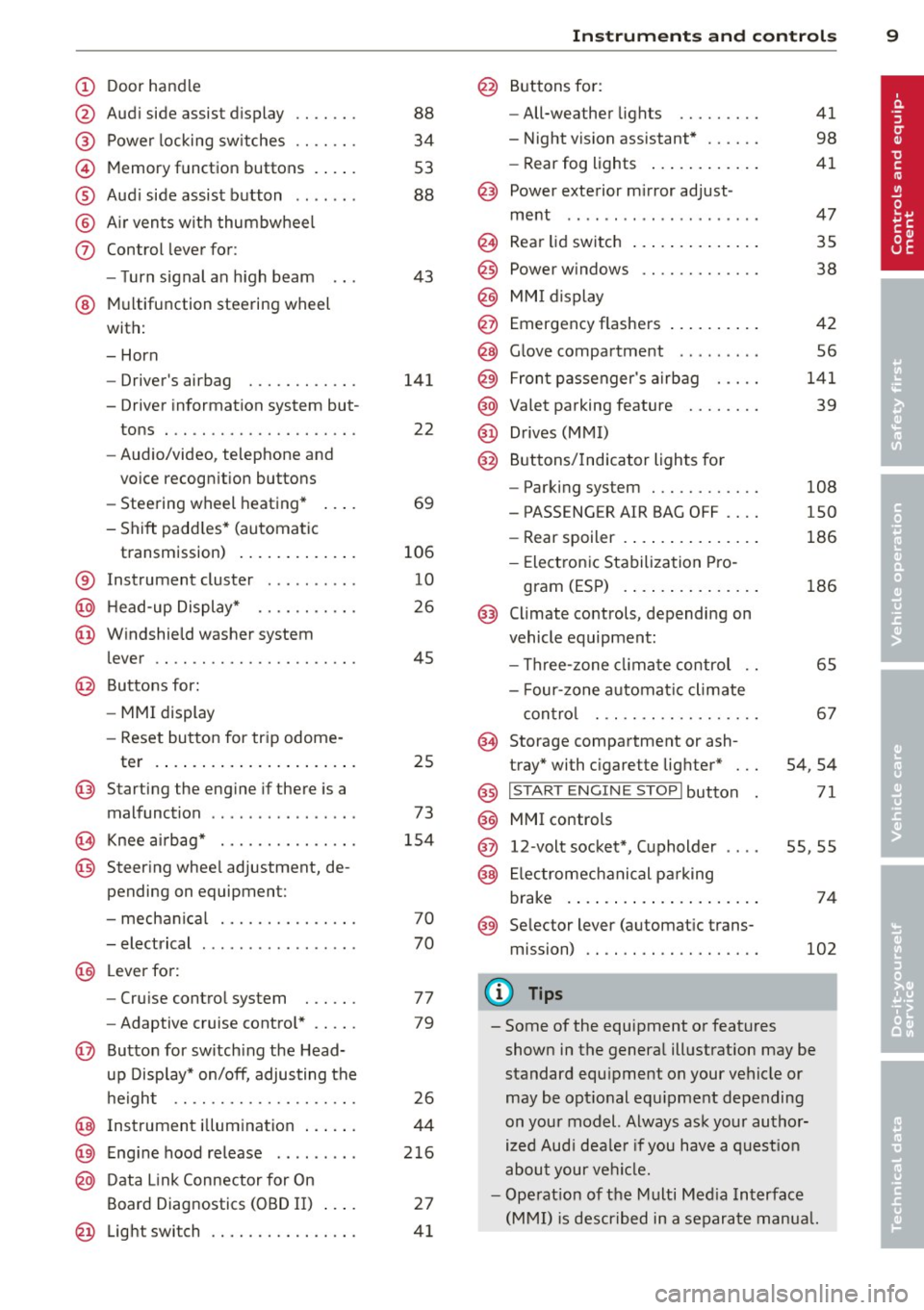
(!) Door handle
@
®
©
®
®
(j)
Audi side assist d isplay
Power locking sw itches
Memory function buttons . ... .
Aud i side assist button .. .. .. .
A ir vents with thumbwheel
Control lever for :
- T urn signal an h igh beam
@ Multifunction steering wheel
with:
- Horn
- Driver's airbag
- Driver information system but-
tons . .. ............. .... .
- Audio/video, telephone and
vo ice recogn ition buttons
- Steering wheel heating* ... .
- Shift padd les* (automatic
transmission) ..... ... .. .. .
® Instrument cluster ..... .. .. .
@ H ead-up Display* ...... .. .. .
@ Windshield washer system
lever .. .. ............. .... .
@ Buttons for:
-MMI display
- Reset button for trip odome -
ter .... .. ... ..... ... .. .. .
@ Starting the eng ine if there is a
malfunct ion ............ ... .
0 Knee airbag* .......... .... .
@ Steer ing whee l adjustment, de
pending on equipment:
- mecha nical .......... .... .
- electrical ............. ... .
@ Lever fo r:
- Cru ise contro l system
- Adaptive cruise contro l* .. .. .
@ Button for switch ing the Head
up Disp lay* on/off, adjusting the
h eight .. ............. .... .
@ Instrument i llumination ... .. .
@ Eng ine hood release ........ .
@ D ata Link Connector for On
Board Diagnostics (OBD II)
@ Lig ht swi tch ........... .... .
88
34
53
88
43
141
22
69
106
10
26
45
25
73
1 54
70
70
77
79
26
44
2 16
27
41
In strument s and control s 9
@ Buttons for :
- All-weather lights
- Night vision assistant* ..... .
- Rear fog lights .. .. .. ..... .
@ Power exterior m irror ad just -
ment .. .. .. .... .......... .
@ Rear lid switch ... . .. .. ..... .
@
@
@ Power w indows
MM I display
Emergency flashers
@ G love compartment . .. .. ... .
@ Fron t passenger's a irb ag .... .
@ Valet parking feature ....... .
@ Drives (MMI)
@ Buttons /Indicator lights for
- Parking system ........... .
- PASS ENG ER AIR BAG OFF ... .
- Rear spoiler .. .. . ... ...... .
- Elect ron ic Stabilization Pro-
gram (ESP) .... . .. .. ..... .
@ Climate controls, depending on
vehicle equipment:
- Three -zone clima te control ..
- Four-zone au tomat ic climate
con tro l ... .. ............ .
@ Storage compartment or ash-
tray* with c igarette lig hter* ...
@) I S TART ENGI NE STOPI button
@ MMI controls
@ 12-volt socket*, (upholder
@ Elec tromec hanical p arking
brake . ... .... ... .. .. ..... .
@ Selector lever (automat ic trans
mission)
(!) Tips
41
98
41
47
35
38
42
56
141
39
108
150
186
186
65
67
54 ,54
71
55,55
74
102
- Some of the equipment or features
shown in the genera l ill ustration may be
standard equ ipment on your vehicle or
may be opt ional equ ipment depending
on your model. Always ask your author
ized Aud i dea le r i f you have a quest io n
abou t your ve hicl e.
- Ope rat ion of t he Mu lti Med ia Interface
(M MI) is described in a separate manua l.
Page 13 of 294
Instrument s and warnin g/indic ator ligh ts 11
- Never open the engine hood if you see or
hear steam, or if you see engine coolant
dr ipping from the engine compartment.
You could burn yourself . Let the engine
cool off first so that you cannot hear or
see any steam or engine coolant.
Q) Note
- Mount ing additional lights or accessories
i n front of the a ir inlets reduces the cool
i ng effect of the rad iator . At h igh outside
temperatures or high eng ine load, the
engine could overheat.
- The front spo ile r has been designed to
proper ly distrib ute the cooling air wh en
t h e veh icle i s moving.
If the spoiler is
damaged, this cou ld red uce the cooling
effect and the engine co uld then over
heat . Ask yo ur authorized Audi dea ler fo r
ass istance.
Tachometer (engine rev counter)
The tachometer indicates the engine RPM
(revolutions per minutes).
If engine R PM drops be low 1 ,500, you should
downshift to the next lower gea r. T he red area
at the end of the sca le indicates maximum
pe rmissib le engine RPM after the break- in pe
riod. Before reach ing this area, move these
lector lever to position "D/S (Drive)" or ease
your foot off the accelerator peda l.
(D Note
The tachometer needle should only br iefly
be in the red zone: you cou ld damage your
eng ine! The beginn ing of the red zone var
ies depending on the e ng ine.
@ For the sake of the environment
Upshift ing early saves fuel and reduces en
g ine noise.
Fuel gauge
The fuel gauge only wo rks when the ignition is
on .
If the fuel level drops below 2.6 gallons (10 liters), the bottom LED turns red and the
indicator
light~ turns on ¢
page 20. The
bottom LED blinks red when the fue l level is
very low.
T he possible range based on the current f uel
level is shown in tab@¢
page 22, fig . 4 .
(D Note
Neve r run the tan k comp letely dry. An ir
r egular supp ly o f fu el can cause engine
misfiring and fuel could enter the exha ust
system . The cata lytic converter could then
overheat and be damaged.
Warning/indicator Lights
Description
The ind icator lights in the instrument cluster
blink or turn on. They indicate funct ions or
malfunctions
q ,& .
Messages may appear with some indicato r
lights. A warning signal will sound at the
same time. The indicator lights and messages
in the center of the displays may be rep laced
by other d isplays . To show them again, select
the tab for ind icator lights and messages us
ing the multifunction steering whee l
¢
page 22. I f there are several malfunc
tions, you can display them one at a time us
ing the thumbwheel.
Some indicators lights in the d isplay can tu rn
o n in seve ra l c olors.
&_ WARNING
- F ailure to heed warning l igh ts an d other
important vehicle in formation may resu lt
in serious personal inj ury or vehicle dam
age .
- Whenever stalled or stoppe d for repair,
move the vehicle a safe d istance off the
road, stop the engine, and turn on the
emergency flasher
q page 42.
- The engine compartment of any motor
veh icle is a potentially hazardous area.
Before you check anything in the engine
Page 14 of 294
12 Instrum ent s and w arn ing /indic ato r light s
compartment, stop the engine and let it
cool down. Always exercise extreme cau
tion when work ing under the hood
¢ page 210, Engine compartment
Malf u nctions or faults wi ll be identified ei
ther with a red symbol (pr iority 1 -Dan
ger!) or with a yellow symbol (priority 2 -
Warn ing).
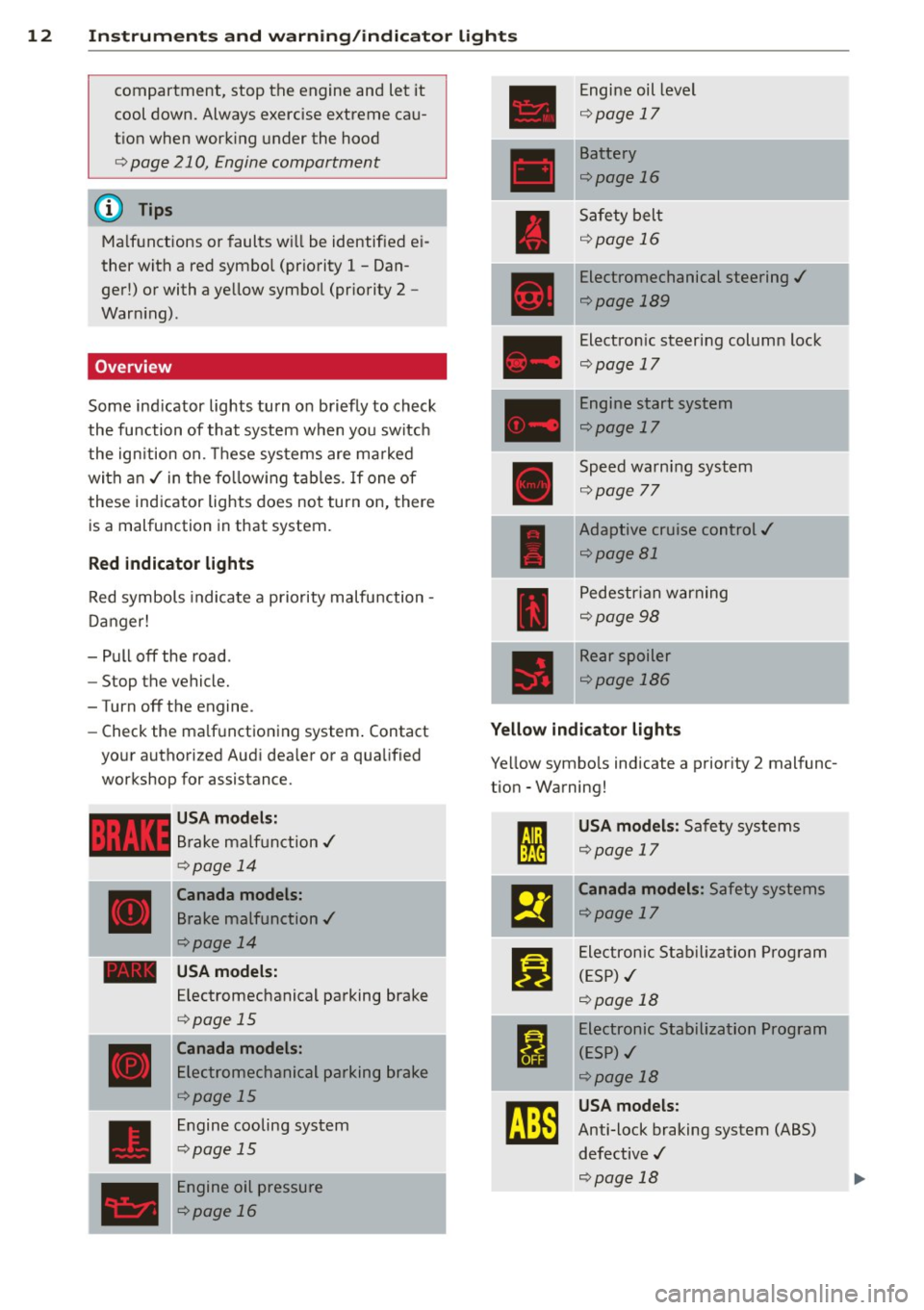
Overview
Some indicator lights turn on briefly to check
the function of that system when you switch
the ignition on. These systems are ma rked
with an./ in the follow ing tab les. If one of
these indicator lights does not turn on, there
is a malfunction in that system.
Red indicator lights
Red symbols indicate a priority malfunction -
Danger!
- Pull off the road.
- Stop the vehicle.
-Turn off the engine.
- Check the ma lfunctioning system. Contact
your authorized Audi dealer or a qualified
workshop for assistance.
USA model s:
Brake ma lf u nction./
¢page 14
Canada model s:
Brake malfunction ./
¢page 14
- USA model s:
____ ,
Electromechanical parking brake
¢ page 15
Canada models:
Electromechanical parking brake
¢page 15
Engine cooling system
¢page 15
Engine oil pressure
¢page 16
I
Engine oil level
¢ page 17
Battery
Qpage 16
Safety belt
¢page 16
Electromechanical steering ./
¢page 189
Electronic steering column lock
Qpage 17
Engine start system
¢page 17
Speed warning system
Qpage 77
Adaptive cruise control./
Qpage 81
-
Pedestrian warning
¢page98
Rear spoiler
¢page 186
Yellow indicator light s
Yellow symbo ls indicate a priority 2 malfunc-
tion - Warning!
I
USA model s: Safety systems
Qpage 17 '
m
Canada models : Safety systems
Qpage 17
Ji]
Electronic Stab ilizat ion Program
(ESP)./
¢page 18
I
Electronic Stabilization Program
(E SP)./
¢page 18
rJ}E
USA models:
Anti-lock braking system (ABS)
defective ./
Qpage 18
I
Page 15 of 294
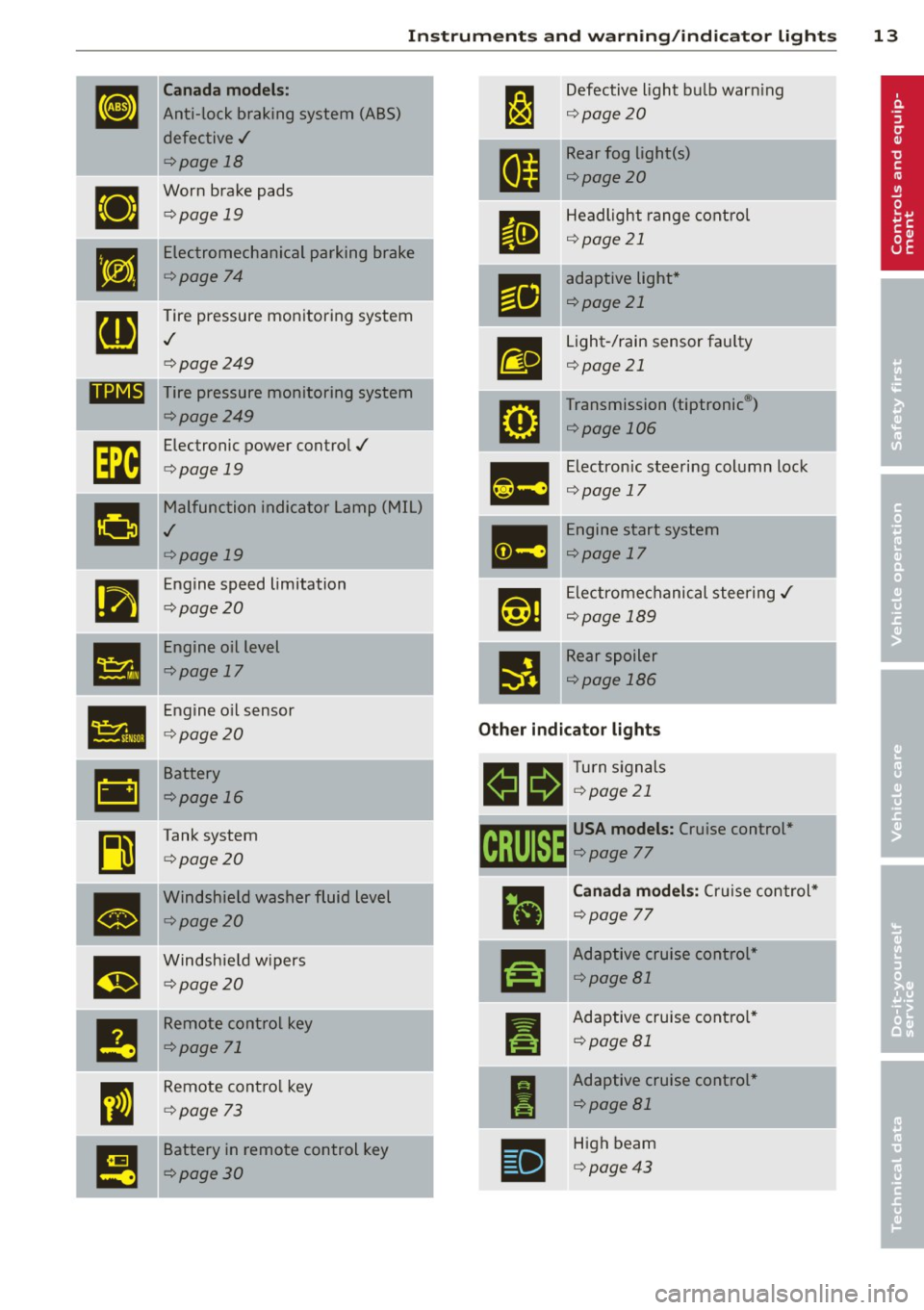
Instrument s and warnin g/indic ator ligh ts 13
Canada models:
Anti-lock braking system (ABS)
defective ./
c:>page 18
Worn brake pads
c:>page 19
Electromechanical parking brake
c:>page 74
Tire pressure mon itoring system
./
c:> page249
-pa ....,.,.. -,,
ll@l@t Tire pressure monitoring system
-
•
•
-
•
•
m
-
I!
c:>page2 49
Electronic power contro l ./
c:> page 19
Malfunction indicator Lamp (MIL)
./
c:>page19
Engine speed limitation
c:>page 20
Engine oil level
c:>page 17
Engine o il sensor
c:> page20
Battery
c:>page 16
Tank system
c:>page20
Windshield washer fluid level
c:>page20
Windshie ld w ipers
c:>page20
Remote control key
c:>page 71
Remote cont ro l key
c:> page 73
Battery in remote control key
c:>page30
-
Defective light bu lb warn ing
9 page20
Rear fog light(s)
c:>page20
Headlight range cont rol
9 page 21
-
adaptive lig ht*
¢page 21
Light-/rain sensor faulty
¢page 21
Transmission (tiptronic®)
c:>page 106
Electronic steering col umn lock
9page 17
Engine start system
c:>page 17
Ele ctrome chanical steering ./
¢page 189
-
Rear spoiler
c:>page 186
Other indicator light s
11!1 a Turn s ignals
Iii !!!9':ii ¢ page 21
~ USA models: Cruise con trol*
~ c:> page 77
• -
r!I
I
I
Canada models : Cruis e control*
¢page 77
-
Adaptive cruise control *
c:>page Bl
Adaptive cruise cont ro l*
¢page Bl
Adaptive cruise control *
¢page 81
High beam
c:>page43
Page 19 of 294
Instruments and warning/indicator lights 17
flash before you respond to the low oil level warning
Ill. By then, your engine
may already have suffered serious dam
age.
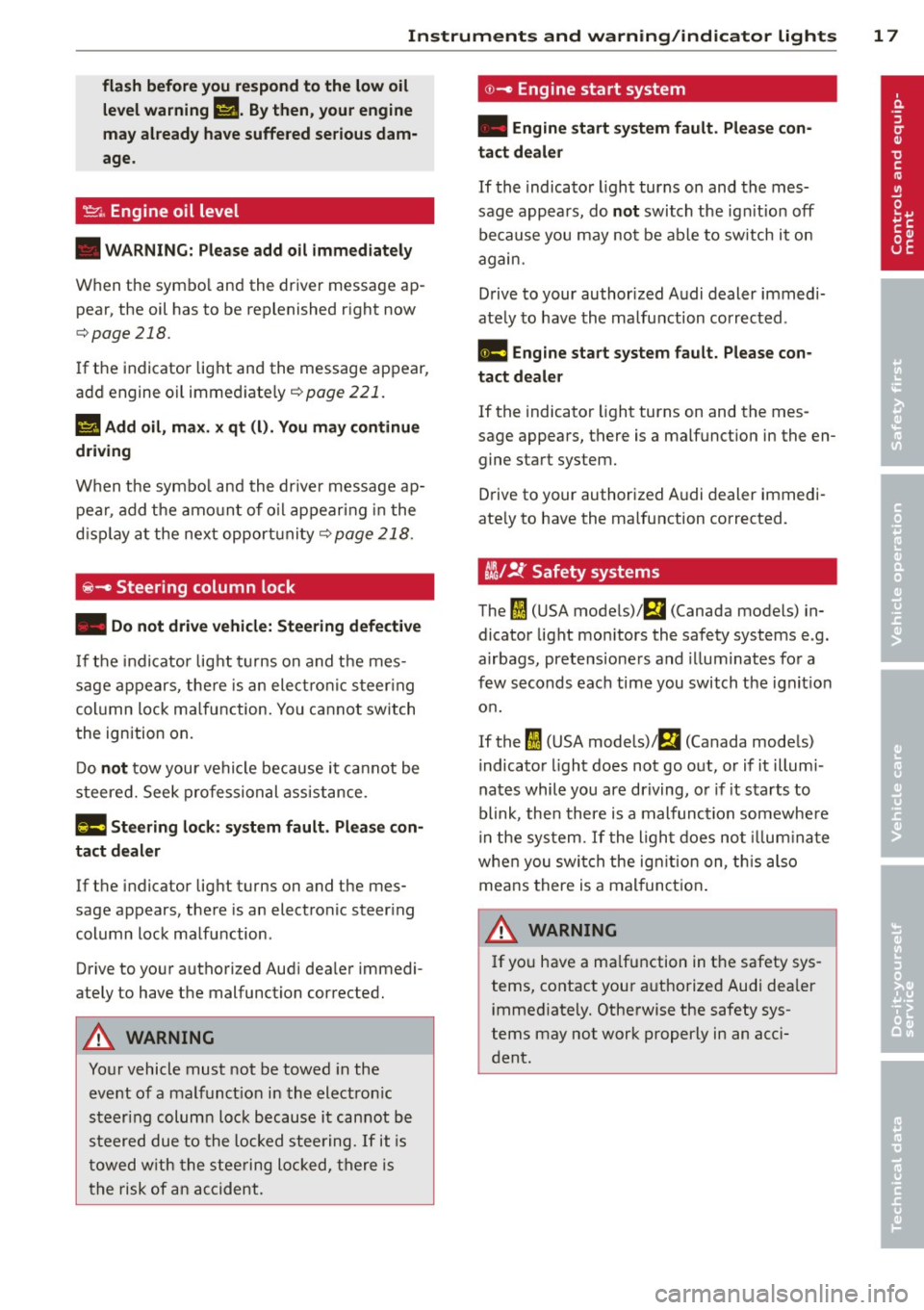
~ . Engine oil level
• WARNING: Please add oil immediately
When the symbol and the driver message ap
pear, the oil has to be replenished right now
,=;,page 218.
If the indicator light and the message appear,
add engine oil immediately
,=;, page 221.
II Add oil, max. x qt (l). You may continue
driving
When the symbol and the driver message ap
pear, add the amount of oil appearing in the
display at the next opportunity
¢ page 218.
@ -Steering column lock
• Do not drive vehicle: Steering defective
If the indicator light turns on and the mes
sage appears, there is an electronic steering
column lock malfunction. You cannot switch
the ignition on.
Do
not tow your vehicle because it cannot be
steered. Seek professional assistance.
l!l!I Steering lock: system fault. Please con
tact dealer
If the indicator light turns on and the mes
sage appears, there is an electronic steering
column lock malfunction .
Drive to your authorized Audi dealer immedi
ately to have the malfunction corrected.
A WARNING
-
Your vehicle must not be towed in the
event of a malfunction in the electronic
steering column lock because it cannot be
steered due to the locked steering.
If it is
towed with the steering locked, there is
the risk of an accident.
©-Engine start system
• Engine start system fault. Please con
tact dealer
If the indicator light turns on and the mes
sage appears, do
not switch the ignition off
because you may not be able to switch it on
again.
Drive to your authorized Audi dealer immedi
ately to have the malfunction corrected.
II! Engine start system fault. Please con
tact dealer
If the indicator light turns on and the mes
sage appears, there is a malfunction in the en gine start system.
Drive to your authorized Audi dealer immedi
ately to have the malfunction corrected.
t!i1 !i: Safety systems
The ffll (USA models)!Ei (Canada models) in
dicator light monitors the safety systems e .g.
airbags, pretensioners and illuminates for a
few seconds each time you switch the ignition
on.
If the
ffl (USA models);Ei (Canada models)
indicator light does not go out, or if it illumi
nates while you are driving, or if it starts to
blink, then there is a malfunction somewhere
in the system.
If the light does not illuminate
when you switch the ignition on, this also
means there is a malfunction.
A WARNING ~
If you have a malfunction in the safety sys-
tems, contact your authorized Audi dealer
immediately. Otherwise the safety sys
tems may not work properly in an acci
dent .
Page 25 of 294
Instrument s and warning /indicator lights 23
- You can se lect the units used for temper
ature, speed and other measurements in
the M MI.
- Fo r information on the a udio/video and
navigation * functions, refe r to the sepa
r ate MMI owner's manual.
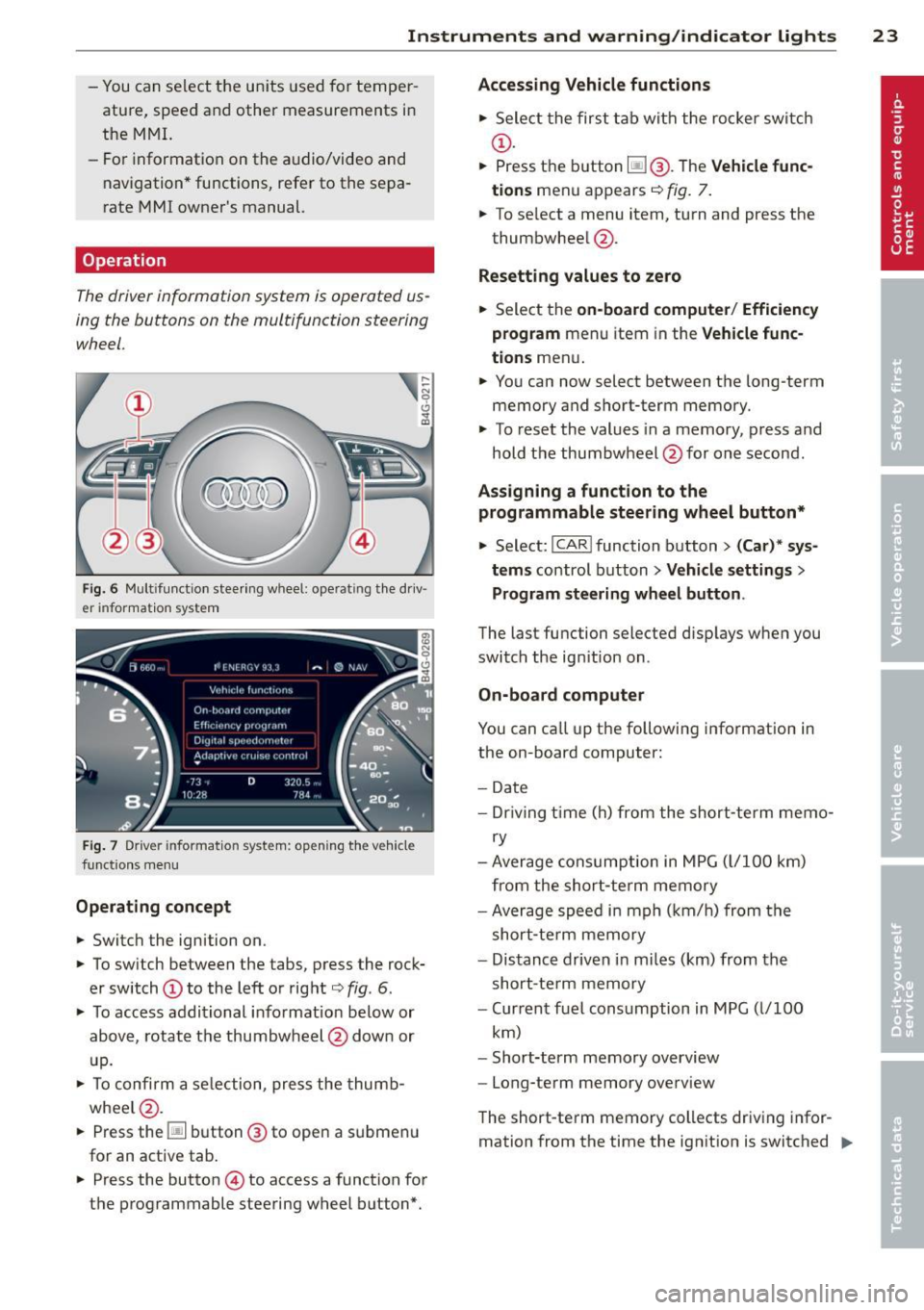
Operation
The driver information system is operated us
ing the buttons on the multifunction steering
wheel.
Fi g. 6 M ult ifu nct io n steer ing w hee l: operat ing t he d riv
er informat ion system
F ig. 7 Drive r informat ion syst em: op eni ng t he ve hicle
funct io ns m en u
Operating concept
.. Switc h the ign ition on.
.. To sw itch between the tabs, press the rock
er switch
(D to the left or rig ht c:> fig . 6.
.. To acc ess addit ional info rmation below or
abov e, rotat e the thumbw heel @dow n or
u p.
.. To confi rm a se le ction, pre ss the thu mb
whee l@ .
.. Press the~ button @to open a s ubmen u
fo r an active tab .
.. Press the button © to access a function fo r
t h e programmable steering w heel b utton*.
Accessing Vehicle functions
.. Sele ct th e first t ab wit h th e ro cker swi tch
(D .
.. Press t he button ~@. T he Vehicle func
tions
menu a ppears <=> fig. 7.
.. To se lect a menu item, turn and press the
thumbwhee l@ .
Resetting values to ze ro
.. Select the on-board computer / Efficiency
program
menu item in the Vehicle func
tions
men u .
.. Yo u can now select between t he long-term
memory and s hort-term memory .
.. To reset the values in a memory, p ress and
hold t he thumbwheel @for one second .
Assigning a funct ion to the
programmable steering wheel button*
.. Select: I CA RI function b utton > (Car) * sys
tems
control button > Vehicle settings >
Program steering wh eel button .
The last fu nction selected disp lays w hen you
switc h the ig nition on .
On-board computer
You can ca ll up the following info rmation in
the on-board computer:
- Date
- Dr iv ing t ime ( h) from the short-term me mo-
ry
- Average consumption in MP G (l/1 00 km)
from the shor t-te rm memory
- Ave rage spee d in mph ( km/h) from the
s h ort -term memory
- Dis tanc e driven i n m iles (km) fr om the
s hort-te rm memory
- Cur ren t fu el cons umption in MPG ( l/100
k m )
- Short-term memory overview
- Long-term memory ove rview
The short -te rm memory collects driv ing infor
mation from the time the ign it ion is switched .,..
Page 26 of 294
24 Instruments and warning /indicator lights
on until it is switched off. If you con tinue dr iv
ing within two hours after switch ing the igni
tion off, the new values a re included when
calculat ing the current tr ip i nformat ion.
Unlike the short -term memory, the long -term
memory is not erased automatica lly. You can
select the time period for evaluat ing trip in
formati on yo urself.
F or some veh icle functions, you can access the
tri p information from the tempora ry memory
in the line
(D ~ page 22, fig . 5.
Efficiency program
The effi ciency program can hel p yo u t o use
less fuel. It eval uates driving information in
reference to fue l co nsu mption and shows oth
er equipment i nfl uencing consumption as we ll
as shift recommendations.
c:> page 24. Fue l
economy messages
c:> page 24 prov ide tips
for eff icient driving. The eff ic iency prog ram
uses dis tance and consumption data from tr ip
comp ute r
1.
To display the efficiency program , call up Ve
h icle functions and select the menu option
Efficiency program . If the data are deleted in
the efficiency program, those values are also
reset in t rip compu ter .
@ Tips
-All sto red va lues w ill be lost if the veh i
cle bat tery is disconnected .
- Fuel consumpt io ns (average and cur
r en t), range and speed are display ed in
m etr ic units on Cana dian models.
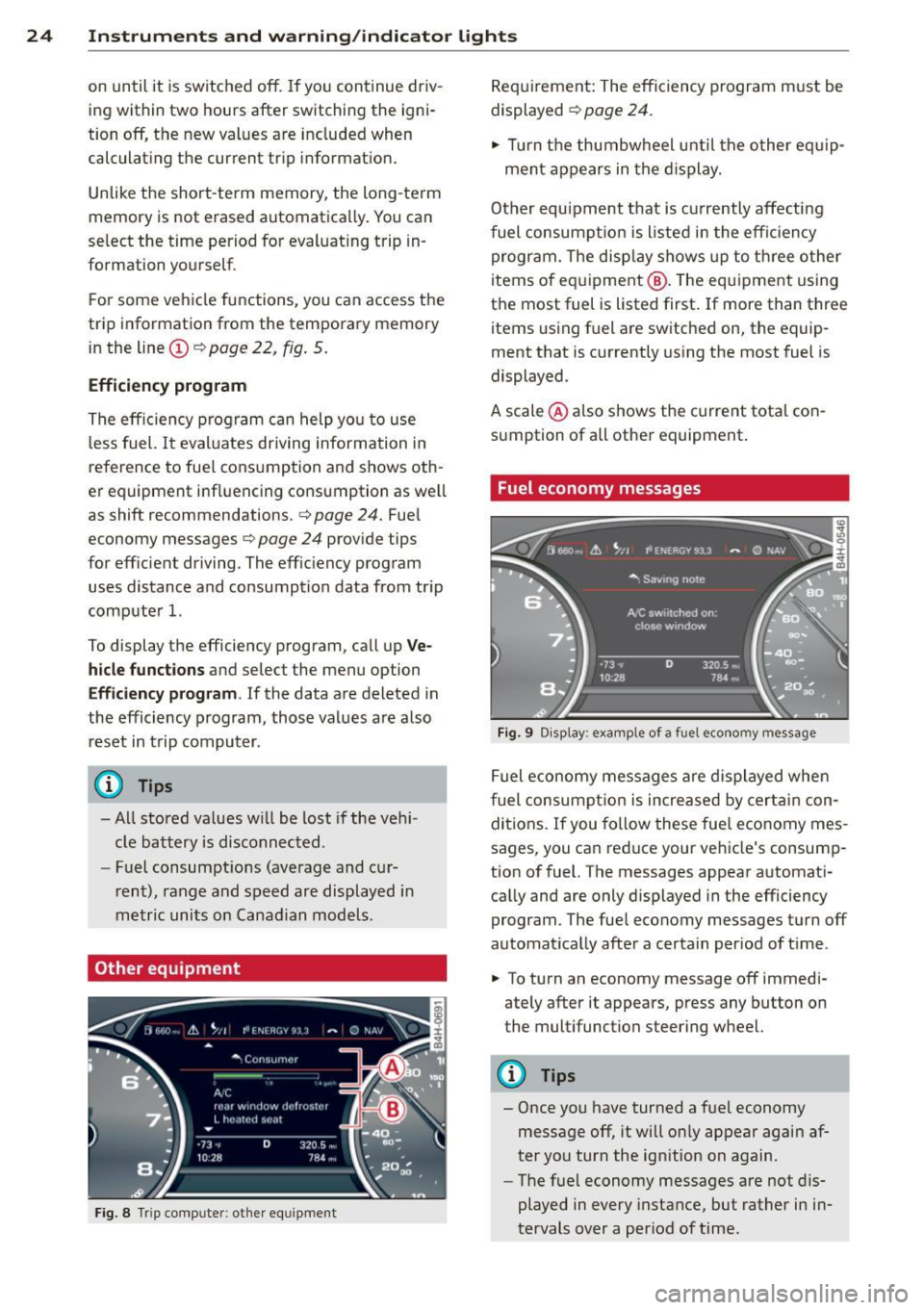
Other equipment
Fig. 8 Tri p co mpute r: ot her eq uipme nt
Req uirement: The efficiency program m ust be
displayed
c:> page 24.
,. Tur n the thu mbw heel u ntil t he o ther e quip-
ment appe ars in the disp lay.
Oth er equ ipment t hat is cu rrently affecti ng
f uel con su mp tio n is liste d in t he e fficiency
progr am. The disp lay shows up to t hree o ther
items of e quip ment @. The eq uipme nt using
t h e most fuel is listed first. If more than three
items using fuel are switched on, the equip
ment that is c urrently using the most fuel is
displayed .
A scale @also s hows the current tota l co n
s u mption of all other equipment.
Fuel economy messages
Fig. 9 Disp lay: exa mple of a fuel eco nomy m essage
Fuel eco no m y me ssages are disp layed whe n
f uel consum ption is increased by cert ain con
di tions. If you fo llow these fue l eco nomy mes
sages, you ca n red uce your ve hicle's consum p
tion o f fuel. The messages appear a utomati
ca lly and are only d isplayed in the efficiency
program. The fue l economy messages turn off
automat ica lly afte r a certain per iod of t ime .
,. To turn an economy message off immedi -
ately after it appears, press any button on
the mult ifunction steering whee l.
(D Tips
- Once you have turned a f uel economy
message off, it will o nly appear agai n af
ter you turn the ign ition on again.
- The fuel economy messa ges are not dis
played in every instance, but rather in in
tervals over a period of time .
Page 31 of 294
Opening and closing Keys
Key set
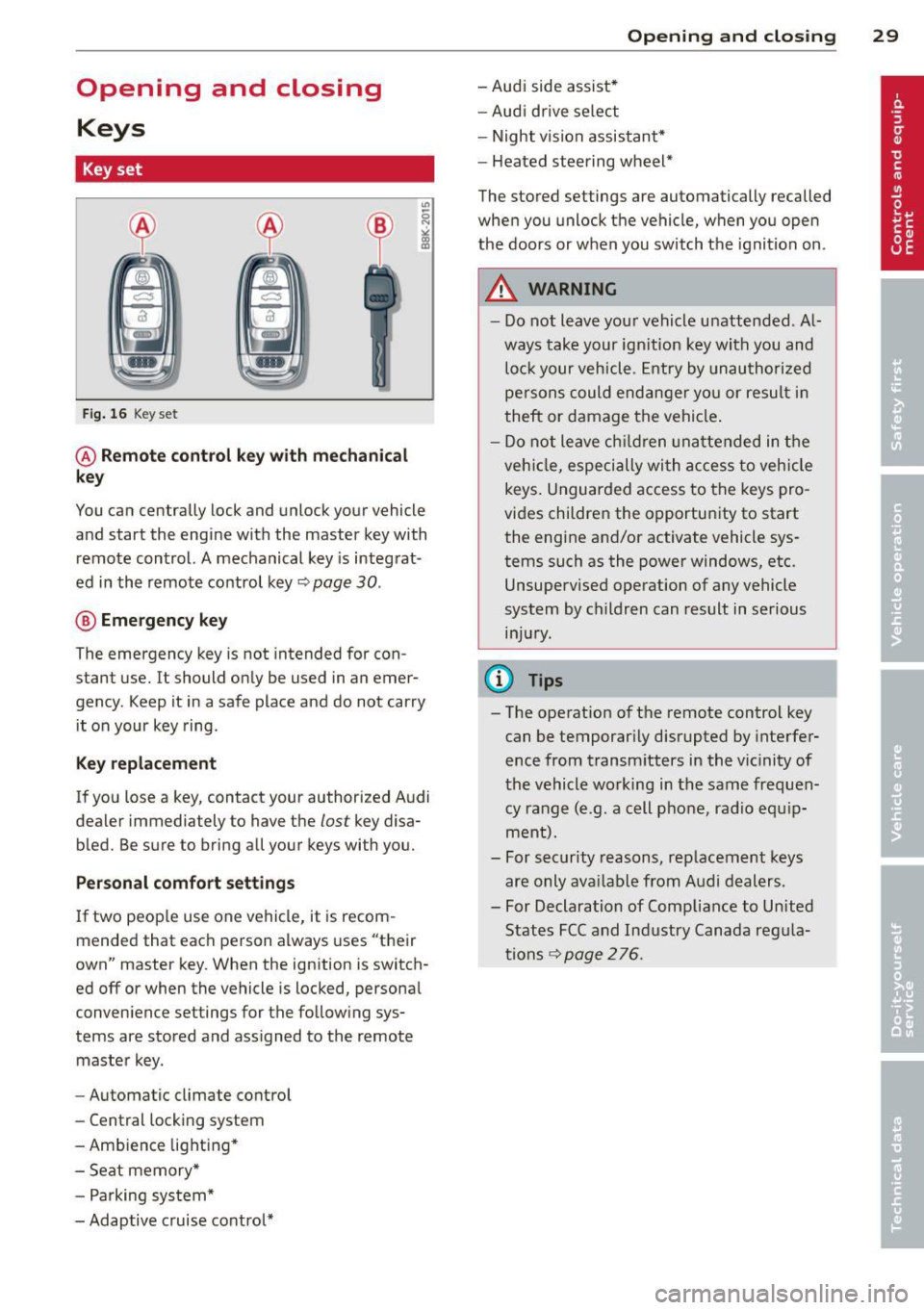
Fig. 16 Key set
@ Remote control key with mechanical
key
You can centrally lock and unlock your vehicle
and start the engine with the master key with
remote control. A mechanical key is integrat
ed in the remote control key~
page 30.
® Emergency key
The emergency key is not intended for con
stant use.
It should only be used in an emer
gency . Keep it in a safe place and do not carry
it on your key ring .
Key replacement
If you lose a key, contact your authorized Audi
dealer immediately to have the
lost key disa
bled. Be sure to bring all your keys with you.
Personal comfort settings
If two people use one vehicle, it is recom
mended that each person always uses "their
own" master key. When the ignition is switch
ed
off or when the vehicle is locked, personal
convenience settings for the following sys
tems are stored and assigned to the remote
master key.
- Automatic climate control
- Central locking system
- Ambience lighting*
- Seat memory*
- Parking system*
- Adaptive cruise control*
Opening and closing 29
- Audi side assist*
- Audi drive select
- Night vision assistant*
- Heated steering wheel*
The stored settings are automatically recalled
when you unlock the vehicle, when you open
the doors or when you switch the ignition on.
A WARNING
---Do not leave your vehicle unattended . Al
ways take your ignition key with you and
lock your vehicle. Entry by unauthorized
persons could endanger you or result in
theft or damage the vehicle.
- Do not leave children unattended in the
vehicle, especially with access to vehicle
keys. Unguarded access to the keys pro
vides children the opportunity to start the engine and/or activate vehicle sys
tems such as the power windows, etc. Unsupervised operation of any vehicle
system by children can result in serious
injury.
{!) Tips
- The operation of the remote control key can be temporarily disrupted by interfer
ence from transmitters in the vicinity of
the vehicle working in the same frequen
cy range (e .g. a cell phone , radio equip
ment).
- For security reasons, replacement keys
are only available from Audi dealers.
- For Declaration of Compliance to United
States FCC and Industry Canada regula
tions
~ page 276.
Page 45 of 294
Coming home , Leav ing home
The coming home function il luminates the
area outside the vehicle when you switch the
ignition off and open the driver 's door . To turn
the function on, select
Light s when le aving
c a r > On .
The leav ing home function illuminates the
area outside the vehicle when yo u un lock the
veh icle . To turn the function on, select
Li gh ts
when unloc kin g ca r> On.
The coming home and leaving home functions
only operate when it is dark and the light
switch is in the
AUTO pos ition.
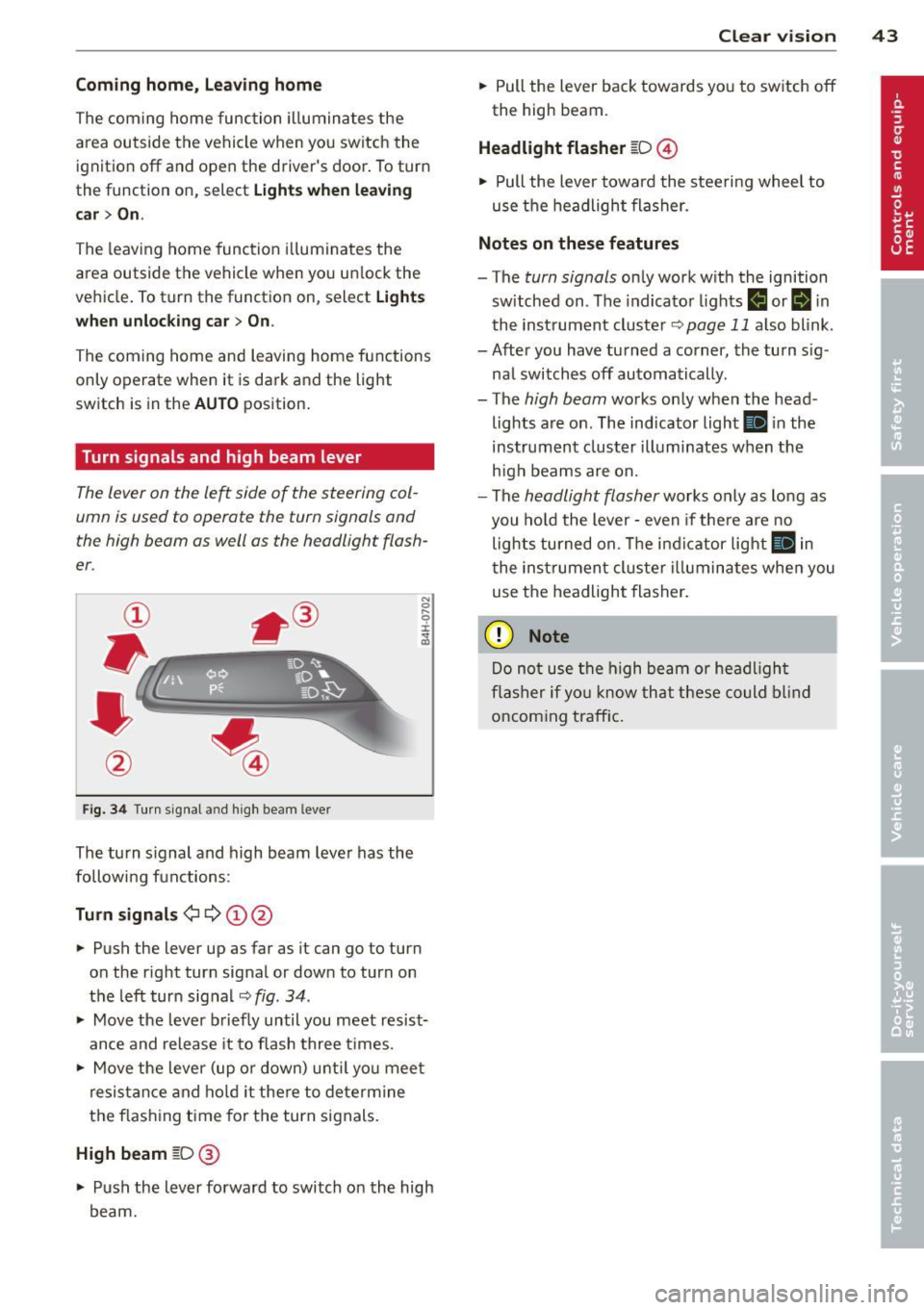
Turn signals and high beam lever
The lever on the le~ side of the steering col
umn is used to operate the turn signals and
the high beam as well as the headlight flash
er .
Fig. 3 4 Tu rn signal a nd h igh beam lever
The turn s ignal and high beam lever has the
followi ng functions:
Tu rn sign als ¢ ¢ @@
.. Push the lever up as far as it can go to turn
on the r ight turn signal or down to turn on
the left turn sig nal
c:::;, fig . 34 .
.. Move the lever b riefly until you meet resist
ance and release it to flash three times .
.. Move the lever (up or down) unti l you mee t
resistance and ho ld it there to dete rmine
the f las hing t ime for the turn signals.
High beam [D @
.. Push the lever forward to switch on the high
beam.
Clear vi sion 43
.. Pull the lever back towards you to switch off
the high beam.
Headlight fla sher [D ©
.. Pull the lever towa rd the stee ring wheel to
use the headlight flasher.
Note s on these features
- The turn signals on ly work with the ignition
sw itched on . The indicator lights
f,j or II in
the inst rument cluste r
~page 11 also blink.
- After you have turned a corner, the turn s ig -
nal switches off automatically .
- The
high beam works only when the head
lights are on . The indicator light
Ill in the
instrument cluster illuminates when the
h igh beams are on.
- The
headlight flasher works only as long as
you hold the lever -even if the re a re no
lights turned on. The indicator light
Ill in
the inst rument cluster i lluminates whe n you
use the headlight flasher.
(D Note
Do no t use the high beam or headligh t
flasher if yo u know that these could blind
oncoming traffic.