key AUDI A7 2013 User Guide
[x] Cancel search | Manufacturer: AUDI, Model Year: 2013, Model line: A7, Model: AUDI A7 2013Pages: 310, PDF Size: 77.45 MB
Page 41 of 310
~ Press and hold the button !o::s I for at least
four seconds to store the new open position.
A visual and audio signal will follow.
The settings in the MMI determine if the rear lid can be opened using the handle ¢
page 35.
Opening will be stopped immediately when:
- You press the button
la l on the remote con-
trol master key, or
- You press the button
la l in the rear lid, or
- You push the handle in the rear lid, or
- You pull the button
l.:::s ! in the driver's door,
or
- When something blocks the rear lid or
makes it difficult for the lid to move.
If you press one of the buttons ~now, the
rear lid will either open or close, depending on
its angle .
Closing will be stopped immediately when:
- You press the button
la l in the rear lid, or
- You push the handle in the rear lid, or
- You release the button
!a l on the driver's
door, or
- When something blocks the rear lid or
makes it difficult for the lid to move.
If you press one of the buttons ~now, the
rear lid will either close or open, depending on
its angle .
You can manually stop the automatic open ing/closing of the rear lid. The automatic clos
ing process begins if you push down on the
rear lid.
A WARNING
-After closing the rear lid, always pull up
on it to make sure that it is properly
closed. Otherwise it could open suddenly
when the vehicle is moving .
- To help prevent poisonous exhaust gas
from being drawn into the vehicle, al
ways keep the rear lid closed while driv
ing. Never transport objects larger than
those which fit completely into the lug
gage area, because then the rear lid can
not be fully closed.
Opening and closing 39
- Never leave your vehicle unattended es
pecially with the rear lid left open. A
child could crawl into the car through the luggage compartment and pull the lid
shut, becoming trapped and unable to
get out . To reduce the risk of personal in
jury, never let children play in or around
your vehicle. Always keep the rear lid as
well as the vehicle doors closed when not
in use.
- Never close the rear lid inattentively or
without checking first. Although the
closing force of the rear lid is Limited,
you can still seriously injure yourself or
others .
- Always ensure that no one is within
range of the rear lid when it is moving, in
particular close to the hinges and the up
per and lower edges - fingers or hands
can be pinched .
- Never try to interfere with the rear lid or
help it when it is being opened or closed
automatically .
(D Note
The rear lid can bump into objects such as
the garage ceiling when opening and be
come damaged.
(D Tips
-Audio signals are given when you close
the rear lid using the
l a! button in the
driver's door.
- If there is a mechanical problem with au
tomatic closing for the rear lid or there is
an obstruction, it opens again immedi
ately . Check to see why the rear lid could
not be closed before attempting to close
it again .
- The following applies to vehicles equip
ped with the Convenience key* feature: if
the remote control key is left in the lug
gage compartment, luggage compart
ment will automatically unlock itself af
ter you lock the vehicle. This prevents
you from unintentionally locking your
key in the luggage compartment. .,.
Page 42 of 310
40 Opening and clo sing
- When the vehicle is locked, the rear lid
can be un locked separate ly by pressing
the button ~ on the master key. W hen
the rear lid is closed aga in, it locks auto
matically.
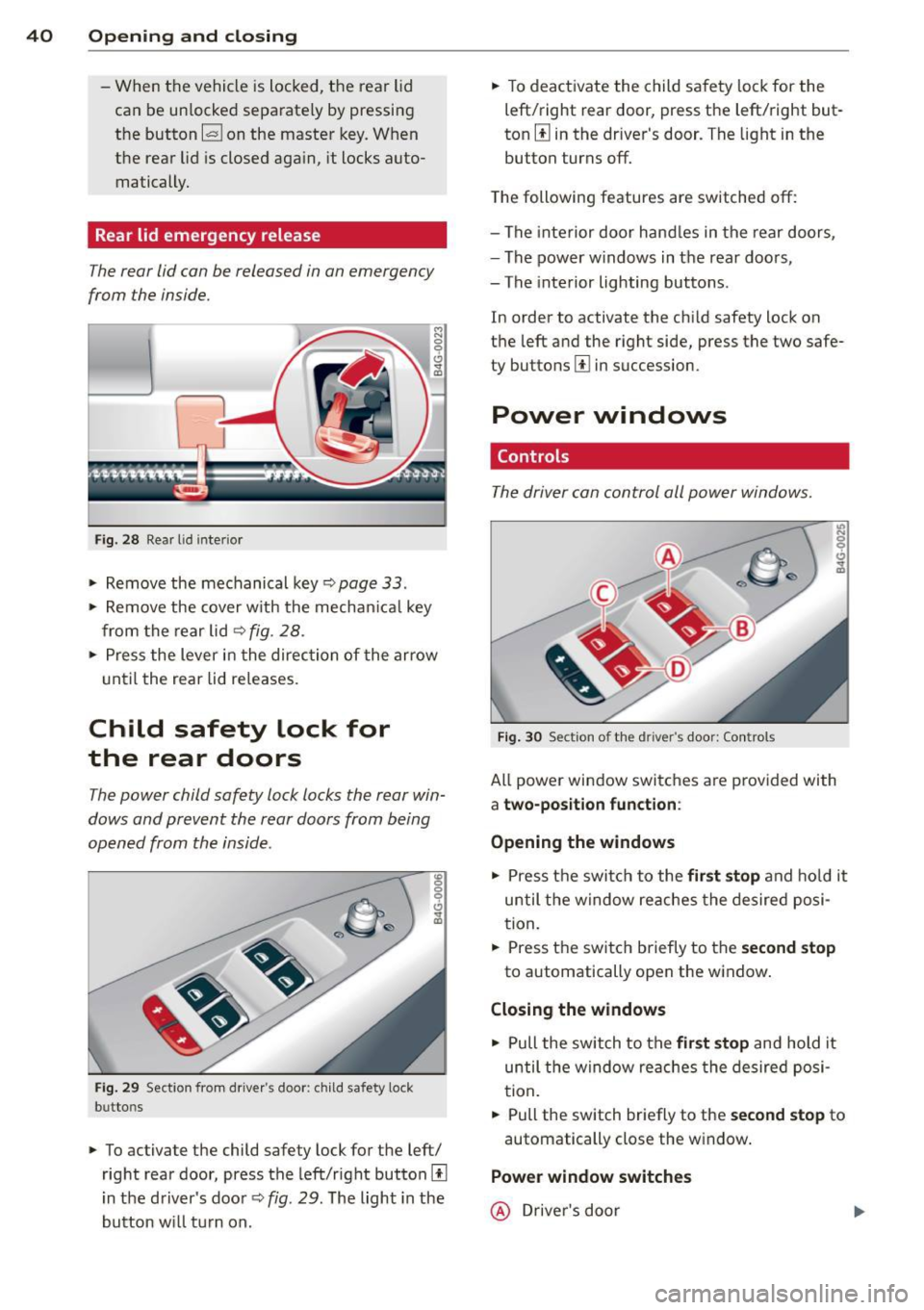
Rear lid emergency release
The rear lid con be released in on emergency
from the inside.
F ig . 28 Rear l id inter ior
., Remove the mechanical key ~page 33 .
., Remove the cover w ith the mechan ica l key
from the rear lid
~ fig . 28 .
!:l 0 9 C)
"' a,
., Press the lever in the direc tion of the arrow
u ntil the rear lid releases.
Child safety lock for
the rear doors
The power child safety lock locks the rear win
dows and prevent the rear doors from being
opened from the inside .
Fig. 29 Section from driver's door : child safety lock
b u tto ns
., To activate the child safety lock for the left/
right rear door, press the left/right button
[I
in the driver's doo r Q fig. 29. The light in the
button w ill tu rn on. .,
To deact ivate the child safe ty lock for the
left/right rear door, press the left/right but
ton
[I in the dr iver's door . The light in the
button turns off.
T he following features are switched off:
- The inte rior door hand les in the rear doors,
- The power w indows in the rear doo rs,
- The inte rior lighting buttons .
In order to activate the ch ild safety lock on
the left and the r ight side , press the two safe
ty buttons
[I in succession.
Power windows
Controls
The driver con control all power windows .
Fig. 3 0 Sect ion o f the d river ·s doo r: Con trols
All power window switches a re p rovided with
a two-position function :
Opening the windows
., Press t he swi tch to the first stop and ho ld it
until the w indow reaches the desired posi
tion .
., Press t he switch briefly to the
se cond stop
to automatically open the window .
Closing the windows
., Pull the switch to the firs t stop and hold it
until the window re aches the desired posi
t ion.
., Pull the switch briefly to the
se cond stop to
automatically close the w indow .
Power window switches
@ Driver's door
Page 43 of 310
@ Passenger's door
© Left rear door
@ Right rea r doo r
_& WARNING
-When you leave your veh icle -even if on
ly briefly -always take the ignition key
with you . This applies partic ularly when
children remain in the vehicle . Otherwise
the ch ildren could start the engine or op
erate electrical equ ipment (e.g. power
windows). The power windows are func
t ional until the driver's door or passeng
er's door has been opened .
- Be careful when closing the wi ndows .
Check to see that no one is in the way, or
serious injury could result!
- When locking the veh icle from outs ide,
the vehicle must be unoccu pied s ince the
windows ca n no longer be opened i n an
eme rgency .
(0 Tips
- When you ope n the doors, the w indows
a utomat ica lly low er about 10 mm .
- When the window in the dr iver's or pas
senger's door is completely open, it will
r aise approximate ly 25 mm when the
door is opened. The w indow will lower
again w hen you close the doo r.
- After the ignition has been switched off,
t h e windows can still be opened o r
closed for abou t 10 minu tes. The powe r
windows are not swi tched off un til the
drive r's door or passenge r's door has
been opened .
What to do after a malfunction
The one-touch open and close function must
be reactivated if the battery hos been discon
nected.
.. Pull and hold the power w indow switch un
t il the window is fully closed .
.. Re lease the switch and then p ull it again for
at least one second .
Opening and clo sin g 41
Valet parking
The valet parking feature protects the lug
gage compor tment from unauthori zed access
from the outside.
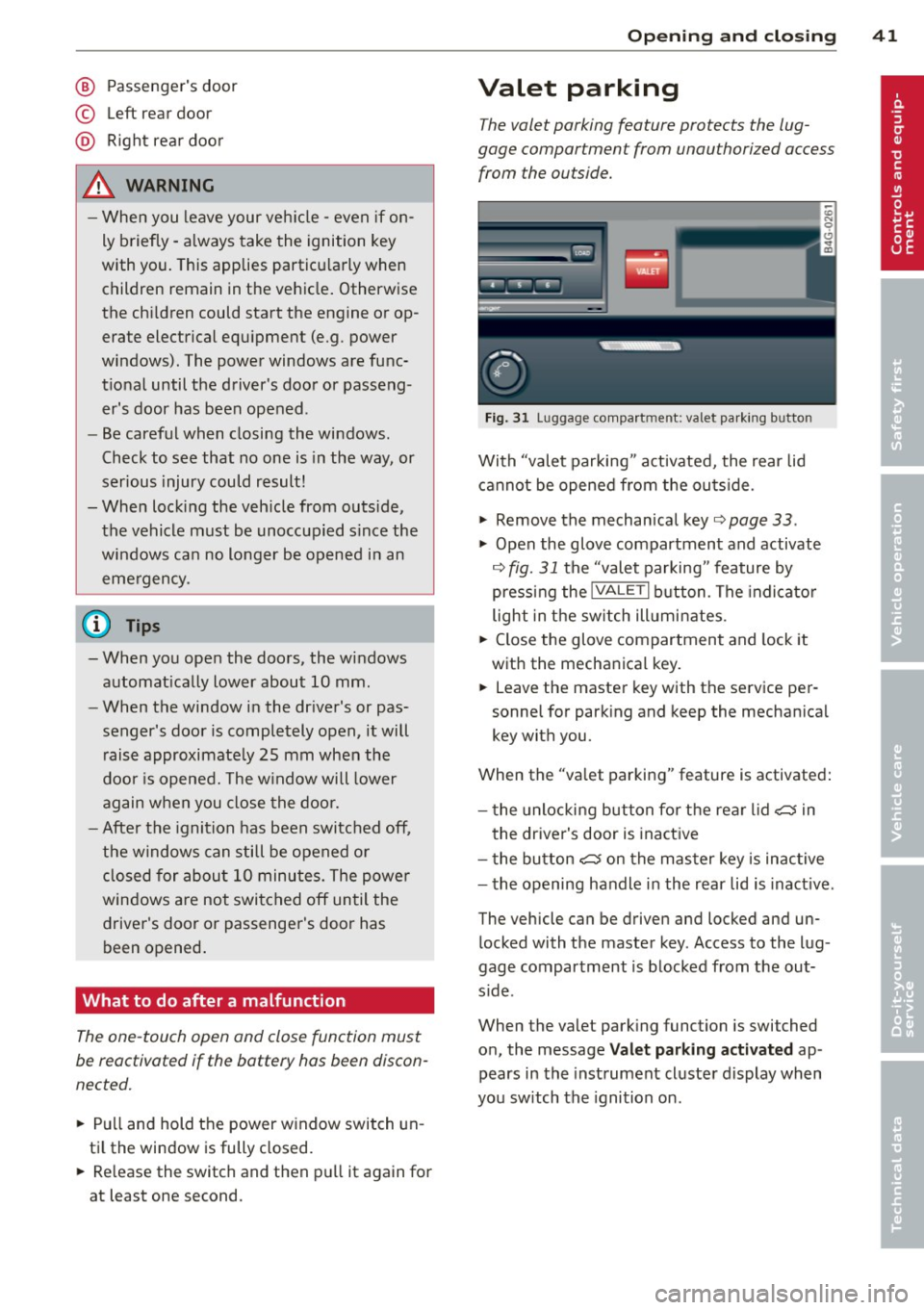
Fig . 3 1 Luggage compa rt m en t: va let pa rk in g b utto n
With "valet parking " act ivated, the rear lid
cannot be opened from the ou tside.
.. Remove the mechan ical key ¢
page 33 .
.,. Open the glove compartment and activate
¢
fig. 31 the "valet parking " feature by
press ing the
lVALE TI button . The indi cat o r
light in the sw itch ill umi nates .
.. Close the glove compartment and lock it
with the mechanica l key.
.. Leave the master key with the se rvice per
sonne l for park ing and keep the mechanica l
key with you.
When the "va let parking" feature is activated:
- t he unlocki ng but ton fo r th e rear lid
~ in
t he driver's door is inact ive
- t he button
~ on the mas ter key is inac tive
- the opening handle in the rear lid is inact ive .
The vehicle can be driven and locked and un l ocked with t he master key . Access to the lug
gage compar tment is b locked from the out
s ide .
When the valet park ing function is switched
o n, the message
Valet parking activated ap
pears in the inst rument cluste r display wh en
you sw itch the ignition on .
Page 44 of 310
42 Opening and clo sing
Sliding/tilting sunroof
Operation
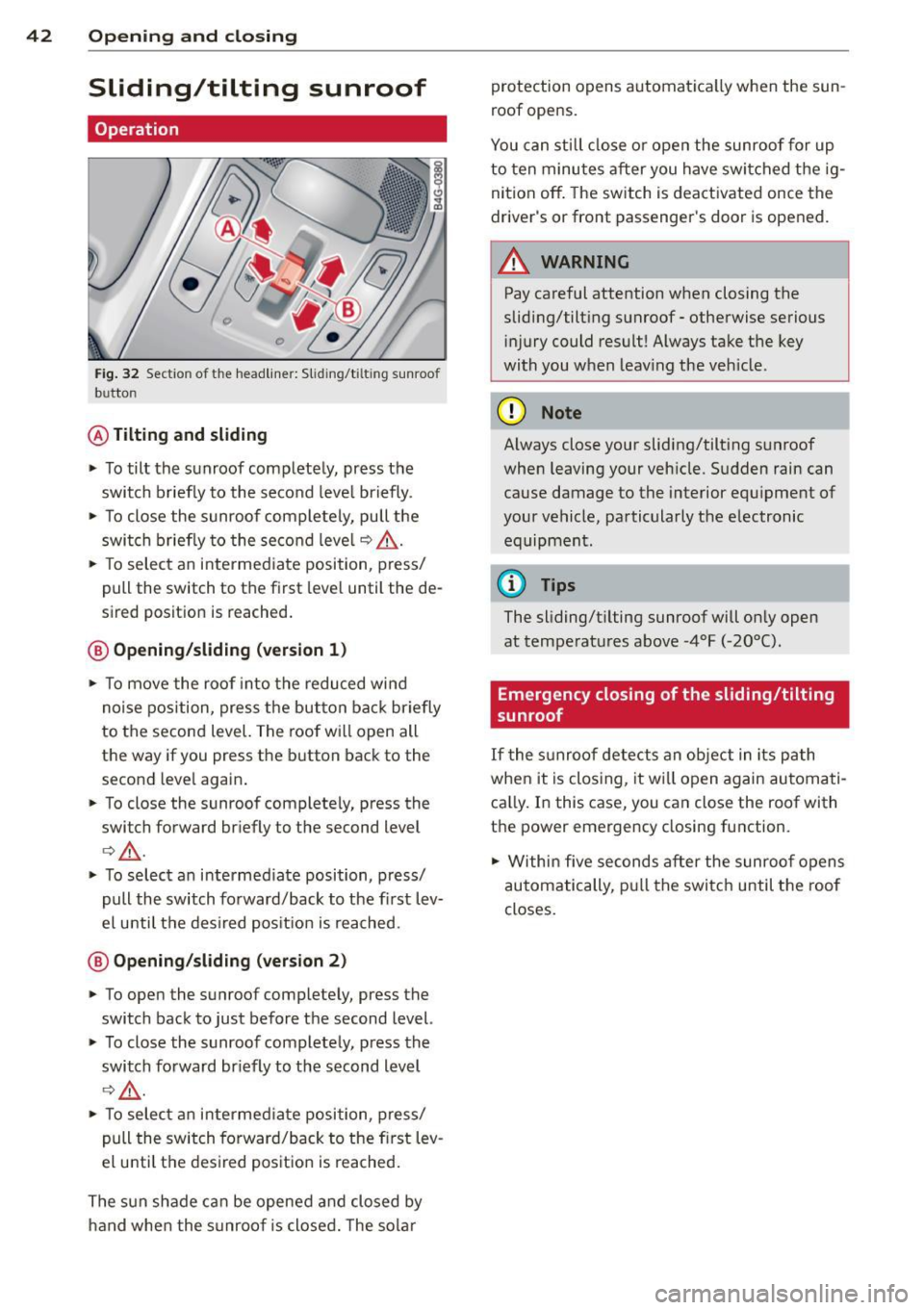
Fig . 32 Sectio n of th e he adliner: Slid ing/t iltin g sunroo f
b u tto n
@ Tiltin g and sliding
.,. To tilt the sunroof completely, press the
switch briefly to the second leve l briefly .
.,. To close the sunroof complete ly, pull the
switch briefly to the second leve l
c::> &,..
.,. To select an intermed iate position, press/
pull the switch to the first leve l until the de
sired position is reached.
® Opening /sliding (version 1 )
.,. To move the roof into the reduced wind
no ise position, press the button bac k briefly
to the second level. The roof w ill open all
the way if you press the button back to the
second leve l again .
.,. To close the sunroof completely, press the
switch forward briefly to the second level
r::> &,. .
.,. To select an i ntermed iate position, press/
pull the switch forward/back to the fi rst lev
el unti l the des ired pos it ion is reached .
@ Opening/sliding (version 2)
.,. To open the sunroof completely, press the
switch back to just before the second level.
.,. To close the sunroof completely, press the
switch fo rward br iefly to the second level
c::> .,&. .
.,. To selec t an intermed iate position, press/
pull the switch forward/back to the f irst lev
el u ntil the des ired pos ition is reached.
The sun shade can be opened an d closed by
h a nd when the s unroo f is closed . The solar protection opens automat
ica lly when the sun
roof opens.
You can still close or open the sunroof for up
to ten minutes a fter you have swi tched the ig
nition off . The sw itch is deactivated once the
driver 's or front passenger's door is opened.
A WARNING
-
Pay careful attention when closing the
sliding/tilting sunroof - otherwise serious in jury c ould result! Always take t he key
with you w hen leav ing the ve hicle.
(D Note
-
Always close your sliding/tilting sunroof
when leaving your veh icle. S udden rain can
cause damage to the interior equ ipment of
your vehicle, pa rticularly the e lectronic
equipment .
(D Tips
The sliding/t ilting sunroof will on ly open
at tempe ratu res above -4°F (-20°().
Emergency closing of the sliding/tilting
sunroof
If the s unroof detects an object in its path
when it is clos ing, it w ill open again automati
ca lly. I n this case, you can close the roof with
t h e power emergency closing function.
.,. Within five seconds after the sunroo f opens
automatically, p ull the switc h until the roof
closes.
Page 48 of 310
46 Clear vis ion
instrument cluste r illuminates when the
high beams are on.
- T he
headlight flash er works only as long as
yo u hold the lever - even if there are no
l ights turned on. The indicator light
II in
the instrument cluster il luminates when you
use the headlight flasher.
A WARNING
Do not use the high beam or headlight
flasher if you know that these could blind
oncoming traffic.
Interior lights
Front and rear interior lighting
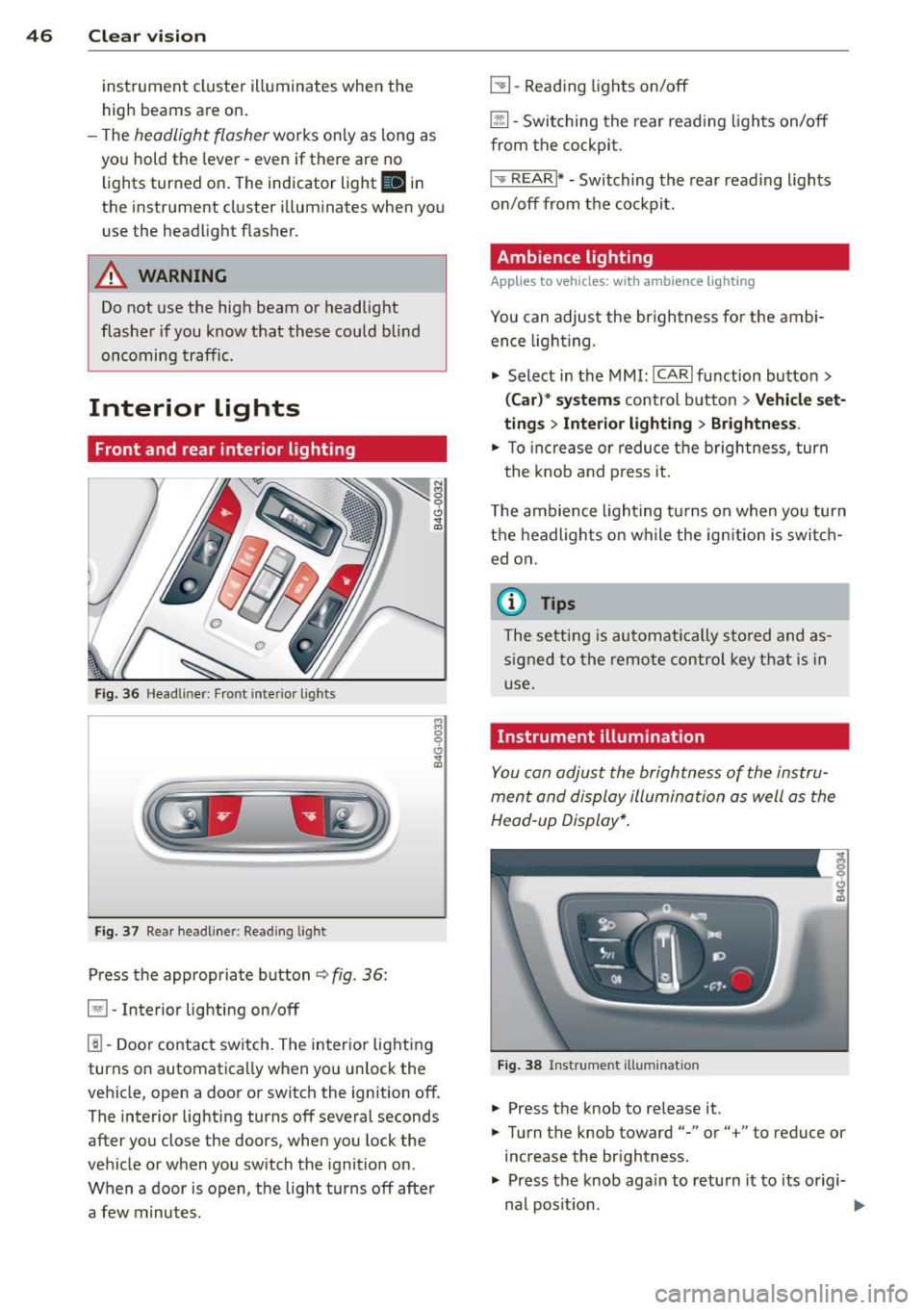
Fi g. 36 Headliner: Front interior ligh ts
Fig . 37 Re ar headli ne r: Readi ng light
Press the appropriate button q fig . 36:
El-Interior lighting on/off
I]]-Door contac t sw itch . The inter ior lighting
turns on automatica lly when you unlock the
vehicle, open a door or switch the ignition off.
The interior lighting turns off several seconds
after you close the doors, when you lock the
vehicle or when you sw itch the ignition on.
When a door is open, the light t urns off afte r
a few minutes.
L:!l -Read ing lights on/off
~ - Switching the rear read ing lights on/off
from the cockpi t.
I" REARI * - Switching the rear reading lights
o n/off from the cockpit.
Ambience lighting
Applies to vehicles: with ambience lighting
You can adjust the br ightness for the ambi
ence ligh tin g.
.. Select in the MMI: ICARlfunction butto n>
(Car )* sys tem s control button > Vehicle set
ting s
> Interi or lighting > Brightne ss.
.. To increase or reduce the b rightness , turn
t he knob and press it .
T he ambience light ing tu rns on when you turn
t h e headlights on wh ile the ig nition is swi tc h
ed on.
(D Tips
The setti ng is automati cally sto red and as
s igned to the remo te contr ol key t hat i s in
u se .
Instrument illumination
You can adjust the brightness of the instru
men t and di splay illumination a s well as the
Head-up Display*.
Fi g. 38 Instrume nt illumina tion
... Press the knob to re lease it.
.. Turn the knob toward"-" or"+" to reduce or
increase the br ightness .
.. Press the knob aga in to return it to its origi-
na l posit ion . ...
Page 52 of 310
50 Clear vis ion
Tilt function for the pass enger' s mirror
To help y ou see the curb when backi ng into a
parking space , the surface of the m irro r tilts
slightly. The knob must be in the P position
for this to happ en .
You can adj ust the ti lted mirror s urface by
turning the knob in the desired direction .
When you move out of reverse and into anoth
er gear, the new mirror position is stored and
assigned to the key you are using.
The mirror goes back into its origina l positio n
once yo u drive forward faster than 9 mph (15
km/h) or sw itch the ignition off .
A WARNING
- Curved (i.e . convex) mirror s urfaces in
crease your field of view. Remember that
vehicles or other objects will appear
smaller and fa rther away than when seen
in a flat mi rror .
If you use this mirror to
est imate distances of following vehicles
when ch anging lanes , you cou ld es tim ate
incorrectly and cause an acc ident .
(D Note
-If the mirror hous ing is moved uninten
tiona lly (for example, whi le par king you r
vehicle), then you must first fo ld the mi r
r or electr ically. Do not readjust the mir
ror housing manua lly. You could damage
t h e motor which controls the mirror.
- If you wash t he vehi cle in an au tomatic
car wash, yo u m ust fold the exterior m ir
ro rs in to reduce the risk of damage to
the mirrors. Never fold power fo lding ex
terior mirrors* by hand. Only fold them
i n and out us ing the power contro ls.
(D Tips
- The exterior mirror settings are stored
with the memory funct ion*
c> page 56.
- If there is a malfunct ion in the electrical
system, you can still ad just the exter ior
mir rors by press ing the edge of the mir
r or.
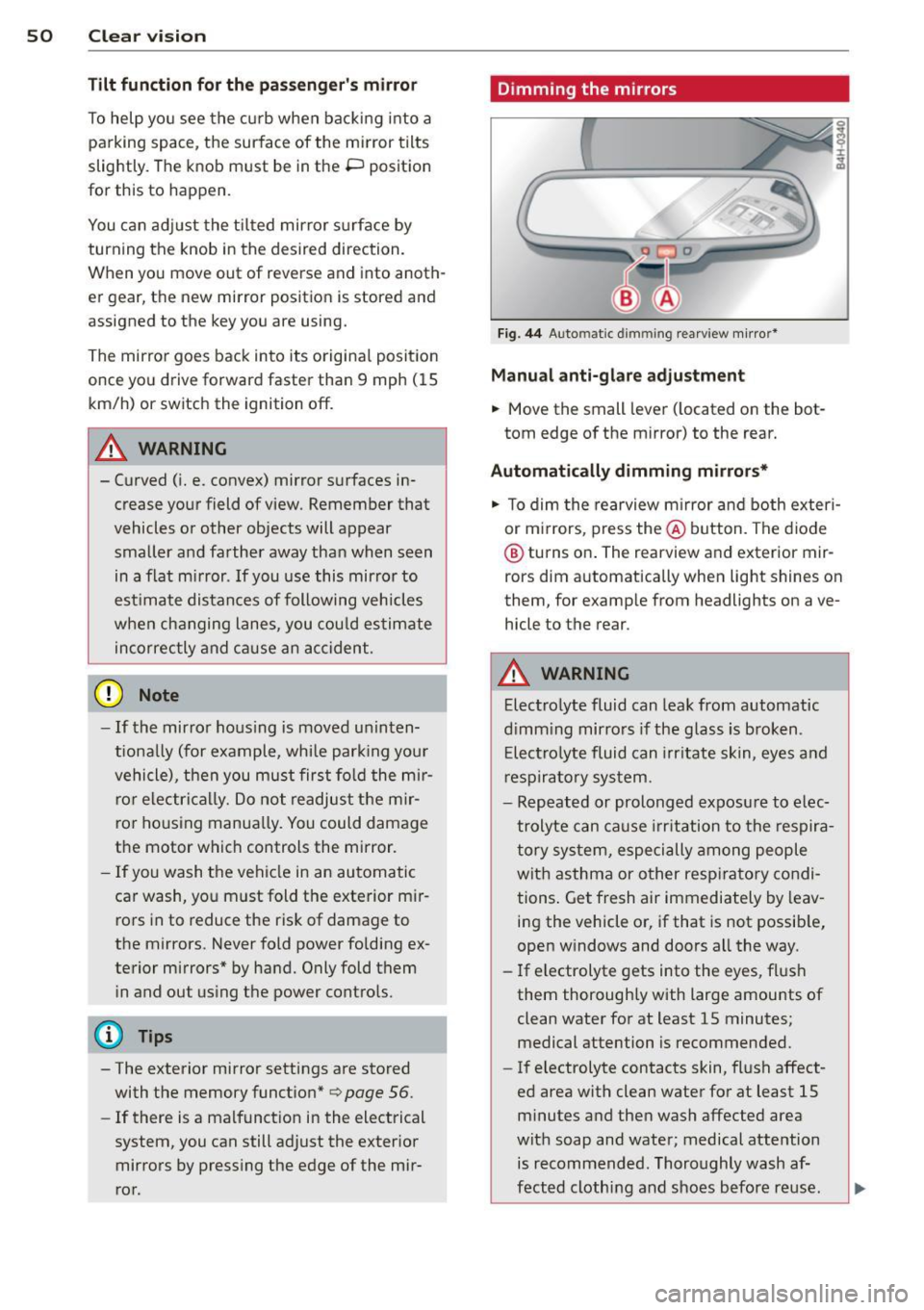
Dimming the mirrors
F ig . 44 A uto ma tic d immin g rearview mirro r*
Manu al anti-glare adjustment
.,. Move the small leve r (located on the bot
tom edge of the mirror) to the rear.
Automatically dimming mirrors*
.,. To dim the rearview m irror and both exteri
or m irrors, press the@ button . The diode
@ turns on . The rearview and exterior mir
rors dim automatically when light shines on
them, for examp le from headlights on ave
hicle to the rear .
A WARNING
-Electrolyte fluid can lea k from automatic
d imm ing mirro rs if the g lass is broken .
E lectro lyte fluid can irr itate sk in, eyes a nd
r espira to ry system .
- Repeated or prolonged exposu re to e lec
trolyte can ca u se irritation to the respira
t ory sys tem, especially among people
wit h asthma or other resp iratory condi
tions . Get fresh air immediately by leav
ing the vehicle or, if that is not possib le,
open w indows and doors all the way .
- If electrolyte gets into the eyes, fl ush
them thorough ly with large amou nts of
clean water for at least 15 minutes; medical attention is recommended.
- If electrolyte contacts skin, fl ush affect
ed area with clean water for at least 15 minutes a nd then wash affected area
with soap and water; medical atte ntion
is recommended. Thoroughly wash af
fect ed clothing and shoes before re use .
Page 58 of 310
56 Seats and storage
until you feel it lock into p lace c::> .& in Prop
er adjustment of head restraints on
page 134.
• To move the head restraint down, press the
button -arrow-
c::> fig. 49 and slide the head
restraint downward .
Removing the head restraints
• Fold the backrest forward ¢ page 64.
• Move the head restraint upward as far as it
can go.
• Press the release
c::> fig. SO with the me
chanical key¢
page 33 and the button
-arrow- ¢
fig. 49 . Pull the head restraint out
of the backrest at the same time¢ ,&.
Installing the head restraints
• Slide the posts on the head restraint down
into the guides until you feel the posts lock
into place .
• Press the button -ar row-
c::> fig . 49 and slide
the head restraint a ll the way down. You
should not be able to pull the head restraint
out of the backrest .
So that the driver can have a better view to
the rea r, the head restraints shou ld be pushed
down completely when the rear seats are not
occupied.
& WARNING
- Only remove the rear seat head restraints
when necessary in order to install a child
seat. Install the head restraint again im
med iately once the child seat is removed.
Driv ing without head restra ints or with
head restraints that are not properly ad
justed increases the r isk of serious or fa
tal neck injury dramatically .
- Read and heed all WARNINGS
¢page 134.
Seat memory
Description
Applies to vehicles: with memory function
The memory function allows you to quick ly
and easi ly store and recall personal seating profiles for
the driver and front passenger*.
The memory function is operated through the
master key and the memory buttons in the
driver's/front passenger's* doors.
T he driver's seating profile is stored and as
signed to the master key each time the vehicle
is locked . The seating profile is reca lled auto
matically when the vehicle is unlocked. If two
people use one vehicle, it is recommended
that each person always uses "their own" master key .
Two seating profiles can be stored in each of
the driver's/front passenger's* doors. Once
stored, these seating profiles can be recalled at any time.
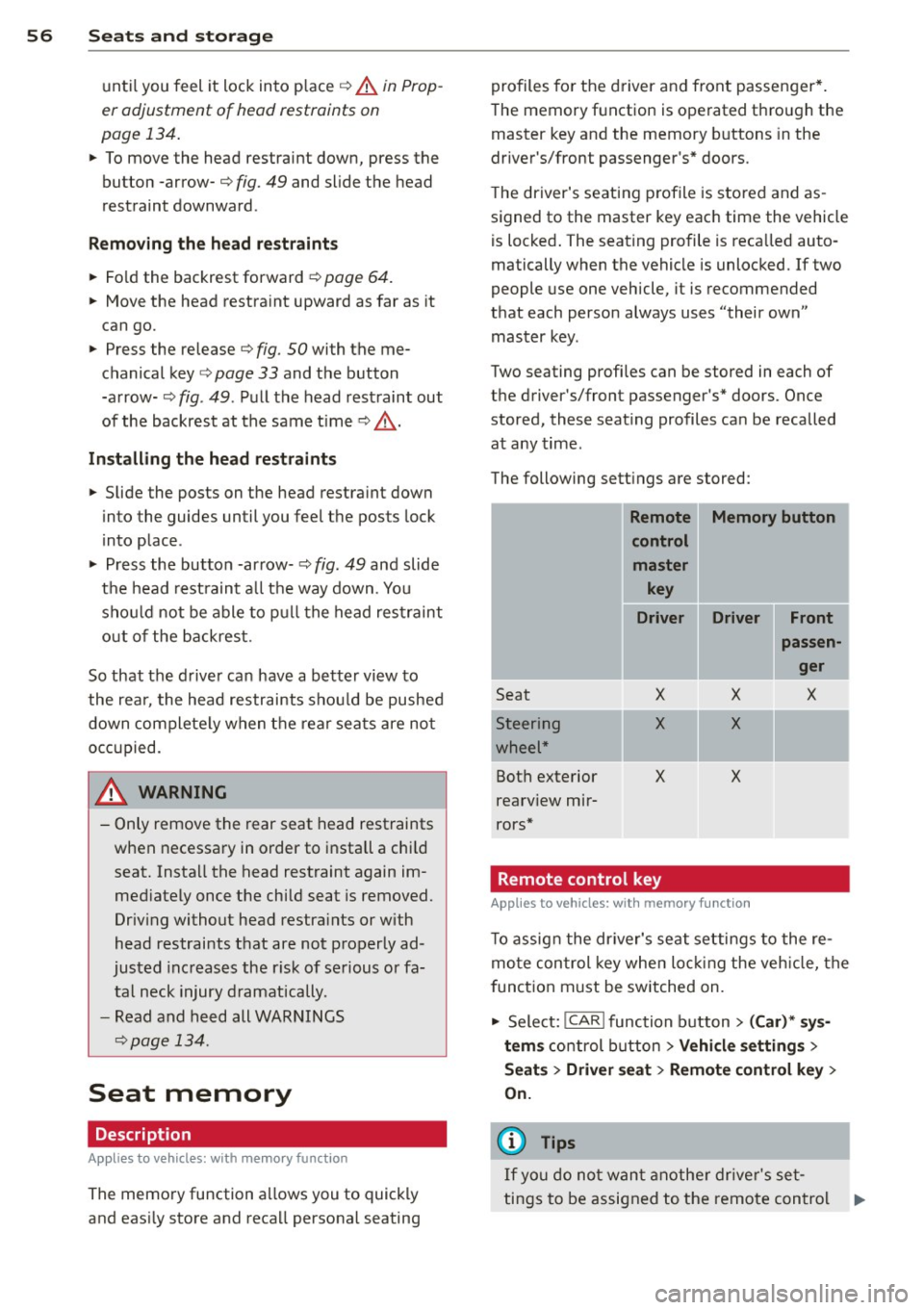
The following sett ings are stored:
- --Remote Memory button
control
master key
Driver Driver Front
I
Seat
-Steering
wheel*
Both exterior
rearv iew mir
rors*
X
X
X
Remote control key X
X
X
Applies to
vehicles: with memory function
passen
ger
X
-
T o assign the driver's seat settings to the re
mote control key when locking the vehicle, the
f unction must be switched on.
• Select:
!CAR ! function button> (Car)* sys
tems
control button > Vehicle settings >
Seats > Driver seat > Remote control key >
On.
(D Tips
If you do not want another driver's set-
tings to be assigned to the remote control .,.
Page 59 of 310
key, switch off the memory f unction using
the MMI or the
I OFF ! button c::> page 5 7.
Memory buttons
Applies to vehicles: with memory function
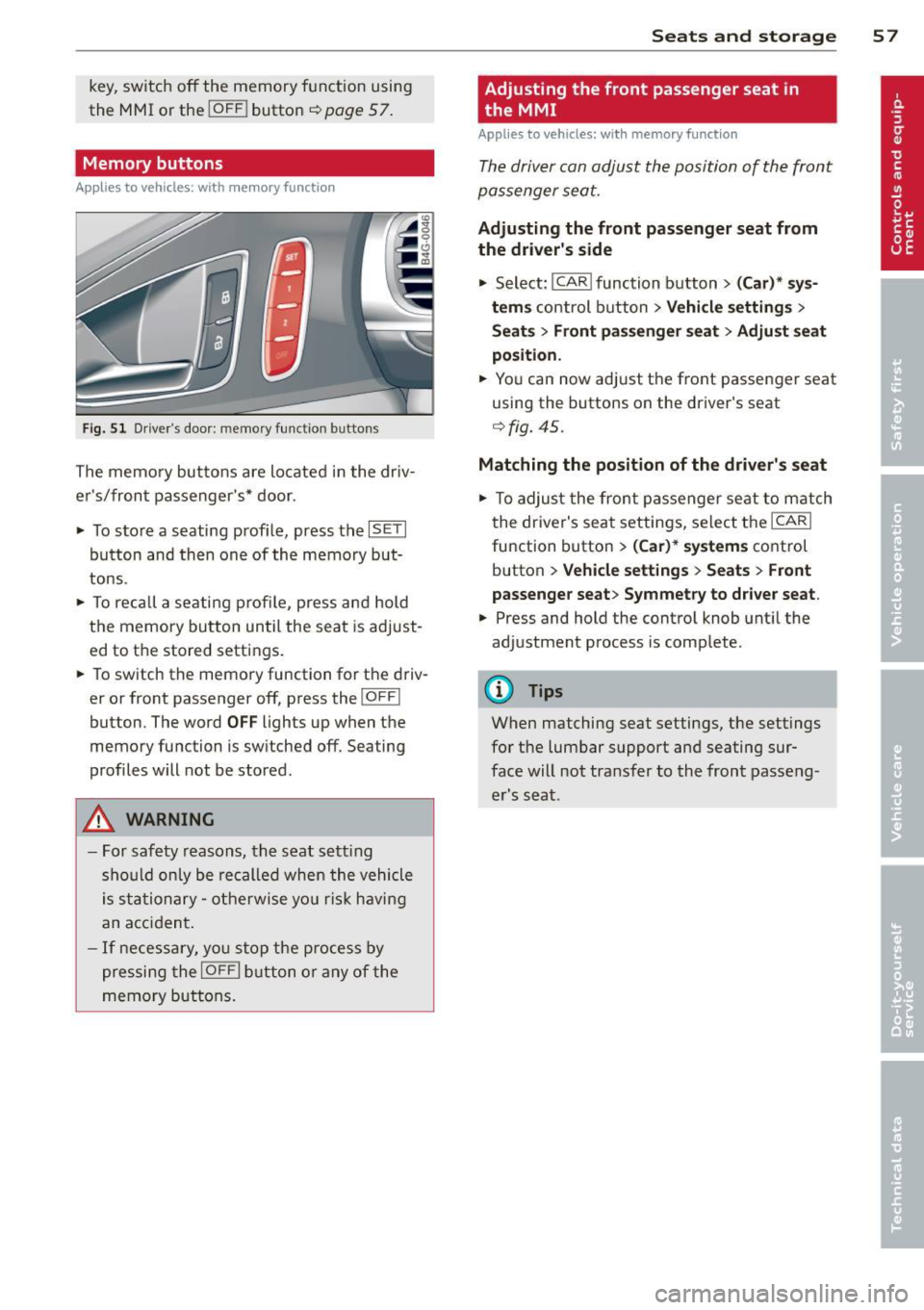
Fig . 51 Dri ver's door: memory fu nct io n buttons
The memo ry butto ns are located in the dr iv
e r's/fron t passenger 's* door.
• To sto re a seating prof ile, press the
ISE TI
button and th en one of the memo ry but
tons.
• To rec all a se ati ng profile, p ress an d hold
t h e memory button un til the sea t is adjust
ed to t he stored settings .
• To switch the memo ry function fo r th e d riv
er or front passenger off, press the
I O FFI
button. The w ord OFF lights up when the
memo ry fu nction is sw itched off. Seating
profiles will not be stored.
A WARNING
- For saf ety reasons, th e seat s ett ing
sho uld o nly be re called when the vehicle
i s stationa ry - otherwise y ou ris k havi ng
a n ac cid en t.
- I f nece ssa ry, yo u stop the pr ocess by
pressi ng the
I OFFI butt on o r any of the
me mory b utt o ns.
Seats and storage 5 7
Adjusting the front passenger seat in
, the MMI
Applies to vehicles: with memory function
Th e driver can adjust the position of the fro nt
p assenger seat.
Adjusting the front passenger seat from
the driver's side
• Select: I CAR I func tion button > (Car) * sy s
tems
c ontr ol bu tton > Vehicle settings >
Seat s> Front passenger seat > Adjust seat
position.
• Yo u can now ad just t he front passenger seat
using the buttons on the driver's seat
c::> fig. 45.
Matching the position of the driver's seat
• To adjust the fron t pa ssenger se at to m atch
t he drive r's seat setti ngs, selec t th e
ICARI
function button > (Car )* systems control
button
> Vehicle settings > Seats > Front
passenger seat > Symmetry to driver seat .
• Press and hold the control knob unt il the
adjustment p rocess is comp lete .
(!) Tips
When matching seat settings, t he settings
fo r the lumbar support and seating sur
face will not tra nsfer to the front passeng
er 's s eat.
Page 61 of 310
.. To reach the 12-volt socket in the luggage
compartment, press the net down or re
move the bracket from the mounts
c:>fig. 55.
There is an additional 12-vo lt socket in the
front and rear center console
c:> fig. 56.
The 12-volt sockets may be used for 12-volt
appliances with maximum consumption of up
to 120 watts.
Before you purchase any accessories, always
read and fol low the information in
cc> page 291, Additional accessories and parts
replacement .
A WARNING
-
The sockets and the electrica l accessories
connected to them operate only when the
ign ition is switched on. Incorrect usage
can lead to serious injuries or burns. To re
duce the risk of injuries, never leave chil
dren unattended in the vehicle with the ve
hicle key.
{CT) Note
To avoid damag ing the socket, only use
plugs that fit properly .
- Never connect equipment that generates
electrical current, such as a so lar panel
or battery charger, to the 12-volt socket.
This could damage the vehicle's e lectr i
ca l system .
- The 12-volt socket should only be used
fo r a short period of time as a power
sour ce for e lectr ica l equipment. P lease
u se the elect rical so ckets in the veh icle
when connec ting equipment for longer
periods.
- To avoid damaging the socket, only use
pl ugs that fit properly.
@ Tips
When the eng ine is off and accessor ies are
still plugged in and are on, the vehicle bat
t ery can still be dra ined .
Sea ts a nd s to rage 59
Storage
(upholder
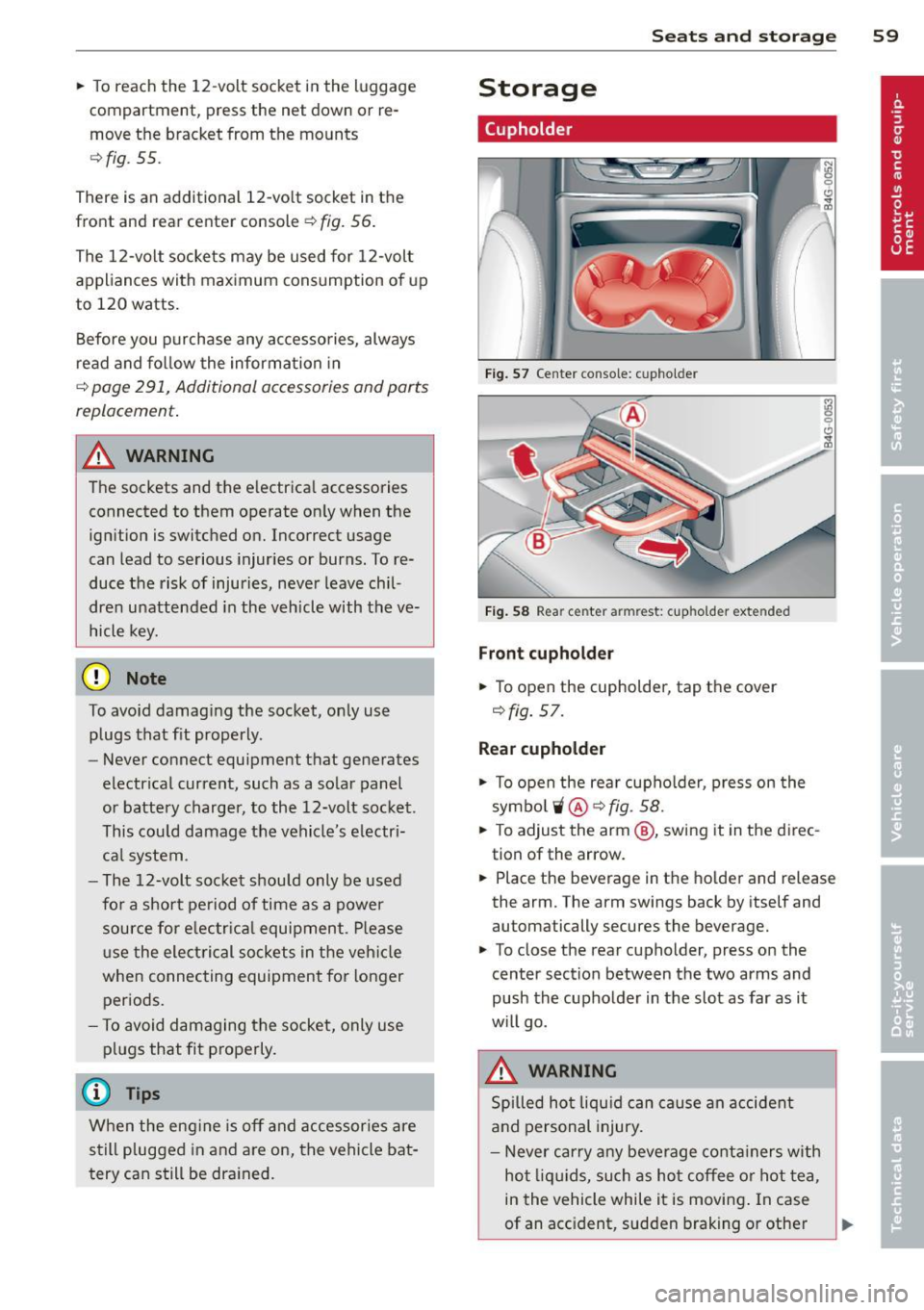
Fig. 57 Center console: cupho lder
F ig . 58 Rear center armrest: cupholder extended
Front cupholder
.. To open the cupholder, tap the cover
c:>fig. 57 .
Rear cupholder
(
.. To open the rear cupho lder, press on the
symbo lii @ c:>fig.
58.
.. To adjust the arm @, swing it in the direc
tion of the arrow.
.. Place the beverage in the holder and release
the arm. The arm swings back by itself and
automatically secures the beverage.
.. To close the rear cupholder, press on the
center section between the two arms and
push the cupholder in the slot as far as it
w ill go.
A WARNING
Spilled ho t liqu id can cause an accident
and personal injury.
- Never carry any beve rage conta iners with
hot liq uids, such as hot coffee or hot tea,
in the vehicle while it is moving . In case
of an acc ident, sudden braking o r other
Ill-
Page 62 of 310
60 Seats and st o rage
vehicle movement, hot liqu id could spill,
causing scalding burns. Spilled hot liqu id
can also cause an accident and personal
injury .
- Use only soft cups in the cupholder. Hard
cups and glasses can cause inju ry in an
acc ident .
- Never use the cupholder or adapter as an
ashtray- risk of fire.
([) Note
Only drink containers with lids should be
carried in the cupho lder. Liqu id could spill
out and damage your veh icle's e lectronic
equ ipment or stain the upholste ry, etc.
Cooled glove compartment
Ap plies to vehicles: with coole d glove compa rtm ent
The cooled glove compartment only functions
when the AIC system is switched on.
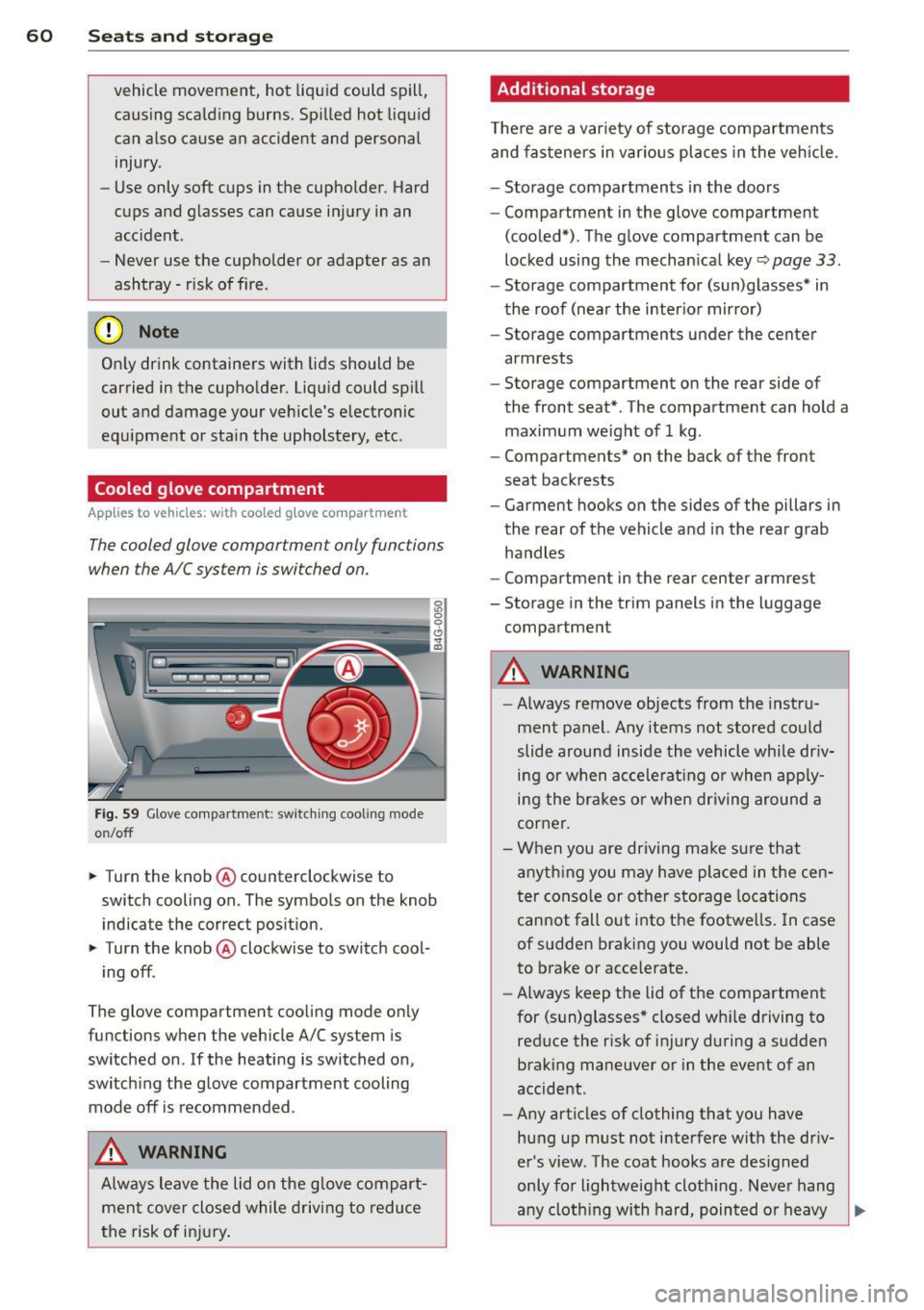
Fig. 59 Glove compa rtment: switc hin g cooling mode
o n/off
~ Turn the knob@ counterclockwise to
switch cooling on. The symbols on the knob
indicate the correct pos ition.
~ Turn the knob @ clockwise to switch cool-
ing off .
The glove compartment cooli ng mode only
functions when the vehicle A/C system is
switched on .
If the heating is switched on,
switch ing the glove compartment cooling
mode off is recommended .
_& WARNING
Always leave the lid on the glove compart
men t cover close d while driving to reduce
t he risk of in jury.
Additional storage
The re are a var iety of storage compartmen ts
and fas teners in various pl aces in the veh icle.
- Storage compartments in the doors
- Compartment in the glove compartment
(coo led*) . The glove compartment can be
locked using the mechan ical key
r::;, page 33.
- Storage compartment for (sun)glasses* in
the roof (near the interior mirro r)
- Storage compartments under the center
armrests
- Storage compartment on the rear side of
the front seat* . The compartment can hold a
maximum weight of 1 kg .
- Compartments* on the back of the front
seat backrests
- Garment hooks on the sides of the pillars in
the rear of the vehicle and in the rear grab
handles
- Compartment in the rear center armrest
- Storage in the trim panels in the luggage
compartment
_& WARNING
-
- Always remove objects from the instru
ment panel. Any items not stored could
slide around inside the vehicle while dr iv
ing or when acce le rat ing or whe n app ly
ing the brakes o r when driving around a
corne r.
- When you are driving make su re that
anyth ing you may have placed in the cen
t er conso le or other storage locations
cannot fall out into the footwe lls . I n case
of sudden braki ng you would not be able
to brake or accelerate.
- Always keep the lid of the compartment
for (sun)glasses" closed wh ile driving to
reduce the risk of i njury during a su dden
braking maneuver or in the event of an
accident .
- Any articles of clothing that you have
hung up must not interfere with the driv
er's view. The coat hooks are des igned
only for lightwe ight cloth ing. Neve r hang
-
any cloth ing with hard, pointed or heavy ..,_