turn signal AUDI A7 2013 User Guide
[x] Cancel search | Manufacturer: AUDI, Model Year: 2013, Model line: A7, Model: AUDI A7 2013Pages: 310, PDF Size: 77.45 MB
Page 122 of 310
120 Parking systems
Cross parking
Applies to vehicles: with park ing system p lus w it h rear
view ca mera
This view may be used when parking in a ga
rage or in a parking space.
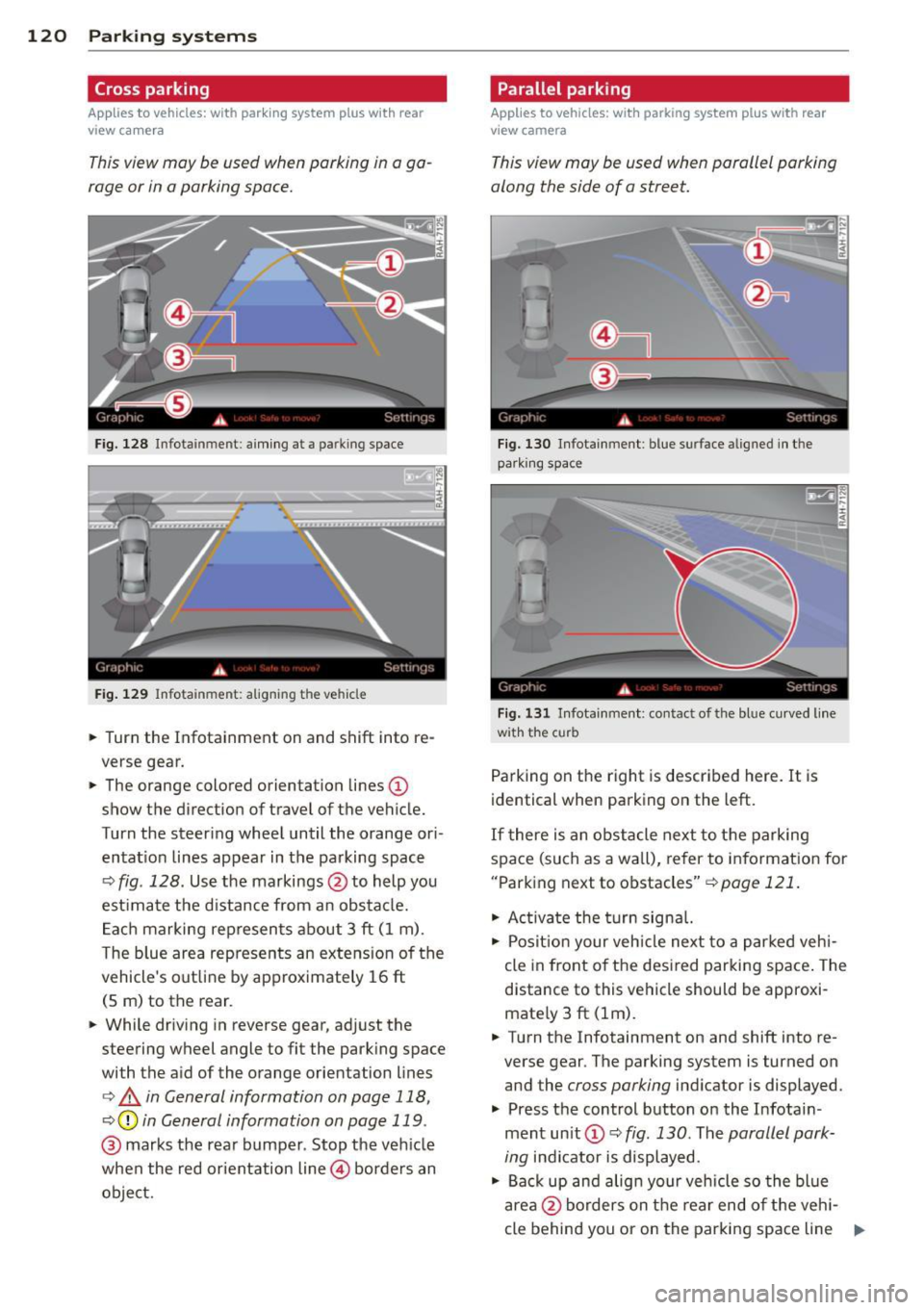
F ig. 128 Infotainment: aim ing at a parking space
Fig. 129 Infotainment : aligning the ve hicle
... Turn the Infotainment on and shift into re
verse gear.
... The orange colored orientation lines@
show the direction of travel of the vehicle.
Turn the steering wheel until the orange ori
entat ion lines appear in the parking space
¢ fig. 128. Use the markings @to help you
est imate the distance from an obstacle.
Each marking represents about 3 ft (1 m).
The blue area represents an extens ion of the
vehicle's out line by approximately 16 ft
(5 m) to the rear.
... While driving in reverse gear, adjust the
steering wheel angle to fit the parking space
with the aid of the orange orientation lines
¢ & in General information on page 118,
¢ @ in General information on page 119 .
@ marks the rear bumper . Stop the veh icle
when the red orientation line@ borders an
object.
Parallel parking
Applies to vehicles : wit h parking system pl us with rear
v iew camera
This view may be used when parallel parking
along the side of a street.
Fig . 130 Infotainment : blue surface aligned in the
park ing space
Fig. 131 Infotainme nt: contact of the blue curved lin e
w ith the curb
Parking on the right is described here. It is
identical when parking on the left.
If there is an obstacle next to the parking
space (such as a wall), refer to information for
"Parking next to obstacles"
¢pa ge 121.
"' Ac tivate the turn signal.
"' Posit ion your veh icle next to a parked vehi
cle in front of the desired parking space. The
distance to this vehicle should be approxi
mate ly 3 ft (lm) .
... Turn the Infotainment on and shift into re
verse gear . The parking system is turned on
and the
cross parking indicator is displayed.
.,. Press the control button on the Infotain
ment unit (!) ¢
fig. 130 . The parallel park
ing
indicator is displayed.
"' Back up and align your vehicle so the blue
area @borders on the rear end of the vehi-
cle behind you or on the parking space line ..,.
Page 123 of 310
r::> & in General information on page 118,
r::> (Din General information on page 119 .
The blue area represents an extension of the
vehicle's outline by approximately 16 ft
(5 m) to the rear . The long side of the blue
area should be on the curb . The entire blue
area must fit into the parking space.
• With the vehicle stopped, turn the steering
wheel to the right as far as it will go.
• Back into the parking space until the blue
curve
r::> fig. 131 touches the curb r::> & in
General information on page 118,
r::> (D in
General information on page 119.
Stop the
vehicle.
• With the vehicle stopped, turn the steering
wheel to the left as far as it will go .
• Continue to back into the parking space un
t il the vehicle is parked parallel to the curb
r::> & in General information on page 118,
r::> (D in General information on page 119.
@ marks the rear bumper. Stop the vehicle,
at the latest, when the red orientation line
@ borders an object. Keep an eye on the
front of your vehicle while do ing th is .
Parking next to obstacles
If there is an obstacle (such as a wall) next to
the parking space, position the vehicle so
there is more space on that side. Position the
long side of the blue surface so that there is
sufficient space from the obstacle. The sur
face must not be touching . You will also need
to star t turning the steering wheel much ear
lier . The blue curve
r::>fig .131 must not touch
the obstacle and should have sufficient room.
(D Tips
The left or right orientation lines and sur
faces will be displayed, depending on the
turn signal being used .
Peripheral cameras
Introduction
Applies to vehicles: with parki ng system plus w ith periph
eral cameras
In addition to parking system plus
r::> page 117, this pa rking system contains pe-
Parking systems 121
ripheral cameras. Depending on the vehicle
equ ipment, you are assisted by various views
such as peripheral view, corner views at the
front and rear of the vehicle, and views direct
ly in front of or behind the vehicle.
General information
Applies to vehicles: with parking system plus with periph
eral cameras
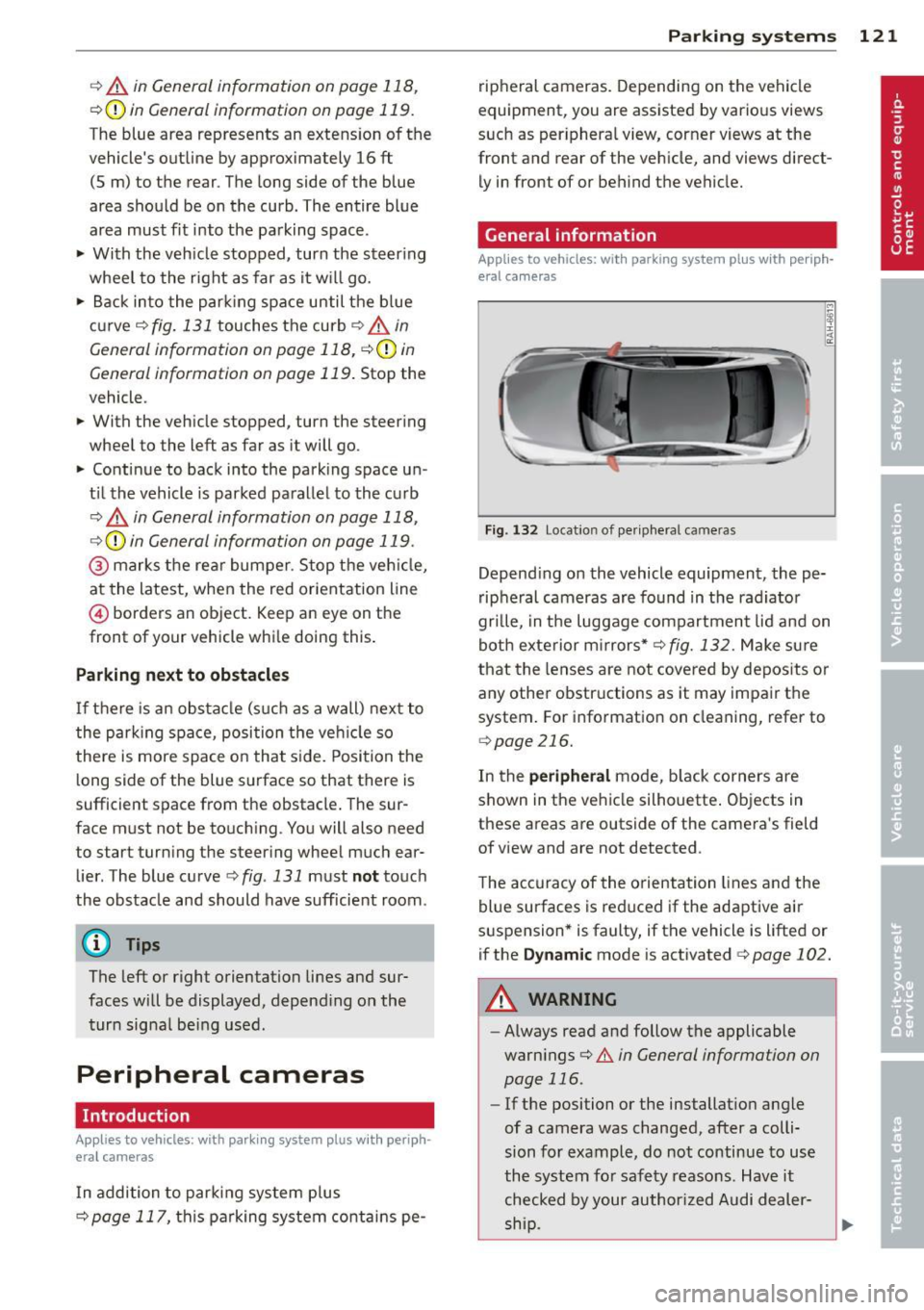
Fig. 132 Locat io n of per ipheral cameras
Depending on the vehicle equipment , the pe
ripheral cameras are found in the radiator
grille, in the luggage compartment lid and on
both exterior mirrors*
r::> fig. 132. Make sure
that the lenses are not covered by deposits or
any other obstructions as it may impair the
system. For information on cleaning, refer to
qpage 216.
In the peripheral mode, black corners are
shown in the vehicle silhouette. Objects in
these areas are outside of the camera's field
of view and are not detected .
The accuracy of the orientation lines and the
blue surfaces is reduced if the adaptive air
suspension* is faulty, if the vehicle is lifted or
if the
Dynamic mode is activated 9 page 102.
A WARNING
-Always read and follow the applicable
warnings
r::> .&. in General information on
page 116 .
-If the position or the installation angle
of a camera was changed, after a colli
sion for example, do not continue to use
the system for safety reasons. Have it checked by your author ized Audi dealer-
-
ship . ~
Page 128 of 310
126 Parking systems
Trailer view
Ap plies to vehicles: with par king system p lus and tra iler
hitch
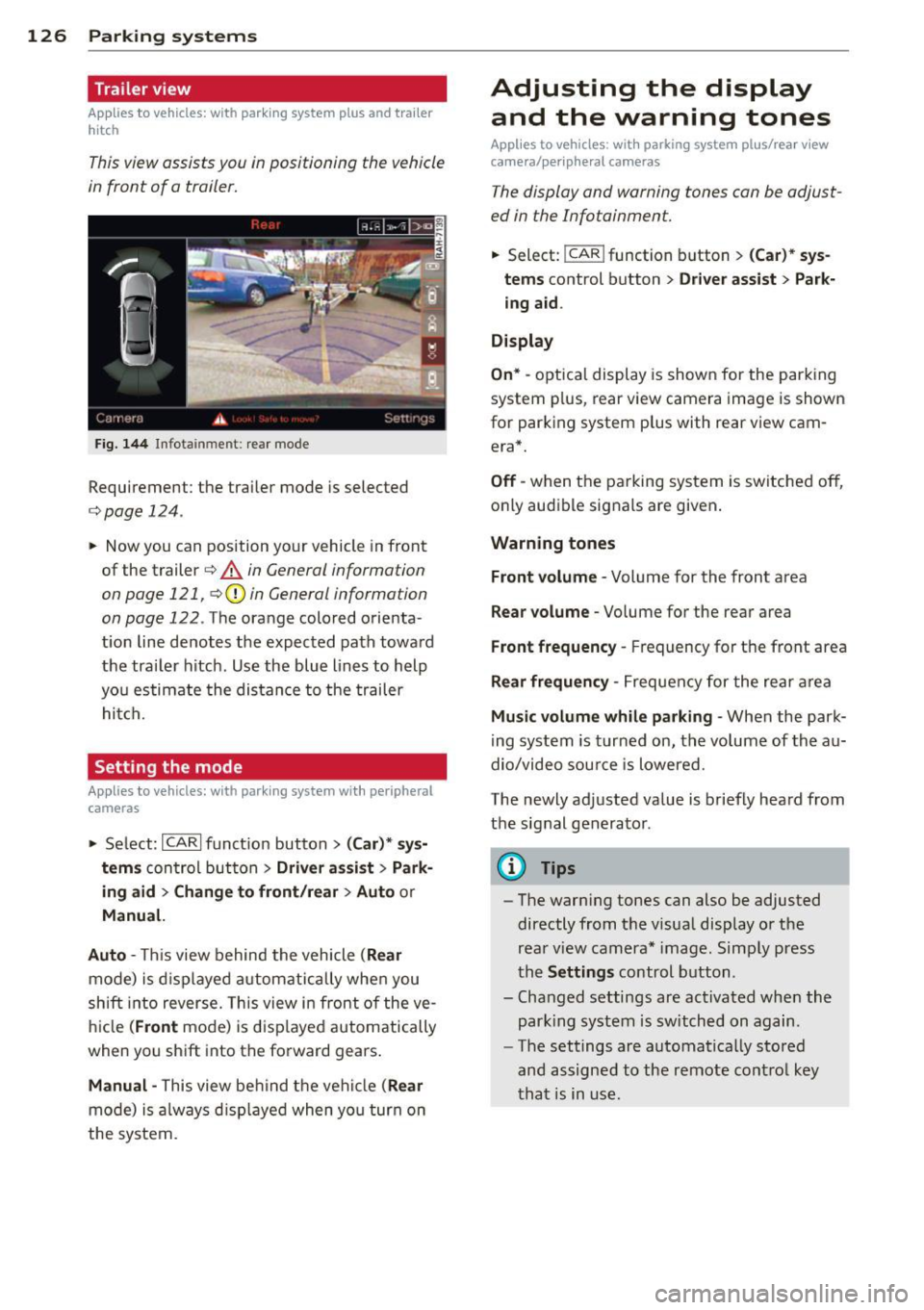
This view assists you in positioning the vehicle
in front of a trailer.
F ig. 1 44 Infotai nment: rea r mode
Requirement: the trai ler mode is selected
c:;, page 124.
.. Now you can position yo ur vehicle in front
of the trailer
c:;, .&. in General information
on page 121, c:;,(j) in General information
on page 122 .
The orange colo red orienta
t ion line denotes the expected path toward
the tra iler hitch . Use the blue lines to help
yo u estimate the distan ce to the trailer
hi tc h.
Setting the mode
Ap plies to veh icles: with par king system wi th peripheral
cameras
.. Select: ICARI funct ion button > ( Car )* sy s
tem s
control button > Driv er a ssis t > Park
ing aid > Ch ange to front /rear > Auto
or
Manual.
Auto -
This view behind the vehicle ( Rear
mode) is d isplayed a utomatically when you
shift into reverse. This view in front of the ve
h icle
(Front mode) is d isp layed automatically
when you sh ift into the forward gears .
Manual -This view be hind the vehicle (Rear
mode) is a lways d isp layed when yo u turn on
the system.
Adjusting the display and the warning tones
Applies to vehicles: wit h parking syste m plus/ rea r view
came ra/ peri pheral cameras
The display and warning tones can be adjust
ed in the Infotainment.
.. Select: !CAR ! function b utton > (Ca r) * s ys
tems
control button > Dri ver ass ist > Par k
i n g a id .
Display
On * -
optica l display is shown for the parking
system p lus, rear view camera image is shown
for parking system plus with rear view cam era*.
Off -when the parking system is switche d off,
o nly aud ible signa ls are given .
Warning tones
Front volume -
Volume for the front area
Rear volume -Volume for the rear area
Front frequency -Frequency for the front area
Rear frequen cy -Frequency for the rear area
Mu sic volum e while parking -When the park
ing system is turned on, the vo lume of the au
dio/video sou rce is lowered.
The newly adjusted value is briefly hea rd from
the signal generator .
@ Tips
-The warn ing tones can also be adjusted
directly from t he visua l display o r the
rea r view camera* image. Simp ly press
the
Setting s control button .
- Changed settings are act ivated when the
par king system is switched on again.
- The settings are automa tica lly stored
and assigned to the remote cont rol key
t ha t is in use .
Page 131 of 310
@ Tips
To open the garage door, press the button,
but do not press it for longer ten seconds
or the Homelink modu le w ill switch to
programming mode .
Programming the transmitter
Applies to vehicles : with Home Link
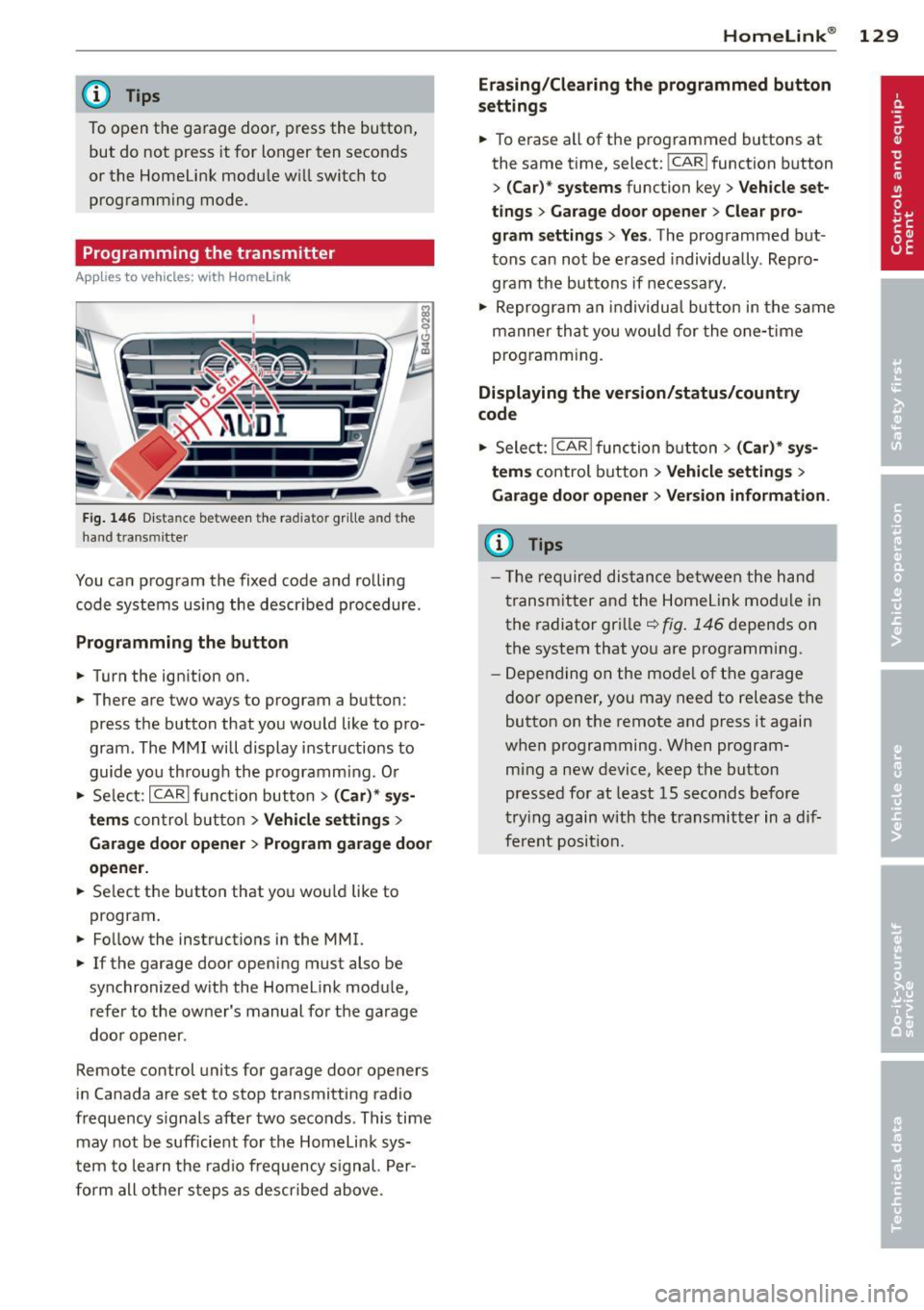
Fig. 146 Dist an ce be tween the ra diato r gr ille a nd the
hand t ransm itter
You can program the fixed code and rolling
code systems using the described procedure.
Programming the button
.. Turn the ignition on.
.. There are two ways to program a button:
press the button that you would like to pro
gram . The MMI will display instructions to
guide you through the programm ing . O r
.. Se lect: ICARlfunction button>
( Car) * sys
tems
con trol button > Vehicle settings >
Garage door opener > Program garage door
opener .
.. Se lect the button that you wou ld like to
program .
.. Fo llow the instructions in the MMI.
.. If the garage door opening must also be
synchronized with the Homelink module,
refer to the owner's manual for the garage
door opener .
Remote control units for garage door openers
in Canada are set to stop transmitting radio
frequency s ignals after two seconds . This time
may not be sufficient for the Homelink sys
tem to learn the radio frequency signal. Per
form all other steps as descr ibed above .
Homelink ® 129
Erasing/Clearing the programmed button
settings
.. To erase all of the programmed buttons at
the same time, select: !CAR ! function button
>
(Car)* systems function key> Vehicle set
tings
> Garage door opener > Clear pro
gram settings> Yes .
The programmed but
tons can not be erased individua lly . Repro
gram the buttons if necessary .
.. Reprogram an individual button in the same
manner that you wou ld for the one-time
programming.
Displaying the version/status/country
code
.. Select: I CAR I function button > (Car)* sys
tems
control button > Vehicle settings >
Garage door opener > Version information .
(D Tips
- The required distance between the hand
transmitter and the Homelink mod ule in
the radiator grille~
fig. 146 depends on
the system that you are programm ing .
- Depending on the mode l of the garage
door opener, you may need to release the
button on the remote and press it again
when programming. When program
ming a new device, keep the button
pressed for at least 15 seconds before
trying again with the transmitter in a dif
ferent position.
Page 155 of 310
-Always carefully follow instru ctions from
c hild restraint manufacturers when in
sta lling child restraints.
A WARNING
If, in exceptional circumstances, you must
install a forward or rearward-facing child
restraint on the front passenger's seat:
- Improper installation of child restraints
can reduce their effectiveness or even
prevent them from providing any protec
tion.
- An improperly installed child restraint
can interfere with the airbag as it de
ploys and seriously injure or even kill the
child - even with an Advanced Airbag
System.
- Always carefully follow the manufactur
er's instructions provided with the child
seat or carrier .
- Always make sure that there is nothing
on the front passenger seat that will
cause the capacitive passenger detection
system in the seat to signal to the Airbag
System that the seat is occupied by a
person when it is not, or to signal that it
is occupied by someone who is heavier
than the person actually sitting on the
seat. The presence of additional objects
could cause the passenger front airbag
to be turned on when it should be off, or
could cause the airbag to work in a way
that is different from the way it would
have worked without the object on the
seat .
Airbag system 153
Front airbags
Description of front airbags
The airbag system can provide supplemental
protection to properly restrained front seat occupants.
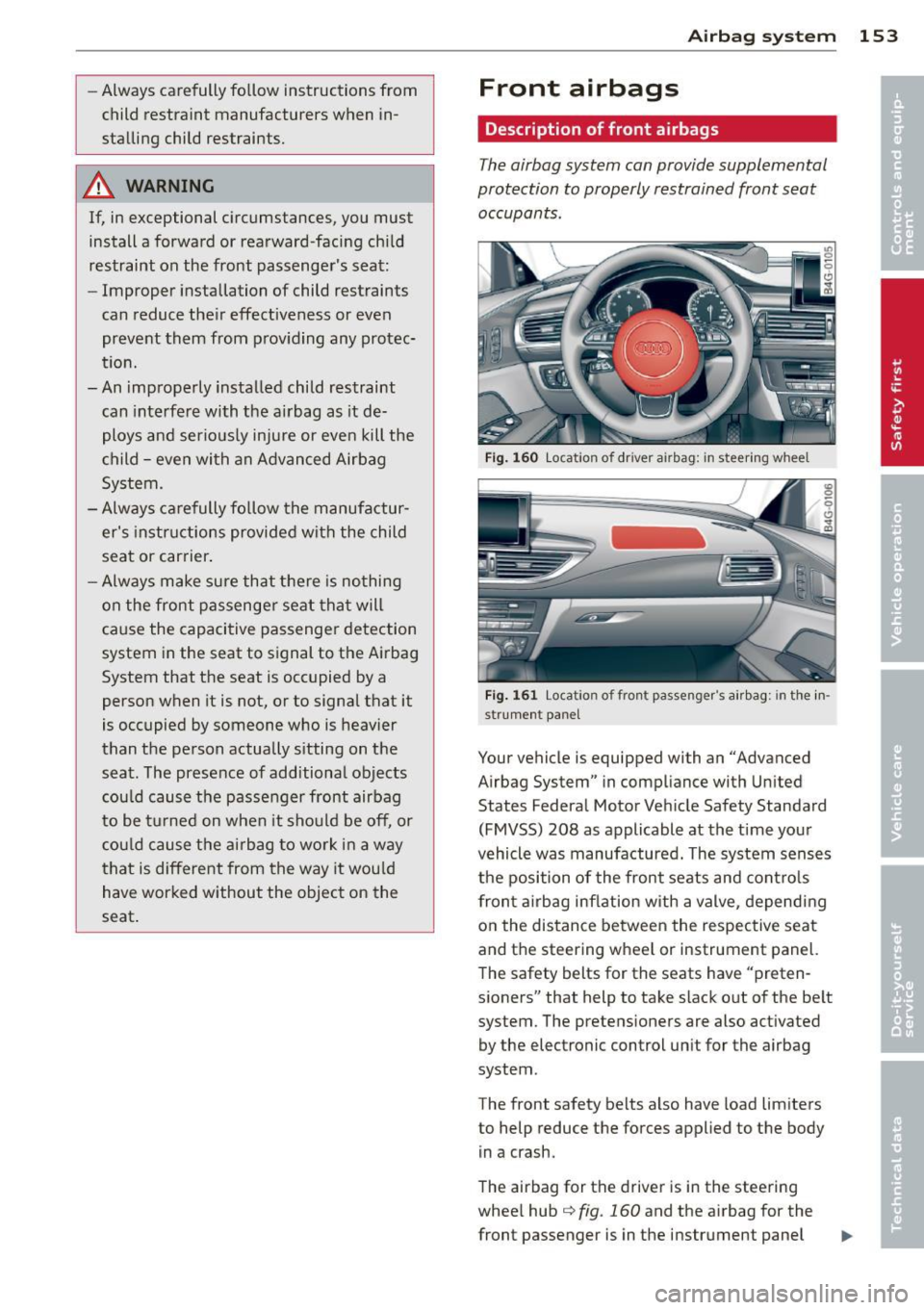
Fig. 160 Loc ation of driver airbag: in steering w heel
Fig. 161 Loc ation of front passenger's a irbag: in the in·
strument panel
Your vehicle is equipped with an "Advanced
Airbag System" in compliance with United
States Federal Motor Vehicle Safety Standard
(FMVSS) 208 as applicable at the time your
vehicle was manufactured. The system senses
the position of the front seats and controls
front airbag inflation with a valve, depending
on the distance between the respective seat
and the steering wheel or instrument panel.
The safety belts for the seats have "preten
sioners" that help to take slack out of the belt
system. The pretens ioners are also activated
by the electronic control unit for the airbag
system .
The front safety belts also have load limiters
to help reduce the forces applied to the body
in a crash.
The airbag for the driver is in the steering
wheel hub
q fig. 160 and the airbag for the
front passenger is in the instrument panel
Page 164 of 310
162 Airbag system
continuously to serve as a constant reminder
to have the system inspected immediately.
If a malfunction occurs that turns the front
a ir bag on the passenger side off, the
PAS SEN
GER AIR BAG OFF
light will come on and stay
on whenever the ignition is on.
.&_ WARNING
An airbag system that is not functioning
properly cannot provide supplemental pro
tection in a frontal crash.
- If the airbag indicator light
c::> page 19
comes when the vehicle is be ing used,
have t he system inspected immediately
by your authorized Aud i dea ler . It is pos
sible that the airbag will inf late when it
is not supposed to, or w ill not inflate
when it sho uld.
PASSENGER AIR BAG OFF light
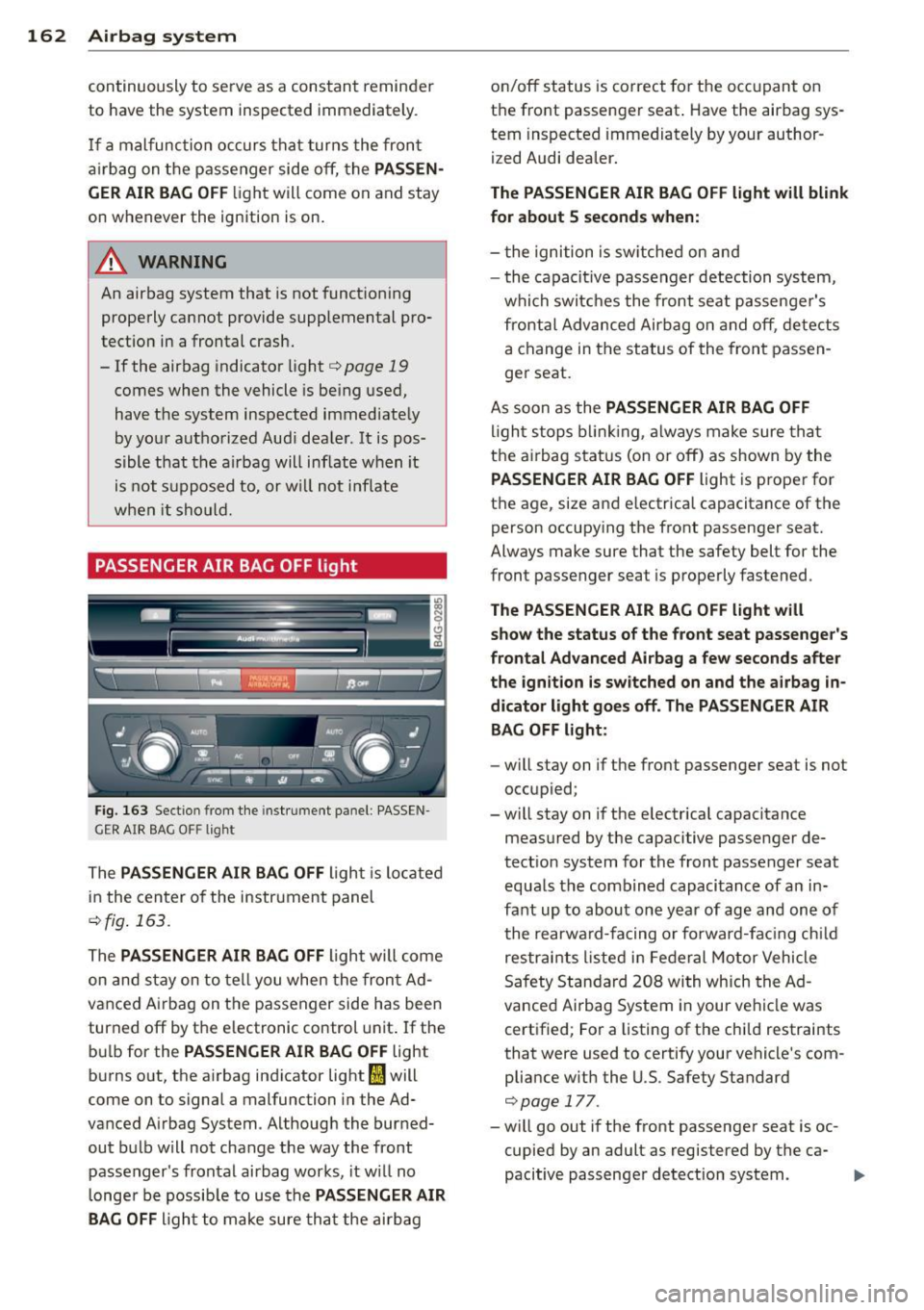
Fig. 163 Section from the inst rument panel : PASSEN
GER AIR BAG O FF light
The PAS SENGER AIR BAG OFF Light is Located
in the cen ter of the instrument panel
c::> fig . 163.
The PASSENGER AIR BAG OFF Light will come
on and stay on to tell you when the front Ad
vanced A irbag on the passenger side has been
turned off by the e lectronic control unit . If the
bu lb for the
PAS SENGER AIR BAG OFF Light
burns out, the a irbag ind icator light
fl will
come on to signal a malfunction in the Ad·
vanced Airbag System . Although the burned
out bulb will not change the way the front
passenger's frontal airbag works, it w ill no
L onger be possib le to use the
PASSENGER AIR
BAG OFF
Light to make sure tha t the ai rbag on/off status is correct for the occ
upant on
the front passenger seat . Have the airbag sys
tem inspected immediately by your author
ized Audi dea ler.
The PASSENGER AIR BAG OFF light will blink
for about 5 second s when:
- t he ignition is sw itched on and
- the capacit ive passenger detection system,
which switc hes the front seat passenger's
frontal Advanced Airbag on and off, detects a change in the status of the front passen
ger seat.
As soon as the
PASSENGER AIR BAG OFF
l igh t stops b linking, a lways make sure tha t
the a irbag status (on or off) as shown by the
PAS SENGER AIR BAG OFF Light is proper for
the age, size and e lectrical capacitance of the
person occupy ing the front passenger seat.
Always make sure that the safety belt for the
front passenger seat is properly fastened .
The PASSENGER AIR BAG OF F light will
s ho w the status of the front seat pass enger 's
frontal Ad van ced Air bag a few seconds after
the ign ition is sw itched on and the airbag in
dicator light go es off. The PA SSENG ER AIR
BAG OFF li ght :
-will stay on if the front passenger seat is not
occupied;
- will stay on if the e lectrical capacitance
measured by the capacitive passenger de
tect ion system for the front passenger seat
equa ls the combined capacitance of an in
fant up to about one yea r of age and one of
the rearward-facing or forward-fac ing ch ild
restrai nts listed i n Federal Motor Vehicle
Safety Standard 208 with which the Ad
vanced Airbag System in your vehicle was
certified; For a Listing of the child restraints
that were used to certify your vehicle's com
pliance with the U.S. Safety Standard
c::> page 177.
- will go out if the front passenger seat is oc
cupied by an adult as registered by the ca
pacitive passenger detection system.
Page 267 of 310

When the malfunction indicator is illuminat
ed, the system may not be able to detect or
signal low tire pressure as intended. TPMS
malfunctions may occur for a variety of rea
sons, including the installation of replace ment or alternate tires or wheels on the vehi
cle that prevent the TPMS from function ing
properly . Always check the TPMS malfunction
tellta le after replacing one or more tires or
wheels on your vehicle to ensure that the re
placement or alternate tires and wheels allow
the TPMS to continue to function properly.
Tire pressure indicator appears
Applies to vehicles: with tire pressure monitoring system
The tire pressure indicator in the instrument
cluster informs you if the tire pressure is too
low or if there is a system malfunction.
Fig. 201 Display : underinflatio n warning
Fig. 202 Display : Syste m malfun ctio n
Using the ABS sensors, the tire pressure moni
toring system compares the tire tread circum
ference and vibration characteristics of the in
dividual tires . If the pressure decreases in one
or more tires , th is is indicated in the instru
ment cluster with a warning symbol
RE and a
message¢
fig . 201.
The tire pressure monitoring system must be
reset via MMI each time the pressures are ad-
Tires and wheels 265
justed (e.g. when switching between partial
and full load pressure) or after changing or re
plac ing a tire on your vehicle¢
page 266. The
TPMS indicator only monitors the tire pres
sure that you have previously stored. You can
find the recommended tire pressures for your
vehicle on the label on dr iver's side B-pillar
<=:>page 250 .
Tire tread circumference and vibration charac
teristics can change and cause a tire pressure
warning if :
- the tire pressure in one or more tires is too
low,
- the tire has structural damage,
- the tire pressure was changed, wheels rotat-
ed or replaced but the TPMS was not reset
¢page 266 .
Warning symbols
RE Loss of pressure in at least one tire¢.&. .
Check the tire or tires and replace or repair if
necessary. The indicator light
RE in the instru
ment cluster also illuminates
¢ page 12.
Check/correct the pressures of all four tires
and reset TPMS via MMI.
11;;~, ( T ire Pressure Monitoring System) Tire
pressure! System malfunction.
If11NIS, appears after switching the ignition
on or while driving¢
fig. 202 and the indica
tor light
RE in the instrument cluster blinks
for approximately one minute and then stays
on, there is a system malfunction.
Attempt to store the correct tire pressure
¢
page 266 . If the indicator light does not
turn off or if it turns on shortly thereafter, im
mediately drive your vehicle to an authorized
Audi dealer or authorized repair facility to have the malfunction corrected .
A WARNING
-If the tire pressure ind icator appears in
the instrument cluster display, one or
more of your tires is significantly under
inflated. Reduce your speed immediately
and avoid any hard steering or braking
maneuvers. Stop as soon as possib le and .,.
Page 302 of 310
300 Index
K
Key ... . ... ....... ......... ... .... .. 32
Battery replacement master key ... .. .. 33
Emergency key .............. ..... .. 32
Key not recognized . . . . . . . . . . . . . . . . . . 78
Key replacement ......... .... .... .. 32
Master key . . . . . . . . . . . . . . . . . . . . . . . . 32
Mechanical key .............. ... ... . 33
Valet key . .. .. ........ .... ... .. .. .. 32
Kick-down tiptronic
113
Knee airbags ................. ..... . 166
Description ................. ..... . 166
How they work .............. ..... . 168
Important safety instructions . . . . . . . . 168
L
Lane assist . . . . . . . . . . . . . . . . . . . . . . . . . 95
Lane Change Assistant
refer to side assist . . . . . . . . . . . . . . . . . . 98
LATCH .. .. .. ............. .... .. ... 189
Descript ion .... .... ...... .. .. .. .. .
Installing a child restraint ...... .. .. .
Location .. .... ............. ... ' . .
Mounting and releasing the anchorage
hook
. . .. .. ............. .... .. .. .
190
191
190
191
Launch Control Program .... .. .. .. .. . 114
Leather ..................... ..... . 221
L eather (cleaning) .......... .. .. .. .. . 222
Leaving home ............. .. .. .. .. .. 45
Lifting jack . . . . . . . . . . . . . . . . . . . . . . . . 2 71
Lifting vehicle ................ ... ... 283
Light Ambience lighting .......... .. .... .. 46
Coming/Leaving home ..... .. .. ...... 45
Daytime running lights .. ... ... .. .. .. 43
Emergency flashers . . . . . . . . . . . . . . . . . 44
Exterior lighting .... .. .... .. .. .. .. ..
43
H ead light range control ... .. .. .. .. . . 43
High beam .............. ........ .. 45
L ow beam . ................. ..... ..
43
Rear fog lights .............. ..... .. 43
Side marker lights ......... ... .... ..
43
Turn signals ............. .. .. .. .. .. 45 Light/rain
sensor
Headlights . ..... ................ .. 43
Intermittent (windshield w ipers) ...... 47
Sensor defective . . . . . . . . . . . . . . . . . . . . 22
Loading the roof rack ................ . 62
Locking Power locking switch ................ 37
Remote control .... ........... .. .. . 35
Using the key ................. ..... 37
Low beams . .... .. ... .......... .... . 43
Lower universal anchorages (Canada) . . .
189
Luggage compartment
Bag hooks . . . . . . . . . . . . . . . . . . . . . . . . . 65
Cargo net . . . . . . . . . . . . . . . . . . . . . . . . . 65
carpeting ..... .. ................ .. 66
Cover ......... .. ..................
63
Enlarging . . . . . . . . . . . . . . . . . . . . . . . . . 64
Loading ... ...... ................. .
63
Ski sack ...................... ..... 66
Stowing luggage .............. ....
136
Tie -downs . . . . . . . . . . . . . . . . . . . . . . . . . 65
Trunk pass-through ...... ...... .. .. . 67
Lumbar support
Front seats . . . . . . . . . . . . . . . . . . . . . . . . 54
M
Maintenance .... .. ................ . 289
Malfunction Indicator Lamp (MIL) . . 21, 29
Manual shift program ............ .. .. 113
Massage function
Front seats . . . . . . . . . . . . . . . . . . . . . . . . 54
Matte finish paint .. ............. .. .. 215
Mechanical key .. .. ... .......... .. .. . 33
Mirrors Adjusting the exterior mirrors ..... ... .
49
d' . ,mmrng .. .... .. ................ .. so
Vanity mirrors ................ ..... 47
Monitoring the Advanced Airbag System
161
Multifunction steering wheel .. .. .. .. .. . 25
N
Natural leather .....................
New t ires and wheels
NHTSA 221
257
Contacting .. .. .. ....... ...... .. .. 138
Page 306 of 310
304 Index
Steering whee l w ith tip tronic ... .. .... . 1 13
Steps fo r determining correct load lim it . 255
Stopping the engine . . . . . . . . . . . . . . . . . . 77
S to rage . . . . . . . . . . . . . . . . . . . . . . . . 59, 63
S tron ic transm issio n
L aunch Cont ro l Program . ....... ....
114
S tron ic® .. .. ... ... .... ... .. .. .... . 109
Sunroof . .... ............. .. .. .. .. .. 42
Sun shade . .. ... ....... ...... ... .. .. 47
Sun visors ... ... .. ..... ... .. .. .... .. 47
Symbo ls
refer to Wa rni ng/ind icator lig hts ...... 12
T
Tachometer . . . . . . . . . . . . . . . . . . . . . 1 2, 23
Tec hnical modifications ..... .... .... . 292
Tempe ratu re d isp lay .................. 23
Tether anchors ................. .... 192
Tether strap .... .. ..... ... .. .. .... . 192
The first 1,000 miles (1,500 km) and after-
wards . .. .. ................... .... .
204
Three-zone climate control ...... .... .. 69
Tie -downs 65,137
T ips fo r th e env ironment
Saving fue l ................ .. .. .. . .
tiptronic
6 2
109
tiptronic (au tomatic transmission) .... . 1 13
T ire pressure .... .... ...... ... ... .. . 252
Tire pressure monitoring system .. .. ... 264
Loss of air pressure ................ 265
Malfunct io n ...................... 265
Res ett ing t ire p ressures ......... .... 266
Tires . ..... .. ... .. ..... ... .. .. .... .
Service life .................. .... .
Speed rating letter code ... .. .. .... .
Tire man ufacturing date ....... .... .
r 'f . ire spec, 1cat1ons ......... .... ... .
Tread depth .................. ... .
246
256
258
258
258
256
Unifo rm t ir e quality g rading .. .. .. ... 260
W in te r tir es ...................... 26 1
Tires and vehicle load lim its .... .. .. .. . 254
Tires and whee ls
C hecking tire pressu re ... .. .. .... .. .
2 52
Cold t ire inflat ion pressure ... .. .. .. . 250
Dimensions . ...................... 257
General notes . . . . . . . . . . . . . . . . . . . . . 246
G lossary of tire and loading terminolo -
gy .. ... .. .. .. .. .. ... .. ..... ... . .
Low aspect ratio tires . .. ..... ... .. . .
New t ires and wheels ........... ... .
Replac ing . .... .................. .
Snow c ha ins ..................... .
T ires and veh icle load limits ... .. .. . .
Whee l bolts
. ' ............. ...... .
w· t · in er tires ... . .............. .. . .
Tire service life .................... .
T oo ls
. . .. .. .... .. .. ... ..... ... .. ..
T o rn o r frayed safety belts ........... .
247
263
257
258
262
254
263
2 61
256
2 67
143
T h . ouc -up paint ..................... 218
Towing
T ow t ruck p roced ures . .. ..... ... .. ..
2 81
T PMS
T ire pressure mon itoring system .....
265
Trailer tow ing . .... ................. 209
Operating instructions .............. 209
p
k " ar mg system ........ ........... . 127
Technical requirements . . . . . . . . 209,210
Tra ile r tow ing ti ps ................ . 211
Train (transporting your vehicle) ... .... 283
T ra nsmis sion
S tronic ® .. .... .. ... .. ..... .... . ..
109
tipt ronic . ..... .. .. .... .... ... .. .. 109
T ransmission malfunction ( indicato r
li ght) ...... .... ...................
11 4
Transport Canada ................... 138
Transporting yo ur vehicle . ... ... .. .. .. 2 83
Tread Wea r In dicator (TW I) .. ... ...... 256
Tr ip odometer .................... ... 27
What does it mean when DEF appears in
th e tr ip odometer display? ...........
27
Tru nk
refer to Luggage compartment ... .. .. . 63
Tru nk pass -through .................. 67
Turn signals . .... ................... . 45
Warning/indicator lights . .......... .. 23
u
Un dercoating . .. .. ................. 219
U nfastening sa fety belts .... ... .. .. .. 14 5
Un idirec tional tires . ................ . 246
Uniform tire quality grading . ... .. .. .. 260