warning light AUDI A7 2013 Owner's Manual
[x] Cancel search | Manufacturer: AUDI, Model Year: 2013, Model line: A7, Model: AUDI A7 2013Pages: 310, PDF Size: 77.45 MB
Page 34 of 310
32 Opening and clo sing
Opening and closing
Keys
Key set
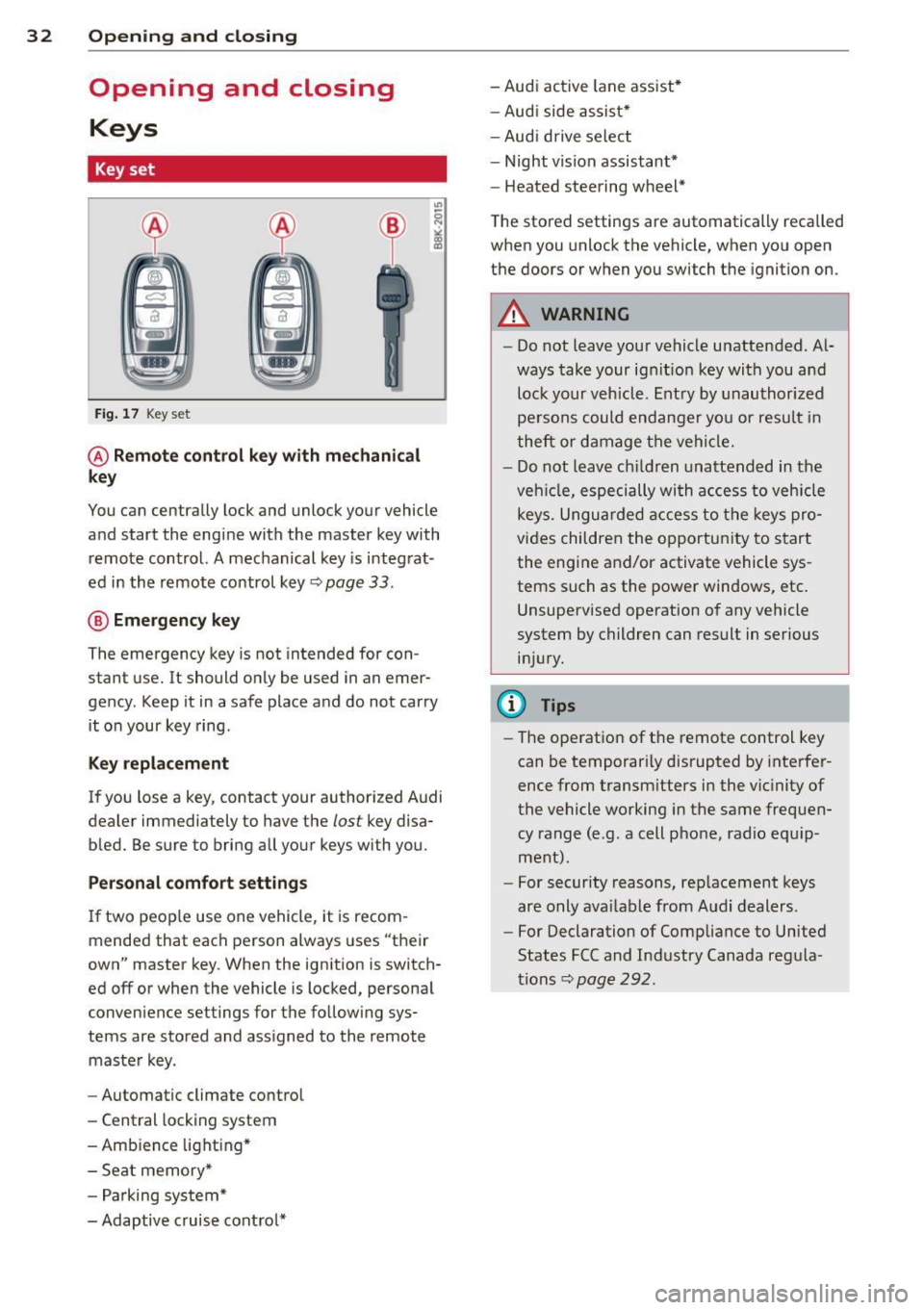
Fig . 17 Key set
@ Remot e control k ey w ith m echan ical
ke y
You can centrally lock and unlock your vehicle
and start the engine with the master key with
remote control. A mechanical key is integrat
ed in the remote control key
r:::;, page 33 .
@ Eme rgenc y ke y
The emergency key is not intended for con
stant use.
It should only be used in an emer
gency. Keep it in a safe place and do not carry it on your key ring .
Key replac em ent
If you lose a key, contact your authorized Audi
dealer immediately to have the
lost key disa
bled. Be sure to bring all your keys with you.
P er sonal c omfo rt se ttin gs
If two peop le use one vehicle, it is recom
mended that each person always uses "their
own" master key . When the ignition is switch
ed off or when the vehicle is locked, personal
convenience settings for the follow ing sys
tems are stored and assigned to the remote master key .
- Automatic climate control
- Central locking system
- Amb ience light ing*
- Seat memory*
- Parking system*
- Adaptive cruise control* - Audi active
lane assist *
- Aud i side assist*
- Aud i drive select
- Night vision assistant*
- Heated steering wheel*
The stored settings are automatically recalled
when you unlock the vehicle, when you open
the doors or when you switch the ignition on.
A WARNING
-- Do not leave your vehicle unattended . Al-
ways take your ignit ion key with you and
lock your vehicle . Entry by unauthorized
persons could endanger yo u or resu lt in
theft or damage the vehicle.
- Do not leave ch ildren unattended in the
veh icle, especially with access to vehicle
keys. Unguarded access to the keys pro
vides children the opportunity to start the engine and/or activate vehicle sys
tems such as the power windows, etc .
Unsupervised operation of any vehicle
system by children can result in serious
injury.
(1) Tips
- The operation of the remote control key
can be temporar ily disrupted by interfer
ence from transm itters in the vic inity of
the vehicle working in the same frequen
cy range (e.g. a cell phone, radio equip
ment).
- For security reasons, rep lacement keys
are only ava ilable from Audi dealers.
- For Declaration of Compliance to United
States FCC and Industry Canada regula
tions
r:::;, page 292.
Page 35 of 310
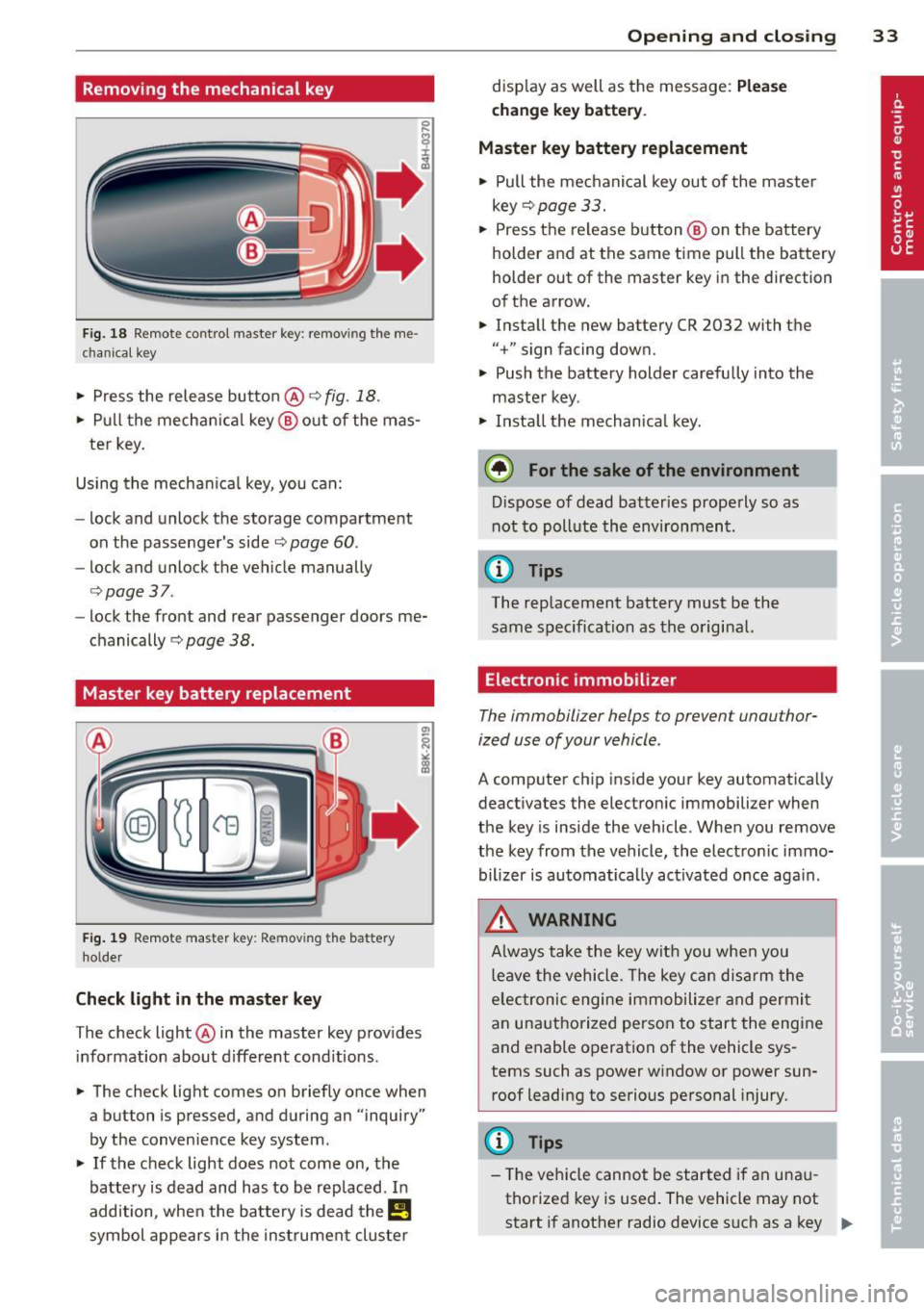
Removing the mechanical key
Fig. 18 Remote control maste r key : re mov ing the me
c han ical key
• Press the release button @ r=> fig. 18.
• Pull the mechanica l key @ out of the mas
ter key.
Using the mechan ica l key, you can:
- lock and unlock the storage compartment
on the passenger's side
c::> page 60 .
-lock and unlock the vehicle manually
c::>page 37 .
-lock the front and rear passenger doors me
chanically
c:> page 38.
Master key battery replacement
Fig . 19 Remote master key : Re mov ing the ba ttery
holde r
Check light in the master key
The check light @ in the master key provides
information about different cond itions .
• The check light comes on briefly once when
a button is pressed, and during an "inquiry"
by the conven ience key system .
• If the check light does not come on, the
battery is dead and has to be replaced. In
addition, when the battery is dead the
E!!
symbol appears in the instrument cluster
Opening and closing 33
display as well as the message: Please
change key battery .
Master key battery replacement
• Pull the mechanical key out of the master
key
c::> page 33.
• Press the release button @ on the battery
holder and at the same time pull the battery
holder out of the master key in the direction
of the arrow.
• Install the new battery CR 2032 with the
"+ " sign facing down.
• Push the battery holder carefully into the
maste r key .
• Install the mechanical key.
@ For the sake of the environment
Dispose of dead batteries properly so as
not to pollute the environment .
(D Tips
The replacement battery must be the
same specification as the original.
, Electronic immobilizer
The immobilizer helps to prevent unauthor
ized use of your vehicle .
A computer chip inside your key automatically
deactivates the electronic immobilizer when
the key is inside the vehicle. When you remove
the key from the vehicle, the electronic immo
bilizer is automatically activated once again .
A WARNING
-
Always take the key with you when you
leave the vehicle. The key can disarm the
e lectronic engine immobilizer and permit
an unauthorized person to start the engine
and enable operation of the vehicle sys
tems such as power window or power sun
roof leading to serious personal injury.
(D Tips
- Th e vehicle cannot be started if an una u
thorized key is used. The vehicle may not
start if another radio device such as a key
Ill>
Page 36 of 310
34 Openin g and clo sing
for another vehicle or a transponder is
located on the key ring.
- For Declaration of Compliance to United States FCC and Industry Canada regula
tions
~ page 292.
Power locking system
General description
The power locking system locks or unlocks all
doors and the rear lid simultaneously.
You can lock and unlock the vehicle centrally.
You have the following choices:
- Remote master key~
page 35,
-Door handles with convenience key*
~ page 36,
-Lock cy linder at the dr iver's door
¢ page 37, or
- Power lock ing switch inside
¢ page 37.
Select ive unlocking
When you lock the vehicle, the power locking
system w ill lock the doors and the rear lid .
When unlocking, you can set in the MMI
whether only the driver 's door o r the entire
vehicle should be unlocked ¢
page 35.
Automatic locking
The automat ic locking feature locks all the ve
h icle doors and the rear l id when you drive
faster tha n 9 mph (15 km/h).
The car is unlocked again, when the opening
function in the power locking system sw itch
or at one of the door levers is actuated . The
Auto Lock function can be turned on and off in
the MMI
¢ page 35.
Anti-theft alarm warning sy stem
If the anti -theft alarm warning system de
tects a break- in into the vehicle, acoust ic and
visua l warning signals are triggered.
The anti-theft warning system is activated au
tomatically when you lock the vehicle . It is de
activated when unlocking using the remote key, with the mechanical key, and when you
sw itch the ignition on. T
he alarm also turns off when the a larm cycle
has expired .
Turn signals
When you unlock the veh icle, the turn s ignals
flash twice. When you lock the vehicle the
turn s ignals flash once. If they do not flash,
one of the doors, the rear lid or the hood is
not locked.
Unint entionally locking your self out
In the follow ing cases there safeguards to
prevent yo u lock ing yo ur remo te master key i n
the vehicle :
- The vehicle does not lock w ith the central
loc king switch ¢
page 3 7 if the drive r's
door is open.
- On veh icles with co nvenience key*, if the
most recently used master key is in the lug
gage compartment, the rear lid is a utomat i
cally un locked again after it is closed.
Do not lock your veh icle w ith the
remot e ma s
t e r ke y or co nv eni enc e ke y*
until all doors
and the rear lid are closed . In this way you
avoid lock ing you rsel f out accidentally .
Power side door clo ser *
The veh icle doors are equipped with a power
s ide door closer. When closing a door, you on
ly h ave to let it fall light ly into the latch. The
door will then automatically close by itself
¢ & .
A WARNING
-When you lock yo ur vehicle from o utside,
nobody -especially children -shou ld re
main inside the vehicle. Remember,
when you lock the vehicle from the out side the windows cannot be opened from
the inside.
- When you leave the veh icle, always take
the ignition key w ith you . Th is w ill pre
vent passenge rs (children, for example)
from accidenta lly being locked in the ve
h icle should they accidentally press the
power locking sw itch in the doors.
~
Page 39 of 310
@ Tips
If your vehicle has been standing for an ex
tended period, please note the follow ing:
- The proximity sensors are deactivated af-
ter a few days to save power. You then
have to pull on the door handle once to
unlock the vehicle and a second time to
open the veh icle.
- To prevent the battery from being dis
charged and to preserve your veh icle's
ability to start for as long as possible,
the energy management system gradu
ally switches off unnecessary conven i ence funct ions. It is possible that you
will not be able to unlock your vehicle us
i ng these conven ien ce f unctions.
- Fo r De clarat ion of Compliance to United
Sta tes FCC and Indus try Canada regula
tions
¢page 292.
Operating locks with the key
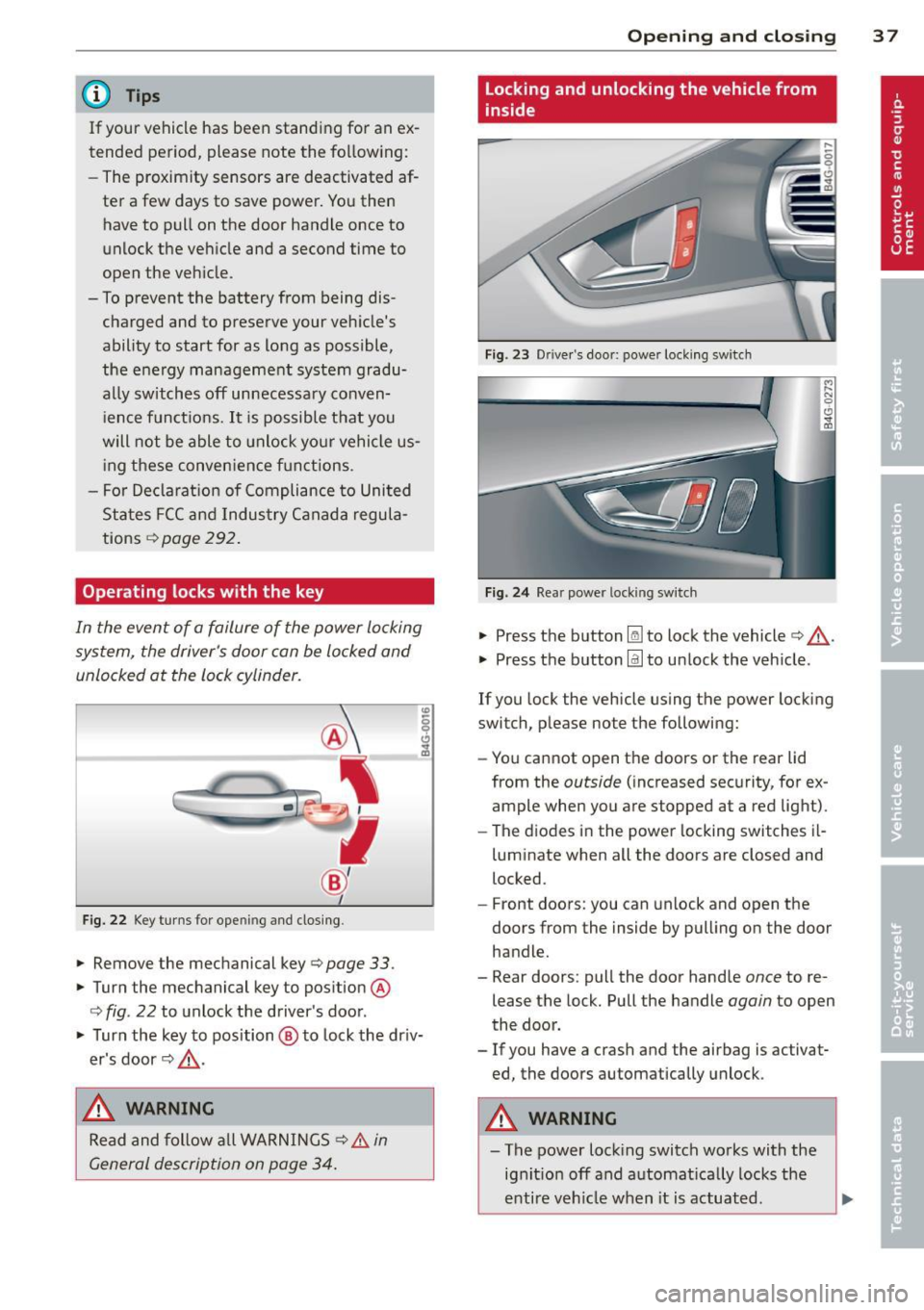
In the event of a failure of the power locking
system, the driver's door can be locked and unlocked at the lock cylinder.
Fig. 2 2 Key turns for opening and clos ing .
"' Remove the mechanical key¢ page 33 .
"' Turn the mechanical key to position @
q fig. 22 to unlock the driver's door .
"' Turn the key to position ® to lock the dr iv
er's door¢ &,.
,& WARNING
Read and follow a ll WARNINGS ¢ & in
General description on page 34.
Op enin g an d clos ing
Locking and unlocking the vehicle from
inside
Fig . 23 Drive r's door: power locking switch
Fi g. 2 4 Rear power locking switch
"' Press the button l@J to lock the vehicle¢&, .
"' Press the button
@:I to unlock the veh icle .
If you lock the vehicle using the power locking
switch, p lease note the following:
- You cannot open the doors or the rear lid
from the
outside ( increased security, for ex
ample when you are stopped at a red light).
- The d iodes in the power locking switches il-
luminate when all the doors are closed and
locked.
- Front doors: you can unlock and open the
doors from the inside by pulling on the door
handle.
- Rear doors: pull the door handle
once to re
lease the lock. Pull the handle
again to open
the door.
- If you have a crash and the airbag is activat
ed the doors automatically unlock .
,
A WARNING
-The power lock ing switch works with the
ig nit ion off and automat ica lly locks the
enti re veh icle when it is actuated.
3 7
Page 43 of 310
@ Passenger's door
© Left rear door
@ Right rea r doo r
_& WARNING
-When you leave your veh icle -even if on
ly briefly -always take the ignition key
with you . This applies partic ularly when
children remain in the vehicle . Otherwise
the ch ildren could start the engine or op
erate electrical equ ipment (e.g. power
windows). The power windows are func
t ional until the driver's door or passeng
er's door has been opened .
- Be careful when closing the wi ndows .
Check to see that no one is in the way, or
serious injury could result!
- When locking the veh icle from outs ide,
the vehicle must be unoccu pied s ince the
windows ca n no longer be opened i n an
eme rgency .
(0 Tips
- When you ope n the doors, the w indows
a utomat ica lly low er about 10 mm .
- When the window in the dr iver's or pas
senger's door is completely open, it will
r aise approximate ly 25 mm when the
door is opened. The w indow will lower
again w hen you close the doo r.
- After the ignition has been switched off,
t h e windows can still be opened o r
closed for abou t 10 minu tes. The powe r
windows are not swi tched off un til the
drive r's door or passenge r's door has
been opened .
What to do after a malfunction
The one-touch open and close function must
be reactivated if the battery hos been discon
nected.
.. Pull and hold the power w indow switch un
t il the window is fully closed .
.. Re lease the switch and then p ull it again for
at least one second .
Opening and clo sin g 41
Valet parking
The valet parking feature protects the lug
gage compor tment from unauthori zed access
from the outside.
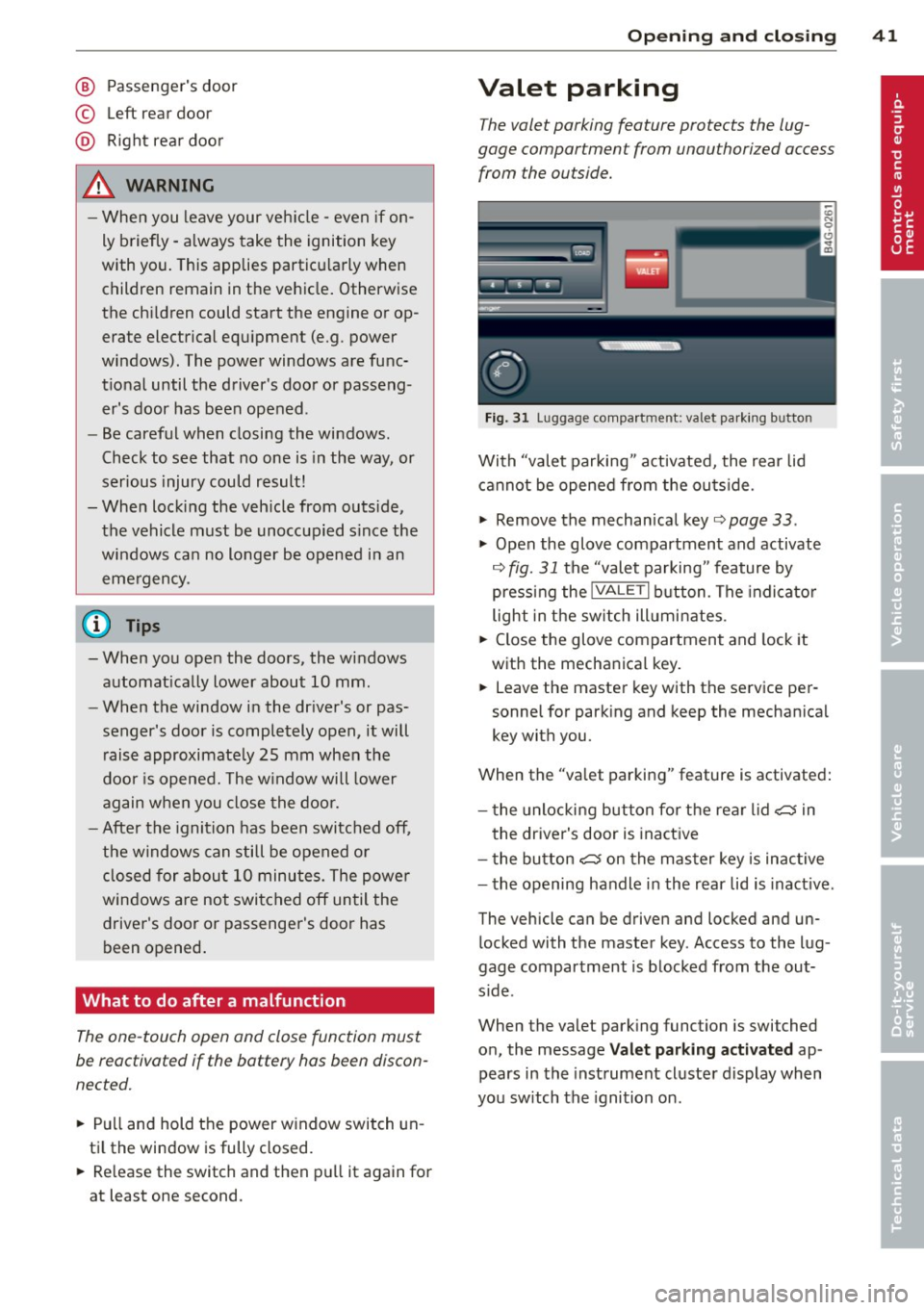
Fig . 3 1 Luggage compa rt m en t: va let pa rk in g b utto n
With "valet parking " act ivated, the rear lid
cannot be opened from the ou tside.
.. Remove the mechan ical key ¢
page 33 .
.,. Open the glove compartment and activate
¢
fig. 31 the "valet parking " feature by
press ing the
lVALE TI button . The indi cat o r
light in the sw itch ill umi nates .
.. Close the glove compartment and lock it
with the mechanica l key.
.. Leave the master key with the se rvice per
sonne l for park ing and keep the mechanica l
key with you.
When the "va let parking" feature is activated:
- t he unlocki ng but ton fo r th e rear lid
~ in
t he driver's door is inact ive
- t he button
~ on the mas ter key is inac tive
- the opening handle in the rear lid is inact ive .
The vehicle can be driven and locked and un l ocked with t he master key . Access to the lug
gage compar tment is b locked from the out
s ide .
When the valet park ing function is switched
o n, the message
Valet parking activated ap
pears in the inst rument cluste r display wh en
you sw itch the ignition on .
Page 46 of 310
44 Clear vision
& WARNING
-Automatic headlights are only intended
to assist the driver . They do not relieve
the driver of his responsibility to check
the headlights and to turn them on man
ually according to the current light and
visibility conditions. For example, fog
cannot be detected by the light sensors.
So always switch on the headlights
io
under these weather conditions and
when driving in the dark.
- Crashes can happen when you cannot see
the road ahead and when you cannot be
seen by other motorists. Always turn on
theheadlightssothatyoucanseeahead and so that others can see your car from
the back .
- Please observe legal regulations when
using the lighting systems described .
(D Note
The rear fog lights should only be turned
on in accordance with traffic regulation, as
the lights are bright for following traffic.
{D) Tips
- The light sensor* for automatic head
light range control* is located in the rear
view mirror mount . You should therefore
not apply any stickers to the windshield
in this area in order to prevent malfunc
tions or failures .
- In the event of a light sensor malfunc
tion, the driver is notified in the instru
ment cluster display ~
page 22 .
-You will hear a warning tone if you open
the driver door when the exterior lights
are switched on.
- In cool or damp weather, the inside of
the headlights, turn signals and tail lights can fog over due to the tempera
ture difference between the inside and
outside. They will clear shortly after
switching them on. This does not affect
the service life of the lighting.
Emergency flasher
The emergency flasher makes other motorists
aware that you or your vehicle are in an emer
gency situation .
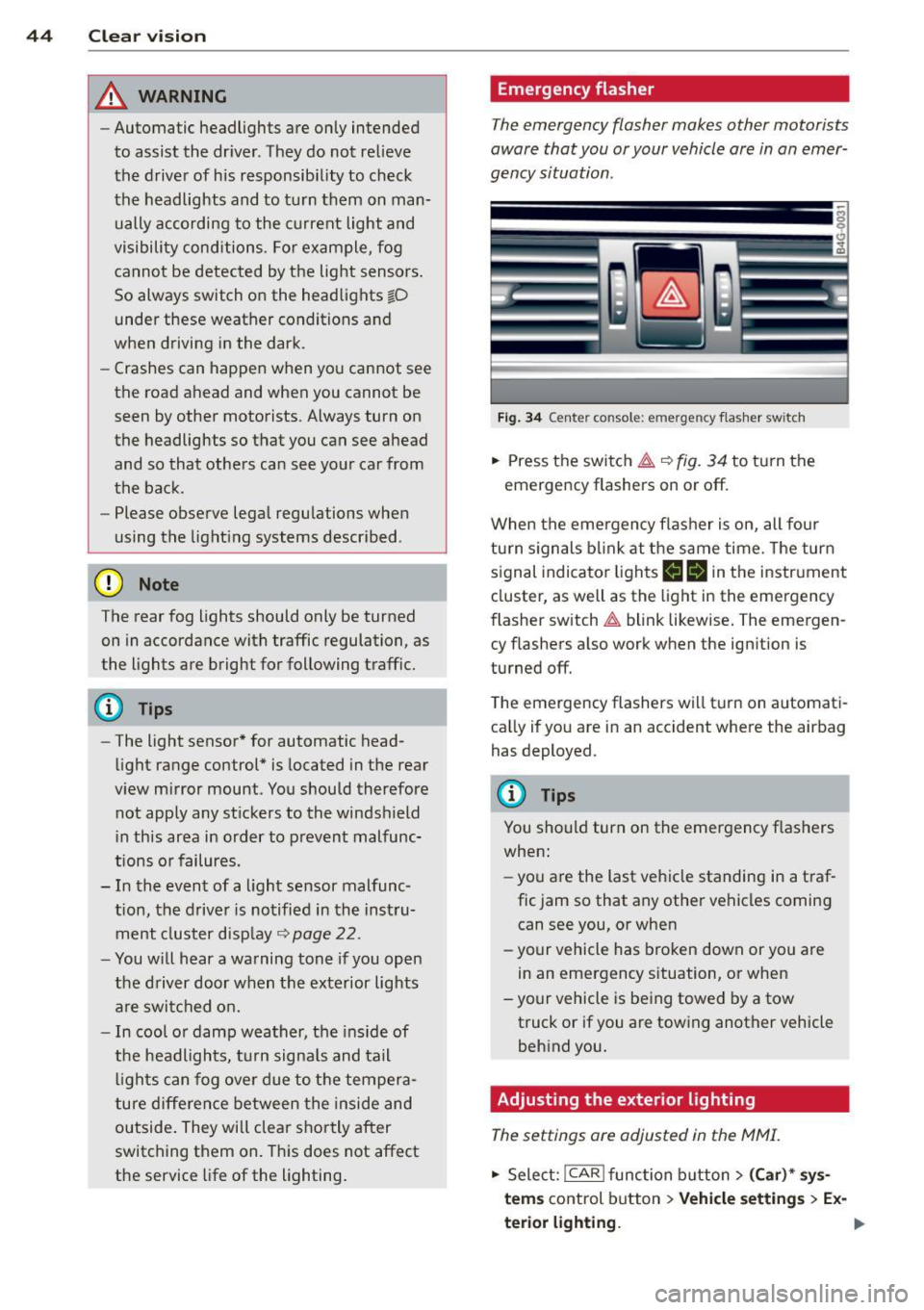
Fig. 34 Ce nte r co nso le: em erg en cy flash er sw itc h
.. Press the switch I:;,,. ~fig. 34 to turn the
emergency flashers on or off.
When the emergency flasher is on, all four
turn signals blink at the same time. The turn
signal indicator lights
B Nin the instrument
cluster, as well as the light in the emergency
flasher switch
I:;,,. blink likewise. The emergen
cy flashers also work when the ignition is
turned off.
The emergency flashers will turn on automati
cally if you are in an accident where the airbag
has deployed.
@ Tips
You should turn on the emergency flashers
when:
- you are the last vehicle standing in a traf
fic jam so that any other vehicles coming
can see you, or when
- your vehicle has broken down or you are
in an emergency situation, or when
-your vehicle is being towed by a tow
truck or if you are towing another vehicle
behind you.
Adjusting the exterior lighting
The settings ore adjusted in the MMI.
.. Select: !CAR ! function button> (Car)* sys
tems
control button > Vehicle settings > Ex-
terior lighting. ..,.
Page 48 of 310
46 Clear vis ion
instrument cluste r illuminates when the
high beams are on.
- T he
headlight flash er works only as long as
yo u hold the lever - even if there are no
l ights turned on. The indicator light
II in
the instrument cluster il luminates when you
use the headlight flasher.
A WARNING
Do not use the high beam or headlight
flasher if you know that these could blind
oncoming traffic.
Interior lights
Front and rear interior lighting
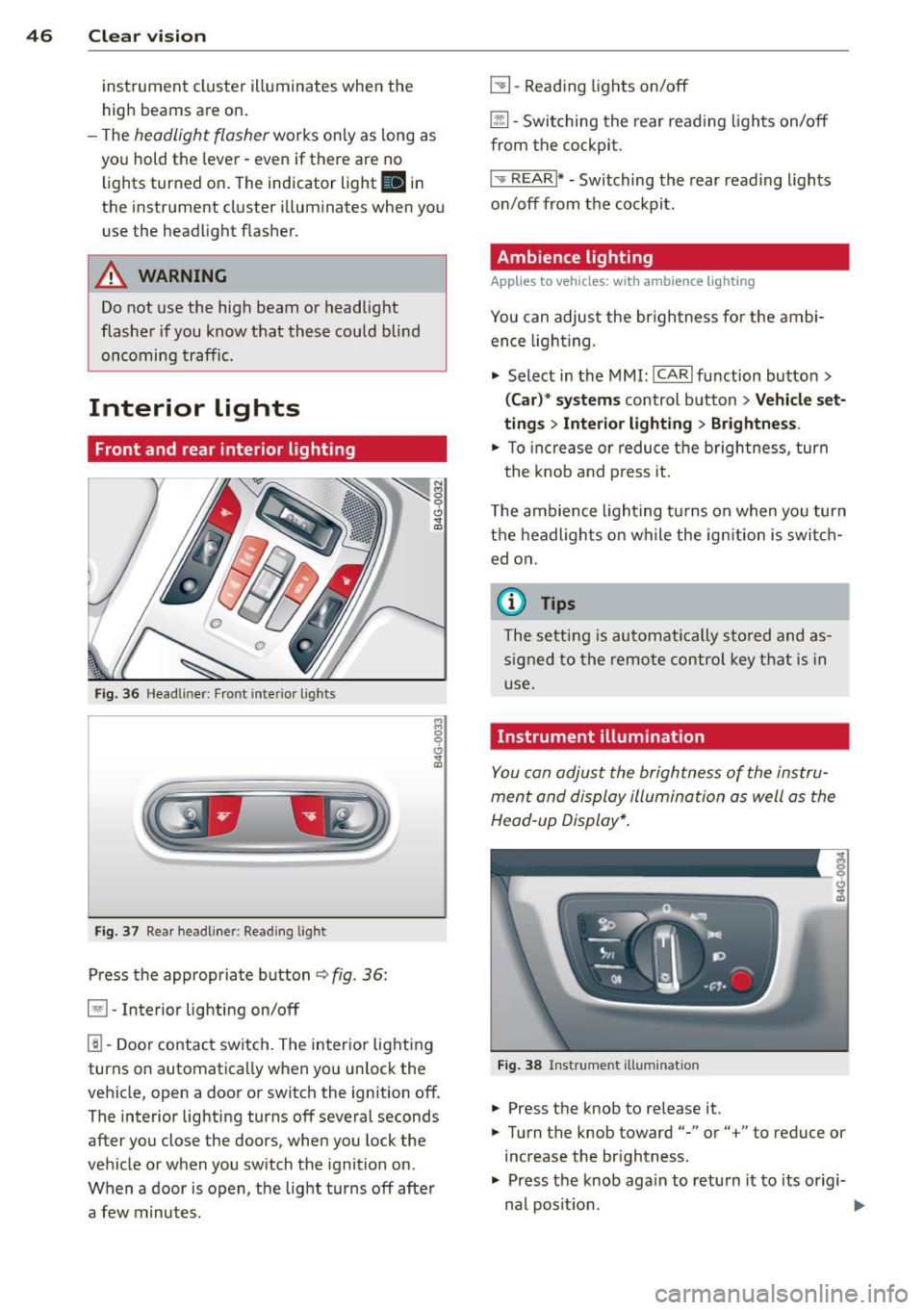
Fi g. 36 Headliner: Front interior ligh ts
Fig . 37 Re ar headli ne r: Readi ng light
Press the appropriate button q fig . 36:
El-Interior lighting on/off
I]]-Door contac t sw itch . The inter ior lighting
turns on automatica lly when you unlock the
vehicle, open a door or switch the ignition off.
The interior lighting turns off several seconds
after you close the doors, when you lock the
vehicle or when you sw itch the ignition on.
When a door is open, the light t urns off afte r
a few minutes.
L:!l -Read ing lights on/off
~ - Switching the rear read ing lights on/off
from the cockpi t.
I" REARI * - Switching the rear reading lights
o n/off from the cockpit.
Ambience lighting
Applies to vehicles: with ambience lighting
You can adjust the br ightness for the ambi
ence ligh tin g.
.. Select in the MMI: ICARlfunction butto n>
(Car )* sys tem s control button > Vehicle set
ting s
> Interi or lighting > Brightne ss.
.. To increase or reduce the b rightness , turn
t he knob and press it .
T he ambience light ing tu rns on when you turn
t h e headlights on wh ile the ig nition is swi tc h
ed on.
(D Tips
The setti ng is automati cally sto red and as
s igned to the remo te contr ol key t hat i s in
u se .
Instrument illumination
You can adjust the brightness of the instru
men t and di splay illumination a s well as the
Head-up Display*.
Fi g. 38 Instrume nt illumina tion
... Press the knob to re lease it.
.. Turn the knob toward"-" or"+" to reduce or
increase the br ightness .
.. Press the knob aga in to return it to its origi-
na l posit ion . ...
Page 49 of 310
@ Tips
The instrument illumination (for dials and
needles) lights on when the ign it ion is
sw itched on and the vehicle lig hts are
turned off. As the daylight fades, the ill u
m ination of the dials likewise dims auto
mat ically and w ill go out comp lete ly when
the o utside lig ht is ve ry low . This fea ture is
meant to remi nd you t o swit ch on the
headl igh ts when o utside light condi tions
become poor.
Vision
Sun visors
( J
F ig . 39 Sun v isor
The sun visors for the driver and passenger
can b e released from their brackets and
turned tow ard the doors ¢
fig. 39@.
The mirror light switches on when the cover
over the vanity mirror @opens.
Sun shade
Applies to vehicles: with sun shade
The sun shade is located on the luggage com
partment shelf.
a a
F ig . 40 Sun s hade i n lowe red pos it io n
Clear vi sion 4 7
When the sun shade is in the lowered posi
tion, it is secured in t he retainer @.
1-To raise @the s un shade , remove it from
t he re tainer.
_& WARNING ..
Do not use t he sun shade to secure cargo .
The luggage compartment cove r is not a
surface for storing objects . Objects p laced
on the cover could endanger all ve hicle oc
cupants dur ing sudden braking maneuvers
or i n a c rash .
Wiper and washer
system
Switching the windshield wipers on
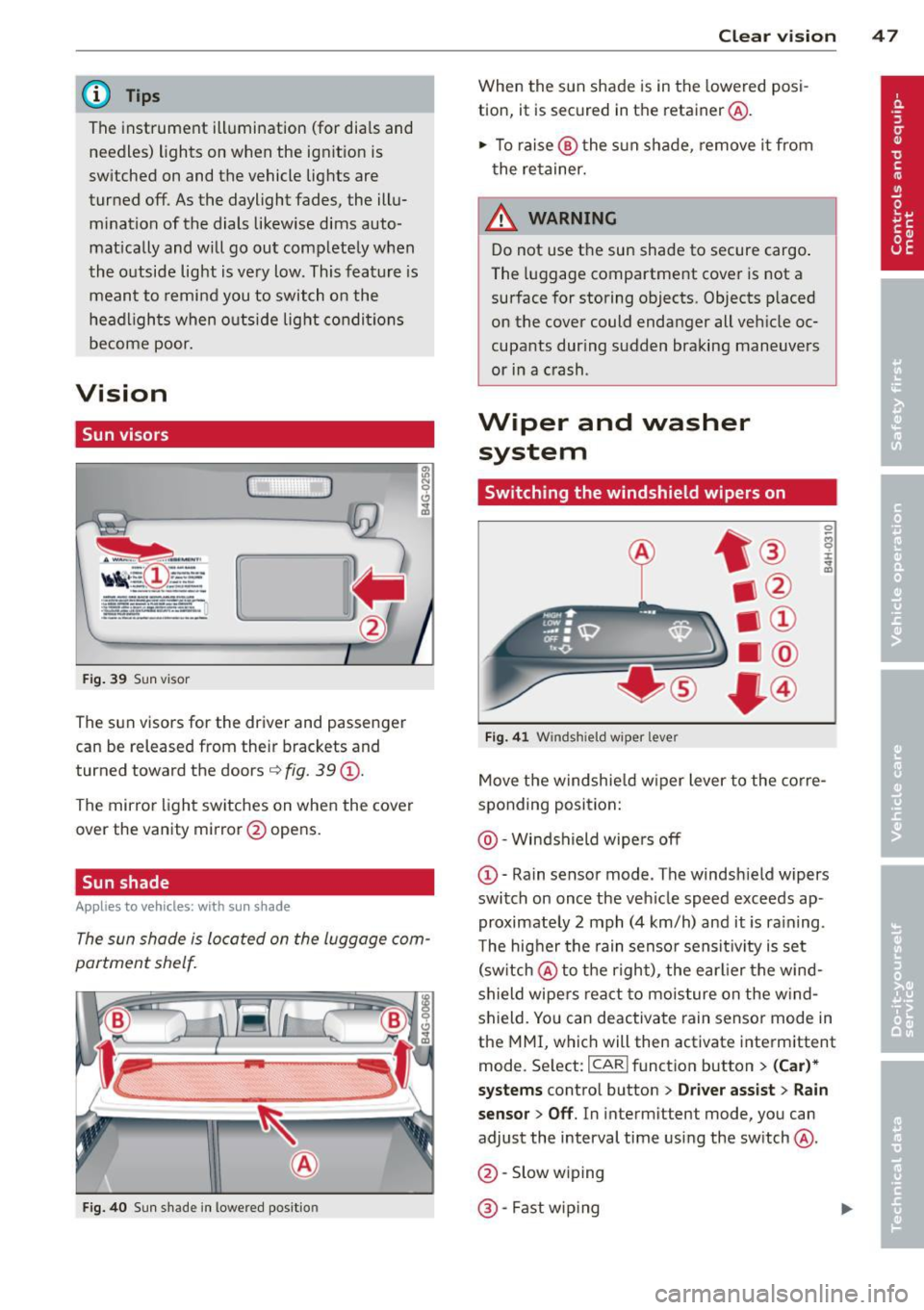
Fi g. 4 1 Windshi eld wipe r leve r
Move the windshie ld w iper lever to the corre
sponding position:
@ -Windshield wipe rs off
@ -Rain senso r mode . The windsh ield wipers
switch on once the veh icle speed exceeds ap
proximate ly 2 mph (4 km/h) and it is ra ining .
T he hig her the rain senso r sens it ivity is set
(sw itch @to th e r ight) , the earlier the wind
shield wipers react to mois ture on the w ind
shield. Yo u can deactivate rain sensor mode in
the MMI, which will then activate interm ittent
mode. Se lect: ICAR ifunct ion button>
(Car )*
systems
contro l button > Driver assist > Rain
sensor > Off .
In interm ittent mode, yo u can
adjust the interval time using the switch @.
@ -Slow w ip ing
@ -Fast wip ing
Page 50 of 310
48 Clear vis ion
© -Single wipe . If you hold the lever in this
position longer, the wipers switch from slow
wiping to fast wip ing.
® -Clean the windshield . T he wipers wipe
one time after several seconds o f driv ing to
remove water drop lets . You can switch this
function off by moving the lever to position ®
within 10 seconds after the afterw ipe. The af
terw ipe funct ion is react ivated the next time
you switch the ig nition on .
C leaning the headlights *. The headlight wash
er system* operates on ly when the headlights
are on. If you move the lever to pos ition ®,
the head lights and the nig ht vision assistant
camera* are washed in intervals .
A WARNING
- The ra in sensor is only des igned to assist
and support the drive r.
It remains entire
ly the dr iver's respons ibility to monito r
o utside wea ther conditions and to man
ually activate the wipers as soon as rain
or drizzle reduces visib ility through the
windshield.
- The windshie ld must not be treated with
water-repe llent materials. They can in
crease glare under poor visib ility condi
t ions such as wetness, darkness, or when
the sun is low on the horizon. In addi
t io n, they can cause the wi ndshield wip
ers to chatter .
- Properly fu nctioning windshie ld w iper
blades are required fo r a clear view and
safe dr iv ing
c::> page 48, Replacing
windshield wiper blades .
(D Note
- In the case of frost, check whether the
winds hield wiper b lades a re frozen to
the windshie ld. Switching on the wind
s h ield wipers can damage the wipe r
blades!
- Prior to using a car wash, the windshield
wipe r system must be switched off (lever
i n position @). This helps to prevent un
i ntent ional sw itching on and damage to
the windshie ld w iper system. - Do not
use the w ipers to clear a frosted
w indow . Us ing the wipers as a conven
ient ice scrape r will destroy the wiper
blades.
(D Tips
- The windshie ld w ipers are switched off
w hen the ignit ion is off. Activate the
w indshield wipers after the ign ition is
switched back on by moving the w ind
shield wiper lever to any position .
- Worn or d irty windshield wiper blades
result in streaking. This can affect the
rain sensor function . Check your wind
shield wiper blades regularly.
- The washer fluid nozz les of the wind
shield washe r system a re heated at low
tempe rat ures when the ignition is on .
- Whe n stopping temporarily, e.g . at a
traffic light, the set speed of the wind
shield w ipe rs is automatically reduced by
one speed.
Replacing windshield wiper blades
Wiper blades in good condition help keep the
windshield clear .
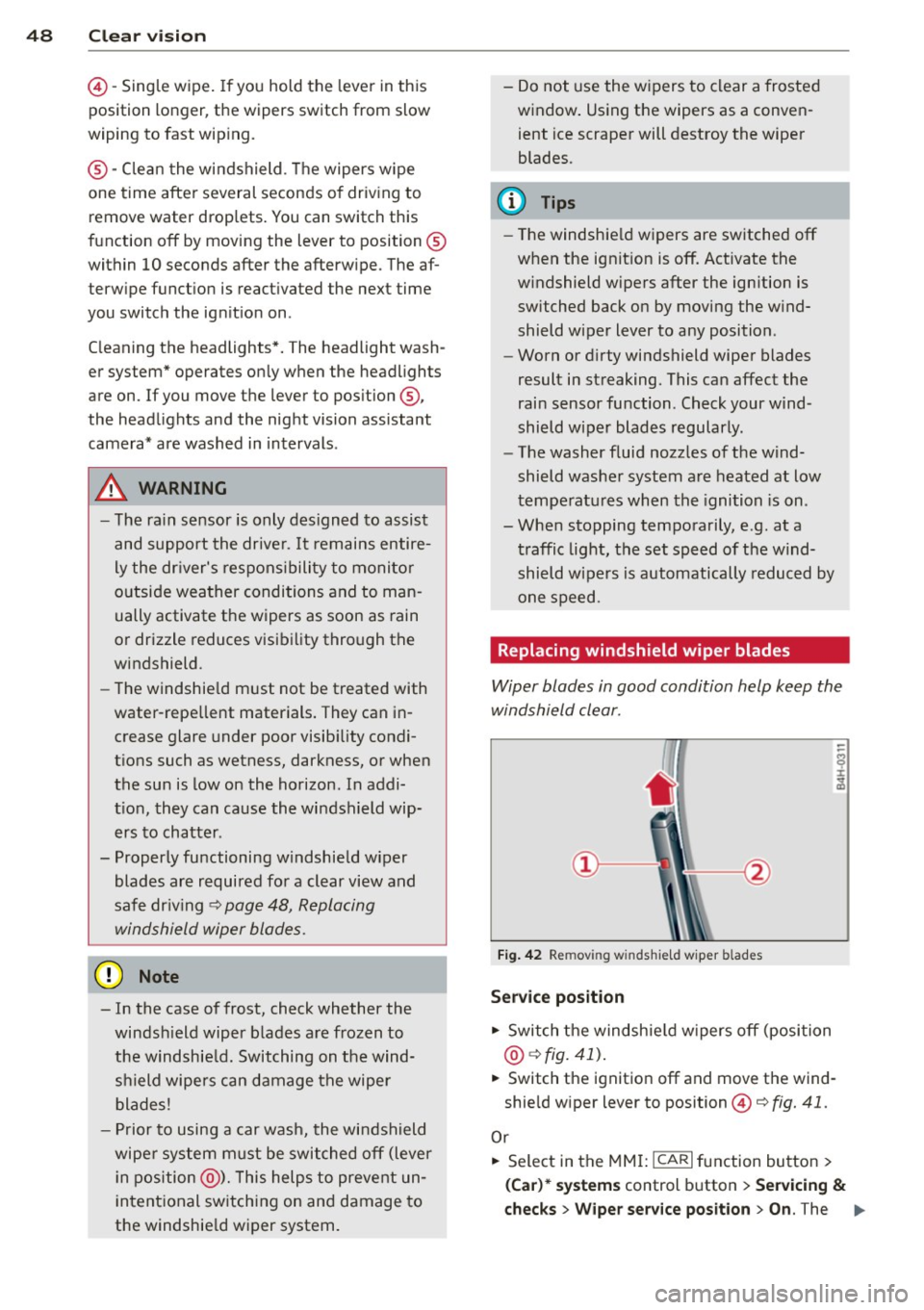
Fig. 42 Remov ing w indsh ie ld wiper b lades
Service position
.,. Switch the windsh ie ld w ipers o ff (position
@ c::>fig. 41).
.,. Switch the ignition off and move t he wind
shie ld w iper lever to position ©
c::> fig. 41.
Or
.,. Select in the MMI: ICAR I function bu tton >
(Car) * system s control b utton > Servicing &
check s > Wiper service position > On . The ..,.
Page 52 of 310
50 Clear vis ion
Tilt function for the pass enger' s mirror
To help y ou see the curb when backi ng into a
parking space , the surface of the m irro r tilts
slightly. The knob must be in the P position
for this to happ en .
You can adj ust the ti lted mirror s urface by
turning the knob in the desired direction .
When you move out of reverse and into anoth
er gear, the new mirror position is stored and
assigned to the key you are using.
The mirror goes back into its origina l positio n
once yo u drive forward faster than 9 mph (15
km/h) or sw itch the ignition off .
A WARNING
- Curved (i.e . convex) mirror s urfaces in
crease your field of view. Remember that
vehicles or other objects will appear
smaller and fa rther away than when seen
in a flat mi rror .
If you use this mirror to
est imate distances of following vehicles
when ch anging lanes , you cou ld es tim ate
incorrectly and cause an acc ident .
(D Note
-If the mirror hous ing is moved uninten
tiona lly (for example, whi le par king you r
vehicle), then you must first fo ld the mi r
r or electr ically. Do not readjust the mir
ror housing manua lly. You could damage
t h e motor which controls the mirror.
- If you wash t he vehi cle in an au tomatic
car wash, yo u m ust fold the exterior m ir
ro rs in to reduce the risk of damage to
the mirrors. Never fold power fo lding ex
terior mirrors* by hand. Only fold them
i n and out us ing the power contro ls.
(D Tips
- The exterior mirror settings are stored
with the memory funct ion*
c> page 56.
- If there is a malfunct ion in the electrical
system, you can still ad just the exter ior
mir rors by press ing the edge of the mir
r or.
Dimming the mirrors
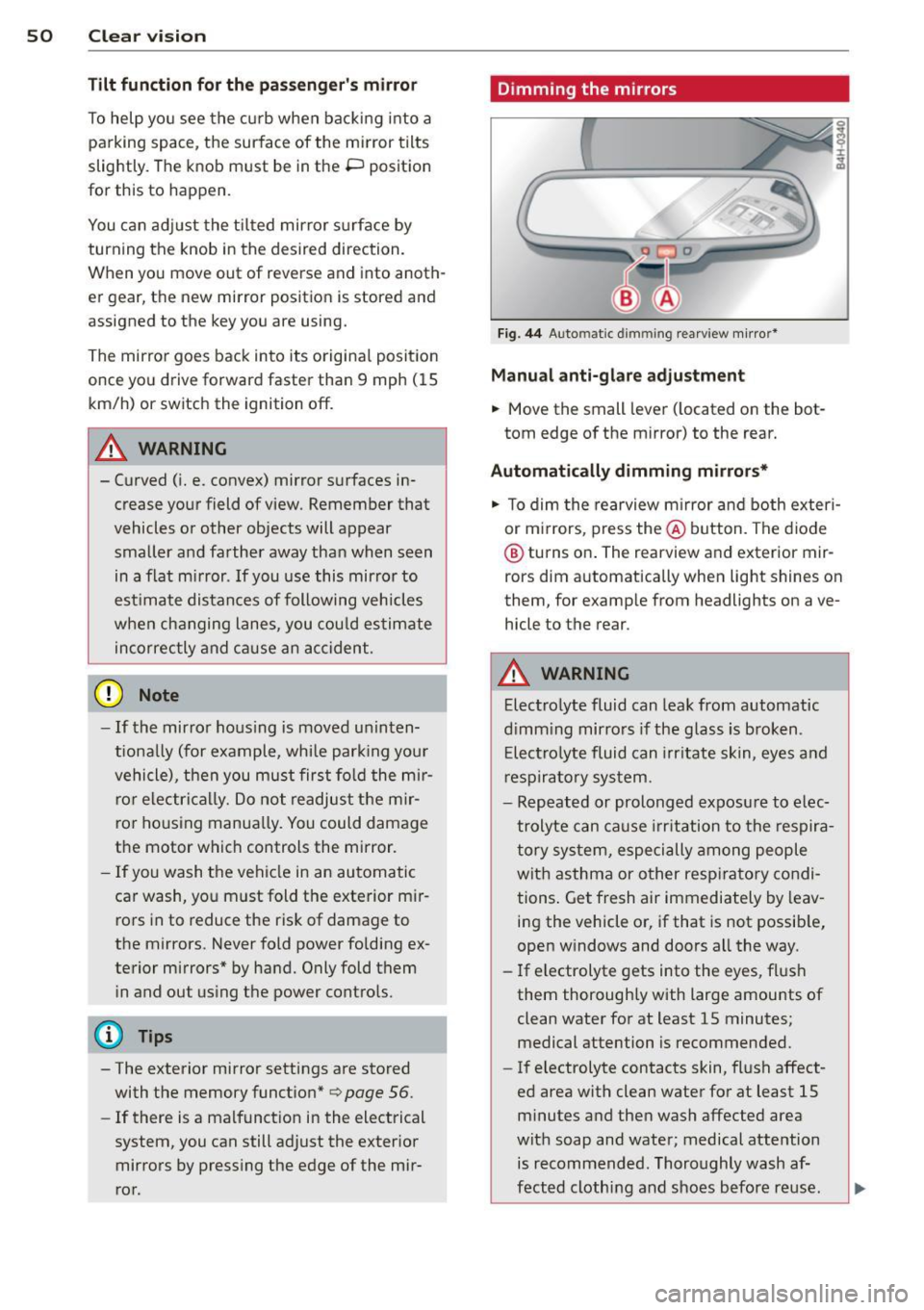
F ig . 44 A uto ma tic d immin g rearview mirro r*
Manu al anti-glare adjustment
.,. Move the small leve r (located on the bot
tom edge of the mirror) to the rear.
Automatically dimming mirrors*
.,. To dim the rearview m irror and both exteri
or m irrors, press the@ button . The diode
@ turns on . The rearview and exterior mir
rors dim automatically when light shines on
them, for examp le from headlights on ave
hicle to the rear .
A WARNING
-Electrolyte fluid can lea k from automatic
d imm ing mirro rs if the g lass is broken .
E lectro lyte fluid can irr itate sk in, eyes a nd
r espira to ry system .
- Repeated or prolonged exposu re to e lec
trolyte can ca u se irritation to the respira
t ory sys tem, especially among people
wit h asthma or other resp iratory condi
tions . Get fresh air immediately by leav
ing the vehicle or, if that is not possib le,
open w indows and doors all the way .
- If electrolyte gets into the eyes, fl ush
them thorough ly with large amou nts of
clean water for at least 15 minutes; medical attention is recommended.
- If electrolyte contacts skin, fl ush affect
ed area with clean water for at least 15 minutes a nd then wash affected area
with soap and water; medical atte ntion
is recommended. Thoroughly wash af
fect ed clothing and shoes before re use .