warning AUDI A7 2014 Owners Manual
[x] Cancel search | Manufacturer: AUDI, Model Year: 2014, Model line: A7, Model: AUDI A7 2014Pages: 306, PDF Size: 76.83 MB
Page 120 of 306
118 Parking systems
the next to last segment is disp layed . Obsta
cles in the collision area, including those out
side of the vehicle 's path, are shown in red. Do
not continue driving farther forward or in re
verse
q .&. in General information on
page 116, q(f) in General information on
page 116 .
Rear view camera
Introduction
Applies to vehicles: with pa rkin g system p lus wit h rear
view ca mera
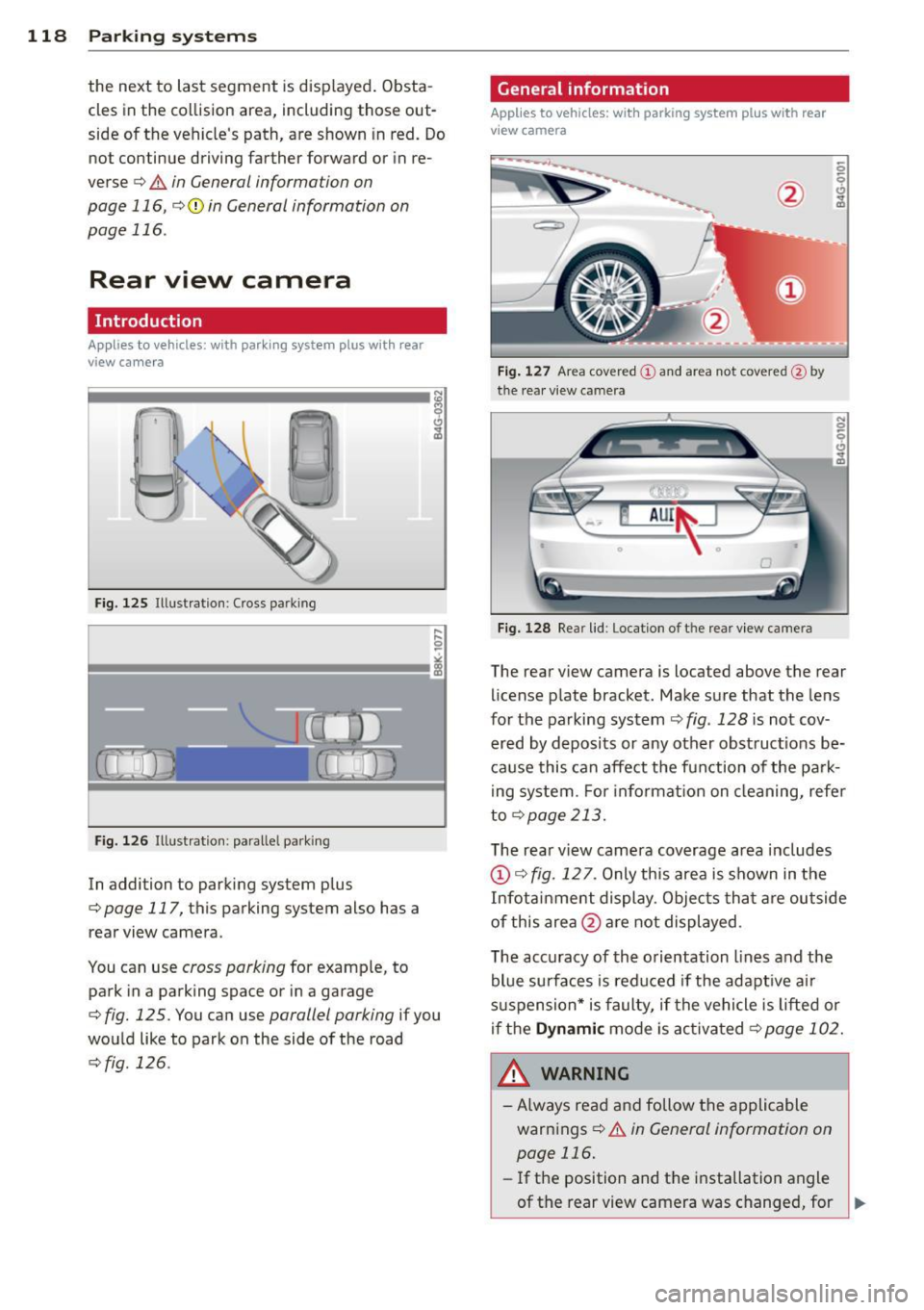
Fig. 125 Illustration: Cross parking
F ig. 126 Illustrat ion: paralle l parking
In addition to parking system p lus
q page 117, this parking system also has a
rear view camera .
You can use
cross parking for examp le, to
park in a parking space or in a garage
q fig. 125. You can use parallel parking if you
wou ld like to park on the side of the road
r::;, fig. 126.
General information
Applies to vehicles : wit h parking system plus with rear
v iew camera
Fig. 1 27 Area covered © and area not covered @by
the rea r view camera
F ig. 128 Rea r lid : Location of the rear view camera
N 0 q
Cl
~
The rear view camera is located above the rear
license p late bracket. Make sure that the lens
for the parking system
r::;, fig . 128 is not cov
ered by deposits or any other obst ruct ions be
ca use this can affect the fun ction of the park
i ng system. For informa tion on cleaning, refer
to
q page 213.
The rea r view camera coverage area includes
@ q fig. 12 7. Only this area is shown in the
Infot ainment display. Objects tha t are out side
of this area @are not displayed .
The acc uracy of th e orientation lines and the
blue surfaces is reduced if the adapt ive a ir
s u spension* is faulty, if the vehicle is lifted or
if the
Dynam ic mode is ac tiva ted q page 102.
A WARNING ~
-Always read and follow the applicable
warnings
r::;, .&. in General information on
page 116.
- If the position and t he installation angle
-
of the rear view camera was changed, for IJl>
Page 121 of 306
example, after a collision, do not contin
ue to use the system for safety reasons.
Have it checked by your authorized Audi
dealership or authorized repair facility.
- Only use the rear view camera to assist
you if it shows a good, clear picture. For
example, the image may be affected by
the sun shining into the lens, dirt on the
lens or if there is a system fault.
- Use the rear view camera only if the lug
gage compartment lid is completely
closed. Make sure any objects you may
have mounted on the luggage compart
ment lid do not block the rear view cam
era.
- The camera lens enlarges and distorts
the field of vision. The object appears
both altered and inaccurate on the
screen.
- In certain situations, people or objects in
the display appear closer or further
away:
- For objects that do not touch the
ground , such as the bumper of a
parked vehicle, a trailer hitch or the
rear of a truck. Do not use the help
lines in this case.
- If driven from a level surface onto an
incline, or a downward slope.
- If driven toward protruding objects.
- If the vehicle is carrying too much load
in the rear.
(D Note
- Always read and follow the applicable
warnings
¢ (D in General information on
page 116 .
-The orange colored orientation lines in
the Infotainment display show the vehi
cle path depending on the steering
wheel angle. The front of the vehicle
front swings out more than the rear of
the vehicle. Maintain plenty of distance
so that your outside mirror or a corner of
your vehicle does not collide with any ob stacles.
Parking systems 119
Switching on/off
App lies to vehicles: wit h parking system plus w ith rear
v iew camera
Switching on
.. Shift in to reverse or
.. press the
PwA bu tton in the center console
¢ page 11 7, fig . 123 . A short confirmation
tone sounds and the LED in the button turns
on .
Switching between the rear view camera
and optical display
.,. Press the Graphic control button®
¢ page 120, fig. 129 to see the optical dis
play .
.. Press the
Rearview control button to see the
rear view camera image.
Switching off
.,. Drive forward faster than 6 mph (10 km/h),
or
.. Press the p,,1A button, or
.,. Switch the ignition off.
(D Tips
The visual display in the left part of the
display should help you detect the critical
vehicle areas.
Page 124 of 306
122 Park in g s ystems
& WARNING
- Always read and follow the applicable
warnings
Q .&. in General information on
page 116.
- If the posit ion or the installation angle
of a camera was changed, after a colli
sion for example, do not continue to use
the system for safety reasons. Have it
checked by your authorized Audi dealer
ship.
- Keep in m ind that the image i n the dis
play is distorted if the ex ter ior mirro r
housing has been man ual ly adjusted.
- Use the
re ar mode and the corner vi ew
(re ar)
mode on ly when the luggage com
partment lid is fully closed. Otherwise
the image in the display will be distort
ed.
- The veh icle surroundings are shown us
ing the camera images. The vehicle im
age is shown by the system. Objects and
obstacles above the camera are not dis
played.
- Camera lenses en large and distort the
field of v is ion. The objects appear both
altered and inaccurate on the screen.
(D Note
-Always read and follow the applicab le
warnings
c:> (i) in General information on
page 116.
- The Infota inment display shows the di
rection in which the rear of the vehicle is
traveling based on the steering wheel
angle . The front of the veh icle front
swings out more than the rear of t he ve
hicle. Ma intain plenty of distance so that
you r outside m irror or a corner of you r
vehicle does not coll ide wi th any obsta
cles.
@ Tips
I f the 8/cr;iJ/r:;::::s symbol appea rs i n the
disp lay and the respec tive display area is
grayed out, then the power exter io r mir
rors were fo lded in or the driver's door/ front passenger's door/
luggage compart
ment lid was opened.
Switching on or off
Applies to vehicles: with parking system plus with periph
eral cameras
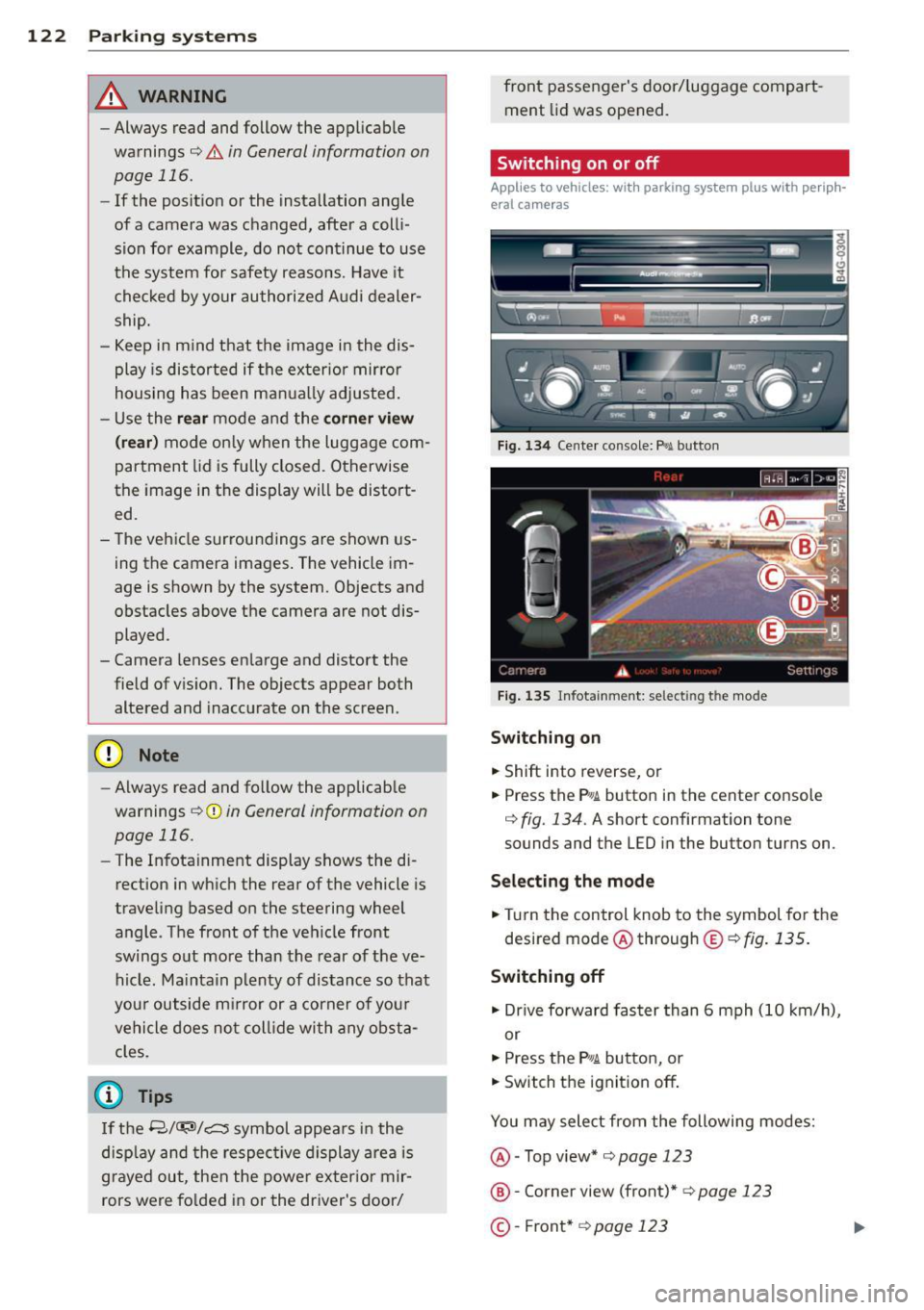
Fig . 1 34 Ce nte r console: f>• JI butto n
Fig . 1 35 Infota inment: select ing t he mode
Sw itching on
.. Shift into reverse, or
.. Press the P•QJ\. button in the center console
c:> fig. 134. A short confirmation tone
sounds and the
LED in the button turns on.
Selecting the mode
.. Turn the control knob to the symbol fo r the
desired mode @ through @¢
fig. 135 .
Switching off
.. Dr ive fo rward faster than 6 mph (10 km/ h),
or
.. Press the
P"li bu tton, or
.. Switch the ignition off .
You may sele ct from the following modes:
@ -Top view*
c:> page 123
@ -Corner view (front)* c:> page 123
©-Front * c:> page 123
Page 128 of 306

126 Parking systems
Trailer view
Ap plies to vehicles: with par king system p lus and tra iler
hitch
This view assists you in positioning the vehicle
in front of a trailer.
F ig. 1 45 Infotai nment: rea r mode
Requirement: the trai ler mode is selected
c:;, page 124.
.. Now you can pos ition your vehicle in front of
the trailer
c:;, A in General information on
page 122,
c:;, (D in General information on
page 122 .
The orange co lored or ientat ion
line denotes the expected path toward the
trailer hitch . Use the b lue lines to he lp you
est ima te the d istance to the t railer hi tch.
Setting the mode
A ppl ies to vehicles: with park ing system wit h peripheral
cameras
.. Se lect : I CAR I func tion button> (Car )* sys
tem s
control button > Driver assi st > Park
ing aid > Ch ange t o front /rear > Aut o
or
Manua l.
A uto -
Th is view behind the vehicle ( Rear
mode) is d isplayed automatically when you
shift into reverse. This view in front of the ve
h icle
( Fron t mode) is d isp layed automatically
when yo u sh ift into the fo rward gea rs .
Manual -This view behind t he vehicle (Rear
mode) is a lways d is pl ayed when you turn on
the system .
Adjusting the display
and the warning tones
Applies to vehicles: wit h parking system plus/ rea r vi ew
came ra/ peri pheral cameras
The display and warning tones can be adjust
ed in the Infotainment.
.. Select: !CARI function button > ( Car )* sys
tems
control button > Dri ver ass ist > Par k
i n g a id .
Display
On * -
optica l display is shown for the parking
system p lus, rear view camera image is shown
for parking system plus with rear view cam era*.
Off -when the parking system is switche d off,
only aud ible signa ls are given .
Warning tones
Front volume -
Volume for the front area
Rear volume -Volume for the rear area
Front frequency -Frequency for the front area
Rear frequen cy -Frequency for the rear area
Mu sic volum e while parking -When the park
ing system is turned on, the vo lume of the au
dio/video sou rce is lowered.
The newly adjusted value is briefly hea rd from
the signal generator .
@ Tips
-The warn ing tones can also be adjusted
directly from t he visua l display o r the
rea r view camera* image. Simp ly press
the
Setting s control button .
- Changed settings are act ivated when the
par king system is switched on again.
- The settings are automa tica lly stored
and assigned to the remote cont rol key
t ha t is in use .
Page 129 of 306

Error messages
Applies to vehicles: with parking system plus/rear view
camera/per ipheral cameras
There is an e rror in the system if the LED in
the
p, qA button is blinking and you hear a con
tinuous alarm for a few seconds afte r switch
ing on the parking system or when the park
ing system is already activated. If the error is
not corrected before you switch off the igni
tion, the LED in the
Pw.6. button will blink the
next time you switch on the parking system by
shifting into reverse.
Parking system plus
If a sensor is faulty, the~ symbol will appear
in front of/behind the vehicle in the Infotain
ment display. If a rear sensor is fau lty, only
obstacles that are in areas @ and @ are
shown ¢
page 117, fig. 122. If a front sensor
i s faulty, only obstacles that are in areas ©
and @are shown .
Peripheral cameras*
There is also a system error if:
- the
'(:8:)• • symbol appears in the display and
the corresponding display area is shown in
blue. The camera is not working in this area.
- all segments around the vehicles are red or
if no segments are displayed.
Drive to your authorized Aud i dea ler o r au
thorized repair fac ility immediately to have
the ma lfunction corrected.
Trailer hitch
Appl ies to vehicles: with parking system plus/rear view
camera/per ipheral cameras and trailer hitch
For vehicles using the tra iler socket, the park
ing system rear senso rs do not turn on when
you shift into reverse gear or when yo u press
the P
01A button. This results in the following re
strictions:
Parking system plus*
There is no distance wa rning for the rear. The
front sensors rema in activated. The visual d is
play switches to the traile r tow ing mode.
Parking systems 127
Parking system plus and rear view
camera* /Peripheral cameras*
There is no distance warning for the rear. The
front sensors remain activated. The visual dis
play switches to the trailer towing mode. The
rear view camera image will not show the ori
entation lines and the blue surfaces .
{D Tips
Trailer hitches that are not installed at the
factory may cause the park ing system to
malfunction or they may restr ict its func
tion.
Page 130 of 306

128 Homelink
Homelink
Universal remote
control
General information
Applies to vehicles: with Homelink u nive rsal remote con
tro l
The HomeLink universal remote control can
be programmed with hand-held transmitters
from existing equipment.
With Homelink, you can control devices such
as the garage door, security systems, house
lights, etc. comfortably from the inside of you
vehicle.
Homelink makes it possible for you to replace
three different remote controls from devices in your home with one universal remote . Th is
feature works for most garage door and exte
rior door motor signals. Programming the in
d iv idual remo te control fo r your remote con
trol takes p lace near the center of the radiator
grille. There is a control module attached at
this location .
A one-t ime programm ing of the sensor mus t
be performed before you are able to use sys
tems w ith Homelink.
A WARNING
- Never use the Homelink transmitter
with any garage door opener that does
have not the safety stop and reverse fea
ture as requ ired by federal safety stand
ards. Th is includes any garage door open
er model manufactured before April 1, 1982.
- A garage door opener which cannot de
tect an object, signaling the door to stop
and reverse does not meet current feder
al safety standards . Us ing a garage doo r
opener witho ut these fea tures increases
risk of serious injury or death.
- For safety reasons never release the
parking brake or start the engine while
anyone is standing in front of the vehicle .
- A garage door or an estate gate may
sometimes be set in motion when the Homelink remote control is being pro
grammed. If the device is repeatedly ac
tivated, this can overstrain motor and
damage its electrical components -an
overheated motor is a fire hazard!
- To avo id possible injuries or property
damage, please always make absolutely
certa in that no persons or objects are lo
cated in the range of motion of any
equ ipment being operated.
(0 Tips
- If you would like additional information
on the Homelink Un iversal Transceiver,
Homelink compatible products, or to
purchase other accessories su ch as the
Homelink Lighting Package, please con
tact Homelink at 1 -800-355-3515 or on
the Internet at www.homelink.com.
- For Declara tion of Comp liance to United
States FCC and Ind ustry Canada reg ula
tions¢
page 288 .
-For security reasons, we recommend that
you clear the programmed b uttons be
fore selling the ve hicle .
Operation
Appl ies to vehicles: wit h Ho melink
Fig . 14 6 Headliner: controls
M 0
9 (!)
~
Requirement: The buttons must be program
med ¢
page 129 .
"'To open the garage door , press the program
med b utton . The LED @ will light up o r
flash.
"' To close the garage door, press the button
again .
Ill>
Page 132 of 306
130 Driving Saf ely
Driving Safely
General notes
Safe driving habits
Please remember -safety first!
This chapter contains important information,
tips, instructions and warnings that you need
to read and observe for your own safety, the
safety of your passengers and others . We have
summarized here what you need to know
about safety belts, a irbags, ch ild restra ints as
well as child safety. Your safety is for us
priori
ty number 1.
Always observe the info rmat ion
and warn ings in th is sect ion -fo r yo ur own
safety as well as that of your passengers .
The information in this se ction app lies to all
model ve rsions of your veh icle . Some of the
feat ures described in this sec tions may be
standard equipment on some models, or may
be optional equipment on others . If you are
not sure, ask your authorized Audi dealer.
A WARNING
- Always make sure that you follow the in
struct ions and heed the WARNINGS in
this Manual. It is in your interest and in
the inte rest of you r passengers.
- Always keep the complete Owner's Liter
ature in your Audi when you lend or sell
your vehicle so that this important info r
mation will always be ava ilable to the
dr iver and passengers.
- Always keep the Owner's literature handy
so that you can find i t eas ily if you have
ques tions.
Safety equipment
The safety features are part of the occupant
restraint system and work together to help
redu ce the risk of injury in a wide variety of
accident situations.
Your safety and the safety of your passenge rs
should not be left to chance. Advances in
technology have made a varie ty o f fea tures
avai la bl e to he lp re duce the risk of injury in an accident
. The following is a list of just a few of
the safety features in your Audi:
- sophis tic ated s afety be lts fo r drive r and a ll
passenger sea ting pos it ions,
- safety belt prete nsioners ,
- safety belt force lim iters fo r the front seats,
- safety belt he ight adjustment systems for
the front seats ,
- front airbags,
- knee airbags for the front seats *
- side airbags in the front seats a nd outer rear
seats*,
- side curtain airbags ,
- specia l LATCH anchorages for child re-
straints,
- hea d restr aints for each sea ting pos ition,
- ad justab le s teer ing colum n.
These ind iv idual safety features, can work to
ge ther as a system to help protect you and
you r passengers in a wide range of accidents .
T hese features canno t wo rk as a system if
they are not always cor re ct ly adjusted and co r
rect ly used.
Safety i s everybody' s respon sibility!
Important things to do before driving
Safety is everybody 's job! Vehicle and occu
pant safety always depends on the informed and careful driver .
For your safety and the safety of your passen
gers,
befor e driv ing always:
.. Make s ure that all lights and signals are op
erating correctly.
.. Make sure that the t ire pressure is correct .
.. Make s ure t hat all windows are clean and af
ford good vis ibility to the outs ide .
.. Sec ure all luggage a nd other items caref ully
q page 64, q page 61 .
.. Ma ke s ure t hat nothing can interfe re wi th
the peda ls .
.. Adjust front seat, head restraint and mirrors
correctly for your height.
.. Instruct passengers to adjust the head re-
straints according to the ir height . .,..
Page 133 of 306
.. Make sure to use the right child rest raint
correct ly to protect children
Q page 175,
Child Safety .
.. Sit properly in your seat and make sure that
your passengers do the same¢
page 53,
General recommendations .
.. Fasten your safety belt and wear it properly.
Also instruct your passengers to fasten their
safety belts properly ¢
page 140 .
What impairs driving safety?
Safe driving is directly related to the condi
tion of the vehicle, the driver as well as the
driver 's ability to concentrate on the road
without being distracted.
The driver is respons ible for the safety of the
veh icle and all of its occupants.
If your ability
to drive is impai red, safety r isks for everybody
in the vehicle increase and you also become a
hazard to everyone else on the road ¢
A.
Therefore:
.. Do not let yourself be distracted by passen
gers or by using a cellular telephone.
.. NEVER drive when your driving ability is im
paired (by medications, alcohol, drugs, etc.).
.. Observe all traffic laws, rules of the road
and speed limits and plain common sense .
.. ALWAYS adjust your speed to road, traff ic
and weather conditions .
.,. Take frequent breaks on long trips. Do not
drive for more than two hours at a stretch.
.. Do NOT drive when you are t ired, under
pressure or when you are stressed.
A WARNING
Impaired driving safety increases the risk
of serious personal injury and death when
ever a vehicle is being used.
Driving Safely 131
Proper occupant
seating positions
Proper seating position for the driver
The proper driver seating position is impor
tant for safe, relaxed driving .
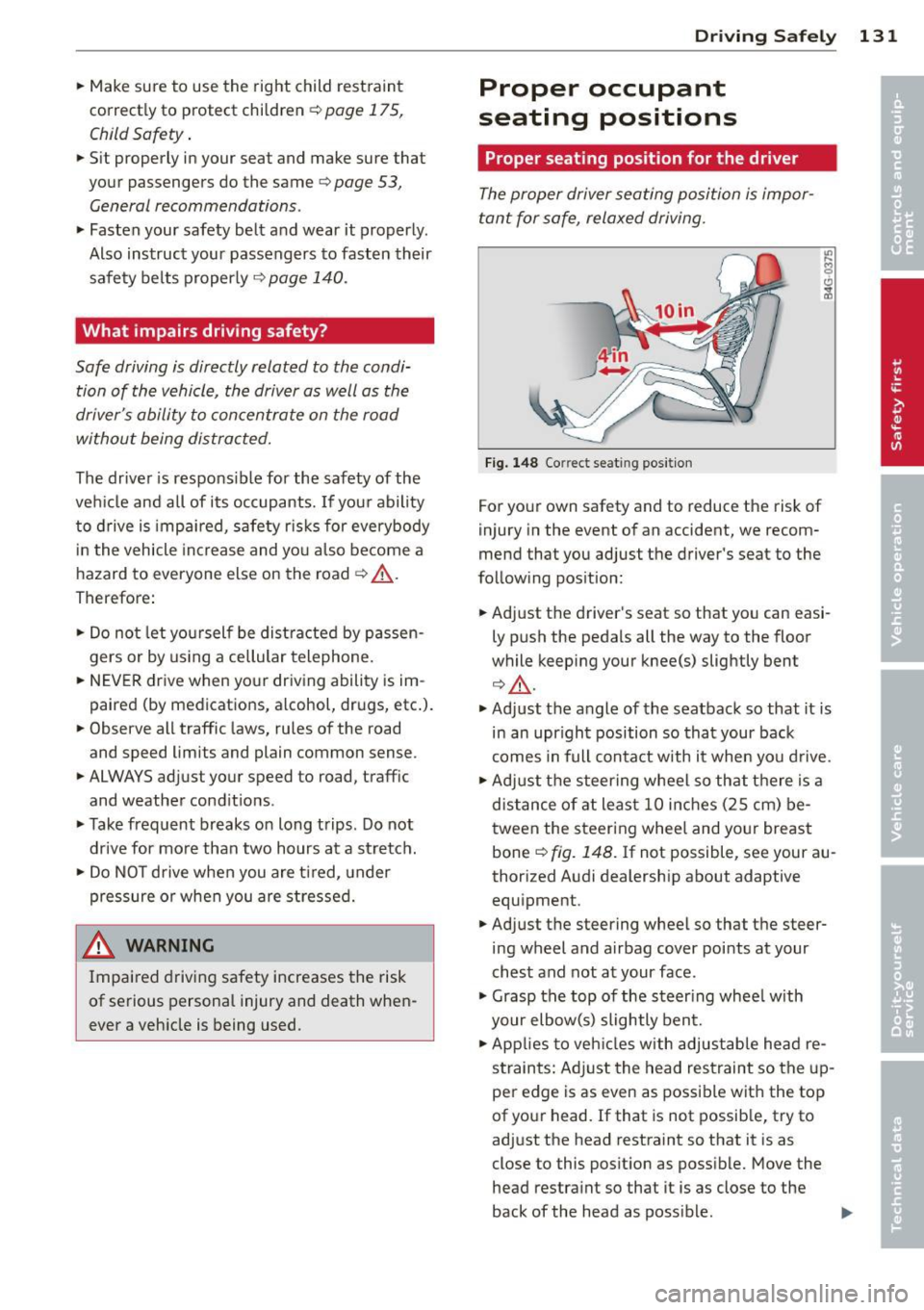
Fig. 148 Correct seat ing pos it ion
For your own safety and to reduce the risk of
injury in the event of an accident, we recom
mend that you adjust the driver's seat to the
follow ing pos ition:
.. Adjust the driver's seat so that you can easi
ly push the pedals all the way to the floor
wh ile keeping your knee(s) slightly bent
¢.&_ .
.. Adjust the angle of the seatback so that it is
in an upr ight position so that your back
comes in full contact w ith it when you drive.
.. Adjust the steering wheel so that th ere is a
distance of at least 10 inches (25 cm) be
tween the steering wheel and yo ur breast
bone
Q fig. 148. If not possible, see your au
thorized Audi dealership about adaptive
equipment .
.. Adjust the steering wheel so that the steer
ing wheel and airbag cover points at your
chest and not at your face.
.,. Grasp the top of the steering wheel with
your elbow(s) slightly bent.
.. App lies to veh icles with adjustable head re
straints: Ad just the head restraint so the up
per edge is as even as possible with the top
of your head. If that is not possible, try to
adjust the head restraint so that it is as
close to this posit ion as possible. Move the
head restraint so that it is as close to the
back of the head as poss ible. .,.
Page 134 of 306
132 Driving Safely
• Fasten and wear safety belts correctly
9 page 143.
• Always keep both feet in the footwell so
that you are in control of the vehicle at all
t imes.
Fo r detailed information on how to adjust the
driver's seat, see
<=> page 54.
A WARNING
Drivers who are unbelted, out of position
or too close to the airbag can be seriously
injured by an airbag as it unfolds . To help
reduce the risk of serious personal injury:
- Always adjust the driver's seat and the
steering wheel so that there are at least 10 inches (25 cm) between your breast
bone and the steering wheel.
- Always adjust the driver's seat and the
steering wheel so that there are at least
4 inches (10 cm) between the knees and
the lower part of the instrument panel.
- Always hold the steering wheel on the
outside of the steering wheel rim with
your hands at the 9 o'clock and 3 o'clock
positions to help reduce the risk of per
sonal injury if the driver's airbag inflates.
- Never hold the steering wheel at the
12 o'clock position or with your hands at
other positions inside the steering wheel
rim or on the steering wheel hub. Hold
ing the steering wheel the wrong way
can cause serious injuries to the hands,
arms and head if the driver's airbag in
flates.
- Pointing the steering wheel toward your
face decreases the ability of the supple
mental driver's airbag to protect you in a
collision.
- Always sit in an upright position and nev
er lean against or place any part of your
body too close to the area where the air
bags are located.
- Before driving, always adjust the front
seats and head restraints properly and
make sure that all passengers are prop
erly restrained. -
Never adjust the seats while the vehicle
is moving. Your seat may move unexpect
edly and you could lose control of the ve hicle .
- Never drive with the backrest reclined or
tilted far back! The farther the backrests
are tilted back, the greater the risk of in
jury due to incorrect positioning of the safety belt and improper seating posi
tion .
- Children must always ride in child seats
<=> page 175. Special precautions apply
when installing a child seat on the front
passenger seat
r=,> page 149.
Proper seating position for the front
passenger
The proper front passenger seating position
is important for safe, relaxed driving.
For your own safety and to reduce the risk of
injury in the event of an accident, we recom
mend that you adjust the seat for the front
passenger to the following position:
• Adjust the angle of the seatback so that it is
in an upright position and your back comes
in full contact w ith it whenever the vehicle is
moving.
• Adjust the head restraint so the upper edge
is as even as possible with the top of your
head. If that is not possible, try to adjust
the head restraint so that it is as close to
this position as possible <=>
page 134. Move
the head restraint so that it is as close to the
back of the head as possible.
• Keep both feet flat on the floor in front of
th e front passenger seat.
• Fasten and wear safety belts correctly
<=> page 143.
For detailed information on how to adjust the
front passenger's seat, see
9 page 53.
WARNING
Front seat passengers who are unbelted,
out of position or too close to the airbag
Page 135 of 306
can be seriously injured or killed by the air
bag as it unfolds. To help reduce the risk of
serious personal injury:
- Passengers must always sit in an upright
position and never lean against or place
any part of their body too close to the area where the airbags are located.
- Passengers who are unbelted, out of po
sition or too close to the airbag can be seriously injured by an airbag as it un
folds with great force in the blink of an eye .
- Always make sure that there are at least
10 inches (25 cm) between the front
passenger's breastbone and the instru
ment panel.
- Always make sure that there are at least
4 inches (10 cm) between the front pas
senger's knees and the lower part of the
instrument panel.
- Each passenger must always sit on a seat
of their own and properly fasten and
wear the safety belt belonging to that
seat.
- Before driving, always adjust the front passenger seat and head restraint prop
erly.
- Always keep your feet on the floor in front of the seat. Never rest them on the seat, instrument panel, out of the win
dow, etc. The airbag system and safety
belt will not be able to protect you prop
erly and can even increase the risk of in
jury in a crash .
- Never drive with the backrest reclined or
tilted far back! The farther the backrests
are tilted back, the greater the risk of in
jury due to incorrect positioning of the
safety belt and improper seating posi
tion.
- Children must always ride in child seats
~ page 175. Special precautions apply
when installing a child seat on the front
passenger seat¢
page 149.
Driving Safely 133
Proper seating positions for passengers
in rear seats
Rear seat passengers must sit upright with
both feet on the floor consistent with their
physical size and be properly restrained
whenever the vehicle is in use.
To reduce the risk of injury caused by an incor
rect seating position in the event of a sudden
braking maneuver or an accident , your pas
sengers on the rear bench seat must always
observe the following:
.,.. Adjust the head restraint so the upper edge
is as even as possible with the top of your
head. If that is not possible , try to adjust
the head restraint so that it is as close to
this position as possible¢
page 134 .
.,.. Keep both feet flat in the footwell in front of
the rear seat .
.,.. Fasten and wear safety belts properly
¢ page 143 .
.,.. Make sure that children are always properly
restrained in a child restraint that is appro
priate for their size and age~
page 175.
_& WARNING
..-
Passengers who are improperly seated on
the rear seat can be seriously injured in a
crash.
- Each passenger must always sit on a seat
of their own and properly fasten and
wear the safety belt belonging to that seat .
- Safety belts only offer maximum protec
tion when the safety belts are properly
positioned on the body and securely
latched . By not sitting upright, a rear
seat passenger increases the risk of per
sonal injury from improperly positioned
safety belts!
- Always adjust the head restraint properly
so that it can give maximum protection.
•
•