ECO mode AUDI A7 2014 User Guide
[x] Cancel search | Manufacturer: AUDI, Model Year: 2014, Model line: A7, Model: AUDI A7 2014Pages: 306, PDF Size: 76.83 MB
Page 71 of 306

Warm and cold Climate controls
Description
App lies to vehicles: with three -zone cl imate contro l or
four -zone a uto mat ic climate contro l
The climate control system warms, cools and
adds humidity to the air in the vehicle interior .
It is the most effective when the windows and
sunroof* are closed . If the temperature inside
the parked veh icle becomes very warm, open
i ng the w indow br iefly will speed up the cool
ing process.
In all heating mode functions except
defrost,
the blower on ly switches to a higher speed
once the engine coolant has reached a certain
temperature.
Condensat ion from the cooling system can
drip and form a puddle of wate r under the ve
h icle. This is normal and does not mean there
is a leak .
Pollutant filt er
The pollutant filter removes pollutants such
as dust and po llen from the air.
The air pollutants filter must be changed at
the intervals specified in your Warranty
&
Maintenance booklet, so that the air condi
tioner can properly work .
If you drive your vehicle in an area with high
a ir pollution, the filter may need to be
changed more frequently than specified in
your Aud i Warranty
& Ma intenance booklet. If
i n doubt, ask your authori zed Audi Service Ad
visor for adv ice.
K ey coded settings
Three-zone climate control: T he b lower set
ting and air d istribution are stored automati
cally and ass igned to the remote control key
that is in use .
Four-zone automatic climate control: The cli
mate contro l settings are automatica lly stor
ed and assigned to the remote control key
that is in use .
Warm and c old 69
A WARNING
-
Reduced visibi lity is dangerous and can
cause acc idents .
- For safe driving it is very important that
all windows be free of ice, snow and con
densat ion.
- Comp letely fam il iarize yourse lf with the
proper use and funct ion of the heat ing
a nd ventilation system and especially
how to defog and defrost the w indows.
- Never use the windshield wiper/washer system in freez ing weathe r unt il you
have wa rmed the windshie ld first, using
the heating and ventilation system. The
washer sol ution may freeze on the wind
shie ld and red uce visibi lity.
CJ) Note
- If you s uspect that the air conditioner
has been damaged, switch the system
off to avoid furt her damage and have it
inspected by a qualified dea lership .
- Repairs to the Audi air conditioner re
quire specia l technical know ledge and
special tools. Contact an authorized Audi
dealer fo r ass istance.
@ For the sake of the envi ronment
By reducing the amount of f uel you use,
you also red uce the amount of pollutants
emitted into the air.
(D Tips
- Keep the air intake s lo ts ( in front of the
w indshield) free from ice, snow and de
bris in order to maintain the proper func
tion of the climate control system.
- The energy ma nagement system may
switch the seat heating* or rear window defroster off temporar ily. These systems
are available again as soon as the energy
balance has been restored .
- Air escapes through vents under the rear window. When plac ing items of cloth ing
on the luggage compartment cover, en
sure that the openings are not covered.
Page 72 of 306
70 Warm and cold
Three-zone climate control
Operation
Applies to vehicles: with three -zone climate control
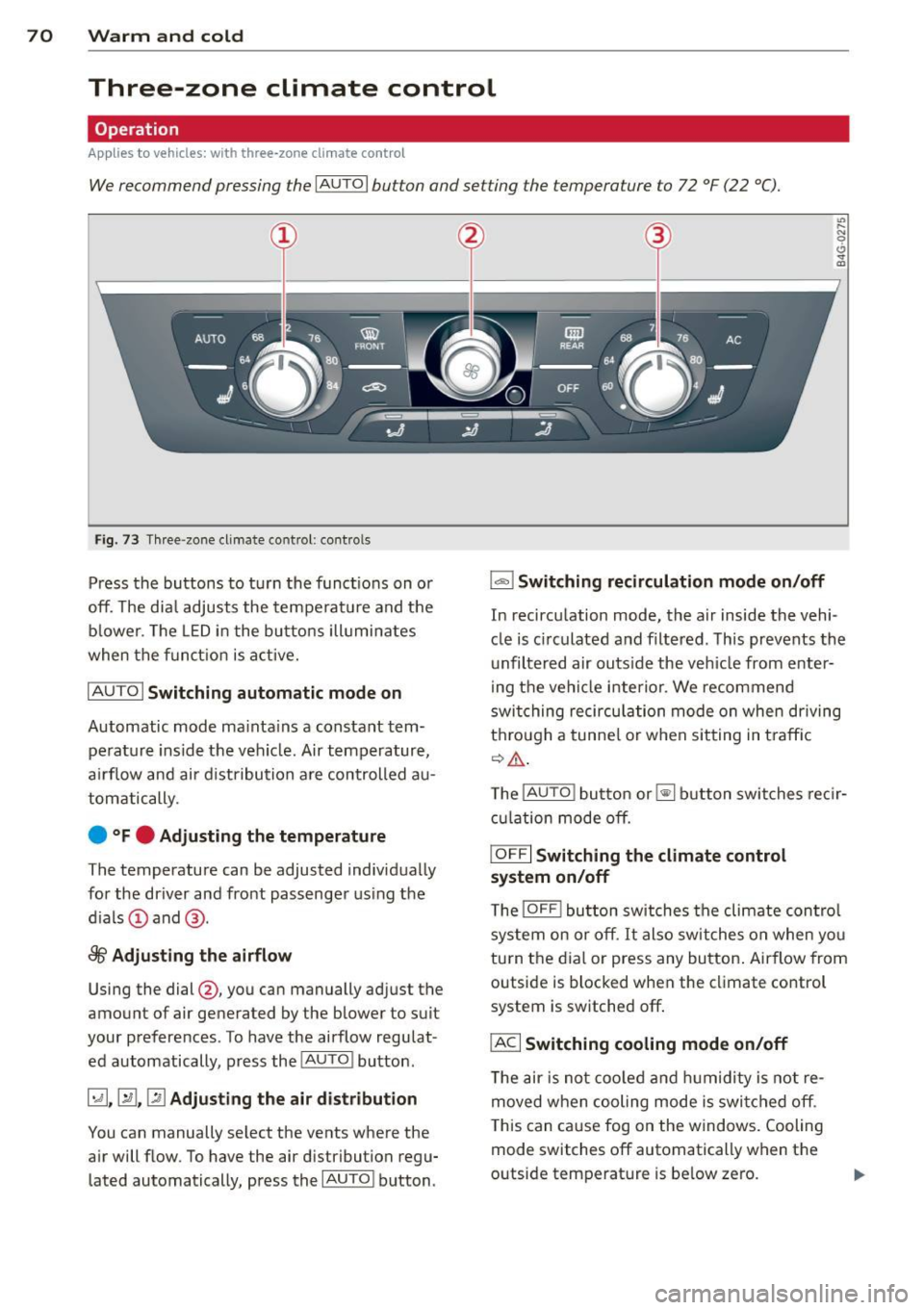
We recommend pressing the IA UT O I button and setting the temperature to 72 °F (22 °C).
Fig . 7 3 Thr ee-zone cl imate co ntrol: co ntro ls
Press the buttons to t urn the func tions on o r
off. The dia l adjusts the te mperat ure and the
bl ower. The LED i n the bu tto ns ill umi nates
when the funct ion is a ctive.
IAU TO I Switching automatic mode on
Automatic mode ma inta ins a constant tem
pe rat ure ins ide the vehi cle. Air temp erature,
a ir flow an d air d ist ribution a re controlled a u
tom atically.
e °Fe Adjusting the temperature
The temperature can be adjusted individ ua lly
for the dr iver and fro nt passenger using the
d ials @and @.
8fr Adjusting the airflow
Using the dial@, you can manually adj ust t he
amount of air generated by the blower to suit
your preferences . To have the ai rflow regu lat
ed automatically, p ress the
!AU TO ! bu tton .
~.~ .~ Adjusting the air distribution
You can manually se lect the vents whe re the
a ir will flow. To have the air distribution regu
lated automatically, press the
I AUTOI b utton .
1..,., 1 Switching recirculation mode on/off
"' ..... g
0 .. a,
In recirc ulation mode, the a ir inside the vehi
cle is c irculated a nd filtered . T his prevents th e
unfiltered air outs ide the ve hicle from enter
ing t he ve hicl e inte rio r. We recommend
swi tching recirc ulati on mode on when driving
t hr ou gh a tunne l o r w hen sit ting in t ra ffic
¢ ,& .
The !AUTO ! button or~ button swi tche s reci r
cula tion mode o ff.
IOFF I Switching the climate control
system on/off
T he IOFF ! button sw itches the cli mate con trol
s ystem on or off.
It al so s wit c hes on whe n yo u
tu rn t he dia l or press any bu tton . Airflow from
o utside is blocked when the climate co ntro l
system is switched off .
IACI Switching cooling mode on/off
The air is n ot coo led and hu midity is not re
moved when coo ling mode is swi tched off .
T his can ca use fog on the windows. Cooling
mode switches off automatically w hen t he
outside temperat ure is be low ze ro.
Page 73 of 306
l
ed or cleared of condensation as quickly as
possib le. The maximum amount of air flows
mainly from the vents be low the windshield.
Recirculation mode switches off. The tempera
ture should be set to 72 °F (22 °C) or higher.
The
IAU TOI button switches the defroster off.
l(lii) REAR I Switching rear window heater
on/off
The rear window heater on ly operates when
the engine is running.
It switches off auto
matica lly after a few minutes, depending on
the outside temperature.
To prevent the rear window heater from
switching off automatically, press and hold
the
lil button for more than 2 seconds. This
remains stored unti l the ignition is switched
off.
[ii Adjusting seat heating
Pressing the button switches the seat heating
on at the highest setting ( leve l 3). The LEDs
indicate the temperature level. To reduce the
temperature, press the button again. To
switch the seat heating off, press the button
repeatedly unt il the LED turns off .
After 10 minutes, the seat heating automati
cally switches from leve l 3 to level 2.
The seat heating for both outer rear seats* is
adjusted using the buttons in the center con
sole.
Warm and cold 71
Air vents
You can open or close the center and outer
vents in the cockpit and the vents in the rear
center console using the ridged thumbwheels.
The levers adjust the direction of the airflow
from the vents.
The air temperature in the rear can be adjust
ed so that it is warmer or co lder by turning
the knob to the red or blue area.
A WARNING
- Do not use the recirc ulation for extended
periods of time. The windows could fog
up since no fresh a ir can enter the vehi
cle. If the windows fog up, press the air
recirc ulat ion button aga in immed iately
to switch off the air recirculation func
tion or select defrost.
- I ndividuals w ith reduced sensitivity to
pa in or temperature could develop burns
when using the seat heating function. To
red uce the risk of injury, these individu
als sho uld not use seat heating.
(D Note
To avoid damage to the heating elements
in the seats, do not kneel on the seats or
place heavy loads on a small area of the
seat.
Page 74 of 306

7 2 Warm and cold
Four-zone automatic climate control
Operation
Applies to vehicles: with four -zone automa tic clima te control
We recommend pressing the IAUTO I button and setting the temperature to 72 °F (22 °C).
Fig. 74 Fo ur-zone automat ic climate contro l: controls
Fig . 75 Fou r-zone automatic cl imate cont ro l: rear con
trol s
Press the buttons to turn the functions on or
off. Use the dials to adjust the temperature,
the blower speed and the air distribution. The
LED in a button will light up when the func
tion is switched on. The settings are shown in
the climate control display and are also shown in the MMI display for a few seconds . The driv
er and front passenger sett ings can be adjust
ing separately.
The settings can also be adjusted in the rear
<::;> fig. 75.
IOFF j Switching the climate control
system on/off
The I O FFI button switches the climate control
system on or off .
It also switches on when you
turn the dia l or press any button. Airflow from outside is blocked when the
climate control
system is switched off .
You can activate the residual heat function
whe n the ignition is off by pressing and hold
ing the ~ button. The residua l heat from the
coolant is used to heat the vehicle interior .
The residual heat function switches off auto
matically after about 30 minutes.
!ACI Switching cooling mode on/off
T he air is not coo led and humidity is not re
moved when cooling mode is switched off.
T his can cause fog on the windows. Cooling
mode switches off automatically when the
outside temperature is be low zero .
1- 1 Switching recirculation mode on/off
In recircu lation mode, the air inside the vehi
cle is circu lated and filtered. This prevents the
unfiltered air outside the vehicle from enter
ing the vehicle interior . We recommend
switching recirculation mode on when driving
through a tunnel or when sitting in traffic ¢ .&, .
The
! AUTO I button or~ button switches rec i r-
cu lation mode off. .,.
Page 75 of 306
IAUTO I Switching automatic mode on
Automatic mode mainta ins a constant tem
perature inside the vehicle. Air temperature,
airflow and air distribution are controlled au
tomatically.
Adjusting the temperature
Temperatu res between 60 °F (+16 °C) and
84 °F ( +28 °C) can be set. O uts ide of this
range,
lo or hi wi ll appear in the climate con
trol system disp lay. At both of these settings,
the climate control system runs continuously
at maximum cooling or heating power. There
is no temperature regu lation.
~ Adjusting the airflow
You can adjust the airf low manually to suit
your needs . To have the airf low regulated au
tomatically, press the
I AUTO j button.
li!J Adjusting the air distribution
You can manually se lect the vents where the
air will flow. To have the air distribution regu
lated automatically, press the
IAUTOI button .
~I~* Adjusting seat heating/
ventilation*
Pressing the button switches the seat heat
ing/ventilation on at the highest setting ( level
3). The LEDs indicate the heating/ventilation
level. To reduce the heating/venti lation, press
the button again. To switch the seat heating/
ventilation off, press the button repeatedly
until the LED turns off.
After 10 minutes, the seat heating automati
cally switches from level 3 to level 2.
l
ed or cleared of condensation as quickly as
possible. The maximum amount of air flows
mainly from the vents below the windshield.
Recirculation mode switches off . The tempera
ture should be set to 72 °F (22 °C) or higher.
The
IAU TOI button switches the defroster off.
Warm and cold 73
liiii REAR ! Switching rear window heater
on/off
The rear window heater only operates when
the engine is running. It switches off auto matically after 10 to 20 minutes, depending
o n the outside temperature.
To prevent the rear window heater from
switching off automatically, press and ho ld
the ~ button for more than 2 seconds. This
remains stored until the ignition is switched
off .
I SYNC I Synchronization*
When synchronization is switched on, the
same settings are applied to both the driver
and front passenger, except for the seat heat
ing/ventilation*. The rear zone is also
synchronized. Synchronization switches off
when the settings for the front passenger s ide
o r r ear are adjusted.
You can also switch synchronization on by pressing and holding a dial. For example, if
you press and hold the dial on the front pas
senger side, the settings for that side are
transferred to the driver side. The same ap
plies to the rear.
Air vents
You can open or close the center and outer
vents in the cockpit and the vents in the rear
cente r console and door pillars using the
ridged thumbwheels. The levers adjust the di
rection of the airflow from the vents.
&_ WARNING
-=
-Do not use the recirc ulation for extended
periods of time . The windows could fog
up since no fresh air can enter the vehi
cle . If the windows fog up, press the air
recirculation button aga in immediately
to switch off the air recirculation func
tion or se lect defrost.
- Individuals w ith reduced sensitivity to
pa in or temperature cou ld deve lop burns
when using the seat heating function . To
red uce the risk of injur y, these individu-
als should not use seat heating. ..,.
Page 81 of 306

.. Hold the master key vertically in the loca
tion indicated
y>>) c::> fig . 80 .
.. Press the brake pedal c:;, A in Starting the
engine on page
77.
.. Press the l~S_T_A_R_T_ E_N_ G_ I_ N _ E_ S_T_ O_ P~ I button . The
engine will start .
.. Drive to your author ized Audi dealer imme
diately to have the malfunction co rrected .
('O Tips
You can view the message again by press
ing the
! START ENGINE STOP I button.
Electromechanical
parking brake
Operation
The electromechanical parking broke replaces
the hand broke.
Fig. 81 Center console: Park ing brake
.. Pull on the switch (®) c::> fig. 81 to apply the
parking brake. The indicator light in the
switch illuminates .
.. Step on the brake pedal or the acce lerator
pedal and press the switch(®) at the same
time to release the parking brake. The indi
cator light in the switch goes out.
Your vehicle is equipped w ith an electrome
chanica l park ing brake. The parking brake is
designed to prevent the vehicle from rolling
un intentionally and rep laces the hand brake.
I n addition to the normal functions of a tradi
tional hand brake, the electromechanica l
parking brake provides various convenience
and safety functions.
On the road 79
When starting from rest
-The integral start ing assist helps you when
driving by automatically re leasing the park
ing brake
c::> page 80, Starting from rest .
- When start ing on inclines, the starting as
sist p revents the vehicle from unintentional
ly rolling back. The braking force of the
parking brake is not re leased until sufficient
driving force has been built up at the
wheels.
Emergency brake function
An emergency brake ensures that the vehicle
can be slowed down even if the
normal brakes
fail
c:;, page Bl, Emergency broking.
Indicator lights
- If the pa rking brake is closed with the ign i
tion
switched on the indicator lights come
on - (USA
models) ,tl (Canada models)
in the instrument cluster and in the switch.
- If the parking brake is closed with the igni
tion
switched off the indicator lights come
on - (USA
models) ,tl (Canada models)
in the instrument cluster and in the sw itch
for about 20 seconds.
A WARNING
Do not press the accelerator pedal inadver
tently if the veh icle is stationary but the
engine is running and a gear is selected .
Otherwise the vehicle w ill start to move
imm ediately and could result in a crash.
(D Note
If the symbol . in the display or the indi
cator light
1111 (USA models)/. (Cana
da models) in the instrum ent cluster flash
es, there is a malfunction in the brake sys
tem. Please refer to the detailed descrip
tion of the indicator lights
c::>poge lS.
-If the indicato r light - (USA mod-
els) /. (Canada models) or
11',1 turns
on, there may be a malf un ction in the
parking brake
c::>poge 16.
Page 83 of 306

Emergency braking
In the event that the conventional brake system fails or locks .
11-In an emergency, pull the switch C®) and
conti nue to pull it to slow your vehicle down
with the parking brake .
11-As soon as you release the sw itch C®) or ac-
celerate, the braki ng p rocess stops.
If you pull the sw itch (®) and hold it above a
speed of about 5 mph (8 km/h), the emergen
cy braking function is in itiated. The v ehicle is
b ra ked at a ll four wheels by activating the hy
d raul ic br ake system. The b ra ke performance
i s sim ilar to making an emergency stop¢.&. .
I n o rder not to activate the emergency brak
i ng by m ista ke, an audible warning tone (bu z
z er) sounds when the switc h(®) is p ulled. As
soon as the switch(®) is released, or the accel
erator pedal is dep ressed, emergency braking
stops .
.&_ WARNING
Emergency braking shou ld only be used in
an eme rgency, when the normal foot brake
has failed or the brake pedal is obstructed.
Using t he parking brake to perform emer
gency braking will slow you r vehicle down
as if you had made a fu ll brake applicat ion.
T he laws of phy sic s ca nnot be s uspended
eve n w ith ES C and its a ssoci ate d compo
nents (ABS, ASR, EDL). In co rners and
when road or weather conditions are bad,
a full brake application can cause the vehi
cle to skid or the rear end to b reak away -
r isking a n accident.
Start-Stop-System
Description
Appl ies to vehicles : wit h Start-Stop-System
The Start -Stop-System can he lp increase fue l
economy and red uce C O2 emissions.
I n the Start-Stop-mode , the eng ine shuts off
automatically whe n the vehicle is stopped,
such as at a traffic light. The ig nit ion remains
On th e ro ad 81
switched on during this stop phase. The en
gine wi ll be a utomatica lly restarted when
needed .
T he las t Start -Stop-Sys tem se tting (on/off us
ing the b utton
10 «<1) will be restored when the
ignition is turned on . The LED in t he
!0 •·1 but
ton t urns on when the Start-Stop-System is
switched off manually.
Basic requir ements for the Start -Stop
mode
- The d river 's door is closed.
- The driver' seat belt is latched.
- The hood is closed.
- The vehi cle must have bee n dr iven faster
t han
2.5 mph (4 km/h) since the las t stop.
- A t railer is not hitched to the ve hicle.
.&_ WARNING
- Never let the ve hicle roll wit h the eng ine
sw itched o ff. You co uld lose con trol over
the vehicle. This can lead to a collision
an d serio us in juries .
-The brake boo ster and the s teering sup
port do not work while the engine is
sw itche d off . M ore force is requi red to
stop and to steer the veh icle.
- To reduce t he risk of injuries, make sure
that the Start-Stop -System is tu rned off
when working in the eng ine compart
ment¢
page 83.
([) Note
Always switch off the Sta rt -Stop-System
when driving through water¢
page 83.
Page 86 of 306

84 On the road
Speed warning system
Introduction
The speed warning system helps you to stay
under a specified maximum speed .
The speed warning system warns you if you
are exceeding the maximum speed that you
have set. You will hear a warning tone when
your speed exceeds the stored value by ap
prox imately 3 mph (3 km/h) . An indicator
light . (USA models)/ . (Canada models) in
the instrument cluster display also turns on at
the same time . The indicator light
a;m
turns off when the speed decreases below the
stored maximum speed.
Sett ing a th resho ld is recommended if you
wou ld like to be reminded when you reach a
certain maximum speed. Situations where you
may want to do so include driving in a country
with a general speed limit or if there is a
specified maximum speed for winter tires.
(1} Tips
Even though your vehicle is equipped with
a speed warning system, you should still
watch the speedometer to make sure you are not driving faster than the speed limit.
Setting the threshold
You can set, change and delete the threshold
in the
MMI.
.,.. Se lect: I CAR I function button> (Car)* sys
t ems
control button > D river ass is t > S peed
wa rning .
You can set any threshold between 20 mph
(30 km/h) and lS0 mph (240 km/h). Settings
can each be adjusted in increments of 6 mph
(10 km/h).
Cruise control
Switching on
Applies to veh icles: w ith cruise control
The cruise control system makes it possible to
drive at a constant speed starting at 20 mph
(30 km/h) .
0
f
~
0
Fig. 85 Contro l leve r with set b utto n
Fig. 86 Disp lay: Se lecte d sp eed
.,.. Pull the lever to position (D ¢ fig. 85 to
sw itch the system on.
.,.. Drive at the speed you wish to set .
.,.. Press button ® to set that speed.
T he sto red speed and the indicator light
@;\~~14 (US models) !Iii (Canadian models) ap
pear in the instrument cluster display
¢ fig. 86. The display may vary, depending on
the type of display in your vehicle.
This information is also shown briefly in the
Head-up Display*.
The speed is kept constant via an engine out
put adjustment or active brake intervent ion.
_& WARNING
=
- Always pay attention to traffic even when
the cruise control is switched on. You are
always responsib le for your speed and .,.
Page 93 of 306

Audi adaptive cruise control and braking guard 91
When approaching a moving vehicl e up ahead,
the adaptive cruise contro l system automati
cally brakes to match that object's speed and
then maintains the stored distance.
If the ve
hicle ahead accelerates, adaptive cruise con
trol will also accelerate up to the stored
speed .
The higher the speed, the greater the distance
in yards (meters) ¢.&. . The
Distance 3 setting
is recommended .
The distances prov ided are specified values .
Depending on the driving situation and the
how the vehicle ahead is driving, the actual
distance may be more or less than these tar
get distances.
The various symbols for the time increments appear briefly in the information line @
¢
page 88, fig . 92 when you change the set
tings .
,::::::,_,::::::, ___ Distance 1: This setting corre-
sponds to a distance of 92 feet/28 meters
when traveling at 62 mph (100 km/h), or a
time interval of 1 second.
,::::::, __ ,::::::, __ Distance 2: This setting corre
sponds to a distance of 118 feet/36 meters
when traveling at 62 mph (100 km/h), or a
time interval of 1.3 seconds .
,::::::, ___ ,::::::,_ Distance 3: This setting corre-
sponds to a distance of 164 feet/SO meters
when traveling at 62 mph (100 km/h), or a
time interval of 1.8 seconds .
,::::::, __ __ ,::::::, Distance 4: This setting corre-
sponds to a distance of 210 feet/64 meters
when traveling at 62 mph (100 km/h), or a
time interval of 2.3 seconds .
A WARNING
Following other vehicles too closely in
creases the risk of collisions and serious
personal injur y.
- Setting short distances to the traffic
ahead reduces the time and distance
available to bring your vehicle to a safe
stop and makes it even more necessary
to pay close attention to traffic. -
Always obey applicable traffic laws, use
good judgment, and select a safe follow
ing d istance for the traff ic, road and
weather conditions .
(D Tips
-Distance 3 is set automatically each time
you switch the ignition on.
- Your standard settings are automatically
stored and assigned to the remote con
trol key being used.
Selecting the driving mode
Applies to vehicles: with Audi adaptive cruise control
.. Select the desired driving mode in dr ive se
lect
c::> page 102 .
(D Tips
Your settings are automat ically stored and
assigned to the remote control key being
used.
Prompt for dr iver intervention
Applies to vehicles: with Audi adaptive cruise contro l
Fig. 96 Instrument cluster: req ues t fo r drive r inte rven
tio n
In certain situations, the system will prompt
you to take action . This could happen, for ex
amp le, if braking by the adaptive cruise con
trol system is not enough to maintain enough
distance to the vehicle ahead .
The indicator light
I and the symbol in the
display will warn you about the s ituat ion
c::> fig. 96. You will also hear an acoustic signal.
- Press the brake pedal to slow your vehicle
down.
Page 97 of 306
Audi active Lane assist
Active Lane assist
Description
Applies to vehicles: with active lane assist
Active lane assist helps you keep your vehicle
in your lane.
Active lane assist detects lane marker lines
within the limits of the system using a camera in the windshield . If you are approaching a de
tected lane marker line and it appears likely
that you w ill leave the lane, the system will
warn you by means of corrective steer ing . T he
driver can over ride the cor re ct ive steer ing at
any time. If the veh icle crosses a line, the d riv
er is also warned by a light
vibration in the
steering whee l. The vibration warning must
be switched on in the MMI for this to happen.
Active lane ass ist is operable when the line
marking the lane is detected on at least one
side of the vehicle .
If the system is in active standby mode and
the turn signa l is activated before driving over
the lane marker line, the warning does not oc
cur since the system allows for intentional lane changes .
The system is designed for driv ing on free
ways and expanded highways and thus works
only at speeds of 40 mph (65 km/h) or more .
If the vehicle is also equipped with Audi adap
tive cruise control*, the corrective steering
will be more specif ic in regard to the driving
situation . In addition to the lane marker lines,
the system can a lso take into acco unt other
objects such as guard rails. If they are detect
ed i n close proximity to the veh icle, Audi a c
tive lane ass ist helps prevent the vehi cle from
driving too close to them . The re is also pass
ing assistance. The system does not provide
any corrective steering if it detects that you
are passing another vehicle.
A WARNING
- The system warns the driver that the ve
hicle is leaving the lane us ing corrective
Audi acti ve lane a ssis t 95
steer ing. The driver is always responsible
for keeping the vehicle within the lane.
- The system can assist the driver in keep
ing the vehicle in the lane, but it does
not steer by itself. A lways keep your
hands on the steering wheel.
- Corrective steering may not occur in cer tain sit uat ions, such as dur ing heavy
brak ing.
- The camera does not recognize all lane
marker lines. Corrective steer ing can only
take p lace on the side of the vehicle
where lane marker lines are detected .
- Other road structures or objects cou ld
possibly be identified un intent ionally as
lane ma rker lines. As a result, cor rect ive
steer ing may be unexpected or may not
oc cur .
- The camera view can be restricted, for
examp le by vehicles driving ahead o r by
r ai n, snow, heavy spray or light s hining
into the camera. This can result in a ctive
lane assist not detecting the lane marke r
lines or detect ing them inco rrectly .
- Unde r ce rtain condi tions such as ruts in
the road, a banked roadway or cross
winds, the corrective stee ring alone may
not be enough to keep the vehicle in the
lane.
- For safety reasons, active lane ass ist
must not be used when there are poor
road and/or weather condit ions such as
slippery roads, fog, gravel, heavy rai n,
snow and the potent ial for hydroplaning .
Using act ive lane assist under thes e con
ditions may increase the risk of a crash.