window AUDI A7 2014 User Guide
[x] Cancel search | Manufacturer: AUDI, Model Year: 2014, Model line: A7, Model: AUDI A7 2014Pages: 306, PDF Size: 76.83 MB
Page 71 of 306

Warm and cold Climate controls
Description
App lies to vehicles: with three -zone cl imate contro l or
four -zone a uto mat ic climate contro l
The climate control system warms, cools and
adds humidity to the air in the vehicle interior .
It is the most effective when the windows and
sunroof* are closed . If the temperature inside
the parked veh icle becomes very warm, open
i ng the w indow br iefly will speed up the cool
ing process.
In all heating mode functions except
defrost,
the blower on ly switches to a higher speed
once the engine coolant has reached a certain
temperature.
Condensat ion from the cooling system can
drip and form a puddle of wate r under the ve
h icle. This is normal and does not mean there
is a leak .
Pollutant filt er
The pollutant filter removes pollutants such
as dust and po llen from the air.
The air pollutants filter must be changed at
the intervals specified in your Warranty
&
Maintenance booklet, so that the air condi
tioner can properly work .
If you drive your vehicle in an area with high
a ir pollution, the filter may need to be
changed more frequently than specified in
your Aud i Warranty
& Ma intenance booklet. If
i n doubt, ask your authori zed Audi Service Ad
visor for adv ice.
K ey coded settings
Three-zone climate control: T he b lower set
ting and air d istribution are stored automati
cally and ass igned to the remote control key
that is in use .
Four-zone automatic climate control: The cli
mate contro l settings are automatica lly stor
ed and assigned to the remote control key
that is in use .
Warm and c old 69
A WARNING
-
Reduced visibi lity is dangerous and can
cause acc idents .
- For safe driving it is very important that
all windows be free of ice, snow and con
densat ion.
- Comp letely fam il iarize yourse lf with the
proper use and funct ion of the heat ing
a nd ventilation system and especially
how to defog and defrost the w indows.
- Never use the windshield wiper/washer system in freez ing weathe r unt il you
have wa rmed the windshie ld first, using
the heating and ventilation system. The
washer sol ution may freeze on the wind
shie ld and red uce visibi lity.
CJ) Note
- If you s uspect that the air conditioner
has been damaged, switch the system
off to avoid furt her damage and have it
inspected by a qualified dea lership .
- Repairs to the Audi air conditioner re
quire specia l technical know ledge and
special tools. Contact an authorized Audi
dealer fo r ass istance.
@ For the sake of the envi ronment
By reducing the amount of f uel you use,
you also red uce the amount of pollutants
emitted into the air.
(D Tips
- Keep the air intake s lo ts ( in front of the
w indshield) free from ice, snow and de
bris in order to maintain the proper func
tion of the climate control system.
- The energy ma nagement system may
switch the seat heating* or rear window defroster off temporar ily. These systems
are available again as soon as the energy
balance has been restored .
- Air escapes through vents under the rear window. When plac ing items of cloth ing
on the luggage compartment cover, en
sure that the openings are not covered.
Page 72 of 306
70 Warm and cold
Three-zone climate control
Operation
Applies to vehicles: with three -zone climate control
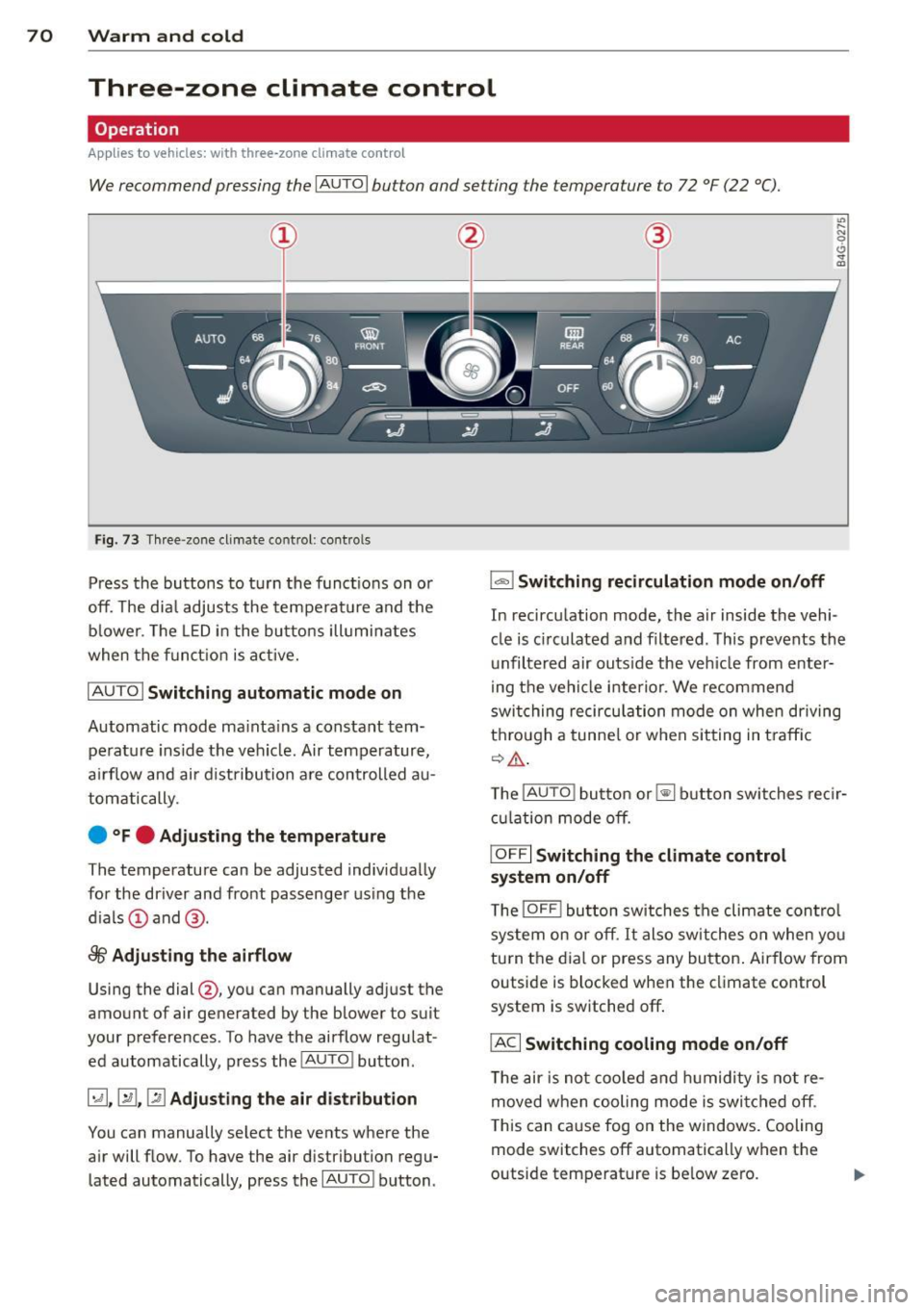
We recommend pressing the IA UT O I button and setting the temperature to 72 °F (22 °C).
Fig . 7 3 Thr ee-zone cl imate co ntrol: co ntro ls
Press the buttons to t urn the func tions on o r
off. The dia l adjusts the te mperat ure and the
bl ower. The LED i n the bu tto ns ill umi nates
when the funct ion is a ctive.
IAU TO I Switching automatic mode on
Automatic mode ma inta ins a constant tem
pe rat ure ins ide the vehi cle. Air temp erature,
a ir flow an d air d ist ribution a re controlled a u
tom atically.
e °Fe Adjusting the temperature
The temperature can be adjusted individ ua lly
for the dr iver and fro nt passenger using the
d ials @and @.
8fr Adjusting the airflow
Using the dial@, you can manually adj ust t he
amount of air generated by the blower to suit
your preferences . To have the ai rflow regu lat
ed automatically, p ress the
!AU TO ! bu tton .
~.~ .~ Adjusting the air distribution
You can manually se lect the vents whe re the
a ir will flow. To have the air distribution regu
lated automatically, press the
I AUTOI b utton .
1..,., 1 Switching recirculation mode on/off
"' ..... g
0 .. a,
In recirc ulation mode, the a ir inside the vehi
cle is c irculated a nd filtered . T his prevents th e
unfiltered air outs ide the ve hicle from enter
ing t he ve hicl e inte rio r. We recommend
swi tching recirc ulati on mode on when driving
t hr ou gh a tunne l o r w hen sit ting in t ra ffic
¢ ,& .
The !AUTO ! button or~ button swi tche s reci r
cula tion mode o ff.
IOFF I Switching the climate control
system on/off
T he IOFF ! button sw itches the cli mate con trol
s ystem on or off.
It al so s wit c hes on whe n yo u
tu rn t he dia l or press any bu tton . Airflow from
o utside is blocked when the climate co ntro l
system is switched off .
IACI Switching cooling mode on/off
The air is n ot coo led and hu midity is not re
moved when coo ling mode is swi tched off .
T his can ca use fog on the windows. Cooling
mode switches off automatically w hen t he
outside temperat ure is be low ze ro.
Page 73 of 306
l
ed or cleared of condensation as quickly as
possib le. The maximum amount of air flows
mainly from the vents be low the windshield.
Recirculation mode switches off. The tempera
ture should be set to 72 °F (22 °C) or higher.
The
IAU TOI button switches the defroster off.
l(lii) REAR I Switching rear window heater
on/off
The rear window heater on ly operates when
the engine is running.
It switches off auto
matica lly after a few minutes, depending on
the outside temperature.
To prevent the rear window heater from
switching off automatically, press and hold
the
lil button for more than 2 seconds. This
remains stored unti l the ignition is switched
off.
[ii Adjusting seat heating
Pressing the button switches the seat heating
on at the highest setting ( leve l 3). The LEDs
indicate the temperature level. To reduce the
temperature, press the button again. To
switch the seat heating off, press the button
repeatedly unt il the LED turns off .
After 10 minutes, the seat heating automati
cally switches from leve l 3 to level 2.
The seat heating for both outer rear seats* is
adjusted using the buttons in the center con
sole.
Warm and cold 71
Air vents
You can open or close the center and outer
vents in the cockpit and the vents in the rear
center console using the ridged thumbwheels.
The levers adjust the direction of the airflow
from the vents.
The air temperature in the rear can be adjust
ed so that it is warmer or co lder by turning
the knob to the red or blue area.
A WARNING
- Do not use the recirc ulation for extended
periods of time. The windows could fog
up since no fresh a ir can enter the vehi
cle. If the windows fog up, press the air
recirc ulat ion button aga in immed iately
to switch off the air recirculation func
tion or select defrost.
- I ndividuals w ith reduced sensitivity to
pa in or temperature could develop burns
when using the seat heating function. To
red uce the risk of injury, these individu
als sho uld not use seat heating.
(D Note
To avoid damage to the heating elements
in the seats, do not kneel on the seats or
place heavy loads on a small area of the
seat.
Page 74 of 306

7 2 Warm and cold
Four-zone automatic climate control
Operation
Applies to vehicles: with four -zone automa tic clima te control
We recommend pressing the IAUTO I button and setting the temperature to 72 °F (22 °C).
Fig. 74 Fo ur-zone automat ic climate contro l: controls
Fig . 75 Fou r-zone automatic cl imate cont ro l: rear con
trol s
Press the buttons to turn the functions on or
off. Use the dials to adjust the temperature,
the blower speed and the air distribution. The
LED in a button will light up when the func
tion is switched on. The settings are shown in
the climate control display and are also shown in the MMI display for a few seconds . The driv
er and front passenger sett ings can be adjust
ing separately.
The settings can also be adjusted in the rear
<::;> fig. 75.
IOFF j Switching the climate control
system on/off
The I O FFI button switches the climate control
system on or off .
It also switches on when you
turn the dia l or press any button. Airflow from outside is blocked when the
climate control
system is switched off .
You can activate the residual heat function
whe n the ignition is off by pressing and hold
ing the ~ button. The residua l heat from the
coolant is used to heat the vehicle interior .
The residual heat function switches off auto
matically after about 30 minutes.
!ACI Switching cooling mode on/off
T he air is not coo led and humidity is not re
moved when cooling mode is switched off.
T his can cause fog on the windows. Cooling
mode switches off automatically when the
outside temperature is be low zero .
1- 1 Switching recirculation mode on/off
In recircu lation mode, the air inside the vehi
cle is circu lated and filtered. This prevents the
unfiltered air outside the vehicle from enter
ing the vehicle interior . We recommend
switching recirculation mode on when driving
through a tunnel or when sitting in traffic ¢ .&, .
The
! AUTO I button or~ button switches rec i r-
cu lation mode off. .,.
Page 75 of 306
IAUTO I Switching automatic mode on
Automatic mode mainta ins a constant tem
perature inside the vehicle. Air temperature,
airflow and air distribution are controlled au
tomatically.
Adjusting the temperature
Temperatu res between 60 °F (+16 °C) and
84 °F ( +28 °C) can be set. O uts ide of this
range,
lo or hi wi ll appear in the climate con
trol system disp lay. At both of these settings,
the climate control system runs continuously
at maximum cooling or heating power. There
is no temperature regu lation.
~ Adjusting the airflow
You can adjust the airf low manually to suit
your needs . To have the airf low regulated au
tomatically, press the
I AUTO j button.
li!J Adjusting the air distribution
You can manually se lect the vents where the
air will flow. To have the air distribution regu
lated automatically, press the
IAUTOI button .
~I~* Adjusting seat heating/
ventilation*
Pressing the button switches the seat heat
ing/ventilation on at the highest setting ( level
3). The LEDs indicate the heating/ventilation
level. To reduce the heating/venti lation, press
the button again. To switch the seat heating/
ventilation off, press the button repeatedly
until the LED turns off.
After 10 minutes, the seat heating automati
cally switches from level 3 to level 2.
l
ed or cleared of condensation as quickly as
possible. The maximum amount of air flows
mainly from the vents below the windshield.
Recirculation mode switches off . The tempera
ture should be set to 72 °F (22 °C) or higher.
The
IAU TOI button switches the defroster off.
Warm and cold 73
liiii REAR ! Switching rear window heater
on/off
The rear window heater only operates when
the engine is running. It switches off auto matically after 10 to 20 minutes, depending
o n the outside temperature.
To prevent the rear window heater from
switching off automatically, press and ho ld
the ~ button for more than 2 seconds. This
remains stored until the ignition is switched
off .
I SYNC I Synchronization*
When synchronization is switched on, the
same settings are applied to both the driver
and front passenger, except for the seat heat
ing/ventilation*. The rear zone is also
synchronized. Synchronization switches off
when the settings for the front passenger s ide
o r r ear are adjusted.
You can also switch synchronization on by pressing and holding a dial. For example, if
you press and hold the dial on the front pas
senger side, the settings for that side are
transferred to the driver side. The same ap
plies to the rear.
Air vents
You can open or close the center and outer
vents in the cockpit and the vents in the rear
cente r console and door pillars using the
ridged thumbwheels. The levers adjust the di
rection of the airflow from the vents.
&_ WARNING
-=
-Do not use the recirc ulation for extended
periods of time . The windows could fog
up since no fresh air can enter the vehi
cle . If the windows fog up, press the air
recirculation button aga in immediately
to switch off the air recirculation func
tion or se lect defrost.
- Individuals w ith reduced sensitivity to
pa in or temperature cou ld deve lop burns
when using the seat heating function . To
red uce the risk of injur y, these individu-
als should not use seat heating. ..,.
Page 76 of 306

7 4 Warm and cold
(D Note
To avoid damage to the heating e lements
in the seats, do not kneel on the seats or
place heavy loads on a small area of the
seat .
Setup
Applies to vehicles: with four-zone a utomat ic clima te con·
tro l
The climate control system setup is accessed
through the MMI .
.,. Se lect : I CAR I func tion button> (Car )* sys·
terns
con trol but ton > AC .
Rear cabin settings*
When th is fu nction is selected, all sett ings for
the rear can be adjusted through the climate
control sys tem in the cockpit. The cl imate
con trol sys tem se tt ings cannot be adjusted in
the rea r seat at the same time. This func tion
switches
o ff after a certain period of time or
when one of the dia ls in the cockp it is press
ed .
Auto recirculation*
The sensit ivity level of the au tomatic rec ircu
lation mode can be set at vario us leve ls from
off to sensit ive. The recirculation mode is con
trolled a utomat ica lly. You must p ress the ~
button if fog forms on the windows.
Footwell temperature
You can adju st the footwell temperat ure so
that it is cooler or wa rme r.
Supplementary heater*
The supplementary heater warms the interio r
of veh icles with diesel engines * mo re quick ly .
T he s upplementa ry he ater is cont ro lled au to
mat ic all y in the
Aut o setting .
Steering wheel heating
App lies to vehicles: wi th hea ted s tee rin g whe el
The steering wheel rim can be heated .
Fig. 76 Stee ring co lu mn : stee rin g w heel hea tin g but ·
ton
.,. Press the~ button to switch steering whee l
heating on/off. The message
Steering wheel
heating on !/Steering wheel heating off !
appears in the instrument cluster d isp lay.
T he temperat ure is maintained at a constant
l evel when steering wheel heating is switched
on.
T he steering wheel hea ting se tt ings are stor
ed automat ica lly and assigne d to the remote
control key that is in use .
Page 82 of 306

80 On the road
-You can apply the parking bra ke at any
time -even w ith the ignition swi tched
off . The ignit ion must be on and the
brake pedal must be pressed in order to
release the parking brake .
- Occas iona l noises when the parking
brake is applied and released are norma l
and are not a cause for concern .
- When the vehicle is parked, the parking
brake goes through a se lf-test cycle at
regular intervals. Any assoc iated no ises
a re no rma l.
Parking
• Press the b ra ke peda l to stop the vehicle .
• Pull the swit ch(®) to set t he parking br ake.
• Move the se lecto r lever to P.
• Turn the eng ine off ~&, .
"' When on incl in es or declines, turn the steer
ing wheel so that yo ur vehicle will roll into
the curb if it begins to move.
A WARNING
- When you leave your veh icle -even if on
ly b riefly -always take the ignition key
with you. This applies partic ularly when
c hildren remain in the ve hicle. Otherw ise
t h e c hild ren could start t he engine, re
lease the pa rking brake or ope rate e lec
t rical equipment (e .g. power windows).
The re is the risk of an accident .
- When the vehicle is loc ked, no one -par
t icu larly not c hildren sho uld remain in
the vehicle . Loc ked doors make it more
difficult for emergency workers to get in
to the vehicle -putt ing lives at risk.
Starting from rest
The starting assist function ensures that the
parking brake is released automatically upon
star ting.
Stopping and applying park ing brake
"' Pull the switch(®) to apply the pa rk ing
brake.
Starting and automatically releasing the parking brake
"' When you start to drive as usual , the park
ing brake is a utomat ically released and your
veh icle beg ins to move.
When stopping at a traffic signal or stopping in city t raffic, the par king b rake can be ap
plied . The vehicle does not have to be he ld
with the footbra ke . The p arking brake elimi
nates the tende ncy to creep w ith a dr ive range
engaged . As soo n as yo u drive off as us ual ,
the pa rking brake is re leased automatically
and the vehicle s tarts to move.
Sta rting on slopes
When starting on inclines , the star ting assist
prevents the vehicle from u nintent ionally roll
ing back . The brak ing force of the parki ng
brake is not re leased unti l suff ic ient d riving
fo rce has been built up at the w heels.
(D Tips
Fo r safe ty reaso ns, the pa rking brak e is re
l eased automatically on ly when t he d riv
er's safety bel t is engaged in the buckle.
Starting off with a trailer
To prevent rolling back unintentionally on an
incline, do the following:
"' Keep the sw itch(®) pulled and depress the
accelerator . The pa rking brake stays applied
and prevents the v ehicl e from roll ing bac k
wa rd .
"' Yo u can rele a se the swit ch(®) once yo u are
sure t hat you are developing enoug h for
ward momentum at the whee ls as you de
press the acce lerator .
Depend ing on the we igh t of the rig (vehi cle
and t railer) and the severity of the incline, yo u
may ro ll backwards as yo u start . You can p re
vent rolling backwa rds by holding the park ing
brake switch (®) pulled o ut and accelerating -
just as you would when starting on a hill with a conventiona l hand brake .
Page 102 of 306

100 Audi side assist
-Improper reliance on the side assist sys
tem can cause collisions and serious
personal injury:
- Never rely only on side assist when
changing lanes.
- Always check rear view mirrors to make
sure that it is safe to change lanes.
- Side assist cannot detect all vehicles un
der all conditions- danger of accident!
- Please note that side assist indicates
there are approaching vehicles, or
vehicles in your blind spot, only after
your vehicle has reached a driving speed of at least 19 mph (30 km/h).
- In certain situations, the system may not
function or its function may be limited.
For example:
- if veh icles are approaching or being left
behind very quickly . The display may
not turn on in time.
- in poor weather conditions such as
heavy rain, snow or heavy mist .
- on very wide lanes, in tight curves or if
there is a rise in the road surface.
Vehicles in the adjacent lane may not
be detected because they are outside
of the sensor range.
(D Note
The sensors can be displaced by impacts or
damage to the bumper, wheel housing and
underbody. This can affect the system.
Have your authorized Audi dealer or au
thorized Audi Service Facility check their
function.
@ Tips
- If the window glass in the driver's door
or front passenger's door has been tint ed, the display in the exterior mirror may
be misinterpreted.
- For Declaration of Compliance to United
States FCC and Industry Canada regula
tions¢
page 288.
Activating and deactivating
Applies to vehicles: rnit s ide ass ist
Fig. 106 Driver's door: Side ass ist butto n
.. Press the button c> A in General informa
tion on page 99
to switch the system on/off.
The LED in the button turns on when side
assist is switched on.
Adjusting the display brightness
Applies to vehicles: wit h side assist
The brightness setting can be adjusted via the
MMI.
.. Select: !CAR I function button> (Car)* sys
tems control button > Driver assist > Audi
side assist .
The display brightness adjusts automatically
to the brightness of the surroundings, both in
the information and in the warning stage. In
very dark or very bright surroundings, the dis
play is already set to the minimum or maxi
mum level by the automatic adjustment . In
such cases, you may notice no change when
adjusting the brightness, or the change may
only be noticeable once the surroundings
change.
Adjust the brightness to a level where the dis
play in the informa tion stage will not disrupt
yo ur view forward. If you change the bright
ness, the display in the exterior mirror will
briefly show the brightness leve l in the infor
mation stage. The brightness of the warning
stage is linked to the brightness in the infor
mation stage and is adjusted along with the
information stage adjustment .
Page 132 of 306
130 Driving Saf ely
Driving Safely
General notes
Safe driving habits
Please remember -safety first!
This chapter contains important information,
tips, instructions and warnings that you need
to read and observe for your own safety, the
safety of your passengers and others . We have
summarized here what you need to know
about safety belts, a irbags, ch ild restra ints as
well as child safety. Your safety is for us
priori
ty number 1.
Always observe the info rmat ion
and warn ings in th is sect ion -fo r yo ur own
safety as well as that of your passengers .
The information in this se ction app lies to all
model ve rsions of your veh icle . Some of the
feat ures described in this sec tions may be
standard equipment on some models, or may
be optional equipment on others . If you are
not sure, ask your authorized Audi dealer.
A WARNING
- Always make sure that you follow the in
struct ions and heed the WARNINGS in
this Manual. It is in your interest and in
the inte rest of you r passengers.
- Always keep the complete Owner's Liter
ature in your Audi when you lend or sell
your vehicle so that this important info r
mation will always be ava ilable to the
dr iver and passengers.
- Always keep the Owner's literature handy
so that you can find i t eas ily if you have
ques tions.
Safety equipment
The safety features are part of the occupant
restraint system and work together to help
redu ce the risk of injury in a wide variety of
accident situations.
Your safety and the safety of your passenge rs
should not be left to chance. Advances in
technology have made a varie ty o f fea tures
avai la bl e to he lp re duce the risk of injury in an accident
. The following is a list of just a few of
the safety features in your Audi:
- sophis tic ated s afety be lts fo r drive r and a ll
passenger sea ting pos it ions,
- safety belt prete nsioners ,
- safety belt force lim iters fo r the front seats,
- safety belt he ight adjustment systems for
the front seats ,
- front airbags,
- knee airbags for the front seats *
- side airbags in the front seats a nd outer rear
seats*,
- side curtain airbags ,
- specia l LATCH anchorages for child re-
straints,
- hea d restr aints for each sea ting pos ition,
- ad justab le s teer ing colum n.
These ind iv idual safety features, can work to
ge ther as a system to help protect you and
you r passengers in a wide range of accidents .
T hese features canno t wo rk as a system if
they are not always cor re ct ly adjusted and co r
rect ly used.
Safety i s everybody' s respon sibility!
Important things to do before driving
Safety is everybody 's job! Vehicle and occu
pant safety always depends on the informed and careful driver .
For your safety and the safety of your passen
gers,
befor e driv ing always:
.. Make s ure that all lights and signals are op
erating correctly.
.. Make sure that the t ire pressure is correct .
.. Make s ure t hat all windows are clean and af
ford good vis ibility to the outs ide .
.. Sec ure all luggage a nd other items caref ully
q page 64, q page 61 .
.. Ma ke s ure t hat nothing can interfe re wi th
the peda ls .
.. Adjust front seat, head restraint and mirrors
correctly for your height.
.. Instruct passengers to adjust the head re-
straints according to the ir height . .,..
Page 137 of 306
-never knee l on the seats
- never ride with the seatback reclined
- never lie down on the rear seat
- never lean up against the instrument pa nel
- never sit on the edge of the seat
- never sit s ideways
- never lean out the window
- never put yo ur feet out the window
- never put yo ur feet o n the ins trumen t pa nel
- never rest you r feet on the seat cushion o r
back of the seat
- never r ide in the footwe ll
- never r ide in the cargo area
A WARNING
Imprope r seat ing positions increase the
r is k of se rious personal injury and death
whenever a veh icle is being used.
- Always make sure that a ll vehicle occu
pants stay in a p ro per seat ing pos it ion
and are properly restra ined whenever the
vehicle is be ing used .
Driver and passenger
side footwell
Important safety instructions
Appl ies to vehicles: with knee a irbags
A WARNING
Always make s ure that the knee ai rbag can
inf late without interfe rence. Objects be
tween yourse lf and the airbag can increase
the risk of injury in an acc ident by interfer
ing w ith the way the a irbag deploys or by
being p ushed into you as the airbag de
ploys.
- No persons (ch ildren) or animals should
ride in the footwell in front of the pas
senger seat. If the airbag deploys, this
c an res ult in serious or fata l injuries.
- No objects of any k ind sho uld be car ried
in the footwell area in fron t of the driv
er's or passenger's seat. Bul ky objects
(shopping bags, for example) can ham
per or prevent p roper deployment of the
airbag. Small objects can be thrown
Dr iving Safel y 135
through the vehicle if the airbag deploys
and in jure you or your passengers.
Pedal area
Pedals
The pedals must always be free to move and
must never be interfered with by a floor mat
or any other object.
Make sure that a ll peda ls move free ly without
i nterfe rence and that nothing prevents them
from return ing to their orig inal positions.
Only use floor mats that leave t he pedal area
free and can be secured with floor mat fasten
ers .
If a brake circ uit fai ls, increased brake pedal
trave l is required to bring the vehicle to a full
stop.
A WARNING
Pedals that ca nnot move free ly can cause
loss of vehicle control and incr ease the risk
of ser ious injury.
- Never p lace any objec ts in the drive r's
footwell. An ob je ct cou ld get into the
pedal area a nd inte rfe re wi th pedal fun c
tion. In case of sudde n brak ing o r an a c
cident, yo u wou ld not be a ble to brake or
accelerate!
- Always ma ke su re th at nothing can fall
or move into the driver's footwel l.
Floor mats on the driver side
Always use floor mats that can be securely
attached to the floor mat fas teners and do
not in terfere with the free movement of the
pedals.
.,. Ma ke s ure t hat the floor ma ts are prope rly
secured an d cannot move and interfere wi th
the peda ls ~ _& .
Use only floor mats tha t leave the peda l area
u nobstru cte d a nd th at are firmly secured so
that they cannot slip o ut o f position. You can
II>
•
•