change wheel AUDI A7 2014 Owner's Manual
[x] Cancel search | Manufacturer: AUDI, Model Year: 2014, Model line: A7, Model: AUDI A7 2014Pages: 306, PDF Size: 76.83 MB
Page 265 of 306
A WARNING 1= •
-If the tire pressure indicator appears in
the instrument cluster d isplay, one or
more of your tires is s ignificantly under
inflated. Reduce your speed immediately
and avoid any hard steering or braking
maneuvers. Stop as soon as possible and
check the tires and their pressures . In
flate the tire pressure to the proper pres
sure as indicated on the vehicle's tire
pressure label¢
page 247. Driving on a
signif icantly under-inflated tire causes
the tire to overheat and can lead to tire
failure. Under-inflation also is likely to impair the vehicle's handling and stop
ping abi lity .
- The driver is responsible for ma inta ining
the cor rect t ire pressures. You must
check the t ire pressures regularly.
- Under certain cond itions (such as a spor
ty driving style, w inter condit ions or un
paved roads), the pressure monitor ind i
c ator may be de layed.
- Ask your author ized Audi dealer if run
flat tires may be used on your veh icle.
You r vehicle registrat ion becomes inva lid
i f you use these tires when not permit
ted. Damage to your vehicle o r acc idents
cou ld also resu lt.
@ Tips
- The t ire pressure monitoring system
stops working when there is an ES C/A BS
malfunction.
- Using snow chains may resul t in a system
malfunction.
- The t ire pressure moni toring sys tem on
you r A udi was developed using t ires with
the "AO" or "RO" identification on the
tire sidewall ¢
page 254. We recom
mend using these t ires.
Tire s an d wheel s 263
Reset tire pressure monitoring system
Applies to veh icles : w ith tire p ress ure mo nito rin g syste m
If the tire pressure is adjusted, wheels are ro
tated or changed, the TPMS must be reset via
MMI .
.,. Switch o n the ignition.
.,. Select in the MMI:
ICA RI function button >
(Car )* syste m s control button > Servicing &
ch eck s > Tire pr essure monitoring > Store
tire pre ssur es> Yes, stor e now .
(D Tips
Do not s to re the tire pressure if there are
snow cha ins on t he tire.
•
•
Page 268 of 306
266 What do I do now?
Changing a wheel
Before changing a wheel
Observe the following precautions for your
own and your passenger's safety when chang
ing a wheel .
... After you experience a tire failure, pull the
car well away from moving traffic and try to
reach
level ground before you stop o ,&.
... All passengers should leave the car and
move to a safe location (for instance, behind
the guardrail)
o A-
.. Engage the parking brake to prevent your
vehicle from rolling unintentionally
o ,&.
... Move selector lever to position Po ,& .
• If you are towing a trailer, unhitch the trailer
from your vehicle .
... Take the
jack and the spare tire out of the
luggage compartment
o page 264,
o page265.
A WARNING
You or your passengers could be injured
while changing a wheel if you do not fol
low these safety precautions:
- If you have a flat tire,
move a safe dis
tance off the road. Turn off the engine,
turn the emergency flashers on and use
other warning devices to alert other mo
torists.
- Make sure that passengers wait in a safe
place away from the vehicle and well
away from the road and traffic.
- To help prevent the vehicle from moving
sudden ly and possibly slipping off the
jack, always fully set the parking brake
and block the wheel diagonally opposite
the wheel being changed . When one
front wheel is lifted off the ground, plac
ing the Automatic Transmission in P
(Park) will
not prevent the vehicle from
moving.
- Before you change a wheel, be sure the
ground is level and firm.
If necessary,
use a sturdy board under the jack.
-
-Always store the vehicle tool kit, the jack
and the replaced tire in the luggage com
partment
opage 136.
@ Tips
Before changing the whee l, you must acti
vate the jacking mode, so that the auto
matic controls for the Adaptive Air Sus
pension* do not make it more difficult to
lift the vehicle with the jack
o page 268 .
Changing a wheel
When you change a wheel, follow these
quence described below step-by-step and in
exactly that order.
l. Activate the vehicle jack mode*
opage 268 .
2. Remove the decorative wheel cover* . For
more details see also
o page 267, Deco
rative wheel covers
or o page 267,
Wheels with wheel bolt caps.
3. Loosen the wheel bolts o page 268.
4. Locate the proper mounting point for the
jack and align the jack below that point
opage 268.
5. Raise the car with the jack o page 268.
6. Remove the wheel with the flat tire and
then install
the spare opage 270.
7. Tighten all wheel bolts lightly .
8.
Lower the vehicle with the jack .
9 . Use the wheel bolt w rench and
firmly
tighten all wheel bolts o page 268.
10. Replace the decorative wheel cover*.
11. Deactivate the vehicle jack mode * in the
MMI:
I CARI function button > (Ca r)* sys
tems
control button > Servicing & checks
> Air susp.: jack mode > Off.
The vehicle jack mode* switches off automati
ca lly at speeds above 6 mph (10 km/h) .
A WARNING ,-
Always read and follow all WARNINGS and
in format ion
o .&. in Raising the vehicle on
page 269
and opage 271.
Page 269 of 306
After changing a wheel
A wheel change is not complete without the doing the following .
• Always store the vehicle tool kit, the jack*
and the replaced tire in the luggage com
partment
Q page 136.
• Check the tire pressure on the spare wheel
immediately after mou nting it.
• As soon as possible, have the
tightening
torques
on al l wheel bolts checked with a
torque wrench. The correct tightening tor
que is 90 ft lb (120 Nm).
• Have the flat tire
replaced as soon as possi
ble.
(D Tips
- If you notice that the wheel bolts are
corroded and difficult to turn wh ile
changing a tire, they should be replaced
before you check the tightening torque.
- Drive at reduced speed until you have the
tightening torques checked .
- After changing a wheel, the tire pressure
i n all four tires must be checked/correct
ed and the tire pressure mon itor ing indi
cator must be stored in the MMI
Qpage263 .
Decorative wheel covers
Applies to vehicles: with decorative wheel covers
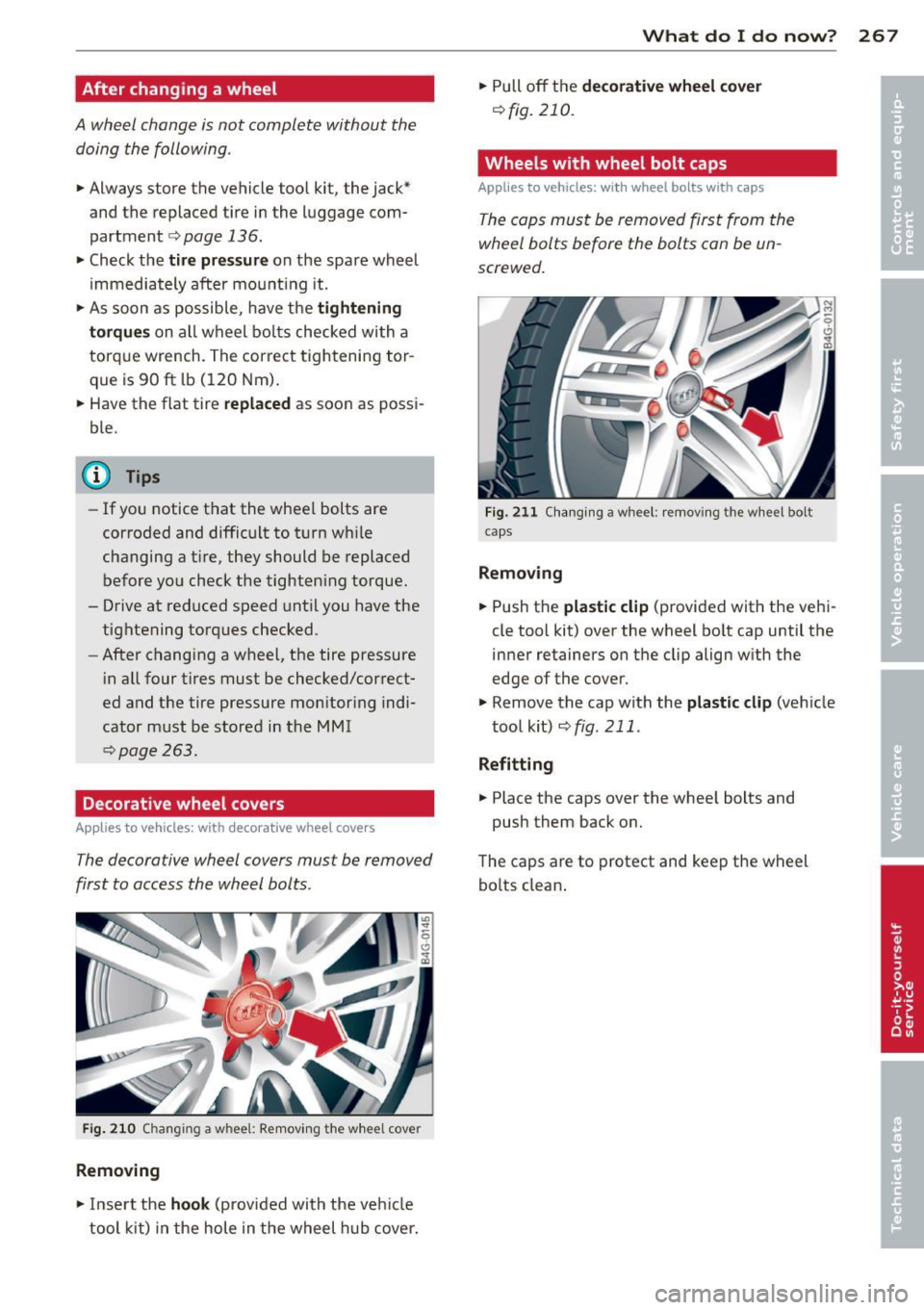
The decorative wheel covers must be removed
first to access the wheel bolts .
Fig. 210 Ch ang ing a whee l: Removing the wheel cove r
Removing
.. Insert the hook (provided with the veh icle
tool kit) in the hole in the wheel hub cover.
What do I do now? 267
• Pull off th e decorative wheel cover
Qfig. 210.
Wheels with wheel bolt caps
Applies to vehicles: with wheel bolts with caps
The caps must be removed first from the
wheel bolts before the bolts can be un
screwed.
Fig. 211 C hanging a whee l: removing the wheel bolt
caps
Removing
• Push the plastic clip (provided with the vehi
cle too l kit) over the wheel bo lt cap until the
inner retainers on the clip align w ith the
edge of the cover.
.. Remove the cap with the
plastic clip (veh icle
tool kit)
Qfig . 211 .
Refitting
• Place the caps over the whee l bolts and
push them back on.
The caps are to protect and keep the wheel
bo lts clean .
Page 270 of 306
268 What do I do now ?
loosening and tightening the wheel
bolts
The wheel bolts must be loosened before rais
ing the vehicle.
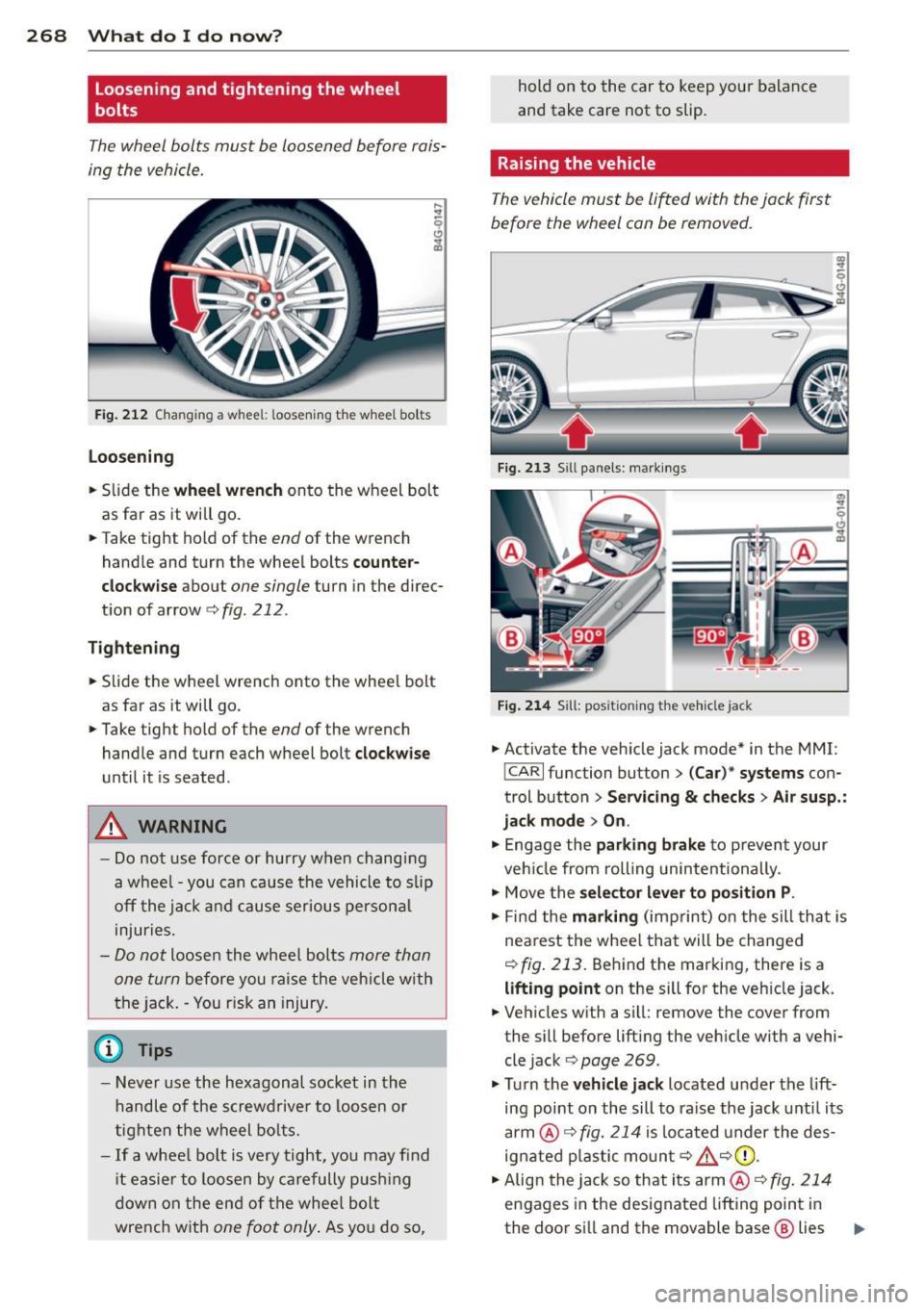
Fig. 212 Changing a wheel: loosening the whee l bo lts
loosening
.. Slide the
w heel wr ench onto the wheel bolt
as far as it will go .
.. Take tight hold of the
end of the wrench
handle and turn the wheel bolts co unte r
clock w ise about one single turn in the direc
t ion of arrow
c:> fig. 212 .
Tighten ing
.. Slide the wheel wrench onto the wheel bolt
as far as it will go.
.. Take tight hold of the
end of the wrench
handle and turn each wheel bolt
clock wise
until it is seated.
A WARNING
- Do not use force or hurry when changing
a whee l - you can cause the vehicle to slip
off the jack a nd cause serious persona l
injuries.
- Do not loosen the wheel bolts more than
one turn
before you raise the veh icle with
the jack. - You risk an injury.
@ Tips
- Never use the hexagonal socket in the
handle of the screwdriver to loosen o r
tighten the wheel bo lts.
- If a wheel bolt is very tight, you may fi nd
i t easier to loosen by ca refully p ushi ng
down on the end of the wheel bolt
wrench with
one foot only . As you do so, hold on to the car to keep your balance
and take care not to slip.
Raising the vehicle
The vehicle must be lifted with the jack first
before the wheel can be removed.
Fig. 213 Sill panels: markings
Fig. 2 14 Sill: pos ition ing t he ve hicle jack
.. Activate the vehicle jack mode* in the MMI:
!CARI function button> (Car) * syst ems con
trol button>
Serv icing & ch eck s> Air su sp .:
ja ck mode > On .
.,. Engage the parki ng brake to prevent your
veh icle from rolling unintentionally .
.,. Move the
sele cto r lever to p osition P .
.. Find the mark ing (imprint) on the sill tha t is
nearest the whee l that will be changed
c:>fig. 213. Be hind the marking, there is a
lifting point on the sill for the vehicle jack.
.. Ve hicles with a si ll: remove the cover from
the sill before lift ing the veh icle w ith a vehi
cle jack c:>
page 269 .
.,. Turn the ve hicl e ja ck located under the lift
ing point on the sill to ra ise the jack until its
arm @c:>
fig. 214 is located under the des
ignated plastic moun t c:>
£ c:> (D .
.. Align the jack so that its arm @c:>
fig. 214
engages in the designated lifting point in
the door sill and the movable base @ lies
IJJ>
Page 271 of 306
flat on the ground. The base @ must be ver
tical under the lifting point @.
.. Wind the jack up further until the flat tire
comes off the ground
c:> ,&. .
Position the vehicle jack onl y under the desig
nated lifting points on the sill
c:> fig . 213.
The re is exactly one location for each wheel.
The jack must not be positioned at any other location
c:> & c:>(D.
An unstable surf ace under the jack can cause
the vehicle to slip off the jack . Always provide
a firm base for the jack on the ground. If nec
essary place a sturdy board o r similar support
u nder the jack . On
hard, slippery surface s
(such as tiles) use a rubber mat or sim ilar to
p revent the jack from s lipping
c:> & -
& WARNING
-You or your passengers could be injured
wh ile chang ing a whee l if you do not fol
low these safety precautions:
- Position the vehicle jack only at the
designated lifting points and align the
jack. Otherwise, the vehicle jack could slip and cause an injury if it does not
have sufficient ho ld on t he vehicle.
-A soft or unstab le surface under the
jack may ca use the vehicle to slip off
the jack. Always provide a fi rm base for
the jack on the gro und.
If necessary,
use a sturdy board under the jack.
- On hard, slippery surface (such a s tiles)
use a rubber mat or similar to prevent
the jack from slipping.
- T o help p revent injury to you rself and
yo ur passengers:
- Do not raise the vehicle until you are
sure the jack is securely engaged.
- Passengers must not remain i n the ve
h icle when it is jacked up.
- Make sure that passengers wait in a
safe place away from the vehicle and
well away from the road and traffic.
- Make sure jack position is correct, ad
just as necessary and then continue to ra ise the jack.
What do I d o now ? 269
-Changes in temperature or load can af
fect the he ight of the vehicle .
(D Note
Do not lift the vehicle by the sill . Position
the vehicle jack only at the designated lift ing points on the sill. Otherwise, your vehi
cle will be damaged.
(I} Tips
The vehicle jack mode * switches off auto
matically at speeds above 6 mph (10 km/
h).
Removing and installing the sill cover
App lies to vehicles: wit h sill
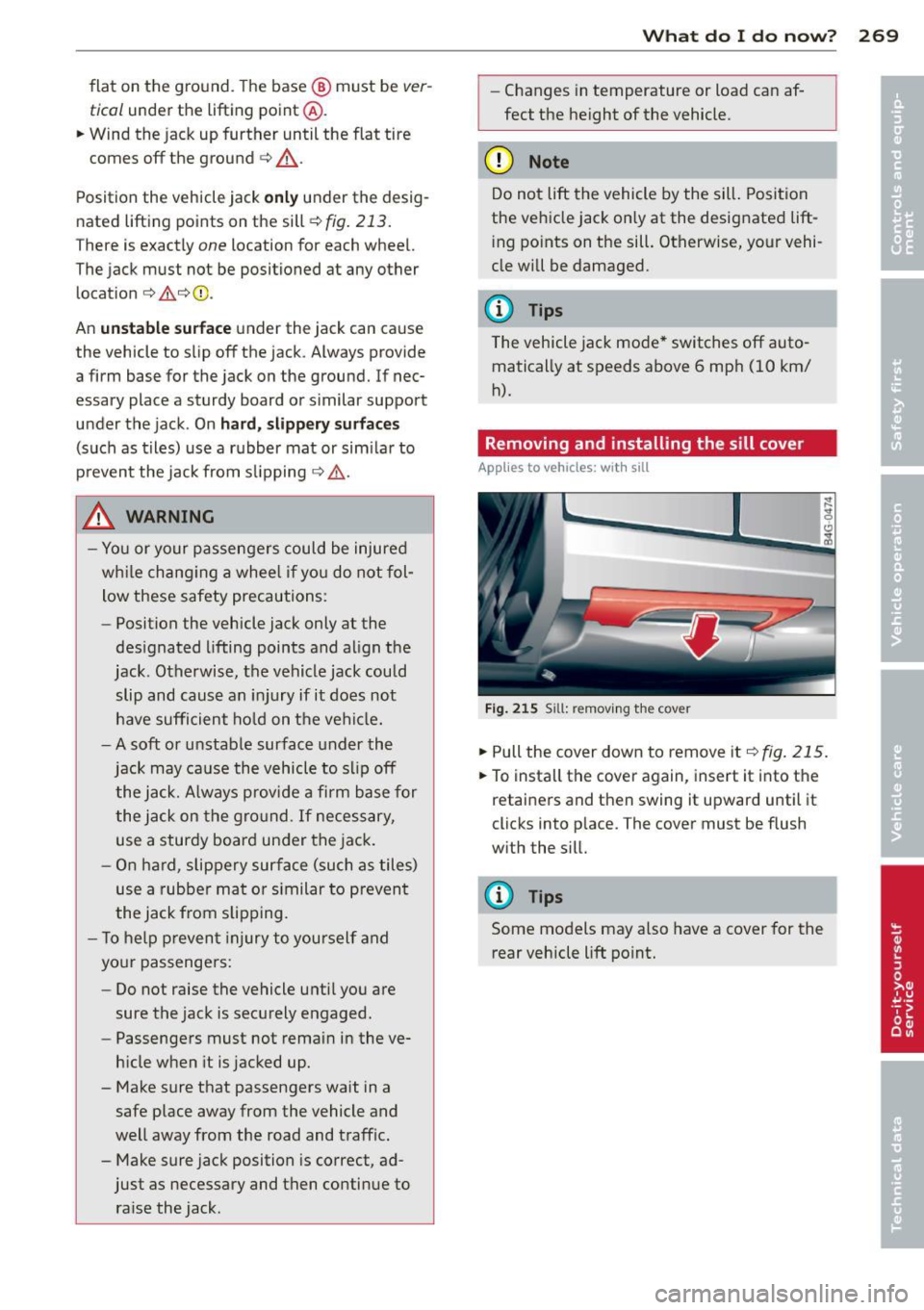
Fig . 215 Sill : re moving th e co ver
.. Pull the cover down to remove it c:> fig. 215.
.. To insta ll the cover again, insert it into the
retainers and then swing it upward until it
clicks into p lace . The cover must be flush
with the sill.
(D Tips
Some models may also have a cover for the rear vehicle lift po int.
Page 273 of 306

Tires with unidirectional tread design
Tires with unidirectional tread design must be
mounted with their tread pattern pointed in
the right direction.
Using a spare tire with a tread pattern
intended for use in a specific direction
When using a spare tire w ith a tread pattern
in tended for use in a specific direction, please
note the following:
- The direction of rotation is marked by an ar
row on the side of the tire.
- If the spare t ire has to be installed in the in
correct direction, use the spare tire only
temporarily since the tire will not be able to
achieve its optimum performance character
istic s with rega rd to aquaplaning, noise and
wear.
- We recommend that you pay particular at
tention to this fact during wet weather and
that you adjust your speed to match road
conditions.
- Replace the flat tire with a new one and
have it installed on your veh icle as soon as
possib le to restore the handling advantages
of a unid irectiona l tire .
Notes on wheel changing
Please read the information c:> page 254, New
tires and replacing tires and wheels
if you are
going to use a spare t ire which is different
from the tires on your veh icle.
After you change a tire :
-Check the tire pressure on the spare imme
diately after installation .
- Have the wheel bolt tightening torque
checked with a torque wrench as soon as
possible by your authorized Audi dealer or
a qualified service station.
- With steel and alloy wheel rims, the wheel
bolts are correctly tightened at a torque of
90 ft lb (120 Nm).
- If you notice that the wheel bolts are cor
roded and difficult to turn while changing
a tire, they should be replaced before you
check the tightening torque. What do I do now? 271
- Replace the flat tire with a new one and
have it installed on your vehicle as soon as
possible. Remount the wheel cover.
Until then , drive with extra care and at re
duced speeds.
A WARNING
-
- If you are going to equ ip your vehicle
with tires or rims which differ from those
which were factory installed, then be
sure to read the information<=>
page 254,
New tires and replacing tires and
wheels.
- Always make sure the damaged wheel or
even a flat tire and the jack and tool kit
are properly secured in the luggage com
pa rtment and are not loose in the pas
senger compartment .
- In an accident or sudden maneuver they
could fly forward, in juring anyone in the
veh icle.
- Always store damaged wheel, jack and
too ls securely in the luggage compa rt
ment. Otherwise , in an accident or su d
den maneuver they could fly forward,
causing injury to passengers in the vehi
cle.
•
•
Page 298 of 306
296 Index
Jumper cables ..... ....... ... .. .... . 277
K
Key ... .. .. .. .. . .. ..... ... .. .. .. .. .. 32
Battery replacement master key ... .. .. 33
Emergency key ... ... .... ... .. .... .. 32
K ey not recogn ized . . . . . . . . . . . . . . . . . . 78
Key replacement .... ....... .. .. .. ..
32
M as ter key ..... .. .... ... .. .. .. .. .. 32
Mech an ic a l key .... .. ..... .... .. .. .. 33
Valet key . .. ................ ... .... 32
Kick-down
t ipt ron ic
113
Knee airbags ... .... .... ..... .. .. .. . 166
Description ..... .. ... .... .. .. .. .. . 166
How they work ............ ... .... . 168
Important saf ety instructions ..... .. . 168
L
Lane assist . . . . . . . . . . . . . . . . . . . . . . . . . 95
L ane Change Ass istant
refer to side assist . . . . . . . . . . . . . . . . . . 98
LATCH .. .. .. .... .. ... ...... .. .. .. . 189
Desc rip tion ....... .... ..... .. .. .. .
Installin g a child restraint .. .. .. .. .. .
Location
Mounting and releasing the anchorage
hook
. . .. ...... .. .... ... .. .. .. .. .
190
191
190
191
La unch Con trol Prog ram .... .. .. .... . 114
Leath er clean ing/protection ....... .. . 216
Leaving home .......... ....... .. .... 46
Lifting jack ...... .. .... ... .. .. .. .. . 268
L ift ing vehicle
Light 280
Ambience lighting ............ .. .... 47
Com ing/Leaving home ..... .. .. .. .. . .
46
Daytime running lights .... .. .. .. .. . . 44
Emergency flashers ....... .. .. .. .. .. 45
Exterior lighting . ...... ... .. .. .. .. .. 44
H eadlight range control ....... .. .. .. 44
H igh b eam ............... ... .... ..
46
Low beam . ................ .. .... .. 44
Rea r fog ligh ts .. ...... ..... .. .. .. .. 44
S ide marker ligh ts ........ .. .. .... .. 44
T urn signals ................. .. ....
46
Light/rain sensor
Headlights . ..... .................. 44
I ntermittent (windshield w ipers) ...... 48
Sen sor defective . . . . . . . . . . . . . . . . . . . .
23
Loading the roof rack ... .. .... ... .... . 63
Locking
Power locking switch ................
37
Remot e control .. ... .. ..... ... .. .. . 35
Using the key .. .. ...... ....... .... .
37
Low be ams . .. .. .. ... .. ..... ... .. .. . 44
Lower un iv e rsal anchorag es (Canada) . . .
189
Luggage compartment
Bag hooks . .. .. . .. ... ... ... .. ... .. . 67
Cargo net . . . . . . . . . . . . . . . . . . . . . . . . .
66
carpeting ..... .. .................. 67
Cover ......... .. ............. ..... 64
Enlarging . . . . . . . . . . . . . . . . . . . . . . . . . 65
Load ing ... .. .. .. ...... .. .... ..... . 64
Ski sack ... .. .. .. ...... .. .... ..... . 67
S towing lugg age . .... ...... ... ....
136
T ie -downs . . . . . . . . . . . . . . . . . . . . . . . . . 66
Trunk pass-through ..... ......... .. . 68
Luggage compa rtment lid
Movement-ac tivated opening .. .. .. .. . 40
Lumbar support
Front seats . . . . . . . . . . . . . . . . . . . . . . . . 55
M
Maintenance .. .. .. ...... ....... .. .. 285
Malfun ction Indicator Lamp (M IL) . .
21, 30
Manua l shift p rogram ................ 113
Massage function
Front seats . . . . . . . . . . . . . . . . . . . . . . . . 55
Ma tte fini sh pa in t cle aning .. ....... ..
213
Mechanica l key .... ................ .. 33
Mirrors Adjusting the exterior mirrors . . . . . . . . . SO
d' . 1mmrng .. .. .. .. .... ...... ... .. .. . 51
Vanity mirrors ... .................. 48
Monitoring the Advanced Airbag System 161
Mul tifunction stee ring wheel ....... ... . 25
N
Natura l leather
Cl ean ing
216
New tir es and wheels ... ...... ... .. .. 254