warning AUDI A7 2014 Owner's Guide
[x] Cancel search | Manufacturer: AUDI, Model Year: 2014, Model line: A7, Model: AUDI A7 2014Pages: 306, PDF Size: 76.83 MB
Page 41 of 306

~ Press and hold the button l"" I for at least
four seconds to store the new open position.
A visual and audio signal will follow.
The settings in the MMI determine if the rear lid can be opened using the handle ¢
page 35.
Opening will be stopped immediately when:
- You press the button
l"" I on the remote con-
trol master key, or
- You press the button
l"" I in the rear lid, or
- You push the handle in the rear lid, or
- You pull the button
l.:::s ! in the driver's door,
or
- When something blocks the rear lid or
makes it difficult for the lid to move.
If you press one of the buttons ~now, the
rear lid will either open or close, depending on
its angle .
Closing will be stopped immediately when:
- You press the button
l"" I in the rear lid, or
- You push the handle in the rear lid, or
- You release the button
l""I on the driver's
door, or
- When something blocks the rear lid or
makes it difficult for the lid to move.
If you press one of the buttons ~now, the
rear lid will either close or open, depending on
its angle .
You can manually stop the automatic open ing/closing of the rear lid. The automatic clos
ing process begins if you push down on the
rear lid.
A WARNING
-After closing the rear lid, always pull up
on it to make sure that it is properly
closed. Otherwise it could open suddenly
when the vehicle is moving .
- To help prevent poisonous exhaust gas
from being drawn into the vehicle, al
ways keep the rear lid closed while driv
ing. Never transport objects larger than
those which fit completely into the lug
gage area, because then the rear lid can
not be fully closed.
Opening and closing 39
- Never leave your vehicle unattended es
pecially with the rear lid left open. A
child could crawl into the car through the luggage compartment and pull the lid
shut, becoming trapped and unable to
get out . To reduce the risk of personal in
jury, never let children play in or around
your vehicle. Always keep the rear lid as
well as the vehicle doors closed when not
in use.
- Never close the rear lid inattentively or
without checking first. Although the
closing force of the rear lid is limited,
you can still seriously injure yourself or
others .
- Always ensure that no one is within
range of the rear lid when it is moving, in
particular close to the hinges and the up
per and lower edges - fingers or hands
can be pinched .
- Never try to interfere with the rear lid or
help it when it is being opened or closed
automatically .
(D Note
The rear lid can bump into objects such as
the garage ceiling when opening and be
come damaged.
(D Tips
-Audio signals are given when you close
the rear lid using the
l a! button in the
driver's door.
- If there is a mechanical problem with au
tomatic closing for the rear lid or there is
an obstruction, it opens again immedi
ately . Check to see why the rear lid could
not be closed before attempting to close
it again .
- The following applies to vehicles equip
ped with the Convenience key* feature: if
the remote control key is left in the lug
gage compartment, luggage compart
ment will automatically unlock itself af
ter you lock the vehicle. This prevents
you from unintentionally locking your
key in the luggage compartment. .,.
Page 43 of 306
![AUDI A7 2014 Owners Guide .. To activate the child safety lock for the left/
right rear door, press the left/right button
Ii]
in the drivers door ¢ fig. 30. The light in the
button w ill turn on.
.. To](/img/6/57602/w960_57602-42.png "AUDI A7 2014 Owners Guide .. To activate the child safety lock for the left/
right rear door, press the left/right button
Ii]
in the drivers door ¢ fig. 30. The light in the
button w ill turn on.
.. To")
.. To activate the child safety lock for the left/
right rear door, press the left/right button
Ii]
in the driver's door ¢ fig. 30. The light in the
button w ill turn on.
.. To deactivate the child safety lock for the
left/right rear door, press the left/r ight but
ton
1±1 in the driver's door. The light in the
button turns off.
The follow ing features are switched off:
- The interior door handles in the rear doors,
- The power windows in the rear doors.
I n order to activate the child safety lock on
the left and the right s ide, press the two safe
ty buttons
Ii] in succession.
Power windows
Controls
The driver can control all power windows.
Fig. 31 Section of the driver 's doo r: Cont rols
l(l 0 0 0
"' m
All power window switches are provided with
a two-position function :
Opening the windows
.. Press the switch to the first stop and hold it
until the window reaches the desired posi
tion.
.,. Press the switch br iefly to the
second stop
to automatically open the window.
Closing the windows
.. Pull the switch to the first stop and hold it
until the window reaches the desired posi
t ion.
.. Pull the switch briefly to the
second stop to
automatically close the window .
Opening and closing 41
Power window switches
@ Driver's door
® Passenger's door
© Left rear door
@ Right rear door
.,&_ WARNING
-When you leave your vehicle - even if on
ly briefly - always take the ignit ion key
with you. This applies particularly when children remain in the vehicle. Otherwise
the children could start the engine or op
erate electrical equipment (e.g. power
windows). The power windows are func
tional until the driver's door or passeng
er's doo r has been opened.
- Be careful when closing the w indows.
Check to see that no one is in the way, or
serio us injury could result!
- When locking the vehicle from outside,
the vehicle must be unoccupied since the
windows can no longer be opened in an
emergency .
{D Tips
-When you open the doors, the windows
automatically lower abo ut 10 mm.
- When the window in the driver's or pas
senger's door is complete ly open, it will
raise approximately 25 mm when the
door is opened. The window will lower
again when you close the door.
- After the ignition has been switched off,
the windows can sti ll be opened or
closed for about 10 minutes. The power
windows are not switched off until the
dr iver's door or passenger's door has
been opened .
What to do after a malfunction
The one-touch open and close function must
be reactivated if the battery has been discon
nected.
.. Pull and ho ld the power window switch until
the window is fully closed. .-
Page 45 of 306

protection opens automatically when the s un
roof opens .
You ca n still close or open the s unroof for up
t o ten m in utes after yo u have sw itched the ig
n ition
off . The switch is deac tivated once the
driver's or front passenger's door is opened .
A WARNING
Pay careful attention when closing the
sliding/tilting sunroof - otherwise ser io us
injury cou ld result! A lways take the key
w ith you when leaving the vehicle .
(D Note
Always close your sliding/tilting sunroof
when leav ing you r vehicle. Sudden rain can
cause damage to the interior equipment of
your veh icle, part icu larly the elect ronic
equ ipment .
(D Tips
The slid ing/tilt ing sunroof will only open
at temperatures above -4°F ( -20°() .
Emergency closing of the sliding/tilting
sunroof
If the sun roof detec ts an objec t in its path
when i t is closing, it will open again a utomat i
cally. In this case, yo u can close the roof w it h
the power emergency closing function .
.,. W it hin five se conds after the s unroof ope ns
automa tica lly, pull the sw itch until the roof
closes .
Opening and clo sin g 43
Page 47 of 306
_& WARNING
-Automatic headlights are only intended
to assist the driver . They do not relieve
the driver of his responsibility to check
the headlights and to turn them on man
ually according to the current light and
visibility conditions. For example, fog
cannot be detected by the light sensors.
So always switch on the headlights
io
under these weather conditions and
when driving in the dark.
- Crashes can happen when you cannot see
the road ahead and when you cannot be
seen by other motorists. Always turn on
the headlights so that you can see ahead
and so that others can see your car from
the back.
- Please observe legal regulations when
using the lighting systems described.
(D Note
The rear fog lights should only be turned
on in accordance with traffic regulation, as
the lights are bright for following traffic.
(D Tips
- The light sensor* for automatic head
light range control* is located in the rear
view mirror mount. You should therefore not apply any stickers to the windshield
in this area in order to prevent malfunc
tions or failures.
- In the event of a light sensor malfunc
tion, the driver is notified in the instru
ment cluster display ~
page 23 .
-You will hear a warning tone if you open
the driver door when the exterior lights
are switched on.
- In cool or damp weather, the inside of
the headlights, turn signals and tail
lights can fog over due to the tempera
ture difference between the inside and
outside. They will clear shortly after
switching them on. This does not affect
the service life of the lighting.
Clear vision 45
Emergency flasher
The emergency flasher makes other motorists
aware that you or your vehicle are in an emer
gency situation .
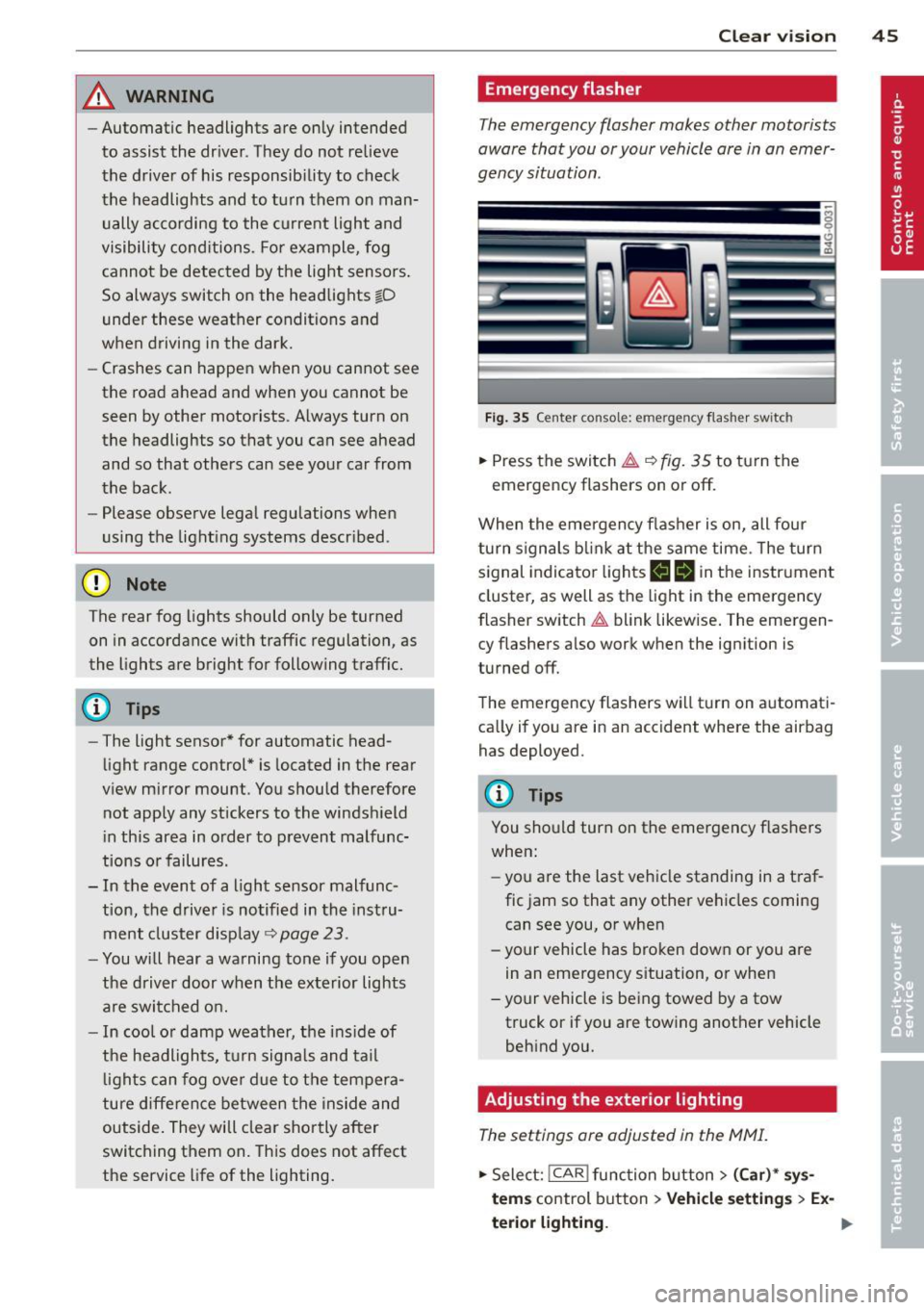
Fig. 35 Center consol e: eme rge ncy flash er sw itc h
.,. Press the switch & ~ fig. 35 to turn the
emergency flashers on or off.
When the emergency flasher is on, all four
turn signals blink at the same time. The turn
signal indicator lights
II Nin the instrument
cluster, as well as the light in the emergency
flasher switch
& blink likewise. The emergen
cy flashers also work when the ignition is
turned off.
The emergency flashers will turn on automati
cally if you are in an accident where the airbag has deployed.
@ Tips
You should turn on the emergency flashers
when:
- you a re the last vehicle standing in a traf
fic jam so that any other vehicles coming
can see you, or when
- your vehicle has broken down or you are
in an emergency situation, or when
- your vehicle is being towed by a tow
truck or if you are towing another vehicle
behind you.
Adjusting the exterior lighting
The settings ore adjusted in the MMI.
.,. Select: !CAR ! function button> (Car)* sys
tems control button > Vehicle settings > Ex-
terior lighting. ..,.
Page 49 of 306

instrument cluster illuminates when the
high beams are on.
- The
headlight flasher works only as long as
yo u hold the lever -even if there are no
l ights turned on . The indicator light
El in
the instrument cluster illuminates when you
use the headlight flasher.
A WARNING
Do not use the hig h beam or headlight
flasher if you know that these could blind
oncoming traffic .
Interior lights
Front and rear interior lighting
Fig. 37 Headliner: Front interior l ights
F ig . 38 Rear headl iner: Read ing light
Press the appropriate button ¢ fig. 3 7:
§1 -Interior lighting on/off
1!1-Door contact switch . The interior lighting
turns on automatica lly when you unlock the
vehicle, open a door or switch the ignition off. The interior lighting turns off several seconds
after you close the doors, when you lock the
vehicle or when you switch the ignition on.
When a door is open, the light tu rns off afte r
a few minutes .
Clear vision 4 7
~ -Reading lights on/off
@ill-Switching the rear reading lights on/off
from the cockpit.
I ',; REARI* -Switching the rear read ing lights
on/off from the cockpit.
Ambience lighting
Applies to veh icles: w ith amb ience lighting
You can adjust the br ightness for the ambi
ence lighting .
.,. Select in the MMI:
ICARI function button >
(Car)* systems control button > Vehicle set
ting s
> Interior lighting > Brightnes s.
.,. To increase o r reduce the b rightness , turn
the knob and press it .
The ambience lighting turns on when yo u turn
the headlights on while the ign ition is swi tch
ed on.
(0 Tips
The setting is automatically stored and as
signed to the remote control key that is in
use.
Instrument illumination
You can adjust the brightness of the instru
ment and display illumination as well as the
Head-up Display*.
Fig. 39 Ins trument illumina tion
.,. Press the knob to re lease it .
.,. Turn the knob toward"-" or"+" to reduce or
increase the br ightness.
.,. Press the knob aga in to return it to its origi-
na l posit ion .
~
Page 50 of 306

48 Clear vis ion
@ Tips
The instrument illumination (for dia ls and
needles) lights on when the ign it ion is
sw itched on and the vehicle lights are
turned off. As the daylight fades, the illu m ination of the dials likewise d ims auto
mat ica lly and will go out comp lete ly when
the o utside light is ve ry low . This feat ure is
meant to remind you to switch on the
headlight s when o utsi de lig ht condi tions
become poor.
Vision
Sun visors
~ .. ~ .. :? -
-· a5 ---
~- ·
-=
=.;.-- · ,._ .. _ ··- · ·-·--·----
Fi g. 40 Sun v isor
( ]
The sun visors for the driver and passenger
can be released from their brackets and
tu rned toward the doo rs
c::> fig. 40@.
The mirror light switches on when the cover
over the vanity mirror @opens.
Sun shade
Appl ies to vehicles: with su n shade
The sun shade is located on the luggage com
partment shelf.
Fig. 41 Sun s hade i n lowe red pos it io n
When the sun shade is in the lowered posi
tion, it is secured in the retainer @.
,. To r aise ® the s un shade , remove i t from
t he re tainer.
,&_ WARNING
= -D o not use the sun shade to secure cargo .
The luggage compartment cover is not a
surface for storing objects . Objects p laced
on the cover could endanger all ve hicle oc
cup-ants during sudden braking maneuvers
or in a c rash .
Wiper and washer
system
Switching the windshield wipers on
Fi g. 4 2 W inds hield w iper leve r
Move the windshie ld w iper lever to the corre
sponding position:
@ -Windshield wipe rs off
(D -Rain sensor mode . The windsh ield wipers
swi tch on once the veh icle speed e xceeds ap
proximate ly 2 mph (4 km/h) and it is ra ining .
T he higher t he rain sensor sensi tivity is set
( s w itch @to the right), the earl ier the wind
s h ield wipe rs rea ct to moisture on the w in d
shield. Yo u can deac tiva te rain sensor mode in
t h e MMI, which will then activate interm ittent
mode. Select :
I CARI funct ion button> (Car )*
systems
contro l button > Driver ass ist > Rain
sensor > Off .
In interm ittent mode, yo u can
adjust the interval time us ing the sw itch @.
@ -Slow wiping
@ -Fast w ip ing
Page 51 of 306
©-Single wipe. If you hold the lever in this
position longer, the wipers switch from slow
wiping to fast wiping.
® -Clean the windshield . The wipers wipe
one time after several seconds of driving to
remove water droplets. You can switch this
function off by moving the lever to position ®
within 10 seconds after the afterwipe. The af
terw ipe funct ion is reactivated the next time
you switch the ignition on.
Cleaning the headlights*. The headlight wash
er system * operates only when the headlights
are on. If you move the lever to position @,
the headlights and the night vision assistant
camera* are washed in intervals.
A WARNING
-The rain sensor is only designed to assist
and support the driver.
It remains entire
ly the driver's responsibility to monitor
outside weather conditions and to man
ually activate the wipers as soon as rain
or drizzle reduces visibility through the
windshield.
- The windshield must not be treated with
water-repellent materials. They can in
crease glare under poor visibility condi
tions such as wetness, darkness, or when
the sun is low on the horizon. In addi
tion, they can cause the windshield wip
ers to chatter.
- Properly functioning windshield wiper blades are required for a clear view and
safe driving~
page 49, Replacing
windshield wiper blades.
0 Note
- In the case of frost, check whether the
windshield wiper blades are frozen to
the windshield. Switching on the wind
shield wipers can damage the wiper blades!
- Prior to using a car wash, the windshield
wiper system must be switched off (lever in position @). This helps to prevent un
intentional switching on and damage to
the windshield wiper system.
Clear vision 49
-Do not use the wipers to clear a frosted
window. Using the wipers as a conven
ient ice scraper will destroy the wiper
blades.
(D Tips
- The windshield wipers are switched off
when the ignition is off. Activate the
windshield wipers after the ignition is
switched back on by moving the wind
shield wiper lever to any position.
- Worn or dirty windshield wiper blades
result in streaking. This can affect the
rain sensor function. Check your wind
shield wiper blades regularly.
- The washer fluid nozzles of the wind
shield washer system are heated at low
temperatures when the ignition is on.
- When stopping temporarily, e .g. at a
traffic light, the set speed of the wind
shield wipers is automatically reduced by
one speed.
Cleaning windshield wiper blades
Clean the windshield wiper blades when they
begin to leave streaks.
.,. Place the windshield wiper arms in the serv
ice position. Refer to~
page 50.
.,. Use a soft cloth and glass cleaner to clean
the windshield wiper blades.
A WARNING
Dirty windshield wiper blades can impair
your view. This can lead to accidents.
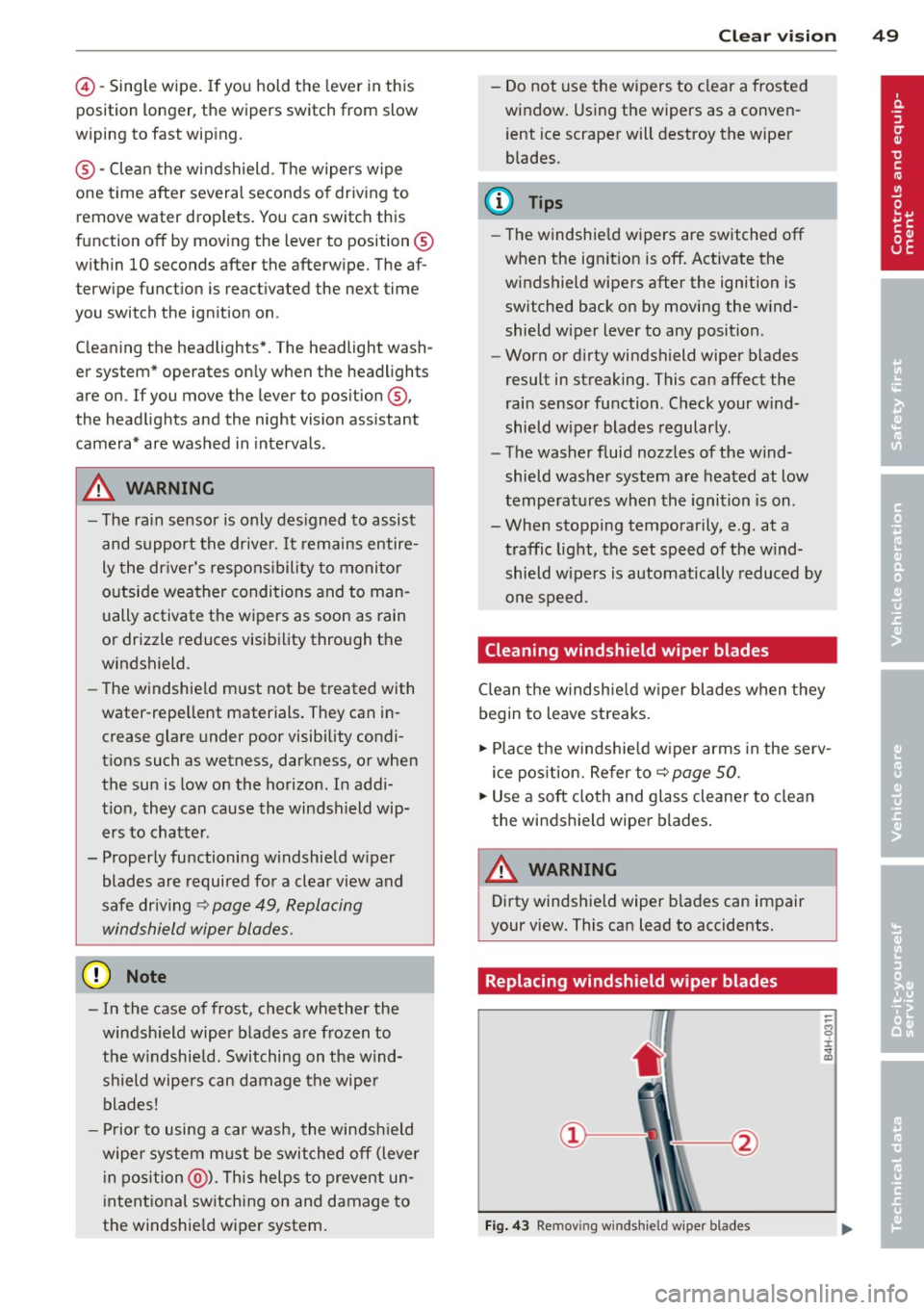
Replacing windshield wiper blades
Fig. 43 Remov ing windshie ld wiper blades
-
Page 52 of 306
50 Clear vis ion
Wiper servi ce po sition /blade rep lacem ent
po sit ion
• Switch the ignition off and move the wind
shield wiper lever to position @¢
page 48,
fig. 42. The windshield wipers move into the
service position.
• To bring the wipers back into the original
pos ition, switch the ignition on and press
the windshie ld wiper lever.
You can also turn the service position on or
off
in the MMI:
• Switch the w indshield wipers off (posit ion
@ ¢page 48, fig. 42).
• Se lect: I CAR I funct ion button> (C ar)* sys·
tern s
control button > Servicing & ch eck s >
Wip er serv ice po sition > On .
R em oving the wip er blade
• Lift the w indshield wiper arm up from the
wi ndshield.
• Press the locking knob
(D ~ fig. 43 on the
wiper blade. Hold t he wiper blade firm ly.
• Remove the wiper blade in the direction of
the arrow .
Attaching th e wiper blade
• Install the new wipe r blade in the retaine r
on the w iper arm @until you hear it cl ick in
to place on the wiper arm.
• Place the wiper arm back on the windshie ld .
• Turn the service pos ition
off .
A WARNING
-
For your safety, yo u should replace the
wiper blades once or tw ice a year. See your
authorized Audi dealer for rep lacement
blades.
(D Note
- The windshield wiper blades must on ly
be folded away when in the service posi
tion! Otherwise, you risk damaging the paint on the hood or the w indshield wip·
er moto r.
- You should not
move your vehicle or
press the w indshield w iper lever when
the wip er arms are folded away from the w
indshield. The windsh ield wipers wou ld
move back into their original position
and co uld damage the hood and wind
shield.
- To help prevent damage to the wiper sys
tem, always loosen blades wh ich are fro
zen to the windshield before operating
w ipers.
- To help prevent damage to wiper blades,
do not use gasoline, kerosene, paint
thinner, or other solvents on o r near the
w iper blades.
- To help prevent damage to the wiper
arms or other components, do not at
tempt to move the wipe rs by hand.
¢j) Tips
- Commercial hot waxes applied by auto·
matic car washes affect the cleanability
of the windshie ld.
- You can also use the se rvice position, for
example, if you want to protect the
w indshield from icing by using a cover.
- You can not activate the service position
when the hood is open .
Mirrors
Adjusting the exterior mirrors
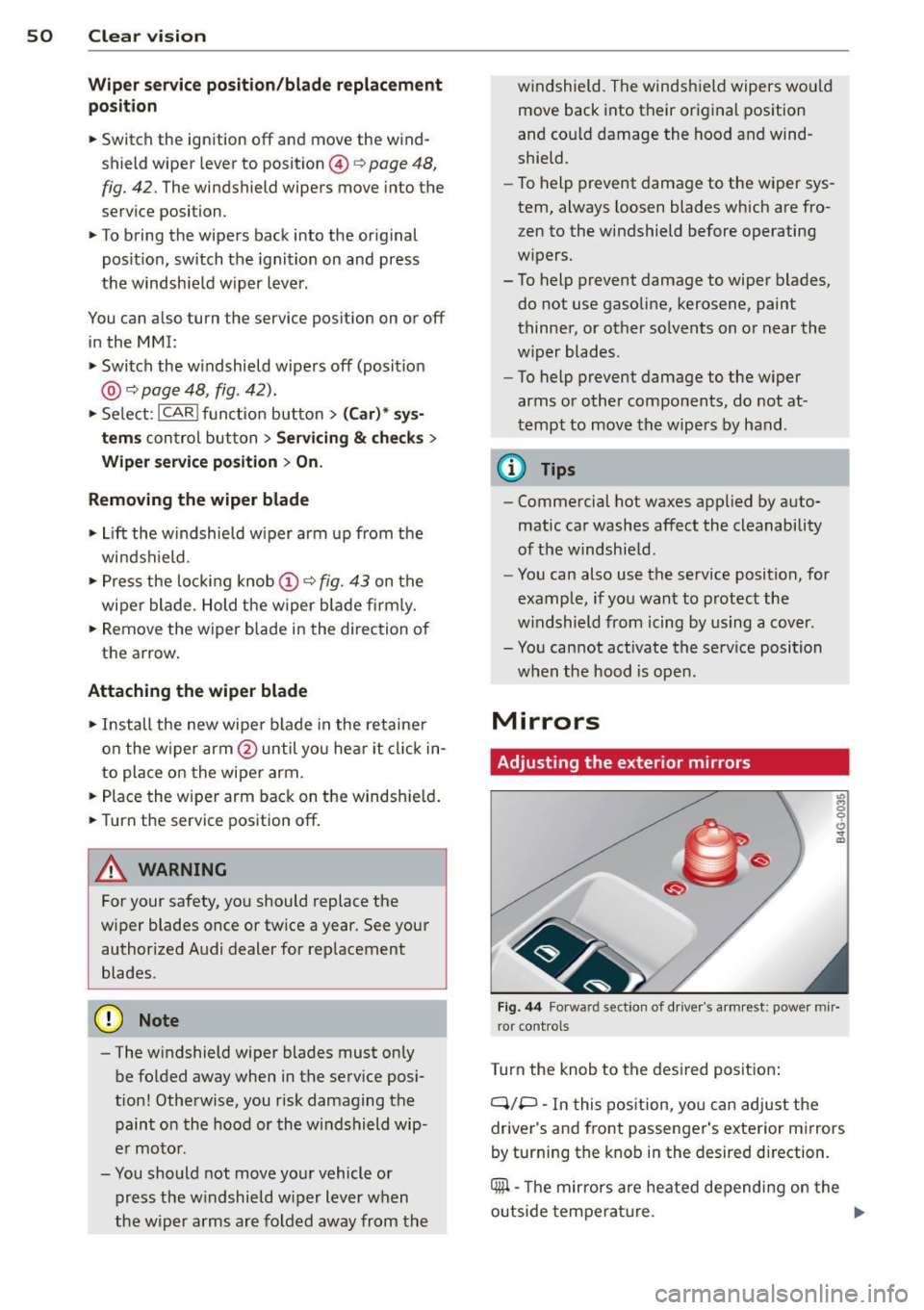
Fig. 44 Forward section of driver 's arm rest: power mir·
ror controls
Turn the knob to the desired posit ion :
Q/P -In this pos ition, yo u can adjust the
driver's and front passenger's exterior mirrors
by turning the knob in the desired direction.
4iil -The m irrors are heated depend ing on the
outside tempera ture. .,._
Page 53 of 306

8 - The exterior mirrors fold in. In the MMI,
you can select if the mirrors fold in automati
cally when you lock the vehicle ~
page 35.
Tilt function for the passenger's mirror
To help you see the curb when backing into a
parking space, the surface of the mirror tilts
slightly. The knob must be in the P position
for this to happen.
You can adjust the tilted mirror surface by
turning the knob in the desired direction.
When you move out of reverse and into anoth
er gear, the new mirror position is stored and
assigned to the key you are using.
The mirror goes back into its original position
once you drive forward faster than 9 mph (15
km/h) or switch the ignition off.
.&_ WARNING
- Curved (i.e. convex) mirror surfaces in
crease your field of view. Remember that
vehicles or other objects will appear
smaller and farther away than when seen in a flat mirror.
If you use this mirror to
estimate distances of following vehicles
when changing lanes, you could estimate
incorrectly and cause an accident.
(D Note
-If the mirror housing is moved uninten
tionally (for example, while parking your
vehicle), then you must first fold the mi r
ror electrically. Do not readjust the mir
ror housing manually. You could damage
the motor which controls the mirror.
- If you wash the vehicle in an automatic
car wash, you must fold the exterior mir
rors in to reduce the risk of damage to
the mirrors. Never fold power folding ex
terior mirrors* by hand. Only fold them in and out using the power controls.
@ Tips
-The exterior mirror settings are stored
with the memory function*
~ page S 7.
- If there is a malfunction in the electrical
system, you can still adjust the exterior
Clear vision S 1
mirrors by pressing the edge of the mir
ror.
Dimming the mirrors
Fig. 45 Automatic dimming rea rview mirro r•
Manual anti-glare adjustment
"' Move the small lever (located on the bottom
edge of the mirror) to the rear.
Automatically dimming mirrors*
"'To dim the rearview mirror and both exterior
mirrors, press the@button. The diode @
turns on. The rearview and exterior mirrors
dim automatically when light shines on
them, for example from headlights on ave
hicle to the rear.
&_ WARNING
= Electrolyte fluid can leak from automatic
dimming mirrors if the glass is broken.
Electrolyte fluid can irritate skin, eyes and
respiratory system.
~
- Repeated or prolonged exposure to elec
trolyte can cause irritation to the respira
tory system, especially among people
with asthma or other respiratory condi
tions. Get fresh air immediately by leav
ing the vehicle or, if that is not possible,
open windows and doors all the way.
- If electrolyte gets into the eyes, flush
them thoroughly with large amounts of
clean water for at least 15 minutes·
'
medical attention is recommended.
- If electrolyte contacts skin, flush affect
ed area with clean water for at least 15 minutes and then wash affected area
with soap and water; medical attention
.___ ______ _:_ ____ _:_.::..:..:..._J ....
Page 55 of 306
Seats and storage
General recommen
dations
Why is your seat adjustment so important?
The safety belts and the airbag system can
only provide maximum protection if the front
seats are correctly adjusted.
There are various ways of adjusting the front
seats to provide safe and comfortable support
for the driver and the front passenger. Adjust
your seat properly so that :
- you can easily and quick ly reach all the
switches and controls in the instrument
panel
- your body is properly supported thus reduc ing physical stress and fatigue
- the safety belts and airbag system can offe r
maximum protection
¢ page 149.
In the following sections, you will see exactly
how you can best adjust your seats .
There are special regulations and instructions
for installing a child seat on the front pas
senger's seat. Always fo llow the information
regarding chi ld safety provided in
¢ page 175, Child Safety.
A WARNING
Incorrect seating position of the driver and
all other passengers can result in serious
personal injury.
- Always keep your feet on the f loor when
the vehicle is in motion -never put your
feet on top of the instrument panel, out of the window or on top of the seat cush
ion. This applies especially to the passen
gers . If your seating position is incorrect,
you increase the r isk of injury in the case
of sudden braking or an acc ident. If the
airbag inflates and the seating position
is incorrect, this could result in persona l
injury or even death.
- It is important for both the driver and
front passenger to keep a distance of a t
Seat s an d sto rage 53
least 10 inches (25 cm) between them
selves and the steering wheel and/or in
strument panel. If you're s itting any
closer than th is, the airbag system can
not protect you properly. In addition, the
front seats and head restraints must be adjusted to your body height so that they
can give you maximum protect ion.
- Always try to keep as much distance as
possible between yourself and the s teer
ing wheel o r instrument pane l.
- Do not adjust the driver's or front pas
senger's seat whi le the vehicle is moving.
Your sea t may move unexpected ly, caus
ing sudden loss of vehicle cont rol and
personal injury . If you adjust yo ur seat
while the veh icle is moving, yo u are out
of posit ion.
Driver's seat
The correct seat position is important for safe
and relaxed driving.
We recommend that you adjus t the dr iver's
seat in the fo llowing manner:
.,. Adjust the seat in fore and aft direction so
that you can easily push the peda ls to the
floor wh ile keeping your knees s lightly bent
i:::> A in Why is your seat adjustment so im
portant? on page 53.
.,. Adjust the backrest so that when you sit
w ith your back against the backrest, you can
still grasp the top of the steering wheel.
.,. Adjust the head restraint so the upper edge
is as even as possible with the top of your
head . If that is not poss ible , try to adjust
the head res traint so that it is as close to
this pos ition as possib le
i:::> page 56. Move
the head restraint so that it is as close to the
back of the head as possible .
A WARNING
Never place any objects in the dr iver's foot
well. An object could get into the pedal
area and interfere with pedal funct ion. In
case of sudden braking or an acc ident, you
would not be able to brake or accelerate.