warning AUDI A7 2014 Service Manual
[x] Cancel search | Manufacturer: AUDI, Model Year: 2014, Model line: A7, Model: AUDI A7 2014Pages: 306, PDF Size: 76.83 MB
Page 56 of 306
54 Seats and storage
Front passenger's seat
Always move the front passenger seat into
the rearmost position.
To avoid contact with the airbag while it is de
ploying, do not sit any closer to the instru
ment panel than necessa ry and always wear
the three-point safety belt provided adjusted
correctly. We recommend that you adjust the
passenger's seat i n the fol low ing ma nner:
~ Bring the back rest up to an (a lmost) upr ight
posit ion.
D o not ride w ith the seat reclined.
~ Adjust the head restraint so the uppe r edge
i s as even a s poss ible with the top of yo ur
head.
If that is not possible, try to a dju st
the head rest raint so that it is as close to
this position as possible ¢
page 56. Move
the head restraint so that it is as close to the
back of the head as possib le.
~ Place your feet on the floor in front of the
passenger's seat.
Front seats
Controls
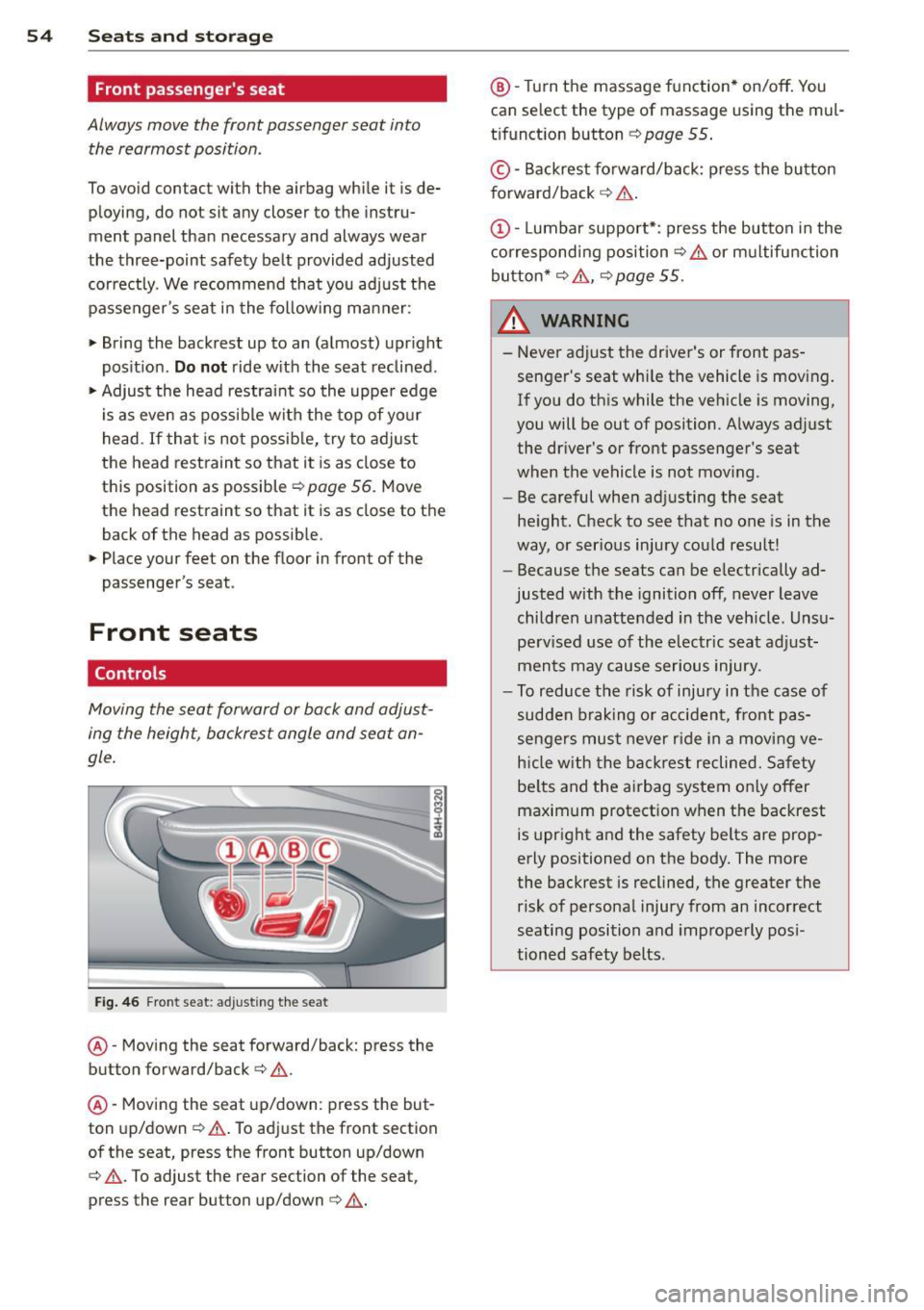
Moving the seat forward or ba ck and adjust
ing the height, backrest angle and seat an
gle .
fig . 46 Front seat: ad justing th e seat
@ -Moving the seat forward/back: press the
button forward/back ¢ .&. .
@ -Moving the seat up/down: press the but
ton up/down¢ &,. To adjust the front section
of the seat, press the front button up/down
¢ &, .To adjust the rear section of the seat ,
press the rear button up/down¢&, .
@ -Turn the massage function* on/off . You
can se lect the type of massage using the mul
t ifunct ion button ¢
page 55 .
© -Backrest forward/back: p ress the bu tton
f orward/back ¢ .&. .
(D -Lumbar support*: press the button in the
c orrespond ing position¢ .&. or m ultifunction
button*¢ .&., ¢
page 55 .
_& WARNING
--
-Never adjust the driver's or front pas -
senger's seat whi le the vehicle is moving .
If you do th is while the veh icle is moving,
you will be out of position. A lways ad just
the driver's or front passenger's seat
when the vehicle is not mov ing.
- Be careful when adjusting the seat
he ight. Check to see that no one is in the
way, or ser ious injury co uld result!
- Because the seats can be e lectrically ad
justed with the ignition off, never leave
children unatte nded in the veh icle. Uns u
perv ised use of the e lectr ic seat ad just
men ts may cause serious injury.
- To r educe the risk of injury in the case of
sudden b raking o r accident, front pas
sengers mus t never r ide in a movi ng ve
h icle with the ba ckrest reclined. Sa fety
be lts and the airbag system only offer
maximum protection when the backrest
is upright and the safety belts are prop
erly positioned on the body. The more
the backrest is reclined, the greater the
risk of personal injury from an incorrect
seating position and imprope rly pos i
tioned safety belts.
Page 57 of 306
Multifunction button
Applies to vehicles: with memory function
You con adjust the massage function, Lumbar
support, side bolsters and seating surface us ing the multifunction button .
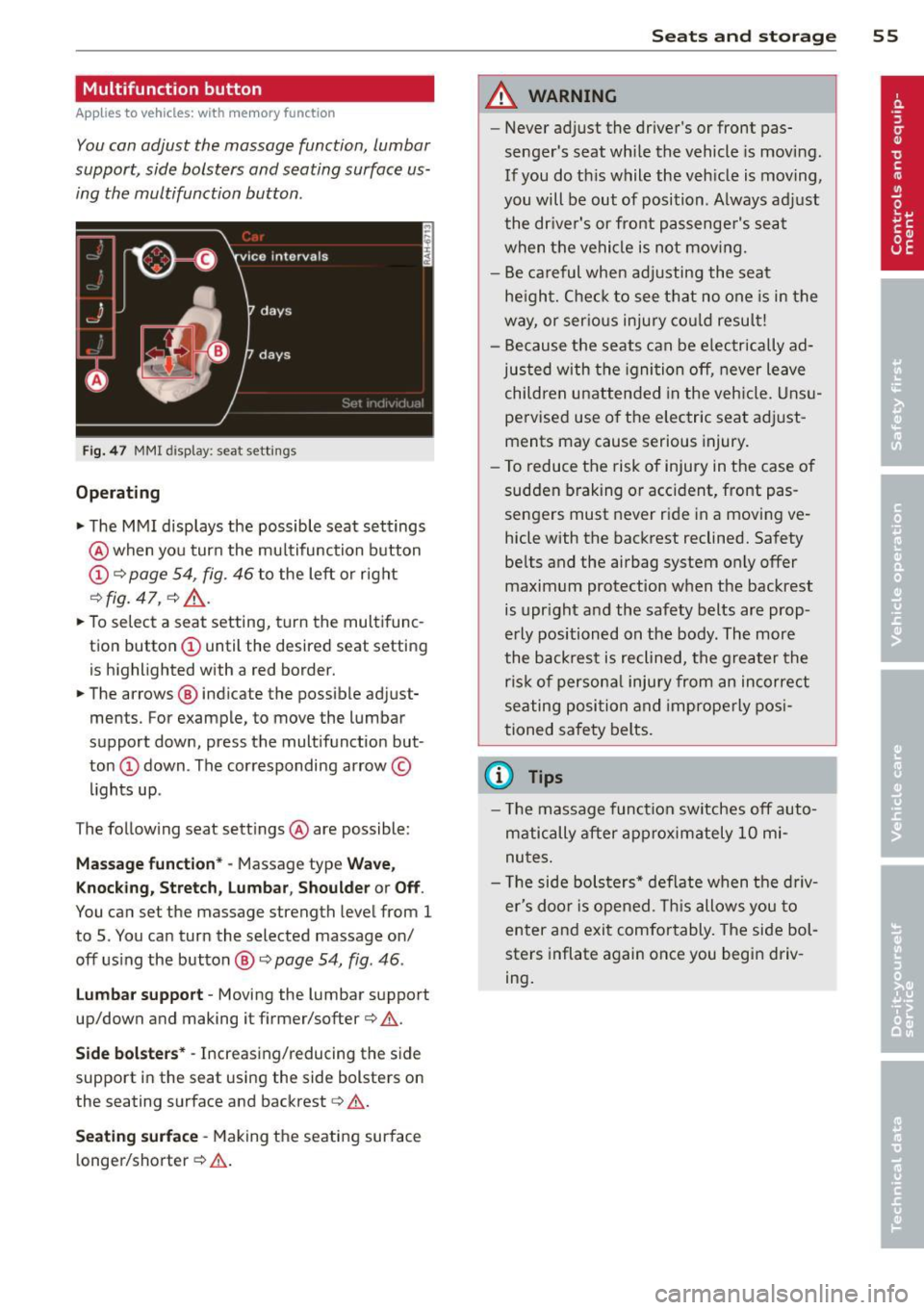
Fig. 47 MMI disp lay : sea t sett ings
Operating
.. The MMI displays the possible seat settings
@ when you turn the multifunction button
(D c:> page 54, fig. 46 to the left or right
~ fig. 47 , c:> ,& .
.. To select a seat setting, turn the multifunc
tion button
(D until the desired seat setting
is highlighted with a red border.
• The arrows @ indicate the possible adjust
ments. For example, to move the lumbar
support down, press the multifunction but
ton
(D down . The corresponding arrow ©
lights up.
T he follow ing seat settings @ are possible:
Massage function* -Massage type Wave,
Knocking, Stretch, Lumbar, Shoulder or Off .
You can set the massage strength level from 1
to 5. You can turn the selected massage on/
off using the button @~
page 54, fig . 46 .
Lumbar support -Moving the lumbar support
up/down and making it firmer/softer
c:> .&. .
Side bolsters * -Increasing/reducing the side
support in the seat using the side bolsters on
the seating surface and backrest
c:> A .
Seating surface -Making the seating surface
l onger/shorter
c:> .&. .
Seats and storage 55
A WARNING
-Never adjust the driver's or front pas
senger's seat while the vehicle is moving.
If you do this while the veh icle is moving,
you will be out of position . A lways adjust
the driver's or front passenger's seat
when the vehicle is not moving.
- Be careful when adjusting the seat
he ight. Check to see that no one is in the
way, or serious injury could result!
- Because the seats can be electrically ad
justed with the ignit ion off, never leave
children unattended in the vehicle. Unsu
pervised use o f the electric seat adjust
ments may cause serious injury.
- To reduce the risk of injury in the case of
sudden braking or accident, front pas
sengers must never ride in a moving ve
hicle with the backrest reclined. Safety
belts and the airbag system on ly offer
maximum protection when the backrest
is upright and the safety belts are prop
erly positioned on the body . The more
the backrest is reclined, the greater the
ris k of persona l inju ry from an incorrect
seating position and improperly posi
tioned safety belts.
(D Tips
- The massage function switches off auto
matically after approximately 10 mi
nutes.
- Th e side bolsters* deflate when the driv
er's doo r is opened. This allows you to
enter and exit comfortably. The side bol
sters inflate again once you begin driv
ing.
Page 58 of 306
56 Seats and storage
Armrest
Th ere is a storage compartment under the
armrest.
F ig. 48 Cockp it : center arm rest
Adjusting th e armrest
• To ad just the angle, raise the armrest from
the start ing pos ition detent by detent.
• To bring the armrest back into its original
position, lift it above the top position and
then fold it back down .
Opening th e storage compartment
• Press the button -arrow-upward.
Please note that the driver's arm movements
may be restr icted w ith the armrest fo lded
down. Fo r th is reason, the armrest should not
be folded down when driving in city traffic.
Head restraints
Front head restraints
App lies to vehicles: with adjustable head restrain ts
Head restraints that are adjusted according
to body size, along with the seat belt, offer
effective protection.
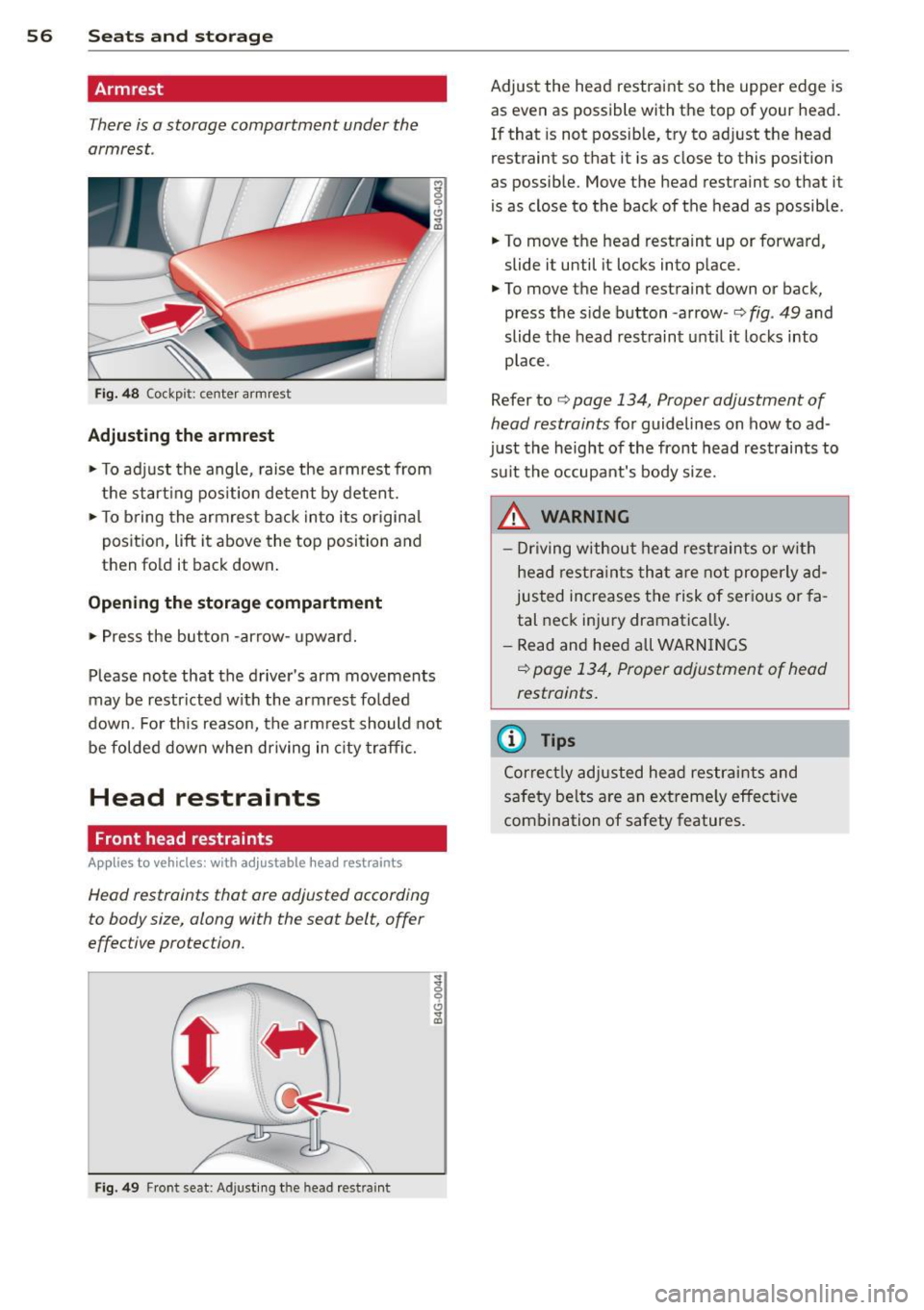
F ig . 49 Fr ont seat: Adjusting t he head res tra int
Adjust the head restraint so the upper edge is
as even as possible with the top of your head.
If that is not possible, try to adjust the head
restraint so that it is as close to this position
as possible. Move the head restraint so th at it
is as close to the back of the head as possib le .
• To move the head restraint up or forward,
slide it until it locks into place.
• To move the head restraint down or back,
press the side button -arrow -
c::> fig. 49 and
slide the head restraint unt il it loc ks into
p lace.
Refer to
c::> page 134, Proper adjustment of
head restraints
fo r guidelines on how to ad
just the height of the front head restraints to
su it the occupant's body size.
_& WARNING
- Dr iving w ithou t hea d rest rain ts or with
hea d restra ints tha t ar e no t properly ad
justed increases t he risk of ser ious or fa
tal neck injury dramatica lly.
- Read and heed all WARN INGS
c::> page 134, Proper adjustment of head
restraints.
(D Tips
Cor rec tly adjusted hea d restr aints and
s a fety be lt s are an extreme ly effe ctive
com bination of safety features.
-
Page 59 of 306

Rear head restraints
/
Fig. SO Rear seats : Head restra int
Fig. 51 Rear head restra ints: re lease
If there is a passenger in the rear center seat
ing position*, slide the center head restraint*
upward at least to the next notch
Q ,&..
Adjusting the head restraints
.. To move the head restraint up, hold it at the
sides with both hands and slide it upward
until you feel it lock into place
Q .&. in Prop
er adjustment of head restraints on
page 134.
.. To move the head restraint down, press the
button -arrow-
Q fig. 50 and sl ide the head
restraint downward .
Removing the head restraints
.. Fold the backrest forward Q page 65.
.. Move the head restraint upward as far as it
can go .
.,. Press the release
Q fig. 51 with the mechan
ical key
9 page 33 and the button -arrow-
9 fig. 50. Pull the head restraint out of the
backrest at the same time
9 ,&..
Seats and storage 57
Installing the head restraints
.. Slide the posts on the head restraint down
into the guides until you feel the posts lock
into place .
.. Press the button -arrow-
Q fig. 50 and slide
the head restraint all the way down. You
should not be able to pull the head restraint
out of the backrest.
So that the driver can have a better view to
the rear, the head restraints should be pushed down completely when the rear seats are not
occupied.
A WARNING
- Only remove the rear seat head restraints
when necessary in order to install a child
seat. Install the head restra int again im
mediately once the child seat is removed.
Driving without head restraints or with
head restraints that are not properly ad
justed increases the risk of serious or fa
tal neck injury dramat ica lly.
- Read and heed all WARNINGS
¢page 134.
Seat memory
Description
Applies to veh icles: w it h memory f unction
The memory function allows you to quickly
and easily store and recall personal seating profiles for the driver and front passenger*.
T he memory function is operated through the
master key and the memory buttons in the
driver's/front passenger's* doors.
The driver's seating profile is stored and as
s ig ned to the master key each time the vehicle
is locked. The seating profile is recalled auto
matically when the vehicle is unlocked. If two
people use one vehicle, it is recommended
that each person always uses "their own"
master key .
Two seating profiles can be stored in each of
the driver's/front passenger's* doors. Once
stored, these seat ing profiles can be recalled
at any time.
Page 60 of 306

58 Seats and storage
The follow ing settings are stored:
Remote Memory button
control
master key
Driver Driver Front passen-ger
Seat X X X
Steering X X
wheel*
Both exterior
X X
rearview mir -
rors*
Remote control key
Applies to vehicles: with memory function
To assign the driver's seat settings to the re
mote control key when locking the vehicle, the
function must be switched on.
> Select: I CARI funct ion button> (Car)* sys
tems
control button > Vehicle settings >
Seats > Driver seat > Remote control key >
On.
I@ Tips
If you do not want another driver's set
tings to be assigned to the remote control
key, switch off the memory function using
the MMI or the
I OFF ! button c:::> page 58.
Memory buttons
Applies to vehicles: with memory function
Fig. 52 Driver's doo r: memory function buttons
The memory buttons are located in the driv
er's/fro nt passenger's* door .
> To store a seating profile, press the ISE T!
but ton and then one of the memory but
tons.
> To recall a seating profile, press and hold
the memory button until the seat is adjust ed to the stored settings.
> To switch the memory function for the driv
er or front passenger off, press the
I OF F I
button . The word OFF lights up when the
memory function is switched off . Seating
p ro fil es w ill not be sto red .
A WARNING
- F or safety reasons, the seat setting
should only be recalled when the veh icle
is stationary -otherwise you risk having
an accident.
- If necessary, you stop the process by
pressing the
I OFF ! button or any of the
memory buttons.
Adjusting the front passenger seat in
the MMI
Applies to vehicles: with memory function
The driver can adjust the position of the front
passenger seat.
Adjusting the front passenger seat from
the driver's side
> Select: !CARI function button> (C ar) * sys
tems
control button > Vehicle settings >
Seats> Front passenger seat > Adjust seat
position .
> You can now adjust the front passenger seat
using the buttons on the driver's seat
c:::> page 54, fig. 46.
Matching the position of the driver's seat
> To adjust the front passenger seat to match
the driver's seat settings, select the
ICARI
function button > ( Car)* systems control
button >
Vehicle settings > Seats > Front
passenger seat> Symmetry to driver seat.
> Press and hold the control knob unt il the ad
justment process is complete.
Page 61 of 306
@ Tips
When matching seat settings, the settings for the lumbar support and seating sur-
face w ill not transfer to the front passeng
er's seat.
Ashtray
Applies to vehicles: with ashtray
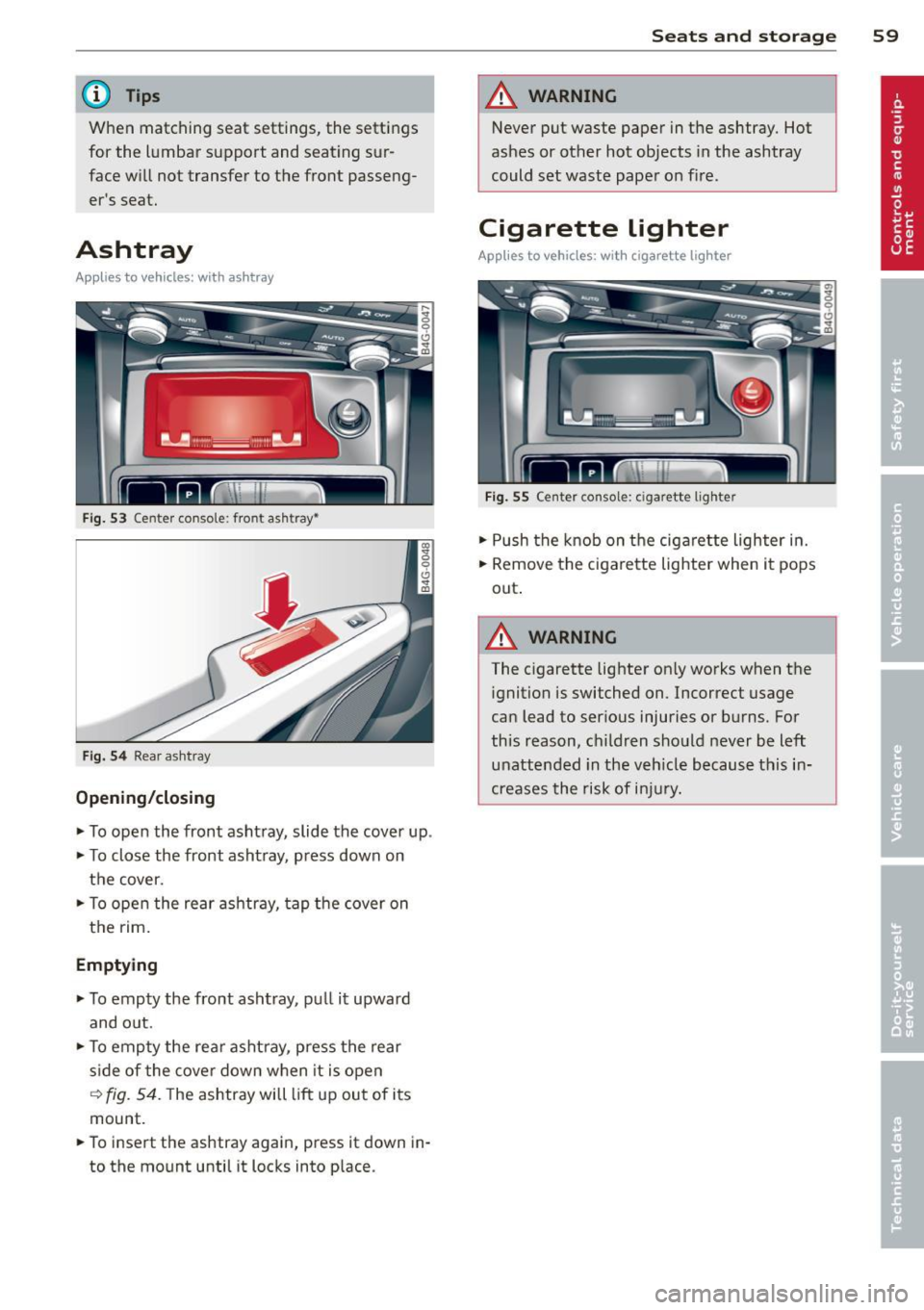
Fig. 53 Center conso le : fron t asht ray•
Fig. 54 Rear a sh tray
Opening/closing
~ To open the front ashtray, slide the cover up .
~ To close the front ashtray, press down on
the cover.
~ To open the rear ashtray, tap the cover on
the rim.
Emptying
~ To empty the front ashtray , pull it upward
and o ut.
~ To empty the rear ashtray, press the rear
s ide of the cover down when it is open
~ fig. 54. The ashtray will lift up out of its
mount.
~ To insert the ashtray again, press it down in
to the mount until it locks into place.
Seats and storage 59
A WARNING
Never put waste paper in the ashtray. Hot
ashes or other hot objects in the ashtray
could set waste paper on fire.
Cigarette lighter
Applies to vehicles: with cigarette lighter
Fig. 55 Center console: c iga rette lighte r
~ Push the knob on the cigarette lighter in.
~ Remove the cigarette lighter when it pops
out .
A WARNING ,_
The c igarette lighter only works when the
ignition is switched on. Incorrect usage
can lead to serious injuries or burns. For
this reason, children should never be left
unattended in the veh icle because this in
creases the risk of injury.
Page 62 of 306

60 Seats and st o rage
12-volt sockets
Appl ies to vehicles: wit h 12-volt sockets
Fig. 56 Sect ion of the trim panel o f th e luggage com ·
par tm ent: 12-vol t so cket
-
Fig. 57 R ear cente r co nso le: 12-vo lt socke t
,. To reach the 12-volt socket in the luggage
compartment, press the net down or re
move the bracket from the mounts
c:> fig . 56 .
There is an additional 12-vo lt socket in the
front and rear center console~
fig. 57.
0 5 0 6
~
The 12-volt sockets may be used for 12-volt
appliances with maximum consumption of up
to 120 watts.
Before you purchase any accessories, always
read and fo llow the information in
c:> page 287, Additional accessories and parts
replacement .
A WARNING
The sockets and the e lectrical accessories
connected to them operate only when the
ign ition is switched on. Incorrect usage
can lead to serious injur ies or burns. To re·
duce the risk of injuries, never leave chi l
dren unattended in the vehicle w ith the ve
hicle key.
(D Note
To avoid damaging the socket, only use plugs that fit properly.
- Never connect equipment that generates
electrical current, such as a solar pane l
or battery charger, to the 12-vo lt socket.
This could damage the vehicle's electri cal system.
- The 12-vo lt socket should on ly be used
for a short period of ti me as a power
source for electrical equ ipment . Please
use the electrical sockets in the vehicle
when connecting equ ipment for longer
periods.
- To avoid damaging the socket , only use
plugs that fit properly.
(0 Tips
When the engine is off and accessories are
still plugged in and are on , the vehicle bat
tery can still be drained.
Storage
Cupholder
F ig. 58 Ce nter co ns ole: c upho lde r
Fig . 59 Rear ce nter a rmrest : cupho ld er exte nded
Page 63 of 306

Front cupholder
• To open the cupholder, tap the cover
¢fig. 58.
Rear cupholder
• To open the rear cupholder, press on the
symbol
W @ ¢ fig. 59.
• To adjust the arm@, swing it in the direc
t ion of the arrow.
• Place the beverage in the holder and release
the arm. The arm swings back by itself and
automatically secures the beverage.
• To close the rear cup holder, press on the
center section between the two arms and
push the cupholder in the slot as far as it
will go .
& WARNING
Spilled hot liquid can cause an accident
and personal injury.
- Never carry any beverage containers with
hot liquids, such as hot coffee or hot tea,
in the vehicle while it is moving . In case
of an accident, sudden braking or other
vehicle movement, hot liquid could spill,
causing sca lding burns. Spilled hot liquid
can a lso cause an accident and personal
injury.
- Use only soft cups in the cupholder . Hard
cups and g lasses can cause injury in an
accident.
- Never use the cupholder or adapter as an
ashtray -risk of fire.
(D Note
On ly drink containers with lids should be
carried in the cupho lder. Liquid could spill
out and damage your vehicle's electronic
equipment or stain the upholstery, etc.
Seats and storage 61
Cooled glove compartment
Applies to vehicles: w ith cooled g love compart men t
The cooled glove compartment only functions
when the AIC system is switched on .
Fig. 60 Glove compartment: sw it c h in g cooling mode
on/off
• Turn the knob@counterclockwise to switch
cooling on. The symbols on the knob indi
cate the correct position .
• Turn the knob @clockwise to switch cooling
off.
The glove compartment cooling mode only
functions when the vehicle A/C system is
switched on . If the heating is switched on,
switching the glove compa rtment cooling
mode off is recommended.
& WARNING ~ -
Always leave the lid on the glove compart
ment cover closed while driving to reduce
the r isk of injury.
Additional storage
There are a variety of storage compartments
and fasteners in various places in the vehicle .
- Storage compartments in the doors
- Compartment in the glove compartment
(coo led*) . Th e g love compartment can be
locked using the mechanica l key ¢
page 33.
-Storage compartment for (sun)glasses* in
the roof (near the interio r mirror)
- Storage compartments under the center
armrests
- Storage compartment on the rear side of
the front seat*. The compartment can hold a
maximum weight of 1 kg. ..,..
Page 64 of 306
62 Seats and storage
-Compartments* on the back of the front
seat backrests
- Garment hooks on the sides of the pillars in
the rear of the vehicle and in the rear grab
handles
- Compartment in the rear center armrest
- Storage in the trim panels in the luggage
compartment
~ WARNING
-
- Always remove objects from the instru
ment panel. Any items not stored could
slide around inside the vehicle while driv
ing or when accelerating or when apply
ing the brakes or when driving around a
corner.
- When you are driving make sure that
anything you may have placed in the cen
ter console or other storage locations
cannot fall out into the footwells. In case
of sudden braking you would not be able
to brake or accelerate.
-Always keep the lid of the compartment
for (sun)glasses* closed while driving to
reduce the risk of injury during a sudden
braking maneuver or in the event of an
accident.
- Any articles of clothing that you have
hung up must not interfere with the driv
er's view. The coat hooks are designed
only for lightweight clothing. Never hang
any clothing with hard, pointed or heavy
objects in the pockets on the coat hooks.
During sudden braking or in an accident -
especially
If the airbag is deployed -
these objects could injure any passen
gers inside the vehicle.
- To reduce the risk of personal injury in an
accident or sudden stop, always keep the
glove compartment closed while driving.
- Read and follow all WARNINGS
~ page 171, Important safety instruc
tions on the side airbag system.
-Hang clothes in such a way that they do
not impair the driver's vision.
- The coat hooks must only be used for
lightweight clothing. Do not leave any
heavy or sharp edged objects in the pock- ets which may interfere with the side cur
tain airbag deployment and can cause
personal
injury in a crash.
- Do not use coat hangers for hanging
clothing on the coat hooks as this can in
terfere with proper deployment of the side curtain airbags in an accident.
- Do not hang heavy objects on the coat
hooks, as they could cause personal in
jury in a sudden stop.
(D Note
Objects located on the rear shelf that rub
against the rear window could damage the heating wires for the rear window defog-
ger .
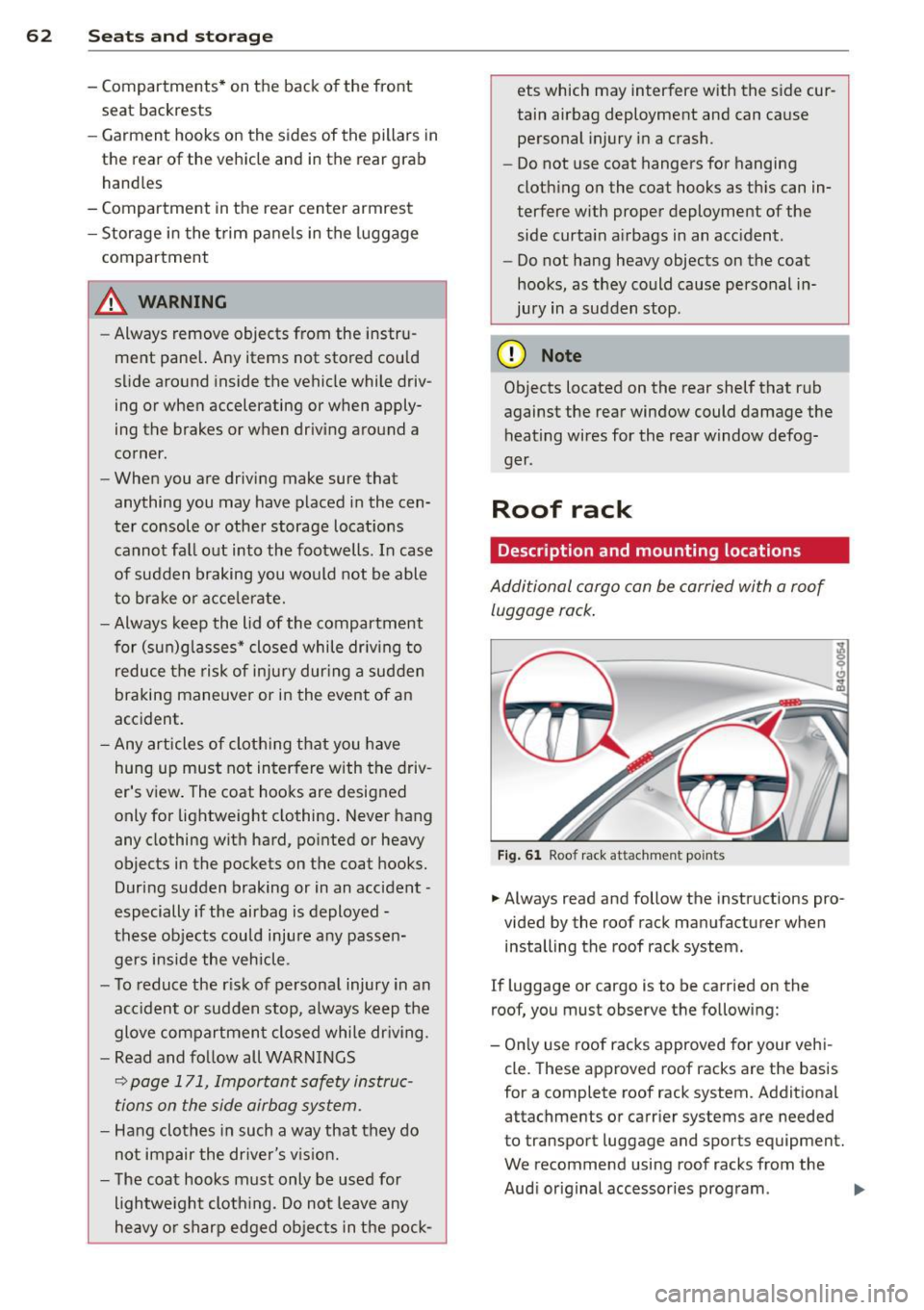
Roof rack
Description and mounting locations
Additional cargo can be carried with a roof
luggage rack.
Fig. 61 Roof rack attachment po ints
... Always read and follow the instructions pro
vided by the roof rack manufacturer when installing the roof rack system.
If luggage or cargo is to be carried on the
roof, you must observe the following:
- Only use roof racks approved for your vehi
cle. These approved roof racks are the basis
for a complete roof rack system. Additional
attachments or carrier systems are needed
to transport luggage and sports equipment.
We recommend using roof racks from the
Audi original accessories program . .,..
Page 65 of 306

-When installing the roof rack, make sure it
is only mounted on the designated locations
on the roof¢
fig. 61 .
-We recommend that you keep the installa
tion instructions for your roof rack system
together with your Owner's literature in the
vehicle.
Wh en should th e roof rack be remov ed ?
- Before going through an automatic car wash
(it is best to ask the car wash operator for
advice).
- When not in use, to reduce fuel consump
tion, wind noise and to guard against theft.
8_ WARNING
- Use of an unapproved roof rack or incor
rect mount ing of an approved roof rack
can cause the roof rack or the items at
tached to it to fall off the roof onto the road.
- Objects falling from the roof of a vehicle
can cause a crash and personal injury .
- Only mount the roof rack on the desig
nated locations on the roof¢
fig. 61 .
-The roof rack system must be installed
exactly according to the instructions pro
vided .
- When driving with a roof rack system,
changes to the center of gravity and wind
resistance can change the veh icle han
dling and lead to a collision . Always
adapt you r driv ing and your speed to the
c u rrent conditions.
(D Note
- Your vehicle warranty does not cover any
damages to the vehicle caused by using
r oof racks or mount ing structures not
approved by Audi for your vehicle . T he
same applies to damage resulting from
incorrect roof rack installa tion.
- Always check t he roof rack moun tings
and hardware before each trip and dur
i ng a trip to make sure everything is se
curely tightened . If necessary, retighten
the mount ings and check the entire sys
tem from t ime to t ime.
S eat s an d sto rage 63
-After mounting a roof rack system, or
when you transport objects on the roof
of your vehicle, the heig ht of the veh icle
is naturally increased. Be careful when
dr iving under low bridges or in parking
garages for example. This cou ld cause
damage to the load and even the vehicle
itself .
- Make sure the open rear lid and the sun
roof* do not come into contact w ith the
roof rac k.
Loading the roof rack
Always distribute loads evenly. Make sure
anything on the roof rack is securely tied
down.
"' Always distribute the loads on the roof rack
even ly.
"' Always attach items to the roof rack securely
befo re you dr ive off.
The maximum permissible roof weight is
220 l b (100 kg) . The roof weight is the total
of the we igh t of the roof rack, t he attach
ments and the cargo you a re carry ing . You
must a lso not exceed the max imum load
weight for the roof rack yo u are using .
When using a roof rack system which has a lower load ca rrying capacity, you must not use
u p the tota l maximum permissible load car ry
ing capacity specified above . Instead, you
sho uld load the roof rack system only to the
max imum capacity specified by the manufac
turer of the roof rack system.
8_ WARNING
Weak, damaged or improper straps used
to secure items to the roof rack can fail
du ring hard b raking o r in a coll is ion and
cause ser ious persona l injury.
- Make sure the roof rack is installed exact
ly as specif ied above ¢
page 62.
- Always use su itable mount ing straps for
secur ing items to the roof rack to help
prevent items from sh ifting or flying for
ward.