park assist AUDI A7 2015 User Guide
[x] Cancel search | Manufacturer: AUDI, Model Year: 2015, Model line: A7, Model: AUDI A7 2015Pages: 316, PDF Size: 78.09 MB
Page 121 of 316
M N <( (.J
'SI: ,...., \!) 1.1'1 ,...., 1.1'1 ,....,
example, after a collision, do not contin
ue to use the system for safety reasons.
Have it checked by your authorized Audi
dealership or authorized repa ir facility .
- Only use the rear v iew camera to assist
you if it shows a good, clear picture. For
example, the image may be affected by
the sun shin ing into the lens, dirt on the
lens or if there is a system fau lt.
- Use the rear view camera only if the lug
gage compartment lid is comp letely
closed. Ma ke su re any objects you may
h ave mounted on the luggage compart
ment lid do not block the rear view cam
era.
- The camera lens en la rges and dis torts
the field of vision. The ob ject appears
both a ltered and inaccurate on the
screen .
- In certain s ituations, peop le or objects in
the display appear closer or f urther
away:
- For objects that do not touch the
ground , such as the bumper of a
pa rked vehicle, a t railer hitch or the
rea r of a truck. Do not use the help
lines in this case.
- If driven from a leve l surface onto a n
incline, or a downward slope.
- If driven towa rd p rotruding objects.
- If the veh icle is ca rrying too much load
in the rear.
(D Note
- Always read and follow the applicable
warnings
¢ (D in General information on
page 116 .
-The orange colored orientat ion lines in
the Infotainment d isplay show the vehi
cle path depending on the steering
whee l ang le. The front of the vehicle
front sw ings out more than the rear of
the veh icle. Mainta in p lenty of distan ce
so that your outside mirro r o r a corne r of
you r vehicle does not collide with any ob
stacles.
Par king sys tem s 119
Switching on/off
App lies to vehicles: wit h parking system plus w ith rear
v iew camera
Switching on
.. Shift in to reverse or
.. press the
PwA bu tton in the center console
¢ page 11 7, fig . 125 . A short confirmation
tone sounds and the LED in the button turns
on .
Swi tching between the re ar view camera
and optic al displa y
.,. Press the Graphi c control button®
¢ page 120, fig. 131 to see the optical d is
play .
.. Press the
Rearview control b utton to see the
rear view camera image.
Switching off
.,. Dr ive forward faster than 6 mph (10 km/h),
or
.. Press the p,,1A button, or
.,. Switch the ignit ion off.
(D Tips
The visual d isplay in the left part of the
display should help you detec t the critical
vehicle areas .
Page 125 of 316
M N <( I.J -
©- Corner view (rear)* ¢ page 123
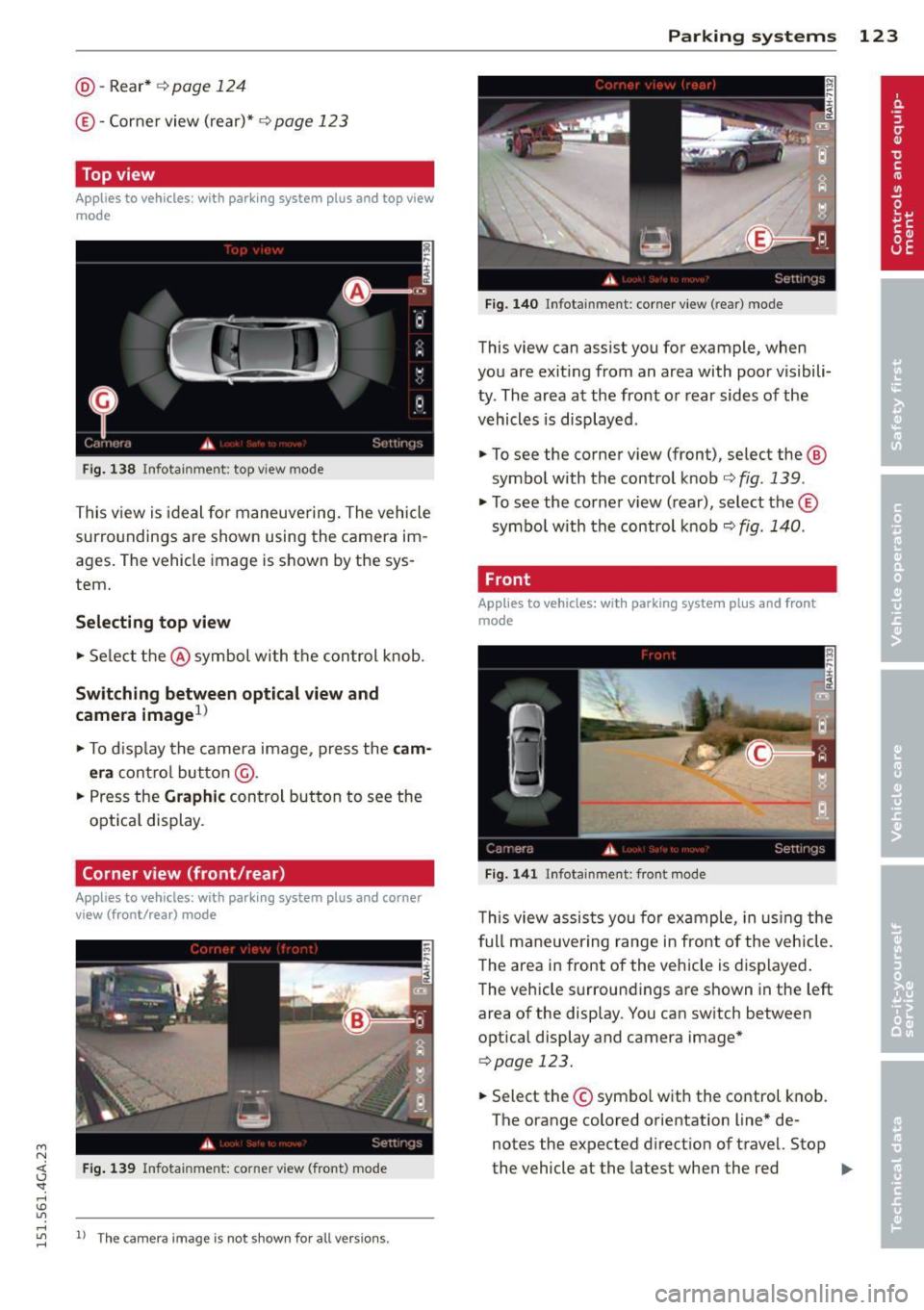
Top view
Applies to vehicles: with parking system plus and top view
mode
Fi g. 138 Infotainment: top view mode
This view is ideal for maneuve ring. The vehicle
surro undings are shown using the camera im
ages. The vehicle image is shown by the sys
tem.
Selecting top view
~ Select the @symbol with the control knob.
Switching between optical view and
camera image
1
)
~ To display the camera image, press the cam
era
contro l button @ .
~ Press the Graphic control button to see the
opt ica l display.
Corner view (front /rear )
Applies to vehicles: with parki ng system plus and corner
view (front/rear ) mode
Fig. 139 Infotainment: corner view (front} mode
"' rl
~ 11
Th e ca mera image is not s hown for all ve rsio ns.
Parking systems 123
Fig. 140 Infotainmen t: corner view (rear) mode
This view can assist you for example, when
you are exit ing from an area with poor visibili
ty . The area at the front or rear sides of the
vehicles is displayed .
~ To see the corner v iew (fron t), select the @
symbol with the control knob¢
fig. 139.
~ To see the co rner v iew ( rear), select the©
symbo l with the control knob¢
fig. 140.
, Front
Applies to vehicles: with parking system plus and front
mo de
Fig. 141 ln fotainment: front mode
This view assists you for example, in using the
full maneuvering range in front of the vehicle.
The area in front of the vehicle is displayed.
The vehicle s urround ings are shown in the left
area of the display. You can switch between
optical display and camera image*
qpag e 123.
~ Select the© symbo l with the control knob .
The orange colored orientation line* de
notes the expected direction of travel. Stop
the vehicle at the latest when the red
Iii>-
Page 126 of 316
124 Parking systems
orientation line* borders an object q .&. in
General information on page 122.
Rear
Appl ies to vehicles: with parking system plus and rear
mode
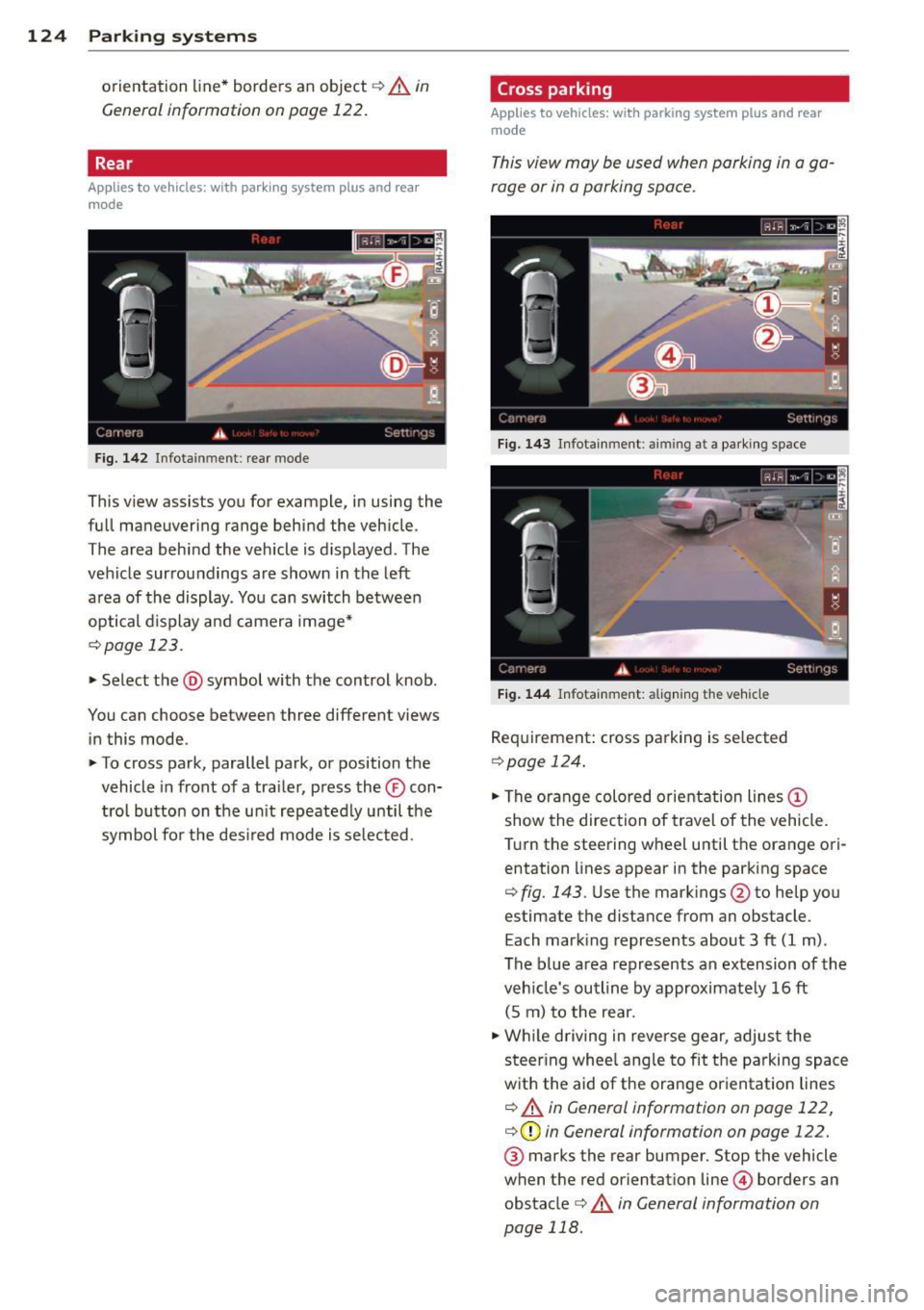
Fig. 142 Infotainment: rear mode
This view assists you for example, in using the
full maneuvering range behind the vehicle.
The area behind the vehicle is displayed. The
vehicle surroundings are shown in the left
area of the display. You can switch between
optical display and camera image*
¢page 123 .
.,. Select the @symbol with the control knob.
You can choose between three different views in this mode.
.,. To cross park, parallel park, or position the
vehicle in front of a trailer, press the ® con
trol button on the unit repeatedly until the
symbol for the desired mode is selected.
Cross parking
Applies to vehicles: w ith park ing system plus and rear
mode
This view may be used when parking in a ga
rage or in a parking space.
Fig. 143 Infotainment: aiming at a park ing space
Fig. 144 Infotainment: aligning the vehicle
Requirement: cross parking is selected
Qpage 124 .
.,. The orange colored orientation lines@
show the direction of travel of the vehicle.
Turn the steering wheel until the orange ori entation lines appear in the parking space
¢ fig. 143 . Use the markings @to help you
estimate the distance from an obstacle.
Each marking represents about 3 ft (1 m).
The blue area represents an extension of the
vehicle's outline by approximately 16 ft
(5 m) to the rear .
.,. While driving in reverse gear, adjust the
steering wheel angle to fit the parking space
with the aid of the orange orientation lines
¢ .&. in General information on page 122,
¢ (Din General information on page 122.
® marks the rear bumper. Stop the vehicle
when the red orientation line© borders an
obstacle
¢ .&. in General information on
page 118.
Page 128 of 316
126 Parking systems
Trailer view
Ap plies to vehicles: with par king system p lus and tra iler
hitch
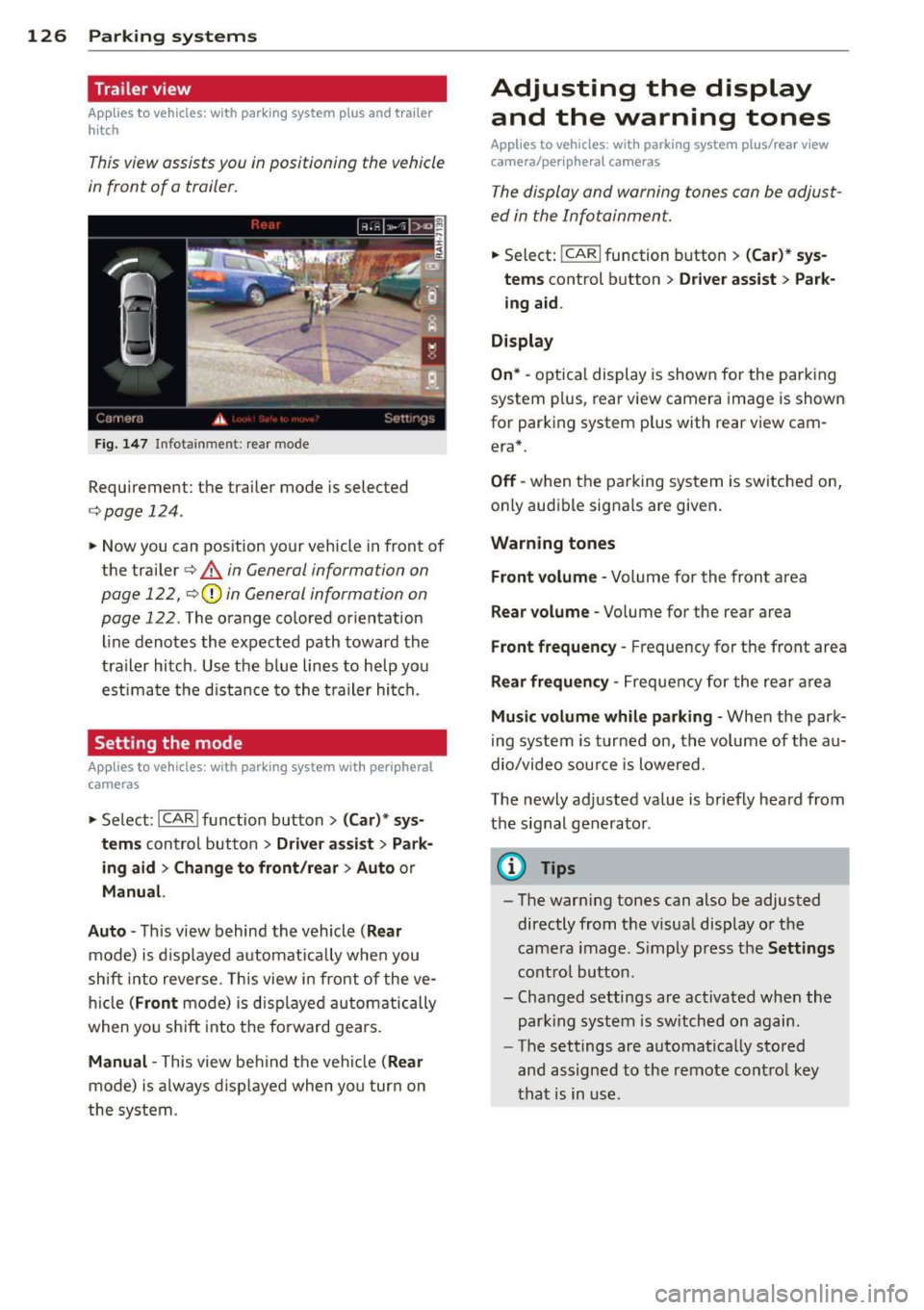
This view assists you in positioning the vehicle
in front of a trailer.
F ig. 1 47 Infotai nment: rea r mode
Requirement: the trai ler mode is selected
c:;, page 124.
.. Now you can pos ition your vehicle in front of
the trailer
c:;, A in General information on
page 122,
c:;, (D in General information on
page 122 .
The orange co lored or ientat ion
line denotes the expected path toward the
trailer hitch . Use the b lue lines to he lp you
est ima te the d istance to the t railer hi tch.
Setting the mode
A ppl ies to vehicles: with park ing system wit h peripheral
cameras
.. Se lect : I CAR I func tion button> (Car )* sys
tem s
control button > Driver assi st > Park
ing aid > Ch ange t o front /rear > Aut o
or
Manua l.
A uto -
Th is view behind the vehicle ( Rear
mode) is d isplayed automatically when you
shift into reverse. This view in front of the ve
h icle
( Fron t mode) is d isp layed automatically
when yo u sh ift into the fo rward gea rs .
Manual -This view behind t he vehicle (Rear
mode) is a lways d is pl ayed when you turn on
the system .
Adjusting the display
and the warning tones
Applies to vehicles: wit h parking system plus/ rea r vi ew
came ra/ peri pheral cameras
The display and warning tones can be adjust
ed in the Infotainment.
.. Select: !CARI function button > ( Car )* sys
tems
control button > Dri ver ass ist > Par k
i n g a id .
Display
On * -
optica l display is shown for the parking
system p lus, rear view camera image is shown
for parking system plus with rear view cam era*.
Off -when the parking system is switche d on,
only aud ible signa ls are given .
Warning tones
Front volume -
Volume for the front area
Rear volume -Volume for the rear area
Front frequency -Frequency for the front area
Rear frequen cy -Frequency for the rear area
Mu sic volum e while parking -When the park
ing system is turned on, the vo lume of the au
dio/video sou rce is lowered.
The newly adjusted value is briefly hea rd from
the signal generator .
@ Tips
-The warn ing tones can also be adjusted
directly from t he visua l display o r the
came ra image. S imply press the
Settings
cont ro l button .
- Changed settings are act ivated when the
par king system is switched on again.
- The settings are automa tica lly stored
and assigned to the remote cont rol key
t ha t is in use .
Page 235 of 316
M N <( (.J
'SI: ,...., \!) ..,.,
,...., ..,., ,....,
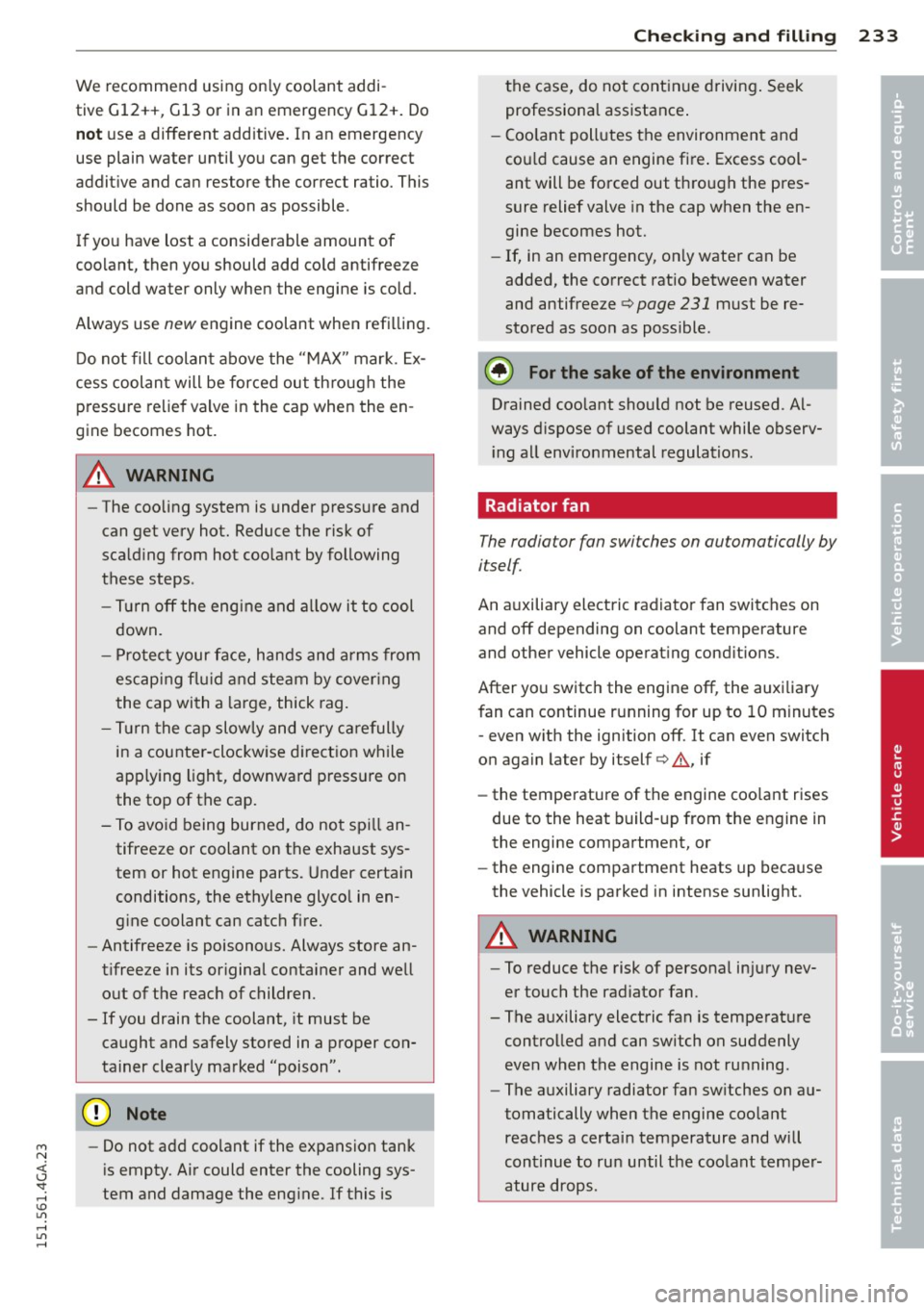
We recommend using only coolant addi-
tive
Gl2++, Gl3 or in an emergency Gl2+. Do
not use a different additive. In an emergency
use plain water until you can get the correct
additive and can restore the correct ratio. This
should be done as soon as possible .
If you have lost a considerable amount of
coolant, then you should add cold antifree ze
and cold water only when the engine is cold.
Always use
new engine coolant when refilling.
Do not fill coolant above the "MAX" mark. Ex
cess coolant will be forced out through the pressure relief valve in the cap when the en
gine becomes hot.
A WARNING
-The cooling system is under pressure and
can get very hot. Reduce the risk of
scalding from hot coolant by following
these steps.
-Turn off the engine and allow itto cool
down.
- Protect your face, hands and arms from
escaping fluid and steam by covering
the cap with a large, thick rag.
- Turn the cap slowly and very carefully
in a counter-clockwise direction while
applying light, downward pressure on
the top of the cap.
- To avoid being burned, do not spill an
tifreeze or coolant on the exhaust sys
tem or hot engine parts. Under certain
conditions, the ethylene glycol in en
gine coolant can catch fire.
- Antifreeze is poisonous. Always store an
tifreeze in its original container and well
out of the reach of children.
- If you drain the coolant, it must be
caught and safely stored in a proper con
tainer clearly marked "poison".
(D Note
- Do not add coolant if the expansion tank
is empty. Air could enter the cooling sys
tem and damage the engine. If this is
Checking and filling 233
the case, do not continue driving. Seek
professional assistance .
- Coolant pollutes the environment and
could cause an engine fire. Excess cool
ant will be forced out through the pres
sure relief valve in the cap when the en
gine becomes hot.
- If, in an emergency, only water can be
added, the correct ratio between water
and antifreeze
c> page 231 must be re
stored as soon as possible.
@ For the sake of the environment
Drained coolant should not be reused. Al
ways dispose of used coolant while observ ing all environmental regulations.
Radiator fan
The radiator fan switches on automatically by
itself.
An auxiliary electric radiator fan switches on
and off depending on coolant temperature
and other vehicle operating conditions .
After you switch the engine off, the auxiliary
fan can continue running for up to 10 minutes
- even with the ignition off.
It can even switch
on again later by itself
c> .&, if
- the temperature of the engine coolant rises
due to the heat build-up from the engine in
the engine compartment, or
- the engine compartment heats up because
the vehicle is parked in intense sunlight.
A WARNING
-To reduce the risk of personal injury nev
er touch the radiator fan.
- The auxiliary electric fan is temperature controlled and can switch on suddenly
even when the engine is not running.
- The auxiliary radiator fan switches on au
tomatically when the engine coolant reaches a certain temperature and will
continue to run until the coolant temper
ature drops.
•
•
Page 283 of 316
M N <( I.J "". rl I.O
Fuses and bulbs
Fuses
Replacing fuses
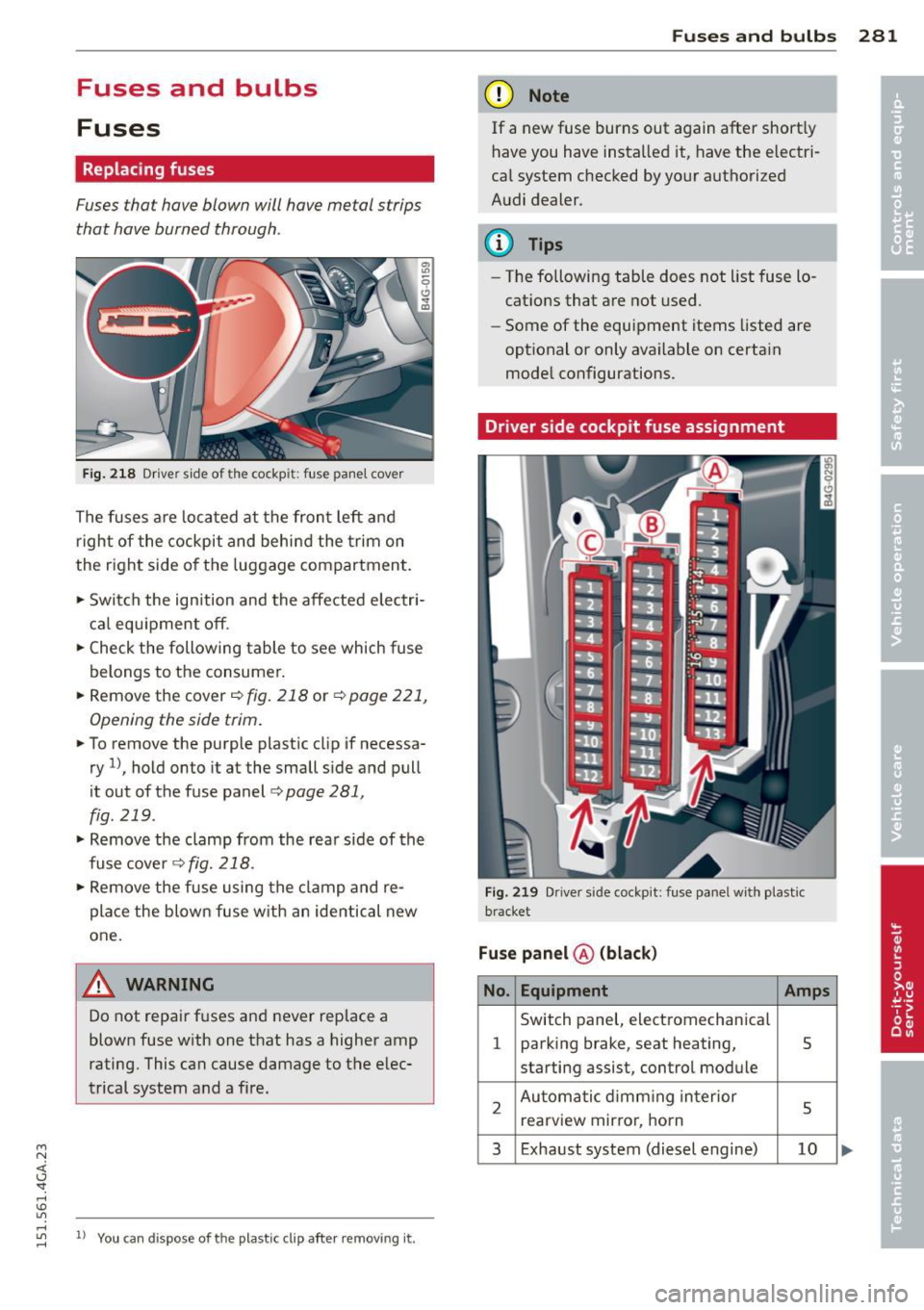
Fuses that have blown will have metal strips
that have burned through.
Fig . 2 18 Dr iver side of the cockp it: fuse panel cove r
The fuses are located at the front left and
r igh t of the cockpit and behi nd the trim on
the right side of the luggage compartment .
.. Switch the ign ition and the affected electr i
ca l equ ipment off .
.. Check the following table to see which fuse
belongs to the consume r .
.. Remove the cover
r:!;> fig. 218 or r:!;> page 221,
Opening the side trim .
.. To remove the purple plastic cl ip if necessa
ry
ll, hold onto it at the small s ide and pull
it out of the fuse panel
r:!;> page 281,
fig. 219 .
.. Remove the clamp from the rea r side of the
fuse cover ¢
fig. 218 .
.. Remove the fuse using the cl amp and re
pla ce the blown fuse w ith an identical new
one.
& WARNING , -
Do not repair f uses and never replace a
blown fuse w ith one that has a higher amp
rating. This can cause damage to the e lec
trical system and a fire.
"' rl
~ 11 You can dis pose of the plastic clip after removing it.
Fu se s and bulb s 281
(D Note
If a new fuse burns out again after short ly
have you have insta lled it, have the electri
ca l system c hecked by yo ur authorized
A udi dealer .
{!) Tips
-The following table does not list fuse lo
cat ions that are not used .
- Some of the equipment items listed are
opt ional or only available on certa in
mode l configurations.
Driver side cockpit fuse assignment
Fi g. 21 9 Driver side cockpit : fuse pa nel w ith plastic
bracket
Fuse panel @ (blac k)
No . Equipment Amps
Switch panel, electromechanica l
1 parking brake, seat heating, 5
starting assist, control module
2 Au toma tic d imm ing in terior
5 rearview mir ro r, horn
3 Exhaust system (diesel engine) 10
Page 302 of 316
300 Index
AUTO automatic climat e control .. .. ... ... ..
73
Automatic headlights ....... .. .... .. 44
climate control . . . . . . . . . . . . . . . . . . . . . 70
Auto Lock . . . . . . . . . . . . . . . . . . . . . . . . . . 3 3
Automatic belt retractor .. ... ..... .. .
141
Automatic climate control
Air vents . .... ........... .... .... ..
7 3
Automatic recirculation .... .. .. .. .. . . 74
Opera tion . . . . . . . . . . . . . . . . . . . . . . . . . 72
Setup . .. .. ................ ... .. .. 74
synchron izing .... ......... ... .. .. .. 73
Automatic Shift Lock (ASL) .... .. .. .. . 110
Automatic transmission ..... .. .. .. .. . 109
Automatic Shift Lock (ASL) .......... 110
Driving . . . . . . . . . . . . . . . . . . . . . . . . . . 111
Emergency mode . . . . . . . . . . . . . . . . . . 114
Emergency release .......... .. .... . 115
Kick-down ............... .. .. .... . 113
Manual shift program ..... .... .... . 113
Selector lever . . . . . . . . . . . . . . . . . . . . . 109
Automatic wipers .................. .. 48
Auto Safety Hotline ........ .. .. .. .. . 136
Ave rage consumption ....... .. .. .. .. . . 25
Average speed . . . . . . . . . . . . . . . . . . . . . . .
25
Avoid damaging the vehicle .. .. .. .. .. . 204
B
Brake fluid
Changing the brake fluid ............
234
Checking the brake fluid level ........ 234
What is the correct brake fluid level? .. 234
What should I do if the brake fluid warn-
ing light comes on? ................
234
Brake system
Anti- lock braking system . . . . . . . . . . . . .
19
Brake assist system . ....... .... .. .. 195
Brake booster .. ... .............. .. 199
Brake fluid .. .. .. .......... ...... . 234
Brake fluid specifications for refill and re-
placement ...... ................ .
234
Brake pads .... .. ............. .... 203
Electromechanical parking brake ... .. . 79
Fluid reservoir ... ................ . 234
How does moisture or road salt affect the
brakes? . . . . . . . . . . . . . . . . . . . . . . . . . .
198
Warning/indicator lights ........ .. .. . 15
Worn brake pads symbol . . . . . . . . . . . . . 20
braking guard
Settings .. .... .. .. .............. ..
93
Brak ing guard . .. .. .......... ...... .. 86
Messages ... .. .. .. ....... .... .... . 93
Break-in period .. .. ............. .... 203
Brake pads .. ... . ... ... .... ... .. .. 203
Tires ........ ... .. .............. . 203
Bulbs .......... .. .. .............. . 284
Bag hooks . . . . . . . . . . . . . . . . . . . . . . . . . . 67 C
Battery ..... ................ ..... .
Charging ................... ..... .
Important warnings ...... .. .. .. .. .
Jump starting . .... ....... .. .. .. .. .
Location
. .. .... ........... .. .... .
low ..... .. ................ ... ' . .
Replacing the battery ..... .. .. .. .. .
State of charge ........... .. .. .. .. .
w· t · 1n er operation ......... .... .... .
Working on the battery .... .. .. .... .
Before driving .............. ... .. .. .
235
237
235
285
235
201
238
201
235
235
128
Blended gasoline . . . . . . . . . . . . . . . . . . . 217
Blower (automatic climate control) . . . . . . 73
Blower (climate con trol) . . . . . . . . . . . . . . . 70
Booster seats .............. ... .... . 182
California Proposition 65 Warning ..... 226
Battery specific .. ............. .... 236
Capacities .. .. .. .. ............. .. .. 292
Engine oil ..... .. ............. .... 227
Carbon par ts
Cleaning . . . . . . . . . . . . . . . . . . . .
214,215
Car carrier
Transporting your vehicle ....... ....
289
Care ..... .. .. .. .. .... ......... .... 212
Cargo area ...... .. .. ... ........... . 134
Cargo net . . . . . . . . . . . . . . . . . . . . . . . . . . . 66
Catalytic converter . ... .. ... ..... .. .. 204
Center armrest
Cockpit . .. .. .. .. ............. .. .. .
56
Central locking .... ............. ..... 33
Emergency locking ................ ..
37
Page 304 of 316

302 Index
Daytime running lights .... .. .. .. .... . . 44
Declaration of compl iance
Adaptive c ruise control .... .. .. .... .
297
Aud i side assis t ... ... .... .. .. .. .. . 297
Cell phone package ... .... .. .. .... . 297
Convenience key ....... ... .. .. .... . 297
Electronic immobilizer ... .. .. .. .... . 297
Garag e door opener (Homelink) ... .. . 297
Remote control key ....... .. .. .. .. . 297
D ecorative parts/ trim
C leaning ... ... .. ..... ... .. .. .... .
214
DEF
What does t his mean when it appea rs in
the trip odomete r d isplay? . .. .. .. .. . .
27
De fective light bulb warning . . . . . . . . . . . 22
D efrosting (windows)
automatic climate control . ... ... ... ..
73
climate contro l . . . . . . . . . . . . . . . . . . . . . 71
Determin ing cor re ct load limi t ... .. ... 257
Diese l fuel . .. .......... ...... ... .. . 218
D iese l partic ulate fi lter . . . . . . . . . . 2 1, 205
D imensions .. ... . ...... ... .. .. .. .. . 292
Dimming the rearview mirror .. .. ...... 51
D isp lays
C leaning ... ... . ...... ... .. .. .... .
214
Distance . . . . . . . . . . . . . . . . . . . . . . . . . . . 25
Door/rear lid warning . . . . . . . . . . . . . . . . . 24
Doors
Power child safety loc k .. .. .. .. .... . .
4 0
D river information system
CD/radio display . . . . . . . . . . . . . . . . . . . .
24
D oor/ rear lid warning . . . . . . . . . . . . . . . 24
Exte rio r tempe rat ure d isplay . .. .. .. . . 24
On -boa rd compute r . . . . . . . . . . . . . . . . . 2 5
D river seating position . . . . . . . . . . . . . . . 129
drive select .... ........... .. .. .... . 102
adaptive a ir s uspension/sport . .. .... .
Adaptive dampers .......... .. .... .
Curve light ........... .... ... .. .. .
E ng ine sound ......... .... ... .. .. .
Safety belt tensioner .......... .. .. .
Sport differen tial ......... .. .. .. .. .
Driving safely 102 102
102
102
102
10 2
128
D riving through water . ... .. .. .. .... . 204
D . . . nvmg time .... .... ...... .. .. .. .. .. 25
Dup licate key . . . . . . . . . . . . . . . . . . . . . . . 31
D ust filter
refer to Poll utant fi lter . ..... ... .. .. . 69
Dynam ic steering
2 00
E
Easy entry feature . . . . . . . . . . . . . . . . . . . . 76
Efficiency program Fuel economy messages ........ .. .. .
26
Other equ ipment . ............. .... . 26
Electr ica l accessories (soc ke ts) . ... .. .. . 60
Electromechanical pa rking brake
Emergency bra king . .. ...... ... .. .. .
80
Operation . . . . . . . . . . . . . . . . . . . . . . . . . 79
Parking . .. .. .. .. .. ........... .. .. . 79
Re leas ing and closing .. ..... .... . .. . 79
Starting assist ... .. .... .... ... .. .. . 80
Starting from rest . .... ..... ... .. .. . 80
Starting off w ith a trailer .......... .. . 80
Warning/ind icator lights ........ .... . 16
Elec tromechanica l power assist . ... .. .. 2 00
El ectronic d ifferential lock
Warning/ind icator lights ........... ..
19
Electronic differential lock (EDL) . . . . . . . 195
Warning/ind icator lights ........ .... . 19
Electronic immob ilizer . . . . . . . . . . . . 27, 32
Electronic power cont rol (EPC)
wa rning/indicator light ......... .... .
20
Electronic speed limiter .......... .... . 30
Elec tronic Stabilization Con tro l (ESC) . .. 195
Warning/ind icator lights ..... ... .. .. . 19
Emergency actuat ion
Doo rs .... .. .. .. .. ........... .... .
37
Power sunroof . .. ............. .. ... 42
Rea r lid ... .... .. .. .... . ... ... .. .. . 39
Em b k'
ergency ra 1ng . .......... ...... .. 80
Emergency flasher ... ... ..... ... .. .. . 45
Warning/ind icator lights .......... .. . 23
Emergency re le a se
Se lector lever .... .. .... .... ... .. ..
115
E mergency start ing ..... .. ... ..... .. 285
Emergency towing . ............. .... 287
E mergency wa rn in g triangle .... .. .. .. 2 73
Energy management .... .. ... ..... .. 201
Engine
Compartment .... .. ... ..... ... .. ..
227
Coolant ... .... .. ............. .... 231
Page 308 of 316

306 Index
New tires and wheels
NHTSA 260
Contact ing ... ........... .... .... . 136
Night vision assistant . . . . . . . . . . . . . . . . 105
Cleaning camera lenses .. .. .. .. .. .. . 213
Nitrogen oxide (NOx) cata lytic converter
refertoAdBlue . ........... ... .... . 221
Number of seats ........... .. .. .... . 138
0
Occupant seating posit ions 129
Octane rating ............... .. .... . 217
Odometer . .. ............. .. .. .. .. .. 27
OFF (automatic climate control) . . . . . . . . 72
OFF (climate control) ........ ... .... .. 70
Oil
refer to Engine oil ........ .. .. .... . 227
On-board computer .......... .. .... .. 25
On-Board Diagnostic System (OBD)
Data Link Connector (DLC) ... ... .... . . 29
E lectronic speed limiter . . . . . . . . . . . . . . 30
Malfunction Indicator Lamp (MIL) . . . . . 29
Open doo r/hood/rear lid warning . . . . . . . 24
Opening Hood .. .. .. ................ ... .. . 225
Power windows ........ .. .. .. .. .. .. 40
Rear lid .. .. ............. .. .. .. .. .. 37
Sliding/tilting sunroof ....... .. .... .. 41
Operate your vehicle econom ically and
minim ize pollution .......... ... .. .. . 205
Other equipment (efficiency program) ... 26
Out let .. .. ............... .. .. .... .. 59
p
Paint damage ............. .. .. .. .. . 214
Paint No . .. ... ............ .... .. .. . 291
Parking ..... ................ ..... .. 79
Automatic transmission ............ 111
Valet parking ...................... 41
Parking brake ............. .. .. .... .. 79
also refer to Electromechan ical park ing
b rake .. .. ... ............ .... .. .. .. 79
Park ing system
Adjust ing the disp lay/warning tone .. . 126
C leaning sensors/camera lenses . .. .. . 213 Cleaning the
rear view camera ..... .. 118
Malfunction ..... ................ . 127
Parking system plus ................ 117
Peripheral cameras ............ .... 121
Rear view camera .............. .... 118
Trailer hitch ..... ................ . 127
also refer to Parking systems . . . 117, 118
Parking systems ... ................ . 116
Particle filter
refer to Diesel particu late filter .. .. .. . 21
Parts replacement . ................ . 296
Pass-through with ski sack ............. 67
PASSENGER AIR BAG OFF light .. .. .. .. 160
Passenger pro tection .............. .. 192
Passive safety system ................ 128
Pedals . ........ .. .. .............. . 133
Physical principles of a frontal collision 139
Plastic parts Cleaning .. .... .. ................ . 214
Polish ing . . . . . . . . . . . . . . . . . . . . . . . . . . 214
Pollen filter
refer to Pollutant filter ......... .. .. . 69
Pollutant filter .... ............. .... . 69
Power locking system ................. 33
Locking/unlock ing the veh icle from in-
side .. .. .. .. .. .. .. .. ... ..... ... .. . 36
Selective unlock feature . . . . . . . . . . . . . 34
Settings . . . . . . . . . . . . . . . . . . . . . . . . . . 34
Unlocking and locking vehicle .... .. .. . 34
Power seat adjustment Front seats . . . . . . . . . . . . . . . . . . . . . . . . 54
Power steering
refer to Electromechanical power assist 200
Power windows .... ................ .. 40
malfunction ..... ................ .. 41
Pregnant women
Special considerations when wear ing a
safety belt . . . . . . . . . . . . . . . . . . . . . . . 143
pre sense ...... ... ................ . 192
Preventative passenger protection . . . . . 192
Proper occupant seating positions . .... 129
Proper safety belt position . . . . . . . . . . . . 142
Proper seating position
Front passenger . ................. . 130
Occupants ... .. .. ................ . 129
Rear passengers .. ............. .... 131