change time AUDI A7 2016 User Guide
[x] Cancel search | Manufacturer: AUDI, Model Year: 2016, Model line: A7, Model: AUDI A7 2016Pages: 294, PDF Size: 73.82 MB
Page 101 of 294

M N <( I.J "". rl I.O
"' N I.O rl
-Improper reliance on the side assist system
can cause collisions and serious personal in
jury:
- Never rely only on side assist when chang
ing lanes .
- Always check rear view mirrors to make
sure that it is safe to change lanes.
- Sid e assist cannot detect a ll vehicles under
all conditions- danger of accident!
- Please note that side assist indicates there
are approaching vehicles, or vehicles in your
blind spot, only after your vehicle has
reached a driving speed of at least 19 mph
(30 km/h).
- In certain situations, the system may not
function or its function may be limited. For
example:
- if vehicles are approaching or being left
behind very quickly. The display may not
turn on in time.
- in poor weather conditions such as heavy
rain, snow or heavy m ist .
- on very wide lanes, in tight curves or if
there is a rise in the road surface . Vehicles
in the adjacent lane may not be detected
because they are outside of the sensor
range.
(D Note
The sensors can be displaced by impacts or damage to the bumper, wheel housing and
underbody. This can affect the system . Have
your authorized Audi dealer or authorized
Audi Service Facility check their function.
(D Tips
-If the window g lass in the driver's door or
front passenger's door has been tinted, the
display in the exterior mirror may be misin
terpreted.
- For Declarat ion of Compliance to United
States FCC and Industry Canada regulations
c:>page277 .
Audi side assist
Switching on and off
Applies to vehicles: wit h Audi side ass ist
Fig. 108 Driver 's door : side assist button
" Press the c:> A in General information on
page 98
button to switch the system on and
off. The LED in the button turns on when side
assist is switched on .
Adjusting the display brightness
Applies to vehicles: wit h Audi side ass ist
The display brightness can be adjusted in the In
fotainment system .
.,. Select: the I CAR I function button > (Car)* Sys
tems
control button > Driver assistance > Audi
side assist .
The display brightness adjusts automatically to
the brightness of the surroundings, both in the
information and in the warning stage. In very
dark or very bright surroundings, the display is al
ready set to the m inimum or maximum level by
the automatic adjustment. In such cases, you
may not ice no change when adjusting the bright
ness, or the change may only be noticeable once
the surroundings change.
Adjust the br ightness to a level where the display
in the info rmation stage will not disrupt your
view forward. If you change the brightness, the
display in the exterior mirror will briefly show the
brightness level in the information stage . The
brightness of the warning stage is linked to the
brightness in the information stage and is adjust
ed along with the information stage adjustment.
Ill>
99
Page 103 of 294
M N <( (.J
'SI: ,...., \!) ..,.,
N \!) ,....,
Audi drive select Driving settings
Introduction
Drive select makes it possible to experience dif
ferent types of vehicle settings in one vehicle.
The driver can select
Comfort, Auto and Dynamic
modes in the Infotainment system to switch be
tween a sporty and a comfortable driving mode.
In the
Individual mode, the settings can be ad
justed to your personal preferences. This makes it possible to combine settings such as a sporty en
g ine tun ing with light steering.
_&. WARNING
Improper use of the Audi drive select can
cause collisions, other acc idents and serious
personal injury.
Description
-
The follow ing systems are affected by drive se
lect:
Engine and transmission
Depending on the mode, the eng ine and the
transmission respond quicker or in a more bal
anced manner to acce lerator pedal movements.
I n the sporty dynamic mode, the transmission
shifts at higher RPMs.
Air suspension*
The adaptive air suspension/adaptive air suspen
sion sport*
(Air suspension in the MMI) is an
e lectronically controlled a ir suspension and
damping system. They are adjusted depending on
the selected driving mode, the driver's steering,
b raking and acce leration input and the road sur
face, vehicle speed and load. A sporty setting is generally used in vehicles with adaptive air sus
pension sport*.
The vehicle clearance varies depending on these lected mode and the speed.
The highway setting is activated automatically
when you drive above 75 mph (120 km/h) for
more than 30 seconds in the
Auto or Dynamic
Audi drive select
mode. The ground clearance is increased auto
matically if the speed drops below 44 mph (70
km/h) for more than 120 seconds.
Steering
T he steering adapts in terms of steer ing effort
and steering ratios . Indirect steering that moves
easily, like the steering in comfort mode, is best
suited to long drives on a highway. In contrast,
dynamic mode provides sporty, direct steering.
T he following applies to vehicles with dynamic
steering*: the steering ratio changes based on ve
hicle speed in order to maintain optimum steer
ing effort for the driver at all times. This sets the
steering to be less sensitive at higher speeds in
order to provide improved vehicle control. At re
duced speeds, however, steering is more direct in
order to keep the steering effort as minimal as
poss ible when the driver is maneuvering the vehi
cle. At low and average speeds, dynamic steer ing
additionally provides more responsive steering
performance.
Sport differential*
As a component of the all wheel dr ive system
(quattro)
¢ page 192, the Sport differential* dis
tributes the driving power to the rear axle de
pending on the sit uation. The distribution of
power varies depending on the selected mode,
from balanced (comfort) to agile (dynamic) . The
goal is a high level of agility and ability to accel
erate on curves. The vehicle is very responsive to
steering.
Curve light*
T he curve light adapts to driving on curves. The
pivoting action and the lighting are also adapted
to the mode.
Adaptive cruise control*
T he behav ior when accelerating can be adjusted
from comfortable to sporty, depending on the
drive select mode. Adaptive cruise control a lso
responds to the driving behavior of the vehicle
ahead in a more conservative or sporty manner. ..,_
101
Page 109 of 294
M N <( I.J "". rl I.O
"' N I.O rl
Automatic transmission S tronic, tiptronic
Introduction
The automat ic transm iss ion is controlled elec
tronically. The transmission upshifts or down
shifts automatically depending on which drive
program is selected.
When a
moderate driving style is used, the
transmission selects the most econom ical driving
mode. The transmiss ion upshifts at a lower RPM
and downshifts at a higher RPM to improve fuel
efficiency.
The transmission switches to a sporty mode after a kick-down or when the driver uses a
sporty driv
ing style
cha racterized by quick accelerator pedal
movements, heavy acceleration, frequent
changes in speed and traveling at the maximum
speed.
If desired, the driver can also select the gears
manually (tiptronic mode) ¢ page 111.
Various automat ic tr ansm issions may be instal
led, depending on the model:
S tronic transmission
The S tronic is a dual -clutch transmission . Power
is transferred using two clutches that work inde
pendently from one another. They replace the
torque converter used in conventional automat ic
transmissions and a llow the vehicle to accelerate
without a noticeable interruption in traction.
tiptronic transmission
In the tiptronic transmission, power is transfer
r ed by a torque converter.
Automatic transmission
Selector lever positions
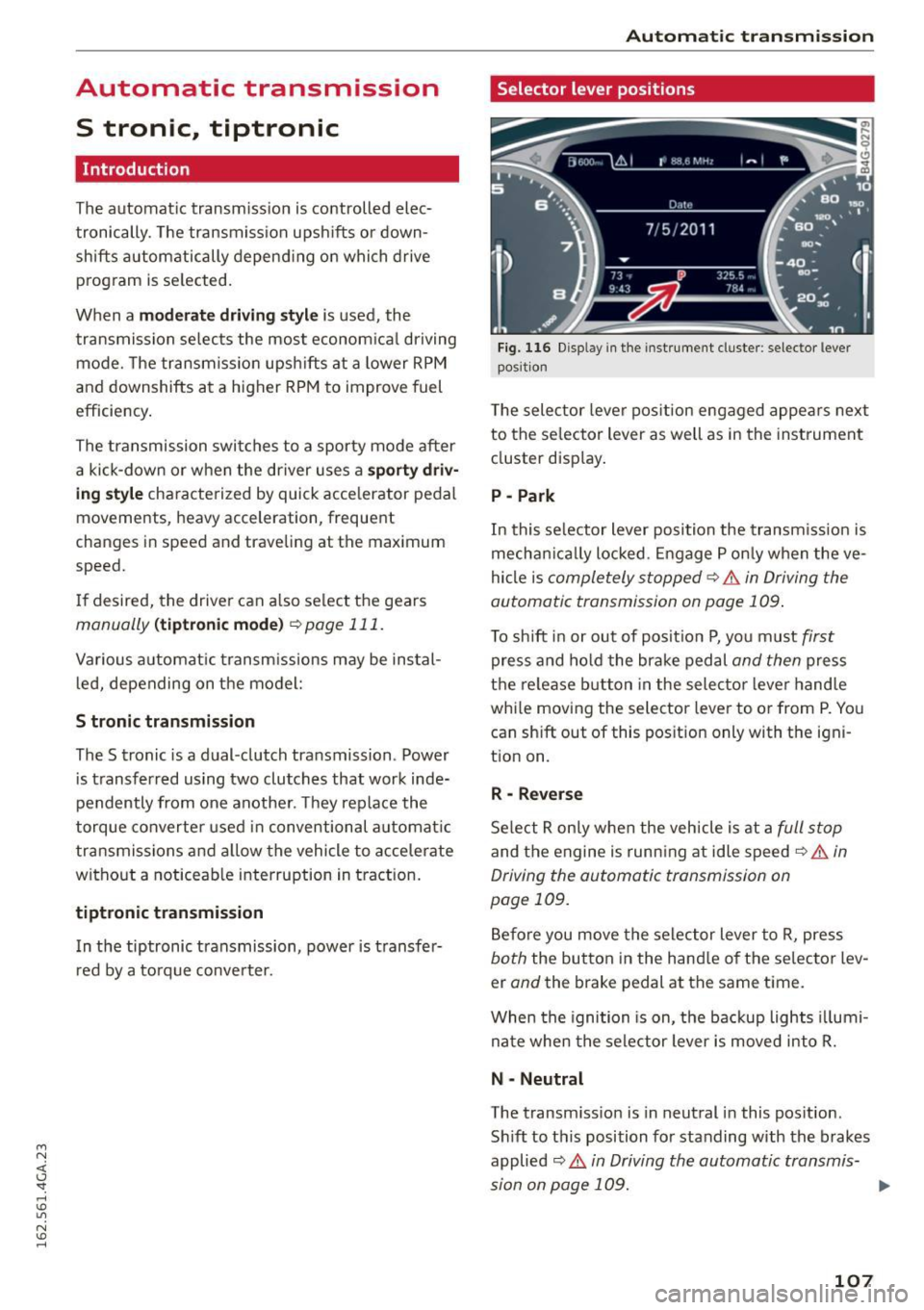
Fig. 116 Disp lay in the instrument cluste r: selector lever
posit ion
T he selec tor lever pos ition engaged appea rs next
to the se lector lever as well as in the instrument
cluster display.
P -Park
In this selector lever position the transmission is
mechanica lly locked . Engage P only when the ve
hicle is
completely stopped¢.& in Driving the
automatic transmission on page 109.
To shift in or out of posit ion P, you must first
press and hold the brake pedal and then press
the release button in the selector lever hand le
whi le moving the selector lever to or from P. You
can sh ift out of this position only with the igni
tion on.
R -Reverse
Select R only when the vehicle is at a full stop
and the engine is running at idle speed¢ .& in
Driving the automatic transmission on
page 109.
Before you move the selector lever to R, press
both the button in the hand le of the selector lev
er
and the brake pedal at the same time.
When the ignition is on, the backup lights illumi
nate when the selector lever is moved into R.
N -Neutral
The transm iss io n is in neutral in this pos ition.
Sh ift to this position for standing with the brakes
applied
¢ .& in Driving the automatic transmis-
sion on page 109. .,.
107
Page 116 of 294
Parkin g sys tems
Parking systems
General information
A ppl ies to veh icles: w ith pa rk in g system plus/rear v iew ca m
era/per ipheral came ras
Depending on your vehicle 's equipment, various
pa rking aids will help you when parking and ma
neuvering.
The
p ark ing syste m plu s assists you when park
ing by audibly and visua lly indicating objects de
tected
in front of and behind the vehicle
¢ page
115.
The rear v iew ca mera shows the area beh ind the
ve hicle in the Infotainment display. This display
assists you when you are c ross or parallel parking
¢ page
116. In add ition, you are ass isted by the
functions from the parking system plus
¢ page
115.
The pe riph era l cam era s assist you with parking
and maneuvering. You are aided by var ious cam
eras depending on the vehicle equipment level
¢ page
119. In addition, you are assisted by the
functions from th e parking syst em p lus
¢ page 115.
A WARNING
-Always look for traffic and check the area
around your vehicle by looking at it directly
as well. The parking system cannot rep lace
the driver's attent ion. The dr iver is a lways
responsible for safety during parking and
f or all other maneuvers.
- Please note that some surfaces, such as
clothing, are not detected by the system.
- Sensors and cameras have blind spots in
wh ich peop le and objects cannot be detect
ed . Be especia lly caut ious of ch ild ren and
animals.
- T he sensors can be displaced by impacts or
damage to the radia tor grille, bumper ,
wheel housing and the underbody . The park
ing systems may become impai red as a re
s u lt . Have yo ur autho rized Audi dealer or
qualified workshop check their function .
- Make sure the sensors are not covered by
stickers, deposits or any other obstructions
114
-
as it may impair the sensor function. For in
formation on cleaning, refer to¢ page
205 .
(D Note
- Some ob jects are not detec ted by the sys
tem under certain circumstances :
- Objects such as barrier chains, trailer draw
bars, vertical poles or fences
- Objects above the sensors such as wall ex
tensions
- Objects w ith specific surfaces or struc
tures such as chain link fences or powder
snow .
- If you continue driving closer to a low-lying
object, it may disappear from the sensor
range . Note that you w ill no longe r be
wa rned about th is obstacle.
(D Tips
- The system may provide a warning even
tho ugh there are no obstacles in the cover
age area in some situat ions, such as :
- certain road surfaces or for long grass.
- externa l ultrason ic sources e.g. from
cleaning vehicles.
- h eavy ra in, snow or thick vehicle exhaus t.
- We recommend that you practi ce parking in
a traff ic-free location or par king lo t to be
come fam iliar with the sys tem. When doing
this, there should be good light and weather conditions.
- Yo u can change the vo lume and pi tch of the
signals as well as the display¢ page
124.
-Please refer to the instr uctions for towing a
trailer ¢ page
124.
-What appea rs in the infot ainmen t display is
somewha t time-delayed.
Page 126 of 294
Parking systems
Adjusting the display and the warning tones
Applies to veh icles: With parking system plus/rea rview ca m
era/peripheral came ras
The display and warning tones can be adjusted in
the Infotainment.
~ Se lect: the ICARI function button > (Car )* Sys
tems
contro l button > Dri ver assi stance > Park
ing aid .
Display
On * -
An optical disp lay is shown for t he parking
system plus, a rearview camera image is shown
for the rearview camera* .
Off -When the p ark ing system is sw itched off,
only audib le signa ls are given.
Warning tones
Front volume -
Volume for the front area
Rear volume -Volume for the rear area
Front frequenc y -Frequency for the front area
Rear frequency -Frequency fo r the rear area
Entertainment volume lowering -When the
pa rking system is turned on, the vo lume of the
aud io/v ideo source is lowered.
The newly adjusted value is briefly heard from
the signal generator.
(D Tips
- The warning tones can also be adjusted d i
rectly by the visual display or the picture
from the camera . S imply press the
Settings
control b utton .
- Changed settings are activated when the
p arking system is switc hed on aga in.
- The settings for volume and frequency are
automat ically saved and ass igned to the re
mote con trol key being used.
Error messages
Applies to veh icles: With parking system plus/rearview cam
era/peripheral came ras
There is an e rror in the system if the LED in t he
Pw , button is b link ing and yo u hear a continuous
124
alarm for a few seconds afte r switching on the
par kin g system or when the parking system is al
r eady act ivated . If the error is not corrected be
fo re you switch off the ignition, the LED in the
Pw ,
button will blink the next time you switch on the
parki ng system by shifting into reverse.
Parking sy stem plus
If a senso r is fa ulty, the .f;l4 symbol will appear in
front of/behind the vehicle in the Infota inment
display. If a rear sensor is faulty, only obstacles
that are in areas @and @ are shown
<=:> page 115, fig . 121 . If a fro nt sensor is faulty,
o n ly obs tacles that a re in areas © and @are
shown. Ther e is a lso a system ma lf u nction if all
segme nts around the vehicle a re red or if no seg
men ts a re dis played.
Peripheral cameras*
There is a system malfunct ion if the i:8l• • symbol
appears and the co rrespo nd ing display a rea is
shown in bl ue. The came ra is not wo rking in this
a rea.
Drive to an authorized A udi dealer or authorized
Audi Se rvice Facility immed iately to have th e
malfunction corrected.
Trailer hitch
App lies to vehicles: with parking system plus/rearview cam
era/periphe ral ca meras and trailer hitch
For vehicles us ing the trailer socket, the parking
system rear sensors do not turn o n when yo u
shift into reverse gear or when you press the
p,,1 A
button . This res ults in the following restrictions.
Parking sy stem plus
There is no d istance warning for the rear. The
front sensors remain act ivated. The visual display
switches to the trailer towing mode.
Rearview camera* /peripheral came ras*
There is no d istance warn ing fo r th e rea r. T he
front sensors remain act ivated . The visual display
switches to the trailer towing mode. The rearv iew
camera image will not show t he or ientat ion lines
and the b lue sur faces. .,._
Page 159 of 294
M N <( (.J
'SI: ,...., \!) 1.1'1
N \!) ,....,
his or her back up against the backrest and the
backrest is not reclined,
- the adult is not taking weight off the seat by
holding on to the passenger assist handle
above the front passenger door or supporting
their weight on the armrest,
- the safety be lt is being properly worn and that
there is not a lot of s lack in the safety be lt web
bing,
- there are no aftermarket seat covers or cush
ions or other things (such as blankets) on the
front passenger seat that m ight cause the ca
pacit ive passenger detection system to miscal
culate electrical capac itance.
Important safety instructions on
monitoring the Advanced Airbag System
A WARNING
- If the status of the Adva need A irbag System
has changed while the vehicle is mov ing, the
PASSENGER AIR BAG OFF light blinks for
about S seconds to catch the driver's atten
t ion . If th is happens, always stop as soon as
it is safe to do so and check the steps descri
bed above.
- If the PASSENGER AIR BAG OFF light does
not go off when an adult who is not very
small is si tting on the front passenger seat
after taking the steps described above,
make sure the adult is properly seated and
restrained at one of the rear seating posi
t ions. Have the airbag system inspected by
your authorized Aud i dealer before trans
porting anyone on the front passenger seat.
A WARNING
An airbag system that is not funct ioning prop
erly cannot provide supplementa l protect ion
in a frontal crash.
- If the airbag indicator light c::;, page 18
comes when the vehicle is be ing used, have
the system inspected immed iate ly by your
au thori zed Audi dealer.
It is possible that
the a irb ag will inflate when it is not s up
posed to, or w ill not inflate when it should.
Airbag syste m
A WARNING
If the front airbag inflates, a child without a
chi ld restraint, or in a rearward-facing chi ld
safety seat, or in a forwa rd-fac ing child re
straint that has not been proper ly installed
will be ser ious ly injured and can be killed .
- Even though you r vehicle is equipped with
an Advanced A irbag System, make ce rtain
that al l children, especially 1 2 years and
younge r, al ways ride on the back seat prop
erly restra ined for their age and size.
- Always install forward o r rear-facing child
seats on the rear seat -even with an Ad
vance d Ai rbag System.
- If you must ins tall a rearwa rd-fa cing c hild
seat on the front passenger seat because of
exceptiona l circumstances and the
PASSEN
GER AIR BAG OFF
light does not appear and
stay on, immediately install the rear-facing
child seat in a rear seating position and have
the airbag system inspected by your Audi
deale r.
- If, in exceptiona l circumstances, you must
install a forwa rd-facing child restraint on
the front passenger seat , always move the
seat into i ts rearmost pos ition in the seat's
fore and a ft ad justmen t range, as fa r away
fr om the airb ag as possib le. The b ackrest
m ust be adjus ted to an upr ight position.
Make sure t hat the
PASSENGER AIR BAG
OFF
li ght comes on and stays on all the time
whenever the ignition is switched on.
A WARNING
- I f the PASSENGER AIR BAG OFF light does
not go out when an adult is s itting on the
front passenger seat after tak ing the steps
described above, make su re the adult is
p roperly seated and restrained a t one of the
rea r seat ing pos itions.
- Have the airbag system inspected by your
Aud i deale r before t ransporting anyone on
the front passenger seat.
157
Page 171 of 294
M N <( (.J
'SI: ,...., \!) 1.1'1
N \!) ,....,
Advanced front airbag system and children
Your vehicle is equipped wit h a front "Advanced
A irbag System" i n compliance w it h United States
F ederal Motor Vehicle Safe ty Standard ( FMVSS)
208 as applicable at the time your vehicle was
manufactured .
The Advanced Airbag system in your ve hicl e has
been certified to mee t the " low -risk" requ ire
ments for 3 -and 6-year o ld children on the pas
senger side and small adults on the driver side.
T he low risk deployment criteria are intended to
reduce the r isk of injury through interaction with
the airbag that can occur, for example, by being
too close to the steering whee l and instrument
panel when the a irbag inflates . In add it io n, the
system has been cert ified to comply with the
"suppression" requiremen ts of the Safety Stand
ar d, to turn off t he front airbag for infa nts up to
12 months who are restra ined on the front pas
senger seat in child restraints that are listed i n
the Standard.
E ven though yo ur vehicle is equ ip ped with an Ad
vanced A irbag sys tem, all children, especia lly
those 12 years and younger, should always ride in
the back seat properly restrained for their age
and size. The airbag on the passenger side makes
the front seat a potent ially dangerous p lace for
a
chi ld to r ide. The fro nt seat is not the safes t place
for a child in a forward-facing child safety seat . It
can be a very dangerous place for a n infant or a
l arger child in a rea rward-facing seat .
T he vehicle's Advanced Airbag System has a ca
pacitive passenger detect ion system in the front
passenger seat cush ion that ca n detec t the p res
e n ce of a baby o r a child in a c hild restra int sys
tem on this seat.
The capacit ive passenger detection system regis
ters the changes that result in an electrical field
when a ch ild, a child rest raint, and a baby b la nk et
a re on the fron t passenger sea t. T he change in
the meas ured c apac it a nce due to the presence of
a child,
a chi ld restraint, and a baby blanket on
the front passenger seat is re lated to the child re
straint system resting on the seat . The measu red
capacitance of a chi ld restraint system va ries de-
Child sa fety
pending on the type of sys tem and specific make
and mode l.
T he elec trical c apacit a nce of the va rious types,
makes, and mo dels o f child restra ints specifie d
by the U.S.National Highway Traff ic Sa fety Ad
ministration (NH TSA) in the relevant safety
standard are stored in the Advanced Airbag Sys
tem control unit together w it h the capacitances
typ ica l of infants and a 1-year old child. When a
c h ild restra int is used on the front passenger seat
with
a typ ica l 1 year-old in fant, the Advanced Air
bag System compa res the capacitance measu red
by the capacitive passenge r dete ction system
wi th t he dat a stored in the elec tronic con trol
u ni t.
Child restraints and Advanced front airbag
system
Regardless of the c hild restra int that you use,
make sure that it has been cert ified to meet Unit
ed States Federa l Moto r Veh icle Safety Standa rds
and has been ce rtified by its manufacture r fo r
u se with an a irbag. Always b e sur e t hat t he c hild
r est rain t is prope rly insta lled a t one of the rear
sea ting pos itions. If in excep tional circ ums tan ces
yo u m ust use it on the front passenge r seat, care
fully read a ll of the information on chi ld safety
and Advanced Airbags and heed all of the appli
cable WARNINGS. Make certain that the child
and child restra int are correctly recogni zed by the
capacit ive passenger detection system i n the
front passenger seat, that the front passe nger
airbag is turned off, and that the a irbag status is
always cor rect ly signa led by the
PASSENGER AIR
BAG OFF
light .
Many types and models of child rest raints have
been available ove r the years, new mode ls a re in
t rod uced regu larly in co rporating new and im
proved de signs and older mode ls are take n ou t of
produ ct io n. Ch ild restra ints are not s tandar dized.
Child rest rain ts of the same type typ ically have
different weights and sizes and different "foot
prints", the size and shape of t he bottom of the
c hi ld restra int that sits on the seat, when they
are installed on
a vehicle seat. These d ifferences
make it virtua lly impossib le to cert ify compliance
with the requirements for advanced airbags with .,.
169
Page 190 of 294
Intelligent Technology
shared, p le a se see yo ur contract with the
wireless telecomm unications provider and the
"About Aud i connect" tab in your vehicle's
MMI:
! MENUI button> Audi connect > About
Audi connect .
Electronic Stabilization
Control (ESC)
Description
ESC helps to improve road holding and vehicle
dynamics to help reduce the probability of sk id
d ing and loss of veh icle control.
It works only
when the engine is runn ing. ESC detects certa in
d ifficult d riving situations, including when the ve
h icle is beginn ing to sp in (yaw) o ut of control and
he lps you to ge t the veh icle back u nder cont ro l b y
selec tively braking the whee ls, and/or reduc ing
engine power and providing steering assistance
to help hold the vehicle on the driver's i ntended
course. The indicator light
DJ in the instrument
cluster blinks when ESC is taking action to help
you control t he veh icle.
ESC has lim itations. It is important to remember
that ESC cannot overcome the laws of physics. It
will not a lways be ab le to he lp out under all con
d itions you may come up against. For example,
ESC may not always be able to help you master
situations where there is a sudden change in the
coefficient of friction of the road surface. Whe n
there is a section of d ry road tha t is s udden ly cov
ere d wi th wa ter, s lush or snow, ESC ca nnot per
form the same way it wou ld on the d ry s urface . If
the vehicle hydroplanes ( rides on a cushion of wa
ter instead of t he road surface), ESC wi ll not be
ab le to he lp you steer the veh icle because contact
with the pavement has been i nterrupted and the
ve hicle cannot be b raked or steered. Dur ing fast
cor ne ring, particula rly o n w inding roads, ESC
cannot a lways deal as eff ect ively wi th d iff icu lt
d riving situat ions than at lowe r speeds.
Always ad just your speed and dr iv ing style to
road, traffic and weather conditions. ESC ca nnot
over ride the vehicle's physical limi ts, increase t he
ava ilab le tract io n, or keep a vehi cle on t he road if
roa d de pa rture is a res ult o f driver in att enti on.
I nstead, ESC improves the poss ibility of keeping
188
the veh icle unde r control and on the road dur ing
extreme maneuve rs by using the dr iver's stee ring
i nputs to help keep the vehicle going in the in
tended direction. If yo u are traveling at a speed
that causes you to run off the road before ESC
can p rov ide any assistance, you may not experi
ence the benefits of ESC.
ESC is switc hed on all the time. In certain s itua
tions when you need less tracti on, you can switch
off ASR by press ing the button
[ru c:> page 189,
fig . 178. Be sure to sw itch ASR on aga in when
you no longer need l ess traction.
The following systems are integrated in the ESC:
Anti -lock braking system (ABS )
ABS prevents the whee ls from locki ng when brak
i ng . T he veh icle can st ill be stee red even during
hard braking. App ly steady pressure to the brake
pedal. Do not pump the pedal. A puls ing in the
brake pedal indicates that the system is acting to
stab ilize the veh icle.
Brake assist sy stem
The bra ke ass ist system can decrease braking dis
tance. It increases bra king power when the driver
presses the brake peda l quickly in emergency sit
uat ions. You must press and hold the b rake peda l
u nt il the dange rous situat io n is over . In vehicles
with adaptive cruise co ntro l*, the brake ass ist
system is more sensitive if t he d ista nce detected
to t he veh icle a head is too sma ll.
Anti-slip regulation (ASR)
ASR red uces eng ine power when the drive wheels
begin spin ning and adapts the force to the road
cond it ions . Th is makes it eas ier to sta rt, acce ler
ate a nd dr ive up incl ines.
Electronic differential lock (EDL)
EDL applies t he brakes to a whee l that starts
sp inning a nd tra nsfe rs the d rive power to the
othe r drivi ng whee ls. This function is not ava ila
ble at hig he r speeds.
In extreme cases, EDL automatically sw itches off
to keep the brake o n the braked whee l from over
hea ting. The vehicle is st ill work ing cor rect ly. EDL ..,.
Page 222 of 294
Checking and Fill in g
Engine compartment
Engine compartment overview
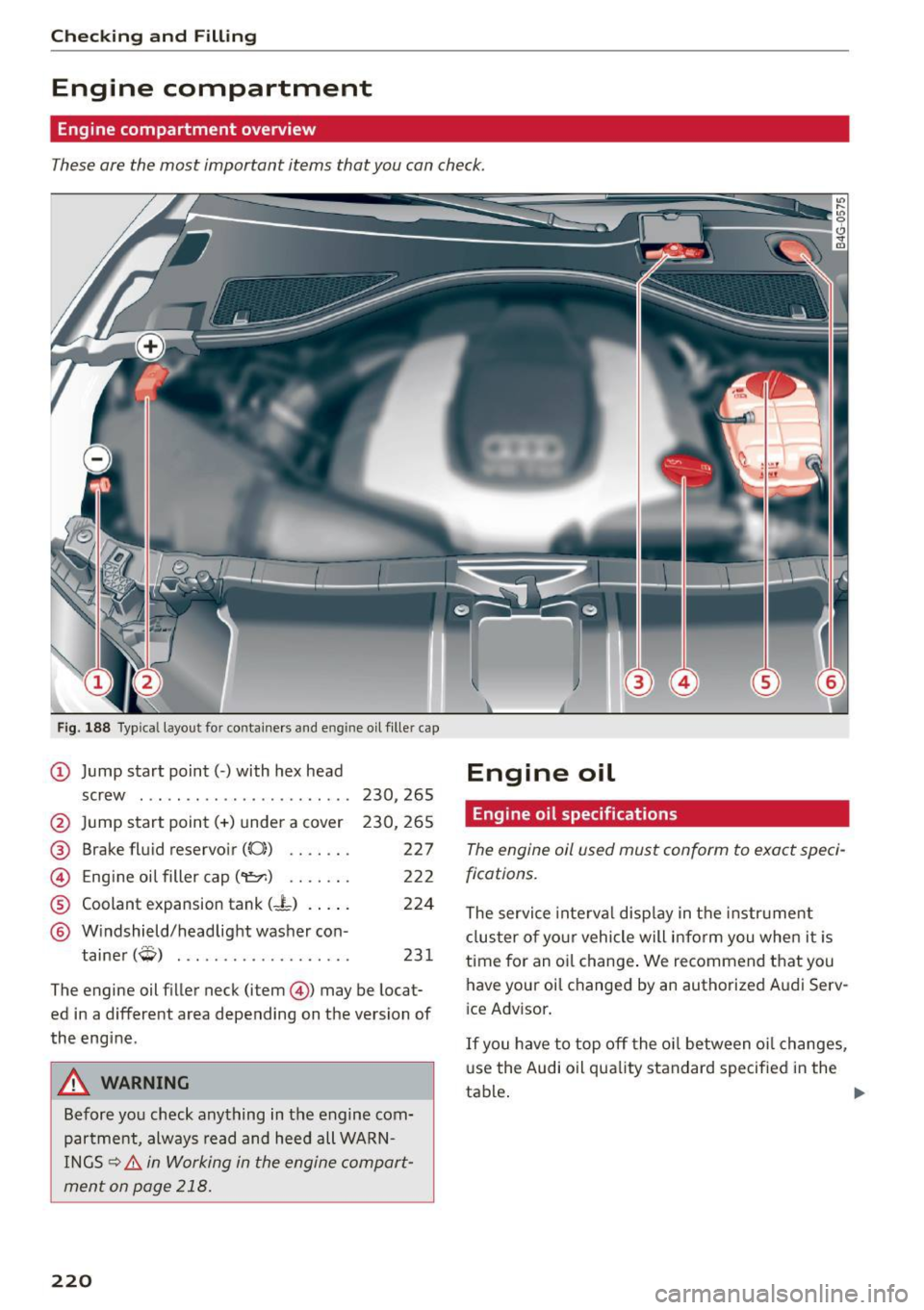
These are the most important items that you can check .
Fig. 188 Typica l layou t fo r con tainers and en gin e oil fille r cap
@ Jump start point( -) with hex head Engine oi L
screw . . . . . . . . . . . . . . . . . . . . . . . 230 , 265
@ Jump start point(+) under a cover
@ Brake fluid reservoir (0)) ...... .
@ Eng ine oil filler cap
('t::71) .. .. .. .
® Coolant expansion tank (-L) .... .
@ Windshield/headlight washer con -
t .
(~ ) amer ~ ................. . .
230,265
227
222
224
231
The engine oil filler neck (item @) may be locat
ed in a different area depending on the version of
the engine .
A WARNING
Before you check anything in the engine com
partment, always read and heed all WARN
INGS~.&.
in Working in the engine compart
ment on page 218.
220
Engine oil specifications
The engine oil used must conform to exact speci
fications.
The service inte rval disp lay in the instr ument
cl us ter of your vehicle will inform you whe n it i s
time for an oi l change . We recommend that you
have your oil changed by an authorized A ud i Serv
i ce Advisor .
If you have to top off the o il between oi l changes,
use the Audi oil quality standard specifie d in the
table . ..,.
Page 225 of 294
M N <( (.J
'SI: ,...., \!) ..,.,
N \!) ,....,
-The oil fi ller ca p m ust be prope rly secure d to
preve nt oil from being sprayed on t he hot
eng ine and exhaust system when t he engine
is runn ing -fire haza rd!
- If your skin has come i n contact w ith the en
gine oil, you m ust subsequently clea nse it
th oroughly.
@ Note
-Check the oil level using the MMI. If the
message
Please red uce oil le vel a p pears,
contact your author ized Audi dealer or other
qualified workshop to have excess o il ex
tracted if necessary .
-Audi do es not recommend th e use of o il
additiv es. They ma y damage th e engin e
and ad ve rs e ly affect your New Vehicle War
rant y.
@ For the sake of the environment
-Under no circumstances can the o il come in
contact with the sewage network o r the soil.
- Observe and follow lega l regu lations whe n
dispos ing of empty oil conta iners.
Changing the engine oil
We recommend that have your oil changed by an
authorized Audi dealer or a qualified service sta
tion.
Before you check anything in the engine compart
ment,
alw ay s re ad and heed all WARNINGS c> .&.
in Working in the engine compartment on
page 218 .
The engine oil must be changed according to the
interva ls specified in your Warranty
& Mainte
n ance booklet . This is ve ry important because the
lub ricat ing propert ies of o il diminish gradually
du ring normal vehi cle use.
Unde r some circumstances the engine o il should
be changed more frequently. Change oil more of
ten if you d rive mostly short distances, ope rate
the vehicle in dusty areas or unde r predom inantly
s top-a nd-go tr aff ic condit io ns, o r have you r vehi
cle whe re temperatures rema in below freezing
for extended periods .
Checking and Fillin g
Detergent additives in the oil will make fresh oil
l ook dark after the engine has been running for a
sho rt time. Th is is norma l and is not a reason to
change the oi l more often than recommended.
Beca use of the p roblem of p roper disposal, along
with t he specia l too ls and necessary expertise re
quired, we strongly recommend that yo u have
yo ur o il changed by an authorized
Audi dealer or
a qua lified service station.
If y ou choo se to change your oil yourself , please
note the following important informat ion:
A WARNING "--
To reduce the risk of personal in jury if you
must change the eng ine oi l in your vehicle
yourself:
- Wear eye protect ion.
-
- To reduce the risk of burns from hot eng ine
oil, let the engine coo l down to the touch.
- W hen removing the o il dra in p lug with your
f ingers, stay as far away as possib le. Always
keep yo ur forearm parallel to the ground to
he lp prevent hot o il from running down your
arm.
- Dra in the oil into a container designed for
this purpose, one la rge enough to hold at
least the tota l amou nt of oil in yo ur engine.
- Engine oil is poisonous . Keep it we ll out of
the reach of ch ild ren .
- Continuous contact wit h used eng ine o il is
harmful to your skin. Always protect your
skin by washing oil off thoro ughly wi th soap
a nd water .
«I) Note
Never mix oil additives with yo ur engine oil.
These additives can damage your engine and
adverse ly affect your Aud i Limited New Vehi
cle Warranty.
@ For the sake of the environment
- Before changi ng your oil, first make sure
you know where you can prope rly dispose of
the used oi l.
- Always dispose of used eng ine oi l properly.
Do not dump it o n ga rden soi l, wooded
223