instrument cluster AUDI A7 2016 User Guide
[x] Cancel search | Manufacturer: AUDI, Model Year: 2016, Model line: A7, Model: AUDI A7 2016Pages: 294, PDF Size: 73.82 MB
Page 46 of 294
Lights and Vi sion
- In cool or damp weather, the ins ide of the
headlights, turn signals and tail lights can
fog over due to the temperat ure difference
between the inside and outs ide. They w ill
clear shortly after switching them on. This
does not affect the service li fe of the light
i ng.
Turn signals and high beam lev er
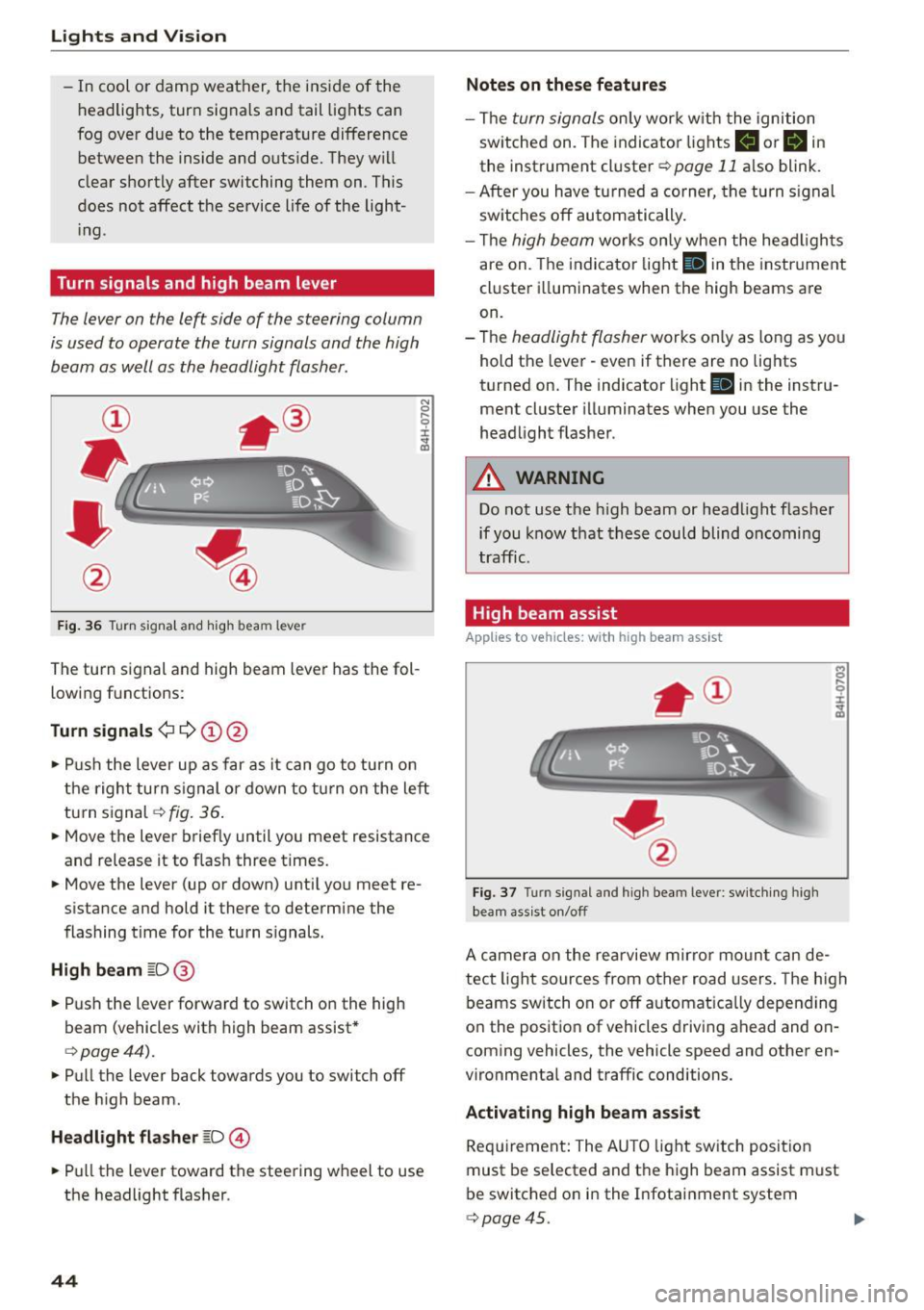
The lever on the left side of the steering column
is used to operate the turn signals and the high
beam as well as the headlight flasher.
F ig . 36 Tu rn signa l and hig h beam lever
The turn s ignal and high beam leve r has the fol
lowing f unctions:
Turn signals ¢¢@@
N
0 ,.._ 0 ±
~
• Pu sh the lever up as far as it can go t o turn on
t he righ t turn s ignal or down to tu rn on the left
tu rn s ignal
c:> fig. 36 .
• Move the lever brief ly until you meet resistance
and release it to flas h three times.
• Move the lever (up or down) unti l you meet re
s istance and hold it there to determine the
flashing time for the tu rn s ignals.
High beam ~D @
• Push the lever forward to switch on the high
beam (vehicles with h igh beam assist *
c:>page44).
• Pull the lever back towards you to switch off
the h igh beam.
Headlight flasher ~D ©
• Pull the lever toward the steering wheel to use
the headlight f lasher.
44
Notes on these features
- The turn signals on ly work w it h the ignition
sw itche d on. The indicato r lights
II or Bin
the instrument cl uster c:> page 11 also blink.
- After you have tu rned a corner, the turn s ignal
sw itches off automatically .
- Th e
high beam works on ly when the he ad ligh ts
are on. The indi cator light
II in the instr ume nt
cl uste r ill uminates when the high beams a re
on.
- The
headligh t flasher works o nly as long as yo u
hold t he leve r - even if there are no lig hts
turned on. The indicator light
II in the instru
ment cluster i lluminates when you use the
headlight f lasher .
A WARNING
Do not use the high beam or head light flasher
if you know that th ese could blind oncoming
traffic .
High beam assist
Applies to veh icles: with high beam assist
Fig . 3 7 Turn signal and high beam lever: sw itc hing high
bea m ass ist o n/off
A camer a on the rea rview mirror moun t ca n de
tec t light sources from other road users . The high
beams switch on or off a utomat ica lly depen ding
o n the position of vehicles driving ahead and on
coming vehicles, the vehicle speed and othe r en
vironme nta l and traffic conditions.
Activating high beam assist
Req uirement: The AU TO light sw itch posit ion
must be selected and t he h igh beam assist m ust
be switched o n in the I nfotai nment system
c:> page45.
Page 47 of 294
M N <( (.J
'SI: ,...., \!) ..,.,
N \!) ,....,
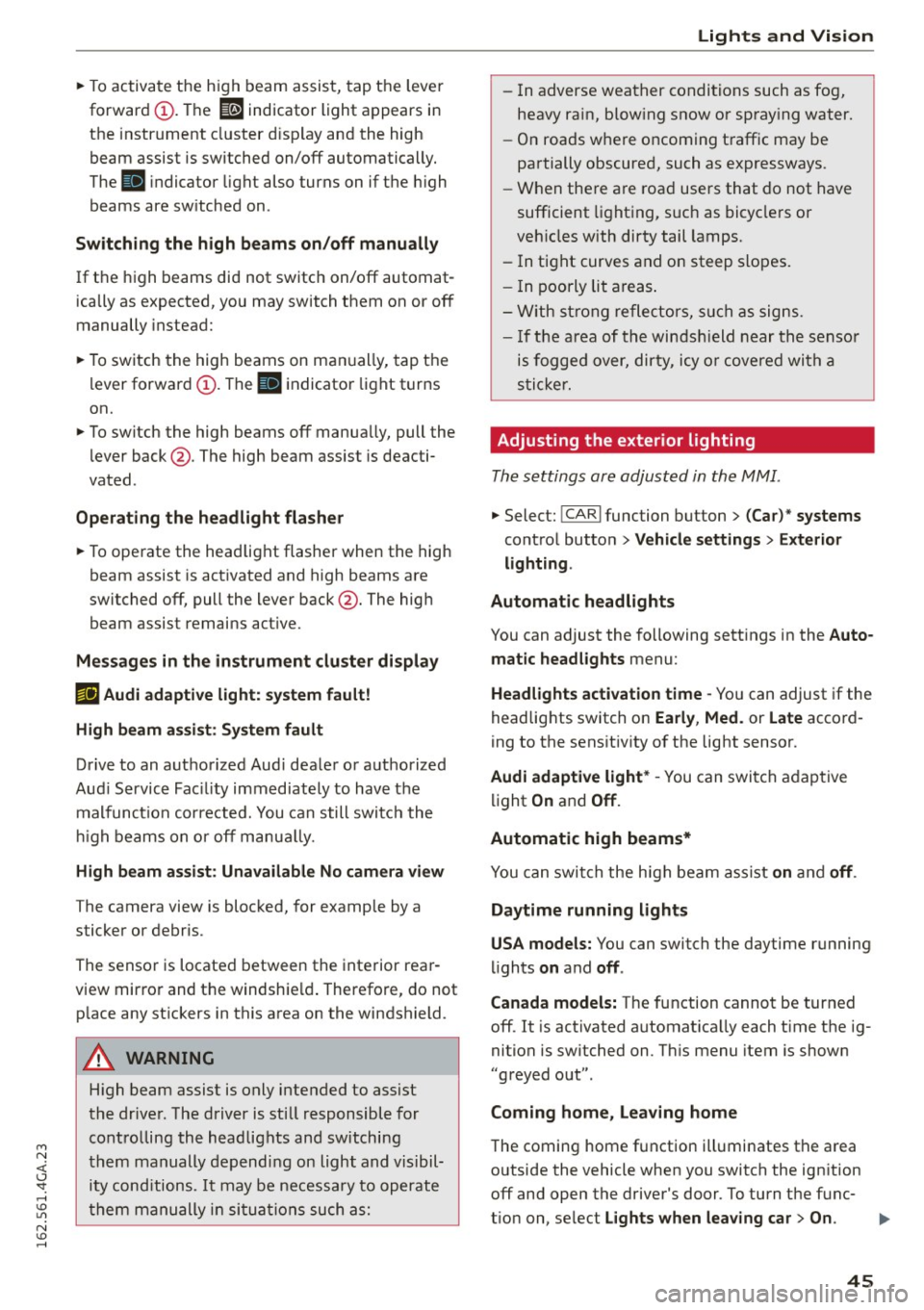
~ To activate the h igh beam assist, tap the lever
forward
(D . The ID indicator light appears in
the instrument cluster disp lay and the high
beam assist is switched on/off automatically.
The
El indicator ligh t also turns on if the high
beams are switched on .
Switching the high beam s on/off manually
If the high beams did not switch on/off automat
ically as expected, you may switch them on or off
manually instead:
~ T o switch the high beams on man ually, tap the
lever forward
(D. The El indica tor light turns
on.
~ To switch the high beams off manua lly, pull the
lever back@. The high beam assist is deacti
vated.
Operating the headlight flasher
~ To operate the headlight flasher when the high
beam assist is activated and high beams are
switched off, pull the lever back@. The high
beam assist remains act ive.
Messages in the instrument cluster display
r!IJ Audi adaptive light: system fault!
High beam assist: System fault
Drive to an authorized Aud i dealer or authorized
Aud i Service Fac ility immediately to have the
malfunct ion corrected. You can still switch the
hi gh beams on or off manually.
High beam assist : Unavailable No camera view
The camera view is blocked, for example by a
sticker or debr is.
The sensor is located between the interior rear
view mirror and the windshie ld. Therefore, do not
p lace any st ickers in this area on the windshield.
A WARNING
-
High beam assist is only intended to assist
the driver. The driver is still responsible for
controlling the headlights and switching
them manually depending on light and visibil
i t y cond itions. It may be necessary to operate
them manually in situations such as:
Lights and Vision
-In adverse weather conditions such as fog,
heavy ra in, blow ing snow or spray ing water.
- On roads where oncoming traffic may be
partially obscured, such as expressways.
- When there a re road users that do not have
sufficient lighting, such as bicyclers or
veh icles with dirty tail lamps.
- In tight curves and on steep slopes.
- I n poorly lit areas.
- With strong reflectors, such as signs.
-If the area of the windsh ield near the sensor
is fogged over, dirty, icy or covered with a
sticker.
Adjusting the exterior lighting
The settings are adjusted in the MMI.
~ Select: !CARI function button> (Car)* systems
control button > Vehicle settings > Exterior
lighting .
Automatic headlights
You can adjust the following sett ings in the Auto
matic headlights
menu:
Headlights activation time -You can adjust if the
headlights switch on
Early , Med. or Late accord
ing to the sensit ivity of the light sensor.
Audi adaptive light* -You can switch adaptive
light
On and Off.
Automatic high beams*
You can switch the high beam assist on and off.
Daytime running lights
USA models:
You can switch the daytime running
lights
on and off .
Canada models:
The function cannot be turned
off. It is activated automat ica lly each t ime the ig
nition is switched on. Th is menu item is show n
"greyed out".
Coming home, Leaving home
The coming home function illuminates the area
outside the vehicle when you switch the ignition off and open the driver's door. To turn the func-
t ion on, select
Lights when leaving car > On . ..,.
45
Page 48 of 294
Lights and Vision
The leaving home function illuminates the area
outside the vehicle when you un lock the vehicle.
To turn the function on, select
Lights when un
locking car> On .
The coming home and leaving home functions
only operate when it is dark and the light switch
is in the
AUTO posit ion .
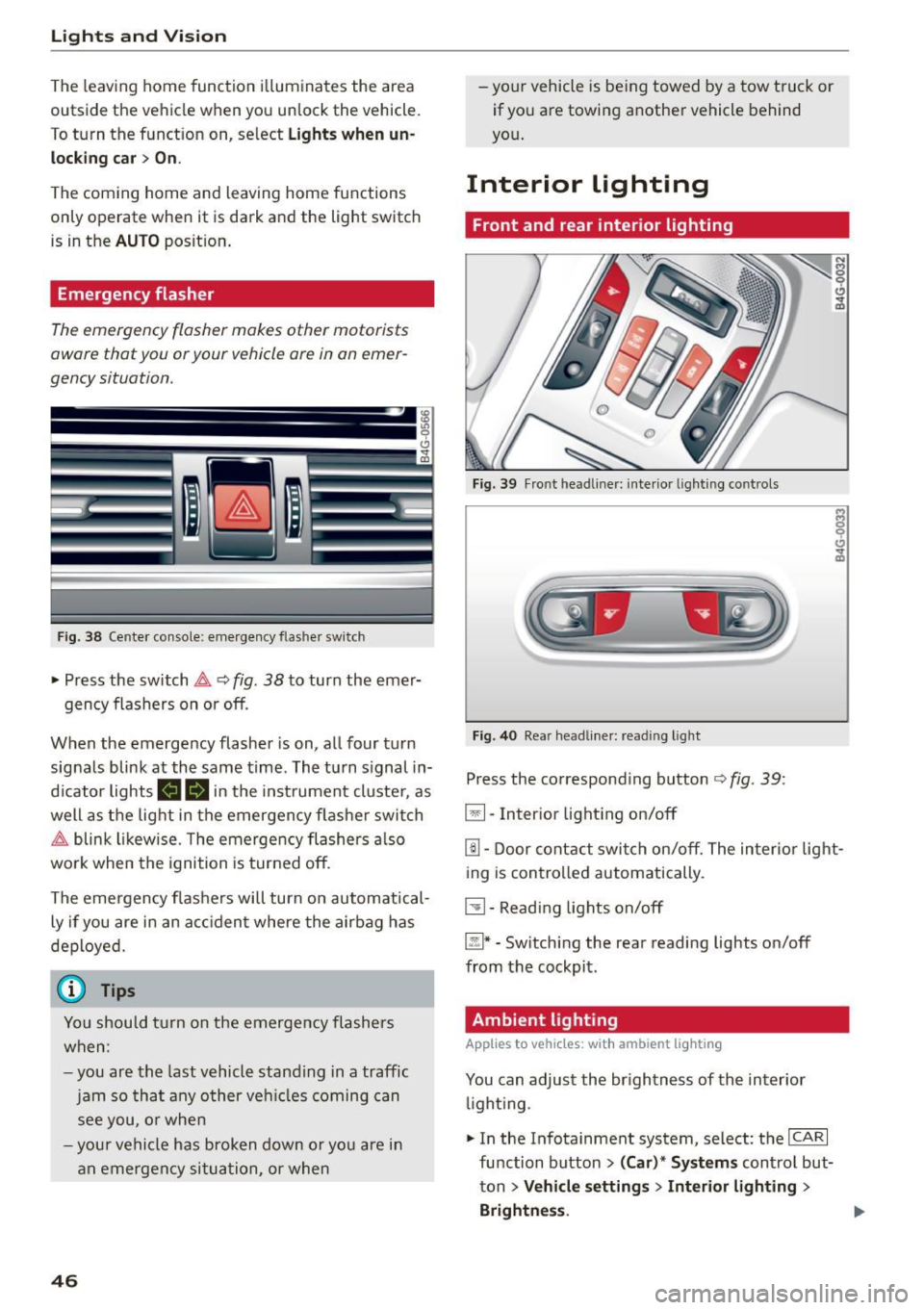
Emergency flasher
The emergency flasher makes other motorists
aware that you or your vehicle are in an emer
gency situation.
F ig. 38 Cente r co nsole: e mergen cy flasher sw itc h
~ Press the switch &, Q fig. 38 to turn the emer-
gency flashers on or off.
When the emergency flasher is on, all four turn
signals blink at the same time . The turn s ignal in
d icator lights
111!1 in the instrument cluster, as
well as the light in the emergen cy flashe r swit ch
&, blink likewise . T he emergency flashers also
wo rk when the ignition is turned off.
The emergency flashers will turn on automatical
ly if you are in an acc ident where the airbag has
deployed.
(j) Tips
You should turn on the emergency flashers
when:
- you are the last vehicle standing in a traffic
jam so that any other vehicl es coming can
see you, or when
- your vehicle has broken down or you are in
an emergency situation, or when
46
-your vehicle is being towed by a tow truck or
if you are towing another vehicle behind
yo u.
Interior Lighting
Front and rear interior lighting
Fig. 39 Front head liner: interio r light ing controls
Fig . 40 Rea r head lin er: read ing light
Press the corresponding button ¢ fig. 39:
5:1-Interior lighting on/off
rn-Door contact switch on/off. The interior light
ing is controlled automatically.
~- Reading lights on/off
~* -Switching the rear reading lights on/off
from the cockpit.
Ambient lighting
Applies to vehicles: wit h ambient lig hting
You can adjust the br ightness of the interior
li ght ing .
~ In the Infotainment system, select : the ICA RI
function button > (Car)* Systems control but
ton
> Vehicle settings > Interior lighting >
Brightne ss.
Page 75 of 294
M N <( I.J "". rl I.O
"' N I.O rl
Basic settings
Applies to vehicles: with four-zone automat ic climate control
The climate control syst em basic s ettings are ac
cessed in th e Infotainment system.
... Se lect : th e ICARI function button > (Car )* Sys-
tems
contro l button > AC.
Rear seat settings
W hen t his funct ion is se lected, a ll sett ings for
the rear can be adjusted through the climate con
trol system in the cockpit. The climate contro l
system sett ings cannot be adjusted in the rea r
seat at the same time. This funct io n sw itches off
after a certain period of time or w hen o ne of the
con trols in the cockpit is pressed.
Recirculation mode
The sensit ivity level of the automatic recircula
tion mode can be set at various leve ls from
Off to
Sensitive . Recirculat io n mode is contro lled auto
mat ica lly. If the w indows fog up, press the
I@ F RON T I button.
Footwell temperature
You can adjust the footwe ll temperat ure so that
it is coole r or warmer.
Au xiliary heater*
In vehicles with d iesel en gines*, the auxiliary
heate r helps to warm t he vehicle interior more
qu ickly . The auxiliary heater is controlled auto
mat ica lly in the
A uto setting.
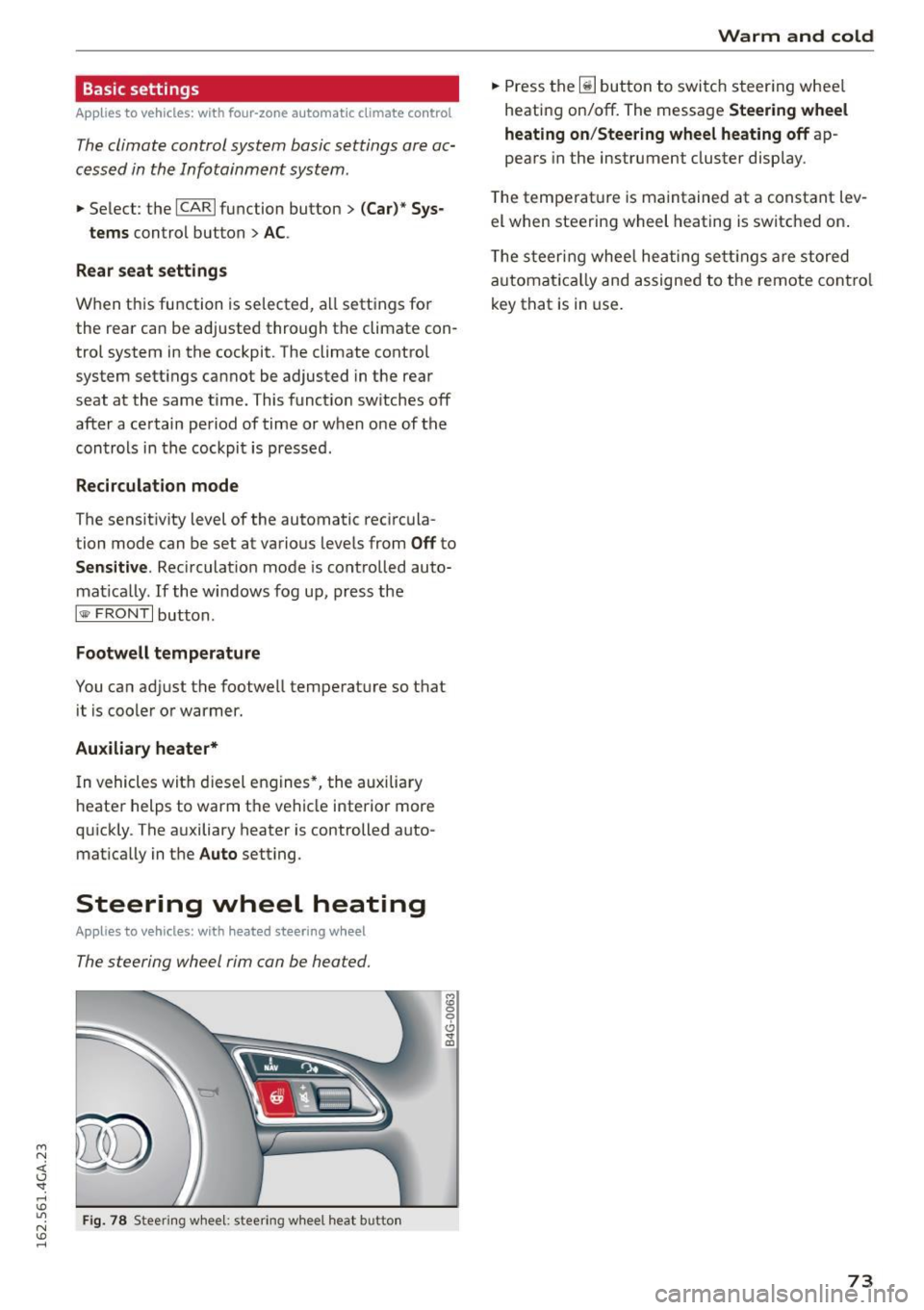
Steering wheel heating
Applies to vehicles: with heated steering w heel
The steering wheel rim can be heated.
F ig . 7 8 Steering w heel : steering w hee l heat butto n
M :g 0
0 .,. ID
Warm and cold
... Press the~ button to switc h steer ing whee l
heati ng on/off. The message
Steering wheel
heating on/Steering wheel heating off
ap
pears in the instrument cluster display.
T he temperat ure is maintained at a constant lev
el when steering wheel heating is switched on .
T he s teer ing wheel hea ting se tt ings a re stored
a utoma tica lly and assigne d to the remote con trol
key that is in use .
73
Page 80 of 294
Driving
"' Drive to an authorized Audi dealer or author
i z ed Audi Service Facility immediately to have
the malfunction corrected .
@ Tips
You can view the message again by pressing
the
I START ENGINE ST OPI button .
Electromechanical
parking brake
Operation
The electromechanical parking brake replaces
the hand brake.
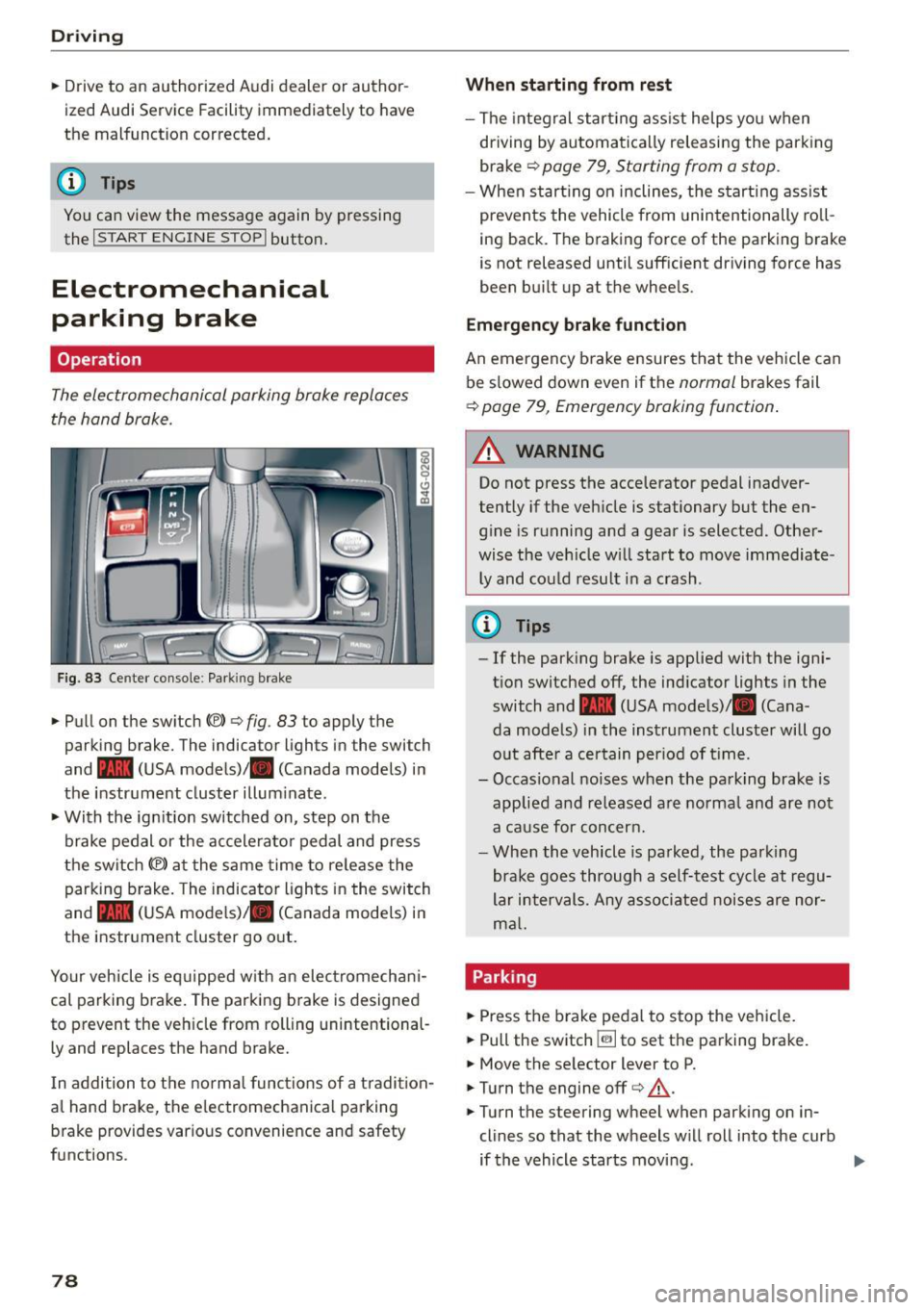
Fig. 83 Ce nter co nso le : Park ing brake
• Pull on the switch{®) ¢ fig. 83 to apply the
parking brake. The indica tor lights in the swi tch
and - (USA mode ls)/ . (Canada models) i n
the instr ument cluster illum inate .
• With the ig nition switched on, step on the
brake pedal or the ac celera to r pedal and press
the switch {®) at the same time to re lease the
parking b rake . The indicator ligh ts in the switch
and - (USA mode ls)/ . (Canada models) i n
the inst rument cluster go o ut.
Your veh icle is eq uipped w ith an elec tromechan i
cal parking b rake. The parking b rake is designed
to prevent the veh icle from rolling unintentional
ly and replaces the hand brake.
I n addition to t he normal func tions of a tradi tion
al hand brake, the e lectromechanica l parking
b rake provides var ious convenience and safety
functions.
78
When starting from rest
- The integral star ting ass ist helps you when
dr iving by automa tica lly releasing the park ing
brake ¢
page 79, Starting from a stop .
-When st art ing on inclines, the s tart ing assist
prevents the vehicle from unintentionally ro ll
i ng back. The braking force of the parking brake
is not released until sufficient dr iving force has
been bu ilt up at the whee ls .
Emergency brake function
An emergency b rake ensures tha t the vehicle can
be s lowed down even if the
normal brakes fail
¢ page 79, Emergency braking function .
_&. WARNING
-
Do not press the accelerator pedal inadver
tently if the veh icle is stationary but the en
g in e is running and a gear is selected. Other
wise the ve hicle w ill sta rt to move immediate
ly and could result i n a crash .
@ Tips
-If the park ing brake is applied with the ign i
t ion switched off, the ind icator lights in the
switch and -(USA mode ls)/ . (Cana
da models) in the instrument cluster will go
o ut afte r a ce rtain per iod of t ime.
- Occasional noises when the pa rking brake- is
applied a nd re leased a re norma l and are not
a ca use for concer n.
- Whe n the v ehicle is pa rked, the par king
brake goes through a self -test cycle at r egu
lar i nterval s. Any asso ciated noises are nor
m al.
Parking
• Press the brake peda l to stop the ve hicle.
"' Pull the switch ~ to set the pa rking brake.
• Move the se lector lever to P.
• Turn the engine off¢&_ .
• Turn the steering wheel when parking on in
clines so that the wheels w ill roll into the curb
if the vehicle starts movi ng .
Page 83 of 294
M N <( I.J "". rl 1.0
"' N 1.0 rl
-The ignition will turn off if you press the
I START ENGINE STOP I button during a stop
phase . The needle in the tachometer
moves
into the OFF position.
General information
Applies to vehi cles: with Start-Stop-System
The standard Start-Stop mode con be canceled
for different system-related reasons.
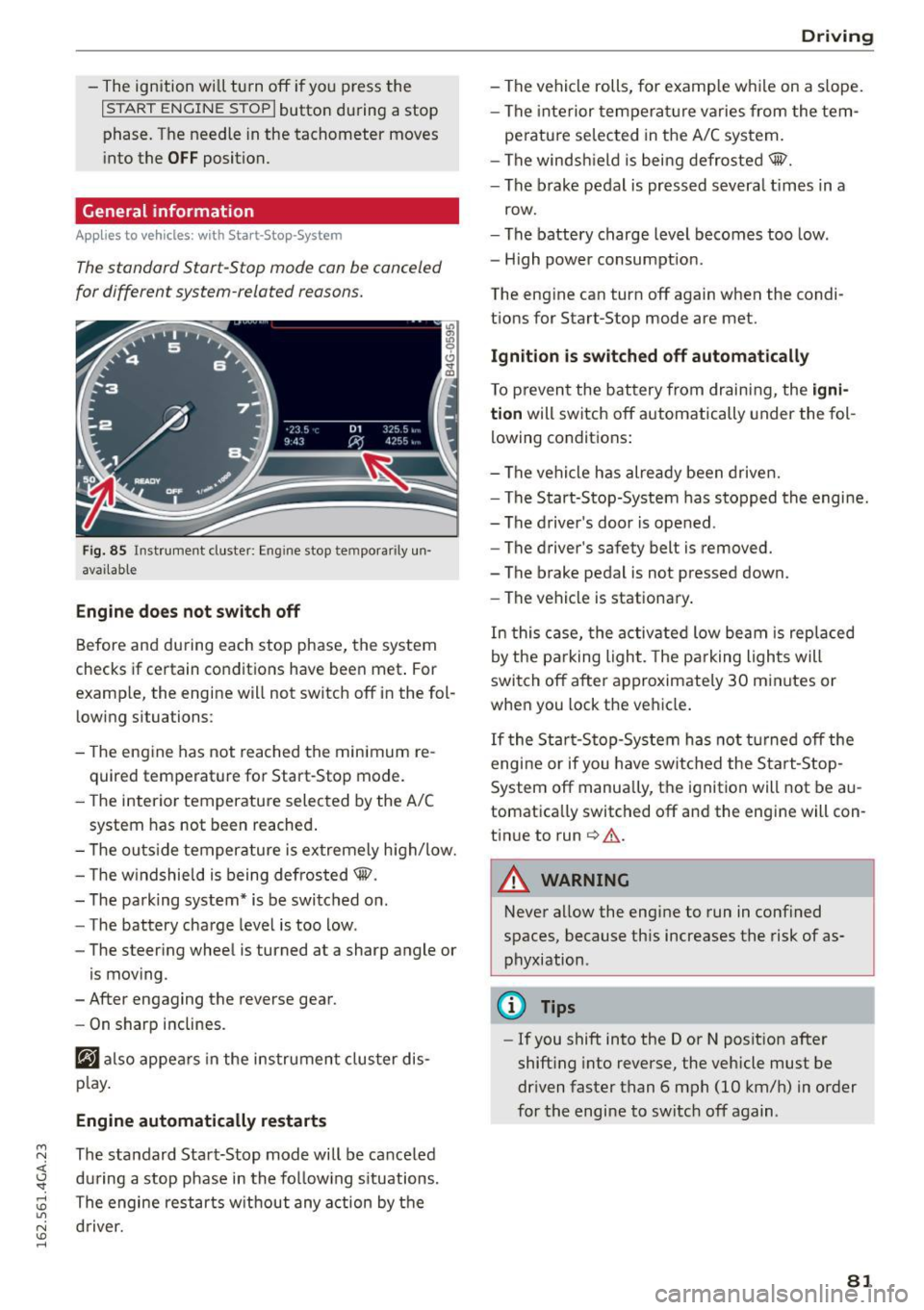
Fig. 85 Instrument cluster: Eng ine stop tempora rily un
avai lable
Engine does not switch off
Before and during each stop phase, the system
checks if certain conditions have been met . For
examp le, the engine will not switch off in the fol
lowing situations:
- The engine has not reached the minimum re
quired temperature for Start-Stop mode.
- The interior temperature selected by the A/C
system has not been reached.
- The outside temperature is extremely high/low.
- The windshield is being defrosted@.
- The parking system* is be switched on .
- The battery charge level is too low .
- The steering wheel is turned at a sharp angle or
is moving .
- After engaging the reverse gear.
- On sharp inclines.
@J also appears in the instrument cluster dis
play.
Engine automatically restarts
The standard Start-Stop mode will be canceled
during a stop phase in the following situations .
The engine restarts without any action by the driver.
Driving
- The vehicle rolls, for examp le while on a s lope.
- The interior temperature varies from the tem-
perature selected in the A/C system.
- The windshield is being defrosted@.
- The brake pedal is pressed severa l times in a
row.
- The battery charge level becomes too low.
- High power consumption.
The engine can turn off again when the condi tions for Start-Stop mode are met.
Ignition is switched off automatically
To prevent the battery from draining, the igni
tion
will switch off automatically under the fol
lowing conditions:
- The vehicle has already been driven.
- The Start-Stop-System has stopped the engine.
- The driver's door is opened .
- The driver's safety belt is removed.
- The brake pedal is not pressed down.
- The vehicle is stationary.
In this case, the activated low beam is replaced
by the parking light. The parking lights will
switch off after approximately 30 minutes or
when you lock the vehicle.
If the Start-Stop-System has not turned off the
engine or if you have switched the Start-Stop
System off manually, the ignition will not be au
tomatically switched off and the engine will con
tinue to run
c> .&. .
A WARNING
--Never allow the engine to run in confined
spaces, because this increases the risk of as
phyxiation .
@ Tips
-If you shift into the D or N position after
shifting into reverse, the vehicle must be
driven faster than 6 mph (10 km/h) in order
for the engine to switch off again .
81
Page 84 of 294

Driving
Switching the Start-Stop-System on/off
manually
Applies to veh icles: with Sta rt-Stop-System
If you do not wish to use the system, you can
switch it off manually.
F ig . 86 Ce nter con so le: Start -Stop-Syste m button
• To switch the Start-Stop-System off/on manual
ly, press the
1 0• •1 button . The L ED in the button
turns on when t he system is switched off .
(D Tips
If you switch the system off d uring a stop
phase, the engine will start again automati
cally.
Messages in the instrument cluster display
Applies to vehicles: with Start -Stop-System
Start-stop system dea ctivated: Please restart
engine manually
This message appea rs when specific conditions
are no t me t d uring a stop phase and the Sta rt
Stop-System will
not be able to resta rt the en
gine. The engine must be started with the
I S TAR T ENGINE STOP I button.
Start-stop system: System fault! Currently
unavailable
There is a ma lf u nct ion in the Star t-Stop -System .
Drive the veh icle to an authorized repair fac ility
for servic ing as soon as possib le to correct the
malfunct ion.
82
Speed warning system
Introduction
The speed warning system helps you to stay un
der a specified maximum speed .
The speed warning system warns you if you are
exceeding the maximum speed that you have set .
You w ill hear a warning tone when your speed ex
ceeds the sto red val ue by app rox imately 3 mph
(3 km/h) . An indicator light . (USA mode ls)/ .
(Ca nada models) in the ins trumen t cluste r dis
play a lso turns o n at the same time. The ind ic a tor
li ght .,. turns off w hen the speed decrea ses
below the stored maximum speed.
Set ting a t hreshol d is recom mended if you would
lik e to be rem inded when you re ach a cert ain
maximum speed . Si tua tions where you may want
to do so include drivin g in a country w ith a gene r
a l speed limit or if there is a specified max imum
speed for winter tires.
(D Tips
Eve n though your vehicle is eq uipped w ith a
speed warning system, you should still watch
the speedometer to make sure yo u are not
drivi ng faster than the speed lim it.
Setting the threshold
You con set , change and delete the warning
threshold in the Infotainment system.
• Select: the ICAR I function button > (Car)* Sy s
tems
control b utton > Driver ass istance >
Speed warning .
You can set any threshold betwee n 20 mph
(30 km/h) and 150 mph (240 km/h) . Settings
can each be adjusted in increments of 6 mph
(10 km/h) .
Page 85 of 294
M N <( \,J
"". rl I.O
"' N I.O rl
Cruise control system
Switching on
Applies to vehicles: with cr uise contro l system
The cruise control system makes it possible to
drive a constant speed that is 30 km/h or higher.
0
f
®t
0
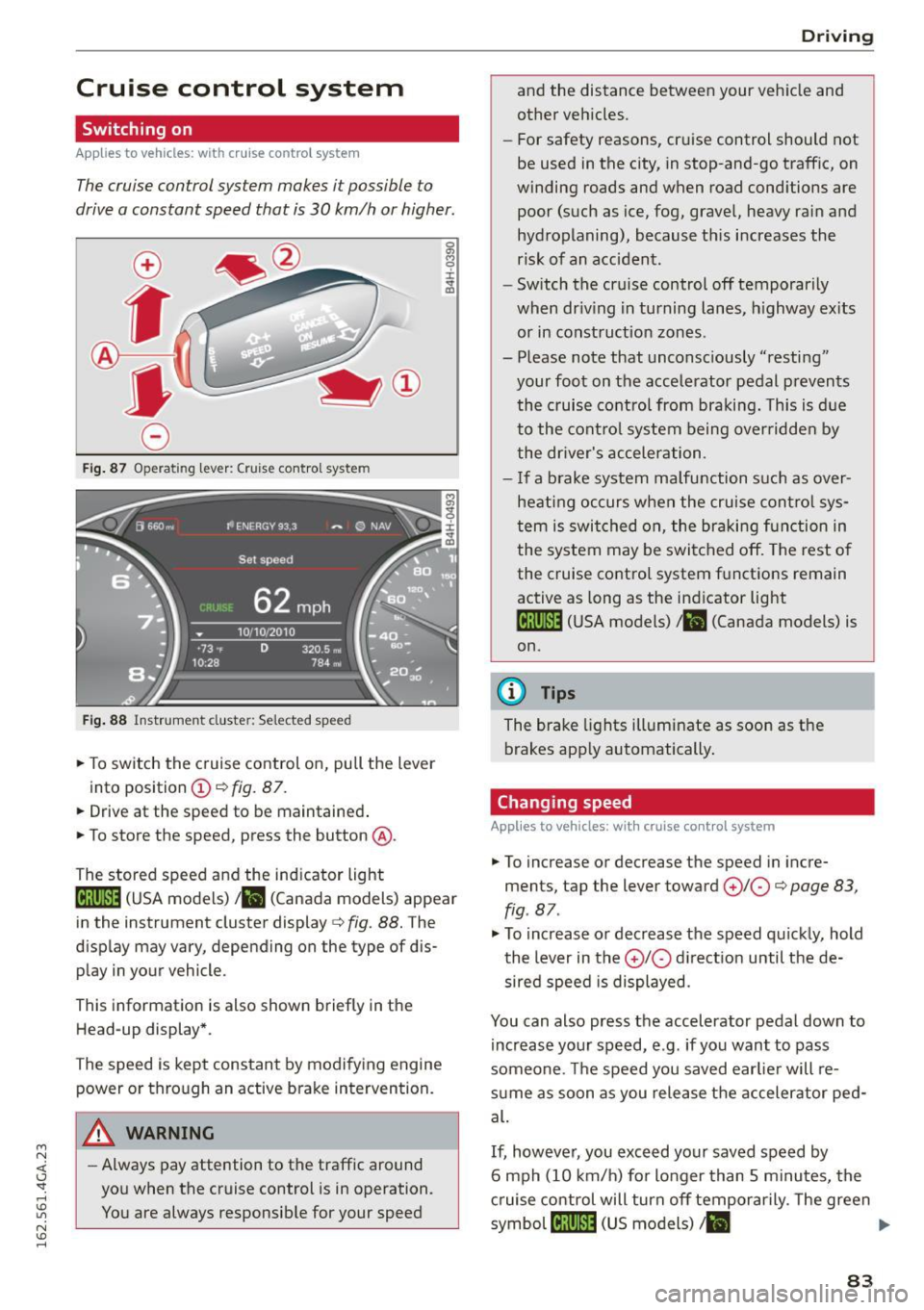
Fig. 87 Operating lever: Cruise control system
Fig. 88 Instrument cluster: Selected speed
.,. To switch the c ruise control on, pull the lever
into position
(D c:> fig. 87 .
.,. Drive at the speed to be maintained .
.,. To store the speed, press the button @.
The stored speed and the indicator light
lij;(l )~i~ (USA models) ,ii (Canada models) appear
in the instrument cluster display
c:> fig. 88. The
display may vary, depending on the type of dis
play in your vehicle.
This informat ion is also shown briefly in the
Head-up display*.
The speed is kept constant by modifying engine power or through an active brake intervention.
A WARNING
- Always pay attention to the traffic around
you when the cruise control is in operation.
You are always responsib le for your speed
-
Dr ivi ng
and the distance between your vehicle and
other vehicles.
- For safety reasons, cruise control should not
be used in the city, in stop-and-go traffic, on
winding roads and when road cond itions are
poor (such as ice, fog, gravel, heavy rain and
hydroplaning), because this increases the
risk of an accident.
- Switch the cruise control off temporarily
when dr iv ing in turning lanes, h ighway ex its
or in construction zones.
- Please note that unconsciously "resting" your foot on the accele rator pedal p revents
the cruise control from braki ng. This is d ue
to the contro l system being over ridden by
the dr iver's acceler ation.
- I f a brake system malfunction such as over
hea ting occurs when the cruise cont ro l sys
tem is swit ched on, the braking f unction in
the system may be switched off. The rest o f
the cruise co ntrol system f unctions remain
active as long as the indicator light
1ff;(i )~i~ (USA models) ,ii (Canada models) is
on.
{!) Tips
The brake lights illuminate as soon as the
brakes app ly automatically .
Changing speed
Applies to vehicles: wit h cruise co ntro l system
.,. To increase or decrease th e speed in incre
ments, tap the lever toward
(£)10 c:> page 83,
fig . 87 .
.,. To increase or decrease the speed quic kly, hold
the lever in the
0 10 d irect ion until the de
sired speed is displayed.
You can also press the accelerator pedal down to increase yo ur speed, e.g. if you want to pass
someone. The speed you saved earlie r will re
s u me as soon as you release the accelerator ped
al.
If, however, you exceed your saved speed by
6 mph (10 km/h) for longer than 5 m inutes, the
c ruise control will turn off temporarily. The green
symbol
cij;(l)~i~ (US models) I ii
83
Page 92 of 294
Audi adapt ive cru ise control and brak ing gu ard
The higher the speed, the greater the distance in
yards (meters)
c::;, .,& . The Dista n ce 3 setting is
recommended.
The distances provided are specified values. De
pending on the d riving situat ion and the how the
vehicle ahead is driving, the actual distance may
be more or less than these target distances.
The various symbols for the time increments ap
pear briefly in the information line@q
page 87,
fig. 94 when you c hange the settings.
c::::,_c::::, ___ Distan ce 1 : This set ting co rresponds
to a distance o f 92 feet/28 meters when trave l
ing at 62 mph (100 km/h), or a time interval of 1
second.
c::::, __ c::::, __ Distan ce 2: T his sett ing corresponds
to a distance o f 118 feet/36 meters when travel
ing at 62 mph (100 km/h), or a time interval of
1.3 seconds.
c::::, ___ c::::,_ Distanc e 3: This setting corresponds
to a distance o f 164 feet/SO me ters when travel
ing at 62 mph (100 km/h), or a time interval of
1.8 seconds.
c::::, ____ c::::, Distanc e 4: This setting corresponds
to a distance o f 210 feet/64 me ters when travel
ing at 62 mph (100 km/h), or a time interval of
2.3 seconds.
A WARNING
Following other vehicles too closely increases
the risk of collisions and ser ious personal in
jury.
- Setting short distances to the traffic ahead
reduces the time and d istance availab le to
br ing your vehicle to a safe stop and makes
i t even more necessary to pay close atten
t ion to traffic.
- Always obey applicable traffic laws, use
good judgme nt, and select a safe following
distance for the traffic, road and weather
condit ions.
(0 Tips
- Distanc e 3 is set automatically each time
you sw itch the ignit ion on.
90
- Your standard settings are automatically
stored and assigned to the remote control
key be ing used .
Selecting the driving mode
Applies to vehicles: wit h Aud i adapt ive c ruise contro l
.,. Select the desired driving mode in drive select
c::;,page 101.
@ Tips
Your settings are automatica lly stored and as
signed to the remote control key being used.
Prompt for driver intervention
Applies to vehicles: with A udi adapt ive c ru ise contro l
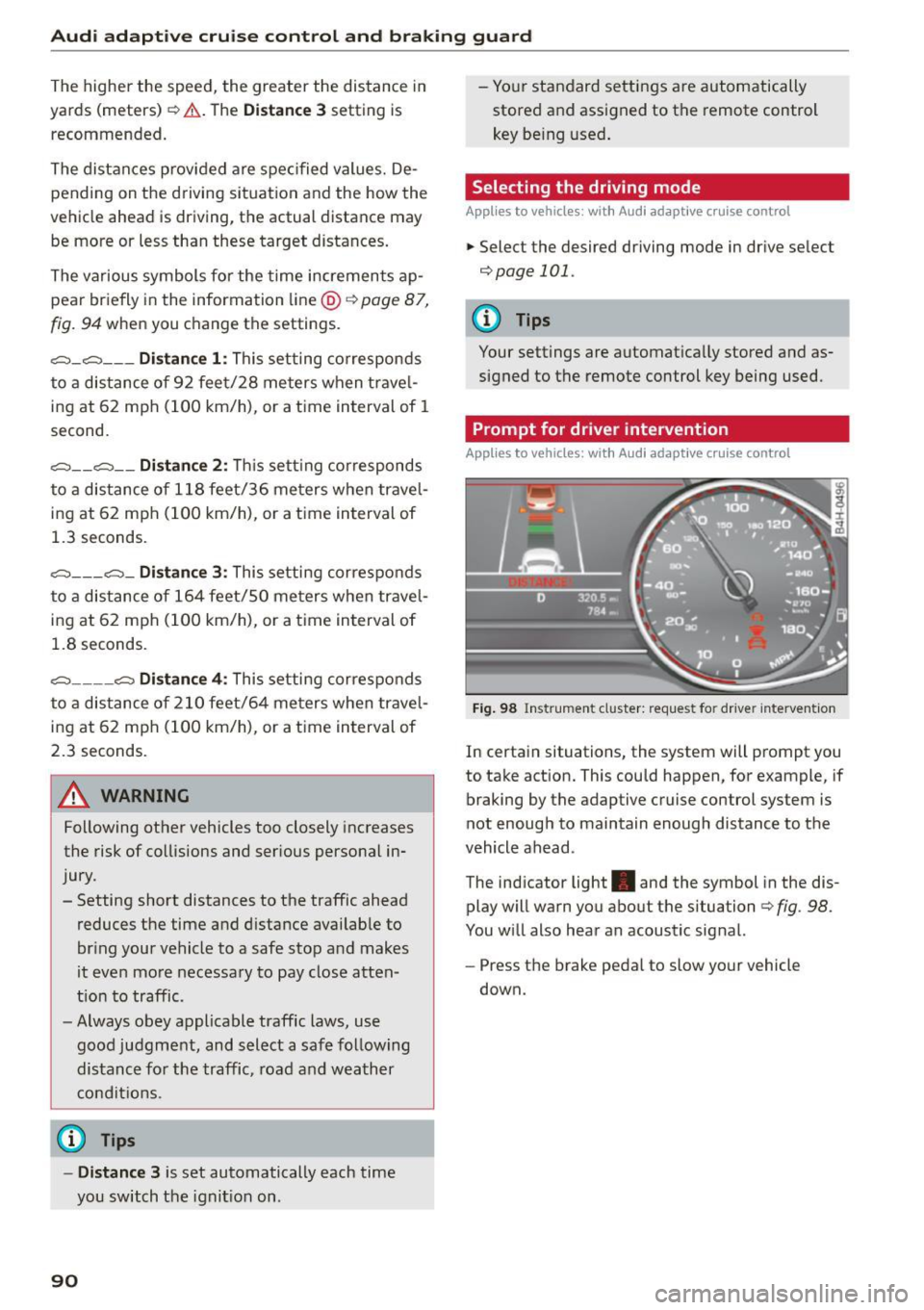
Fig . 98 Instrument cluster: req uest fo r dr ive r interve ntion
In certain situations, the system will prompt you
to take action. This could happen, for example, if
braking by the adaptive cruise control system is
not enough to maintain enough distance to the
vehicle ahead .
The indicator light. and the symbol in the dis
play will warn you about the situation
c::;, fig . 98.
You w ill also hear an acoustic sig nal.
- Press the brake peda l to slow your vehicle
down.
Page 93 of 294

Audi adaptive cruise control and braking guard
Audi braking guard
Description
Applies to vehicles: with Audi adaptive cruise co ntrol
F ig. 99 Instrument cluster : approach warning
Braking guard uses radar sensors and a video
camera. It also functions within the lim its of the
system when adaptive cruise control is sw itched
off.
What can braking guard do?
When detected in time, the system can assess
situations when a vehicle ahead brakes suddenly
or if your own veh icle is traveling at a high speed
and approaching a vehicle up ahead that is mov
ing more slow ly . Braking guard does not react if it
cannot de te ct the situation .
The system advises you of various situations:
- The
distance warning is given if you are too
close to the vehicle ahead for a long time. If the
vehicle ahead brakes sharply, you will not be
able to avo id a collision. The indicator light.
in the d isplay comes on .
- The
approach warning is g iven when a detected
vehicle up ahead in your lane is moving much
more slowly than you are or if it brakes sharply .
When this warning is g iven, it may only be pos
sible to
avoid a co llis ion by swerving or braking
sharp ly. The indicator light. and indica tor in
the display will warn yo u about the danger
¢
fig. 99. You will also hear an acoustic signal.
If you do not react fast enough or do not react at
all to the situation, braking guard will intervene
M N by braking. <( I.J "". rl I.O
"' N <.0 ll This is not a vailable in some coun tri es. rl
- If a collision is imminent, the system wi ll first
provide an
acute warning by briefly and sharply
app ly ing the brakes.
- If you do not react to the acute warning, brak
ing guard can brake with increasing force within
the limits of the system. This reduces the vehi
cle speed in the event of a collision.
- The system can initiate maximum braking
short ly before a collision
1l . Full dece leration at
high speeds occurs only in vehicles with adap
tive cruise control and s ide ass ist (pre sense
plus).
- If the braking guard senses that you are not
braking hard enough when a collis ion is imm i
nent, it can increase the braking force .
- The pre sense functions also engage when a
collision is imm inent ¢
page 185 .
Which functions can be controlled?
You can switch braking guard and the distance/
approach warning on or off in the MMI
¢ page 92, Settings in the Infotainment sys
tem .
A WARNING
--
Lack of attention can cause collisions, other
accidents and ser ious personal injuri es. The
braking guard is an ass ist system and cannot
prevent a collision by itself. The driver must
always intervene . The driver is always respon
sib le for braking at the correct time.
- Always pay close attent ion to traffic,
even
when the braking guard is switched on . Be
ready to intervene and be ready to take com
p lete control whenever necessary. Always
keep the safe and legal distance between
your veh icle and vehicles up ahead.
- Braking guard works within limits and will
not respond outside the system limits, for
example when approaching a stopped vehi
cle or stationary obstacle (end of a traffic
jam or vehicle that has broken down in traf
fic).
-Always remember that the radar sensor for
the braking gua rd works on ly w ithin defined
liJ,,
91