steering wheel AUDI A7 2016 User Guide
[x] Cancel search | Manufacturer: AUDI, Model Year: 2016, Model line: A7, Model: AUDI A7 2016Pages: 294, PDF Size: 73.82 MB
Page 77 of 294
M N <( I.J "". rl I.O
"' N I.O rl
There must be at least 10 inches (25 cm) be
tween your chest and the center of the steering
wheel.
If you cannot sit more than 10 inches (25
cm) from the steering wheel, see if adaptive
equipment is available to help you reach the ped
als and increase the distance from the steering
wheel.
For detailed information on how to adjust the
driver's seat, see
r:::>page 53.
In vehicles with the memory function*, the steer
ing column settings are stored together with the
seat position.
A WARNING
Improper use of steering wheel adjustment
and improper seating position can cause seri
ous personal injury.
- Adjust the steer ing wheel column only when
the vehicle is not mov ing to prevent loss of
vehicle control.
- Adjust the driver's seat or steering wheel so
that there is a minimum of 10 inches (25
cm) between yo ur chest and the steering
wheel
r:::>page 127, fig. 144. If you cannot
mainta in this min imum d istance, the a irbag
system cannot protect you properly .
- If phys ica l limitations prevent you from sit
ti ng 10 inches (25 cm) or more from the
steering wheel, check with your authorized
Audi dealer to see if adaptive eq uipment is
available.
- If the steering wheel is aligned wi th your
face, the supp lemental driver's airbag can
not provide as much protection in an acci
dent. Always make sure that the steering
wheel is aligned w ith your chest.
- Always hold the steering wheel with your hands at the 9 o'clock and 3 o'clock posi
t ions to reduce the r isk of personal injury if
the driver 's airbag deploys.
- Never hold the steer ing wheel at the 12
o'clock posit ion or w ith your hands inside
the steering wheel rim or on the steering
wheel hub. Holding th e steering wheel the
wrong way can cause se rious injuries to the
hands, arms and head if the driver's a irbag
dep loys .
Drivi ng
Easy seat entry
Applies to vehicles: with power steering wheel adjustment
Easy seat entry makes it easier to enter and exit
the vehicle by adjusting the steering column au
tomatically.
.. In the Infotainment system, select: the ICARI
function button > ( Car) * Systems control but
ton
> V ehicle sett ings > Se ats> Driver 's se at>
Ea sy se at entry > On .
When easy seat entry is sw itched on, the steering
column goes back up into the park pos ition when
the ignit ion is switched off . After entering the ve
hicle, the steeri ng column returns to the stored
pos ition once the ig nit ion is switched on.
Starting and stopping
the engine
Starting the engine
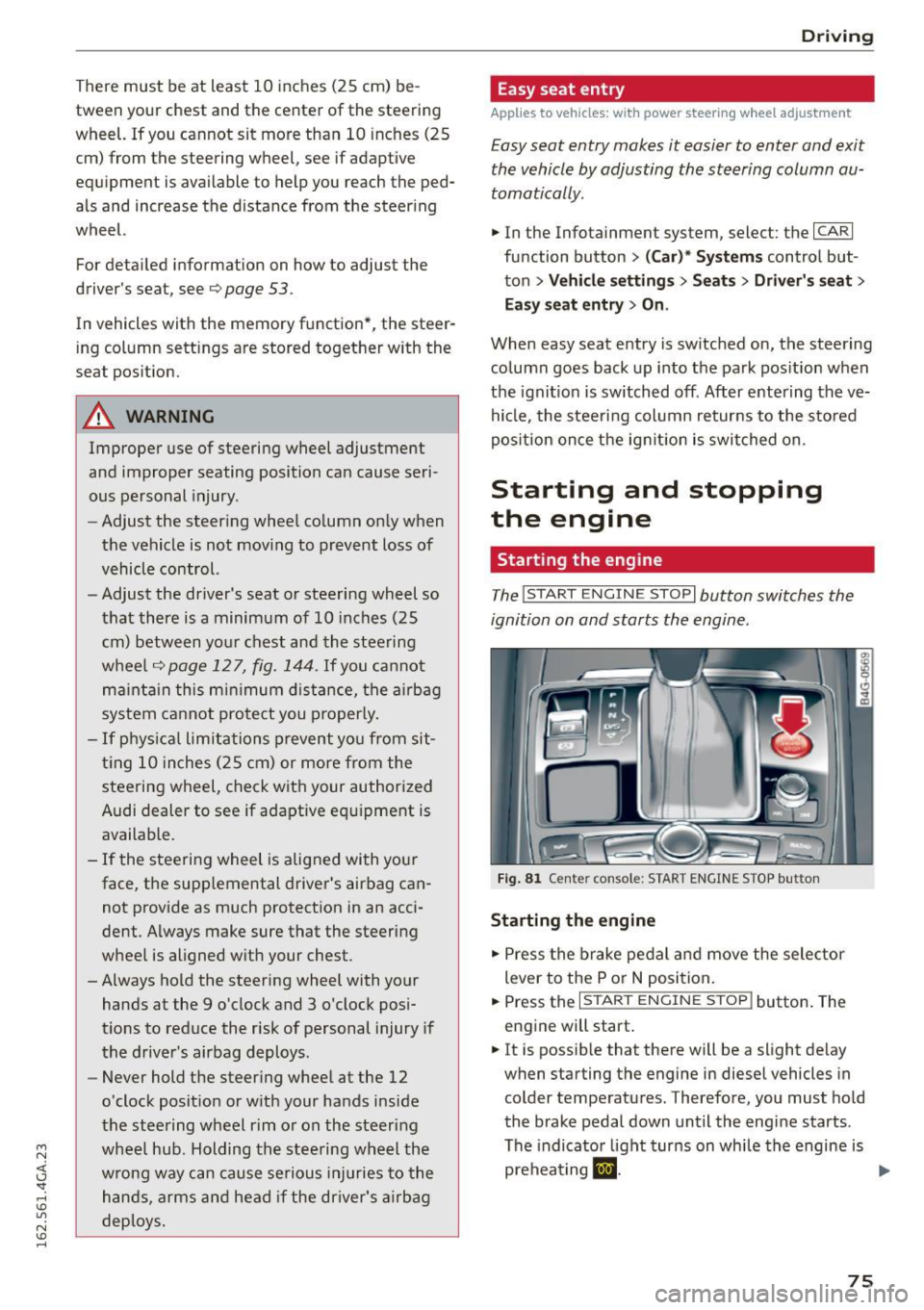
The I STAR T ENGIN E ST OPI button switches the
ignition on and starts the engine .
Fig . 8 1 Center console: START ENGINE STOP button
Sta rting the engine
.. Press the brake pedal a nd move the selector
lever to the P o r
N position.
.. Press the
I START ENGINE STOP j button . The
eng ine will start .
.. It is possib le that there will be a slight delay
when starting the engine in diesel vehicles in
colder temperatu res. Therefore, you must hold
the brake pedal down unt il the engi ne starts .
The indicator light turns on whi le the engine is
preheating
m . ...
75
Page 80 of 294
Driving
"' Drive to an authorized Audi dealer or author
i z ed Audi Service Facility immediately to have
the malfunction corrected .
@ Tips
You can view the message again by pressing
the
I START ENGINE ST OPI button .
Electromechanical
parking brake
Operation
The electromechanical parking brake replaces
the hand brake.
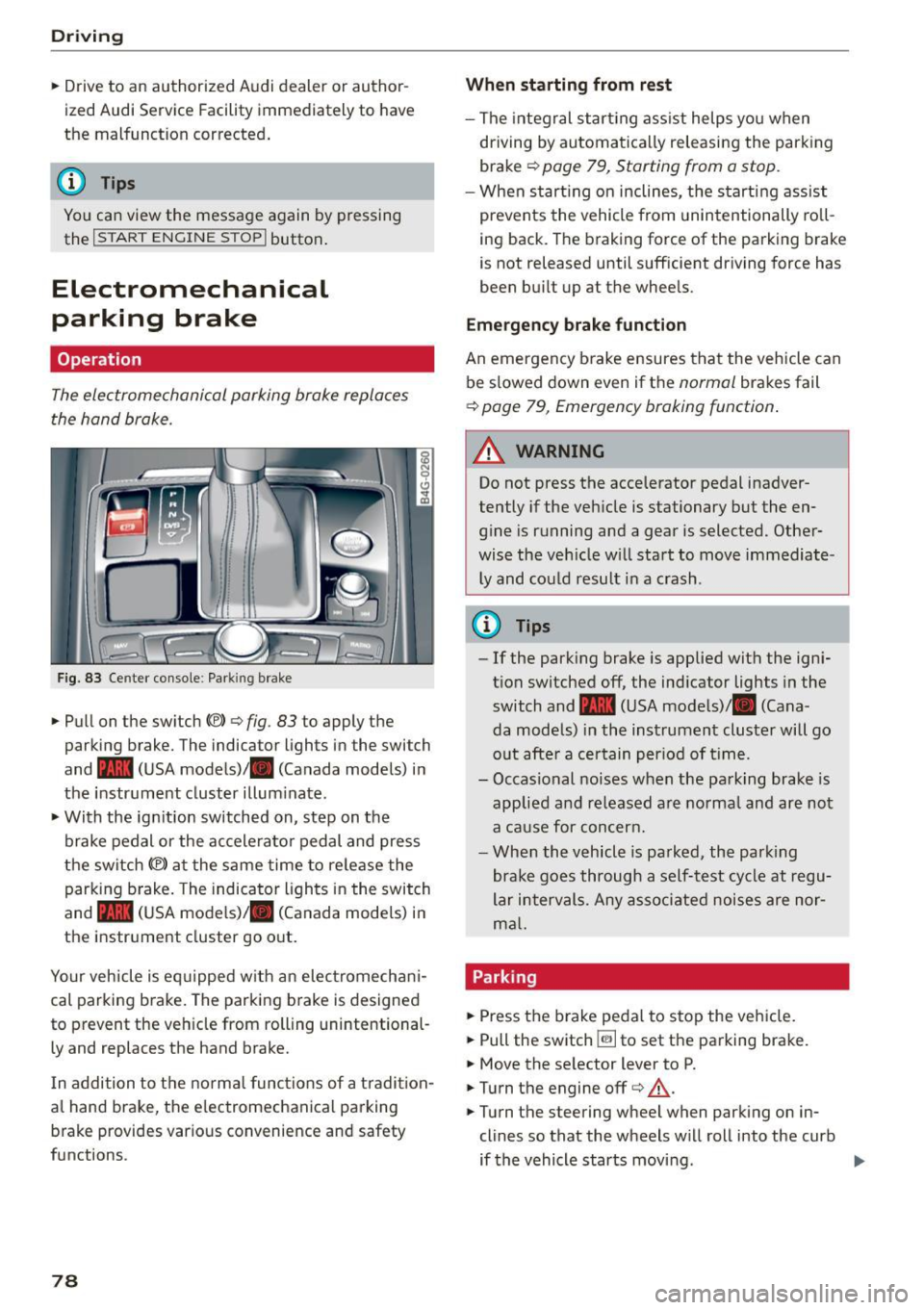
Fig. 83 Ce nter co nso le : Park ing brake
• Pull on the switch{®) ¢ fig. 83 to apply the
parking brake. The indica tor lights in the swi tch
and - (USA mode ls)/ . (Canada models) i n
the instr ument cluster illum inate .
• With the ig nition switched on, step on the
brake pedal or the ac celera to r pedal and press
the switch {®) at the same time to re lease the
parking b rake . The indicator ligh ts in the switch
and - (USA mode ls)/ . (Canada models) i n
the inst rument cluster go o ut.
Your veh icle is eq uipped w ith an elec tromechan i
cal parking b rake. The parking b rake is designed
to prevent the veh icle from rolling unintentional
ly and replaces the hand brake.
I n addition to t he normal func tions of a tradi tion
al hand brake, the e lectromechanica l parking
b rake provides var ious convenience and safety
functions.
78
When starting from rest
- The integral star ting ass ist helps you when
dr iving by automa tica lly releasing the park ing
brake ¢
page 79, Starting from a stop .
-When st art ing on inclines, the s tart ing assist
prevents the vehicle from unintentionally ro ll
i ng back. The braking force of the parking brake
is not released until sufficient dr iving force has
been bu ilt up at the whee ls .
Emergency brake function
An emergency b rake ensures tha t the vehicle can
be s lowed down even if the
normal brakes fail
¢ page 79, Emergency braking function .
_&. WARNING
-
Do not press the accelerator pedal inadver
tently if the veh icle is stationary but the en
g in e is running and a gear is selected. Other
wise the ve hicle w ill sta rt to move immediate
ly and could result i n a crash .
@ Tips
-If the park ing brake is applied with the ign i
t ion switched off, the ind icator lights in the
switch and -(USA mode ls)/ . (Cana
da models) in the instrument cluster will go
o ut afte r a ce rtain per iod of t ime.
- Occasional noises when the pa rking brake- is
applied a nd re leased a re norma l and are not
a ca use for concer n.
- Whe n the v ehicle is pa rked, the par king
brake goes through a self -test cycle at r egu
lar i nterval s. Any asso ciated noises are nor
m al.
Parking
• Press the brake peda l to stop the ve hicle.
"' Pull the switch ~ to set the pa rking brake.
• Move the se lector lever to P.
• Turn the engine off¢&_ .
• Turn the steering wheel when parking on in
clines so that the wheels w ill roll into the curb
if the vehicle starts movi ng .
Page 83 of 294
M N <( I.J "". rl 1.0
"' N 1.0 rl
-The ignition will turn off if you press the
I START ENGINE STOP I button during a stop
phase . The needle in the tachometer
moves
into the OFF position.
General information
Applies to vehi cles: with Start-Stop-System
The standard Start-Stop mode con be canceled
for different system-related reasons.
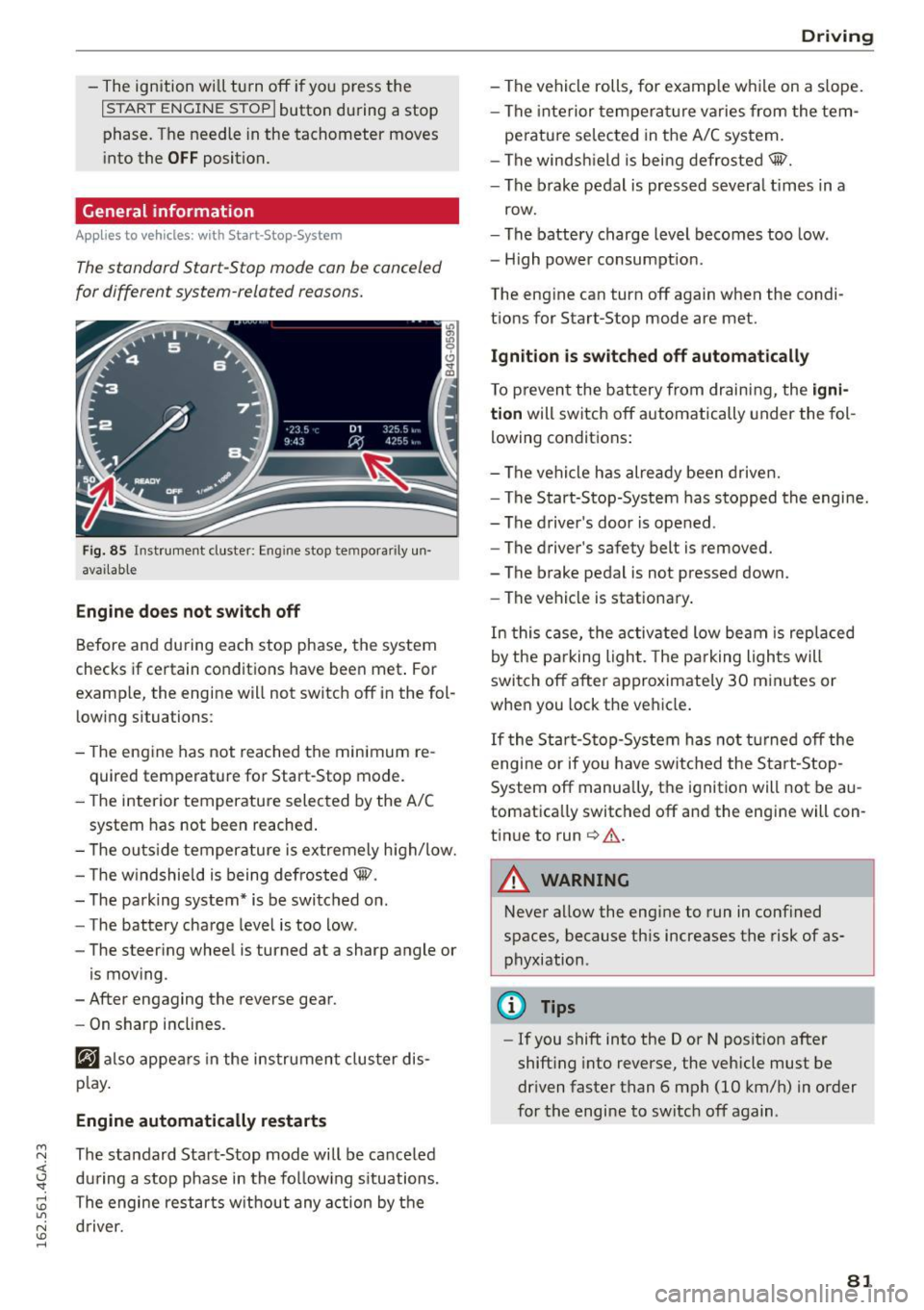
Fig. 85 Instrument cluster: Eng ine stop tempora rily un
avai lable
Engine does not switch off
Before and during each stop phase, the system
checks if certain conditions have been met . For
examp le, the engine will not switch off in the fol
lowing situations:
- The engine has not reached the minimum re
quired temperature for Start-Stop mode.
- The interior temperature selected by the A/C
system has not been reached.
- The outside temperature is extremely high/low.
- The windshield is being defrosted@.
- The parking system* is be switched on .
- The battery charge level is too low .
- The steering wheel is turned at a sharp angle or
is moving .
- After engaging the reverse gear.
- On sharp inclines.
@J also appears in the instrument cluster dis
play.
Engine automatically restarts
The standard Start-Stop mode will be canceled
during a stop phase in the following situations .
The engine restarts without any action by the driver.
Driving
- The vehicle rolls, for examp le while on a s lope.
- The interior temperature varies from the tem-
perature selected in the A/C system.
- The windshield is being defrosted@.
- The brake pedal is pressed severa l times in a
row.
- The battery charge level becomes too low.
- High power consumption.
The engine can turn off again when the condi tions for Start-Stop mode are met.
Ignition is switched off automatically
To prevent the battery from draining, the igni
tion
will switch off automatically under the fol
lowing conditions:
- The vehicle has already been driven.
- The Start-Stop-System has stopped the engine.
- The driver's door is opened .
- The driver's safety belt is removed.
- The brake pedal is not pressed down.
- The vehicle is stationary.
In this case, the activated low beam is replaced
by the parking light. The parking lights will
switch off after approximately 30 minutes or
when you lock the vehicle.
If the Start-Stop-System has not turned off the
engine or if you have switched the Start-Stop
System off manually, the ignition will not be au
tomatically switched off and the engine will con
tinue to run
c> .&. .
A WARNING
--Never allow the engine to run in confined
spaces, because this increases the risk of as
phyxiation .
@ Tips
-If you shift into the D or N position after
shifting into reverse, the vehicle must be
driven faster than 6 mph (10 km/h) in order
for the engine to switch off again .
81
Page 96 of 294
Audi active lane assist
Audi active lane assist Lane assist
Description
A pp lies to veh icles: w ith Audi active lane assist
Active lane assist detects lane marker lines with
in the limits of the system using a camera in the
windshield. If you are approaching a detected lane marker line and it appears likely that you
will leave the lane, the system will warn you with
corrective steering. You can override this steering
at any time. If you pass over a line, the steering
wheel will vibrate lightly. In order for this warn
ing vibration to occur, it must first be switched
on in the Infotainment system. Active lane assist is operable when the lane marker line is detected
on at least one side of the vehicle.
The system is designed for driving on freeways
and expanded highways and thus works only at
speeds of 40 mph (65 km/h) or more .
Applies to vehicles with side assist*: If you acti
vate a turn s ignal when active lane assist is ready
and it classifies a lane change as critical because
of vehicles traveling alongside you or approach ing you, there will be noticeable corrective steer
ing shortly before you leave the lane. This will at
tempt to keep your vehicle in the lane.
Applies to vehicles without side assist*: the sys
tem does not warn when it is ready if you activate
the turn signal before crossing the lane marker line. In this case, it assumes that you are chang
ing lanes intentionally.
Applies to vehicles with adaptive cruise control*
or parking aid*: The corrective steering is target
ed based on the driving situation. In addition to
the lane marker lines, the system can also take
into account other objects such as guard rails. If
they are detected in close proximity to the vehi
cle, active lane assist helps prevent the vehicle
from driving too close to them. There is also
passing assistance . The system does not provide
any corrective steering if it detects that you are
passing another vehicle.
94
A WARNING
-
- The system warns the driver that the vehicle
is leaving the lane using corrective steering.
The driver is always responsible for keeping
the vehicle within the lane.
- The system can help you keep the vehicle in the lane, but it does not drive by itself. Al
ways keep your hands on the steering
wheel.
- Corrective steering may not occur in certain
situations, such as during heavy braking.
- There may be cases where the camera does
not recognize all lane marker lines. Correc
tive steering can only take place on the side
of the vehicle where lane marker lines are
detected.
- Other road structures or objects could possi
bly be identified unintentionally as lane marker lines. As a result, corrective steering
may be unexpected or may not occur.
- The camera view can be restricted, for ex
ample by vehicles driving ahead or by rain,
snow, heavy spray or light shining into the
camera. This can result in active lane assist
not detecting the lane marker lines or de
tecting them incorrectly.
- Under certain conditions such as ruts in the
road, a banked roadway or crosswinds, the
corrective steering alone may not be enough
to keep the vehicle in the middle of the lane.
- For safety reasons, active lane assist must
not be used when there are poor road and/
or weather conditions such as slippery roads, fog, gravel, heavy rain, snow and the
potential for hydroplaning. Using active lane
assist under these conditions may increase
the risk of a crash.
Page 97 of 294

M N <( I.J "". rl I.O
"' N I.O rl
Switching on and off
Applies to vehicles: with Audi active lane assist
Fig. 100 Turn signal lever: active lane assist button
Fig. 101 Windshield: camera w indow for active lane assis t
... Press the¢ fig. 100 button to switch the sys
tem on and off. The. or. indicator light in
the instrument cluster turns on or off .
Indicator lights
• Ready:
The indicator light turns on when the
system is ready for use. The system can now be
operated .
• Not ready: The indicator light turns on if the
system is switched on but is inoperable . This may
be due to the following reasons :
- There is no lane marker line.
- The relevant lane marker lines are not detected
(for example, markings in a construction zone
or because they are obstructed by snow, dirt,
water or backlighting).
- The vehicle's speed is below the speed needed
to activate it, which is about 40 mph (65 km/
h).
- The lane is narrower than about 8 ft. (2.5 m) or
wider than 15
ft (4.5 m).
- The curve is too sharp.
Audi active lane assist
- The driver's hands are not on the steering
wheel.
(D Tips
Make sure the camera's field of view
¢
fig. 101 is not obstructed by stickers or any
thing else. For information on cleaning, refer
to ¢ page
205.
Lane assist display in the instrument
cluster
Applies to vehicles: wit h Audi active lane ass ist
Fig. 102 Instrument cluster: active lane assist is switched
on and providing warnings
Fig. 103 Instrumen t cluster: act ive lane assist is sw itched
on but not ready to provide warn ings
You can call up the active lane assist display using
the buttons in the multifunction steering wheel
¢ page
23.
An additional indicato r appears in the Head-up
display* .
95
Page 98 of 294

Audi active lane assist
White line(s)
Active lane assist is activated
and ready to provide warn ings.
Red line(s) Active lane assist warns you
(left or right) before leav ing a lane
¢fig . 102 . In addit ion, the
steering wheel vibrates lightly .
Gray line(s) Active lane assist is activated, but not ready to give warning
¢fig. 103.
Messages in the instrument cluster display
If the active lane assist switches off automatical
ly, the indicator light in the display turns off and
one of the following messages appears:
Audi active lane a ssist: Currently unavailable .
No camera view
This message appea rs if the came ra is unab le to
detect the lines . Thi s co uld happen if:
- The camera field of view ¢
page 95, fig. 101 is
dirty or covered in ice. Clean this area o n the
winds hield.
- The camera field of view is fogged over. Wait
until the fog has cleared before switching the
active lane assist on again.
- T he system has been unable to detect the lanes
for an extended period of time due to road con
ditions. Switch the active lane assist back on
when the lines are more visible.
Audi active lane assist : currently unavailable
There is a temporary active lane ass ist malfunc
tion . Try switching the active lane assist on again
later .
Audi active lane assist : system fault!
Drive to an a uthorized Aud i dea ler or authorized
Audi Service Faci lity immediately to have the
malfunct ion corrected.
Audi active lane assist: Please take over steering
This message appears if you are not steering by
yourse lf. If this is the case, active lane assist does
not swi tch off, but it is "not ready" to provide a
warn ing. The system can help you keep the vehi
cle in the lane. However, yo u are responsible for
driving the vehicle and must steer it yourself.
96
· Adjusting the vibration warning
Applies to veh icles: with Audi active lane assist
.,. Select: the I CARI function button > (Car) * Sys
tems
control button > Driver assistan ce > Audi
ac tive lane assist .
You can switch the add itiona l vibrating war ning
in the steering wheel on or off.
(D Tips
Your settings are automat ical ly stored and as
signed to the remote control key being used.
Page 103 of 294
M N <( (.J
'SI: ,...., \!) ..,.,
N \!) ,....,
Audi drive select Driving settings
Introduction
Drive select makes it possible to experience dif
ferent types of vehicle settings in one vehicle.
The driver can select
Comfort, Auto and Dynamic
modes in the Infotainment system to switch be
tween a sporty and a comfortable driving mode.
In the
Individual mode, the settings can be ad
justed to your personal preferences. This makes it possible to combine settings such as a sporty en
g ine tun ing with light steering.
_&. WARNING
Improper use of the Audi drive select can
cause collisions, other acc idents and serious
personal injury.
Description
-
The follow ing systems are affected by drive se
lect:
Engine and transmission
Depending on the mode, the eng ine and the
transmission respond quicker or in a more bal
anced manner to acce lerator pedal movements.
I n the sporty dynamic mode, the transmission
shifts at higher RPMs.
Air suspension*
The adaptive air suspension/adaptive air suspen
sion sport*
(Air suspension in the MMI) is an
e lectronically controlled a ir suspension and
damping system. They are adjusted depending on
the selected driving mode, the driver's steering,
b raking and acce leration input and the road sur
face, vehicle speed and load. A sporty setting is generally used in vehicles with adaptive air sus
pension sport*.
The vehicle clearance varies depending on these lected mode and the speed.
The highway setting is activated automatically
when you drive above 75 mph (120 km/h) for
more than 30 seconds in the
Auto or Dynamic
Audi drive select
mode. The ground clearance is increased auto
matically if the speed drops below 44 mph (70
km/h) for more than 120 seconds.
Steering
T he steering adapts in terms of steer ing effort
and steering ratios . Indirect steering that moves
easily, like the steering in comfort mode, is best
suited to long drives on a highway. In contrast,
dynamic mode provides sporty, direct steering.
T he following applies to vehicles with dynamic
steering*: the steering ratio changes based on ve
hicle speed in order to maintain optimum steer
ing effort for the driver at all times. This sets the
steering to be less sensitive at higher speeds in
order to provide improved vehicle control. At re
duced speeds, however, steering is more direct in
order to keep the steering effort as minimal as
poss ible when the driver is maneuvering the vehi
cle. At low and average speeds, dynamic steer ing
additionally provides more responsive steering
performance.
Sport differential*
As a component of the all wheel dr ive system
(quattro)
¢ page 192, the Sport differential* dis
tributes the driving power to the rear axle de
pending on the sit uation. The distribution of
power varies depending on the selected mode,
from balanced (comfort) to agile (dynamic) . The
goal is a high level of agility and ability to accel
erate on curves. The vehicle is very responsive to
steering.
Curve light*
T he curve light adapts to driving on curves. The
pivoting action and the lighting are also adapted
to the mode.
Adaptive cruise control*
T he behav ior when accelerating can be adjusted
from comfortable to sporty, depending on the
drive select mode. Adaptive cruise control a lso
responds to the driving behavior of the vehicle
ahead in a more conservative or sporty manner. ..,_
101
Page 106 of 294

Night visio n ass is t
Night vision assist
Night vision assist with
pedestrian and wild
animal highlighting
Description
A pp lies to veh icles : w ith night v isio n ass ist
The night vision assist can detect, highlight and,
if necessary, warn about pedestrians and large
wild animals.
Night vision assistant with pedestr ian and wild
animal detection assists you in darkness by using
an infrared camera to monitor the area in front of
your vehicle, within the limits of the system.
It
can display objects up to approximately
1000 feet (300 meters) away. The heat image de
tected by the camera is shown in the instrument
cluster display. Warm areas appear lighter and
cold areas appear darker.
Highlighting detected pedestrians and wild
animals
A pplies to veh icles: w ith night v isio n ass ist
F ig. 110 Instrument cluster: Yellow pedestr ian highl ight
i ng
Fig. 111 I n st rument cluster: symbol when infrared image
i s not visib le
104
Within the limits o f the system, night vision as
sistant can detect pedestrians and wild animals
that are within the detect ion range between ap
proximately 32 feet (10 meters) and 295 feet
(90 meters) in front of the vehicle. When it is
dark outside and the headlights are switched on,
detected pedestrians and w ild an imals are
marked in yellow ¢
fig. 110 within the limits of
the system ¢
page 105 . Wild animal detection is
not act ive in bu ilt-up areas . The system only de
tects large wild anima ls such as deer.
@ Tips
I f another display such as navigation rep laces
the image from the night v is ion assist the~ .. ,
symbol appears in a tab
r::!>fig . 111. You can
access night vision assist using the buttons in
the m ultifunction steering wheel¢
page 24 .
Pedestrian and wild animal warning
Applies to vehicles: wit h night vision assist
Fig . 112 Instrument cl uster: @Pedest rian warn ing ,®
w ild animal warning
Fig. 113 Instrument cl uste r: @ Pedestr ian warn ing/ @
wild an ima l warn ing , when the image from th e n ight vis ion
assist is not selected in t he instrument cluster display
Iii-
Page 113 of 294
M N <( I.J "". rl I.O
"' N I.O rl
Manual shift program
Using the manual shift program you can man
ually select gears.
)
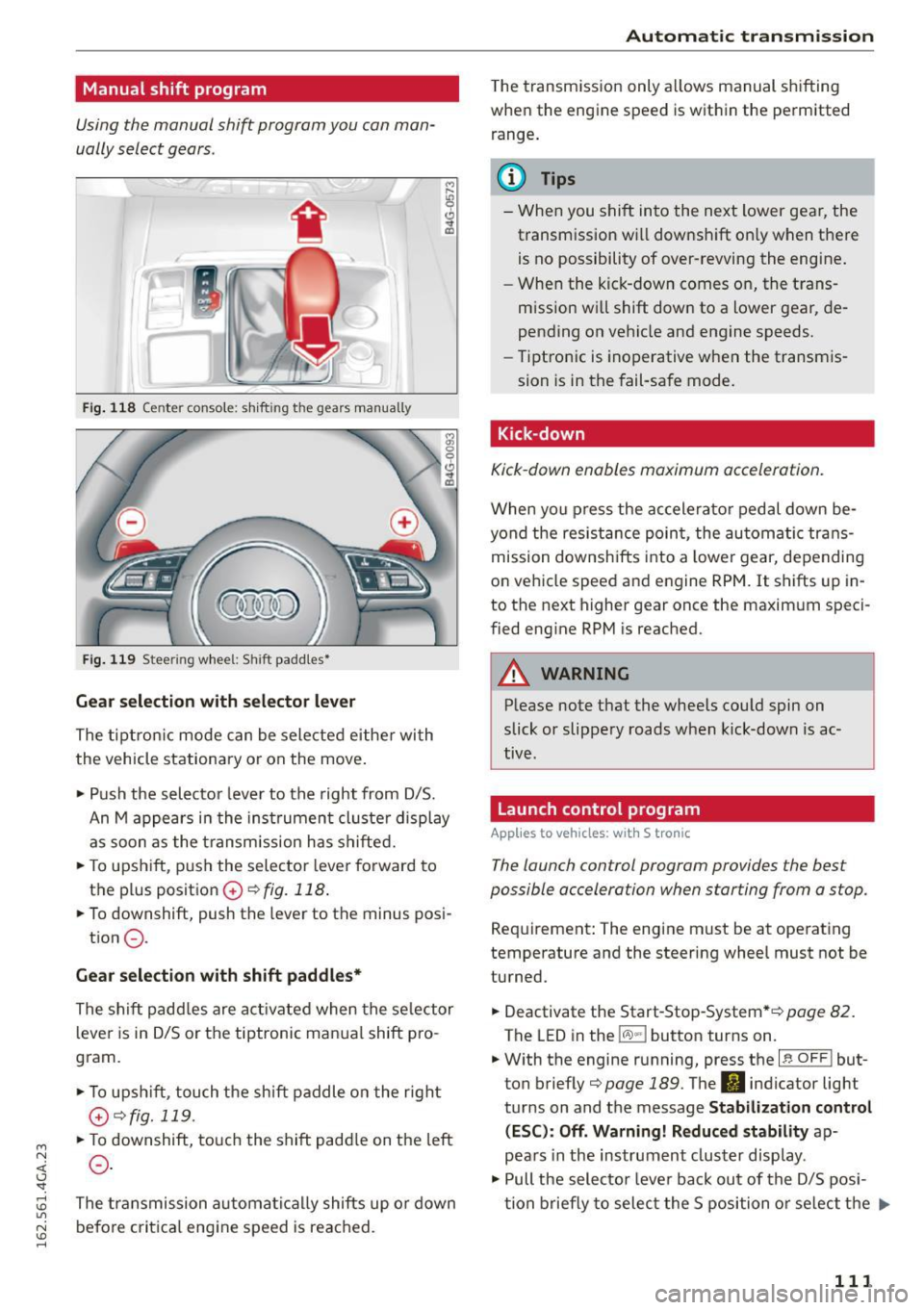
Fig. 118 Center console: shift ing t he g ears manually
Fig. 119 Stee ring whee l: Shi ft paddles•
Gear selection with selector lever
The tiptronic mode can be selected either with
the vehicle stationary or on the move.
• Push the selector lever to the right from D/S.
An M appears in the instrument cluster display
as soon as the transm ission has shifted.
• To upshift, push the selector lever forward to
the plus position
0 ~ fig. 118 .
• To downshift, push the lever to the minus posi-
tion
0 .
Gear selection with shift paddles*
The shift padd les are activated when the selector
lever is in D/S or the tiptronic manual shift pro
gram.
• To upshift , touch the shift paddle on the right
(v¢fig.119 .
• To downshift, touch the shift paddle on the left
0 .
The transmission automatically shifts up or down
before critical engine speed is reached.
Automatic transmission
The transmission only allows manual shifting
when the engine speed is within the permitted
range .
(D Tips
-When you shift into the next lower gear, the
transmission wi ll downshift on ly when there
is no possibility of over-revving the engine.
- When the kick-down comes on, the trans
mission wi ll shift down to a lower gear, de
pending on vehicle and engine speeds.
- Tiptronic is inoperative when the transmis
sion is in the fail-safe mode.
Kick -down
Kick-down enables maximum acceleration.
When you press the accelerator pedal down be
yond the resistance point, the automatic trans
mission downshifts into a lower gear, depending
on vehicle speed and engine RPM. It shifts up in
to the next higher gear once the maximum speci
fied engine RPM is reached.
A WARNING
-Please note that the whee ls could spin on
slick or slippery roads when kick-down is ac
tive .
Launch control program
Appl ies to vehicles: with S tronic
-
The launch control program provides the best
possible accelera tion when s tarting from a s top.
Requirement: The engine must be at operating
temperature and the steering wheel must not be
turned.
• Deactivate the Start-Stop-System* ¢
page 82.
The LED in the lCA.l .. l button turns on .
• With the engine running, press the
~ l~ -0-F F~ ! but
ton briefly¢
page 189 . The II indicator light
turns on and the message
Stabilization control
(ESC): Off. Warning! Reduced stability
ap
pears in the instrument cluster display .
• Pull the selector lever back out of the D/S posi
tion briefly to select the S position or select the .,.
111
Page 120 of 294

Parking systems
• While driving in reverse gear, adjust the steer
ing wheel angle to fit the parking space with
the a id of the orange orientation lines ~
A in
General information on page 116,
c::> (D in Gen
eral information on page 117.
® displays the
rear bumper . Stop the vehicle, at the latest,
whe n the red orientation line@ borders an ob
ject .
Parallel parking
Applies to vehicles: with rearv iew camera
This view may be used when parallel parking
along the side of a street.
F ig. 129 In fotainme nt: blue surface a lig ned w it h park ing
spot
F ig . 1 30 In fota inme nt: co nta ct of the b lue curved line w it h
the c urb
Parking on the right is described here. It is identi
cal whe n pa rking on the left.
If there is an obstacle next to the park ing space
(such as a wall), refer to "Information for pa rk ing
next to obstacles"
c::> page 118 .
• Activate the turn s ignal.
• Position your vehicle next to a parked vehicle in
front of the desired park ing space . The distance
118
to this vehicle should be approximately 3 ft (1
m).
• Turn the Infotainment on and shift into reverse
gear. The parking system is turned on and the
cross parking view is displayed .
• Press the control button on the Infota inment
un it ©
c::> fig. 129 . The parallel parking indica
tor is d isp layed .
• Backup and align your veh icle so the blue area
@ borders on the rea r end of the vehicle beh ind
you or on the parking space line
c::> A in Gener
al information on page 116,
c::> (D in General in
formation on page 117 .
The blue area repre
sents an extension of the vehicle's outline by
approx imately 16 ft (5 meters) to the rear. The
long side of the blue area should be on the
curb . The entire b lue area must fit into the
parking space.
• With the vehicle stopped, turn the steering
wheel to the right as far as it will go.
• Backup into the park ing spot. When the b lue
curve
c::> fig. 130 is near the curb c::> A in Gener
al information on page 116,
stop the vehicle
c::> Q) in General information on page 117 .
• With the vehicle stopped, turn the steering
wheel to the left as far as it w ill go.
• Continue to back into the parking space until
the vehicle is parked parallel to the curb
c::> A
in General information on page 116, c::> (D in
General information on page 117.@
disp lays
the rear bumper. Stop the vehicle, at the la test,
when the red orientat ion line @ borders an ob
ject . Keep an eye on the fron t of your vehicle
while doing this.
Parking next to obstacles
When there is an obstacle (such as a wall) next to
the parking space, choose a space with more
space on the s ides. Position the long side of the
blue surface so that there is sufficient space from
the obstacle . The surface must not be touching.
You w ill also need to start turn ing the steering
whee l much earlier . The blue curve
c::> fig. 130
must not touch the obstacle, but rather there
should be enough distance.