warning AUDI A7 2016 Manual PDF
[x] Cancel search | Manufacturer: AUDI, Model Year: 2016, Model line: A7, Model: AUDI A7 2016Pages: 294, PDF Size: 73.82 MB
Page 96 of 294
Audi active lane assist
Audi active lane assist Lane assist
Description
A pp lies to veh icles: w ith Audi active lane assist
Active lane assist detects lane marker lines with
in the limits of the system using a camera in the
windshield. If you are approaching a detected lane marker line and it appears likely that you
will leave the lane, the system will warn you with
corrective steering. You can override this steering
at any time. If you pass over a line, the steering
wheel will vibrate lightly. In order for this warn
ing vibration to occur, it must first be switched
on in the Infotainment system. Active lane assist is operable when the lane marker line is detected
on at least one side of the vehicle.
The system is designed for driving on freeways
and expanded highways and thus works only at
speeds of 40 mph (65 km/h) or more .
Applies to vehicles with side assist*: If you acti
vate a turn s ignal when active lane assist is ready
and it classifies a lane change as critical because
of vehicles traveling alongside you or approach ing you, there will be noticeable corrective steer
ing shortly before you leave the lane. This will at
tempt to keep your vehicle in the lane.
Applies to vehicles without side assist*: the sys
tem does not warn when it is ready if you activate
the turn signal before crossing the lane marker line. In this case, it assumes that you are chang
ing lanes intentionally.
Applies to vehicles with adaptive cruise control*
or parking aid*: The corrective steering is target
ed based on the driving situation. In addition to
the lane marker lines, the system can also take
into account other objects such as guard rails. If
they are detected in close proximity to the vehi
cle, active lane assist helps prevent the vehicle
from driving too close to them. There is also
passing assistance . The system does not provide
any corrective steering if it detects that you are
passing another vehicle.
94
A WARNING
-
- The system warns the driver that the vehicle
is leaving the lane using corrective steering.
The driver is always responsible for keeping
the vehicle within the lane.
- The system can help you keep the vehicle in the lane, but it does not drive by itself. Al
ways keep your hands on the steering
wheel.
- Corrective steering may not occur in certain
situations, such as during heavy braking.
- There may be cases where the camera does
not recognize all lane marker lines. Correc
tive steering can only take place on the side
of the vehicle where lane marker lines are
detected.
- Other road structures or objects could possi
bly be identified unintentionally as lane marker lines. As a result, corrective steering
may be unexpected or may not occur.
- The camera view can be restricted, for ex
ample by vehicles driving ahead or by rain,
snow, heavy spray or light shining into the
camera. This can result in active lane assist
not detecting the lane marker lines or de
tecting them incorrectly.
- Under certain conditions such as ruts in the
road, a banked roadway or crosswinds, the
corrective steering alone may not be enough
to keep the vehicle in the middle of the lane.
- For safety reasons, active lane assist must
not be used when there are poor road and/
or weather conditions such as slippery roads, fog, gravel, heavy rain, snow and the
potential for hydroplaning. Using active lane
assist under these conditions may increase
the risk of a crash.
Page 97 of 294

M N <( I.J "". rl I.O
"' N I.O rl
Switching on and off
Applies to vehicles: with Audi active lane assist
Fig. 100 Turn signal lever: active lane assist button
Fig. 101 Windshield: camera w indow for active lane assis t
... Press the¢ fig. 100 button to switch the sys
tem on and off. The. or. indicator light in
the instrument cluster turns on or off .
Indicator lights
• Ready:
The indicator light turns on when the
system is ready for use. The system can now be
operated .
• Not ready: The indicator light turns on if the
system is switched on but is inoperable . This may
be due to the following reasons :
- There is no lane marker line.
- The relevant lane marker lines are not detected
(for example, markings in a construction zone
or because they are obstructed by snow, dirt,
water or backlighting).
- The vehicle's speed is below the speed needed
to activate it, which is about 40 mph (65 km/
h).
- The lane is narrower than about 8 ft. (2.5 m) or
wider than 15
ft (4.5 m).
- The curve is too sharp.
Audi active lane assist
- The driver's hands are not on the steering
wheel.
(D Tips
Make sure the camera's field of view
¢
fig. 101 is not obstructed by stickers or any
thing else. For information on cleaning, refer
to ¢ page
205.
Lane assist display in the instrument
cluster
Applies to vehicles: wit h Audi active lane ass ist
Fig. 102 Instrument cluster: active lane assist is switched
on and providing warnings
Fig. 103 Instrumen t cluster: act ive lane assist is sw itched
on but not ready to provide warn ings
You can call up the active lane assist display using
the buttons in the multifunction steering wheel
¢ page
23.
An additional indicato r appears in the Head-up
display* .
95
Page 98 of 294

Audi active lane assist
White line(s)
Active lane assist is activated
and ready to provide warn ings.
Red line(s) Active lane assist warns you
(left or right) before leav ing a lane
¢fig . 102 . In addit ion, the
steering wheel vibrates lightly .
Gray line(s) Active lane assist is activated, but not ready to give warning
¢fig. 103.
Messages in the instrument cluster display
If the active lane assist switches off automatical
ly, the indicator light in the display turns off and
one of the following messages appears:
Audi active lane a ssist: Currently unavailable .
No camera view
This message appea rs if the came ra is unab le to
detect the lines . Thi s co uld happen if:
- The camera field of view ¢
page 95, fig. 101 is
dirty or covered in ice. Clean this area o n the
winds hield.
- The camera field of view is fogged over. Wait
until the fog has cleared before switching the
active lane assist on again.
- T he system has been unable to detect the lanes
for an extended period of time due to road con
ditions. Switch the active lane assist back on
when the lines are more visible.
Audi active lane assist : currently unavailable
There is a temporary active lane ass ist malfunc
tion . Try switching the active lane assist on again
later .
Audi active lane assist : system fault!
Drive to an a uthorized Aud i dea ler or authorized
Audi Service Faci lity immediately to have the
malfunct ion corrected.
Audi active lane assist: Please take over steering
This message appears if you are not steering by
yourse lf. If this is the case, active lane assist does
not swi tch off, but it is "not ready" to provide a
warn ing. The system can help you keep the vehi
cle in the lane. However, yo u are responsible for
driving the vehicle and must steer it yourself.
96
· Adjusting the vibration warning
Applies to veh icles: with Audi active lane assist
.,. Select: the I CARI function button > (Car) * Sys
tems
control button > Driver assistan ce > Audi
ac tive lane assist .
You can switch the add itiona l vibrating war ning
in the steering wheel on or off.
(D Tips
Your settings are automat ical ly stored and as
signed to the remote control key being used.
Page 99 of 294

M N <( I.J ""'. rl I.O
"' N I.O rl
Audi side assist Side assist
Description
Applies to vehicles: with Audi side assist
Fig. 104 Sensor detection range
F ig. 105 Display on the exterio r mirro r
Side ass ist helps you monitor your blind spot and
traffic behind your veh icle . With in the limits of
the system, it wa rns you about vehicles that are
coming closer or that are traveling w ith your
within sensor range
(D c> fig. 104: If a lane
change is class ified as critical, the display@in
the exterior mirror turns on
c> fig. 105 .
The display i n the left exterior mirror provides as
sistance when making a lane cha nge to the left,
while the d isp lay in the right exterio r mirror pro
vides assistance when making a lane change to
the right .
Information stage
As long as you do not activate the turn signal,
side assis t
informs you about ve hicles that a re
detected and classified as crit ica l. The display in
the mirror turns on, but is dim.
Aud i side assist
The display remains d im in the information stage
so that your view toward the front is not d istur
bed.
Warning stage
If the display in a m irror blinks bright ly when you
act ivate a tu rn s ignal, s ide ass ist is
warning you
about detected vehicles that it has classified as
critica l. If this happens, check traffic by glancing
in the rearview mirror and over your shoulder
c> .&. in General informa tion on page 98.
Applies to vehicles w ith active lane assist* : The
display in the mirror can also blink if you have not
activated a turn signal : If you are app roaching a
detected lane marker line and it appears you will
be leaving the lane, side assist w ill warn you
about detected vehicles that it has class ified as
critical.
@ Tips
You can adjust the brightness on of the dis
play on the rearview mirror
c>page 99.
97
Page 100 of 294
Audi side assist
General information
App lies to vehicles: with sid e assist
®
@
©
Fig. 106 Driving s itua tions
~ AUD I
• 0 0 •
Fig. 107 Rear of the ve hicle: pos it io n of t he sensors
Side assist functions at speeds above approx i
mately 19 mph (30 km/h).
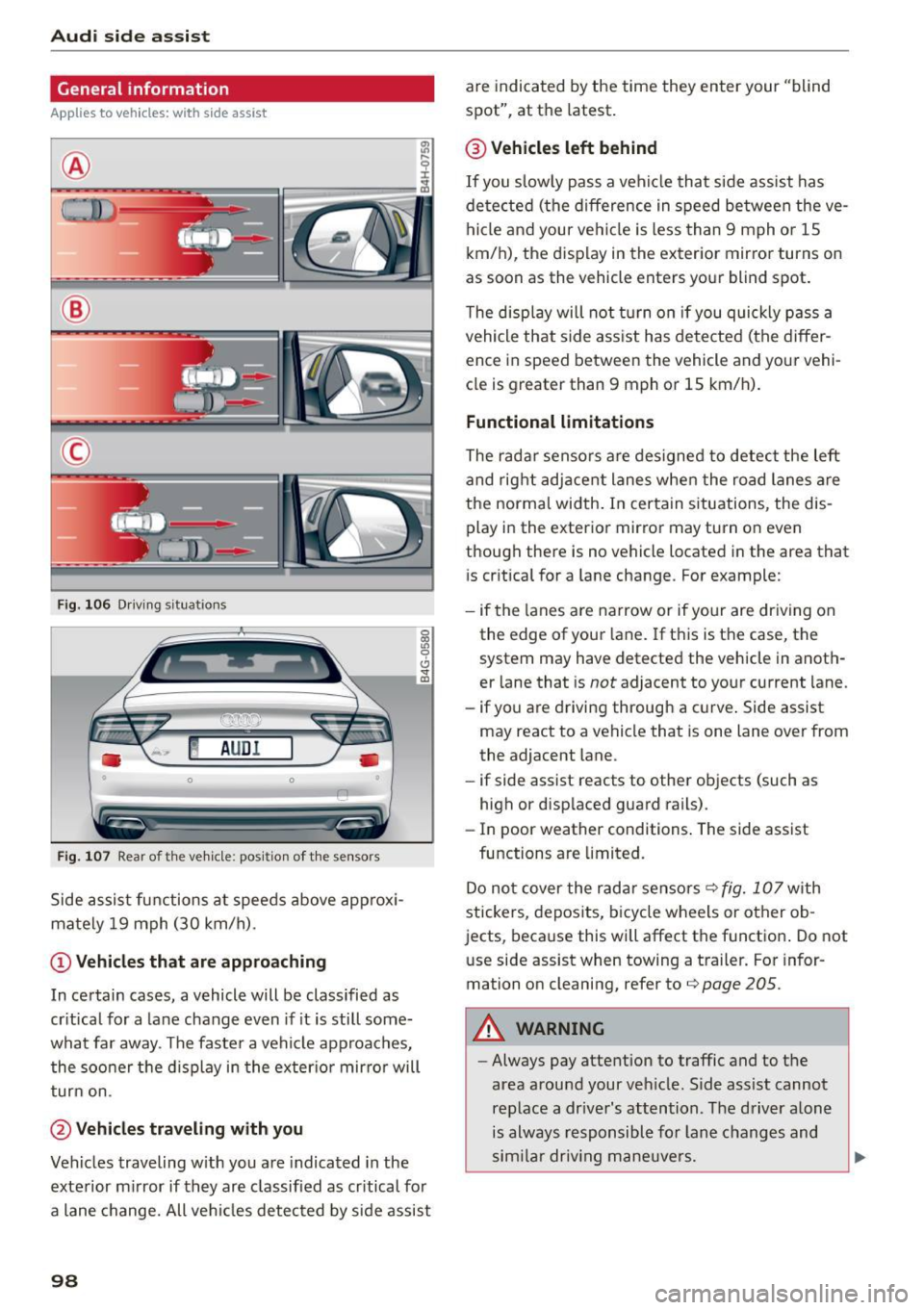
(D Vehicles that are approaching
In certain cases, a vehicle will be classified as
critical for a lane change even if it is still some
what far away . The faste r a vehicle approaches,
the sooner t he d isplay in the exter io r mirro r will
turn on.
@Vehicles traveling with you
Vehicles traveling w ith you are indicated in the
exterior mirror if they are classified as critical for
a lane change. All vehicles detected by side assist
98
are indicated by the time they enter your "blind
spot", at the latest.
@ Vehicles left behind
If you slowly pass a veh icle that side assist has
detected (the difference in speed between the ve
hicle and your vehicle is less than 9 mph or 1S
km/h), the display in the exterior mirror turns on
as soon as the vehicle enters your blind spot.
T he display will not turn on if you quickly pass a
vehicle that side ass ist has detected (the differ
ence in speed between the vehicle and your vehi
cle is greater than 9 mph or 15 km/h).
Functional limitations
The radar sensors are designed to detect the left
and right adjacent lanes when the road lanes are
the normal width. In certain s ituations, the dis
play in the exterior mirror may turn on even
though there is no vehicle located in the area that
i s cr itical for a lane change. For example:
- if the lanes are narrow or if your are dr iving on
the edge of your lane. If this is the case, the
system may have detected the vehicle in anoth
er lane that is
not adjacent to your current lane.
- if yo u are driving through a c urve . Side assist
may react to a vehicle that is one lane over from
the adjacent lane.
- if side assist reacts to other objects (such as
high or displaced guard rails).
- In poor weather conditions . The side assist
functions are limited.
Do not cover the radar sensors
q fig. 107 with
stickers, deposits, bicycle wheels or other ob
jects, because this will affect the function . Do not
use side assist when towing a trailer . For infor
mation on cleaning, refer to
q page 205 .
A WARNING
-Always pay attention to traffic and to the
area around your veh icle. S ide ass ist cannot
replace a dr iver's attention . The driver alone
is always responsible for lane changes and
sim ila r driv ing maneuvers.
Page 101 of 294

M N <( I.J "". rl I.O
"' N I.O rl
-Improper reliance on the side assist system
can cause collisions and serious personal in
jury:
- Never rely only on side assist when chang
ing lanes .
- Always check rear view mirrors to make
sure that it is safe to change lanes.
- Sid e assist cannot detect a ll vehicles under
all conditions- danger of accident!
- Please note that side assist indicates there
are approaching vehicles, or vehicles in your
blind spot, only after your vehicle has
reached a driving speed of at least 19 mph
(30 km/h).
- In certain situations, the system may not
function or its function may be limited. For
example:
- if vehicles are approaching or being left
behind very quickly. The display may not
turn on in time.
- in poor weather conditions such as heavy
rain, snow or heavy m ist .
- on very wide lanes, in tight curves or if
there is a rise in the road surface . Vehicles
in the adjacent lane may not be detected
because they are outside of the sensor
range.
(D Note
The sensors can be displaced by impacts or damage to the bumper, wheel housing and
underbody. This can affect the system . Have
your authorized Audi dealer or authorized
Audi Service Facility check their function.
(D Tips
-If the window g lass in the driver's door or
front passenger's door has been tinted, the
display in the exterior mirror may be misin
terpreted.
- For Declarat ion of Compliance to United
States FCC and Industry Canada regulations
c:>page277 .
Audi side assist
Switching on and off
Applies to vehicles: wit h Audi side ass ist
Fig. 108 Driver 's door : side assist button
" Press the c:> A in General information on
page 98
button to switch the system on and
off. The LED in the button turns on when side
assist is switched on .
Adjusting the display brightness
Applies to vehicles: wit h Audi side ass ist
The display brightness can be adjusted in the In
fotainment system .
.,. Select: the I CAR I function button > (Car)* Sys
tems
control button > Driver assistance > Audi
side assist .
The display brightness adjusts automatically to
the brightness of the surroundings, both in the
information and in the warning stage. In very
dark or very bright surroundings, the display is al
ready set to the m inimum or maximum level by
the automatic adjustment. In such cases, you
may not ice no change when adjusting the bright
ness, or the change may only be noticeable once
the surroundings change.
Adjust the br ightness to a level where the display
in the info rmation stage will not disrupt your
view forward. If you change the brightness, the
display in the exterior mirror will briefly show the
brightness level in the information stage . The
brightness of the warning stage is linked to the
brightness in the information stage and is adjust
ed along with the information stage adjustment.
Ill>
99
Page 103 of 294
M N <( (.J
'SI: ,...., \!) ..,.,
N \!) ,....,
Audi drive select Driving settings
Introduction
Drive select makes it possible to experience dif
ferent types of vehicle settings in one vehicle.
The driver can select
Comfort, Auto and Dynamic
modes in the Infotainment system to switch be
tween a sporty and a comfortable driving mode.
In the
Individual mode, the settings can be ad
justed to your personal preferences. This makes it possible to combine settings such as a sporty en
g ine tun ing with light steering.
_&. WARNING
Improper use of the Audi drive select can
cause collisions, other acc idents and serious
personal injury.
Description
-
The follow ing systems are affected by drive se
lect:
Engine and transmission
Depending on the mode, the eng ine and the
transmission respond quicker or in a more bal
anced manner to acce lerator pedal movements.
I n the sporty dynamic mode, the transmission
shifts at higher RPMs.
Air suspension*
The adaptive air suspension/adaptive air suspen
sion sport*
(Air suspension in the MMI) is an
e lectronically controlled a ir suspension and
damping system. They are adjusted depending on
the selected driving mode, the driver's steering,
b raking and acce leration input and the road sur
face, vehicle speed and load. A sporty setting is generally used in vehicles with adaptive air sus
pension sport*.
The vehicle clearance varies depending on these lected mode and the speed.
The highway setting is activated automatically
when you drive above 75 mph (120 km/h) for
more than 30 seconds in the
Auto or Dynamic
Audi drive select
mode. The ground clearance is increased auto
matically if the speed drops below 44 mph (70
km/h) for more than 120 seconds.
Steering
T he steering adapts in terms of steer ing effort
and steering ratios . Indirect steering that moves
easily, like the steering in comfort mode, is best
suited to long drives on a highway. In contrast,
dynamic mode provides sporty, direct steering.
T he following applies to vehicles with dynamic
steering*: the steering ratio changes based on ve
hicle speed in order to maintain optimum steer
ing effort for the driver at all times. This sets the
steering to be less sensitive at higher speeds in
order to provide improved vehicle control. At re
duced speeds, however, steering is more direct in
order to keep the steering effort as minimal as
poss ible when the driver is maneuvering the vehi
cle. At low and average speeds, dynamic steer ing
additionally provides more responsive steering
performance.
Sport differential*
As a component of the all wheel dr ive system
(quattro)
¢ page 192, the Sport differential* dis
tributes the driving power to the rear axle de
pending on the sit uation. The distribution of
power varies depending on the selected mode,
from balanced (comfort) to agile (dynamic) . The
goal is a high level of agility and ability to accel
erate on curves. The vehicle is very responsive to
steering.
Curve light*
T he curve light adapts to driving on curves. The
pivoting action and the lighting are also adapted
to the mode.
Adaptive cruise control*
T he behav ior when accelerating can be adjusted
from comfortable to sporty, depending on the
drive select mode. Adaptive cruise control a lso
responds to the driving behavior of the vehicle
ahead in a more conservative or sporty manner. ..,_
101
Page 104 of 294

Audi dri ve se lect
Engine soun d*
The sound of the engine is adapted to the select
ed mode and ranges from subtle to sporty.
(D Note
-Make sure there is enough clearance above
and below the veh icle when parking. The
height of the vehicle can change once it is
parked due to temperature fluctuations,
changes to the load conditions and changes
to the driving modes, which can affect clear
ance.
- When transporting the vehicle on a car car
rier, train, ship or by other means, only tie
the vehicle down at the running surface of
the tires, which is the outer c ircumference .
Securing the vehicle at the axle compo
nents, suspension struts or towing eyes is
not permitted because the pressure in the
a ir s uspension struts can change dur ing
transport. The vehicle may not be secured
sufficient ly if this happens .
- If yo u are goi ng to tow a t railer, yo u m ust
activate the trai ler operation mode
¢ page 201.
(D Tips
-In some models, the maximum vehicle
speed can on ly be reached in the
Auto and
D ynami c modes.
- Se lecting the
D ynamic mode results in spor
ty shifting characte ristics . The S gear posi
tion engages automatically.
- In vehicles with spo rt differential*, the
Dy·
na mic
mode is deactivated when towing a
trai ler.
- In vehicles that have dynamic steering*, op
erating noise is heard when starting or stop -
Adjusting the Individual mode
ping the engine. This does not indica te a
problem .
Selecting the driving mode
You can choose between comfort, auto, dynamic
and individual.
Fig . 109 Infota inment : drive select
.. To select the mode, se lect the following in the
Infotainment system:
I CAR I function button >
Comfort , Auto , D yn amic or Indi vidu al.
You can change the driv ing mode when the vehi
cle is stationary or whi le driving . If traffic per
mits, after changing modes, briefly take your
foot off the accelerator pedal so that the recently
selected mode is also activated for the engine.
Comfort -provides a comfort-o riented vehicle
setup and is s uited for long drives o n highways.
Auto -provides an overall comfortable ye t dy
nam ic dr iv ing feel and is suited for eve ry day use.
D ynami c· gives the driver a sporty driving feel
and is suited to a sporty driv ing style .
Individual ·¢ page 102.
A WARNING
Pay attent ion to traffic when operating the
drive select to reduce the risk of an accident .
You con adjust the vehicle settings to your personal preferences .
.. Se lect: the ICARI function button> Set individ
ual
control button. Once you select the menu,
102
you will automatically drive in the In di vid ua l
mode.
Page 106 of 294

Night visio n ass is t
Night vision assist
Night vision assist with
pedestrian and wild
animal highlighting
Description
A pp lies to veh icles : w ith night v isio n ass ist
The night vision assist can detect, highlight and,
if necessary, warn about pedestrians and large
wild animals.
Night vision assistant with pedestr ian and wild
animal detection assists you in darkness by using
an infrared camera to monitor the area in front of
your vehicle, within the limits of the system.
It
can display objects up to approximately
1000 feet (300 meters) away. The heat image de
tected by the camera is shown in the instrument
cluster display. Warm areas appear lighter and
cold areas appear darker.
Highlighting detected pedestrians and wild
animals
A pplies to veh icles: w ith night v isio n ass ist
F ig. 110 Instrument cluster: Yellow pedestr ian highl ight
i ng
Fig. 111 I n st rument cluster: symbol when infrared image
i s not visib le
104
Within the limits o f the system, night vision as
sistant can detect pedestrians and wild animals
that are within the detect ion range between ap
proximately 32 feet (10 meters) and 295 feet
(90 meters) in front of the vehicle. When it is
dark outside and the headlights are switched on,
detected pedestrians and w ild an imals are
marked in yellow ¢
fig. 110 within the limits of
the system ¢
page 105 . Wild animal detection is
not act ive in bu ilt-up areas . The system only de
tects large wild anima ls such as deer.
@ Tips
I f another display such as navigation rep laces
the image from the night v is ion assist the~ .. ,
symbol appears in a tab
r::!>fig . 111. You can
access night vision assist using the buttons in
the m ultifunction steering wheel¢
page 24 .
Pedestrian and wild animal warning
Applies to vehicles: wit h night vision assist
Fig . 112 Instrument cl uster: @Pedest rian warn ing ,®
w ild animal warning
Fig. 113 Instrument cl uste r: @ Pedestr ian warn ing/ @
wild an ima l warn ing , when the image from th e n ight vis ion
assist is not selected in t he instrument cluster display
Iii-
Page 107 of 294
M N <( I.J "". rl I.O
"' N I.O rl
Disp lay in th e in st rum ent clu ste r/head-up
di splay *
If there are pedestrians or wild animals in an area
in front of your vehicle that is classified as criti
cal, the system will direct your attention to this:
- Pedestrians or wi ld animals are highlighted in
red and the corresponding symbol. or.
turns on
¢fig. 112.
-There is also a tone.
The area classified as cr itical is based on the vehi
cle speed and the steering w heel angle. Pedes
tr ian and wild animal warning encourages you to
pay more attention.
I f the nigh t vision assist image is replaced by an
o ther d isp lay (such as the on-board computer),
the red ind icator light . or. will appear if
there is a pedestrian or wild animal warning
¢ fig . 113.
If the head- up display* is sw itched on and the
n ight vision assist content is activated, . or.
will appear in the head-up display*.
Ma rking light*
To direct the driver's attention to a pedestr ian,
the headlights can flash on the pedestr ian th ree
times in a row when the re is a pedes trian warn
ing .
This happens at speeds above approximate ly
35 mph (60 km/h) when you are traveling ou t
side of we ll-lit areas and when flashing the head
lights will not create glare for a vehicle detected
in the oncoming lane. The marker light* is con
trolled by the high beam assist* ¢
page 44, High
beam assist.
The marking light is not used for wi ld animals .
Nig ht v is io n as sist
General information
App lies to vehicles : wit h night vision assist
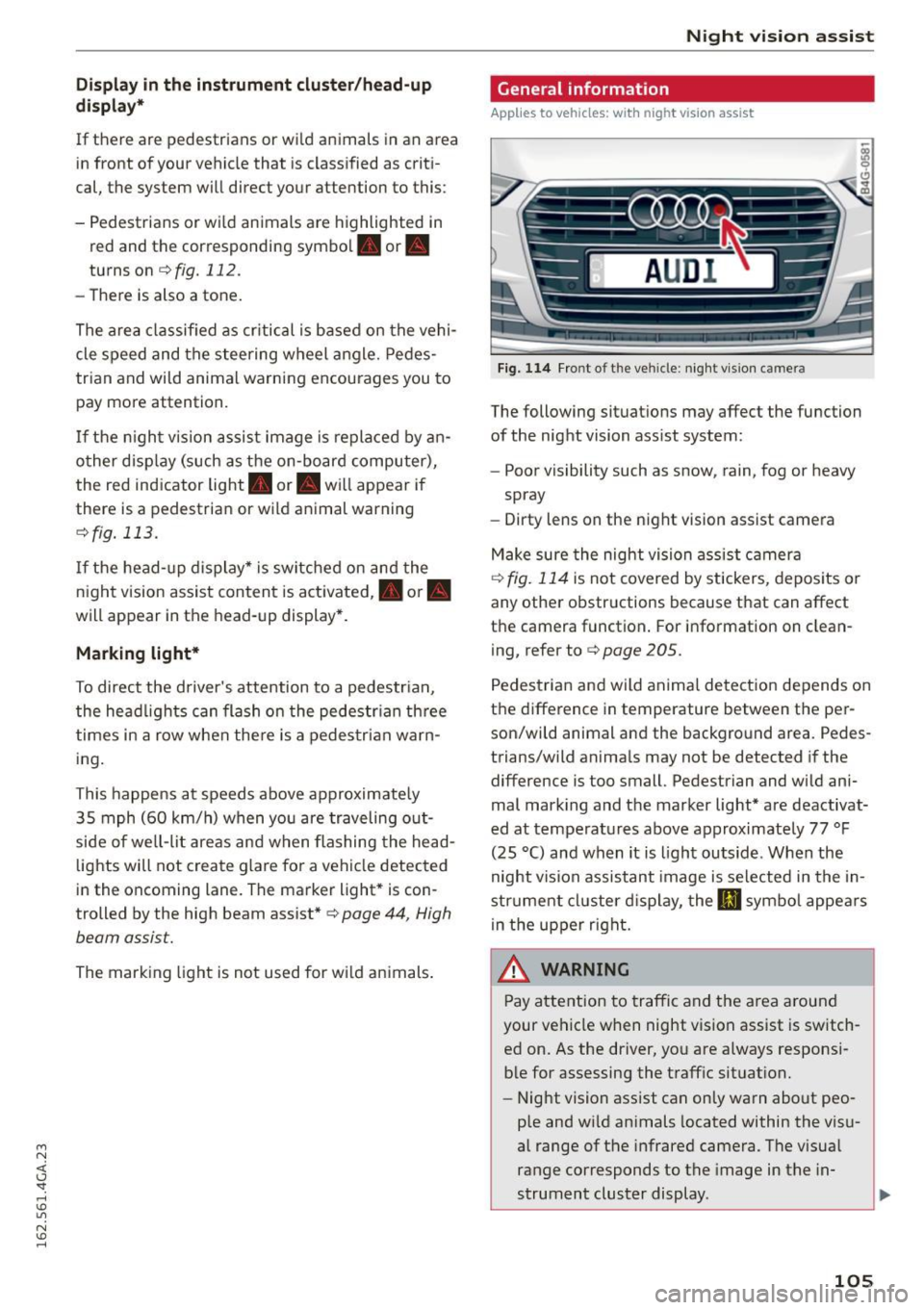
Fig. 114 Fro nt of the veh icle: night vi sion camera
The following situat ions may affect the function
of the night vision assist system:
- Poor visibility such as snow , rain, fog or heavy
spray
- Dirty lens on the night vision assist camera
Make sure the night vision ass ist camera
¢
fig. 114 is not covered by stickers, depos its or
any other obstructions because that can affect
the camera function . For information on clean
ing, refer to¢
page 205.
Pedestria n and wild anima l detect ion depends on
the difference in temperature between the per son/wild animal and the background area. Pedes
trians/wild anima ls may not be detected if the
difference is too small. Pedestrian and wild ani
mal mark ing and the marker light* are deactivat
ed at temperatures above approximately 77 °F
(25 °C) and when it is light outside . When the
night vision assistant image is selected in the in
str ument cl uster d isplay, the
Ill symbo l appears
i n the upper right.
A WARNING
Pay attention to traffic and the area a round
your vehicle when night vision assist is sw itch
ed on. As the driver, yo u are a lways responsi
ble for assessing the traffic situat ion.
- Night vision assist can only warn about peo
ple and wi ld animals located within the visu
al range of the infrared camera. The visual
range corresponds to the image in the in
strument cluster display .
-
105