ECO mode AUDI A7 2017 Owner´s Manual
[x] Cancel search | Manufacturer: AUDI, Model Year: 2017, Model line: A7, Model: AUDI A7 2017Pages: 284, PDF Size: 72.29 MB
Page 67 of 284
co
co
.... N
" N .... 0
00
\.J '
General information
Breaking in
A new vehicle must be broken in, and the break
in distance should be 1,000 mi les ( 1,500 km). Do
not drive at speeds that w ill exceed
2/3 of the
maximum permitted engine speed
(RPM) for the
first 600 miles (1,000 km) , and avoid full accel
eration during this period . You may gradually
start increasing the
RPM and the speed between
600 miles (1,000 km) and 1,000 miles (1,500 km).
During the first hours of use, the engine has a
higher internal friction than later on when all
moving parts have settled into place with each
other.
How the vehicle is driven during the first 1,000
miles (1,500 km) also affects the engine quality.
Drive at moderate engine speeds after the initial
break-in per iod, part icularly when running a cold
engine . This will reduce engine wear and improve
the mileage .
Do not drive at too
low of an engine speed (rpm).
Shift down if the engine stops running "smooth ly" . Extremely high eng ine speeds are automati
cally reduced .
New tires
If your vehicle is running on new tires, drive pa r
ticularly careful for the first 350 miles (500 kilo
meters) after fitting .
.&_ WARNING
-
New tires tend to be slippery and must also
be "broken-in". Be sure to remember this dur
ing the first 350 miles (500 kilometers).
Brake gently . Avo id following closely behind
other vehicles or other situations that might
require sudden, hard brak ing.
Avoid damaging the vehicle
When you are driving on poor roads, or over
curbs, steep ramps, etc., make certain that low-
D riving
lying parts such as spoilers and exhaust system
parts do not bottom out and get damaged .
T h is is espec ially true for veh icles with low-slung
chass is (sports chassis)* and fully loaded
vehicles.
Warming up/cooling down
Appl ies to: Sand RS models
By warming up/cooling down the engine careful
ly, you can he lp reduce unnecessary strain on
your vehicle when driving in a sporty style.
The engine speed is limited when the engine is
cold -the full engine output is not available.
When the engine is at operat ing temperature,
the engine speed limitation moves to a higher
RPM range. The tires also only reach their full
road holding capab ility once they have warmed
up .
Your vehicle also has an after-run cooling fea
ture . However, cooling down is still important.
The engine and the brakes as well as the exhaust
system and the transmission become very hot
when driving in a spo rty style . Before you shut
the vehicle off, you should cool down the vehicle
by driving a few miles at low speeds with light ac
celeration.
Driving through water on roads
Note the following to reduce the risk of vehicle
damage when driving through water, for example
on flooded roads:
- The water must not be any higher than the bot
tom of the vehicle body .
- Do not drive faste r than walking speed.
.&_ WARNING
= -
After driving through water or mud, the effec-
tiveness of the brakes may be reduced due to
moisture on the brake rotors and brake pads.
A few careful brake applications should dry
off the brakes .
(D Note
-Vehicle components such as the engine,
transmission, suspens ion or electrical
65
Page 73 of 284

Turn off ignit ion before lea ving vehi cle. Batte ry
i s di schar ging
This message appea rs if the driver's door is
opened while the ignition is sw itched on . Always
switch off the ignition if you are leaving the vehi
cle. Also see
9 page 73.
Shift to P and turn off i gnition b efore l eaving
ca r, otherwi se vehicle can roll aw ay
This message appears if the driver's door is
opened while the igni tion is sw itched on and the
selecto r lever is not in t he P posit ion. Move the
selecto r lever in to the P pos ition and switch the
ignit ion off when you exit the vehicle. Otherwise
the vehicle could roll. A lso see
9 page 73 .
Starting the engine when there is a
malfunction
It may not be possible to start the engine under
certain circumstances, for example if the battery
in the vehicle key is drained, if interference is af
fected the key or if there is a system malfunc tion .
Fig. 77 Center console/remote control key : starting the
engine if there is a malfunctio n
Requirement: the message Key is not r ecog
nized . Hold ba ck of key again st mark ed area .
See owner 's manual
must appear and the DJ in
d icator light mus t turn on.
• Hold the remote control key in the location in
dicated as shown in the illustrat ion
f >l) c::> fig . 77 .
• Press the b rake pedal.
• Press the
I START ENGINE STOPI button. The
~ engi ne will s tart .
.... N
" N .... 0
00
~ ll Market -specific
Drivi ng
• Drive to an authorized Audi dea ler or author
ized Audi Service Facility immediately to have
the malfunction corrected.
@ Tips
You can view the message again by pressing
the
I START ENGINE STOP I button.
Start-Stop system
Description
Applies to: veh icles w ith Start/Stop system
T he Sta rt/Stop system can help increase fue l
eco nomy and reduce CO2 emissions.
In Start/Stop mode, the engine shuts off auto
matically when the vehicle is stopped, such as at
a traffic ligh t. The ignition rema ins switched o n
dur ing this stop phase. The engine w ill restart
automat ica lly when needed.
Applies to A7 Sportback: the Start/Stop system
activates automatically once the ignit ion is
switched on.
Applies to 57 Sportback: the last Start/Stop sys
tem setting is restored when the ignit ion is
switched on.
Ba sic requirements for Start /Stop m ode
- The driver's door must be closed .
- The driver's seat belt much be fastened.
- The hood must be closed.
- The vehicle must have dr iven faster than
2.5 mph (4 km/h) since the last time it stop
ped .
- A trailer must not be hitched to the vehicle.
(D Note
A lways swi tch the Sta rt/S top sys tem off when
driv ing th ro ugh wa ter
c::> page 71.
© Tips
The engine stops short ly before the ve hicle
comes to a s top
l) .
71
Page 78 of 284
Driving
-Hill hold assist cannot hold the veh icle in
place on all h ills (for example, if the ground
is slippery or icy).
- To reduce the risk of an accident, always
make sure the vehicle is situated safely
wh ile stat ionary.
Automatic transmission
Introduction
The automat ic tra nsmission is cont rolled e lec
tronically . The transmission sh ifts up or down au
tomatically depending on which drive program is
selected.
Whe n a
mod erate dri ving style is used, the
transmission selects the most economical driving
mode. The transmiss ion upshifts at a lower RPM
and downshifts at a higher RPM to improve fuel
efficiency.
The transm ission switches to a spo rty mode after
a kick-down or when the driver uses a
spo rt y
driving style
characterized by quick accelerator
pedal movements, heavy acceleration, frequent
changes in speed and traveling at the maximum
speed.
If desired, the driver can also select the gears
manually ( tipt ronic mod e) 9 page 79.
A ppl ies to: ve hicles w ith 5 tro nic t ra n smi ssio n
The S tronic is a dual-clutch t ransmiss ion . Power
is transferred using two clutches that work inde
pendently from one another. They replace the
torque converter used in conventional automatic transmissions and allow the vehicle to accelerate
without a noticeable inter ruption in tract ion .
App lies to: ve hicles w ith a tipt ro nic tra ns mi ssio n
Power is transferred using a torque converter.
76
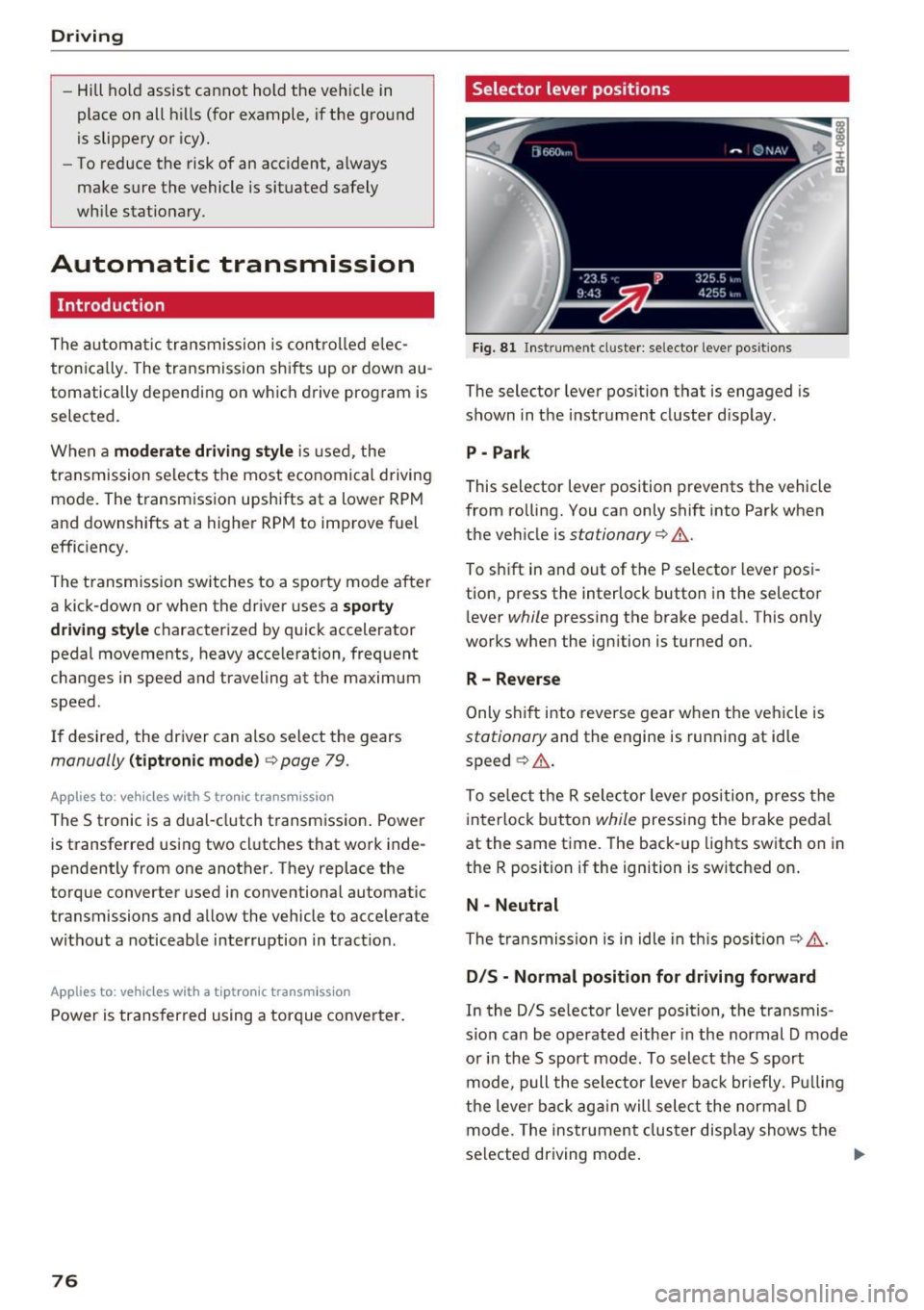
Selector lever positions
Fi g. 81 Inst rument cl uster: se lector leve r pos it ions
The selector lever position that is engaged is
shown in the instrument cluster d isplay .
P -Park
This selector lever position prevents the vehicle
from ro lling. You can only shift into Park when
the veh icle is
stationary 9 ,1. .
To sh ift in and out of the P selecto r lever posi
tion, press the interlock button in the selector
l ever
while pressing the brake pedal. This only
works when the ignition is turned on.
R- Reverse
Only s hif t into reverse gear w hen the veh icle is
stationary and the engine is running at idle
speed ~
,1..
To se lect the R sele ctor leve r position, press the
interlock button
while pressing the brake pedal
at the same time. The back -up lights switch on in
the R position if the ignition is switched on .
N -Neutral
The tra nsmission is in idle in th is posi tion ~ ,1. .
DIS -Normal position for driving forward
In the D/S se lector lever position, the transmis
s io n can be operated e ither in the normal D mode
o r in the S sport mode . To select th e S sport
mode, pull the selector leve r back br iefly . P ull ing
the leve r back ag ai n will sele ct the normal D
mode. The ins trument cluster display shows the
selected driving mode .
Page 81 of 284
co
co
.... N
" N .... 0
00
<.,;) 'SI"
-Never hold the vehicle on an incline with a
slipping clutch. The clutch opens automati
cally when it becomes too hot from the
overload . The
1§1 indicator light turns on
and a message appears
Q page 81 when
the clutch is overloaded.
(D Note
- When stopping on an incline, do not try to
hold the vehicle in place by pressing the ac
celerator pedal while a driving gear is se
l ected. This can cause the transmission to
overheat and can damage it. Set the parking
brake or press the brake pedal to prevent
the vehicle from rolling.
- Allow ing the vehicle to roll when the engine
is stopped will damage the transmission be
cause it is not lubricated .
(D Tips
For safety reasons, the parking brake is re
leased automatically only when the driver's
safety belt is fastened.
Hill descent control
The hill descent control system assists the driver
when driving down hills .
Hill descent contro l is activated when the selec
tor lever is in the Dor S position and you press
the brake pedal. The transmission automatically
selects a gear that is suitable for the hill. Hill de
scent control tries to maintain the speed ach
ieved at the time of braking, within physical and
technical limitations. If may still be necessary to adjust the speed with the brake pedal.
Hill descent control switches off once the hill lev
els out or you press the accelerator pedal.
On vehicles with a cruise control system*
¢ page 85, hill descent control is also activated
when the speed is set.
_& WARNING
Hill descent control cannot overcome physical
limitations, so it may not be able to maintain
Driving
a constant speed under all conditions. Always be ready to apply the brakes.
Shifting manually (tiptronic mode)
The tiptronic mode allows the driver to shi~ the
gears manually .
'
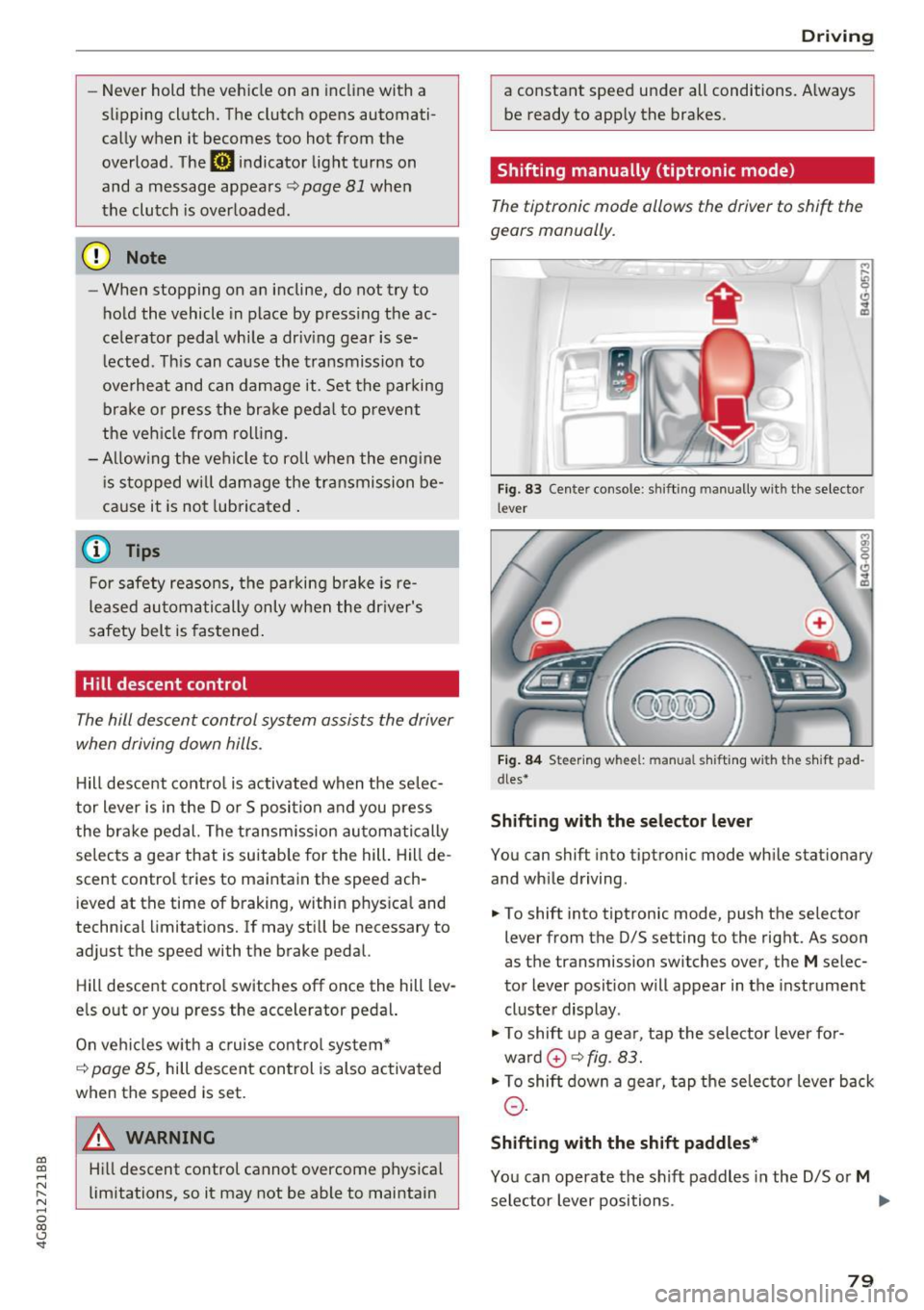
Fig. 83 Center console : shift ing manually wit h the selector
lever
Fig. 84 Steering w hee l: m anual s hifting wi th the sh ift pad
dles•
Shifting with the selector lever
You can shift into tiptronic mode while stationary
and while driving.
.,. To shift into tiptronic mode, push the selector
lever from the D/S setting to the right. As soon
as the transmission switches over, the
M selec
tor lever posit ion will appear in the instrument
cluster display .
"'To shift up a gear, tap the selector lever for
ward
0 ¢ fig. 83.
"'To shift down a gear, tap the selector lever back
0-
Shifting with the shift paddles*
You can operate the shift paddles in the D/S or M
selector lever positions. .,.
79
Page 82 of 284

Driving
"'T o shift up one gear, tap the shi ft paddle 0
¢ fig. 84.
"'To shift down one gear, tap the 0 sh ift paddle .
The transmission automatically shifts up o r down
before critical engine speed is reached .
Appl ies to: RS mode ls: when accelerating, the
transmission does
not a utomat ically shift to the
next gear shortly before the maximum pe rm itted
engine RPM is reached .
The transm ission only a llows manual shifting
when the engine speed is within the permitted range.
Kick-down
Kick-down enables maximum acceleration.
When you press the accelerato r peda l down be
yond the resistance point, the automatic trans
miss io n downshifts into a lower gear, depend ing
on vehicle speed and engine RPM. It shif ts up in
to the next higher gear once the max imum speci
fied engine RPM is reached .
I n t iptroni c mode, the t ransmission does
not au
tomatically sh ift down into a lowe r gear. If you
m ust accelerate, for example to pass a veh icle,
you must shift manually .
_& WARNING
Please note that the wheels could spin on
slick or slippery roads when kick-down is ac
tive.
Overboost
Applies to: RS 7 Spo rtback perfor man ce
-
The max imum engine torque is temporar ily in
creased in overboost. Overboost is activated
when nearing full throttle in the S position and
when the engine is at operat ing temperatu re .
The bars in the boost p ressure indicator are red
¢page 87.
_& WARNING
= -
Please note that the wheels could spin on
slick or s lippery roads when overboost is ac
tive.
80
' Launch control program
App lies to: vehicles with S tronic
The launch control program provides the best
possible acceleration when starting from a stop .
Requirement: the engine must be at operating
temperature and the steering wheel must not be
turned .
"' Deactivate the Start/Stop system*¢
page 73.
The LED in the jr,;i ••I button turns on .
"' Switch the Electronic Stabilization Control
(ESC) sport mode on¢
page 121. The Iii indi
cato r light turns on.
"' Pull the selector leve r back out of the D/S posi
tion b riefly to selec t the S position or se lect t he
DYNAM IC driv ing mode in d rive sele ct
<=:> page 106.
"'Press the brake pedal firm ly with your left foot
and hold it all the way down for at least one
second .
"' At the same time, press the gas peda l all the
way down with your right foot until the eng ine
reaches and stays at a high RPM level.
"' Remove your foot from the brake peda l w ith in
five seconds ¢,& .
_& WARNING
-Always a dapt your driving to the traff ic flow.
- On ly use t he Launch cont rol program when
road and traffic con dit ions allow it an d oth
er drivers will no t be endange red o r bot h
ered by your driving and the veh icle's accel
eratio n.
- Please note that the d rive wheels can spin
and the vehicle can break away when sport mode is switched on, especially when the
road is slippery.
- Once the vehicle has started moving, press
the
I ~ OFF! button b rief ly to turn the sport
mode off.
(D Tips
- The transmission temperat ure may increase
significant ly after using the launch control
prog ram . If that happens, the prog ram may
not be ava ilab le for a few minutes. It will be
available again after a coo l-down period.
...
Page 84 of 284
Trailer towing
Trailer towing
Driving with a trailer
General information
Your Audi was designed primarily for passenger
transportation.
If you plan to tow a trailer, please remember that
the additional load will affect durability, economy and performance.
Trailer towing not on ly places more stress on the
ve hicle, it also ca lls for more concentration from
the dr iver.
F or this reason, always follow the operating and
driving instructions provided and use common
sense.
@ Note
If you are going to tow a trailer, you must ac
tivate the tra ile r operation mode
¢ page 82, Operating instructions.
Technical requirements
Traile r hitch
Use a weight-carrying hitch conforming to the
gross trai ler weight. The hitch must be suitab le
for your ve hicle and tra iler and must be mounted
securely on the vehicle 's chassis at a
technically
sound
locat ion . Use on ly a trailer hitch with a re
movable ba ll mount . Always chec k w it h t he t rail
er hitch man ufactur er to make s ure t hat you a re
using the co rrect hi tc h.
Do not use a bumper hitch.
The hitch m ust be installed i n such a way that it
does not interfere with the impact -absorbing
bumper sys tem . N o mod ificat ions should be
made to the vehicle exhaust and b rake systems .
Fr om t ime to t ime, che ck t hat all hitch mo unti ng
bol ts rem ain securely faste ned.
W hen you are not tow ing a tra iler, remove the
tra ile r hitc h ba ll mount . This prevents the hitch
from ca using damage shou ld your veh icle be
s truck from behind¢ &..
82
Trailer brakes
If your trailer is equipped wi th a bra king sys tem,
c h ec k t o be sure that it con forms to all regu la
tions.
The trailer hydrau lic br ake system mus t not be
directly connecte d to the vehicle's hydr auli c
brake system .
Safety chains
Always use safety chains between your vehicle
a nd t he tra ile r.
Trailer lights
Trailer lights must meet all regulations. Be sure
to check w ith your Aud i dea ler for correct wir ing,
switches and relays.
Mirrors
If you a re unab le to see the traffic behind you us
i ng the regular outs ide mir rors, then you
must in
stall extended mirrors. It is important that you
always have clear vision to the rear.
A WARNING
Afte r remov ing the tra ile r hi tch, do not s to re
i t in yo ur vehicle. In cas e of sudden brak ing,
the hit ch could fly fo rwa rd and injure you or
your pas sengers.
Operating instructions
Maximum trailer weight
A tra ile r f or yo ur vehicle is lim ite d to a typical
cla ss 1 or class 2 trailer.
Trailer load distribution
Be sure the load in the trai ler is held sec urely in
place to p revent it from shifting forward , back
ward or si deways .
Never allow a pas senger to ride in a trailer ¢ &.
in Driving instructions on page 84.
Engine cooling system
Towing a tra ile r makes the engine wor k harder . It
i s impo rtant that the cooling system's perform
ance is up to the additional load. Ma ke sure that
the cooling system has enoug h fluid.
IJJ,,,
Page 87 of 284

co
co
.... N
" N .... 0
00
<..:l 'SI"
Assist Speed warning system
Applies to: vehicles with speed warning system
The speed warning system helps you to stay un
der a specified maximum speed.
The speed warning system warns you if you are
exceeding the maximum speed that you have set.
A warning tone will sound as soon as your speed
exceeds the stored value slightly.
The . (USA models)/ . (Canada models) indi
cator light and a message appear in the instru
ment cluster display at the same time. The./
• indicator light and the message turn off if the
speed falls back below the stored maximum
speed .
Setting a threshold is recommended if you would
like to be reminded when you reach a certain
maximum speed. Situations where you may want
to do so include driving in a country with a gener
al speed limit or if there is a specified maximum
speed for winter tires.
Setting the warning threshold
The warning threshold is set in the Infotainment
system.
.. Select: the
ICARI function button > (Car)* Sys
tems control button > Driver assistance >
Speed warning.
@ Tips
Regardless of the speed warning system, you
should always monitor your speed using the
speedometer and make sure you are following
the legal speed limit.
Assist
Cruise control system
Switching on
Applies to: vehicles with cruise control system
The cruise control system makes it possible to
drive at a constant speed starting at 20 mph (30
km/h) .
0
g M 0 :i:
f
... m
®t
0
Fig. 86 Operating leve r: cru ise cont rol system
.. To switch the cruise control on, pull the lever
into position @~ fig. 86.
.. Drive at the speed to be maintained .
.. To store the speed, press the button @.
Th e stored speed and the
[lljlfJ~il (USA models) /
l'I (Canada models) indicator light are displayed
in the instrument cluster.
T his information is also shown briefly in the
Head-up display* .
The speed is maintained by modifying engine
power or through an active brake intervention.
A WARNING
-Always pay attention to the traffic around
you when the cruise control system is in op
eration . You are always responsible for your
speed and the distance between your vehi
cle and other vehicles.
- For safety reasons, cruise control should not
be used in the city, in stop-and-go traffic, on
winding roads and when road conditions are poor (such as ice, fog, gravel, heavy ra in and
hydroplaning), because this inc reases the
risk of an accident.
- Switch the cruise control off temporarily
when dr iv ing in turning lanes, highway exits
-
or in construction zones . ~
85
Page 89 of 284

co
co
.-, N
" N .-, 0
00
<.,;) 'SI'
Boost, shifting and
engine oil temperature
indicators
Applies to: vehicles with boost, shifting and engine oil tem
peratu re indicators
Fig. 87 Instrument cluster: boost, shift ing and eng ine oil
temperature indicators
... Turn the menu thumbwheel on the steering
wheel until
Lap timer appears in the instru
ment cluster display.
@ Boost pressure indicator
The current engine load (meaning the current
boost pressure) is indicated by a bar .
@ Shifting indicator
The shifting indicator is on ly visible when shifting
gears in tiptronic mode ¢ page
79. Green LEDs
turn on as the engine RPMs increase. The LEDS
flash red at speeds near the RPM limit.
In vehicles with an activated head-up display
¢ page
24, the shifting indicator is shown in the
head-up display instead of the instrument clus
ter.
© Engine oil tempe rature indicator
If the engine oil temperature is below 140 °F
(60 °(), th<> I# symbol followed by three hy
phens"- - -" and the
0
( unit is shown.
The engine has reached its operating tempera
ture when the engine oil temperature is between
140
° F (60 °() and 248 °F (120 °() under normal
driving conditions. The engine oil temperature
may be higher if there is heavy engine load and
high temperatures outside. This is not a cause for
concern as long as the .¢ page
15 or Ill
Assist
¢ page 15 indicato r lights in the display do not
blink.
Lap timer
Introduction
Applies to: vehicles with lap timer
You can record and evaluate lap times with the
lap timer ¢ page
87, fig. 88. Th e time is meas
ur ed in m inutes, seconds and 1/10 seconds . The
hours are also shown when the lap time exceeds
60 minutes. The maximum individual measure
ment is 99 hours. A maximum of SO laps can be
recorded.
A WARNING
-Your focus shou ld always be on driving your
vehicle safe ly. As the driver, you have com
plete respons ibility for safety in traffic. Only
use the functions in such a way that you al
ways maintain complete control over your ve
hicle in all traffic situations .
@ Tips
You can retr ieve informat ion from the tr ip
computer wh ile the lap timer stopwatch is
r unning.
Opening the lap timer and recording times
Applies to: vehicles with lap timer
Fig. 88 Display: lap t imer
Opening the lap timer
... Turn the menu thumbwheel on the steering
wheel until
Lap timer appears in the instru
ment cluster display .
-
87
Page 95 of 284
.. To resume cr uise control, press the b rake pedal
and pull the lever toward you into position @.
A WARNING
It is dangerous to activate cruise control and
resume the stored speed when the current
road, traffic or weather conditions do not per
m it this. This increases the risk of an acc ident.
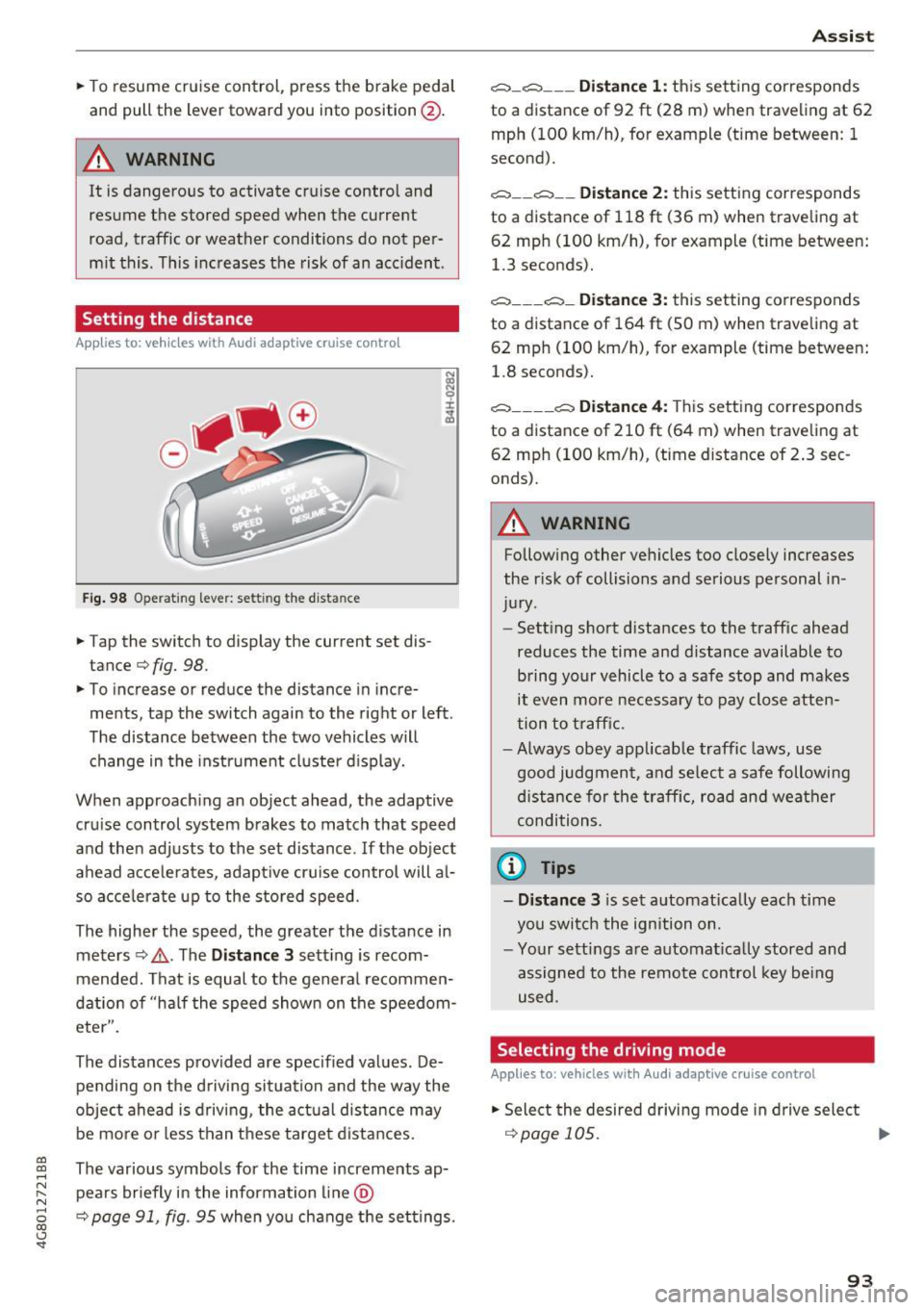
Setting the distance
App lies to: veh icles with Audi adaptive cruise contro l
Fig . 98 O perat 1ng leve r: set ting the d ista nce
.. Tap the switch to display the current set dis
tance¢
fig. 98.
.. To increase or reduce the distance in incre
ments, tap the switch again to the right or left .
The distance between the two vehicles w ill
change in the instrument cluste r d isplay.
When approach ing an object ahead, the adaptive
cru ise control system b rakes to match that speed
and the n adj usts to the set distance . If the ob ject
a head acce le ra tes, adapt ive cruise control will a l
so acce le ra te up to the s to red speed .
The higher the speed, the greater the d istance in
meters ¢,&. . The
Distance 3 sett ing is recom
mended. That i s equal to the genera l recommen
dation of "ha lf the speed shown on the speedom
eter".
The distances prov ided are specified values . De
pending on the d riving si tuation and the way the
ob ject ahead is d riving , the act ual d istance may
be mo re o r less t han t hese targe t dista nces.
co ~ The various symbols for the time increments ap-
~ pea rs briefly in the information line @
8 ¢ page 91, fig. 95 when yo u change the set tings. 00 <..:l 'SI"
A ss ist
c:::::, _c:::::, ___ Distance 1: this sett ing corresponds
to a distance of 92
ft (28 m) when traveling at 62
mph (100 km/h), for example (time between: 1
second).
c:::::, __ c:::::, __ Distance 2: this setting cor responds
to a distance of 118 ft (36 m) when traveling at
62 mp h (100 km/h), for example (time between:
1.3 seconds).
c:::::, ___ c:::::,_ Distance 3: this setting corres ponds
to a distance of 164 ft (SO m) when trave ling at
62 mp h (100 km/h), for example (time between:
1.8 seconds).
c:::::, ____ c:::::, Distance 4: This sett ing correspon ds
to a distance of 210 ft (6 4 m) when traveling at
62 mp h (100 km/h), (time distance of 2 .3 sec
onds).
A WARNING
-Following other ve hicles too close ly incre .ases
the r isk of collisions a nd serious personal in
ju ry.
- Sett ing s hort d ista nces to the traff ic ahead
reduces the time and distance available to b ring yo ur vehicle to a safe stop and makes
it even more necessa ry to pay close atten
tion to t raffic.
- Always obey app licab le traffic laws, use
good judg men t, a nd se lect a safe following
di stance f or the traff ic, ro ad an d wea ther
condi tion s.
@ Tips
- Distance 3
is s et au tomatically each time
you swi tch the ign ition on.
- Yo ur sett ings a re automat ica lly stored and
assigned to the remote control key be ing
used .
Selecting the driving mode
Applies to: vehicles with Audi adaptive cruise control
.. Select the desire d driving mode in dr ive select
¢page 105 . ..,.
93
Page 107 of 284

co
co
.... N
" N .... 0
00
\.J '
Applies to: vehicles with night vision assist
Night vision as sis t: Sy stem fau lt
The system cannot guarantee correct function
and is sw itched off . See an author ized Audi deal
er or authorized Audi Service Facility for assis
tance.
N ight vision a ssist : Currently una vailab le
The system cannot guarantee correct function at
this t ime and is switched
off.
N ight vision a ssist : Onl y av a ilable at night wi th
light s turned on
Night vision ass ist only wo rks when i t is dar k out
side and the head lights are on.
N ight vision as sis t: Pe destrian marking current
ly un availabl e
The pedestrian and wild animal marking was
switched
off by the system.
Audi drive select (drive
settings)
Introduction
Drive select makes it possible to experience dif
ferent types of vehicle settings in one vehicle.
The dr iver can select
Comfort , Au to a nd D ynamic
modes i n the Infota inment system to switch be
tween , fo r example, a sporty and a comfo rtable
driving mode .
Sett ings can be ad justed to your personal p refe r
e nces in
Ind ividual mode. Th is makes it poss ible
t o combine settings such as a sporty engine se t
ting w ith light steering .
Description
The following systems, among other things, are
infl uenced by drive select :
Engine and automatic transmission
Depending on t he mode, the e ng in e and auto
mat ic transmission respond more q uick ly o r in a
more balanced manner to accelerator pedal
Assist
movements . In the sporty dynamic mode, the
transmission shifts at higher speed ranges.
Adapt ive a ir suspension *
The adapt ive ai r suspension* is an e lectron ically
co ntro lled air suspens io n and dampi ng sys tem.
T he ad justmen t depends o n the dr iving mode se
l ected, steering movements, the driver's braking
and acce le ration, and as the road surface, veh icle
speed and load.
T he vehicle groun d clearan ce depends on t he
mode selected and the speed . When you are in
the
auto , the highway setting is activated when
yo u drive above 75 mph (120 km/h) for more
than 30 seconds. The g round clearance is in
creased automatically if the speed drops be low
44 mp h (70 km/h) for more than 120 seconds .
Suspension control*
With the Audi Dynamic Ride Control damping
contro l, dampening characteristics of the ve hicle
can be individually adjusted us ing drive select.
This makes it possible to satisfy the des ire for
sporty suspens ion
(DYNAMIC) and comfortable
s u spension (COMFOR T) without g iv ing up bal
anced tu ning (AUTO) .
Steering
The power steering adapts. Indirect steering that
moves easily as in comfort mode is espec ially
su ited to long drives on a highway . The Dynam ic
mode provides sporty, direct steering .
Applies to: vehicles with dynamic steering
The steering ratio changes based on veh icle
speed in order to maintain opt imum steer ing ef
fort fo r th e driver at all times . Thi s sets the s teer
i ng to be less sensitive at h igher speeds i n orde r
to provide improved ve hicl e con trol. At reduced
speeds, stee ring is more direct in orde r to keep
t h e s teer ing effort as minimal as possible when
t h e driver is maneuvering the ve hicle. At low and
average speeds, dynamic steering * additionally
provides more responsive steering performance.
Sport differential*
As a compone nt o f the all whee l dr ive system
(qua ttro)
~ page 124, the sport different ia l dis -
t ributes the driving power to the rear axle .,.
105