brakes AUDI A7 2017 Owner´s Manual
[x] Cancel search | Manufacturer: AUDI, Model Year: 2017, Model line: A7, Model: AUDI A7 2017Pages: 284, PDF Size: 72.29 MB
Page 90 of 284

Assist
Timing laps
.. To start timing, press the thumbwheel.
.. To stop t iming for this round, press the thumb
whee l again. This starts timing the next lap at
the same time. The last recorded t ime will
move up one line. The lap number is displayed
in front of the time measurement.
Di splaying intermediate time and pausing
timing
.. To display a split time, press the thumbwheel.
The timing continues to run in the background .
.. To interrupt the timing, for example to insert a
pause, press the thumbwheel.
.. To resume timing , press the thumbwheel
again.
If timing is paused, you can continue it later even
if you switch the ign ition off .
Evaluating , resuming or resetting timing
App lies to: ve hicles with lap timer
You can evaluate the fastest, slowes t and aver
age lap times .
Fig. 89 Display: eva lu ating a recorded time
.. To eval uate a recorded time (view the statis
tics), press the thumbwheel. The number of
laps driven, the fastest lap"+", the slowest lap
"-", and the average lap time "0" appear in the
display.
• To continue timing for additional laps, press
the thumbwheel.
.. To reset the timing to zero, press the thumb
whee l aga in. The lap timer switches off.
88
@ Tips
- Saved lap times cannot be individually de
leted from the total results.
- The saved lap timer va lues wi ll remain after
switching the ignition off.
Audi adaptive cruise
control
Description
Applies to: vehicles with Audi adapt ive cruise control
Fig. 90 Detectio n ra nge
The adaptive cru ise control system is a combina
tion of speed and dis tance regulation .
It assists
the driver by both regulating the speed and
maintaining a distance to the vehicle driving
ahead, within the limits of the system.
If the sys
tem detects and object ahead, adaptive cruise
control can brake and accelerate your vehicle .
This makes driving more comfortable both on
long stretches of highway and in stop-and-go
traffic .
What can adaptive cruise control do?
The adaptive cruise control system uses video, ra
dar and ultrasound. Objects driving ahead can be
recognized up to 650 feet (200 m) away.
On open roads with no traffic, it functions like a
cruise control system. The stored speed is main
tained . When approaching an object ahead, the
adaptive cruise control system automatically
brakes to match that object's speed and then
maintains the stored distance . As soon as the
system does not detect an object ahead, adaptive
cruise contro l accelerates up to the stored speed.
Ill>
Page 92 of 284
Ass is t
_&. WARNING
- Improper use of adaptive cruise control can
cause collis ions, other accidents and serious
personal injury .
- Never let the comfort and convenience that
adaptive cruise control and braking guard
offer d istract you from the need to be alert
to traff ic conditions and the need to rema in
in full control of your vehicle at all times,
- Always remember that the adaptive cruise
contro l and braking guard have limits - they
will not slow the veh icle down or ma intain
the set distan ce when you drive towards a n
obstacle or something on or near the road
that is not moving, such as vehicles stopped in a traffic jam, a stalled or disabled vehicle .
If registered by the radar sensors, vehicles
or obstacles that are not moving can trigger
a collision warn ing and if confirmed by the
video camera, a n acute collision warning .
- Never follow a veh icle so closely that you
cannot stop your vehicle safe ly . The adap
t ive cr uise control cannot slow or brake the
vehicle safely when you fo llow another veh i
cl e too close ly. Always remember that the
automa tic braking func tion cannot br ing the
vehicle to a sudden or emergency stop un
der these condit ions .
- T o prevent unintended operation, always
switch ACC off when it is not being used .
(U) Note
The sensors can be displaced by impacts or
damage to the bumpe r, whee l housing and
underbody. That cou ld affect t he adaptive
cruise control system and braking guard .
Have an authorized Audi dealer or authorized
Audi Serv ice Facility check their function.
90
In curves
Applies to: vehicles with Audi adaptive cruise control
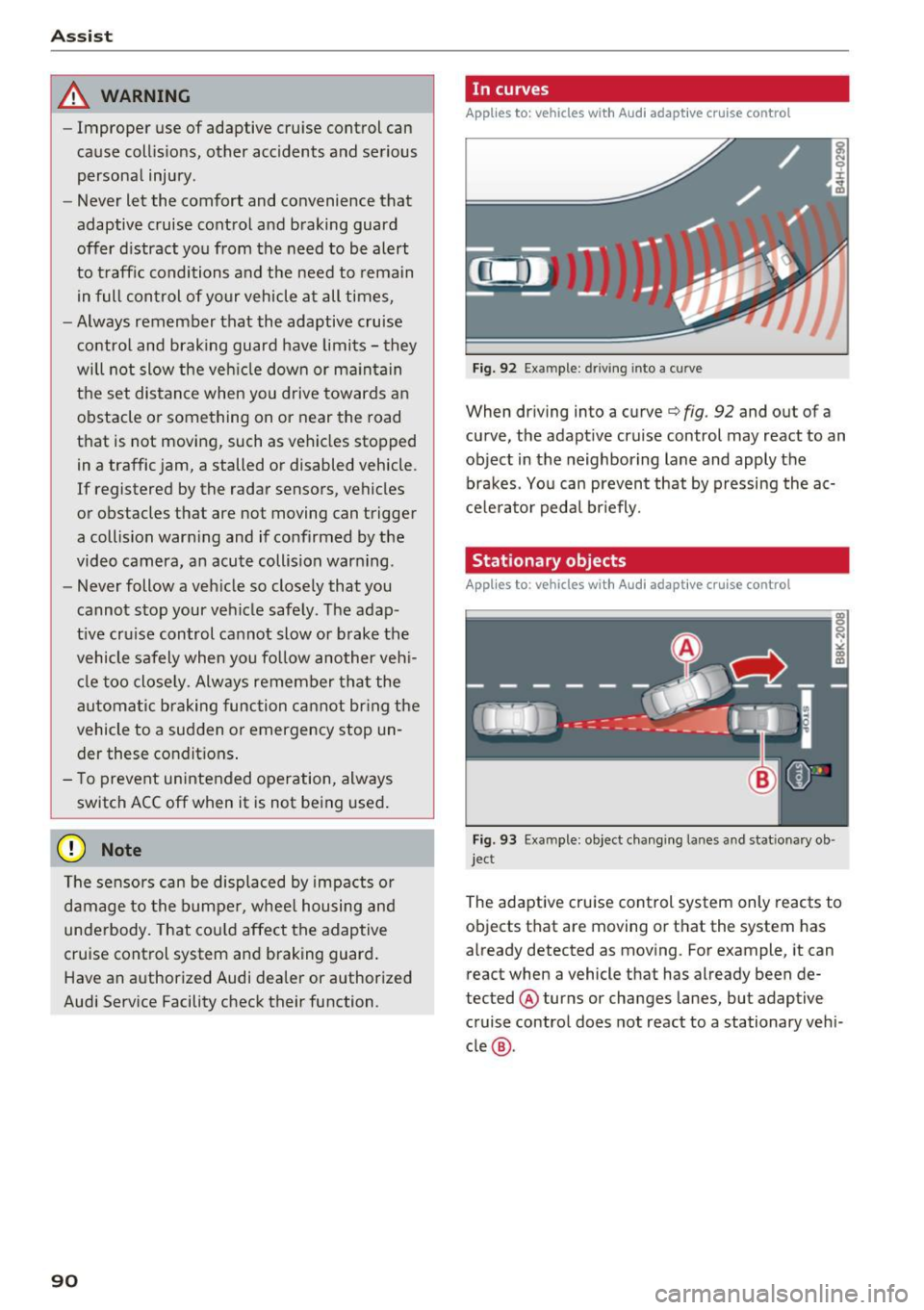
Fig. 92 Ex am ple: dri ving into a curv e
When dr iving into a curve c:::> fig. 92 and out of a
curve , the adapt ive cruise control may react to an
object in the neighboring lane and apply the brakes . Yo u can prevent that by pressing the ac
ce le ra to r peda l br iefly.
Stationary objects
Applies to: vehicles with Audi adaptive cruise control
F ig . 93 Exam ple: object chang ing la nes a nd stat ion ary ob ·
jec t
The adaptive cru ise control system only reacts to
objects that are moving or t hat the system has
already detected as moving . For example, it can
react when a vehicle that has already been de
tected @ turns or changes lanes, but adaptive
cruise control does not react to a stationary veh i
cle @.
Page 93 of 284
co
co
.... N
" N .... 0
00
<.,;) 'SI"
Switching on/off
App lies to: vehicles with Audi adaptive cruise contro l
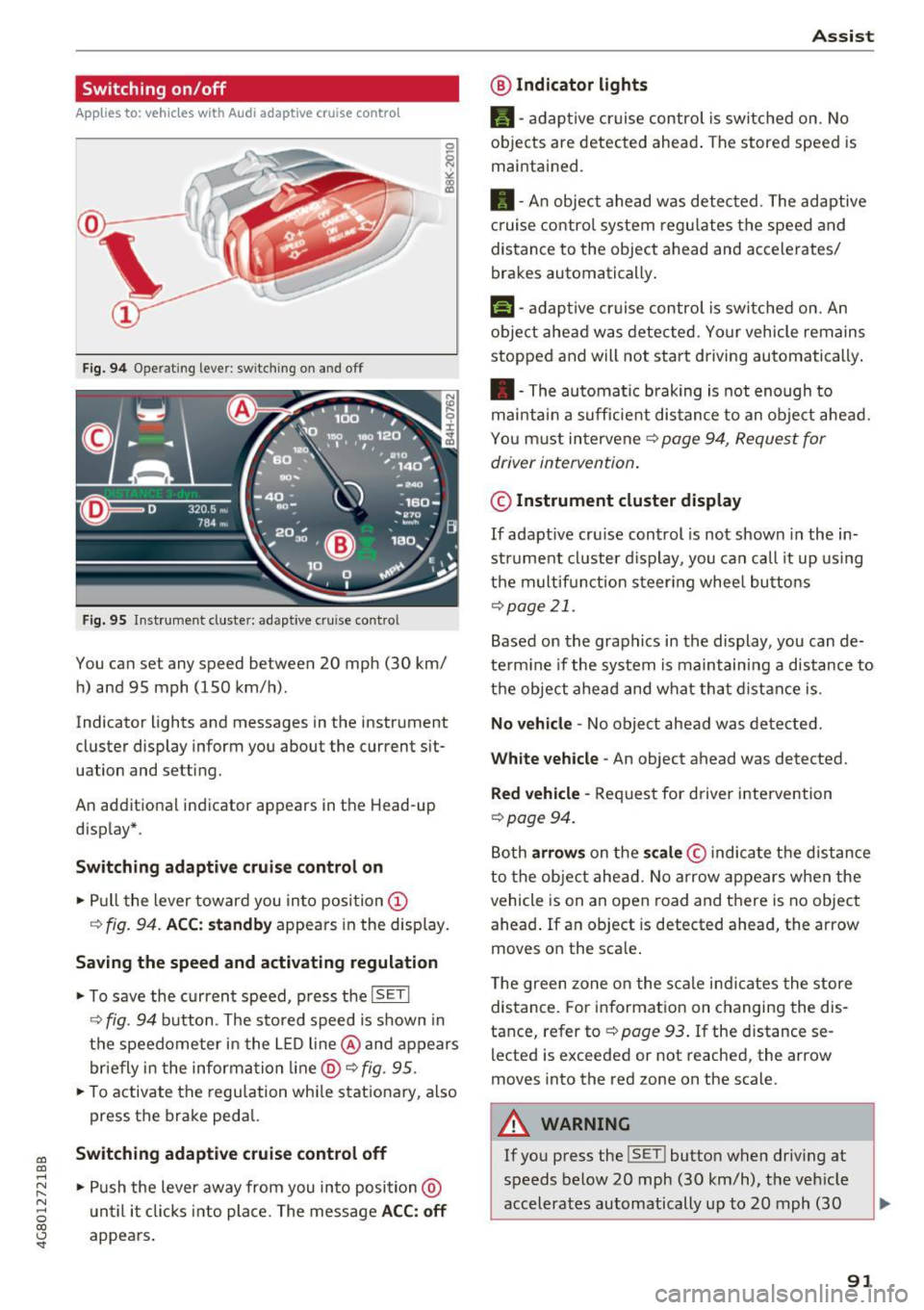
Fig. 9 4 Operat ing leve r: sw itching o n and off
Fig. 95 Inst rument cluste r: adaptive cruise contro l
You can set any speed between 20 mph (30 km/
h) and 95 mph (150 km/h) .
Indicator lights and messages in the instrument
cluster display inform you about the current sit
uation and setting.
An addit ional indicator appears in the Head-up
d isplay* .
Switching adaptiv e cruise control on
.,. Pull the lever toward you into position @
¢
fig . 94. ACC: standb y appears in the display.
Saving the speed and activating regulation
.. To save the current speed, p ress the ISETI
¢ fig . 94 button . The stored speed is shown in
the speedometer in the L ED l ine @ and appears
briefly in t he information line @ ¢
fig. 95 .
.,. To activate the regu lation whi le stationary, also
press the brake peda l.
Switching adaptive cruis e control off
.,. Push the lever away from you in to posi tion @
u nt il it clicks i nto place. The message
ACC : off
appears.
A ss ist
@ Indic ato r light s
•-adaptive cruise control is switched on. No
objects are detected ahead . The stored speed is
maintained .
• - An object ahead was detected . The adaptive
c ruise contro l system regu lates the speed and
distance to the object ahead and accelerates/
brakes automatically .
f:i-adaptive cruise control is switched on. An
object ahead was detected. Your vehicle remains
stopped and will not sta rt driving automatically .
• -The automatic braking is not enough to
mai ntai n a sufficie nt dis tance to an obje ct ahead.
You must intervene ¢
page 94, Request for
driver intervention .
© Instrument cluster display
If adaptive cru ise control is not shown in the in
strument cl uster d isplay, you can call it up using
t h e m ultif unction steer ing whee l butto ns
¢page 21.
Based on the graphics in the display , you can de
te rm ine if the system is maintain ing a distance to
t h e object ahead and what that d ist ance is .
No vehicle -No object ahead was detected .
White veh icle -An object ahead was detected.
Red vehicle -Request for driver intervention
~page 94.
Both arrow s on the scale © indicate the distance
to the object ahead. No arrow appears w hen the
vehicle is on an open road and t here is no object
ahead . If an object is detected ahead, the arrow
moves on the sca le .
The green zone on the s cale i ndicates the store
distance . For information on changing the dis
tance, refer to ¢
page 93. If the distance se
lected is exceeded or not reached , the arrow
moves into the red zone on the scale .
A WARNING
~~ --
If you press the !SET ! button when driv ing at
speeds below 20 mph (30 km/h), the vehicle
accelerates automatically up to 20 mph (30
91
Page 96 of 284

Ass is t
@ Tips
Your settings are automatica lly stored and as
signed to the remote control key be ing used .
Request for driver intervention
App lies to: ve hicles w ith Audi adaptive cruise co ntro l
Fig . 99 Instrum ent clus te r: r eq ues t fo r drive r interve ntio n
In certain situations, the system w ill request you
to take action :
- if t he braking from the adapt ive cr uise control
system is no t enough to maintai n enough dis
tance to the object ahead.
The dange r is ind icated by the . indicator light
~ fig. 99. An audio s ignal will also sound.
- Press the brake pedal to slow your vehicle down .
Audi braking guard
Applies to: ve hicles w ith Audi adaptive cruise co ntro l
Fig . 100 In str um ent clus te r: appro ach warning
The braking guard uses radar sensors and a video
camera .
It also functions within the limits of the
l) This is no t a vail able in som e coun trie s.
94
system when adaptive cru ise control is switched
off.
What can the braking guard do ?
When detected in time, the system can assess
dange rous si tu at ions where an object ahead
brakes sudden ly or if yo ur own vehicle is trave ling
at a h igh speed and approach ing an ob ject that is
moving more slow ly. The braking guard does not
react if it cannot detect the situation.
The system advises you of var ious dange rous sit
uations :
- The
di stan ce warning occu rs if you dr ive too
close ly to the object ahead fo r a long per iod of
time .
If the object ahead brakes strongly, you
would not be ab le to avoid a co llis ion. The .
indicator light appears as an indication for this .
- T he
appr oach w arning occurs when an object
ahead is trave ling more slowly or brakes
strongly. When this warning occurs, it may only
be possible to avoid a collis ion by swerving or
brak ing strongly . The danger is indicated by the
• indicator light
¢fig. 100 . An audio signal
w ill also so und .
If you do not react early enough or at all to a dan
gerous situation, the braking guard supports you
with a braking intervention .
- If a co llision is imminent, the system wi ll first
provide an
acute warning by braking sharply .
- If you do not react to th e acute warning, the
b raking guard can inc rease the braking force
w ith in the lim its of the system
1> . This reduces
the vehicle speed in the event of a coll is ion.
- T he system can in itiate complete dece leration
shortly before a collision
l) . Full deceleration at
high speeds occurs only in veh icles with adap
tive cruise control and side assist (pre se nse
plus) .
- If the braking guard determ ines that you are
not braking s trongly enough when the re is a n
impending coll is ion, it can increas e the b raking
force.
- The p re sense funct io ns also engage w hen
there is an impending collision ~
page 138.
Page 122 of 284

Intelligent Technology
Intelligent Technology
Electronic Stabilization
Control (ESC)
Description
Elect ronic Stabilization Control (ESC) suppo rts
driver safety.
It red uces the risk of slipping and
improves dr iving stability. ESC detects crit ica l sit
uations such as the veh icle oversteering and un
dersteering or the wheels are sp inning. The vehi
cle is stabilized by app lying the brakes or reduc
ing engine torque. As soon as the ESC is active ly
regulat ing, the
D.1 indicato r light blin ks in the in
s trumen t clus ter.
The fo llow ing systems are integrated in the ESC :
Ant i-lock braking system (ABS)
ABS p revents the whee ls from locking whe n brak
ing. The vehicle can sti ll be steered even during
hard brak ing. Apply steady press ure to the brake
pedal. Do not pump the pedal. A puls ing in t he
b rake pedal indicates that the system is acting to
s tabilize the vehicle .
Br ake assist system
The brake assist system can decrease brak ing dis
tance . It increases brak ing power when the driver
presses the brake pedal q uick ly in emergency sit
uations . You must press and hold t he b rake pedal
until the dangerous sit uat io n is over . In veh icles
with adapt ive c ruise control*, the bra ke as sist
sy stem is more sensitive if t he di sta nce detec ted
t o the vehicle dr iv ing ahead is too small. On
ve hicl es with act ivated and f unct io ni ng night vi
sion assist*, the brake assist system can respond mo re sensit ively if there is a warning .
Anti-slip regulation (ASR)
ASR red uces eng ine power when the drive w heels
be gin sp inning an d adapts the force to the road
conditions. This makes it easie r to sta rt, acceler
ate and dr ive up h ills.
Electronic differential lock (EDL)
E DL a ppl ies the bra kes to a wheel tha t st art s
sp inning and tra nsfe rs t he dr ive powe r to t he
120
other driving whee ls. This func tion is no t ava ila
ble at hig her speeds.
I n extreme cases , EDL automat ic al ly swi tches off
to keep t he b rake o n the br aked wheel from ove r
heating. The ve hicle is still working correct ly. ED L
will switc h on again automatically when condi
tions have returned to normal.
Steering recommendation
The ESC he lps to s tabili ze th e vehicle by ch ang ing
t h e s teer ing torque.
I n veh icles with dynamic s teer ing*, ESC a lso
helps to stab ilize the s teeri ng in cr it ic al situ a
tions.
Selective wheel torque control
Se lective wheel to rque control is used when d riv
i ng on curves . The front whee l on the ins ide of
t h e curve or both whe els on the i nside of th e
cu rve are braked se lectively as needed. This al
l ows mo re pre cise driving in curves .
Automatic post -collision braking system
The "a utomat ic post -coll is io n braking system"
can help to reduce the risk of sl iding and of addi
tiona l co llisions after an acc iden t. If the a irbag
c on tro l modu le dete cts a collision above a cer tain
vehicle speed, the veh icle is braked by t he ESC.
The veh icle does not brake automatically if:
- the drive r presses the accelerator pedal, or
- the bra king force generate d by the pressed
brake pedal is greater than the b raking force
that would be in itiated by the system, or
- the ESC, the bra ke system or the vehicle elect ri
cal system are not functioning.
A WARNING
- The ESC and its integ rated systems can not
overcome the lim its imposed by natura l
p hys ica l laws. Th is is es pec ially i mpo rtan t
on s lippery or we t roads. If the system s be
g in a cting to s tabili ze yo ur vehicle, you
should immedi ately alte r your speed to
match the road and tra ffi c conditions. Do
not let the inc reased safety provided tempt
Page 124 of 284
Intelligent Technology
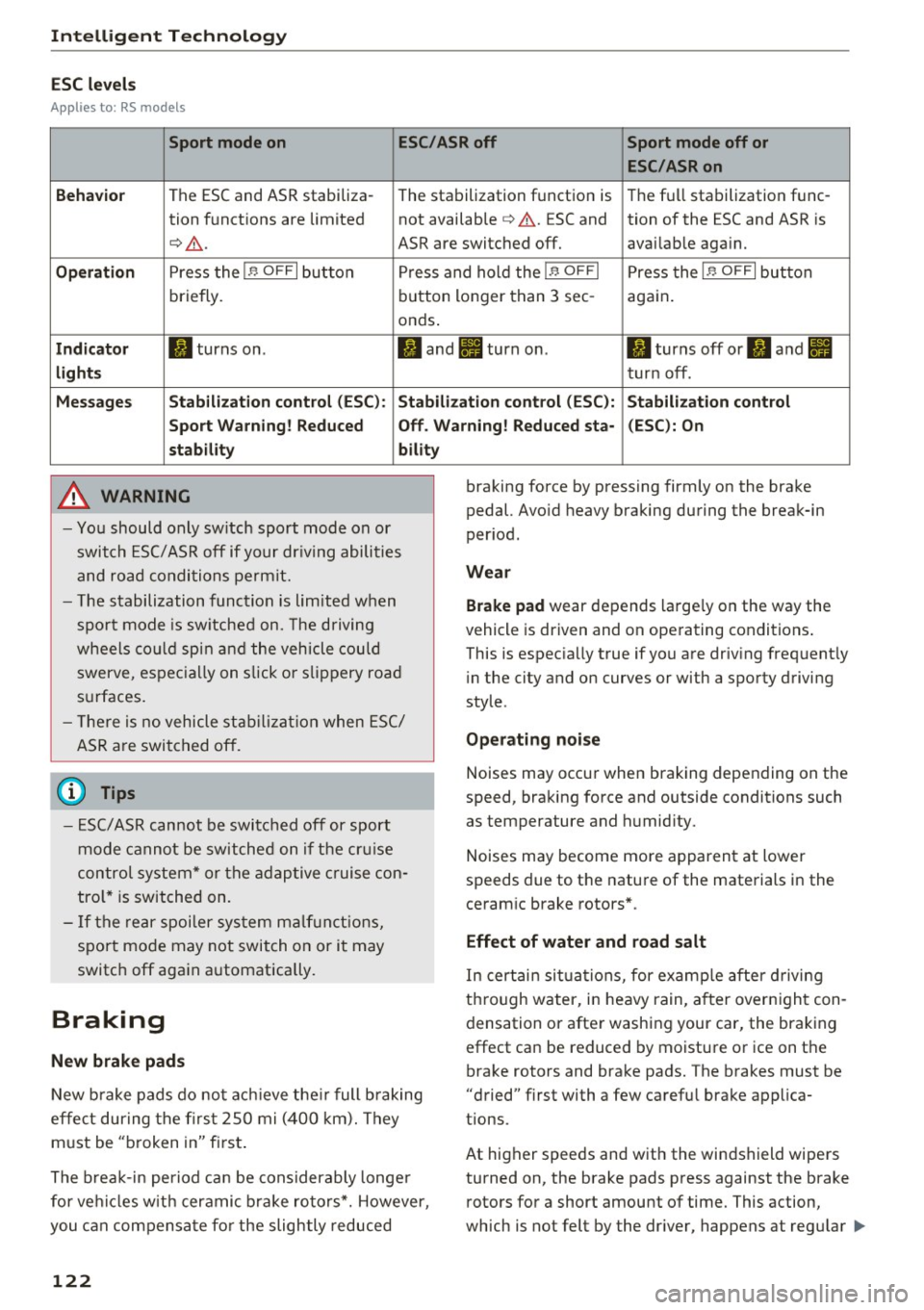
ESC levels
Ap plies to : RS models
Sport mode on ESC/ASRoff Sport mode off or
ESC /ASRon
Beha vior
The ESC and ASR stabiliza-
The stabilization function is The fu
ll stabilization func-
tion funct ions are limited not available
¢ ,& . ESC and tion of the ESC and ASR is
¢ .&. . ASR are switched off. availab le aga in.
Op eration Press the I.$ OFF I button P ress and hold the j.$ OF FI Press the I.$ OFF I button
briefly. b
utton longer than 3 sec- aga in .
onds .
Indicator II turns on . II and Ill turn on. II turns off or II and Ill
light s turn off .
Me ssage s Stabilization control (ESC ): S tabilization control (ESC ): Stabilization control
Sport Warn ing ! Reduced Off . Warning! Reduced sta - (ESC): On
stab ility bility
A WARNING
-Yo u should only sw itch sport mode on or
switch ESC/ ASR off if your dr iving abili ties
and road condi tions permit.
- T he stabilization func tion is limited w hen
spo rt m ode is sw itche d on. The driving
wheels co uld spi n and the vehicle could
swerve, espec ially on s lick or slippery road
s u rfaces.
- T here is no vehicle sta bilizat ion when E SC/
ASR a re swi tched off.
(D Tips
- ES C/ASR can not be switc hed off or sport
mode cannot be switche d on if the cr uise
contro l system * or the adap tive c ruise con
tro l* is switched on.
- If the re a r spoiler sys tem m alf unct ions,
sport mo de may not switch on or it may
switc h off aga in automatically.
Braking
New brake pads
New b rake pads do not ac hieve the ir full b raking
effe ct during the firs t 2S 0 mi (400 km). They
m ust be "broken in" fi rst .
The b rea k-in period ca n be considerably longe r
for ve hicles w it h cer amic b rake rotors*. However,
you can compensa te fo r the slightly reduced
122
braking force by pressing firmly on the brake
pedal. Avo id heavy braking during the break-in
per iod.
Wear
Brake pad
wear depends large ly on the way the
vehicle is driven and on ope rating conditions .
This is espec ia ll y true if you a re driv ing frequent ly
i n the city and on curves or with a sporty driving
sty le .
Ope rating noi se
Noises may occur when braking depending on the
speed, braking force and outside conditions such
as temperature and humid ity.
Noises may become mo re apparent at lower
speeds due to the nature of the materials in the
ceram ic brake rotors* .
Effect of water and road salt
In certain situa tions, for e xamp le after d riving
thro ugh water, in heavy rain, a fter over nigh t con
densation or after washing your car, the brak ing
effect can be reduced by moisture or ice on the bra ke rotors and brake pads. The brakes must be
"dried" f irst with a few ca refu l brake app lica
tions.
At higher speeds and with the windshield wipers
turned on, the brake pads press against the brake rotors for a short amount of time. This action,
wh ich is not felt by the dr iver, happens at regu lar .,..
Page 125 of 284
co
co
.... N
" N .... 0
00
\.J '
the brakes in wet weather.
The braki ng effect can also be red uced if you are
driving on salted roads and you do not apply the b rakes for long periods of time . The layer of salt
on the brake rotors and pads must be worn off
f irst when the brakes are app lied.
Due to its surface, the ceramic bra ke rotor* ab
sorbs moisture in certa in situations. There fore,
there will temporarily be less braking force than
when the brakes are dry . You can compensate for
this by pressing the brake pedal harder.
Cor rosion
L eaving the vehicle parked fo r long periods of
time, low mi leage and avoiding heavy braking
can contribute to corrosion on the brake rotors
and to dirty brake pads.
I f you usually avo id heavy braking or if there is
corrosion present , occasional heavy braking at
high speeds is recommended to clean the brake
rotors and pads
q ,& .
Brak e system malfunct ion
if you notice that the brake pedal travel has sud
denly increased, then a brake c ircui t in the dual
circuit brake system may have malfunctioned. Drive to an authorized Audi dea ler or a uthorized
Aud i Service Facility immediately to have the
problem corrected. On the way there, drive with
reduced speed and keep in mind that you w ill
need a longer distance to stop and you w ill need
to p ress the b rake pedal harde r.
L ow brake fluid level
When the brake fl uid level is low, malfunct ions in
the brake system may occur . The brake f lu id level
is electronically monitored.
Br ak e boost er
The brake booster amplifies the pressure you ap
p ly to the brake peda l. It only works when the en
g ine is running.
A WARNING
- Only apply the brakes for the purpose of
cleaning the brake system whe n road and
-
Intellig ent Technology
traffic conditions permit. You must not en
danger other road users. This increases the
risk of an accident.
- Never let the vehicle roll while the engine is
stopped because this increases the risk of an
accident.
- New brake pads do not ach ieve the ir full
braking effect during the first 250 m i
(400 km). They m ust be "broken in" first.
The break-in per iod ca n be cons iderably lon
ge r fo r vehicles with ceram ic brake rotors* .
H owever, you can compensate fo r the
slightly reduced braking force by pressi ng
fi rm ly on the brake pedal. Avo id heavy b rak
ing du ring the break -in pe riod.
- Ce rtain weathe r and ope rating condi tions
such as driving through water, dr iv ing in
heavy rain o r driv ing after was hing your ve
hicle can impa ir the effect iveness of the
brakes. In the winter, ice may build up on
the brake pads, rotors and drums . Check
these components by braking carefully. Ap
p lyi ng the brakes carefully several times
d ries the b rakes and removes ice build-up .
- The efficiency of the brakes can also be im
pa ired by dr iv ing for long stretches on roads
covered with sa lt without using the bra kes .
You can remove salt deposits from the
b rake rotors and pads by carefully applying
t he brakes several times .
- I f the fron t spoiler is damaged o r yo u install
another spoi ler, make su re the front wheel
b rakes are ven tilated properly . Othe rw ise,
the brake system co uld overheat, which re
duces their effectiveness .
- Fa ilure of a brake circuit impairs brak ing
pe rformance, which increases b raking dis
tance. Avo id driving the vehicle and have it
towed it to the nearest a uthorized Audi
deale r or authorized Aud i Serv ice Facility.
- I f the brake booster is not working, yo u w ill
have to p ress much harder on the brake
pedal to compensate fo r the lack of the
booster.
Q) Note
- Never let the brakes "rub" by pressing the
peda l lightly when braking is not actually
123
Page 126 of 284
Intelligent Technology
necessary. This causes the brakes to over
heat and increases bra king distance and
causes wear .
- Befo re driving downhi ll a long distance on a
steep hill, decrease your speed and select a
l ower gear. This makes use of the engine
braking effect and relieves the brakes. If
you need to brake additionally, b rake in in
t e rvals a nd not continuously .
(D Tips
-If the brake booster is not working, you
must press the brake pedal with much more
force than normal.
- If you retrofit you r vehicle with a front spoil
e r, whee l covers o r similar items , make sure
that the a ir flow to t he fron t wheels is not
i nte rr u pted . Othe rw ise the brake sys tem
ca n become too hot .
Electromechanical
steering, dynamic
steering
The electromechanical steering supports the
driver 's st eering movements.
Power steering adapts elec tronically based on
the vehicle speed .
Indicator light s and mes sage s
• Do not drive vehicle: steering defective
If thi s in dica tor light t urns o n and st ays o n and
t his mess age appears, t he power s teer ing m ay
have fai led.
St op the veh icle in a safe lo cat io n as soo n as pos
sib le. Do
not c ontinue dr iving. See an author ized
Aud i dealer o r auth o rize d Aud i Serv ice Facili ty for
assis tance.
(;:r,n Steering : Sy stem fault You can continue
driving
If the indicator lig ht tur ns on and the message
appears, the steering wheel may be mo re diff i
cul t to m ove or mo re sensit ive tha n usua l. The
s teer ing whee l may also be at an angle when
d riving s traight .
124
Drive slowly to an a uth orized Audi dea ler or au
thorized Audi Serv ice Facility to have the mal
funct ion corrected .
,Ion Dynamic steering: Initializing
If the indica to r li gh t is blinking and this message
appea rs, dy namic stee ring* is be ing initiali zed.
The steer ing whee l will be easy to move afte r
s ta rt ing t he en gine . Re- ini tializ ation mig ht be
necessary if the steering wheel was moved hard
to the left and r ight while the veh icle was not
moving . The d isp lay turns off if the in it ia li zation
was s uccessful.
(D Tips
- If the . or ,Ion indicato r light only stays on
f or a s ho rt time, you may cont inue driving .
- The dynamic stee ring stability systems
¢
page 1 20 are not ava ila bl e in the event of
a system mal function.
- For add itiona l information on dynamic
steering, re fer to
¢ page 105.
All wheel drive (quattro)
Applies to: vehicles with all wheel drive
In all wheel drive, all four wheels are powered.
General information
In all whee l drive, the dr iv ing power is divide d be
tween all four whee ls. This happens automatical
l y depending on yo ur driv ing behavior as we ll as
the cur rent road conditions . Also see
¢ page 120 , Electronic Stabilization Control
(ESC).
A center d ifferential distributes the driving powe r
varia bly to the front and rea r ax le. It wor ks to
gether w ith selective whee l torque contro l, w hich
activates w hen d riving through curves
¢ page 120 . With the sport d ifferent ial*, power
dis tribution to the rear wheels is var iable and can
be adjus ted wi th drive select¢
page 105 .
The all wheel drive concept is designed fo r high
engine power . Yo ur vehicle is except iona lly pow
erfu l and has excellent driving cha rac teristics
bot h un der normal d riving condi tions and on
snow and i ce. A lways read and follow safe ty pre-
c auti ons ¢
,&.. IJll-
Page 215 of 284

a,
a,
..... N r-. N ..... 0 a, OJ ..
® Mud and snow capability
"M/5" or "M+S" indicates the tire
is suitable for driving on mud and
snow. £ indicates a winter tire.
@Composition of the tire cord
and materials
The number of plies indicates the
number of rubberized fabric lay
ers in the tire . In general: the
more layers, the more weight a
tire can carry. Tire manufacturers
must also specify the materials
used in the ti re . These inc lude
stee l, nylon, polyester and other
materials.
@ Maximum permitted load
This number indicates the maxi
mum load in kilograms and
pounds that the tire can carry.
@ Un iform tire quality grade
standards for treadwear,
traction and temperature resistance
Tread wear, traction and temper
ature ranges¢
page 229 .
@ Running direction
The arrows indicate the running
direction of unidirectional tires.
You must always follow the speci
fied running direction
¢page 248 .
~ Maximum permitted
inflation pressure
Wheels
T his number indicates the maxi
mum pressure to which a tire can
be inflated under normal operat
ing conditions .
Glossary of tire and loading
terminology
Accessory weight
means the combined weight (in
excess of those standard items
which may be replaced) of auto matic t ransmission, power steer
ing, power brakes, power win
dows , powe r seats, radio, and
heater, to the extent tha t these
items are avai lab le as factory- in
stalled equipment (whether in
s t alled or not).
Aspect ratio
means the ratio of the height to
the w idth of the tire in percent.
Numbers of 55 or lower indicate a
low sidewall for improved steer
ing response and better overall
handling on dry pavement .
Bead
means the part of the tire that is
made of steel wires, wrapped or
reinfo rced by ply cords and that is
shaped to fit the rim. ...
213
Page 217 of 284

a,
a,
..... N r-. N ..... 0 a, OJ ..
Maximum (permissible )
inflat ion pressure
means the maximum cold infla
tion pressure to wh ich a t ire may
be inflated. Also called "maxi
mum inflation pressure ."
Normal occupant weight
means 150 lbs . (68 kilograms)
times the number of occupants
seated in the veh icle up to the to
tal seating capacity of your vehi
c le .
Occupant distribution
means distribution of occupants
in a vehicle.
Oute r diameter
means the overall diameter of an
inflated new tire .
Overall width
means the linear distance be
tween the exteriors of the side
walls of an inflated tire, including
elevations due to labeling, deco
rations, or protective bands or
ribs.
Ply
means a layer of rubber-coated
parallel cords.
Wheels
Production options weight
means the combined weight of
those installed regular production
options weighing over 5 lbs. (2.3
kg) in excess of those standard
items which they replace, not pre
viously considered in curb weight
or accessory weight, including
heavy duty brakes, ride levelers,
roof rack, heavy duty battery, and
special trim .
Radial ply tire
means a pneumatic tire in which
the ply cords that extend to the
beads are laid at substantially 90
degrees to the centerline of the
tread.
Recommended inflation
pressure
see ¢ page 214, Cold tire infla
tion pressure.
Reinforced tire
means a tire designed to operate
at higher loads and at higher in
flation pressures than the corre
sponding standard tire. Rein
forced tires may be identified as
"X L", "xl", "EXTRA LOAD", or "RF"
on the sidewall. ..,
215