ignition AUDI A7 2017 Owner´s Manual
[x] Cancel search | Manufacturer: AUDI, Model Year: 2017, Model line: A7, Model: AUDI A7 2017Pages: 284, PDF Size: 72.29 MB
Page 35 of 284
co
co
.... N
" N .... 0
00
<.,;) 'SI'
.. Remove the integrated mechanical key
¢
page 29 or use the separate mechan ical key .
.. Pull the cap out of the opening
¢ fig. 23 .
.. Insert the key in the inside slot and turn it all
the way to the right (right door) or left (left
door).
A WARNING
Read and heed all WARNINGS¢ A in Descrip
tion on page
27.
Anti-theft alarm system
If the anti-theft alarm system detects a vehicle
b reak-in, audio and visual warning signals are
triggered. The anti-theft alarm system is activat
ed when the vehicle is locked as usual. It
switches
off when the vehicle is unlocked.
If the alarm is triggered, it w ill shut off automat
ically after a ce rtain amount of time. Switch the
ignition on or press the~ button on the remote
control key to turn
off the alarm.
Luggage compartment
Lid
Automatic luggage compartment lid
Applies to: vehicles with automat ic luggage compartment lid
The luggage compartment lid can be opened and
closed electrically.
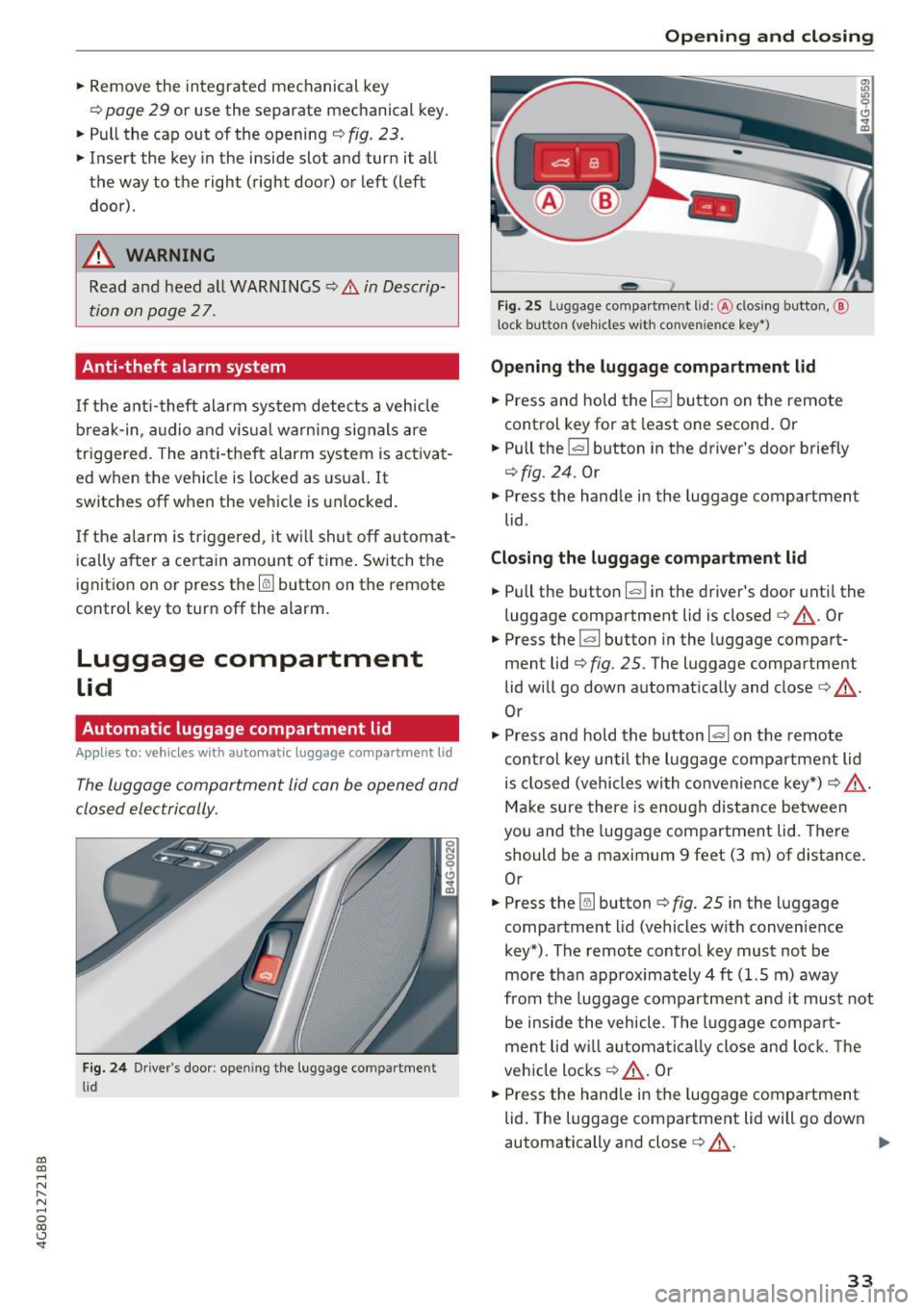
Fig. 24 Drive r's door : opening the luggage compartment
lid
Open ing and closing
Fig. 25 Luggage compa rt me nt lid: @clos ing butto n,@
l ock button (vehicles w ith conve nie nce key• )
Opening the luggage compartment lid
.. Press and hold the lal button on the remote
control key for at least one second. Or
.. Pull the~ button in the driver's door briefly
¢fig. 24 . Or
" Press the handle in the luggage compartment
lid .
Closing the luggage compartment lid
.. Pull the button lal in the driver's door until the
luggage compartment lid is closed¢,&. . Or
.. Press the
la l button in the luggage compart
ment lid¢
fig. 25 . The luggage compartment
lid will go down automatically and close¢,&. .
Or
" Press and hold the button
la l on the remote
control key until the luggage compartment lid
is closed (vehicles with convenience key*) ¢ ,&. .
Make sure there is enough distance between
you and the luggage compartment lid. There
should be a maximum 9 feet (3 m) of distance.
Or
" Press the~ button ¢
fig. 25 in the luggage
compartment lid (vehicles with convenience
key*) . The remote control key must not be
more than approx imately 4 ft (1.5 m) away
from the luggage compartment and it must not
be inside the vehicle . The luggage compart
ment lid w ill automatically close and lock. The
vehicle locks¢,&. . Or
.. Press the hand le in the luggage compartment
lid. The luggage compartment lid will go down
automatically and close¢,&. .
Ill>
33
Page 40 of 284

Opening and clo sin g
• To close the sunroof comp letely, press the
switch forward briefly to the second level
c::> ,&. .
• To select an intermediate pos ition, press/pull
the switch forward/back to the first level until
the desired position is reached .
The sunshade can be opened and closed by hand
when the roof is closed. The sunshade opens au
tomatically when the roof is opened.
You can still operate the sliding/tilt ing sunroof
for about 10 minutes after the ignition is switch
ed off. The switch is deactivated once the driver's
or front passenger 's door is opened.
A WARNING
Pay careful attent ion when closing the slid
ing/t ilting sunroof -otherw ise ser ious injury
cou ld result! Always take the ign ition key with
you when leaving the vehicle .
@ Note
Always close your sliding/tilting sunroof when
leaving your veh icle. Sudden ra in can cause
damage to the interior equ ipment of your ve
hicle, particularly the electron ic equ ipment.
-
@ Tips
- For informat ion on convenience opening, re
fer to
<::.>page 37.
- The sunroof will only open down to -20 °C
(-4 °F) .
Sunroof power emergency closing
App lies to: vehicl es with sli d in g/ti lting sunroof
If the sunroof detects an object in its path whe n
it is closing, it w ill open again automatically. In
this case, you can close the roof with the power
emergency closing function.
• Within five seconds afte r the sunroof opens au
tomat ica lly, pull the switch unt il the roof
closes .
I f you let go of the sw itch early, the sunroof will
open again .
38
Garage door opener
(Homelink)
Description
App lies to: vehicles with garage door opener (Horne Link)
Fig. 31 Garage door opener: examples of usage for d iff er·
ent syste ms
With the garage door opener (Homelink), you
can activate systems such as the garage doors,
security systems or house lights from inside your
vehicle. Three buttons are integrated in the head
liner that can be programmed to up to three re
mote controls .
To be able to operate systems using the garage door opener, the buttons in the headliner must
first be programmed .
A WARNING
When operating or programming the garage
door opener, make sure that no people or ob
jects are in the a rea immediately s urrounding
the equipment . People can be injured or prop
erty can be damaged if st ruck when closing .
(D Tips
-For security reasons, we recommend that
you clear the prog rammed buttons before
sell ing the vehicle .
- For add itiona l information about Homel ink,
visit www.homelink .com .
- For an exp lanat ion on conform ity w ith the
FCC reg ulations in the Un ited States and the
Industry Canada regulat ions, see
<::.> page 267.
Page 41 of 284

co
co
.... N
" N .... 0
00
<..:l 'SI"
Programming buttons
Applies to: vehicles wit h garage door opener (Homelink)
Fig. 3 2 Headl iner: c ontro ls
You can program bot h fixed code and rol ling code
systems using this procedure .
Programming /reprogramming button s
• Switch the ignition on .
.. Press and hold the button in the head liner that
you wou ld like to program for at least 10 sec
onds. Or
• Se lect:
~ I C~ A~ R~ I fu nct ion button > (Car) * Systems
co ntro l button > Vehicle setting s > Garage
door opener > Program garage door opener .
.. Fol low the ins truc tions i n the I nfota inme nt sys
tem .
Deleting button programming
The programmed bu ttons cannot be de leted ind i
v id ually . They must be deleted all at once. Rep ro
g ram the bu ttons if necessary .
.. Se lect: the
ICARI fu nction button > (Car) * Sys
tems
control b utton > Vehicle settings > Ga
rage door opener
> Clear program settings >
Yes .
Displaying the version /status/country code
.. Se lec t: I CAR I funct ion button > (Car) * Systems
co ntro l butto n > Vehicle settings > Garage
door opener > Version information .
(D Tips
The garage door opene r may need to be
synchronized w ith the-system motor after the
programming . Follow the manufacture r's i n
st ruc tions for do ing th is.
Open ing and closing
Operation
App lies to: vehicles with garage door opener (Home link)
Requireme nts : t h e bu tton in the headliner m ust
be program med<>
page 39 and t he ve hicle m ust
be wi thin r ange of the system, s uc h a s the ga rage
doo r.
• Press the bu tton to ope n the garage door. The
L E D @ <>
page 39, fig. 32 blink s or tur ns on .
• Press the bu tton ag ai n to open the g arage
door.
@ Tips
When o pening or clos ing the g arage door, d o
not press and hold t he b utton lon ger ten sec
o nd s or the garage door opener w ill switch to
p rogramming mode.
39
Page 42 of 284
Lights and Vision
Lights and Vision
Exterior lighting
Switching lights on and off
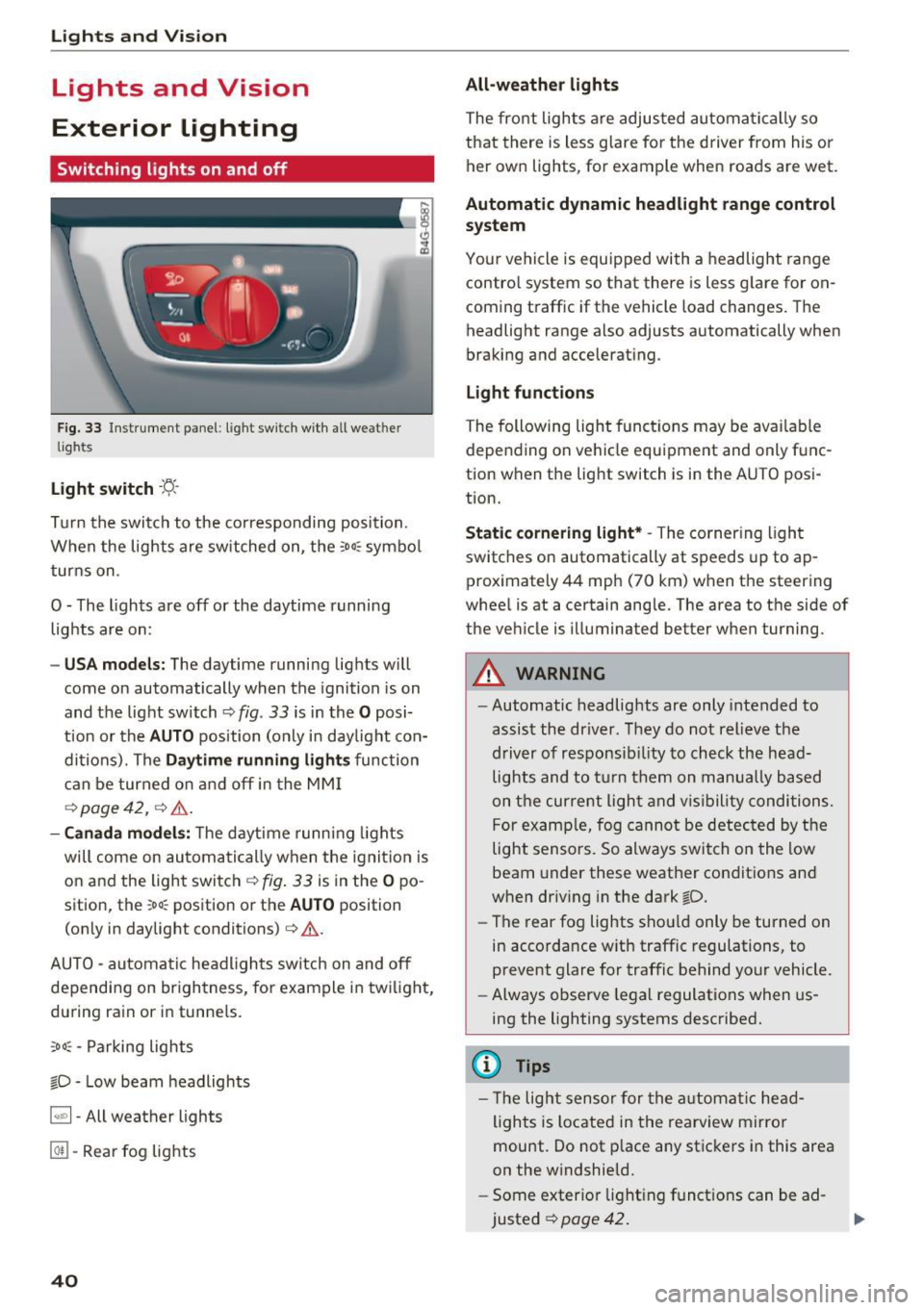
Fig. 33 Instrument panel: light sw itch w ith all weat her
lights
Light switch · 't/..·
T ur n the switch to the corresponding posi tion.
When the lights are sw itched on, the
:oo: symbol
turns on .
0 - The lights are off or the daytime running
lights are on:
- USA m odels: The daytime running lights will
come on automatically when the ignition is on
and the light switch¢
fig. 33 is in the O posi
t ion or the
AUTO position (only in day light con
dit ions). The
D aytime running light s function
can be turned o n and off in the MM I
r=:>page42, ¢ ,6 .
-Canada mo del s: T he d aytime runn ing lights
will come on automati cally when the ignit io n is
on and the ligh t swi tch
r=:> fig . 33 is in the O po
sition, the
;oo: position or the AUTO position
(on ly in daylight conditions)
¢ &.
AUTO -automatic headlights switch on and off
depending on br igh tness, for example i n tw ilig ht,
du ring rain or in tunnels.
;oo: -Parking lights
io -Low beam headlights
~ - All weather lights
@TI -Rear fog lights
40
All-weather lights
The front lights a re adjus ted au toma tically so
that there is less g lare fo r the d river from his o r
her own lights, for example when roads are wet .
Automatic dynamic headlight range control
system
Yo ur vehicle is equ ipped with a headlight range
contro l system so that there is less g lare for on
coming t raffic if the vehicle load changes. The
headlight range also adjusts automatically when
braking and accelerat ing .
Light funct ion s
The following light functions may be ava ilable
depending on ve hicle equipment and only func
tion when the light switch is in the AUTO posi
tion.
Static cornering light* -The cornering light
switches on automatically at speeds up to ap
proximately 44 mph (70 km) when the steering
whee l is at a certain angle. The area to the side of
the vehicle is illuminated better when turning.
A WARNING
-Automatic headlig hts are only intended to
assis t the driver. They do not relieve the
driver of responsib ility to check the head
lights and to t urn them on manua lly based
on t he cur re nt ligh t and v is ibility conditions.
F or examp le, fog cannot be detec ted by the
light sensors. So always switch on the low
beam under these weather conditio ns an d
when driv ing in the dark
io.
- The rear fog lights shou ld only be turned on
in accorda nce w ith traffic regulations, to
prevent glare for traffic behind your vehicle.
- Always observe legal regulations when us
ing the lighting systems described.
(D Tips
- Th e light senso r for the a utomat ic he ad
ligh ts is located in the rearview mirro r
mount . Do not p lace any stic kers i n this area
on the w indshield.
- Some exter ior light ing f unct ions can be ad
justed
¢ page 42 .
Page 43 of 284
co
co
.... N
" N .... 0
00
\.J '
lights are on and open the door, a warning
tone sounds.
- In cool or damp weather, the inside of the
headlights, turn signals and tail lights can
fog over due to the temperature difference
between the inside and outside. They will
clear shortly after switching them on. This
does not affect the serv ice life of the light
ing .
Turn signal and high beam lever
The turn signal lever operates the turn signals,
the high beams and the headlight flasher.
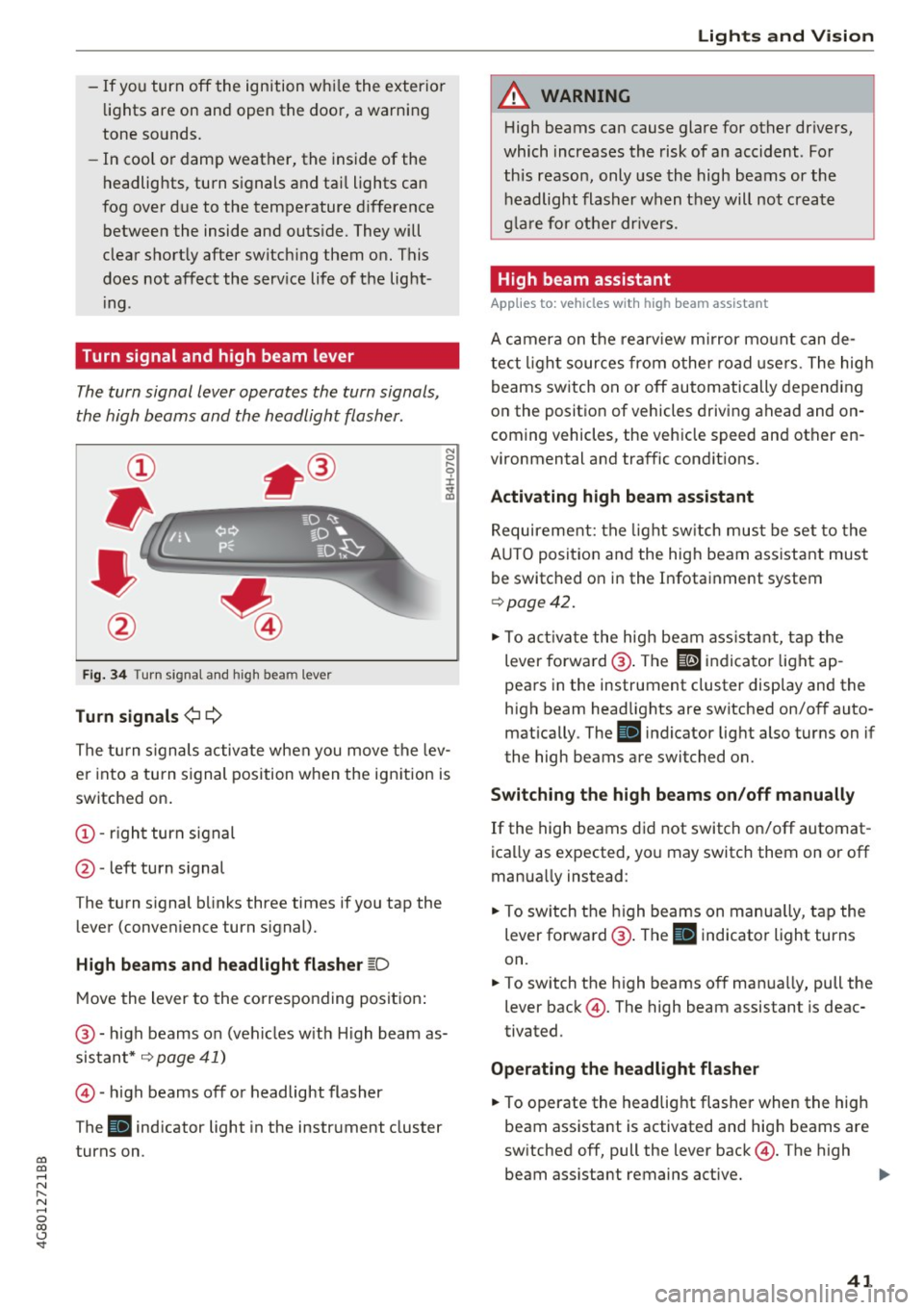
Fig. 34 Turn s ignal and h igh bea m lever
Turn signals¢¢
N
0
,-.. 0 ± .,. a,
The turn s ignals activate when you move the lev
er into a turn signal position when the ignition is
switched on.
@ -right turn signal
@ -left turn signal
The turn s ignal blinks three times if you tap the
lever (conven ience turn s ignal).
High beams and headlight flasher ~D
Move the lever to the corresponding position :
@ -high beams on (vehicles w ith H igh beam as
sistant*
~ page 41)
©-high beams off or headlight flasher
The
Bl indicator light in the instrument cluster
turns on.
Lights and Vision
A WARNING
High beams can cause glare for other drivers,
which increases the risk of an accident . For
this reason, only use the high beams or the
headlight flasher when they will not create
glare for other drivers .
High beam assistant
Applies to : vehicles wi th high beam assis tan t
A camera on the rearview mirror mount can de
tect light sources from other road use rs . The high
beams switch on or off automatically depending
on the position of vehicles driving ahead and on
coming vehicles, the veh icle speed and other en
vironmental and traffic cond it ions.
Activating high beam assistant
Requirement: the light switch must be set to the
A UTO posit ion and the high beam ass istant must
be switched on in the Infotainment system
~page 42 .
.. To activate the high beam assistant, tap the
lever forwa rd @ . The
El indicator light ap
pears in the instrument cluster display and the
high beam headlights are switched on/off auto matically . The
Bl indicator light also turns on if
the high beams are switched on.
Switching the high beams on/off manually
If the high beams did not switch on/off automat
ica lly as expected, you may switch them on or off
manua lly instead:
"' To switch the high beams on manually, tap the
lever forward @. The
Bl indicator light turns
on.
.. To switch the high beams off manually, pull the
lever back@. The high beam assistant is deac
tivated.
Operating the headlight flasher
.. To operate the headlight flasher when the high
beam assistant is activated and hig h beams are
switched off, pull the lever back@. The high
beam ass istant remains active. ..,
41
Page 45 of 284
co
co
.... N
" N .... 0 co <.,;) 'SI'
turn signal lever. The emergency flashers stop
temporarily .
The emergency flashers also wo rk when the igni
tion is turned off .
Interior Lighting
Front and rear interior lighting
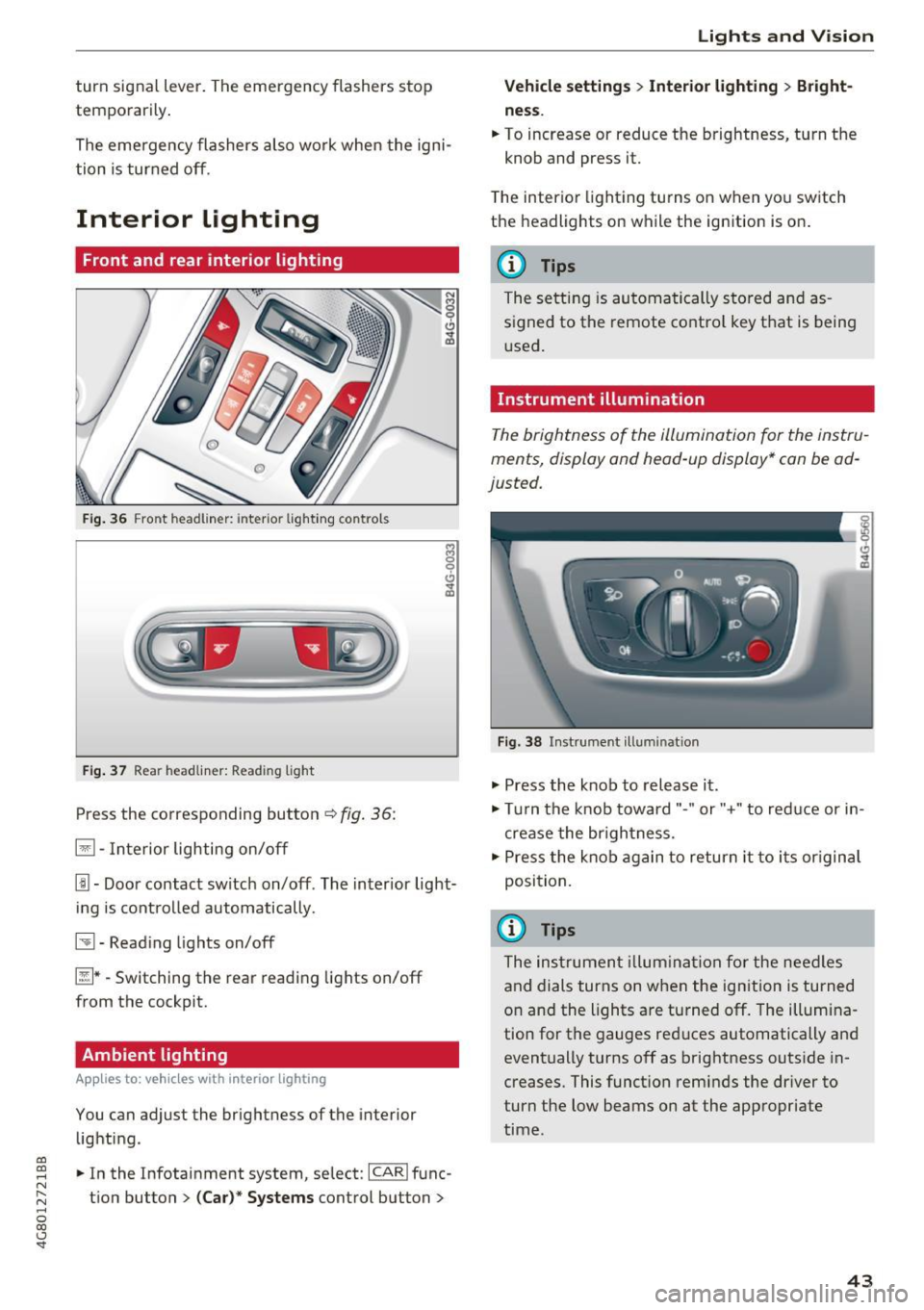
Fig. 36 Fro nt hea dliner: inter io r light ing co ntro ls
F ig. 37 Rea r headliner: Read ing light
Press the corresponding button c:::> fig . 36:
El -Interior lighting on/off
I!!-Doo r contact switch on/off . The inter ior light
i ng is cont rolled automatically.
~ -Read ing lights on/off
~ * -Switching the rear read ing lights on/off
from the cockpit.
Ambient lighting
App lies to: vehicl es with interior lighting
You can adjust the brightness of the interior
lighti ng .
.. In the Infotainment system, se lect:
ICARI func
tion button
> (Ca r)* Systems control button >
Lights and V ision
Vehicle settings > Interior lighting > Bright
ne ss .
.. To increase or reduce the brightness, turn t he
knob and press it.
T he inter ior lighting tu rns on when yo u sw itch
the headlights on while the ignition is on .
(D Tips
The setti ng is au toma tically s to red and as
s igned to the remote cont ro l key t hat is being
u sed .
Instrument illumination
The brightness of the illumination fo r the instru
ments, display and head-up display* con be ad
justed.
Fig . 38 Instrument ill um ination
"' Press the knob to release it .
"' Tur n the knob toward"-" or"+" to red uce or in
crease the br igh tness.
.,. Press the knob again to return it to i ts or igin al
posi tion.
(D Tips
The ins trumen t illum ina tion for the need les
and dials turns on when the ignition is turned
on and the lights a re turned off. The illumi na
tion for the gauges red uces automatically and
eventually turns off as brightness outside in
creases. This funct ion rem inds the dr iver to
turn the low beams on at the appropriate
time .
43
Page 46 of 284

Lights and Vision
Vision
Adjusting the exterior mirrors
Fig. 39 Drive r's door: knob for the exterior mirrors
Turn the knob to the desired position:
Q/ P -adjusts the left/right exterior mirror.
M ove the knob in the desired direction.
®-Heat the mir ror glass depend ing on the o ut
side temperature .
~ -Folds the exterio r m irrors* . In the Infotain
men t sys tem, yo u can selec t if the mirrors fold in
automatically when you lock the vehicle
q page 32 .
Front passenger's exterior mirror tilt
function*
To help you see the curb w hen back ing into a
parking space, the surface of the mirror tilts
slightly. Fo r thi s to happen, the knob must be in
the posit io n for the front passenger's outside
mirror .
You can adjust the t ilted mi rror surface by turn
ing the knob in the desired direction. When you
move out of reverse and into anothe r gear, the
new mirror position is stored and assigned to the
key you are us ing.
The mirror goes back into its o rigina l position
once yo u drive forward faster than 9 mph
(15 km/h) or turn the ignition off.
A WARNING
Curved mirror surfaces (convex or aspheric*)
enlarge the field of vision . However, they
ma ke objects i n the mirror appear smaller
and farther away. Your may estimate i ncor-
44
rect ly w hen you use these mirro rs to gauge
your d istance from t he veh icles beh ind you
when chang ing lanes, which inc reases the risk
of an acc ident.
(D Note
- If the mi rror housing was moved by fo rce
( f or example, by runn ing into an object
when maneuvering the vehicle), the m irror
must be fo lded a ll the way in us ing the pow
er folding fu nction . T he m irror hous ing
must not be moved back into place by hand
because t his wo uld impair the func tion of
t he mir ror mechani sm.
- If you wash the vehicle in an automatic ca r
wash, you mus t fold t he ex ter ior mirro rs in
to reduce the r is k of damage to the m irro rs.
N ever fold power fo ld ing exterior mi rrors *
by hand . On ly fold them in and out using
the power controls .
(D Tips
-If the power adjusting func tion malfunc
tions, the glass in both mirrors can be ad
justed by p ressing on the edge of it by hand.
- The e xte rior m irro r settings are stored w it h
the memory fu nctio n* ¢
page 5 0.
Dimming the mirrors
Your vehicle is equipped with a manual or auto
matic* dimming rearview mirror.
Fi g. 40 A utomat ic dimming rearv iew mirr or*
Manual dimming rearview mirror
.,. Pull the lever on the bottom of the mirror back. Iii>-
Page 48 of 284

Lights and Vision
_& WARNING
Do not use the sunshade to secure cargo. The
luggage compartment cover is not a surface
for storing objects . Objects placed o n the cov
er could endange r all vehicle occupants dur
ing sudde n braking maneuvers or in a crash .
Windshield wipers
Switching the windshield wipers on
Fig. 4 3 Winds hield w iper lever
Move the wi ndshield wipe r lever to the corre
spon ding pos ition:
@ -windshie ld w ipers off
g
"' 0 ± .. a,
© -rain sensor mode . T he w indshield wipers
sw itch on once the vehicle speed exceeds approx
imately 2 mph (4 km/h) and it is ra ining . T he
h igher the ra in sensor sensitivity is set (swi tc h @
to the r igh t), the earlie r the windshie ld w ipers re
a ct to moist ure on the w indshield . Yo u can deac
tivate the rain sensor mode in the Info tainment
system, wh ic h sw itches the int ermitte nt mode
on. Se lect : ICAR !funct ion button>
(Car )* sys
tems
contro l button > Dr iver ass istance > Rain
sensor > Off .
In intermittent mode, you can ad
just the interval time using the sw itch @.
@-slow wiping
@-fast wiping
©-sing le w ipe If you hold the lever in th is posi
tion longer, t he wipers sw itch from s low w iping
to fast wip ing .
® -clean the windsh ield The wipe rs wipe one
time afte r seve ra l seconds of dr iv ing to remove
wa te r drop lets . You can switch th is func tion off
46
by moving the lever to posit ion ® within 10 sec
onds of the afterwipe. The afterw ipe funct ion is
reactivated t he next time you switch the ignit ion
on.
Cleaning the headlights* . The headlight washer
system * operates only when the low beam head
li ghts are on . If you move the lever to posit ion
® , the headlights and the night v ision assist
camera* are cleaned at intervals .
_& WARNING
-The rain sensor is o nly intended to ass ist t he
d river . The driver may still be responsible
for manually switc hing the wipers on bas ed
on vi sibility con ditions .
- The winds hield may not be t reated with wa
ter-repelling w indshield coating agents. Un
f a vo rable condit ions, such as wet ness, d ark
n es s or low su n, can resu lt in increased
glare, which increases the risk of an acci
de nt. W iper blade chatter is also possible.
- P roperly func tioning wi ndshiel d wipe r
blades are required for a clea r view and safe
driving
c::> page 47, Replacing windshield
wiper blades.
(D Note
- If there is frost, make sure the win dshield
wiper blades are not frozen to the wind
shield. Switch ing on the windshield wipers
when the blades are frozen to the wind
shield can damage the w iper blades.
- Prior to using a car wash, the windshield
w iper system must be sw itched off (lever in
posit io n 0) . This prevents the wipers from
switching on unintentionally and causi ng
damage to the windsh ield wiper sys tem .
@ Tips
-The windshie ld w ipers switch off when the
ignition is switc hed off. You can activate the
w indshield wipers after the ignition is
switched back on by moving the w indshield
wiper lever to a ny po sit ion .
- Wor n or dirty w indshield w iper blades resu lt
in s tre aking. This can affect the rain s enso r .,..
Page 49 of 284
co
co
.... N
" N .... 0
00
\.J -
blades regularly .
- The washer fluid nozzles for the windshie ld
washer system are heated at low tempera
tures when the ignition is on .
- When stopping temporarily, such as at a
traffic light, the speed of the windshie ld
wipers automatically reduces by one leve l.
Cleaning windshield wiper blades
Clean the wiper blades when you see wiper
streaks. Use a soft cloth and a glass cleaner.
.. Place the windshield wiper arms in the service
position
c::> page 47.
.. Fold the windshield wiper arms away from the
windshield .
.&_ WARNING
Dirty windshield wiper blades can impair v i
sion, which increases the risk of an accident .
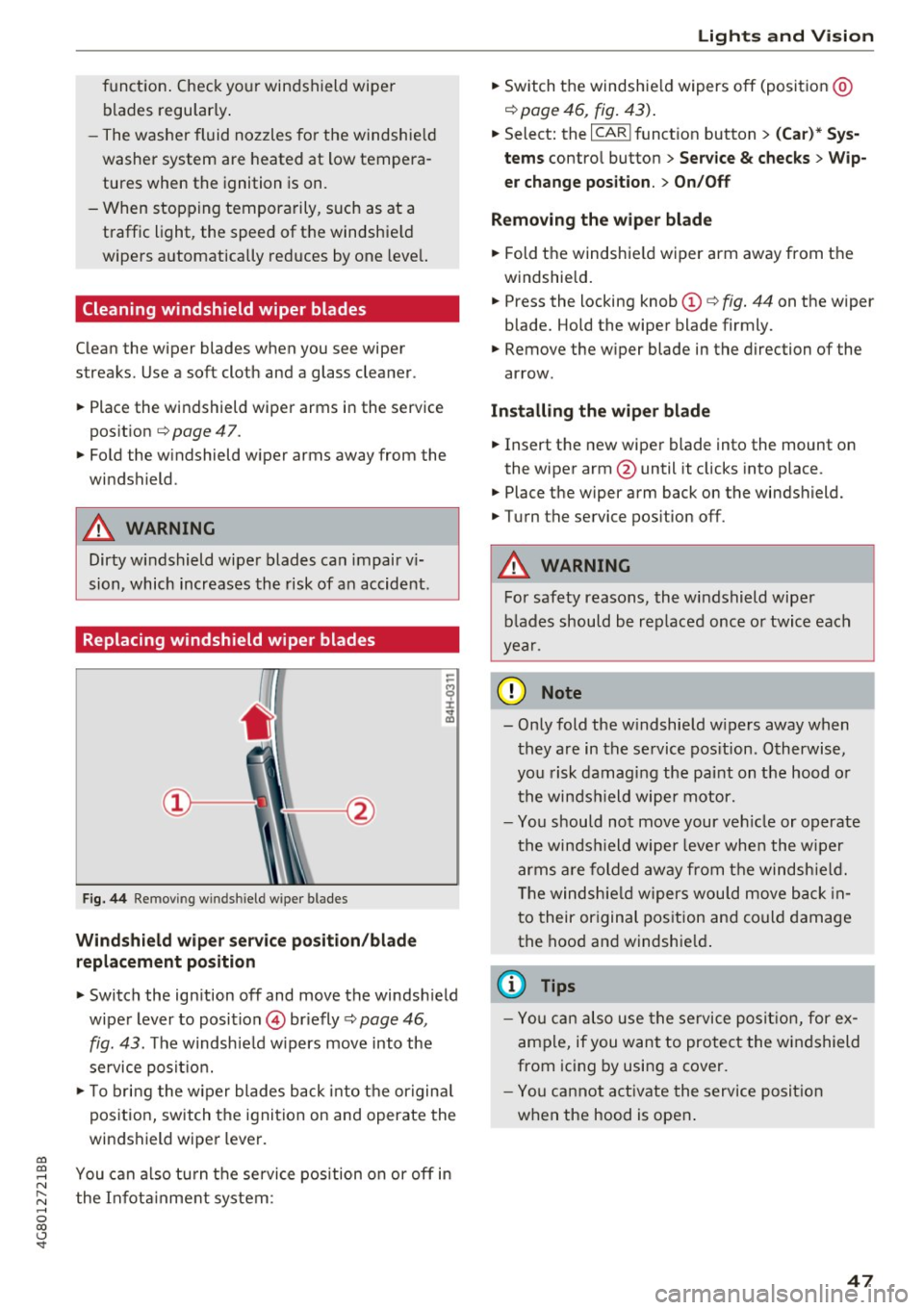
Replacing windshield wiper blades
Fig. 44 Remov ing windshield wiper blades
Wind shield wiper ser vice po sition /blade
rep lacement position
-
.. Switch the ign ition off and move the windsh ield
wiper lever to position © briefly
c::> page 46 ,
fig. 43. The windsh ie ld w ipers move into the
service posit io n.
.. To bring the w iper blades back into the origina l
position, switch the ignition on and operate the
windshield wiper lever .
You can a lso turn t he service position on or
off in
the Infota inment system :
Lights and Vision
.. Sw itch the windshie ld wipers off (posit ion @
¢page 46, fig. 43) .
.. Select: the I CAR I funct ion button > (C ar )* Sys
tem s
control button > Service & checks > Wip
er change po sition .
> On/Off
Remo ving the wiper blad e
.. Fold the windshie ld wiper arm away from the
w indshield .
.. Press the locking knob©
c::> fig. 44 on the wiper
blade. Hold the wiper blade firmly.
.. Remove the wiper blade in the direction of the
arrow .
Install ing the wiper blade
.. Insert the new wiper blade into the mount on
the wiper arm@until it clicks into place.
.. Place the wiper arm back on the windshield .
.. Turn the service pos ition
off .
.&_ WARNING
-
For safety reasons, the windshield wipe r
b lades should be rep laced once o r twice each
year .
([) Note
-Only fold the w indshie ld w ipers away when
they are in the service pos ition . Otherwise,
you risk damaging the paint on the hood o r
the winds hield wiper motor.
- Yo u should not move your ve hicle or operate
the winds hield wiper leve r when the wipe r
arms a re folded away from the windshie ld.
T he windsh ie ld wipers wou ld move back in
t o their or iginal pos ition and could damage
the hood a nd windshie ld .
(D Tips
- Yo u can also use the service posit ion , for e x
ample, if you want to protect the windshield
from icing by using a cover.
- You cannot a ct ivate the serv ice posit io n
when the hood is open .
47
Page 53 of 284

co
co
.... N
" N .... 0
00
<.,;) 'SI"
Remote Memory button control key
Driver D river Front
passen-ger
Seat X X X
Steering wheel* X X
Both
exterior X X
mirrors*
Remote control key
Applies to: vehicles with memory function
The driver's seat profile can be assigned to the
remote control key when the vehicle is locked.
• Select: the ICARI function button > (Car)* Sys
tems
control button > Vehicle settings > Driv
er's seat
> Remote control key > On .
(D Tips
If you do not wish to have the seat profile for
another driver assigned to the remote control
key, switch the memory function off in the In
fotainment system or using the
IOFFI button
r:::;,page 51.
Memory buttons
Applies to: vehicles with memory function
Fig. 51 Driver 's door: memory function buttons
The memory buttons are located in the driver's/
front passenger's* door.
Switching the memory function on/off
• Press the IOFFI button to switch the memory
function on/off. The LED in the button turns on
Seats and storage
when the memory function is off . Seat profiles
are neither stored nor recalled.
Storing a seat profile
• Press the ISET I button. When the word SET
lights up, the memory is ready to store set
tings .
• Now press a memory button briefly. A tone
confirms that the settings were stored.
Accessing a seat profile
• If the driver's door is open and the ignition is
sw itched off, press the memo ry button.
.. If the driver's door is closed or the ignition is
switched on, press and hold the memory but
ton until the seat adjustment is complete .
A WARNING
-For safety reasons, the seat setting can only
be recalled when the vehicle is stationary,
otherwise the re is a risk of an accident.
- If necessary, you can stop the recall process
by press ing the
IOFFI button or any memory
button.
Adjusting the front passenger's seat in the
Infotainment system
Applies to: vehicles with memory function
The driver can move the front passenger's seat
into various positions.
Adjusting the front passenger's seat from
the driver's seat
• Select: the I CAR I funct ion button > (Car) * Sys
tems
contro l button > Vehicle settings > Seats
> Front passenger's seat > Adjust seat posi
tion .
• You can now adjust the front passenger's seat
using the driver's seat buttons
r:::;, page 48,
fig. 45.
Align with driver's seat
• To transfer the settings from the driver's seat
to the front passenger's seat, select: the
I CAR I
function button > (Car)* Systems control but
ton
> Vehicle settings> Seats > Front passeng-
er 's seat > Align with driver 's seat. ..,.
51