instrument cluster AUDI A7 2017 Owner´s Manual
[x] Cancel search | Manufacturer: AUDI, Model Year: 2017, Model line: A7, Model: AUDI A7 2017Pages: 284, PDF Size: 72.29 MB
Page 75 of 284

co
co
.... N
" N .... 0
00
<..:l 'SI'
-The vehicle battery charge leve l is too low .
- Power consumpt ion is high .
The engine can turn off again when the condi
tions fo r Start-S top mode a re met .
Ignition i s switched off automatically
To prevent the veh icle battery from draining, the
ignit ion will sw itch off
automaticall y under the
following conditions :
- The vehicle must have already been driven.
- The Start/Stop system has stopped the engine.
- T he driver's door must be open.
- The driver's safe ty be lt must be unb uck led.
- The brake pedal must not be p ressed .
- The veh icle must be stationary .
In this case, the activated low beam is replaced by the parking light. The parking lights will
switch off after app roximately 30 minutes or
when yo u lock the vehicle .
If the Start/Stop system has not turned off the
engine or if you have sw itched the Start/Stop sys
tem off manually, the ignition will not be auto mat ical ly switched off and the engine w ill contin
ue to run~&. .
A WARNING
To red uce the r isk of poisoning, never allow
t he engine to r un in conf ined s paces.
@ Tips
If you select the Dor N se lector lever position
after sh ifting into reverse, the vehicle m ust
be driven f ast er than 6 mph (10 km/ h) in or
der fo r th e engine to switch off ag ain.
-
D rivi ng
Manually switching the Start/Stop system
off/on
Applies to : vehicles wit h Start/Stop sys te m
If you do not wish to use th e system, you can
switch it off manually.
Fi g. 79 Cen te r console: S tart/Stop system butto n
.. To switch the Start/Stop system off/on man
ually, press the
l (A) ~ I button . The LED in the b ut
ton turns on when the system is switched off.
(D Tips
If you switch the system off during a stop phase, the engine will start aga in automati
cally .
Messages in the instrument cluster display
Applies to: vehicles wit h Start/Stop syste m
Start-stop system deactivated: Please re start
engine manually
T his message appears w hen spec ific conditions
are no t me t du ring a stop phase. The S tart/Stop
system will
not b e a ble to restart the engine . The
engine m ust be star ted with the
I S TAR T ENGINE S TOP ! button .
Start-stop system: Syst em fault! Currently
unavailable
T he re is a ma lfunction in the Start/Stop system.
Drive the vehicle to an a uth orized Aud i dea ler or
author ized Service Facility as soon as possible to
have the malfunction corrected .
73
Page 76 of 284

Driving
Electromechanical
parking brake
Fig . 80 Center conso le: par king brake
Your vehicle is equipped with an electromechani
cal parking brake
Q fig. 80 . The parking brake is
designed to prevent the vehicle from rolling un intentionally and rep laces the hand brake.
S etting /manuall y re leas ing the parking
bra ke
.. Pull the(®) switch to set the parking brake. The
LED in the switch illuminates. The -(USA
models)/ . (Canada models) indicator light al
so turns on in the instrument cluster display .
.. To release the parking brake manua lly, press
the brake o r acce lerato r pedal while the igni
tion is switched on a nd p ress the®> switch at
the same time. The L ED in the b utton and the
indicator light in the display t urn off.
Releasing the parking brake automatically
Req uirement: the driver's door must be closed,
the dr iver's safety belt must be la tched and the
pa rking brake must be set.
.. To start driving and release the park ing brake
automat ica lly, press the acce lerato r pedal as
us ual.
In addition to releasing the park ing brake auto
mat ically, othe r convenience and safety funct ions
are available whe n you sta rt driving
Q page 75,
Starting from a stop.
Preventing the automatic parking br ake
release
The vehicle could begin ro lling unintentionally,
depending on the hill or if towing a trailer.
74
.. To prevent the park ing brake from releasing au
tomatically, pull and ho ld the<®> switch and
press the acce lerator peda l. The parking brake
remains set and prevents the vehicle from roll
ing backward.
" You can release the®) switch again once you
are sure that yo u are giving enough driving
force to the wheels by press ing the accelerator
pedal.
Eme rgency braking function
You can use the emergency braking function in an
emergency sit uation, or if the standa rd brake op
eration malfunctions or is disab led.
" Pull and ho ld the®) switch.
" As soon as you release the ®> switch or acceler-
ate, the braking stops.
Pul ling and ho ld ing the®> switch while driving
the vehicle activates the emergency braking func
tion. The ve hicle is braked at all four wheels by
activating the hydraulic brake system . The brak
i ng effect is sim ila r to heavy brak ing
Q ,&. .
To reduce the risk of activating the emergency
braking by m istake, a warning tone (buzzer)
sounds when the© switch is pulled. Emergency
braking stops as soon as the© switch is released
o r the accelerator pedal is pressed.
Park ing
" Press the brake pedal to stop the vehicle.
" Pull the© switch to set the parking brake .
" Place the selector leve r in t he P position .
" Tu rn the engine off
Q ,&. .
"Tur n the steering w hee l when parking on in
cl ines so that the wheels w ill roll into the cu rb
if the vehicle start s moving.
& WARNING
- Do not press the acce le rator pedal inadve r
tently if a gea r is selected when the vehicle
is stationary and the engine is running. Oth
erwise, the vehicle will start to move imme
diate ly and this could result i n an accident .
- Emergency braking sho uld only be used in
an emergency, when the norma l brake pedal
has fai led or the brake peda l is obstr ucted. "'
Page 78 of 284
Driving
-Hill hold assist cannot hold the veh icle in
place on all h ills (for example, if the ground
is slippery or icy).
- To reduce the risk of an accident, always
make sure the vehicle is situated safely
wh ile stat ionary.
Automatic transmission
Introduction
The automat ic tra nsmission is cont rolled e lec
tronically . The transmission sh ifts up or down au
tomatically depending on which drive program is
selected.
Whe n a
mod erate dri ving style is used, the
transmission selects the most economical driving
mode. The transmiss ion upshifts at a lower RPM
and downshifts at a higher RPM to improve fuel
efficiency.
The transm ission switches to a spo rty mode after
a kick-down or when the driver uses a
spo rt y
driving style
characterized by quick accelerator
pedal movements, heavy acceleration, frequent
changes in speed and traveling at the maximum
speed.
If desired, the driver can also select the gears
manually ( tipt ronic mod e) 9 page 79.
A ppl ies to: ve hicles w ith 5 tro nic t ra n smi ssio n
The S tronic is a dual-clutch t ransmiss ion . Power
is transferred using two clutches that work inde
pendently from one another. They replace the
torque converter used in conventional automatic transmissions and allow the vehicle to accelerate
without a noticeable inter ruption in tract ion .
App lies to: ve hicles w ith a tipt ro nic tra ns mi ssio n
Power is transferred using a torque converter.
76
Selector lever positions
Fi g. 81 Inst rument cl uster: se lector leve r pos it ions
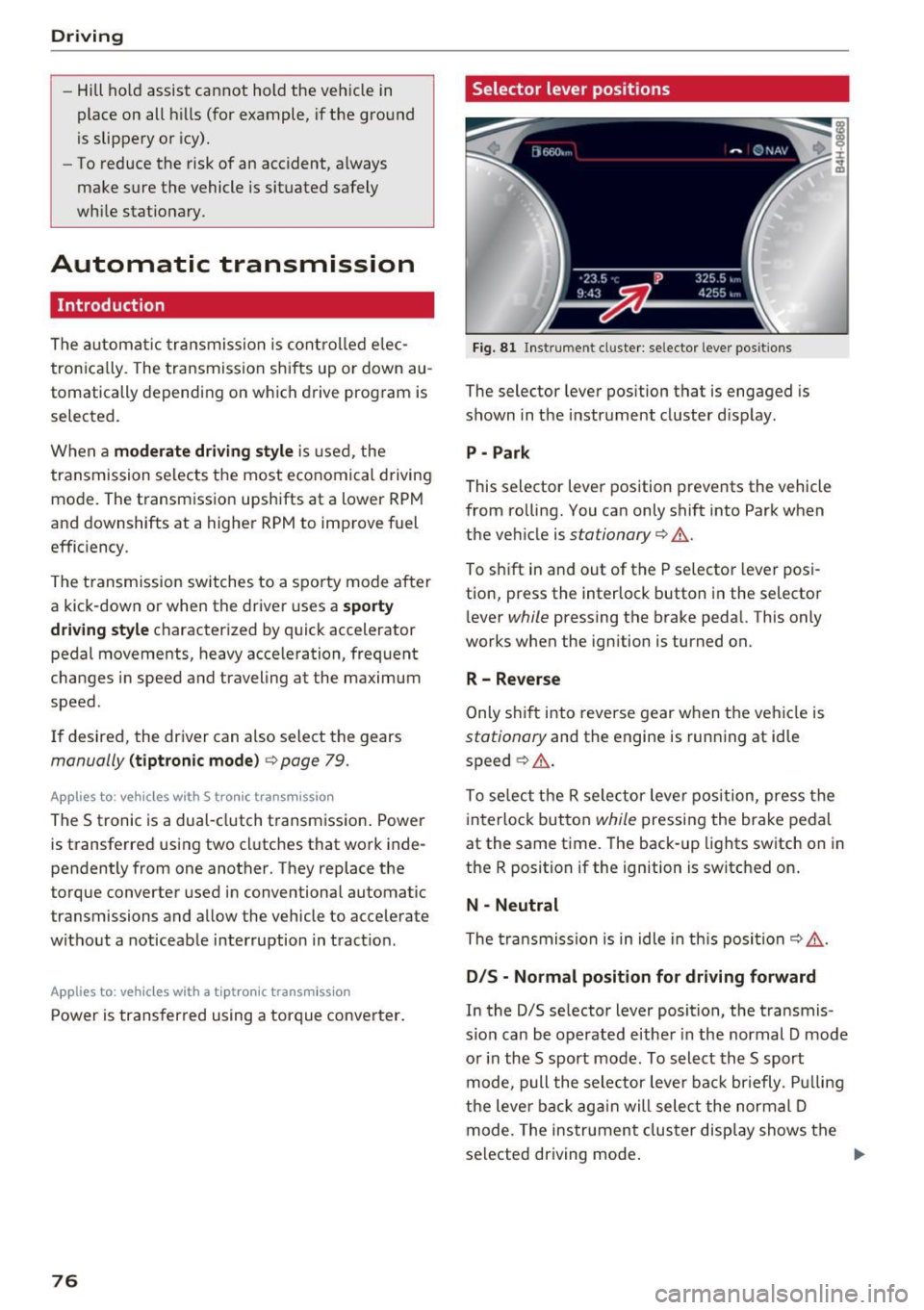
The selector lever position that is engaged is
shown in the instrument cluster d isplay .
P -Park
This selector lever position prevents the vehicle
from ro lling. You can only shift into Park when
the veh icle is
stationary 9 ,1. .
To sh ift in and out of the P selecto r lever posi
tion, press the interlock button in the selector
l ever
while pressing the brake pedal. This only
works when the ignition is turned on.
R- Reverse
Only s hif t into reverse gear w hen the veh icle is
stationary and the engine is running at idle
speed ~
,1..
To se lect the R sele ctor leve r position, press the
interlock button
while pressing the brake pedal
at the same time. The back -up lights switch on in
the R position if the ignition is switched on .
N -Neutral
The tra nsmission is in idle in th is posi tion ~ ,1. .
DIS -Normal position for driving forward
In the D/S se lector lever position, the transmis
s io n can be operated e ither in the normal D mode
o r in the S sport mode . To select th e S sport
mode, pull the selector leve r back br iefly . P ull ing
the leve r back ag ai n will sele ct the normal D
mode. The ins trument cluster display shows the
selected driving mode .
Page 79 of 284

co
co
.... N
" N .... 0
00
<.,;) 'SI'
In the normal m ode D, the tr ansmission auto
matica lly selects t he suitab le gear ratio . It de
pends on en gine load, vehicle speed and driving
style.
Select the
s p o rt m od e S for sporty driving. The
ve hicle makes full use of the engine's power .
Shifting is more noticeable when accelerat ing.
To move from selector lever position N to D, you must press the brake pedal and the vehicle must
be traveling less than 1 mph (2 km/h) or be sta
tionary ¢.&. .
.&_ WARNING
-The veh icle can roll even if the ignition is
switched off.
- Never select R or P while driving, because
this increases the risk of an accident.
-
- Power is still transmitted to the wheels
when the eng ine is running at idle. To pre
vent the veh icle from "creeping", you must
keep your foot on the brake in all selector
lever positions (except P) when the eng ine is
running . Otherwise, th is increases the r isk
of an accident.
- Do not inadvertently press the accelerator
peda l w hen the veh icle is stopped if a gear is
engaged. Ot herwise the veh icle will start to
move immediately, even i f the parking bra ke
is set. This cou ld res ult in a crash .
- T o de cre ase the risk of an accident, these
lector lever must be in the P posi tion and
the parking brake must be set before open
ing the hood and working on a r unning en
gine. Always read and fo llow the applicable
warnings
q page 199, Working in the en
gine compartment.
(D Tips
- Drive select: sporty shifting character istics
can be selected us ing the
Dy namic driving
mode.Sw ill appea r in the instrument clus
ter display instead of D.
- If you accidenta lly select N while driv ing,
take your foot off the accelerator pedal and
wait for the engine to slow down to idle be
fore selecting D/S.
D rivi ng
-If there is a powe r failure, the se lector lever
wi ll not move out of the P position. The
eme rgency re lease can be used if t his hap
pens
¢ page 81.
Selector lever lock
The selector lever lock prevents you from select
ing a gear accidentally, causing the vehicle to
roll.
)
Fi g. 82 Selector lever lock
T o release the se lector lever lock:
" Switch the ignit ion on .
" Press the brake pedal
while pressing the inter-
lock butto n.
Automatic shift lock (ASL)
The selector lever is locked in the P and N posi
t ions when the ig nit ion is switched on. The re
move it from t hese positions, the driver must
press the b rake peda l and press the lock button
at the same time. The following message ap
pears in the inst rument cluster display when the
selector lever is in the P or N posi tion to remind
t h e driver:
Brake pedal mu st be applied to shift from P
The automatic shift lock only funct ions when the
vehicle is stat ionary or at speeds be low 1 mph
(2 km/h) . At higher speeds, the lock is automati
c a lly deactivated in the N pos ition .
The selector lever is not locked when shifting
quick ly throug h N, for example from R to D. This
makes it possible to free the veh icle when it is
stuck by "rocking" it. The selecto r lever lock en-
gages if t he lever stays in t he N pos it ion longer ...
77
Page 81 of 284
co
co
.... N
" N .... 0
00
<.,;) 'SI"
-Never hold the vehicle on an incline with a
slipping clutch. The clutch opens automati
cally when it becomes too hot from the
overload . The
1§1 indicator light turns on
and a message appears
Q page 81 when
the clutch is overloaded.
(D Note
- When stopping on an incline, do not try to
hold the vehicle in place by pressing the ac
celerator pedal while a driving gear is se
l ected. This can cause the transmission to
overheat and can damage it. Set the parking
brake or press the brake pedal to prevent
the vehicle from rolling.
- Allow ing the vehicle to roll when the engine
is stopped will damage the transmission be
cause it is not lubricated .
(D Tips
For safety reasons, the parking brake is re
leased automatically only when the driver's
safety belt is fastened.
Hill descent control
The hill descent control system assists the driver
when driving down hills .
Hill descent contro l is activated when the selec
tor lever is in the Dor S position and you press
the brake pedal. The transmission automatically
selects a gear that is suitable for the hill. Hill de
scent control tries to maintain the speed ach
ieved at the time of braking, within physical and
technical limitations. If may still be necessary to adjust the speed with the brake pedal.
Hill descent control switches off once the hill lev
els out or you press the accelerator pedal.
On vehicles with a cruise control system*
¢ page 85, hill descent control is also activated
when the speed is set.
_& WARNING
Hill descent control cannot overcome physical
limitations, so it may not be able to maintain
Driving
a constant speed under all conditions. Always be ready to apply the brakes.
Shifting manually (tiptronic mode)
The tiptronic mode allows the driver to shi~ the
gears manually .
'
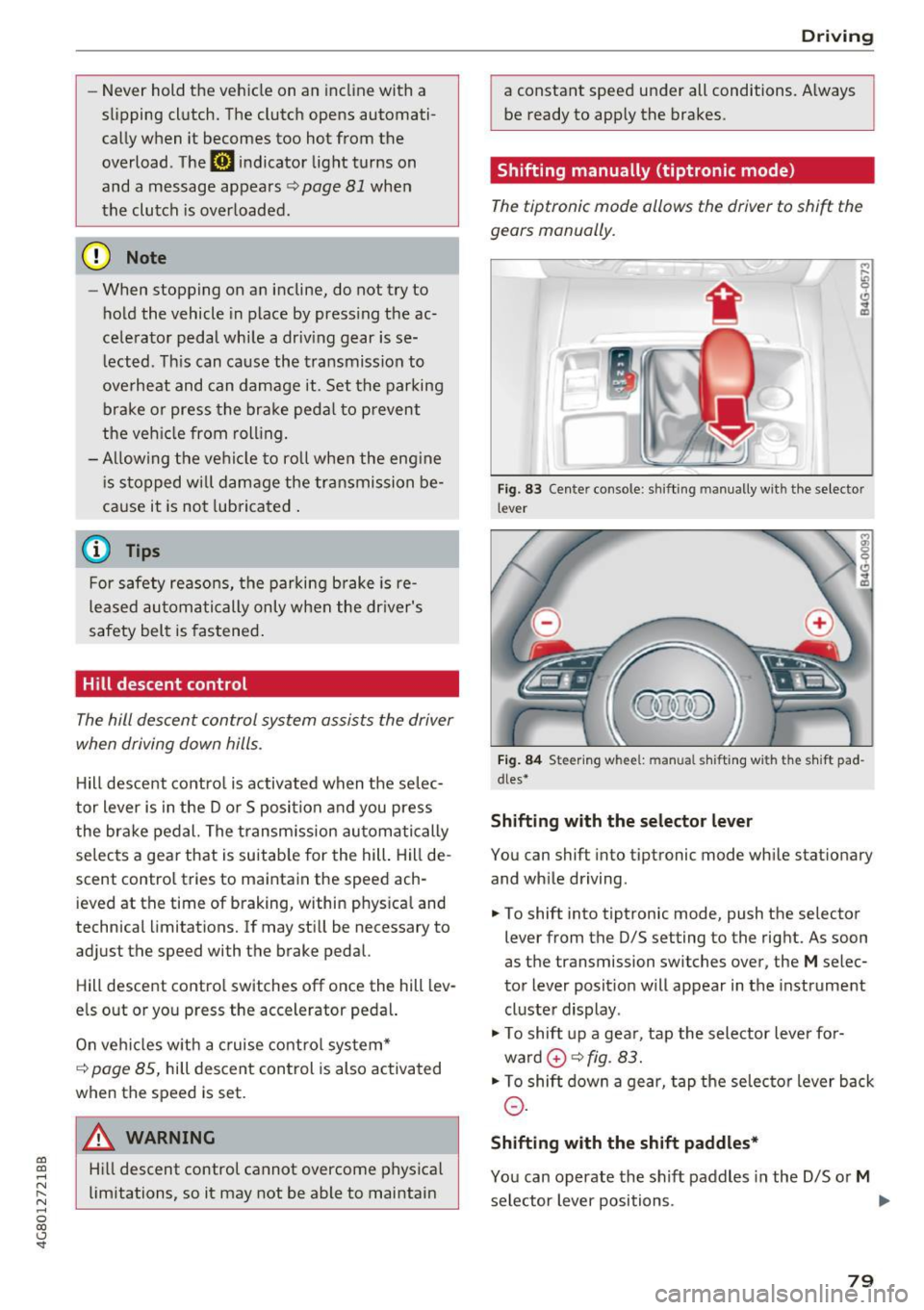
Fig. 83 Center console : shift ing manually wit h the selector
lever
Fig. 84 Steering w hee l: m anual s hifting wi th the sh ift pad
dles•
Shifting with the selector lever
You can shift into tiptronic mode while stationary
and while driving.
.,. To shift into tiptronic mode, push the selector
lever from the D/S setting to the right. As soon
as the transmission switches over, the
M selec
tor lever posit ion will appear in the instrument
cluster display .
"'To shift up a gear, tap the selector lever for
ward
0 ¢ fig. 83.
"'To shift down a gear, tap the selector lever back
0-
Shifting with the shift paddles*
You can operate the shift paddles in the D/S or M
selector lever positions. .,.
79
Page 87 of 284

co
co
.... N
" N .... 0
00
<..:l 'SI"
Assist Speed warning system
Applies to: vehicles with speed warning system
The speed warning system helps you to stay un
der a specified maximum speed.
The speed warning system warns you if you are
exceeding the maximum speed that you have set.
A warning tone will sound as soon as your speed
exceeds the stored value slightly.
The . (USA models)/ . (Canada models) indi
cator light and a message appear in the instru
ment cluster display at the same time. The./
• indicator light and the message turn off if the
speed falls back below the stored maximum
speed .
Setting a threshold is recommended if you would
like to be reminded when you reach a certain
maximum speed. Situations where you may want
to do so include driving in a country with a gener
al speed limit or if there is a specified maximum
speed for winter tires.
Setting the warning threshold
The warning threshold is set in the Infotainment
system.
.. Select: the
ICARI function button > (Car)* Sys
tems control button > Driver assistance >
Speed warning.
@ Tips
Regardless of the speed warning system, you
should always monitor your speed using the
speedometer and make sure you are following
the legal speed limit.
Assist
Cruise control system
Switching on
Applies to: vehicles with cruise control system
The cruise control system makes it possible to
drive at a constant speed starting at 20 mph (30
km/h) .
0
g M 0 :i:
f
... m
®t
0
Fig. 86 Operating leve r: cru ise cont rol system
.. To switch the cruise control on, pull the lever
into position @~ fig. 86.
.. Drive at the speed to be maintained .
.. To store the speed, press the button @.
Th e stored speed and the
[lljlfJ~il (USA models) /
l'I (Canada models) indicator light are displayed
in the instrument cluster.
T his information is also shown briefly in the
Head-up display* .
The speed is maintained by modifying engine
power or through an active brake intervention.
A WARNING
-Always pay attention to the traffic around
you when the cruise control system is in op
eration . You are always responsible for your
speed and the distance between your vehi
cle and other vehicles.
- For safety reasons, cruise control should not
be used in the city, in stop-and-go traffic, on
winding roads and when road conditions are poor (such as ice, fog, gravel, heavy ra in and
hydroplaning), because this inc reases the
risk of an accident.
- Switch the cruise control off temporarily
when dr iv ing in turning lanes, highway exits
-
or in construction zones . ~
85
Page 89 of 284

co
co
.-, N
" N .-, 0
00
<.,;) 'SI'
Boost, shifting and
engine oil temperature
indicators
Applies to: vehicles with boost, shifting and engine oil tem
peratu re indicators
Fig. 87 Instrument cluster: boost, shift ing and eng ine oil
temperature indicators
... Turn the menu thumbwheel on the steering
wheel until
Lap timer appears in the instru
ment cluster display.
@ Boost pressure indicator
The current engine load (meaning the current
boost pressure) is indicated by a bar .
@ Shifting indicator
The shifting indicator is on ly visible when shifting
gears in tiptronic mode ¢ page
79. Green LEDs
turn on as the engine RPMs increase. The LEDS
flash red at speeds near the RPM limit.
In vehicles with an activated head-up display
¢ page
24, the shifting indicator is shown in the
head-up display instead of the instrument clus
ter.
© Engine oil tempe rature indicator
If the engine oil temperature is below 140 °F
(60 °(), th<> I# symbol followed by three hy
phens"- - -" and the
0
( unit is shown.
The engine has reached its operating tempera
ture when the engine oil temperature is between
140
° F (60 °() and 248 °F (120 °() under normal
driving conditions. The engine oil temperature
may be higher if there is heavy engine load and
high temperatures outside. This is not a cause for
concern as long as the .¢ page
15 or Ill
Assist
¢ page 15 indicato r lights in the display do not
blink.
Lap timer
Introduction
Applies to: vehicles with lap timer
You can record and evaluate lap times with the
lap timer ¢ page
87, fig. 88. Th e time is meas
ur ed in m inutes, seconds and 1/10 seconds . The
hours are also shown when the lap time exceeds
60 minutes. The maximum individual measure
ment is 99 hours. A maximum of SO laps can be
recorded.
A WARNING
-Your focus shou ld always be on driving your
vehicle safe ly. As the driver, you have com
plete respons ibility for safety in traffic. Only
use the functions in such a way that you al
ways maintain complete control over your ve
hicle in all traffic situations .
@ Tips
You can retr ieve informat ion from the tr ip
computer wh ile the lap timer stopwatch is
r unning.
Opening the lap timer and recording times
Applies to: vehicles with lap timer
Fig. 88 Display: lap t imer
Opening the lap timer
... Turn the menu thumbwheel on the steering
wheel until
Lap timer appears in the instru
ment cluster display .
-
87
Page 93 of 284
co
co
.... N
" N .... 0
00
<.,;) 'SI"
Switching on/off
App lies to: vehicles with Audi adaptive cruise contro l
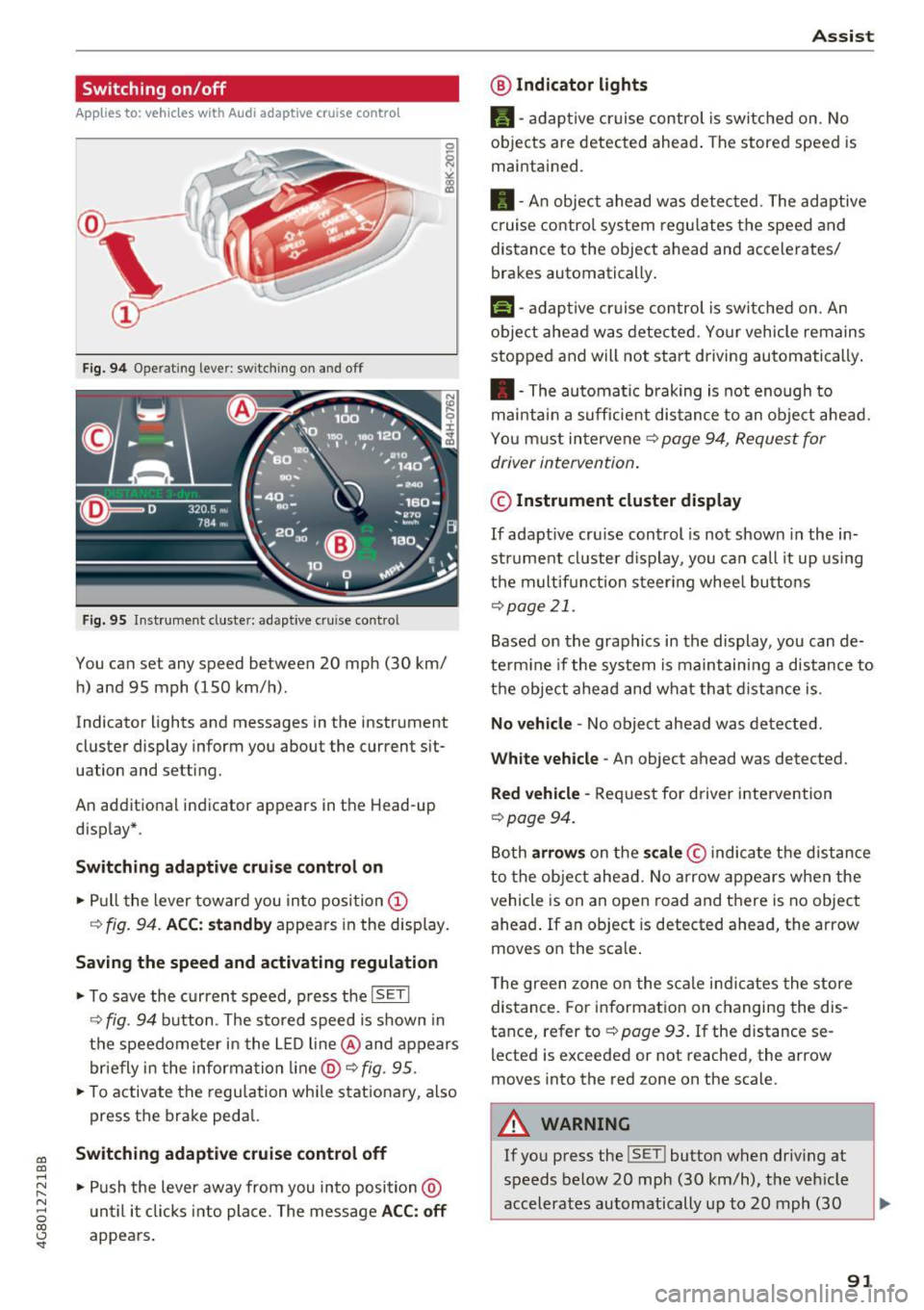
Fig. 9 4 Operat ing leve r: sw itching o n and off
Fig. 95 Inst rument cluste r: adaptive cruise contro l
You can set any speed between 20 mph (30 km/
h) and 95 mph (150 km/h) .
Indicator lights and messages in the instrument
cluster display inform you about the current sit
uation and setting.
An addit ional indicator appears in the Head-up
d isplay* .
Switching adaptiv e cruise control on
.,. Pull the lever toward you into position @
¢
fig . 94. ACC: standb y appears in the display.
Saving the speed and activating regulation
.. To save the current speed, p ress the ISETI
¢ fig . 94 button . The stored speed is shown in
the speedometer in the L ED l ine @ and appears
briefly in t he information line @ ¢
fig. 95 .
.,. To activate the regu lation whi le stationary, also
press the brake peda l.
Switching adaptive cruis e control off
.,. Push the lever away from you in to posi tion @
u nt il it clicks i nto place. The message
ACC : off
appears.
A ss ist
@ Indic ato r light s
•-adaptive cruise control is switched on. No
objects are detected ahead . The stored speed is
maintained .
• - An object ahead was detected . The adaptive
c ruise contro l system regu lates the speed and
distance to the object ahead and accelerates/
brakes automatically .
f:i-adaptive cruise control is switched on. An
object ahead was detected. Your vehicle remains
stopped and will not sta rt driving automatically .
• -The automatic braking is not enough to
mai ntai n a sufficie nt dis tance to an obje ct ahead.
You must intervene ¢
page 94, Request for
driver intervention .
© Instrument cluster display
If adaptive cru ise control is not shown in the in
strument cl uster d isplay, you can call it up using
t h e m ultif unction steer ing whee l butto ns
¢page 21.
Based on the graphics in the display , you can de
te rm ine if the system is maintain ing a distance to
t h e object ahead and what that d ist ance is .
No vehicle -No object ahead was detected .
White veh icle -An object ahead was detected.
Red vehicle -Request for driver intervention
~page 94.
Both arrow s on the scale © indicate the distance
to the object ahead. No arrow appears w hen the
vehicle is on an open road and t here is no object
ahead . If an object is detected ahead, the arrow
moves on the sca le .
The green zone on the s cale i ndicates the store
distance . For information on changing the dis
tance, refer to ¢
page 93. If the distance se
lected is exceeded or not reached , the arrow
moves into the red zone on the scale .
A WARNING
~~ --
If you press the !SET ! button when driv ing at
speeds below 20 mph (30 km/h), the vehicle
accelerates automatically up to 20 mph (30
91
Page 100 of 284

Ass is t
@ Tips
Make sure the camera's fie ld of view
¢
fig. 102 i s not obstructed by st ickers or any
thing else. For information on cleaning, refer
to¢
page 235.
View in instrument cluster display
A ppl ies to: ve hicles w ith Audi active lane assist
Fig . 1 03 Instrument cl uster: act ive lane ass ist is sw itc hed
on a nd prov id ing warn ings
Fi g. 10 4 Inst rument cluster: act ive la ne assist is sw itc hed
on but not ready to provide warnings
You can call up the active lane assist display us
ing the buttons in the multifunction steering
wheel ¢
page 21.
An addit iona l indicator appears in the Head -up
disp lay*.
White line(s) Active lane assist is activated and ready to p rov ide warnings.
Red line(s) Active lane assist warns you
(left or r ight) before leaving a lane
¢ fig. 103. In addit ion, the
steering wheel vibrates light ly.
Gray line(s) Active lane assist is activated,
b ut not ready to give warning
¢ fig . 104.
98
Messages in the instrument clu ster disp lay
If t he a ctive lane assist sw itches off automa tical
l y, the indicator light in the display turns off and
one of the fo llow ing messages appears:
Audi a ctive lane assi st : Currentl y unavailable.
No camera v iew
This message appears if the camera is unable to
de tect the lines. This could happe n if:
- The camera field of view¢
page 97, fig. 102 is
dirty or covered in ice . Clean th is area on the
w indshield.
- The camera fie ld of view is fogged over. Wait
until the fog has cleared before switch ing the
active la ne assist on aga in .
- T he system has been unable to detect the lanes
for an extended p eriod of t ime due to road con
ditions . Switch ac tive lane assist back on when
t he lines a re more visib le.
Audi a cti ve lane assi st: Currently unavailab le
There is a temporary act ive lane assist malfunc
tion. Try switc hing the active lane assist on again
later.
Audi a cti ve l ane assist: System fault!
D rive to an au thor ized A udi dealer or au thorized
Audi Service Facility immediate ly to have the
malfunction corrected.
Audi active lane a ssis t : Plea se take over steering
This message appears if you are not steer ing by
yourself .
If this is the case, active lane assist does
not switch off, b ut it is "not ready" to provide a
warning. The system can help you keep the vehi
cl e in the lane. However, you are responsible for
driv ing the vehicle and must steer it yourse lf .
Adjusting the vibration warning
App lies to: vehicles wit h Audi active la ne ass ist
.,. Select: the I CARI function button > (Car ) * Sys
tems
contro l button > Dri ver assistan ce > Audi
a ct ive lane assist .
Vibrat ion warning
You can swi tch the addit io nal vib ra ti on war ning
in the steering whee l on or off .
Ill-
Page 104 of 284

Ass is t
@ Tips
- Side assist is not active whi le you are mak
i ng the adjustment.
- Your settings are automatically stored and
assigned to the remote control key being
used.
Messages
Applies to: vehicles with Audi side assist
If side ass ist switches off by itself, the LED in the
button turns off and a message will appear in the
instrument cluster display:
Audi s ide assi st: Curr ently un availabl e. No
s enso r vi sion
The radar sensor vis ion is impaired. Do not cover
the area in front of the sensors with bike wheels,
stickers, dirt or other objects . Clean the area in
front of the sensors, if necessary ¢
page 100,
fig . 108.
Aud i side as sist: Currently un avail able
Side assist cannot be switched on at th is time be
cause there is a malfunction (for example, the
battery charge level may be too low).
Aud i side a ssist: S ys tem fault!
The system cannot guarantee that it will detect
vehicles correctly and it has switched off. The
sensors have been moved or are faulty . H ave the
system checked by an authorized Audi dealer or
authorized Audi Service Facility soon .
Audi side assi st : Unav ailable wh en towing
Side assist switches off automatically when a fac
tory-installed trailer hitch is connected to the
electrical connector on the trailer. There is no
guarantee the system will switch off when using
a retrofitted tra iler hitch. Do not use side ass ist
when towing a trailer.
102
Night vision assist with
pedestrian and wild
animal detection
Description
Applies to : vehicles with night vision assist
The night vision assist con detect, highlight and,
if necessary, warn about pedestrians and large
wild animals.
Night vision assist with pedestrian and wild ani
mal detection assists you at night by us ing an in
frared camera to monitor the area in front of
your vehicle, within the limits of the system. It
can display objects up to a distance of approxi
mately 1000 feet (300 m). The thermal image
detected by the camera is shown in the instru
ment cluster disp lay. Warm areas appear lighter
and cold areas appear darker.
Highlighting detected pedestrians and wild
animals
Applies to: vehicles with n ight vis ion assist
Fig . 110 In stru men t cl ust er: yellow highlighted pedes ·
trians
Fig. 111 Instrument cl uster: symbol when the infrared im
age is not visible
Within the limits of the system, the night v is io n
ass ist can detect pedestr ians and wild animals ..,..