service AUDI A7 2017 Owner´s Manual
[x] Cancel search | Manufacturer: AUDI, Model Year: 2017, Model line: A7, Model: AUDI A7 2017Pages: 284, PDF Size: 72.29 MB
Page 23 of 284
co
co
.... N
" N .... 0
00
<.,;) 'SI"
Driver information
system
Overview
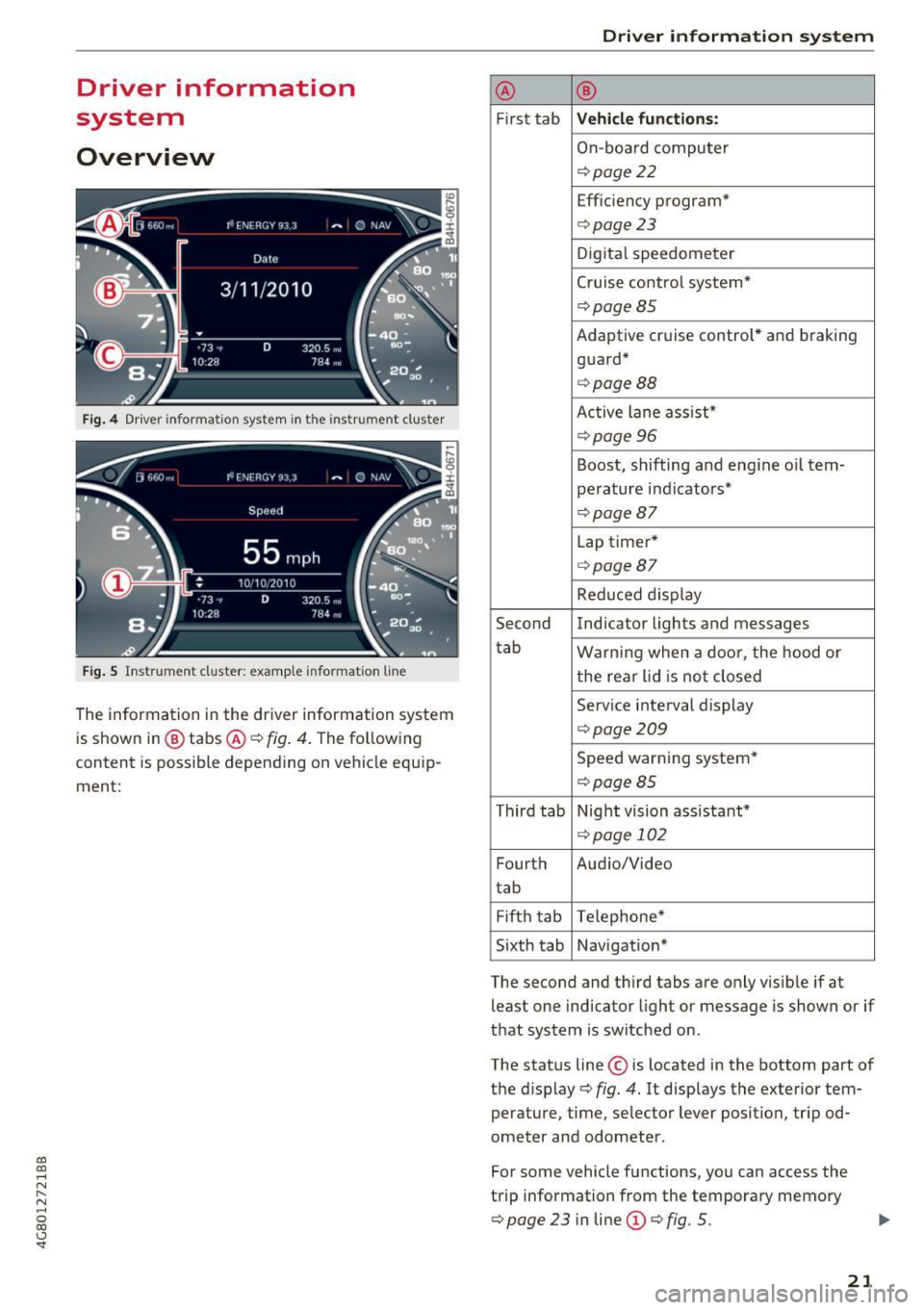
Fig . 4 Dr iver informa tion system in t he inst rum ent clus ter
Fig . S Ins trum ent cl uster: examp le in formation line
The information in the driver information system
is shown in @ tabs @
c::> fig. 4. The following
content is possible depending on vehicle equip
ment:
Driver in forma tion system
® ®
First tab Vehicle functions:
On-boa rd computer
c::> page22
Efficiency program*
c::>page23
Digital speedometer
Cruise control system*
c::> page 85
Adaptive cruise control* and braking
guard*
c::> page 88
Active lane ass ist*
c::> page 96
Boost, shifting and engine oil tern-
perature indicators*
c::> page 8 7
Lap timer*
c::> page 8 7
Reduced display
Second Indicator lights and messages
tab Warning when a door, the hood o r
the rear lid is not closed
Service interval display
c::> page 209
Speed warning system *
c::> page 85
Third tab Night vision ass istant*
c::> page 102
Fourth Audio/Video
tab
Fi fth tab Telephone*
Sixth tab Navigation*
The second and third tabs are only visible if at least one indicator light or message is shown or if
that system is switched on .
The status line © is located in the bottom part of
the display
c::> fig . 4. It displays the exterior tem
perature, time, selector lever position, tripod
ometer and odometer .
For some vehicle functions, you can access the
trip information from the temporary memory
c::> page 23 in line (D c::> fig . 5.
21
Page 28 of 284

Driver information s ystem
The MI L light may a lso ill uminate if there is a
leak in the on-board f uel vapor recovery system.
If the light ill uminates after a ref uell ing, stop
the vehicle and make sure the fuel filler cap is
proper ly closed
c;, page 193.
In order to make an accurate diagnosis, the stor
ed data can on ly be disp layed using specia l diag
nostic eq uipment (generic scan too l for 0BD).
I n order to connect the specia l diagnostic equip
ment, push the plug into the Data Link Connector
(DLC). The DLC is located to the rig ht of the hood
release ¢
fig. 14.
Your author ized Audi dealer or a qualified service
station can interpret the code and perform the necessary repa ir.
A WARNING
Do not use the diagnostic connector for pe r
sonal use. Incorrect usage can cause malfunc
tions, which can increase the risk of a colli
sion!
Electronic speed limiter
-
Your veh icle may be facto ry equipped wi th t ires
that a re rated for a maximum speed of 130 mph
(2 10 km/h). This is less t han the maxim um speed
of yo ur vehicle. To redu ce t he risk of s udden tire
fa ilur e and loss o f control if the veh icle is operat
ed at excessive speeds, yo ur vehicle a lso has an
electron ic speed limiter . The electronic spee d
lim ite r prevents your vehicle from going faster
than the t ire speed rating. For more information
c;, page 218.
I f th e en gine contro l unit receives faulty vehicle
road speed s ignals, the Ma lfunction Indicator
Lamp (MIL)
II will illuminate. If this occurs,
contact the nearest authorized Aud i dealer for
assis tance .
S models
Your veh icle's top speed is e lectron ica lly limited
to 155 mph (250 km/h).
If th e engine contro l unit receives faul ty vehi cle
roadspeed signa ls, the Malfunct io n Indicator
Lamp ( MIL)
¢4 will illuminate. If this occurs,
26
contact the nea rest author ized Audi dealer for
assista nee .
A WARNING
Always observe the posted speed limits and
adjust your speed to suit preva iling road, traf
f ic and weather conditions. Never drive your
vehicle faster than the maximum speed rating
of the ti res insta lled.
-
Page 30 of 284
Opening and clo sin g
@ Tips
- Do not leave valuables unattended in the ve
hicle . A locked vehicle is not a safe!
- The LED in the driver 's door rail blinks when
you lock the vehicle . If the LED lights up for
approximately 30 seconds after locking,
there is a ma lfunction in the central locking
system. Have the problem corrected by an
authorized Audi dealer or authorized Audi Service Fac ility.
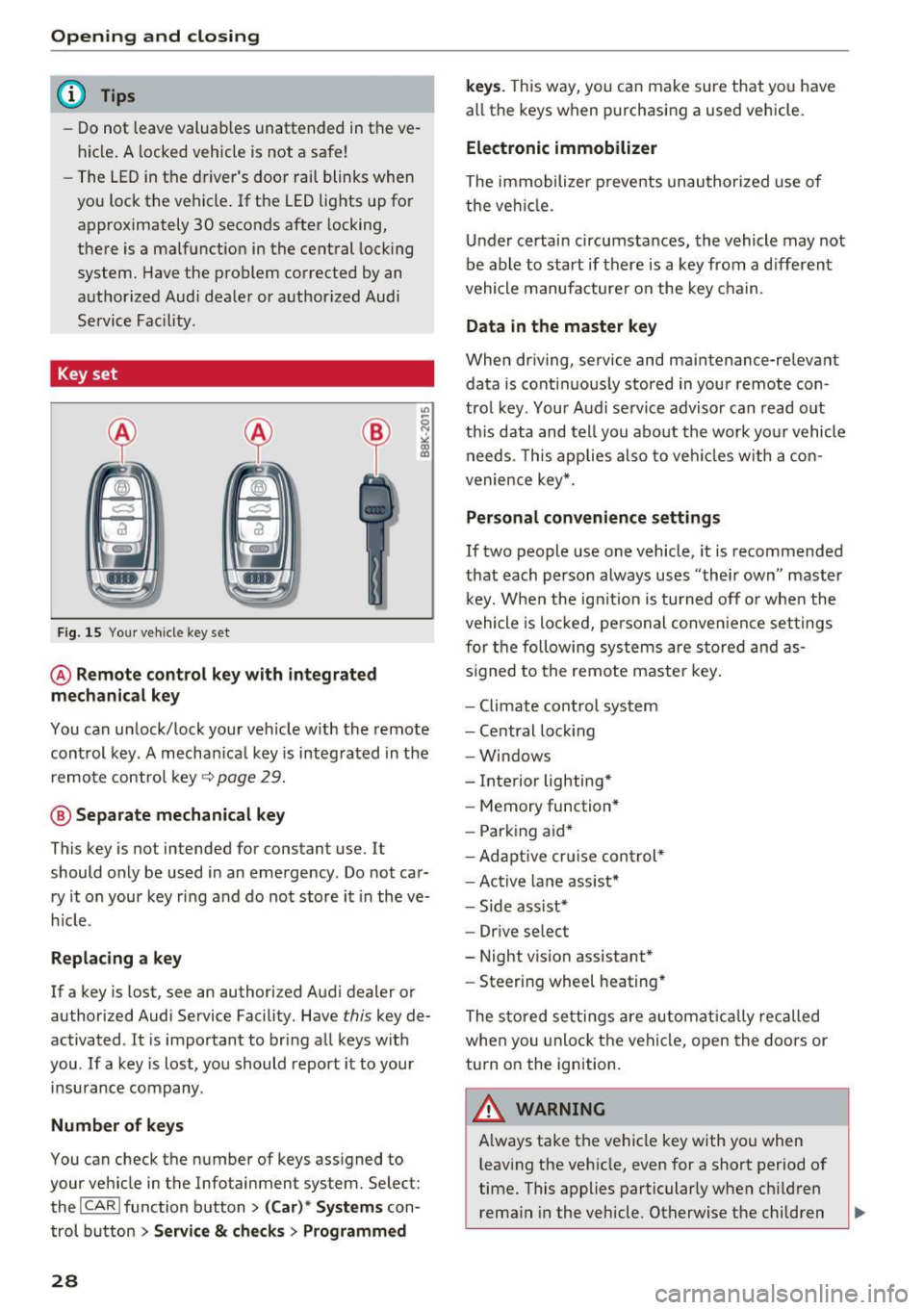
Key set
Fig. 15 You r veh icle key set
@ Remote control ke y with integr ated
mechanica l key
You can unlock/lock your veh icle w ith the remote
control key . A mechan ical key is integrated in the
remote control key~
page 29.
@ Separate mechanical ke y
This key is not intended for constant use. It
should only be used in an emergency . Do not car
ry it on your key ring and do not store it in the ve
h icle.
Replacing a ke y
If a key is lost, see an authorized Audi dealer or
authorized Audi Service Facility. Have
this key de
activated . It is important to bring all keys with
you . If a key is lost, you should report it to your
insurance company.
Number of key s
You can check the number of keys ass igned to
your veh icle in the Infotainment system. Select:
the !CAR !function button>
(C ar )* S yst e m s con
trol button
> Service & che cks > Programmed
28
k ey s. T his way, you can make sure that you have
all the keys when purchasing a used vehicle.
El ectronic immobiliz er
The immobilizer p revents unauthorized use of
the ve hicle.
Under certain circumstances, the vehicle may not
be able to start if there is a key from a d ifferent
vehicle manufacturer on the key chain.
Da ta in th e master key
When dr iving, service and maintenance-relevant
data is cont inuous ly stored in your remote con
trol key. Your A udi se rvice advisor can read out
th is data and tell you about the work yo ur vehicle
needs . This applies also to veh icles with a con
venience key *.
Personal convenience sett ings
If two people use one vehicle, it is recommended
that each person always uses "their own" master k ey. When the ign ition is turned off o r whe n the
vehicle is locked, personal conve nience set tings
for the following systems are stored and as
s igned to the remote maste r key .
- Climate cont rol system
- Central lock ing
- Windows
- Interior lighting*
- Memory function*
- Park ing aid*
- Ad aptive cru ise con trol *
- Ac tive lane assist*
- Side ass ist*
- Drive select
- Night vision assistant*
- Steering wheel heating *
The stored settings a re a utomat ica lly recalled
whe n you unlock t he vehi cle, open the doors or
turn on the ignition.
A WARNING
A lways take the vehicle key with you when
leaving the vehicle, even for a short period of
time. This applies particularly when child ren
rema in in the vehicle . Otherwise the children
-
Page 49 of 284
co
co
.... N
" N .... 0
00
\.J -
blades regularly .
- The washer fluid nozzles for the windshie ld
washer system are heated at low tempera
tures when the ignition is on .
- When stopping temporarily, such as at a
traffic light, the speed of the windshie ld
wipers automatically reduces by one leve l.
Cleaning windshield wiper blades
Clean the wiper blades when you see wiper
streaks. Use a soft cloth and a glass cleaner.
.. Place the windshield wiper arms in the service
position
c::> page 47.
.. Fold the windshield wiper arms away from the
windshield .
.&_ WARNING
Dirty windshield wiper blades can impair v i
sion, which increases the risk of an accident .
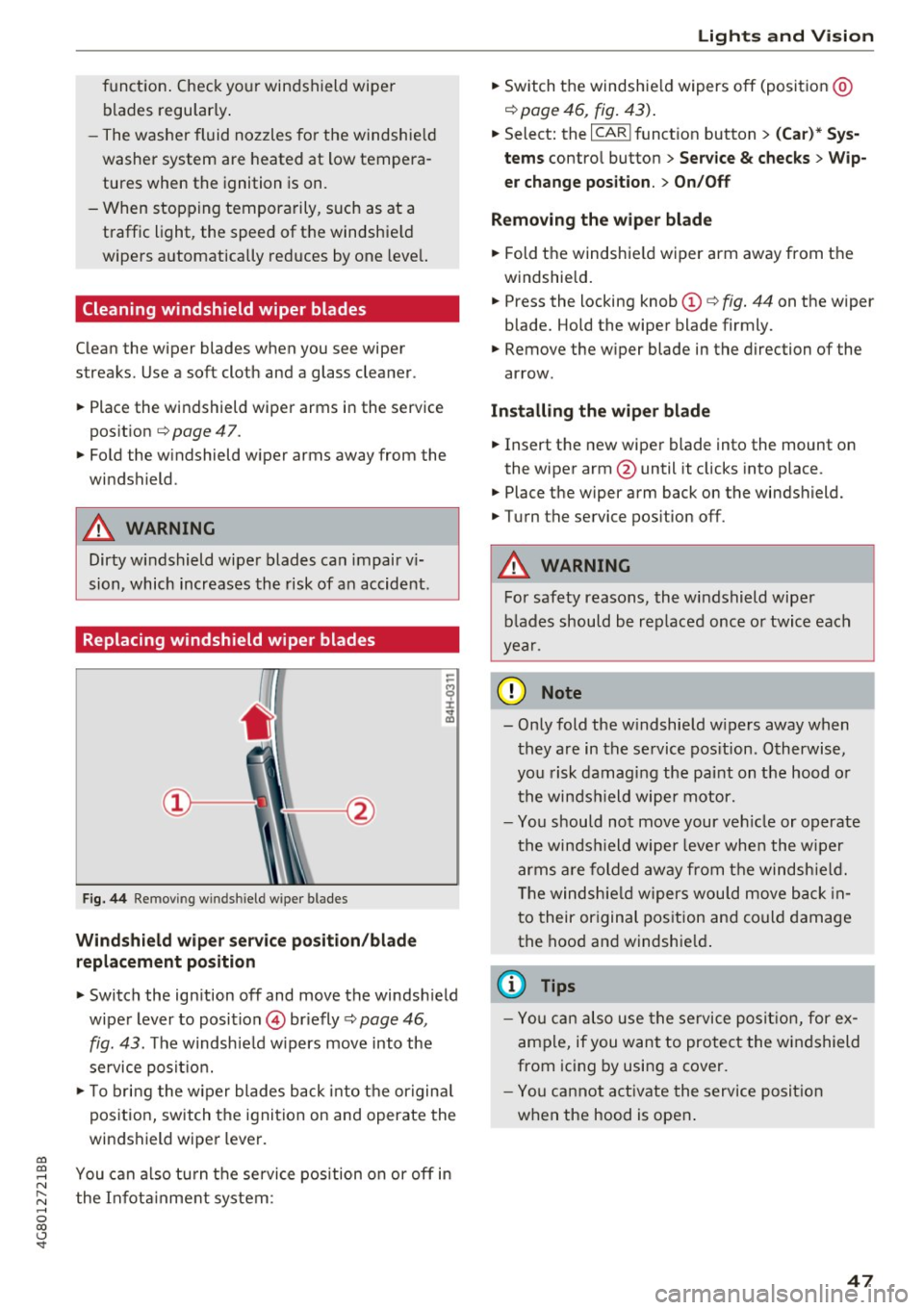
Replacing windshield wiper blades
Fig. 44 Remov ing windshield wiper blades
Wind shield wiper ser vice po sition /blade
rep lacement position
-
.. Switch the ign ition off and move the windsh ield
wiper lever to position © briefly
c::> page 46 ,
fig. 43. The windsh ie ld w ipers move into the
service posit io n.
.. To bring the w iper blades back into the origina l
position, switch the ignition on and operate the
windshield wiper lever .
You can a lso turn t he service position on or
off in
the Infota inment system :
Lights and Vision
.. Sw itch the windshie ld wipers off (posit ion @
¢page 46, fig. 43) .
.. Select: the I CAR I funct ion button > (C ar )* Sys
tem s
control button > Service & checks > Wip
er change po sition .
> On/Off
Remo ving the wiper blad e
.. Fold the windshie ld wiper arm away from the
w indshield .
.. Press the locking knob©
c::> fig. 44 on the wiper
blade. Hold the wiper blade firmly.
.. Remove the wiper blade in the direction of the
arrow .
Install ing the wiper blade
.. Insert the new wiper blade into the mount on
the wiper arm@until it clicks into place.
.. Place the wiper arm back on the windshield .
.. Turn the service pos ition
off .
.&_ WARNING
-
For safety reasons, the windshield wipe r
b lades should be rep laced once o r twice each
year .
([) Note
-Only fold the w indshie ld w ipers away when
they are in the service pos ition . Otherwise,
you risk damaging the paint on the hood o r
the winds hield wiper motor.
- Yo u should not move your ve hicle or operate
the winds hield wiper leve r when the wipe r
arms a re folded away from the windshie ld.
T he windsh ie ld wipers wou ld move back in
t o their or iginal pos ition and could damage
the hood a nd windshie ld .
(D Tips
- Yo u can also use the service posit ion , for e x
ample, if you want to protect the windshield
from icing by using a cover.
- You cannot a ct ivate the serv ice posit io n
when the hood is open .
47
Page 61 of 284
co
co
.... N
" N .... 0
00
\.J '
Description
The climate control system warms, cools and re
moves humidity from the air in the vehicle interi
or. It is the most effective when the w indows and
sunroof* are closed. If there is a build-up of heat
inside the vehicle, ventilation can help to speed
up the cooling process.
I n all heating mode functions, except for defrost,
the blower on ly switches to a higher speed once
the engine coolant has reached a sufficient tem
perature .
Pollutant filter
The pollutant filter removes pollutants such as
dust and pollen from the air.
Key recognition
Appl ies to: ve hicles with de luxe a utoma tic clima te co ntro l
The blower setting and air distribution are stored
automatically and assigned to the remote control
key that you are using.
Appl ies to: ve hicles with 4 -zo ne del uxe automat ic cl imate
co ntrol
The climate control settings are automatically
stored and assigned to the remote control key
that is in use.
A WARNING
Poor visibility can lead to accidents.
- For safer driving, keep all windows free of
ice, snow and fog .
- Become familiar as quickly as possible with
the correct use and function of the climate
contro l system, especially with the defrost
ing and defogging function.
- When the temperature is below freezing,
only use the windshield washer system after
Warm and cold
the windshield has been warmed by the cli
mate control system. The washer fluid could
freeze on the windshield and impair visibili ty .
(D Note
-If you suspect that the climate control sys
tem is damaged, switch the system off to
prevent further damage and have it checked
by an authorized Audi dealer or authorized
Aud i Service Facility.
- Repairs to the Audi climate control system
require special technical knowledge and
special tools . See an authorized Aud i dealer
or authorized Audi Service Facility.
@ For the sake of the environment
-To save fuel, turn off cooling mode by press
ing the
IAJCI button . This will also reduce
em iss ions.
- In vehicles w ith a diesel engine, you can
switch the auto supplementary heater off in
the Infotai nment system.
(D Tips
- To prevent interference with the heat ing
and cooling output and to prevent the win
dows from fogging over, the air intake in
front of the windshie ld must be free of ice,
snow or leaves.
- Condensation from the cooling system can
dr ip and form a puddle of water under the
vehicle. This is normal and does not mean
there is a leak.
- The energy management system may tem
porarily switch off certain functions, such as
the seat heating* or rear window defogger .
These systems are avai lable aga in as soon
as the energy supply has been restored.
59
Page 69 of 284
co
co
.... N
" N .... 0
00
<.,;) 'SI"
lead to greater tire wear and will affect driving
behav ior.
Do not drive on
winter tires year-round , as this
will consume up to 10% more fuel.
Eliminate unnecessary weight
Since every kilogram of extra weight increases
fuel consumption, a quick inspection of the lug
gage compartment may be worth it to avoid un
necessary weight.
When not being used, a roof rack should be re moved to decrease the wind resistance of the ve
hicle. You will save approximately 12% of your
fuel when at speeds from 62-75 mph (100-120 km/h).
Save energy
The engine drives the generator, which generates
electricity; the fuel consumption also increases
with the demand for electricity. Therefore, switch
electrical equipment off when you no longer
need it. Examples of equipment that uses a lot of
energy are air blowers at a high setting, the rear
window defogger and seat heating*.
CD Note
Do not leave engine idling unattended after
starting. If warning lights should come on to
indicate improper operation, they would go
unheeded. Extended idling also produces
heat, which could result in overheating or
other damage to the vehicle or other proper
ty .
CD Note
-Have your vehicle maintained properly and
in accordance with the service recommenda
tions in your Warranty
& Maintenance book
let. Lack of proper maintenance as well as
improper use of the vehicle will impair the
function of the emission control system and
could lead to damage .
- Do not alter or remove any component of
the Emission Control System unless ap
proved by the manufacturer.
- Do not alter or remove any device, such as
heat shields, switches, ignition wires,
Driving
valves , which are designed to protect your
vehicle's Emission Control System and other
important vehicle components.
(D Tips
The consumption estimates as published by
ENVIRONMENTAL PROTECTION AGENCY
(EPA) and Transport Canada may not corre
spond to your actual consumption on the
road, which will vary depending upon vehicle
load and speed, road and weather conditions,
trip length, etc .
Steering
Manual steering wheel position adjustment
Applies to: vehicles with manual steering wheel adjustment
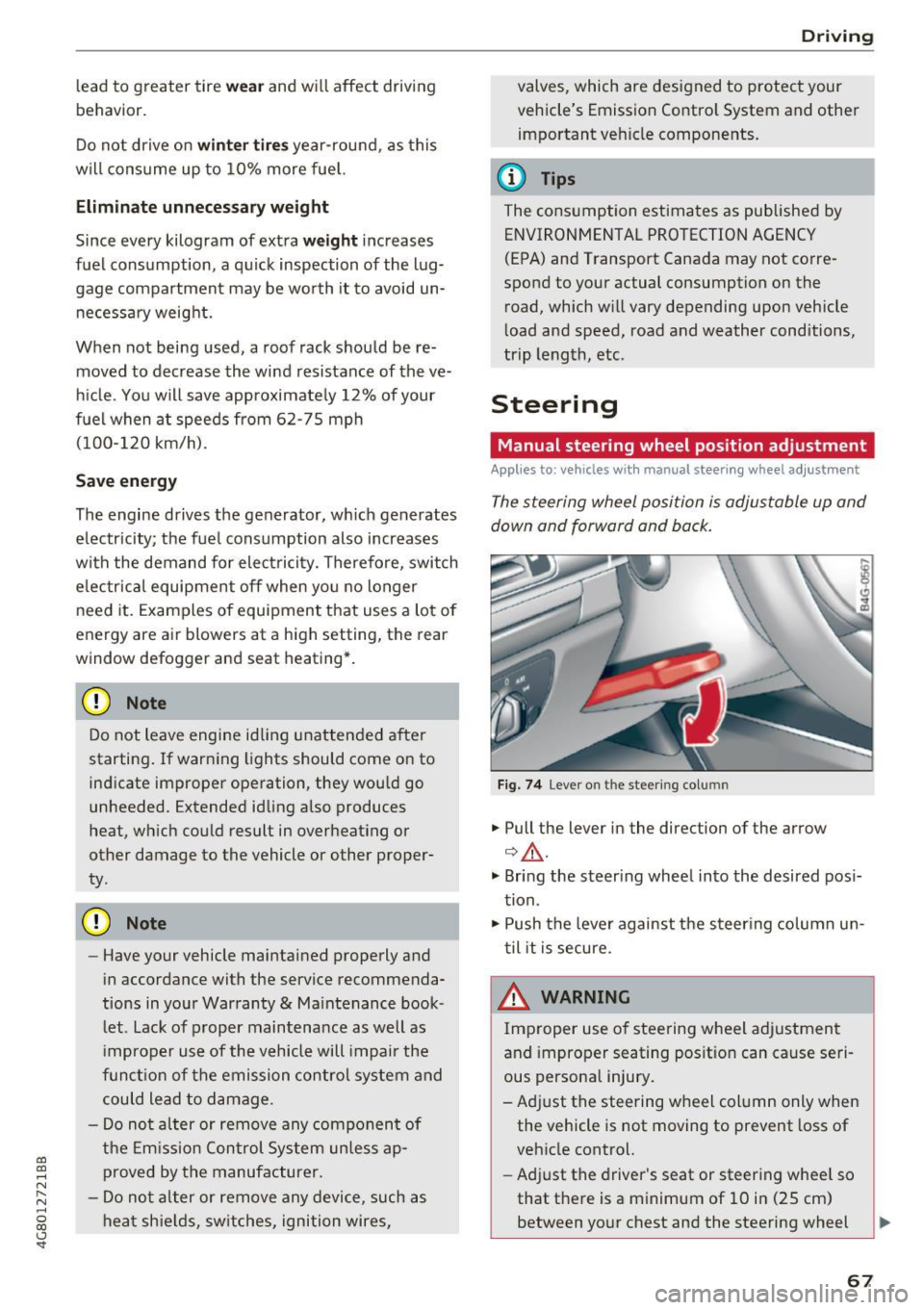
The steering wheel position is adjustable up and
down and forward and back.
Fig. 74 L eve r o n t he stee ring col umn
"'Pull the lever in the direction of the arrow
Q &_ .
"' Bring the steering wheel into the desired posi
tion.
"' Push the lever against the steering column un
til it is secure.
_& WARNING
~ -
Improper use of steering wheel adjustment
and improper seating position can cause seri
ous personal injury.
-Adjust the steering wheel column only when the vehicle is not moving to prevent loss of
vehicle control.
- Adjust the driver's seat or steering wheel so
that there is a minimum of 10 in (25 cm) between your chest and the steering wheel
II>
67
Page 73 of 284

Turn off ignit ion before lea ving vehi cle. Batte ry
i s di schar ging
This message appea rs if the driver's door is
opened while the ignition is sw itched on . Always
switch off the ignition if you are leaving the vehi
cle. Also see
9 page 73.
Shift to P and turn off i gnition b efore l eaving
ca r, otherwi se vehicle can roll aw ay
This message appears if the driver's door is
opened while the igni tion is sw itched on and the
selecto r lever is not in t he P posit ion. Move the
selecto r lever in to the P pos ition and switch the
ignit ion off when you exit the vehicle. Otherwise
the vehicle could roll. A lso see
9 page 73 .
Starting the engine when there is a
malfunction
It may not be possible to start the engine under
certain circumstances, for example if the battery
in the vehicle key is drained, if interference is af
fected the key or if there is a system malfunc tion .
Fig. 77 Center console/remote control key : starting the
engine if there is a malfunctio n
Requirement: the message Key is not r ecog
nized . Hold ba ck of key again st mark ed area .
See owner 's manual
must appear and the DJ in
d icator light mus t turn on.
• Hold the remote control key in the location in
dicated as shown in the illustrat ion
f >l) c::> fig . 77 .
• Press the b rake pedal.
• Press the
I START ENGINE STOPI button. The
~ engi ne will s tart .
.... N
" N .... 0
00
~ ll Market -specific
Drivi ng
• Drive to an authorized Audi dea ler or author
ized Audi Service Facility immediately to have
the malfunction corrected.
@ Tips
You can view the message again by pressing
the
I START ENGINE STOP I button.
Start-Stop system
Description
Applies to: veh icles w ith Start/Stop system
T he Sta rt/Stop system can help increase fue l
eco nomy and reduce CO2 emissions.
In Start/Stop mode, the engine shuts off auto
matically when the vehicle is stopped, such as at
a traffic ligh t. The ignition rema ins switched o n
dur ing this stop phase. The engine w ill restart
automat ica lly when needed.
Applies to A7 Sportback: the Start/Stop system
activates automatically once the ignit ion is
switched on.
Applies to 57 Sportback: the last Start/Stop sys
tem setting is restored when the ignit ion is
switched on.
Ba sic requirements for Start /Stop m ode
- The driver's door must be closed .
- The driver's seat belt much be fastened.
- The hood must be closed.
- The vehicle must have dr iven faster than
2.5 mph (4 km/h) since the last time it stop
ped .
- A trailer must not be hitched to the vehicle.
(D Note
A lways swi tch the Sta rt/S top sys tem off when
driv ing th ro ugh wa ter
c::> page 71.
© Tips
The engine stops short ly before the ve hicle
comes to a s top
l) .
71
Page 75 of 284

co
co
.... N
" N .... 0
00
<..:l 'SI'
-The vehicle battery charge leve l is too low .
- Power consumpt ion is high .
The engine can turn off again when the condi
tions fo r Start-S top mode a re met .
Ignition i s switched off automatically
To prevent the veh icle battery from draining, the
ignit ion will sw itch off
automaticall y under the
following conditions :
- The vehicle must have already been driven.
- The Start/Stop system has stopped the engine.
- T he driver's door must be open.
- The driver's safe ty be lt must be unb uck led.
- The brake pedal must not be p ressed .
- The veh icle must be stationary .
In this case, the activated low beam is replaced by the parking light. The parking lights will
switch off after app roximately 30 minutes or
when yo u lock the vehicle .
If the Start/Stop system has not turned off the
engine or if you have sw itched the Start/Stop sys
tem off manually, the ignition will not be auto mat ical ly switched off and the engine w ill contin
ue to run~&. .
A WARNING
To red uce the r isk of poisoning, never allow
t he engine to r un in conf ined s paces.
@ Tips
If you select the Dor N se lector lever position
after sh ifting into reverse, the vehicle m ust
be driven f ast er than 6 mph (10 km/ h) in or
der fo r th e engine to switch off ag ain.
-
D rivi ng
Manually switching the Start/Stop system
off/on
Applies to : vehicles wit h Start/Stop sys te m
If you do not wish to use th e system, you can
switch it off manually.
Fi g. 79 Cen te r console: S tart/Stop system butto n
.. To switch the Start/Stop system off/on man
ually, press the
l (A) ~ I button . The LED in the b ut
ton turns on when the system is switched off.
(D Tips
If you switch the system off during a stop phase, the engine will start aga in automati
cally .
Messages in the instrument cluster display
Applies to: vehicles wit h Start/Stop syste m
Start-stop system deactivated: Please re start
engine manually
T his message appears w hen spec ific conditions
are no t me t du ring a stop phase. The S tart/Stop
system will
not b e a ble to restart the engine . The
engine m ust be star ted with the
I S TAR T ENGINE S TOP ! button .
Start-stop system: Syst em fault! Currently
unavailable
T he re is a ma lfunction in the Start/Stop system.
Drive the vehicle to an a uth orized Aud i dea ler or
author ized Service Facility as soon as possible to
have the malfunction corrected .
73
Page 77 of 284

co
co
.... N
" N .... 0
00
\.J '
brake similar to heavy braking. ESC and the
associated components (ABS, ASR, EDL)
cannot overcome the laws of physics . In cor
ners and when road or weather conditions
are bad, a full brake application can cause
the vehicle to skid or the rear end to swerve,
which increases the risk of an accident.
- If the power supply fails, you cannot set the
parking brake if it is released. In this case,
park the vehicle on level ground and secure
it by placing the selector lever in the P posi
tion. See an authorized Audi dealer or au
thorized Audi Service Facility for assistance.
- Always take the vehicle key with you when leaving your vehicle, even for a short period
of time. This applies particularly when chil
dren remain in the vehicle. Otherwise chil
dren could start the engine, release the
parking brake or operate electrical equip
ment such as power windows, which in
creases the risk of an accident.
- No one should remain in the vehicle when it
is locked -especially children. Locked doors
make it more difficult for emergency work
ers to get into the vehicle, which puts lives
at risk.
(D) Tips
When stopping at a traffic signal or stopping
in city traffic, you can set the parking brake
manually. The vehicle does not have to be
held with the brake pedal. The parking brake
eliminates the tendency to creep when a se
lector lever position is engaged. As soon as
you press the accelerator pedal, the parking
brake releases automatically and your vehicle
starts to move
c::> page 75.
(D Tips
- Occasional noises when the parking brake is
set and released are normal and are not a
cause for concern.
- The parking brake goes through a self-test
cycle at regular intervals when the vehicle is
stopped. Any noises associated with this are normal.
Driving
- If there is a power failure, the parking brake
will not set if it is released, and it will not
release if it is set
c::> &. . See an authorized
Audi dealer or authorized Audi Service Fa
cility for assistance.
Starting from a stop
Various convenience and safety functions may be
available when the vehicle begins driving, de
pending on vehicle equipment .
Starting on hills with the parking brake set
Requirement: the driver's door must be closed
and the driver's safety belt must be fastened.
.,. To start driving comfortably when on a hill, set
the parking brake and begin driving as usual.
The braking force of the parking brake does not
release automatically until the wheels build up
enough driving force.
Starting on hills with hill hold assist
Hill hold assist makes it easier to start on hills.
Requirement: the driver's door must be closed
and the engine must be running.
.. To activate hill hold assist, press and hold the
brake pedal for several seconds. The vehicle
must be in an uphill direction of travel.
After releasing the brake pedal, the braking pow er is maintained for a brief moment
c::> ..&. to pre
vent the vehicle from rolling back when starting .
During this time, you can easily begin to move
your vehicle.
_& WARNING
A ppl ies to: ve hicles with hill hold assist
- If you do not begin driving immediately or
the engine stalls after releasing the brake
pedal, your vehicle may begin to roll back
ward. Press the brake pedal or set the park
ing brake immediately .
- The intelligent technology of hill hold assist
cannot overcome the limitations imposed by
natural physical laws. The increased comfort
offered by hill hold assist should not cause
you to take safety risks.
Ill-
75
Page 83 of 284

-When accelerating using the la unch control
program, all vehicle parts are subject to
heavy loads . T hi s can lead to increased
wear.
Transmission malfunction
ml Tran smission : ple ase press b ra ke peda l and
s e le ct gear aga in
Press the brake pedal and se lect the desired se
lector lever posit ion aga in. You can then continue
driving.
ml Transm ission o verheat ing : Please dri ve con
ser vat ively .
The transm ission temperature has increased s ig
nificantly due to the sporty driving manner. D rive
in a less sporty manner until the temperature re
turns to the normal range and the indicator light
switches of .
ml Transmission malfunction: You can continue
dri ving
There is a system malfunct ion in the transmis
sion . Yo u may continue driving. Drive to your au
thor ized Audi dealer or authorized Audi Service
F acility soon to have the ma lfunction corrected.
ml Transm ission m alfun ction: You can continue
dri ving with limited functionality
There is a system malfunction in the t ransm is
sion . T he transmission is sw itching to emergency
mode. This mode only sh ifts in to certa in gears or
will no longer shift at all. The engine may stall. D rive to an authorized Audi dea ler or authorized
Aud i Service Facility immediately to have the
malfunct ion corrected.
Applies to: vehicles with S tronic transm ission
ml Ii) Tra nsm is sion malfunction : No reverse
gear. You can continue driving
There is a system malfunct ion in the transm is
sion. The transmission is sw itchi ng to emergency
mode. This mode only shifts in to certa in gears or
will no longer shift at all. The engi ne may stall .
~ You cannot engage the reverse gear . Drive to an ....
~ author ized Audi dealer or author ized Audi Service N .... 0 co <.,;) 'SI"
D rivi ng
Facility immed iate ly to have the malfunction co r
rected .
ml Transmiss ion malfunction : Stop vehi cle and
shift to park.
Do not continue dr iving. Se lect the P selector lev
er posit ion and see an authorized Audi dealer or
authorized Aud i Serv ice Facility for ass istance .
(D Note
If the transm ission has switched to emergen
cy mode, drive to your authorized Aud i dea ler
or authorized Audi Service Facility immediate l y to have the ma lfunction co rrected.
Selector lever emergency release
If the vehicle 's power supply fails, the selector
lever can be released in an emergency.
F ig . 85 Fro nt center conso le: eme rge ncy release for the se
lector leve r
... To reach the emergency release mechanism, re
move the ashtray insert* .
... Loosen and remove the small cap in the asht ray
mou nt
Q fig . 85 .
... You now have a ccess to a pin. Using a screw
driver or sim ila r object, press the pin down and
hold it in that position .
.,. Press the re lease button in the selector lever
and move it into the N position.
Only move the selec tor lever out of the P posit io n
whe n the ignition is switched on . If the veh icle
must be pushed or towed d ue to a power failure
(for example, the vehicle battery is drained), the
selector lever must first be moved to the N posi
t ion using the eme rgency re lease mechanism.
81