steering AUDI A7 2017 Owner´s Manual
[x] Cancel search | Manufacturer: AUDI, Model Year: 2017, Model line: A7, Model: AUDI A7 2017Pages: 284, PDF Size: 72.29 MB
Page 69 of 284
co
co
.... N
" N .... 0
00
<.,;) 'SI"
lead to greater tire wear and will affect driving
behav ior.
Do not drive on
winter tires year-round , as this
will consume up to 10% more fuel.
Eliminate unnecessary weight
Since every kilogram of extra weight increases
fuel consumption, a quick inspection of the lug
gage compartment may be worth it to avoid un
necessary weight.
When not being used, a roof rack should be re moved to decrease the wind resistance of the ve
hicle. You will save approximately 12% of your
fuel when at speeds from 62-75 mph (100-120 km/h).
Save energy
The engine drives the generator, which generates
electricity; the fuel consumption also increases
with the demand for electricity. Therefore, switch
electrical equipment off when you no longer
need it. Examples of equipment that uses a lot of
energy are air blowers at a high setting, the rear
window defogger and seat heating*.
CD Note
Do not leave engine idling unattended after
starting. If warning lights should come on to
indicate improper operation, they would go
unheeded. Extended idling also produces
heat, which could result in overheating or
other damage to the vehicle or other proper
ty .
CD Note
-Have your vehicle maintained properly and
in accordance with the service recommenda
tions in your Warranty
& Maintenance book
let. Lack of proper maintenance as well as
improper use of the vehicle will impair the
function of the emission control system and
could lead to damage .
- Do not alter or remove any component of
the Emission Control System unless ap
proved by the manufacturer.
- Do not alter or remove any device, such as
heat shields, switches, ignition wires,
Driving
valves , which are designed to protect your
vehicle's Emission Control System and other
important vehicle components.
(D Tips
The consumption estimates as published by
ENVIRONMENTAL PROTECTION AGENCY
(EPA) and Transport Canada may not corre
spond to your actual consumption on the
road, which will vary depending upon vehicle
load and speed, road and weather conditions,
trip length, etc .
Steering
Manual steering wheel position adjustment
Applies to: vehicles with manual steering wheel adjustment
The steering wheel position is adjustable up and
down and forward and back.
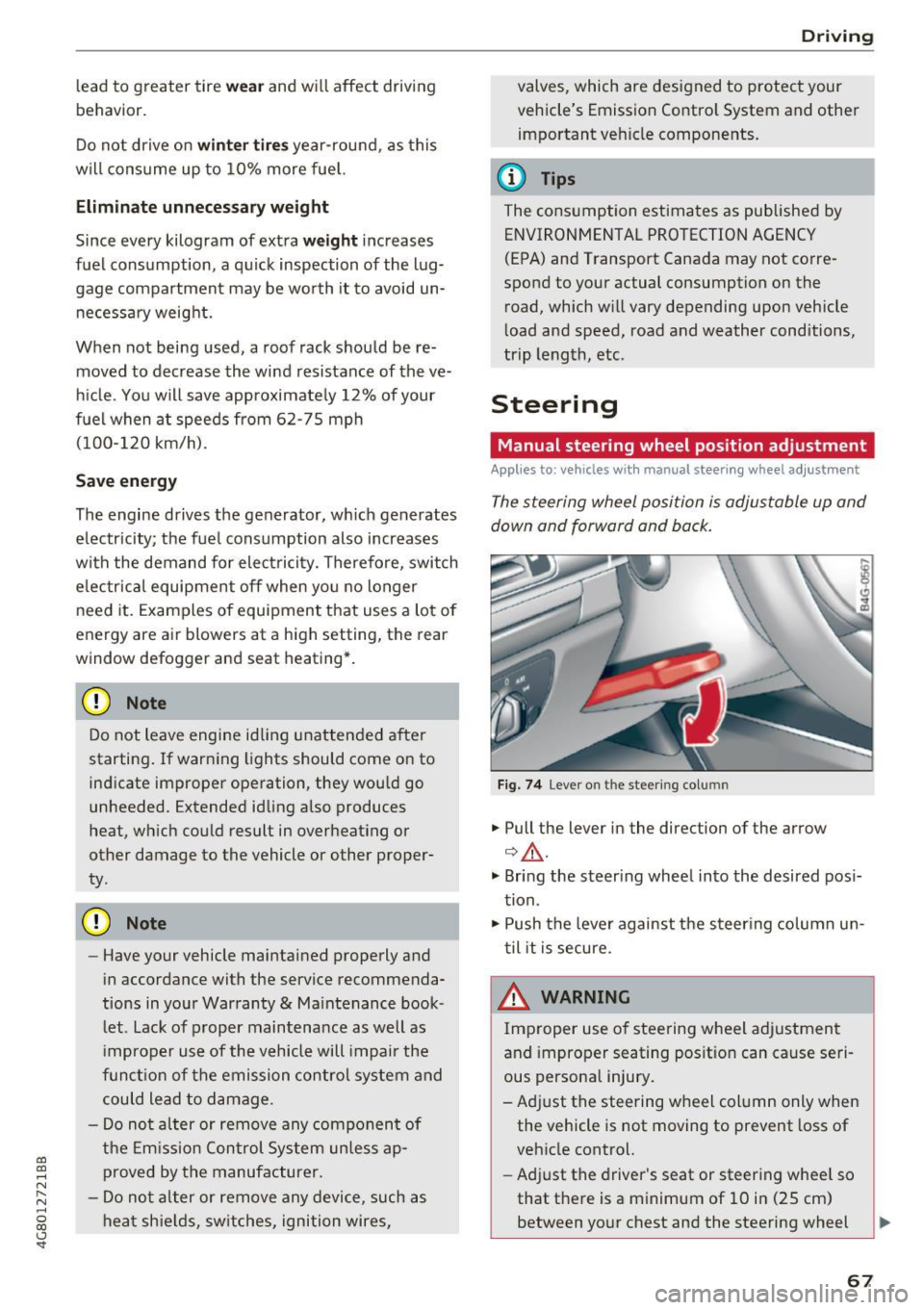
Fig. 74 L eve r o n t he stee ring col umn
"'Pull the lever in the direction of the arrow
Q &_ .
"' Bring the steering wheel into the desired posi
tion.
"' Push the lever against the steering column un
til it is secure.
_& WARNING
~ -
Improper use of steering wheel adjustment
and improper seating position can cause seri
ous personal injury.
-Adjust the steering wheel column only when the vehicle is not moving to prevent loss of
vehicle control.
- Adjust the driver's seat or steering wheel so
that there is a minimum of 10 in (25 cm) between your chest and the steering wheel
II>
67
Page 70 of 284

Driving
c;,page 130, fig. 142. If you cannot main
tain this minimum distance, the airbag sys
tem cannot protect you properly.
- If physical limitations prevent you from sit
ting 10 in (25 cm) or more from the steer
ing wheel, check with your authorized Audi
dealer to see if adaptive equipment is avail
able.
- If the steering wheel is aligned with your
face, the supplemental driver's airbag can
not provide as much protection in an acci
dent. A lways make sure that the steering
wheel is aligned with your chest.
- Always hold the steering wheel with your
hands at the 9 o'clock and 3 o'clock posi
tions to reduce the risk of personal injury if
the driver's airbag deploys .
- Never hold the steering wheel at the 12
o'clock position or with your hands inside
the steering wheel rim or on the steering
wheel hub . Holding the steering wheel the
wrong way can cause serious injuries to the
hands, arms and head if the driver's airbag
deploys.
Power steering wheel position adjustment
A pp lies to: ve hicles w ith power steering wheel adju stment
The steering wheel position can be adjusted elec
trically up and down and forward and back.
Fig. 75 Switch for adjusting the steering whee l position
• To adjust the height, press the switch up/down.
The steering column will continue moving as
long as you are pressing the switch .
• To move the steering whee l forward or back,
press the switch forward/back. The steering
column will continue moving as long as you are pressing the switch .
68
The steering wheel can also be adjusted when the
ignition is switched off.
In vehicles with memory function*, the steering
column settings are sto red together with the
seat position.
~ WARNING
Improper use of steering wheel adjustment
and improper seating position can cause seri
ous personal injury.
- Adjust the steering wheel column only when
the vehicle is not moving to prevent loss of
vehicle control.
- Adjust the driver's seat or steering wheel so
that there is a minimum of 10 in (25 cm)
between your chest and the steering wheel
c;,page 130, fig. 142 . If you cannot main
tain this minimum distance, the airbag sys
tem cannot protect you properly.
- If physical limitations prevent you from sit ting 10 in (25 cm) or more from the steer
ing wheel, check with your authorized Audi
dealer to see if adaptive equipment is avail
able.
- If the steering wheel is aligned with your
face, the supplemental dr iver's a irbag can
not provide as much protection in an acci
dent. Always make sure that the steering
wheel is aligned with your chest.
- Always hold the steering wheel with your
hands at the 9 o'clock and 3 o'clock posi
tions to reduce the risk of personal injury if
the driver's airbag dep loys.
- Never hold the steering wheel at the 12
o'clock position or with your hands inside
the steering wheel rim or on the steering
wheel hub. Holding the steering wheel the
wrong way can cause serious injuries to the hands, arms and head if the driver's airbag
deploys.
-
Page 71 of 284

co
co
.... N
" N .... 0
00
<.,;) 'SI"
Easy seat entry
Applies to: vehicles with power steering wheel adjustment
Easy seat entry makes it easier to enter and exit
the vehicle by adjusting the steering column au
tomatically.
• In the Infotainment system, select the ICARI
function button > ( Car )* Sys te m s control but
ton
> Vehicl e setting s > Seat s > Driver's s eat >
E as y seat entry > On .
When easy seat entry is switched on , the steering
column goes back up into the park position when
the ignition is switched off . After entering the ve
h icle, the steering co lumn returns to the stored
position once the ignition is switched on.
Starting and stopping
the engine
Starting the engine
The I START E NGIN E STOP I button switches the
ignition on and starts the engine .
Fig. 76 Center conso le: STAR T ENGINE STOP button
Starting the engine
• Press the brake peda l and move the se lector
lever into the P or N position
¢ ,&..
• Press the I START ENGINE STOPI button. The
engine will start.
Applies to: vehicles with diesel engines
• It is possible that there will be a slight delay
when starting the engine in colder tempera
tu res. Therefore, you must hold the brake pedal
down until the engine starts. The indicator light
turns on while the engine is preheating
1,1 .
Drivi ng
Switching the ignition on /off
If you wo uld like to sw itch the igni tion on w ith
out starting the engine, follow these steps:
• Press the
!START E NGINE STOP ! button with
out press ing the brake peda l. Vehicles witho ut
t he Star t/Stop system*: the need le in the tach
ometer moves into the
READY position .
• To switch the ignition off, press the button
again . The needle in the tachometer moves into
the
O FF position .
T he prewarming runs automatica lly in diesel
vehicles when the ignition is switched on .
E quipment tha t uses a lot of e lectr icity is sw itch
ed off temporarily when you start the engine .
If the engine does not start immediately, the
start ing procedure stops automat ically after a
sho rt time. Repeat the s ta rting proced ure.
Start /Stop system *
Read the informat ion in¢ page 71, Start-Stop
system .
.&, WARNING
To reduce the risk of poisoning, never a llow
the eng ine to run in confined spaces .
(D Note
Avoid h igh engine speed, full throttle, and
heavy engine load if the engine has not
-
r eached operat ing temperat ure ye t. You cou ld
damage the engine.
(® For the sake of the environment
Do not let the eng ine run wh ile parked to
warm up. Beg in driving immed iate ly. Th is re
duces unnecessa ry emissions.
(D Tips
- Some noise afte r start ing the e ngine is nor
ma l and is no cause for conce rn.
- If you leave the vehicle w ith the ignition
switched on, the ignit ion w ill switch off af
ter a ce rtain amount of time. Ma ke sure that
elect rical eq uipment such as the exterior
lights are swit ched off.
69
Page 72 of 284
Driving
Stopping the engine
~ Bring the vehicle to a fu ll stop.
~ Move the selecto r leve r to the P or N position.
~ Press the I START ENGINE STOPI r=.> page 69,
fig . 76 button .
Steering lock
1
)
The stee ring locks when you tu rn the engine off
using the
!START ENGINE STOP ! button a nd
ope n the dr iver's door. The locked stee ring helps
p revent vehicle theft .
Emergency off function*
If i t is absolutely necessary, the engine can also
be turned off while dr iv ing in the R o r D/S se lec
to r lever position at speeds below 6 mph (10 km/
h). To stop the engine , press and hold t he
I START ENGINE STOP I button and also press the
b rake pedal.
_& WARNING
- Never tu rn
off the engine before the veh icle
has come to a comp lete stop. The full func
t ion of the b rake booster and the powe r
steering is not guaranteed . Yo u may need to
use more force when braking or s teer ing.
Beca use you cannot brake and stee r as you
us ually wou ld, this could lead to accidents
and serious injur ies.
- Always ta ke the key with you w hen ever you
l eave yo ur vehicle. Othe rw ise, the engi ne
c oul d be s ta rt ed o r elec tri ca l eq uip me nt
s u ch a s the power windows cou ld be operat
ed. This can lead to se rious i njur y.
- Fo r sa fety reasons, always park the ve hicle
with the se lector lever in the P position.
Otherwise, there is the risk that the vehicle
cou ld roll unintentionally .
{[) Note
I f the eng ine has been under heavy load for
an extended per io d of t ime, hea t builds up in
the engine compartment after the eng ine is
sw itched off and there is a risk of damaging
the engine. For this reason, let the engine run
l) T hi s function is not avai lable in all countries.
70
at idle for approximate ly two minutes before
shutting it
off .
(D Tips
Afte r th e engine h as been switched off, t he
r adiator fan can contin ue to run for up to 10
minutes -even w ith the ignition switched off.
It can also switch on again after some time if
the coo lant tempe rature r ises as the result of
h eat bu ildup or if the engine is already warm
and the e ng ine compartment is also heated
by the sun's rays.
Messages
Turn off ignition before leaving car
This message appears and a warning tone sounds
i f you open the drive r's doo r when the ign it ion is
switched on.
Press brake pedal to start engine
This message appears if yo u do not p ress the
brake peda l when starting the engine.
II Key not in vehicle?
This indicator light turns on and this message ap
pears if the ignition key was removed from t he
vehicle when the engine was running.
If the ig ni
tion key is no lo nger in the vehicle, you cannot
swi tch on the igni tion or st art the engine once
you stop it. You also cannot lock the vehicle from
the outside .
Shift to P, otherwi se vehicle can roll aw ay.
Door s do not lock if lever is not in P.
This message a ppears for safety reasons if t he
t ransm iss ion is not in the P posi tion when you
swi tch the ig nition off. Move the selec to r l ever to
t h e P posit ion . Othe rw ise the vehicle is no t pro
tected from ro lling and it cannot be locked.
II Key is not recognized. Hold back of key
against marked area. See owner' s manual
If the indica to r light turns on and this message
appears, there is a ma lfunction
r=.> page 71. ..,.
Page 74 of 284
Driving
Stopping/starting the engine
Applies to: ve hicles w ith Start/Stop system
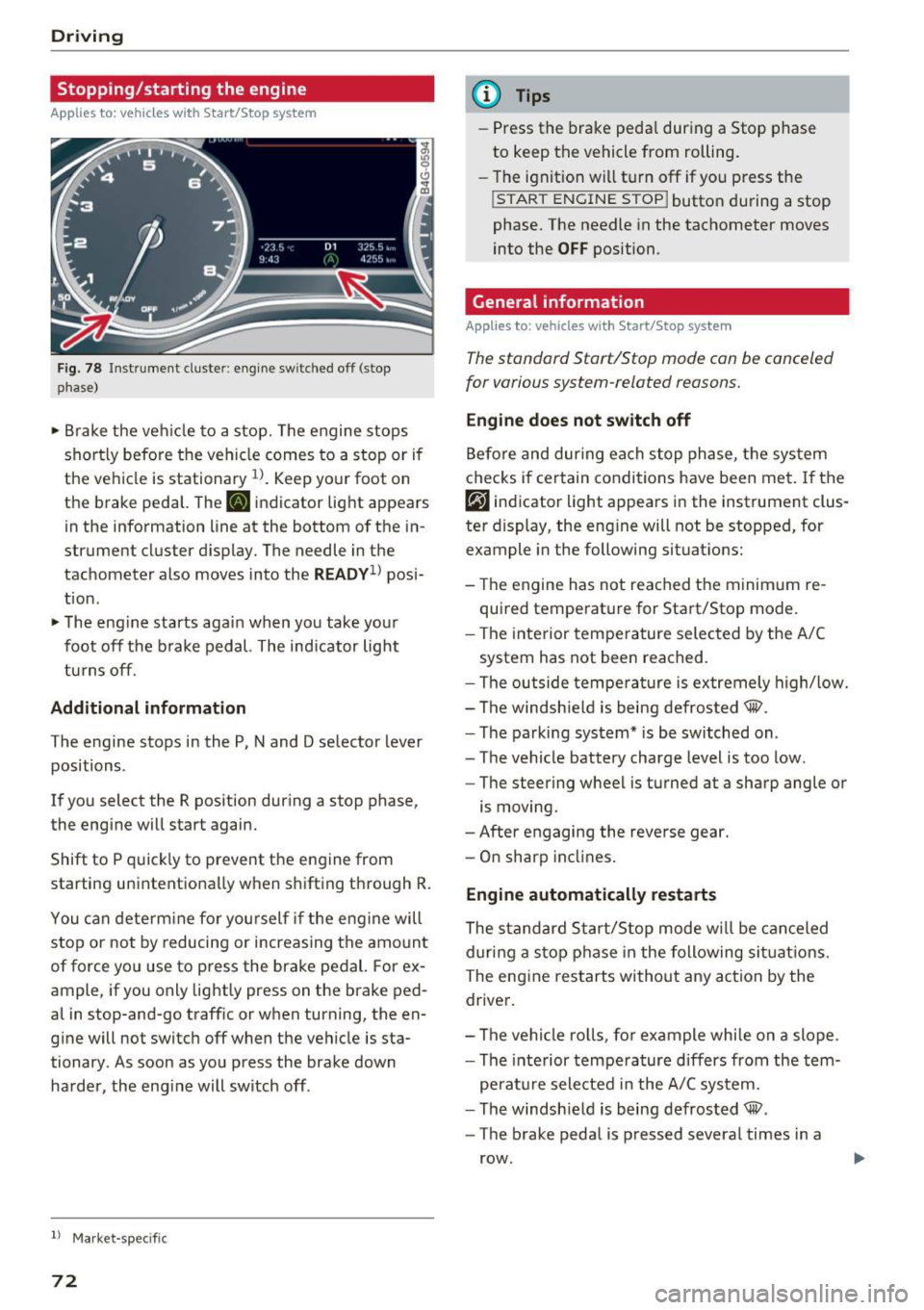
F ig. 78 Instrument cluster: eng ine sw itched off (stop
phase)
• Brake the ve hicle to a stop. The engine stops
shortly before the vehicle comes to a stop or if
the vehicle is stationary
l l. Keep your foot on
the brake pedal. The
[IJ indicator light appears
in the information line at the bottom of the in
strument cluster display. The needle in the
tachometer also moves into the
RE ADV1> posi
tion .
• The eng ine starts again when you take your
foot off the b rake pedal. The indicator light
turns off.
Add itional informat ion
The engine stops in the P, N and D selector lever
positions .
If you select the R position dur ing a stop phase,
the engine will start again.
Shift to P quick ly to prevent the engine from
starting unintent ionally when shifting through R.
You can determ ine fo r you rself if the engine will
stop or not by reducing or increasing the amo unt
of force you use to press the brake pedal. For ex
ample, if you only lightly press on the brake ped
al in stop-and-go traff ic or when turning, the en
g ine will not switch off when the vehicle is sta
tionary. As soon as you press the brake down
harder , the eng ine will switch off .
l) Market -specifi c
72
@ Tips
-Press the brake peda l during a Stop phase
to keep the vehicle from rolling.
- The ignition w ill turn off if you press the
I START ENGINE STOPI butto n du ring a stop
phase. The needle in the tachometer moves
into the
OFF position.
General information
App lies to: vehicles wit h Start/Stop syste m
The standard Start/Stop mode con be canceled
for various system-related reasons.
Engine do es not switch off
Before and dur ing each stop phase, the sys tem
checks if certain conditions have been met.
If the
rjJ indicator light appears in the instrument clus
ter display, the eng ine will not be stopped, for
example in the following situat ions:
- The engine has not reached the minim um re
quired temperature for Start/Stop mode.
- The interior temperature selected by the A/C
system has not been reached.
- The outside tempe ra tu re is extremely high/low.
- The windsh ield is being defrosted® .
- The parking system* is be switched on .
- The vehicle battery charge level is too low.
- The steering wheel is turned at a sharp angle or
is moving.
- After engaging the reverse gear.
- On sharp inclines.
Engine automatically restarts
The standard S tart/Stop mode w ill be canceled
d uring a stop p hase in the following si tuations.
The eng ine restarts without any action by the
driver.
- The vehicle ro lls, fo r example while on a slope .
- The inte rior tempe rature differs from the tem-
pe rat ure selected in the A/C system.
- The windsh ield is being defrosted® .
- The brake pedal is pressed several times in a
row .
Page 76 of 284

Driving
Electromechanical
parking brake
Fig . 80 Center conso le: par king brake
Your vehicle is equipped with an electromechani
cal parking brake
Q fig. 80 . The parking brake is
designed to prevent the vehicle from rolling un intentionally and rep laces the hand brake.
S etting /manuall y re leas ing the parking
bra ke
.. Pull the(®) switch to set the parking brake. The
LED in the switch illuminates. The -(USA
models)/ . (Canada models) indicator light al
so turns on in the instrument cluster display .
.. To release the parking brake manua lly, press
the brake o r acce lerato r pedal while the igni
tion is switched on a nd p ress the®> switch at
the same time. The L ED in the b utton and the
indicator light in the display t urn off.
Releasing the parking brake automatically
Req uirement: the driver's door must be closed,
the dr iver's safety belt must be la tched and the
pa rking brake must be set.
.. To start driving and release the park ing brake
automat ica lly, press the acce lerato r pedal as
us ual.
In addition to releasing the park ing brake auto
mat ically, othe r convenience and safety funct ions
are available whe n you sta rt driving
Q page 75,
Starting from a stop.
Preventing the automatic parking br ake
release
The vehicle could begin ro lling unintentionally,
depending on the hill or if towing a trailer.
74
.. To prevent the park ing brake from releasing au
tomatically, pull and ho ld the<®> switch and
press the acce lerator peda l. The parking brake
remains set and prevents the vehicle from roll
ing backward.
" You can release the®) switch again once you
are sure that yo u are giving enough driving
force to the wheels by press ing the accelerator
pedal.
Eme rgency braking function
You can use the emergency braking function in an
emergency sit uation, or if the standa rd brake op
eration malfunctions or is disab led.
" Pull and ho ld the®) switch.
" As soon as you release the ®> switch or acceler-
ate, the braking stops.
Pul ling and ho ld ing the®> switch while driving
the vehicle activates the emergency braking func
tion. The ve hicle is braked at all four wheels by
activating the hydraulic brake system . The brak
i ng effect is sim ila r to heavy brak ing
Q ,&. .
To reduce the risk of activating the emergency
braking by m istake, a warning tone (buzzer)
sounds when the© switch is pulled. Emergency
braking stops as soon as the© switch is released
o r the accelerator pedal is pressed.
Park ing
" Press the brake pedal to stop the vehicle.
" Pull the© switch to set the parking brake .
" Place the selector leve r in t he P position .
" Tu rn the engine off
Q ,&. .
"Tur n the steering w hee l when parking on in
cl ines so that the wheels w ill roll into the cu rb
if the vehicle start s moving.
& WARNING
- Do not press the acce le rator pedal inadve r
tently if a gea r is selected when the vehicle
is stationary and the engine is running. Oth
erwise, the vehicle will start to move imme
diate ly and this could result i n an accident .
- Emergency braking sho uld only be used in
an emergency, when the norma l brake pedal
has fai led or the brake peda l is obstr ucted. "'
Page 81 of 284
co
co
.... N
" N .... 0
00
<.,;) 'SI"
-Never hold the vehicle on an incline with a
slipping clutch. The clutch opens automati
cally when it becomes too hot from the
overload . The
1§1 indicator light turns on
and a message appears
Q page 81 when
the clutch is overloaded.
(D Note
- When stopping on an incline, do not try to
hold the vehicle in place by pressing the ac
celerator pedal while a driving gear is se
l ected. This can cause the transmission to
overheat and can damage it. Set the parking
brake or press the brake pedal to prevent
the vehicle from rolling.
- Allow ing the vehicle to roll when the engine
is stopped will damage the transmission be
cause it is not lubricated .
(D Tips
For safety reasons, the parking brake is re
leased automatically only when the driver's
safety belt is fastened.
Hill descent control
The hill descent control system assists the driver
when driving down hills .
Hill descent contro l is activated when the selec
tor lever is in the Dor S position and you press
the brake pedal. The transmission automatically
selects a gear that is suitable for the hill. Hill de
scent control tries to maintain the speed ach
ieved at the time of braking, within physical and
technical limitations. If may still be necessary to adjust the speed with the brake pedal.
Hill descent control switches off once the hill lev
els out or you press the accelerator pedal.
On vehicles with a cruise control system*
¢ page 85, hill descent control is also activated
when the speed is set.
_& WARNING
Hill descent control cannot overcome physical
limitations, so it may not be able to maintain
Driving
a constant speed under all conditions. Always be ready to apply the brakes.
Shifting manually (tiptronic mode)
The tiptronic mode allows the driver to shi~ the
gears manually .
'
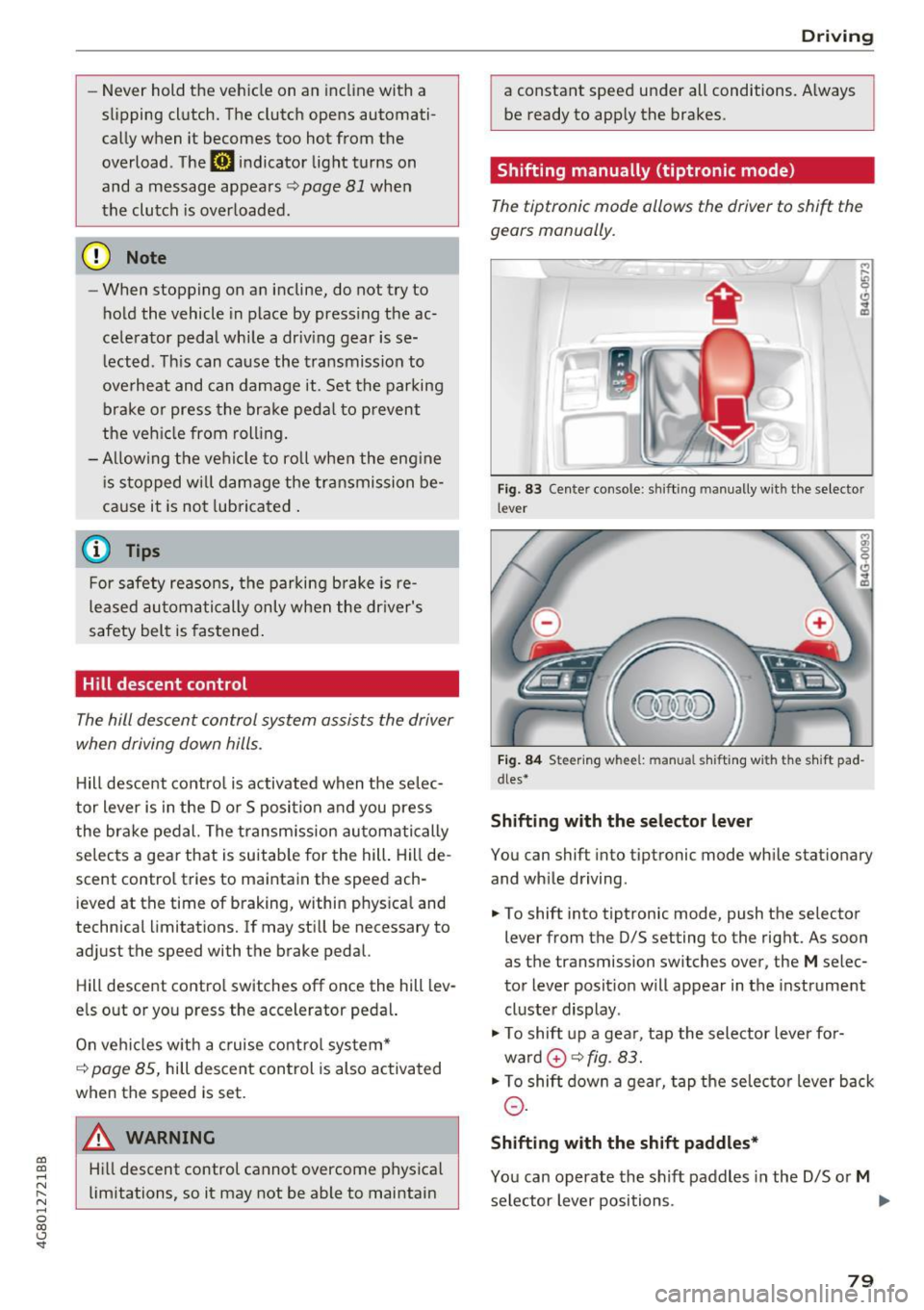
Fig. 83 Center console : shift ing manually wit h the selector
lever
Fig. 84 Steering w hee l: m anual s hifting wi th the sh ift pad
dles•
Shifting with the selector lever
You can shift into tiptronic mode while stationary
and while driving.
.,. To shift into tiptronic mode, push the selector
lever from the D/S setting to the right. As soon
as the transmission switches over, the
M selec
tor lever posit ion will appear in the instrument
cluster display .
"'To shift up a gear, tap the selector lever for
ward
0 ¢ fig. 83.
"'To shift down a gear, tap the selector lever back
0-
Shifting with the shift paddles*
You can operate the shift paddles in the D/S or M
selector lever positions. .,.
79
Page 82 of 284

Driving
"'T o shift up one gear, tap the shi ft paddle 0
¢ fig. 84.
"'To shift down one gear, tap the 0 sh ift paddle .
The transmission automatically shifts up o r down
before critical engine speed is reached .
Appl ies to: RS mode ls: when accelerating, the
transmission does
not a utomat ically shift to the
next gear shortly before the maximum pe rm itted
engine RPM is reached .
The transm ission only a llows manual shifting
when the engine speed is within the permitted range.
Kick-down
Kick-down enables maximum acceleration.
When you press the accelerato r peda l down be
yond the resistance point, the automatic trans
miss io n downshifts into a lower gear, depend ing
on vehicle speed and engine RPM. It shif ts up in
to the next higher gear once the max imum speci
fied engine RPM is reached .
I n t iptroni c mode, the t ransmission does
not au
tomatically sh ift down into a lowe r gear. If you
m ust accelerate, for example to pass a veh icle,
you must shift manually .
_& WARNING
Please note that the wheels could spin on
slick or slippery roads when kick-down is ac
tive.
Overboost
Applies to: RS 7 Spo rtback perfor man ce
-
The max imum engine torque is temporar ily in
creased in overboost. Overboost is activated
when nearing full throttle in the S position and
when the engine is at operat ing temperatu re .
The bars in the boost p ressure indicator are red
¢page 87.
_& WARNING
= -
Please note that the wheels could spin on
slick or s lippery roads when overboost is ac
tive.
80
' Launch control program
App lies to: vehicles with S tronic
The launch control program provides the best
possible acceleration when starting from a stop .
Requirement: the engine must be at operating
temperature and the steering wheel must not be
turned .
"' Deactivate the Start/Stop system*¢
page 73.
The LED in the jr,;i ••I button turns on .
"' Switch the Electronic Stabilization Control
(ESC) sport mode on¢
page 121. The Iii indi
cato r light turns on.
"' Pull the selector leve r back out of the D/S posi
tion b riefly to selec t the S position or se lect t he
DYNAM IC driv ing mode in d rive sele ct
<=:> page 106.
"'Press the brake pedal firm ly with your left foot
and hold it all the way down for at least one
second .
"' At the same time, press the gas peda l all the
way down with your right foot until the eng ine
reaches and stays at a high RPM level.
"' Remove your foot from the brake peda l w ith in
five seconds ¢,& .
_& WARNING
-Always a dapt your driving to the traff ic flow.
- On ly use t he Launch cont rol program when
road and traffic con dit ions allow it an d oth
er drivers will no t be endange red o r bot h
ered by your driving and the veh icle's accel
eratio n.
- Please note that the d rive wheels can spin
and the vehicle can break away when sport mode is switched on, especially when the
road is slippery.
- Once the vehicle has started moving, press
the
I ~ OFF! button b rief ly to turn the sport
mode off.
(D Tips
- The transmission temperat ure may increase
significant ly after using the launch control
prog ram . If that happens, the prog ram may
not be ava ilab le for a few minutes. It will be
available again after a coo l-down period.
...
Page 85 of 284

co
co
.... N
" N .... 0
00
\.J '
When towing a trailer, inflate the tires of your
vehicle to the tire pressure listed under "Full
load" on the label
¢page 221. Inflate trailer
tires to trailer and tire manufacturers' specifica
tions .
Lights
Check to make sure both vehicle and trailer lights
are working properly.
Safety chains
Be sure trailer safety chains are properly connect
ed from the trailer to the hitch on the vehicle. Leave enough slack in the chains to permit turn
ing corners. When you install safety chains, make
sure they will not drag on the road when you are
driving.
The chains should cross under the trailer tongue
to prevent it from dropping in case of separation
from the hitch.
Adjusting the Audi drive select
Make sure the vehicle is on a level surface before
hitching up the trailer and before adjusting the
tongue weight. The vehicle must be in
auto or
comfort driving mode and not raised
¢page 105, ¢0 .
Make sure that the vehicle is lowered. In Info
tainment , select:
ICARI function button> Lower
control button.
If you must drive under poor road conditions , you
can raise the vehicle
after coupling the trailer or
after adjusting the tongue weight ¢page 107.
0 Note
-Changes in temperature or load can affect
the height of the vehicle.
- Always select
auto or comfort mode. Other
wise, the tongue load specified for your ve
hicle will no longer be applicable.
Trailer towing
Driving instructions
Driving with a trailer always requires extra care
and consideration .
Weight distribution
Towing a loaded trailer with an empty car results
in a highly unstable distribution of weight. If this
cannot be avoided, drive at very low speeds only
to avoid the risk of losing steering control.
A "balanced" rig is easier to operate and control.
This means that the tow vehicle should be loaded
to the extent possible and permissible, while keeping the trailer as light as possible under the
circumstances . Whenever possible, transfer
some cargo to the luggage compartment of the
tow vehicle while observing tongue load require
ments and vehicle loading considerations.
Speed
The higher the speed, the more difficult it be
comes for the driver to control the rig . Do not
drive at the maximum permissible speed. Reduce
your speed even more if load, weather or wind
conditions are unfavorable -particularly when
going downhill.
Reduce vehicle speed
immediately if the trailer
shows the slightest sign of swaying .
Do not try
to stop the swaying by accelerating.
Observe speed limits. In some areas, speeds for
vehicles towing trailers are lower than for regular
vehicles.
Always apply brakes early . When driving down
hill, shift into a lower gear to use the engine
braking effect to slow the vehicle. Use of the
brakes alone can cause them to overheat and fail.
Air suspension*
When driving with a trailer, activate the trailer
mode of the air suspension. Switch the air sus
pension trailer mode on when you are towing a
trailer. This will limit the regulation by the air
suspension while driving . Select in the MMI:
I CAR ! function button > (Car)* systems control
button
> Vehicle settings > Air susp.: towing >
On. 1J,,
83
Page 89 of 284

co
co
.-, N
" N .-, 0
00
<.,;) 'SI'
Boost, shifting and
engine oil temperature
indicators
Applies to: vehicles with boost, shifting and engine oil tem
peratu re indicators
Fig. 87 Instrument cluster: boost, shift ing and eng ine oil
temperature indicators
... Turn the menu thumbwheel on the steering
wheel until
Lap timer appears in the instru
ment cluster display.
@ Boost pressure indicator
The current engine load (meaning the current
boost pressure) is indicated by a bar .
@ Shifting indicator
The shifting indicator is on ly visible when shifting
gears in tiptronic mode ¢ page
79. Green LEDs
turn on as the engine RPMs increase. The LEDS
flash red at speeds near the RPM limit.
In vehicles with an activated head-up display
¢ page
24, the shifting indicator is shown in the
head-up display instead of the instrument clus
ter.
© Engine oil tempe rature indicator
If the engine oil temperature is below 140 °F
(60 °(), th<> I# symbol followed by three hy
phens"- - -" and the
0
( unit is shown.
The engine has reached its operating tempera
ture when the engine oil temperature is between
140
° F (60 °() and 248 °F (120 °() under normal
driving conditions. The engine oil temperature
may be higher if there is heavy engine load and
high temperatures outside. This is not a cause for
concern as long as the .¢ page
15 or Ill
Assist
¢ page 15 indicato r lights in the display do not
blink.
Lap timer
Introduction
Applies to: vehicles with lap timer
You can record and evaluate lap times with the
lap timer ¢ page
87, fig. 88. Th e time is meas
ur ed in m inutes, seconds and 1/10 seconds . The
hours are also shown when the lap time exceeds
60 minutes. The maximum individual measure
ment is 99 hours. A maximum of SO laps can be
recorded.
A WARNING
-Your focus shou ld always be on driving your
vehicle safe ly. As the driver, you have com
plete respons ibility for safety in traffic. Only
use the functions in such a way that you al
ways maintain complete control over your ve
hicle in all traffic situations .
@ Tips
You can retr ieve informat ion from the tr ip
computer wh ile the lap timer stopwatch is
r unning.
Opening the lap timer and recording times
Applies to: vehicles with lap timer
Fig. 88 Display: lap t imer
Opening the lap timer
... Turn the menu thumbwheel on the steering
wheel until
Lap timer appears in the instru
ment cluster display .
-
87