window AUDI A7 2017 Owner´s Manual
[x] Cancel search | Manufacturer: AUDI, Model Year: 2017, Model line: A7, Model: AUDI A7 2017Pages: 284, PDF Size: 72.29 MB
Page 30 of 284
Opening and clo sin g
@ Tips
- Do not leave valuables unattended in the ve
hicle . A locked vehicle is not a safe!
- The LED in the driver 's door rail blinks when
you lock the vehicle . If the LED lights up for
approximately 30 seconds after locking,
there is a ma lfunction in the central locking
system. Have the problem corrected by an
authorized Audi dealer or authorized Audi Service Fac ility.
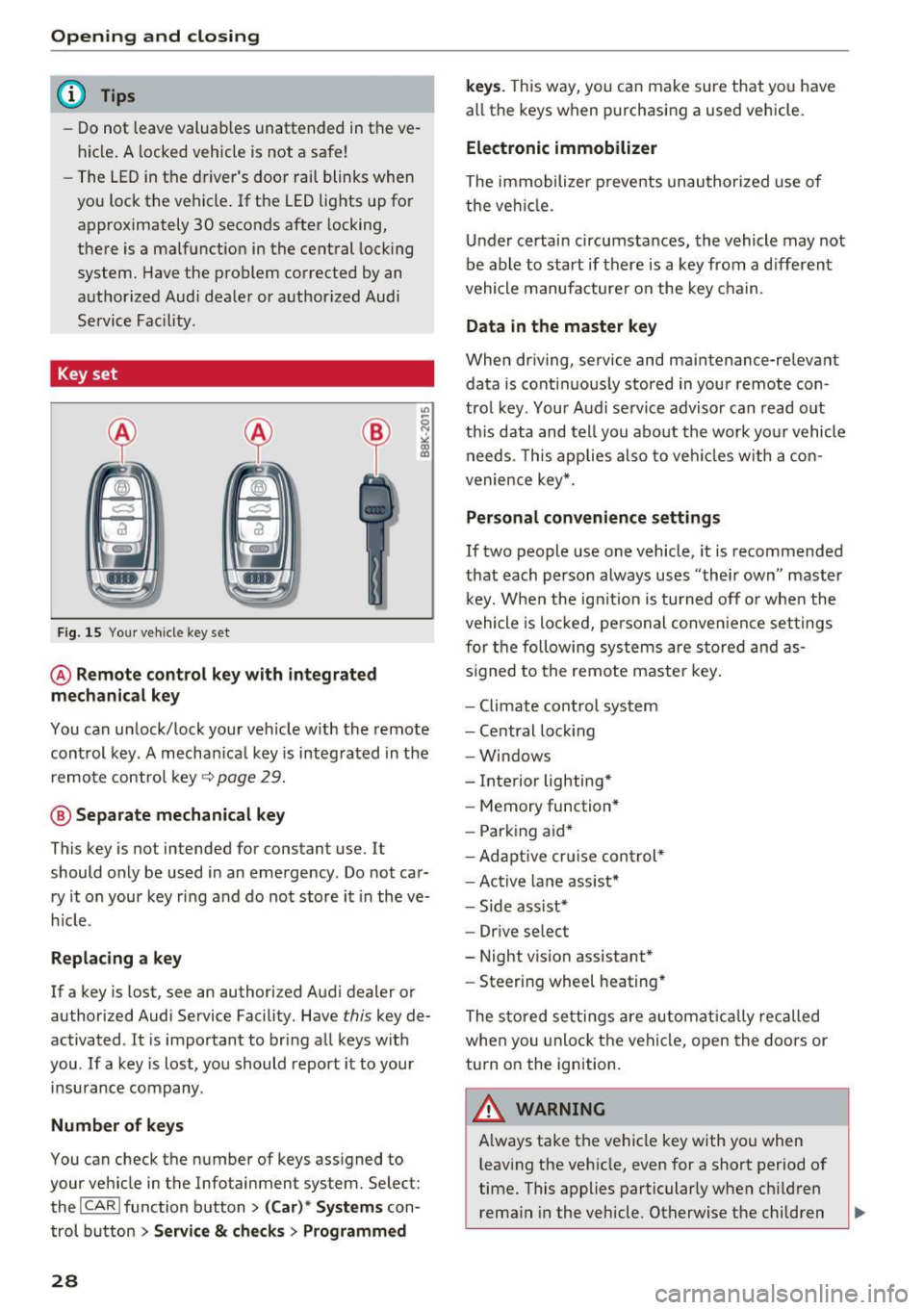
Key set
Fig. 15 You r veh icle key set
@ Remote control ke y with integr ated
mechanica l key
You can unlock/lock your veh icle w ith the remote
control key . A mechan ical key is integrated in the
remote control key~
page 29.
@ Separate mechanical ke y
This key is not intended for constant use. It
should only be used in an emergency . Do not car
ry it on your key ring and do not store it in the ve
h icle.
Replacing a ke y
If a key is lost, see an authorized Audi dealer or
authorized Audi Service Facility. Have
this key de
activated . It is important to bring all keys with
you . If a key is lost, you should report it to your
insurance company.
Number of key s
You can check the number of keys ass igned to
your veh icle in the Infotainment system. Select:
the !CAR !function button>
(C ar )* S yst e m s con
trol button
> Service & che cks > Programmed
28
k ey s. T his way, you can make sure that you have
all the keys when purchasing a used vehicle.
El ectronic immobiliz er
The immobilizer p revents unauthorized use of
the ve hicle.
Under certain circumstances, the vehicle may not
be able to start if there is a key from a d ifferent
vehicle manufacturer on the key chain.
Da ta in th e master key
When dr iving, service and maintenance-relevant
data is cont inuous ly stored in your remote con
trol key. Your A udi se rvice advisor can read out
th is data and tell you about the work yo ur vehicle
needs . This applies also to veh icles with a con
venience key *.
Personal convenience sett ings
If two people use one vehicle, it is recommended
that each person always uses "their own" master k ey. When the ign ition is turned off o r whe n the
vehicle is locked, personal conve nience set tings
for the following systems are stored and as
s igned to the remote maste r key .
- Climate cont rol system
- Central lock ing
- Windows
- Interior lighting*
- Memory function*
- Park ing aid*
- Ad aptive cru ise con trol *
- Ac tive lane assist*
- Side ass ist*
- Drive select
- Night vision assistant*
- Steering wheel heating *
The stored settings a re a utomat ica lly recalled
whe n you unlock t he vehi cle, open the doors or
turn on the ignition.
A WARNING
A lways take the vehicle key with you when
leaving the vehicle, even for a short period of
time. This applies particularly when child ren
rema in in the vehicle . Otherwise the children
-
Page 31 of 284
co
co
.... N
" N .... 0
00
<..:l 'SI'
could start the engine or operate electrical
equipment such as power windows.
(D Tips
- The operation of the remote control key can
be temporarily disrupted by interference
from transmitters near the vehicle working
i n the same frequency range (such as a cell
phone or radio equipment).
- Using the mechanical key, you can:
- Lock/unlock the glove compartment.
- Manually lock/unlock the vehicle
¢ page 32 .
-Mechanically lock the doors¢ page 32.
-For an explanation on conformity with the
FCC regulations in the United States and the
Industry Canada regulations, see
¢ page 267.
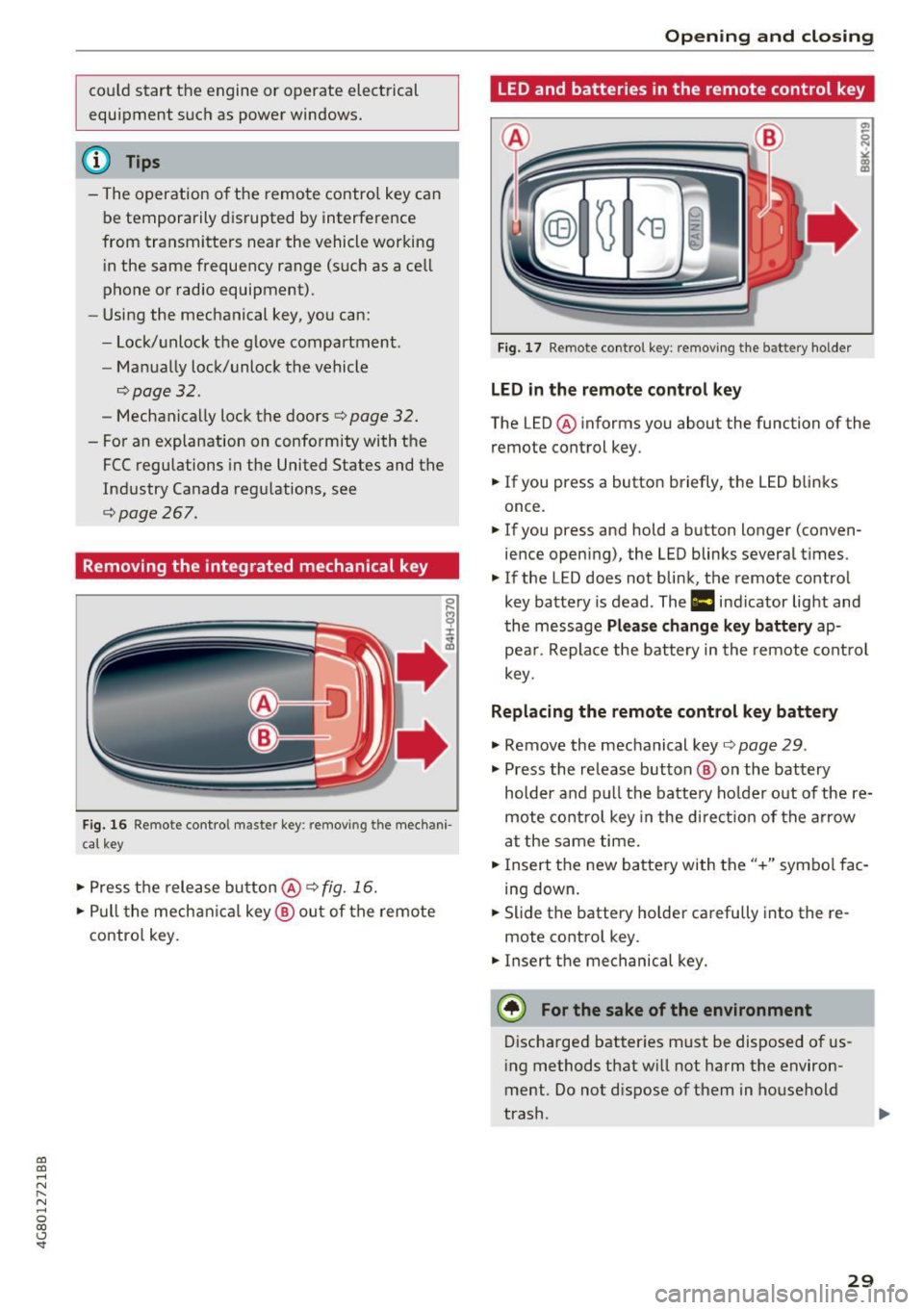
Removing the integrated mechanical key
Fig. 16 Remote contro l maste r key : remov ing t he mech ani
cal key
• Press the release button@¢ fig. 16.
• Pull the mechanica l key @ out of the remote
contro l key.
Open ing and closing
LED and batteries in the remote control key
Fig. 17 Remote control key: removing the battery holder
LED in the remote control key
The LED @ informs you about the function of the
remote control key.
• If you press a button briefly, the LED b links
once .
• If you press and hold a button longer (conven
ience opening), the LED blinks several times.
"' If the LED does not blink, the remote control
key battery is dead . The
1:1 indicator light and
the message
Please change key battery ap
pear . Replace the battery in the remote control
key.
Replacing the remote control key battery
"'Remove the mechanical key ¢page 29 .
"' Press the release button @ on the battery
holder and pull the battery ho lder out of the re
mote control key in the di rect io n of the arrow
at the same time.
• Insert the new battery with the"+" symbol fac
ing down.
• Slide the battery holder carefully into the re
mote control key.
"' Insert the mechanical key.
@) For the sake of the environment
Discharged batter ies must be disposed of us
ing methods that w ill not harm the environ
ment . Do not dispose of them in household
trash.
29
Page 38 of 284

Opening and closing
Child safety lock
The child safety lock prevents the rear doors
from being opened from the inside and the rear
power windows from be operated .
Fig. 28 Sect ion of driver's doo r: c hil d safety lock butto ns
• To activate/deactivate the inner doo r handle
and the power w indow switch for the respective
rear door, press the left/right
[!I button in the
driver's door~
fig. 28. The ind icator light in the
button t urns on/blinks.
• To activate/deactivate the child safety lock on
both sides, you must press the
[±l buttons one
after the other.
.&_ WARNING
Always take the vehicle key with you when
leaving the vehicle, even for a short period of
time. This applies particularl y when children
remain in the vehicle. Otherwise children
could start the engine or operate electrical
equipment (such as power windows), which
increases the risk of an accident.
36
Power windows
Controls
The driver can control all power windows .
Fig. 29 D river 's doo r: power win dow controls
All power window switches are equipped with a
two -stage function :
Opening and closing the windows
a, ~ M 0 ::, a, m
• To open or close the window completely, press
the switch down or pull the switch up briefly to
the second level. The operat io n will stop if the
sw itch is pressed/pulled again .
• To select a position in between opened and
closed, press/pu ll the switch to the first level
until the desired window position is reached.
Power window switches
@ Left front door
@ Right front door
@ Left rear door
@ Right rear door
.&_ WARNING
-Always take the vehicle key with you when
leaving the vehicle, even for a short period
of time. This applies particularly when chil
dren remain in the vehicle. Otherwise chil
dren could start the engine or operate elec
tr ical equipment (such as power windows),
which increases the risk of an accident. The
power windows continue to function until
the driver's door or front passenger's door
has been opened.
- Pay careful attention when clos ing the win
dows. Pinching could cause serious injuries .
-
Page 39 of 284
co
co
.... N
" N .... 0
00
<.,;) 'SI"
-When locking the vehicle from outside, the
vehicle must be unoccupied since the win
dows can no longer be opened in an emer
gency .
(D Tips
-The windows will automatica lly lower ap
prox imately 0 .4 inches (10 mm) when you
open the doors.
- When the window in the dr iver's or front
passenger 's doo r is comp letely open, it w ill
raise approximate ly 1 inch (25 mm) when
t h e door is opened. The w indow w ill lower
again when you close the door .
- You can still open and close t he windows for
appro ximately 10 mi nutes after tur ning the
i gni tion off . The power w indows do not
swi tch off until t he d river's doo r o r front
passenger 's doo r has been opened.
Convenience opening
All of the windows and th e sunroof* can be
opened at once.
The settings in the Infotainment system spec ify
which windows will open .
Convenience opening feature
• Press and hold the~ button on the remote
contro l key unt il all of the windows reach the
desired position and the su nroof* is ti lted open .
Setting convenien ce open ing in the
Infotainment system
• Se lect : the ICARI function button > (Car )* Sys
tems control button > Vehicle settings > Cen
tra l locking
> Long-pre ss to open windows .
To enable convenience opening of the w indows
and the roof*, the
Front windows , Rear windows
and Roof functions must be sw itched On .
.&_ WARNING
For security reason s, the windows a nd th e
sunroof* ca n only be opened w ith t he re m ote
co ntrol key a t a maxim um dis tanc e of app rox
imate ly 6 f eet (2 m) from the vehicle .
Opening and closing
Correct ing power window malfunctions
You can reactivate the one-touch up/down func
tion if it malfunctions .
• Pull the power window switch up until the win
dow is completely raised .
"' Release the switch and p ull it up aga in fo r at
least one second .
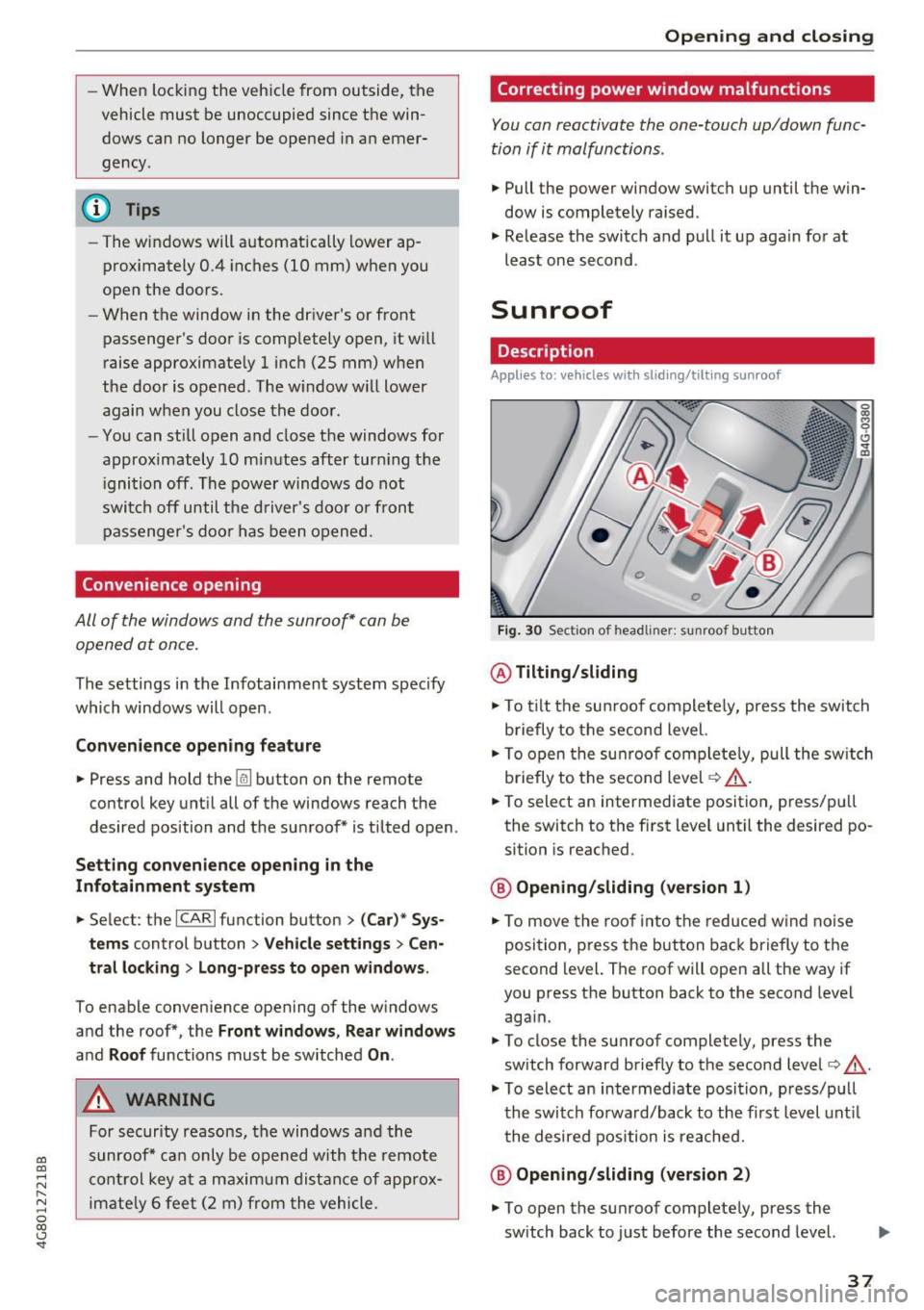
Sunroof
Description
Applies to: vehicles with sliding/tilt ing sunroof
Fig. 30 Sectio n of head lin er: sunroof butto n
@ Tilting/sliding
"'To tilt the su nroof co mplete ly, press the switch
briefly to the second level.
• To o pen t he su nroof com plete ly, pull the sw itc h
briefly to the sec ond level
c:> _& .
• To select an intermedi ate position, p ress/p ull
the switch to the f irst level until the desired po
sition is reached .
@ Opening/sliding (version 1)
• To move the roo f into t he reduced w ind no ise
posi tion, p ress t he but ton back briefly to t he
second level. The roof will open all the way if
you press the b utton back to the second level
aga in.
"' To close the sunroof completely, press the
sw itch forward b riefly to the second level
c:> &.
"' To select an intermediate posi tion, p ress/p ull
t h e switch fo rwa rd/back to the first level unt il
t he de sired pos ition is re ache d.
@ Opening/sliding (version 2)
"' To open the su nroof complete ly , press the
sw itch back to just before the second level.
37
Page 47 of 284

co
co
.... N
" N .... 0
00
<.,;) 'SI"
Automatic dimming rearview mirror*
• Press the button@¢ fig. 40. The indicator
light @ turns on. Interior and exterior mirrors*
will dim when there is incoming light (such as headlights from the rear) .
A WARNING
If the glass on an automatic dimming mirror
breaks, electrolyte can leak out. This liquid
can irritate the skin, eyes and respiratory sys
tem . If there is contact with the fluid, flush
immediately with plenty of water . Consult a
physician if necessary.
- Repeated or long-term exposure to electro
lyte fluid can lead to irritation of the air
ways, especially in people with asthma or
other respiratory conditions. Take deep
breaths immediately after leaving the vehi
cle or, if this is not possible, open all of the
doors and windows as wide as possible.
- If electrolyte fluid enters the eyes, flush
them thoroughly with a large amount of
clean water for at least 15 minutes and then
seek medical attention.
- If electrolyte fluid comes into contact with
the skin, flush the affected area with clean
water for at least 15 minutes and then clean
with soap and water and seek medical at
tention . Clean affected clothing and shoes
thoroughly before wearing again .
- If the fluid was swallowed and the person is conscious, flush the mouth with water for at
least 15 minutes. Do not induce vomiting
unless this is recommended by medical pro
fessionals. Seek medical attention immedi
ately.
(D Note
If the glass on an automatic dimming mirror
breaks, electrolyte can leak out. This liquid
damages plastic surfaces and paint. Clean
this liquid as quickly as possible, for example
with a wet sponge.
Lights and Vision
(D Tips
- If the light reaching the rearview mirror is
obstructed, the automatic dimming mirror
will not function correctly,
- The automatic dimming mirrors do not dim
when the interior lighting is turned on or
the reverse gear is selected.
Sun visors
[ }
Fig. 41 Front passenger's s
ide: sun visor
The sun visors for the driver and front passenger
can be released from their mounts and turned to
ward the doors@.
The mirror light switches on when the cover over
the vanity mirror @opens.
Sunshade
App lies to: vehicles with sunshade
The sunshade is located on the luggage com
partment shelf.
@0
------...._ ·_· --- "'.
Fig. 42 Sun sh ade in lowered pos itio n
When the sunshade is in the lowered position, it
is secured in the retainer @.
• To raise @ the sunshade, remove it from the
retainer.
45
Page 57 of 284
co
co
.... N
" N .... 0
00
<.,;) 'SI'
-Do not hang heavy objects on the coat
hooks, as they could cause personal injury in
a sudden stop.
(D Note
Objects on the rear shelf that rub against the
rear w indow can damage the rear window
heating wires.
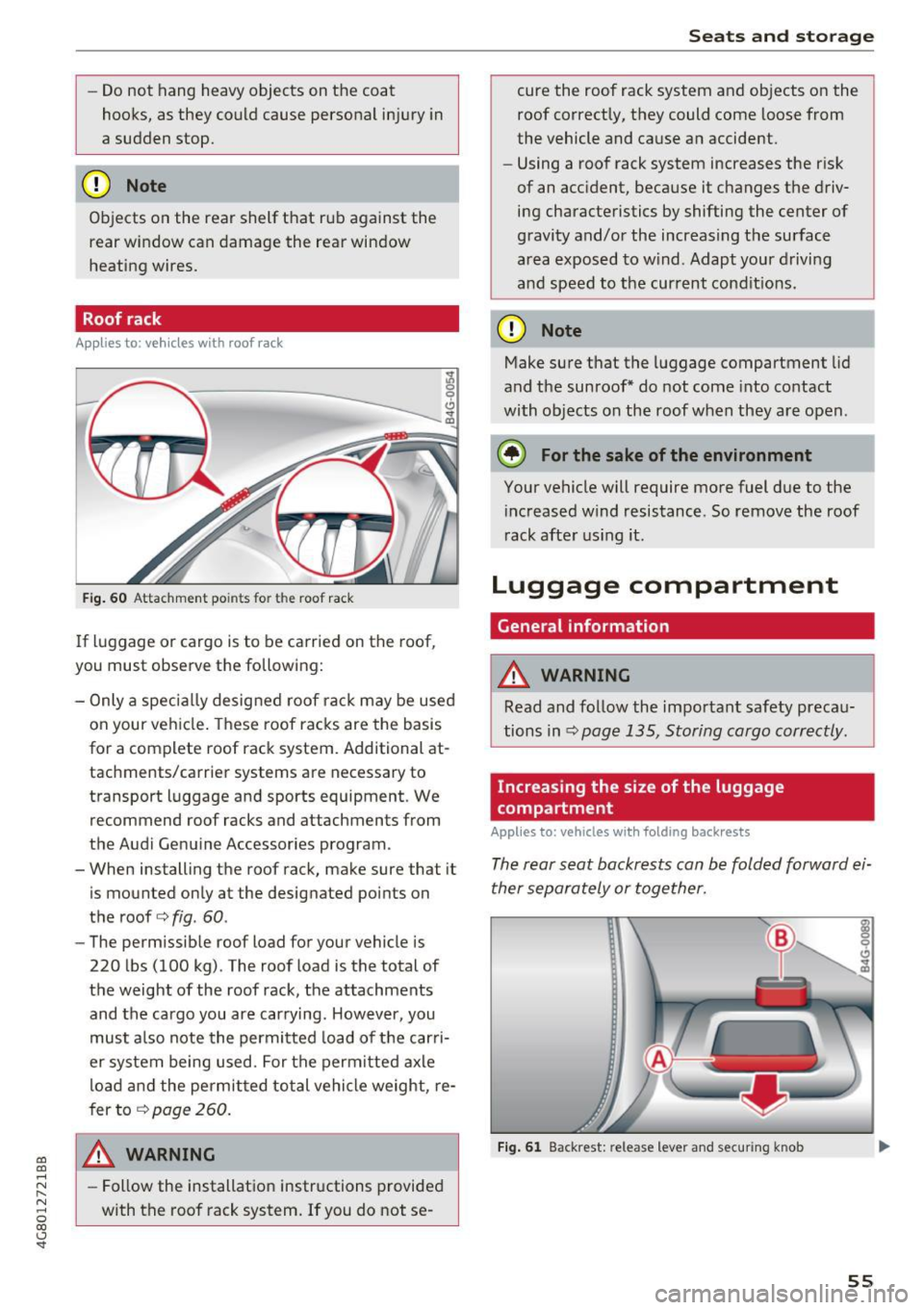
Roof rack
App lies to: ve hicles with roof rac k
Fig. 60 Attac hm ent po int s for t he roof rack
If luggage or cargo is to be carried on the roof,
you must observe the following: :,;
0
0
Cl
"' a,
-
Only a special ly desig ned roof ra ck may be used
on your ve hicle . These roof rac ks are the basis
for a complete roof rack system. Additional at
tachm ents/carrier systems are necessary to
transport luggage and sports equipment . We
recommend roof racks and attachments from
the Audi Ge nuine Accessor ies program .
- When installing the roof rack, make sure that it
i s mounted only at the designated points on
the roof
c> fig . 60 .
- The permissib le roof load for your vehicle is
220 l bs (100 kg) . The roof load is the total of
the weight of the roof rack, the attachments and the cargo you are carrying . However, you
must a lso note the permit ted load of the car ri
er system being used. For the perm itted axle
l oad and the permit ted total vehicle weight , re
f er to
c> page 260.
A WARNING
- Follow the installation instructions provided
with the roof rack system. If you do not se-
Seats and storag e
cure the roof rack system and objects o n the
roof correct ly, t hey could come loose from
the vehicle and cause an accident.
- Using a roof rack system increases the r isk
of an accident , because it changes the driv
ing characte ristics by shifting the center of
gravity and/o r the increas ing t he surface
area exposed to w ind . Adapt your drivi ng
an d speed to the cur rent con ditions .
(D Note
Make sure t hat the luggage compartment lid
and t he sunroof* do not come into contact
with ob jects on the roof when they are open .
@ For the sake of the environment
Your vehicle will require more fuel due to the
increased w ind resis tance . So remove the roof
r ack afte r using it.
Luggage compartment
General information
A WARNING
-Read and follow the important safety preca u-
tions in ¢
pag e 135, Storing cargo correctly .
Increasing the size of the luggage
compartment
Applies to: vehicles with folding backrests
The re ar seat backrests can b e folded forward ei
ther separately or toge ther.
Fi g. 61 Backr est: re lease leve r and se cur ing knob
55
Page 59 of 284
co
co
.... N
" N .... 0
00
<.,;) 'SI"
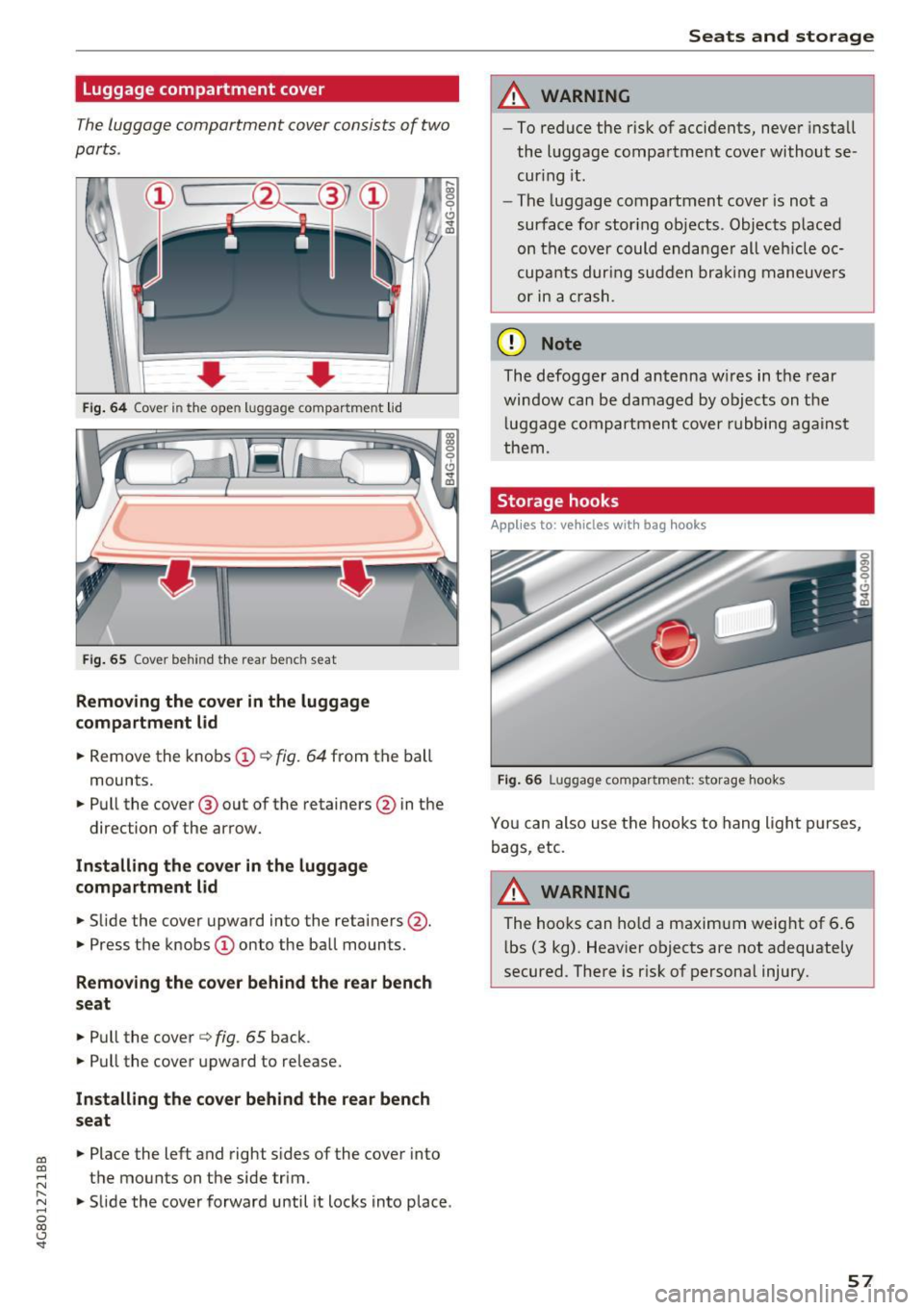
Luggage compartment cover
The luggage compartment cover con sists of two
parts .
..... 0:, 0
'
0
CJ
0 d~
Fi g. 64 Co ver in t he ope n luggag e compar tme nt lid
Fi g. 65 Cov er behin d th e rear ben ch seat
Removing the cover in the luggage
compartment lid
~ Remove the knobs CD¢ fig. 64 from the ball
mounts.
~ Pull the cover @ out of the retainers @in the
direction of the arrow.
In stall ing th e co ver in the luggag e
compartment lid
~ Slide the cover upward into the retainers @.
~ Press the knobs CD onto the ball mounts.
Removing th e cover behind the rear bench
seat
~ Pull the cover ¢ fig. 65 back.
~ Pull the cover upward to release.
In stall ing th e cover behind the r ear bench
s eat
~ Place the left and righ t sides of the cover into
the mounts on the s ide trim .
~ Slide the cover forward until it locks into place .
Seats and storag e
A WARNING
--To reduce the r isk of accidents, never install
the luggage compartment cover without se
cur ing it .
- The luggage compartment cover is not a
surface for stor ing ob jects . Objects p laced
on the cover could endange r all ve hicle oc
cupa nts dur ing sudden bra kin g maneuve rs
or in a crash.
(D Note
The defogger and antenna w ires in the rear
window can be damaged by objects on the
l uggage compartment cover rubbing against
them .
Storage hooks
Applies to: vehicles with bag hooks
Fig. 66 Lugg ag e compar tment: st orage hooks
Yo u can also use the hooks to hang light p urses,
bags , etc.
A WARNING
-
The hooks can ho ld a maximum weight of 6.6
l bs (3 kg) . Heav ier objects are not adequate ly
secured . There is r isk of persona l injury.
57
Page 61 of 284
co
co
.... N
" N .... 0
00
\.J '
Description
The climate control system warms, cools and re
moves humidity from the air in the vehicle interi
or. It is the most effective when the w indows and
sunroof* are closed. If there is a build-up of heat
inside the vehicle, ventilation can help to speed
up the cooling process.
I n all heating mode functions, except for defrost,
the blower on ly switches to a higher speed once
the engine coolant has reached a sufficient tem
perature .
Pollutant filter
The pollutant filter removes pollutants such as
dust and pollen from the air.
Key recognition
Appl ies to: ve hicles with de luxe a utoma tic clima te co ntro l
The blower setting and air distribution are stored
automatically and assigned to the remote control
key that you are using.
Appl ies to: ve hicles with 4 -zo ne del uxe automat ic cl imate
co ntrol
The climate control settings are automatically
stored and assigned to the remote control key
that is in use.
A WARNING
Poor visibility can lead to accidents.
- For safer driving, keep all windows free of
ice, snow and fog .
- Become familiar as quickly as possible with
the correct use and function of the climate
contro l system, especially with the defrost
ing and defogging function.
- When the temperature is below freezing,
only use the windshield washer system after
Warm and cold
the windshield has been warmed by the cli
mate control system. The washer fluid could
freeze on the windshield and impair visibili ty .
(D Note
-If you suspect that the climate control sys
tem is damaged, switch the system off to
prevent further damage and have it checked
by an authorized Audi dealer or authorized
Aud i Service Facility.
- Repairs to the Audi climate control system
require special technical knowledge and
special tools . See an authorized Aud i dealer
or authorized Audi Service Facility.
@ For the sake of the environment
-To save fuel, turn off cooling mode by press
ing the
IAJCI button . This will also reduce
em iss ions.
- In vehicles w ith a diesel engine, you can
switch the auto supplementary heater off in
the Infotai nment system.
(D Tips
- To prevent interference with the heat ing
and cooling output and to prevent the win
dows from fogging over, the air intake in
front of the windshie ld must be free of ice,
snow or leaves.
- Condensation from the cooling system can
dr ip and form a puddle of water under the
vehicle. This is normal and does not mean
there is a leak.
- The energy management system may tem
porarily switch off certain functions, such as
the seat heating* or rear window defogger .
These systems are avai lable aga in as soon
as the energy supply has been restored.
59
Page 62 of 284

Warm and cold
Automatic climate control
Applies to: vehicles w ith de luxe a utomat ic cl imate contro l
We recommend pressing the !AUTOI button and setting the temperature to 72 °F (22 °C) .
Fig . 70 De luxe automatic cl imate control: cont ro ls
Press the buttons to turn the functions on or off.
The dial adjusts the temperature and the blower .
The LED in a button will light up when the func
tion is sw itched on .
!AUTO I Switching automatic mode on
Automatic mode maintains a constant tempera
ture inside the vehicle . Air temperature, airflow
and a ir distribution are controlled automatically .
Adjusting the temperature
The temperat ure can be adjusted individually for
the dr iver and front passenger using the dials
(I)
and @.
Adjusting the blower c9e
Using the dial@, you can manually adjust the
amo unt of air generated by the blower to suit
your preferences. The blower should always run at a low sett ing to prevent the windows from
fogging and to ensure a cont inuous exchange of
air inside the vehicle. To have the blower regulat
ed automatically, p ress the
!AUTO I button.
~. ~ . (2) Adjusting air distribution
You can manua lly se lect the vents where the air
will flow. To have the a ir distribution regu lated
automatically, press the
IAUTO I button.
60
1- 1 Switching recirculation mode on/off
In recirculat ion mode, the air inside the vehicle is
c irculated and filtered. Th is prevents the unf il
te red air outs ide the veh icle from entering the
vehicle interior. We recommend sw itching recir
cu lation mode on when driving through a tunnel
o r when sitt ing in traffic ~.&, .
The
! AUTOI button or l
recirculation mode off.
I OFF I Switching the climate control system
on/off
The ! O FF ! button switches the climate control
system on or off .
It also switches on when you
press the blower control. Airflow from outside is
blocked when the climate control system is
swi tch ed off.
IA/C l Switching cooling mode on/off
The air is not cooled and humidity is not removed
when cool ing mode is sw itched off . This can
cause fog on the w indows. The cooling mode
switches off automatically when there are cold
outside temperatures.
l
The w indshield and side windows are defrosted
or cleared of condensat ion as quick ly as poss ible . ..,.
Page 63 of 284
co
co
.... N
" N .... 0
00
<..:l 'SI"
The maximum amount of air flows mainly from
the vents below the windshield . Recirculation
mode switches off. The temperature shou ld be
set to approximately 72
°F (22 °().
The IAUTOI button switches the defroster off .
l(li) REAR I Switching the rear window defogger
on/off
The rear window heater o nly operates when the
engine is running . It switches off automatically
after a few minutes, depend ing on the outside
temperature.
To prevent t he rear w indow heater from switch
ing off automatically, p ress and ho ld the
llliil REARI
button for more than 2 seconds . This is stored
until the ignition is switched off.
~ Adjusting seat heating*
Pressing the button switches the seat heating on
at t he hig hest setting (level 3) . The LEDs indicate
the temperature level. To reduce the tempera
ture, press the button again. To switch the seat heating off, press the button repeated ly until the
LED turns off.
After 10 minutes, the seat heating automatically
switches from level 3 to level 2.
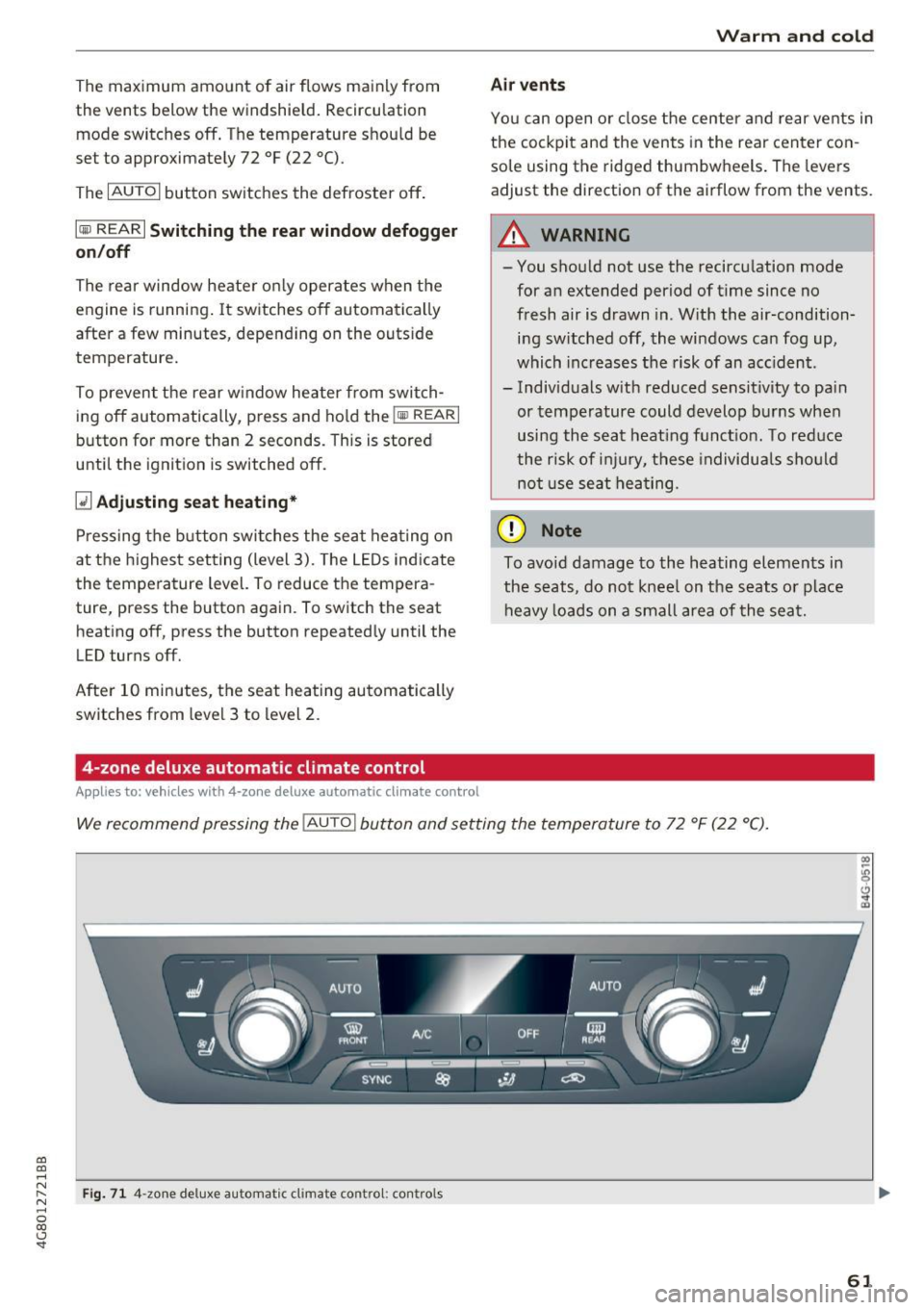
4-zone deluxe automatic climate control
App lies to: ve hicles with 4-zo ne deluxe automatic cl imate cont rol
Warm and cold
Air vents
You can open or close the center and rear vents in
the cockpit and the vents in the rear center con
sole using the ridged thumbwheels . The levers
adjust the direction of the airflow from the vents.
A WARNING
-
- You shou ld not use the recircu lation mode
for an extended period of time since no
fresh air is drawn in. With the air-condition
ing sw itched off, the windows can fog up,
which inc reases the risk of an acc ident.
- Individuals w ith reduced sens it ivity to pain
or temperature could develop burns when
using the seat heating function. To red uce
the risk of injury, these individua ls should
not use seat heating.
(D Note
To avoid damage to the heating elements in
the seats, do not knee l on the seats or place
heavy loads on a small area of the seat.
We recommend pressing the IAU TO I button and setting the temperature to 72 °F (22 °C).
Fig. 71 4 -zone deluxe a utomat ic cl imate contro l: cont rols
61