window AUDI A7 2017 Owner´s Manual
[x] Cancel search | Manufacturer: AUDI, Model Year: 2017, Model line: A7, Model: AUDI A7 2017Pages: 284, PDF Size: 72.29 MB
Page 64 of 284

Warm and cold
Fig. 72 4-zone deluxe automat ic climate control system:
r ear con tro ls
Press the buttons to turn the functions on or off.
Use the controls to adjust the temperature, the
blower speed and the air distribution. The LED in
a button will light up when the function is
sw itched on . The front settings are shown in the
climate control system display and in the Info
tainment system disp lay for a few seconds . T he
driver and front passenger settings can be ad
justed separately.
The settings can also be adjusted in the rear
~ fig. 72.
IO FF ! Switchin g the clim ate con trol s ystem
on /off
The I O FF I button switches the climate control
system on or off. It also switches on whe n you
p ress the cont rol. Airflow from outside is b locked
when the climate control system is switched off .
The
IO FF I button in the rear only switches the A/C
system on/off in the rear of the vehicle.
IA/C l Switching cooling mode on /off
The air is not cooled and humidity is not removed
when cooling mode is switched off . T his can
cause fog on the windows. The cooling mode
switches off automatically when there are cold
outside temperatures.
l """ I Switch ing recirculation mode on /off
In recircu lation mode, the a ir inside the vehicle is
circu lated and fi ltered. This prevents the unfil
tered a ir outside the vehicle from entering the
vehicle inter ior. We recommend switching recir
culation mode on when driving through a tunne l
or when sitting in traffic~.&. .
62
The !AU TOI button o r I@ FRON TI button switches
recircu lation mode off .
IAUTO I Switching automatic mode on
Automatic mode maintains a constant tempera
ture inside the vehi cle. Air temperature , a ir flow
and air distrib ution are controlled automatica lly.
If press and hold the button longer,
72 °F (22 °C)
will be set.
Adjusting the temperatu re
Temperatures between 60 °F (+ 16 °() and 84 °F
(+28 °() can be set . Outside of this range, LO or
HI w ill appear in the climate control system dis
play. In both settings, the climate control runs
constantly at the max imum coo ling or heat ing
l evel. The temperature is not regu lated .
Adjusting the blower~
You can adjust the volume of air generated by the
blower to your preference . The blower should al
ways run at a low setting to prevent the windows
from fogg ing and to ensure a cont inuo us ex
change of air inside the vehicle . To have the blow
er regulated automatically, p ress the
IAU TO I but
ton.
~ Adjusting air distribution
You can man ua lly select the vents where the air
will flow. To have the air distr ibut ion regulated
a utomat ica lly, press the
IAU TO I button.
~ Adjusting seat heat ing* /seat ventilation*
Pressing the button switches the seat heating/
seat ventilation on at the h ighest setting (level
3). The LEDs ind icate the temperature level. To
reduce the temperat ure, press the b utton again.
To switc h the seat heat ing/seat ventila tion off,
press the button repeatedly until the LED turns
off.
After
1 0 m inutes, the seat heating automatically
switches from level 3 to level 2.
l
The w indshield and side windows are defrosted
o r cleared of condensat ion as quick ly as poss ible.
The maxim um amount of ai r flows mainly from
t h e vents below the windsh ield. Recirc ulation ..,.
Page 65 of 284

co
co
.... N
" N .... 0
00
\.J '
set to approximate ly 72 °F (22 °C).
The
IAU TOI button switches the defroster off.
IQiD REAR I Switching the rea r window defo gger
on /off
The rear window heate r o nl y operates when the
engine is running. It sw itches off automatical ly
afte r a few minutes, depend ing on the outs ide
temperature.
To prevent the rear w indow heater from switch
ing off automatically , press and ho ld the
l lliil R EAR I
button fo r more than 2 seconds . T his is stored
until the ignition is switched off.
ISYNCI Synchronization
When synchronization is switched on, the set
tings for the dr ive r's side are applied to the front
passenger's side (except fo r seat heating/ventila
tion*) . The settings in the rear are a lso synchron
ized. Synchronization switches off if the settings
are adjust ed on the front passenger's side or in
the rear .
You can synchronize the settings in a row by pressing and holding a contro l. For examp le, to
apply the s ettings for the front passeng er's side
to the d river's side, press and ho ld the contro l on
the front passenger 's side. The same applie s to
the rear .
Res idual heat *
With the ignition turned off, yo u can activate the
residual h eat function by press ing the [!] button
c:> fig. 71. The residual heat from the coolant is
used to heat the vehicle interior. The residual
heat function switches o ff au tomatically after
about 30 m inutes.
Air vents
You can open or close the cent er and rear v ents in
the cockpit and the vents in the rear center con
sole and door pillars us ing the r idged thumb
wheels. The levers adjust the direct io n of the a ir
flow from the vents .
Warm and c old
A WARNING
- You shou ld not use the recircu lation mode
for an extended period of time since no
fresh air is drawn in . W it h the air-condition
ing switched off, the windows can fog up,
which inc reases the risk of an acc ident.
- Individuals w ith reduced sensit ivity to pa in
or tempe rature could develop b urns when
using the seat heat ing f unct ion. To red uce
t he risk of i njury, these individu als sho uld
not use seat heating.
(!;) Note
To avoid damage to the heating elements in
the seats, do not knee l on the seats o r place
heavy loads on a small area of the sea t.
Basic settings
The climate control system basic settings are ac
cessed in the Infotainment system.
.,. Select: the I CAR I functio n button > (Car )* Sys -
tems
co ntro l butto n > AC.
Rear se at settings*
When this funct ion is selected, all settings for
the rear can be adjusted t hrough the climate con
trol system in the cockpit . The climate control
system settings cannot be adjusted in the rear
seat at t he same time. This f unct ion sw itches off
after a ce rtain per iod of t ime o r when one of t he
contro ls in the coc kp it is pressed.
Automatic reci rculation*
T he sensitivity level of the automatic recircula
t ion mode can be set at var ious levels from
Off to
S ensitive . Recircu lation mode is cont ro lled auto
matically. If the windows fog up , press the
I""' FR ON T! button .
Footwell temperature*
You can adjust the footwell temperature so that
it is cooler or wa rme r.
Aut omat ic auxiliar y heater *
In vehicles with diesel engines*, the auxiliary
heater helps to warm the vehicle interior more
63
Page 69 of 284
co
co
.... N
" N .... 0
00
<.,;) 'SI"
lead to greater tire wear and will affect driving
behav ior.
Do not drive on
winter tires year-round , as this
will consume up to 10% more fuel.
Eliminate unnecessary weight
Since every kilogram of extra weight increases
fuel consumption, a quick inspection of the lug
gage compartment may be worth it to avoid un
necessary weight.
When not being used, a roof rack should be re moved to decrease the wind resistance of the ve
hicle. You will save approximately 12% of your
fuel when at speeds from 62-75 mph (100-120 km/h).
Save energy
The engine drives the generator, which generates
electricity; the fuel consumption also increases
with the demand for electricity. Therefore, switch
electrical equipment off when you no longer
need it. Examples of equipment that uses a lot of
energy are air blowers at a high setting, the rear
window defogger and seat heating*.
CD Note
Do not leave engine idling unattended after
starting. If warning lights should come on to
indicate improper operation, they would go
unheeded. Extended idling also produces
heat, which could result in overheating or
other damage to the vehicle or other proper
ty .
CD Note
-Have your vehicle maintained properly and
in accordance with the service recommenda
tions in your Warranty
& Maintenance book
let. Lack of proper maintenance as well as
improper use of the vehicle will impair the
function of the emission control system and
could lead to damage .
- Do not alter or remove any component of
the Emission Control System unless ap
proved by the manufacturer.
- Do not alter or remove any device, such as
heat shields, switches, ignition wires,
Driving
valves , which are designed to protect your
vehicle's Emission Control System and other
important vehicle components.
(D Tips
The consumption estimates as published by
ENVIRONMENTAL PROTECTION AGENCY
(EPA) and Transport Canada may not corre
spond to your actual consumption on the
road, which will vary depending upon vehicle
load and speed, road and weather conditions,
trip length, etc .
Steering
Manual steering wheel position adjustment
Applies to: vehicles with manual steering wheel adjustment
The steering wheel position is adjustable up and
down and forward and back.
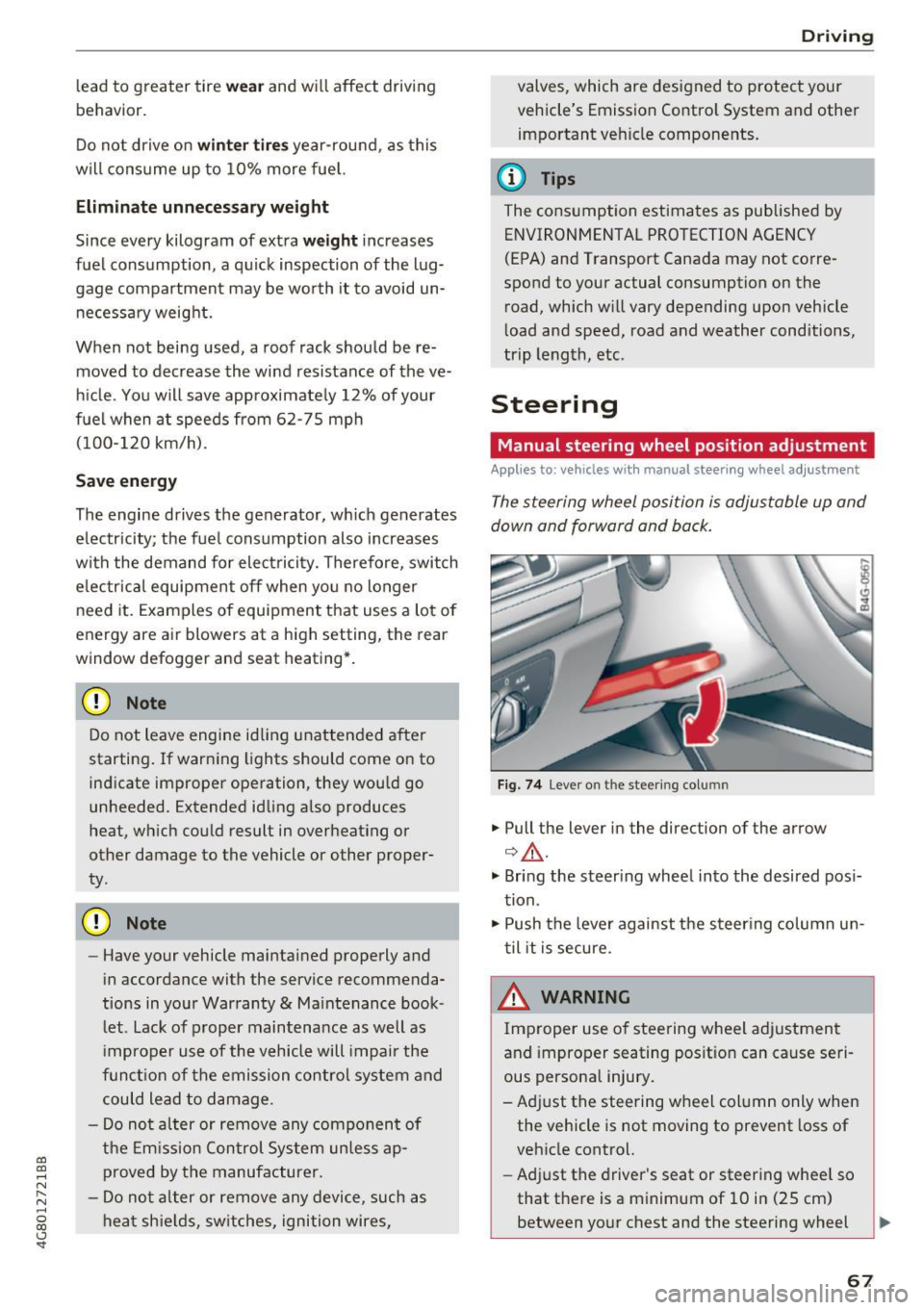
Fig. 74 L eve r o n t he stee ring col umn
"'Pull the lever in the direction of the arrow
Q &_ .
"' Bring the steering wheel into the desired posi
tion.
"' Push the lever against the steering column un
til it is secure.
_& WARNING
~ -
Improper use of steering wheel adjustment
and improper seating position can cause seri
ous personal injury.
-Adjust the steering wheel column only when the vehicle is not moving to prevent loss of
vehicle control.
- Adjust the driver's seat or steering wheel so
that there is a minimum of 10 in (25 cm) between your chest and the steering wheel
II>
67
Page 72 of 284
Driving
Stopping the engine
~ Bring the vehicle to a fu ll stop.
~ Move the selecto r leve r to the P or N position.
~ Press the I START ENGINE STOPI r=.> page 69,
fig . 76 button .
Steering lock
1
)
The stee ring locks when you tu rn the engine off
using the
!START ENGINE STOP ! button a nd
ope n the dr iver's door. The locked stee ring helps
p revent vehicle theft .
Emergency off function*
If i t is absolutely necessary, the engine can also
be turned off while dr iv ing in the R o r D/S se lec
to r lever position at speeds below 6 mph (10 km/
h). To stop the engine , press and hold t he
I START ENGINE STOP I button and also press the
b rake pedal.
_& WARNING
- Never tu rn
off the engine before the veh icle
has come to a comp lete stop. The full func
t ion of the b rake booster and the powe r
steering is not guaranteed . Yo u may need to
use more force when braking or s teer ing.
Beca use you cannot brake and stee r as you
us ually wou ld, this could lead to accidents
and serious injur ies.
- Always ta ke the key with you w hen ever you
l eave yo ur vehicle. Othe rw ise, the engi ne
c oul d be s ta rt ed o r elec tri ca l eq uip me nt
s u ch a s the power windows cou ld be operat
ed. This can lead to se rious i njur y.
- Fo r sa fety reasons, always park the ve hicle
with the se lector lever in the P position.
Otherwise, there is the risk that the vehicle
cou ld roll unintentionally .
{[) Note
I f the eng ine has been under heavy load for
an extended per io d of t ime, hea t builds up in
the engine compartment after the eng ine is
sw itched off and there is a risk of damaging
the engine. For this reason, let the engine run
l) T hi s function is not avai lable in all countries.
70
at idle for approximate ly two minutes before
shutting it
off .
(D Tips
Afte r th e engine h as been switched off, t he
r adiator fan can contin ue to run for up to 10
minutes -even w ith the ignition switched off.
It can also switch on again after some time if
the coo lant tempe rature r ises as the result of
h eat bu ildup or if the engine is already warm
and the e ng ine compartment is also heated
by the sun's rays.
Messages
Turn off ignition before leaving car
This message appears and a warning tone sounds
i f you open the drive r's doo r when the ign it ion is
switched on.
Press brake pedal to start engine
This message appears if yo u do not p ress the
brake peda l when starting the engine.
II Key not in vehicle?
This indicator light turns on and this message ap
pears if the ignition key was removed from t he
vehicle when the engine was running.
If the ig ni
tion key is no lo nger in the vehicle, you cannot
swi tch on the igni tion or st art the engine once
you stop it. You also cannot lock the vehicle from
the outside .
Shift to P, otherwi se vehicle can roll aw ay.
Door s do not lock if lever is not in P.
This message a ppears for safety reasons if t he
t ransm iss ion is not in the P posi tion when you
swi tch the ig nition off. Move the selec to r l ever to
t h e P posit ion . Othe rw ise the vehicle is no t pro
tected from ro lling and it cannot be locked.
II Key is not recognized. Hold back of key
against marked area. See owner' s manual
If the indica to r light turns on and this message
appears, there is a ma lfunction
r=.> page 71. ..,.
Page 77 of 284

co
co
.... N
" N .... 0
00
\.J '
brake similar to heavy braking. ESC and the
associated components (ABS, ASR, EDL)
cannot overcome the laws of physics . In cor
ners and when road or weather conditions
are bad, a full brake application can cause
the vehicle to skid or the rear end to swerve,
which increases the risk of an accident.
- If the power supply fails, you cannot set the
parking brake if it is released. In this case,
park the vehicle on level ground and secure
it by placing the selector lever in the P posi
tion. See an authorized Audi dealer or au
thorized Audi Service Facility for assistance.
- Always take the vehicle key with you when leaving your vehicle, even for a short period
of time. This applies particularly when chil
dren remain in the vehicle. Otherwise chil
dren could start the engine, release the
parking brake or operate electrical equip
ment such as power windows, which in
creases the risk of an accident.
- No one should remain in the vehicle when it
is locked -especially children. Locked doors
make it more difficult for emergency work
ers to get into the vehicle, which puts lives
at risk.
(D) Tips
When stopping at a traffic signal or stopping
in city traffic, you can set the parking brake
manually. The vehicle does not have to be
held with the brake pedal. The parking brake
eliminates the tendency to creep when a se
lector lever position is engaged. As soon as
you press the accelerator pedal, the parking
brake releases automatically and your vehicle
starts to move
c::> page 75.
(D Tips
- Occasional noises when the parking brake is
set and released are normal and are not a
cause for concern.
- The parking brake goes through a self-test
cycle at regular intervals when the vehicle is
stopped. Any noises associated with this are normal.
Driving
- If there is a power failure, the parking brake
will not set if it is released, and it will not
release if it is set
c::> &. . See an authorized
Audi dealer or authorized Audi Service Fa
cility for assistance.
Starting from a stop
Various convenience and safety functions may be
available when the vehicle begins driving, de
pending on vehicle equipment .
Starting on hills with the parking brake set
Requirement: the driver's door must be closed
and the driver's safety belt must be fastened.
.,. To start driving comfortably when on a hill, set
the parking brake and begin driving as usual.
The braking force of the parking brake does not
release automatically until the wheels build up
enough driving force.
Starting on hills with hill hold assist
Hill hold assist makes it easier to start on hills.
Requirement: the driver's door must be closed
and the engine must be running.
.. To activate hill hold assist, press and hold the
brake pedal for several seconds. The vehicle
must be in an uphill direction of travel.
After releasing the brake pedal, the braking pow er is maintained for a brief moment
c::> ..&. to pre
vent the vehicle from rolling back when starting .
During this time, you can easily begin to move
your vehicle.
_& WARNING
A ppl ies to: ve hicles with hill hold assist
- If you do not begin driving immediately or
the engine stalls after releasing the brake
pedal, your vehicle may begin to roll back
ward. Press the brake pedal or set the park
ing brake immediately .
- The intelligent technology of hill hold assist
cannot overcome the limitations imposed by
natural physical laws. The increased comfort
offered by hill hold assist should not cause
you to take safety risks.
Ill-
75
Page 103 of 284

co
co
.... N
" N .... 0
00
<..:l 'SI"
-If vehicles are approaching or being l.eft
behind very quickly. The display may not
turn on in time.
- In poor weather conditions such as heavy
rain, snow or heavy mist.
- On very wide lanes, in tight curves, or if
there is a rise in the road surface. Vehicles
in the adjacent lane may not be detected
because they are outside of the sensor
range.
- Audi side assist cannot detect all vehicles
under all conditions, which can increase the
risk of accidents.
- Please note that side assist only displays ap
proaching vehicles or vehicles in your blind
spot if your vehicle is traveling at least 19 mph (30 km/h).
- In certain situations, the system may not
work or its function may be limited . For ex
ample:
- The display may not turn on at the right
time if vehicles are approaching or passing
very quickly.
- In poor weather conditions, such as heavy
rain, snow or fog.
- In very wide lanes, in tight curves or when
there are slopes in the roadway, vehicles
in the neighboring lanes may not be de
tected because they are outside of the
sensor range .
(D Note
The sensors can be displaced by impacts or
damage to the bumper, wheel housing and
underbody. This can impair the system. Have
an authorized Audi dealer or authorized Audi
Service Facility check their function.
(D Ti ps
If the window glass in the driver's door or
front passenger's door has been tinted, the
display in the exterior mirror may be incor
rect.
- For an explanation on conformity with the
FCC regulations in the United States and the
Industry Canada regulations, see
¢page 267.
Assist
Switching on and off
App lies to : vehicles wi th Audi side ass ist
Fig. 109 Driver 's door : side assist button
"' Press the button to switch the system on and
off ¢.&. in General information on page 100 .
The LED in the button turns on when side assist
is switched on.
Adjusting the display brightness
App lies to: vehicles wi th Audi side ass ist
The display brightness can be adjusted in the In
fotainment system .
"' Select: the I CAR I function button > (Car)* Sys
tems control button > Driver assistance > Audi
side assis t.
The display brightness adjusts automatically to
the brightness of the surroundings, both in the
information and in the warning stage. In very
dark or very bright surroundings, the automatic
adjustment will set the display to the minimum
or maximum level. In such cases, you may notice
no change when adjusting the brightness, or the
change may only be noticeable once the sur
roundings change.
Adjust the brightness to a level where the display
in the information stage will not disrupt your
view ahead. If you change the brightness, the dis
play in the exterior mirror will briefly show the
brightness level in the information stage. The
brightness of the warning stage is linked to the
brightness in the information stage and is adjust-
ed along with the information stage . ..,
101
Page 129 of 284
co
co
.... N
" N .... 0
00
\.J -
der to maintain an optima l vehicle battery charge
l evel.
(D Tips
- Energy management cannot overcome the
laws of physics. Note that the charge level
and length of the vehicle batte ry life are
li mited.
- When the starting ability is endangered, the
(•j indicator light turns on ¢ page 14.
What you should know
Maintaining the starting ability is the highest
priority .
A lot of stress is placed on the vehicle battery
when driving short distances, during c ity driving,
and at co ld times of the year. A lot of energy is
used but little is generated. It is a lso critical
when the engine is not running but e lectr ica l
equ ipment is switched o n. In th is case, energy is
used but none is generated .
In s ituations like this, energy management will
actively regu late the distribution of ene rgy.
Long periods w ithout use
If yo u do not drive you r vehicle for several days or
weeks, e lectrica l equipment is gradually sca led
back or switched off. This reduces energy use and
ens ures the veh icle w ill be able to start after long
periods of time. Some convenience functions,
such as interior lighting or power seat adjust
ment, may not be available under certain circum
stances . These convenience functions will be
ava ilable again once you switch the ig nition on
an d s tart the engi ne.
With the engine switched off
T he vehicle battery will drain if yo u use I nfota in
ment f unctions such as listening to the rad io
while the eng ine is switched off .
The vehicle's ability to start may be impaired by
the energy use, a message will appear in the In
fotainment system d isplay .
The message ind icates that the system will
switch off automatically soon. If you wou ld like
Intellig ent Technology
to cont inue using the functions, you must start
t h e engine.
With the engine running
Alt hough e lectr ica l energy is ge nerated wh ile
dr iv ing , the ve hicle ba ttery can dra in. This ca n
happen if li ttle ene rgy is generate d but much is
u sed , and the charge level of the vehicle battery
is not optimal.
T o res to re the balance of ene rgy, componen ts
t h at require large amoun ts of ene rgy are tempo
rarily scaled back or switched off . Heat ing sys
tems in partic ula r req uire a great dea l of energy .
If you notice, for example, that the seat heating*
or rear window defogger is not work ing, then it
has been tempora rily reduced or sw itched off.
These systems are availab le aga in as soo n as the
energy sup ply has bee n restored .
In add ition, you may notice that the idle speed
has slig htly increased. That is normal and no
cause for concern . By increas ing the idling speed,
the addit ional required energy will be generated
and the vehicle battery will be charged .
Notice about data
recorded by the Event
Data Recorder and
vehicle control modules
Event Data Recorder
Th is vehicle is equ ipped w ith an Event Data Re
corder (EDR) . The ma in purpose of a n EDR is to
r ecord, in certai n cras h or nea r crash-like situa
ti ons, s uch as an airbag deployme nt o r hi ttin g a
road obsta cle, da ta t hat w ill ass ist in underst and
i ng how a vehicle 's systems performed . The EDR
is des igned to record data related to vehicle dy
namics and safety systems for a short perio d of
t ime, typ ica lly 30 seconds or less . The EDR in this
vehicle is designed to record such data as:
- How va rious systems in your vehicle were ope r
ating;
- W het her o r not the drive r and passenge r safety
be lts were b uckled/fastened;
- How far (if at all) the driver was dep ressing the
accelerator and/or bra ke pedal; and, .,,.
127
Page 131 of 284

co
co
.... N
" N .... 0
00
\.J '
Basics
Safe driving habits
Please remember -safety first!
This chapter contains important information,
tips, instructions and warnings that you need to
read and observe for your own safety, the safety
of your passengers and others . We have summar
ized here what you need to know about safety
belts, airbags, child restraints as well as child
safety. Your safety is for us
priority number 1. Al
ways observe the information and warnings in
this section - for your own safety as well as that
of your passengers.
The information in this section applies to all
model versions of your vehicle. Some of the fea
tures descr ibed in this sections may be standard
equipment on some models, or may be optional
equipment on others. If you are not sure, ask
your authorized Audi dealer.
A WARNING
- Always make sure that you follow the in
structions and heed the WARNINGS in this
Manual. It is in your interest and in the in
terest of your passengers .
-
-Always keep the complete Owner's Litera
ture in your Audi when you lend or sell your
vehicle so that this important information
will always be available to the driver and
passengers.
- Always keep the Owner's literature handy so
that you can find it easily if you have ques
tions.
Safety equipment
The safety features are part of the occupant re
straint system and work together to help reduce the risk of injury in a wide variety of accident sit
uations.
Your safety and the safety of your passengers
should not be left to chance. Advances in tech
nology have made a var iety of features available
to help reduce the risk of injury in an accident.
Driving safety
The following is a list of just a few of the safety
features in your Audi:
- sophisticated safety belts for driver and all pas-
senger seat ing pos itions,
- safety belt pretensioners,
- safety belt force limiters for the front seats,
- safety belt height adjustment systems for the
front seats,
- front airbags,
- knee airbags for the front seats*
- side airbags in the front seats and outer rear
seats*,
- side curtain airbags with ejection mitigation
features,
- special LATCH anchorages for child restraints,
- head restraints for each seat ing position,
- adjustab le steering column.
These individual safety features, can work to gether as a system to help protect you and your
passengers in a wide range of accidents . These
features cannot work as a system if they are not
always correctly adjusted and correctly used.
Safety is everybody's responsibility!
Important things to do before driving
Safety is everybody 's job! Vehicle and occupant
safety always depends on the informed and care
ful driver .
For your safety and the safety of your passen
gers,
before driving always:
.,. Make sure that all lights and signals are operat
ing correctly .
.,. Make sure that the tire pressure is correct.
.,. Make sure that all windows are clean and afford
good visibility to the outside .
.,. Secure all luggage and other items carefully
¢ page 55, ¢ page 54.
.,. Make sure that nothing can interfere with the
pedals.
.,. Adjust front seat, head restraint and mirrors
correctly for your height .
.,. Instruct passengers to adjust the head re
straints according to their height .
129
Page 134 of 284
Driving safety
-Passengers who are unbelted , out of posi
tion or too close to the airbag can be seri
ously injured by an airbag as it unfolds with
great force in the blink of an eye .
- Always make sure that there are at least
10 inches (25 cm) between the front pas
senger 's breastbone and the instrument
panel.
- Always make sure that there are at least
4 inches (10 cm) between the front passen ger's knees and the lower part of the instru
ment panel.
- Each passenger must always sit on a seat of
their own and properly fasten and wear the
safety belt belonging to that seat.
- Before dr iving, always adjust the front pas
senger seat properly .
- For adjustable head restraints: before driv
ing, always also adjust the head restraints
properly .
- Always keep your feet on the floor in front
of the seat. Never rest them on the seat, in
strument pane l, out of the window, etc. The
airbag system and safety be lt will not be
able to protect you properly and can even in
crease the risk of injury in a crash .
- Never dr ive with the backrest reclined or
ti lted far back! The farther the backrests are
ti lted back , the greater the risk of injury due
to incorrect positioning of the safety belt
and improper seating position.
- Children must always ride in child seats
<='> page 172. Special precautions apply
when installing a child seat on the front passenger seat<='>
page 148 .
Proper seating positions for passengers in
rear seats
Rear seat passengers must sit upright with both
feet on the floor consistent with their physical
size and be properly restrained whenever the ve
hicle is in use.
To reduce the r isk of injury caused by an incorrect
seating position in the event of a sudden braking
maneuver or an accident, you r passengers on the
rear bench seat must always observe the follow
ing:
132
.,. For adjustab le head restraints: adjust the head
restraint so the upper edge is as even as possi
ble with the top of your head. If that is not pos
sible, try to adjust the head restraint so that it
is as close to this position as possible
<='> page 132 .
.,. Keep both feet flat in the footwell in front of
the rear seat .
.,. Fasten and wear safety belts properly
<='> page 143 .
.,. Make sure that children are a lways properly re
strained in a child restraint that is appropriate
for their size and age
c:::> page 172.
A WARNING
Passengers who are improperly seated on the
rear seat can be seriously injured in a crash.
- Each passenger must always sit on a seat of
their own and properly fasten and wear the safety belt belonging to that seat .
- Safety belts only offer maximum protection
when the safety belts are properly posi
tioned on the body and securely latched . By
not sitting upright, a rear seat passenger in
creases the risk of personal injury from im
properly positioned safety belts!
- For adjustable head restraints: always ad
just the head restraint properly so that it
can give maximum protection.
Proper adjustment of head restraints
Applies to: vehicles with adjustable head restraints
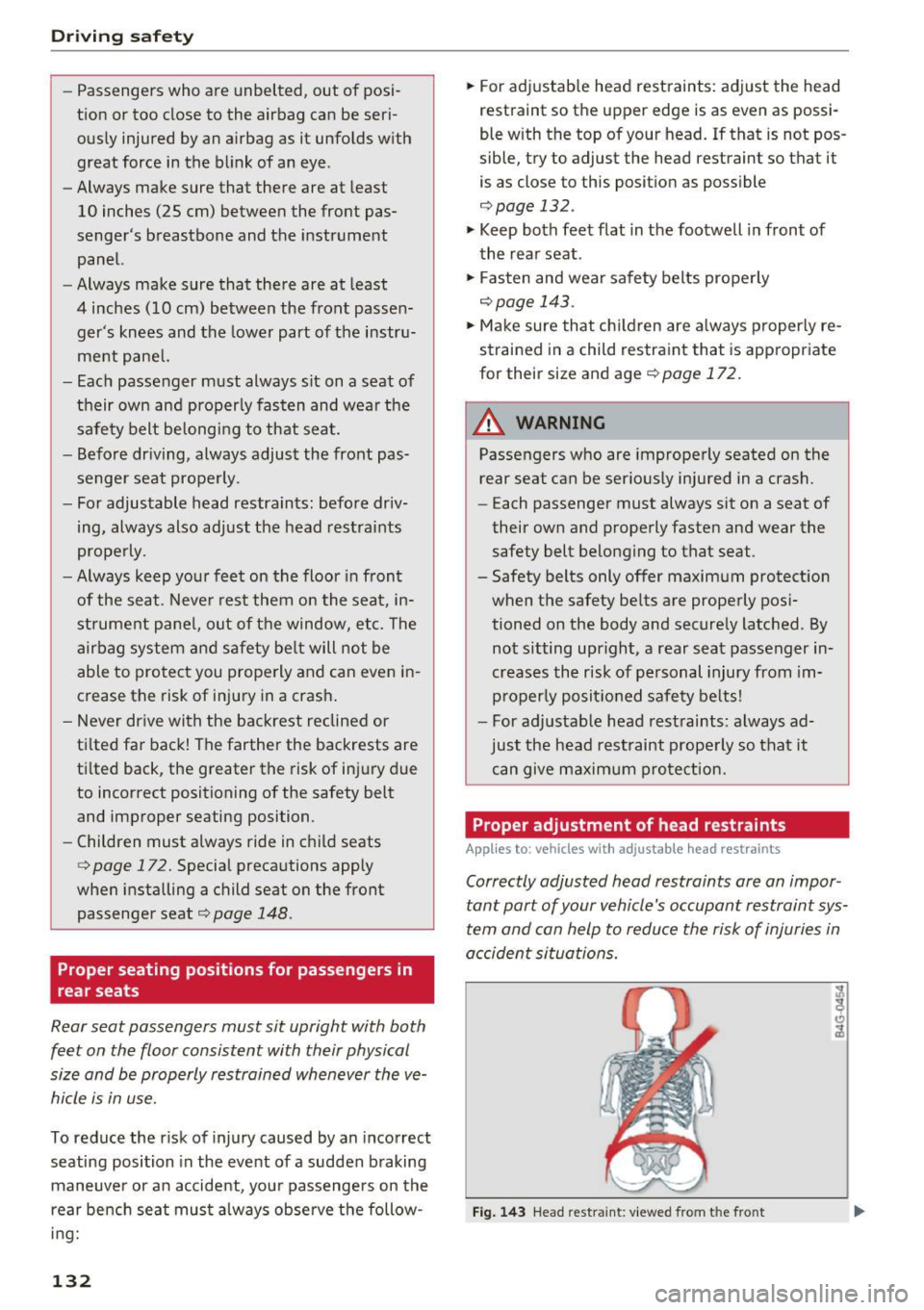
Correctly adjusted head restraints ore an impor
tant part of your vehicle's occupant restraint sys
tem and can help to reduce the risk of injuries in
accident situations.
Fig. 143 Head restraint : viewed from t he front
Page 135 of 284
co
co
.... N
" N .... 0
00
\.J '
achieve the best protection. .,. Adjust the head restraint so the upper edge is
as even as possible with the top of your head. If
that is not possible, try to adjust the head re
straint so that it is as close to this position as
poss ible ¢
fig. 143. Move the head restraint so
that it is as close to the back of the head as
possible.
... If there is a passenger on the rear center seat
ing posit ion*, slide the center head restraint*
upward at least to the next notch.
Adjusting head restraints
c> page 49.
_& WARNING
All seats are equipped with head restraints .
Dr iving without head restraints or with head
restraints that are not properly adjusted in
creases the risk of serious or fatal neck injury
dramatically. To help reduce the risk of injury:
- Always dr ive with the head restraints in
place and properly adjusted.
- Every person in the vehicle must have a
properly adjusted head restra int.
- Always make sure each person in the vehicle
properly adjusts their head restraint. Adjust
the head restra int so the upper edge is as
even as possible with the top of your head.
If that is not possible, try to adjust the head
restraint so that it is as close to this position
as possib le. Move the head restraint so that
it is as close to the back of the head as pos
sible.
- Never attempt to adjust head restraint
while driving. If you have driven off and
must adjust the driver headrest for any rea
son, first stop the vehicle safely before at
tempting to adjust the head restra int.
- Children must always be properly restrained in a ch ild restraint that is appropriate for
their age and size
c>page 172.
-
Driving safety
Examples of improper seating positions
The occupant restraint system can only reduce
the risk of injury if vehicle occupants are properly
seated.
Improper seating positions can cause serious in
jury or death . Safety belts can only work when
they are properly positioned on the body . Im
proper seat ing positions reduce the effectiveness
of safety belts and will even increase the risk of
injury and death by moving the safety belt to crit
ical areas of the body. Improper seating positions
also increase the risk of serious injury and death
when an airbag deploys and strikes an occupant
who is not in the proper seating position. A driver
is responsible for the safety of all vehicle occu
pants and especially for children . Therefore:
... Never allow anyone to assume an incorrect
seating position when the vehicle is being used
c> .,& .
The following bulletins list only some sample po
sitions that will increase the risk of serious injury
and death . Our hope is that these examples will
make you more aware of seating positions that
are dangerous .
Therefore, whenever the vehicle is moving:
-never stand up in the vehicle
- never stand on the seats
- never kneel on the seats
- never ride with the seatback recl ined
- never lie down on the rear seat
- never lean up against the instrument panel
- never sit on the edge of the seat
- never sit sideways
- never lean out the window
- never put your feet out the window
- never put your feet on the instrument panel
- never rest your feet on the seat cushion or back
of the seat
- never ride in the footwell
- never ride in the cargo area
133