key AUDI A7 2017 Owner´s Manual
[x] Cancel search | Manufacturer: AUDI, Model Year: 2017, Model line: A7, Model: AUDI A7 2017Pages: 284, PDF Size: 72.29 MB
Page 61 of 284
co
co
.... N
" N .... 0
00
\.J '
Description
The climate control system warms, cools and re
moves humidity from the air in the vehicle interi
or. It is the most effective when the w indows and
sunroof* are closed. If there is a build-up of heat
inside the vehicle, ventilation can help to speed
up the cooling process.
I n all heating mode functions, except for defrost,
the blower on ly switches to a higher speed once
the engine coolant has reached a sufficient tem
perature .
Pollutant filter
The pollutant filter removes pollutants such as
dust and pollen from the air.
Key recognition
Appl ies to: ve hicles with de luxe a utoma tic clima te co ntro l
The blower setting and air distribution are stored
automatically and assigned to the remote control
key that you are using.
Appl ies to: ve hicles with 4 -zo ne del uxe automat ic cl imate
co ntrol
The climate control settings are automatically
stored and assigned to the remote control key
that is in use.
A WARNING
Poor visibility can lead to accidents.
- For safer driving, keep all windows free of
ice, snow and fog .
- Become familiar as quickly as possible with
the correct use and function of the climate
contro l system, especially with the defrost
ing and defogging function.
- When the temperature is below freezing,
only use the windshield washer system after
Warm and cold
the windshield has been warmed by the cli
mate control system. The washer fluid could
freeze on the windshield and impair visibili ty .
(D Note
-If you suspect that the climate control sys
tem is damaged, switch the system off to
prevent further damage and have it checked
by an authorized Audi dealer or authorized
Aud i Service Facility.
- Repairs to the Audi climate control system
require special technical knowledge and
special tools . See an authorized Aud i dealer
or authorized Audi Service Facility.
@ For the sake of the environment
-To save fuel, turn off cooling mode by press
ing the
IAJCI button . This will also reduce
em iss ions.
- In vehicles w ith a diesel engine, you can
switch the auto supplementary heater off in
the Infotai nment system.
(D Tips
- To prevent interference with the heat ing
and cooling output and to prevent the win
dows from fogging over, the air intake in
front of the windshie ld must be free of ice,
snow or leaves.
- Condensation from the cooling system can
dr ip and form a puddle of water under the
vehicle. This is normal and does not mean
there is a leak.
- The energy management system may tem
porarily switch off certain functions, such as
the seat heating* or rear window defogger .
These systems are avai lable aga in as soon
as the energy supply has been restored.
59
Page 66 of 284
Warm and cold
quickly. The auxiliary heating act ivates automati
cally when the when the automatic auxiliary
heater funct ion is act ivated .
Steering wheel heating
Applies to: vehicles with steering wheel heating
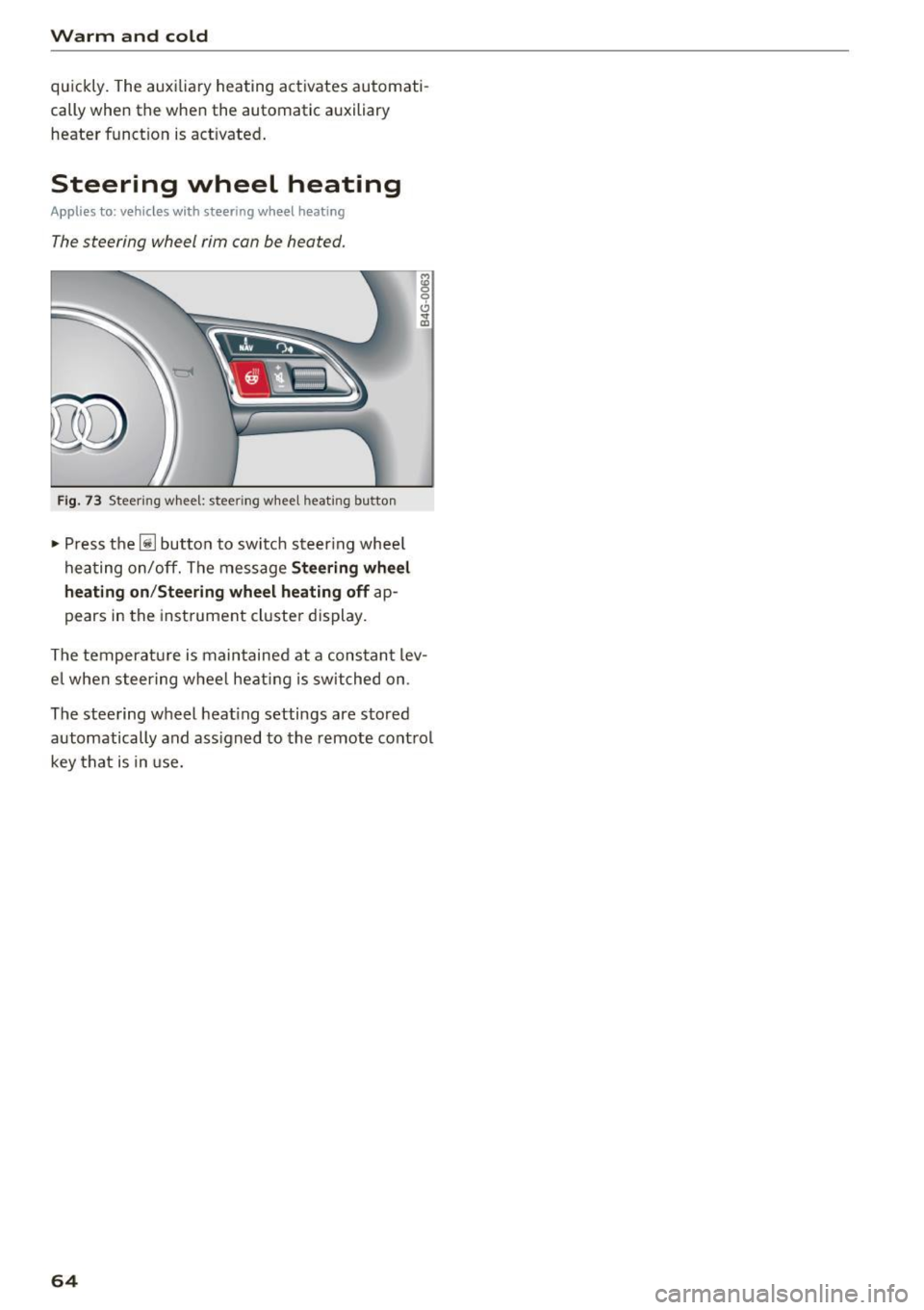
The steering wheel rim can be heated.
Fig . 73 Steer ing w heel: stee ring w heel heat ing but to n
• Press the lil bu tton to sw itch s teer ing whee l
hea ting on/off. The message
St ee ring wh eel
h eating on /Steering wheel heating off
ap
pears in the instrument cluster display.
The tempera tu re is maintained at a cons tant lev
e l when s teering wheel heating is switched on .
The stee ring wheel heat ing settings are stored
automatically and ass igned to the remote cont rol
key t hat is in use.
64
Page 72 of 284
Driving
Stopping the engine
~ Bring the vehicle to a fu ll stop.
~ Move the selecto r leve r to the P or N position.
~ Press the I START ENGINE STOPI r=.> page 69,
fig . 76 button .
Steering lock
1
)
The stee ring locks when you tu rn the engine off
using the
!START ENGINE STOP ! button a nd
ope n the dr iver's door. The locked stee ring helps
p revent vehicle theft .
Emergency off function*
If i t is absolutely necessary, the engine can also
be turned off while dr iv ing in the R o r D/S se lec
to r lever position at speeds below 6 mph (10 km/
h). To stop the engine , press and hold t he
I START ENGINE STOP I button and also press the
b rake pedal.
_& WARNING
- Never tu rn
off the engine before the veh icle
has come to a comp lete stop. The full func
t ion of the b rake booster and the powe r
steering is not guaranteed . Yo u may need to
use more force when braking or s teer ing.
Beca use you cannot brake and stee r as you
us ually wou ld, this could lead to accidents
and serious injur ies.
- Always ta ke the key with you w hen ever you
l eave yo ur vehicle. Othe rw ise, the engi ne
c oul d be s ta rt ed o r elec tri ca l eq uip me nt
s u ch a s the power windows cou ld be operat
ed. This can lead to se rious i njur y.
- Fo r sa fety reasons, always park the ve hicle
with the se lector lever in the P position.
Otherwise, there is the risk that the vehicle
cou ld roll unintentionally .
{[) Note
I f the eng ine has been under heavy load for
an extended per io d of t ime, hea t builds up in
the engine compartment after the eng ine is
sw itched off and there is a risk of damaging
the engine. For this reason, let the engine run
l) T hi s function is not avai lable in all countries.
70
at idle for approximate ly two minutes before
shutting it
off .
(D Tips
Afte r th e engine h as been switched off, t he
r adiator fan can contin ue to run for up to 10
minutes -even w ith the ignition switched off.
It can also switch on again after some time if
the coo lant tempe rature r ises as the result of
h eat bu ildup or if the engine is already warm
and the e ng ine compartment is also heated
by the sun's rays.
Messages
Turn off ignition before leaving car
This message appears and a warning tone sounds
i f you open the drive r's doo r when the ign it ion is
switched on.
Press brake pedal to start engine
This message appears if yo u do not p ress the
brake peda l when starting the engine.
II Key not in vehicle?
This indicator light turns on and this message ap
pears if the ignition key was removed from t he
vehicle when the engine was running.
If the ig ni
tion key is no lo nger in the vehicle, you cannot
swi tch on the igni tion or st art the engine once
you stop it. You also cannot lock the vehicle from
the outside .
Shift to P, otherwi se vehicle can roll aw ay.
Door s do not lock if lever is not in P.
This message a ppears for safety reasons if t he
t ransm iss ion is not in the P posi tion when you
swi tch the ig nition off. Move the selec to r l ever to
t h e P posit ion . Othe rw ise the vehicle is no t pro
tected from ro lling and it cannot be locked.
II Key is not recognized. Hold back of key
against marked area. See owner' s manual
If the indica to r light turns on and this message
appears, there is a ma lfunction
r=.> page 71. ..,.
Page 73 of 284

Turn off ignit ion before lea ving vehi cle. Batte ry
i s di schar ging
This message appea rs if the driver's door is
opened while the ignition is sw itched on . Always
switch off the ignition if you are leaving the vehi
cle. Also see
9 page 73.
Shift to P and turn off i gnition b efore l eaving
ca r, otherwi se vehicle can roll aw ay
This message appears if the driver's door is
opened while the igni tion is sw itched on and the
selecto r lever is not in t he P posit ion. Move the
selecto r lever in to the P pos ition and switch the
ignit ion off when you exit the vehicle. Otherwise
the vehicle could roll. A lso see
9 page 73 .
Starting the engine when there is a
malfunction
It may not be possible to start the engine under
certain circumstances, for example if the battery
in the vehicle key is drained, if interference is af
fected the key or if there is a system malfunc tion .
Fig. 77 Center console/remote control key : starting the
engine if there is a malfunctio n
Requirement: the message Key is not r ecog
nized . Hold ba ck of key again st mark ed area .
See owner 's manual
must appear and the DJ in
d icator light mus t turn on.
• Hold the remote control key in the location in
dicated as shown in the illustrat ion
f >l) c::> fig . 77 .
• Press the b rake pedal.
• Press the
I START ENGINE STOPI button. The
~ engi ne will s tart .
.... N
" N .... 0
00
~ ll Market -specific
Drivi ng
• Drive to an authorized Audi dea ler or author
ized Audi Service Facility immediately to have
the malfunction corrected.
@ Tips
You can view the message again by pressing
the
I START ENGINE STOP I button.
Start-Stop system
Description
Applies to: veh icles w ith Start/Stop system
T he Sta rt/Stop system can help increase fue l
eco nomy and reduce CO2 emissions.
In Start/Stop mode, the engine shuts off auto
matically when the vehicle is stopped, such as at
a traffic ligh t. The ignition rema ins switched o n
dur ing this stop phase. The engine w ill restart
automat ica lly when needed.
Applies to A7 Sportback: the Start/Stop system
activates automatically once the ignit ion is
switched on.
Applies to 57 Sportback: the last Start/Stop sys
tem setting is restored when the ignit ion is
switched on.
Ba sic requirements for Start /Stop m ode
- The driver's door must be closed .
- The driver's seat belt much be fastened.
- The hood must be closed.
- The vehicle must have dr iven faster than
2.5 mph (4 km/h) since the last time it stop
ped .
- A trailer must not be hitched to the vehicle.
(D Note
A lways swi tch the Sta rt/S top sys tem off when
driv ing th ro ugh wa ter
c::> page 71.
© Tips
The engine stops short ly before the ve hicle
comes to a s top
l) .
71
Page 77 of 284

co
co
.... N
" N .... 0
00
\.J '
brake similar to heavy braking. ESC and the
associated components (ABS, ASR, EDL)
cannot overcome the laws of physics . In cor
ners and when road or weather conditions
are bad, a full brake application can cause
the vehicle to skid or the rear end to swerve,
which increases the risk of an accident.
- If the power supply fails, you cannot set the
parking brake if it is released. In this case,
park the vehicle on level ground and secure
it by placing the selector lever in the P posi
tion. See an authorized Audi dealer or au
thorized Audi Service Facility for assistance.
- Always take the vehicle key with you when leaving your vehicle, even for a short period
of time. This applies particularly when chil
dren remain in the vehicle. Otherwise chil
dren could start the engine, release the
parking brake or operate electrical equip
ment such as power windows, which in
creases the risk of an accident.
- No one should remain in the vehicle when it
is locked -especially children. Locked doors
make it more difficult for emergency work
ers to get into the vehicle, which puts lives
at risk.
(D) Tips
When stopping at a traffic signal or stopping
in city traffic, you can set the parking brake
manually. The vehicle does not have to be
held with the brake pedal. The parking brake
eliminates the tendency to creep when a se
lector lever position is engaged. As soon as
you press the accelerator pedal, the parking
brake releases automatically and your vehicle
starts to move
c::> page 75.
(D Tips
- Occasional noises when the parking brake is
set and released are normal and are not a
cause for concern.
- The parking brake goes through a self-test
cycle at regular intervals when the vehicle is
stopped. Any noises associated with this are normal.
Driving
- If there is a power failure, the parking brake
will not set if it is released, and it will not
release if it is set
c::> &. . See an authorized
Audi dealer or authorized Audi Service Fa
cility for assistance.
Starting from a stop
Various convenience and safety functions may be
available when the vehicle begins driving, de
pending on vehicle equipment .
Starting on hills with the parking brake set
Requirement: the driver's door must be closed
and the driver's safety belt must be fastened.
.,. To start driving comfortably when on a hill, set
the parking brake and begin driving as usual.
The braking force of the parking brake does not
release automatically until the wheels build up
enough driving force.
Starting on hills with hill hold assist
Hill hold assist makes it easier to start on hills.
Requirement: the driver's door must be closed
and the engine must be running.
.. To activate hill hold assist, press and hold the
brake pedal for several seconds. The vehicle
must be in an uphill direction of travel.
After releasing the brake pedal, the braking pow er is maintained for a brief moment
c::> ..&. to pre
vent the vehicle from rolling back when starting .
During this time, you can easily begin to move
your vehicle.
_& WARNING
A ppl ies to: ve hicles with hill hold assist
- If you do not begin driving immediately or
the engine stalls after releasing the brake
pedal, your vehicle may begin to roll back
ward. Press the brake pedal or set the park
ing brake immediately .
- The intelligent technology of hill hold assist
cannot overcome the limitations imposed by
natural physical laws. The increased comfort
offered by hill hold assist should not cause
you to take safety risks.
Ill-
75
Page 95 of 284
.. To resume cr uise control, press the b rake pedal
and pull the lever toward you into position @.
A WARNING
It is dangerous to activate cruise control and
resume the stored speed when the current
road, traffic or weather conditions do not per
m it this. This increases the risk of an acc ident.
Setting the distance
App lies to: veh icles with Audi adaptive cruise contro l
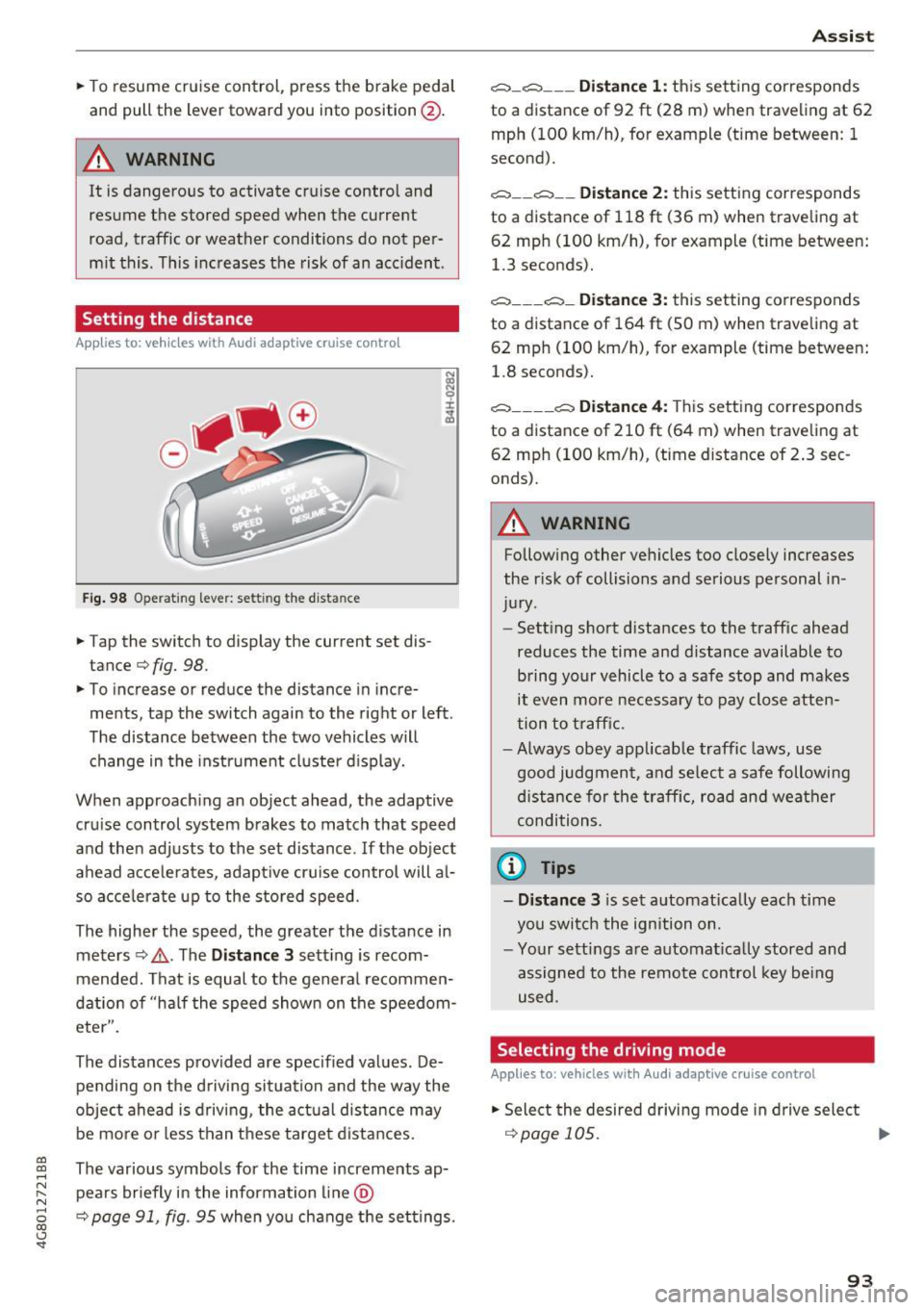
Fig . 98 O perat 1ng leve r: set ting the d ista nce
.. Tap the switch to display the current set dis
tance¢
fig. 98.
.. To increase or reduce the distance in incre
ments, tap the switch again to the right or left .
The distance between the two vehicles w ill
change in the instrument cluste r d isplay.
When approach ing an object ahead, the adaptive
cru ise control system b rakes to match that speed
and the n adj usts to the set distance . If the ob ject
a head acce le ra tes, adapt ive cruise control will a l
so acce le ra te up to the s to red speed .
The higher the speed, the greater the d istance in
meters ¢,&. . The
Distance 3 sett ing is recom
mended. That i s equal to the genera l recommen
dation of "ha lf the speed shown on the speedom
eter".
The distances prov ided are specified values . De
pending on the d riving si tuation and the way the
ob ject ahead is d riving , the act ual d istance may
be mo re o r less t han t hese targe t dista nces.
co ~ The various symbols for the time increments ap-
~ pea rs briefly in the information line @
8 ¢ page 91, fig. 95 when yo u change the set tings. 00 <..:l 'SI"
A ss ist
c:::::, _c:::::, ___ Distance 1: this sett ing corresponds
to a distance of 92
ft (28 m) when traveling at 62
mph (100 km/h), for example (time between: 1
second).
c:::::, __ c:::::, __ Distance 2: this setting cor responds
to a distance of 118 ft (36 m) when traveling at
62 mp h (100 km/h), for example (time between:
1.3 seconds).
c:::::, ___ c:::::,_ Distance 3: this setting corres ponds
to a distance of 164 ft (SO m) when trave ling at
62 mp h (100 km/h), for example (time between:
1.8 seconds).
c:::::, ____ c:::::, Distance 4: This sett ing correspon ds
to a distance of 210 ft (6 4 m) when traveling at
62 mp h (100 km/h), (time distance of 2 .3 sec
onds).
A WARNING
-Following other ve hicles too close ly incre .ases
the r isk of collisions a nd serious personal in
ju ry.
- Sett ing s hort d ista nces to the traff ic ahead
reduces the time and distance available to b ring yo ur vehicle to a safe stop and makes
it even more necessa ry to pay close atten
tion to t raffic.
- Always obey app licab le traffic laws, use
good judg men t, a nd se lect a safe following
di stance f or the traff ic, ro ad an d wea ther
condi tion s.
@ Tips
- Distance 3
is s et au tomatically each time
you swi tch the ign ition on.
- Yo ur sett ings a re automat ica lly stored and
assigned to the remote control key be ing
used .
Selecting the driving mode
Applies to: vehicles with Audi adaptive cruise control
.. Select the desire d driving mode in dr ive select
¢page 105 . ..,.
93
Page 96 of 284

Ass is t
@ Tips
Your settings are automatica lly stored and as
signed to the remote control key be ing used .
Request for driver intervention
App lies to: ve hicles w ith Audi adaptive cruise co ntro l
Fig . 99 Instrum ent clus te r: r eq ues t fo r drive r interve ntio n
In certain situations, the system w ill request you
to take action :
- if t he braking from the adapt ive cr uise control
system is no t enough to maintai n enough dis
tance to the object ahead.
The dange r is ind icated by the . indicator light
~ fig. 99. An audio s ignal will also sound.
- Press the brake pedal to slow your vehicle down .
Audi braking guard
Applies to: ve hicles w ith Audi adaptive cruise co ntro l
Fig . 100 In str um ent clus te r: appro ach warning
The braking guard uses radar sensors and a video
camera .
It also functions within the limits of the
l) This is no t a vail able in som e coun trie s.
94
system when adaptive cru ise control is switched
off.
What can the braking guard do ?
When detected in time, the system can assess
dange rous si tu at ions where an object ahead
brakes sudden ly or if yo ur own vehicle is trave ling
at a h igh speed and approach ing an ob ject that is
moving more slow ly. The braking guard does not
react if it cannot detect the situation.
The system advises you of var ious dange rous sit
uations :
- The
di stan ce warning occu rs if you dr ive too
close ly to the object ahead fo r a long per iod of
time .
If the object ahead brakes strongly, you
would not be ab le to avoid a co llis ion. The .
indicator light appears as an indication for this .
- T he
appr oach w arning occurs when an object
ahead is trave ling more slowly or brakes
strongly. When this warning occurs, it may only
be possible to avoid a collis ion by swerving or
brak ing strongly . The danger is indicated by the
• indicator light
¢fig. 100 . An audio signal
w ill also so und .
If you do not react early enough or at all to a dan
gerous situation, the braking guard supports you
with a braking intervention .
- If a co llision is imminent, the system wi ll first
provide an
acute warning by braking sharply .
- If you do not react to th e acute warning, the
b raking guard can inc rease the braking force
w ith in the lim its of the system
1> . This reduces
the vehicle speed in the event of a coll is ion.
- T he system can in itiate complete dece leration
shortly before a collision
l) . Full deceleration at
high speeds occurs only in veh icles with adap
tive cruise control and side assist (pre se nse
plus) .
- If the braking guard determ ines that you are
not braking s trongly enough when the re is a n
impending coll is ion, it can increas e the b raking
force.
- The p re sense funct io ns also engage w hen
there is an impending collision ~
page 138.
Page 97 of 284

co
co
.... N
" N .... 0
00
\.J '
You can switch the braking guard and the dis
tance/approach warning on or off in the Infotain
ment system
c::, page 95 , Settings in the Info
tainment system.
A WARNING
Lack of attention can cause collisions, other
accidents and serious personal injuries. The
braking guard is an assist system and cannot
prevent a collision by itself. The driver must
always intervene . The driver is always respon
sible for braking at the correct time.
- Always pay close attention to traffic , even
when the braking guard is switched on . Be
ready to intervene and be ready to take
complete control whenever necessary. Al
ways keep the safe and legal distance be
tween your vehicle and vehicles up ahead.
- Braking guard works within limits and will
not respond outside the system limits, for
example when approaching a stopped vehi
cle or stationary obstacle (end of a traffic
jam or vehicle that has broken down in traf
fic).
- Always remember that the radar sensor for
the braking guard works only within defined
detection and range limits that may prevent
the proper detection of other vehicles .
- The radar sensor's function and range can
be reduced by rain, snow and heavy spray.
Moving vehicles up ahead may not be
promptly detected or may not be detected
at all.
- Reflective surfaces including crash barriers
or tunnel entrances may impair the function
of the radar sensor.
{!) Tips
- You can cancel the braking with increasing
force that is initiated by the system by brak
ing yourself, by accelerating noticeably or
by swerving.
- Keep in mind that braking guard can brake
unexpectedly. Always secure any cargo or
objects that you are transporting to reduce
the risk of damage or injury .
Assist
Settings in the Infotainment system
Applies to: vehicles with Audi adaptive cruise control
.,. Select: the I CAR! function button > (Car)*Sys·
terns
control button > Driver assistance > Audi
braking guard.
System -
Switch the braking guard On/Off. When
you switch the ignition on, the message
Braking
guard: Off
appears if the system is switched off.
Early warning -The distance and approach warn
ings in the display can be switched
On/Off.
(D Tips
- Your settings are automatically stored and
assigned to the remote control key being
used.
- If you restrict or switch off the ESC, the
braking guard also switches itself off
¢ page 121 .
-Switch braking guard off when you are load
ing the vehicle onto a vehicle carrier, train,
ship or other type of transportation. This
can prevent undesired warnings from the
braking guard system.
Messages
Applies to : vehicles with Aud i adapt ive c ru ise control
Braking guard: Off
This message appears if the system is switched
off through the Infotainment system. Otherwise,
if the system is turned off, the information ap
pears every time shortly after the start of the
trip .
The message also appears if the system is not
available due to a malfunction or if the ESC is
switched
off ¢page 121. If this is the case, the
system will not provide warnings about a possi
ble collision.
Braking guard: engaged
This message appears if a sharp brake pressure
was applied due to an acute warning .
ACC: unavailable
ACC and Audi braking guard: Unavailable
95
Page 101 of 284
co
co
.... N
" N .... 0
00
<.,;) 'SI"
@ Tips
Your settings are automatically stored and assigned to the remote control key being used.
Audi side assist
Description
A ppl ies to: ve hicles with Audi side assist
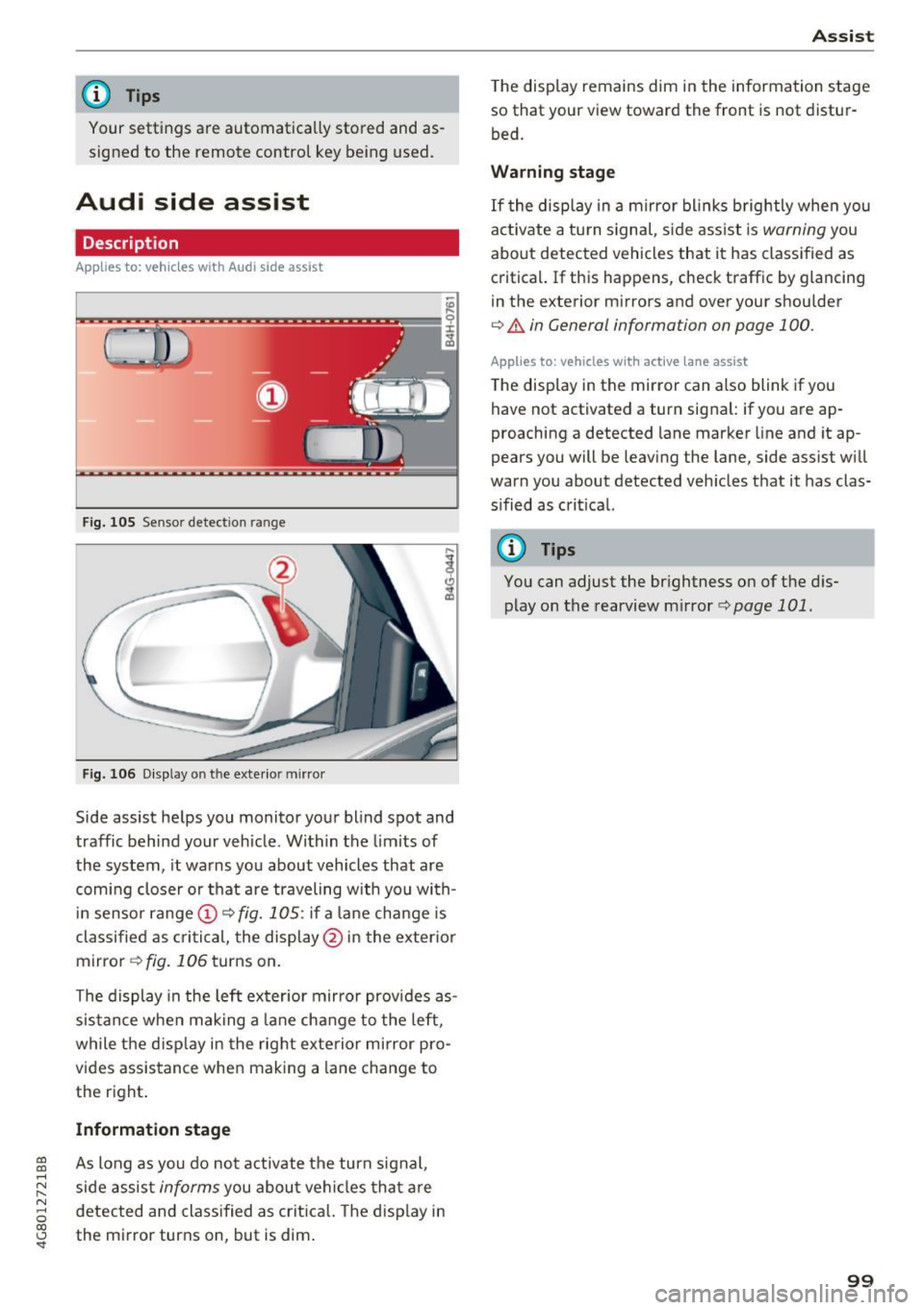
Fig. 105 Senso r detection range
Fig. 106 D isp lay on the exte rior mirro r
Side assist helps you monito r your blind spot and
traffic behind your vehicle . Within the limits of
the system, it wa rns you about vehicles that are
com ing closer or that are traveling with you with
in sensor range
(D c> fig. 1 OS: if a lane change is
classified as cri tic al, the display @ in the exter io r
mirror
c> fig. 106 turns on.
The display in the left ex ter ior mir ror provides as
sis tance when mak ing a lane change to the left,
while the d isp lay in the right exterior mirror pro
vides assis tance when making a lane change to
the r ight .
Information stage
As long as you do no t activate the turn s ignal,
side assis t
informs you about ve hicl es that a re
d etec ted and class ified as crit ica l. T he disp lay in
the mi rror turns on, but is dim .
Ass ist
The display remains dim in the information stage
so that your view toward the front is not distur
bed.
Warning stage
If the display in a mirror bl inks b rightly when you
act ivate a tu rn s ignal, s ide assist is
warning you
about detected vehicles that it has classified as
c ritical. If this happens, check traffic by glancing
in the exterior m irrors and over your shoulder
c> .&. in General information on page 100.
App lies to: vehicles wit h active lane assist
The display in the mirror can also blink if you
have not activated a turn signal: if you are ap
proaching a detected lane marker line and it ap
pears you will be leaving the lane, side assist w ill
warn you about detected veh icles that it has clas
s ified as crit ical.
@ Tips
You can adjust the br ightness on of the d is
play on the rearview m irror
c> page 101.
99
Page 104 of 284

Ass is t
@ Tips
- Side assist is not active whi le you are mak
i ng the adjustment.
- Your settings are automatically stored and
assigned to the remote control key being
used.
Messages
Applies to: vehicles with Audi side assist
If side ass ist switches off by itself, the LED in the
button turns off and a message will appear in the
instrument cluster display:
Audi s ide assi st: Curr ently un availabl e. No
s enso r vi sion
The radar sensor vis ion is impaired. Do not cover
the area in front of the sensors with bike wheels,
stickers, dirt or other objects . Clean the area in
front of the sensors, if necessary ¢
page 100,
fig . 108.
Aud i side as sist: Currently un avail able
Side assist cannot be switched on at th is time be
cause there is a malfunction (for example, the
battery charge level may be too low).
Aud i side a ssist: S ys tem fault!
The system cannot guarantee that it will detect
vehicles correctly and it has switched off. The
sensors have been moved or are faulty . H ave the
system checked by an authorized Audi dealer or
authorized Audi Service Facility soon .
Audi side assi st : Unav ailable wh en towing
Side assist switches off automatically when a fac
tory-installed trailer hitch is connected to the
electrical connector on the trailer. There is no
guarantee the system will switch off when using
a retrofitted tra iler hitch. Do not use side ass ist
when towing a trailer.
102
Night vision assist with
pedestrian and wild
animal detection
Description
Applies to : vehicles with night vision assist
The night vision assist con detect, highlight and,
if necessary, warn about pedestrians and large
wild animals.
Night vision assist with pedestrian and wild ani
mal detection assists you at night by us ing an in
frared camera to monitor the area in front of
your vehicle, within the limits of the system. It
can display objects up to a distance of approxi
mately 1000 feet (300 m). The thermal image
detected by the camera is shown in the instru
ment cluster disp lay. Warm areas appear lighter
and cold areas appear darker.
Highlighting detected pedestrians and wild
animals
Applies to: vehicles with n ight vis ion assist
Fig . 110 In stru men t cl ust er: yellow highlighted pedes ·
trians
Fig. 111 Instrument cl uster: symbol when the infrared im
age is not visible
Within the limits of the system, the night v is io n
ass ist can detect pedestr ians and wild animals ..,..