lights AUDI A7 2017 Owner´s Manual
[x] Cancel search | Manufacturer: AUDI, Model Year: 2017, Model line: A7, Model: AUDI A7 2017Pages: 284, PDF Size: 72.29 MB
Page 45 of 284
co
co
.... N
" N .... 0 co <.,;) 'SI'
turn signal lever. The emergency flashers stop
temporarily .
The emergency flashers also wo rk when the igni
tion is turned off .
Interior Lighting
Front and rear interior lighting
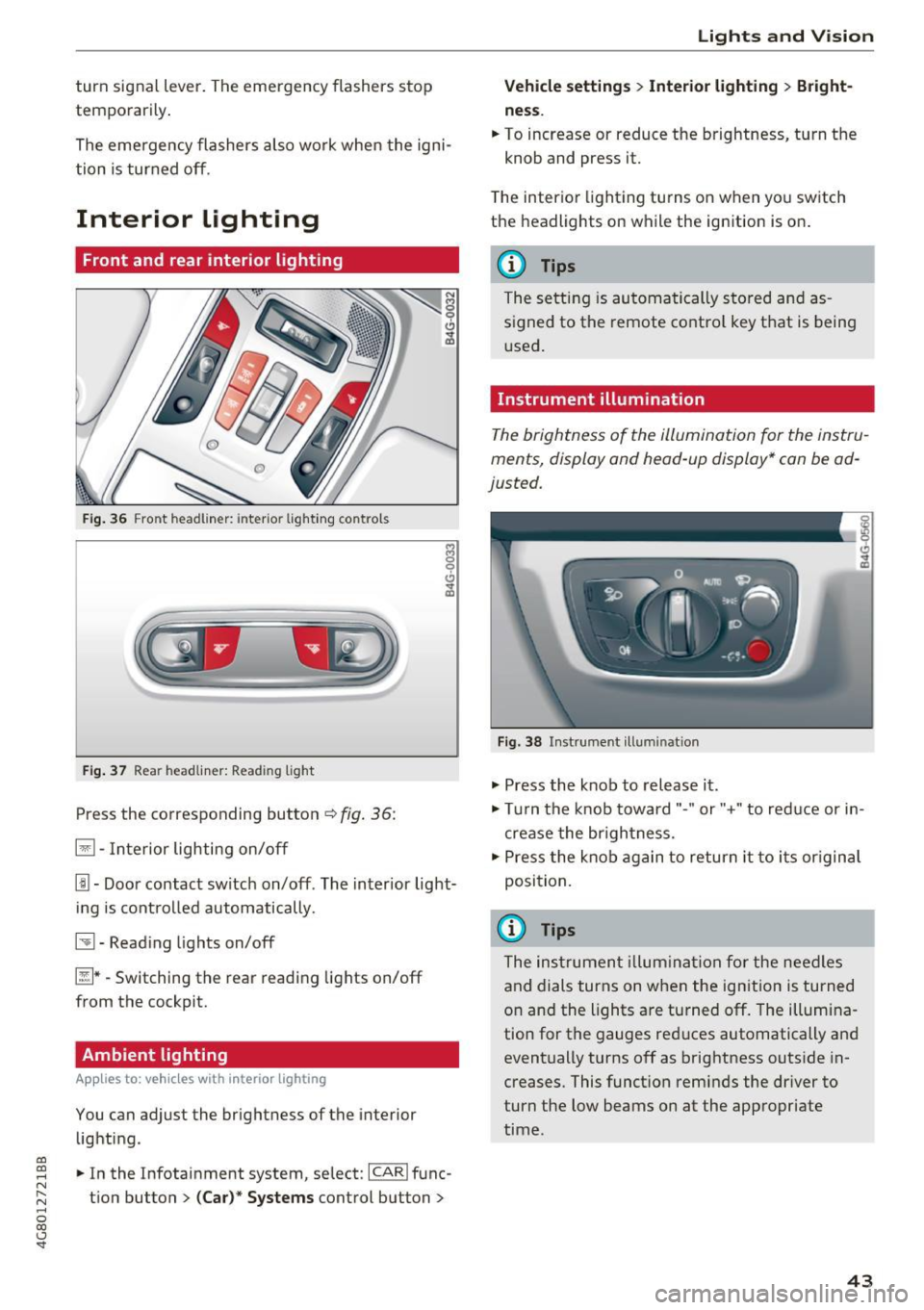
Fig. 36 Fro nt hea dliner: inter io r light ing co ntro ls
F ig. 37 Rea r headliner: Read ing light
Press the corresponding button c:::> fig . 36:
El -Interior lighting on/off
I!!-Doo r contact switch on/off . The inter ior light
i ng is cont rolled automatically.
~ -Read ing lights on/off
~ * -Switching the rear read ing lights on/off
from the cockpit.
Ambient lighting
App lies to: vehicl es with interior lighting
You can adjust the brightness of the interior
lighti ng .
.. In the Infotainment system, se lect:
ICARI func
tion button
> (Ca r)* Systems control button >
Lights and V ision
Vehicle settings > Interior lighting > Bright
ne ss .
.. To increase or reduce the brightness, turn t he
knob and press it.
T he inter ior lighting tu rns on when yo u sw itch
the headlights on while the ignition is on .
(D Tips
The setti ng is au toma tically s to red and as
s igned to the remote cont ro l key t hat is being
u sed .
Instrument illumination
The brightness of the illumination fo r the instru
ments, display and head-up display* con be ad
justed.
Fig . 38 Instrument ill um ination
"' Press the knob to release it .
"' Tur n the knob toward"-" or"+" to red uce or in
crease the br igh tness.
.,. Press the knob again to return it to i ts or igin al
posi tion.
(D Tips
The ins trumen t illum ina tion for the need les
and dials turns on when the ignition is turned
on and the lights a re turned off. The illumi na
tion for the gauges red uces automatically and
eventually turns off as brightness outside in
creases. This funct ion rem inds the dr iver to
turn the low beams on at the appropriate
time .
43
Page 46 of 284

Lights and Vision
Vision
Adjusting the exterior mirrors
Fig. 39 Drive r's door: knob for the exterior mirrors
Turn the knob to the desired position:
Q/ P -adjusts the left/right exterior mirror.
M ove the knob in the desired direction.
®-Heat the mir ror glass depend ing on the o ut
side temperature .
~ -Folds the exterio r m irrors* . In the Infotain
men t sys tem, yo u can selec t if the mirrors fold in
automatically when you lock the vehicle
q page 32 .
Front passenger's exterior mirror tilt
function*
To help you see the curb w hen back ing into a
parking space, the surface of the mirror tilts
slightly. Fo r thi s to happen, the knob must be in
the posit io n for the front passenger's outside
mirror .
You can adjust the t ilted mi rror surface by turn
ing the knob in the desired direction. When you
move out of reverse and into anothe r gear, the
new mirror position is stored and assigned to the
key you are us ing.
The mirror goes back into its o rigina l position
once yo u drive forward faster than 9 mph
(15 km/h) or turn the ignition off.
A WARNING
Curved mirror surfaces (convex or aspheric*)
enlarge the field of vision . However, they
ma ke objects i n the mirror appear smaller
and farther away. Your may estimate i ncor-
44
rect ly w hen you use these mirro rs to gauge
your d istance from t he veh icles beh ind you
when chang ing lanes, which inc reases the risk
of an acc ident.
(D Note
- If the mi rror housing was moved by fo rce
( f or example, by runn ing into an object
when maneuvering the vehicle), the m irror
must be fo lded a ll the way in us ing the pow
er folding fu nction . T he m irror hous ing
must not be moved back into place by hand
because t his wo uld impair the func tion of
t he mir ror mechani sm.
- If you wash the vehicle in an automatic ca r
wash, you mus t fold t he ex ter ior mirro rs in
to reduce the r is k of damage to the m irro rs.
N ever fold power fo ld ing exterior mi rrors *
by hand . On ly fold them in and out using
the power controls .
(D Tips
-If the power adjusting func tion malfunc
tions, the glass in both mirrors can be ad
justed by p ressing on the edge of it by hand.
- The e xte rior m irro r settings are stored w it h
the memory fu nctio n* ¢
page 5 0.
Dimming the mirrors
Your vehicle is equipped with a manual or auto
matic* dimming rearview mirror.
Fi g. 40 A utomat ic dimming rearv iew mirr or*
Manual dimming rearview mirror
.,. Pull the lever on the bottom of the mirror back. Iii>-
Page 47 of 284

co
co
.... N
" N .... 0
00
<.,;) 'SI"
Automatic dimming rearview mirror*
• Press the button@¢ fig. 40. The indicator
light @ turns on. Interior and exterior mirrors*
will dim when there is incoming light (such as headlights from the rear) .
A WARNING
If the glass on an automatic dimming mirror
breaks, electrolyte can leak out. This liquid
can irritate the skin, eyes and respiratory sys
tem . If there is contact with the fluid, flush
immediately with plenty of water . Consult a
physician if necessary.
- Repeated or long-term exposure to electro
lyte fluid can lead to irritation of the air
ways, especially in people with asthma or
other respiratory conditions. Take deep
breaths immediately after leaving the vehi
cle or, if this is not possible, open all of the
doors and windows as wide as possible.
- If electrolyte fluid enters the eyes, flush
them thoroughly with a large amount of
clean water for at least 15 minutes and then
seek medical attention.
- If electrolyte fluid comes into contact with
the skin, flush the affected area with clean
water for at least 15 minutes and then clean
with soap and water and seek medical at
tention . Clean affected clothing and shoes
thoroughly before wearing again .
- If the fluid was swallowed and the person is conscious, flush the mouth with water for at
least 15 minutes. Do not induce vomiting
unless this is recommended by medical pro
fessionals. Seek medical attention immedi
ately.
(D Note
If the glass on an automatic dimming mirror
breaks, electrolyte can leak out. This liquid
damages plastic surfaces and paint. Clean
this liquid as quickly as possible, for example
with a wet sponge.
Lights and Vision
(D Tips
- If the light reaching the rearview mirror is
obstructed, the automatic dimming mirror
will not function correctly,
- The automatic dimming mirrors do not dim
when the interior lighting is turned on or
the reverse gear is selected.
Sun visors
[ }
Fig. 41 Front passenger's s
ide: sun visor
The sun visors for the driver and front passenger
can be released from their mounts and turned to
ward the doors@.
The mirror light switches on when the cover over
the vanity mirror @opens.
Sunshade
App lies to: vehicles with sunshade
The sunshade is located on the luggage com
partment shelf.
@0
------...._ ·_· --- "'.
Fig. 42 Sun sh ade in lowered pos itio n
When the sunshade is in the lowered position, it
is secured in the retainer @.
• To raise @ the sunshade, remove it from the
retainer.
45
Page 48 of 284

Lights and Vision
_& WARNING
Do not use the sunshade to secure cargo. The
luggage compartment cover is not a surface
for storing objects . Objects placed o n the cov
er could endange r all vehicle occupants dur
ing sudde n braking maneuvers or in a crash .
Windshield wipers
Switching the windshield wipers on
Fig. 4 3 Winds hield w iper lever
Move the wi ndshield wipe r lever to the corre
spon ding pos ition:
@ -windshie ld w ipers off
g
"' 0 ± .. a,
© -rain sensor mode . T he w indshield wipers
sw itch on once the vehicle speed exceeds approx
imately 2 mph (4 km/h) and it is ra ining . T he
h igher the ra in sensor sensitivity is set (swi tc h @
to the r igh t), the earlie r the windshie ld w ipers re
a ct to moist ure on the w indshield . Yo u can deac
tivate the rain sensor mode in the Info tainment
system, wh ic h sw itches the int ermitte nt mode
on. Se lect : ICAR !funct ion button>
(Car )* sys
tems
contro l button > Dr iver ass istance > Rain
sensor > Off .
In intermittent mode, you can ad
just the interval time using the sw itch @.
@-slow wiping
@-fast wiping
©-sing le w ipe If you hold the lever in th is posi
tion longer, t he wipers sw itch from s low w iping
to fast wip ing .
® -clean the windsh ield The wipe rs wipe one
time afte r seve ra l seconds of dr iv ing to remove
wa te r drop lets . You can switch th is func tion off
46
by moving the lever to posit ion ® within 10 sec
onds of the afterwipe. The afterw ipe funct ion is
reactivated t he next time you switch the ignit ion
on.
Cleaning the headlights* . The headlight washer
system * operates only when the low beam head
li ghts are on . If you move the lever to posit ion
® , the headlights and the night v ision assist
camera* are cleaned at intervals .
_& WARNING
-The rain sensor is o nly intended to ass ist t he
d river . The driver may still be responsible
for manually switc hing the wipers on bas ed
on vi sibility con ditions .
- The winds hield may not be t reated with wa
ter-repelling w indshield coating agents. Un
f a vo rable condit ions, such as wet ness, d ark
n es s or low su n, can resu lt in increased
glare, which increases the risk of an acci
de nt. W iper blade chatter is also possible.
- P roperly func tioning wi ndshiel d wipe r
blades are required for a clea r view and safe
driving
c::> page 47, Replacing windshield
wiper blades.
(D Note
- If there is frost, make sure the win dshield
wiper blades are not frozen to the wind
shield. Switch ing on the windshield wipers
when the blades are frozen to the wind
shield can damage the w iper blades.
- Prior to using a car wash, the windshield
w iper system must be sw itched off (lever in
posit io n 0) . This prevents the wipers from
switching on unintentionally and causi ng
damage to the windsh ield wiper sys tem .
@ Tips
-The windshie ld w ipers switch off when the
ignition is switc hed off. You can activate the
w indshield wipers after the ignition is
switched back on by moving the w indshield
wiper lever to a ny po sit ion .
- Wor n or dirty w indshield w iper blades resu lt
in s tre aking. This can affect the rain s enso r .,..
Page 49 of 284
co
co
.... N
" N .... 0
00
\.J -
blades regularly .
- The washer fluid nozzles for the windshie ld
washer system are heated at low tempera
tures when the ignition is on .
- When stopping temporarily, such as at a
traffic light, the speed of the windshie ld
wipers automatically reduces by one leve l.
Cleaning windshield wiper blades
Clean the wiper blades when you see wiper
streaks. Use a soft cloth and a glass cleaner.
.. Place the windshield wiper arms in the service
position
c::> page 47.
.. Fold the windshield wiper arms away from the
windshield .
.&_ WARNING
Dirty windshield wiper blades can impair v i
sion, which increases the risk of an accident .
Replacing windshield wiper blades
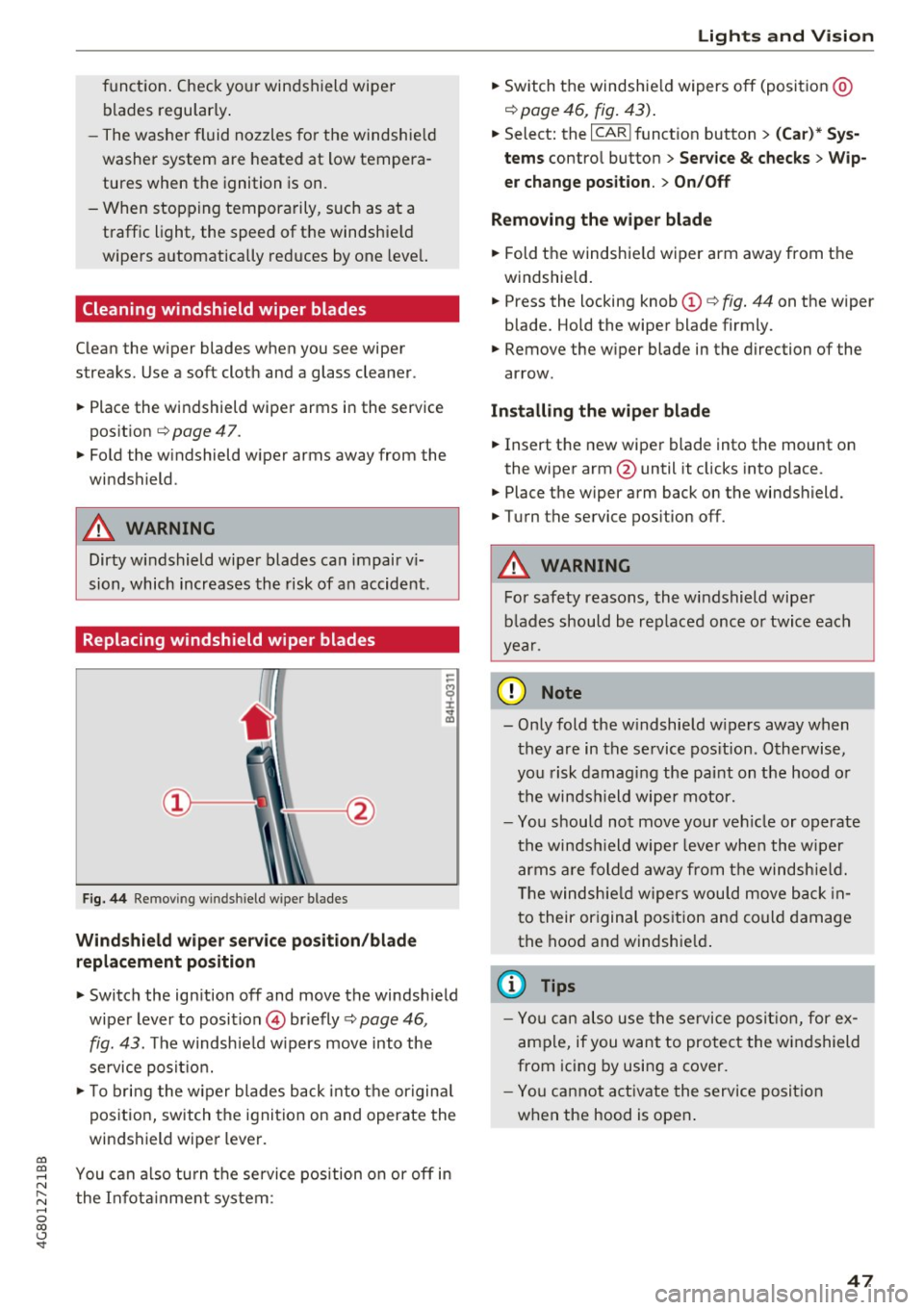
Fig. 44 Remov ing windshield wiper blades
Wind shield wiper ser vice po sition /blade
rep lacement position
-
.. Switch the ign ition off and move the windsh ield
wiper lever to position © briefly
c::> page 46 ,
fig. 43. The windsh ie ld w ipers move into the
service posit io n.
.. To bring the w iper blades back into the origina l
position, switch the ignition on and operate the
windshield wiper lever .
You can a lso turn t he service position on or
off in
the Infota inment system :
Lights and Vision
.. Sw itch the windshie ld wipers off (posit ion @
¢page 46, fig. 43) .
.. Select: the I CAR I funct ion button > (C ar )* Sys
tem s
control button > Service & checks > Wip
er change po sition .
> On/Off
Remo ving the wiper blad e
.. Fold the windshie ld wiper arm away from the
w indshield .
.. Press the locking knob©
c::> fig. 44 on the wiper
blade. Hold the wiper blade firmly.
.. Remove the wiper blade in the direction of the
arrow .
Install ing the wiper blade
.. Insert the new wiper blade into the mount on
the wiper arm@until it clicks into place.
.. Place the wiper arm back on the windshield .
.. Turn the service pos ition
off .
.&_ WARNING
-
For safety reasons, the windshield wipe r
b lades should be rep laced once o r twice each
year .
([) Note
-Only fold the w indshie ld w ipers away when
they are in the service pos ition . Otherwise,
you risk damaging the paint on the hood o r
the winds hield wiper motor.
- Yo u should not move your ve hicle or operate
the winds hield wiper leve r when the wipe r
arms a re folded away from the windshie ld.
T he windsh ie ld wipers wou ld move back in
t o their or iginal pos ition and could damage
the hood a nd windshie ld .
(D Tips
- Yo u can also use the service posit ion , for e x
ample, if you want to protect the windshield
from icing by using a cover.
- You cannot a ct ivate the serv ice posit io n
when the hood is open .
47
Page 50 of 284
Sea ts and stor age
Seats and storage
General information
A WARNING
Refer to c::> page 129 , Driving safety for im
portant information, tips, suggestions and
warnings that you should read and follow for
your own safety and the safety of you r pas
sengers.
Front seats
Power seat adjustment
App lies to veh icles with power adjustable seats
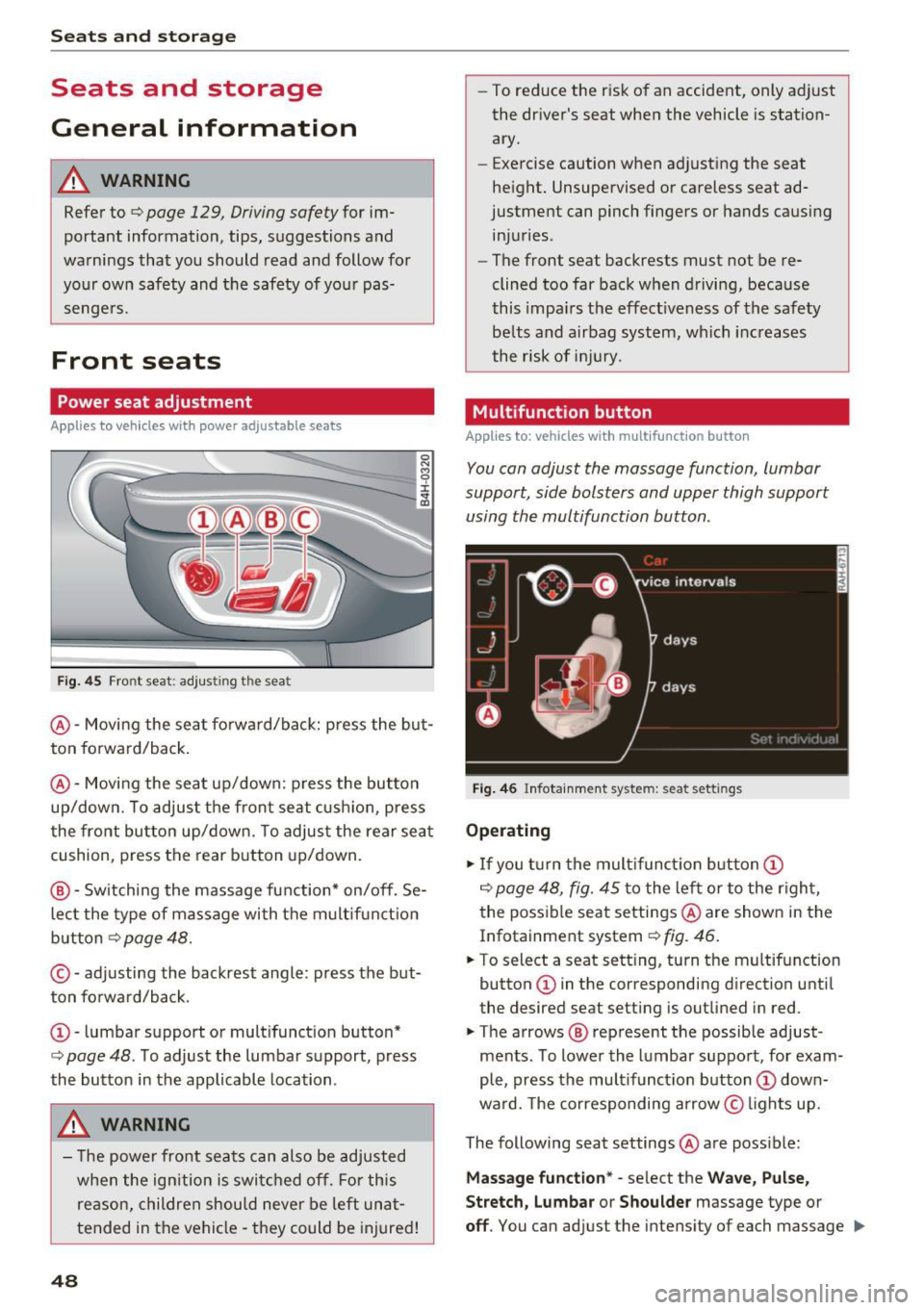
F ig. 4 5 Fro nt seat: adj ustin g the sea t
@ -Movi ng the seat fo rwa rd/back: p ress the but
ton forwa rd/back .
@ -Moving the seat up/down: press the button
up/dow n. To adjust the front seat cush ion, press
the front button up/dow n. T o adjus t the rear sea t
cushion, press the rear button up/down.
@ - Switching the massage function * on/off . Se
lec t the type of massage with the multif unct ion
button
c::> page 48.
© - adjusting the backrest angle : press the but
ton fo rwa rd/back.
CD -lumbar support or mult ifunct ion button*
c::> page 48 . To adjust the lumbar support, press
the bu tton in the applicable location .
A WARNING
- The power fro nt seats can also be adjusted
when the ign ition is swi tc h ed off. For this
reason, children should never be left una t
tended in the vehicle -they could be injured!
48
- To reduce the r isk of an accident, only adjust
the driver 's seat when the vehicle is station
ary.
- Exercise caution when adjusting the seat
height. Unsupervised or careless seat ad
justment can pinch fingers or hands causing
injuries .
- The front seat backrests must not be re
clined too far back when driving, because
this impa irs the effect iveness of the safety
be lts and airbag system, which increases
the risk of i nju ry.
Multifunction button
App lies to: vehicles wit h mult ifunct ion b utto n
You can adjust the massage function , lumbar
support, side bolsters and upper thigh support
using the multifunction button.
Fig . 46 Infotainm ent s ystem: se at settin gs
Operating
.,. If you t urn the mult ifunct ion b utton CD
c::> page 48, fig. 45 to the lef t or to the r igh t,
the poss ible seat settings @are shown in the
Infotainment system
c::> f ig . 46.
.,. To s ele ct a seat sett ing , turn the multifunction
button
CD in the corresponding direction unti l
the des ired seat setting is outlined in red .
.,. The arrows @ represent the possible adjust
ments . To lower the lumbar support , for exam
ple, press the mult ifunct ion button
CD down
ward. The corresponding arrow © lights up.
The following seat settings @are poss ible:
Ma ssa ge fun ctio n* -select the W ave, Pulse ,
Stretch, Lumbar or Shoulder
massage type or
off. You can adjust the intensity of each massage IIJ,,
Page 53 of 284

co
co
.... N
" N .... 0
00
<.,;) 'SI"
Remote Memory button control key
Driver D river Front
passen-ger
Seat X X X
Steering wheel* X X
Both
exterior X X
mirrors*
Remote control key
Applies to: vehicles with memory function
The driver's seat profile can be assigned to the
remote control key when the vehicle is locked.
• Select: the ICARI function button > (Car)* Sys
tems
control button > Vehicle settings > Driv
er's seat
> Remote control key > On .
(D Tips
If you do not wish to have the seat profile for
another driver assigned to the remote control
key, switch the memory function off in the In
fotainment system or using the
IOFFI button
r:::;,page 51.
Memory buttons
Applies to: vehicles with memory function
Fig. 51 Driver 's door: memory function buttons
The memory buttons are located in the driver's/
front passenger's* door.
Switching the memory function on/off
• Press the IOFFI button to switch the memory
function on/off. The LED in the button turns on
Seats and storage
when the memory function is off . Seat profiles
are neither stored nor recalled.
Storing a seat profile
• Press the ISET I button. When the word SET
lights up, the memory is ready to store set
tings .
• Now press a memory button briefly. A tone
confirms that the settings were stored.
Accessing a seat profile
• If the driver's door is open and the ignition is
sw itched off, press the memo ry button.
.. If the driver's door is closed or the ignition is
switched on, press and hold the memory but
ton until the seat adjustment is complete .
A WARNING
-For safety reasons, the seat setting can only
be recalled when the vehicle is stationary,
otherwise the re is a risk of an accident.
- If necessary, you can stop the recall process
by press ing the
IOFFI button or any memory
button.
Adjusting the front passenger's seat in the
Infotainment system
Applies to: vehicles with memory function
The driver can move the front passenger's seat
into various positions.
Adjusting the front passenger's seat from
the driver's seat
• Select: the I CAR I funct ion button > (Car) * Sys
tems
contro l button > Vehicle settings > Seats
> Front passenger's seat > Adjust seat posi
tion .
• You can now adjust the front passenger's seat
using the driver's seat buttons
r:::;, page 48,
fig. 45.
Align with driver's seat
• To transfer the settings from the driver's seat
to the front passenger's seat, select: the
I CAR I
function button > (Car)* Systems control but
ton
> Vehicle settings> Seats > Front passeng-
er 's seat > Align with driver 's seat. ..,.
51
Page 68 of 284
Driving
system can be severely damaged by dr iving
th ro ugh water.
- Always switch the Star t/Stop sys tem * off
when driving through wate r
r:';> page 71.
{D) Tips
-Dete rm ine the depth befo re driv ing th ro ugh
wa ter.
- Do not s to p the veh icle, dr ive in reverse or
swi tc h t he eng ine off when dr iv ing t hrough
wa ter.
- K eep in mind t hat on coming veh icles m ay
crea te waves t hat raise the wate r level an d
make it too deep for your ve hicle to drive
th ro ugh safely.
- Avo id driving through s alt wa ter, because
th is can ca use corros io n.
Economical and environmentally-friendly
driving
The amount of fue l cons umption, the env iron
men tal impact and the wear to the engine,
b rakes and t ires dep ends mostly on your dr iv ing
style. W ith an anticipatory and economic driv ing
s tyle, f ue l consumption can be reduced by ap
p roximate ly 10-15% . The following tips will help
you conserve the environment and your money at
the same time .
Anticipatory dr iving
A veh icle uses the mos t fu el when a cce le ra ting.
W hen you dr ive wi th ant icipat ion, you do not
need to brake as often and so you ac celerate less .
When possib le, let your ve hicle coast wit h a
gear
engaged ,
for example, when you notice that the
next traffic light is red. This produces an engine
braking effect, which helps to protect the brakes
and tires and reduces the emissions a nd fuel con
sumpt io n to ze ro (f uel shut-off dur ing decelera
tion) .
Shift efficiently
An effective way to save fuel is to upshift earlier.
Staying in a gear too long uses fue l unnecessari
ly .
Press down on the acce le rator peda l slowly and
avoid "k ick -down" .
66
Avoid full acceleration
You should rarely travel at the maxim um vehicle
speed. Hig h speeds cause a disproportionate ly
high increase in fue l cons umption, emissions and
traffic noise. Slowe r driving saves fue l.
Reduce idling time
The Start-S top system * helps to re du ce the idling
time automat ic all y. In ve hicles withou t the Star t
Stop system *, i t is efficient to sw itch the engine
off when stopped at railroad crossings and long
red lights. Stopping the engine for 30-40 sec
onds a lready saves more fue l than the amo unt of
extra fue l needed to restart the engine.
It takes a very long time in id le to warm the en
gine up to operating temperature. Wear and
emissions are especially high in the warm- up
phase . Therefore, you shou ld begin driving im
med iate ly after starting the engi ne. Avoid high
RPMs wh ile doing this.
Have maintenance performed regul arly
By having maintenance pe rformed reg ula rly on
your vehicle, you can help to reduce fuel con
sumption before you even start to drive. The
mainte nance condition of your vehicle not on ly
affects traffic safety and long- term value but al
so im pacts
fuel consumption . A poorly main
ta ined engine can lead to fuel consump tio n t hat
i s 1 0% hig he r th an no rm al.
Avoid short trips
The eng ine and exhaust clean ing system must
r each their op tima l
operating temperature to ef
fect ively reduce consump tion a nd emissions.
A cold engine uses a d isproportionately high
amount of fuel. T he eng ine reaches operat ing
temperat ure and cons umption no rma lizes only
af ter approximate ly
2.5 miles (4 km).
Check the tire pressu re
To save fue l, make sure the t ires are always in
flated to t he correct press ure
r=':>page 221. The
fuel consumpt ion can increase by 5% if the pres
s ur e is only 0 .5 bar too low . Due to t he i ncreased
r oll ing resis tance, low tire p ressures w ill also
...
Page 69 of 284
co
co
.... N
" N .... 0
00
<.,;) 'SI"
lead to greater tire wear and will affect driving
behav ior.
Do not drive on
winter tires year-round , as this
will consume up to 10% more fuel.
Eliminate unnecessary weight
Since every kilogram of extra weight increases
fuel consumption, a quick inspection of the lug
gage compartment may be worth it to avoid un
necessary weight.
When not being used, a roof rack should be re moved to decrease the wind resistance of the ve
hicle. You will save approximately 12% of your
fuel when at speeds from 62-75 mph (100-120 km/h).
Save energy
The engine drives the generator, which generates
electricity; the fuel consumption also increases
with the demand for electricity. Therefore, switch
electrical equipment off when you no longer
need it. Examples of equipment that uses a lot of
energy are air blowers at a high setting, the rear
window defogger and seat heating*.
CD Note
Do not leave engine idling unattended after
starting. If warning lights should come on to
indicate improper operation, they would go
unheeded. Extended idling also produces
heat, which could result in overheating or
other damage to the vehicle or other proper
ty .
CD Note
-Have your vehicle maintained properly and
in accordance with the service recommenda
tions in your Warranty
& Maintenance book
let. Lack of proper maintenance as well as
improper use of the vehicle will impair the
function of the emission control system and
could lead to damage .
- Do not alter or remove any component of
the Emission Control System unless ap
proved by the manufacturer.
- Do not alter or remove any device, such as
heat shields, switches, ignition wires,
Driving
valves , which are designed to protect your
vehicle's Emission Control System and other
important vehicle components.
(D Tips
The consumption estimates as published by
ENVIRONMENTAL PROTECTION AGENCY
(EPA) and Transport Canada may not corre
spond to your actual consumption on the
road, which will vary depending upon vehicle
load and speed, road and weather conditions,
trip length, etc .
Steering
Manual steering wheel position adjustment
Applies to: vehicles with manual steering wheel adjustment
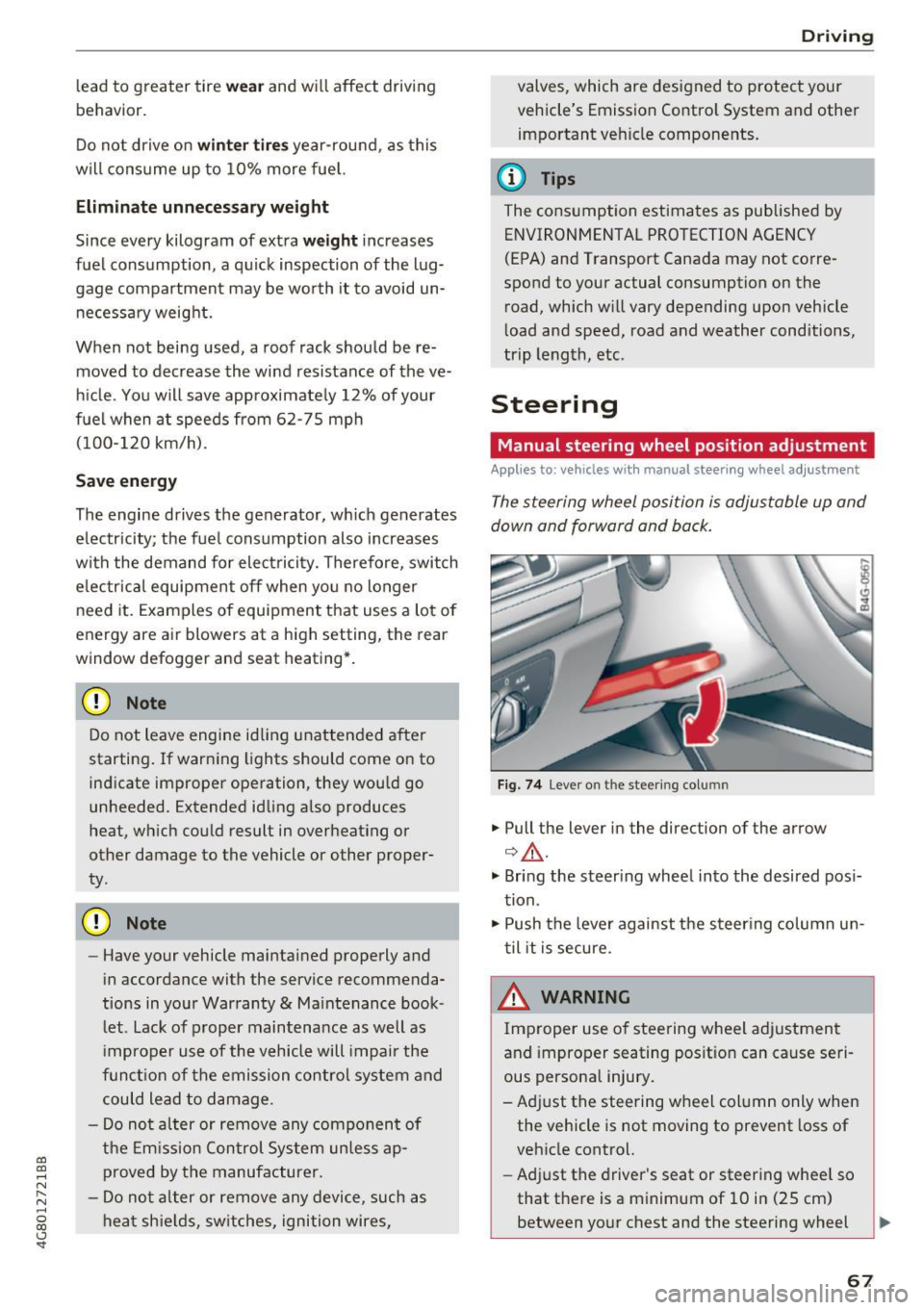
The steering wheel position is adjustable up and
down and forward and back.
Fig. 74 L eve r o n t he stee ring col umn
"'Pull the lever in the direction of the arrow
Q &_ .
"' Bring the steering wheel into the desired posi
tion.
"' Push the lever against the steering column un
til it is secure.
_& WARNING
~ -
Improper use of steering wheel adjustment
and improper seating position can cause seri
ous personal injury.
-Adjust the steering wheel column only when the vehicle is not moving to prevent loss of
vehicle control.
- Adjust the driver's seat or steering wheel so
that there is a minimum of 10 in (25 cm) between your chest and the steering wheel
II>
67
Page 71 of 284

co
co
.... N
" N .... 0
00
<.,;) 'SI"
Easy seat entry
Applies to: vehicles with power steering wheel adjustment
Easy seat entry makes it easier to enter and exit
the vehicle by adjusting the steering column au
tomatically.
• In the Infotainment system, select the ICARI
function button > ( Car )* Sys te m s control but
ton
> Vehicl e setting s > Seat s > Driver's s eat >
E as y seat entry > On .
When easy seat entry is switched on , the steering
column goes back up into the park position when
the ignition is switched off . After entering the ve
h icle, the steering co lumn returns to the stored
position once the ignition is switched on.
Starting and stopping
the engine
Starting the engine
The I START E NGIN E STOP I button switches the
ignition on and starts the engine .
Fig. 76 Center conso le: STAR T ENGINE STOP button
Starting the engine
• Press the brake peda l and move the se lector
lever into the P or N position
¢ ,&..
• Press the I START ENGINE STOPI button. The
engine will start.
Applies to: vehicles with diesel engines
• It is possible that there will be a slight delay
when starting the engine in colder tempera
tu res. Therefore, you must hold the brake pedal
down until the engine starts. The indicator light
turns on while the engine is preheating
1,1 .
Drivi ng
Switching the ignition on /off
If you wo uld like to sw itch the igni tion on w ith
out starting the engine, follow these steps:
• Press the
!START E NGINE STOP ! button with
out press ing the brake peda l. Vehicles witho ut
t he Star t/Stop system*: the need le in the tach
ometer moves into the
READY position .
• To switch the ignition off, press the button
again . The needle in the tachometer moves into
the
O FF position .
T he prewarming runs automatica lly in diesel
vehicles when the ignition is switched on .
E quipment tha t uses a lot of e lectr icity is sw itch
ed off temporarily when you start the engine .
If the engine does not start immediately, the
start ing procedure stops automat ically after a
sho rt time. Repeat the s ta rting proced ure.
Start /Stop system *
Read the informat ion in¢ page 71, Start-Stop
system .
.&, WARNING
To reduce the risk of poisoning, never a llow
the eng ine to run in confined spaces .
(D Note
Avoid h igh engine speed, full throttle, and
heavy engine load if the engine has not
-
r eached operat ing temperat ure ye t. You cou ld
damage the engine.
(® For the sake of the environment
Do not let the eng ine run wh ile parked to
warm up. Beg in driving immed iate ly. Th is re
duces unnecessa ry emissions.
(D Tips
- Some noise afte r start ing the e ngine is nor
ma l and is no cause for conce rn.
- If you leave the vehicle w ith the ignition
switched on, the ignit ion w ill switch off af
ter a ce rtain amount of time. Ma ke sure that
elect rical eq uipment such as the exterior
lights are swit ched off.
69