lights AUDI A7 2017 Owner´s Manual
[x] Cancel search | Manufacturer: AUDI, Model Year: 2017, Model line: A7, Model: AUDI A7 2017Pages: 284, PDF Size: 72.29 MB
Page 75 of 284

co
co
.... N
" N .... 0
00
<..:l 'SI'
-The vehicle battery charge leve l is too low .
- Power consumpt ion is high .
The engine can turn off again when the condi
tions fo r Start-S top mode a re met .
Ignition i s switched off automatically
To prevent the veh icle battery from draining, the
ignit ion will sw itch off
automaticall y under the
following conditions :
- The vehicle must have already been driven.
- The Start/Stop system has stopped the engine.
- T he driver's door must be open.
- The driver's safe ty be lt must be unb uck led.
- The brake pedal must not be p ressed .
- The veh icle must be stationary .
In this case, the activated low beam is replaced by the parking light. The parking lights will
switch off after app roximately 30 minutes or
when yo u lock the vehicle .
If the Start/Stop system has not turned off the
engine or if you have sw itched the Start/Stop sys
tem off manually, the ignition will not be auto mat ical ly switched off and the engine w ill contin
ue to run~&. .
A WARNING
To red uce the r isk of poisoning, never allow
t he engine to r un in conf ined s paces.
@ Tips
If you select the Dor N se lector lever position
after sh ifting into reverse, the vehicle m ust
be driven f ast er than 6 mph (10 km/ h) in or
der fo r th e engine to switch off ag ain.
-
D rivi ng
Manually switching the Start/Stop system
off/on
Applies to : vehicles wit h Start/Stop sys te m
If you do not wish to use th e system, you can
switch it off manually.
Fi g. 79 Cen te r console: S tart/Stop system butto n
.. To switch the Start/Stop system off/on man
ually, press the
l (A) ~ I button . The LED in the b ut
ton turns on when the system is switched off.
(D Tips
If you switch the system off during a stop phase, the engine will start aga in automati
cally .
Messages in the instrument cluster display
Applies to: vehicles wit h Start/Stop syste m
Start-stop system deactivated: Please re start
engine manually
T his message appears w hen spec ific conditions
are no t me t du ring a stop phase. The S tart/Stop
system will
not b e a ble to restart the engine . The
engine m ust be star ted with the
I S TAR T ENGINE S TOP ! button .
Start-stop system: Syst em fault! Currently
unavailable
T he re is a ma lfunction in the Start/Stop system.
Drive the vehicle to an a uth orized Aud i dea ler or
author ized Service Facility as soon as possible to
have the malfunction corrected .
73
Page 78 of 284
Driving
-Hill hold assist cannot hold the veh icle in
place on all h ills (for example, if the ground
is slippery or icy).
- To reduce the risk of an accident, always
make sure the vehicle is situated safely
wh ile stat ionary.
Automatic transmission
Introduction
The automat ic tra nsmission is cont rolled e lec
tronically . The transmission sh ifts up or down au
tomatically depending on which drive program is
selected.
Whe n a
mod erate dri ving style is used, the
transmission selects the most economical driving
mode. The transmiss ion upshifts at a lower RPM
and downshifts at a higher RPM to improve fuel
efficiency.
The transm ission switches to a spo rty mode after
a kick-down or when the driver uses a
spo rt y
driving style
characterized by quick accelerator
pedal movements, heavy acceleration, frequent
changes in speed and traveling at the maximum
speed.
If desired, the driver can also select the gears
manually ( tipt ronic mod e) 9 page 79.
A ppl ies to: ve hicles w ith 5 tro nic t ra n smi ssio n
The S tronic is a dual-clutch t ransmiss ion . Power
is transferred using two clutches that work inde
pendently from one another. They replace the
torque converter used in conventional automatic transmissions and allow the vehicle to accelerate
without a noticeable inter ruption in tract ion .
App lies to: ve hicles w ith a tipt ro nic tra ns mi ssio n
Power is transferred using a torque converter.
76
Selector lever positions
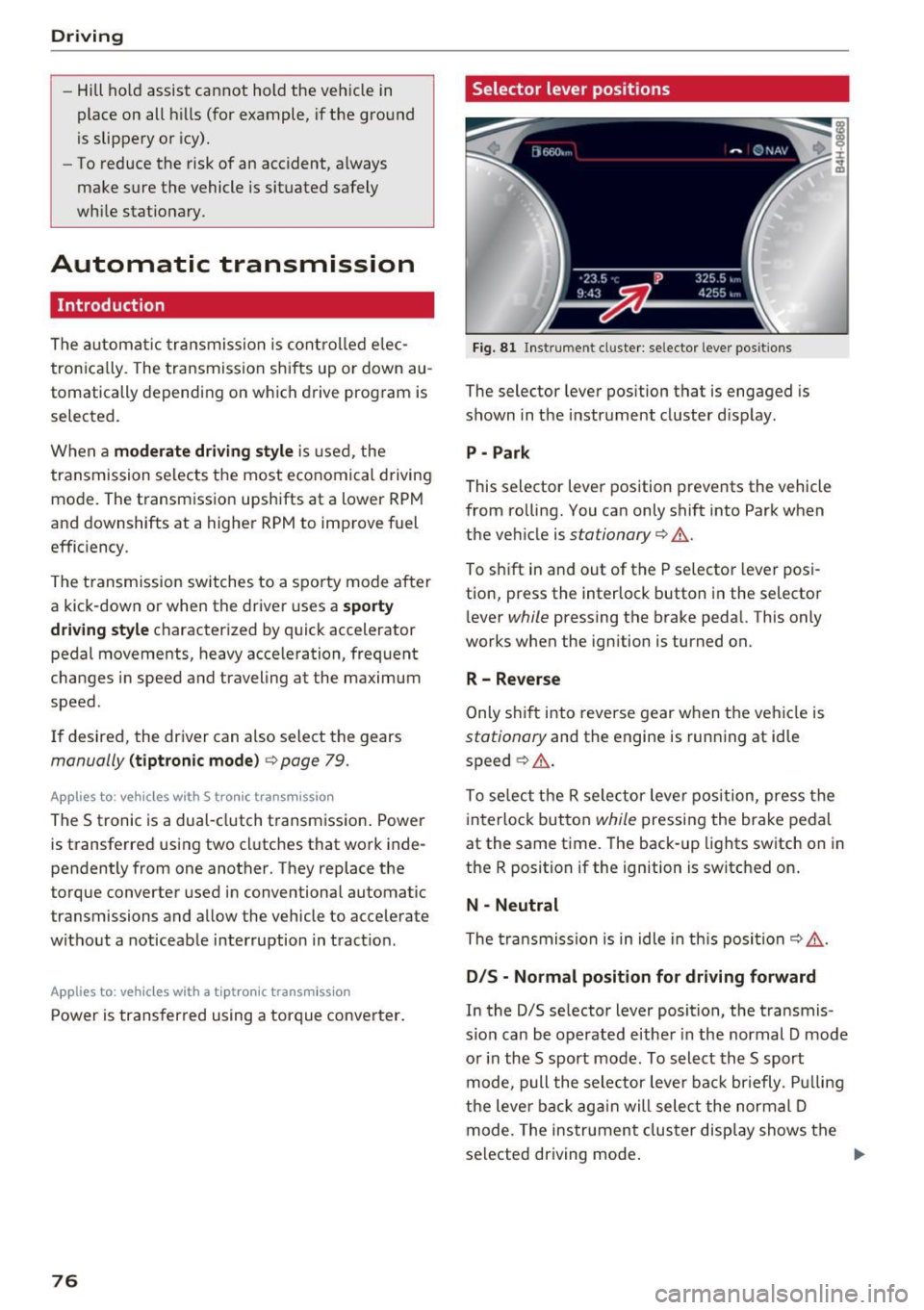
Fi g. 81 Inst rument cl uster: se lector leve r pos it ions
The selector lever position that is engaged is
shown in the instrument cluster d isplay .
P -Park
This selector lever position prevents the vehicle
from ro lling. You can only shift into Park when
the veh icle is
stationary 9 ,1. .
To sh ift in and out of the P selecto r lever posi
tion, press the interlock button in the selector
l ever
while pressing the brake pedal. This only
works when the ignition is turned on.
R- Reverse
Only s hif t into reverse gear w hen the veh icle is
stationary and the engine is running at idle
speed ~
,1..
To se lect the R sele ctor leve r position, press the
interlock button
while pressing the brake pedal
at the same time. The back -up lights switch on in
the R position if the ignition is switched on .
N -Neutral
The tra nsmission is in idle in th is posi tion ~ ,1. .
DIS -Normal position for driving forward
In the D/S se lector lever position, the transmis
s io n can be operated e ither in the normal D mode
o r in the S sport mode . To select th e S sport
mode, pull the selector leve r back br iefly . P ull ing
the leve r back ag ai n will sele ct the normal D
mode. The ins trument cluster display shows the
selected driving mode .
Page 80 of 284

Driving
than 2 seconds when the brake pedal is not
pressed.
Interlock button
The in terlo ck button in the selector leve r handle
p revents you from moving the se lector lever i n
adve rtently while in some se lector lever posi
tions. The positions that require the interlock
button to be pressed are marked in co lor in the il
lustration ¢
fig. 82.
Driving tips
Starting the engine
• The selector lever must be in the P or the N po
s ition.
Starting from a stop
• Press and hold the brake pedal.
• Press and hold the lock button in the selector
lever hand le, select the desired se lector lever
position such as 0/5 and release the lock but
ton.
• Wait a moment u ntil the transmission shifts .
You w ill not ice a slight moveme nt when the
gear engages .
• Release t he b rake pedal and press the accelera
tor pedal ¢& .
Stopp ing temporarily
• Keep the veh icle stationary us ing the braking
pedal, for example at traffic lights .
• Do not p ress the accelerator pedal when doing
th is.
• To preve nt the vehicle from rolling w hen you
sta rt d riving, se t the par king brake w hen stop
ping on steep inclines¢&, .
• The park ing brake w ill release automatically
and the vehicle wi ll start moving once you press
the accelerator pedal.
Stopping /parking
If the se lec tor lever is not in the P posit io n when
you open the driver's door, the vehicle could rol l.
The message
Transmission: selector lever in
drive position!
appears . A warn ing tone w ill also
sound.
• Press and hold the brake pedal¢&, .
78
• Se t the park ing brake.
• Select the P se lector lever position .
U nder cert ain circumst ances, such as d riving in
t h e mo unta ins, it may be useful to swi tch tempo
rarily to the man ual sh ift program in order to
manua lly adjust the gears to the driving condi
tions
¢ page 79 .
On inc lines, activate the parking brake f irs t and
then move the selector lever to the P position
¢
page 74. This prevents the locking mechanism
from be ing loaded too heavily and will make it
easier to move the selector lever out of the P po
s ition.
A WARNING
-
- The vehicle can roll even if the ignit io n is
sw itched off.
- Never leave your veh icle with the engine
r u nning while in gear .
- Do not press the acce le rato r pedal when
changing t he selec tor lever posit ion while
the vehicle is s tat ionary and the engine is
r u nning.
- Please note that a small amount of power is
tra nsmi tted if the vehicle is stoppe d tem po
rari ly wh ile in the D/S or R sele ctor leve r po
sitio n. T o reduce the ris k of an ac cident, you
m ust c ontin ue pressing firm ly on the brake
pe dal while the ve hicle is stopped so that it
does not roll.
- Never engage the R or P selector level pos i
tion s while dr iving. It could ca use a crash .
- Before driving down a s teep slope, redu ce
your speed and sh ift into a lower gear w ith
"t i p tronic" .
- Do not ri de the brakes or press the brake
pe dal too often or too long when dr iv ing
downhill . Constant braking causes t he
brakes to ove rheat and substant ia lly re
duces brak ing performance, increases brak
ing d istance or causes comp lete failure of
the bra ke system.
- If you must stop on an incline, always hold
the vehicle in place w it h the foot brake or
parking bra ke to p revent it from rolling
back .
Page 84 of 284
Trailer towing
Trailer towing
Driving with a trailer
General information
Your Audi was designed primarily for passenger
transportation.
If you plan to tow a trailer, please remember that
the additional load will affect durability, economy and performance.
Trailer towing not on ly places more stress on the
ve hicle, it also ca lls for more concentration from
the dr iver.
F or this reason, always follow the operating and
driving instructions provided and use common
sense.
@ Note
If you are going to tow a trailer, you must ac
tivate the tra ile r operation mode
¢ page 82, Operating instructions.
Technical requirements
Traile r hitch
Use a weight-carrying hitch conforming to the
gross trai ler weight. The hitch must be suitab le
for your ve hicle and tra iler and must be mounted
securely on the vehicle 's chassis at a
technically
sound
locat ion . Use on ly a trailer hitch with a re
movable ba ll mount . Always chec k w it h t he t rail
er hitch man ufactur er to make s ure t hat you a re
using the co rrect hi tc h.
Do not use a bumper hitch.
The hitch m ust be installed i n such a way that it
does not interfere with the impact -absorbing
bumper sys tem . N o mod ificat ions should be
made to the vehicle exhaust and b rake systems .
Fr om t ime to t ime, che ck t hat all hitch mo unti ng
bol ts rem ain securely faste ned.
W hen you are not tow ing a tra iler, remove the
tra ile r hitc h ba ll mount . This prevents the hitch
from ca using damage shou ld your veh icle be
s truck from behind¢ &..
82
Trailer brakes
If your trailer is equipped wi th a bra king sys tem,
c h ec k t o be sure that it con forms to all regu la
tions.
The trailer hydrau lic br ake system mus t not be
directly connecte d to the vehicle's hydr auli c
brake system .
Safety chains
Always use safety chains between your vehicle
a nd t he tra ile r.
Trailer lights
Trailer lights must meet all regulations. Be sure
to check w ith your Aud i dea ler for correct wir ing,
switches and relays.
Mirrors
If you a re unab le to see the traffic behind you us
i ng the regular outs ide mir rors, then you
must in
stall extended mirrors. It is important that you
always have clear vision to the rear.
A WARNING
Afte r remov ing the tra ile r hi tch, do not s to re
i t in yo ur vehicle. In cas e of sudden brak ing,
the hit ch could fly fo rwa rd and injure you or
your pas sengers.
Operating instructions
Maximum trailer weight
A tra ile r f or yo ur vehicle is lim ite d to a typical
cla ss 1 or class 2 trailer.
Trailer load distribution
Be sure the load in the trai ler is held sec urely in
place to p revent it from shifting forward , back
ward or si deways .
Never allow a pas senger to ride in a trailer ¢ &.
in Driving instructions on page 84.
Engine cooling system
Towing a tra ile r makes the engine wor k harder . It
i s impo rtant that the cooling system's perform
ance is up to the additional load. Ma ke sure that
the cooling system has enoug h fluid.
IJJ,,,
Page 85 of 284

co
co
.... N
" N .... 0
00
\.J '
When towing a trailer, inflate the tires of your
vehicle to the tire pressure listed under "Full
load" on the label
¢page 221. Inflate trailer
tires to trailer and tire manufacturers' specifica
tions .
Lights
Check to make sure both vehicle and trailer lights
are working properly.
Safety chains
Be sure trailer safety chains are properly connect
ed from the trailer to the hitch on the vehicle. Leave enough slack in the chains to permit turn
ing corners. When you install safety chains, make
sure they will not drag on the road when you are
driving.
The chains should cross under the trailer tongue
to prevent it from dropping in case of separation
from the hitch.
Adjusting the Audi drive select
Make sure the vehicle is on a level surface before
hitching up the trailer and before adjusting the
tongue weight. The vehicle must be in
auto or
comfort driving mode and not raised
¢page 105, ¢0 .
Make sure that the vehicle is lowered. In Info
tainment , select:
ICARI function button> Lower
control button.
If you must drive under poor road conditions , you
can raise the vehicle
after coupling the trailer or
after adjusting the tongue weight ¢page 107.
0 Note
-Changes in temperature or load can affect
the height of the vehicle.
- Always select
auto or comfort mode. Other
wise, the tongue load specified for your ve
hicle will no longer be applicable.
Trailer towing
Driving instructions
Driving with a trailer always requires extra care
and consideration .
Weight distribution
Towing a loaded trailer with an empty car results
in a highly unstable distribution of weight. If this
cannot be avoided, drive at very low speeds only
to avoid the risk of losing steering control.
A "balanced" rig is easier to operate and control.
This means that the tow vehicle should be loaded
to the extent possible and permissible, while keeping the trailer as light as possible under the
circumstances . Whenever possible, transfer
some cargo to the luggage compartment of the
tow vehicle while observing tongue load require
ments and vehicle loading considerations.
Speed
The higher the speed, the more difficult it be
comes for the driver to control the rig . Do not
drive at the maximum permissible speed. Reduce
your speed even more if load, weather or wind
conditions are unfavorable -particularly when
going downhill.
Reduce vehicle speed
immediately if the trailer
shows the slightest sign of swaying .
Do not try
to stop the swaying by accelerating.
Observe speed limits. In some areas, speeds for
vehicles towing trailers are lower than for regular
vehicles.
Always apply brakes early . When driving down
hill, shift into a lower gear to use the engine
braking effect to slow the vehicle. Use of the
brakes alone can cause them to overheat and fail.
Air suspension*
When driving with a trailer, activate the trailer
mode of the air suspension. Switch the air sus
pension trailer mode on when you are towing a
trailer. This will limit the regulation by the air
suspension while driving . Select in the MMI:
I CAR ! function button > (Car)* systems control
button
> Vehicle settings > Air susp.: towing >
On. 1J,,
83
Page 86 of 284

Trailer towing
Coolant t emperatur e
The coolant temperatu re gauge <=? page 9 must
be observed ca refully. The coo lant tempe rature
can increase if you drive on long inclines in a low
gear at high engine sp eeds. Reduce your sp eed
immed ia te ly if the LEDs in the top part of the dis
p lay turn on.
For more information abo ut indicator lights, re
fe r to . <=?
page 14.
A WARNING
Anyone not properly restrained in a moving
vehicle is at a much greater risk in an acci
dent . Never let anyone ride in your car who is
not properly wearing the restraints provided
by Audi.
Trailer towing information
Important to know
-
Your veh icle hand les different ly when tow ing a
tra ile r because of the additional weight and d if
fe rent we ight d istr ib ution. Safety, performance
and economy w ill great ly depend o n how careful
ly you load yo ur trailer and ope rate your r ig .
Before you actually tow your tra iler, practice
turn ing, stopp ing and bac king up in an area away
from t raff ic. Keep practicing until you have be
come comple tely fami liar with t he way your vehi
cle-trailer comb inat ion behaves and responds.
Backing up is d iffic ult and requires pract ice .
Backing up with a tra iler gene rally requires steer
i n g ac tion oppos ite to tha t when backing up yo ur
veh icle w it h out a trailer .
M aintain a g reater d istance between your vehicle
and the one in front of you . You w ill need more
room to stop . To compensa te fo r th e tra ile r, you
will nee d a larger than no rma l tur ning rad ius.
When pass ing , remembe r that you ca nnot accel
e rate as fast as you no rma lly would because of
the adde d load . Make s ure yo u have eno ugh room
to pass . After passing, allow plenty of room for
your trai ler before chang ing lanes again.
84
Avo id jerky starts, sharp turns or rapid lane
c h anges.
(D Tips
- Do not tow a trailer dur ing the brea k-i n pe ri
od of your veh icle.
- I f you tow a tra ile r, your A udi m ay requi re
more frequent ma intenance due to the ex
tra load
¢ page 264.
Parking on a slope
Do not park on a slope wi th a trailer . If it cannot
be avoided, do so only after doing the following:
When parking:
.,. App ly the foot bra ke .
.,. Have so meone p lace cho cks unde r bot h the ve
hicle and the trailer w heels.
.,. With choc ks in place, slowly rele ase the brakes
until the w heel chocks abso rb the load .
.,. Turn th e whee ls towards the curb.
.,. App ly the par king b rake .
.,. Select the P se lecto r lever posit ion.
When restarting after parking:
.,. App ly the foot bra ke .
.,. Start the engine .
.,. Sele ct the D/S se lector l ever position.
.,. Re lease the par king brake and s low ly pull o ut
and away from the whee l chocks.
.,. Stop and have someone re trieve the wheel
chocks .
(D Tips
If you move the selector lever of the automat
i c transmission to P befo re applying the park
i ng brake and before blocking the whee ls, yo u
may have to use more force la ter to move the
l eve r o ut of the P pos it io n.
Page 88 of 284
Ass is t
- Please note that unconsciously "resting"
your foot on the accelerator pedal prevents
the cruise control from braking. This is be cause pressing the accelerator pedal over
rides the cruise control system .
-If a brake system malfunction such as over
heating occurs when the cruise control sys
tem is sw itched on, the braking function in
the system may be switched off. The rest of
the cruise control system f unctions remain
a ct ive as long as the
[l!jl!)~1j (USA models) /
Bl (Canada models) indicator light is on .
@ Tips
The brake lights turn on when the brakes a re
app lied automatically.
Changing speed
A pp lies to: ve hicles w ith c ruise control system
.. To inc rease or decrease the speed in incre
ments, tap the lever toward
0 10 ¢ page 85,
fig . 86 .
.. To increase or decrease the speed quickly, hold
the lever in the
0 10 direction until the de
s ired speed is displayed.
You can a lso press the accelerator pedal down to
increase your speed, for example if you want to
pass someone. The speed you set earlier w ill re
sume as soon as you release the accelerator ped
al.
However, if you exceed your saved speed by 5
mph (10 km/h) for longer than 6 minutes, the
cru ise control system turns off temporarily.
The green
1ij;(l )~14 (USA models) t BI (Canada mod
els) indicator light in the speedometer turns off
and the stored speed is maintained.
Preselecting the speed
A pp lies to: ve hicles w ith c ruise control system
You can pre-select your desired speed when the
vehicle is stationary.
.. Switch the ignition on .
.. Pu ll the lever into position@~
page 85,
fig. 86.
86
.. To increase or decrease the speed, tap the lever
toward
0 10 .
.. To store the speed d isp layed, release the lever.
This function makes it possible, fo r example, to
save the speed you want before driving on the
highway. Once on the highway, activate the
cruise contro l by pull ing the lever toward@.
Switching off
App lies to : vehicles with c ruise co nt rol system
Temporary deacti vation
.. Press the brake pedal, or
.. Press the lever into position @(not clicked into
place)
¢ page 85, fig . 86, or
.. Dr ive for longer than 5 minutes faster than 5
mph (10 km/h) above the stored speed.
Switching off completely
.. Press the lever into position @(clicked into
place), or
.. Switch the ignit io n off.
The speed you stored will be maintained if the cruise contro l has been switched off temporarily .
To resume the stored speed, release the brake pedal and pull the lever to position @.
Switch ing the ignit ion off w ill erase the stored
speed .
A WARNING
You should only resume the stored speed if it
is not too high for existing traff ic conditions.
Othe rw ise you can inc rease the risk of an acc i
dent.
Page 89 of 284

co
co
.-, N
" N .-, 0
00
<.,;) 'SI'
Boost, shifting and
engine oil temperature
indicators
Applies to: vehicles with boost, shifting and engine oil tem
peratu re indicators
Fig. 87 Instrument cluster: boost, shift ing and eng ine oil
temperature indicators
... Turn the menu thumbwheel on the steering
wheel until
Lap timer appears in the instru
ment cluster display.
@ Boost pressure indicator
The current engine load (meaning the current
boost pressure) is indicated by a bar .
@ Shifting indicator
The shifting indicator is on ly visible when shifting
gears in tiptronic mode ¢ page
79. Green LEDs
turn on as the engine RPMs increase. The LEDS
flash red at speeds near the RPM limit.
In vehicles with an activated head-up display
¢ page
24, the shifting indicator is shown in the
head-up display instead of the instrument clus
ter.
© Engine oil tempe rature indicator
If the engine oil temperature is below 140 °F
(60 °(), th<> I# symbol followed by three hy
phens"- - -" and the
0
( unit is shown.
The engine has reached its operating tempera
ture when the engine oil temperature is between
140
° F (60 °() and 248 °F (120 °() under normal
driving conditions. The engine oil temperature
may be higher if there is heavy engine load and
high temperatures outside. This is not a cause for
concern as long as the .¢ page
15 or Ill
Assist
¢ page 15 indicato r lights in the display do not
blink.
Lap timer
Introduction
Applies to: vehicles with lap timer
You can record and evaluate lap times with the
lap timer ¢ page
87, fig. 88. Th e time is meas
ur ed in m inutes, seconds and 1/10 seconds . The
hours are also shown when the lap time exceeds
60 minutes. The maximum individual measure
ment is 99 hours. A maximum of SO laps can be
recorded.
A WARNING
-Your focus shou ld always be on driving your
vehicle safe ly. As the driver, you have com
plete respons ibility for safety in traffic. Only
use the functions in such a way that you al
ways maintain complete control over your ve
hicle in all traffic situations .
@ Tips
You can retr ieve informat ion from the tr ip
computer wh ile the lap timer stopwatch is
r unning.
Opening the lap timer and recording times
Applies to: vehicles with lap timer
Fig. 88 Display: lap t imer
Opening the lap timer
... Turn the menu thumbwheel on the steering
wheel until
Lap timer appears in the instru
ment cluster display .
-
87
Page 93 of 284
co
co
.... N
" N .... 0
00
<.,;) 'SI"
Switching on/off
App lies to: vehicles with Audi adaptive cruise contro l
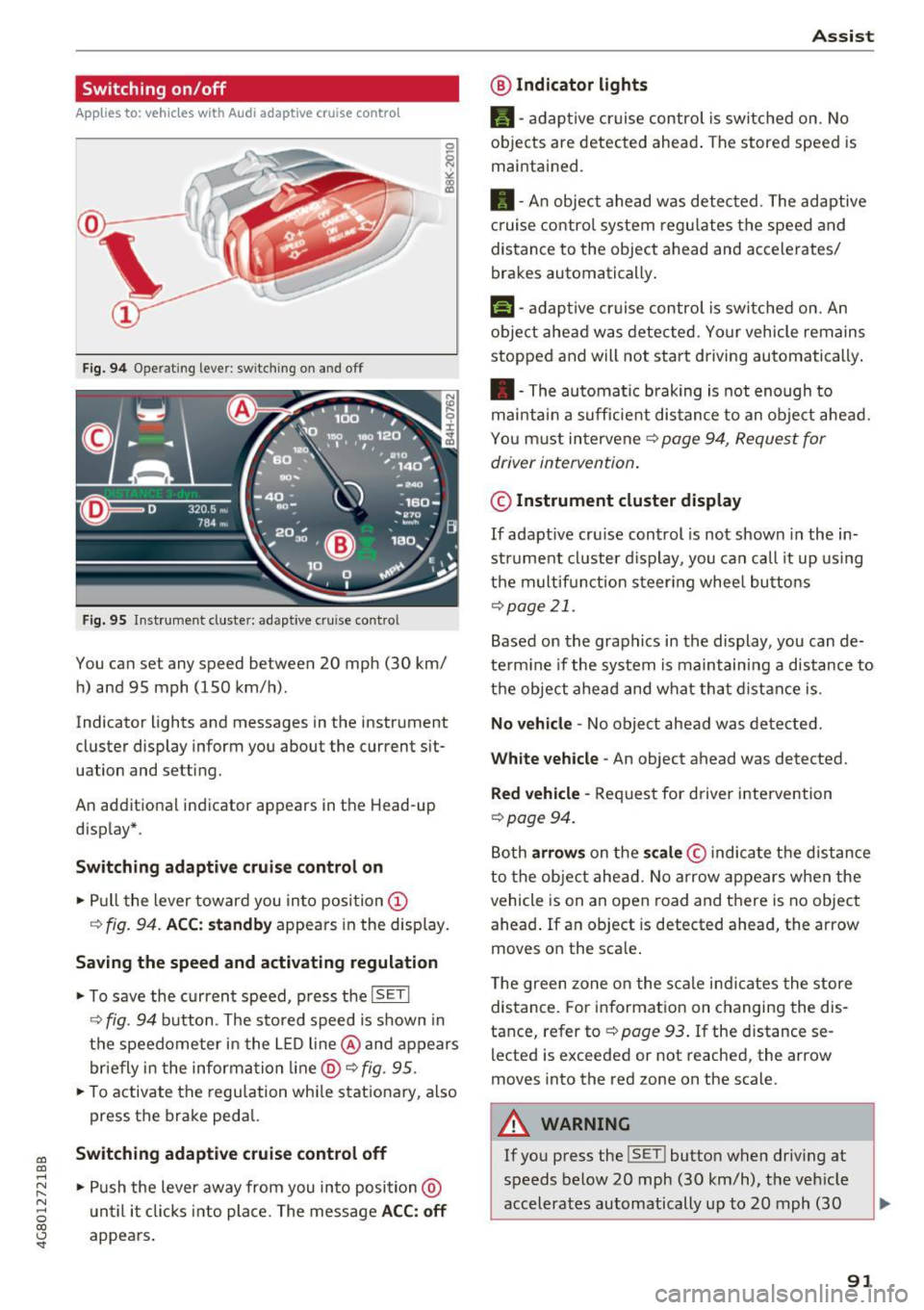
Fig. 9 4 Operat ing leve r: sw itching o n and off
Fig. 95 Inst rument cluste r: adaptive cruise contro l
You can set any speed between 20 mph (30 km/
h) and 95 mph (150 km/h) .
Indicator lights and messages in the instrument
cluster display inform you about the current sit
uation and setting.
An addit ional indicator appears in the Head-up
d isplay* .
Switching adaptiv e cruise control on
.,. Pull the lever toward you into position @
¢
fig . 94. ACC: standb y appears in the display.
Saving the speed and activating regulation
.. To save the current speed, p ress the ISETI
¢ fig . 94 button . The stored speed is shown in
the speedometer in the L ED l ine @ and appears
briefly in t he information line @ ¢
fig. 95 .
.,. To activate the regu lation whi le stationary, also
press the brake peda l.
Switching adaptive cruis e control off
.,. Push the lever away from you in to posi tion @
u nt il it clicks i nto place. The message
ACC : off
appears.
A ss ist
@ Indic ato r light s
•-adaptive cruise control is switched on. No
objects are detected ahead . The stored speed is
maintained .
• - An object ahead was detected . The adaptive
c ruise contro l system regu lates the speed and
distance to the object ahead and accelerates/
brakes automatically .
f:i-adaptive cruise control is switched on. An
object ahead was detected. Your vehicle remains
stopped and will not sta rt driving automatically .
• -The automatic braking is not enough to
mai ntai n a sufficie nt dis tance to an obje ct ahead.
You must intervene ¢
page 94, Request for
driver intervention .
© Instrument cluster display
If adaptive cru ise control is not shown in the in
strument cl uster d isplay, you can call it up using
t h e m ultif unction steer ing whee l butto ns
¢page 21.
Based on the graphics in the display , you can de
te rm ine if the system is maintain ing a distance to
t h e object ahead and what that d ist ance is .
No vehicle -No object ahead was detected .
White veh icle -An object ahead was detected.
Red vehicle -Request for driver intervention
~page 94.
Both arrow s on the scale © indicate the distance
to the object ahead. No arrow appears w hen the
vehicle is on an open road and t here is no object
ahead . If an object is detected ahead, the arrow
moves on the sca le .
The green zone on the s cale i ndicates the store
distance . For information on changing the dis
tance, refer to ¢
page 93. If the distance se
lected is exceeded or not reached , the arrow
moves into the red zone on the scale .
A WARNING
~~ --
If you press the !SET ! button when driv ing at
speeds below 20 mph (30 km/h), the vehicle
accelerates automatically up to 20 mph (30
91
Page 99 of 284

co
co
.... N
" N .... 0
00
<.,;) 'SI"
lines, the system c an also t ake into account other
objects such as guard rails . If they are detected in
close proximity to the veh icle, active lane assist
he lps prevent the vehicle from driving too close
to them. There is also passing assistance . The
system does not provide any corrective steering if
i t detects that you are passing another veh icle .
& WARNING
-The system wa rns the driver that the veh icle
is leav ing the lane using co rre ctive s teer ing.
T he driver is always respo nsible for kee ping
the vehicle within the lane .
- T he system can help you keep the vehicle in
th e lan e, but i t does not drive by itself. Al
w ays keep yo ur hands on the steering
whee l.
- Corrective steer ing may not o ccur in ce rtain
situations , su ch as during heavy bra king.
- T here m ay be cases where the came ra does
not recognize all lane ma rker lines . Correc
t ive steering can o nly take p lace on the side
of the veh icle where lane marker lines are
detected.
- Other road structures or objects could possi
bly be identified unintentiona lly as lane
marker lines . As a result, corrective steering
may be unexpected or may not occur.
- The camera view can be restricted, for ex ample by vehicles driv ing ahead or by rain,
snow, heavy spray or light shining into the
camera . This can result in act ive lane assist
not detec ting the lane marke r lines or de
tecting them incor rectly.
- Under certa in conditions suc h as rut s in the
road, a bank ed roadway o r crosswinds , the
co rrective stee ring a lone may not be enough
to keep the vehicle in the mi ddle of the lane.
- F or safety reasons, active lane assis t m ust
not be used when the re are poor roa d an d/
o r we athe r cond itions s uch a s slippery
roads, fog, grave l, heavy r ain, snow a nd the
potent ial for hydroplaning . Using active lane
assist under these conditions may increase
the risk of a crash.
A ss ist
Switching on/off
App lies to : veh icles w it h A udi act ive lane ass ist
Fi g. 10 1 Turn s ignal leve r: bu tto n fo r active lan e ass is t
Fig . 1 02 W inds hield: came ra w indow fo r active lane a ssist
.,. Press the button to sw itch the sys tem on and
off c'.>fig .101. The .or. indicator light in
the inst rument cluste r turns o n or off .
Indicator lights
• Ready: the indicator light turns on when the
system is ready for use. The system can now be
operated .
• Not ready : the indicator light turns on if the
system is switched on but is inoperable. This may
be due to the following reasons:
- There is no lane marker line .
- The relevant lane mar ke r li nes a re not detected
(for examp le, ma rkings in a construction zone
or because they are obstructed by snow, dirt,
water or light ing).
- The vehicle speed is be low the activation speed
of approximate ly 40 mph (65 km/h) .
- The la ne is too nar row or too wide .
- The curve is too narrow.
- The d river's hands are not on the steer ing
wheel.
97