warning lights AUDI A7 2017 Owner´s Manual
[x] Cancel search | Manufacturer: AUDI, Model Year: 2017, Model line: A7, Model: AUDI A7 2017Pages: 284, PDF Size: 72.29 MB
Page 50 of 284
Sea ts and stor age
Seats and storage
General information
A WARNING
Refer to c::> page 129 , Driving safety for im
portant information, tips, suggestions and
warnings that you should read and follow for
your own safety and the safety of you r pas
sengers.
Front seats
Power seat adjustment
App lies to veh icles with power adjustable seats
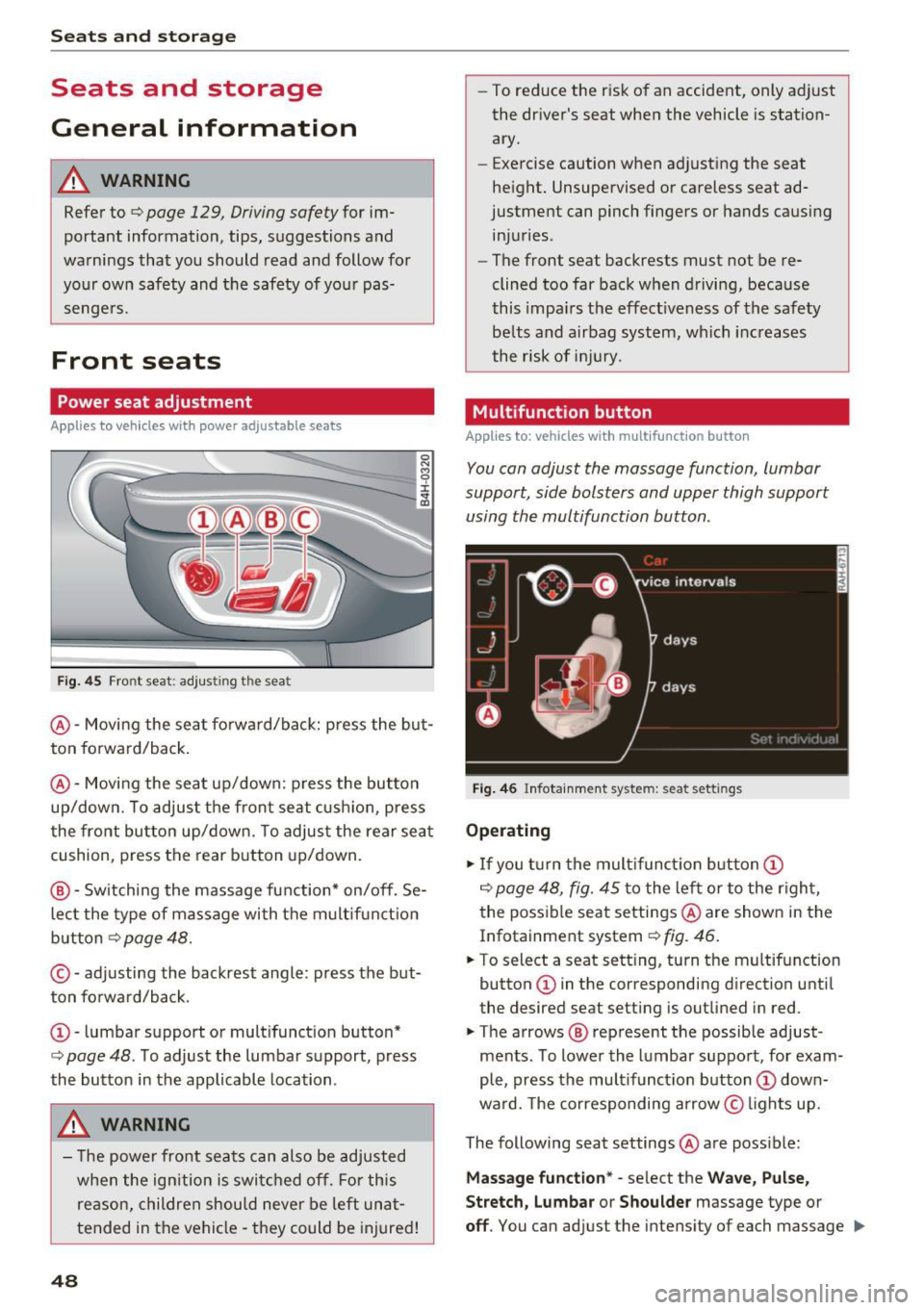
F ig. 4 5 Fro nt seat: adj ustin g the sea t
@ -Movi ng the seat fo rwa rd/back: p ress the but
ton forwa rd/back .
@ -Moving the seat up/down: press the button
up/dow n. To adjust the front seat cush ion, press
the front button up/dow n. T o adjus t the rear sea t
cushion, press the rear button up/down.
@ - Switching the massage function * on/off . Se
lec t the type of massage with the multif unct ion
button
c::> page 48.
© - adjusting the backrest angle : press the but
ton fo rwa rd/back.
CD -lumbar support or mult ifunct ion button*
c::> page 48 . To adjust the lumbar support, press
the bu tton in the applicable location .
A WARNING
- The power fro nt seats can also be adjusted
when the ign ition is swi tc h ed off. For this
reason, children should never be left una t
tended in the vehicle -they could be injured!
48
- To reduce the r isk of an accident, only adjust
the driver 's seat when the vehicle is station
ary.
- Exercise caution when adjusting the seat
height. Unsupervised or careless seat ad
justment can pinch fingers or hands causing
injuries .
- The front seat backrests must not be re
clined too far back when driving, because
this impa irs the effect iveness of the safety
be lts and airbag system, which increases
the risk of i nju ry.
Multifunction button
App lies to: vehicles wit h mult ifunct ion b utto n
You can adjust the massage function , lumbar
support, side bolsters and upper thigh support
using the multifunction button.
Fig . 46 Infotainm ent s ystem: se at settin gs
Operating
.,. If you t urn the mult ifunct ion b utton CD
c::> page 48, fig. 45 to the lef t or to the r igh t,
the poss ible seat settings @are shown in the
Infotainment system
c::> f ig . 46.
.,. To s ele ct a seat sett ing , turn the multifunction
button
CD in the corresponding direction unti l
the des ired seat setting is outlined in red .
.,. The arrows @ represent the possible adjust
ments . To lower the lumbar support , for exam
ple, press the mult ifunct ion button
CD down
ward. The corresponding arrow © lights up.
The following seat settings @are poss ible:
Ma ssa ge fun ctio n* -select the W ave, Pulse ,
Stretch, Lumbar or Shoulder
massage type or
off. You can adjust the intensity of each massage IIJ,,
Page 53 of 284

co
co
.... N
" N .... 0
00
<.,;) 'SI"
Remote Memory button control key
Driver D river Front
passen-ger
Seat X X X
Steering wheel* X X
Both
exterior X X
mirrors*
Remote control key
Applies to: vehicles with memory function
The driver's seat profile can be assigned to the
remote control key when the vehicle is locked.
• Select: the ICARI function button > (Car)* Sys
tems
control button > Vehicle settings > Driv
er's seat
> Remote control key > On .
(D Tips
If you do not wish to have the seat profile for
another driver assigned to the remote control
key, switch the memory function off in the In
fotainment system or using the
IOFFI button
r:::;,page 51.
Memory buttons
Applies to: vehicles with memory function
Fig. 51 Driver 's door: memory function buttons
The memory buttons are located in the driver's/
front passenger's* door.
Switching the memory function on/off
• Press the IOFFI button to switch the memory
function on/off. The LED in the button turns on
Seats and storage
when the memory function is off . Seat profiles
are neither stored nor recalled.
Storing a seat profile
• Press the ISET I button. When the word SET
lights up, the memory is ready to store set
tings .
• Now press a memory button briefly. A tone
confirms that the settings were stored.
Accessing a seat profile
• If the driver's door is open and the ignition is
sw itched off, press the memo ry button.
.. If the driver's door is closed or the ignition is
switched on, press and hold the memory but
ton until the seat adjustment is complete .
A WARNING
-For safety reasons, the seat setting can only
be recalled when the vehicle is stationary,
otherwise the re is a risk of an accident.
- If necessary, you can stop the recall process
by press ing the
IOFFI button or any memory
button.
Adjusting the front passenger's seat in the
Infotainment system
Applies to: vehicles with memory function
The driver can move the front passenger's seat
into various positions.
Adjusting the front passenger's seat from
the driver's seat
• Select: the I CAR I funct ion button > (Car) * Sys
tems
contro l button > Vehicle settings > Seats
> Front passenger's seat > Adjust seat posi
tion .
• You can now adjust the front passenger's seat
using the driver's seat buttons
r:::;, page 48,
fig. 45.
Align with driver's seat
• To transfer the settings from the driver's seat
to the front passenger's seat, select: the
I CAR I
function button > (Car)* Systems control but
ton
> Vehicle settings> Seats > Front passeng-
er 's seat > Align with driver 's seat. ..,.
51
Page 69 of 284
co
co
.... N
" N .... 0
00
<.,;) 'SI"
lead to greater tire wear and will affect driving
behav ior.
Do not drive on
winter tires year-round , as this
will consume up to 10% more fuel.
Eliminate unnecessary weight
Since every kilogram of extra weight increases
fuel consumption, a quick inspection of the lug
gage compartment may be worth it to avoid un
necessary weight.
When not being used, a roof rack should be re moved to decrease the wind resistance of the ve
hicle. You will save approximately 12% of your
fuel when at speeds from 62-75 mph (100-120 km/h).
Save energy
The engine drives the generator, which generates
electricity; the fuel consumption also increases
with the demand for electricity. Therefore, switch
electrical equipment off when you no longer
need it. Examples of equipment that uses a lot of
energy are air blowers at a high setting, the rear
window defogger and seat heating*.
CD Note
Do not leave engine idling unattended after
starting. If warning lights should come on to
indicate improper operation, they would go
unheeded. Extended idling also produces
heat, which could result in overheating or
other damage to the vehicle or other proper
ty .
CD Note
-Have your vehicle maintained properly and
in accordance with the service recommenda
tions in your Warranty
& Maintenance book
let. Lack of proper maintenance as well as
improper use of the vehicle will impair the
function of the emission control system and
could lead to damage .
- Do not alter or remove any component of
the Emission Control System unless ap
proved by the manufacturer.
- Do not alter or remove any device, such as
heat shields, switches, ignition wires,
Driving
valves , which are designed to protect your
vehicle's Emission Control System and other
important vehicle components.
(D Tips
The consumption estimates as published by
ENVIRONMENTAL PROTECTION AGENCY
(EPA) and Transport Canada may not corre
spond to your actual consumption on the
road, which will vary depending upon vehicle
load and speed, road and weather conditions,
trip length, etc .
Steering
Manual steering wheel position adjustment
Applies to: vehicles with manual steering wheel adjustment
The steering wheel position is adjustable up and
down and forward and back.
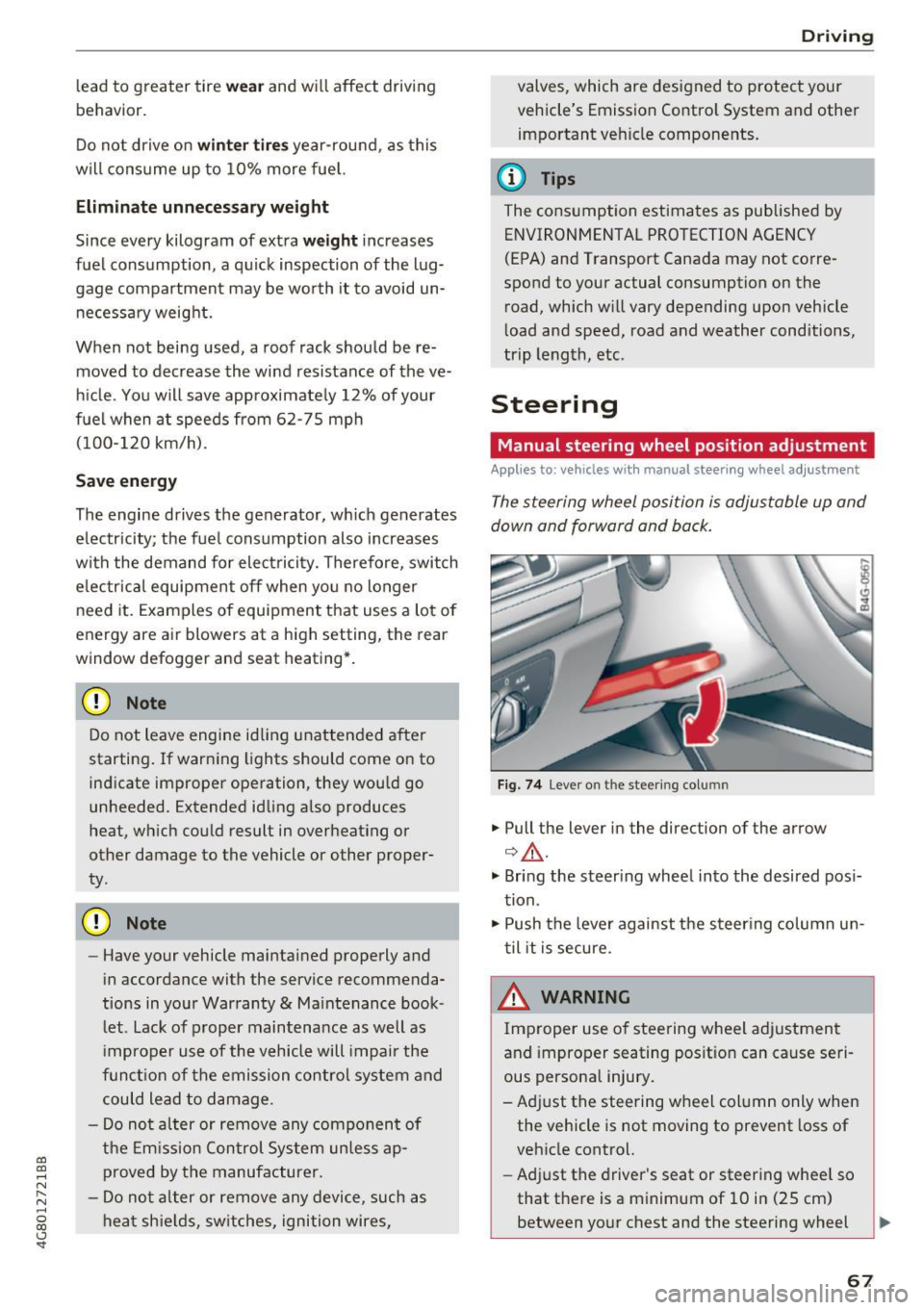
Fig. 74 L eve r o n t he stee ring col umn
"'Pull the lever in the direction of the arrow
Q &_ .
"' Bring the steering wheel into the desired posi
tion.
"' Push the lever against the steering column un
til it is secure.
_& WARNING
~ -
Improper use of steering wheel adjustment
and improper seating position can cause seri
ous personal injury.
-Adjust the steering wheel column only when the vehicle is not moving to prevent loss of
vehicle control.
- Adjust the driver's seat or steering wheel so
that there is a minimum of 10 in (25 cm) between your chest and the steering wheel
II>
67
Page 71 of 284

co
co
.... N
" N .... 0
00
<.,;) 'SI"
Easy seat entry
Applies to: vehicles with power steering wheel adjustment
Easy seat entry makes it easier to enter and exit
the vehicle by adjusting the steering column au
tomatically.
• In the Infotainment system, select the ICARI
function button > ( Car )* Sys te m s control but
ton
> Vehicl e setting s > Seat s > Driver's s eat >
E as y seat entry > On .
When easy seat entry is switched on , the steering
column goes back up into the park position when
the ignition is switched off . After entering the ve
h icle, the steering co lumn returns to the stored
position once the ignition is switched on.
Starting and stopping
the engine
Starting the engine
The I START E NGIN E STOP I button switches the
ignition on and starts the engine .
Fig. 76 Center conso le: STAR T ENGINE STOP button
Starting the engine
• Press the brake peda l and move the se lector
lever into the P or N position
¢ ,&..
• Press the I START ENGINE STOPI button. The
engine will start.
Applies to: vehicles with diesel engines
• It is possible that there will be a slight delay
when starting the engine in colder tempera
tu res. Therefore, you must hold the brake pedal
down until the engine starts. The indicator light
turns on while the engine is preheating
1,1 .
Drivi ng
Switching the ignition on /off
If you wo uld like to sw itch the igni tion on w ith
out starting the engine, follow these steps:
• Press the
!START E NGINE STOP ! button with
out press ing the brake peda l. Vehicles witho ut
t he Star t/Stop system*: the need le in the tach
ometer moves into the
READY position .
• To switch the ignition off, press the button
again . The needle in the tachometer moves into
the
O FF position .
T he prewarming runs automatica lly in diesel
vehicles when the ignition is switched on .
E quipment tha t uses a lot of e lectr icity is sw itch
ed off temporarily when you start the engine .
If the engine does not start immediately, the
start ing procedure stops automat ically after a
sho rt time. Repeat the s ta rting proced ure.
Start /Stop system *
Read the informat ion in¢ page 71, Start-Stop
system .
.&, WARNING
To reduce the risk of poisoning, never a llow
the eng ine to run in confined spaces .
(D Note
Avoid h igh engine speed, full throttle, and
heavy engine load if the engine has not
-
r eached operat ing temperat ure ye t. You cou ld
damage the engine.
(® For the sake of the environment
Do not let the eng ine run wh ile parked to
warm up. Beg in driving immed iate ly. Th is re
duces unnecessa ry emissions.
(D Tips
- Some noise afte r start ing the e ngine is nor
ma l and is no cause for conce rn.
- If you leave the vehicle w ith the ignition
switched on, the ignit ion w ill switch off af
ter a ce rtain amount of time. Ma ke sure that
elect rical eq uipment such as the exterior
lights are swit ched off.
69
Page 75 of 284

co
co
.... N
" N .... 0
00
<..:l 'SI'
-The vehicle battery charge leve l is too low .
- Power consumpt ion is high .
The engine can turn off again when the condi
tions fo r Start-S top mode a re met .
Ignition i s switched off automatically
To prevent the veh icle battery from draining, the
ignit ion will sw itch off
automaticall y under the
following conditions :
- The vehicle must have already been driven.
- The Start/Stop system has stopped the engine.
- T he driver's door must be open.
- The driver's safe ty be lt must be unb uck led.
- The brake pedal must not be p ressed .
- The veh icle must be stationary .
In this case, the activated low beam is replaced by the parking light. The parking lights will
switch off after app roximately 30 minutes or
when yo u lock the vehicle .
If the Start/Stop system has not turned off the
engine or if you have sw itched the Start/Stop sys
tem off manually, the ignition will not be auto mat ical ly switched off and the engine w ill contin
ue to run~&. .
A WARNING
To red uce the r isk of poisoning, never allow
t he engine to r un in conf ined s paces.
@ Tips
If you select the Dor N se lector lever position
after sh ifting into reverse, the vehicle m ust
be driven f ast er than 6 mph (10 km/ h) in or
der fo r th e engine to switch off ag ain.
-
D rivi ng
Manually switching the Start/Stop system
off/on
Applies to : vehicles wit h Start/Stop sys te m
If you do not wish to use th e system, you can
switch it off manually.
Fi g. 79 Cen te r console: S tart/Stop system butto n
.. To switch the Start/Stop system off/on man
ually, press the
l (A) ~ I button . The LED in the b ut
ton turns on when the system is switched off.
(D Tips
If you switch the system off during a stop phase, the engine will start aga in automati
cally .
Messages in the instrument cluster display
Applies to: vehicles wit h Start/Stop syste m
Start-stop system deactivated: Please re start
engine manually
T his message appears w hen spec ific conditions
are no t me t du ring a stop phase. The S tart/Stop
system will
not b e a ble to restart the engine . The
engine m ust be star ted with the
I S TAR T ENGINE S TOP ! button .
Start-stop system: Syst em fault! Currently
unavailable
T he re is a ma lfunction in the Start/Stop system.
Drive the vehicle to an a uth orized Aud i dea ler or
author ized Service Facility as soon as possible to
have the malfunction corrected .
73
Page 80 of 284

Driving
than 2 seconds when the brake pedal is not
pressed.
Interlock button
The in terlo ck button in the selector leve r handle
p revents you from moving the se lector lever i n
adve rtently while in some se lector lever posi
tions. The positions that require the interlock
button to be pressed are marked in co lor in the il
lustration ¢
fig. 82.
Driving tips
Starting the engine
• The selector lever must be in the P or the N po
s ition.
Starting from a stop
• Press and hold the brake pedal.
• Press and hold the lock button in the selector
lever hand le, select the desired se lector lever
position such as 0/5 and release the lock but
ton.
• Wait a moment u ntil the transmission shifts .
You w ill not ice a slight moveme nt when the
gear engages .
• Release t he b rake pedal and press the accelera
tor pedal ¢& .
Stopp ing temporarily
• Keep the veh icle stationary us ing the braking
pedal, for example at traffic lights .
• Do not p ress the accelerator pedal when doing
th is.
• To preve nt the vehicle from rolling w hen you
sta rt d riving, se t the par king brake w hen stop
ping on steep inclines¢&, .
• The park ing brake w ill release automatically
and the vehicle wi ll start moving once you press
the accelerator pedal.
Stopping /parking
If the se lec tor lever is not in the P posit io n when
you open the driver's door, the vehicle could rol l.
The message
Transmission: selector lever in
drive position!
appears . A warn ing tone w ill also
sound.
• Press and hold the brake pedal¢&, .
78
• Se t the park ing brake.
• Select the P se lector lever position .
U nder cert ain circumst ances, such as d riving in
t h e mo unta ins, it may be useful to swi tch tempo
rarily to the man ual sh ift program in order to
manua lly adjust the gears to the driving condi
tions
¢ page 79 .
On inc lines, activate the parking brake f irs t and
then move the selector lever to the P position
¢
page 74. This prevents the locking mechanism
from be ing loaded too heavily and will make it
easier to move the selector lever out of the P po
s ition.
A WARNING
-
- The vehicle can roll even if the ignit io n is
sw itched off.
- Never leave your veh icle with the engine
r u nning while in gear .
- Do not press the acce le rato r pedal when
changing t he selec tor lever posit ion while
the vehicle is s tat ionary and the engine is
r u nning.
- Please note that a small amount of power is
tra nsmi tted if the vehicle is stoppe d tem po
rari ly wh ile in the D/S or R sele ctor leve r po
sitio n. T o reduce the ris k of an ac cident, you
m ust c ontin ue pressing firm ly on the brake
pe dal while the ve hicle is stopped so that it
does not roll.
- Never engage the R or P selector level pos i
tion s while dr iving. It could ca use a crash .
- Before driving down a s teep slope, redu ce
your speed and sh ift into a lower gear w ith
"t i p tronic" .
- Do not ri de the brakes or press the brake
pe dal too often or too long when dr iv ing
downhill . Constant braking causes t he
brakes to ove rheat and substant ia lly re
duces brak ing performance, increases brak
ing d istance or causes comp lete failure of
the bra ke system.
- If you must stop on an incline, always hold
the vehicle in place w it h the foot brake or
parking bra ke to p revent it from rolling
back .
Page 84 of 284
Trailer towing
Trailer towing
Driving with a trailer
General information
Your Audi was designed primarily for passenger
transportation.
If you plan to tow a trailer, please remember that
the additional load will affect durability, economy and performance.
Trailer towing not on ly places more stress on the
ve hicle, it also ca lls for more concentration from
the dr iver.
F or this reason, always follow the operating and
driving instructions provided and use common
sense.
@ Note
If you are going to tow a trailer, you must ac
tivate the tra ile r operation mode
¢ page 82, Operating instructions.
Technical requirements
Traile r hitch
Use a weight-carrying hitch conforming to the
gross trai ler weight. The hitch must be suitab le
for your ve hicle and tra iler and must be mounted
securely on the vehicle 's chassis at a
technically
sound
locat ion . Use on ly a trailer hitch with a re
movable ba ll mount . Always chec k w it h t he t rail
er hitch man ufactur er to make s ure t hat you a re
using the co rrect hi tc h.
Do not use a bumper hitch.
The hitch m ust be installed i n such a way that it
does not interfere with the impact -absorbing
bumper sys tem . N o mod ificat ions should be
made to the vehicle exhaust and b rake systems .
Fr om t ime to t ime, che ck t hat all hitch mo unti ng
bol ts rem ain securely faste ned.
W hen you are not tow ing a tra iler, remove the
tra ile r hitc h ba ll mount . This prevents the hitch
from ca using damage shou ld your veh icle be
s truck from behind¢ &..
82
Trailer brakes
If your trailer is equipped wi th a bra king sys tem,
c h ec k t o be sure that it con forms to all regu la
tions.
The trailer hydrau lic br ake system mus t not be
directly connecte d to the vehicle's hydr auli c
brake system .
Safety chains
Always use safety chains between your vehicle
a nd t he tra ile r.
Trailer lights
Trailer lights must meet all regulations. Be sure
to check w ith your Aud i dea ler for correct wir ing,
switches and relays.
Mirrors
If you a re unab le to see the traffic behind you us
i ng the regular outs ide mir rors, then you
must in
stall extended mirrors. It is important that you
always have clear vision to the rear.
A WARNING
Afte r remov ing the tra ile r hi tch, do not s to re
i t in yo ur vehicle. In cas e of sudden brak ing,
the hit ch could fly fo rwa rd and injure you or
your pas sengers.
Operating instructions
Maximum trailer weight
A tra ile r f or yo ur vehicle is lim ite d to a typical
cla ss 1 or class 2 trailer.
Trailer load distribution
Be sure the load in the trai ler is held sec urely in
place to p revent it from shifting forward , back
ward or si deways .
Never allow a pas senger to ride in a trailer ¢ &.
in Driving instructions on page 84.
Engine cooling system
Towing a tra ile r makes the engine wor k harder . It
i s impo rtant that the cooling system's perform
ance is up to the additional load. Ma ke sure that
the cooling system has enoug h fluid.
IJJ,,,
Page 86 of 284

Trailer towing
Coolant t emperatur e
The coolant temperatu re gauge <=? page 9 must
be observed ca refully. The coo lant tempe rature
can increase if you drive on long inclines in a low
gear at high engine sp eeds. Reduce your sp eed
immed ia te ly if the LEDs in the top part of the dis
p lay turn on.
For more information abo ut indicator lights, re
fe r to . <=?
page 14.
A WARNING
Anyone not properly restrained in a moving
vehicle is at a much greater risk in an acci
dent . Never let anyone ride in your car who is
not properly wearing the restraints provided
by Audi.
Trailer towing information
Important to know
-
Your veh icle hand les different ly when tow ing a
tra ile r because of the additional weight and d if
fe rent we ight d istr ib ution. Safety, performance
and economy w ill great ly depend o n how careful
ly you load yo ur trailer and ope rate your r ig .
Before you actually tow your tra iler, practice
turn ing, stopp ing and bac king up in an area away
from t raff ic. Keep practicing until you have be
come comple tely fami liar with t he way your vehi
cle-trailer comb inat ion behaves and responds.
Backing up is d iffic ult and requires pract ice .
Backing up with a tra iler gene rally requires steer
i n g ac tion oppos ite to tha t when backing up yo ur
veh icle w it h out a trailer .
M aintain a g reater d istance between your vehicle
and the one in front of you . You w ill need more
room to stop . To compensa te fo r th e tra ile r, you
will nee d a larger than no rma l tur ning rad ius.
When pass ing , remembe r that you ca nnot accel
e rate as fast as you no rma lly would because of
the adde d load . Make s ure yo u have eno ugh room
to pass . After passing, allow plenty of room for
your trai ler before chang ing lanes again.
84
Avo id jerky starts, sharp turns or rapid lane
c h anges.
(D Tips
- Do not tow a trailer dur ing the brea k-i n pe ri
od of your veh icle.
- I f you tow a tra ile r, your A udi m ay requi re
more frequent ma intenance due to the ex
tra load
¢ page 264.
Parking on a slope
Do not park on a slope wi th a trailer . If it cannot
be avoided, do so only after doing the following:
When parking:
.,. App ly the foot bra ke .
.,. Have so meone p lace cho cks unde r bot h the ve
hicle and the trailer w heels.
.,. With choc ks in place, slowly rele ase the brakes
until the w heel chocks abso rb the load .
.,. Turn th e whee ls towards the curb.
.,. App ly the par king b rake .
.,. Select the P se lecto r lever posit ion.
When restarting after parking:
.,. App ly the foot bra ke .
.,. Start the engine .
.,. Sele ct the D/S se lector l ever position.
.,. Re lease the par king brake and s low ly pull o ut
and away from the whee l chocks.
.,. Stop and have someone re trieve the wheel
chocks .
(D Tips
If you move the selector lever of the automat
i c transmission to P befo re applying the park
i ng brake and before blocking the whee ls, yo u
may have to use more force la ter to move the
l eve r o ut of the P pos it io n.
Page 88 of 284
Ass is t
- Please note that unconsciously "resting"
your foot on the accelerator pedal prevents
the cruise control from braking. This is be cause pressing the accelerator pedal over
rides the cruise control system .
-If a brake system malfunction such as over
heating occurs when the cruise control sys
tem is sw itched on, the braking function in
the system may be switched off. The rest of
the cruise control system f unctions remain
a ct ive as long as the
[l!jl!)~1j (USA models) /
Bl (Canada models) indicator light is on .
@ Tips
The brake lights turn on when the brakes a re
app lied automatically.
Changing speed
A pp lies to: ve hicles w ith c ruise control system
.. To inc rease or decrease the speed in incre
ments, tap the lever toward
0 10 ¢ page 85,
fig . 86 .
.. To increase or decrease the speed quickly, hold
the lever in the
0 10 direction until the de
s ired speed is displayed.
You can a lso press the accelerator pedal down to
increase your speed, for example if you want to
pass someone. The speed you set earlier w ill re
sume as soon as you release the accelerator ped
al.
However, if you exceed your saved speed by 5
mph (10 km/h) for longer than 6 minutes, the
cru ise control system turns off temporarily.
The green
1ij;(l )~14 (USA models) t BI (Canada mod
els) indicator light in the speedometer turns off
and the stored speed is maintained.
Preselecting the speed
A pp lies to: ve hicles w ith c ruise control system
You can pre-select your desired speed when the
vehicle is stationary.
.. Switch the ignition on .
.. Pu ll the lever into position@~
page 85,
fig. 86.
86
.. To increase or decrease the speed, tap the lever
toward
0 10 .
.. To store the speed d isp layed, release the lever.
This function makes it possible, fo r example, to
save the speed you want before driving on the
highway. Once on the highway, activate the
cruise contro l by pull ing the lever toward@.
Switching off
App lies to : vehicles with c ruise co nt rol system
Temporary deacti vation
.. Press the brake pedal, or
.. Press the lever into position @(not clicked into
place)
¢ page 85, fig . 86, or
.. Dr ive for longer than 5 minutes faster than 5
mph (10 km/h) above the stored speed.
Switching off completely
.. Press the lever into position @(clicked into
place), or
.. Switch the ignit io n off.
The speed you stored will be maintained if the cruise contro l has been switched off temporarily .
To resume the stored speed, release the brake pedal and pull the lever to position @.
Switch ing the ignit ion off w ill erase the stored
speed .
A WARNING
You should only resume the stored speed if it
is not too high for existing traff ic conditions.
Othe rw ise you can inc rease the risk of an acc i
dent.
Page 89 of 284

co
co
.-, N
" N .-, 0
00
<.,;) 'SI'
Boost, shifting and
engine oil temperature
indicators
Applies to: vehicles with boost, shifting and engine oil tem
peratu re indicators
Fig. 87 Instrument cluster: boost, shift ing and eng ine oil
temperature indicators
... Turn the menu thumbwheel on the steering
wheel until
Lap timer appears in the instru
ment cluster display.
@ Boost pressure indicator
The current engine load (meaning the current
boost pressure) is indicated by a bar .
@ Shifting indicator
The shifting indicator is on ly visible when shifting
gears in tiptronic mode ¢ page
79. Green LEDs
turn on as the engine RPMs increase. The LEDS
flash red at speeds near the RPM limit.
In vehicles with an activated head-up display
¢ page
24, the shifting indicator is shown in the
head-up display instead of the instrument clus
ter.
© Engine oil tempe rature indicator
If the engine oil temperature is below 140 °F
(60 °(), th<> I# symbol followed by three hy
phens"- - -" and the
0
( unit is shown.
The engine has reached its operating tempera
ture when the engine oil temperature is between
140
° F (60 °() and 248 °F (120 °() under normal
driving conditions. The engine oil temperature
may be higher if there is heavy engine load and
high temperatures outside. This is not a cause for
concern as long as the .¢ page
15 or Ill
Assist
¢ page 15 indicato r lights in the display do not
blink.
Lap timer
Introduction
Applies to: vehicles with lap timer
You can record and evaluate lap times with the
lap timer ¢ page
87, fig. 88. Th e time is meas
ur ed in m inutes, seconds and 1/10 seconds . The
hours are also shown when the lap time exceeds
60 minutes. The maximum individual measure
ment is 99 hours. A maximum of SO laps can be
recorded.
A WARNING
-Your focus shou ld always be on driving your
vehicle safe ly. As the driver, you have com
plete respons ibility for safety in traffic. Only
use the functions in such a way that you al
ways maintain complete control over your ve
hicle in all traffic situations .
@ Tips
You can retr ieve informat ion from the tr ip
computer wh ile the lap timer stopwatch is
r unning.
Opening the lap timer and recording times
Applies to: vehicles with lap timer
Fig. 88 Display: lap t imer
Opening the lap timer
... Turn the menu thumbwheel on the steering
wheel until
Lap timer appears in the instru
ment cluster display .
-
87