lock AUDI A7 2017 Owner´s Manual
[x] Cancel search | Manufacturer: AUDI, Model Year: 2017, Model line: A7, Model: AUDI A7 2017Pages: 284, PDF Size: 72.29 MB
Page 75 of 284

co
co
.... N
" N .... 0
00
<..:l 'SI'
-The vehicle battery charge leve l is too low .
- Power consumpt ion is high .
The engine can turn off again when the condi
tions fo r Start-S top mode a re met .
Ignition i s switched off automatically
To prevent the veh icle battery from draining, the
ignit ion will sw itch off
automaticall y under the
following conditions :
- The vehicle must have already been driven.
- The Start/Stop system has stopped the engine.
- T he driver's door must be open.
- The driver's safe ty be lt must be unb uck led.
- The brake pedal must not be p ressed .
- The veh icle must be stationary .
In this case, the activated low beam is replaced by the parking light. The parking lights will
switch off after app roximately 30 minutes or
when yo u lock the vehicle .
If the Start/Stop system has not turned off the
engine or if you have sw itched the Start/Stop sys
tem off manually, the ignition will not be auto mat ical ly switched off and the engine w ill contin
ue to run~&. .
A WARNING
To red uce the r isk of poisoning, never allow
t he engine to r un in conf ined s paces.
@ Tips
If you select the Dor N se lector lever position
after sh ifting into reverse, the vehicle m ust
be driven f ast er than 6 mph (10 km/ h) in or
der fo r th e engine to switch off ag ain.
-
D rivi ng
Manually switching the Start/Stop system
off/on
Applies to : vehicles wit h Start/Stop sys te m
If you do not wish to use th e system, you can
switch it off manually.
Fi g. 79 Cen te r console: S tart/Stop system butto n
.. To switch the Start/Stop system off/on man
ually, press the
l (A) ~ I button . The LED in the b ut
ton turns on when the system is switched off.
(D Tips
If you switch the system off during a stop phase, the engine will start aga in automati
cally .
Messages in the instrument cluster display
Applies to: vehicles wit h Start/Stop syste m
Start-stop system deactivated: Please re start
engine manually
T his message appears w hen spec ific conditions
are no t me t du ring a stop phase. The S tart/Stop
system will
not b e a ble to restart the engine . The
engine m ust be star ted with the
I S TAR T ENGINE S TOP ! button .
Start-stop system: Syst em fault! Currently
unavailable
T he re is a ma lfunction in the Start/Stop system.
Drive the vehicle to an a uth orized Aud i dea ler or
author ized Service Facility as soon as possible to
have the malfunction corrected .
73
Page 77 of 284

co
co
.... N
" N .... 0
00
\.J '
brake similar to heavy braking. ESC and the
associated components (ABS, ASR, EDL)
cannot overcome the laws of physics . In cor
ners and when road or weather conditions
are bad, a full brake application can cause
the vehicle to skid or the rear end to swerve,
which increases the risk of an accident.
- If the power supply fails, you cannot set the
parking brake if it is released. In this case,
park the vehicle on level ground and secure
it by placing the selector lever in the P posi
tion. See an authorized Audi dealer or au
thorized Audi Service Facility for assistance.
- Always take the vehicle key with you when leaving your vehicle, even for a short period
of time. This applies particularly when chil
dren remain in the vehicle. Otherwise chil
dren could start the engine, release the
parking brake or operate electrical equip
ment such as power windows, which in
creases the risk of an accident.
- No one should remain in the vehicle when it
is locked -especially children. Locked doors
make it more difficult for emergency work
ers to get into the vehicle, which puts lives
at risk.
(D) Tips
When stopping at a traffic signal or stopping
in city traffic, you can set the parking brake
manually. The vehicle does not have to be
held with the brake pedal. The parking brake
eliminates the tendency to creep when a se
lector lever position is engaged. As soon as
you press the accelerator pedal, the parking
brake releases automatically and your vehicle
starts to move
c::> page 75.
(D Tips
- Occasional noises when the parking brake is
set and released are normal and are not a
cause for concern.
- The parking brake goes through a self-test
cycle at regular intervals when the vehicle is
stopped. Any noises associated with this are normal.
Driving
- If there is a power failure, the parking brake
will not set if it is released, and it will not
release if it is set
c::> &. . See an authorized
Audi dealer or authorized Audi Service Fa
cility for assistance.
Starting from a stop
Various convenience and safety functions may be
available when the vehicle begins driving, de
pending on vehicle equipment .
Starting on hills with the parking brake set
Requirement: the driver's door must be closed
and the driver's safety belt must be fastened.
.,. To start driving comfortably when on a hill, set
the parking brake and begin driving as usual.
The braking force of the parking brake does not
release automatically until the wheels build up
enough driving force.
Starting on hills with hill hold assist
Hill hold assist makes it easier to start on hills.
Requirement: the driver's door must be closed
and the engine must be running.
.. To activate hill hold assist, press and hold the
brake pedal for several seconds. The vehicle
must be in an uphill direction of travel.
After releasing the brake pedal, the braking pow er is maintained for a brief moment
c::> ..&. to pre
vent the vehicle from rolling back when starting .
During this time, you can easily begin to move
your vehicle.
_& WARNING
A ppl ies to: ve hicles with hill hold assist
- If you do not begin driving immediately or
the engine stalls after releasing the brake
pedal, your vehicle may begin to roll back
ward. Press the brake pedal or set the park
ing brake immediately .
- The intelligent technology of hill hold assist
cannot overcome the limitations imposed by
natural physical laws. The increased comfort
offered by hill hold assist should not cause
you to take safety risks.
Ill-
75
Page 78 of 284
Driving
-Hill hold assist cannot hold the veh icle in
place on all h ills (for example, if the ground
is slippery or icy).
- To reduce the risk of an accident, always
make sure the vehicle is situated safely
wh ile stat ionary.
Automatic transmission
Introduction
The automat ic tra nsmission is cont rolled e lec
tronically . The transmission sh ifts up or down au
tomatically depending on which drive program is
selected.
Whe n a
mod erate dri ving style is used, the
transmission selects the most economical driving
mode. The transmiss ion upshifts at a lower RPM
and downshifts at a higher RPM to improve fuel
efficiency.
The transm ission switches to a spo rty mode after
a kick-down or when the driver uses a
spo rt y
driving style
characterized by quick accelerator
pedal movements, heavy acceleration, frequent
changes in speed and traveling at the maximum
speed.
If desired, the driver can also select the gears
manually ( tipt ronic mod e) 9 page 79.
A ppl ies to: ve hicles w ith 5 tro nic t ra n smi ssio n
The S tronic is a dual-clutch t ransmiss ion . Power
is transferred using two clutches that work inde
pendently from one another. They replace the
torque converter used in conventional automatic transmissions and allow the vehicle to accelerate
without a noticeable inter ruption in tract ion .
App lies to: ve hicles w ith a tipt ro nic tra ns mi ssio n
Power is transferred using a torque converter.
76
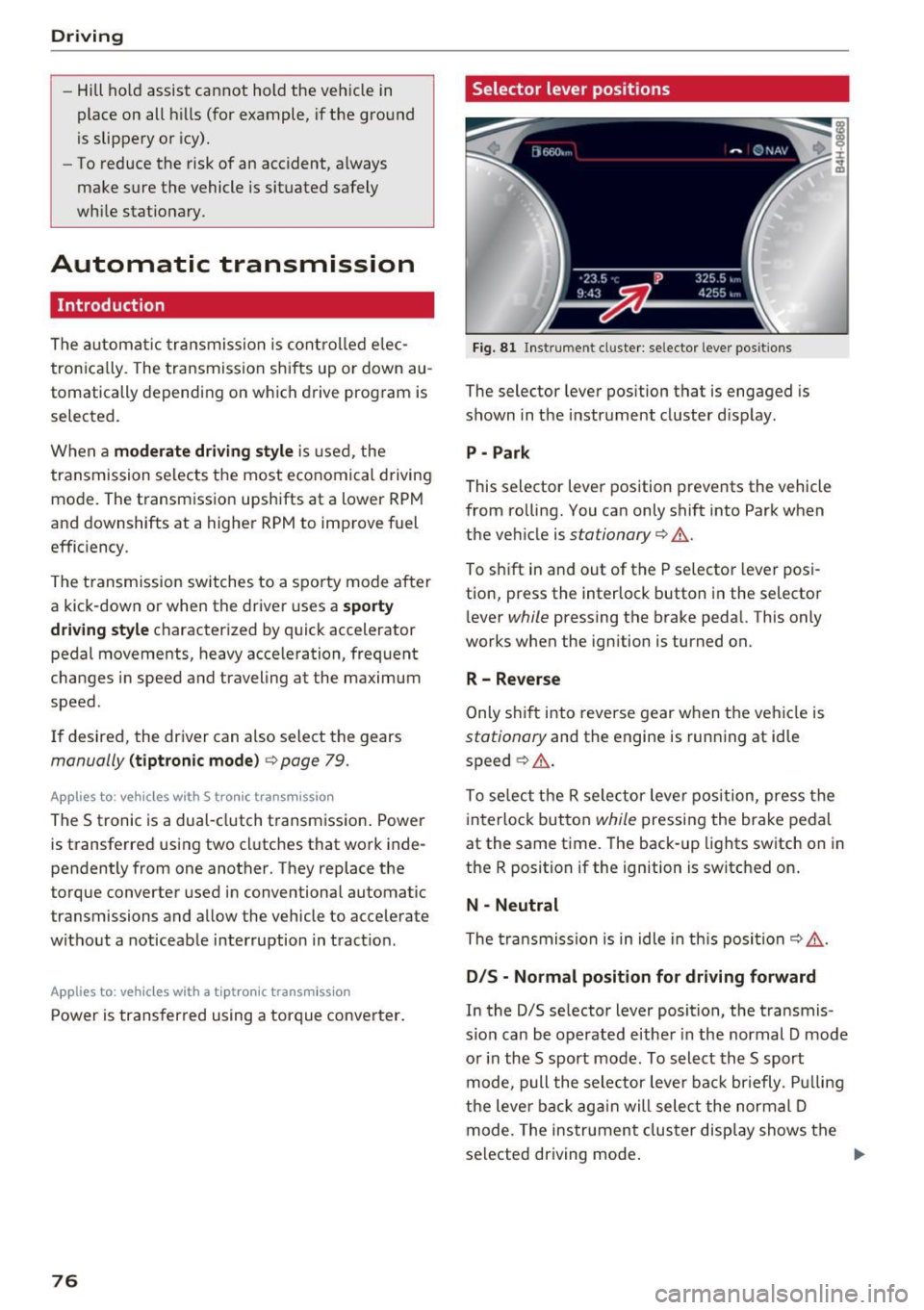
Selector lever positions
Fi g. 81 Inst rument cl uster: se lector leve r pos it ions
The selector lever position that is engaged is
shown in the instrument cluster d isplay .
P -Park
This selector lever position prevents the vehicle
from ro lling. You can only shift into Park when
the veh icle is
stationary 9 ,1. .
To sh ift in and out of the P selecto r lever posi
tion, press the interlock button in the selector
l ever
while pressing the brake pedal. This only
works when the ignition is turned on.
R- Reverse
Only s hif t into reverse gear w hen the veh icle is
stationary and the engine is running at idle
speed ~
,1..
To se lect the R sele ctor leve r position, press the
interlock button
while pressing the brake pedal
at the same time. The back -up lights switch on in
the R position if the ignition is switched on .
N -Neutral
The tra nsmission is in idle in th is posi tion ~ ,1. .
DIS -Normal position for driving forward
In the D/S se lector lever position, the transmis
s io n can be operated e ither in the normal D mode
o r in the S sport mode . To select th e S sport
mode, pull the selector leve r back br iefly . P ull ing
the leve r back ag ai n will sele ct the normal D
mode. The ins trument cluster display shows the
selected driving mode .
Page 79 of 284

co
co
.... N
" N .... 0
00
<.,;) 'SI'
In the normal m ode D, the tr ansmission auto
matica lly selects t he suitab le gear ratio . It de
pends on en gine load, vehicle speed and driving
style.
Select the
s p o rt m od e S for sporty driving. The
ve hicle makes full use of the engine's power .
Shifting is more noticeable when accelerat ing.
To move from selector lever position N to D, you must press the brake pedal and the vehicle must
be traveling less than 1 mph (2 km/h) or be sta
tionary ¢.&. .
.&_ WARNING
-The veh icle can roll even if the ignition is
switched off.
- Never select R or P while driving, because
this increases the risk of an accident.
-
- Power is still transmitted to the wheels
when the eng ine is running at idle. To pre
vent the veh icle from "creeping", you must
keep your foot on the brake in all selector
lever positions (except P) when the eng ine is
running . Otherwise, th is increases the r isk
of an accident.
- Do not inadvertently press the accelerator
peda l w hen the veh icle is stopped if a gear is
engaged. Ot herwise the veh icle will start to
move immediately, even i f the parking bra ke
is set. This cou ld res ult in a crash .
- T o de cre ase the risk of an accident, these
lector lever must be in the P posi tion and
the parking brake must be set before open
ing the hood and working on a r unning en
gine. Always read and fo llow the applicable
warnings
q page 199, Working in the en
gine compartment.
(D Tips
- Drive select: sporty shifting character istics
can be selected us ing the
Dy namic driving
mode.Sw ill appea r in the instrument clus
ter display instead of D.
- If you accidenta lly select N while driv ing,
take your foot off the accelerator pedal and
wait for the engine to slow down to idle be
fore selecting D/S.
D rivi ng
-If there is a powe r failure, the se lector lever
wi ll not move out of the P position. The
eme rgency re lease can be used if t his hap
pens
¢ page 81.
Selector lever lock
The selector lever lock prevents you from select
ing a gear accidentally, causing the vehicle to
roll.
)
Fi g. 82 Selector lever lock
T o release the se lector lever lock:
" Switch the ignit ion on .
" Press the brake pedal
while pressing the inter-
lock butto n.
Automatic shift lock (ASL)
The selector lever is locked in the P and N posi
t ions when the ig nit ion is switched on. The re
move it from t hese positions, the driver must
press the b rake peda l and press the lock button
at the same time. The following message ap
pears in the inst rument cluster display when the
selector lever is in the P or N posi tion to remind
t h e driver:
Brake pedal mu st be applied to shift from P
The automatic shift lock only funct ions when the
vehicle is stat ionary or at speeds be low 1 mph
(2 km/h) . At higher speeds, the lock is automati
c a lly deactivated in the N pos ition .
The selector lever is not locked when shifting
quick ly throug h N, for example from R to D. This
makes it possible to free the veh icle when it is
stuck by "rocking" it. The selecto r lever lock en-
gages if t he lever stays in t he N pos it ion longer ...
77
Page 80 of 284

Driving
than 2 seconds when the brake pedal is not
pressed.
Interlock button
The in terlo ck button in the selector leve r handle
p revents you from moving the se lector lever i n
adve rtently while in some se lector lever posi
tions. The positions that require the interlock
button to be pressed are marked in co lor in the il
lustration ¢
fig. 82.
Driving tips
Starting the engine
• The selector lever must be in the P or the N po
s ition.
Starting from a stop
• Press and hold the brake pedal.
• Press and hold the lock button in the selector
lever hand le, select the desired se lector lever
position such as 0/5 and release the lock but
ton.
• Wait a moment u ntil the transmission shifts .
You w ill not ice a slight moveme nt when the
gear engages .
• Release t he b rake pedal and press the accelera
tor pedal ¢& .
Stopp ing temporarily
• Keep the veh icle stationary us ing the braking
pedal, for example at traffic lights .
• Do not p ress the accelerator pedal when doing
th is.
• To preve nt the vehicle from rolling w hen you
sta rt d riving, se t the par king brake w hen stop
ping on steep inclines¢&, .
• The park ing brake w ill release automatically
and the vehicle wi ll start moving once you press
the accelerator pedal.
Stopping /parking
If the se lec tor lever is not in the P posit io n when
you open the driver's door, the vehicle could rol l.
The message
Transmission: selector lever in
drive position!
appears . A warn ing tone w ill also
sound.
• Press and hold the brake pedal¢&, .
78
• Se t the park ing brake.
• Select the P se lector lever position .
U nder cert ain circumst ances, such as d riving in
t h e mo unta ins, it may be useful to swi tch tempo
rarily to the man ual sh ift program in order to
manua lly adjust the gears to the driving condi
tions
¢ page 79 .
On inc lines, activate the parking brake f irs t and
then move the selector lever to the P position
¢
page 74. This prevents the locking mechanism
from be ing loaded too heavily and will make it
easier to move the selector lever out of the P po
s ition.
A WARNING
-
- The vehicle can roll even if the ignit io n is
sw itched off.
- Never leave your veh icle with the engine
r u nning while in gear .
- Do not press the acce le rato r pedal when
changing t he selec tor lever posit ion while
the vehicle is s tat ionary and the engine is
r u nning.
- Please note that a small amount of power is
tra nsmi tted if the vehicle is stoppe d tem po
rari ly wh ile in the D/S or R sele ctor leve r po
sitio n. T o reduce the ris k of an ac cident, you
m ust c ontin ue pressing firm ly on the brake
pe dal while the ve hicle is stopped so that it
does not roll.
- Never engage the R or P selector level pos i
tion s while dr iving. It could ca use a crash .
- Before driving down a s teep slope, redu ce
your speed and sh ift into a lower gear w ith
"t i p tronic" .
- Do not ri de the brakes or press the brake
pe dal too often or too long when dr iv ing
downhill . Constant braking causes t he
brakes to ove rheat and substant ia lly re
duces brak ing performance, increases brak
ing d istance or causes comp lete failure of
the bra ke system.
- If you must stop on an incline, always hold
the vehicle in place w it h the foot brake or
parking bra ke to p revent it from rolling
back .
Page 86 of 284

Trailer towing
Coolant t emperatur e
The coolant temperatu re gauge <=? page 9 must
be observed ca refully. The coo lant tempe rature
can increase if you drive on long inclines in a low
gear at high engine sp eeds. Reduce your sp eed
immed ia te ly if the LEDs in the top part of the dis
p lay turn on.
For more information abo ut indicator lights, re
fe r to . <=?
page 14.
A WARNING
Anyone not properly restrained in a moving
vehicle is at a much greater risk in an acci
dent . Never let anyone ride in your car who is
not properly wearing the restraints provided
by Audi.
Trailer towing information
Important to know
-
Your veh icle hand les different ly when tow ing a
tra ile r because of the additional weight and d if
fe rent we ight d istr ib ution. Safety, performance
and economy w ill great ly depend o n how careful
ly you load yo ur trailer and ope rate your r ig .
Before you actually tow your tra iler, practice
turn ing, stopp ing and bac king up in an area away
from t raff ic. Keep practicing until you have be
come comple tely fami liar with t he way your vehi
cle-trailer comb inat ion behaves and responds.
Backing up is d iffic ult and requires pract ice .
Backing up with a tra iler gene rally requires steer
i n g ac tion oppos ite to tha t when backing up yo ur
veh icle w it h out a trailer .
M aintain a g reater d istance between your vehicle
and the one in front of you . You w ill need more
room to stop . To compensa te fo r th e tra ile r, you
will nee d a larger than no rma l tur ning rad ius.
When pass ing , remembe r that you ca nnot accel
e rate as fast as you no rma lly would because of
the adde d load . Make s ure yo u have eno ugh room
to pass . After passing, allow plenty of room for
your trai ler before chang ing lanes again.
84
Avo id jerky starts, sharp turns or rapid lane
c h anges.
(D Tips
- Do not tow a trailer dur ing the brea k-i n pe ri
od of your veh icle.
- I f you tow a tra ile r, your A udi m ay requi re
more frequent ma intenance due to the ex
tra load
¢ page 264.
Parking on a slope
Do not park on a slope wi th a trailer . If it cannot
be avoided, do so only after doing the following:
When parking:
.,. App ly the foot bra ke .
.,. Have so meone p lace cho cks unde r bot h the ve
hicle and the trailer w heels.
.,. With choc ks in place, slowly rele ase the brakes
until the w heel chocks abso rb the load .
.,. Turn th e whee ls towards the curb.
.,. App ly the par king b rake .
.,. Select the P se lecto r lever posit ion.
When restarting after parking:
.,. App ly the foot bra ke .
.,. Start the engine .
.,. Sele ct the D/S se lector l ever position.
.,. Re lease the par king brake and s low ly pull o ut
and away from the whee l chocks.
.,. Stop and have someone re trieve the wheel
chocks .
(D Tips
If you move the selector lever of the automat
i c transmission to P befo re applying the park
i ng brake and before blocking the whee ls, yo u
may have to use more force la ter to move the
l eve r o ut of the P pos it io n.
Page 112 of 284
Parking system s
Rearview camera
Introduction
Applies to: ve hicles w ith rearview camera
, I
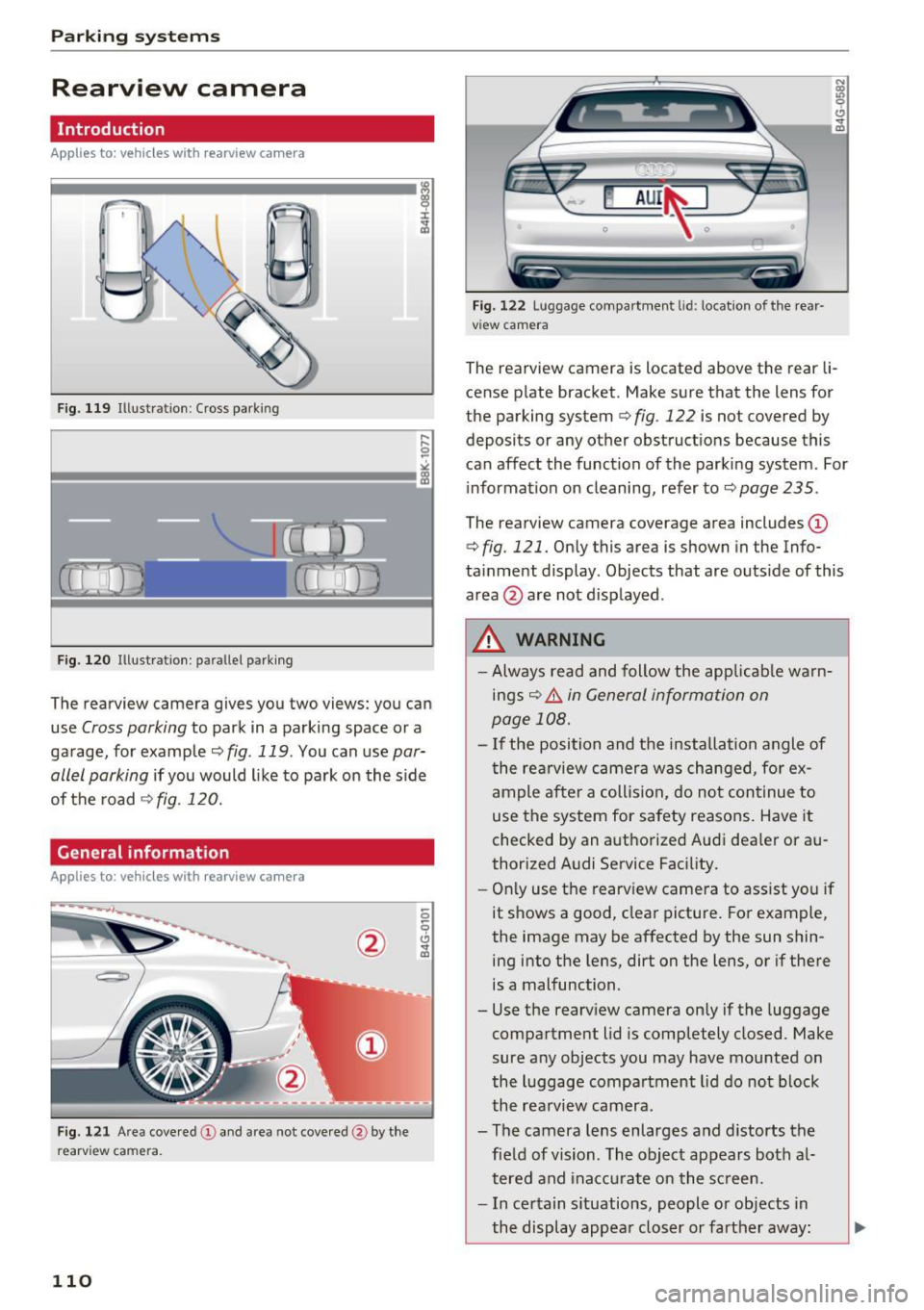
F ig. 119 Illustration : Cross parking
Fig. 120 Illustration : pa rallel parking
The rearview camera gives you two views: you can
use
Cross parking to park in a parking space or a
ga rage, for example ¢
fig. 119 . You can use par
allel parking
i f you would l ike to park on the s ide
of the road¢
fig. 120.
General information
Applies to: ve hicles with rearview camera
F ig . 121 Area cove red @ and area not cove red @ by the
r earv ie w ca mera .
110
Fig. 122 Lu ggage compartmen t lid : locatio n of the rear
v iew camera
N Cl)
"' 9 CJ ... m
The rearview camera is located above the rear li
cense p late bracket. Make sure that the lens for
the parking system
¢ fig . 122 is not covered by
deposits or any other obstructions because this
can affect the function of the parking system . For
information on cleaning, refer to ¢
page 235.
The rearview camera coverage area includes (D
¢ fig. 121. Only this area is shown in the Info
ta inment display . Objects that are outs ide of this
area @ are not disp layed .
.&_ WARNING
- Always read and follow the app licab le warn
ings¢ .&.
in General information on
page 108.
- I f the position and the installation angle of
the rea rview camera was changed, for ex
ample after a collision, do not cont inue to
use the system for safety reasons. Have it
checked by an authorized Audi dea ler or au
thorized Audi Service Facility.
- Onl y use the rearv iew camera to ass ist you if
it s hows a good, clear picture. For example,
the image may be affected by the sun shin ing into the lens, dirt on the lens, or if there
is a malfunction.
- Use the rearv iew camera on ly if the luggage
compartment lid is completely closed. Make
sure any objects you may have mounted on
the luggage compartment lid do not b lock
the rea rview camera .
- The camera lens enlarges and distorts the fie ld of vision . The object appears both a l
tered and ina ccu rate on the sc reen.
- In certain s ituations, people or objects in
the display appea r closer or farther away :
Page 122 of 284

Intelligent Technology
Intelligent Technology
Electronic Stabilization
Control (ESC)
Description
Elect ronic Stabilization Control (ESC) suppo rts
driver safety.
It red uces the risk of slipping and
improves dr iving stability. ESC detects crit ica l sit
uations such as the veh icle oversteering and un
dersteering or the wheels are sp inning. The vehi
cle is stabilized by app lying the brakes or reduc
ing engine torque. As soon as the ESC is active ly
regulat ing, the
D.1 indicato r light blin ks in the in
s trumen t clus ter.
The fo llow ing systems are integrated in the ESC :
Ant i-lock braking system (ABS)
ABS p revents the whee ls from locking whe n brak
ing. The vehicle can sti ll be steered even during
hard brak ing. Apply steady press ure to the brake
pedal. Do not pump the pedal. A puls ing in t he
b rake pedal indicates that the system is acting to
s tabilize the vehicle .
Br ake assist system
The brake assist system can decrease brak ing dis
tance . It increases brak ing power when the driver
presses the brake pedal q uick ly in emergency sit
uations . You must press and hold t he b rake pedal
until the dangerous sit uat io n is over . In veh icles
with adapt ive c ruise control*, the bra ke as sist
sy stem is more sensitive if t he di sta nce detec ted
t o the vehicle dr iv ing ahead is too small. On
ve hicl es with act ivated and f unct io ni ng night vi
sion assist*, the brake assist system can respond mo re sensit ively if there is a warning .
Anti-slip regulation (ASR)
ASR red uces eng ine power when the drive w heels
be gin sp inning an d adapts the force to the road
conditions. This makes it easie r to sta rt, acceler
ate and dr ive up h ills.
Electronic differential lock (EDL)
E DL a ppl ies the bra kes to a wheel tha t st art s
sp inning and tra nsfe rs t he dr ive powe r to t he
120
other driving whee ls. This func tion is no t ava ila
ble at hig her speeds.
I n extreme cases , EDL automat ic al ly swi tches off
to keep t he b rake o n the br aked wheel from ove r
heating. The ve hicle is still working correct ly. ED L
will switc h on again automatically when condi
tions have returned to normal.
Steering recommendation
The ESC he lps to s tabili ze th e vehicle by ch ang ing
t h e s teer ing torque.
I n veh icles with dynamic s teer ing*, ESC a lso
helps to stab ilize the s teeri ng in cr it ic al situ a
tions.
Selective wheel torque control
Se lective wheel to rque control is used when d riv
i ng on curves . The front whee l on the ins ide of
t h e curve or both whe els on the i nside of th e
cu rve are braked se lectively as needed. This al
l ows mo re pre cise driving in curves .
Automatic post -collision braking system
The "a utomat ic post -coll is io n braking system"
can help to reduce the risk of sl iding and of addi
tiona l co llisions after an acc iden t. If the a irbag
c on tro l modu le dete cts a collision above a cer tain
vehicle speed, the veh icle is braked by t he ESC.
The veh icle does not brake automatically if:
- the drive r presses the accelerator pedal, or
- the bra king force generate d by the pressed
brake pedal is greater than the b raking force
that would be in itiated by the system, or
- the ESC, the bra ke system or the vehicle elect ri
cal system are not functioning.
A WARNING
- The ESC and its integ rated systems can not
overcome the lim its imposed by natura l
p hys ica l laws. Th is is es pec ially i mpo rtan t
on s lippery or we t roads. If the system s be
g in a cting to s tabili ze yo ur vehicle, you
should immedi ately alte r your speed to
match the road and tra ffi c conditions. Do
not let the inc reased safety provided tempt
Page 128 of 284

Intelligent Technology
& WARNING
When extending and retracting the rear spoil
er, make sure there are no persons or objects
w ith in the spoiler range to red uce the risk of
injury .
& WARNING
Driv ing at higher speeds w ithout the rear
spoiler dep loyed can impa ir hand ling ch arac
t er istics, mak ing t he vehi cle h arder to con
t rol.
- Always make sure tha t the spoiler is de
ployed whe n driving a t speeds ove r 85 mph
(140 km/h) . If the rear spoiler warning/ind i
cator light in the instrument cluster comes
on, the rear spo iler may not have deployed.
- Never drive at speeds higher than 85 mph (140 km/ h) if the spoile r is not deployed.
Have the spoiler inspected as soon as possi
ble by an author ized Audi dealer or qualif ied
workshop.
-Always obey speed limits and other tra ffic
laws .
(D Note
-Never push on the vehicle on the rear spoi l
er . This cou ld cause damage.
- To prevent damage to the rear spoiler do
not lean o r place anything on it.
- Only opera te the rear spoiler man ually when
the luggage compartment lid is close and
the rear spoiler movi ng pa rts a re not
blocked. Otherwise, damage could occur.
(D Tips
Clean the rear spoi ler compartment eve ry 2 to
3 mont hs. To function correctly, the rear
spoiler m ust be free of ice, snow and leaves.
126
Energy management
' The starting ability is optimized
T he energy management system manages the
electrical energy distribution and optimizes the
availability of electrical energy for starting the
engine.
When a vehicle with a conventional energy sys
tem is no t drive n for a long time, the ve hicle bat
te ry is drained by equ ipment (fo r example, t he
i mmob il iz er). I n cer ta in circ umstan ces, the re
could m ay no t be e nough energy to s tart the en
gine.
You r vehicle is equipped with an inte lligent e ner
gy management system fo r dist ributing elec trici
ty. Thi s sign ifica ntl y improves the start ing ability
and incre ases the vehicle battery life .
The ene rgy ma nagement system Is made up of
battery diagnosi s, idling current management ,
and dynamic energy management .
Battery diagnosis
T he battery diagnos is determines the vehicle bat
tery charge level. The sensors detect the ba tte ry,
the batt ery cur rent, and t he battery temperature .
The curren t cha rge level and the pe rformance of
t h e ve hicle battery are dete rm ined based on th is .
Idling current management
The idling current management decreases the
energy used while parked . With the engine
switched off , it m anages t he e ne rgy dis trib ution
to the d ifferen t electr ica l components . Data from
t h e b attery d iagnosis is ta ken into a ccou nt for
th is .
De pen ding on the vehicle batte ry c ha rge level,
e le ctri ca l eq uipme nt is switched off one i tem af
te r th e o ther to p revent t he vehi cle b attery from
dra ining and to ma intain the s tarting ab ility.
Dynamic energy management
While dr iv ing , dynam ic energy management dis
t ributes the app ropr iate amo unt of energy to t he
ele ctrica l eq uipm ent. It contro ls t he batte ry
c harge level so tha t the amou nt o f energy is no t
ll>
Page 133 of 284

co
co
,...,
N
" N ,...,
0
00
\.J '
you are in control of the vehicle at all times.
F or detailed information on how to adjust the
driver's seat, see¢
page 48.
A WARNING
Drivers who are unbelted, out of position or
too close to the airbag can be seriously in
jured by an airbag as it unfolds. To help re
duce the risk of serious personal injury:
- Always adjust the driver's seat and the
steering wheel so that there are at least
10 inches (25 cm) between your breastbone
and the steering wheel.
- Always adjust the driver's seat and the
steering wheel so that there are at least
4 inches (10 cm) between the knees and the
lower part of the instrument panel.
- Always hold the steering wheel on the out
side of the steering wheel rim with your
hands at the 9 o'clock and 3 o'clock posi
tions to help reduce the risk of personal in
jury if the driver's airbag inflates.
- Never hold the steer ing wheel at the
12 o'clock posit ion or with your hands at
other positions inside the steering wheel
rim or on the steering wheel hub. Holding
the steering wheel the wrong way can cause
serious injuries to the hands, arms and head if the driver 's airbag inflates.
- Pointing the steering wheel toward your
face decreases the ability of the supplemen
tal driver's airbag to protect you in a colli sion.
- Always sit in an upright position and never
lean against or place any part of your body
too close to the area where the airbags are
located.
- Before driving, always adjust the front seats
properly and make sure that all passengers
are properly restrained.
- For adjustable head restraints: before driv
ing, always also adjust the head restraints
properly .
- Never adjust the seats while the vehicle is
moving. Your seat may move unexpectedly
and you could lose control of the vehicle.
-
Driving safety
-Never drive with the backrest reclined or
tilted far back! The farther the backrests are
tilted back, the greater the risk of injury due
to incorrect positioning of the safety belt
and improper seating position.
- Children must always ride in child seats
¢
page 172 . Special precautions apply
when installing a child seat on the front
passenger seat¢
page 148.
Proper seating position for the front
passenger
The proper front passenger seating position is
important for safe, relaxed driving.
For your own safety and to reduce the risk of in
jury in the event of an accident, we recommend
that you adjust the seat for the front passenger
to the fol lowing position:
~ Adjust the angle of the seatback so that it is in
an upright position and your back comes in full
contact with it whenever the vehicle is moving.
~ For adjustable head restraints: adjust the head
restraint so the upper edge is as even as possi
ble with the top of your head. If that is not pos
sible, try to adjust the head restraint so that it is as close to this position as possible
¢
page 132. Move the head restraint so that it
is as close to the back of the head as possible.
~ Keep both feet flat on the floor in front of the
front passenger seat.
~ Fasten and wear safety belts correctly
¢page 143.
For detailed information on how to adjust the
front passenger's seat, see¢
page 48.
A WARNING
Front seat passengers who are unbe lted, out
of position or too close to the airbag can be
seriously injured or killed by the airbag as it
unfolds . To help reduce the risk of serious
personal injury:
- Passengers must always sit in an upright po
sition and never lean against or place any pa rt of their body too close to the area
where the airbags are located. .,,.
131