warning light AUDI A7 2017 Owner´s Manual
[x] Cancel search | Manufacturer: AUDI, Model Year: 2017, Model line: A7, Model: AUDI A7 2017Pages: 284, PDF Size: 72.29 MB
Page 100 of 284

Ass is t
@ Tips
Make sure the camera's fie ld of view
¢
fig. 102 i s not obstructed by st ickers or any
thing else. For information on cleaning, refer
to¢
page 235.
View in instrument cluster display
A ppl ies to: ve hicles w ith Audi active lane assist
Fig . 1 03 Instrument cl uster: act ive lane ass ist is sw itc hed
on a nd prov id ing warn ings
Fi g. 10 4 Inst rument cluster: act ive la ne assist is sw itc hed
on but not ready to provide warnings
You can call up the active lane assist display us
ing the buttons in the multifunction steering
wheel ¢
page 21.
An addit iona l indicator appears in the Head -up
disp lay*.
White line(s) Active lane assist is activated and ready to p rov ide warnings.
Red line(s) Active lane assist warns you
(left or r ight) before leaving a lane
¢ fig. 103. In addit ion, the
steering wheel vibrates light ly.
Gray line(s) Active lane assist is activated,
b ut not ready to give warning
¢ fig . 104.
98
Messages in the instrument clu ster disp lay
If t he a ctive lane assist sw itches off automa tical
l y, the indicator light in the display turns off and
one of the fo llow ing messages appears:
Audi a ctive lane assi st : Currentl y unavailable.
No camera v iew
This message appears if the camera is unable to
de tect the lines. This could happe n if:
- The camera field of view¢
page 97, fig. 102 is
dirty or covered in ice . Clean th is area on the
w indshield.
- The camera fie ld of view is fogged over. Wait
until the fog has cleared before switch ing the
active la ne assist on aga in .
- T he system has been unable to detect the lanes
for an extended p eriod of t ime due to road con
ditions . Switch ac tive lane assist back on when
t he lines a re more visib le.
Audi a cti ve lane assi st: Currently unavailab le
There is a temporary act ive lane assist malfunc
tion. Try switc hing the active lane assist on again
later.
Audi a cti ve l ane assist: System fault!
D rive to an au thor ized A udi dealer or au thorized
Audi Service Facility immediate ly to have the
malfunction corrected.
Audi active lane a ssis t : Plea se take over steering
This message appears if you are not steer ing by
yourself .
If this is the case, active lane assist does
not switch off, b ut it is "not ready" to provide a
warning. The system can help you keep the vehi
cl e in the lane. However, you are responsible for
driv ing the vehicle and must steer it yourse lf .
Adjusting the vibration warning
App lies to: vehicles wit h Audi active la ne ass ist
.,. Select: the I CARI function button > (Car ) * Sys
tems
contro l button > Dri ver assistan ce > Audi
a ct ive lane assist .
Vibrat ion warning
You can swi tch the addit io nal vib ra ti on war ning
in the steering whee l on or off .
Ill-
Page 105 of 284
co
co
.... N
" N .... 0
00
<..:l 'SI'
that are between approximately 32 ft (10 m) and
295
ft (90 m) in front of the vehicle and within
the detection zone . Within the limits of the sys
tem ¢
page 103, a pedestrian or w ild animal de
tected when the low beams are sw itched on is
highlighted in yellow¢
fig. 110 . Animal recogni
tion is not active w it hi n highly developed areas .
The system on ly de tects large wild anima ls s uch
as deer.
@ Tips
If another display such as navigation replaces
the image from the night v is ion assist the~.,
symbo l appea rs in a tab¢
fig. 111. You can
a ccess nigh t vision assist using the mul tifunc
t ion stee ring w heel buttons ¢
page 22 .
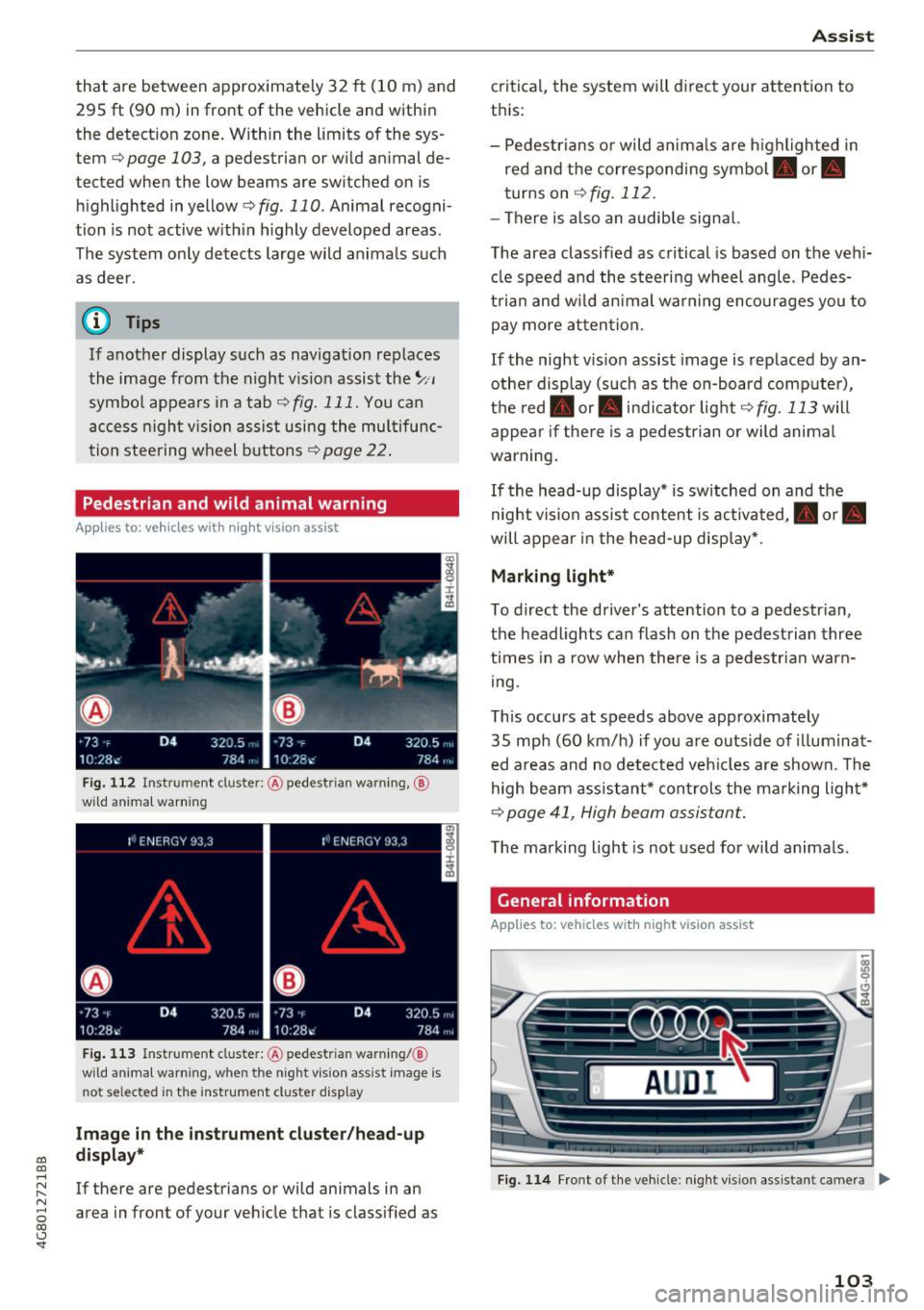
Pedestrian and wild animal warning
Applies to: vehicles with night vision assist
F ig . 11 2 Instru ment clust er: @ pede stri an warn ing ,@
wild animal warnin g
Fig . 11 3 In strument clus te r: @ pedest ria n warn ing/ @
wi ld an imal warning, when the nigh t vis ion a ssis t image is
n ot se lec ted in the instrument clust er dis p lay
Image in the inst rument clu ster /h ead -up
di spla y*
If there are pedestrians or wild animals in an
area in front of your veh icle that is class ified as
A ss ist
critica l, the system will d irect your attention to
t h is:
- Pedestrians or wild anima ls are h ighl ighted in
red and the corresponding symbol. or.
turns on
¢ fig. 112 .
-There is also an audib le signal.
T he area classified as critical is based on the vehi
cle speed a nd the steering wheel angle . Pedes
t rian an d w ild an imal warning encourages you to
pay more atten tion.
If the night vision assist image is replaced by an
othe r display (such as the on-board comp ute r),
t h e red . or. in d icator light ¢
fig . 113 will
appea r if the re is a pedestrian or wild animal
war ning .
If the head-up display* is sw itched on and the
night vis ion assist content is activated, . or.
will appe ar i n the head-up displ ay* .
Marking light*
To direct the driver's attention to a pedestr ian ,
the headlights can flash on the pedestrian three
t imes in a row whe n there is a pedestr ian warn
i ng .
This occurs at speeds above approximately
35 mph (60 km/h) if you are outside of illuminat
ed a reas and no de tected veh icles are shown. Th e
high beam assistant* con trols the ma rking ligh t*
¢ page 41, High beam assis tant.
T he ma rking light is not used for wild anima ls .
General information
Applies to: vehicles with night vision assist
Fig. 1 14 Front of the ve hicle : n ig h t v is io n as sist an t cam era ..,_
103
Page 106 of 284

Ass is t
The following situations may affect the function
of th e night vision assist system:
- Poor v isibility such as snow, ra in , fog or heavy
spray
- Di rty lens on the nigh t vis ion assis t camera
Make sure the night vision ass ist camera
¢ fig . 114 is not covered by stickers, deposits or
any other obstructions because that can affect
the camera f unct io n. For info rmation on clean
ing, refer to¢
page 235.
The pedestrian and wild anima l recogn ition de
pends on the temperat ure diffe rence between
the person/w ild an imal and t he backg ro und. Peo
p le/w ild animals may not be de tected if the dif
ference is too small . The pedestrian/wi ld an imal
marking and the ma rking light* deactivate at
temperatures above approximately 77 °F (25 °C)
and during daylight. If the night vision assist im
age is selected in the instrument cluster display,
then the
II symbol appears at the top on the
right s ide .
_.&. WARNING
Pay attent ion to traffic and the area around
yo ur vehicle whe n night vision assist is switch
ed on. The dr iver is always responsible for as
sess ing the traffic s itu ation.
- Night vis ion assist can only warn about peo
ple and wild animals lo cated within the visu
al range of the i nfra red camera. The visual
ra nge cor responds to the image in the in
strument cl uster display .
- Nigh t vision assist may not de tect people or
wild animals an d mark them if
- they are not in an upright posit ion, for ex
ample if they are sitting or ly ing down
a nd/or
- the silho uette in the display appears in
comp lete o r interrup ted, fo r example be
caus e the pe rson is pa rtially covered by a
veh icle or an animal by tall grass. This
could in cr ease the risk of an ac cident .
- Never try to swerve a round animals if doing
so w ill endanger you o r other road use rs, be
ca use this increases the risk of an accide nt.
104
@ Tips
- Even though the system evaluates the
shape and heat given off by all detected ob
jects, there are limits to the system. There
may be false warnings.
- For technical reasons, the image pauses in split second intervals.
Switching on /off
App lies to: vehicles wit h night vision assist
Fig . 115 A rea around the ligh t sw itc h: ni ght vis ion assis
t an t but to n
Requirement: switch the ignit io n on and tu rn the
li ght sw itch to the
AUTO pos it ion .
.,. Press the~ button¢
fig. 115. The heat image
from the n ight vision camera appears in the in
strument cluster display .
.,. Press the~ button again to switch the night
vision ass ist off .
If conditions are bright enough, night vision as
s ist can be swi tched on w ithout moving the ligh t
switch to the
AUTO posit ion. Pedestrian and w ild
anima l hig hligh ting and wa rnings are only a ct ive
whe n it is da rk outside and the headlights are
switched on .
Adjusting the contrast
Applies to: vehicles wi th night vision assis t
.,. Sel ect : the I CAR I fu nct ion button > ( Car )* Sys
tems
control button > Dri ver a ssistance >
Night v ision ass ist contr ast .
When the night vision ass ist is sw itch ed on and
the image is v isible in the instrument cluster dis
play, you can adjust the contrast in the image
from
Min to M ax.
Page 108 of 284

Ass is t
depending on the s ituation. The distr ibution of
power varies from balanced (comfort) to sporty
(dynamic) depending on the selected mode. The
goal is a high leve l of agility and ability to accel
erate on curves. The veh icle is very responsive to
steer ing .
Cornering light*
The cornering light adapts the high beams to the
direction of the curve depending on the speed.
The pivot ing action and the lighting also adapt to
the mode.
Adaptive c ru ise contr ol*
The behavior when acce le rating can be adjusted
from comfortable to sporty, depending on the
drive select mode. Adaptive cruise control a lso
responds to the driving behavior of the veh icle
ahead in a more conservative or sporty manner.
Engine sound *
The engine sound adapts to the current mode
and can be subtle to sporty .
(D Note
Applies to: vehicles with adaptive air suspension
- Make sure there is enough clearance above
and below the veh icle when parking. The
height of the vehicle (ground clearance) can
change once it is parked due to tempera ture
fluctuations, changes to the load condit ions
and c hanges to the d riving modes.
- When transporting the veh icle on a car car
r ier, tra in, ship or by other means, only tie
the veh icle dow n at the running surfa ce of
the tires, w hic h is the outer circ umference .
Securing the vehicle at the axle compo
nents, suspension st ruts or towing eyes is
not permitted because the pressure in the
air suspension struts can change dur ing
transport . The vehicle may not be secured
sufficiently if this happens.
(D Tips
- In some models, the maximum vehicle
speed can only be reached in the auto and
dynam ic modes.
106
- The S se lector lever position a utomat ica lly
engages if the dynamic mode is selected.
- Applies to: vehicles with dynamic steering:
operating noise is heard when starting or
stopp ing the engine. Th is does not indicate
a problem.
Selecting the driving mode
F ig. 116 Infota inmen t: drive select
'" To select the mode, select the follow ing in the
Infota inment :
!CAR ! function b utton> Comfort ,
Auto , Dynamic or Individu al.
'" Applies to: vehicles with a ti.re'! button on the
steering wheel: press the button repeatedly un
til the desired mode appea rs in the instrument
cl uste r display.
You can change the driv ing mode when the vehi
cl e is stationary or while driv ing. If traff ic per
mits, afte r changing modes, briefly ta ke your
foot off the accelerator pedal so that the recently
selected mode is also activated fo r the engine.
Comf ort -prov ides a comfort -or iented vehi cle
setup and is suited fo r long drives on highways.
Auto -provides an overal l comfortab le yet dy
namic dr iv in g feel and is suited for everyday use.
Dynamic -gives the dr iver a sporty driving fee l
and is suited to a sporty d riving style .
Individual -¢ page 107.
A WARNING
Pay attention to traffic when ope rating the
d rive select to reduce the r is k of an accident.
-
Page 110 of 284

Parking systems
Parking systems
General information
Applies to: vehicles with parking system plus/rearview cam
era/peripheral camera
Depending on your vehicle's equipment , various
parking aids will help you when parking and ma
neuvering.
The
parking system plus assists you when park
ing by audibly and visually indicating objects de
tected
in front of and behind the vehicle
¢page 109.
The
rearview camera shows the area behind the
vehicle in the Infotainment system display. This
display assists you when you are cross or parallel parking
¢ page 110. The parking system plus
functions are also available
¢ page 109.
The
peripheral cameras assist you with parking
and maneuvering. You are aided by various cam
eras depending on the vehicle equipment level
¢ page 113. The parking system plus functions
are also available
¢ page 109.
A WARNING
-Always look for traffic and check the area
around your vehicle by looking at it directly
as well. The parking system cannot replace
the driver's attention. The driver is always responsible when entering or leaving a park
ing space and during similar maneuvers.
- Please note that some surfaces, such as
clothing, are not detected by the system .
-
-Sensors and cameras have blind spots in
which people and objects cannot be detect ed . Be especially cautious of small children
and animals.
- The sensors can be displaced by impacts or
damage to the radiator grille, bumper,
wheel housing and the underbody . The park
ing system may be impaired as a result.
Have an authorized Audi dealer or author
ized Audi Service Facility check their func
tion .
- Make sure the sensors are not obstructed by stickers, deposits or other materials. If they
are, the sensor function could be impaired.
108
For additional information on cleaning, see
¢page 235.
(D Note
-Some objects are not detected or displayed
by the system under certain circumstances:
- Objects such as barrier chains, trailer draw
bars, vertical poles or fences
- Objects above the sensors such as wall ex
tensions
- Objects with certain surfaces or structures
such as chain link fences or powder snow
- If you continue driving closer to a low ob
ject, it may disappear from the sensor range. Note that you will no longer be
warned about th is obstacle .
- Keep enough distance from the curb to re
duce the risk of damage to the rims .
(D Tips
-The system may provide a warning even
though there are no obstacles in the cover
age area in some situations, such as :
- certa in road surfaces or when there is tall
grass.
- external ultrasonic sources such as from
cleaning vehicles .
- in heavy rain, snow, or thick vehicle ex
haust.
- We recommend that you practice parking in
a traffic-free location or parking lot to be
come familiar with the system . When doing
this, there should be good light and weath
er conditions.
- You can change the volume and pitch of the
signals as well as the display
¢ page 118.
- Please refer to the instructions for towing a
trailer located in
¢page 118.
- What appears in the infotainment d isplay is
somewhat time-delayed.
- Th e sensors must be kept clean and free of
snow and ice for park aid to operate .
Page 122 of 284

Intelligent Technology
Intelligent Technology
Electronic Stabilization
Control (ESC)
Description
Elect ronic Stabilization Control (ESC) suppo rts
driver safety.
It red uces the risk of slipping and
improves dr iving stability. ESC detects crit ica l sit
uations such as the veh icle oversteering and un
dersteering or the wheels are sp inning. The vehi
cle is stabilized by app lying the brakes or reduc
ing engine torque. As soon as the ESC is active ly
regulat ing, the
D.1 indicato r light blin ks in the in
s trumen t clus ter.
The fo llow ing systems are integrated in the ESC :
Ant i-lock braking system (ABS)
ABS p revents the whee ls from locking whe n brak
ing. The vehicle can sti ll be steered even during
hard brak ing. Apply steady press ure to the brake
pedal. Do not pump the pedal. A puls ing in t he
b rake pedal indicates that the system is acting to
s tabilize the vehicle .
Br ake assist system
The brake assist system can decrease brak ing dis
tance . It increases brak ing power when the driver
presses the brake pedal q uick ly in emergency sit
uations . You must press and hold t he b rake pedal
until the dangerous sit uat io n is over . In veh icles
with adapt ive c ruise control*, the bra ke as sist
sy stem is more sensitive if t he di sta nce detec ted
t o the vehicle dr iv ing ahead is too small. On
ve hicl es with act ivated and f unct io ni ng night vi
sion assist*, the brake assist system can respond mo re sensit ively if there is a warning .
Anti-slip regulation (ASR)
ASR red uces eng ine power when the drive w heels
be gin sp inning an d adapts the force to the road
conditions. This makes it easie r to sta rt, acceler
ate and dr ive up h ills.
Electronic differential lock (EDL)
E DL a ppl ies the bra kes to a wheel tha t st art s
sp inning and tra nsfe rs t he dr ive powe r to t he
120
other driving whee ls. This func tion is no t ava ila
ble at hig her speeds.
I n extreme cases , EDL automat ic al ly swi tches off
to keep t he b rake o n the br aked wheel from ove r
heating. The ve hicle is still working correct ly. ED L
will switc h on again automatically when condi
tions have returned to normal.
Steering recommendation
The ESC he lps to s tabili ze th e vehicle by ch ang ing
t h e s teer ing torque.
I n veh icles with dynamic s teer ing*, ESC a lso
helps to stab ilize the s teeri ng in cr it ic al situ a
tions.
Selective wheel torque control
Se lective wheel to rque control is used when d riv
i ng on curves . The front whee l on the ins ide of
t h e curve or both whe els on the i nside of th e
cu rve are braked se lectively as needed. This al
l ows mo re pre cise driving in curves .
Automatic post -collision braking system
The "a utomat ic post -coll is io n braking system"
can help to reduce the risk of sl iding and of addi
tiona l co llisions after an acc iden t. If the a irbag
c on tro l modu le dete cts a collision above a cer tain
vehicle speed, the veh icle is braked by t he ESC.
The veh icle does not brake automatically if:
- the drive r presses the accelerator pedal, or
- the bra king force generate d by the pressed
brake pedal is greater than the b raking force
that would be in itiated by the system, or
- the ESC, the bra ke system or the vehicle elect ri
cal system are not functioning.
A WARNING
- The ESC and its integ rated systems can not
overcome the lim its imposed by natura l
p hys ica l laws. Th is is es pec ially i mpo rtan t
on s lippery or we t roads. If the system s be
g in a cting to s tabili ze yo ur vehicle, you
should immedi ately alte r your speed to
match the road and tra ffi c conditions. Do
not let the inc reased safety provided tempt
Page 124 of 284
Intelligent Technology
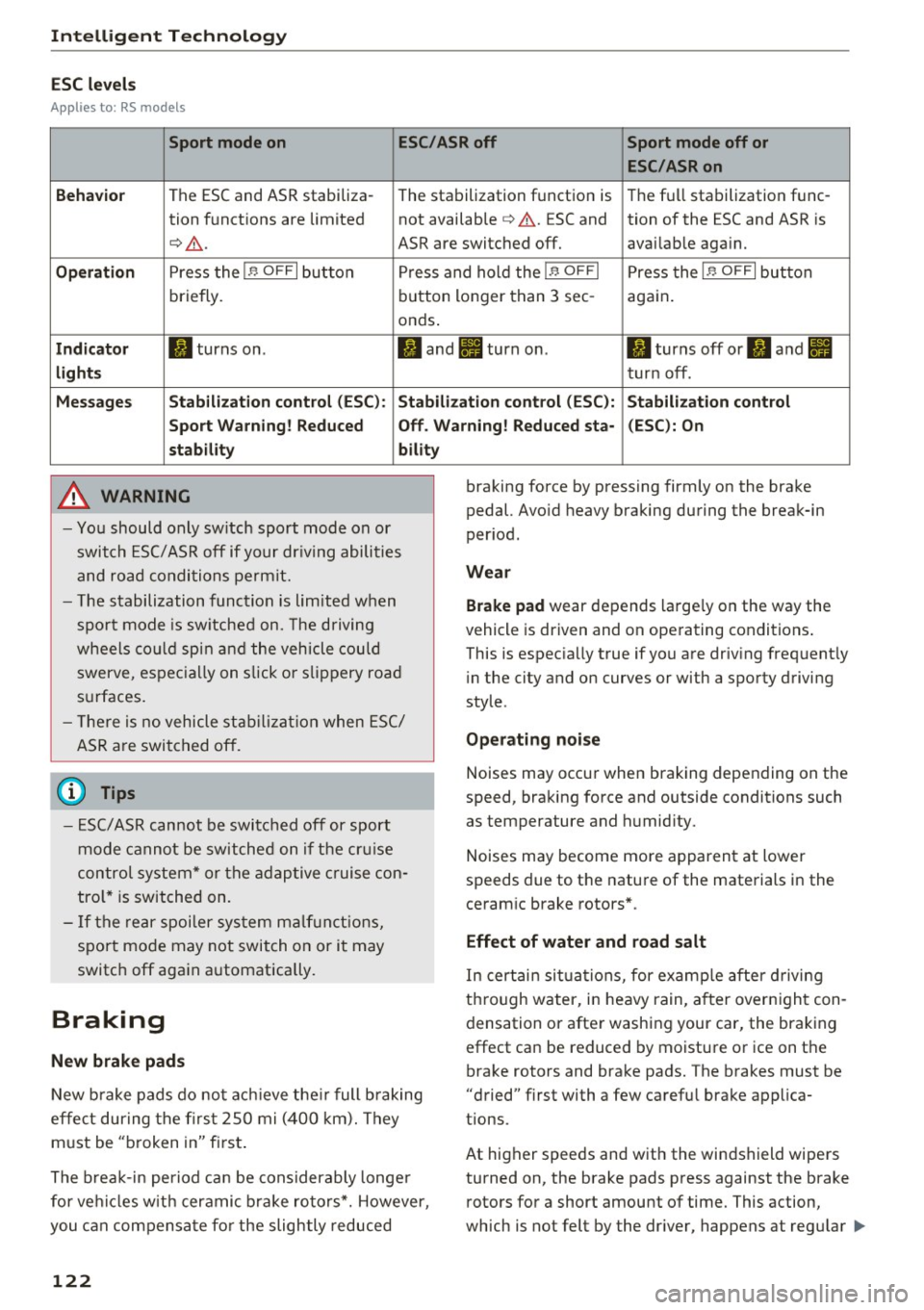
ESC levels
Ap plies to : RS models
Sport mode on ESC/ASRoff Sport mode off or
ESC /ASRon
Beha vior
The ESC and ASR stabiliza-
The stabilization function is The fu
ll stabilization func-
tion funct ions are limited not available
¢ ,& . ESC and tion of the ESC and ASR is
¢ .&. . ASR are switched off. availab le aga in.
Op eration Press the I.$ OFF I button P ress and hold the j.$ OF FI Press the I.$ OFF I button
briefly. b
utton longer than 3 sec- aga in .
onds .
Indicator II turns on . II and Ill turn on. II turns off or II and Ill
light s turn off .
Me ssage s Stabilization control (ESC ): S tabilization control (ESC ): Stabilization control
Sport Warn ing ! Reduced Off . Warning! Reduced sta - (ESC): On
stab ility bility
A WARNING
-Yo u should only sw itch sport mode on or
switch ESC/ ASR off if your dr iving abili ties
and road condi tions permit.
- T he stabilization func tion is limited w hen
spo rt m ode is sw itche d on. The driving
wheels co uld spi n and the vehicle could
swerve, espec ially on s lick or slippery road
s u rfaces.
- T here is no vehicle sta bilizat ion when E SC/
ASR a re swi tched off.
(D Tips
- ES C/ASR can not be switc hed off or sport
mode cannot be switche d on if the cr uise
contro l system * or the adap tive c ruise con
tro l* is switched on.
- If the re a r spoiler sys tem m alf unct ions,
sport mo de may not switch on or it may
switc h off aga in automatically.
Braking
New brake pads
New b rake pads do not ac hieve the ir full b raking
effe ct during the firs t 2S 0 mi (400 km). They
m ust be "broken in" fi rst .
The b rea k-in period ca n be considerably longe r
for ve hicles w it h cer amic b rake rotors*. However,
you can compensa te fo r the slightly reduced
122
braking force by pressing firmly on the brake
pedal. Avo id heavy braking during the break-in
per iod.
Wear
Brake pad
wear depends large ly on the way the
vehicle is driven and on ope rating conditions .
This is espec ia ll y true if you a re driv ing frequent ly
i n the city and on curves or with a sporty driving
sty le .
Ope rating noi se
Noises may occur when braking depending on the
speed, braking force and outside conditions such
as temperature and humid ity.
Noises may become mo re apparent at lower
speeds due to the nature of the materials in the
ceram ic brake rotors* .
Effect of water and road salt
In certain situa tions, for e xamp le after d riving
thro ugh water, in heavy rain, a fter over nigh t con
densation or after washing your car, the brak ing
effect can be reduced by moisture or ice on the bra ke rotors and brake pads. The brakes must be
"dried" f irst with a few ca refu l brake app lica
tions.
At higher speeds and with the windshield wipers
turned on, the brake pads press against the brake rotors for a short amount of time. This action,
wh ich is not felt by the dr iver, happens at regu lar .,..
Page 125 of 284
co
co
.... N
" N .... 0
00
\.J '
the brakes in wet weather.
The braki ng effect can also be red uced if you are
driving on salted roads and you do not apply the b rakes for long periods of time . The layer of salt
on the brake rotors and pads must be worn off
f irst when the brakes are app lied.
Due to its surface, the ceramic bra ke rotor* ab
sorbs moisture in certa in situations. There fore,
there will temporarily be less braking force than
when the brakes are dry . You can compensate for
this by pressing the brake pedal harder.
Cor rosion
L eaving the vehicle parked fo r long periods of
time, low mi leage and avoiding heavy braking
can contribute to corrosion on the brake rotors
and to dirty brake pads.
I f you usually avo id heavy braking or if there is
corrosion present , occasional heavy braking at
high speeds is recommended to clean the brake
rotors and pads
q ,& .
Brak e system malfunct ion
if you notice that the brake pedal travel has sud
denly increased, then a brake c ircui t in the dual
circuit brake system may have malfunctioned. Drive to an authorized Audi dea ler or a uthorized
Aud i Service Facility immediately to have the
problem corrected. On the way there, drive with
reduced speed and keep in mind that you w ill
need a longer distance to stop and you w ill need
to p ress the b rake pedal harde r.
L ow brake fluid level
When the brake fl uid level is low, malfunct ions in
the brake system may occur . The brake f lu id level
is electronically monitored.
Br ak e boost er
The brake booster amplifies the pressure you ap
p ly to the brake peda l. It only works when the en
g ine is running.
A WARNING
- Only apply the brakes for the purpose of
cleaning the brake system whe n road and
-
Intellig ent Technology
traffic conditions permit. You must not en
danger other road users. This increases the
risk of an accident.
- Never let the vehicle roll while the engine is
stopped because this increases the risk of an
accident.
- New brake pads do not ach ieve the ir full
braking effect during the first 250 m i
(400 km). They m ust be "broken in" first.
The break-in per iod ca n be cons iderably lon
ge r fo r vehicles with ceram ic brake rotors* .
H owever, you can compensate fo r the
slightly reduced braking force by pressi ng
fi rm ly on the brake pedal. Avo id heavy b rak
ing du ring the break -in pe riod.
- Ce rtain weathe r and ope rating condi tions
such as driving through water, dr iv ing in
heavy rain o r driv ing after was hing your ve
hicle can impa ir the effect iveness of the
brakes. In the winter, ice may build up on
the brake pads, rotors and drums . Check
these components by braking carefully. Ap
p lyi ng the brakes carefully several times
d ries the b rakes and removes ice build-up .
- The efficiency of the brakes can also be im
pa ired by dr iv ing for long stretches on roads
covered with sa lt without using the bra kes .
You can remove salt deposits from the
b rake rotors and pads by carefully applying
t he brakes several times .
- I f the fron t spoiler is damaged o r yo u install
another spoi ler, make su re the front wheel
b rakes are ven tilated properly . Othe rw ise,
the brake system co uld overheat, which re
duces their effectiveness .
- Fa ilure of a brake circuit impairs brak ing
pe rformance, which increases b raking dis
tance. Avo id driving the vehicle and have it
towed it to the nearest a uthorized Audi
deale r or authorized Aud i Serv ice Facility.
- I f the brake booster is not working, yo u w ill
have to p ress much harder on the brake
pedal to compensate fo r the lack of the
booster.
Q) Note
- Never let the brakes "rub" by pressing the
peda l lightly when braking is not actually
123
Page 127 of 284
co
co
.... N
" N .... 0
00
<.,;) 'SI"
Winter tires
By using all wheel drive, your vehicle has good
forward motion with standard tires in winter con
ditions . However, in winter we recommend using
winter or all season tires on all four wheels, be
cause this will improve the braking effect.
Snow chains
If there are snow chain laws, snow chains must
also be used on vehicles with all wheel drive
¢ page 227, Snow chains.
Replacing tires
For vehicles w ith all whee l dr ive, only whee ls w ith
the same rolling circumference should be used .
Avoid using tires with different tread depths
¢ page 218, New tires or wheels.
Offroad vehicle?
Your Audi is not an offroad vehicle -there is not
enough ground clearance. For this reason, avoid
difficult terrain.
_& WARNING
-Also, in vehicles with a ll wheel drive, adapt
your dr iving style to the current road and
traff ic conditions. Do not let the increased
safety provided tempt you into taking risks,
because this increases the risk of an acci
dent .
- The braking ability of your vehicle is limited
to the traction of the wheels . In this way, it
is not different from a two wheel dr ive vehi
cle. Do not be tempted to accelerate to a
high speed when the road is slippery, be
cause this increases the risk of an accident .
- Note that on wet streets, the front wheels
can "hydroplane" if driving at speeds that
are too high. Unlike front wheel drive
vehicles, the engine does not rev higher sud
denly when the vehicle begins hydroplaning .
For this reason, adapt your speed to the
road conditions to reduce the risk of an acci
dent.
Intelligent Technology
Rear spoiler
The extendable rear spoiler increases driving sta
bility.
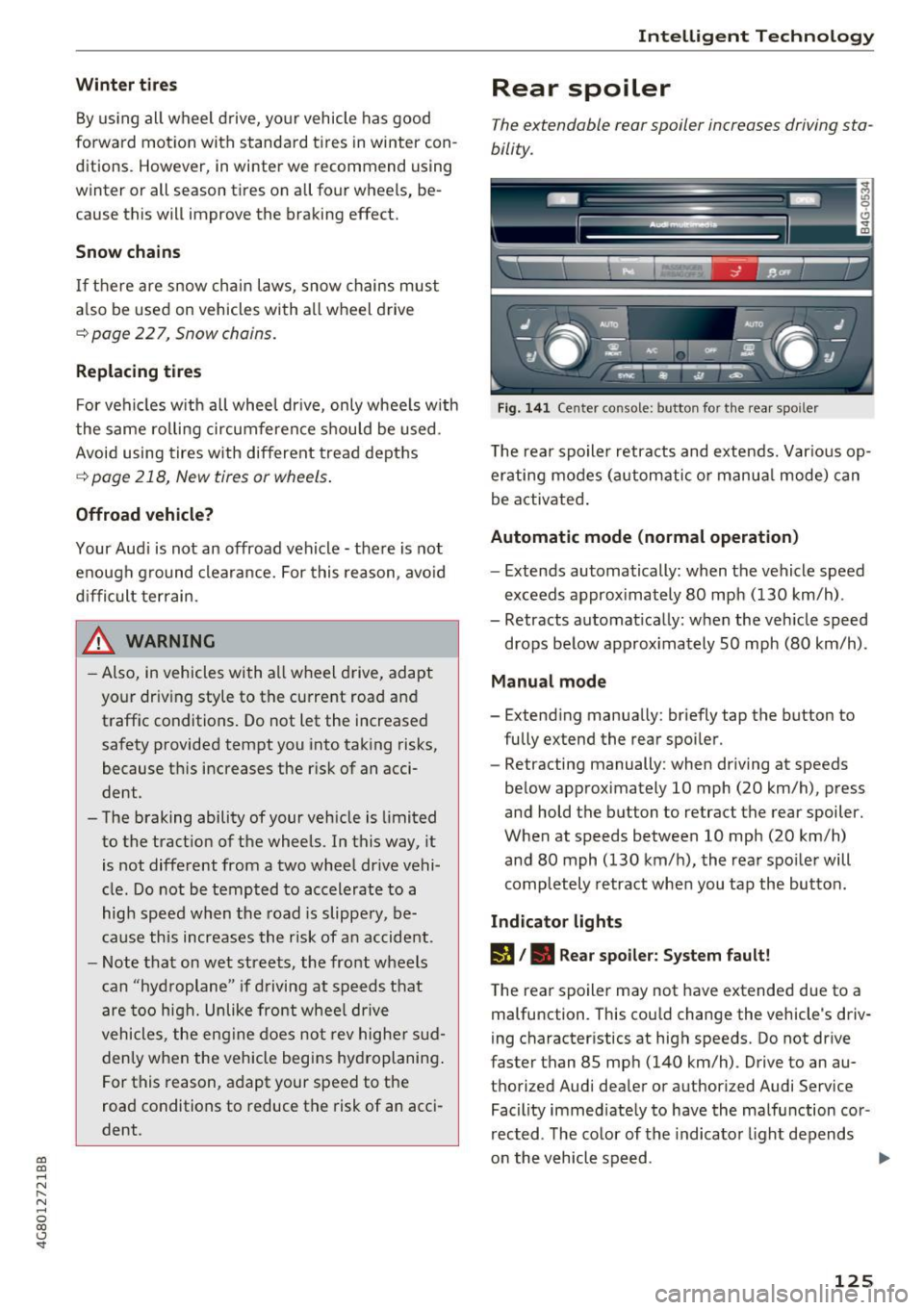
Fig. 141 Center console: button for the rear spoiler
T he rear spo iler retracts and extends. Var ious op
erating modes (automatic o r manua l mode) can
be activated .
Automatic mode (normal operation)
-Extends automatically: when the vehicle speed
exceeds approx imately 80 mph (130 km/h) .
- Retracts automat ically: when the vehicle speed
drops below approx imately SO mph (80 km/h).
Manual mode
- Extending manually: briefly tap the button to
fully extend the rear spoiler.
- Retracting manually: when driving at speeds
below approximately 10 mph (20 km/h), press
and hold the button to retract the rear spoiler.
When at speeds between 10 mph (20 km/h)
and 80 mph (130 km/h), the rear spoiler will
completely retract when you tap the button.
Indicator lights
lfa /. Rear spoiler: System fault!
The rear spoiler may not have extended due to a
malfunction . This cou ld change the vehicle 's driv
ing characteristics at high speeds. Do not drive
faster than 85 mph (140 km/h) . Drive to an au
thorized Audi dealer or authorized Audi Service Facility immed iately to have the malfunction cor
rected . The color of the indicator light depends
on the vehicle speed .
125
Page 128 of 284

Intelligent Technology
& WARNING
When extending and retracting the rear spoil
er, make sure there are no persons or objects
w ith in the spoiler range to red uce the risk of
injury .
& WARNING
Driv ing at higher speeds w ithout the rear
spoiler dep loyed can impa ir hand ling ch arac
t er istics, mak ing t he vehi cle h arder to con
t rol.
- Always make sure tha t the spoiler is de
ployed whe n driving a t speeds ove r 85 mph
(140 km/h) . If the rear spoiler warning/ind i
cator light in the instrument cluster comes
on, the rear spo iler may not have deployed.
- Never drive at speeds higher than 85 mph (140 km/ h) if the spoile r is not deployed.
Have the spoiler inspected as soon as possi
ble by an author ized Audi dealer or qualif ied
workshop.
-Always obey speed limits and other tra ffic
laws .
(D Note
-Never push on the vehicle on the rear spoi l
er . This cou ld cause damage.
- To prevent damage to the rear spoiler do
not lean o r place anything on it.
- Only opera te the rear spoiler man ually when
the luggage compartment lid is close and
the rear spoiler movi ng pa rts a re not
blocked. Otherwise, damage could occur.
(D Tips
Clean the rear spoi ler compartment eve ry 2 to
3 mont hs. To function correctly, the rear
spoiler m ust be free of ice, snow and leaves.
126
Energy management
' The starting ability is optimized
T he energy management system manages the
electrical energy distribution and optimizes the
availability of electrical energy for starting the
engine.
When a vehicle with a conventional energy sys
tem is no t drive n for a long time, the ve hicle bat
te ry is drained by equ ipment (fo r example, t he
i mmob il iz er). I n cer ta in circ umstan ces, the re
could m ay no t be e nough energy to s tart the en
gine.
You r vehicle is equipped with an inte lligent e ner
gy management system fo r dist ributing elec trici
ty. Thi s sign ifica ntl y improves the start ing ability
and incre ases the vehicle battery life .
The ene rgy ma nagement system Is made up of
battery diagnosi s, idling current management ,
and dynamic energy management .
Battery diagnosis
T he battery diagnos is determines the vehicle bat
tery charge level. The sensors detect the ba tte ry,
the batt ery cur rent, and t he battery temperature .
The curren t cha rge level and the pe rformance of
t h e ve hicle battery are dete rm ined based on th is .
Idling current management
The idling current management decreases the
energy used while parked . With the engine
switched off , it m anages t he e ne rgy dis trib ution
to the d ifferen t electr ica l components . Data from
t h e b attery d iagnosis is ta ken into a ccou nt for
th is .
De pen ding on the vehicle batte ry c ha rge level,
e le ctri ca l eq uipme nt is switched off one i tem af
te r th e o ther to p revent t he vehi cle b attery from
dra ining and to ma intain the s tarting ab ility.
Dynamic energy management
While dr iv ing , dynam ic energy management dis
t ributes the app ropr iate amo unt of energy to t he
ele ctrica l eq uipm ent. It contro ls t he batte ry
c harge level so tha t the amou nt o f energy is no t
ll>