warning light AUDI A7 2017 Owner´s Manual
[x] Cancel search | Manufacturer: AUDI, Model Year: 2017, Model line: A7, Model: AUDI A7 2017Pages: 284, PDF Size: 72.29 MB
Page 43 of 284
co
co
.... N
" N .... 0
00
\.J '
lights are on and open the door, a warning
tone sounds.
- In cool or damp weather, the inside of the
headlights, turn signals and tail lights can
fog over due to the temperature difference
between the inside and outside. They will
clear shortly after switching them on. This
does not affect the serv ice life of the light
ing .
Turn signal and high beam lever
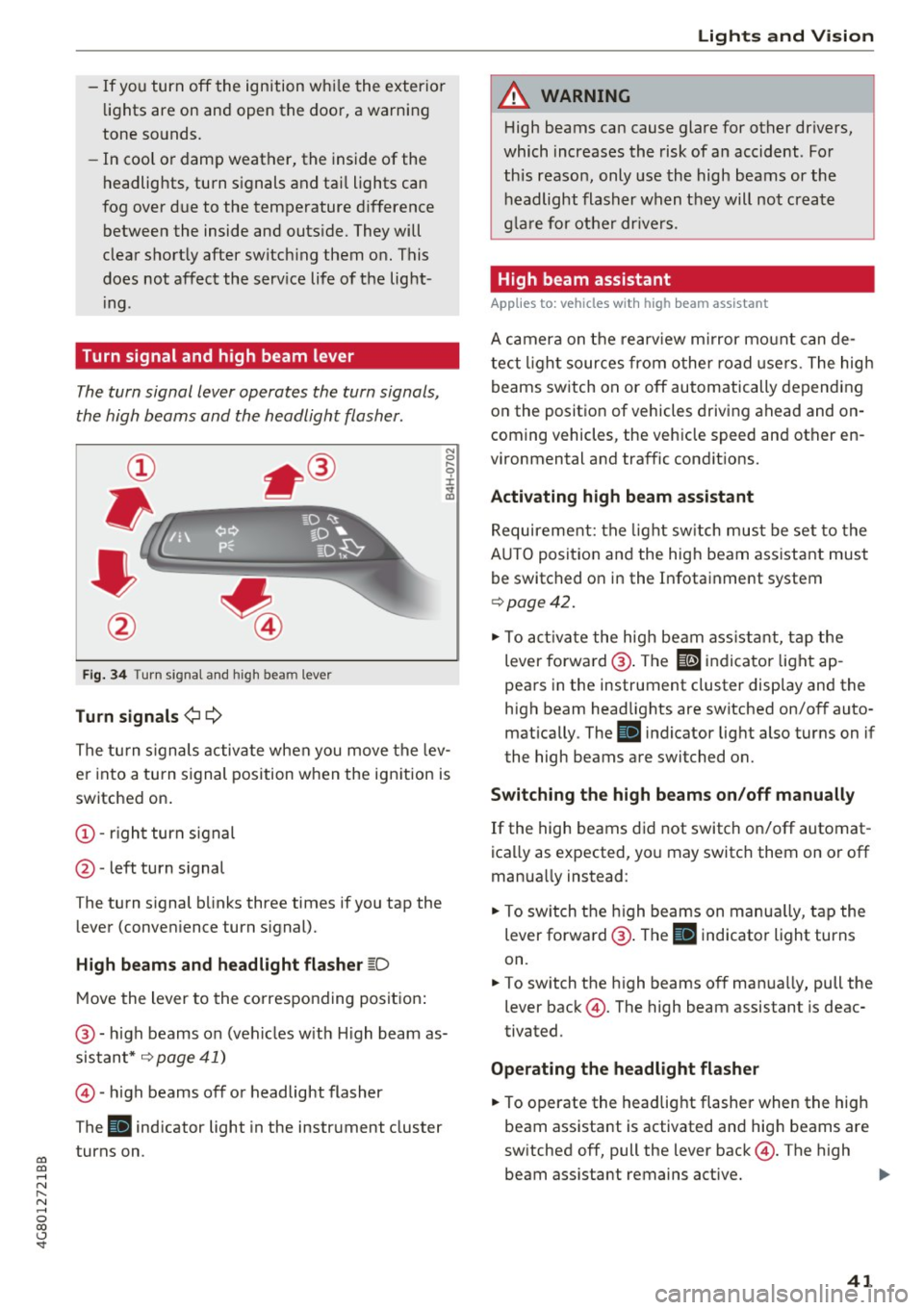
The turn signal lever operates the turn signals,
the high beams and the headlight flasher.
Fig. 34 Turn s ignal and h igh bea m lever
Turn signals¢¢
N
0
,-.. 0 ± .,. a,
The turn s ignals activate when you move the lev
er into a turn signal position when the ignition is
switched on.
@ -right turn signal
@ -left turn signal
The turn s ignal blinks three times if you tap the
lever (conven ience turn s ignal).
High beams and headlight flasher ~D
Move the lever to the corresponding position :
@ -high beams on (vehicles w ith H igh beam as
sistant*
~ page 41)
©-high beams off or headlight flasher
The
Bl indicator light in the instrument cluster
turns on.
Lights and Vision
A WARNING
High beams can cause glare for other drivers,
which increases the risk of an accident . For
this reason, only use the high beams or the
headlight flasher when they will not create
glare for other drivers .
High beam assistant
Applies to : vehicles wi th high beam assis tan t
A camera on the rearview mirror mount can de
tect light sources from other road use rs . The high
beams switch on or off automatically depending
on the position of vehicles driving ahead and on
coming vehicles, the veh icle speed and other en
vironmental and traffic cond it ions.
Activating high beam assistant
Requirement: the light switch must be set to the
A UTO posit ion and the high beam ass istant must
be switched on in the Infotainment system
~page 42 .
.. To activate the high beam assistant, tap the
lever forwa rd @ . The
El indicator light ap
pears in the instrument cluster display and the
high beam headlights are switched on/off auto matically . The
Bl indicator light also turns on if
the high beams are switched on.
Switching the high beams on/off manually
If the high beams did not switch on/off automat
ica lly as expected, you may switch them on or off
manua lly instead:
"' To switch the high beams on manually, tap the
lever forward @. The
Bl indicator light turns
on.
.. To switch the high beams off manually, pull the
lever back@. The high beam assistant is deac
tivated.
Operating the headlight flasher
.. To operate the headlight flasher when the high
beam assistant is activated and hig h beams are
switched off, pull the lever back@. The high
beam ass istant remains active. ..,
41
Page 44 of 284
Lights and Vision
Messages in the instrument clu ster display
Headlight a ssis t: System fault !
Drive to an authorized Aud i dealer or a uthorized
Aud i Serv ice Facility immediately to have t he
malfunct io n corrected. You can still switc h the
h igh beams on or off manually.
Headlight as sist: Unavailable No camera view
The camera view is blocked, for example by a
sticker or debris.
The senso r is located between the interior rear
view mirror and the windshield. Do not place any stickers in th is area on the windshield.
A WARNING
H igh beam assistant is only i ntended to assist
the driver . The dr iver is still responsible for
cont ro ll in g the head ligh ts a nd switc hing
t hem manually depend ing on light and v isibil
i t y condition s. It may be necessary to operate
th em m anually i n situ ations such as:
- In adve rse weathe r cond it ions s uch as fog,
he avy ra in, b low ing snow or sp raying wa te r.
- On roads w here oncoming traffi c may be
pa rtiall y obscu red, s uch as ex pressways.
- Whe n there are road users t hat do not have
s ufficient ligh ting, s uc h as bicycle rs o r
vehicles wi th dirty ta il lamps.
- In tight cu rv es and o n steep hills.
- In poorly lit areas .
- With strong reflectors , such as signs.
- If the area of the windshield near the senso r
is fogged over, dirty, icy or covered with a
sticker.
Adjusting the exterior l ighting
The funct ions are adjusted in the Infotainment
system.
~ Se lect : I CAR I functio n button> (Car) * Systems
contro l button > Vehicle settings > Exterior
light ing .
Automatic headlights
You can adj ust the fo ll ow ing settings in the Au
tomatic headlight s
menu:
42
Activation sensitivity -you can adjust if the
headlights switch on
Early , Medium or Late ac
cording to the sensit ivity of the light sensor.
Auto-dimming high beams * -yo u can switch t he
high beam assistant *
On and Off .
Daytime running lights*
USA models :
the daytime running lights can be
swi tched on/off. Select
On or Off .
Canada models:
this function cannot be sw itched
off . They act ivate automatically each time the ig
nit ion is switched on .
Coming home, Leaving home
The coming home function illuminates the area
outside the vehicle when you turn the ig nit ion off
and open the d river's door . To turn the function
o n, select
Lights when leaving car > On .
The leaving home illum inates the area outside
the vehicle when you unlock the vehicle . To turn
the function on, se lect
Lights when unlocking
car > On .
The coming home and leav ing home functions
on ly operate when it is dark and the light switch
i s in the
AUTO pos ition .
Emergency flashers
-------
Fig. 35 Cente r conso le : emergency f las her bu tton
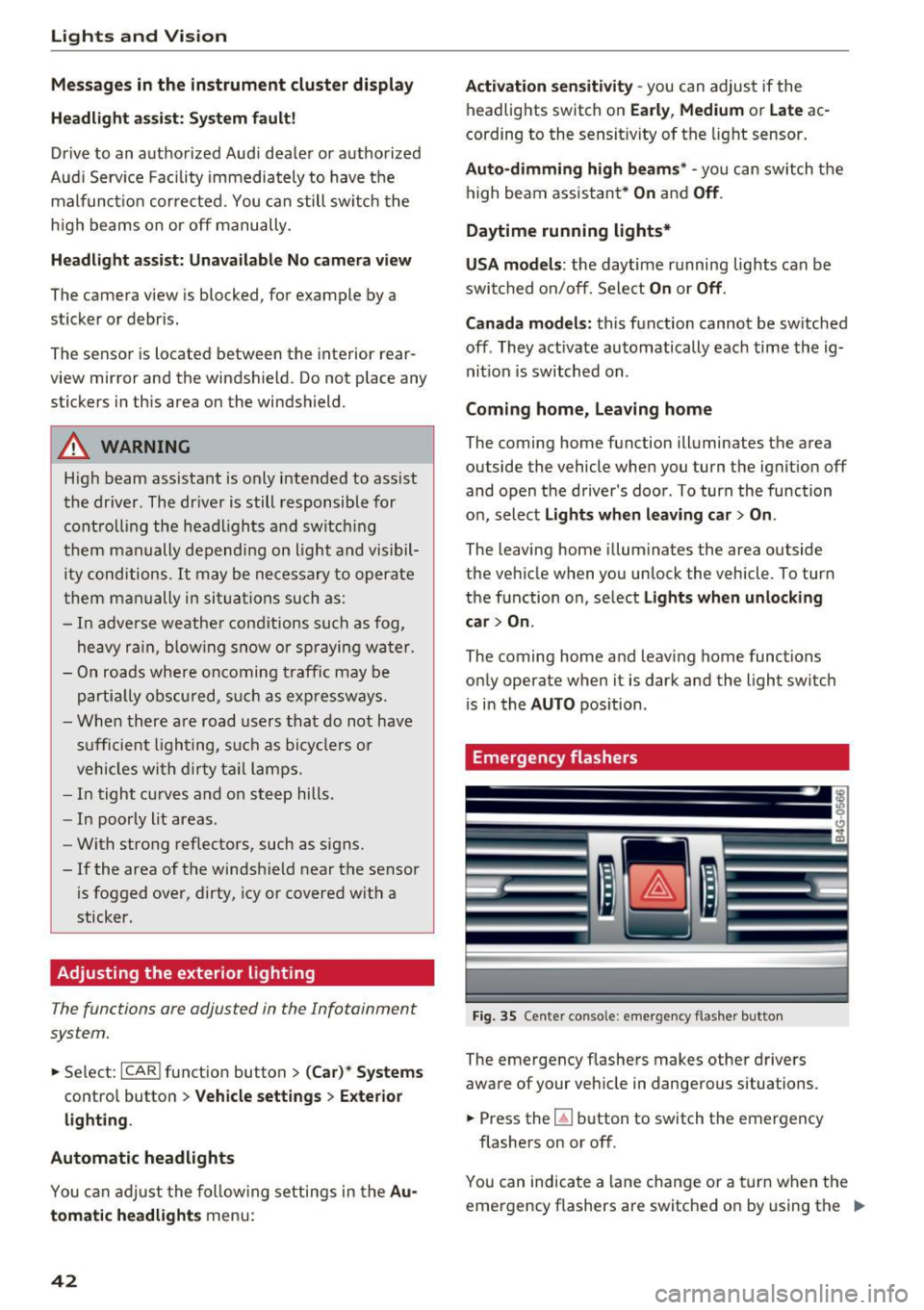
The emergency flashe rs makes other d rivers
aware of your veh icle in dangerous situations.
~ Press the~ button to switch the emergency
flashers on or off .
You can indicate a lane change or a tur n w hen the
emergency flashers are switched o n by using the "'
Page 46 of 284

Lights and Vision
Vision
Adjusting the exterior mirrors
Fig. 39 Drive r's door: knob for the exterior mirrors
Turn the knob to the desired position:
Q/ P -adjusts the left/right exterior mirror.
M ove the knob in the desired direction.
®-Heat the mir ror glass depend ing on the o ut
side temperature .
~ -Folds the exterio r m irrors* . In the Infotain
men t sys tem, yo u can selec t if the mirrors fold in
automatically when you lock the vehicle
q page 32 .
Front passenger's exterior mirror tilt
function*
To help you see the curb w hen back ing into a
parking space, the surface of the mirror tilts
slightly. Fo r thi s to happen, the knob must be in
the posit io n for the front passenger's outside
mirror .
You can adjust the t ilted mi rror surface by turn
ing the knob in the desired direction. When you
move out of reverse and into anothe r gear, the
new mirror position is stored and assigned to the
key you are us ing.
The mirror goes back into its o rigina l position
once yo u drive forward faster than 9 mph
(15 km/h) or turn the ignition off.
A WARNING
Curved mirror surfaces (convex or aspheric*)
enlarge the field of vision . However, they
ma ke objects i n the mirror appear smaller
and farther away. Your may estimate i ncor-
44
rect ly w hen you use these mirro rs to gauge
your d istance from t he veh icles beh ind you
when chang ing lanes, which inc reases the risk
of an acc ident.
(D Note
- If the mi rror housing was moved by fo rce
( f or example, by runn ing into an object
when maneuvering the vehicle), the m irror
must be fo lded a ll the way in us ing the pow
er folding fu nction . T he m irror hous ing
must not be moved back into place by hand
because t his wo uld impair the func tion of
t he mir ror mechani sm.
- If you wash the vehicle in an automatic ca r
wash, you mus t fold t he ex ter ior mirro rs in
to reduce the r is k of damage to the m irro rs.
N ever fold power fo ld ing exterior mi rrors *
by hand . On ly fold them in and out using
the power controls .
(D Tips
-If the power adjusting func tion malfunc
tions, the glass in both mirrors can be ad
justed by p ressing on the edge of it by hand.
- The e xte rior m irro r settings are stored w it h
the memory fu nctio n* ¢
page 5 0.
Dimming the mirrors
Your vehicle is equipped with a manual or auto
matic* dimming rearview mirror.
Fi g. 40 A utomat ic dimming rearv iew mirr or*
Manual dimming rearview mirror
.,. Pull the lever on the bottom of the mirror back. Iii>-
Page 47 of 284

co
co
.... N
" N .... 0
00
<.,;) 'SI"
Automatic dimming rearview mirror*
• Press the button@¢ fig. 40. The indicator
light @ turns on. Interior and exterior mirrors*
will dim when there is incoming light (such as headlights from the rear) .
A WARNING
If the glass on an automatic dimming mirror
breaks, electrolyte can leak out. This liquid
can irritate the skin, eyes and respiratory sys
tem . If there is contact with the fluid, flush
immediately with plenty of water . Consult a
physician if necessary.
- Repeated or long-term exposure to electro
lyte fluid can lead to irritation of the air
ways, especially in people with asthma or
other respiratory conditions. Take deep
breaths immediately after leaving the vehi
cle or, if this is not possible, open all of the
doors and windows as wide as possible.
- If electrolyte fluid enters the eyes, flush
them thoroughly with a large amount of
clean water for at least 15 minutes and then
seek medical attention.
- If electrolyte fluid comes into contact with
the skin, flush the affected area with clean
water for at least 15 minutes and then clean
with soap and water and seek medical at
tention . Clean affected clothing and shoes
thoroughly before wearing again .
- If the fluid was swallowed and the person is conscious, flush the mouth with water for at
least 15 minutes. Do not induce vomiting
unless this is recommended by medical pro
fessionals. Seek medical attention immedi
ately.
(D Note
If the glass on an automatic dimming mirror
breaks, electrolyte can leak out. This liquid
damages plastic surfaces and paint. Clean
this liquid as quickly as possible, for example
with a wet sponge.
Lights and Vision
(D Tips
- If the light reaching the rearview mirror is
obstructed, the automatic dimming mirror
will not function correctly,
- The automatic dimming mirrors do not dim
when the interior lighting is turned on or
the reverse gear is selected.
Sun visors
[ }
Fig. 41 Front passenger's s
ide: sun visor
The sun visors for the driver and front passenger
can be released from their mounts and turned to
ward the doors@.
The mirror light switches on when the cover over
the vanity mirror @opens.
Sunshade
App lies to: vehicles with sunshade
The sunshade is located on the luggage com
partment shelf.
@0
------...._ ·_· --- "'.
Fig. 42 Sun sh ade in lowered pos itio n
When the sunshade is in the lowered position, it
is secured in the retainer @.
• To raise @ the sunshade, remove it from the
retainer.
45
Page 48 of 284

Lights and Vision
_& WARNING
Do not use the sunshade to secure cargo. The
luggage compartment cover is not a surface
for storing objects . Objects placed o n the cov
er could endange r all vehicle occupants dur
ing sudde n braking maneuvers or in a crash .
Windshield wipers
Switching the windshield wipers on
Fig. 4 3 Winds hield w iper lever
Move the wi ndshield wipe r lever to the corre
spon ding pos ition:
@ -windshie ld w ipers off
g
"' 0 ± .. a,
© -rain sensor mode . T he w indshield wipers
sw itch on once the vehicle speed exceeds approx
imately 2 mph (4 km/h) and it is ra ining . T he
h igher the ra in sensor sensitivity is set (swi tc h @
to the r igh t), the earlie r the windshie ld w ipers re
a ct to moist ure on the w indshield . Yo u can deac
tivate the rain sensor mode in the Info tainment
system, wh ic h sw itches the int ermitte nt mode
on. Se lect : ICAR !funct ion button>
(Car )* sys
tems
contro l button > Dr iver ass istance > Rain
sensor > Off .
In intermittent mode, you can ad
just the interval time using the sw itch @.
@-slow wiping
@-fast wiping
©-sing le w ipe If you hold the lever in th is posi
tion longer, t he wipers sw itch from s low w iping
to fast wip ing .
® -clean the windsh ield The wipe rs wipe one
time afte r seve ra l seconds of dr iv ing to remove
wa te r drop lets . You can switch th is func tion off
46
by moving the lever to posit ion ® within 10 sec
onds of the afterwipe. The afterw ipe funct ion is
reactivated t he next time you switch the ignit ion
on.
Cleaning the headlights* . The headlight washer
system * operates only when the low beam head
li ghts are on . If you move the lever to posit ion
® , the headlights and the night v ision assist
camera* are cleaned at intervals .
_& WARNING
-The rain sensor is o nly intended to ass ist t he
d river . The driver may still be responsible
for manually switc hing the wipers on bas ed
on vi sibility con ditions .
- The winds hield may not be t reated with wa
ter-repelling w indshield coating agents. Un
f a vo rable condit ions, such as wet ness, d ark
n es s or low su n, can resu lt in increased
glare, which increases the risk of an acci
de nt. W iper blade chatter is also possible.
- P roperly func tioning wi ndshiel d wipe r
blades are required for a clea r view and safe
driving
c::> page 47, Replacing windshield
wiper blades.
(D Note
- If there is frost, make sure the win dshield
wiper blades are not frozen to the wind
shield. Switch ing on the windshield wipers
when the blades are frozen to the wind
shield can damage the w iper blades.
- Prior to using a car wash, the windshield
w iper system must be sw itched off (lever in
posit io n 0) . This prevents the wipers from
switching on unintentionally and causi ng
damage to the windsh ield wiper sys tem .
@ Tips
-The windshie ld w ipers switch off when the
ignition is switc hed off. You can activate the
w indshield wipers after the ignition is
switched back on by moving the w indshield
wiper lever to a ny po sit ion .
- Wor n or dirty w indshield w iper blades resu lt
in s tre aking. This can affect the rain s enso r .,..
Page 49 of 284
co
co
.... N
" N .... 0
00
\.J -
blades regularly .
- The washer fluid nozzles for the windshie ld
washer system are heated at low tempera
tures when the ignition is on .
- When stopping temporarily, such as at a
traffic light, the speed of the windshie ld
wipers automatically reduces by one leve l.
Cleaning windshield wiper blades
Clean the wiper blades when you see wiper
streaks. Use a soft cloth and a glass cleaner.
.. Place the windshield wiper arms in the service
position
c::> page 47.
.. Fold the windshield wiper arms away from the
windshield .
.&_ WARNING
Dirty windshield wiper blades can impair v i
sion, which increases the risk of an accident .
Replacing windshield wiper blades
Fig. 44 Remov ing windshield wiper blades
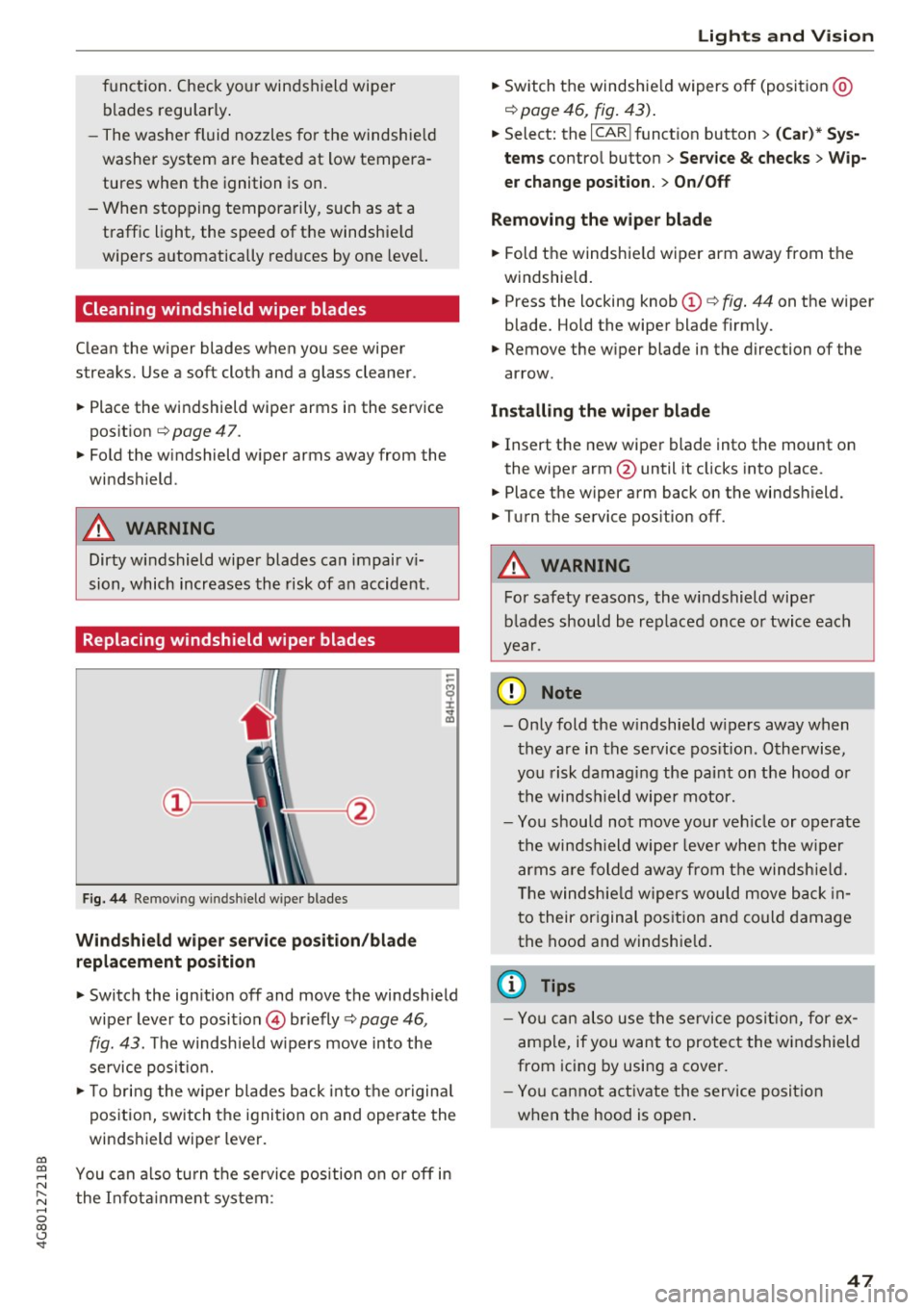
Wind shield wiper ser vice po sition /blade
rep lacement position
-
.. Switch the ign ition off and move the windsh ield
wiper lever to position © briefly
c::> page 46 ,
fig. 43. The windsh ie ld w ipers move into the
service posit io n.
.. To bring the w iper blades back into the origina l
position, switch the ignition on and operate the
windshield wiper lever .
You can a lso turn t he service position on or
off in
the Infota inment system :
Lights and Vision
.. Sw itch the windshie ld wipers off (posit ion @
¢page 46, fig. 43) .
.. Select: the I CAR I funct ion button > (C ar )* Sys
tem s
control button > Service & checks > Wip
er change po sition .
> On/Off
Remo ving the wiper blad e
.. Fold the windshie ld wiper arm away from the
w indshield .
.. Press the locking knob©
c::> fig. 44 on the wiper
blade. Hold the wiper blade firmly.
.. Remove the wiper blade in the direction of the
arrow .
Install ing the wiper blade
.. Insert the new wiper blade into the mount on
the wiper arm@until it clicks into place.
.. Place the wiper arm back on the windshield .
.. Turn the service pos ition
off .
.&_ WARNING
-
For safety reasons, the windshield wipe r
b lades should be rep laced once o r twice each
year .
([) Note
-Only fold the w indshie ld w ipers away when
they are in the service pos ition . Otherwise,
you risk damaging the paint on the hood o r
the winds hield wiper motor.
- Yo u should not move your ve hicle or operate
the winds hield wiper leve r when the wipe r
arms a re folded away from the windshie ld.
T he windsh ie ld wipers wou ld move back in
t o their or iginal pos ition and could damage
the hood a nd windshie ld .
(D Tips
- Yo u can also use the service posit ion , for e x
ample, if you want to protect the windshield
from icing by using a cover.
- You cannot a ct ivate the serv ice posit io n
when the hood is open .
47
Page 50 of 284
Sea ts and stor age
Seats and storage
General information
A WARNING
Refer to c::> page 129 , Driving safety for im
portant information, tips, suggestions and
warnings that you should read and follow for
your own safety and the safety of you r pas
sengers.
Front seats
Power seat adjustment
App lies to veh icles with power adjustable seats
F ig. 4 5 Fro nt seat: adj ustin g the sea t
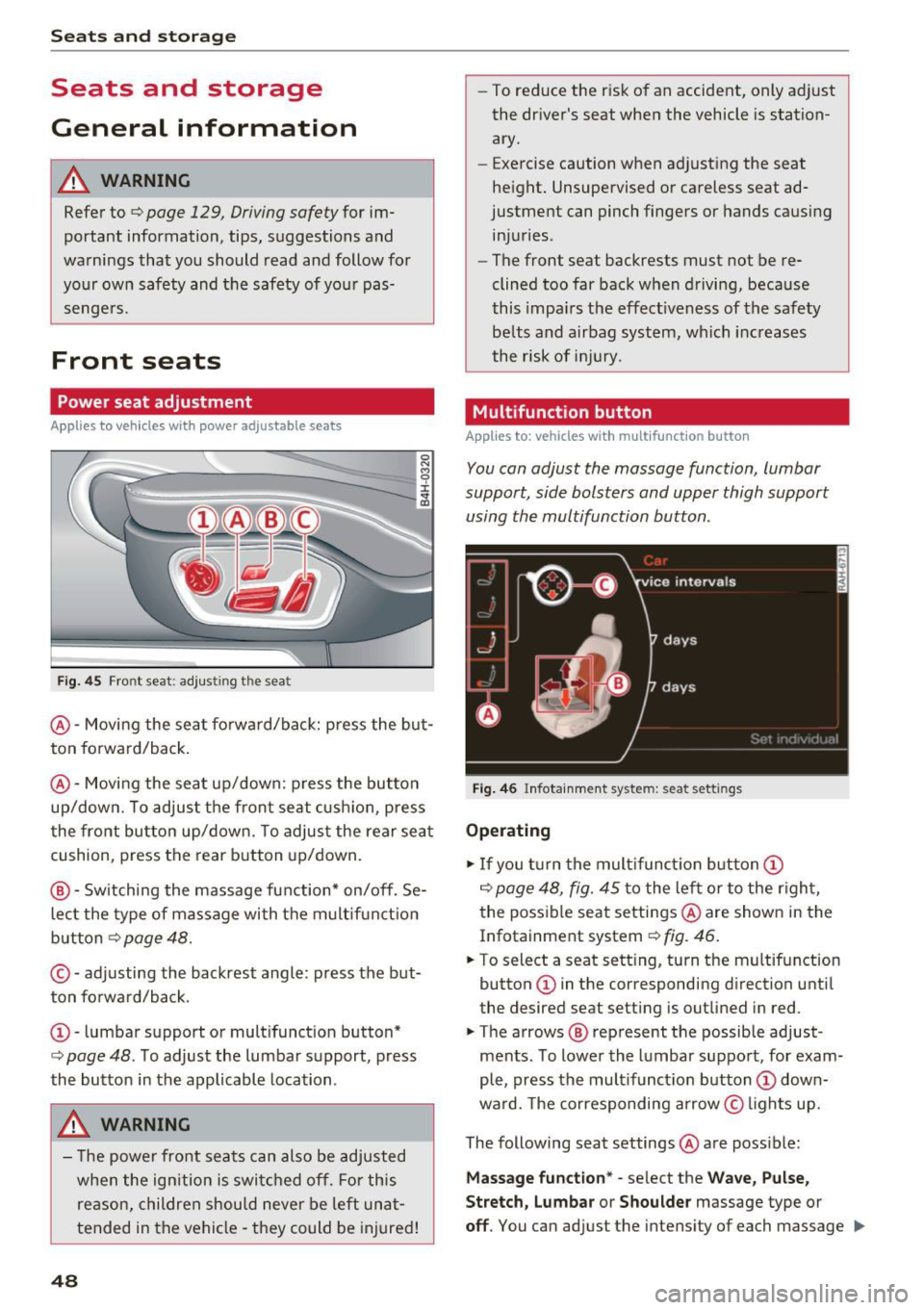
@ -Movi ng the seat fo rwa rd/back: p ress the but
ton forwa rd/back .
@ -Moving the seat up/down: press the button
up/dow n. To adjust the front seat cush ion, press
the front button up/dow n. T o adjus t the rear sea t
cushion, press the rear button up/down.
@ - Switching the massage function * on/off . Se
lec t the type of massage with the multif unct ion
button
c::> page 48.
© - adjusting the backrest angle : press the but
ton fo rwa rd/back.
CD -lumbar support or mult ifunct ion button*
c::> page 48 . To adjust the lumbar support, press
the bu tton in the applicable location .
A WARNING
- The power fro nt seats can also be adjusted
when the ign ition is swi tc h ed off. For this
reason, children should never be left una t
tended in the vehicle -they could be injured!
48
- To reduce the r isk of an accident, only adjust
the driver 's seat when the vehicle is station
ary.
- Exercise caution when adjusting the seat
height. Unsupervised or careless seat ad
justment can pinch fingers or hands causing
injuries .
- The front seat backrests must not be re
clined too far back when driving, because
this impa irs the effect iveness of the safety
be lts and airbag system, which increases
the risk of i nju ry.
Multifunction button
App lies to: vehicles wit h mult ifunct ion b utto n
You can adjust the massage function , lumbar
support, side bolsters and upper thigh support
using the multifunction button.
Fig . 46 Infotainm ent s ystem: se at settin gs
Operating
.,. If you t urn the mult ifunct ion b utton CD
c::> page 48, fig. 45 to the lef t or to the r igh t,
the poss ible seat settings @are shown in the
Infotainment system
c::> f ig . 46.
.,. To s ele ct a seat sett ing , turn the multifunction
button
CD in the corresponding direction unti l
the des ired seat setting is outlined in red .
.,. The arrows @ represent the possible adjust
ments . To lower the lumbar support , for exam
ple, press the mult ifunct ion button
CD down
ward. The corresponding arrow © lights up.
The following seat settings @are poss ible:
Ma ssa ge fun ctio n* -select the W ave, Pulse ,
Stretch, Lumbar or Shoulder
massage type or
off. You can adjust the intensity of each massage IIJ,,
Page 53 of 284

co
co
.... N
" N .... 0
00
<.,;) 'SI"
Remote Memory button control key
Driver D river Front
passen-ger
Seat X X X
Steering wheel* X X
Both
exterior X X
mirrors*
Remote control key
Applies to: vehicles with memory function
The driver's seat profile can be assigned to the
remote control key when the vehicle is locked.
• Select: the ICARI function button > (Car)* Sys
tems
control button > Vehicle settings > Driv
er's seat
> Remote control key > On .
(D Tips
If you do not wish to have the seat profile for
another driver assigned to the remote control
key, switch the memory function off in the In
fotainment system or using the
IOFFI button
r:::;,page 51.
Memory buttons
Applies to: vehicles with memory function
Fig. 51 Driver 's door: memory function buttons
The memory buttons are located in the driver's/
front passenger's* door.
Switching the memory function on/off
• Press the IOFFI button to switch the memory
function on/off. The LED in the button turns on
Seats and storage
when the memory function is off . Seat profiles
are neither stored nor recalled.
Storing a seat profile
• Press the ISET I button. When the word SET
lights up, the memory is ready to store set
tings .
• Now press a memory button briefly. A tone
confirms that the settings were stored.
Accessing a seat profile
• If the driver's door is open and the ignition is
sw itched off, press the memo ry button.
.. If the driver's door is closed or the ignition is
switched on, press and hold the memory but
ton until the seat adjustment is complete .
A WARNING
-For safety reasons, the seat setting can only
be recalled when the vehicle is stationary,
otherwise the re is a risk of an accident.
- If necessary, you can stop the recall process
by press ing the
IOFFI button or any memory
button.
Adjusting the front passenger's seat in the
Infotainment system
Applies to: vehicles with memory function
The driver can move the front passenger's seat
into various positions.
Adjusting the front passenger's seat from
the driver's seat
• Select: the I CAR I funct ion button > (Car) * Sys
tems
contro l button > Vehicle settings > Seats
> Front passenger's seat > Adjust seat posi
tion .
• You can now adjust the front passenger's seat
using the driver's seat buttons
r:::;, page 48,
fig. 45.
Align with driver's seat
• To transfer the settings from the driver's seat
to the front passenger's seat, select: the
I CAR I
function button > (Car)* Systems control but
ton
> Vehicle settings> Seats > Front passeng-
er 's seat > Align with driver 's seat. ..,.
51
Page 54 of 284
Sea ts and stor age
.. Press and hold the control knob until the ad
justing process is complete.
@ Tips
The lumbar support and upper th igh support
settings a re not transferred when aligning
the front passenger's seat with the driver's
seat.
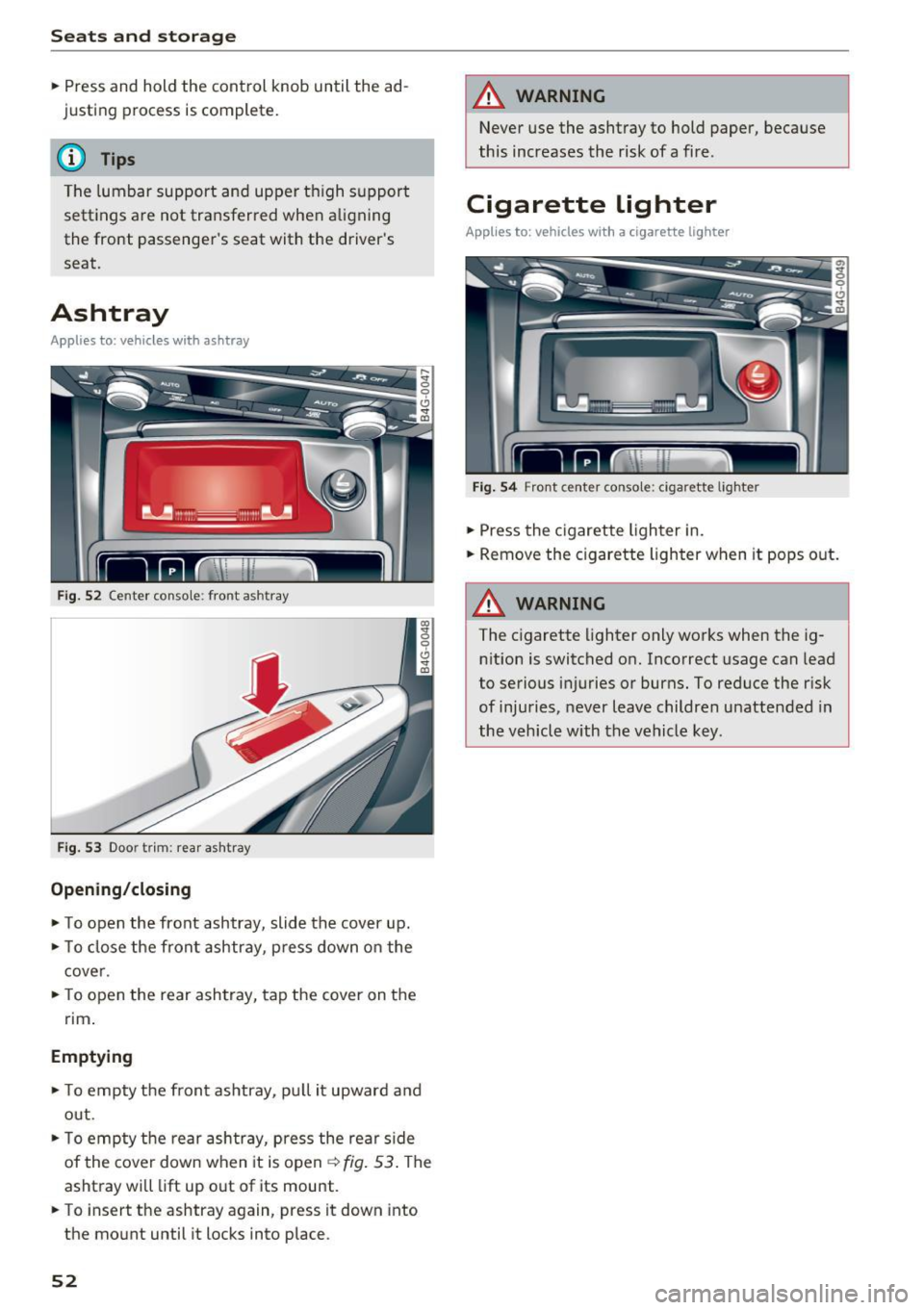
Ashtray
A pp lies to: ve hicles w ith ashtray
F ig . 52 Center conso le : front ashtray
F ig. 53 Doo r tr im: rea r asht ray
Opening /closing
.. To open the front ashtray, slide the cover up .
.. To close the front ashtray, press down o n the
cove r .
.. To open the rear ashtray, tap the cover on the
rim .
Emptying
.. To empty th e front ashtray, pu ll it upward and
out .
.. To empty the rear ash tray, press the rear side
of the cover down when it is open
¢ fig . 53 . The
ashtray will lift up out of its mount .
.. To insert the ashtray again, press it down into
the mount until it locks into place.
52
A WARNING
Never use the ashtray to hold paper, because
this increases the risk of a fire .
Cigarette lighter
Applies to: vehicles wi th a ci gare tte lighter
F ig . 54 Front center conso le: cigarette lighter
.. Press the c igarette lighter in .
.. Remove the cigarette lighter when it pops out.
A WARNING
The cigarette lighter only works when the ig
n ition is switched on. Incorrect usage can lead
to serious injuries or burns. To reduce the risk
of injuries, never leave children unattended in
the vehicle with the vehicle key.
Page 55 of 284
co
co
.... N
" N .... 0
00
<.,;) 'SI"
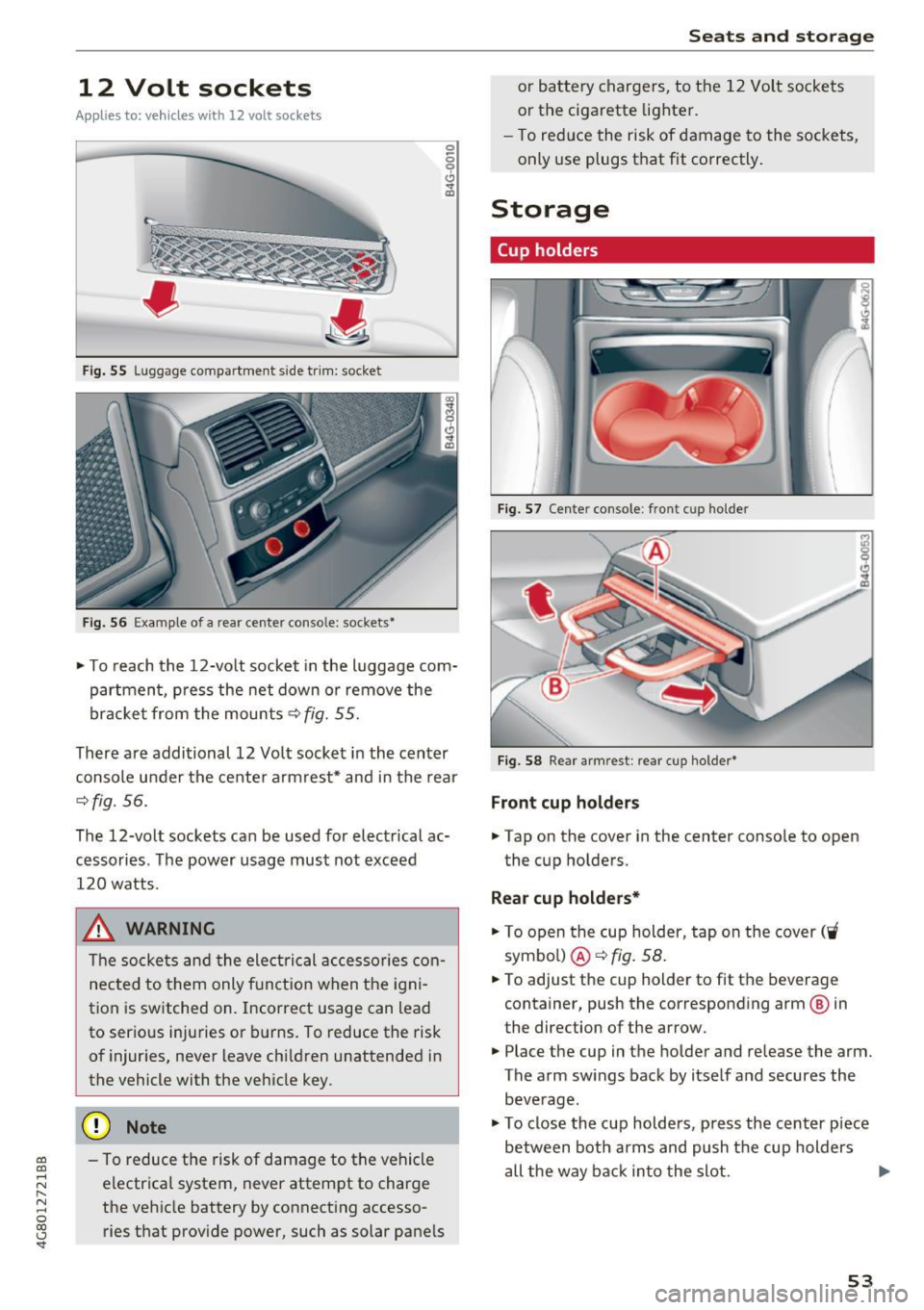
12 Volt sockets
App lies to: ve hicles with 12 volt socke ts
Fi g. 55 Luggage compartment side tr im: socket
Fi g. 56 Exa mple of a rear center conso le: sockets•
0 0 9 (!) ., ID
~ T o reach the 12-volt socket in the luggage com
partmen t, p ress the net down or remove the
bracket from the mounts~
fig. 55.
There are addi tional 12 Vo lt socket in the center
console under the cente r arm rest* and in the rear
~fig. 56.
The 12-volt sockets can be used for electrical ac
cessories. The power usage must not exceed
120 watts.
_& WARNING
The socke ts and the ele ctrical accesso ries con
nected to them only f unction when the igni
tion is switched on. Incorrect usage can lead
to ser ious injuries or b urns. To reduce the risk
of injur ies, never leave ch ild ren unattended in
the vehicle with the vehicle key.
(D Note
- To reduce the risk of damage to the vehicle electrical system, never attempt to charge
the vehicle battery by connecting accesso
ries that prov ide power, such as solar pane ls
Seats and storag e
or battery chargers, to the 12 Volt sockets
or the cigarette lighter.
- To red uce the risk of damage to the sockets,
only use plugs that fit correctly .
Storage
Cup holders
I
I
Fig . 5 7 Cente r console : front cup ho lde r
Fig. 5 8 Rear armrest : rear cup holder•
Front cup holders
~ Tap on the cover in the center conso le to open
the cup holders.
Rear cup holders*
~ To open the cup holder, tap on the cover ('i
symbo l) @ ~fig . 58.
~ To adjust the cup holder to fit the beverage
container, push the corresponding arm @ in
the direction of the arrow.
~ Place the cup in the holder and release the arm.
The a rm sw ings back by itse lf and secures the
beve rage.
~ To close the cup holders, p ress the center piece
between both arms and push t he cup holders
all the way back in to the slot . .,.
53